Skip to content
  • Home
  • Recent
  • Tags
  • 0 Unread 0
  • Categories
  • Unreplied
  • Popular
  • GitHub
  • Docu
  • Hilfe
Skins
  • Light
  • Brite
  • Cerulean
  • Cosmo
  • Flatly
  • Journal
  • Litera
  • Lumen
  • Lux
  • Materia
  • Minty
  • Morph
  • Pulse
  • Sandstone
  • Simplex
  • Sketchy
  • Spacelab
  • United
  • Yeti
  • Zephyr
  • Dark
  • Cyborg
  • Darkly
  • Quartz
  • Slate
  • Solar
  • Superhero
  • Vapor

  • Default (No Skin)
  • No Skin
Collapse
ioBroker Logo

Community Forum

donate donate
  1. ioBroker Community Home
  2. Deutsch
  3. ioBroker Allgemein
  4. [gelöst]Node.JS lässt sich nicht updaten
NEWS

  • Jahresrückblick 2025 – unser neuer Blogbeitrag ist online! ✨
    BluefoxB
    Bluefox
    17
    1
    2.7k

  • Neuer Blogbeitrag: Monatsrückblick - Dezember 2025 🎄
    BluefoxB
    Bluefox
    13
    1
    1.1k

  • Weihnachtsangebot 2025! 🎄
    BluefoxB
    Bluefox
    25
    1
    2.4k

[gelöst]Node.JS lässt sich nicht updaten

Scheduled Pinned Locked Moved ioBroker Allgemein
54 Posts 6 Posters 5.0k Views 3 Watching
  • Oldest to Newest
  • Newest to Oldest
  • Most Votes
Reply
  • Reply as topic
Log in to reply
This topic has been deleted. Only users with topic management privileges can see it.
  • Thomas BraunT Thomas Braun

    @holzwurm1976 sagte in Node.JS lässt sich nicht updaten:

    Ich bekomme aber die Verbindung nicht hin!

    Über welches Protokoll?

    Ich habe NAS und dann Experte eingestellt.
    Als Pfad habe ich folgendes eingegeben:

    Funktioniert das denn von der Kommandozeile aus? Und interne IPs musst du nicht verschleiern, da kann eh keiner was mit anfangen.

    H Offline
    H Offline
    Holzwurm1976
    wrote on last edited by
    #16

    @thomas-braun
    Nein, das klappt auch nicht

    Thomas BraunT 1 Reply Last reply
    0
    • H Holzwurm1976

      @thomas-braun
      Nein, das klappt auch nicht

      Thomas BraunT Online
      Thomas BraunT Online
      Thomas Braun
      Most Active
      wrote on last edited by
      #17

      @holzwurm1976 sagte in Node.JS lässt sich nicht updaten:

      Nein, das klappt auch nicht

      Meldungen?

      Linux-Werkzeugkasten:
      https://forum.iobroker.net/topic/42952/der-kleine-iobroker-linux-werkzeugkasten
      NodeJS Fixer Skript:
      https://forum.iobroker.net/topic/68035/iob-node-fix-skript
      iob_diag: curl -sLf -o diag.sh https://iobroker.net/diag.sh && bash diag.sh

      H 1 Reply Last reply
      0
      • Thomas BraunT Thomas Braun

        @holzwurm1976 sagte in Node.JS lässt sich nicht updaten:

        Nein, das klappt auch nicht

        Meldungen?

        H Offline
        H Offline
        Holzwurm1976
        wrote on last edited by Holzwurm1976
        #18

        @thomas-braun

        -bash: admin: Datei oder Verzeichnis nicht gefun
        
        Thomas BraunT 1 Reply Last reply
        0
        • H Holzwurm1976

          @thomas-braun

          -bash: admin: Datei oder Verzeichnis nicht gefun
          
          Thomas BraunT Online
          Thomas BraunT Online
          Thomas Braun
          Most Active
          wrote on last edited by Thomas Braun
          #19

          @holzwurm1976

          VOLLSTÄNDIG. ALLES!
          Inklusive VOLLSTÄNDIGER Eingabezeile.

          Linux-Werkzeugkasten:
          https://forum.iobroker.net/topic/42952/der-kleine-iobroker-linux-werkzeugkasten
          NodeJS Fixer Skript:
          https://forum.iobroker.net/topic/68035/iob-node-fix-skript
          iob_diag: curl -sLf -o diag.sh https://iobroker.net/diag.sh && bash diag.sh

          H 1 Reply Last reply
          0
          • Thomas BraunT Thomas Braun

            @holzwurm1976

            VOLLSTÄNDIG. ALLES!
            Inklusive VOLLSTÄNDIGER Eingabezeile.

            H Offline
            H Offline
            Holzwurm1976
            wrote on last edited by
            #20

            @thomas-braun

            sudo mount -t cifs -o username=<admin>,password="<xxx>",noserverino,cache=loose,rw,forceuid,uid=iobroker,forcegid,gid=iobroker,file_mode=0777,dir_mode=0777,vers=3.1.1 //192.168.178.147/NAS/BACKUP /opt/iobroker/backups
            -bash: admin: Datei oder Verzeichnis nicht gefunden
            
            
            Thomas BraunT 2 Replies Last reply
            0
            • H Holzwurm1976

              @thomas-braun

              sudo mount -t cifs -o username=<admin>,password="<xxx>",noserverino,cache=loose,rw,forceuid,uid=iobroker,forcegid,gid=iobroker,file_mode=0777,dir_mode=0777,vers=3.1.1 //192.168.178.147/NAS/BACKUP /opt/iobroker/backups
              -bash: admin: Datei oder Verzeichnis nicht gefunden
              
              
              Thomas BraunT Online
              Thomas BraunT Online
              Thomas Braun
              Most Active
              wrote on last edited by
              #21

              @holzwurm1976

              VOLLSTÄNDIG. ALLES!
              Inklusive VOLLSTÄNDIGER Eingabezeile.

              Linux-Werkzeugkasten:
              https://forum.iobroker.net/topic/42952/der-kleine-iobroker-linux-werkzeugkasten
              NodeJS Fixer Skript:
              https://forum.iobroker.net/topic/68035/iob-node-fix-skript
              iob_diag: curl -sLf -o diag.sh https://iobroker.net/diag.sh && bash diag.sh

              1 Reply Last reply
              0
              • H Holzwurm1976

                @thomas-braun

                sudo mount -t cifs -o username=<admin>,password="<xxx>",noserverino,cache=loose,rw,forceuid,uid=iobroker,forcegid,gid=iobroker,file_mode=0777,dir_mode=0777,vers=3.1.1 //192.168.178.147/NAS/BACKUP /opt/iobroker/backups
                -bash: admin: Datei oder Verzeichnis nicht gefunden
                
                
                Thomas BraunT Online
                Thomas BraunT Online
                Thomas Braun
                Most Active
                wrote on last edited by
                #22

                @holzwurm1976

                <admin> ist auch kein gültiger Username. Keine Sonderzeichen verwenden!

                Linux-Werkzeugkasten:
                https://forum.iobroker.net/topic/42952/der-kleine-iobroker-linux-werkzeugkasten
                NodeJS Fixer Skript:
                https://forum.iobroker.net/topic/68035/iob-node-fix-skript
                iob_diag: curl -sLf -o diag.sh https://iobroker.net/diag.sh && bash diag.sh

                H 1 Reply Last reply
                0
                • Thomas BraunT Thomas Braun

                  @holzwurm1976

                  <admin> ist auch kein gültiger Username. Keine Sonderzeichen verwenden!

                  H Offline
                  H Offline
                  Holzwurm1976
                  wrote on last edited by
                  #23

                  @thomas-braun
                  damit melde ich mich aber im NAS an???

                  Thomas BraunT 1 Reply Last reply
                  0
                  • H Holzwurm1976

                    @thomas-braun
                    damit melde ich mich aber im NAS an???

                    Thomas BraunT Online
                    Thomas BraunT Online
                    Thomas Braun
                    Most Active
                    wrote on last edited by
                    #24

                    @holzwurm1976

                    Ist für SMB/Cifs trotzdem kein gültiger Username.

                    Linux-Werkzeugkasten:
                    https://forum.iobroker.net/topic/42952/der-kleine-iobroker-linux-werkzeugkasten
                    NodeJS Fixer Skript:
                    https://forum.iobroker.net/topic/68035/iob-node-fix-skript
                    iob_diag: curl -sLf -o diag.sh https://iobroker.net/diag.sh && bash diag.sh

                    H 1 Reply Last reply
                    0
                    • Thomas BraunT Thomas Braun

                      @holzwurm1976

                      Ist für SMB/Cifs trotzdem kein gültiger Username.

                      H Offline
                      H Offline
                      Holzwurm1976
                      wrote on last edited by
                      #25

                      @thomas-braun
                      OK, habe eine Benutzer "andre" angelegt, funktioniert aber trotzdem nicht

                      sudo mount -t cifs -o username=<andre>,password="<holzwurm76>",noserverino,cache=loose,rw,forceuid,uid=iobroker,forcegid,gid=iobroker,file_mode=0777,dir_mode=0777,vers=3.1.1 //192.168.178.147
                      -bash: andre: Datei oder Verzeichnis nicht gefunden
                      
                      
                      Thomas BraunT 1 Reply Last reply
                      0
                      • H Holzwurm1976

                        @thomas-braun
                        OK, habe eine Benutzer "andre" angelegt, funktioniert aber trotzdem nicht

                        sudo mount -t cifs -o username=<andre>,password="<holzwurm76>",noserverino,cache=loose,rw,forceuid,uid=iobroker,forcegid,gid=iobroker,file_mode=0777,dir_mode=0777,vers=3.1.1 //192.168.178.147
                        -bash: andre: Datei oder Verzeichnis nicht gefunden
                        
                        
                        Thomas BraunT Online
                        Thomas BraunT Online
                        Thomas Braun
                        Most Active
                        wrote on last edited by
                        #26

                        @holzwurm1976

                        Da gehören KEINE Zeichen wie < oder > hin. Wie kommst du auf die Idee?

                        Linux-Werkzeugkasten:
                        https://forum.iobroker.net/topic/42952/der-kleine-iobroker-linux-werkzeugkasten
                        NodeJS Fixer Skript:
                        https://forum.iobroker.net/topic/68035/iob-node-fix-skript
                        iob_diag: curl -sLf -o diag.sh https://iobroker.net/diag.sh && bash diag.sh

                        H 1 Reply Last reply
                        0
                        • Thomas BraunT Thomas Braun

                          @holzwurm1976

                          Da gehören KEINE Zeichen wie < oder > hin. Wie kommst du auf die Idee?

                          H Offline
                          H Offline
                          Holzwurm1976
                          wrote on last edited by
                          #27

                          @thomas-braun
                          OK, jetzt kommt diese Meldung

                          sudo mount -t cifs -o username=andre,password=holzwurm76,noserverino,cache=loose,rw,forceuid,uid=iobroker,forcegid,gid=iobroker,file_mode=0777,dir_mode=0777,vers=3.1.1 //192.168.178.147/opt/iobroker/backups
                          mount: //192.168.178.147/opt/iobroker/backups: can't find in /etc/fsta
                          
                          
                          Thomas BraunT T 2 Replies Last reply
                          0
                          • H Holzwurm1976

                            @thomas-braun
                            OK, jetzt kommt diese Meldung

                            sudo mount -t cifs -o username=andre,password=holzwurm76,noserverino,cache=loose,rw,forceuid,uid=iobroker,forcegid,gid=iobroker,file_mode=0777,dir_mode=0777,vers=3.1.1 //192.168.178.147/opt/iobroker/backups
                            mount: //192.168.178.147/opt/iobroker/backups: can't find in /etc/fsta
                            
                            
                            Thomas BraunT Online
                            Thomas BraunT Online
                            Thomas Braun
                            Most Active
                            wrote on last edited by
                            #28

                            @holzwurm1976

                            Kerl...
                            Nochmal:

                            VOLLSTÄNDIG. ALLES!
                            Inklusive VOLLSTÄNDIGER Eingabezeile.

                            Linux-Werkzeugkasten:
                            https://forum.iobroker.net/topic/42952/der-kleine-iobroker-linux-werkzeugkasten
                            NodeJS Fixer Skript:
                            https://forum.iobroker.net/topic/68035/iob-node-fix-skript
                            iob_diag: curl -sLf -o diag.sh https://iobroker.net/diag.sh && bash diag.sh

                            1 Reply Last reply
                            0
                            • H Holzwurm1976

                              @thomas-braun
                              OK, jetzt kommt diese Meldung

                              sudo mount -t cifs -o username=andre,password=holzwurm76,noserverino,cache=loose,rw,forceuid,uid=iobroker,forcegid,gid=iobroker,file_mode=0777,dir_mode=0777,vers=3.1.1 //192.168.178.147/opt/iobroker/backups
                              mount: //192.168.178.147/opt/iobroker/backups: can't find in /etc/fsta
                              
                              
                              T Do not disturb
                              T Do not disturb
                              ticaki
                              wrote on last edited by ticaki
                              #29

                              @holzwurm1976
                              Vollständige Eingabezeile bedeutet

                              tim@iobroker-lxc:~$ ls -l
                              total 4
                              drwxr-xr-x 14 101000 101000 4096 13. Aug  2023  ssl_keys
                              

                              so :) Dann sieht man mit welchem user und in welchem Verzeichnis du den Befehl ausgeführt hast.

                              Weather-Warnings Espresense NSPanel-Lovelace-ui Tagesschau

                              Spenden

                              H 1 Reply Last reply
                              0
                              • T ticaki

                                @holzwurm1976
                                Vollständige Eingabezeile bedeutet

                                tim@iobroker-lxc:~$ ls -l
                                total 4
                                drwxr-xr-x 14 101000 101000 4096 13. Aug  2023  ssl_keys
                                

                                so :) Dann sieht man mit welchem user und in welchem Verzeichnis du den Befehl ausgeführt hast.

                                H Offline
                                H Offline
                                Holzwurm1976
                                wrote on last edited by
                                #30

                                @ticaki
                                jatzt hat es geklappt, ich habe über den Typ CIFS alles eingestellt, und den Pfad geändert!
                                Danke für Eure Hilfe,

                                Wie kann ich denn ein Backup wieder einspielen, wenn ich das System neu aufgesetzt habe?

                                T 1 Reply Last reply
                                0
                                • H Holzwurm1976

                                  @ticaki
                                  jatzt hat es geklappt, ich habe über den Typ CIFS alles eingestellt, und den Pfad geändert!
                                  Danke für Eure Hilfe,

                                  Wie kann ich denn ein Backup wieder einspielen, wenn ich das System neu aufgesetzt habe?

                                  T Do not disturb
                                  T Do not disturb
                                  ticaki
                                  wrote on last edited by
                                  #31

                                  @holzwurm1976
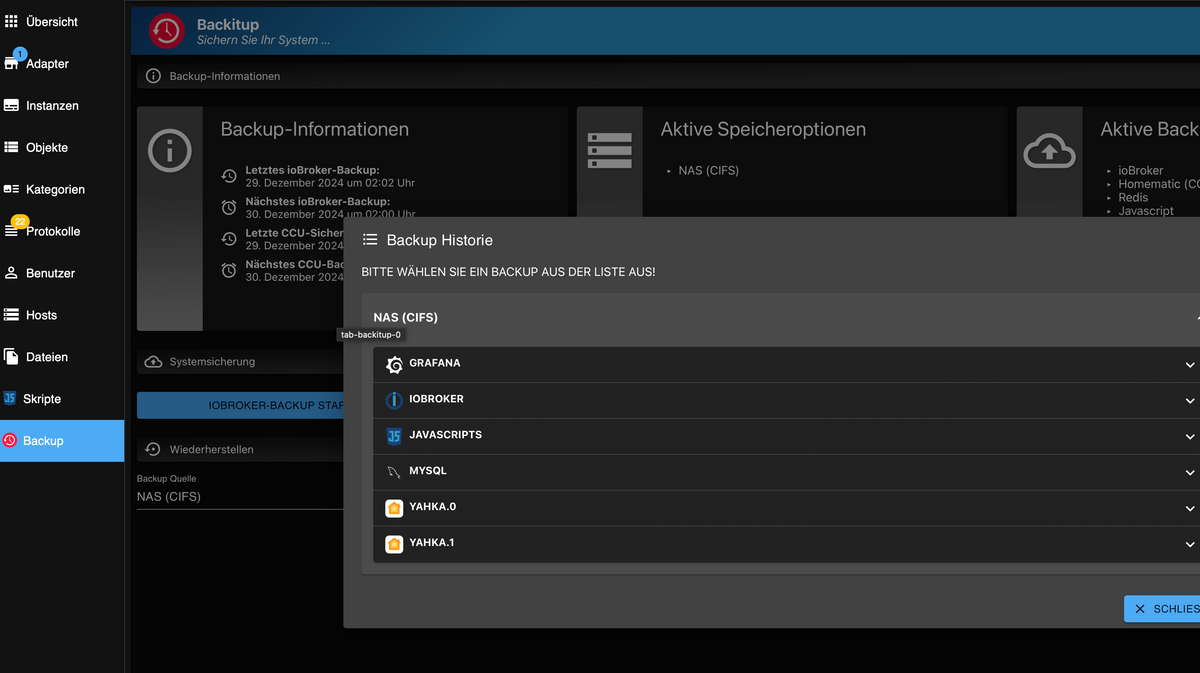
                                  Bildschirmfoto 2024-12-29 um 23.40.16.png
                                  da.

                                  Weather-Warnings Espresense NSPanel-Lovelace-ui Tagesschau

                                  Spenden

                                  Thomas BraunT 1 Reply Last reply
                                  0
                                  • T ticaki

                                    @holzwurm1976
                                    Bildschirmfoto 2024-12-29 um 23.40.16.png
                                    da.

                                    Thomas BraunT Online
                                    Thomas BraunT Online
                                    Thomas Braun
                                    Most Active
                                    wrote on last edited by
                                    #32

                                    @ticaki

                                    Aber auch erst, nachdem das Dateisystem wieder eingehängt wurde.

                                    Linux-Werkzeugkasten:
                                    https://forum.iobroker.net/topic/42952/der-kleine-iobroker-linux-werkzeugkasten
                                    NodeJS Fixer Skript:
                                    https://forum.iobroker.net/topic/68035/iob-node-fix-skript
                                    iob_diag: curl -sLf -o diag.sh https://iobroker.net/diag.sh && bash diag.sh

                                    1 Reply Last reply
                                    1
                                    • H Offline
                                      H Offline
                                      Holzwurm1976
                                      wrote on last edited by Holzwurm1976
                                      #33

                                      @thomas-braun
                                      so, jetzt habe ich ein paar Stunden Updates gemacht, und konnte alle Adapter aktualiseren, bis auf diese beiden:

                                        RPI-Monitor  1.3.2    2.3.0 
                                        Worx  2.3.4    3.1.1  
                                      
                                      Thomas BraunT 1 Reply Last reply
                                      0
                                      • H Holzwurm1976

                                        @thomas-braun
                                        so, jetzt habe ich ein paar Stunden Updates gemacht, und konnte alle Adapter aktualiseren, bis auf diese beiden:

                                          RPI-Monitor  1.3.2    2.3.0 
                                          Worx  2.3.4    3.1.1  
                                        
                                        Thomas BraunT Online
                                        Thomas BraunT Online
                                        Thomas Braun
                                        Most Active
                                        wrote on last edited by
                                        #34

                                        @holzwurm1976 sagte in Node.JS lässt sich nicht updaten:

                                        und konnte alle Adapter aktualiseren, bis auf diese beiden:

                                        Meldungen dazu?

                                        Linux-Werkzeugkasten:
                                        https://forum.iobroker.net/topic/42952/der-kleine-iobroker-linux-werkzeugkasten
                                        NodeJS Fixer Skript:
                                        https://forum.iobroker.net/topic/68035/iob-node-fix-skript
                                        iob_diag: curl -sLf -o diag.sh https://iobroker.net/diag.sh && bash diag.sh

                                        H 1 Reply Last reply
                                        0
                                        • Thomas BraunT Thomas Braun

                                          @holzwurm1976 sagte in Node.JS lässt sich nicht updaten:

                                          und konnte alle Adapter aktualiseren, bis auf diese beiden:

                                          Meldungen dazu?

                                          H Offline
                                          H Offline
                                          Holzwurm1976
                                          wrote on last edited by
                                          #35

                                          @thomas-braun oh man, irgendwann lerne ich es:

                                          $ iobroker upgrade worx@3.1.1 --debug
                                          
                                          Update worx from @2.3.4 to @3.1.1
                                          
                                          NPM version: 10.8.2
                                          
                                          Installing iobroker.worx@3.1.1... (System call)
                                          
                                          > @abandonware/noble@1.9.2-24 install> node-gyp-build
                                          
                                          gyp info it worked if it ends with ok
                                          
                                          gyp info using node@18.20.5 | linux | arm
                                          
                                          gyp info find Python using Python version 3.7.3 found at "/usr/bin/python3"
                                          
                                          gyp info spawn /usr/bin/python3
                                          
                                          gyp info spawn args [
                                          
                                          gyp info spawn args '/opt/iobroker/node_modules/node-gyp/gyp/gyp_main.py',gyp info spawn args 'binding.gyp',gyp info spawn args '-f',gyp info spawn args 'make',gyp info spawn args '-I',gyp info spawn args '/opt/iobroker/node_modules/@abandonware/noble/build/config.gypi',gyp info spawn args '-I',gyp info spawn args '/opt/iobroker/node_modules/node-gyp/addon.gypi',gyp info spawn args '-I',
                                          
                                          gyp info spawn args '/home/iobroker/.cache/node-gyp/18.20.5/include/node/common.gypi',gyp info spawn args '-Dlibrary=shared_library',gyp info spawn args '-Dvisibility=default',gyp info spawn args '-Dnode_root_dir=/home/iobroker/.cache/node-gyp/18.20.5',gyp info spawn args '-Dnode_gyp_dir=/opt/iobroker/node_modules/node-gyp',gyp info spawn args '-Dnode_lib_file=/home/iobroker/.cache/node-gyp/18.20.5/<(target_arch)/node.lib',gyp info spawn args '-Dmodule_root_dir=/opt/iobroker/node_modules/@abandonware/noble',gyp info spawn args '-Dnode_engine=v8',gyp info spawn args '--depth=.',gyp info spawn args '--no-parallel',gyp info spawn args '--generator-output',gyp info spawn args 'build',gyp info spawn args '-Goutput_dir=.'gyp info spawn args ]
                                          
                                          Traceback (most recent call last):
                                          
                                          File "/opt/iobroker/node_modules/node-gyp/gyp/gyp_main.py", line 42, in <module> import gyp # noqa: E402 File "/opt/iobroker/node_modules/node-gyp/gyp/pylib/gyp/__init__.py", line 9, in <module> import gyp.input File "/opt/iobroker/node_modules/node-gyp/gyp/pylib/gyp/input.py", line 8, in <module> import gyp.common File "/opt/iobroker/node_modules/node-gyp/gyp/pylib/gyp/common.py", line 435 if CC := os.environ.get("CC_target") or os.environ.get("CC"): ^SyntaxError: invalid syntax
                                          
                                          gyp ERR! configure error
                                          
                                          gyp ERR! stack Error: `gyp` failed with exit code: 1gyp ERR! stack at ChildProcess.<anonymous> (/opt/iobroker/node_modules/node-gyp/lib/configure.js:317:18)gyp ERR! stack at ChildProcess.emit (node:events:517:28)gyp ERR! stack at ChildProcess._handle.onexit (node:internal/child_process:292:12)
                                          
                                          gyp ERR! System Linux 5.10.103-v7l+gyp ERR! command "/usr/bin/node" "/opt/iobroker/node_modules/.bin/node-gyp" "rebuild"gyp ERR! cwd /opt/iobroker/node_modules/@abandonware/noblegyp ERR! node -v v18.20.5gyp ERR! node-gyp -v v10.3.1gyp ERR! not ok
                                          
                                          > aws-crt@1.21.8 install> node ./scripts/install.js
                                          
                                          Could not find tar version 6.2.1
                                          
                                          Looking for tar version 6.2.1 as a dependency...
                                          
                                          Could not find tar version 6.2.1Could not find tarDownloading tar from npm for build...
                                          
                                          npm error code EBADENGINEnpm error engine Unsupported enginenpm error engine Not compatible with your version of node/npm: glob@11.0.0npm error notsup Not compatible with your version of node/npm: glob@11.0.0npm error notsup Required: {"node":"20 || >=22"}npm error notsup Actual: {"npm":"10.8.2","node":"v18.20.5"}npm error A complete log of this run can be found in: /home/iobroker/.npm/_logs/2024-12-30T11_42_03_774Z-debug-0.logERROR - npm could not download tar! tar is required to build the CRTERROR: Could not download tar! Cannot build CRTThis is likely due to being unable to download the package.Please install tar version undefined and then run the aws-crt install script againIf that does not work, ensure that:* you have npm (node package manager) installed* tar version 6.2.1 is available in your node package registry
                                          
                                          npm error code 1
                                          
                                          npm error path /opt/iobroker/node_modules/aws-crtnpm error command failednpm error command sh -c node ./scripts/install.js
                                          
                                          npm error A complete log of this run can be found in: /home/iobroker/.npm/_logs/2024-12-30T11_41_35_974Z-debug-0.log
                                          
                                          Updating objects from io-package.json for adapter "worx" with version "2.3.4"
                                          
                                          upload [13] worx.admin /opt/iobroker/node_modules/iobroker.worx/admin/i18n/de/translations.json i18n/de/translations.json application/json
                                          
                                          upload [12] worx.admin /opt/iobroker/node_modules/iobroker.worx/admin/i18n/en/translations.json i18n/en/translations.json application/json
                                          
                                          upload [11] worx.admin /opt/iobroker/node_modules/iobroker.worx/admin/i18n/es/translations.json i18n/es/translations.json application/json
                                          
                                          upload [10] worx.admin /opt/iobroker/node_modules/iobroker.worx/admin/i18n/fr/translations.json i18n/fr/translations.json application/json
                                          
                                          upload [9] worx.admin /opt/iobroker/node_modules/iobroker.worx/admin/i18n/it/translations.json i18n/it/translations.json application/json
                                          
                                          upload [8] worx.admin /opt/iobroker/node_modules/iobroker.worx/admin/i18n/nl/translations.json i18n/nl/translations.json application/json
                                          
                                          upload [7] worx.admin /opt/iobroker/node_modules/iobroker.worx/admin/i18n/pl/translations.json i18n/pl/translations.json application/json
                                          
                                          upload [6] worx.admin /opt/iobroker/node_modules/iobroker.worx/admin/i18n/pt/translations.json i18n/pt/translations.json application/json
                                          
                                          upload [5] worx.admin /opt/iobroker/node_modules/iobroker.worx/admin/i18n/ru/translations.json i18n/ru/translations.json application/json
                                          
                                          upload [4] worx.admin /opt/iobroker/node_modules/iobroker.worx/admin/i18n/uk/translations.json i18n/uk/translations.json application/json
                                          
                                          upload [3] worx.admin /opt/iobroker/node_modules/iobroker.worx/admin/i18n/zh-cn/translations.json i18n/zh-cn/translations.json application/json
                                          
                                          upload [2] worx.admin /opt/iobroker/node_modules/iobroker.worx/admin/index_m.html index_m.html text/html
                                          
                                          upload [1] worx.admin /opt/iobroker/node_modules/iobroker.worx/admin/jsonConfig.json jsonConfig.json application/json
                                          
                                          upload [0] worx.admin /opt/iobroker/node_modules/iobroker.worx/admin/worx.png worx.png image/png
                                          
                                          Process exited with code 0
                                          
                                          1 Reply Last reply
                                          0
                                          Reply
                                          • Reply as topic
                                          Log in to reply
                                          • Oldest to Newest
                                          • Newest to Oldest
                                          • Most Votes


                                          Support us

                                          ioBroker
                                          Community Adapters
                                          Donate
                                          FAQ Cloud / IOT
                                          HowTo: Node.js-Update
                                          HowTo: Backup/Restore
                                          Downloads
                                          BLOG

                                          698

                                          Online

                                          32.6k

                                          Users

                                          82.3k

                                          Topics

                                          1.3m

                                          Posts
                                          Community
                                          Impressum | Datenschutz-Bestimmungen | Nutzungsbedingungen | Einwilligungseinstellungen
                                          ioBroker Community 2014-2025
                                          logo
                                          • Login

                                          • Don't have an account? Register

                                          • Login or register to search.
                                          • First post
                                            Last post
                                          0
                                          • Home
                                          • Recent
                                          • Tags
                                          • Unread 0
                                          • Categories
                                          • Unreplied
                                          • Popular
                                          • GitHub
                                          • Docu
                                          • Hilfe