




Formatierung Pushover
-
Moin,
kann man mit dem blockly für pushover irgendwie den Text formatieren?
Ich meine diese html tags...<b>word</b> - display word in bold <i>word</i> - display word in italics <u>word</u> - display word underlined <font color="#0000ff">word</font> - display word in blue text <a href="http://example.com/">word</a> - display word as a tappable link to http://example.com/So geht es leider nicht
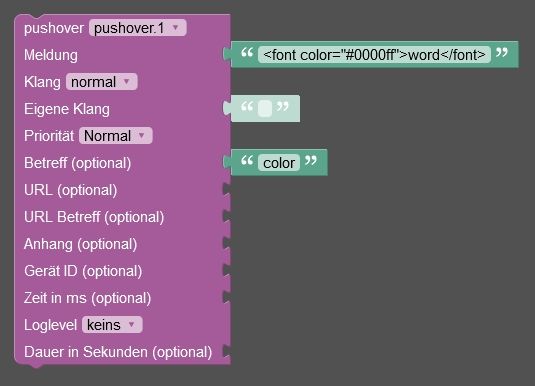
wenn es keine Lösung für Blockly gibt wäre ich auch mit einem JS code zufrieden

-
Moin,
kann man mit dem blockly für pushover irgendwie den Text formatieren?
Ich meine diese html tags...<b>word</b> - display word in bold <i>word</i> - display word in italics <u>word</u> - display word underlined <font color="#0000ff">word</font> - display word in blue text <a href="http://example.com/">word</a> - display word as a tappable link to http://example.com/So geht es leider nicht
wenn es keine Lösung für Blockly gibt wäre ich auch mit einem JS code zufrieden
sendTo('pushover', {
    message: 'This message includes <b>bold</b>, <i>italic</i> and <u>underlined</u> text <font color=green>in</font> <font color=#ffa500>different</font> <font color=red>colors</font>.',
    html: 1
});
``

so funktioniert es - mit blockly habe ich es auch nicht geschafft
nach einem gelösten Thread wäre es sinnvoll dies in der Überschrift des ersten Posts einzutragen [gelöst]-... Bitte benutzt das Voting rechts unten im Beitrag wenn er euch geholfen hat. Forum-Tools: PicPick https://picpick.app/en/download/ und ScreenToGif https://www.screentogif.com/downloads.html
-
Moin,
kann man mit dem blockly für pushover irgendwie den Text formatieren?
Ich meine diese html tags...<b>word</b> - display word in bold <i>word</i> - display word in italics <u>word</u> - display word underlined <font color="#0000ff">word</font> - display word in blue text <a href="http://example.com/">word</a> - display word as a tappable link to http://example.com/So geht es leider nicht
wenn es keine Lösung für Blockly gibt wäre ich auch mit einem JS code zufrieden
evtl hier ein issue aufmachen https://github.com/ioBroker/ioBroker.pushover
-
Moin,
kann man mit dem blockly für pushover irgendwie den Text formatieren?
Ich meine diese html tags...<b>word</b> - display word in bold <i>word</i> - display word in italics <u>word</u> - display word underlined <font color="#0000ff">word</font> - display word in blue text <a href="http://example.com/">word</a> - display word as a tappable link to http://example.com/So geht es leider nicht
wenn es keine Lösung für Blockly gibt wäre ich auch mit einem JS code zufrieden
hier ist auch eine lösung für blockly https://forum.iobroker.net/post/1166622
-
Moin,
kann man mit dem blockly für pushover irgendwie den Text formatieren?
Ich meine diese html tags...<b>word</b> - display word in bold <i>word</i> - display word in italics <u>word</u> - display word underlined <font color="#0000ff">word</font> - display word in blue text <a href="http://example.com/">word</a> - display word as a tappable link to http://example.com/So geht es leider nicht
wenn es keine Lösung für Blockly gibt wäre ich auch mit einem JS code zufrieden
warum ein doppel-post ?????
-
sendTo('pushover', { message: 'This message includes <b>bold</b>, <i>italic</i> and <u>underlined</u> text <font color=green>in</font> <font color=#ffa500>different</font> <font color=red>colors</font>.', html: 1 }); `` so funktioniert es - mit blockly habe ich es auch nicht geschafft@liv-in-sky sagte in Formatierung Pushover:
mit blockly habe ich es auch nicht geschafft

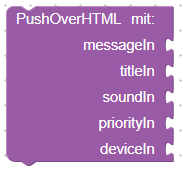
sendTo("pushover.0", "send", { message: messageIn, title: titleIn, sound: soundIn, priority: priorityIn, device: deviceIn, html: 1 }); /* sendTo("pushover", { message: 'Test text', // mandatory - your text message title: 'SweetHome', // optional - your message's title, otherwise your app's name is used sound: 'magic', // optional - the name of one of the sounds supported by device clients to override the user's default sound choice // pushover, bike, bugle, cashregister, classical, cosmic, falling, // gamelan, incoming, intermission, magic, mechanical, pianobar, siren, // spacealarm, tugboat, alien, climb, persistent, echo, updown, none priority: -1, // optional // -1 to always send as a quiet notification, // 1 to display as high-priority and bypass the user's quiet hours, or // 2 to also require confirmation from the user token: 'API/KEY token' // optional // add other than configurated token to the call url, // optional - a supplementary URL to show with your message url_title, // optional - a title for your supplementary URL, otherwise just the URL is shown device, // optional - your user's device name to send the message directly to that device, rather than all of the user's devices timestamp // optional - a Unix timestamp of your message's date and time to display to the user, rather than the time your message is received by our API html // optional - 1 to enable parsing of HTML formating for bold, italic, underlined and font color monospace // optional - 1 to display the message in monospace font // either html or monospace is allowed }); */ -
@liv-in-sky sagte in Formatierung Pushover:
mit blockly habe ich es auch nicht geschafft
sendTo("pushover.0", "send", { message: messageIn, title: titleIn, sound: soundIn, priority: priorityIn, device: deviceIn, html: 1 }); /* sendTo("pushover", { message: 'Test text', // mandatory - your text message title: 'SweetHome', // optional - your message's title, otherwise your app's name is used sound: 'magic', // optional - the name of one of the sounds supported by device clients to override the user's default sound choice // pushover, bike, bugle, cashregister, classical, cosmic, falling, // gamelan, incoming, intermission, magic, mechanical, pianobar, siren, // spacealarm, tugboat, alien, climb, persistent, echo, updown, none priority: -1, // optional // -1 to always send as a quiet notification, // 1 to display as high-priority and bypass the user's quiet hours, or // 2 to also require confirmation from the user token: 'API/KEY token' // optional // add other than configurated token to the call url, // optional - a supplementary URL to show with your message url_title, // optional - a title for your supplementary URL, otherwise just the URL is shown device, // optional - your user's device name to send the message directly to that device, rather than all of the user's devices timestamp // optional - a Unix timestamp of your message's date and time to display to the user, rather than the time your message is received by our API html // optional - 1 to enable parsing of HTML formating for bold, italic, underlined and font color monospace // optional - 1 to display the message in monospace font // either html or monospace is allowed }); */es geht wie im link beschrieben - man darf nicht den pushover block nehmn, sondern den sendTo block (erster block ganz oben
dann pushover auswählen und im zahnrad die parameter message und html einrichten - html fehlt im orginal pushover block - daher geht es nicht damit
-
warum ein doppel-post ?????
@liv-in-sky
hab den anderen Post erst gefunden nachdem ich diesen hier gepostet habe -
@liv-in-sky
hab den anderen Post erst gefunden nachdem ich diesen hier gepostet habedanke für die Vorschläge
-
@liv-in-sky
hab den anderen Post erst gefunden nachdem ich diesen hier gepostet habeprobier mal das beschrieben in meinen letzten post mit dem sendTo block
-
probier mal das beschrieben in meinen letzten post mit dem sendTo block
@liv-in-sky
schon getestet… funktioniert


Hey! Du scheinst an dieser Unterhaltung interessiert zu sein, hast aber noch kein Konto.
Hast du es satt, bei jedem Besuch durch die gleichen Beiträge zu scrollen? Wenn du dich für ein Konto anmeldest, kommst du immer genau dorthin zurück, wo du zuvor warst, und kannst dich über neue Antworten benachrichtigen lassen (entweder per E-Mail oder Push-Benachrichtigung). Du kannst auch Lesezeichen speichern und Beiträge positiv bewerten, um anderen Community-Mitgliedern deine Wertschätzung zu zeigen.
Mit deinem Input könnte dieser Beitrag noch besser werden 💗
Registrieren AnmeldenSupport us
237
Online33.0k
Benutzer83.6k
Themen1.3m
Beiträge