




mihome-vacuum Adapter verbindet sich nicht mehr.
-
Hallo Gemeinde,
seit heute habe ich das Problem, dass sich der mihome-vacuum - Adapter (v4.1.1) nicht mehr mit dem Gerät (roborock.vacuum.s6) verbindet.
Die FW des Robbys ist (3.5.8_2700).
Die IP-Adresse wurde nicht verändert. (die ist statisch).
Ich kann den Adapter so oft starten, wie ich möchte, es kommt immer die gleiche Fehlermeldung:2024-03-23 11:40:56.634 - info: mihome-vacuum.0 (19338) Got terminate signal TERMINATE_YOURSELF 2024-03-23 11:40:56.635 - error: mihome-vacuum.0 (19338) Socket Close 2024-03-23 11:40:56.636 - info: mihome-vacuum.0 (19338) terminating 2024-03-23 11:40:56.636 - info: mihome-vacuum.0 (19338) Terminated (ADAPTER_REQUESTED_TERMINATION): Without reason 2024-03-23 11:40:56.681 - info: host.IOBroker-Holger stopInstance system.adapter.mihome-vacuum.0 send kill signal 2024-03-23 11:40:57.135 - info: mihome-vacuum.0 (19338) terminating 2024-03-23 11:40:57.171 - info: host.IOBroker-Holger instance system.adapter.mihome-vacuum.0 terminated with code 11 (ADAPTER_REQUESTED_TERMINATION) 2024-03-23 11:40:59.722 - info: host.IOBroker-Holger instance system.adapter.mihome-vacuum.0 started with pid 20133 2024-03-23 11:41:00.242 - debug: mihome-vacuum.0 (20133) Redis Objects: Use Redis connection: 127.0.0.1:9001 2024-03-23 11:41:00.262 - debug: mihome-vacuum.0 (20133) Objects client ready ... initialize now 2024-03-23 11:41:00.263 - debug: mihome-vacuum.0 (20133) Objects create System PubSub Client 2024-03-23 11:41:00.263 - debug: mihome-vacuum.0 (20133) Objects create User PubSub Client 2024-03-23 11:41:00.289 - debug: mihome-vacuum.0 (20133) Objects client initialize lua scripts 2024-03-23 11:41:00.293 - debug: mihome-vacuum.0 (20133) Objects connected to redis: 127.0.0.1:9001 2024-03-23 11:41:00.779 - debug: mihome-vacuum.0 (20133) Redis States: Use Redis connection: 127.0.0.1:9000 2024-03-23 11:41:00.789 - debug: mihome-vacuum.0 (20133) States create System PubSub Client 2024-03-23 11:41:00.790 - debug: mihome-vacuum.0 (20133) States create User PubSub Client 2024-03-23 11:41:00.846 - debug: mihome-vacuum.0 (20133) States connected to redis: 127.0.0.1:9000 2024-03-23 11:41:00.867 - debug: mihome-vacuum.0 (20133) Plugin sentry Initialize Plugin (enabled=true) 2024-03-23 11:41:01.012 - info: mihome-vacuum.0 (20133) starting. Version 4.1.1 in /opt/iobroker/node_modules/iobroker.mihome-vacuum, node: v18.19.0, js-controller: 5.0.19 2024-03-23 11:41:01.031 - debug: mihome-vacuum.0 (20133) load Map creator... true 2024-03-23 11:41:01.040 - debug: mihome-vacuum.0 (20133) Create State for deviceInfo 2024-03-23 11:41:01.041 - debug: mihome-vacuum.0 (20133) Create State for deviceInfomac 2024-03-23 11:41:01.041 - debug: mihome-vacuum.0 (20133) Create State for deviceInfomodel 2024-03-23 11:41:01.041 - debug: mihome-vacuum.0 (20133) Create State for deviceInfofw_ver 2024-03-23 11:41:01.041 - debug: mihome-vacuum.0 (20133) Create State for deviceInfowifi_signal 2024-03-23 11:41:01.042 - debug: mihome-vacuum.0 (20133) Create State for deviceInfounsupported 2024-03-23 11:41:01.042 - debug: mihome-vacuum.0 (20133) MIIO: Config: ip:192.168.178.56 token: 7841756d75XXXXXXXXX 2024-03-23 11:41:01.043 - info: mihome-vacuum.0 (20133) IOT enabled, create state 2024-03-23 11:41:01.045 - debug: mihome-vacuum.0 (20133) server started on 0.0.0.0:53421 2024-03-23 11:41:01.541 - info: admin.0 (163) <== Disconnect system.user.admin from ::ffff:192.168.178.130 2024-03-23 11:41:03.046 - debug: mihome-vacuum.0 (20133) Helo message Timeout 2024-03-23 11:41:06.373 - warn: roborock.0 (19444) Failed to map rooms. You need to name your rooms via the mobile app on your phone. 2024-03-23 11:41:15.047 - debug: mihome-vacuum.0 (20133) Helo message Timeout 2024-03-23 11:41:27.047 - debug: mihome-vacuum.0 (20133) Helo message TimeoutGestern ging das alles noch??
Seltsam war, dass ich den Robby zwar in Räume über meine Vis schicken konnte, er aber immer 100% Akku angezeigt hat und keine Karte mehr angezeigt hat?
Kann mir jemand helfen?
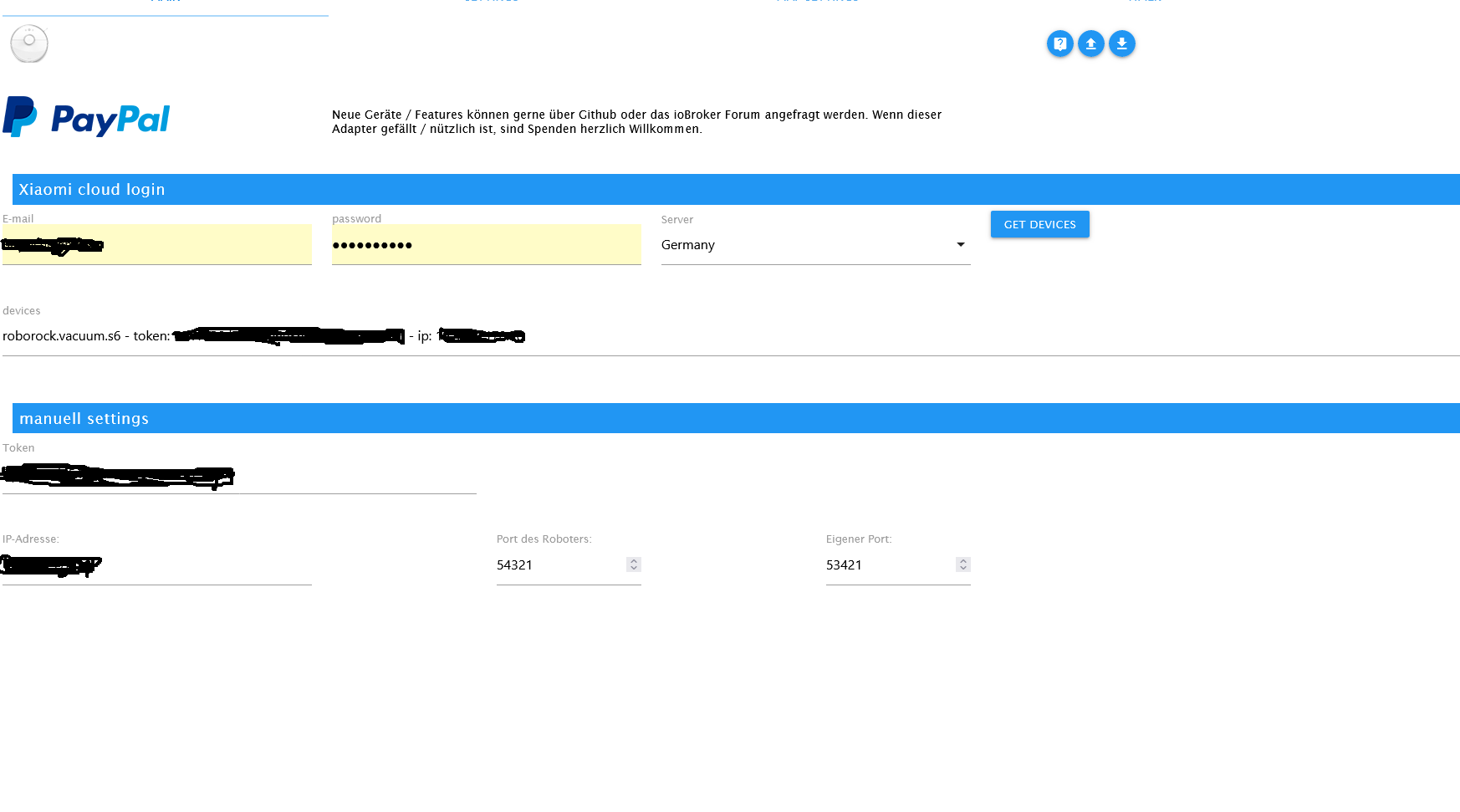
Die Einstellung sind wie folgt:
-
Hallo Gemeinde,
seit heute habe ich das Problem, dass sich der mihome-vacuum - Adapter (v4.1.1) nicht mehr mit dem Gerät (roborock.vacuum.s6) verbindet.
Die FW des Robbys ist (3.5.8_2700).
Die IP-Adresse wurde nicht verändert. (die ist statisch).
Ich kann den Adapter so oft starten, wie ich möchte, es kommt immer die gleiche Fehlermeldung:2024-03-23 11:40:56.634 - info: mihome-vacuum.0 (19338) Got terminate signal TERMINATE_YOURSELF 2024-03-23 11:40:56.635 - error: mihome-vacuum.0 (19338) Socket Close 2024-03-23 11:40:56.636 - info: mihome-vacuum.0 (19338) terminating 2024-03-23 11:40:56.636 - info: mihome-vacuum.0 (19338) Terminated (ADAPTER_REQUESTED_TERMINATION): Without reason 2024-03-23 11:40:56.681 - info: host.IOBroker-Holger stopInstance system.adapter.mihome-vacuum.0 send kill signal 2024-03-23 11:40:57.135 - info: mihome-vacuum.0 (19338) terminating 2024-03-23 11:40:57.171 - info: host.IOBroker-Holger instance system.adapter.mihome-vacuum.0 terminated with code 11 (ADAPTER_REQUESTED_TERMINATION) 2024-03-23 11:40:59.722 - info: host.IOBroker-Holger instance system.adapter.mihome-vacuum.0 started with pid 20133 2024-03-23 11:41:00.242 - debug: mihome-vacuum.0 (20133) Redis Objects: Use Redis connection: 127.0.0.1:9001 2024-03-23 11:41:00.262 - debug: mihome-vacuum.0 (20133) Objects client ready ... initialize now 2024-03-23 11:41:00.263 - debug: mihome-vacuum.0 (20133) Objects create System PubSub Client 2024-03-23 11:41:00.263 - debug: mihome-vacuum.0 (20133) Objects create User PubSub Client 2024-03-23 11:41:00.289 - debug: mihome-vacuum.0 (20133) Objects client initialize lua scripts 2024-03-23 11:41:00.293 - debug: mihome-vacuum.0 (20133) Objects connected to redis: 127.0.0.1:9001 2024-03-23 11:41:00.779 - debug: mihome-vacuum.0 (20133) Redis States: Use Redis connection: 127.0.0.1:9000 2024-03-23 11:41:00.789 - debug: mihome-vacuum.0 (20133) States create System PubSub Client 2024-03-23 11:41:00.790 - debug: mihome-vacuum.0 (20133) States create User PubSub Client 2024-03-23 11:41:00.846 - debug: mihome-vacuum.0 (20133) States connected to redis: 127.0.0.1:9000 2024-03-23 11:41:00.867 - debug: mihome-vacuum.0 (20133) Plugin sentry Initialize Plugin (enabled=true) 2024-03-23 11:41:01.012 - info: mihome-vacuum.0 (20133) starting. Version 4.1.1 in /opt/iobroker/node_modules/iobroker.mihome-vacuum, node: v18.19.0, js-controller: 5.0.19 2024-03-23 11:41:01.031 - debug: mihome-vacuum.0 (20133) load Map creator... true 2024-03-23 11:41:01.040 - debug: mihome-vacuum.0 (20133) Create State for deviceInfo 2024-03-23 11:41:01.041 - debug: mihome-vacuum.0 (20133) Create State for deviceInfomac 2024-03-23 11:41:01.041 - debug: mihome-vacuum.0 (20133) Create State for deviceInfomodel 2024-03-23 11:41:01.041 - debug: mihome-vacuum.0 (20133) Create State for deviceInfofw_ver 2024-03-23 11:41:01.041 - debug: mihome-vacuum.0 (20133) Create State for deviceInfowifi_signal 2024-03-23 11:41:01.042 - debug: mihome-vacuum.0 (20133) Create State for deviceInfounsupported 2024-03-23 11:41:01.042 - debug: mihome-vacuum.0 (20133) MIIO: Config: ip:192.168.178.56 token: 7841756d75XXXXXXXXX 2024-03-23 11:41:01.043 - info: mihome-vacuum.0 (20133) IOT enabled, create state 2024-03-23 11:41:01.045 - debug: mihome-vacuum.0 (20133) server started on 0.0.0.0:53421 2024-03-23 11:41:01.541 - info: admin.0 (163) <== Disconnect system.user.admin from ::ffff:192.168.178.130 2024-03-23 11:41:03.046 - debug: mihome-vacuum.0 (20133) Helo message Timeout 2024-03-23 11:41:06.373 - warn: roborock.0 (19444) Failed to map rooms. You need to name your rooms via the mobile app on your phone. 2024-03-23 11:41:15.047 - debug: mihome-vacuum.0 (20133) Helo message Timeout 2024-03-23 11:41:27.047 - debug: mihome-vacuum.0 (20133) Helo message TimeoutGestern ging das alles noch??
Seltsam war, dass ich den Robby zwar in Räume über meine Vis schicken konnte, er aber immer 100% Akku angezeigt hat und keine Karte mehr angezeigt hat?
Kann mir jemand helfen?
Die Einstellung sind wie folgt:
Da wird der Robo nicht erreicht.
Bei mir funktioniert der Adapter aber, es dürfte sich daher nicht um ein grundsätzliches Problem handeln.
Bring dein nodejs auf den letzen Stand, den Rest vom Betriebssystem dann gleich auch. -
Da wird der Robo nicht erreicht.
Bei mir funktioniert der Adapter aber, es dürfte sich daher nicht um ein grundsätzliches Problem handeln.
Bring dein nodejs auf den letzen Stand, den Rest vom Betriebssystem dann gleich auch. -
@thomas-braun Danke für den Tip. Ich arbeite mit einem Container und einem Synology Nas-Server.
@hunterhb sagte in mihome-vacuum Adapter verbindet sich nicht mehr.:
Ich arbeite mit einem Container und einem Synology Nas-Server.
Hm? Und?
-
@hunterhb sagte in mihome-vacuum Adapter verbindet sich nicht mehr.:
Ich arbeite mit einem Container und einem Synology Nas-Server.
Hm? Und?
-
@hunterhb jetzt habe ich den buanet/IO-Broker aktualisiert.
Frage mich ob das Ursächlich dafür sein kann. Denn mit den "alten" Versionen ist es ja schon mal gelaufen.
Super Trick. Jetzt habe ich einen leeren IO-Broker

Ich habe noch eine Sicherung auf dem Nas-Server von gestern. Bekomme diese aber nicht über den Backup-Adapter zurück.
Auf diesem Pfad liegt die Sicherung:
"\NAS-Mein\NAS-Mein\Dokumente\SmartHome\IOBroker\Backups\iobroker_2024_02_13-20_29_00_backupiobroker.tar.gz"
Wie stellt man Backitup ein? -
@thomas-braun Wollte damit sagen, dass alle Pakete aktuell sind
@hunterhb sagte in mihome-vacuum Adapter verbindet sich nicht mehr.:
Wollte damit sagen, dass alle Pakete aktuell sind
Nein, sind sie nicht. Dein nodejs ist z. B. nicht aktuell.
Vielleicht ist es auch die dfsg-Version. -
@thomas-braun NodeJs: V18.19.1 was ist aktuell?
@hunterhb
Das ist aktuell.
In deinem Log stand eben noch node: v18.19.0 drin.

Hello! It looks like you're interested in this conversation, but you don't have an account yet.
Getting fed up of having to scroll through the same posts each visit? When you register for an account, you'll always come back to exactly where you were before, and choose to be notified of new replies (either via email, or push notification). You'll also be able to save bookmarks and upvote posts to show your appreciation to other community members.
With your input, this post could be even better 💗
Register Login532
Online32.8k
Users82.7k
Topics1.3m
Posts