




Innogy: deutliche Verzögerung bei Bewegungsmeldern
-
Hallo,
seit 2 Tagen, was rein zufällig ( ) mit einem Update der Zentrale und der Sensoren zusammenfällt, werden von 2/3 meiner eingebundenen Bewegungsmelder die Bewegungen nur stark verzögert im iobroker angezeigt. Teilweise dauert es 20sec bis sich der Counter ändert. Da ich über die Bewegung meine Lampen in der Wohnung steuere sind die damit quasi nutzlos geworden.
Weiß jemand was ich da machen kann?Vielen Dank
bubiman -
Hallo,
seit 2 Tagen, was rein zufällig ( ) mit einem Update der Zentrale und der Sensoren zusammenfällt, werden von 2/3 meiner eingebundenen Bewegungsmelder die Bewegungen nur stark verzögert im iobroker angezeigt. Teilweise dauert es 20sec bis sich der Counter ändert. Da ich über die Bewegung meine Lampen in der Wohnung steuere sind die damit quasi nutzlos geworden.
Weiß jemand was ich da machen kann?Vielen Dank
bubiman -
@bubiman sagte in Innogy: deutliche Verzögerung bei Bewegungsmeldern:
Weiß jemand was ich da machen kann?
erst mal nachsehen was passiert ist.
z.B. mit
iob diagin der Langfassung.@homoran sagte in Innogy: deutliche Verzögerung bei Bewegungsmeldern:
@bubiman sagte in Innogy: deutliche Verzögerung bei Bewegungsmeldern:
Weiß jemand was ich da machen kann?
erst mal nachsehen was passiert ist.
z.B. mit
iob diagin der Langfassung.Ich hoffe, dass das folgende die richtige Ausgabe ist.
Langfassung:
Skript v.2023-10-10 *** BASE SYSTEM *** Hardware Vendor : To Be Filled By O.E.M. Kernel : x86_64 Userland : amd64 Docker : v9.0.1 Virtualization : Docker Kernel : x86_64 Userland : amd64 Systemuptime and Load: 10:38:55 up 79 days, 2:13, 0 user, load average: 6.34, 6.07, 5.29 CPU threads: 8 *** Time and Time Zones *** Thu Jan 18 09:38:55 UTC 2024 Thu Jan 18 10:38:55 CET 2024 CET +0100 Etc/UTC *** User and Groups *** root /root root *** X-Server-Setup *** X-Server: false Desktop: Terminal: *** MEMORY *** total used free shared buff/cache available Mem: 33G 9.5G 435M 294M 24G 24G Swap: 0B 0B 0B Total: 33G 9.5G 435M 32078 M total memory 9088 M used memory 19816 M active memory 9613 M inactive memory 414 M free memory 0 M buffer memory 23310 M swap cache 0 M total swap 0 M used swap 0 M free swap *** FILESYSTEM *** Filesystem Type Size Used Avail Use% Mounted on /dev/loop2 btrfs 60G 15G 45G 26% / tmpfs tmpfs 64M 0 64M 0% /dev shm tmpfs 64M 0 64M 0% /dev/shm shfs fuse.shfs 477G 236G 242G 50% /opt/iobroker /dev/loop2 btrfs 60G 15G 45G 26% /etc/hosts Messages concerning ext4 filesystem in dmesg: Show mounted filesystems \(real ones only\): TARGET SOURCE FSTYPE OPTIONS / /dev/loop2[/btrfs/subvolumes/4585e6617de0b03386cf4ff673d4d50372b962720eee7add12978d48972d2141] btrfs rw,noatime,space_cache=v2,subvolid=10562,subvol=/btrfs/subvolumes/4585e6617de0b03386cf4ff673d4d50372b962720eee7add12978d48972d2141 |-/opt/userscripts shfs[/appdata/iobroker/scripts] fuse.shfs rw,nosuid,nodev,noatime,user_id=0,group_id=0,default_permissions,allow_other |-/opt/iobroker shfs[/appdata/iobroker/data] fuse.shfs rw,nosuid,nodev,noatime,user_id=0,group_id=0,default_permissions,allow_other |-/etc/resolv.conf /dev/loop2[/containers/e9729b7b0ddd4082bffeba35b0d7cbaf1e01f08dc2f17864de1feda5e44837fe/resolv.conf] btrfs rw,noatime,space_cache=v2,subvolid=5,subvol=/ |-/etc/hostname /dev/loop2[/containers/e9729b7b0ddd4082bffeba35b0d7cbaf1e01f08dc2f17864de1feda5e44837fe/hostname] btrfs rw,noatime,space_cache=v2,subvolid=5,subvol=/ `-/etc/hosts /dev/loop2[/containers/e9729b7b0ddd4082bffeba35b0d7cbaf1e01f08dc2f17864de1feda5e44837fe/hosts] btrfs rw,noatime,space_cache=v2,subvolid=5,subvol=/ Files in neuralgic directories: /var: 34M /var/ 32M /var/lib 19M /var/lib/apt/lists 19M /var/lib/apt 13M /var/lib/dpkg /opt/iobroker/backups: 334M /opt/iobroker/backups/ /opt/iobroker/iobroker-data: 837M /opt/iobroker/iobroker-data/ 559M /opt/iobroker/iobroker-data/files 165M /opt/iobroker/iobroker-data/files/devices.admin/static 165M /opt/iobroker/iobroker-data/files/devices.admin 163M /opt/iobroker/iobroker-data/files/devices.admin/static/js The five largest files in iobroker-data are: 46M /opt/iobroker/iobroker-data/states.jsonl 35M /opt/iobroker/iobroker-data/files/devices.admin/static/js/main.24f2bb56.js.map 33M /opt/iobroker/iobroker-data/files/devices.admin/static/js/main.10538062.js.map 21M /opt/iobroker/iobroker-data/files/web.admin/static/js/main.aaea95f8.js.map 21M /opt/iobroker/iobroker-data/files/devices.admin/static/js/2.2e59ed19.chunk.js.map USB-Devices by-id: USB-Sticks - Avoid direct links to /dev/* in your adapter setups, please always prefer the links 'by-id': find: '/dev/serial/by-id/': No such file or directory *** NodeJS-Installation *** /usr/bin/nodejs v18.19.0 /usr/bin/node v18.19.0 /usr/bin/npm 10.2.3 /usr/bin/npx 10.2.3 /usr/bin/corepack 0.22.0 nodejs: Installed: 18.19.0-1nodesource1 Candidate: 18.19.0+dfsg-6~deb12u1 Version table: 18.19.0+dfsg-6~deb12u1 500 500 http://deb.debian.org/debian-security bookworm-security/main amd64 Packages *** 18.19.0-1nodesource1 500 500 https://deb.nodesource.com/node_18.x nodistro/main amd64 Packages 100 /var/lib/dpkg/status 18.18.2-1nodesource1 500 500 https://deb.nodesource.com/node_18.x nodistro/main amd64 Packages 18.18.1-1nodesource1 500 500 https://deb.nodesource.com/node_18.x nodistro/main amd64 Packages 18.18.0-1nodesource1 500 500 https://deb.nodesource.com/node_18.x nodistro/main amd64 Packages 18.17.1-1nodesource1 500 500 https://deb.nodesource.com/node_18.x nodistro/main amd64 Packages 18.17.0-1nodesource1 500 500 https://deb.nodesource.com/node_18.x nodistro/main amd64 Packages 18.16.1-1nodesource1 500 500 https://deb.nodesource.com/node_18.x nodistro/main amd64 Packages 18.16.0-1nodesource1 500 500 https://deb.nodesource.com/node_18.x nodistro/main amd64 Packages 18.15.0-1nodesource1 500 500 https://deb.nodesource.com/node_18.x nodistro/main amd64 Packages 18.14.2-1nodesource1 500 500 https://deb.nodesource.com/node_18.x nodistro/main amd64 Packages 18.14.1-1nodesource1 500 500 https://deb.nodesource.com/node_18.x nodistro/main amd64 Packages 18.14.0-1nodesource1 500 500 https://deb.nodesource.com/node_18.x nodistro/main amd64 Packages 18.13.0+dfsg1-1 500 500 http://deb.debian.org/debian bookworm/main amd64 Packages 18.13.0-1nodesource1 500 500 https://deb.nodesource.com/node_18.x nodistro/main amd64 Packages 18.12.0-1nodesource1 500 500 https://deb.nodesource.com/node_18.x nodistro/main amd64 Packages 18.11.0-1nodesource1 500 500 https://deb.nodesource.com/node_18.x nodistro/main amd64 Packages 18.10.0-1nodesource1 500 500 https://deb.nodesource.com/node_18.x nodistro/main amd64 Packages 18.9.1-1nodesource1 500 500 https://deb.nodesource.com/node_18.x nodistro/main amd64 Packages 18.9.0-1nodesource1 500 500 https://deb.nodesource.com/node_18.x nodistro/main amd64 Packages 18.8.0-1nodesource1 500 500 https://deb.nodesource.com/node_18.x nodistro/main amd64 Packages 18.7.0-1nodesource1 500 500 https://deb.nodesource.com/node_18.x nodistro/main amd64 Packages 18.6.0-1nodesource1 500 500 https://deb.nodesource.com/node_18.x nodistro/main amd64 Packages 18.5.0-1nodesource1 500 500 https://deb.nodesource.com/node_18.x nodistro/main amd64 Packages 18.4.0-1nodesource1 500 500 https://deb.nodesource.com/node_18.x nodistro/main amd64 Packages 18.3.0-1nodesource1 500 500 https://deb.nodesource.com/node_18.x nodistro/main amd64 Packages 18.2.0-1nodesource1 500 500 https://deb.nodesource.com/node_18.x nodistro/main amd64 Packages 18.1.0-1nodesource1 500 500 https://deb.nodesource.com/node_18.x nodistro/main amd64 Packages 18.0.0-1nodesource1 500 500 https://deb.nodesource.com/node_18.x nodistro/main amd64 Packages Temp directories causing npm8 problem: 0 No problems detected Errors in npm tree: *** ioBroker-Installation *** ioBroker Status iobroker is running on this host. Objects type: jsonl States type: jsonl Core adapters versions js-controller: 4.0.24 admin: 6.12.0 javascript: 7.1.6 Adapters from github: 1 Adapter State + system.adapter.admin.0 : admin : e9729b7b0ddd - enabled, port: 8081, bind: 0.0.0.0, run as: admin system.adapter.alias-manager.0 : alias-manager : e9729b7b0ddd - enabled + system.adapter.backitup.0 : backitup : e9729b7b0ddd - enabled system.adapter.bmw.0 : bmw : e9729b7b0ddd - disabled + system.adapter.deconz.0 : deconz : e9729b7b0ddd - enabled, port: 80 system.adapter.devices.0 : devices : e9729b7b0ddd - disabled + system.adapter.discovery.0 : discovery : e9729b7b0ddd - enabled + system.adapter.fb-checkpresence.0 : fb-checkpresence : e9729b7b0ddd - enabled + system.adapter.fb-checkpresence.1 : fb-checkpresence : e9729b7b0ddd - enabled system.adapter.fb-checkpresence.2 : fb-checkpresence : e9729b7b0ddd - disabled system.adapter.flot.0 : flot : e9729b7b0ddd - disabled system.adapter.frigate.0 : frigate : e9729b7b0ddd - disabled system.adapter.habpanel.0 : habpanel : e9729b7b0ddd - disabled + system.adapter.hm-rega.0 : hm-rega : e9729b7b0ddd - enabled + system.adapter.hm-rpc.0 : hm-rpc : e9729b7b0ddd - enabled, port: 2001 + system.adapter.hm-rpc.1 : hm-rpc : e9729b7b0ddd - enabled, port: 2010 + system.adapter.hm-rpc.2 : hm-rpc : e9729b7b0ddd - enabled, port: 9292 + system.adapter.hmip.0 : hmip : e9729b7b0ddd - enabled + system.adapter.homeconnect.0 : homeconnect : e9729b7b0ddd - enabled + system.adapter.hs100.0 : hs100 : e9729b7b0ddd - enabled + system.adapter.influxdb.0 : influxdb : e9729b7b0ddd - enabled, port: 8086 + system.adapter.info.0 : info : e9729b7b0ddd - enabled + system.adapter.innogy-smarthome.0 : innogy-smarthome : e9729b7b0ddd - enabled + system.adapter.jarvis.0 : jarvis : e9729b7b0ddd - enabled + system.adapter.javascript.0 : javascript : e9729b7b0ddd - enabled system.adapter.labcom.0 : labcom : e9729b7b0ddd - enabled + system.adapter.mqtt.0 : mqtt : e9729b7b0ddd - enabled, port: 1883, bind: 0.0.0.0 + system.adapter.node-red.0 : node-red : e9729b7b0ddd - enabled, port: 1880, bind: 0.0.0.0 + system.adapter.pvforecast.0 : pvforecast : e9729b7b0ddd - enabled system.adapter.signal-cmb.0 : signal-cmb : e9729b7b0ddd - disabled + system.adapter.simple-api.0 : simple-api : e9729b7b0ddd - enabled, port: 8087, bind: 0.0.0.0, run as: admin + system.adapter.socketio.0 : socketio : e9729b7b0ddd - enabled, port: 8084, bind: 0.0.0.0, run as: admin + system.adapter.sonoff.0 : sonoff : e9729b7b0ddd - enabled, port: 1884, bind: 0.0.0.0 + system.adapter.sonos.0 : sonos : e9729b7b0ddd - enabled + system.adapter.sql.0 : sql : e9729b7b0ddd - enabled, port: 3308 + system.adapter.statistics.0 : statistics : e9729b7b0ddd - enabled + system.adapter.telegram.0 : telegram : e9729b7b0ddd - enabled, port: 8443, bind: 0.0.0.0 + system.adapter.tr-064.0 : tr-064 : e9729b7b0ddd - enabled system.adapter.tr-064.1 : tr-064 : e9729b7b0ddd - disabled + system.adapter.tradfri.0 : tradfri : e9729b7b0ddd - enabled + system.adapter.twinkly.0 : twinkly : e9729b7b0ddd - enabled + system.adapter.vesync.0 : vesync : e9729b7b0ddd - enabled system.adapter.vis.0 : vis : e9729b7b0ddd - enabled system.adapter.weatherunderground.0 : weatherunderground : e9729b7b0ddd - enabled + system.adapter.web.0 : web : e9729b7b0ddd - enabled, port: 8082, bind: 0.0.0.0, run as: admin + system.adapter.yamaha.0 : yamaha : e9729b7b0ddd - enabled system.adapter.zigbee.0 : zigbee : iobroker2 - disabled, port: /dev/ttyACM0 + instance is alive Enabled adapters with bindings + system.adapter.admin.0 : admin : e9729b7b0ddd - enabled, port: 8081, bind: 0.0.0.0, run as: admin + system.adapter.deconz.0 : deconz : e9729b7b0ddd - enabled, port: 80 + system.adapter.hm-rpc.0 : hm-rpc : e9729b7b0ddd - enabled, port: 2001 + system.adapter.hm-rpc.1 : hm-rpc : e9729b7b0ddd - enabled, port: 2010 + system.adapter.hm-rpc.2 : hm-rpc : e9729b7b0ddd - enabled, port: 9292 + system.adapter.influxdb.0 : influxdb : e9729b7b0ddd - enabled, port: 8086 + system.adapter.mqtt.0 : mqtt : e9729b7b0ddd - enabled, port: 1883, bind: 0.0.0.0 + system.adapter.node-red.0 : node-red : e9729b7b0ddd - enabled, port: 1880, bind: 0.0.0.0 + system.adapter.simple-api.0 : simple-api : e9729b7b0ddd - enabled, port: 8087, bind: 0.0.0.0, run as: admin + system.adapter.socketio.0 : socketio : e9729b7b0ddd - enabled, port: 8084, bind: 0.0.0.0, run as: admin + system.adapter.sonoff.0 : sonoff : e9729b7b0ddd - enabled, port: 1884, bind: 0.0.0.0 + system.adapter.sql.0 : sql : e9729b7b0ddd - enabled, port: 3308 + system.adapter.telegram.0 : telegram : e9729b7b0ddd - enabled, port: 8443, bind: 0.0.0.0 + system.adapter.web.0 : web : e9729b7b0ddd - enabled, port: 8082, bind: 0.0.0.0, run as: admin ioBroker-Repositories stable : http://download.iobroker.net/sources-dist.json beta : http://download.iobroker.net/sources-dist-latest.json Active repo(s): stable Installed ioBroker-Instances Used repository: stable Adapter "admin" : 6.12.0 , installed 6.12.0 Adapter "alias-manager": 1.2.6 , installed 1.2.6 Adapter "backitup" : 2.9.8 , installed 2.9.8 Adapter "bmw" : 2.5.7 , installed 2.5.7 Adapter "deconz" : 1.3.23 , installed 1.3.23 Adapter "devices" : 1.1.5 , installed 1.1.5 Adapter "discovery" : 4.2.0 , installed 4.2.0 Adapter "fb-checkpresence": 1.2.2 , installed 1.2.2 Adapter "flot" : 1.12.0 , installed 1.12.0 Adapter "frigate" : 0.2.7 , installed 0.2.7 Adapter "habpanel" : 0.5.0 , installed 0.5.0 Adapter "hm-rega" : 4.0.0 , installed 4.0.0 Adapter "hm-rpc" : 1.15.19 , installed 1.15.19 Adapter "hmip" : 1.21.0 , installed 1.21.0 Adapter "homeconnect" : 1.3.0 , installed 1.3.0 Adapter "hs100" : 2.2.0 , installed 2.2.0 Adapter "influxdb" : 3.2.0 , installed 3.2.0 Adapter "info" : 2.0.0 , installed 2.0.0 Adapter "innogy-smarthome": 1.2.6 , installed 1.2.6 Adapter "jarvis" : 3.1.8 , installed 3.1.8 Adapter "javascript" : 7.1.6 , installed 7.1.6 Controller "js-controller": 5.0.17 , installed 4.0.24 [Updatable] Adapter "mqtt" : 5.1.0 , installed 5.1.0 Adapter "node-red" : 4.0.3 , installed 4.0.3 Adapter "pvforecast" : 2.9.1 , installed 2.9.1 Adapter "signal-cmb" : 0.3.0 , installed 0.3.0 Adapter "simple-api" : 2.7.2 , installed 2.7.2 Adapter "socketio" : 6.6.0 , installed 6.6.0 Adapter "sonoff" : 3.0.3 , installed 3.0.3 Adapter "sonos" : 3.0.0 , installed 3.0.0 Adapter "sql" : 2.2.0 , installed 2.2.0 Adapter "statistics" : 2.4.0 , installed 2.4.0 Adapter "telegram" : 3.0.1 , installed 3.0.1 Adapter "tr-064" : 4.2.18 , installed 4.2.18 Adapter "tradfri" : 3.1.3 , installed 3.1.3 Adapter "twinkly" : 1.0.14 , installed 1.0.14 Adapter "vesync" : 0.0.3 , installed 0.0.3 Adapter "vis" : 1.5.4 , installed 1.5.4 Adapter "vis-2" : 2.9.11 , installed 2.9.11 Adapter "weatherunderground": 3.6.0, installed 3.6.0 Adapter "web" : 6.1.10 , installed 6.1.10 Adapter "ws" : 2.5.8 , installed 2.5.8 Adapter "yamaha" : 0.5.3 , installed 0.5.3 Objects and States Please stand by - This may take a while Objects: 14006 States: 13810 *** OS-Repositories and Updates *** Hit:1 http://deb.debian.org/debian bookworm InRelease Hit:2 http://deb.debian.org/debian bookworm-updates InRelease Hit:3 http://deb.debian.org/debian-security bookworm-security InRelease Hit:4 https://deb.nodesource.com/node_18.x nodistro InRelease Reading package lists... Pending Updates: 1 *** Listening Ports *** Active Internet connections (only servers) Proto Recv-Q Send-Q Local Address Foreign Address State User Inode PID/Program name tcp 0 0 0.0.0.0:2001 0.0.0.0:* LISTEN 99 1369349070 322/io.hm-rpc.0 tcp 0 0 0.0.0.0:2010 0.0.0.0:* LISTEN 99 1369349092 337/io.hm-rpc.1 tcp 0 0 0.0.0.0:1884 0.0.0.0:* LISTEN 99 1369356328 481/io.sonoff.0 tcp 0 0 0.0.0.0:1880 0.0.0.0:* LISTEN 99 1371518982 23397/node-red tcp 0 0 0.0.0.0:1883 0.0.0.0:* LISTEN 99 1369352384 447/io.mqtt.0 tcp 0 0 0.0.0.0:9000 0.0.0.0:* LISTEN 99 1369346654 176/iobroker.js-con tcp 0 0 0.0.0.0:9001 0.0.0.0:* LISTEN 99 1369347176 176/iobroker.js-con tcp 0 0 0.0.0.0:8400 0.0.0.0:* LISTEN 99 1369359620 1098/io.jarvis.0 tcp 0 0 0.0.0.0:9292 0.0.0.0:* LISTEN 99 1369350756 508/io.hm-rpc.2 tcp6 0 0 :::8084 :::* LISTEN 99 1369354734 615/io.socketio.0 tcp6 0 0 :::8087 :::* LISTEN 99 1369352109 1056/io.simple-api. tcp6 0 0 :::8081 :::* LISTEN 99 1369345586 198/io.admin.0 tcp6 0 0 :::8082 :::* LISTEN 99 1369358529 1041/io.web.0 udp 0 0 0.0.0.0:1900 0.0.0.0:* 99 1369359907 1210/io.deconz.0 udp 0 0 0.0.0.0:1905 0.0.0.0:* 99 1371801466 466/io.sonos.0 udp 0 0 0.0.0.0:35210 0.0.0.0:* 99 1369359535 999/io.tradfri.0 udp 0 0 172.17.0.6:5353 0.0.0.0:* 99 1369349271 375/io.tr-064.0 *** Log File - Last 25 Lines *** 2024-01-18 10:40:35.402 - debug: statistics.0 (790) [STATE CHANGE] new last for "temp.avg.hm-rpc.1.000ED709AED5C6.1.ACTUAL_TEMPERATURE.last: -1.7 2024-01-18 10:40:35.646 - debug: statistics.0 (790) [EXECUTING] minmax hm-rpc.1.000ED709AED5C6.1.ACTUAL_TEMPERATURE 2024-01-18 10:40:35.646 - debug: statistics.0 (790) [STATE CHANGE] new last for "temp.minmax.hm-rpc.1.000ED709AED5C6.1.ACTUAL_TEMPERATURE.last: -1.7 2024-01-18 10:40:35.708 - debug: statistics.0 (790) [STATE CHANGE] ======================= hm-rpc.1.000ED709AED5C6.1.HUMIDITY ======================= 2024-01-18 10:40:35.709 - debug: statistics.0 (790) [STATE CHANGE] stateChange => 99 2024-01-18 10:40:35.709 - debug: statistics.0 (790) [STATE CHANGE] schedule onStateChangeAvgValue for hm-rpc.1.000ED709AED5C6.1.HUMIDITY 2024-01-18 10:40:35.709 - debug: statistics.0 (790) [STATE CHANGE] schedule onStateChangeMinMaxValue for hm-rpc.1.000ED709AED5C6.1.HUMIDITY 2024-01-18 10:40:35.711 - debug: statistics.0 (790) [EXECUTING] avg call hm-rpc.1.000ED709AED5C6.1.HUMIDITY 2024-01-18 10:40:35.711 - debug: statistics.0 (790) [STATE CHANGE] new last for "temp.avg.hm-rpc.1.000ED709AED5C6.1.HUMIDITY.last: 99 2024-01-18 10:40:36.034 - debug: statistics.0 (790) [EXECUTING] minmax hm-rpc.1.000ED709AED5C6.1.HUMIDITY 2024-01-18 10:40:36.034 - debug: statistics.0 (790) [STATE CHANGE] new last for "temp.minmax.hm-rpc.1.000ED709AED5C6.1.HUMIDITY.last: 99 2024-01-18 10:40:36.436 - info: admin.0 (198) ==> Connected system.user.admin from ::ffff:192.168.3.118 2024-01-18 10:40:39.473 - warn: hs100.0 (558) Socket connection Timeout 192_168_3_121 Pool Wärmepumpe please reconnect the Device 2024-01-18 10:40:39.475 - warn: hs100.0 (558) Socket connection Timeout 192_168_3_205 Pool Pumpe/UV please reconnect the Device 2024-01-18 10:40:42.546 - warn: hs100.0 (558) Socket connection Timeout 192_168_3_121 Pool Wärmepumpe please reconnect the Device 2024-01-18 10:40:42.548 - warn: hs100.0 (558) Socket connection Timeout 192_168_3_205 Pool Pumpe/UV please reconnect the Device 2024-01-18 10:40:49.457 - warn: hs100.0 (558) Socket connection Timeout 192_168_3_121 Pool Wärmepumpe please reconnect the Device 2024-01-18 10:40:49.458 - warn: hs100.0 (558) Socket connection Timeout 192_168_3_205 Pool Pumpe/UV please reconnect the Device 2024-01-18 10:40:52.529 - warn: hs100.0 (558) Socket connection Timeout 192_168_3_121 Pool Wärmepumpe please reconnect the Device 2024-01-18 10:40:52.530 - warn: hs100.0 (558) Socket connection Timeout 192_168_3_205 Pool Pumpe/UV please reconnect the Device 2024-01-18 10:40:59.441 - warn: hs100.0 (558) Socket connection Timeout 192_168_3_121 Pool Wärmepumpe please reconnect the Device 2024-01-18 10:40:59.442 - warn: hs100.0 (558) Socket connection Timeout 192_168_3_205 Pool Pumpe/UV please reconnect the Device 2024-01-18 10:41:00.153 - info: host.e9729b7b0ddd instance system.adapter.labcom.0 started with pid 27431 2024-01-18 10:41:02.518 - warn: hs100.0 (558) Socket connection Timeout 192_168_3_121 Pool Wärmepumpe please reconnect the Device 2024-01-18 10:41:02.520 - warn: hs100.0 (558) Socket connection Timeout 192_168_3_205 Pool Pumpe/UV please reconnect the DeviceZusammenfassung:
======================= SUMMARY ======================= v.2023-10-10 model name : Intel(R) Atom(TM) CPU C3758 @ 2.20GHz Kernel : x86_64 Userland : amd64 Docker : v9.0.1 Installation: Docker Kernel: x86_64 Userland: amd64 Timezone: Etc/UTC User-ID: 0 X-Server: false Pending OS-Updates: 1 Pending iob updates: 1 Nodejs-Installation: /usr/bin/nodejs v18.19.0 /usr/bin/node v18.19.0 /usr/bin/npm 10.2.3 /usr/bin/npx 10.2.3 /usr/bin/corepack 0.22.0 Recommended versions are nodejs 18.19.0 and npm 10.2.3 Your nodejs installation is correct MEMORY: total used free shared buff/cache available Mem: 33G 9.6G 768M 298M 24G 24G Swap: 0B 0B 0B Total: 33G 9.6G 768M Active iob-Instances: 35 Active repo(s): stable ioBroker Core: js-controller 4.0.24 admin 6.12.0 ioBroker Status: iobroker is running on this host. Objects type: jsonl States type: jsonl Status admin and web instance: + system.adapter.admin.0 : admin : e9729b7b0ddd - enabled, port: 8081, bind: 0.0.0.0, run as: admin + system.adapter.web.0 : web : e9729b7b0ddd - enabled, port: 8082, bind: 0.0.0.0, run as: admin Objects: 14006 States: 13809 Size of iob-Database: 17M /opt/iobroker/iobroker-data/objects.jsonl 6.6M /opt/iobroker/iobroker-data/objects.json.migrated 6.6M /opt/iobroker/iobroker-data/objects.json.bak.migrated 45M /opt/iobroker/iobroker-data/states.jsonl 1.4M /opt/iobroker/iobroker-data/states.json.migrated 1.4M /opt/iobroker/iobroker-data/states.json.bak.migrated =================== END OF SUMMARY ==================== -
@homoran sagte in Innogy: deutliche Verzögerung bei Bewegungsmeldern:
@bubiman sagte in Innogy: deutliche Verzögerung bei Bewegungsmeldern:
Weiß jemand was ich da machen kann?
erst mal nachsehen was passiert ist.
z.B. mit
iob diagin der Langfassung.Ich hoffe, dass das folgende die richtige Ausgabe ist.
Langfassung:
Skript v.2023-10-10 *** BASE SYSTEM *** Hardware Vendor : To Be Filled By O.E.M. Kernel : x86_64 Userland : amd64 Docker : v9.0.1 Virtualization : Docker Kernel : x86_64 Userland : amd64 Systemuptime and Load: 10:38:55 up 79 days, 2:13, 0 user, load average: 6.34, 6.07, 5.29 CPU threads: 8 *** Time and Time Zones *** Thu Jan 18 09:38:55 UTC 2024 Thu Jan 18 10:38:55 CET 2024 CET +0100 Etc/UTC *** User and Groups *** root /root root *** X-Server-Setup *** X-Server: false Desktop: Terminal: *** MEMORY *** total used free shared buff/cache available Mem: 33G 9.5G 435M 294M 24G 24G Swap: 0B 0B 0B Total: 33G 9.5G 435M 32078 M total memory 9088 M used memory 19816 M active memory 9613 M inactive memory 414 M free memory 0 M buffer memory 23310 M swap cache 0 M total swap 0 M used swap 0 M free swap *** FILESYSTEM *** Filesystem Type Size Used Avail Use% Mounted on /dev/loop2 btrfs 60G 15G 45G 26% / tmpfs tmpfs 64M 0 64M 0% /dev shm tmpfs 64M 0 64M 0% /dev/shm shfs fuse.shfs 477G 236G 242G 50% /opt/iobroker /dev/loop2 btrfs 60G 15G 45G 26% /etc/hosts Messages concerning ext4 filesystem in dmesg: Show mounted filesystems \(real ones only\): TARGET SOURCE FSTYPE OPTIONS / /dev/loop2[/btrfs/subvolumes/4585e6617de0b03386cf4ff673d4d50372b962720eee7add12978d48972d2141] btrfs rw,noatime,space_cache=v2,subvolid=10562,subvol=/btrfs/subvolumes/4585e6617de0b03386cf4ff673d4d50372b962720eee7add12978d48972d2141 |-/opt/userscripts shfs[/appdata/iobroker/scripts] fuse.shfs rw,nosuid,nodev,noatime,user_id=0,group_id=0,default_permissions,allow_other |-/opt/iobroker shfs[/appdata/iobroker/data] fuse.shfs rw,nosuid,nodev,noatime,user_id=0,group_id=0,default_permissions,allow_other |-/etc/resolv.conf /dev/loop2[/containers/e9729b7b0ddd4082bffeba35b0d7cbaf1e01f08dc2f17864de1feda5e44837fe/resolv.conf] btrfs rw,noatime,space_cache=v2,subvolid=5,subvol=/ |-/etc/hostname /dev/loop2[/containers/e9729b7b0ddd4082bffeba35b0d7cbaf1e01f08dc2f17864de1feda5e44837fe/hostname] btrfs rw,noatime,space_cache=v2,subvolid=5,subvol=/ `-/etc/hosts /dev/loop2[/containers/e9729b7b0ddd4082bffeba35b0d7cbaf1e01f08dc2f17864de1feda5e44837fe/hosts] btrfs rw,noatime,space_cache=v2,subvolid=5,subvol=/ Files in neuralgic directories: /var: 34M /var/ 32M /var/lib 19M /var/lib/apt/lists 19M /var/lib/apt 13M /var/lib/dpkg /opt/iobroker/backups: 334M /opt/iobroker/backups/ /opt/iobroker/iobroker-data: 837M /opt/iobroker/iobroker-data/ 559M /opt/iobroker/iobroker-data/files 165M /opt/iobroker/iobroker-data/files/devices.admin/static 165M /opt/iobroker/iobroker-data/files/devices.admin 163M /opt/iobroker/iobroker-data/files/devices.admin/static/js The five largest files in iobroker-data are: 46M /opt/iobroker/iobroker-data/states.jsonl 35M /opt/iobroker/iobroker-data/files/devices.admin/static/js/main.24f2bb56.js.map 33M /opt/iobroker/iobroker-data/files/devices.admin/static/js/main.10538062.js.map 21M /opt/iobroker/iobroker-data/files/web.admin/static/js/main.aaea95f8.js.map 21M /opt/iobroker/iobroker-data/files/devices.admin/static/js/2.2e59ed19.chunk.js.map USB-Devices by-id: USB-Sticks - Avoid direct links to /dev/* in your adapter setups, please always prefer the links 'by-id': find: '/dev/serial/by-id/': No such file or directory *** NodeJS-Installation *** /usr/bin/nodejs v18.19.0 /usr/bin/node v18.19.0 /usr/bin/npm 10.2.3 /usr/bin/npx 10.2.3 /usr/bin/corepack 0.22.0 nodejs: Installed: 18.19.0-1nodesource1 Candidate: 18.19.0+dfsg-6~deb12u1 Version table: 18.19.0+dfsg-6~deb12u1 500 500 http://deb.debian.org/debian-security bookworm-security/main amd64 Packages *** 18.19.0-1nodesource1 500 500 https://deb.nodesource.com/node_18.x nodistro/main amd64 Packages 100 /var/lib/dpkg/status 18.18.2-1nodesource1 500 500 https://deb.nodesource.com/node_18.x nodistro/main amd64 Packages 18.18.1-1nodesource1 500 500 https://deb.nodesource.com/node_18.x nodistro/main amd64 Packages 18.18.0-1nodesource1 500 500 https://deb.nodesource.com/node_18.x nodistro/main amd64 Packages 18.17.1-1nodesource1 500 500 https://deb.nodesource.com/node_18.x nodistro/main amd64 Packages 18.17.0-1nodesource1 500 500 https://deb.nodesource.com/node_18.x nodistro/main amd64 Packages 18.16.1-1nodesource1 500 500 https://deb.nodesource.com/node_18.x nodistro/main amd64 Packages 18.16.0-1nodesource1 500 500 https://deb.nodesource.com/node_18.x nodistro/main amd64 Packages 18.15.0-1nodesource1 500 500 https://deb.nodesource.com/node_18.x nodistro/main amd64 Packages 18.14.2-1nodesource1 500 500 https://deb.nodesource.com/node_18.x nodistro/main amd64 Packages 18.14.1-1nodesource1 500 500 https://deb.nodesource.com/node_18.x nodistro/main amd64 Packages 18.14.0-1nodesource1 500 500 https://deb.nodesource.com/node_18.x nodistro/main amd64 Packages 18.13.0+dfsg1-1 500 500 http://deb.debian.org/debian bookworm/main amd64 Packages 18.13.0-1nodesource1 500 500 https://deb.nodesource.com/node_18.x nodistro/main amd64 Packages 18.12.0-1nodesource1 500 500 https://deb.nodesource.com/node_18.x nodistro/main amd64 Packages 18.11.0-1nodesource1 500 500 https://deb.nodesource.com/node_18.x nodistro/main amd64 Packages 18.10.0-1nodesource1 500 500 https://deb.nodesource.com/node_18.x nodistro/main amd64 Packages 18.9.1-1nodesource1 500 500 https://deb.nodesource.com/node_18.x nodistro/main amd64 Packages 18.9.0-1nodesource1 500 500 https://deb.nodesource.com/node_18.x nodistro/main amd64 Packages 18.8.0-1nodesource1 500 500 https://deb.nodesource.com/node_18.x nodistro/main amd64 Packages 18.7.0-1nodesource1 500 500 https://deb.nodesource.com/node_18.x nodistro/main amd64 Packages 18.6.0-1nodesource1 500 500 https://deb.nodesource.com/node_18.x nodistro/main amd64 Packages 18.5.0-1nodesource1 500 500 https://deb.nodesource.com/node_18.x nodistro/main amd64 Packages 18.4.0-1nodesource1 500 500 https://deb.nodesource.com/node_18.x nodistro/main amd64 Packages 18.3.0-1nodesource1 500 500 https://deb.nodesource.com/node_18.x nodistro/main amd64 Packages 18.2.0-1nodesource1 500 500 https://deb.nodesource.com/node_18.x nodistro/main amd64 Packages 18.1.0-1nodesource1 500 500 https://deb.nodesource.com/node_18.x nodistro/main amd64 Packages 18.0.0-1nodesource1 500 500 https://deb.nodesource.com/node_18.x nodistro/main amd64 Packages Temp directories causing npm8 problem: 0 No problems detected Errors in npm tree: *** ioBroker-Installation *** ioBroker Status iobroker is running on this host. Objects type: jsonl States type: jsonl Core adapters versions js-controller: 4.0.24 admin: 6.12.0 javascript: 7.1.6 Adapters from github: 1 Adapter State + system.adapter.admin.0 : admin : e9729b7b0ddd - enabled, port: 8081, bind: 0.0.0.0, run as: admin system.adapter.alias-manager.0 : alias-manager : e9729b7b0ddd - enabled + system.adapter.backitup.0 : backitup : e9729b7b0ddd - enabled system.adapter.bmw.0 : bmw : e9729b7b0ddd - disabled + system.adapter.deconz.0 : deconz : e9729b7b0ddd - enabled, port: 80 system.adapter.devices.0 : devices : e9729b7b0ddd - disabled + system.adapter.discovery.0 : discovery : e9729b7b0ddd - enabled + system.adapter.fb-checkpresence.0 : fb-checkpresence : e9729b7b0ddd - enabled + system.adapter.fb-checkpresence.1 : fb-checkpresence : e9729b7b0ddd - enabled system.adapter.fb-checkpresence.2 : fb-checkpresence : e9729b7b0ddd - disabled system.adapter.flot.0 : flot : e9729b7b0ddd - disabled system.adapter.frigate.0 : frigate : e9729b7b0ddd - disabled system.adapter.habpanel.0 : habpanel : e9729b7b0ddd - disabled + system.adapter.hm-rega.0 : hm-rega : e9729b7b0ddd - enabled + system.adapter.hm-rpc.0 : hm-rpc : e9729b7b0ddd - enabled, port: 2001 + system.adapter.hm-rpc.1 : hm-rpc : e9729b7b0ddd - enabled, port: 2010 + system.adapter.hm-rpc.2 : hm-rpc : e9729b7b0ddd - enabled, port: 9292 + system.adapter.hmip.0 : hmip : e9729b7b0ddd - enabled + system.adapter.homeconnect.0 : homeconnect : e9729b7b0ddd - enabled + system.adapter.hs100.0 : hs100 : e9729b7b0ddd - enabled + system.adapter.influxdb.0 : influxdb : e9729b7b0ddd - enabled, port: 8086 + system.adapter.info.0 : info : e9729b7b0ddd - enabled + system.adapter.innogy-smarthome.0 : innogy-smarthome : e9729b7b0ddd - enabled + system.adapter.jarvis.0 : jarvis : e9729b7b0ddd - enabled + system.adapter.javascript.0 : javascript : e9729b7b0ddd - enabled system.adapter.labcom.0 : labcom : e9729b7b0ddd - enabled + system.adapter.mqtt.0 : mqtt : e9729b7b0ddd - enabled, port: 1883, bind: 0.0.0.0 + system.adapter.node-red.0 : node-red : e9729b7b0ddd - enabled, port: 1880, bind: 0.0.0.0 + system.adapter.pvforecast.0 : pvforecast : e9729b7b0ddd - enabled system.adapter.signal-cmb.0 : signal-cmb : e9729b7b0ddd - disabled + system.adapter.simple-api.0 : simple-api : e9729b7b0ddd - enabled, port: 8087, bind: 0.0.0.0, run as: admin + system.adapter.socketio.0 : socketio : e9729b7b0ddd - enabled, port: 8084, bind: 0.0.0.0, run as: admin + system.adapter.sonoff.0 : sonoff : e9729b7b0ddd - enabled, port: 1884, bind: 0.0.0.0 + system.adapter.sonos.0 : sonos : e9729b7b0ddd - enabled + system.adapter.sql.0 : sql : e9729b7b0ddd - enabled, port: 3308 + system.adapter.statistics.0 : statistics : e9729b7b0ddd - enabled + system.adapter.telegram.0 : telegram : e9729b7b0ddd - enabled, port: 8443, bind: 0.0.0.0 + system.adapter.tr-064.0 : tr-064 : e9729b7b0ddd - enabled system.adapter.tr-064.1 : tr-064 : e9729b7b0ddd - disabled + system.adapter.tradfri.0 : tradfri : e9729b7b0ddd - enabled + system.adapter.twinkly.0 : twinkly : e9729b7b0ddd - enabled + system.adapter.vesync.0 : vesync : e9729b7b0ddd - enabled system.adapter.vis.0 : vis : e9729b7b0ddd - enabled system.adapter.weatherunderground.0 : weatherunderground : e9729b7b0ddd - enabled + system.adapter.web.0 : web : e9729b7b0ddd - enabled, port: 8082, bind: 0.0.0.0, run as: admin + system.adapter.yamaha.0 : yamaha : e9729b7b0ddd - enabled system.adapter.zigbee.0 : zigbee : iobroker2 - disabled, port: /dev/ttyACM0 + instance is alive Enabled adapters with bindings + system.adapter.admin.0 : admin : e9729b7b0ddd - enabled, port: 8081, bind: 0.0.0.0, run as: admin + system.adapter.deconz.0 : deconz : e9729b7b0ddd - enabled, port: 80 + system.adapter.hm-rpc.0 : hm-rpc : e9729b7b0ddd - enabled, port: 2001 + system.adapter.hm-rpc.1 : hm-rpc : e9729b7b0ddd - enabled, port: 2010 + system.adapter.hm-rpc.2 : hm-rpc : e9729b7b0ddd - enabled, port: 9292 + system.adapter.influxdb.0 : influxdb : e9729b7b0ddd - enabled, port: 8086 + system.adapter.mqtt.0 : mqtt : e9729b7b0ddd - enabled, port: 1883, bind: 0.0.0.0 + system.adapter.node-red.0 : node-red : e9729b7b0ddd - enabled, port: 1880, bind: 0.0.0.0 + system.adapter.simple-api.0 : simple-api : e9729b7b0ddd - enabled, port: 8087, bind: 0.0.0.0, run as: admin + system.adapter.socketio.0 : socketio : e9729b7b0ddd - enabled, port: 8084, bind: 0.0.0.0, run as: admin + system.adapter.sonoff.0 : sonoff : e9729b7b0ddd - enabled, port: 1884, bind: 0.0.0.0 + system.adapter.sql.0 : sql : e9729b7b0ddd - enabled, port: 3308 + system.adapter.telegram.0 : telegram : e9729b7b0ddd - enabled, port: 8443, bind: 0.0.0.0 + system.adapter.web.0 : web : e9729b7b0ddd - enabled, port: 8082, bind: 0.0.0.0, run as: admin ioBroker-Repositories stable : http://download.iobroker.net/sources-dist.json beta : http://download.iobroker.net/sources-dist-latest.json Active repo(s): stable Installed ioBroker-Instances Used repository: stable Adapter "admin" : 6.12.0 , installed 6.12.0 Adapter "alias-manager": 1.2.6 , installed 1.2.6 Adapter "backitup" : 2.9.8 , installed 2.9.8 Adapter "bmw" : 2.5.7 , installed 2.5.7 Adapter "deconz" : 1.3.23 , installed 1.3.23 Adapter "devices" : 1.1.5 , installed 1.1.5 Adapter "discovery" : 4.2.0 , installed 4.2.0 Adapter "fb-checkpresence": 1.2.2 , installed 1.2.2 Adapter "flot" : 1.12.0 , installed 1.12.0 Adapter "frigate" : 0.2.7 , installed 0.2.7 Adapter "habpanel" : 0.5.0 , installed 0.5.0 Adapter "hm-rega" : 4.0.0 , installed 4.0.0 Adapter "hm-rpc" : 1.15.19 , installed 1.15.19 Adapter "hmip" : 1.21.0 , installed 1.21.0 Adapter "homeconnect" : 1.3.0 , installed 1.3.0 Adapter "hs100" : 2.2.0 , installed 2.2.0 Adapter "influxdb" : 3.2.0 , installed 3.2.0 Adapter "info" : 2.0.0 , installed 2.0.0 Adapter "innogy-smarthome": 1.2.6 , installed 1.2.6 Adapter "jarvis" : 3.1.8 , installed 3.1.8 Adapter "javascript" : 7.1.6 , installed 7.1.6 Controller "js-controller": 5.0.17 , installed 4.0.24 [Updatable] Adapter "mqtt" : 5.1.0 , installed 5.1.0 Adapter "node-red" : 4.0.3 , installed 4.0.3 Adapter "pvforecast" : 2.9.1 , installed 2.9.1 Adapter "signal-cmb" : 0.3.0 , installed 0.3.0 Adapter "simple-api" : 2.7.2 , installed 2.7.2 Adapter "socketio" : 6.6.0 , installed 6.6.0 Adapter "sonoff" : 3.0.3 , installed 3.0.3 Adapter "sonos" : 3.0.0 , installed 3.0.0 Adapter "sql" : 2.2.0 , installed 2.2.0 Adapter "statistics" : 2.4.0 , installed 2.4.0 Adapter "telegram" : 3.0.1 , installed 3.0.1 Adapter "tr-064" : 4.2.18 , installed 4.2.18 Adapter "tradfri" : 3.1.3 , installed 3.1.3 Adapter "twinkly" : 1.0.14 , installed 1.0.14 Adapter "vesync" : 0.0.3 , installed 0.0.3 Adapter "vis" : 1.5.4 , installed 1.5.4 Adapter "vis-2" : 2.9.11 , installed 2.9.11 Adapter "weatherunderground": 3.6.0, installed 3.6.0 Adapter "web" : 6.1.10 , installed 6.1.10 Adapter "ws" : 2.5.8 , installed 2.5.8 Adapter "yamaha" : 0.5.3 , installed 0.5.3 Objects and States Please stand by - This may take a while Objects: 14006 States: 13810 *** OS-Repositories and Updates *** Hit:1 http://deb.debian.org/debian bookworm InRelease Hit:2 http://deb.debian.org/debian bookworm-updates InRelease Hit:3 http://deb.debian.org/debian-security bookworm-security InRelease Hit:4 https://deb.nodesource.com/node_18.x nodistro InRelease Reading package lists... Pending Updates: 1 *** Listening Ports *** Active Internet connections (only servers) Proto Recv-Q Send-Q Local Address Foreign Address State User Inode PID/Program name tcp 0 0 0.0.0.0:2001 0.0.0.0:* LISTEN 99 1369349070 322/io.hm-rpc.0 tcp 0 0 0.0.0.0:2010 0.0.0.0:* LISTEN 99 1369349092 337/io.hm-rpc.1 tcp 0 0 0.0.0.0:1884 0.0.0.0:* LISTEN 99 1369356328 481/io.sonoff.0 tcp 0 0 0.0.0.0:1880 0.0.0.0:* LISTEN 99 1371518982 23397/node-red tcp 0 0 0.0.0.0:1883 0.0.0.0:* LISTEN 99 1369352384 447/io.mqtt.0 tcp 0 0 0.0.0.0:9000 0.0.0.0:* LISTEN 99 1369346654 176/iobroker.js-con tcp 0 0 0.0.0.0:9001 0.0.0.0:* LISTEN 99 1369347176 176/iobroker.js-con tcp 0 0 0.0.0.0:8400 0.0.0.0:* LISTEN 99 1369359620 1098/io.jarvis.0 tcp 0 0 0.0.0.0:9292 0.0.0.0:* LISTEN 99 1369350756 508/io.hm-rpc.2 tcp6 0 0 :::8084 :::* LISTEN 99 1369354734 615/io.socketio.0 tcp6 0 0 :::8087 :::* LISTEN 99 1369352109 1056/io.simple-api. tcp6 0 0 :::8081 :::* LISTEN 99 1369345586 198/io.admin.0 tcp6 0 0 :::8082 :::* LISTEN 99 1369358529 1041/io.web.0 udp 0 0 0.0.0.0:1900 0.0.0.0:* 99 1369359907 1210/io.deconz.0 udp 0 0 0.0.0.0:1905 0.0.0.0:* 99 1371801466 466/io.sonos.0 udp 0 0 0.0.0.0:35210 0.0.0.0:* 99 1369359535 999/io.tradfri.0 udp 0 0 172.17.0.6:5353 0.0.0.0:* 99 1369349271 375/io.tr-064.0 *** Log File - Last 25 Lines *** 2024-01-18 10:40:35.402 - debug: statistics.0 (790) [STATE CHANGE] new last for "temp.avg.hm-rpc.1.000ED709AED5C6.1.ACTUAL_TEMPERATURE.last: -1.7 2024-01-18 10:40:35.646 - debug: statistics.0 (790) [EXECUTING] minmax hm-rpc.1.000ED709AED5C6.1.ACTUAL_TEMPERATURE 2024-01-18 10:40:35.646 - debug: statistics.0 (790) [STATE CHANGE] new last for "temp.minmax.hm-rpc.1.000ED709AED5C6.1.ACTUAL_TEMPERATURE.last: -1.7 2024-01-18 10:40:35.708 - debug: statistics.0 (790) [STATE CHANGE] ======================= hm-rpc.1.000ED709AED5C6.1.HUMIDITY ======================= 2024-01-18 10:40:35.709 - debug: statistics.0 (790) [STATE CHANGE] stateChange => 99 2024-01-18 10:40:35.709 - debug: statistics.0 (790) [STATE CHANGE] schedule onStateChangeAvgValue for hm-rpc.1.000ED709AED5C6.1.HUMIDITY 2024-01-18 10:40:35.709 - debug: statistics.0 (790) [STATE CHANGE] schedule onStateChangeMinMaxValue for hm-rpc.1.000ED709AED5C6.1.HUMIDITY 2024-01-18 10:40:35.711 - debug: statistics.0 (790) [EXECUTING] avg call hm-rpc.1.000ED709AED5C6.1.HUMIDITY 2024-01-18 10:40:35.711 - debug: statistics.0 (790) [STATE CHANGE] new last for "temp.avg.hm-rpc.1.000ED709AED5C6.1.HUMIDITY.last: 99 2024-01-18 10:40:36.034 - debug: statistics.0 (790) [EXECUTING] minmax hm-rpc.1.000ED709AED5C6.1.HUMIDITY 2024-01-18 10:40:36.034 - debug: statistics.0 (790) [STATE CHANGE] new last for "temp.minmax.hm-rpc.1.000ED709AED5C6.1.HUMIDITY.last: 99 2024-01-18 10:40:36.436 - info: admin.0 (198) ==> Connected system.user.admin from ::ffff:192.168.3.118 2024-01-18 10:40:39.473 - warn: hs100.0 (558) Socket connection Timeout 192_168_3_121 Pool Wärmepumpe please reconnect the Device 2024-01-18 10:40:39.475 - warn: hs100.0 (558) Socket connection Timeout 192_168_3_205 Pool Pumpe/UV please reconnect the Device 2024-01-18 10:40:42.546 - warn: hs100.0 (558) Socket connection Timeout 192_168_3_121 Pool Wärmepumpe please reconnect the Device 2024-01-18 10:40:42.548 - warn: hs100.0 (558) Socket connection Timeout 192_168_3_205 Pool Pumpe/UV please reconnect the Device 2024-01-18 10:40:49.457 - warn: hs100.0 (558) Socket connection Timeout 192_168_3_121 Pool Wärmepumpe please reconnect the Device 2024-01-18 10:40:49.458 - warn: hs100.0 (558) Socket connection Timeout 192_168_3_205 Pool Pumpe/UV please reconnect the Device 2024-01-18 10:40:52.529 - warn: hs100.0 (558) Socket connection Timeout 192_168_3_121 Pool Wärmepumpe please reconnect the Device 2024-01-18 10:40:52.530 - warn: hs100.0 (558) Socket connection Timeout 192_168_3_205 Pool Pumpe/UV please reconnect the Device 2024-01-18 10:40:59.441 - warn: hs100.0 (558) Socket connection Timeout 192_168_3_121 Pool Wärmepumpe please reconnect the Device 2024-01-18 10:40:59.442 - warn: hs100.0 (558) Socket connection Timeout 192_168_3_205 Pool Pumpe/UV please reconnect the Device 2024-01-18 10:41:00.153 - info: host.e9729b7b0ddd instance system.adapter.labcom.0 started with pid 27431 2024-01-18 10:41:02.518 - warn: hs100.0 (558) Socket connection Timeout 192_168_3_121 Pool Wärmepumpe please reconnect the Device 2024-01-18 10:41:02.520 - warn: hs100.0 (558) Socket connection Timeout 192_168_3_205 Pool Pumpe/UV please reconnect the DeviceZusammenfassung:
======================= SUMMARY ======================= v.2023-10-10 model name : Intel(R) Atom(TM) CPU C3758 @ 2.20GHz Kernel : x86_64 Userland : amd64 Docker : v9.0.1 Installation: Docker Kernel: x86_64 Userland: amd64 Timezone: Etc/UTC User-ID: 0 X-Server: false Pending OS-Updates: 1 Pending iob updates: 1 Nodejs-Installation: /usr/bin/nodejs v18.19.0 /usr/bin/node v18.19.0 /usr/bin/npm 10.2.3 /usr/bin/npx 10.2.3 /usr/bin/corepack 0.22.0 Recommended versions are nodejs 18.19.0 and npm 10.2.3 Your nodejs installation is correct MEMORY: total used free shared buff/cache available Mem: 33G 9.6G 768M 298M 24G 24G Swap: 0B 0B 0B Total: 33G 9.6G 768M Active iob-Instances: 35 Active repo(s): stable ioBroker Core: js-controller 4.0.24 admin 6.12.0 ioBroker Status: iobroker is running on this host. Objects type: jsonl States type: jsonl Status admin and web instance: + system.adapter.admin.0 : admin : e9729b7b0ddd - enabled, port: 8081, bind: 0.0.0.0, run as: admin + system.adapter.web.0 : web : e9729b7b0ddd - enabled, port: 8082, bind: 0.0.0.0, run as: admin Objects: 14006 States: 13809 Size of iob-Database: 17M /opt/iobroker/iobroker-data/objects.jsonl 6.6M /opt/iobroker/iobroker-data/objects.json.migrated 6.6M /opt/iobroker/iobroker-data/objects.json.bak.migrated 45M /opt/iobroker/iobroker-data/states.jsonl 1.4M /opt/iobroker/iobroker-data/states.json.migrated 1.4M /opt/iobroker/iobroker-data/states.json.bak.migrated =================== END OF SUMMARY ====================@bubiman sagte in Innogy: deutliche Verzögerung bei Bewegungsmeldern:
Virtualization : Docker
so etwas gehört immer in den Eröffnungspost!
@bubiman sagte in Innogy: deutliche Verzögerung bei Bewegungsmeldern:
load average: 6.34, 6.07, 5.29
viel zu hoch
da rödelt irgendetwas massiv.
mal mittopnachsehen was das ist.@bubiman sagte in Innogy: deutliche Verzögerung bei Bewegungsmeldern:
:38:55 up 79 days,
ist wohl nach update nicht neugestartet
@bubiman sagte in Innogy: deutliche Verzögerung bei Bewegungsmeldern:
mit einem Update der Zentrale und der Sensoren z
was wurde denn wie upgedated?
bei Docker ist das nicht der "normale" Weg!@bubiman sagte in Innogy: deutliche Verzögerung bei Bewegungsmeldern:
warn: hs100.0 (558) Socket connection Timeout 192_168_3_121 Pool Wärmepumpe ple
was klemmt denn da?
-
@bubiman sagte in Innogy: deutliche Verzögerung bei Bewegungsmeldern:
Virtualization : Docker
so etwas gehört immer in den Eröffnungspost!
@bubiman sagte in Innogy: deutliche Verzögerung bei Bewegungsmeldern:
load average: 6.34, 6.07, 5.29
viel zu hoch
da rödelt irgendetwas massiv.
mal mittopnachsehen was das ist.@bubiman sagte in Innogy: deutliche Verzögerung bei Bewegungsmeldern:
:38:55 up 79 days,
ist wohl nach update nicht neugestartet
@bubiman sagte in Innogy: deutliche Verzögerung bei Bewegungsmeldern:
mit einem Update der Zentrale und der Sensoren z
was wurde denn wie upgedated?
bei Docker ist das nicht der "normale" Weg!@bubiman sagte in Innogy: deutliche Verzögerung bei Bewegungsmeldern:
warn: hs100.0 (558) Socket connection Timeout 192_168_3_121 Pool Wärmepumpe ple
was klemmt denn da?
@homoran sagte in Innogy: deutliche Verzögerung bei Bewegungsmeldern:
@bubiman sagte in Innogy: deutliche Verzögerung bei Bewegungsmeldern:
Virtualization : Docker
so etwas gehört immer in den Eröffnungspost!
Ok, werde ich nächste mal dran denken
@bubiman sagte in Innogy: deutliche Verzögerung bei Bewegungsmeldern:
load average: 6.34, 6.07, 5.29
viel zu hoch
da rödelt irgendetwas massiv.
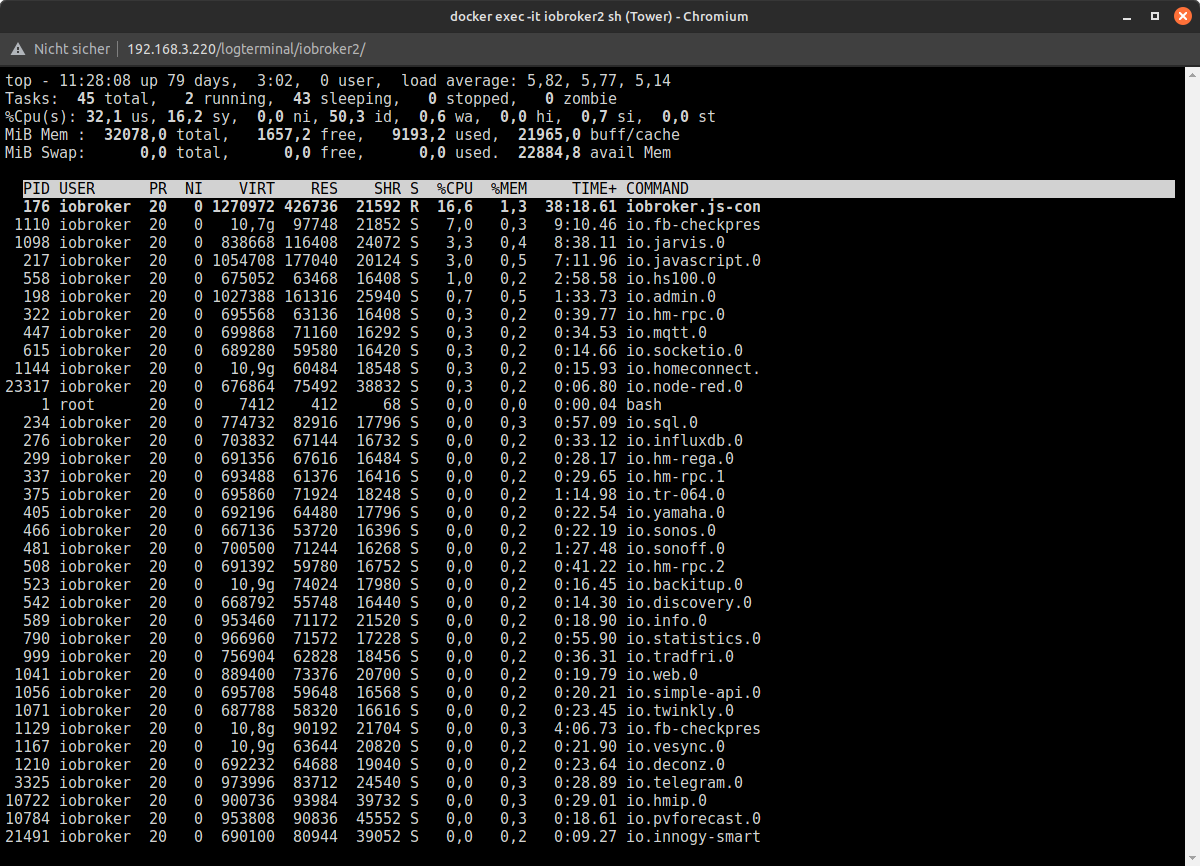
mal mittopnachsehen was das ist.Einmal top in der Konsole des iobroker Dockers:
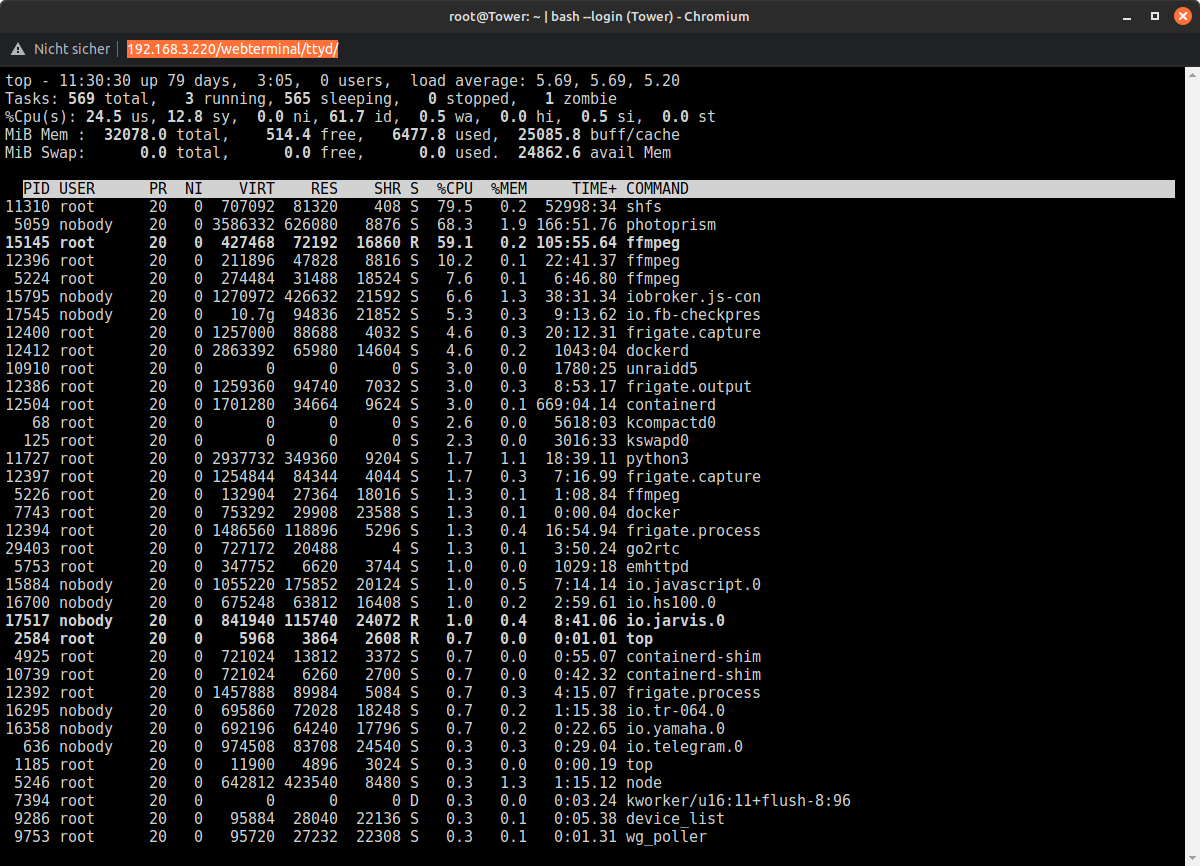
und einmal in der unraid Konsole:
@bubiman sagte in Innogy: deutliche Verzögerung bei Bewegungsmeldern:
:38:55 up 79 days,
ist wohl nach update nicht neugestartet
Das verstehe ich nicht. Das scheint eher die uptime des unraid Servers zu sein auf dem der iobroker Docker läift. Den iobroker Docker hatte ich gestern erst neugestartet.
@bubiman sagte in Innogy: deutliche Verzögerung bei Bewegungsmeldern:
mit einem Update der Zentrale und der Sensoren z
was wurde denn wie upgedated?
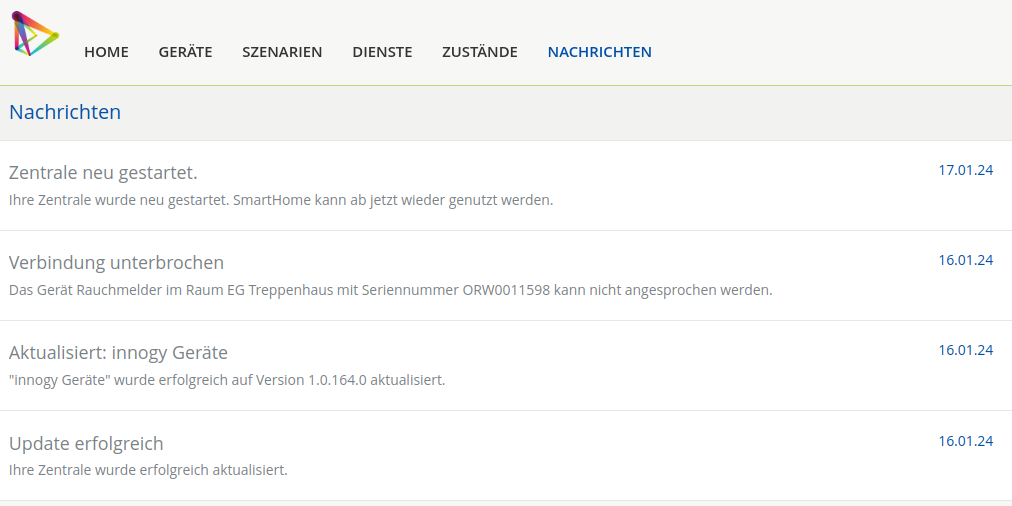
bei Docker ist das nicht der "normale" Weg!Nachdem ich die Probleme mit den innogy Bewegungsmeldern bemerkt hatte, hatte ich in die Webgui der Innogy Zentrale geschaut und die hatte am 16.01. Updates gemacht:
@bubiman sagte in Innogy: deutliche Verzögerung bei Bewegungsmeldern:
warn: hs100.0 (558) Socket connection Timeout 192_168_3_121 Pool Wärmepumpe ple
was klemmt denn da?
die sind aktuell gar nicht eingesteckt
Ich verstehe halt nicht warum ich die Bewegungen von einem Bewegungsmelder ohne zeitlicher Verzögerung in der iobroker Objekten sehe, bei zwei anderen Bewegungsmeldern dauert es aber 20-30sec. Deswegen war ich erstmal davon ausgegangen, dass es an den Bewegungsmeldern / der Innogy Zentrale liegt und nicht beim iobroker.
Vielen Dank
bubiman -
@homoran sagte in Innogy: deutliche Verzögerung bei Bewegungsmeldern:
@bubiman sagte in Innogy: deutliche Verzögerung bei Bewegungsmeldern:
Virtualization : Docker
so etwas gehört immer in den Eröffnungspost!
Ok, werde ich nächste mal dran denken
@bubiman sagte in Innogy: deutliche Verzögerung bei Bewegungsmeldern:
load average: 6.34, 6.07, 5.29
viel zu hoch
da rödelt irgendetwas massiv.
mal mittopnachsehen was das ist.Einmal top in der Konsole des iobroker Dockers:
und einmal in der unraid Konsole:
@bubiman sagte in Innogy: deutliche Verzögerung bei Bewegungsmeldern:
:38:55 up 79 days,
ist wohl nach update nicht neugestartet
Das verstehe ich nicht. Das scheint eher die uptime des unraid Servers zu sein auf dem der iobroker Docker läift. Den iobroker Docker hatte ich gestern erst neugestartet.
@bubiman sagte in Innogy: deutliche Verzögerung bei Bewegungsmeldern:
mit einem Update der Zentrale und der Sensoren z
was wurde denn wie upgedated?
bei Docker ist das nicht der "normale" Weg!Nachdem ich die Probleme mit den innogy Bewegungsmeldern bemerkt hatte, hatte ich in die Webgui der Innogy Zentrale geschaut und die hatte am 16.01. Updates gemacht:
@bubiman sagte in Innogy: deutliche Verzögerung bei Bewegungsmeldern:
warn: hs100.0 (558) Socket connection Timeout 192_168_3_121 Pool Wärmepumpe ple
was klemmt denn da?
die sind aktuell gar nicht eingesteckt
Ich verstehe halt nicht warum ich die Bewegungen von einem Bewegungsmelder ohne zeitlicher Verzögerung in der iobroker Objekten sehe, bei zwei anderen Bewegungsmeldern dauert es aber 20-30sec. Deswegen war ich erstmal davon ausgegangen, dass es an den Bewegungsmeldern / der Innogy Zentrale liegt und nicht beim iobroker.
Vielen Dank
bubiman@bubiman ich bin jetzt eigentlich raus, da ich mich mit docker, unraid &co. wegen der unnötigen Komplikationen nicht befasse.
Nur noch ein lerzter Hinweis:
die load average enthält neben CPU Last auch die Betrachtung von I/O Vorgängen.Die Verteilung der CPU Lasten ksnn ich bei dir nicht wirklich beurteilen sieht aber nicht so gravierend schlecht aus, wie die Load average es vermuten ließe.Dann könnten noch irgendwelche Probleme bei irgendwelchen I/O Vorgängen das System ausbremsen.
-
@homoran sagte in Innogy: deutliche Verzögerung bei Bewegungsmeldern:
@bubiman sagte in Innogy: deutliche Verzögerung bei Bewegungsmeldern:
Virtualization : Docker
so etwas gehört immer in den Eröffnungspost!
Ok, werde ich nächste mal dran denken
@bubiman sagte in Innogy: deutliche Verzögerung bei Bewegungsmeldern:
load average: 6.34, 6.07, 5.29
viel zu hoch
da rödelt irgendetwas massiv.
mal mittopnachsehen was das ist.Einmal top in der Konsole des iobroker Dockers:
und einmal in der unraid Konsole:
@bubiman sagte in Innogy: deutliche Verzögerung bei Bewegungsmeldern:
:38:55 up 79 days,
ist wohl nach update nicht neugestartet
Das verstehe ich nicht. Das scheint eher die uptime des unraid Servers zu sein auf dem der iobroker Docker läift. Den iobroker Docker hatte ich gestern erst neugestartet.
@bubiman sagte in Innogy: deutliche Verzögerung bei Bewegungsmeldern:
mit einem Update der Zentrale und der Sensoren z
was wurde denn wie upgedated?
bei Docker ist das nicht der "normale" Weg!Nachdem ich die Probleme mit den innogy Bewegungsmeldern bemerkt hatte, hatte ich in die Webgui der Innogy Zentrale geschaut und die hatte am 16.01. Updates gemacht:
@bubiman sagte in Innogy: deutliche Verzögerung bei Bewegungsmeldern:
warn: hs100.0 (558) Socket connection Timeout 192_168_3_121 Pool Wärmepumpe ple
was klemmt denn da?
die sind aktuell gar nicht eingesteckt
Ich verstehe halt nicht warum ich die Bewegungen von einem Bewegungsmelder ohne zeitlicher Verzögerung in der iobroker Objekten sehe, bei zwei anderen Bewegungsmeldern dauert es aber 20-30sec. Deswegen war ich erstmal davon ausgegangen, dass es an den Bewegungsmeldern / der Innogy Zentrale liegt und nicht beim iobroker.
Vielen Dank
bubiman@bubiman ich selbst habe keine Innogy Bewegungsmelder. Was du aber mal unabhängig von allem anderen probieren kannst, stoppe mal den Adapter und lösche die Datenpunkte der beiden BWM die verzögert melden. Dann starte den Adapter neu.
-
@bubiman ich selbst habe keine Innogy Bewegungsmelder. Was du aber mal unabhängig von allem anderen probieren kannst, stoppe mal den Adapter und lösche die Datenpunkte der beiden BWM die verzögert melden. Dann starte den Adapter neu.
@winni sagte in Innogy: deutliche Verzögerung bei Bewegungsmeldern:
@bubiman ich selbst habe keine Innogy Bewegungsmelder. Was du aber mal unabhängig von allem anderen probieren kannst, stoppe mal den Adapter und lösche die Datenpunkte der beiden BWM die verzögert melden. Dann starte den Adapter neu.
Das werde ich nachher mal probieren
-
@bubiman ich bin jetzt eigentlich raus, da ich mich mit docker, unraid &co. wegen der unnötigen Komplikationen nicht befasse.
Nur noch ein lerzter Hinweis:
die load average enthält neben CPU Last auch die Betrachtung von I/O Vorgängen.Die Verteilung der CPU Lasten ksnn ich bei dir nicht wirklich beurteilen sieht aber nicht so gravierend schlecht aus, wie die Load average es vermuten ließe.Dann könnten noch irgendwelche Probleme bei irgendwelchen I/O Vorgängen das System ausbremsen.
@homoran sagte in Innogy: deutliche Verzögerung bei Bewegungsmeldern:
@bubiman ich bin jetzt eigentlich raus, da ich mich mit docker, unraid &co. wegen der unnötigen Komplikationen nicht befasse.
Nur noch ein lerzter Hinweis:
die load average enthält neben CPU Last auch die Betrachtung von I/O Vorgängen.Die Verteilung der CPU Lasten ksnn ich bei dir nicht wirklich beurteilen sieht aber nicht so gravierend schlecht aus, wie die Load average es vermuten ließe.Dann könnten noch irgendwelche Probleme bei irgendwelchen I/O Vorgängen das System ausbremsen.
Danke für deine Unterstützung. In der Unraid Übersicht wird für den iobroker Docker ne CPU Last von 1-5% angegeben. Das hatte ich bisher immer als unkritisch angesehen. Der Atom hat eigentlich nur wirklich was zu tun wenn der Import von PhotoPrism läuft.
-
@homoran sagte in Innogy: deutliche Verzögerung bei Bewegungsmeldern:
@bubiman ich bin jetzt eigentlich raus, da ich mich mit docker, unraid &co. wegen der unnötigen Komplikationen nicht befasse.
Nur noch ein lerzter Hinweis:
die load average enthält neben CPU Last auch die Betrachtung von I/O Vorgängen.Die Verteilung der CPU Lasten ksnn ich bei dir nicht wirklich beurteilen sieht aber nicht so gravierend schlecht aus, wie die Load average es vermuten ließe.Dann könnten noch irgendwelche Probleme bei irgendwelchen I/O Vorgängen das System ausbremsen.
Danke für deine Unterstützung. In der Unraid Übersicht wird für den iobroker Docker ne CPU Last von 1-5% angegeben. Das hatte ich bisher immer als unkritisch angesehen. Der Atom hat eigentlich nur wirklich was zu tun wenn der Import von PhotoPrism läuft.
@bubiman sagte in Innogy: deutliche Verzögerung bei Bewegungsmeldern:
Der Atom hat eigentlich nur wirklich was zu tun wenn der Import von PhotoPrism läuft.
und dann hat der gesamte host keine Power mehr.
je nach Atömchen ist der nicht für so viele Anwendungen parallel ausgelegt.Möglicherweise blockiert der Import auch die I/O Kanäle

Hey! Du scheinst an dieser Unterhaltung interessiert zu sein, hast aber noch kein Konto.
Hast du es satt, bei jedem Besuch durch die gleichen Beiträge zu scrollen? Wenn du dich für ein Konto anmeldest, kommst du immer genau dorthin zurück, wo du zuvor warst, und kannst dich über neue Antworten benachrichtigen lassen (entweder per E-Mail oder Push-Benachrichtigung). Du kannst auch Lesezeichen speichern und Beiträge positiv bewerten, um anderen Community-Mitgliedern deine Wertschätzung zu zeigen.
Mit deinem Input könnte dieser Beitrag noch besser werden 💗
Registrieren AnmeldenSupport us
234
Online33.0k
Benutzer83.4k
Themen1.3m
Beiträge