Weiter zum Inhalt
  • Home
  • Aktuell
  • Tags
  • 0 Ungelesen 0
  • Kategorien
  • Unreplied
  • Beliebt
  • GitHub
  • Docu
  • Hilfe
Skins
  • Hell
  • Brite
  • Cerulean
  • Cosmo
  • Flatly
  • Journal
  • Litera
  • Lumen
  • Lux
  • Materia
  • Minty
  • Morph
  • Pulse
  • Sandstone
  • Simplex
  • Sketchy
  • Spacelab
  • United
  • Yeti
  • Zephyr
  • Dunkel
  • Cyborg
  • Darkly
  • Quartz
  • Slate
  • Solar
  • Superhero
  • Vapor

  • Standard: (Kein Skin)
  • Kein Skin
Einklappen
ioBroker Logo

Community Forum

donate donate
  1. ioBroker Community Home
  2. Deutsch
  3. ioBroker Allgemein
  4. Objekte werden verzögert aktualisiert

NEWS

  • Monatsrückblick Januar/Februar 2026 ist online!
    BluefoxB
    Bluefox
    18
    1
    757

  • Jahresrückblick 2025 – unser neuer Blogbeitrag ist online! ✨
    BluefoxB
    Bluefox
    18
    1
    6.1k

  • Neuer Blogbeitrag: Monatsrückblick - Dezember 2025 🎄
    BluefoxB
    Bluefox
    13
    1
    1.5k

Objekte werden verzögert aktualisiert

Geplant Angeheftet Gesperrt Verschoben ioBroker Allgemein
16 Beiträge 4 Kommentatoren 1.2k Aufrufe 4 Beobachtet
  • Älteste zuerst
  • Neuste zuerst
  • Meiste Stimmen
Antworten
  • In einem neuen Thema antworten
Anmelden zum Antworten
Dieses Thema wurde gelöscht. Nur Nutzer mit entsprechenden Rechten können es sehen.
  • OliverIOO Offline
    OliverIOO Offline
    OliverIO
    schrieb am zuletzt editiert von
    #2

    @pepsi1183

    so etwas hört sich meist nach gründen im system an.
    welche hardware?
    wieviel ram?
    wie ist so die prozessorauslastung deines systems?
    wenn der rechner mit lauter anderen dingen beschäftigt ist, dann dauert es eine weile, bis ein datenpunkt aktualisiert wird.

    also am besten mal das ergebnis des folgenden befehls hier posten

    iob diag
    

    und dann mal

    top
    oder 
    htop
    

    beobachten, welche prozesse da immer am meisten auslastung erzeugen (CPU-Spalte), aber auch RAM (MEM) des prozesses betrachten

    Meine Adapter und Widgets
    TVProgram, SqueezeboxRPC, OpenLiga, RSSFeed, MyTime,, pi-hole2, vis-json-template, skiinfo, vis-mapwidgets, vis-2-widgets-rssfeed
    Links im Profil

    Pepsi1183P 1 Antwort Letzte Antwort
    0
    • OliverIOO OliverIO

      @pepsi1183

      so etwas hört sich meist nach gründen im system an.
      welche hardware?
      wieviel ram?
      wie ist so die prozessorauslastung deines systems?
      wenn der rechner mit lauter anderen dingen beschäftigt ist, dann dauert es eine weile, bis ein datenpunkt aktualisiert wird.

      also am besten mal das ergebnis des folgenden befehls hier posten

      iob diag
      

      und dann mal

      top
      oder 
      htop
      

      beobachten, welche prozesse da immer am meisten auslastung erzeugen (CPU-Spalte), aber auch RAM (MEM) des prozesses betrachten

      Pepsi1183P Offline
      Pepsi1183P Offline
      Pepsi1183
      schrieb am zuletzt editiert von
      #3

      @oliverio
      Hi Danke für die Hilfe:

      Also iob läuft als eine Proxmox VM
      CPU: 4 (2 Socets 2 Kerne)
      6GB Arbeitsspeicher
      unter Debian 11

      Die 6GB Arbeitsspeicher werden glaube ich langsam eng, oder zumindest werden die gut belegt....

      ======================= SUMMARY =======================
                              v.2023-10-10
      
      
         Static hostname: ioBrokerVM
               Icon name: computer-vm
                 Chassis: vm
          Virtualization: kvm
        Operating System: Debian GNU/Linux 11 (bullseye)
                  Kernel: Linux 5.10.0-21-amd64
            Architecture: x86-64
      
      Installation:           kvm
      Kernel:                 x86_64
      Userland:               amd64
      Timezone:               Europe/Berlin (CEST, +0200)
      User-ID:                1000
      X-Server:               false
      Boot Target:            graphical.target
      
      Pending OS-Updates:     3
      Pending iob updates:    0
      
      /home/iobroker/.diag.sh: line 486: nodejs: command not found
      Nodejs-Installation:
                              /usr/bin/node           v16.20.2
                              /usr/bin/npm            8.19.4
                              /usr/bin/npx            8.19.4
                              /usr/bin/corepack       0.17.0
      
      Recommended versions are nodejs 18.18.2 and npm 9.8.1
      *** nodejs is NOT correctly installed ***
      Wrong installation path detected. This needs to be fixed.
      
      Please check
      https://forum.iobroker.net/topic/35090/howto-nodejs-installation-und-upgrades-unter-debian
      for more information on how to fix these errors.
      
      MEMORY:
                     total        used        free      shared  buff/cache   available
      Mem:            5.9G        3.7G        856M        0.0K        1.3G        2.1G
      Swap:           974M        214M        760M
      Total:          6.9G        4.0G        1.6G
      
      Active iob-Instances:   35
      Active repo(s): stable
      
      ioBroker Core:          js-controller           5.0.12
                              admin                   6.10.1
      
      ioBroker Status:        iobroker is running on this host.
      
      
      Objects type: jsonl
      States  type: jsonl
      
      Status admin and web instance:
      + system.adapter.admin.0                  : admin                 : ioBrokerVM                               -  enabled, port: 8081, bind: 0.0.0.0, run as: admin
      + system.adapter.web.0                    : web                   : ioBrokerVM                               -  enabled, port: 8082, bind: 0.0.0.0, run as: admin
      
      Objects:                50498
      States:                 32857
      
      Size of iob-Database:
      
      45M     /opt/iobroker/iobroker-data/objects.jsonl
      17M     /opt/iobroker/iobroker-data/states.jsonl


      =================== END OF SUMMARY ====================
      

      Ressourcenseitig sieht das eigentlich entspannt aus, wenn ich das richtig verstehe, keine großen ausbrecher......


      top - 02:04:48 up 6 days, 2:44, 1 user, load average: 0,27, 0,50, 0,44
      Tasks: 153 total, 1 running, 152 sleeping, 0 stopped, 0 zombie
      %CPU(s): 6,0 us, 0,9 sy, 0,0 ni, 92,1 id, 0,1 wa, 0,0 hi, 0,8 si, 0,0 st
      MiB Spch: 5941,0 total, 1010,9 free, 3580,1 used, 1349,9 buff/cache
      MiB Swap: 975,0 total, 760,7 free, 214,2 used. 2309,0 avail Spch

      PID USER      PR  NI    VIRT    RES    SHR S  %CPU  %MEM     ZEIT+ BEFEHL
      423 iobroker  20   0 1403196 461540  33700 S  14,0   7,6   1675:30 iobroker.js-con
      653 iobroker  20   0  733520 175136  33496 S   9,6   2,9 704:45.85 io.shelly.0
      551 iobroker  20   0 1214040 315480  38664 S   3,7   5,2 294:47.69 io.javascript.0
      519 iobroker  20   0  967252 107228  33276 S   3,0   1,8 212:20.45 io.history.0
      534 iobroker  20   0  793372 122988  33456 S   2,7   2,0 217:34.17 io.influxdb.0
      623 iobroker  20   0  694272  98812  33592 S   0,7   1,6  23:43.42 io.modbus.0
      492 iobroker  20   0 1029900 181864  39216 S   0,3   3,0  28:17.70 io.admin.0
      679 iobroker  20   0   10,7g 108828  34772 S   0,3   1,8  30:29.02 io.synology.0
      694 iobroker  20   0   10,7g 110952  34908 S   0,3   1,8  34:37.15 io.synology.1
      793 iobroker  20   0  740016  81180  33376 S   0,3   1,3   2:33.03 io.broadlink2.0
      

      1445 iobroker 20 0 10,9g 79372 35440 S 0,3 1,3 2:34.45 io.pushbullet.1
      1505 iobroker 20 0 670848 70476 33096 S 0,3 1,2 2:24.73 io.vis-inventwo
      1580 iobroker 20 0 10,6g 110952 34116 S 0,3 1,8 24:40.34 io.homekit-cont
      1595 iobroker 20 0 690516 95296 33324 S 0,3 1,6 16:29.57 io.awtrix-light
      1715 iobroker 20 0 668852 96568 33532 S 0,3 1,6 6:38.33 io.deconz.0
      1 root 20 0 163836 8764 6396 S 0,0 0,1 0:03.33 systemd

      Thomas BraunT 1 Antwort Letzte Antwort
      0
      • Pepsi1183P Pepsi1183

        @oliverio
        Hi Danke für die Hilfe:

        Also iob läuft als eine Proxmox VM
        CPU: 4 (2 Socets 2 Kerne)
        6GB Arbeitsspeicher
        unter Debian 11

        Die 6GB Arbeitsspeicher werden glaube ich langsam eng, oder zumindest werden die gut belegt....

        ======================= SUMMARY =======================
                                v.2023-10-10
        
        
           Static hostname: ioBrokerVM
                 Icon name: computer-vm
                   Chassis: vm
            Virtualization: kvm
          Operating System: Debian GNU/Linux 11 (bullseye)
                    Kernel: Linux 5.10.0-21-amd64
              Architecture: x86-64
        
        Installation:           kvm
        Kernel:                 x86_64
        Userland:               amd64
        Timezone:               Europe/Berlin (CEST, +0200)
        User-ID:                1000
        X-Server:               false
        Boot Target:            graphical.target
        
        Pending OS-Updates:     3
        Pending iob updates:    0
        
        /home/iobroker/.diag.sh: line 486: nodejs: command not found
        Nodejs-Installation:
                                /usr/bin/node           v16.20.2
                                /usr/bin/npm            8.19.4
                                /usr/bin/npx            8.19.4
                                /usr/bin/corepack       0.17.0
        
        Recommended versions are nodejs 18.18.2 and npm 9.8.1
        *** nodejs is NOT correctly installed ***
        Wrong installation path detected. This needs to be fixed.
        
        Please check
        https://forum.iobroker.net/topic/35090/howto-nodejs-installation-und-upgrades-unter-debian
        for more information on how to fix these errors.
        
        MEMORY:
                       total        used        free      shared  buff/cache   available
        Mem:            5.9G        3.7G        856M        0.0K        1.3G        2.1G
        Swap:           974M        214M        760M
        Total:          6.9G        4.0G        1.6G
        
        Active iob-Instances:   35
        Active repo(s): stable
        
        ioBroker Core:          js-controller           5.0.12
                                admin                   6.10.1
        
        ioBroker Status:        iobroker is running on this host.
        
        
        Objects type: jsonl
        States  type: jsonl
        
        Status admin and web instance:
        + system.adapter.admin.0                  : admin                 : ioBrokerVM                               -  enabled, port: 8081, bind: 0.0.0.0, run as: admin
        + system.adapter.web.0                    : web                   : ioBrokerVM                               -  enabled, port: 8082, bind: 0.0.0.0, run as: admin
        
        Objects:                50498
        States:                 32857
        
        Size of iob-Database:
        
        45M     /opt/iobroker/iobroker-data/objects.jsonl
        17M     /opt/iobroker/iobroker-data/states.jsonl


        =================== END OF SUMMARY ====================
        

        Ressourcenseitig sieht das eigentlich entspannt aus, wenn ich das richtig verstehe, keine großen ausbrecher......


        top - 02:04:48 up 6 days, 2:44, 1 user, load average: 0,27, 0,50, 0,44
        Tasks: 153 total, 1 running, 152 sleeping, 0 stopped, 0 zombie
        %CPU(s): 6,0 us, 0,9 sy, 0,0 ni, 92,1 id, 0,1 wa, 0,0 hi, 0,8 si, 0,0 st
        MiB Spch: 5941,0 total, 1010,9 free, 3580,1 used, 1349,9 buff/cache
        MiB Swap: 975,0 total, 760,7 free, 214,2 used. 2309,0 avail Spch

        PID USER      PR  NI    VIRT    RES    SHR S  %CPU  %MEM     ZEIT+ BEFEHL
        423 iobroker  20   0 1403196 461540  33700 S  14,0   7,6   1675:30 iobroker.js-con
        653 iobroker  20   0  733520 175136  33496 S   9,6   2,9 704:45.85 io.shelly.0
        551 iobroker  20   0 1214040 315480  38664 S   3,7   5,2 294:47.69 io.javascript.0
        519 iobroker  20   0  967252 107228  33276 S   3,0   1,8 212:20.45 io.history.0
        534 iobroker  20   0  793372 122988  33456 S   2,7   2,0 217:34.17 io.influxdb.0
        623 iobroker  20   0  694272  98812  33592 S   0,7   1,6  23:43.42 io.modbus.0
        492 iobroker  20   0 1029900 181864  39216 S   0,3   3,0  28:17.70 io.admin.0
        679 iobroker  20   0   10,7g 108828  34772 S   0,3   1,8  30:29.02 io.synology.0
        694 iobroker  20   0   10,7g 110952  34908 S   0,3   1,8  34:37.15 io.synology.1
        793 iobroker  20   0  740016  81180  33376 S   0,3   1,3   2:33.03 io.broadlink2.0
        

        1445 iobroker 20 0 10,9g 79372 35440 S 0,3 1,3 2:34.45 io.pushbullet.1
        1505 iobroker 20 0 670848 70476 33096 S 0,3 1,2 2:24.73 io.vis-inventwo
        1580 iobroker 20 0 10,6g 110952 34116 S 0,3 1,8 24:40.34 io.homekit-cont
        1595 iobroker 20 0 690516 95296 33324 S 0,3 1,6 16:29.57 io.awtrix-light
        1715 iobroker 20 0 668852 96568 33532 S 0,3 1,6 6:38.33 io.deconz.0
        1 root 20 0 163836 8764 6396 S 0,0 0,1 0:03.33 systemd

        Thomas BraunT Online
        Thomas BraunT Online
        Thomas Braun
        Most Active
        schrieb am zuletzt editiert von
        #4

        @pepsi1183

        Bitte die Langfassung.
        Und nodejs schon mal in Angriff nehmen:

        https://forum.iobroker.net/topic/69068/neuer-befehl-iob-nodejs-update

        Linux-Werkzeugkasten:
        https://forum.iobroker.net/topic/42952/der-kleine-iobroker-linux-werkzeugkasten
        NodeJS Fixer Skript:
        https://forum.iobroker.net/topic/68035/iob-node-fix-skript
        iob_diag: curl -sLf -o diag.sh https://iobroker.net/diag.sh && bash diag.sh

        Pepsi1183P 1 Antwort Letzte Antwort
        0
        • Thomas BraunT Thomas Braun

          @pepsi1183

          Bitte die Langfassung.
          Und nodejs schon mal in Angriff nehmen:

          https://forum.iobroker.net/topic/69068/neuer-befehl-iob-nodejs-update

          Pepsi1183P Offline
          Pepsi1183P Offline
          Pepsi1183
          schrieb am zuletzt editiert von Pepsi1183
          #5

          @thomas-braun
          Danke für den Tip mit Nodejs, hat aber auch nichts gebracht.

          wie komme ich an die "Langfassung" Putty springt direkt ins summery....

          ======= Start marking the full check here =========

          Skript v.2023-10-10
          
          *** BASE SYSTEM ***
             Static hostname: ioBrokerVM
                   Icon name: computer-vm
                     Chassis: vm
              Virtualization: kvm
            Operating System: Debian GNU/Linux 11 (bullseye)
                      Kernel: Linux 5.10.0-21-amd64
                Architecture: x86-64
          
          model name      : Common KVM processor
          Docker          : false
          Virtualization  : kvm
          Kernel          : x86_64
          Userland        : amd64
          
          Systemuptime and Load:
           00:54:56 up  1:28,  1 user,  load average: 0.45, 0.58, 0.45
          CPU threads: 8
          
          
          *** Time and Time Zones ***
                         Local time: Sun 2023-10-15 00:54:56 CEST
                     Universal time: Sat 2023-10-14 22:54:56 UTC
                           RTC time: Sat 2023-10-14 22:54:57
                          Time zone: Europe/Berlin (CEST, +0200)
          System clock synchronized: yes
                        NTP service: active
                    RTC in local TZ: no
          
          *** User and Groups ***
          christoph
          /home/christoph
          christoph cdrom floppy sudo audio dip video plugdev netdev iobroker
          
          *** X-Server-Setup ***
          X-Server:       false
          Desktop:
          Terminal:       tty
          Boot Target:    graphical.target
          
          *** MEMORY ***
                         total        used        free      shared  buff/cache   available
          Mem:            5.9G        3.7G        1.1G        0.0K        1.2G        2.1G
          Swap:           974M          0B        974M
          Total:          6.9G        3.7G        2.0G
          
                   5940 M total memory
                   3692 M used memory
                    361 M active memory
                   4172 M inactive memory
                   1070 M free memory
                    153 M buffer memory
                   1024 M swap cache
                    974 M total swap
                      0 M used swap
                    974 M free swap
          
          *** FAILED SERVICES ***
          
            UNIT LOAD ACTIVE SUB DESCRIPTION
          0 loaded units listed.
          
          *** FILESYSTEM ***
          Filesystem     Type      Size  Used Avail Use% Mounted on
          udev           devtmpfs  2.9G     0  2.9G   0% /dev
          tmpfs          tmpfs     595M  496K  594M   1% /run
          /dev/sda1      ext4       48G   13G   34G  27% /
          tmpfs          tmpfs     3.0G     0  3.0G   0% /dev/shm
          tmpfs          tmpfs     5.0M     0  5.0M   0% /run/lock
          tmpfs          tmpfs     595M     0  595M   0% /run/user/1000
          
          Messages concerning ext4 filesystem in dmesg:
          [Sat Oct 14 23:26:57 2023] EXT4-fs (sda1): mounted filesystem with ordered data mode. Opts: (null)
          [Sat Oct 14 23:26:57 2023] EXT4-fs (sda1): re-mounted. Opts: errors=remount-ro
          
          Show mounted filesystems \(real ones only\):
          TARGET SOURCE    FSTYPE OPTIONS
          /      /dev/sda1 ext4   rw,relatime,errors=remount-ro
          
          Files in neuralgic directories:
          
          /var:
          5.7G    /var/
          4.7G    /var/log
          4.1G    /var/log/journal/f27f865acaa7446abfab405c3542c7b6
          4.1G    /var/log/journal
          643M    /var/lib
          
          Hint: You are currently not seeing messages from other users and the system.
                Users in groups 'adm', 'systemd-journal' can see all messages.
                Pass -q to turn off this notice.
          Archived and active journals take up 32.0M in the file system.
          
          /opt/iobroker/backups:
          22M     /opt/iobroker/backups/
          
          /opt/iobroker/iobroker-data:
          1.3G    /opt/iobroker/iobroker-data/
          493M    /opt/iobroker/iobroker-data/files
          461M    /opt/iobroker/iobroker-data/iobroker-data
          197M    /opt/iobroker/iobroker-data/backup-objects
          78M     /opt/iobroker/iobroker-data/files/icons-open-icon-library-png
          
          The five largest files in iobroker-data are:
          78M     /opt/iobroker/iobroker-data/states.jsonl
          42M     /opt/iobroker/iobroker-data/objects.jsonl
          41M     /opt/iobroker/iobroker-data/files/material/static/js/main.c5478f66.js.map
          35M     /opt/iobroker/iobroker-data/files/devices.admin/static/js/main.24f2bb56.js.map
          21M     /opt/iobroker/iobroker-data/files/web.admin/static/js/main.edf7552a.js.map
          
          USB-Devices by-id:
          USB-Sticks -  Avoid direct links to /dev/* in your adapter setups, please always prefer the links 'by-id':
          
          find: '/dev/serial/by-id/': No such file or directory
          
          *** NodeJS-Installation ***
          
          /usr/bin/nodejs         v18.18.2
          /usr/bin/node           v18.18.2
          /usr/bin/npm            9.8.1
          /usr/bin/npx            9.8.1
          /usr/bin/corepack       0.19.0
          
          
          nodejs:
            Installed: 18.18.2-1nodesource1
            Candidate: 18.18.2-1nodesource1
            Version table:
           *** 18.18.2-1nodesource1 1001
                  500 https://deb.nodesource.com/node_18.x nodistro/main amd64 Packages
                  100 /var/lib/dpkg/status
               18.18.1-1nodesource1 1001
                  500 https://deb.nodesource.com/node_18.x nodistro/main amd64 Packages
               18.18.0-1nodesource1 1001
                  500 https://deb.nodesource.com/node_18.x nodistro/main amd64 Packages
               18.17.1-1nodesource1 1001
                  500 https://deb.nodesource.com/node_18.x nodistro/main amd64 Packages
               18.17.0-1nodesource1 1001
                  500 https://deb.nodesource.com/node_18.x nodistro/main amd64 Packages
               18.16.1-1nodesource1 1001
                  500 https://deb.nodesource.com/node_18.x nodistro/main amd64 Packages
               18.16.0-1nodesource1 1001
                  500 https://deb.nodesource.com/node_18.x nodistro/main amd64 Packages
               18.15.0-1nodesource1 1001
                  500 https://deb.nodesource.com/node_18.x nodistro/main amd64 Packages
               18.14.2-1nodesource1 1001
                  500 https://deb.nodesource.com/node_18.x nodistro/main amd64 Packages
               18.14.1-1nodesource1 1001
                  500 https://deb.nodesource.com/node_18.x nodistro/main amd64 Packages
               18.14.0-1nodesource1 1001
                  500 https://deb.nodesource.com/node_18.x nodistro/main amd64 Packages
               18.13.0-1nodesource1 1001
                  500 https://deb.nodesource.com/node_18.x nodistro/main amd64 Packages
               18.12.0-1nodesource1 1001
                  500 https://deb.nodesource.com/node_18.x nodistro/main amd64 Packages
               18.11.0-1nodesource1 1001
                  500 https://deb.nodesource.com/node_18.x nodistro/main amd64 Packages
               18.10.0-1nodesource1 1001
                  500 https://deb.nodesource.com/node_18.x nodistro/main amd64 Packages
               18.9.1-1nodesource1 1001
                  500 https://deb.nodesource.com/node_18.x nodistro/main amd64 Packages
               18.9.0-1nodesource1 1001
                  500 https://deb.nodesource.com/node_18.x nodistro/main amd64 Packages
               18.8.0-1nodesource1 1001
                  500 https://deb.nodesource.com/node_18.x nodistro/main amd64 Packages
               18.7.0-1nodesource1 1001
                  500 https://deb.nodesource.com/node_18.x nodistro/main amd64 Packages
               18.6.0-1nodesource1 1001
                  500 https://deb.nodesource.com/node_18.x nodistro/main amd64 Packages
               18.5.0-1nodesource1 1001
                  500 https://deb.nodesource.com/node_18.x nodistro/main amd64 Packages
               18.4.0-1nodesource1 1001
                  500 https://deb.nodesource.com/node_18.x nodistro/main amd64 Packages
               18.3.0-1nodesource1 1001
                  500 https://deb.nodesource.com/node_18.x nodistro/main amd64 Packages
               18.2.0-1nodesource1 1001
                  500 https://deb.nodesource.com/node_18.x nodistro/main amd64 Packages
               18.1.0-1nodesource1 1001
                  500 https://deb.nodesource.com/node_18.x nodistro/main amd64 Packages
               18.0.0-1nodesource1 1001
                  500 https://deb.nodesource.com/node_18.x nodistro/main amd64 Packages
               12.22.12~dfsg-1~deb11u4 500
                  500 http://deb.debian.org/debian bullseye/main amd64 Packages
                  500 http://security.debian.org/debian-security bullseye-security/main amd64 Packages
          
          Temp directories causing npm8 problem: 0
          No problems detected
          
          Errors in npm tree:
          
          *** ioBroker-Installation ***
          
          ioBroker Status
          iobroker is running on this host.
          
          
          Objects type: jsonl
          States  type: jsonl
          
          Core adapters versions
          js-controller:  5.0.12
          admin:          6.10.1
          javascript:     7.1.4
          
          Adapters from github:   2
          
          Adapter State
          + system.adapter.accuweather.0            : accuweather           : ioBrokerVM                               -  enabled
          + system.adapter.admin.0                  : admin                 : ioBrokerVM                               -  enabled, port: 8081, bind: 0.0.0.0, run as: admin
          + system.adapter.alexa2.0                 : alexa2                : ioBrokerVM                               -  enabled
          + system.adapter.awtrix-light.0           : awtrix-light          : ioBrokerVM                               -  enabled
          + system.adapter.awtrix-light.1           : awtrix-light          : ioBrokerVM                               -  enabled
          + system.adapter.backitup.0               : backitup              : ioBrokerVM                               -  enabled
          + system.adapter.broadlink2.0             : broadlink2            : ioBrokerVM                               -  enabled
          + system.adapter.chromecast.1             : chromecast            : ioBrokerVM                               -  enabled
          + system.adapter.deconz.0                 : deconz                : ioBrokerVM                               -  enabled, port: 80
          + system.adapter.deconz.1                 : deconz                : ioBrokerVM                               -  enabled, port: 80
            system.adapter.devices.0                : devices               : ioBrokerVM                               - disabled
          + system.adapter.discovery.0              : discovery             : ioBrokerVM                               -  enabled
            system.adapter.eusec.0                  : eusec                 : ioBrokerVM                               - disabled
          + system.adapter.fullcalendar.0           : fullcalendar          : ioBrokerVM                               -  enabled
            system.adapter.fullybrowser.0           : fullybrowser          : ioBrokerVM                               - disabled
          + system.adapter.harmony.0                : harmony               : ioBrokerVM                               -  enabled
          + system.adapter.history.0                : history               : ioBrokerVM                               -  enabled
          + system.adapter.homekit-controller.0     : homekit-controller    : ioBrokerVM                               -  enabled
          + system.adapter.hue.0                    : hue                   : ioBrokerVM                               -  enabled, port: 443
            system.adapter.ical.0                   : ical                  : ioBrokerVM                               - disabled
            system.adapter.icons-icons8.0           : icons-icons8          : ioBrokerVM                               - disabled
            system.adapter.icons-material-png.0     : icons-material-png    : ioBrokerVM                               - disabled
            system.adapter.icons-material-svg.0     : icons-material-svg    : ioBrokerVM                               - disabled
            system.adapter.icons-mfd-svg.0          : icons-mfd-svg         : ioBrokerVM                               - disabled
            system.adapter.icons-open-icon-library-png.0: icons-open-icon-library-png: ioBrokerVM                               - disabled
          + system.adapter.influxdb.0               : influxdb              : ioBrokerVM                               -  enabled, port: 8086
          + system.adapter.info.0                   : info                  : ioBrokerVM                               -  enabled
          + system.adapter.iot.0                    : iot                   : ioBrokerVM                               -  enabled
          + system.adapter.javascript.0             : javascript            : ioBrokerVM                               -  enabled
            system.adapter.material.0               : material              : ioBrokerVM                               - disabled
          + system.adapter.modbus.0                 : modbus                : ioBrokerVM                               -  enabled
            system.adapter.mqtt-client.0            : mqtt-client           : ioBrokerVM                               - disabled, port: 1883
          + system.adapter.mqtt.0                   : mqtt                  : ioBrokerVM                               -  enabled, port: 1883, bind: 192.168.73.54
          + system.adapter.myenergi.0               : myenergi              : ioBrokerVM                               -  enabled
            system.adapter.net-tools.0              : net-tools             : ioBrokerVM                               - disabled
            system.adapter.nina.0                   : nina                  : ioBrokerVM                               - disabled
            system.adapter.node-red.0               : node-red              : ioBrokerVM                               - disabled, port: 1880, bind: 0.0.0.0
            system.adapter.paw.0                    : paw                   : ioBrokerVM                               - disabled, port: 8898
          + system.adapter.pi-hole.0                : pi-hole               : ioBrokerVM                               -  enabled
            system.adapter.ping.0                   : ping                  : ioBrokerVM                               - disabled
          + system.adapter.proxmox.0                : proxmox               : ioBrokerVM                               -  enabled, port: 8006
          + system.adapter.pushbullet.0             : pushbullet            : ioBrokerVM                               -  enabled
          + system.adapter.pushbullet.1             : pushbullet            : ioBrokerVM                               -  enabled
            system.adapter.scenes.0                 : scenes                : ioBrokerVM                               - disabled
          + system.adapter.semp.0                   : semp                  : ioBrokerVM                               -  enabled
          + system.adapter.shelly.0                 : shelly                : ioBrokerVM                               -  enabled, port: 1882, bind: 0.0.0.0
            system.adapter.simple-api.0             : simple-api            : ioBrokerVM                               - disabled, port: 8087, bind: 0.0.0.0, run as: admin
            system.adapter.sma-em.0                 : sma-em                : ioBrokerVM                               - disabled
            system.adapter.sonos.0                  : sonos                 : ioBrokerVM                               - disabled
          + system.adapter.synology.0               : synology              : ioBrokerVM                               -  enabled, port: 5000
          + system.adapter.synology.1               : synology              : ioBrokerVM                               -  enabled, port: 5000
          + system.adapter.tr-064.0                 : tr-064                : ioBrokerVM                               -  enabled
            system.adapter.vis-canvas-gauges.0      : vis-canvas-gauges     : ioBrokerVM                               -  enabled
            system.adapter.vis-colorpicker.0        : vis-colorpicker       : ioBrokerVM                               -  enabled
            system.adapter.vis-fancyswitch.0        : vis-fancyswitch       : ioBrokerVM                               -  enabled
            system.adapter.vis-google-fonts.0       : vis-google-fonts      : ioBrokerVM                               -  enabled
            system.adapter.vis-hqwidgets.0          : vis-hqwidgets         : ioBrokerVM                               -  enabled
            system.adapter.vis-icontwo.0            : vis-icontwo           : ioBrokerVM                               -  enabled
          + system.adapter.vis-inventwo.0           : vis-inventwo          : ioBrokerVM                               -  enabled
            system.adapter.vis-jqui-mfd.0           : vis-jqui-mfd          : ioBrokerVM                               -  enabled
            system.adapter.vis-material-advanced.0  : vis-material-advanced : ioBrokerVM                               -  enabled
            system.adapter.vis-materialdesign.0     : vis-materialdesign    : ioBrokerVM                               -  enabled
            system.adapter.vis-metro.0              : vis-metro             : ioBrokerVM                               -  enabled
            system.adapter.vis-players.0            : vis-players           : ioBrokerVM                               -  enabled
            system.adapter.vis-timeandweather.0     : vis-timeandweather    : ioBrokerVM                               -  enabled
            system.adapter.vis.0                    : vis                   : ioBrokerVM                               -  enabled
          + system.adapter.web.0                    : web                   : ioBrokerVM                               -  enabled, port: 8082, bind: 0.0.0.0, run as: admin
            system.adapter.ws.0                     : ws                    : ioBrokerVM                               - disabled, port: 8084, bind: 192.168.73.54, run as: admin
          
          + instance is alive
          
          Enabled adapters with bindings
          + system.adapter.admin.0                  : admin                 : ioBrokerVM                               -  enabled, port: 8081, bind: 0.0.0.0, run as: admin
          + system.adapter.deconz.0                 : deconz                : ioBrokerVM                               -  enabled, port: 80
          + system.adapter.deconz.1                 : deconz                : ioBrokerVM                               -  enabled, port: 80
          + system.adapter.hue.0                    : hue                   : ioBrokerVM                               -  enabled, port: 443
          + system.adapter.influxdb.0               : influxdb              : ioBrokerVM                               -  enabled, port: 8086
          + system.adapter.mqtt.0                   : mqtt                  : ioBrokerVM                               -  enabled, port: 1883, bind: 192.168.73.54
          + system.adapter.proxmox.0                : proxmox               : ioBrokerVM                               -  enabled, port: 8006
          + system.adapter.shelly.0                 : shelly                : ioBrokerVM                               -  enabled, port: 1882, bind: 0.0.0.0
          + system.adapter.synology.0               : synology              : ioBrokerVM                               -  enabled, port: 5000
          + system.adapter.synology.1               : synology              : ioBrokerVM                               -  enabled, port: 5000
          + system.adapter.web.0                    : web                   : ioBrokerVM                               -  enabled, port: 8082, bind: 0.0.0.0, run as: admin
          
          ioBroker-Repositories
          stable        : http://download.iobroker.net/sources-dist.json
          beta          : http://download.iobroker.net/sources-dist-latest.json
          
          Active repo(s): stable
          
          Installed ioBroker-Instances
          Used repository: stable
          Adapter    "accuweather"  : 1.3.1    , installed 1.3.1
          Adapter    "admin"        : 6.10.1   , installed 6.10.1
          Adapter    "alexa2"       : 3.25.2   , installed 3.25.2
          Adapter    "awtrix-light" : 0.8.0    , installed 0.8.0
          Adapter    "backitup"     : 2.8.1    , installed 2.8.1
          Adapter    "broadlink2"   : 2.1.5    , installed 2.1.5
          Adapter    "chromecast"   : 3.0.3    , installed 3.0.3
          Adapter    "deconz"       : 1.3.21   , installed 1.3.21
          Adapter    "devices"      : 1.1.5    , installed 1.1.5
          Adapter    "discovery"    : 3.1.0    , installed 3.1.0
          Adapter    "eusec"        : 1.1.2    , installed 1.1.2
          Adapter    "fb-checkpresence": 1.2.2 , installed 1.2.2
          Adapter    "fullcalendar" : 1.2.0    , installed 2.2.2
          Adapter    "fullybrowser" : 2.1.2    , installed 2.1.2
          Adapter    "harmony"      : 1.2.2    , installed 1.2.2
          Adapter    "history"      : 2.2.6    , installed 2.2.6
          Adapter    "homekit-controller": 0.5.8, installed 0.5.8
          Adapter    "hue"          : 3.10.0   , installed 3.10.0
          Adapter    "ical"         : 1.13.3   , installed 1.13.3
          Adapter    "icons-icons8" : 0.0.1    , installed 0.0.1
          Adapter    "icons-material-png": 0.1.0, installed 0.1.0
          Adapter    "icons-material-svg": 0.1.0, installed 0.1.0
          Adapter    "icons-mfd-svg": 1.1.0    , installed 1.1.0
          Adapter    "icons-open-icon-library-png": 0.1.2, installed 0.1.2
          Adapter    "influxdb"     : 3.2.0    , installed 3.2.0
          Adapter    "info"         : 2.0.0    , installed 2.0.0
          Adapter    "iot"          : 1.14.5   , installed 1.14.5
          Adapter    "javascript"   : 7.1.4    , installed 7.1.4
          Controller "js-controller": 5.0.12   , installed 5.0.12
          Adapter    "material"     : 1.3.1    , installed 1.3.1
          Adapter    "modbus"       : 5.0.11   , installed 5.0.11
          Adapter    "mqtt"         : 4.1.1    , installed 4.1.1
          Adapter    "mqtt-client"  : 1.6.3    , installed 1.6.3
          Adapter    "myenergi"     : 0.0.3    , installed 0.0.3
          Adapter    "net-tools"    : 0.2.0    , installed 0.2.0
          Adapter    "nina"         : 0.0.25   , installed 0.0.25
          Adapter    "node-red"     : 4.0.3    , installed 4.0.3
          Adapter    "paw"          : 0.3.2    , installed 0.3.2
          Adapter    "pi-hole"      : 1.3.6    , installed 1.3.6
          Adapter    "ping"         : 1.6.2    , installed 1.6.2
          Adapter    "proxmox"      : 1.3.5    , installed 1.3.5
          Adapter    "pushbullet"   : 1.0.1    , installed 1.0.1
          Adapter    "sbfspot"      : 4.1.6    , installed 4.1.6
          Adapter    "scenes"       : 2.3.9    , installed 2.3.9
          Adapter    "semp"         : 1.3.4    , installed 1.3.4
          Adapter    "shelly"       : 6.4.1    , installed 6.4.1
          Adapter    "simple-api"   : 2.7.2    , installed 2.7.2
          Adapter    "sma-em"       : 1.0.0    , installed 1.0.0
          Adapter    "socketio"     : 6.5.5    , installed 6.5.5
          Adapter    "sonos"        : 2.3.1    , installed 2.3.1
          Adapter    "synology"     : 3.0.0    , installed 3.0.0
          Adapter    "tr-064"       : 4.2.18   , installed 4.2.18
          Adapter    "vis"          : 1.4.16   , installed 1.4.16
          Adapter    "vis-canvas-gauges": 1.0.1, installed 1.0.1
          Adapter    "vis-colorpicker": 2.0.3  , installed 2.0.3
          Adapter    "vis-fancyswitch": 1.1.0  , installed 1.1.0
          Adapter    "vis-google-fonts": 1.0.4 , installed 1.0.4
          Adapter    "vis-hqwidgets": 1.4.0    , installed 1.4.0
          Adapter    "vis-icontwo"  : 0.96.0   , installed 0.96.0
          Adapter    "vis-inventwo" : 3.3.3    , installed 3.3.3
          Adapter    "vis-jqui-mfd" : 1.0.12   , installed 1.0.12
          Adapter    "vis-material-advanced": 1.7.4, installed 1.7.4
          Adapter    "vis-metro"    : 1.2.0    , installed 1.2.0
          Adapter    "vis-players"  : 0.1.6    , installed 0.1.6
          Adapter    "vis-timeandweather": 1.2.2, installed 1.2.2
          Adapter    "weatherunderground": 3.6.0, installed 3.6.0
          Adapter    "web"          : 6.1.2    , installed 6.1.2
          Adapter    "ws"           : 2.5.5    , installed 2.5.5
          Adapter    "zigbee"       : 1.8.23   , installed 1.8.23
          
          Objects and States
          Please stand by - This may take a while
          
          ** OS-Repositories and Updates ***
          W: An error occurred during the signature verification. The repository is not updated and the previous index files will be used. GPG error: https://apt.grafana.com stable InRelease: The following signatures couldn't be verified because the public key is not available: NO_PUBKEY 963FA27710458545
          W: Failed to fetch https://apt.grafana.com/dists/stable/InRelease  The following signatures couldn't be verified because the public key is not available: NO_PUBKEY 963FA27710458545
          W: Some index files failed to download. They have been ignored, or old ones used instead.
          Hit:1 http://security.debian.org/debian-security bullseye-security InRelease
          Hit:2 http://deb.debian.org/debian bullseye InRelease
          Get:3 https://apt.grafana.com stable InRelease [5984 B]
          Hit:4 http://deb.debian.org/debian bullseye-updates InRelease
          Hit:5 https://deb.nodesource.com/node_18.x nodistro InRelease
          Err:3 https://apt.grafana.com stable InRelease
            The following signatures couldn't be verified because the public key is not available: NO_PUBKEY 963FA27710458545
          Reading package lists...
          W: An error occurred during the signature verification. The repository is not updated and the previous index files will be used. GPG error: https://apt.grafana.com stable InRelease: The following signatures couldn't be verified because the public key is not available: NO_PUBKEY 963FA27710458545
          W: Failed to fetch https://apt.grafana.com/dists/stable/InRelease  The following signatures couldn't be verified because the public key is not available: NO_PUBKEY 963FA27710458545
          W: Some index files failed to download. They have been ignored, or old ones used instead.
          

          OliverIOO 1 Antwort Letzte Antwort
          0
          • Pepsi1183P Pepsi1183

            @thomas-braun
            Danke für den Tip mit Nodejs, hat aber auch nichts gebracht.

            wie komme ich an die "Langfassung" Putty springt direkt ins summery....

            ======= Start marking the full check here =========

            Skript v.2023-10-10
            
            *** BASE SYSTEM ***
               Static hostname: ioBrokerVM
                     Icon name: computer-vm
                       Chassis: vm
                Virtualization: kvm
              Operating System: Debian GNU/Linux 11 (bullseye)
                        Kernel: Linux 5.10.0-21-amd64
                  Architecture: x86-64
            
            model name      : Common KVM processor
            Docker          : false
            Virtualization  : kvm
            Kernel          : x86_64
            Userland        : amd64
            
            Systemuptime and Load:
             00:54:56 up  1:28,  1 user,  load average: 0.45, 0.58, 0.45
            CPU threads: 8
            
            
            *** Time and Time Zones ***
                           Local time: Sun 2023-10-15 00:54:56 CEST
                       Universal time: Sat 2023-10-14 22:54:56 UTC
                             RTC time: Sat 2023-10-14 22:54:57
                            Time zone: Europe/Berlin (CEST, +0200)
            System clock synchronized: yes
                          NTP service: active
                      RTC in local TZ: no
            
            *** User and Groups ***
            christoph
            /home/christoph
            christoph cdrom floppy sudo audio dip video plugdev netdev iobroker
            
            *** X-Server-Setup ***
            X-Server:       false
            Desktop:
            Terminal:       tty
            Boot Target:    graphical.target
            
            *** MEMORY ***
                           total        used        free      shared  buff/cache   available
            Mem:            5.9G        3.7G        1.1G        0.0K        1.2G        2.1G
            Swap:           974M          0B        974M
            Total:          6.9G        3.7G        2.0G
            
                     5940 M total memory
                     3692 M used memory
                      361 M active memory
                     4172 M inactive memory
                     1070 M free memory
                      153 M buffer memory
                     1024 M swap cache
                      974 M total swap
                        0 M used swap
                      974 M free swap
            
            *** FAILED SERVICES ***
            
              UNIT LOAD ACTIVE SUB DESCRIPTION
            0 loaded units listed.
            
            *** FILESYSTEM ***
            Filesystem     Type      Size  Used Avail Use% Mounted on
            udev           devtmpfs  2.9G     0  2.9G   0% /dev
            tmpfs          tmpfs     595M  496K  594M   1% /run
            /dev/sda1      ext4       48G   13G   34G  27% /
            tmpfs          tmpfs     3.0G     0  3.0G   0% /dev/shm
            tmpfs          tmpfs     5.0M     0  5.0M   0% /run/lock
            tmpfs          tmpfs     595M     0  595M   0% /run/user/1000
            
            Messages concerning ext4 filesystem in dmesg:
            [Sat Oct 14 23:26:57 2023] EXT4-fs (sda1): mounted filesystem with ordered data mode. Opts: (null)
            [Sat Oct 14 23:26:57 2023] EXT4-fs (sda1): re-mounted. Opts: errors=remount-ro
            
            Show mounted filesystems \(real ones only\):
            TARGET SOURCE    FSTYPE OPTIONS
            /      /dev/sda1 ext4   rw,relatime,errors=remount-ro
            
            Files in neuralgic directories:
            
            /var:
            5.7G    /var/
            4.7G    /var/log
            4.1G    /var/log/journal/f27f865acaa7446abfab405c3542c7b6
            4.1G    /var/log/journal
            643M    /var/lib
            
            Hint: You are currently not seeing messages from other users and the system.
                  Users in groups 'adm', 'systemd-journal' can see all messages.
                  Pass -q to turn off this notice.
            Archived and active journals take up 32.0M in the file system.
            
            /opt/iobroker/backups:
            22M     /opt/iobroker/backups/
            
            /opt/iobroker/iobroker-data:
            1.3G    /opt/iobroker/iobroker-data/
            493M    /opt/iobroker/iobroker-data/files
            461M    /opt/iobroker/iobroker-data/iobroker-data
            197M    /opt/iobroker/iobroker-data/backup-objects
            78M     /opt/iobroker/iobroker-data/files/icons-open-icon-library-png
            
            The five largest files in iobroker-data are:
            78M     /opt/iobroker/iobroker-data/states.jsonl
            42M     /opt/iobroker/iobroker-data/objects.jsonl
            41M     /opt/iobroker/iobroker-data/files/material/static/js/main.c5478f66.js.map
            35M     /opt/iobroker/iobroker-data/files/devices.admin/static/js/main.24f2bb56.js.map
            21M     /opt/iobroker/iobroker-data/files/web.admin/static/js/main.edf7552a.js.map
            
            USB-Devices by-id:
            USB-Sticks -  Avoid direct links to /dev/* in your adapter setups, please always prefer the links 'by-id':
            
            find: '/dev/serial/by-id/': No such file or directory
            
            *** NodeJS-Installation ***
            
            /usr/bin/nodejs         v18.18.2
            /usr/bin/node           v18.18.2
            /usr/bin/npm            9.8.1
            /usr/bin/npx            9.8.1
            /usr/bin/corepack       0.19.0
            
            
            nodejs:
              Installed: 18.18.2-1nodesource1
              Candidate: 18.18.2-1nodesource1
              Version table:
             *** 18.18.2-1nodesource1 1001
                    500 https://deb.nodesource.com/node_18.x nodistro/main amd64 Packages
                    100 /var/lib/dpkg/status
                 18.18.1-1nodesource1 1001
                    500 https://deb.nodesource.com/node_18.x nodistro/main amd64 Packages
                 18.18.0-1nodesource1 1001
                    500 https://deb.nodesource.com/node_18.x nodistro/main amd64 Packages
                 18.17.1-1nodesource1 1001
                    500 https://deb.nodesource.com/node_18.x nodistro/main amd64 Packages
                 18.17.0-1nodesource1 1001
                    500 https://deb.nodesource.com/node_18.x nodistro/main amd64 Packages
                 18.16.1-1nodesource1 1001
                    500 https://deb.nodesource.com/node_18.x nodistro/main amd64 Packages
                 18.16.0-1nodesource1 1001
                    500 https://deb.nodesource.com/node_18.x nodistro/main amd64 Packages
                 18.15.0-1nodesource1 1001
                    500 https://deb.nodesource.com/node_18.x nodistro/main amd64 Packages
                 18.14.2-1nodesource1 1001
                    500 https://deb.nodesource.com/node_18.x nodistro/main amd64 Packages
                 18.14.1-1nodesource1 1001
                    500 https://deb.nodesource.com/node_18.x nodistro/main amd64 Packages
                 18.14.0-1nodesource1 1001
                    500 https://deb.nodesource.com/node_18.x nodistro/main amd64 Packages
                 18.13.0-1nodesource1 1001
                    500 https://deb.nodesource.com/node_18.x nodistro/main amd64 Packages
                 18.12.0-1nodesource1 1001
                    500 https://deb.nodesource.com/node_18.x nodistro/main amd64 Packages
                 18.11.0-1nodesource1 1001
                    500 https://deb.nodesource.com/node_18.x nodistro/main amd64 Packages
                 18.10.0-1nodesource1 1001
                    500 https://deb.nodesource.com/node_18.x nodistro/main amd64 Packages
                 18.9.1-1nodesource1 1001
                    500 https://deb.nodesource.com/node_18.x nodistro/main amd64 Packages
                 18.9.0-1nodesource1 1001
                    500 https://deb.nodesource.com/node_18.x nodistro/main amd64 Packages
                 18.8.0-1nodesource1 1001
                    500 https://deb.nodesource.com/node_18.x nodistro/main amd64 Packages
                 18.7.0-1nodesource1 1001
                    500 https://deb.nodesource.com/node_18.x nodistro/main amd64 Packages
                 18.6.0-1nodesource1 1001
                    500 https://deb.nodesource.com/node_18.x nodistro/main amd64 Packages
                 18.5.0-1nodesource1 1001
                    500 https://deb.nodesource.com/node_18.x nodistro/main amd64 Packages
                 18.4.0-1nodesource1 1001
                    500 https://deb.nodesource.com/node_18.x nodistro/main amd64 Packages
                 18.3.0-1nodesource1 1001
                    500 https://deb.nodesource.com/node_18.x nodistro/main amd64 Packages
                 18.2.0-1nodesource1 1001
                    500 https://deb.nodesource.com/node_18.x nodistro/main amd64 Packages
                 18.1.0-1nodesource1 1001
                    500 https://deb.nodesource.com/node_18.x nodistro/main amd64 Packages
                 18.0.0-1nodesource1 1001
                    500 https://deb.nodesource.com/node_18.x nodistro/main amd64 Packages
                 12.22.12~dfsg-1~deb11u4 500
                    500 http://deb.debian.org/debian bullseye/main amd64 Packages
                    500 http://security.debian.org/debian-security bullseye-security/main amd64 Packages
            
            Temp directories causing npm8 problem: 0
            No problems detected
            
            Errors in npm tree:
            
            *** ioBroker-Installation ***
            
            ioBroker Status
            iobroker is running on this host.
            
            
            Objects type: jsonl
            States  type: jsonl
            
            Core adapters versions
            js-controller:  5.0.12
            admin:          6.10.1
            javascript:     7.1.4
            
            Adapters from github:   2
            
            Adapter State
            + system.adapter.accuweather.0            : accuweather           : ioBrokerVM                               -  enabled
            + system.adapter.admin.0                  : admin                 : ioBrokerVM                               -  enabled, port: 8081, bind: 0.0.0.0, run as: admin
            + system.adapter.alexa2.0                 : alexa2                : ioBrokerVM                               -  enabled
            + system.adapter.awtrix-light.0           : awtrix-light          : ioBrokerVM                               -  enabled
            + system.adapter.awtrix-light.1           : awtrix-light          : ioBrokerVM                               -  enabled
            + system.adapter.backitup.0               : backitup              : ioBrokerVM                               -  enabled
            + system.adapter.broadlink2.0             : broadlink2            : ioBrokerVM                               -  enabled
            + system.adapter.chromecast.1             : chromecast            : ioBrokerVM                               -  enabled
            + system.adapter.deconz.0                 : deconz                : ioBrokerVM                               -  enabled, port: 80
            + system.adapter.deconz.1                 : deconz                : ioBrokerVM                               -  enabled, port: 80
              system.adapter.devices.0                : devices               : ioBrokerVM                               - disabled
            + system.adapter.discovery.0              : discovery             : ioBrokerVM                               -  enabled
              system.adapter.eusec.0                  : eusec                 : ioBrokerVM                               - disabled
            + system.adapter.fullcalendar.0           : fullcalendar          : ioBrokerVM                               -  enabled
              system.adapter.fullybrowser.0           : fullybrowser          : ioBrokerVM                               - disabled
            + system.adapter.harmony.0                : harmony               : ioBrokerVM                               -  enabled
            + system.adapter.history.0                : history               : ioBrokerVM                               -  enabled
            + system.adapter.homekit-controller.0     : homekit-controller    : ioBrokerVM                               -  enabled
            + system.adapter.hue.0                    : hue                   : ioBrokerVM                               -  enabled, port: 443
              system.adapter.ical.0                   : ical                  : ioBrokerVM                               - disabled
              system.adapter.icons-icons8.0           : icons-icons8          : ioBrokerVM                               - disabled
              system.adapter.icons-material-png.0     : icons-material-png    : ioBrokerVM                               - disabled
              system.adapter.icons-material-svg.0     : icons-material-svg    : ioBrokerVM                               - disabled
              system.adapter.icons-mfd-svg.0          : icons-mfd-svg         : ioBrokerVM                               - disabled
              system.adapter.icons-open-icon-library-png.0: icons-open-icon-library-png: ioBrokerVM                               - disabled
            + system.adapter.influxdb.0               : influxdb              : ioBrokerVM                               -  enabled, port: 8086
            + system.adapter.info.0                   : info                  : ioBrokerVM                               -  enabled
            + system.adapter.iot.0                    : iot                   : ioBrokerVM                               -  enabled
            + system.adapter.javascript.0             : javascript            : ioBrokerVM                               -  enabled
              system.adapter.material.0               : material              : ioBrokerVM                               - disabled
            + system.adapter.modbus.0                 : modbus                : ioBrokerVM                               -  enabled
              system.adapter.mqtt-client.0            : mqtt-client           : ioBrokerVM                               - disabled, port: 1883
            + system.adapter.mqtt.0                   : mqtt                  : ioBrokerVM                               -  enabled, port: 1883, bind: 192.168.73.54
            + system.adapter.myenergi.0               : myenergi              : ioBrokerVM                               -  enabled
              system.adapter.net-tools.0              : net-tools             : ioBrokerVM                               - disabled
              system.adapter.nina.0                   : nina                  : ioBrokerVM                               - disabled
              system.adapter.node-red.0               : node-red              : ioBrokerVM                               - disabled, port: 1880, bind: 0.0.0.0
              system.adapter.paw.0                    : paw                   : ioBrokerVM                               - disabled, port: 8898
            + system.adapter.pi-hole.0                : pi-hole               : ioBrokerVM                               -  enabled
              system.adapter.ping.0                   : ping                  : ioBrokerVM                               - disabled
            + system.adapter.proxmox.0                : proxmox               : ioBrokerVM                               -  enabled, port: 8006
            + system.adapter.pushbullet.0             : pushbullet            : ioBrokerVM                               -  enabled
            + system.adapter.pushbullet.1             : pushbullet            : ioBrokerVM                               -  enabled
              system.adapter.scenes.0                 : scenes                : ioBrokerVM                               - disabled
            + system.adapter.semp.0                   : semp                  : ioBrokerVM                               -  enabled
            + system.adapter.shelly.0                 : shelly                : ioBrokerVM                               -  enabled, port: 1882, bind: 0.0.0.0
              system.adapter.simple-api.0             : simple-api            : ioBrokerVM                               - disabled, port: 8087, bind: 0.0.0.0, run as: admin
              system.adapter.sma-em.0                 : sma-em                : ioBrokerVM                               - disabled
              system.adapter.sonos.0                  : sonos                 : ioBrokerVM                               - disabled
            + system.adapter.synology.0               : synology              : ioBrokerVM                               -  enabled, port: 5000
            + system.adapter.synology.1               : synology              : ioBrokerVM                               -  enabled, port: 5000
            + system.adapter.tr-064.0                 : tr-064                : ioBrokerVM                               -  enabled
              system.adapter.vis-canvas-gauges.0      : vis-canvas-gauges     : ioBrokerVM                               -  enabled
              system.adapter.vis-colorpicker.0        : vis-colorpicker       : ioBrokerVM                               -  enabled
              system.adapter.vis-fancyswitch.0        : vis-fancyswitch       : ioBrokerVM                               -  enabled
              system.adapter.vis-google-fonts.0       : vis-google-fonts      : ioBrokerVM                               -  enabled
              system.adapter.vis-hqwidgets.0          : vis-hqwidgets         : ioBrokerVM                               -  enabled
              system.adapter.vis-icontwo.0            : vis-icontwo           : ioBrokerVM                               -  enabled
            + system.adapter.vis-inventwo.0           : vis-inventwo          : ioBrokerVM                               -  enabled
              system.adapter.vis-jqui-mfd.0           : vis-jqui-mfd          : ioBrokerVM                               -  enabled
              system.adapter.vis-material-advanced.0  : vis-material-advanced : ioBrokerVM                               -  enabled
              system.adapter.vis-materialdesign.0     : vis-materialdesign    : ioBrokerVM                               -  enabled
              system.adapter.vis-metro.0              : vis-metro             : ioBrokerVM                               -  enabled
              system.adapter.vis-players.0            : vis-players           : ioBrokerVM                               -  enabled
              system.adapter.vis-timeandweather.0     : vis-timeandweather    : ioBrokerVM                               -  enabled
              system.adapter.vis.0                    : vis                   : ioBrokerVM                               -  enabled
            + system.adapter.web.0                    : web                   : ioBrokerVM                               -  enabled, port: 8082, bind: 0.0.0.0, run as: admin
              system.adapter.ws.0                     : ws                    : ioBrokerVM                               - disabled, port: 8084, bind: 192.168.73.54, run as: admin
            
            + instance is alive
            
            Enabled adapters with bindings
            + system.adapter.admin.0                  : admin                 : ioBrokerVM                               -  enabled, port: 8081, bind: 0.0.0.0, run as: admin
            + system.adapter.deconz.0                 : deconz                : ioBrokerVM                               -  enabled, port: 80
            + system.adapter.deconz.1                 : deconz                : ioBrokerVM                               -  enabled, port: 80
            + system.adapter.hue.0                    : hue                   : ioBrokerVM                               -  enabled, port: 443
            + system.adapter.influxdb.0               : influxdb              : ioBrokerVM                               -  enabled, port: 8086
            + system.adapter.mqtt.0                   : mqtt                  : ioBrokerVM                               -  enabled, port: 1883, bind: 192.168.73.54
            + system.adapter.proxmox.0                : proxmox               : ioBrokerVM                               -  enabled, port: 8006
            + system.adapter.shelly.0                 : shelly                : ioBrokerVM                               -  enabled, port: 1882, bind: 0.0.0.0
            + system.adapter.synology.0               : synology              : ioBrokerVM                               -  enabled, port: 5000
            + system.adapter.synology.1               : synology              : ioBrokerVM                               -  enabled, port: 5000
            + system.adapter.web.0                    : web                   : ioBrokerVM                               -  enabled, port: 8082, bind: 0.0.0.0, run as: admin
            
            ioBroker-Repositories
            stable        : http://download.iobroker.net/sources-dist.json
            beta          : http://download.iobroker.net/sources-dist-latest.json
            
            Active repo(s): stable
            
            Installed ioBroker-Instances
            Used repository: stable
            Adapter    "accuweather"  : 1.3.1    , installed 1.3.1
            Adapter    "admin"        : 6.10.1   , installed 6.10.1
            Adapter    "alexa2"       : 3.25.2   , installed 3.25.2
            Adapter    "awtrix-light" : 0.8.0    , installed 0.8.0
            Adapter    "backitup"     : 2.8.1    , installed 2.8.1
            Adapter    "broadlink2"   : 2.1.5    , installed 2.1.5
            Adapter    "chromecast"   : 3.0.3    , installed 3.0.3
            Adapter    "deconz"       : 1.3.21   , installed 1.3.21
            Adapter    "devices"      : 1.1.5    , installed 1.1.5
            Adapter    "discovery"    : 3.1.0    , installed 3.1.0
            Adapter    "eusec"        : 1.1.2    , installed 1.1.2
            Adapter    "fb-checkpresence": 1.2.2 , installed 1.2.2
            Adapter    "fullcalendar" : 1.2.0    , installed 2.2.2
            Adapter    "fullybrowser" : 2.1.2    , installed 2.1.2
            Adapter    "harmony"      : 1.2.2    , installed 1.2.2
            Adapter    "history"      : 2.2.6    , installed 2.2.6
            Adapter    "homekit-controller": 0.5.8, installed 0.5.8
            Adapter    "hue"          : 3.10.0   , installed 3.10.0
            Adapter    "ical"         : 1.13.3   , installed 1.13.3
            Adapter    "icons-icons8" : 0.0.1    , installed 0.0.1
            Adapter    "icons-material-png": 0.1.0, installed 0.1.0
            Adapter    "icons-material-svg": 0.1.0, installed 0.1.0
            Adapter    "icons-mfd-svg": 1.1.0    , installed 1.1.0
            Adapter    "icons-open-icon-library-png": 0.1.2, installed 0.1.2
            Adapter    "influxdb"     : 3.2.0    , installed 3.2.0
            Adapter    "info"         : 2.0.0    , installed 2.0.0
            Adapter    "iot"          : 1.14.5   , installed 1.14.5
            Adapter    "javascript"   : 7.1.4    , installed 7.1.4
            Controller "js-controller": 5.0.12   , installed 5.0.12
            Adapter    "material"     : 1.3.1    , installed 1.3.1
            Adapter    "modbus"       : 5.0.11   , installed 5.0.11
            Adapter    "mqtt"         : 4.1.1    , installed 4.1.1
            Adapter    "mqtt-client"  : 1.6.3    , installed 1.6.3
            Adapter    "myenergi"     : 0.0.3    , installed 0.0.3
            Adapter    "net-tools"    : 0.2.0    , installed 0.2.0
            Adapter    "nina"         : 0.0.25   , installed 0.0.25
            Adapter    "node-red"     : 4.0.3    , installed 4.0.3
            Adapter    "paw"          : 0.3.2    , installed 0.3.2
            Adapter    "pi-hole"      : 1.3.6    , installed 1.3.6
            Adapter    "ping"         : 1.6.2    , installed 1.6.2
            Adapter    "proxmox"      : 1.3.5    , installed 1.3.5
            Adapter    "pushbullet"   : 1.0.1    , installed 1.0.1
            Adapter    "sbfspot"      : 4.1.6    , installed 4.1.6
            Adapter    "scenes"       : 2.3.9    , installed 2.3.9
            Adapter    "semp"         : 1.3.4    , installed 1.3.4
            Adapter    "shelly"       : 6.4.1    , installed 6.4.1
            Adapter    "simple-api"   : 2.7.2    , installed 2.7.2
            Adapter    "sma-em"       : 1.0.0    , installed 1.0.0
            Adapter    "socketio"     : 6.5.5    , installed 6.5.5
            Adapter    "sonos"        : 2.3.1    , installed 2.3.1
            Adapter    "synology"     : 3.0.0    , installed 3.0.0
            Adapter    "tr-064"       : 4.2.18   , installed 4.2.18
            Adapter    "vis"          : 1.4.16   , installed 1.4.16
            Adapter    "vis-canvas-gauges": 1.0.1, installed 1.0.1
            Adapter    "vis-colorpicker": 2.0.3  , installed 2.0.3
            Adapter    "vis-fancyswitch": 1.1.0  , installed 1.1.0
            Adapter    "vis-google-fonts": 1.0.4 , installed 1.0.4
            Adapter    "vis-hqwidgets": 1.4.0    , installed 1.4.0
            Adapter    "vis-icontwo"  : 0.96.0   , installed 0.96.0
            Adapter    "vis-inventwo" : 3.3.3    , installed 3.3.3
            Adapter    "vis-jqui-mfd" : 1.0.12   , installed 1.0.12
            Adapter    "vis-material-advanced": 1.7.4, installed 1.7.4
            Adapter    "vis-metro"    : 1.2.0    , installed 1.2.0
            Adapter    "vis-players"  : 0.1.6    , installed 0.1.6
            Adapter    "vis-timeandweather": 1.2.2, installed 1.2.2
            Adapter    "weatherunderground": 3.6.0, installed 3.6.0
            Adapter    "web"          : 6.1.2    , installed 6.1.2
            Adapter    "ws"           : 2.5.5    , installed 2.5.5
            Adapter    "zigbee"       : 1.8.23   , installed 1.8.23
            
            Objects and States
            Please stand by - This may take a while
            
            ** OS-Repositories and Updates ***
            W: An error occurred during the signature verification. The repository is not updated and the previous index files will be used. GPG error: https://apt.grafana.com stable InRelease: The following signatures couldn't be verified because the public key is not available: NO_PUBKEY 963FA27710458545
            W: Failed to fetch https://apt.grafana.com/dists/stable/InRelease  The following signatures couldn't be verified because the public key is not available: NO_PUBKEY 963FA27710458545
            W: Some index files failed to download. They have been ignored, or old ones used instead.
            Hit:1 http://security.debian.org/debian-security bullseye-security InRelease
            Hit:2 http://deb.debian.org/debian bullseye InRelease
            Get:3 https://apt.grafana.com stable InRelease [5984 B]
            Hit:4 http://deb.debian.org/debian bullseye-updates InRelease
            Hit:5 https://deb.nodesource.com/node_18.x nodistro InRelease
            Err:3 https://apt.grafana.com stable InRelease
              The following signatures couldn't be verified because the public key is not available: NO_PUBKEY 963FA27710458545
            Reading package lists...
            W: An error occurred during the signature verification. The repository is not updated and the previous index files will be used. GPG error: https://apt.grafana.com stable InRelease: The following signatures couldn't be verified because the public key is not available: NO_PUBKEY 963FA27710458545
            W: Failed to fetch https://apt.grafana.com/dists/stable/InRelease  The following signatures couldn't be verified because the public key is not available: NO_PUBKEY 963FA27710458545
            W: Some index files failed to download. They have been ignored, or old ones used instead.
            

            OliverIOO Offline
            OliverIOO Offline
            OliverIO
            schrieb am zuletzt editiert von OliverIO
            #6

            @pepsi1183

            also bei der auslastung wundert es mich nicht, das da iobroker nicht immer sofort zum zug kommt.
            evtl kannst du tricksen in dem du die prozess priorität des prozesse für den iobroker.js-controller etwas hochsetzt. allerdings leidet dann die performance der anderen prozesse darunter, da linux anhand des nice-wertes entscheidet, wieviel zeitscheiben ein prozess auf einem kern erhält, bevor er dem nächsten prozess den kern übergibt.

            https://www.atlantic.net/vps-hosting/how-to-set-linux-process-priority-using-nice-and-renice-commands/

            mit top kann man sich das dann anschauen

            Meine Adapter und Widgets
            TVProgram, SqueezeboxRPC, OpenLiga, RSSFeed, MyTime,, pi-hole2, vis-json-template, skiinfo, vis-mapwidgets, vis-2-widgets-rssfeed
            Links im Profil

            Pepsi1183P 1 Antwort Letzte Antwort
            0
            • OliverIOO OliverIO

              @pepsi1183

              also bei der auslastung wundert es mich nicht, das da iobroker nicht immer sofort zum zug kommt.
              evtl kannst du tricksen in dem du die prozess priorität des prozesse für den iobroker.js-controller etwas hochsetzt. allerdings leidet dann die performance der anderen prozesse darunter, da linux anhand des nice-wertes entscheidet, wieviel zeitscheiben ein prozess auf einem kern erhält, bevor er dem nächsten prozess den kern übergibt.

              https://www.atlantic.net/vps-hosting/how-to-set-linux-process-priority-using-nice-and-renice-commands/

              mit top kann man sich das dann anschauen

              Pepsi1183P Offline
              Pepsi1183P Offline
              Pepsi1183
              schrieb am zuletzt editiert von
              #7

              @oliverio
              Danke fürs Feedback, Welche Auslastung meinst du?
              Welche stelle übersehe ich die ganze Zeit?

              Ja, die vm hat was zu tun, aber hat noch luft nach oben, so wie ich das sehen....
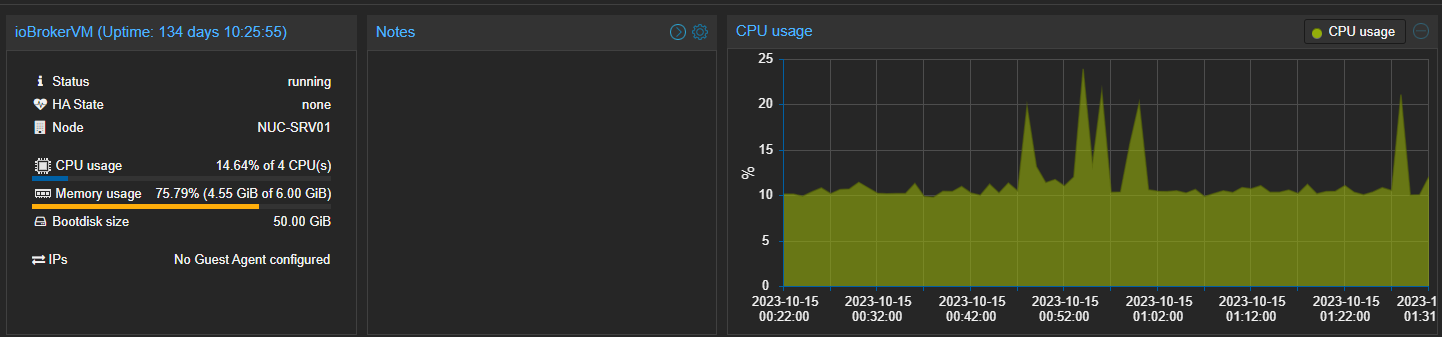
              71d05b25-8baf-4e6b-b1d6-e48db7fc778d-image.png

              OliverIOO 1 Antwort Letzte Antwort
              0
              • Pepsi1183P Pepsi1183

                @oliverio
                Danke fürs Feedback, Welche Auslastung meinst du?
                Welche stelle übersehe ich die ganze Zeit?

                Ja, die vm hat was zu tun, aber hat noch luft nach oben, so wie ich das sehen....

                71d05b25-8baf-4e6b-b1d6-e48db7fc778d-image.png

                OliverIOO Offline
                OliverIOO Offline
                OliverIO
                schrieb am zuletzt editiert von
                #8

                @pepsi1183

                ok, sorry,
                ich glaube in einem anderen thread war dann auch ein top auszug mit deutlich höheren auslastungen (chromium, shelly, etc)
                dann hab ich das verwechselt.
                hab den vorhin nur unterwegs mal angeschaut und nun etwas später dazugeschrieben

                Meine Adapter und Widgets
                TVProgram, SqueezeboxRPC, OpenLiga, RSSFeed, MyTime,, pi-hole2, vis-json-template, skiinfo, vis-mapwidgets, vis-2-widgets-rssfeed
                Links im Profil

                Pepsi1183P 1 Antwort Letzte Antwort
                0
                • OliverIOO OliverIO

                  @pepsi1183

                  ok, sorry,
                  ich glaube in einem anderen thread war dann auch ein top auszug mit deutlich höheren auslastungen (chromium, shelly, etc)
                  dann hab ich das verwechselt.
                  hab den vorhin nur unterwegs mal angeschaut und nun etwas später dazugeschrieben

                  Pepsi1183P Offline
                  Pepsi1183P Offline
                  Pepsi1183
                  schrieb am zuletzt editiert von
                  #9

                  @oliverio
                  Ok, "schade" hatte die Hoffnung du siehst etwas das ich übersehe...

                  habe nochmal geschaut, wenn ich top per ssh offen habe und in einem Blockly den Object-Browser aufrufe macht js-con jede menge.....

                  PID USER      PR  NI    VIRT    RES    SHR S  %CPU  %MEM     ZEIT+ BEFEHL
                  422 iobroker  20   0   12,0g   1,2g  40360 R 110,3  21,5  27:55.63 iobroker.js-con
                  
                  OliverIOO 1 Antwort Letzte Antwort
                  0
                  • Pepsi1183P Pepsi1183

                    @oliverio
                    Ok, "schade" hatte die Hoffnung du siehst etwas das ich übersehe...

                    habe nochmal geschaut, wenn ich top per ssh offen habe und in einem Blockly den Object-Browser aufrufe macht js-con jede menge.....

                    PID USER      PR  NI    VIRT    RES    SHR S  %CPU  %MEM     ZEIT+ BEFEHL
                    422 iobroker  20   0   12,0g   1,2g  40360 R 110,3  21,5  27:55.63 iobroker.js-con
                    
                    OliverIOO Offline
                    OliverIOO Offline
                    OliverIO
                    schrieb am zuletzt editiert von
                    #10

                    @pepsi1183
                    hm ja das wäre erklärbar.
                    im javascript-adapter werden sämtliche datenpunkte beim öffnen abonniert. das ist wohl so, damit die auswahl der datenpunkte und anzeige der werte einfacher ist. das kann beim öffnen schon ganz schön last erzeugen. ist aber nur bei der Bearbeitung so.
                    Nach kurzer Zeit sollte sich das beruhigen.

                    evtl noch etwas zu deiner auslastungsanzeige oben.
                    da sieht man jetzt die einzelne VM
                    wie sieht den die Gesamtbelastung der Hardware aus?

                    wenn da noch andere VMs oder Container laufen, benötigen die ja auch ein wenig Leistung.
                    Allerdings weiß ich nicht, ob sich das in der Auslastung der einzelnen VM wiederspiegelt. So von der Grafik her würde ich auch sagen, das passt.

                    evtl könnte man mal noch nach der Lese/Schreibauslastung schauen.
                    Was hängt da dran? SD-Karte/SSD?
                    was verwendest du für den objektspeicher bei iobroker? redis/jsonl?
                    prüfe mal die qualität deines datenspeichers, nicht das sich da schon sektoren/speicherblockausfälle ankündigen?
                    https://wiki.ubuntuusers.de/Festplattenstatus/
                    schau auch mal das syslog nach warning/error durch.
                    idealerweise in der iobroker vm, als auch auf dem host-system unter proxmox, falls das geht (ich hab kein proxmox)

                    ggfs. auch mal parallel eine 2 vm mit einer neuen iobroker installation aufmachen, backup einspielen und schauen ob es sich da genauso verhält

                    sorry für die relativ wahllose vorschlagsliste. das sind die sachen die mir noch eingefallen sind.

                    Meine Adapter und Widgets
                    TVProgram, SqueezeboxRPC, OpenLiga, RSSFeed, MyTime,, pi-hole2, vis-json-template, skiinfo, vis-mapwidgets, vis-2-widgets-rssfeed
                    Links im Profil

                    Pepsi1183P 1 Antwort Letzte Antwort
                    0
                    • T Nicht stören
                      T Nicht stören
                      ticaki
                      schrieb am zuletzt editiert von ticaki
                      #11

                      Eine Uptime von 130 Tagen heißt schon mal das der Kernel von vor 130 Tagen ist. Mal iobroker neu gestartet? Weiß nicht ob ne neue nodejs Version verwendet wird, wenn er nicht neu gestartet wird.

                      Weather-Warnings Espresense NSPanel-Lovelace-ui Tagesschau

                      Spenden

                      1 Antwort Letzte Antwort
                      0
                      • OliverIOO OliverIO

                        @pepsi1183
                        hm ja das wäre erklärbar.
                        im javascript-adapter werden sämtliche datenpunkte beim öffnen abonniert. das ist wohl so, damit die auswahl der datenpunkte und anzeige der werte einfacher ist. das kann beim öffnen schon ganz schön last erzeugen. ist aber nur bei der Bearbeitung so.
                        Nach kurzer Zeit sollte sich das beruhigen.

                        evtl noch etwas zu deiner auslastungsanzeige oben.
                        da sieht man jetzt die einzelne VM
                        wie sieht den die Gesamtbelastung der Hardware aus?

                        wenn da noch andere VMs oder Container laufen, benötigen die ja auch ein wenig Leistung.
                        Allerdings weiß ich nicht, ob sich das in der Auslastung der einzelnen VM wiederspiegelt. So von der Grafik her würde ich auch sagen, das passt.

                        evtl könnte man mal noch nach der Lese/Schreibauslastung schauen.
                        Was hängt da dran? SD-Karte/SSD?
                        was verwendest du für den objektspeicher bei iobroker? redis/jsonl?
                        prüfe mal die qualität deines datenspeichers, nicht das sich da schon sektoren/speicherblockausfälle ankündigen?
                        https://wiki.ubuntuusers.de/Festplattenstatus/
                        schau auch mal das syslog nach warning/error durch.
                        idealerweise in der iobroker vm, als auch auf dem host-system unter proxmox, falls das geht (ich hab kein proxmox)

                        ggfs. auch mal parallel eine 2 vm mit einer neuen iobroker installation aufmachen, backup einspielen und schauen ob es sich da genauso verhält

                        sorry für die relativ wahllose vorschlagsliste. das sind die sachen die mir noch eingefallen sind.

                        Pepsi1183P Offline
                        Pepsi1183P Offline
                        Pepsi1183
                        schrieb am zuletzt editiert von
                        #12

                        @oliverio
                        Das Sorry kannste streichen, versuchst ja zumindest zu helfen, da ich auch keine Idee habe, freue ich mich über jeden Vorschlag wo man was prüfen/optimieren könnte.

                        "was verwendest du für den objektspeicher bei iobroker? redis/jsonl?"

                        • Gute Frage, müsste ich gleich mal schauen, was ist denn performace technisch zu empfehlen?

                        Also der Host hat ebenfalls wenig zu tun.... und zur SSD kann ich noch keine Fehlermeldungen/Hinweise finden.
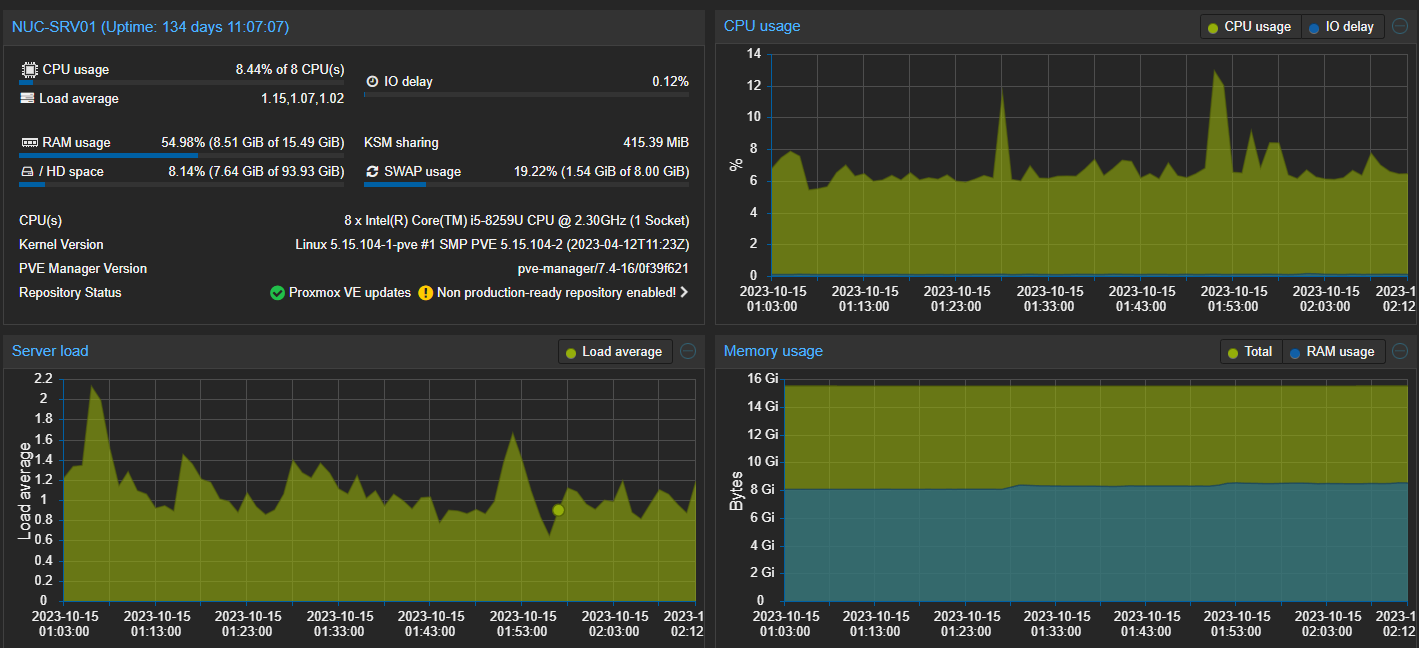
                        4e882d06-2c5a-4882-9a28-d7eeb2be5e7a-image.png

                        @ticaki :
                        iob habe ich gerade mal neu gestartet und auch mal ein sudo reboot gemacht, trotzdem keine Verbesserung

                        Pepsi1183P T OliverIOO 3 Antworten Letzte Antwort
                        0
                        • Pepsi1183P Pepsi1183

                          @oliverio
                          Das Sorry kannste streichen, versuchst ja zumindest zu helfen, da ich auch keine Idee habe, freue ich mich über jeden Vorschlag wo man was prüfen/optimieren könnte.

                          "was verwendest du für den objektspeicher bei iobroker? redis/jsonl?"

                          • Gute Frage, müsste ich gleich mal schauen, was ist denn performace technisch zu empfehlen?

                          Also der Host hat ebenfalls wenig zu tun.... und zur SSD kann ich noch keine Fehlermeldungen/Hinweise finden.
                          4e882d06-2c5a-4882-9a28-d7eeb2be5e7a-image.png

                          @ticaki :
                          iob habe ich gerade mal neu gestartet und auch mal ein sudo reboot gemacht, trotzdem keine Verbesserung

                          Pepsi1183P Offline
                          Pepsi1183P Offline
                          Pepsi1183
                          schrieb am zuletzt editiert von
                          #13

                          Nochmal allgemein:

                          sehe ich irgendwo wie viele Objekte ein Adapter / eine Instanz hat?

                          Überlege gerade ob ggf. ein Adapter mal unkontrolliert Objekte generiert hat oder ähnliches und das Problem einfach leere ungenutzte Objekte sind.....

                          1 Antwort Letzte Antwort
                          0
                          • Pepsi1183P Pepsi1183

                            @oliverio
                            Das Sorry kannste streichen, versuchst ja zumindest zu helfen, da ich auch keine Idee habe, freue ich mich über jeden Vorschlag wo man was prüfen/optimieren könnte.

                            "was verwendest du für den objektspeicher bei iobroker? redis/jsonl?"

                            • Gute Frage, müsste ich gleich mal schauen, was ist denn performace technisch zu empfehlen?

                            Also der Host hat ebenfalls wenig zu tun.... und zur SSD kann ich noch keine Fehlermeldungen/Hinweise finden.
                            4e882d06-2c5a-4882-9a28-d7eeb2be5e7a-image.png

                            @ticaki :
                            iob habe ich gerade mal neu gestartet und auch mal ein sudo reboot gemacht, trotzdem keine Verbesserung

                            T Nicht stören
                            T Nicht stören
                            ticaki
                            schrieb am zuletzt editiert von ticaki
                            #14

                            @pepsi1183
                            redis

                            wichtig: https://forum.iobroker.net/topic/52976/wichtiger-hinweis-für-redis-installationen

                            Überlege gerade ob ggf. ein Adapter mal unkontrolliert Objekte generiert hat oder ähnliches und das Problem einfach leere ungenutzte Objekte sind.....

                            Experte -> object baum -> mülleimer klicken, da steht die Zahl wieviele States gelöscht werden, nur nicht bestätigen. :)

                            Weather-Warnings Espresense NSPanel-Lovelace-ui Tagesschau

                            Spenden

                            1 Antwort Letzte Antwort
                            0
                            • Pepsi1183P Pepsi1183

                              @oliverio
                              Das Sorry kannste streichen, versuchst ja zumindest zu helfen, da ich auch keine Idee habe, freue ich mich über jeden Vorschlag wo man was prüfen/optimieren könnte.

                              "was verwendest du für den objektspeicher bei iobroker? redis/jsonl?"

                              • Gute Frage, müsste ich gleich mal schauen, was ist denn performace technisch zu empfehlen?

                              Also der Host hat ebenfalls wenig zu tun.... und zur SSD kann ich noch keine Fehlermeldungen/Hinweise finden.
                              4e882d06-2c5a-4882-9a28-d7eeb2be5e7a-image.png

                              @ticaki :
                              iob habe ich gerade mal neu gestartet und auch mal ein sudo reboot gemacht, trotzdem keine Verbesserung

                              OliverIOO Offline
                              OliverIOO Offline
                              OliverIO
                              schrieb am zuletzt editiert von
                              #15

                              @pepsi1183

                              Ich verwende auch redis

                              In der expertensicht der Instanzen siehst du welcher Instanz aktuell wieviele states liest und schreibt.

                              Meine Adapter und Widgets
                              TVProgram, SqueezeboxRPC, OpenLiga, RSSFeed, MyTime,, pi-hole2, vis-json-template, skiinfo, vis-mapwidgets, vis-2-widgets-rssfeed
                              Links im Profil

                              Pepsi1183P 1 Antwort Letzte Antwort
                              0
                              • OliverIOO OliverIO

                                @pepsi1183

                                Ich verwende auch redis

                                In der expertensicht der Instanzen siehst du welcher Instanz aktuell wieviele states liest und schreibt.

                                Pepsi1183P Offline
                                Pepsi1183P Offline
                                Pepsi1183
                                schrieb am zuletzt editiert von
                                #16

                                @oliverio & @ticaki

                                Danke für die Ideen.
                                Habe jetzt auch auf redis umgestellt und die Performance im Admin Bereich scheint auch besser zu sein.
                                Habe dabei auch gesehen, dass mein MQTT Server von einem ESPresence "versuch" mit Datenpunkten überflutet wurde.
                                Habe ich jetzt erstmal gelöscht und das Thema ESPresence verschoben, bis das System wieder richtig läuft.

                                Ich habe noch 18640 Objekte und grob überschlagen passt je Instanz die Anzahl Objekte.

                                Aber irgendwas scheint noch nicht sauber zu sein. Mein Vis Projekt zeigt mir beim starten immer noch initial keine Daten an, sondern lädt die Werte anscheinend immer erst nach und nach bei Änderungen bzw. Wert Update Meldungen.

                                Kann man definieren, wie lange Werte in Objekten "Gültig" sind? Oder irgendwas in der Richtung?

                                1 Antwort Letzte Antwort
                                0

                                Hey! Du scheinst an dieser Unterhaltung interessiert zu sein, hast aber noch kein Konto.

                                Hast du es satt, bei jedem Besuch durch die gleichen Beiträge zu scrollen? Wenn du dich für ein Konto anmeldest, kommst du immer genau dorthin zurück, wo du zuvor warst, und kannst dich über neue Antworten benachrichtigen lassen (entweder per E-Mail oder Push-Benachrichtigung). Du kannst auch Lesezeichen speichern und Beiträge positiv bewerten, um anderen Community-Mitgliedern deine Wertschätzung zu zeigen.

                                Mit deinem Input könnte dieser Beitrag noch besser werden 💗

                                Registrieren Anmelden
                                Antworten
                                • In einem neuen Thema antworten
                                Anmelden zum Antworten
                                • Älteste zuerst
                                • Neuste zuerst
                                • Meiste Stimmen


                                Support us

                                ioBroker
                                Community Adapters
                                Donate
                                FAQ Cloud / IOT
                                HowTo: Node.js-Update
                                HowTo: Backup/Restore
                                Downloads
                                BLOG

                                594

                                Online

                                32.8k

                                Benutzer

                                82.7k

                                Themen

                                1.3m

                                Beiträge
                                Community
                                Impressum | Datenschutz-Bestimmungen | Nutzungsbedingungen | Einwilligungseinstellungen
                                ioBroker Community 2014-2025
                                logo
                                • Anmelden

                                • Du hast noch kein Konto? Registrieren

                                • Anmelden oder registrieren, um zu suchen
                                • Erster Beitrag
                                  Letzter Beitrag
                                0
                                • Home
                                • Aktuell
                                • Tags
                                • Ungelesen 0
                                • Kategorien
                                • Unreplied
                                • Beliebt
                                • GitHub
                                • Docu
                                • Hilfe