



Skip to content
  • Home
  • Aktuell
  • Tags
  • 0 Ungelesen 0
  • Kategorien
  • Unreplied
  • Beliebt
  • GitHub
  • Docu
  • Hilfe
Skins
  • Light
  • Brite
  • Cerulean
  • Cosmo
  • Flatly
  • Journal
  • Litera
  • Lumen
  • Lux
  • Materia
  • Minty
  • Morph
  • Pulse
  • Sandstone
  • Simplex
  • Sketchy
  • Spacelab
  • United
  • Yeti
  • Zephyr
  • Dark
  • Cyborg
  • Darkly
  • Quartz
  • Slate
  • Solar
  • Superhero
  • Vapor

  • Standard: (Kein Skin)
  • Kein Skin
Einklappen
ioBroker Logo

Community Forum

donate donate
  1. ioBroker Community Home
  2. Deutsch
  3. ioBroker Allgemein
  4. [gelöst] backitup /bin/sh: 1: influx: not found
NEWS

  • Jahresrückblick 2025 – unser neuer Blogbeitrag ist online! ✨
    BluefoxB
    Bluefox
    17
    1
    2.1k

  • Neuer Blogbeitrag: Monatsrückblick - Dezember 2025 🎄
    BluefoxB
    Bluefox
    13
    1
    939

  • Weihnachtsangebot 2025! 🎄
    BluefoxB
    Bluefox
    25
    1
    2.2k

[gelöst] backitup /bin/sh: 1: influx: not found

Geplant Angeheftet Gesperrt Verschoben ioBroker Allgemein
55 Beiträge 7 Kommentatoren 5.1k Aufrufe 6 Watching
  • Älteste zuerst
  • Neuste zuerst
  • Meiste Stimmen
Antworten
  • In einem neuen Thema antworten
Anmelden zum Antworten
Dieses Thema wurde gelöscht. Nur Nutzer mit entsprechenden Rechten können es sehen.
  • A Alero

    @thomas-braun
    habe mit apt update und sudo apt install...... immer noch die gleiche FM.

    Thomas BraunT Online
    Thomas BraunT Online
    Thomas Braun
    Most Active
    schrieb am zuletzt editiert von
    #18

    @alero

    Vollständige Ein- wie Ausgaben bitte.

    Linux-Werkzeugkasten:
    https://forum.iobroker.net/topic/42952/der-kleine-iobroker-linux-werkzeugkasten
    NodeJS Fixer Skript:
    https://forum.iobroker.net/topic/68035/iob-node-fix-skript
    iob_diag: curl -sLf -o diag.sh https://iobroker.net/diag.sh && bash diag.sh

    1 Antwort Letzte Antwort
    0
    • A Alero

      @thomas-braun
      mit adduser juergen. hab schon gelesen. habe da -m wohl vergessen.

      HomoranH Nicht stören
      HomoranH Nicht stören
      Homoran
      Global Moderator Administrators
      schrieb am zuletzt editiert von Homoran
      #19

      @alero sagte in backitup /bin/sh: 1: influx: not found:

      @thomas-braun
      mit adduser juergen. hab schon gelesen. habe da -m wohl vergessen.

      nöö, auch mit adduser wird normalerweise das /home/juergen angelegt

      bist du etwa mit sudo su unterwegs?

      kein Support per PN! - Fragen im Forum stellen - es gibt fast nichts, was nicht auch für andere interessant ist.

      Benutzt das Voting rechts unten im Beitrag wenn er euch geholfen hat.

      der Installationsfixer: curl -fsL https://iobroker.net/fix.sh | bash -

      A 1 Antwort Letzte Antwort
      0
      • HomoranH Homoran

        @alero sagte in backitup /bin/sh: 1: influx: not found:

        @thomas-braun
        mit adduser juergen. hab schon gelesen. habe da -m wohl vergessen.

        nöö, auch mit adduser wird normalerweise das /home/juergen angelegt

        bist du etwa mit sudo su unterwegs?

        A Offline
        A Offline
        Alero
        schrieb am zuletzt editiert von
        #20

        @homoran
        nein . ich habe mich am server mit dem user juergen angemeldet

        A 1 Antwort Letzte Antwort
        0
        • A Alero

          @homoran
          nein . ich habe mich am server mit dem user juergen angemeldet

          A Offline
          A Offline
          Alero
          schrieb am zuletzt editiert von
          #21

          So,
          habe iobroker noch mal zurückgesetzt (Snapshot) und habe mich noch einmal neu angemeldet mit User juergen.
          Jetzt muss ich noch einmal alles durchgehen.
          Als erstens mach ich jetzt noch einmal das:

          sudo apt update
          apt policy influx*
          
          
          HomoranH Thomas BraunT 2 Antworten Letzte Antwort
          0
          • A Alero

            So,
            habe iobroker noch mal zurückgesetzt (Snapshot) und habe mich noch einmal neu angemeldet mit User juergen.
            Jetzt muss ich noch einmal alles durchgehen.
            Als erstens mach ich jetzt noch einmal das:

            sudo apt update
            apt policy influx*
            
            
            HomoranH Nicht stören
            HomoranH Nicht stören
            Homoran
            Global Moderator Administrators
            schrieb am zuletzt editiert von
            #22

            @alero wo ist die Eingabezeile???

            kein Support per PN! - Fragen im Forum stellen - es gibt fast nichts, was nicht auch für andere interessant ist.

            Benutzt das Voting rechts unten im Beitrag wenn er euch geholfen hat.

            der Installationsfixer: curl -fsL https://iobroker.net/fix.sh | bash -

            1 Antwort Letzte Antwort
            0
            • A Alero

              So,
              habe iobroker noch mal zurückgesetzt (Snapshot) und habe mich noch einmal neu angemeldet mit User juergen.
              Jetzt muss ich noch einmal alles durchgehen.
              Als erstens mach ich jetzt noch einmal das:

              sudo apt update
              apt policy influx*
              
              
              Thomas BraunT Online
              Thomas BraunT Online
              Thomas Braun
              Most Active
              schrieb am zuletzt editiert von
              #23

              @alero sagte in backitup /bin/sh: 1: influx: not found:

              habe iobroker noch mal zurückgesetzt (Snapshot)

              Warum denn das??

              Linux-Werkzeugkasten:
              https://forum.iobroker.net/topic/42952/der-kleine-iobroker-linux-werkzeugkasten
              NodeJS Fixer Skript:
              https://forum.iobroker.net/topic/68035/iob-node-fix-skript
              iob_diag: curl -sLf -o diag.sh https://iobroker.net/diag.sh && bash diag.sh

              A 1 Antwort Letzte Antwort
              0
              • Thomas BraunT Thomas Braun

                @alero sagte in backitup /bin/sh: 1: influx: not found:

                habe iobroker noch mal zurückgesetzt (Snapshot)

                Warum denn das??

                A Offline
                A Offline
                Alero
                schrieb am zuletzt editiert von Alero
                #24

                so,
                der Fehler ist natürlich immer noch da. kein repository.
                dann kommt jetzt das:

                wget -q https://repos.influxdata.com/influxdata-archive_compat.key
                echo '393e8779c89ac8d958f81f942f9ad7fb82a25e133faddaf92e15b16e6ac9ce4c influxdata-archive_compat.key' | sha256sum -c && cat influxdata-archive_compat.key | gpg --dearmor | sudo tee /usr/share/keyrings/influxdata-archive_compat.gpg > /dev/null
                echo 'deb [signed-by=/usr/share/keyrings/influxdata-archive_compat.gpg] https://repos.influxdata.com/debian stable main' | sudo tee /etc/apt/sources.list.d/influxdata.list
                

                richtig? kopiert ausd deinem link phantastische Repositories

                P.S. Homeverzeichnis mit sudo mkhomedir_helper juergen angelegt

                A Thomas BraunT 2 Antworten Letzte Antwort
                0
                • A Alero

                  so,
                  der Fehler ist natürlich immer noch da. kein repository.
                  dann kommt jetzt das:

                  wget -q https://repos.influxdata.com/influxdata-archive_compat.key
                  echo '393e8779c89ac8d958f81f942f9ad7fb82a25e133faddaf92e15b16e6ac9ce4c influxdata-archive_compat.key' | sha256sum -c && cat influxdata-archive_compat.key | gpg --dearmor | sudo tee /usr/share/keyrings/influxdata-archive_compat.gpg > /dev/null
                  echo 'deb [signed-by=/usr/share/keyrings/influxdata-archive_compat.gpg] https://repos.influxdata.com/debian stable main' | sudo tee /etc/apt/sources.list.d/influxdata.list
                  

                  richtig? kopiert ausd deinem link phantastische Repositories

                  P.S. Homeverzeichnis mit sudo mkhomedir_helper juergen angelegt

                  A Offline
                  A Offline
                  Alero
                  schrieb am zuletzt editiert von
                  #25

                  bekomme schon eine FM beim eingeben der folgenden Spalte

                  echo '393e8779c89ac8d958f81f942f9ad7fb82a25e133faddaf92e15b16e6ac9ce4c influxdata-archive_compat.key' | sha256sum -c && cat influxdata-archive_compat.key | gpg --dearmor | sudo tee /usr/share/keyrings/influxdata-archive_compat.gpg > /dev/null
                  

                  FM:

                  juergen@iobroker-prod-12:/home$ echo '393e8779c89ac8d958f81f942f9ad7fb82a25e133faddaf92e15b16e6ac9ce4c influxdata-archive_compat.key' | sha256sum -c && cat influxdata-archive_compat.key | gpg --dearmor | sudo tee /usr/share/keyrings/influxdata-archive_compat.gpg > /dev/null
                  sha256sum: influxdata-archive_compat.key: No such file or directory
                  influxdata-archive_compat.key: FAILED open or read
                  sha256sum: WARNING: 1 listed file could not be read
                  
                  A 1 Antwort Letzte Antwort
                  0
                  • A Alero

                    bekomme schon eine FM beim eingeben der folgenden Spalte

                    echo '393e8779c89ac8d958f81f942f9ad7fb82a25e133faddaf92e15b16e6ac9ce4c influxdata-archive_compat.key' | sha256sum -c && cat influxdata-archive_compat.key | gpg --dearmor | sudo tee /usr/share/keyrings/influxdata-archive_compat.gpg > /dev/null
                    

                    FM:

                    juergen@iobroker-prod-12:/home$ echo '393e8779c89ac8d958f81f942f9ad7fb82a25e133faddaf92e15b16e6ac9ce4c influxdata-archive_compat.key' | sha256sum -c && cat influxdata-archive_compat.key | gpg --dearmor | sudo tee /usr/share/keyrings/influxdata-archive_compat.gpg > /dev/null
                    sha256sum: influxdata-archive_compat.key: No such file or directory
                    influxdata-archive_compat.key: FAILED open or read
                    sha256sum: WARNING: 1 listed file could not be read
                    
                    A Offline
                    A Offline
                    Alero
                    schrieb am zuletzt editiert von
                    #26

                    FM beseitigt:

                    echo '393e8779c89ac8d958f81f942f9ad7fb82a25e133faddaf92e15b16e6ac9ce4c influxdata-archive_compat.key' | sha256sum -c && cat influxdata-archive_compat.key | gpg --dearmor | sudo tee /usr/share/keyrings/influxdata-archive_compat.gpg > /dev/null
                    
                    A 1 Antwort Letzte Antwort
                    0
                    • A Alero

                      FM beseitigt:

                      echo '393e8779c89ac8d958f81f942f9ad7fb82a25e133faddaf92e15b16e6ac9ce4c influxdata-archive_compat.key' | sha256sum -c && cat influxdata-archive_compat.key | gpg --dearmor | sudo tee /usr/share/keyrings/influxdata-archive_compat.gpg > /dev/null
                      
                      A Offline
                      A Offline
                      Alero
                      schrieb am zuletzt editiert von
                      #27

                      Nächster Befehl auch abgesetzt und ANtwort:

                      juergen@iobroker-prod-12:/home$ echo 'deb [signed-by=/usr/share/keyrings/influxdata-archive_compat.gpg] https://repos.influxdata.com/debian stable main' | sudo tee /etc/apt/sources.list.d/influxdata.list
                      deb [signed-by=/usr/share/keyrings/influxdata-archive_compat.gpg] https://repos.influxdata.com/debian stable main
                      
                      1 Antwort Letzte Antwort
                      0
                      • A Alero

                        so,
                        der Fehler ist natürlich immer noch da. kein repository.
                        dann kommt jetzt das:

                        wget -q https://repos.influxdata.com/influxdata-archive_compat.key
                        echo '393e8779c89ac8d958f81f942f9ad7fb82a25e133faddaf92e15b16e6ac9ce4c influxdata-archive_compat.key' | sha256sum -c && cat influxdata-archive_compat.key | gpg --dearmor | sudo tee /usr/share/keyrings/influxdata-archive_compat.gpg > /dev/null
                        echo 'deb [signed-by=/usr/share/keyrings/influxdata-archive_compat.gpg] https://repos.influxdata.com/debian stable main' | sudo tee /etc/apt/sources.list.d/influxdata.list
                        

                        richtig? kopiert ausd deinem link phantastische Repositories

                        P.S. Homeverzeichnis mit sudo mkhomedir_helper juergen angelegt

                        Thomas BraunT Online
                        Thomas BraunT Online
                        Thomas Braun
                        Most Active
                        schrieb am zuletzt editiert von
                        #28

                        @alero sagte in backitup /bin/sh: 1: influx: not found:

                        P.S. Homeverzeichnis mit sudo mkhomedir_helper juergen angelegt

                        Aber falsch. Du steht in /home , solltest aber in ~ bzw. /home/juergen stehen.

                        Und wo ist die VOLLSTÄNDIGE Ein- wie Ausgabe?

                        Mach es nochmal, vollständig...

                        wget -q https://repos.influxdata.com/influxdata-archive_compat.key
                        
                        echo '393e8779c89ac8d958f81f942f9ad7fb82a25e133faddaf92e15b16e6ac9ce4c influxdata-archive_compat.key' | sha256sum -c && cat influxdata-archive_compat.key | gpg --dearmor | sudo tee /usr/share/keyrings/influxdata-archive_compat.gpg > /dev/null
                        
                        echo 'deb [signed-by=/usr/share/keyrings/influxdata-archive_compat.gpg] https://repos.influxdata.com/debian stable main' | sudo tee /etc/apt/sources.list.d/influxdata.list
                        
                        rm influxdata-archive_compat.key
                        

                        Linux-Werkzeugkasten:
                        https://forum.iobroker.net/topic/42952/der-kleine-iobroker-linux-werkzeugkasten
                        NodeJS Fixer Skript:
                        https://forum.iobroker.net/topic/68035/iob-node-fix-skript
                        iob_diag: curl -sLf -o diag.sh https://iobroker.net/diag.sh && bash diag.sh

                        A 1 Antwort Letzte Antwort
                        0
                        • Thomas BraunT Thomas Braun

                          @alero sagte in backitup /bin/sh: 1: influx: not found:

                          P.S. Homeverzeichnis mit sudo mkhomedir_helper juergen angelegt

                          Aber falsch. Du steht in /home , solltest aber in ~ bzw. /home/juergen stehen.

                          Und wo ist die VOLLSTÄNDIGE Ein- wie Ausgabe?

                          Mach es nochmal, vollständig...

                          wget -q https://repos.influxdata.com/influxdata-archive_compat.key
                          
                          echo '393e8779c89ac8d958f81f942f9ad7fb82a25e133faddaf92e15b16e6ac9ce4c influxdata-archive_compat.key' | sha256sum -c && cat influxdata-archive_compat.key | gpg --dearmor | sudo tee /usr/share/keyrings/influxdata-archive_compat.gpg > /dev/null
                          
                          echo 'deb [signed-by=/usr/share/keyrings/influxdata-archive_compat.gpg] https://repos.influxdata.com/debian stable main' | sudo tee /etc/apt/sources.list.d/influxdata.list
                          
                          rm influxdata-archive_compat.key
                          
                          A Offline
                          A Offline
                          Alero
                          schrieb am zuletzt editiert von
                          #29

                          @thomas-braun

                          so habs noch einmal gemacht.

                          juergen@iobroker-prod-12:/$ cd home/
                          juergen@iobroker-prod-12:/home$ ls
                          influxdata-archive_compat.key  iobroker  juergen
                          juergen@iobroker-prod-12:/home$ cd juergen
                          juergen@iobroker-prod-12:~$ wget -q https://repos.influxdata.com/influxdata-archive_compat.key
                          juergen@iobroker-prod-12:~$ echo '393e8779c89ac8d958f81f942f9ad7fb82a25e133faddaf92e15b16e6ac9ce4c influxdata-archive_compat.key' | sha256sum -c && cat influxdata-archive_compat.key | gpg --dearmor | sudo tee /usr/share/keyrings/influxdata-archive_compat.gpg > /dev/null
                          influxdata-archive_compat.key: OK
                          juergen@iobroker-prod-12:~$ echo 'deb [signed-by=/usr/share/keyrings/influxdata-archive_compat.gpg] https://repos.influxdata.com/debian stable main' | sudo tee /etc/apt/sources.list.d/influxdata.list
                          deb [signed-by=/usr/share/keyrings/influxdata-archive_compat.gpg] https://repos.influxdata.com/debian stable main
                          juergen@iobroker-prod-12:~$ rm influxdata-archive_compat.key
                          juergen@iobroker-prod-12:~$ 
                          
                          A 1 Antwort Letzte Antwort
                          0
                          • A Alero

                            @thomas-braun

                            so habs noch einmal gemacht.

                            juergen@iobroker-prod-12:/$ cd home/
                            juergen@iobroker-prod-12:/home$ ls
                            influxdata-archive_compat.key  iobroker  juergen
                            juergen@iobroker-prod-12:/home$ cd juergen
                            juergen@iobroker-prod-12:~$ wget -q https://repos.influxdata.com/influxdata-archive_compat.key
                            juergen@iobroker-prod-12:~$ echo '393e8779c89ac8d958f81f942f9ad7fb82a25e133faddaf92e15b16e6ac9ce4c influxdata-archive_compat.key' | sha256sum -c && cat influxdata-archive_compat.key | gpg --dearmor | sudo tee /usr/share/keyrings/influxdata-archive_compat.gpg > /dev/null
                            influxdata-archive_compat.key: OK
                            juergen@iobroker-prod-12:~$ echo 'deb [signed-by=/usr/share/keyrings/influxdata-archive_compat.gpg] https://repos.influxdata.com/debian stable main' | sudo tee /etc/apt/sources.list.d/influxdata.list
                            deb [signed-by=/usr/share/keyrings/influxdata-archive_compat.gpg] https://repos.influxdata.com/debian stable main
                            juergen@iobroker-prod-12:~$ rm influxdata-archive_compat.key
                            juergen@iobroker-prod-12:~$ 
                            
                            A Offline
                            A Offline
                            Alero
                            schrieb am zuletzt editiert von
                            #30

                            jetzt sieht mein apt policy influx* so aus:

                            juergen@iobroker-prod-12:~$ apt policy influx*
                            influxdb2-cli:
                              Installed: (none)
                              Candidate: 2.7.3-1
                              Version table:
                                 2.7.3-1 500
                                    500 https://repos.influxdata.com/debian stable/main amd64 Packages
                                 2.7.1-2 500
                                    500 https://repos.influxdata.com/debian stable/main amd64 Packages
                                 2.6.1 500
                                    500 https://repos.influxdata.com/debian stable/main amd64 Packages
                                 2.6.0 500
                                    500 https://repos.influxdata.com/debian stable/main amd64 Packages
                                 2.5.0 500
                                    500 https://repos.influxdata.com/debian stable/main amd64 Packages
                                 2.4.0 500
                                    500 https://repos.influxdata.com/debian stable/main amd64 Packages
                                 2.3.0 500
                                    500 https://repos.influxdata.com/debian stable/main amd64 Packages
                            influxdb-client:
                              Installed: (none)
                              Candidate: 1.6.7~rc0-1+b13
                              Version table:
                                 1.6.7~rc0-1+b13 500
                                    500 http://deb.debian.org/debian bookworm/main amd64 Packages
                            influxdb-dev:
                              Installed: (none)
                              Candidate: (none)
                              Version table:
                            influxdb2-client:
                              Installed: (none)
                              Candidate: 2.7.1-1
                              Version table:
                                 2.7.1-1 500
                                    500 https://repos.influxdata.com/debian stable/main amd64 Packages
                            influxdb:
                              Installed: (none)
                              Candidate: 1.8.10-1
                              Version table:
                                 1.8.10-1 500
                                    500 https://repos.influxdata.com/debian stable/main amd64 Packages
                                 1.6.7~rc0-1+b13 500
                                    500 http://deb.debian.org/debian bookworm/main amd64 Packages
                            influxctl:
                              Installed: (none)
                              Candidate: 2.0.4
                              Version table:
                                 2.0.4 500
                                    500 https://repos.influxdata.com/debian stable/main amd64 Packages
                                 2.0.3 500
                                    500 https://repos.influxdata.com/debian stable/main amd64 Packages
                                 2.0.2 500
                                    500 https://repos.influxdata.com/debian stable/main amd64 Packages
                                 2.0.1 500
                                    500 https://repos.influxdata.com/debian stable/main amd64 Packages
                                 2.0.0 500
                                    500 https://repos.influxdata.com/debian stable/main amd64 Packages
                            influxdb2:
                              Installed: (none)
                              Candidate: 2.7.1-1
                              Version table:
                                 2.7.1-1 500
                                    500 https://repos.influxdata.com/debian stable/main amd64 Packages
                                 2.7.0-1 500
                                    500 https://repos.influxdata.com/debian stable/main amd64 Packages
                                 2.6.1-1 500
                                    500 https://repos.influxdata.com/debian stable/main amd64 Packages
                                 2.6.0-1 500
                                    500 https://repos.influxdata.com/debian stable/main amd64 Packages
                                 2.5.1-1 500
                                    500 https://repos.influxdata.com/debian stable/main amd64 Packages
                                 2.4.0-1 500
                                    500 https://repos.influxdata.com/debian stable/main amd64 Packages
                                 2.3.0-1 500
                                    500 https://repos.influxdata.com/debian stable/main amd64 Packages
                                 2.2.0 500
                                    500 https://repos.influxdata.com/debian stable/main amd64 Packages
                            juergen@iobroker-prod-12:~$ 
                            
                            Thomas BraunT 1 Antwort Letzte Antwort
                            0
                            • A Alero

                              jetzt sieht mein apt policy influx* so aus:

                              juergen@iobroker-prod-12:~$ apt policy influx*
                              influxdb2-cli:
                                Installed: (none)
                                Candidate: 2.7.3-1
                                Version table:
                                   2.7.3-1 500
                                      500 https://repos.influxdata.com/debian stable/main amd64 Packages
                                   2.7.1-2 500
                                      500 https://repos.influxdata.com/debian stable/main amd64 Packages
                                   2.6.1 500
                                      500 https://repos.influxdata.com/debian stable/main amd64 Packages
                                   2.6.0 500
                                      500 https://repos.influxdata.com/debian stable/main amd64 Packages
                                   2.5.0 500
                                      500 https://repos.influxdata.com/debian stable/main amd64 Packages
                                   2.4.0 500
                                      500 https://repos.influxdata.com/debian stable/main amd64 Packages
                                   2.3.0 500
                                      500 https://repos.influxdata.com/debian stable/main amd64 Packages
                              influxdb-client:
                                Installed: (none)
                                Candidate: 1.6.7~rc0-1+b13
                                Version table:
                                   1.6.7~rc0-1+b13 500
                                      500 http://deb.debian.org/debian bookworm/main amd64 Packages
                              influxdb-dev:
                                Installed: (none)
                                Candidate: (none)
                                Version table:
                              influxdb2-client:
                                Installed: (none)
                                Candidate: 2.7.1-1
                                Version table:
                                   2.7.1-1 500
                                      500 https://repos.influxdata.com/debian stable/main amd64 Packages
                              influxdb:
                                Installed: (none)
                                Candidate: 1.8.10-1
                                Version table:
                                   1.8.10-1 500
                                      500 https://repos.influxdata.com/debian stable/main amd64 Packages
                                   1.6.7~rc0-1+b13 500
                                      500 http://deb.debian.org/debian bookworm/main amd64 Packages
                              influxctl:
                                Installed: (none)
                                Candidate: 2.0.4
                                Version table:
                                   2.0.4 500
                                      500 https://repos.influxdata.com/debian stable/main amd64 Packages
                                   2.0.3 500
                                      500 https://repos.influxdata.com/debian stable/main amd64 Packages
                                   2.0.2 500
                                      500 https://repos.influxdata.com/debian stable/main amd64 Packages
                                   2.0.1 500
                                      500 https://repos.influxdata.com/debian stable/main amd64 Packages
                                   2.0.0 500
                                      500 https://repos.influxdata.com/debian stable/main amd64 Packages
                              influxdb2:
                                Installed: (none)
                                Candidate: 2.7.1-1
                                Version table:
                                   2.7.1-1 500
                                      500 https://repos.influxdata.com/debian stable/main amd64 Packages
                                   2.7.0-1 500
                                      500 https://repos.influxdata.com/debian stable/main amd64 Packages
                                   2.6.1-1 500
                                      500 https://repos.influxdata.com/debian stable/main amd64 Packages
                                   2.6.0-1 500
                                      500 https://repos.influxdata.com/debian stable/main amd64 Packages
                                   2.5.1-1 500
                                      500 https://repos.influxdata.com/debian stable/main amd64 Packages
                                   2.4.0-1 500
                                      500 https://repos.influxdata.com/debian stable/main amd64 Packages
                                   2.3.0-1 500
                                      500 https://repos.influxdata.com/debian stable/main amd64 Packages
                                   2.2.0 500
                                      500 https://repos.influxdata.com/debian stable/main amd64 Packages
                              juergen@iobroker-prod-12:~$ 
                              
                              Thomas BraunT Online
                              Thomas BraunT Online
                              Thomas Braun
                              Most Active
                              schrieb am zuletzt editiert von
                              #31

                              @alero sagte in backitup /bin/sh: 1: influx: not found:

                              influxdb2-client

                              Den willst du haben.

                              sudo apt install influxdb2-client
                              

                              Linux-Werkzeugkasten:
                              https://forum.iobroker.net/topic/42952/der-kleine-iobroker-linux-werkzeugkasten
                              NodeJS Fixer Skript:
                              https://forum.iobroker.net/topic/68035/iob-node-fix-skript
                              iob_diag: curl -sLf -o diag.sh https://iobroker.net/diag.sh && bash diag.sh

                              A 1 Antwort Letzte Antwort
                              0
                              • Thomas BraunT Thomas Braun

                                @alero sagte in backitup /bin/sh: 1: influx: not found:

                                influxdb2-client

                                Den willst du haben.

                                sudo apt install influxdb2-client
                                
                                A Offline
                                A Offline
                                Alero
                                schrieb am zuletzt editiert von
                                #32

                                @thomas-braun
                                den habe ich jetzt auch installiert.

                                juergen@iobroker-prod-12:~$ sudo apt install influxdb2-client
                                Reading package lists... Done
                                Building dependency tree... Done
                                Reading state information... Done
                                The following packages were automatically installed and are no longer required:
                                  ntpsec-ntpdate ntpsec-ntpdig
                                Use 'sudo apt autoremove' to remove them.
                                The following NEW packages will be installed:
                                  influxdb2-client
                                0 upgraded, 1 newly installed, 0 to remove and 6 not upgraded.
                                Need to get 11.3 MB of archives.
                                After this operation, 25.0 MB of additional disk space will be used.
                                Get:1 https://repos.influxdata.com/debian stable/main amd64 influxdb2-client amd64 2.7.1-1 [11.3 MB]
                                Fetched 11.3 MB in 1s (11.2 MB/s)           
                                Selecting previously unselected package influxdb2-client.
                                (Reading database ... 37821 files and directories currently installed.)
                                

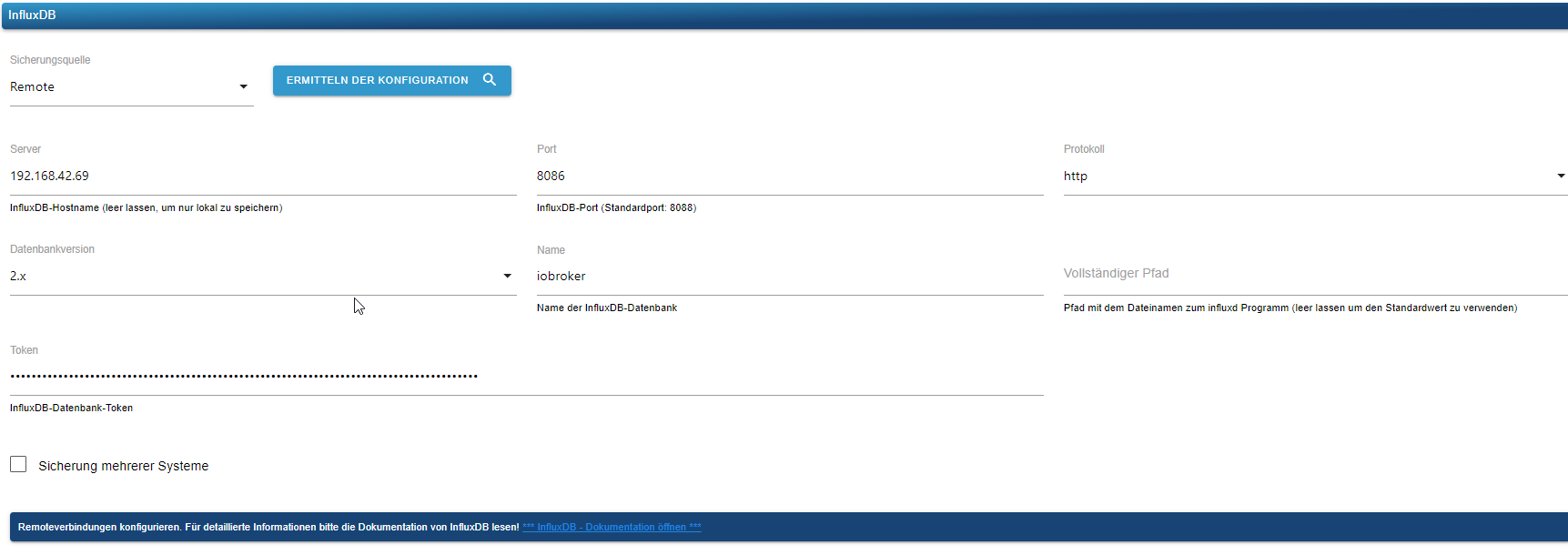
                                beim Backitup bekomme ich aber noch eine FM:

                                [DEBUG] [influxDB] - InfluxDB-Backup started ...
                                [DEBUG] [influxDB] - Start InfluxDB Backup ...
                                [DEBUG] [influxDB] - InfluxDB Backup tmp directory created 
                                [DEBUG] [influxDB] - Try deleting the InfluxDB tmp directory: "/opt/iobroker/backups/influxDB_2023_10_05-10_54_33_backupiobroker"
                                [DEBUG] [influxDB] - InfluxDB tmp directory "/opt/iobroker/backups/influxDB_2023_10_05-10_54_33_backupiobroker" successfully deleted
                                [DEBUG] [influxDB] - 
                                [ERROR] [influxDB] - Error: Command failed: influx backup --bucket iobroker --host http://192.168.42.69:8086 -t CiOIz_JIz-0T_u2EkcBIkHEUTV5jbpm5WgaWhLmVbFEuk0ac3i5PwYW-ogS7eLA8I9V97Ft9H1hnDs_5== "/opt/iobroker/backups/influxDB_2023_10_05-10_54_33_backupiobroker"
                                2023/10/05 10:54:33 INFO: Downloading metadata snapshot
                                Error: failed to backup metadata: failed to download metadata snapshot: 401 Unauthorized: read:authorizations is unauthorized
                                
                                Thomas BraunT 1 Antwort Letzte Antwort
                                0
                                • A Alero

                                  @thomas-braun
                                  den habe ich jetzt auch installiert.

                                  juergen@iobroker-prod-12:~$ sudo apt install influxdb2-client
                                  Reading package lists... Done
                                  Building dependency tree... Done
                                  Reading state information... Done
                                  The following packages were automatically installed and are no longer required:
                                    ntpsec-ntpdate ntpsec-ntpdig
                                  Use 'sudo apt autoremove' to remove them.
                                  The following NEW packages will be installed:
                                    influxdb2-client
                                  0 upgraded, 1 newly installed, 0 to remove and 6 not upgraded.
                                  Need to get 11.3 MB of archives.
                                  After this operation, 25.0 MB of additional disk space will be used.
                                  Get:1 https://repos.influxdata.com/debian stable/main amd64 influxdb2-client amd64 2.7.1-1 [11.3 MB]
                                  Fetched 11.3 MB in 1s (11.2 MB/s)           
                                  Selecting previously unselected package influxdb2-client.
                                  (Reading database ... 37821 files and directories currently installed.)
                                  

                                  beim Backitup bekomme ich aber noch eine FM:

                                  [DEBUG] [influxDB] - InfluxDB-Backup started ...
                                  [DEBUG] [influxDB] - Start InfluxDB Backup ...
                                  [DEBUG] [influxDB] - InfluxDB Backup tmp directory created 
                                  [DEBUG] [influxDB] - Try deleting the InfluxDB tmp directory: "/opt/iobroker/backups/influxDB_2023_10_05-10_54_33_backupiobroker"
                                  [DEBUG] [influxDB] - InfluxDB tmp directory "/opt/iobroker/backups/influxDB_2023_10_05-10_54_33_backupiobroker" successfully deleted
                                  [DEBUG] [influxDB] - 
                                  [ERROR] [influxDB] - Error: Command failed: influx backup --bucket iobroker --host http://192.168.42.69:8086 -t CiOIz_JIz-0T_u2EkcBIkHEUTV5jbpm5WgaWhLmVbFEuk0ac3i5PwYW-ogS7eLA8I9V97Ft9H1hnDs_5== "/opt/iobroker/backups/influxDB_2023_10_05-10_54_33_backupiobroker"
                                  2023/10/05 10:54:33 INFO: Downloading metadata snapshot
                                  Error: failed to backup metadata: failed to download metadata snapshot: 401 Unauthorized: read:authorizations is unauthorized
                                  
                                  Thomas BraunT Online
                                  Thomas BraunT Online
                                  Thomas Braun
                                  Most Active
                                  schrieb am zuletzt editiert von
                                  #33

                                  @alero sagte in backitup /bin/sh: 1: influx: not found:

                                  401 Unauthorized

                                  Da fehlen die Rechte auf die db zuzugreifen. Kann ich dir aber nix zu sagen, hab kein influxdb2 im Einsatz.

                                  Aber schmeiß die "and 6 not upgraded" Pakete auf das System. Da dürfte ein wichtiges Update der libc dabei sein.

                                  Linux-Werkzeugkasten:
                                  https://forum.iobroker.net/topic/42952/der-kleine-iobroker-linux-werkzeugkasten
                                  NodeJS Fixer Skript:
                                  https://forum.iobroker.net/topic/68035/iob-node-fix-skript
                                  iob_diag: curl -sLf -o diag.sh https://iobroker.net/diag.sh && bash diag.sh

                                  A 1 Antwort Letzte Antwort
                                  0
                                  • Thomas BraunT Thomas Braun

                                    @alero sagte in backitup /bin/sh: 1: influx: not found:

                                    401 Unauthorized

                                    Da fehlen die Rechte auf die db zuzugreifen. Kann ich dir aber nix zu sagen, hab kein influxdb2 im Einsatz.

                                    Aber schmeiß die "and 6 not upgraded" Pakete auf das System. Da dürfte ein wichtiges Update der libc dabei sein.

                                    A Offline
                                    A Offline
                                    Alero
                                    schrieb am zuletzt editiert von
                                    #34

                                    @thomas-braun
                                    wie bekomme ich die 6 fehlenden Pakete heraus die ich installieren muss?

                                    Thomas BraunT 1 Antwort Letzte Antwort
                                    0
                                    • A Alero

                                      @thomas-braun
                                      wie bekomme ich die 6 fehlenden Pakete heraus die ich installieren muss?

                                      Thomas BraunT Online
                                      Thomas BraunT Online
                                      Thomas Braun
                                      Most Active
                                      schrieb am zuletzt editiert von
                                      #35

                                      @alero

                                      Mit der üblichen Systempflege:

                                      sudo apt update
                                      sudo apt full-upgrade
                                      

                                      Linux-Werkzeugkasten:
                                      https://forum.iobroker.net/topic/42952/der-kleine-iobroker-linux-werkzeugkasten
                                      NodeJS Fixer Skript:
                                      https://forum.iobroker.net/topic/68035/iob-node-fix-skript
                                      iob_diag: curl -sLf -o diag.sh https://iobroker.net/diag.sh && bash diag.sh

                                      A 1 Antwort Letzte Antwort
                                      0
                                      • Thomas BraunT Thomas Braun

                                        @alero

                                        Mit der üblichen Systempflege:

                                        sudo apt update
                                        sudo apt full-upgrade
                                        
                                        A Offline
                                        A Offline
                                        Alero
                                        schrieb am zuletzt editiert von
                                        #36

                                        @thomas-braun
                                        hi, danke
                                        hab den Befehl gerade gegoogelt.

                                        sudo sudo apt list --upgradable 
                                        Listing... Done
                                        libc-bin/stable-security 2.36-9+deb12u3 amd64 [upgradable from: 2.36-9+deb12u1]
                                        libc-dev-bin/stable-security 2.36-9+deb12u3 amd64 [upgradable from: 2.36-9+deb12u1]
                                        libc-l10n/stable-security 2.36-9+deb12u3 all [upgradable from: 2.36-9+deb12u1]
                                        libc6-dev/stable-security 2.36-9+deb12u3 amd64 [upgradable from: 2.36-9+deb12u1]
                                        libc6/stable-security 2.36-9+deb12u3 amd64 [upgradable from: 2.36-9+deb12u1]
                                        locales/stable-security 2.36-9+deb12u3 all [upgradable from: 2.36-9+deb12u1]
                                        juergen@iobroker-prod-12:~$ sudo apt install influxdb2-client
                                        

                                        werde ich nach installieren.

                                        Thomas BraunT 1 Antwort Letzte Antwort
                                        0
                                        • A Alero

                                          @thomas-braun
                                          hi, danke
                                          hab den Befehl gerade gegoogelt.

                                          sudo sudo apt list --upgradable 
                                          Listing... Done
                                          libc-bin/stable-security 2.36-9+deb12u3 amd64 [upgradable from: 2.36-9+deb12u1]
                                          libc-dev-bin/stable-security 2.36-9+deb12u3 amd64 [upgradable from: 2.36-9+deb12u1]
                                          libc-l10n/stable-security 2.36-9+deb12u3 all [upgradable from: 2.36-9+deb12u1]
                                          libc6-dev/stable-security 2.36-9+deb12u3 amd64 [upgradable from: 2.36-9+deb12u1]
                                          libc6/stable-security 2.36-9+deb12u3 amd64 [upgradable from: 2.36-9+deb12u1]
                                          locales/stable-security 2.36-9+deb12u3 all [upgradable from: 2.36-9+deb12u1]
                                          juergen@iobroker-prod-12:~$ sudo apt install influxdb2-client
                                          

                                          werde ich nach installieren.

                                          Thomas BraunT Online
                                          Thomas BraunT Online
                                          Thomas Braun
                                          Most Active
                                          schrieb am zuletzt editiert von
                                          #37

                                          @alero sagte in backitup /bin/sh: 1: influx: not found:

                                          werde ich nach installieren.

                                          Dringend. Wie erwartet die libc.

                                          Linux-Werkzeugkasten:
                                          https://forum.iobroker.net/topic/42952/der-kleine-iobroker-linux-werkzeugkasten
                                          NodeJS Fixer Skript:
                                          https://forum.iobroker.net/topic/68035/iob-node-fix-skript
                                          iob_diag: curl -sLf -o diag.sh https://iobroker.net/diag.sh && bash diag.sh

                                          A 1 Antwort Letzte Antwort
                                          0
                                          Antworten
                                          • In einem neuen Thema antworten
                                          Anmelden zum Antworten
                                          • Älteste zuerst
                                          • Neuste zuerst
                                          • Meiste Stimmen


                                          Support us

                                          ioBroker
                                          Community Adapters
                                          Donate
                                          FAQ Cloud / IOT
                                          HowTo: Node.js-Update
                                          HowTo: Backup/Restore
                                          Downloads
                                          BLOG

                                          708

                                          Online

                                          32.6k

                                          Benutzer

                                          82.2k

                                          Themen

                                          1.3m

                                          Beiträge
                                          Community
                                          Impressum | Datenschutz-Bestimmungen | Nutzungsbedingungen | Einwilligungseinstellungen
                                          ioBroker Community 2014-2025
                                          logo
                                          • Anmelden

                                          • Du hast noch kein Konto? Registrieren

                                          • Anmelden oder registrieren, um zu suchen
                                          • Erster Beitrag
                                            Letzter Beitrag
                                          0
                                          • Home
                                          • Aktuell
                                          • Tags
                                          • Ungelesen 0
                                          • Kategorien
                                          • Unreplied
                                          • Beliebt
                                          • GitHub
                                          • Docu
                                          • Hilfe