
NEWS




neue Visualisierung "webui" (alternative zu vis & vis-2)
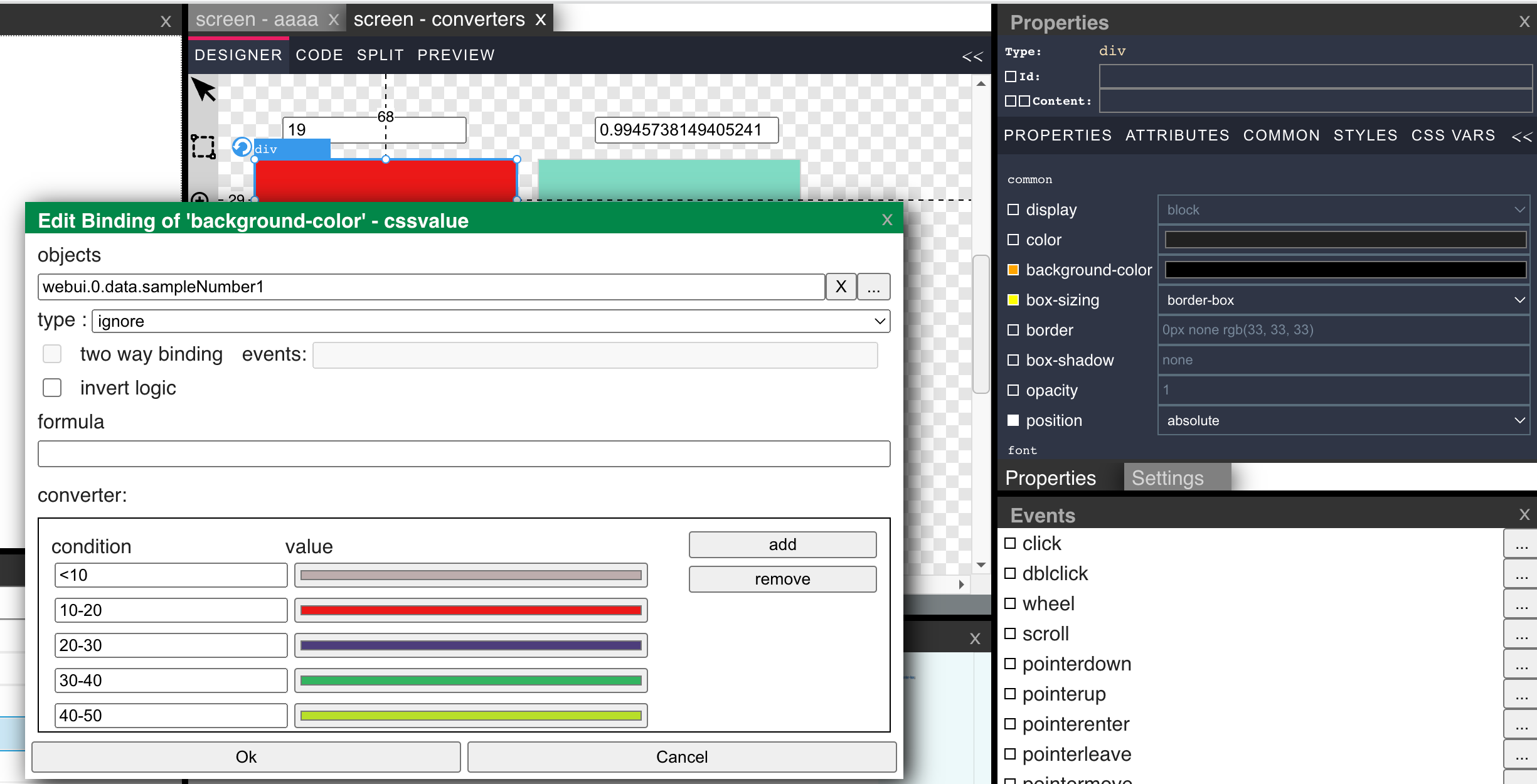
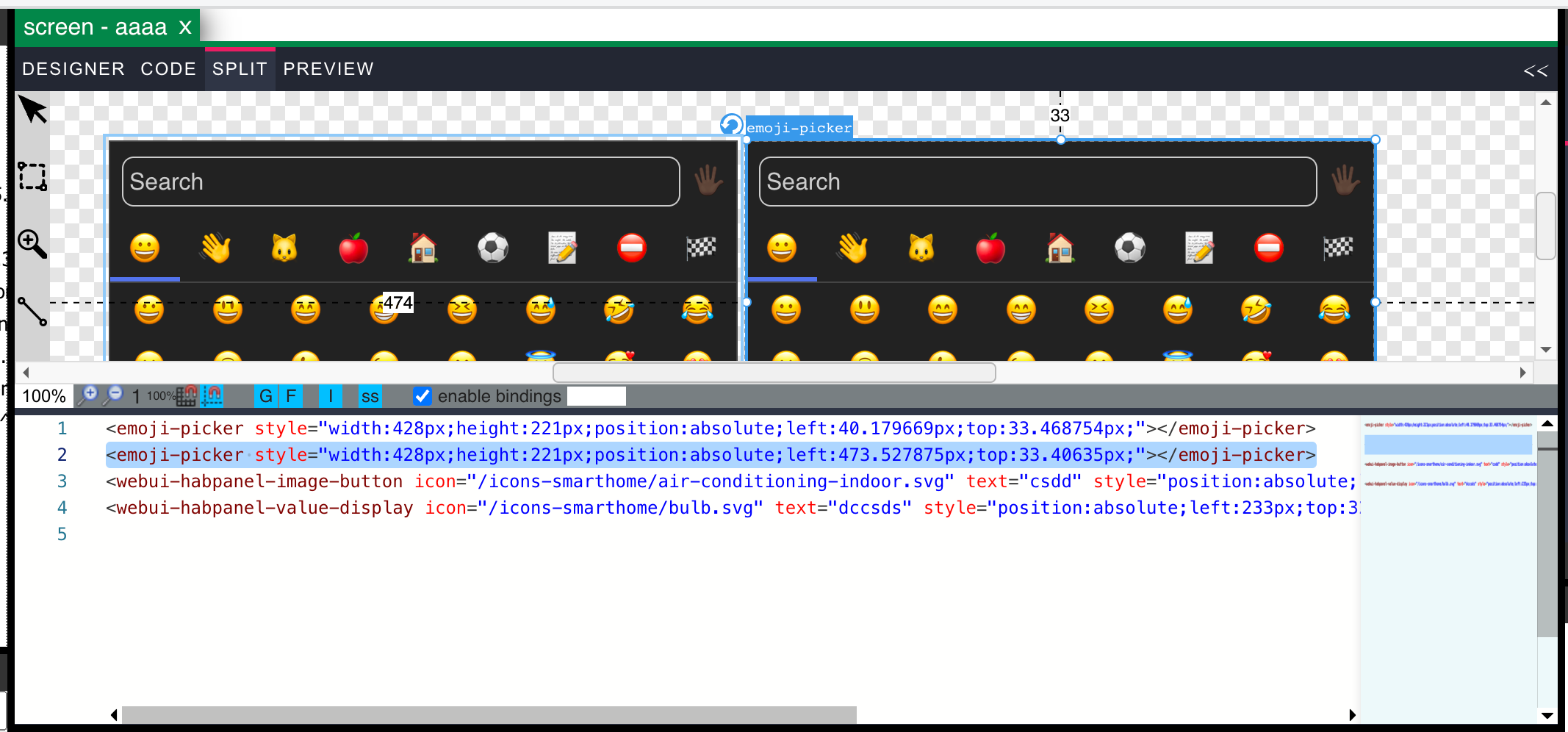
-
@kamikaze said in neue Visualisierung "webui" (alternative zu vis & vis-2):
@kamikaze Ich habe noch etwas herausgefunden:
Wenn ich einen Screenwechsel mache, sind die Daten daraufhin auf der Homepage verfügbar.Wenn es nicht nachstellen kannst, weiß ich gerade nicht was ich machen soll.
In der console vom browser hast geschaut ob es einen fehler gibt?
Oder kann ich iwie zugreifen?@jogibear9988 Sorry, das Konsolenthema hatte ich nicht erwähnt. Nein, es kommen keine Fehlermeldungen.
Wir legen das Thema solange auf Eis, bis ich das Nachstellen kann, bzw. ich eine Lösung für den Fernzugriff etabliert habe.
Derzeit habe ich auch noch andere Projekte, die meine Aufmerksamkeit benötigen.
Aber vielleicht kannst du ja einem "unfähigen" :smirk: bei der anderen Sache noch helfen.
Ich bin zu blöd, bei dem Dialog, dass CSS so zu stylen, dass alle Rahmenelemente unsichtbar sind.
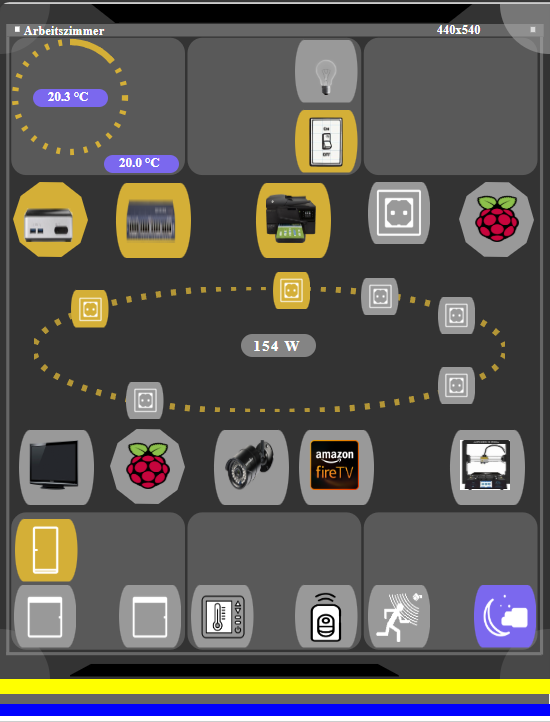
Bedeutet: Alles blaue, gelbe und weisses soll nicht sichtbar sein, inkl. der Kopfzeile.
Der Screen enthält ein gefülltes Rechteck mit 440*540 Pixel. Nur diesen Inhalt möchte ich sehen, wenn ich OpenDialog verwende.
-
@jogibear9988 Sorry, das Konsolenthema hatte ich nicht erwähnt. Nein, es kommen keine Fehlermeldungen.
Wir legen das Thema solange auf Eis, bis ich das Nachstellen kann, bzw. ich eine Lösung für den Fernzugriff etabliert habe.
Derzeit habe ich auch noch andere Projekte, die meine Aufmerksamkeit benötigen.
Aber vielleicht kannst du ja einem "unfähigen" :smirk: bei der anderen Sache noch helfen.
Ich bin zu blöd, bei dem Dialog, dass CSS so zu stylen, dass alle Rahmenelemente unsichtbar sind.
Bedeutet: Alles blaue, gelbe und weisses soll nicht sichtbar sein, inkl. der Kopfzeile.
Der Screen enthält ein gefülltes Rechteck mit 440*540 Pixel. Nur diesen Inhalt möchte ich sehen, wenn ich OpenDialog verwende.
so vlt?
iobroker-webui-dialog.myspecial { border: transparent !important; background-color: transparent; box-shadow: none; } iobroker-webui-dialog.myspecial::part(close) { display: none; } iobroker-webui-dialog.myspecial::part(head) { display: none; } iobroker-webui-dialog.myspecial::part(box) { border: transparent !important; background-color: transparent; } iobroker-webui-dialog.myspecial::part(content) { overflow: hidden; } -
so vlt?
iobroker-webui-dialog.myspecial { border: transparent !important; background-color: transparent; box-shadow: none; } iobroker-webui-dialog.myspecial::part(close) { display: none; } iobroker-webui-dialog.myspecial::part(head) { display: none; } iobroker-webui-dialog.myspecial::part(box) { border: transparent !important; background-color: transparent; } iobroker-webui-dialog.myspecial::part(content) { overflow: hidden; }@jogibear9988 Hallo,
erst einmal vielen Dank für deinen Vorschlag. Zwar noch nicht ganz, was ich mir wünsche, aber schon gut brauchbar.
Ich werde noch ein wenig experimentieren. Ihr braucht Euch nicht damit aufzuhalten.Ich komme noch einmal auf das Problem vom 4 Mar 2025, 18:49 zurück.
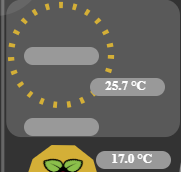
<webui-elemente--beschriftung-temperatur inputsignal="alias.0.Geräte.Heizung.Heizung_Wohnzimmer.Isttemperatur" status="0_userdata.0.Räume.Wohnzimmer.Geräte.Heizung_Wohnzimmer.eigenschaften.deviceStatus" style="position:absolute;left:23px;top:65px;"></webui-elemente--beschriftung-temperatur>
<webui-elemente--beschriftung-temperatur inputsignal="alias.0.Geräte.Heizung.Heizung_Wohnzimmer.Solltemperatur" status="0_userdata.0.Räume.Wohnzimmer.Geräte.Heizung_Wohnzimmer.eigenschaften.deviceStatus" bind-prop:inputsignal="alias.0.Geräte.Heizung.Heizung_Wohnzimmer.Solltemperatur;parseFloat(__0).toFixed(1) + ' °C'" style="position:absolute;left:23px;top:122px;"></webui-elemente--beschriftung-temperatur>
<webui-elemente--beschriftung-temperatur bind-prop:inputsignal="alias.0.Geräte.Heizung.Heizung_Wohnzimmer.Isttemperatur;parseFloat(__0).toFixed(1) + ' °C'" status="0_userdata.0.Räume.Wohnzimmer.Geräte.Heizung_Wohnzimmer.eigenschaften.deviceStatus" style="position:absolute;left:76px;top:90px;width:64px;height:16px;"></webui-elemente--beschriftung-temperatur>
<webui-elemente--beschriftung-temperatur bind-prop:inputsignal="alias.0.Geräte.Heizung.Heizung_Wohnzimmer.Solltemperatur;parseFloat(__0).toFixed(1) + ' °C'" status="0_userdata.0.Räume.Wohnzimmer.Geräte.Heizung_Wohnzimmer.eigenschaften.deviceStatus" style="position:absolute;left:81px;top:148px;width:64px;height:16px;"></webui-elemente--beschriftung-temperatur>
Die Ursache habe ich herausgefunden auch warum ich da bei Euch nicht nachbilden konnte.
Wenn Ihr die vier Zeilen vergleicht, werdet ihr feststellen, dass die letzten zwei korrekt sind und auch permanent funktionieren.
Die erste zwei nur nach Zufall gleich beim ersten Aufruf.Das kommt davon, wenn man mit den Ergebnisses der ersten Schritte über Copy&Paste arbeitet.
Aufgefallen ist das, weil ein Raum immer funktionierte und diese Definition habe ich jetzt verglichen.Danke für eure Hilfe und bis zum nächsten Mal.
-
@jogibear9988 Hi und mal nen kurze frage
Habe ja das js script in das binding vom src rein. das geht soweit ja auch.
Wollte aber jetzt noch ein paar funktionen dazubauen dazu brauche ich aber den window.sessionStorage bzw eventuell auch cookies als speicherung diverser einstellungen bzw defaults.
kann man auf die zugreifen oder geht das nicht ?
Zumindest hab ich es bis jetzt nicht geschaft.Danke
-
@jogibear9988 Hi und mal nen kurze frage
Habe ja das js script in das binding vom src rein. das geht soweit ja auch.
Wollte aber jetzt noch ein paar funktionen dazubauen dazu brauche ich aber den window.sessionStorage bzw eventuell auch cookies als speicherung diverser einstellungen bzw defaults.
kann man auf die zugreifen oder geht das nicht ?
Zumindest hab ich es bis jetzt nicht geschaft.Danke
Check my ioBroker webui - a vis alternative
see: https://github.com/iobroker-community-adapters/ioBroker.webui -
@jogibear9988 hi unter smilie108/grafana2 hab ich es dir rein.
im iframe src ist ein javascript dort siehst du was ich meine ;)ps beim import fehlt in der style immer die } am ende
würde gerne den korrekturwert in einer session varibel speichern um das blättern in der zeitachse von grafana zu realisieren.
weitere idee noch von mir sind presets kurveneinstellungen in einem cokkie zu speichern um sie wie eine personalisierung zu haben.gruß smilie108
-
@jogibear9988 hi unter smilie108/grafana2 hab ich es dir rein.
im iframe src ist ein javascript dort siehst du was ich meine ;)ps beim import fehlt in der style immer die } am ende
würde gerne den korrekturwert in einer session varibel speichern um das blättern in der zeitachse von grafana zu realisieren.
weitere idee noch von mir sind presets kurveneinstellungen in einem cokkie zu speichern um sie wie eine personalisierung zu haben.gruß smilie108
@smilie108 said in neue Visualisierung "webui" (alternative zu vis & vis-2):
@jogibear9988 hi unter smilie108/grafana2 hab ich es dir rein.
im iframe src ist ein javascript dort siehst du was ich meine ;)ps beim import fehlt in der style immer die } am ende
würde gerne den korrekturwert in einer session varibel speichern um das blättern in der zeitachse von grafana zu realisieren.
weitere idee noch von mir sind presets kurveneinstellungen in einem cokkie zu speichern um sie wie eine personalisierung zu haben.gruß smilie108
sollte alles gefixt sein...
deine scripts hab ich nicht angeschaut, aber du solltest sie nun debuggen können.Check my ioBroker webui - a vis alternative
see: https://github.com/iobroker-community-adapters/ioBroker.webui -
@smilie108 said in neue Visualisierung "webui" (alternative zu vis & vis-2):
@jogibear9988 hi unter smilie108/grafana2 hab ich es dir rein.
im iframe src ist ein javascript dort siehst du was ich meine ;)ps beim import fehlt in der style immer die } am ende
würde gerne den korrekturwert in einer session varibel speichern um das blättern in der zeitachse von grafana zu realisieren.
weitere idee noch von mir sind presets kurveneinstellungen in einem cokkie zu speichern um sie wie eine personalisierung zu haben.gruß smilie108
sollte alles gefixt sein...
deine scripts hab ich nicht angeschaut, aber du solltest sie nun debuggen können. -
@jogibear9988
mal ne frage bei den bindables / locals kannst du da auch eine remove funktion hinzufügen ? um variabeln wiedr zu entfernen oder eventuell auch etwas zum umbenennen ? ;)gruß tom
Wo was entfernen? Locale variablen sind weg wenn du den browser neu lädst und die nirgends verwendet sind
-
Jetzt ist es wieder an der Zeit, die Experten zu fragen:
Ich habe mit chart.js mir ein Klasse geschrieben, die mir meine notwendigen Daten in Grafiken umsetzt. Das Ganze habe ich mit rein Javascript gemacht.
Hierzu eine Index.html erstellt:<!DOCTYPE html> <html lang="de"> <head> <meta charset="UTF-8"> <meta name="viewport" content="width=device-width, initial-scale=1.0"> <title>Energieverbrauchs-Diagramm</title> <script src="https://cdn.jsdelivr.net/npm/chart.js"></script> <script src="js/chartBuilder.js"></script> <link rel="stylesheet" href="index.css"> </head> <body> <div id="chartContainer"> <div> <canvas id="houseYearlyChart"></canvas> <div class="legend" id="houseYearlyChartLegend"></div> <!-- Container für die Legende --> </div> <div> <canvas id="roomYearlyChart"></canvas> <div class="legend" id="roomYearlyChartLegend"></div> <!-- Container für die Legende --> </div> <div> <canvas id="roomMonthlyChart"></canvas> <div class="legend" id="roomMonthlyChartLegend"></div> <!-- Container für die Legende --> </div> <div> <canvas id="grossesDiagramm"></canvas> <div class="grossesDiagrammLegend" id="grossesDiagrammLegend"></div> <!-- Container für die Legende --> </div> <div> <canvas id="grossesDiagrammX"></canvas> <div class="grossesDiagrammLegend" id="grossesDiagrammXLegend"></div> <!-- Container für die Legende --> </div> </div> <script src="index.js"> </script> </body> </html>Chart.js als Script-Tag eingebaut, <script src="https://cdn.jsdelivr.net/npm/chart.js"></script>
Meine Klasse hinzugefügt und ein kleines index.js zur Konfiguration der Grafik.const diagrammBasiswerte = { titlecolor: '#ffffff', fontsize: 12, // Schriftgröße: 12px fontfamily: 'Arial', // Schriftart: Arial fontstyle: 'italic', // Schriftstil: kursiv fontweight: 'bold', // Schriftgewicht: fett fontcolor: '#ffffff', maxRotation: 0, minRotation: 0, } const diagramConfigs = { houseYearlyChart: { chartjs_typ: 'bar', // bar oder line chartType: 'yearlyChart', // yearlyChart oder dailyChart datatype: 'absoluteValue', // 'absoluteValue' oder 'Counter' year: '2025', // Jahr aus der Konfiguration month: '', // Nicht erforderlich für yearlyChart threshold: 30, showLegend: true, // Tabelle mit Legende showPoints: false, // Punkte ausblenden devices: JSON.stringify([ // Geräte { id: '7', name: 'Isttemperatur', type: 'absoluteValue', unit: '°C', normalizationFactor: 1, color: '#0000FF' }, ]), options: { datumsformat: { month: 'short' }, // --> 01.Jan.2024 { day: '2-digit', month: 'short', year: 'numeric' } threshold: { label: 'Threshold', type: 'line', borderColor: '#FF0000', borderWidth: 4, fill: false, pointRadius: 0 }, durchschnitt: { label: 'Durchschnitt', type: 'line', borderColor: '#FFFFFF', borderWidth: 2, fill: false, pointRadius: 0 }, scales: { x: { title: { display: true, text: `Zeitraum 2024`, color: diagrammBasiswerte.titlecolor }, ticks: { maxRotation: diagrammBasiswerte.maxRotation, minRotation: diagrammBasiswerte.minRotation, font: { size: diagrammBasiswerte.fontsize, family: diagrammBasiswerte.fontfamily, style: diagrammBasiswerte.fontstyle, weight: diagrammBasiswerte.fontweight, }, color: diagrammBasiswerte.fontcolor, }, }, y: { title: { display: true, text: `Temperatur (°C)`, color: diagrammBasiswerte.titlecolor }, ticks: { font: { size: diagrammBasiswerte.fontsize, family: diagrammBasiswerte.fontfamily, style: diagrammBasiswerte.fontstyle, weight: diagrammBasiswerte.fontweight, }, color: diagrammBasiswerte.fontcolor, }, }, }, }, }, roomYearlyChart: { chartjs_typ: 'bar', chartType: 'yearlyChart', datatype: 'Counter', // 'absoluteValue' oder 'Counter' year: '2024', // Jahr aus der Konfiguration month: '', // Nicht erforderlich für yearlyChart threshold: 300, showLegend: true, showPoints: true, // Punkte einblenden devices: JSON.stringify([ { id: '36', name: 'ac_energie', type: 'Counter', unit: 'kWh', normalizationFactor: 1000, color: '#00FF00' }, { id: '41', name: 'ac_energie_gesamt', type: 'Counter', unit: 'kWh', normalizationFactor: 1000, color: '#FFA500' }, ]), options: { datumsformat: { month: 'short' }, // --> 01.Jan.2024 { day: '2-digit', month: 'short', year: 'numeric' } threshold: { label: 'Threshold', type: 'line', borderColor: '#FF0000', borderWidth: 4, fill: false, pointRadius: 0 }, durchschnitt: { label: 'Durchschnitt', type: 'line', borderColor: '#FFFFFF', borderWidth: 2, fill: false, pointRadius: 0 }, scales: { x: { title: { display: true, text: `Zeitraum 2024`, color: diagrammBasiswerte.titlecolor }, ticks: { maxRotation: diagrammBasiswerte.maxRotation, minRotation: diagrammBasiswerte.minRotation, font: { size: diagrammBasiswerte.fontsize, family: diagrammBasiswerte.fontfamily, style: diagrammBasiswerte.fontstyle, weight: diagrammBasiswerte.fontweight, }, color: diagrammBasiswerte.fontcolor, }, }, y: { title: { display: true, text: `Energie (kWh)`, color: diagrammBasiswerte.titlecolor }, ticks: { font: { size: diagrammBasiswerte.fontsize, family: diagrammBasiswerte.fontfamily, style: diagrammBasiswerte.fontstyle, weight: diagrammBasiswerte.fontweight, }, color: diagrammBasiswerte.fontcolor, }, }, }, }, }, roomMonthlyChart: { chartjs_typ: 'bar', chartType: 'dailyChart', datatype: 'Counter', // 'absoluteValue' oder 'Counter' year: '2025', // Jahr aus der Konfiguration month: '3', // Monat für dailyChart threshold: 10, showLegend: true, showPoints: true, // Punkte einblenden devices: JSON.stringify([ { id: '41', name: 'ac_energie_gesamt', type: 'Counter', unit: 'kWh', normalizationFactor: 1000, color: '#FFFF00' }, { id: '36', name: 'ac_energie', type: 'Counter', unit: 'kWh', normalizationFactor: 1000, color: '#FF00FF' }, ]), options: { datumsformat: { day: '2-digit', month: 'short' }, // --> 01.Apr threshold: { label: 'Threshold', type: 'line', borderColor: '#FF0000', borderWidth: 4, fill: false, pointRadius: 0 }, durchschnitt: { label: 'Durchschnitt', type: 'line', borderColor: '#FFFFFF', borderWidth: 2, fill: false, pointRadius: 0 }, scales: { x: { title: { display: true, text: `Zeitraum 2025`, color: diagrammBasiswerte.titlecolor }, ticks: { maxRotation: diagrammBasiswerte.maxRotation, minRotation: diagrammBasiswerte.minRotation, font: { size: diagrammBasiswerte.fontsize, family: diagrammBasiswerte.fontfamily, style: diagrammBasiswerte.fontstyle, weight: diagrammBasiswerte.fontweight, }, color: diagrammBasiswerte.fontcolor, }, }, y: { title: { display: true, text: `Energie (kWh)`, color: diagrammBasiswerte.titlecolor }, ticks: { font: { size: diagrammBasiswerte.fontsize, family: diagrammBasiswerte.fontfamily, style: diagrammBasiswerte.fontstyle, weight: diagrammBasiswerte.fontweight, }, color: diagrammBasiswerte.fontcolor, }, }, }, }, }, grossesDiagramm: { chartjs_typ: 'line', // bar oder line chartType: 'yearlyChart', // yearlyChart oder dailyChart datatype: 'Counter', // 'absoluteValue' oder 'Counter' year: '2025', // Jahr aus der Konfiguration month: '', // Nicht erforderlich für yearlyChart threshold: 25, showLegend: true, // Tabelle mit Legende showPoints: true, // Punkte ausblenden devices: JSON.stringify([ // Geräte { id: '41', name: 'ac_energie_gesamt', type: 'Counter', unit: '°C', normalizationFactor: 1, color: '#0000FF' }, { id: '21', name: 'ac_energie', type: 'Counter', unit: '°C', normalizationFactor: 1, color: '#FF0000' }, { id: '22', name: 'ac_energie', type: 'Counter', unit: '°C', normalizationFactor: 1, color: '#FFFF00' }, { id: '23', name: 'ac_energie', type: 'Counter', unit: '°C', normalizationFactor: 1, color: '#000000' }, { id: '24', name: 'ac_energie', type: 'Counter', unit: '°C', normalizationFactor: 1, color: '#FF00FF' }, { id: '25', name: 'ac_energie', type: 'Counter', unit: '°C', normalizationFactor: 1, color: '#FFFFFF' }, ]), options: { datumsformat: { month: 'short' }, // --> 01.Jan.2024 { day: '2-digit', month: 'short', year: 'numeric' } threshold: { label: 'Threshold', type: 'line', borderColor: '#FF0000', borderWidth: 4, fill: false, pointRadius: 0 }, durchschnitt: { label: 'Durchschnitt', type: 'line', borderColor: '#FFFFFF', borderWidth: 2, fill: false, pointRadius: 0 }, scales: { x: { title: { display: true, text: `Zeitraum 2024`, color: diagrammBasiswerte.titlecolor }, ticks: { maxRotation: diagrammBasiswerte.maxRotation, minRotation: diagrammBasiswerte.minRotation, font: { size: diagrammBasiswerte.fontsize, family: diagrammBasiswerte.fontfamily, style: diagrammBasiswerte.fontstyle, weight: diagrammBasiswerte.fontweight, }, color: diagrammBasiswerte.fontcolor, }, }, y: { title: { display: true, text: `Temperatur (°C)`, color: diagrammBasiswerte.titlecolor }, ticks: { font: { size: diagrammBasiswerte.fontsize, family: diagrammBasiswerte.fontfamily, style: diagrammBasiswerte.fontstyle, weight: diagrammBasiswerte.fontweight, }, color: diagrammBasiswerte.fontcolor, }, }, }, }, }, grossesDiagrammX: { chartjs_typ: 'line', // bar oder line chartType: 'yearlyChart', // yearlyChart oder dailyChart datatype: 'Counter', // 'absoluteValue' oder 'Counter' year: '2024', // Jahr aus der Konfiguration month: '', // Nicht erforderlich für yearlyChart threshold: 25, showLegend: true, // Tabelle mit Legende showPoints: true, // Punkte ausblenden devices: JSON.stringify([ // Geräte { id: '26', name: 'ac_energie', type: 'Counter', unit: '°C', normalizationFactor: 1, color: '#0000FF' }, { id: '27', name: 'ac_energie', type: 'Counter', unit: '°C', normalizationFactor: 1, color: '#FF0000' }, { id: '28', name: 'ac_energie', type: 'Counter', unit: '°C', normalizationFactor: 1, color: '#FFFF00' }, { id: '29', name: 'ac_energie', type: 'Counter', unit: '°C', normalizationFactor: 1, color: '#000000' }, { id: '30', name: 'ac_energie', type: 'Counter', unit: '°C', normalizationFactor: 1, color: '#FF00FF' }, { id: '31', name: 'ac_energie', type: 'Counter', unit: '°C', normalizationFactor: 1, color: '#FFFFFF' }, ]), options: { datumsformat: { month: 'short' }, // --> 01.Jan.2024 { day: '2-digit', month: 'short', year: 'numeric' } threshold: { label: 'Threshold', type: 'line', borderColor: '#FF0000', borderWidth: 4, fill: false, pointRadius: 0 }, durchschnitt: { label: 'Durchschnitt', type: 'line', borderColor: '#FFFFFF', borderWidth: 2, fill: false, pointRadius: 0 }, scales: { x: { title: { display: true, text: `Zeitraum 2024`, color: diagrammBasiswerte.titlecolor }, ticks: { maxRotation: diagrammBasiswerte.maxRotation, minRotation: diagrammBasiswerte.minRotation, font: { size: diagrammBasiswerte.fontsize, family: diagrammBasiswerte.fontfamily, style: diagrammBasiswerte.fontstyle, weight: diagrammBasiswerte.fontweight, }, color: diagrammBasiswerte.fontcolor, }, }, y: { title: { display: true, text: `Temperatur (°C)`, color: diagrammBasiswerte.titlecolor }, ticks: { font: { size: diagrammBasiswerte.fontsize, family: diagrammBasiswerte.fontfamily, style: diagrammBasiswerte.fontstyle, weight: diagrammBasiswerte.fontweight, }, color: diagrammBasiswerte.fontcolor, }, }, }, }, }, }; // Diagramme erstellen und Daten laden Object.keys(diagramConfigs).forEach((chartId) => { const config = diagramConfigs[chartId]; const apiUrl = `/api/sqlData?devices=${encodeURIComponent(config.devices)}&year=${config.year}&chartType=${config.chartType}${config.chartType === 'dailyChart' ? `&month=${config.month}` : ''}`; fetch(apiUrl) .then((response) => { if (!response.ok) throw new Error(`Fehler: ${response.statusText}`); return response.json(); }) .then((data) => { const chartBuilder = new ChartBuilder(chartId, `${chartId}Legend`); chartBuilder.create(config.chartjs_typ, config.datatype, data, config.showLegend, config.threshold, config.showPoints, config.year, config.options); }) .catch((error) => console.error(`Fehler beim Laden des Diagramms ${chartId}:`, error)); });Jetzt die Frage an die Experten:
Wo und wie binde ich die externen Elemente in webui ein.
<script src="https://cdn.jsdelivr.net/npm/chart.js"></script>
<script src="js/chartBuilder.js"></script>Meine Klasse habe ich als Beispiel einfach im Javascript-Teil des Controls mit eingebunden. Das geht auch bestimmt anders.
Aber wie ich das mit chart.js mache erschließt sich mir nicht. Ich erhalte immer die Meldung, dass Chart nicht existiert.<script src="http://192.168.110.10:8082/webui.0.data/config/additionalfiles/chart.js"></script> <div id="chartContainer" style="position:absolute;left:97px;top:26px;width:476px;height:170px;"> <div> <canvas id="YearlyChart"></canvas> <div class="legend" id="YearlyChartLegend"></div> </div> <script src="http://192.168.110.10:8082/webui.0.widgets/importmap.js"></script> </div>Hier noch das javascript-Modul
/**
* @param {BaseScreenViewerAndControl} instance
*/

const diagrammBasiswerte = {
    titlecolor: '#ffffff',
    fontsize: 12, // Schriftgröße: 12px
    fontfamily: 'Arial', // Schriftart: Arial
    fontstyle: 'italic', // Schriftstil: kursiv
    fontweight: 'bold', // Schriftgewicht: fett
    fontcolor: '#ffffff',
    maxRotation: 0,
    minRotation: 0,
}

const diagramConfigs = {
    YearlyChart: {
        chartjs_typ: 'bar', // bar oder line
        chartType: 'yearlyChart', // yearlyChart oder dailyChart
        datatype: 'absoluteValue', // 'absoluteValue' oder 'Counter'
        year: '2025', // Jahr aus der Konfiguration
        month: '', // Nicht erforderlich für yearlyChart
        threshold: 30,
        showLegend: true, // Tabelle mit Legende
        showPoints: false, // Punkte ausblenden
        devices: JSON.stringify([   // Geräte
            { id: '7', name: 'Isttemperatur', type: 'absoluteValue', unit: '°C', normalizationFactor: 1, color: '#0000FF' },
        ]),
        options: {
            datumsformat: { month: 'short' }, // --> 01.Jan.2024 { day: '2-digit', month: 'short', year: 'numeric' }
            threshold: { label: 'Threshold', type: 'line', borderColor: '#FF0000', borderWidth: 4, fill: false, pointRadius: 0 },
            durchschnitt: { label: 'Durchschnitt', type: 'line', borderColor: '#FFFFFF', borderWidth: 2, fill: false, pointRadius: 0 },
            scales: {
                x: {
                    title: { display: true, text: `Zeitraum 2024`, color: diagrammBasiswerte.titlecolor },
                    ticks: {
                        maxRotation: diagrammBasiswerte.maxRotation,
                        minRotation: diagrammBasiswerte.minRotation,
                        font: {
                            size: diagrammBasiswerte.fontsize,
                            family: diagrammBasiswerte.fontfamily,
                            style: diagrammBasiswerte.fontstyle,
                            weight: diagrammBasiswerte.fontweight,
                        },
                        color: diagrammBasiswerte.fontcolor,
                    },
                },
                y: {
                    title: { display: true, text: `Temperatur (°C)`, color: diagrammBasiswerte.titlecolor },
                    ticks: {
                        font: {
                            size: diagrammBasiswerte.fontsize,
                            family: diagrammBasiswerte.fontfamily,
                            style: diagrammBasiswerte.fontstyle,
                            weight: diagrammBasiswerte.fontweight,
                        },
                        color: diagrammBasiswerte.fontcolor,
                    },
                },
            },
        },
    },
};

export function init(instance,shadowRoot) {
    console.log(instance);
    console.log(shadowRoot);
    console.log(instance.query);
    const cssid = instance._getDomElement('chartContainer');
    console.log(cssid);
    instance.query = "Ich bin blöd";
    console.log(instance.query);
    IOB.setState('0_userdata.0.Funktionen.DatabaseQuery',instance.query);
    const result2 = instance.result;
    console.log(result2);
    const result = IOB.getState('0_userdata.0.Funktionen.DatabaseResult');
    console.log(JSON.stringify(instance,null,2));
    Object.keys(diagramConfigs).forEach((chartId) => {
       const config = diagramConfigs[chartId];
       const data=instance.result
       const chartBuilder = new ChartBuilder(chartId, `${chartId}Legend`,instance);
       chartBuilder.create(instance,config.chartjs_typ, config.datatype, data, config.showLegend, config.threshold, config.showPoints, config.year, config.options);
    });
}

class ChartBuilder {
    constructor(canvasId, legendId,instance) {
        this.ctx = instance._getDomElement(canvasId).getContext('2d');
        // this.ctx = document.getElementById(canvasId).getContext('2d');
        this.chartInstance = null;
        this.legendId = legendId;
    }

    create(instance,chartjs_typ, datatype, data, showLegend, threshold, showPoints, year, options = {}) {
        this.renderChart(instance,chartjs_typ,datatype, data, showLegend, threshold, showPoints, year, options);
    }

    renderChart(instance,chartjs_typ, datatype, data, showLegend, threshold, showPoints, year, options) {
        if (this.chartInstance) this.chartInstance.destroy();

        const legendContainer = instance._getDomElement(this.legendId);
        // const legendContainer = document.getElementById(this.legendId);
        if (!legendContainer) {
            console.error(`Legenden-Element mit ID "${this.legendId}" nicht gefunden.`);
            return;
        }
        legendContainer.style.display = showLegend ? 'block' : 'none';
        legendContainer.innerHTML = ''; // Reset legend

        const labels = [...new Set(data.map((entry) => {
            const formattedDate = new Date(entry.period).toLocaleDateString('de-DE', options.datumsformat);
            if (isNaN(new Date(entry.period).getTime())) {
                console.error(`Invalid Date: ${entry.period}`); // Debugging für fehlerhafte Werte
            }
            return formattedDate;
        }))];

        // Daten nach Geräten gruppieren
        const deviceData = {};
        const statistics = {};

        data.forEach((entry) => {
            if (!deviceData[entry.device_id]) {
                deviceData[entry.device_id] = {
                    label: entry.device_name || 'Unbekanntes Gerät',
                    unit: entry.unit || 'Einheit unbekannt',
                    color: entry.color || '#000000',
                    data: Array(labels.length).fill(0),
                    backgroundColor: entry.color,
                    borderColor: entry.color,
                    fill: false,
                    pointRadius: showPoints ? 5 : 0,
                };

                // Statistikinitialisierung
                statistics[entry.device_id] = {
                    total: 0,
                    count: 0,
                    max: -Infinity,
                    min: Infinity,
                };
            }

            // Datenwerte für das Dataset hinzufügen
            const index = labels.indexOf(new Date(entry.period).toLocaleDateString('de-DE', options.datumsformat));
            if (index >= 0) {
                const normalizedValue = datatype === 'absoluteValue' ? entry.average_value / entry.normalizationFactor : entry.total_value / entry.normalizationFactor; // Differenziere Werte basierend auf Diagrammtyp
                deviceData[entry.device_id].data[index] = normalizedValue;

                // Statistik berechnen
                statistics[entry.device_id].total += normalizedValue;
                statistics[entry.device_id].count += 1;
                statistics[entry.device_id].max = Math.max(statistics[entry.device_id].max, normalizedValue);
                statistics[entry.device_id].min = Math.min(statistics[entry.device_id].min, normalizedValue);
            }
        });

        // Durchschnittslinien und Threshold als Linien-Datensätze
        const averageData = Array(labels.length).fill(
            Object.keys(statistics).reduce((avg, deviceId) => avg + (statistics[deviceId].total / statistics[deviceId].count || 0), 0) / Object.keys(statistics).length
        );
        const thresholdData = Array(labels.length).fill(threshold);

        // Wenn es sich um ein Balkendiagramm handelt, werden Durchschnitt und Threshold als Linien dargestellt
        const additionalDatasets = (chartjs_typ === 'bar' || chartjs_typ === 'line')
            ? [
                {
                    label: options.threshold?.label  ||  'Threshold',
                    data: thresholdData,
                    type: options.threshold?.type  ||  'line', // Linie für Threshold im Balkendiagramm
                    borderColor: options.threshold?.borderColor  ||  '#FF0000',
                    borderWidth: options.threshold?.borderWidth  ||  2,
                    fill: options.threshold?.fill  ||  false,
                    pointRadius: options.threshold?.pointRadius  ||  0,
                },
                {
                    label: options.durchschnitt?.label || 'Durchschnitt',
                    data: averageData,
                    type: options.durchschnitt?.type || 'line', // Linie für Durchschnitt im Balkendiagramm
                    borderColor: options.durchschnitt?.borderColor || '#0000FF',
                    borderWidth: options.durchschnitt?.borderWidth || 2,
                    fill: options.durchschnitt?.label || false,
                    pointRadius: options.durchschnitt?.pointRadius || 0,
                },
            ]
            : [];

        const datasets = [
            ...Object.values(deviceData),
            ...additionalDatasets, // Linien für Balkendiagramme hinzufügen
        ];

        this.chartInstance = new Chart(this.ctx, {
            type: chartjs_typ,
            data: { labels, datasets },
            options: {
                ...options,
                responsive: true,
                plugins: {
                    legend: { display: false }, // Deaktiviere interne Diagrammlegende vollständig
                },
                scales: {
                    x: {

                        ticks: {
                            callback: function(value, index, ticks) {
                                // Verwende die `labels`-Variable direkt in der Callback-Funktion
                                const date = labels[index];
                                return date || 'Invalid Date'; // Fallback für fehlerhafte Werte
                            },
                        },
                        ...options.scales?.x, // Nutze die angepassten X-Achsenoptionen aus der index.html
                    },
                    y: options.scales?.y || {
                        title: { display: true, text: `Werte (${deviceData[Object.keys(deviceData)[0]].unit})` },
                        ticks: {
                            font: {
                                size: 24,
                                family: 'Arial, sans-serif',
                                weight: 'normal',
                            },
                            color: '#ffffff',
                        },
                    },
                },
            },
        });

        // Tabellarische Legende
        legendContainer.innerHTML = `
        <table style="width:100%; border-collapse:collapse;">
          <tr style="background-color:#f4f4f4; text-align:left;">
            <th>Gerät</th>
            <th>Farbe</th>
            <th>Durchschnitt</th>
            <th>Maximum</th>
            <th>Minimum</th>
          </tr>
          ${Object.keys(deviceData).map(deviceId => `
            <tr>
              <td>${deviceData[deviceId].label}</td>
              <td style="background-color:${deviceData[deviceId].color};"></td>
              <td>${(statistics[deviceId].total / statistics[deviceId].count).toFixed(2)} ${deviceData[deviceId].unit}</td>
              <td>${statistics[deviceId].max.toFixed(2)} ${deviceData[deviceId].unit}</td>
              <td>${statistics[deviceId].min.toFixed(2)} ${deviceData[deviceId].unit}</td>
            </tr>
          `).join('')}
        </table>
      `;
    }
}
In der Zeile 193 (this.chartInstance = new Chart(this.ctx, {) steigt das Programm aus, mit der Meldung: Chart existiert nicht.
-
Willst du chartjs von jsdeliver einbinden? Dann wird immer aufs internet zugeriffen wenn du deine Seite öffnest.
Füg am besten meine chartjs webcomponente hinzu, die ist auch im Beispiuel server:
http://129.159.205.3:8082/webui/index.htmlDann solltest du chartjs direkt via: "await importShim("chart.js")" nutzen können.
Aber du kannst natürlich auch direkt meine Komponente nutzen -
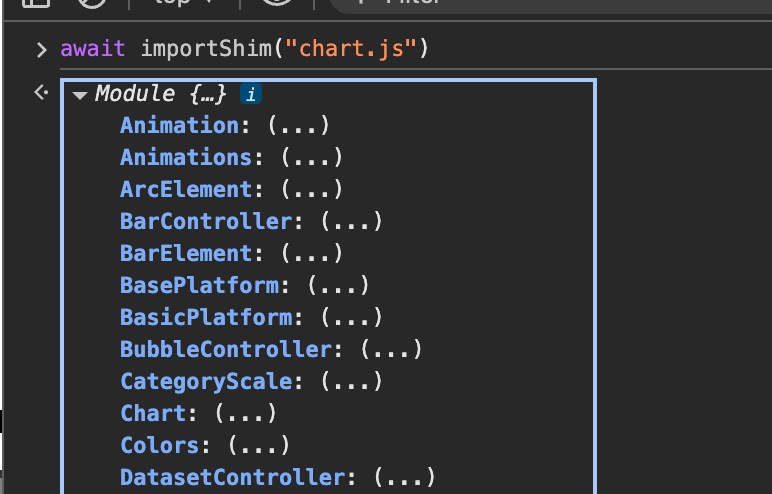
(wenn meine Webcomponente hinzugefügt wurde)
-
Bspw so:

-
Kann sein, das auch "import" statt "importShim" funktioniert. Kann gerade nur in den dev tools testen. Dort geht nur import, da das script nicht über es-module-shims ausgeführt werden.
Warum importShim? Weil die browser im Moment noch keine dynamischen importmaps supporten, und auch weil sie noch keine importmaps in extra files erlauben: https://github.com/guybedford/es-module-shims
-
Kann sein, das auch "import" statt "importShim" funktioniert. Kann gerade nur in den dev tools testen. Dort geht nur import, da das script nicht über es-module-shims ausgeführt werden.
Warum importShim? Weil die browser im Moment noch keine dynamischen importmaps supporten, und auch weil sie noch keine importmaps in extra files erlauben: https://github.com/guybedford/es-module-shims
@jogibear9988 Hallo Jogibear,
ich musste tatsächlich schmunzeln.- Vielen Dank für deine Lösung. Das hat gut funktioniert.
- Du hast aber meine Frage nicht beantwortet.
Wie würde ich solchen Dinge einbinden, wenn es kein npm-Modul gibt? Insbesondere meine eigenen Klasse?
<script src="js/chartBuilder.js"></script>
-
@jogibear9988 Hallo Jogibear,
ich musste tatsächlich schmunzeln.- Vielen Dank für deine Lösung. Das hat gut funktioniert.
- Du hast aber meine Frage nicht beantwortet.
Wie würde ich solchen Dinge einbinden, wenn es kein npm-Modul gibt? Insbesondere meine eigenen Klasse?
<script src="js/chartBuilder.js"></script>
-
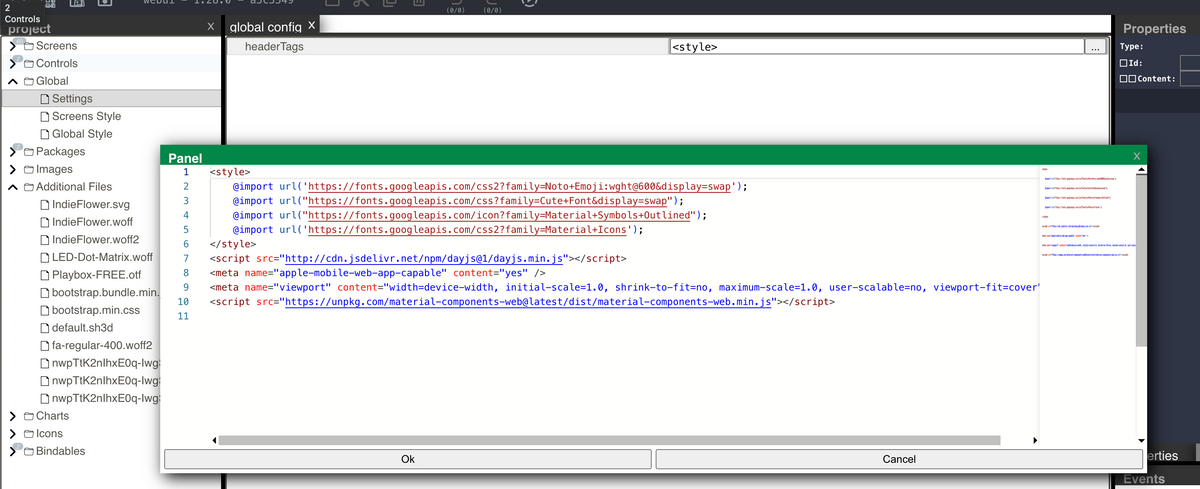
Alles was dort einfügst wird im head hinzugefügt
-
Alles was dort einfügst wird im head hinzugefügt
@jogibear9988 Danke schön. Jetzt habe ich alles, was ich brauche.
Deine Lösung mit dem npm-Modul ist natürlich eleganter, was ich auch nutzen werde.
Die Einbindung meiner Klasse hilft mir bei der zentralen Pflege.Grüße
-
Ich habe ein Control für meine Rolladen erstellt schaffe es aber nicht die auf und ab Pfeile der Material Icons einzufärben, Hindergrund geht. Ist das überhaupt möglich?
Hier mein Code:
<div id="root" @click='{"commands":[{"type":"ToggleSignalValue","signal":{"source":"propertry","name":"signalName"}}]}'>
    <span @click='{"commands":[{"type":"SetSignalValue","signal":{"source":"property","name":"auto"},"value":"toggle"}]}' bind-css:color='{"signal":"?automatik","converter":{"true":"#33d17a","false":"#e01b24"}}' style="grid-column:1 / span 3;grid-row:1;left:auto;top:auto;width:100%;color:[[?automatik]];">[[?this.name]]</span>
    <span bind-content:text="?status" style="grid-column:1 / span 3;grid-row:3;height:100%;left:auto;top:auto;width:100%;"></span>
    <img src="/icons-material-svg/navigation/ic_arrow_drop_up_48px.svg" @click='{"commands":[{"type":"SetSignalValue","signal":{"source":"property","name":"auf"},"value":""}]}' class="#008000" style="grid-column:1;grid-row:2;left:auto;vertical-align:bottom;width:53px;height:46px;top:auto;">
    <img src="/icons-material-svg/navigation/ic_arrow_drop_down_48px.svg" @click='{"commands":[{"type":"SetSignalValue","signal":{"source":"property","name":"zu"},"value":""}]}' style="grid-column:3;grid-row:2;left:auto;top:auto;width:44px;height:47px;">
    <img src="null" bind-prop:src='{"signal":"?status","converter":{"50%":"/icons-eclipse-smarthome-classic/svg/blinds-50.svg","0%":"/icons-eclipse-smarthome-classic/svg/blinds-0.svg","100%":"/icons-eclipse-smarthome-classic/svg/blinds-100.svg"}}' @click='{"commands":[{"type":"SetSignalValue","signal":{"source":"property","name":"stop"}}]}' style="grid-column:2;grid-row:2;">
</div>


Support us
556
Online32.4k
Users81.5k
Topics1.3m
Posts