Skip to content
  • Home
  • Recent
  • Tags
  • 0 Unread 0
  • Categories
  • Unreplied
  • Popular
  • GitHub
  • Docu
  • Hilfe
Skins
  • Light
  • Brite
  • Cerulean
  • Cosmo
  • Flatly
  • Journal
  • Litera
  • Lumen
  • Lux
  • Materia
  • Minty
  • Morph
  • Pulse
  • Sandstone
  • Simplex
  • Sketchy
  • Spacelab
  • United
  • Yeti
  • Zephyr
  • Dark
  • Cyborg
  • Darkly
  • Quartz
  • Slate
  • Solar
  • Superhero
  • Vapor

  • Default (No Skin)
  • No Skin
Collapse
ioBroker Logo

Community Forum

donate donate
  1. ioBroker Community Home
  2. Deutsch
  3. Tester
  4. Test Adapter onvif camera v1.x.x

NEWS

  • Monatsrückblick Januar/Februar 2026 ist online!
    BluefoxB
    Bluefox
    12
    1
    127

  • Jahresrückblick 2025 – unser neuer Blogbeitrag ist online! ✨
    BluefoxB
    Bluefox
    17
    1
    4.3k

  • Neuer Blogbeitrag: Monatsrückblick - Dezember 2025 🎄
    BluefoxB
    Bluefox
    13
    1
    1.2k

Test Adapter onvif camera v1.x.x

Scheduled Pinned Locked Moved Tester
341 Posts 48 Posters 102.9k Views 49 Watching
  • Oldest to Newest
  • Newest to Oldest
  • Most Votes
Reply
  • Reply as topic
Log in to reply
This topic has been deleted. Only users with topic management privileges can see it.
  • JB_SullivanJ Offline
    JB_SullivanJ Offline
    JB_Sullivan
    wrote on last edited by
    #17

    14.16.0 - liegt vermutlich daran - oder?

    ioBroker (since 2018) auf Intel Core i3-5005U NUC und Windwos10 Pro

    T 1 Reply Last reply
    0
    • JB_SullivanJ JB_Sullivan

      14.16.0 - liegt vermutlich daran - oder?

      T Offline
      T Offline
      tombox
      wrote on last edited by
      #18

      @jb_sullivan ja es ist 14.17 aber installier nochmal ich habe mal eine lib downgrade gemacht ob es jetzt geht

      JB_SullivanJ 1 Reply Last reply
      0
      • T tombox

        @jb_sullivan ja es ist 14.17 aber installier nochmal ich habe mal eine lib downgrade gemacht ob es jetzt geht

        JB_SullivanJ Offline
        JB_SullivanJ Offline
        JB_Sullivan
        wrote on last edited by JB_Sullivan
        #19

        @tombox Wird gemacht

        EDIT: Ich weiß nicht ob ich die Änderung schon erwischt habe, aber auch mit der aktuellen Version geht es noch nicht.


        host.GLT(GLT)
        2023-02-18 21:23:35.680 info iobroker npm-rebuild: > canvas@2.7.0 install C:\iobroker\GLT\node_modules\canvas > node-pre-gyp install --fallback-to-build
        host.GLT(GLT)
        2023-02-18 21:23:35.679 info iobroker npm-rebuild:
        host.GLT(GLT)
        2023-02-18 21:23:19.841 info iobroker npm-rebuild: Rebuilding native modules ...
        host.GLT(GLT)
        2023-02-18 21:23:17.414 info iobroker rebuild
        host.GLT(GLT)
        2023-02-18 21:23:17.414 warn adapter "onvif" seems to be installed for a different version of Node.js. Trying to rebuild it... 2 attempt
        host.GLT(GLT)
        2023-02-18 21:23:17.414 info system.adapter.onvif.0 will be rebuilt
        host.GLT(GLT)
        2023-02-18 21:23:17.414 info Adapter system.adapter.onvif.0 needs rebuild and will be restarted afterwards.
        host.GLT(GLT)
        2023-02-18 21:23:17.414 error instance system.adapter.onvif.0 terminated with code 1 (JS_CONTROLLER_STOPPED)
        host.GLT(GLT)
        2023-02-18 21:23:17.414 error Caught by controller[0]: }
        host.GLT(GLT)
        2023-02-18 21:23:17.414 error Caught by controller[0]: ]
        host.GLT(GLT)
        2023-02-18 21:23:17.414 error Caught by controller[0]: 'C:\iobroker\GLT\node_modules\iobroker.onvif\main.js'
        host.GLT(GLT)
        2023-02-18 21:23:17.414 error Caught by controller[0]: 'C:\iobroker\GLT\node_modules\urllib\src\cjs\index.js',
        host.GLT(GLT)
        2023-02-18 21:23:17.414 error Caught by controller[0]: 'C:\iobroker\GLT\node_modules\urllib\src\cjs\HttpClient.js',
        host.GLT(GLT)
        2023-02-18 21:23:17.414 error Caught by controller[0]: 'C:\iobroker\GLT\node_modules\urllib\src\cjs\diagnosticsChannel.js',
        host.GLT(GLT)
        2023-02-18 21:23:17.413 error Caught by controller[0]: requireStack: [
        host.GLT(GLT)
        2023-02-18 21:23:17.413 error Caught by controller[0]: code: 'MODULE_NOT_FOUND',
        host.GLT(GLT)
        2023-02-18 21:23:17.413 error Caught by controller[0]: at Module.require (internal/modules/cjs/loader.js:952:19) {
        host.GLT(GLT)
        2023-02-18 21:23:17.413 error Caught by controller[0]: at Function.Module._load (internal/modules/cjs/loader.js:769:14)
        host.GLT(GLT)
        2023-02-18 21:23:17.413 error Caught by controller[0]: at Module.load (internal/modules/cjs/loader.js:928:32)
        host.GLT(GLT)
        2023-02-18 21:23:17.413 error Caught by controller[0]: at Object.Module._extensions..js (internal/modules/cjs/loader.js:1092:10)
        host.GLT(GLT)
        2023-02-18 21:23:17.413 error Caught by controller[0]: at Module._compile (internal/modules/cjs/loader.js:1063:30)
        host.GLT(GLT)
        2023-02-18 21:23:17.413 error Caught by controller[0]: at Object.<anonymous> (C:\iobroker\GLT\node_modules\urllib\src\cjs\diagnosticsChannel.js:7:47)
        host.GLT(GLT)
        2023-02-18 21:23:17.413 error Caught by controller[0]: at require (internal/modules/cjs/helpers.js:88:18)
        host.GLT(GLT)
        2023-02-18 21:23:17.413 error Caught by controller[0]: at Module.require (internal/modules/cjs/loader.js:952:19)
        host.GLT(GLT)
        2023-02-18 21:23:17.413 error Caught by controller[0]: at Function.Module._load (internal/modules/cjs/loader.js:725:27)
        host.GLT(GLT)
        2023-02-18 21:23:17.413 error Caught by controller[0]: at Function.Module._resolveFilename (internal/modules/cjs/loader.js:880:15)
        host.GLT(GLT)
        2023-02-18 21:23:17.413 error Caught by controller[0]: - C:\iobroker\GLT\node_modules\iobroker.onvif\main.js
        host.GLT(GLT)
        2023-02-18 21:23:17.413 error Caught by controller[0]: - C:\iobroker\GLT\node_modules\urllib\src\cjs\index.js
        host.GLT(GLT)
        2023-02-18 21:23:17.412 error Caught by controller[0]: - C:\iobroker\GLT\node_modules\urllib\src\cjs\HttpClient.js
        host.GLT(GLT)
        2023-02-18 21:23:17.412 error Caught by controller[0]: - C:\iobroker\GLT\node_modules\urllib\src\cjs\diagnosticsChannel.js
        host.GLT(GLT)
        2023-02-18 21:23:17.412 error Caught by controller[0]: Require stack:
        host.GLT(GLT)
        2023-02-18 21:23:17.412 error Caught by controller[0]: Error: Cannot find module 'diagnostics_channel'
        host.GLT(GLT)
        2023-02-18 21:23:17.412 error Caught by controller[0]:
        host.GLT(GLT)
        2023-02-18 21:23:17.412 error Caught by controller[0]: ^
        host.GLT(GLT)
        2023-02-18 21:23:17.412 error Caught by controller[0]: throw err;
        host.GLT(GLT)
        2023-02-18 21:23:17.412 error Caught by controller[0]: internal/modules/cjs/loader.js:883
        host.GLT(GLT)
        2023-02-18 21:23:15.834 info instance system.adapter.onvif.0 started with pid 4868
        host.GLT(GLT)
        2023-02-18 21:23:15.638 info iobroker npm-rebuild: exit 1
        host.GLT(GLT)
        2023-02-18 21:23:14.622 error iobroker npm-rebuild: Rebuilding native modules failed

        ioBroker (since 2018) auf Intel Core i3-5005U NUC und Windwos10 Pro

        T 1 Reply Last reply
        0
        • JB_SullivanJ JB_Sullivan

          @tombox Wird gemacht

          EDIT: Ich weiß nicht ob ich die Änderung schon erwischt habe, aber auch mit der aktuellen Version geht es noch nicht.


          host.GLT(GLT)
          2023-02-18 21:23:35.680 info iobroker npm-rebuild: > canvas@2.7.0 install C:\iobroker\GLT\node_modules\canvas > node-pre-gyp install --fallback-to-build
          host.GLT(GLT)
          2023-02-18 21:23:35.679 info iobroker npm-rebuild:
          host.GLT(GLT)
          2023-02-18 21:23:19.841 info iobroker npm-rebuild: Rebuilding native modules ...
          host.GLT(GLT)
          2023-02-18 21:23:17.414 info iobroker rebuild
          host.GLT(GLT)
          2023-02-18 21:23:17.414 warn adapter "onvif" seems to be installed for a different version of Node.js. Trying to rebuild it... 2 attempt
          host.GLT(GLT)
          2023-02-18 21:23:17.414 info system.adapter.onvif.0 will be rebuilt
          host.GLT(GLT)
          2023-02-18 21:23:17.414 info Adapter system.adapter.onvif.0 needs rebuild and will be restarted afterwards.
          host.GLT(GLT)
          2023-02-18 21:23:17.414 error instance system.adapter.onvif.0 terminated with code 1 (JS_CONTROLLER_STOPPED)
          host.GLT(GLT)
          2023-02-18 21:23:17.414 error Caught by controller[0]: }
          host.GLT(GLT)
          2023-02-18 21:23:17.414 error Caught by controller[0]: ]
          host.GLT(GLT)
          2023-02-18 21:23:17.414 error Caught by controller[0]: 'C:\iobroker\GLT\node_modules\iobroker.onvif\main.js'
          host.GLT(GLT)
          2023-02-18 21:23:17.414 error Caught by controller[0]: 'C:\iobroker\GLT\node_modules\urllib\src\cjs\index.js',
          host.GLT(GLT)
          2023-02-18 21:23:17.414 error Caught by controller[0]: 'C:\iobroker\GLT\node_modules\urllib\src\cjs\HttpClient.js',
          host.GLT(GLT)
          2023-02-18 21:23:17.414 error Caught by controller[0]: 'C:\iobroker\GLT\node_modules\urllib\src\cjs\diagnosticsChannel.js',
          host.GLT(GLT)
          2023-02-18 21:23:17.413 error Caught by controller[0]: requireStack: [
          host.GLT(GLT)
          2023-02-18 21:23:17.413 error Caught by controller[0]: code: 'MODULE_NOT_FOUND',
          host.GLT(GLT)
          2023-02-18 21:23:17.413 error Caught by controller[0]: at Module.require (internal/modules/cjs/loader.js:952:19) {
          host.GLT(GLT)
          2023-02-18 21:23:17.413 error Caught by controller[0]: at Function.Module._load (internal/modules/cjs/loader.js:769:14)
          host.GLT(GLT)
          2023-02-18 21:23:17.413 error Caught by controller[0]: at Module.load (internal/modules/cjs/loader.js:928:32)
          host.GLT(GLT)
          2023-02-18 21:23:17.413 error Caught by controller[0]: at Object.Module._extensions..js (internal/modules/cjs/loader.js:1092:10)
          host.GLT(GLT)
          2023-02-18 21:23:17.413 error Caught by controller[0]: at Module._compile (internal/modules/cjs/loader.js:1063:30)
          host.GLT(GLT)
          2023-02-18 21:23:17.413 error Caught by controller[0]: at Object.<anonymous> (C:\iobroker\GLT\node_modules\urllib\src\cjs\diagnosticsChannel.js:7:47)
          host.GLT(GLT)
          2023-02-18 21:23:17.413 error Caught by controller[0]: at require (internal/modules/cjs/helpers.js:88:18)
          host.GLT(GLT)
          2023-02-18 21:23:17.413 error Caught by controller[0]: at Module.require (internal/modules/cjs/loader.js:952:19)
          host.GLT(GLT)
          2023-02-18 21:23:17.413 error Caught by controller[0]: at Function.Module._load (internal/modules/cjs/loader.js:725:27)
          host.GLT(GLT)
          2023-02-18 21:23:17.413 error Caught by controller[0]: at Function.Module._resolveFilename (internal/modules/cjs/loader.js:880:15)
          host.GLT(GLT)
          2023-02-18 21:23:17.413 error Caught by controller[0]: - C:\iobroker\GLT\node_modules\iobroker.onvif\main.js
          host.GLT(GLT)
          2023-02-18 21:23:17.413 error Caught by controller[0]: - C:\iobroker\GLT\node_modules\urllib\src\cjs\index.js
          host.GLT(GLT)
          2023-02-18 21:23:17.412 error Caught by controller[0]: - C:\iobroker\GLT\node_modules\urllib\src\cjs\HttpClient.js
          host.GLT(GLT)
          2023-02-18 21:23:17.412 error Caught by controller[0]: - C:\iobroker\GLT\node_modules\urllib\src\cjs\diagnosticsChannel.js
          host.GLT(GLT)
          2023-02-18 21:23:17.412 error Caught by controller[0]: Require stack:
          host.GLT(GLT)
          2023-02-18 21:23:17.412 error Caught by controller[0]: Error: Cannot find module 'diagnostics_channel'
          host.GLT(GLT)
          2023-02-18 21:23:17.412 error Caught by controller[0]:
          host.GLT(GLT)
          2023-02-18 21:23:17.412 error Caught by controller[0]: ^
          host.GLT(GLT)
          2023-02-18 21:23:17.412 error Caught by controller[0]: throw err;
          host.GLT(GLT)
          2023-02-18 21:23:17.412 error Caught by controller[0]: internal/modules/cjs/loader.js:883
          host.GLT(GLT)
          2023-02-18 21:23:15.834 info instance system.adapter.onvif.0 started with pid 4868
          host.GLT(GLT)
          2023-02-18 21:23:15.638 info iobroker npm-rebuild: exit 1
          host.GLT(GLT)
          2023-02-18 21:23:14.622 error iobroker npm-rebuild: Rebuilding native modules failed

          T Offline
          T Offline
          tombox
          wrote on last edited by
          #20

          @jb_sullivan Sorry jetzt nochmal

          JB_SullivanJ 1 Reply Last reply
          0
          • T tombox

            @jb_sullivan Sorry jetzt nochmal

            JB_SullivanJ Offline
            JB_SullivanJ Offline
            JB_Sullivan
            wrote on last edited by
            #21

            @tombox Installation funktioniert jetzt ohne Fehler, aber es werden weder automatisch noch manuell Kameras (sind 6 Stück und ONVIF tauglich) gefunden und das obwohl ich sowohl IP als auch Port mäßig direkt "mit der Nase" darauf gestoßen haben.

            
            onvif.0
            8496	2023-02-18 21:28:40.820	info	Finished onvif discovery
            
            onvif.0
            8496	2023-02-18 21:28:35.813	info	Start onvif discovery
            
            onvif.0
            8496	2023-02-18 21:28:35.750	info	Done with cleaning
            
            onvif.0
            8496	2023-02-18 21:28:35.618	info	Clean old version devices
            
            onvif.0
            8496	2023-02-18 21:28:35.570	info	starting. Version 1.0.0 (non-npm: iobroker-community-adapters/ioBroker.onvif#bc7fea2c45037c4557f2e8ec88b760f393cc5378) in C:/iobroker/GLT/node_modules/iobroker.onvif, node: v14.16.0, js-controller: 4.0.24


            ioBroker (since 2018) auf Intel Core i3-5005U NUC und Windwos10 Pro

            T 1 Reply Last reply
            0
            • JB_SullivanJ JB_Sullivan

              @tombox Installation funktioniert jetzt ohne Fehler, aber es werden weder automatisch noch manuell Kameras (sind 6 Stück und ONVIF tauglich) gefunden und das obwohl ich sowohl IP als auch Port mäßig direkt "mit der Nase" darauf gestoßen haben.

              
              onvif.0
              8496	2023-02-18 21:28:40.820	info	Finished onvif discovery
              
              onvif.0
              8496	2023-02-18 21:28:35.813	info	Start onvif discovery
              
              onvif.0
              8496	2023-02-18 21:28:35.750	info	Done with cleaning
              
              onvif.0
              8496	2023-02-18 21:28:35.618	info	Clean old version devices
              
              onvif.0
              8496	2023-02-18 21:28:35.570	info	starting. Version 1.0.0 (non-npm: iobroker-community-adapters/ioBroker.onvif#bc7fea2c45037c4557f2e8ec88b760f393cc5378) in C:/iobroker/GLT/node_modules/iobroker.onvif, node: v14.16.0, js-controller: 4.0.24
              
              
              T Offline
              T Offline
              tombox
              wrote on last edited by
              #22

              @jb_sullivan Wie sieht der log bei manual search aus.. gerne per pn da dort Passwörter enthalten sind

              JB_SullivanJ 1 Reply Last reply
              0
              • T tombox

                @jb_sullivan Wie sieht der log bei manual search aus.. gerne per pn da dort Passwörter enthalten sind

                JB_SullivanJ Offline
                JB_SullivanJ Offline
                JB_Sullivan
                wrote on last edited by
                #23

                @tombox Kann ich hier auch öffentlich posten. Da passiert nichts mit Passwörtern. Er startet und finished sofort ohne weitere Aktionen.

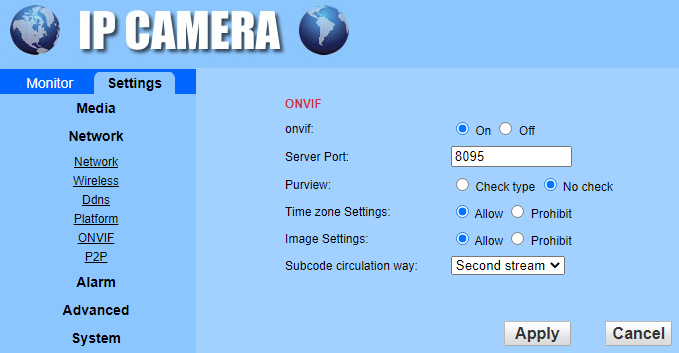
                So sieht es in der Kamera aus, IP Benutzername und PW sind im Adapter natürlich richtig eingetragen - an der Stelle gleich ein Verbesserungsvorschlag. Ich habe mehrere Kameras mit unterschiedlichen Passwörtern. Entweder man muss zukünftig mehrere Instanzen anlegen, oder es gibt vielleicht zukünftig die Möglichkeit in den Instanz Einstellungen nach mehreren unterschiedlichen Benutzernamen/PW Kombinationen und Kameras zu suchen.
                58fc9e9f-2c58-41ee-86ea-f2de5b802c63-image.png

                
                onvif.0
                4456	2023-02-18 21:46:35.614	info	Finished onvif discovery
                
                onvif.0
                4456	2023-02-18 21:46:30.608	info	Start onvif discovery
                
                onvif.0
                4456	2023-02-18 21:46:30.490	info	starting. Version 1.0.0 (non-npm: iobroker-community-adapters/ioBroker.onvif#bc7fea2c45037c4557f2e8ec88b760f393cc5378) in C:/iobroker/GLT/node_modules/iobroker.onvif, node: v14.16.0, js-controller: 4.0.24
                
                onvif.0
                4456	2023-02-18 21:46:30.004	debug	Plugin sentry Initialize Plugin (enabled=true)
                
                onvif.0
                4456	2023-02-18 21:46:29.576	debug	States connected to redis: 127.0.0.1:9000
                
                onvif.0
                4456	2023-02-18 21:46:29.459	debug	States create User PubSub Client
                
                onvif.0
                4456	2023-02-18 21:46:29.458	debug	States create System PubSub Client
                
                onvif.0
                4456	2023-02-18 21:46:29.396	debug	Redis States: Use Redis connection: 127.0.0.1:9000
                
                onvif.0
                4456	2023-02-18 21:46:29.316	debug	Objects connected to redis: 127.0.0.1:9001
                
                onvif.0
                4456	2023-02-18 21:46:29.285	debug	Objects client initialize lua scripts
                
                onvif.0
                4456	2023-02-18 21:46:29.114	debug	Objects create User PubSub Client
                
                onvif.0
                4456	2023-02-18 21:46:29.113	debug	Objects create System PubSub Client
                
                onvif.0
                4456	2023-02-18 21:46:29.092	debug	Objects client ready ... initialize now
                
                onvif.0
                4456	2023-02-18 21:46:28.946	debug	Redis Objects: Use Redis connection: 127.0.0.1:9001
                

                ioBroker (since 2018) auf Intel Core i3-5005U NUC und Windwos10 Pro

                T 1 Reply Last reply
                0
                • JB_SullivanJ JB_Sullivan

                  @tombox Kann ich hier auch öffentlich posten. Da passiert nichts mit Passwörtern. Er startet und finished sofort ohne weitere Aktionen.

                  So sieht es in der Kamera aus, IP Benutzername und PW sind im Adapter natürlich richtig eingetragen - an der Stelle gleich ein Verbesserungsvorschlag. Ich habe mehrere Kameras mit unterschiedlichen Passwörtern. Entweder man muss zukünftig mehrere Instanzen anlegen, oder es gibt vielleicht zukünftig die Möglichkeit in den Instanz Einstellungen nach mehreren unterschiedlichen Benutzernamen/PW Kombinationen und Kameras zu suchen.

                  58fc9e9f-2c58-41ee-86ea-f2de5b802c63-image.png

                  
                  onvif.0
                  4456	2023-02-18 21:46:35.614	info	Finished onvif discovery
                  
                  onvif.0
                  4456	2023-02-18 21:46:30.608	info	Start onvif discovery
                  
                  onvif.0
                  4456	2023-02-18 21:46:30.490	info	starting. Version 1.0.0 (non-npm: iobroker-community-adapters/ioBroker.onvif#bc7fea2c45037c4557f2e8ec88b760f393cc5378) in C:/iobroker/GLT/node_modules/iobroker.onvif, node: v14.16.0, js-controller: 4.0.24
                  
                  onvif.0
                  4456	2023-02-18 21:46:30.004	debug	Plugin sentry Initialize Plugin (enabled=true)
                  
                  onvif.0
                  4456	2023-02-18 21:46:29.576	debug	States connected to redis: 127.0.0.1:9000
                  
                  onvif.0
                  4456	2023-02-18 21:46:29.459	debug	States create User PubSub Client
                  
                  onvif.0
                  4456	2023-02-18 21:46:29.458	debug	States create System PubSub Client
                  
                  onvif.0
                  4456	2023-02-18 21:46:29.396	debug	Redis States: Use Redis connection: 127.0.0.1:9000
                  
                  onvif.0
                  4456	2023-02-18 21:46:29.316	debug	Objects connected to redis: 127.0.0.1:9001
                  
                  onvif.0
                  4456	2023-02-18 21:46:29.285	debug	Objects client initialize lua scripts
                  
                  onvif.0
                  4456	2023-02-18 21:46:29.114	debug	Objects create User PubSub Client
                  
                  onvif.0
                  4456	2023-02-18 21:46:29.113	debug	Objects create System PubSub Client
                  
                  onvif.0
                  4456	2023-02-18 21:46:29.092	debug	Objects client ready ... initialize now
                  
                  onvif.0
                  4456	2023-02-18 21:46:28.946	debug	Redis Objects: Use Redis connection: 127.0.0.1:9001
                  
                  T Offline
                  T Offline
                  tombox
                  wrote on last edited by
                  #24

                  @jb_sullivan Das Passwort ist nur für den Suchvorgang relevant und muss nicht für alle Kameras stimmen.
                  Ich sehe im Log nicht das du auf den Button "Manuel Kamera suchen" drückst

                  JB_SullivanJ 1 Reply Last reply
                  0
                  • T tombox

                    @jb_sullivan Das Passwort ist nur für den Suchvorgang relevant und muss nicht für alle Kameras stimmen.
                    Ich sehe im Log nicht das du auf den Button "Manuel Kamera suchen" drückst

                    JB_SullivanJ Offline
                    JB_SullivanJ Offline
                    JB_Sullivan
                    wrote on last edited by
                    #25

                    @tombox sagte in Test Adapter onvif camera v1.0.0:

                    Ich sehe im Log nicht das du auf den Button "Manuel Kamera suchen" drückst

                    Drücke ich aber - der Button wird dann von blau zu grau und bleibt auch so lange grau bis ich das Fenster verlasse (getestete Wartezeit 15 min.)

                    Wenn ich bei manueller Suche die richtige IP und den richtigen Port eingebe, müsste es ja eigentlich relativ schnell einen Treffer geben - oder? Um dieses zu überprüfen gehe ich dann aus dem Instanz Fenster in das LOG Fenster - und da bekomme ich dann den LOG von oben.

                    ioBroker (since 2018) auf Intel Core i3-5005U NUC und Windwos10 Pro

                    T 1 Reply Last reply
                    0
                    • JB_SullivanJ JB_Sullivan

                      @tombox sagte in Test Adapter onvif camera v1.0.0:

                      Ich sehe im Log nicht das du auf den Button "Manuel Kamera suchen" drückst

                      Drücke ich aber - der Button wird dann von blau zu grau und bleibt auch so lange grau bis ich das Fenster verlasse (getestete Wartezeit 15 min.)

                      Wenn ich bei manueller Suche die richtige IP und den richtigen Port eingebe, müsste es ja eigentlich relativ schnell einen Treffer geben - oder? Um dieses zu überprüfen gehe ich dann aus dem Instanz Fenster in das LOG Fenster - und da bekomme ich dann den LOG von oben.

                      T Offline
                      T Offline
                      tombox
                      wrote on last edited by
                      #26

                      @jb_sullivan
                      Es müsste im Log nach dem drücken des Buttons "Manuel Kamera suchen"
                      info Starting manual search
                      zu sehen sein und dann die einzelnen Versuche

                      Geht denn der "Kamera Suche starten" button kommt da im log "Starting discovery" ?

                      O JB_SullivanJ 2 Replies Last reply
                      0
                      • T tombox

                        @jb_sullivan
                        Es müsste im Log nach dem drücken des Buttons "Manuel Kamera suchen"
                        info Starting manual search
                        zu sehen sein und dann die einzelnen Versuche

                        Geht denn der "Kamera Suche starten" button kommt da im log "Starting discovery" ?

                        O Offline
                        O Offline
                        oFbEQnpoLKKl6mbY5e13
                        wrote on last edited by
                        #27

                        @tombox sagte in Test Adapter onvif camera v1.0.0:

                        Es müsste im Log nach dem drücken des Buttons "Manuel Kamera suchen"
                        info Starting manual search
                        zu sehen sein und dann die einzelnen Versuche

                        Kam bei mir nie.

                        1 Reply Last reply
                        0
                        • T tombox

                          @jb_sullivan
                          Es müsste im Log nach dem drücken des Buttons "Manuel Kamera suchen"
                          info Starting manual search
                          zu sehen sein und dann die einzelnen Versuche

                          Geht denn der "Kamera Suche starten" button kommt da im log "Starting discovery" ?

                          JB_SullivanJ Offline
                          JB_SullivanJ Offline
                          JB_Sullivan
                          wrote on last edited by
                          #28

                          @tombox sagte in Test Adapter onvif camera v1.0.0:

                          Geht denn der "Kamera Suche starten" button kommt da im log "Starting discovery" ?

                          Wenn das der gleiche Text ist wie "Start onvif discovery" - ja, der kommt - aber der Button Farbumschlag verhält sich analog zur manuellen Suche.

                          
                          onvif.0
                          1728	2023-02-19 12:56:51.443	info	Finished onvif discovery
                          
                          onvif.0
                          1728	2023-02-19 12:56:46.437	info	Start onvif discovery
                          
                          onvif.0
                          1728	2023-02-19 12:56:46.273	info	starting. Version 1.0.0 (non-npm: iobroker-community-adapters/ioBroker.onvif#bc7fea2c45037c4557f2e8ec88b760f393cc5378) in C:/iobroker/GLT/node_modules/iobroker.onvif, node: v14.16.0, js-controller: 4.0.24
                          
                          onvif.0
                          1728	2023-02-19 12:56:45.689	debug	Plugin sentry Initialize Plugin (enabled=true)
                          
                          onvif.0
                          1728	2023-02-19 12:56:45.389	debug	States connected to redis: 127.0.0.1:9000
                          
                          onvif.0
                          1728	2023-02-19 12:56:45.321	debug	States create User PubSub Client
                          
                          onvif.0
                          1728	2023-02-19 12:56:45.320	debug	States create System PubSub Client
                          
                          onvif.0
                          1728	2023-02-19 12:56:45.288	debug	Redis States: Use Redis connection: 127.0.0.1:9000
                          
                          onvif.0
                          1728	2023-02-19 12:56:45.243	debug	Objects connected to redis: 127.0.0.1:9001
                          
                          onvif.0
                          1728	2023-02-19 12:56:45.237	debug	Objects client initialize lua scripts
                          
                          onvif.0
                          1728	2023-02-19 12:56:45.105	debug	Objects create User PubSub Client
                          
                          onvif.0
                          1728	2023-02-19 12:56:45.104	debug	Objects create System PubSub Client
                          
                          onvif.0
                          1728	2023-02-19 12:56:45.103	debug	Objects client ready ... initialize now
                          
                          onvif.0
                          1728	2023-02-19 12:56:45.035	debug	Redis Objects: Use Redis connection: 127.0.0.1:9001
                          

                          ioBroker (since 2018) auf Intel Core i3-5005U NUC und Windwos10 Pro

                          T 1 Reply Last reply
                          0
                          • JB_SullivanJ JB_Sullivan

                            @tombox sagte in Test Adapter onvif camera v1.0.0:

                            Geht denn der "Kamera Suche starten" button kommt da im log "Starting discovery" ?

                            Wenn das der gleiche Text ist wie "Start onvif discovery" - ja, der kommt - aber der Button Farbumschlag verhält sich analog zur manuellen Suche.

                            
                            onvif.0
                            1728	2023-02-19 12:56:51.443	info	Finished onvif discovery
                            
                            onvif.0
                            1728	2023-02-19 12:56:46.437	info	Start onvif discovery
                            
                            onvif.0
                            1728	2023-02-19 12:56:46.273	info	starting. Version 1.0.0 (non-npm: iobroker-community-adapters/ioBroker.onvif#bc7fea2c45037c4557f2e8ec88b760f393cc5378) in C:/iobroker/GLT/node_modules/iobroker.onvif, node: v14.16.0, js-controller: 4.0.24
                            
                            onvif.0
                            1728	2023-02-19 12:56:45.689	debug	Plugin sentry Initialize Plugin (enabled=true)
                            
                            onvif.0
                            1728	2023-02-19 12:56:45.389	debug	States connected to redis: 127.0.0.1:9000
                            
                            onvif.0
                            1728	2023-02-19 12:56:45.321	debug	States create User PubSub Client
                            
                            onvif.0
                            1728	2023-02-19 12:56:45.320	debug	States create System PubSub Client
                            
                            onvif.0
                            1728	2023-02-19 12:56:45.288	debug	Redis States: Use Redis connection: 127.0.0.1:9000
                            
                            onvif.0
                            1728	2023-02-19 12:56:45.243	debug	Objects connected to redis: 127.0.0.1:9001
                            
                            onvif.0
                            1728	2023-02-19 12:56:45.237	debug	Objects client initialize lua scripts
                            
                            onvif.0
                            1728	2023-02-19 12:56:45.105	debug	Objects create User PubSub Client
                            
                            onvif.0
                            1728	2023-02-19 12:56:45.104	debug	Objects create System PubSub Client
                            
                            onvif.0
                            1728	2023-02-19 12:56:45.103	debug	Objects client ready ... initialize now
                            
                            onvif.0
                            1728	2023-02-19 12:56:45.035	debug	Redis Objects: Use Redis connection: 127.0.0.1:9001
                            
                            T Offline
                            T Offline
                            tombox
                            wrote on last edited by
                            #29

                            @jb_sullivan Nach Neuinstallation sollten jetzt auch die buttons gehen.

                            JB_SullivanJ 1 Reply Last reply
                            0
                            • T tombox

                              @jb_sullivan Nach Neuinstallation sollten jetzt auch die buttons gehen.

                              JB_SullivanJ Offline
                              JB_SullivanJ Offline
                              JB_Sullivan
                              wrote on last edited by
                              #30

                              @tombox AH jetzt ja - eine Insel, besser gesagt eine Kamera - na dann wollen wir mal gucken ob er die anderen manuell auch noch findet - automatisch hat er jedenfalls nichts gefunden.

                              Aber es geht jetzt schonmal auf manuell.......

                              ioBroker (since 2018) auf Intel Core i3-5005U NUC und Windwos10 Pro

                              1 Reply Last reply
                              0
                              • WszeneW Offline
                                WszeneW Offline
                                Wszene
                                wrote on last edited by
                                #31

                                Vielen Dank für den Adapter
                                Install und hinzufügen der Kameras hat perfekt funktioniert

                                Und da habe ich doch gleich eine Frage
                                Ich habe meine Cams im Garten und würde diese gern vor dem Betreten deaktievieren
                                Also die Aufzeichnung und die Alamierung

                                Momentan mache ich es über die App aber es wäre schön wenn ich in der VIS einen Button hätte mit dem ich das machen könnte

                                Ist es möglich diese Option zu integrieren?

                                Danke im Voraus
                                Marcel

                                Meine Hard- & Software:

                                • MSI Cubi 5 10M-049DE mit Proxmox
                                • CC2652P Zigbee Stick
                                • Steckdosen mit Tasmota und Zigbee
                                • Lichtschalter mit Tasmota
                                • IKEA TRÅDFRI Glühbirnen
                                • Aqara Sensoren
                                T 1 Reply Last reply
                                0
                                • WszeneW Wszene

                                  Vielen Dank für den Adapter
                                  Install und hinzufügen der Kameras hat perfekt funktioniert

                                  Und da habe ich doch gleich eine Frage
                                  Ich habe meine Cams im Garten und würde diese gern vor dem Betreten deaktievieren
                                  Also die Aufzeichnung und die Alamierung

                                  Momentan mache ich es über die App aber es wäre schön wenn ich in der VIS einen Button hätte mit dem ich das machen könnte

                                  Ist es möglich diese Option zu integrieren?

                                  Danke im Voraus
                                  Marcel

                                  T Offline
                                  T Offline
                                  tombox
                                  wrote on last edited by
                                  #32

                                  @wszene ich sehe nicht das dies über onvif Protokoll möglich ist dann wäre das eher etwas individuell für jeden Hersteller

                                  Chris76eC WszeneW 2 Replies Last reply
                                  0
                                  • T tombox

                                    @wszene ich sehe nicht das dies über onvif Protokoll möglich ist dann wäre das eher etwas individuell für jeden Hersteller

                                    Chris76eC Online
                                    Chris76eC Online
                                    Chris76e
                                    wrote on last edited by
                                    #33

                                    @tombox

                                    Bei mir kommen einige Warnugen und errors beim starten der Instanz.

                                    Habe 4 Tapo C200.

                                    192.168.178.117:2020 No snapshot url available: Error: ONVIF SOAP Fault: {"value":"SOAP-ENV:Receiver","subcode":{"value":"ter:ActionNotSupported"}}
                                    
                                    	<?xml version="1.0" encoding="UTF-8"?> <soap:Envelope ><soap:Header><wsa:To>http://schemas.xmlsoap.org/ws/2004/08/addressing/role/anonymous</wsa:To><wsa:Action>http://schemas.xmlsoap.org/ws/2005/04/discovery/ProbeMatches</wsa:Action><wsa:MessageID>urn:uuid:315681d1-2e37-45ee-b407-9b9c26990de8</wsa:MessageID><wsa:RelatesTo>urn:uuid:5bf5e60a-86f3-cf75-a8b2-ab66a704fde6</wsa:RelatesTo><wsd:AppSequence InstanceId="1677084647" SequenceId="urn:uuid:38e8978f-b114-4596-8aba-06a03425c634" MessageNumber="149"/></soap:Header><soap:Body><wsd:ProbeMatches><wsd:ProbeMatch><wsa:EndpointReference><wsa:Address>urn:uuid:9e09e321-e4b7-4a6d-94a1-4a67070299b6</wsa:Address></wsa:EndpointReference><wsd:Types>wsdp:Device pub:Computer</wsd:Types><wsd:XAddrs>http://CamStation2:5357/9e09e321-e4b7-4a6d-94a1-4a67070299b6</wsd:XAddrs><wsd:MetadataVersion>2</wsd:MetadataVersion></wsd:ProbeMatch></wsd:ProbeMatches></soap:Body></soap:Envelope> 
                                    

                                    debugLog.txt

                                    T 2 Replies Last reply
                                    0
                                    • T tombox

                                      @wszene ich sehe nicht das dies über onvif Protokoll möglich ist dann wäre das eher etwas individuell für jeden Hersteller

                                      WszeneW Offline
                                      WszeneW Offline
                                      Wszene
                                      wrote on last edited by
                                      #34

                                      @tombox sagte in Test Adapter onvif camera v1.0.0:

                                      @wszene ich sehe nicht das dies über onvif Protokoll möglich ist dann wäre das eher etwas individuell für jeden Hersteller

                                      Aha OK
                                      Das ist schade aber dann ist es leider so

                                      Meine Hard- & Software:

                                      • MSI Cubi 5 10M-049DE mit Proxmox
                                      • CC2652P Zigbee Stick
                                      • Steckdosen mit Tasmota und Zigbee
                                      • Lichtschalter mit Tasmota
                                      • IKEA TRÅDFRI Glühbirnen
                                      • Aqara Sensoren
                                      1 Reply Last reply
                                      0
                                      • Chris76eC Chris76e

                                        @tombox

                                        Bei mir kommen einige Warnugen und errors beim starten der Instanz.

                                        Habe 4 Tapo C200.

                                        192.168.178.117:2020 No snapshot url available: Error: ONVIF SOAP Fault: {"value":"SOAP-ENV:Receiver","subcode":{"value":"ter:ActionNotSupported"}}
                                        
                                        	<?xml version="1.0" encoding="UTF-8"?> <soap:Envelope ><soap:Header><wsa:To>http://schemas.xmlsoap.org/ws/2004/08/addressing/role/anonymous</wsa:To><wsa:Action>http://schemas.xmlsoap.org/ws/2005/04/discovery/ProbeMatches</wsa:Action><wsa:MessageID>urn:uuid:315681d1-2e37-45ee-b407-9b9c26990de8</wsa:MessageID><wsa:RelatesTo>urn:uuid:5bf5e60a-86f3-cf75-a8b2-ab66a704fde6</wsa:RelatesTo><wsd:AppSequence InstanceId="1677084647" SequenceId="urn:uuid:38e8978f-b114-4596-8aba-06a03425c634" MessageNumber="149"/></soap:Header><soap:Body><wsd:ProbeMatches><wsd:ProbeMatch><wsa:EndpointReference><wsa:Address>urn:uuid:9e09e321-e4b7-4a6d-94a1-4a67070299b6</wsa:Address></wsa:EndpointReference><wsd:Types>wsdp:Device pub:Computer</wsd:Types><wsd:XAddrs>http://CamStation2:5357/9e09e321-e4b7-4a6d-94a1-4a67070299b6</wsd:XAddrs><wsd:MetadataVersion>2</wsd:MetadataVersion></wsd:ProbeMatch></wsd:ProbeMatches></soap:Body></soap:Envelope> 
                                        

                                        debugLog.txt

                                        T Offline
                                        T Offline
                                        tombox
                                        wrote on last edited by
                                        #35

                                        @chris76e Ja genau das ist die Info das Tapes kein snapshot url anbieten also ein url wo man das aktuelle bild abgreifen kann. Das ist sehr ärgerlich. Es bietet nur video Urls. Für ein snapshot müsste man ffmpeg installieren und vom aktuellen stream ein screenshot erstellen


                                        Chris76eC 1 Reply Last reply
                                        0
                                        • T tombox

                                          @chris76e Ja genau das ist die Info das Tapes kein snapshot url anbieten also ein url wo man das aktuelle bild abgreifen kann. Das ist sehr ärgerlich. Es bietet nur video Urls. Für ein snapshot müsste man ffmpeg installieren und vom aktuellen stream ein screenshot erstellen

                                          Chris76eC Online
                                          Chris76eC Online
                                          Chris76e
                                          wrote on last edited by
                                          #36

                                          @tombox

                                          schade, dann bleibt es halt über MotionEye und ein script wegen der Bilder. Oder kann man den stream von Motioneye abfangen, weil da gibt es ne snapshot url?

                                          1 Reply Last reply
                                          0
                                          Reply
                                          • Reply as topic
                                          Log in to reply
                                          • Oldest to Newest
                                          • Newest to Oldest
                                          • Most Votes


                                          Support us

                                          ioBroker
                                          Community Adapters
                                          Donate

                                          568

                                          Online

                                          32.7k

                                          Users

                                          82.4k

                                          Topics

                                          1.3m

                                          Posts
                                          Community
                                          Impressum | Datenschutz-Bestimmungen | Nutzungsbedingungen | Einwilligungseinstellungen
                                          ioBroker Community 2014-2025
                                          logo
                                          • Login

                                          • Don't have an account? Register

                                          • Login or register to search.
                                          • First post
                                            Last post
                                          0
                                          • Home
                                          • Recent
                                          • Tags
                                          • Unread 0
                                          • Categories
                                          • Unreplied
                                          • Popular
                                          • GitHub
                                          • Docu
                                          • Hilfe