



Skip to content
  • Home
  • Aktuell
  • Tags
  • 0 Ungelesen 0
  • Kategorien
  • Unreplied
  • Beliebt
  • GitHub
  • Docu
  • Hilfe
Skins
  • Light
  • Brite
  • Cerulean
  • Cosmo
  • Flatly
  • Journal
  • Litera
  • Lumen
  • Lux
  • Materia
  • Minty
  • Morph
  • Pulse
  • Sandstone
  • Simplex
  • Sketchy
  • Spacelab
  • United
  • Yeti
  • Zephyr
  • Dark
  • Cyborg
  • Darkly
  • Quartz
  • Slate
  • Solar
  • Superhero
  • Vapor

  • Standard: (Kein Skin)
  • Kein Skin
Einklappen
ioBroker Logo

Community Forum

donate donate
  1. ioBroker Community Home
  2. Deutsch
  3. Einsteigerfragen
  4. Installation
  5. 2 mal ioBoker installieren unter Proxmox

NEWS

  • UPDATE 31.10.: Amazon Alexa - ioBroker Skill läuft aus ?
    apollon77A
    apollon77
    48
    3
    8.7k

  • Monatsrückblick – September 2025
    BluefoxB
    Bluefox
    13
    1
    2.2k

  • Neues Video "KI im Smart Home" - ioBroker plus n8n
    BluefoxB
    Bluefox
    16
    1
    3.1k

2 mal ioBoker installieren unter Proxmox

Geplant Angeheftet Gesperrt Verschoben Installation
51 Beiträge 6 Kommentatoren 3.4k Aufrufe 6 Watching
  • Älteste zuerst
  • Neuste zuerst
  • Meiste Stimmen
Antworten
  • In einem neuen Thema antworten
Anmelden zum Antworten
Dieses Thema wurde gelöscht. Nur Nutzer mit entsprechenden Rechten können es sehen.
  • ? Ein ehemaliger Benutzer

    @wolfshunter

    Moin,

    ja, lesen was da im Ubuntu Wiki zu steht :)

    VG
    Bernd

    W Offline
    W Offline
    Wolfshunter
    schrieb am zuletzt editiert von
    #37

    @dp20eic

    Habe nun folgende Augabe:

    root@proxmox:~# hciconfig
    hci0:   Type: Primary  Bus: USB
            BD Address: 8C:88:2B:45:7F:57  ACL MTU: 1021:6  SCO MTU: 255:12
            UP RUNNING 
            RX bytes:1569 acl:0 sco:0 events:169 errors:0
            TX bytes:30976 acl:0 sco:0 commands:169 errors:0
    
    root@proxmox:~# bluetoothctl
    Agent registered
    [CHG] Controller 8C:88:2B:45:7F:57 Pairable: yes
    [bluetooth]# exit
    
    W ? 2 Antworten Letzte Antwort
    0
    • W Wolfshunter

      @dp20eic

      Habe nun folgende Augabe:

      root@proxmox:~# hciconfig
      hci0:   Type: Primary  Bus: USB
              BD Address: 8C:88:2B:45:7F:57  ACL MTU: 1021:6  SCO MTU: 255:12
              UP RUNNING 
              RX bytes:1569 acl:0 sco:0 events:169 errors:0
              TX bytes:30976 acl:0 sco:0 commands:169 errors:0
      
      root@proxmox:~# bluetoothctl
      Agent registered
      [CHG] Controller 8C:88:2B:45:7F:57 Pairable: yes
      [bluetooth]# exit
      
      W Offline
      W Offline
      Wolfshunter
      schrieb am zuletzt editiert von
      #38
      root@proxmox:~# dmesg | grep -i blue
      [    6.261449] usb 1-1.2: Product: Bluetooth Radio
      [    8.464852] Bluetooth: Core ver 2.22
      [    8.464898] NET: Registered PF_BLUETOOTH protocol family
      [    8.464901] Bluetooth: HCI device and connection manager initialized
      [    8.464911] Bluetooth: HCI socket layer initialized
      [    8.464916] Bluetooth: L2CAP socket layer initialized
      [    8.464926] Bluetooth: SCO socket layer initialized
      [    8.546674] Bluetooth: hci0: RTL: examining hci_ver=0a hci_rev=000b lmp_ver=0a lmp_subver=8761
      [    8.547755] Bluetooth: hci0: RTL: rom_version status=0 version=1
      [    8.547769] Bluetooth: hci0: RTL: loading rtl_bt/rtl8761bu_fw.bin
      [    8.550536] Bluetooth: hci0: RTL: loading rtl_bt/rtl8761bu_config.bin
      [    8.550855] Bluetooth: hci0: RTL: cfg_sz 6, total sz 27814
      [    8.699654] Bluetooth: hci0: RTL: fw version 0x09a98a6b
      [    9.971926] Bluetooth: BNEP (Ethernet Emulation) ver 1.3
      [    9.971937] Bluetooth: BNEP filters: protocol multicast
      [    9.971948] Bluetooth: BNEP socket layer initialized
      
      1 Antwort Letzte Antwort
      0
      • W Wolfshunter

        @dp20eic

        Habe nun folgende Augabe:

        root@proxmox:~# hciconfig
        hci0:   Type: Primary  Bus: USB
                BD Address: 8C:88:2B:45:7F:57  ACL MTU: 1021:6  SCO MTU: 255:12
                UP RUNNING 
                RX bytes:1569 acl:0 sco:0 events:169 errors:0
                TX bytes:30976 acl:0 sco:0 commands:169 errors:0
        
        root@proxmox:~# bluetoothctl
        Agent registered
        [CHG] Controller 8C:88:2B:45:7F:57 Pairable: yes
        [bluetooth]# exit
        
        ? Offline
        ? Offline
        Ein ehemaliger Benutzer
        schrieb am zuletzt editiert von
        #39

        @wolfshunter

        Moin,

        das sieht schon besser aus :)

        Jetzt kannst Du ganz normal mit dem Durchreichen an den LXC Container fortfahren.

        VG
        Bernd

        1 Antwort Letzte Antwort
        0
        • da_WoodyD da_Woody

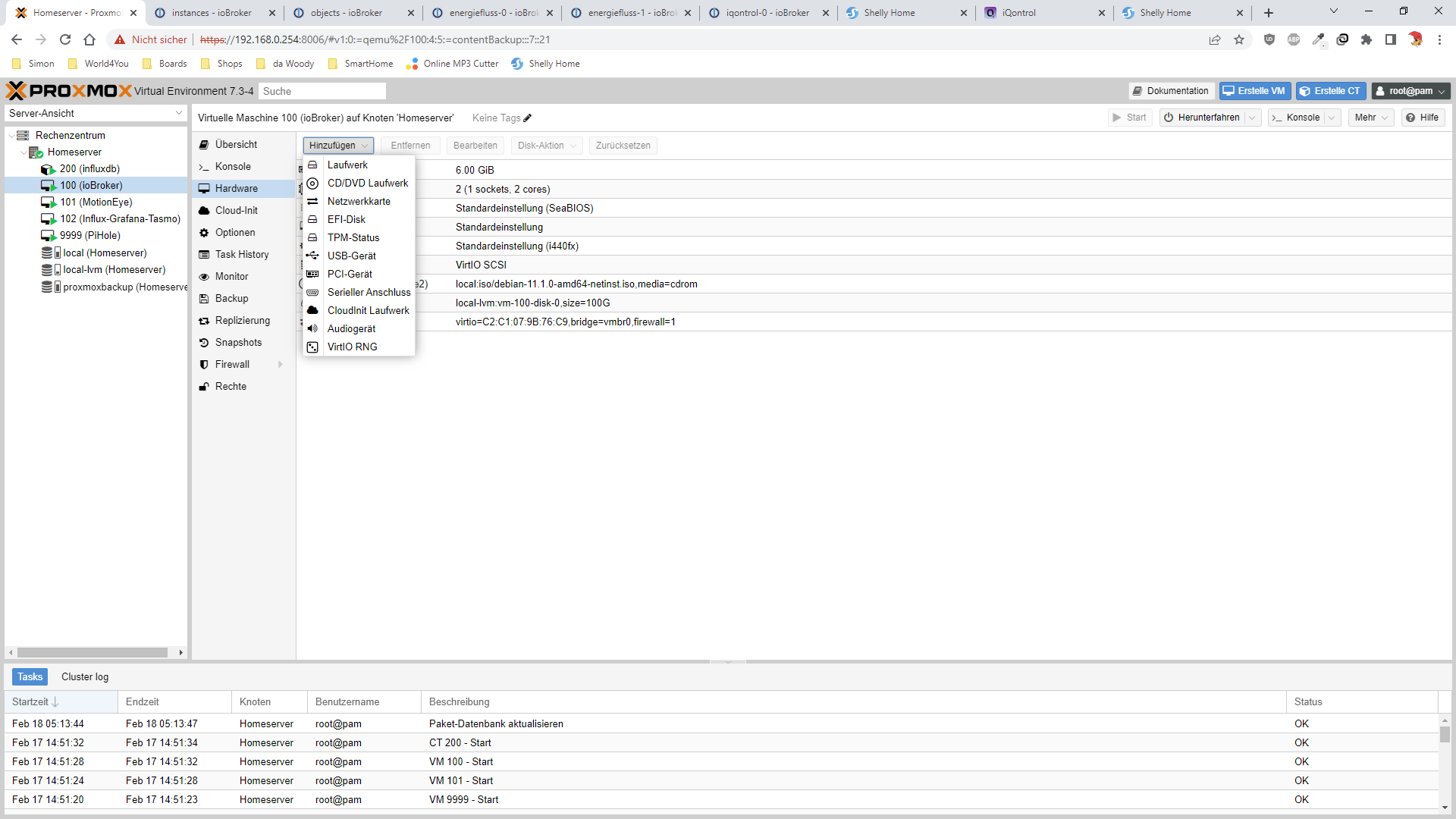
          @wolfshunter eventuell ein config prob in der VM?
          hast du da USB überhaupt aktiv? hab sowas nicht, aber hier
          8683b942-3c93-4338-8f3e-8281bc4523c1-grafik.png
          kannst du USB über hinzufürgen einbinden.

          W Offline
          W Offline
          Wolfshunter
          schrieb am zuletzt editiert von
          #40

          @da_woody

          Das hab ich. Doch nun habe ich ein ähnliches Problem wie vorher
          im Proxmox :-(

          iobroker@ioBroker-blue:~$ lsusb
          Bus 003 Device 001: ID 1d6b:0003 Linux Foundation 3.0 root hub
          Bus 002 Device 002: ID 0bda:a725 Realtek Semiconductor Corp. Bluetooth Radio
          Bus 002 Device 001: ID 1d6b:0002 Linux Foundation 2.0 root hub
          Bus 001 Device 002: ID 0627:0001 Adomax Technology Co., Ltd QEMU USB Tablet
          Bus 001 Device 001: ID 1d6b:0001 Linux Foundation 1.1 root hub
          

          aber hciconfig zeigt:

          iobroker@ioBroker-blue:~$ hciconfig
          hci0:   Type: Primary  Bus: USB
                  BD Address: 00:00:00:00:00:00  ACL MTU: 0:0  SCO MTU: 0:0
                  DOWN
                  RX bytes:49 acl:0 sco:0 events:1 errors:0
                  TX bytes:3 acl:0 sco:0 commands:1 errors:0
          
          
          W ? 2 Antworten Letzte Antwort
          0
          • W Wolfshunter

            @da_woody

            Das hab ich. Doch nun habe ich ein ähnliches Problem wie vorher
            im Proxmox :-(

            iobroker@ioBroker-blue:~$ lsusb
            Bus 003 Device 001: ID 1d6b:0003 Linux Foundation 3.0 root hub
            Bus 002 Device 002: ID 0bda:a725 Realtek Semiconductor Corp. Bluetooth Radio
            Bus 002 Device 001: ID 1d6b:0002 Linux Foundation 2.0 root hub
            Bus 001 Device 002: ID 0627:0001 Adomax Technology Co., Ltd QEMU USB Tablet
            Bus 001 Device 001: ID 1d6b:0001 Linux Foundation 1.1 root hub
            

            aber hciconfig zeigt:

            iobroker@ioBroker-blue:~$ hciconfig
            hci0:   Type: Primary  Bus: USB
                    BD Address: 00:00:00:00:00:00  ACL MTU: 0:0  SCO MTU: 0:0
                    DOWN
                    RX bytes:49 acl:0 sco:0 events:1 errors:0
                    TX bytes:3 acl:0 sco:0 commands:1 errors:0
            
            
            W Offline
            W Offline
            Wolfshunter
            schrieb am zuletzt editiert von
            #41

            Das ganze ist in der VM, am LXC kommt weiterhin die Fehlermeldung

            1 Antwort Letzte Antwort
            0
            • W Wolfshunter

              @da_woody

              Das hab ich. Doch nun habe ich ein ähnliches Problem wie vorher
              im Proxmox :-(

              iobroker@ioBroker-blue:~$ lsusb
              Bus 003 Device 001: ID 1d6b:0003 Linux Foundation 3.0 root hub
              Bus 002 Device 002: ID 0bda:a725 Realtek Semiconductor Corp. Bluetooth Radio
              Bus 002 Device 001: ID 1d6b:0002 Linux Foundation 2.0 root hub
              Bus 001 Device 002: ID 0627:0001 Adomax Technology Co., Ltd QEMU USB Tablet
              Bus 001 Device 001: ID 1d6b:0001 Linux Foundation 1.1 root hub
              

              aber hciconfig zeigt:

              iobroker@ioBroker-blue:~$ hciconfig
              hci0:   Type: Primary  Bus: USB
                      BD Address: 00:00:00:00:00:00  ACL MTU: 0:0  SCO MTU: 0:0
                      DOWN
                      RX bytes:49 acl:0 sco:0 events:1 errors:0
                      TX bytes:3 acl:0 sco:0 commands:1 errors:0
              
              
              ? Offline
              ? Offline
              Ein ehemaliger Benutzer
              schrieb am zuletzt editiert von
              #42

              @wolfshunter

              Moin,

              gib mir mal ein paar Minuten, ich starte mal ein LXC Container, und versuche mal meinen Bluetooth Stick an den durchzureichen.

              VG
              Bernd

              W 1 Antwort Letzte Antwort
              0
              • ? Ein ehemaliger Benutzer

                @wolfshunter

                Moin,

                gib mir mal ein paar Minuten, ich starte mal ein LXC Container, und versuche mal meinen Bluetooth Stick an den durchzureichen.

                VG
                Bernd

                W Offline
                W Offline
                Wolfshunter
                schrieb am zuletzt editiert von
                #43

                @dp20eic

                Ok.

                ich hab hier nocmal die dmesg von der VM:

                iobroker@ioBroker-blue:/lib/firmware$ sudo dmesg | grep -i blue
                [sudo] Passwort fur iobroker:
                [    4.026507] systemd[1]: Set hostname to <ioBroker-blue>.
                [  624.433012] usb 2-1: Product: Bluetooth Radio
                [  624.757929] Bluetooth: Core ver 2.22
                [  624.758068] Bluetooth: HCI device and connection manager initialized
                [  624.758075] Bluetooth: HCI socket layer initialized
                [  624.758079] Bluetooth: L2CAP socket layer initialized
                [  624.758097] Bluetooth: SCO socket layer initialized
                [  624.891710] Bluetooth: BNEP (Ethernet Emulation) ver 1.3
                [  624.891715] Bluetooth: BNEP filters: protocol multicast
                [  624.891722] Bluetooth: BNEP socket layer initialized
                [  626.826974] Bluetooth: hci0: command 0x1001 tx timeout
                [  634.890548] Bluetooth: hci0: RTL: HCI_OP_READ_LOCAL_VERSION failed (-110)
                
                wendy2702W 1 Antwort Letzte Antwort
                0
                • W Wolfshunter

                  @dp20eic

                  Ok.

                  ich hab hier nocmal die dmesg von der VM:

                  iobroker@ioBroker-blue:/lib/firmware$ sudo dmesg | grep -i blue
                  [sudo] Passwort fur iobroker:
                  [    4.026507] systemd[1]: Set hostname to <ioBroker-blue>.
                  [  624.433012] usb 2-1: Product: Bluetooth Radio
                  [  624.757929] Bluetooth: Core ver 2.22
                  [  624.758068] Bluetooth: HCI device and connection manager initialized
                  [  624.758075] Bluetooth: HCI socket layer initialized
                  [  624.758079] Bluetooth: L2CAP socket layer initialized
                  [  624.758097] Bluetooth: SCO socket layer initialized
                  [  624.891710] Bluetooth: BNEP (Ethernet Emulation) ver 1.3
                  [  624.891715] Bluetooth: BNEP filters: protocol multicast
                  [  624.891722] Bluetooth: BNEP socket layer initialized
                  [  626.826974] Bluetooth: hci0: command 0x1001 tx timeout
                  [  634.890548] Bluetooth: hci0: RTL: HCI_OP_READ_LOCAL_VERSION failed (-110)
                  
                  wendy2702W Online
                  wendy2702W Online
                  wendy2702
                  schrieb am zuletzt editiert von
                  #44

                  @wolfshunter Da wird wohl in deiner VM oder LXC auch der Treiber/Firmware fehlen.

                  Bitte keine Fragen per PN, die gehören ins Forum!

                  Benutzt das Voting rechts unten im Beitrag wenn er euch geholfen hat.

                  W 1 Antwort Letzte Antwort
                  0
                  • wendy2702W wendy2702

                    @wolfshunter Da wird wohl in deiner VM oder LXC auch der Treiber/Firmware fehlen.

                    W Offline
                    W Offline
                    Wolfshunter
                    schrieb am zuletzt editiert von
                    #45

                    @wendy2702

                    Muss ich denn in der VM auch die Treiber laden wenn das Gerät durch gereicht wird?

                    wendy2702W 1 Antwort Letzte Antwort
                    0
                    • W Wolfshunter

                      @wendy2702

                      Muss ich denn in der VM auch die Treiber laden wenn das Gerät durch gereicht wird?

                      wendy2702W Online
                      wendy2702W Online
                      wendy2702
                      schrieb am zuletzt editiert von
                      #46

                      @wolfshunter Kann ich dir nicht beantworten da ich es noch nicht mit einem USB Stick gemacht habe.

                      Bitte keine Fragen per PN, die gehören ins Forum!

                      Benutzt das Voting rechts unten im Beitrag wenn er euch geholfen hat.

                      W 2 Antworten Letzte Antwort
                      0
                      • wendy2702W wendy2702

                        @wolfshunter Kann ich dir nicht beantworten da ich es noch nicht mit einem USB Stick gemacht habe.

                        W Offline
                        W Offline
                        Wolfshunter
                        schrieb am zuletzt editiert von
                        #47

                        @wendy2702

                        es funktioniert nun. Musste ein weiteres mal neustarten und nun sehe ich folgendes:

                        iobroker@ioBroker-blue:~$ hciconfig --all
                        hci0:   Type: Primary  Bus: USB
                                BD Address: 8C:88:2B:45:7F:57  ACL MTU: 1021:6  SCO MTU: 255:12
                                UP RUNNING
                                RX bytes:1077 acl:0 sco:0 events:57 errors:0
                                TX bytes:2703 acl:0 sco:0 commands:56 errors:0
                                Features: 0xff 0xff 0xff 0xfe 0xdb 0xfd 0x7b 0x87
                                Packet type: DM1 DM3 DM5 DH1 DH3 DH5 HV1 HV2 HV3
                                Link policy: RSWITCH HOLD SNIFF PARK
                                Link mode: SLAVE ACCEPT
                                Name: 'ioBroker-blue'
                                Class: 0x000000
                                Service Classes: Unspecified
                                Device Class: Miscellaneous,
                                HCI Version: 5.1 (0xa)  Revision: 0x9a9
                                LMP Version: 5.1 (0xa)  Subversion: 0x8a6b
                                Manufacturer: Realtek Semiconductor Corporation (93)
                        
                        iobroker@ioBroker-blue:~$ bluetoothctl
                        Agent registered
                        [CHG] Controller 8C:88:2B:45:7F:57 Pairable: yes
                        [bluetooth]#
                        
                        ? 1 Antwort Letzte Antwort
                        0
                        • W Wolfshunter

                          @wendy2702

                          es funktioniert nun. Musste ein weiteres mal neustarten und nun sehe ich folgendes:

                          iobroker@ioBroker-blue:~$ hciconfig --all
                          hci0:   Type: Primary  Bus: USB
                                  BD Address: 8C:88:2B:45:7F:57  ACL MTU: 1021:6  SCO MTU: 255:12
                                  UP RUNNING
                                  RX bytes:1077 acl:0 sco:0 events:57 errors:0
                                  TX bytes:2703 acl:0 sco:0 commands:56 errors:0
                                  Features: 0xff 0xff 0xff 0xfe 0xdb 0xfd 0x7b 0x87
                                  Packet type: DM1 DM3 DM5 DH1 DH3 DH5 HV1 HV2 HV3
                                  Link policy: RSWITCH HOLD SNIFF PARK
                                  Link mode: SLAVE ACCEPT
                                  Name: 'ioBroker-blue'
                                  Class: 0x000000
                                  Service Classes: Unspecified
                                  Device Class: Miscellaneous,
                                  HCI Version: 5.1 (0xa)  Revision: 0x9a9
                                  LMP Version: 5.1 (0xa)  Subversion: 0x8a6b
                                  Manufacturer: Realtek Semiconductor Corporation (93)
                          
                          iobroker@ioBroker-blue:~$ bluetoothctl
                          Agent registered
                          [CHG] Controller 8C:88:2B:45:7F:57 Pairable: yes
                          [bluetooth]#
                          
                          ? Offline
                          ? Offline
                          Ein ehemaliger Benutzer
                          schrieb am zuletzt editiert von Ein ehemaliger Benutzer
                          #48

                          @wolfshunter sagte in 2 mal ioBoker installieren unter Proxmox:

                          es funktioniert nun. Musste ein weiteres mal neustarten und nun sehe ich folgendes:

                          Moin,

                          da warst Du schneller, musste erstmal Kochen und meinen häuslichen Pflichten nachkommen :)

                          Kannst Du denn jetzt z.B. den Stick mit einem Bluetooth - Adapter in ioBroker verbinden und auch Geräte pairen`

                          VG
                          Bernd

                          W 2 Antworten Letzte Antwort
                          0
                          • ? Ein ehemaliger Benutzer

                            @wolfshunter sagte in 2 mal ioBoker installieren unter Proxmox:

                            es funktioniert nun. Musste ein weiteres mal neustarten und nun sehe ich folgendes:

                            Moin,

                            da warst Du schneller, musste erstmal Kochen und meinen häuslichen Pflichten nachkommen :)

                            Kannst Du denn jetzt z.B. den Stick mit einem Bluetooth - Adapter in ioBroker verbinden und auch Geräte pairen`

                            VG
                            Bernd

                            W Offline
                            W Offline
                            Wolfshunter
                            schrieb am zuletzt editiert von Wolfshunter
                            #49

                            @dp20eic

                            Das mit dem pairen muß nun leider etwas warten, denn leider sind die XIAMI Temp und Luft Sensoren nur über die App zu pairen. :-(

                            Nun muß ich mal schauen das ich mir etwas hole was dann auch ohne die Handy App (ohne Claud :-( )geht

                            Allerdings kann ich im ioBroker den Adapter für Bluetooth hinzufügen.

                            1 Antwort Letzte Antwort
                            0
                            • wendy2702W wendy2702

                              @wolfshunter Kann ich dir nicht beantworten da ich es noch nicht mit einem USB Stick gemacht habe.

                              W Offline
                              W Offline
                              Wolfshunter
                              schrieb am zuletzt editiert von
                              #50

                              @wendy2702

                              Hi,

                              habe mal versucht auf der VM nach BT Geräten in der Nähe zu suchen, aber
                              ich bekommen folgende Fehlermeldung:

                              root@ioBroker-blue:/home/iobroker# bluetoothctl
                              Agent registered
                              [CHG] Controller 8C:88:2B:45:7F:57 Pairable: yes
                              [bluetooth]# scan on
                              Failed to start discovery: org.bluez.Error.InProgress
                              [bluetooth]#
                              

                              Denke so ganz richtig läuft der BT Stick noch nicht :-( in der VM

                              Habe alternative mal einen ThinClient mit einer WLAN/BT Karte getestet, dort
                              bekomme ich dann folgende Meldung:

                              hajo@Kodi-Batocera:~$ bluetoothctl
                              Agent registered
                              [CHG] Controller 14:AB:C5:73:92:AD Pairable: yes
                              [bluetooth]# scan on
                              Discovery started
                              [CHG] Controller 14:AB:C5:73:92:AD Discovering: yes
                              [CHG] Device BE:16:E1:00:10:24 RSSI: -78
                              [CHG] Device A8:A2:37:32:69:D3 RSSI: -72
                              [CHG] Device A8:A2:37:32:69:D3 RSSI: -63
                              [bluetooth]#
                              

                              Hoffe das dort vielleicht mein XIAOMI Temp/Luft Sensort mal auftaucht.

                              1 Antwort Letzte Antwort
                              0
                              • ? Ein ehemaliger Benutzer

                                @wolfshunter sagte in 2 mal ioBoker installieren unter Proxmox:

                                es funktioniert nun. Musste ein weiteres mal neustarten und nun sehe ich folgendes:

                                Moin,

                                da warst Du schneller, musste erstmal Kochen und meinen häuslichen Pflichten nachkommen :)

                                Kannst Du denn jetzt z.B. den Stick mit einem Bluetooth - Adapter in ioBroker verbinden und auch Geräte pairen`

                                VG
                                Bernd

                                W Offline
                                W Offline
                                Wolfshunter
                                schrieb am zuletzt editiert von
                                #51

                                @dp20eic

                                Habe es nun auch geschafft das der Bluetooth Stick in der VM funktioniert.

                                iobroker@ioBroker-blue:~$ bluetoothctl
                                Agent registered
                                [bluetooth]# scan on
                                Discovery started
                                [CHG] Controller 8C:88:2B:45:7F:57 Discovering: yes
                                [NEW] Device 0E:E4:60:C0:5F:61 0E-E4-60-C0-5F-61
                                [NEW] Device 64:1C:B0:C5:BA:25 [TV] Samsung 8 Series (49)
                                [NEW] Device BE:16:E1:00:10:24 MELK-OA10   24
                                [NEW] Device 24:CF:34:3B:24:41 24-CF-34-3B-24-41
                                

                                Aber den Xaiomi bekomme ich immer noch nicht angebunden :-(

                                1 Antwort Letzte Antwort
                                0
                                Antworten
                                • In einem neuen Thema antworten
                                Anmelden zum Antworten
                                • Älteste zuerst
                                • Neuste zuerst
                                • Meiste Stimmen


                                Support us

                                ioBroker
                                Community Adapters
                                Donate

                                546

                                Online

                                32.4k

                                Benutzer

                                81.5k

                                Themen

                                1.3m

                                Beiträge
                                Community
                                Impressum | Datenschutz-Bestimmungen | Nutzungsbedingungen | Einwilligungseinstellungen
                                ioBroker Community 2014-2025
                                logo
                                • Anmelden

                                • Du hast noch kein Konto? Registrieren

                                • Anmelden oder registrieren, um zu suchen
                                • Erster Beitrag
                                  Letzter Beitrag
                                0
                                • Home
                                • Aktuell
                                • Tags
                                • Ungelesen 0
                                • Kategorien
                                • Unreplied
                                • Beliebt
                                • GitHub
                                • Docu
                                • Hilfe
