




MBus-Instanz lässt sich nicht erzeugen
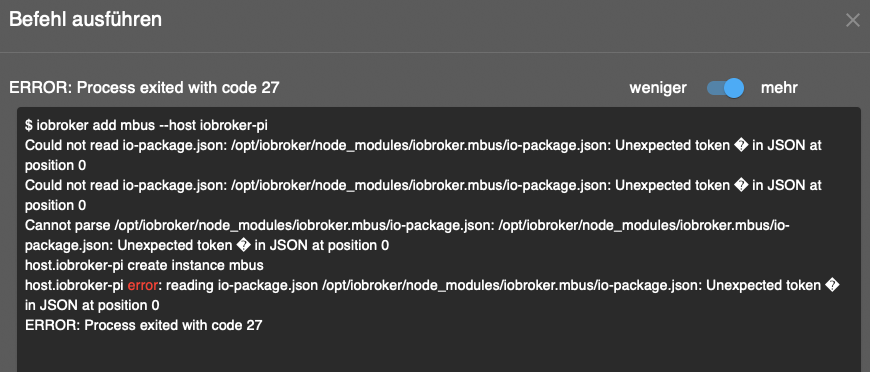
-
@thomas-braun
der Test:
which nodejs && nodejs -v && which node && node -v && which npm && npm -v && apt policy nodejs
liefert gar nichts - ?iobroker update ...
iobroker upgrade
liefert:

ps. das läuft auf einem raspi
@pille0557 keine Screenshots aus der Konsole.
Kann man nicht gut lesen, nicht zitieren, nicht kopieren und ist 'fetter'. -
@pille0557 keine Screenshots aus der Konsole.
Kann man nicht gut lesen, nicht zitieren, nicht kopieren und ist 'fetter'.@thomas-braun
die Anweisung
curl -sLf -o diag.sh https://iobroker.net/diag.sh && bash diag.sh
Liefert Fehler (leider nur die bösen BS-Copys):
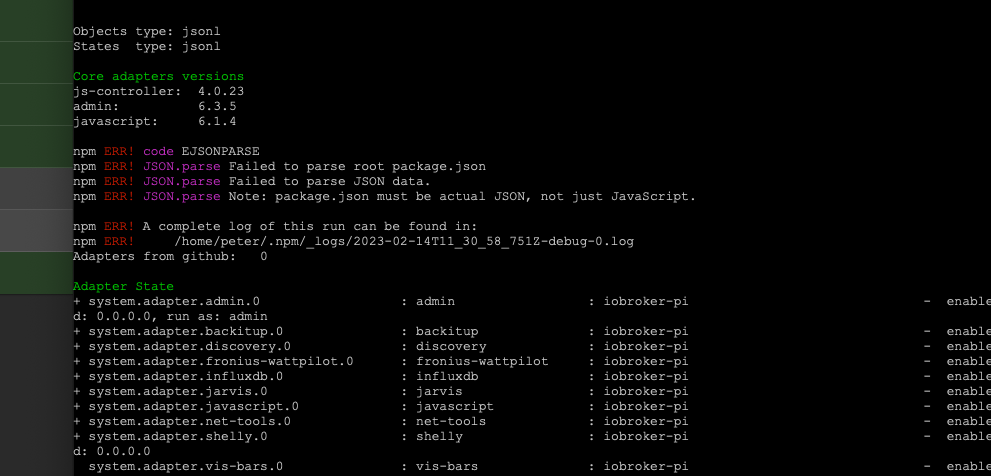
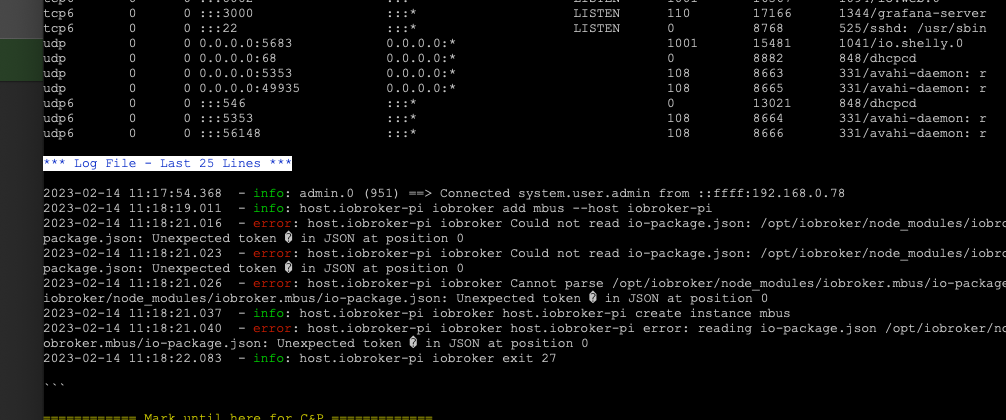
in der Summe kommt das heraus:
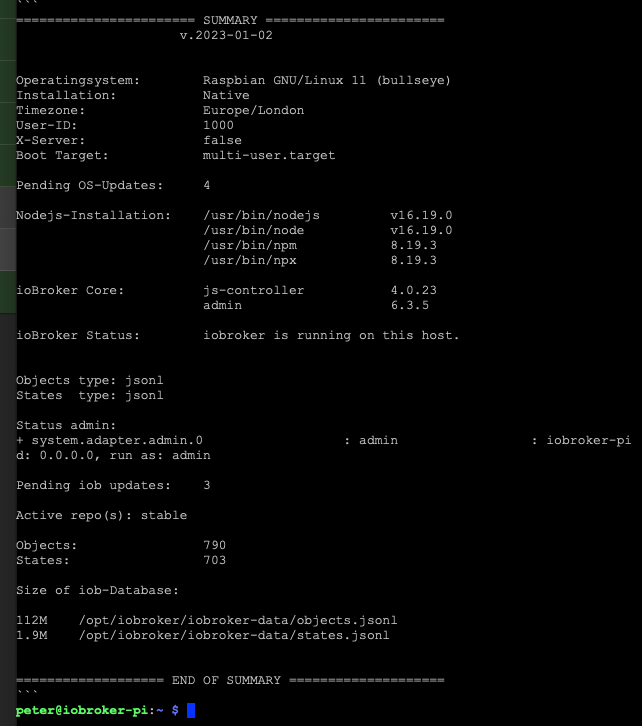
keine Ahnung was es bedeutet
werde wohl wohl auf einer FJS-Kiste (i5Core) mit Debian das Teil nochmal installieren, mal sehen was sich dann ergibt -
@thomas-braun
die Anweisung
curl -sLf -o diag.sh https://iobroker.net/diag.sh && bash diag.sh
Liefert Fehler (leider nur die bösen BS-Copys):
in der Summe kommt das heraus:
keine Ahnung was es bedeutet
werde wohl wohl auf einer FJS-Kiste (i5Core) mit Debian das Teil nochmal installieren, mal sehen was sich dann ergibt@pille0557 sagte in MBus-Instanz lässt sich nicht erzeugen:
(leider nur die bösen BS-Copys):
Warum? Kann und will ich nicht lesen.
Hau die Textausgabe in CodeTags. -
@pille0557 sagte in MBus-Instanz lässt sich nicht erzeugen:
(leider nur die bösen BS-Copys):
Warum? Kann und will ich nicht lesen.
Hau die Textausgabe in CodeTags.@thomas-braun
so nochmal ordentlich ...
der Versuch vom MBus Adapter eine Instanz zu erzeugen:$ iobroker add mbus --host iobroker-pi Could not read io-package.json: /opt/iobroker/node_modules/iobroker.mbus/io-package.json: Unexpected token � in JSON at position 0 Cannot parse /opt/iobroker/node_modules/iobroker.mbus/io-package.json: /opt/iobroker/node_modules/iobroker.mbus/io-package.json: Unexpected token � in JSON at position 0 host.iobroker-pi error: reading io-package.json /opt/iobroker/node_modules/iobroker.mbus/io-package.json: Unexpected token � in JSON at position 0 ERROR: Process exited with code 27npm ls | grep -E 'github|ERR' liefert:
npm ERR! code EJSONPARSE
npm ERR! JSON.parse Failed to parse root package.json
npm ERR! JSON.parse Failed to parse JSON data.
npm ERR! JSON.parse Note: package.json must be actual JSON, not just JavaScript.

npm ERR! A complete log of this run can be found in:
npm ERR!     /home/iobroker/.npm/_logs/2023-02-17T10_03_52_933Z-debug-0.log
habe jetzt alle möglichen Installationsroutinen etc. nochmal durchlaufen lassen ... ?
-
@thomas-braun
so nochmal ordentlich ...
der Versuch vom MBus Adapter eine Instanz zu erzeugen:$ iobroker add mbus --host iobroker-pi Could not read io-package.json: /opt/iobroker/node_modules/iobroker.mbus/io-package.json: Unexpected token � in JSON at position 0 Cannot parse /opt/iobroker/node_modules/iobroker.mbus/io-package.json: /opt/iobroker/node_modules/iobroker.mbus/io-package.json: Unexpected token � in JSON at position 0 host.iobroker-pi error: reading io-package.json /opt/iobroker/node_modules/iobroker.mbus/io-package.json: Unexpected token � in JSON at position 0 ERROR: Process exited with code 27npm ls | grep -E 'github|ERR' liefert:
npm ERR! code EJSONPARSE
npm ERR! JSON.parse Failed to parse root package.json
npm ERR! JSON.parse Failed to parse JSON data.
npm ERR! JSON.parse Note: package.json must be actual JSON, not just JavaScript.

npm ERR! A complete log of this run can be found in:
npm ERR!     /home/iobroker/.npm/_logs/2023-02-17T10_03_52_933Z-debug-0.log
habe jetzt alle möglichen Installationsroutinen etc. nochmal durchlaufen lassen ... ?
System durchpatchen.
iob update
iob upgrade
iob stop
sudo apt update
sudo apt full-upgrade
sudo reboot
Und bitte vollständig aus der Konsole kopieren, inkl. vollständigem login prompt.
-
System durchpatchen.
iob update
iob upgrade
iob stop
sudo apt update
sudo apt full-upgrade
sudo reboot
Und bitte vollständig aus der Konsole kopieren, inkl. vollständigem login prompt.
@thomas-braun
dankepeter@iobroker-pi:/opt/iobroker $ iob update Used repository: stable Cannot read or parse /opt/iobroker/node_modules/@iobroker/js-controller-common/lib/common/../node_modules/iobroker.mbus/io-package.json: /opt/iobroker/node_modules/iobroker.mbus/io-package.json: Unexpected token � in JSON at position 0 Cannot read or parse /opt/iobroker/node_modules/@iobroker/js-controller-common/lib/common/../node_modules/iobroker.vis-bars/io-package.json: /opt/iobroker/node_modules/iobroker.vis-bars/io-package.json: Unexpected token � in JSON at position 0 Cannot read or parse /opt/iobroker/node_modules/@iobroker/js-controller-common/lib/common/../node_modules/iobroker.mbus/io-package.json: /opt/iobroker/node_modules/iobroker.mbus/io-package.json: Unexpected token � in JSON at position 0 Cannot read or parse /opt/iobroker/node_modules/@iobroker/js-controller-common/lib/common/../node_modules/iobroker.vis-bars/io-package.json: /opt/iobroker/node_modules/iobroker.vis-bars/io-package.json: Unexpected token � in JSON at position 0 Adapter "admin" : 6.3.5 , installed 6.3.5 Adapter "backitup" : 2.5.12 , installed 2.5.10 [Updatable] Adapter "discovery" : 3.1.0 , installed 3.1.0 Adapter "fronius-wattpilot": 4.3.0, installed 4.3.0 Adapter "influxdb" : 3.2.0 , installed 3.2.0 Adapter "jarvis" : 3.1.2 , installed 3.1.2 Adapter "javascript" : 6.1.4 , installed 6.1.4 Controller "js-controller": 4.0.24 , installed 4.0.23 [Updatable] Adapter "net-tools" : 0.2.0 , installed 0.2.0 Adapter "shelly" : 6.3.1 , installed 6.0.0 [Updatable] Adapter "simple-api" : 2.7.2 , installed 2.7.2 Adapter "socketio" : 4.2.0 , installed 4.2.0 Adapter "vis" : 1.4.15 , installed 1.4.15 Adapter "web" : 4.3.0 , installed 4.3.0 Adapter "ws" : 1.3.0 , installed 1.3.0peter@iobroker-pi:/opt/iobroker $ iob upgrade Cannot upgrade: /opt/iobroker/node_modules/iobroker.mbus/io-package.json: Unexpected token � in JSON at position 0peter@iobroker-pi:/opt/iobroker $ iob stop peter@iobroker-pi:/opt/iobroker $ sudo apt update Hit:1 http://archive.raspberrypi.org/debian bullseye InRelease Hit:2 https://packages.grafana.com/oss/deb stable InRelease Hit:3 http://raspbian.raspberrypi.org/raspbian bullseye InRelease Hit:4 https://deb.nodesource.com/node_16.x bullseye InRelease Get:5 https://repos.influxdata.com/debian bullseye InRelease [7,022 B] Err:5 https://repos.influxdata.com/debian bullseye InRelease The following signatures couldn't be verified because the public key is not available: NO_PUBKEY D8FF8E1F7DF8B07E Fetched 7,022 B in 7s (1,019 B/s) Reading package lists... Done Building dependency tree... Done Reading state information... Done All packages are up to date. W: An error occurred during the signature verification. The repository is not updated and the previous index files will be used. GPG error: https://repos.influxdata.com/debian bullseye InRelease: The following signatures couldn't be verified because the public key is not available: NO_PUBKEY D8FF8E1F7DF8B07E W: Failed to fetch https://repos.influxdata.com/debian/dists/bullseye/InRelease The following signatures couldn't be verified because the public key is not available: NO_PUBKEY D8FF8E1F7DF8B07E W: Some index files failed to download. They have been ignored, or old ones used instead.peter@iobroker-pi:/opt/iobroker $ sudo apt full-upgrade Reading package lists... Done Building dependency tree... Done Reading state information... Done Calculating upgrade... Done The following package was automatically installed and is no longer required: raspinfo Use 'sudo apt autoremove' to remove it. 0 upgraded, 0 newly installed, 0 to remove and 0 not upgraded.peter@iobroker-pi:/opt/iobroker $ sudo apt autoremove Reading package lists... Done Building dependency tree... Done Reading state information... Done The following packages will be REMOVED: raspinfo 0 upgraded, 0 newly installed, 1 to remove and 0 not upgraded. After this operation, 10.2 kB disk space will be freed. Do you want to continue? [Y/n] Y (Reading database ... 61813 files and directories currently installed.) Removing raspinfo (20230123-1) ... peter@iobroker-pi:/opt/iobroker $ sudo apt full-upgrade Reading package lists... Done Building dependency tree... Done Reading state information... Done Calculating upgrade... Done 0 upgraded, 0 newly installed, 0 to remove and 0 not upgraded. -
@thomas-braun
dankepeter@iobroker-pi:/opt/iobroker $ iob update Used repository: stable Cannot read or parse /opt/iobroker/node_modules/@iobroker/js-controller-common/lib/common/../node_modules/iobroker.mbus/io-package.json: /opt/iobroker/node_modules/iobroker.mbus/io-package.json: Unexpected token � in JSON at position 0 Cannot read or parse /opt/iobroker/node_modules/@iobroker/js-controller-common/lib/common/../node_modules/iobroker.vis-bars/io-package.json: /opt/iobroker/node_modules/iobroker.vis-bars/io-package.json: Unexpected token � in JSON at position 0 Cannot read or parse /opt/iobroker/node_modules/@iobroker/js-controller-common/lib/common/../node_modules/iobroker.mbus/io-package.json: /opt/iobroker/node_modules/iobroker.mbus/io-package.json: Unexpected token � in JSON at position 0 Cannot read or parse /opt/iobroker/node_modules/@iobroker/js-controller-common/lib/common/../node_modules/iobroker.vis-bars/io-package.json: /opt/iobroker/node_modules/iobroker.vis-bars/io-package.json: Unexpected token � in JSON at position 0 Adapter "admin" : 6.3.5 , installed 6.3.5 Adapter "backitup" : 2.5.12 , installed 2.5.10 [Updatable] Adapter "discovery" : 3.1.0 , installed 3.1.0 Adapter "fronius-wattpilot": 4.3.0, installed 4.3.0 Adapter "influxdb" : 3.2.0 , installed 3.2.0 Adapter "jarvis" : 3.1.2 , installed 3.1.2 Adapter "javascript" : 6.1.4 , installed 6.1.4 Controller "js-controller": 4.0.24 , installed 4.0.23 [Updatable] Adapter "net-tools" : 0.2.0 , installed 0.2.0 Adapter "shelly" : 6.3.1 , installed 6.0.0 [Updatable] Adapter "simple-api" : 2.7.2 , installed 2.7.2 Adapter "socketio" : 4.2.0 , installed 4.2.0 Adapter "vis" : 1.4.15 , installed 1.4.15 Adapter "web" : 4.3.0 , installed 4.3.0 Adapter "ws" : 1.3.0 , installed 1.3.0peter@iobroker-pi:/opt/iobroker $ iob upgrade Cannot upgrade: /opt/iobroker/node_modules/iobroker.mbus/io-package.json: Unexpected token � in JSON at position 0peter@iobroker-pi:/opt/iobroker $ iob stop peter@iobroker-pi:/opt/iobroker $ sudo apt update Hit:1 http://archive.raspberrypi.org/debian bullseye InRelease Hit:2 https://packages.grafana.com/oss/deb stable InRelease Hit:3 http://raspbian.raspberrypi.org/raspbian bullseye InRelease Hit:4 https://deb.nodesource.com/node_16.x bullseye InRelease Get:5 https://repos.influxdata.com/debian bullseye InRelease [7,022 B] Err:5 https://repos.influxdata.com/debian bullseye InRelease The following signatures couldn't be verified because the public key is not available: NO_PUBKEY D8FF8E1F7DF8B07E Fetched 7,022 B in 7s (1,019 B/s) Reading package lists... Done Building dependency tree... Done Reading state information... Done All packages are up to date. W: An error occurred during the signature verification. The repository is not updated and the previous index files will be used. GPG error: https://repos.influxdata.com/debian bullseye InRelease: The following signatures couldn't be verified because the public key is not available: NO_PUBKEY D8FF8E1F7DF8B07E W: Failed to fetch https://repos.influxdata.com/debian/dists/bullseye/InRelease The following signatures couldn't be verified because the public key is not available: NO_PUBKEY D8FF8E1F7DF8B07E W: Some index files failed to download. They have been ignored, or old ones used instead.peter@iobroker-pi:/opt/iobroker $ sudo apt full-upgrade Reading package lists... Done Building dependency tree... Done Reading state information... Done Calculating upgrade... Done The following package was automatically installed and is no longer required: raspinfo Use 'sudo apt autoremove' to remove it. 0 upgraded, 0 newly installed, 0 to remove and 0 not upgraded.peter@iobroker-pi:/opt/iobroker $ sudo apt autoremove Reading package lists... Done Building dependency tree... Done Reading state information... Done The following packages will be REMOVED: raspinfo 0 upgraded, 0 newly installed, 1 to remove and 0 not upgraded. After this operation, 10.2 kB disk space will be freed. Do you want to continue? [Y/n] Y (Reading database ... 61813 files and directories currently installed.) Removing raspinfo (20230123-1) ... peter@iobroker-pi:/opt/iobroker $ sudo apt full-upgrade Reading package lists... Done Building dependency tree... Done Reading state information... Done Calculating upgrade... Done 0 upgraded, 0 newly installed, 0 to remove and 0 not upgraded.@pille0557 sagte in MBus-Instanz lässt sich nicht erzeugen:
The following signatures couldn't be verified because the public key is not available: NO_PUBKEY D8FF8E1F7DF8B07E
Hat mit dem Problem zwar nichts zu tun, aber das influx-Repository muss neuangelegt werden.
-
@pille0557 sagte in MBus-Instanz lässt sich nicht erzeugen:
The following signatures couldn't be verified because the public key is not available: NO_PUBKEY D8FF8E1F7DF8B07E
Hat mit dem Problem zwar nichts zu tun, aber das influx-Repository muss neuangelegt werden.
@thomas-braun
habe den iobroker nochmal drüber installiert, bilde mir ein das schon x-mal gemacht zu haben ...
jedenfalls konnte ich jetzt eine Instanz vom MBus erzeugen
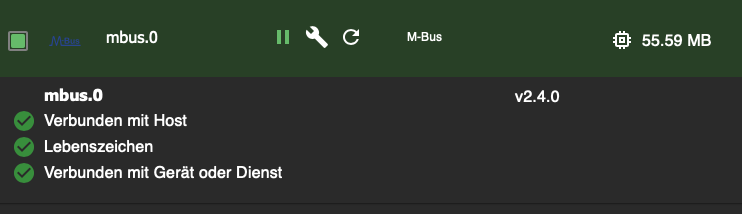
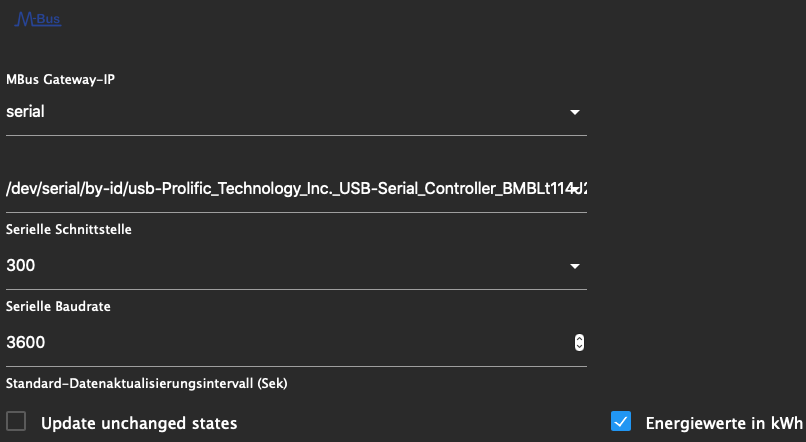
allerdings gibt es im Protokoll Fehlermeldungen:
mbus.0
1823	2023-02-25 15:23:16.182	info	Schedule initialization for M-Bus-ID 1 with update interval 3600

mbus.0
1823	2023-02-25 15:23:14.103	info	Initialize M-Bus Serial to /dev/serial/by-id/usb-Prolific_Technology_Inc._USB-Serial_Controller_BMBLt114J20-if00-port0 with 300baud

mbus.0
1823	2023-02-25 15:23:14.102	info	Default Update Interval: 3600

mbus.0
1823	2023-02-25 15:23:12.021	error	All M-Bus devices could not be read, reinitialize and start over

mbus.0
1823	2023-02-25 15:23:12.020	warn	M-Bus Devices with errors: 1 from 1

mbus.0
1823	2023-02-25 15:23:12.019	warn	M-Bus ID 1 err: Error: Error: Failed to send/receive M-Bus request frame[1].
Nebeneffekt der ganzen Operation, mein Dashboard in grafana ist weg, naja egal...
-
@thomas-braun
habe den iobroker nochmal drüber installiert, bilde mir ein das schon x-mal gemacht zu haben ...
jedenfalls konnte ich jetzt eine Instanz vom MBus erzeugen
allerdings gibt es im Protokoll Fehlermeldungen:
mbus.0
1823	2023-02-25 15:23:16.182	info	Schedule initialization for M-Bus-ID 1 with update interval 3600

mbus.0
1823	2023-02-25 15:23:14.103	info	Initialize M-Bus Serial to /dev/serial/by-id/usb-Prolific_Technology_Inc._USB-Serial_Controller_BMBLt114J20-if00-port0 with 300baud

mbus.0
1823	2023-02-25 15:23:14.102	info	Default Update Interval: 3600

mbus.0
1823	2023-02-25 15:23:12.021	error	All M-Bus devices could not be read, reinitialize and start over

mbus.0
1823	2023-02-25 15:23:12.020	warn	M-Bus Devices with errors: 1 from 1

mbus.0
1823	2023-02-25 15:23:12.019	warn	M-Bus ID 1 err: Error: Error: Failed to send/receive M-Bus request frame[1].
Nebeneffekt der ganzen Operation, mein Dashboard in grafana ist weg, naja egal...
Zu M-Bus selber kann ich nix sagen.
-
Zu M-Bus selber kann ich nix sagen.
@thomas-braun
ok, danke!


Hey! Du scheinst an dieser Unterhaltung interessiert zu sein, hast aber noch kein Konto.
Hast du es satt, bei jedem Besuch durch die gleichen Beiträge zu scrollen? Wenn du dich für ein Konto anmeldest, kommst du immer genau dorthin zurück, wo du zuvor warst, und kannst dich über neue Antworten benachrichtigen lassen (entweder per E-Mail oder Push-Benachrichtigung). Du kannst auch Lesezeichen speichern und Beiträge positiv bewerten, um anderen Community-Mitgliedern deine Wertschätzung zu zeigen.
Mit deinem Input könnte dieser Beitrag noch besser werden 💗
Registrieren Anmelden320
Online33.0k
Benutzer83.5k
Themen1.3m
Beiträge