
NEWS




Vis does not start (Terminated (NO_ERROR): Without reason)
-
Hello. I am learning the smart home with the zigbee and ioBroker.
I installed an official docker image, connected the devices, turned on the Telegram bot, wrote some JS scripts, but I can't start vis.
It just does not start, and the reasons are not specified in the logs. I didn't find any information by searching the forum.
Logs are listed below, please help, how do I install and run vis?
What am I doing:
0) remove vis and all related drivers, remove the web server - so I try to make a "clean" installation- install vis
1.1) the web server was installed automatically and have status "started"
1.2) vis did not start - add the license code in vis settings, check was fine
- restart iis
3.1) vis did not start
That's it, there are no further ideas. Immediately after installation, it was the same, vis never worked on my server
host.iobroker 2022-12-20 22:42:18.437 info instance system.adapter.vis.0 terminated while should be started once vis.0 10212 2022-12-20 22:42:17.883 info Terminated (NO_ERROR): Without reason vis.0 10212 2022-12-20 22:42:16.937 info vis license is OK. vis.0 10212 2022-12-20 22:42:16.338 info starting. Version 1.4.15 in /opt/iobroker/node_modules/iobroker.vis, node: v16.19.0, js-controller: 4.0.23 vis.0 10212 2022-12-20 22:42:16.279 debug States connected to redis: 127.0.0.1:9000 vis.0 10212 2022-12-20 22:42:16.264 debug States create User PubSub Client vis.0 10212 2022-12-20 22:42:16.263 debug States create System PubSub Client vis.0 10212 2022-12-20 22:42:16.255 debug Redis States: Use Redis connection: 127.0.0.1:9000 vis.0 10212 2022-12-20 22:42:16.235 debug Objects connected to redis: 127.0.0.1:9001 vis.0 10212 2022-12-20 22:42:16.199 debug Objects client initialize lua scripts vis.0 10212 2022-12-20 22:42:16.168 debug Objects create User PubSub Client vis.0 10212 2022-12-20 22:42:16.167 debug Objects create System PubSub Client vis.0 10212 2022-12-20 22:42:16.154 debug Objects client ready ... initialize now vis.0 10212 2022-12-20 22:42:16.079 debug Redis Objects: Use Redis connection: 127.0.0.1:9001 admin.0 1929 2022-12-20 22:42:01.591 info <== Disconnect system.user.admin from ::ffff:192.168.12.2 devices - install vis
-
Hello. I am learning the smart home with the zigbee and ioBroker.
I installed an official docker image, connected the devices, turned on the Telegram bot, wrote some JS scripts, but I can't start vis.
It just does not start, and the reasons are not specified in the logs. I didn't find any information by searching the forum.
Logs are listed below, please help, how do I install and run vis?
What am I doing:
0) remove vis and all related drivers, remove the web server - so I try to make a "clean" installation- install vis
1.1) the web server was installed automatically and have status "started"
1.2) vis did not start - add the license code in vis settings, check was fine
- restart iis
3.1) vis did not start
That's it, there are no further ideas. Immediately after installation, it was the same, vis never worked on my server
host.iobroker 2022-12-20 22:42:18.437 info instance system.adapter.vis.0 terminated while should be started once vis.0 10212 2022-12-20 22:42:17.883 info Terminated (NO_ERROR): Without reason vis.0 10212 2022-12-20 22:42:16.937 info vis license is OK. vis.0 10212 2022-12-20 22:42:16.338 info starting. Version 1.4.15 in /opt/iobroker/node_modules/iobroker.vis, node: v16.19.0, js-controller: 4.0.23 vis.0 10212 2022-12-20 22:42:16.279 debug States connected to redis: 127.0.0.1:9000 vis.0 10212 2022-12-20 22:42:16.264 debug States create User PubSub Client vis.0 10212 2022-12-20 22:42:16.263 debug States create System PubSub Client vis.0 10212 2022-12-20 22:42:16.255 debug Redis States: Use Redis connection: 127.0.0.1:9000 vis.0 10212 2022-12-20 22:42:16.235 debug Objects connected to redis: 127.0.0.1:9001 vis.0 10212 2022-12-20 22:42:16.199 debug Objects client initialize lua scripts vis.0 10212 2022-12-20 22:42:16.168 debug Objects create User PubSub Client vis.0 10212 2022-12-20 22:42:16.167 debug Objects create System PubSub Client vis.0 10212 2022-12-20 22:42:16.154 debug Objects client ready ... initialize now vis.0 10212 2022-12-20 22:42:16.079 debug Redis Objects: Use Redis connection: 127.0.0.1:9001 admin.0 1929 2022-12-20 22:42:01.591 info <== Disconnect system.user.admin from ::ffff:192.168.12.2 devicesunder special circumstances it helps to downgrade to vis version 1.4.0 and restart the server - if it is running after the downgrade make an update to latest version again
iobroker upgrade iobroker.vis@1.4.0by the way - you should also try to install the web socket adapter and in the setting of the web adapter choose the web-socket adapter (ws0) for the connection
- install vis
-
under special circumstances it helps to downgrade to vis version 1.4.0 and restart the server - if it is running after the downgrade make an update to latest version again
iobroker upgrade iobroker.vis@1.4.0by the way - you should also try to install the web socket adapter and in the setting of the web adapter choose the web-socket adapter (ws0) for the connection
@liv-in-sky said in Vis does not start (Terminated (NO_ERROR): Without reason):
iobroker.vis@1.4.0
Tried this, nothing changed. All settings of adapters are default (exept license of vis.0 and link to ws.0 in web.0)
I never tried to use iobroker commands in CLI before, only in admin webpage, so I read some docs. During installation of custom version of vis I mention in the logs that vis tried to connect redis, but there is no redis instance in the docker imagehost.iobroker 2023-01-11 22:37:02.921 info instance system.adapter.vis.0 terminated while should be started once vis.0 1453 2023-01-11 22:37:02.376 info Terminated (NO_ERROR): Without reason vis.0 1453 2023-01-11 22:37:01.668 info vis license is OK. vis.0 1453 2023-01-11 22:37:01.106 info starting. Version 1.4.0 in /opt/iobroker/node_modules/iobroker.vis, node: v16.19.0, js-controller: 4.0.24 vis.0 1453 2023-01-11 22:37:01.016 debug States connected to redis: 127.0.0.1:9000 vis.0 1453 2023-01-11 22:37:00.968 debug States create User PubSub Client vis.0 1453 2023-01-11 22:37:00.967 debug States create System PubSub Client vis.0 1453 2023-01-11 22:37:00.960 debug Redis States: Use Redis connection: 127.0.0.1:9000 vis.0 1453 2023-01-11 22:37:00.942 debug Objects connected to redis: 127.0.0.1:9001 vis.0 1453 2023-01-11 22:37:00.896 debug Objects client initialize lua scripts vis.0 1453 2023-01-11 22:37:00.871 debug Objects create User PubSub Client vis.0 1453 2023-01-11 22:37:00.870 debug Objects create System PubSub Client vis.0 1453 2023-01-11 22:37:00.868 debug Objects client ready ... initialize now vis.0 1453 2023-01-11 22:37:00.830 debug Redis Objects: Use Redis connection: 127.0.0.1:9001 admin.0 172 2023-01-11 22:34:44.074 info <== Disconnect system.user.admin from ::ffff:192.168.12.2 webIs redis required for vis? I didn't found this in any tutorial or docs... May be this is the reason that vis does not start?
-
@liv-in-sky said in Vis does not start (Terminated (NO_ERROR): Without reason):
iobroker.vis@1.4.0
Tried this, nothing changed. All settings of adapters are default (exept license of vis.0 and link to ws.0 in web.0)
I never tried to use iobroker commands in CLI before, only in admin webpage, so I read some docs. During installation of custom version of vis I mention in the logs that vis tried to connect redis, but there is no redis instance in the docker imagehost.iobroker 2023-01-11 22:37:02.921 info instance system.adapter.vis.0 terminated while should be started once vis.0 1453 2023-01-11 22:37:02.376 info Terminated (NO_ERROR): Without reason vis.0 1453 2023-01-11 22:37:01.668 info vis license is OK. vis.0 1453 2023-01-11 22:37:01.106 info starting. Version 1.4.0 in /opt/iobroker/node_modules/iobroker.vis, node: v16.19.0, js-controller: 4.0.24 vis.0 1453 2023-01-11 22:37:01.016 debug States connected to redis: 127.0.0.1:9000 vis.0 1453 2023-01-11 22:37:00.968 debug States create User PubSub Client vis.0 1453 2023-01-11 22:37:00.967 debug States create System PubSub Client vis.0 1453 2023-01-11 22:37:00.960 debug Redis States: Use Redis connection: 127.0.0.1:9000 vis.0 1453 2023-01-11 22:37:00.942 debug Objects connected to redis: 127.0.0.1:9001 vis.0 1453 2023-01-11 22:37:00.896 debug Objects client initialize lua scripts vis.0 1453 2023-01-11 22:37:00.871 debug Objects create User PubSub Client vis.0 1453 2023-01-11 22:37:00.870 debug Objects create System PubSub Client vis.0 1453 2023-01-11 22:37:00.868 debug Objects client ready ... initialize now vis.0 1453 2023-01-11 22:37:00.830 debug Redis Objects: Use Redis connection: 127.0.0.1:9001 admin.0 172 2023-01-11 22:34:44.074 info <== Disconnect system.user.admin from ::ffff:192.168.12.2 webIs redis required for vis? I didn't found this in any tutorial or docs... May be this is the reason that vis does not start?
what is the output of the command:
iobroker statuswhat is happening when you open the vis editor with a browser ?did you try it with the address ?
http://192.168.178.59:8082/vis/edit.html?project#view -
what is the output of the command:
iobroker statuswhat is happening when you open the vis editor with a browser ?did you try it with the address ?
http://192.168.178.59:8082/vis/edit.html?project#viewwhat is the output of the command:
iobroker statusroot@iobroker:/opt/iobroker# iobroker status iobroker is running on this host. Objects type: jsonl States type: jsonl root@iobroker:/opt/iobroker#what is happening when you open the vis editor with a browser ?did you try it with the address ?
http://192.168.178.59:8082/vis/edit.html?project#view
My address is http://127.0.0.1:8082/vis/edit.html (I am not at home now, so I connected via ssh tunnel, ports 8081 and 8082 are forwarded)Nothing is happening - there is no connection
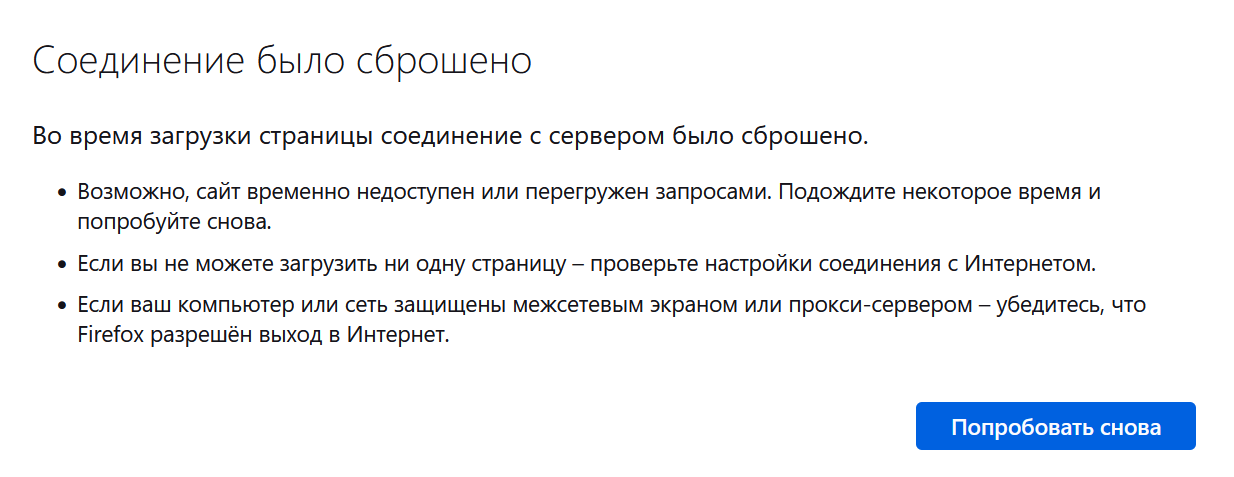
-
what is the output of the command:
iobroker statusroot@iobroker:/opt/iobroker# iobroker status iobroker is running on this host. Objects type: jsonl States type: jsonl root@iobroker:/opt/iobroker#what is happening when you open the vis editor with a browser ?did you try it with the address ?
http://192.168.178.59:8082/vis/edit.html?project#view
My address is http://127.0.0.1:8082/vis/edit.html (I am not at home now, so I connected via ssh tunnel, ports 8081 and 8082 are forwarded)Nothing is happening - there is no connection
@mahmahoritos I'm sorry - maybe docker and the forwarding is making some trouble - we need somebody else to solve this problem - I don't use iobroker like you :-(
-
What is the output of
iob list instancesroot@iobroker:/opt/iobroker# iob list instances + system.adapter.admin.0 : admin : iobroker - enabled, port: 8081, bind: 0.0.0.0 (SSL), run as: admin + system.adapter.backitup.0 : backitup : iobroker - enabled system.adapter.devices.0 : devices : iobroker - disabled + system.adapter.discovery.0 : discovery : iobroker - enabled + system.adapter.ecovacs-deebot.0 : ecovacs-deebot : iobroker - enabled + system.adapter.email.0 : email : iobroker - enabled + system.adapter.javascript.0 : javascript : iobroker - enabled + system.adapter.telegram.0 : telegram : iobroker - enabled, port: 8443, bind: 0.0.0.0 + system.adapter.text2command.0 : text2command : iobroker - enabled system.adapter.vis.0 : vis : iobroker - enabled + system.adapter.web.0 : web : iobroker - enabled, port: 8082, bind: 0.0.0.0, run as: admin + system.adapter.ws.0 : ws : iobroker - enabled, port: 8084, bind: 0.0.0.0, run as: admin + system.adapter.zigbee.0 : zigbee : iobroker - enabled, port: /dev/ttyUSB0 + instance is aliveAlso tried to connect to vis (8082 port) from home network - result is the same
-
@mahmahoritos If you are using a official Docker image, which one?
Did you open the Port 8082 to be able to access VIS ?
I guess you missed to open the port 8082 at Docker config. Default is only 8081 if I remember correct.
-
@mahmahoritos If you are using a official Docker image, which one?
Did you open the Port 8082 to be able to access VIS ?
I guess you missed to open the port 8082 at Docker config. Default is only 8081 if I remember correct.
I guess you missed to open the port 8082 at Docker config. Default is only 8081 if I remember correct.
You are absolutely right! I'm noob...services: iobroker: container_name: iobroker image: buanet/iobroker:latest-v7 hostname: iobroker restart: always ports: - "8081:8081" volumes: - iobrokerdata:/opt/iobroker environment: - TZ=Asia/Yekaterinburg devices: - "/dev/ttyUSB0:/dev/ttyUSB0"I added "8082:8082" string and after recreating container demo page started!
Thank you a lot! -
I guess you missed to open the port 8082 at Docker config. Default is only 8081 if I remember correct.
You are absolutely right! I'm noob...services: iobroker: container_name: iobroker image: buanet/iobroker:latest-v7 hostname: iobroker restart: always ports: - "8081:8081" volumes: - iobrokerdata:/opt/iobroker environment: - TZ=Asia/Yekaterinburg devices: - "/dev/ttyUSB0:/dev/ttyUSB0"I added "8082:8082" string and after recreating container demo page started!
Thank you a lot!@mahmahoritos You are welcome


Support us
493
Online32.5k
Users81.7k
Topics1.3m
Posts