Skip to content
  • Home
  • Recent
  • Tags
  • 0 Unread 0
  • Categories
  • Unreplied
  • Popular
  • GitHub
  • Docu
  • Hilfe
Skins
  • Light
  • Brite
  • Cerulean
  • Cosmo
  • Flatly
  • Journal
  • Litera
  • Lumen
  • Lux
  • Materia
  • Minty
  • Morph
  • Pulse
  • Sandstone
  • Simplex
  • Sketchy
  • Spacelab
  • United
  • Yeti
  • Zephyr
  • Dark
  • Cyborg
  • Darkly
  • Quartz
  • Slate
  • Solar
  • Superhero
  • Vapor

  • Default (No Skin)
  • No Skin
Collapse
ioBroker Logo

Community Forum

donate donate
  1. ioBroker Community Home
  2. Deutsch
  3. ioBroker Allgemein
  4. [Problem] Assistent Discovery Adapter bleibt stecken

NEWS

  • Jahresrückblick 2025 – unser neuer Blogbeitrag ist online! ✨
    BluefoxB
    Bluefox
    16
    1
    1.7k

  • Neuer Blogbeitrag: Monatsrückblick - Dezember 2025 🎄
    BluefoxB
    Bluefox
    13
    1
    876

  • Weihnachtsangebot 2025! 🎄
    BluefoxB
    Bluefox
    25
    1
    2.1k

[Problem] Assistent Discovery Adapter bleibt stecken

Scheduled Pinned Locked Moved ioBroker Allgemein
14 Posts 4 Posters 2.9k Views
  • Oldest to Newest
  • Newest to Oldest
  • Most Votes
Reply
  • Reply as topic
Log in to reply
This topic has been deleted. Only users with topic management privileges can see it.
  • SkudderonS Offline
    SkudderonS Offline
    Skudderon
    wrote on last edited by
    #1

    MOD-Edit by eric2905; 18.05.2017 / 12:45; Betreff geändert

    Hallo ioBroker Profis :)

    ich habe den Discovery Adapter installiert und nun das Problem, daß der Suchlauf der Adapterkonfiguration "stecken" bleibt.

    Der Suchlauf der Geräte schein zu funktionieren; es werden 22 Geräte erkannt.

    Danach bleibt "Suche Dienste" bei 5% stecken ("1 Services gefunden").

    Kann mir jemand sagen wie ich an Detailinformationen komme um das Problem einzugrenzen?

    Vielen Dank

    1 Reply Last reply
    0
    • apollon77A Offline
      apollon77A Offline
      apollon77
      wrote on last edited by
      #2

      Was sagt das log? Irgend ein Fehler?!

      Gesendet von iPhone mit Tapatalk

      Beitrag hat geholfen? Votet rechts unten im Beitrag :-) https://paypal.me/Apollon77 / https://github.com/sponsors/Apollon77

      • Debug-Log für Instanz einschalten? Admin -> Instanzen -> Expertenmodus -> Instanz aufklappen - Loglevel ändern
      • Logfiles auf Platte /opt/iobroker/log/… nutzen, Admin schneidet Zeilen ab
      1 Reply Last reply
      0
      • SkudderonS Offline
        SkudderonS Offline
        Skudderon
        wrote on last edited by
        #3

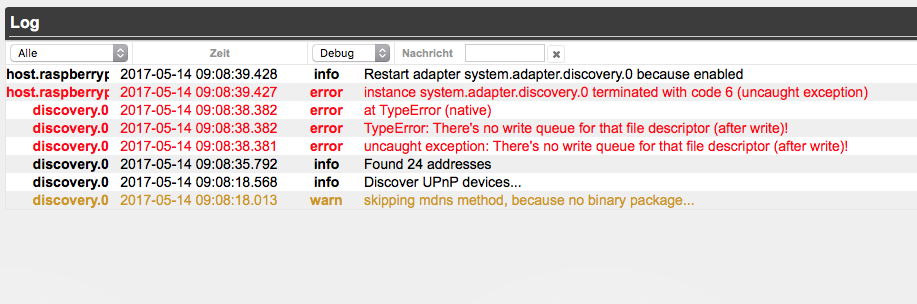
        Oh mein Gott … Asche auf mein Haupt ... ioBroker hat ein Log :( ... ich hab echt nicht dran gedacht

        Ich hab das Log mal drangehangen
        2366_bildschirmfoto_2017-05-14_um_11.08.56.png

        1 Reply Last reply
        0
        • BluefoxB Offline
          BluefoxB Offline
          Bluefox
          wrote on last edited by
          #4

          @Skudderon:

          Oh mein Gott … Asche auf mein Haupt ... ioBroker hat ein Log :( ... ich hab echt nicht dran gedacht

          Ich hab das Log mal drangehangen `
          Kannst du so was machen:

          cd /opt/iobroker
          iobroker stop discovery
          node node_modules/iobroker.discovery/main.js --logs --force


          Und dann die Suche starten?

          1 Reply Last reply
          0
          • apollon77A Offline
            apollon77A Offline
            apollon77
            wrote on last edited by
            #5

            Bluefox, würde in http://forum.iobroker.net/viewtopic.php?p=65358 schönmache berichtet. Meine erste Recherche ergab serial als Ursache.

            Gesendet von iPhone mit Tapatalk

            Beitrag hat geholfen? Votet rechts unten im Beitrag :-) https://paypal.me/Apollon77 / https://github.com/sponsors/Apollon77

            • Debug-Log für Instanz einschalten? Admin -> Instanzen -> Expertenmodus -> Instanz aufklappen - Loglevel ändern
            • Logfiles auf Platte /opt/iobroker/log/… nutzen, Admin schneidet Zeilen ab
            1 Reply Last reply
            0
            • SkudderonS Offline
              SkudderonS Offline
              Skudderon
              wrote on last edited by
              #6

              ja, kann ich … vielen Dank für deine Hilfe ... hier ist das Ergebnis:

              ! ````
              Received "browse" event
              skipping mdns method, because no binary package...
              ping: 0%, devices - 0
              serial: 100%, devices - 1
              Discover UPnP devices...
              upnp: 0%, devices - 0
              found 192.168.2.1
              found 192.168.2.20
              UPNP Answer from 192.168.2.1
              found {"_addr":"192.168.2.1","_name":"fritz.box","_data":{"names":["fritz.box"]}}
              found {"_addr":"192.168.2.20","_name":"Henriks-MBP.fritz.box","_data":{"names":["Henriks-MBP.fritz.box"]}}
              UPNP Answer from 192.168.2.33
              UPNP Answer from 192.168.2.22
              UPNP Answer from 192.168.2.32
              UPNP Answer from 192.168.2.35
              UPNP Answer from 192.168.2.34
              ping: 8%, devices - 2
              found 192.168.2.22
              found 192.168.2.23
              found 192.168.2.27
              found 192.168.2.31
              found 192.168.2.32
              found 192.168.2.33
              found 192.168.2.34
              found 192.168.2.35
              found 192.168.2.36
              found {"_addr":"192.168.2.22","_name":"SonosZB.fritz.box","_data":{"names":["SonosZB.fritz.box"]}}
              found {"_addr":"192.168.2.23","_name":"tc.fritz.box","_data":{"names":["tc.fritz.box"]}}
              found {"_addr":"192.168.2.27","_name":"Henriks-iPad-2.fritz.box","_data":{"names":["Henriks-iPad-2.fritz.box"]}}
              found {"_addr":"192.168.2.31","_name":"192.168.2.31"}
              found {"_addr":"192.168.2.32","_name":"SonosZP.fritz.box","_data":{"names":["SonosZP.fritz.box"]}}
              found {"_addr":"192.168.2.33","_name":"SonosZP.fritz.box","_data":{"names":["SonosZP.fritz.box"]}}
              found {"_addr":"192.168.2.34","_name":"SonosZP.fritz.box","_data":{"names":["SonosZP.fritz.box"]}}
              found {"_addr":"192.168.2.35","_name":"SonosZP.fritz.box","_data":{"names":["SonosZP.fritz.box"]}}
              found {"_addr":"192.168.2.36","_name":"192.168.2.36"}
              UPNP Answer from 192.168.2.124
              upnp: 10%, devices - 7
              ping: 15%, devices - 11
              upnp: 20%, devices - 7
              ping: 23%, devices - 11
              upnp: 30%, devices - 7
              ping: 31%, devices - 11
              found 192.168.2.101
              found {"_addr":"192.168.2.101","_name":"Zigarenbox.fritz.box","_data":{"names":["Zigarenbox.fritz.box"]}}
              upnp: 40%, devices - 7
              ping: 38%, devices - 12
              found 192.168.2.115
              found {"_addr":"192.168.2.115","_name":"Danidrucker.fritz.box","_data":{"names":["Danidrucker.fritz.box"]}}
              upnp: 50%, devices - 7
              ping: 46%, devices - 13
              found 192.168.2.124
              found {"_addr":"192.168.2.124","_name":"WDMyCloud.fritz.box","_data":{"names":["WDMyCloud.fritz.box"]}}
              upnp: 60%, devices - 7
              ping: 54%, devices - 14
              upnp: 70%, devices - 7
              ping: 62%, devices - 14
              ping: 69%, devices - 14
              upnp: 80%, devices - 7
              upnp: 90%, devices - 7
              ping: 77%, devices - 14
              ping: 85%, devices - 14
              upnp: 100%, devices - 7
              ping: 92%, devices - 14
              ping: 100%, devices - undefined
              Found 22 addresses
              Test 192.168.2.23 chromecast
              Test 192.168.2.23 daikin
              Test 192.168.2.23 fronius
              Test 192.168.2.23 hm-rpc
              Test 192.168.2.23 hue
              Test 192.168.2.23 influxdb
              Test 192.168.2.23 landroid
              Test 192.168.2.23 lightify
              Test 192.168.2.23 megad
              Test 192.168.2.23 miele
              Test 192.168.2.23 nut
              Test 192.168.2.23 ping
              Test 192.168.2.23 ping DETECTED!
              Test 192.168.2.23 samsung
              Test 192.168.2.23 sonos
              Test 192.168.2.23 sql
              Test 192.168.2.23 tr-064
              Test 192.168.2.23 upnp
              Test 192.168.2.23 yamaha
              Send UDP discovery package
              Not found
              Test 192.168.2.23 hm-rega
              Test /dev/ttyAMA0 mysensors
              [TypeError: There's no write queue for that file descriptor (after write)!]
              terminating

              1 Reply Last reply
              0
              • BluefoxB Offline
                BluefoxB Offline
                Bluefox
                wrote on last edited by
                #7

                @Skudderon:

                ja, kann ich … vielen Dank für deine Hilfe ... hier ist das Ergebnis:

                ! Received "browse" event skipping mdns method, because no binary package... ping: 0%, devices - 0 serial: 100%, devices - 1 Discover UPnP devices... upnp: 0%, devices - 0 found 192.168.2.1 found 192.168.2.20 UPNP Answer from 192.168.2.1 found {"_addr":"192.168.2.1","_name":"fritz.box","_data":{"names":["fritz.box"]}} found {"_addr":"192.168.2.20","_name":"Henriks-MBP.fritz.box","_data":{"names":["Henriks-MBP.fritz.box"]}} UPNP Answer from 192.168.2.33 UPNP Answer from 192.168.2.22 UPNP Answer from 192.168.2.32 UPNP Answer from 192.168.2.35 UPNP Answer from 192.168.2.34 ping: 8%, devices - 2 found 192.168.2.22 found 192.168.2.23 found 192.168.2.27 found 192.168.2.31 found 192.168.2.32 found 192.168.2.33 found 192.168.2.34 found 192.168.2.35 found 192.168.2.36 found {"_addr":"192.168.2.22","_name":"SonosZB.fritz.box","_data":{"names":["SonosZB.fritz.box"]}} found {"_addr":"192.168.2.23","_name":"tc.fritz.box","_data":{"names":["tc.fritz.box"]}} found {"_addr":"192.168.2.27","_name":"Henriks-iPad-2.fritz.box","_data":{"names":["Henriks-iPad-2.fritz.box"]}} found {"_addr":"192.168.2.31","_name":"192.168.2.31"} found {"_addr":"192.168.2.32","_name":"SonosZP.fritz.box","_data":{"names":["SonosZP.fritz.box"]}} found {"_addr":"192.168.2.33","_name":"SonosZP.fritz.box","_data":{"names":["SonosZP.fritz.box"]}} found {"_addr":"192.168.2.34","_name":"SonosZP.fritz.box","_data":{"names":["SonosZP.fritz.box"]}} found {"_addr":"192.168.2.35","_name":"SonosZP.fritz.box","_data":{"names":["SonosZP.fritz.box"]}} found {"_addr":"192.168.2.36","_name":"192.168.2.36"} UPNP Answer from 192.168.2.124 upnp: 10%, devices - 7 ping: 15%, devices - 11 upnp: 20%, devices - 7 ping: 23%, devices - 11 upnp: 30%, devices - 7 ping: 31%, devices - 11 found 192.168.2.101 found {"_addr":"192.168.2.101","_name":"Zigarenbox.fritz.box","_data":{"names":["Zigarenbox.fritz.box"]}} upnp: 40%, devices - 7 ping: 38%, devices - 12 found 192.168.2.115 found {"_addr":"192.168.2.115","_name":"Danidrucker.fritz.box","_data":{"names":["Danidrucker.fritz.box"]}} upnp: 50%, devices - 7 ping: 46%, devices - 13 found 192.168.2.124 found {"_addr":"192.168.2.124","_name":"WDMyCloud.fritz.box","_data":{"names":["WDMyCloud.fritz.box"]}} upnp: 60%, devices - 7 ping: 54%, devices - 14 upnp: 70%, devices - 7 ping: 62%, devices - 14 ping: 69%, devices - 14 upnp: 80%, devices - 7 upnp: 90%, devices - 7 ping: 77%, devices - 14 ping: 85%, devices - 14 upnp: 100%, devices - 7 ping: 92%, devices - 14 ping: 100%, devices - undefined Found 22 addresses Test 192.168.2.23 chromecast Test 192.168.2.23 daikin Test 192.168.2.23 fronius Test 192.168.2.23 hm-rpc Test 192.168.2.23 hue Test 192.168.2.23 influxdb Test 192.168.2.23 landroid Test 192.168.2.23 lightify Test 192.168.2.23 megad Test 192.168.2.23 miele Test 192.168.2.23 nut Test 192.168.2.23 ping Test 192.168.2.23 ping DETECTED! Test 192.168.2.23 samsung Test 192.168.2.23 sonos Test 192.168.2.23 sql Test 192.168.2.23 tr-064 Test 192.168.2.23 upnp Test 192.168.2.23 yamaha Send UDP discovery package Not found Test 192.168.2.23 hm-rega Test /dev/ttyAMA0 mysensors [TypeError: There's no write queue for that file descriptor (after write)!] terminating `
                bitte diese Datei Löschen. Dann kannst du mindestens discovery nutzen.

                /opt/iobroker/node_modiles/iobroker.discovery/lib/methods/serial.js

                Ich kann momentan nicht erkennen, wo der Fehler liegt.

                Ist das Linux oder Windows (Raspi, OSX, ….)?

                discovery version?

                node.js version?

                1 Reply Last reply
                0
                • apollon77A Offline
                  apollon77A Offline
                  apollon77
                  wrote on last edited by
                  #8

                  @bluefox: https://github.com/EmergingTechnologyAd … issues/684

                  Beitrag hat geholfen? Votet rechts unten im Beitrag :-) https://paypal.me/Apollon77 / https://github.com/sponsors/Apollon77

                  • Debug-Log für Instanz einschalten? Admin -> Instanzen -> Expertenmodus -> Instanz aufklappen - Loglevel ändern
                  • Logfiles auf Platte /opt/iobroker/log/… nutzen, Admin schneidet Zeilen ab
                  1 Reply Last reply
                  0
                  • SkudderonS Offline
                    SkudderonS Offline
                    Skudderon
                    wrote on last edited by
                    #9

                    Vielen Dank @bluefox! Das hat das Problem behoben und der Assistent lief durch.

                    Um deine Frage noch zu beantworten:

                    ioBroker auf Raspi 3.

                    Node 4.8.3

                    discovery 0.2.3

                    1 Reply Last reply
                    0
                    • B Offline
                      B Offline
                      badplay
                      wrote on last edited by
                      #10

                      scheint genau der selbe fehler bei mir zu sein.

                      Ich probiere das gleich mal aus. Habe einen RPI 3 mit Node 4.8.3 und Discovery Adapter 0.2.3

                      Meine Installation hatte wohl ein paar Error. Aber lief alles:

                      root@raspberrypi2:~# node -v
                      v4.8.3
                      root@raspberrypi2:~# sudo mkdir /opt/iobroker
                      root@raspberrypi2:~# sudo chmod 777 /opt/iobroker
                      root@raspberrypi2:~# cd /opt/iobroker
                      root@raspberrypi2:/opt/iobroker# sudo npm install iobroker --unsafe-perm
                      /
                      > iobroker@0.9.0 install /opt/iobroker/node_modules/iobroker
                      > node lib/setup.js
                      
                      npm install iobroker.js-controller --production --prefix /opt/iobroker
                      npm install iobroker.admin --production --prefix /opt/iobroker
                      npm install iobroker.discovery --production --prefix /opt/iobroker
                      In file included from ../src/dns_sd.cpp:1:0:
                      ../src/mdns.hpp:32:20: fatal error: dns_sd.h: Datei oder Verzeichnis nicht gefunden
                       #include <dns_sd.h>
                                          ^
                      compilation terminated.
                      make: *** [Release/obj.target/dns_sd_bindings/src/dns_sd.o] Error 1
                      gyp ERR! build error
                      gyp ERR! stack Error: `make` failed with exit code: 2
                      gyp ERR! stack     at ChildProcess.onExit (/usr/lib/node_modules/npm/node_modules/node-gyp/lib/build.js:276:23)
                      gyp ERR! stack     at emitTwo (events.js:87:13)
                      gyp ERR! stack     at ChildProcess.emit (events.js:172:7)
                      gyp ERR! stack     at Process.ChildProcess._handle.onexit (internal/child_process.js:211:12)
                      gyp ERR! System Linux 4.9.24-v7+
                      gyp ERR! command "/usr/bin/nodejs" "/usr/lib/node_modules/npm/node_modules/node-gyp/bin/node-gyp.js" "rebuild"
                      gyp ERR! cwd /opt/iobroker/node_modules/iobroker.discovery/node_modules/mdns
                      gyp ERR! node -v v4.8.3
                      gyp ERR! node-gyp -v v3.4.0
                      gyp ERR! not ok
                      npm WARN optional dep failed, continuing mdns@2.3.3
                      node-pre-gyp ERR! Tried to download(404): https://github.com/EmergingTechnologyAdvisors/node-serialport/releases/download/4.0.7/serialport-v4.0.7-node-v46-linux-arm.tar.gz
                      node-pre-gyp ERR! Pre-built binaries not found for serialport@4.0.7 and node@4.8.3 (node-v46 ABI) (falling back to source compile with node-gyp)
                      Write "./iobroker start" to start the ioBroker
                      : Datei oder Verzeichnis nicht gefunden
                      Auto-start was enabled. Write "update-rc.d -f iobroker.sh remove" to disable auto-start
                      iobroker is started. Go to "http://ip-addr:8081" to open the admin UI.
                      iobroker@0.9.0 node_modules/iobroker
                      └── yargs@7.1.0 (get-caller-file@1.0.2, decamelize@1.2.0, camelcase@3.0.0, y18n@3.2.1, which-module@1.0.0, set-blocking@2.0.0, yargs-parser@5.0.0, require-main-filename@1.0.1, require-directory@2.1.1, cliui@3.2.0, string-width@1.0.2, os-locale@1.4.0, read-pkg-up@1.0.1)
                      root@raspberrypi2:/opt/iobroker# reboot</dns_sd.h>
                      

                      Mein Discovery Adapter funktioniert nun. Leider findet er meine Harmony Hub nicht. Obwohl das damals gefunden wurde auf meiner iobroker installation unter QNAP NAS


                      1 Reply Last reply
                      0
                      • apollon77A Offline
                        apollon77A Offline
                        apollon77
                        wrote on last edited by
                        #11

                        Was heißt, funktioniert jetzt? Was ist die Änderung zu vorher wo es nicht tat?

                        Beitrag hat geholfen? Votet rechts unten im Beitrag :-) https://paypal.me/Apollon77 / https://github.com/sponsors/Apollon77

                        • Debug-Log für Instanz einschalten? Admin -> Instanzen -> Expertenmodus -> Instanz aufklappen - Loglevel ändern
                        • Logfiles auf Platte /opt/iobroker/log/… nutzen, Admin schneidet Zeilen ab
                        1 Reply Last reply
                        0
                        • B Offline
                          B Offline
                          badplay
                          wrote on last edited by
                          #12

                          habe diese datei gelöscht

                          /opt/iobroker/node_modiles/iobroker.discovery/lib/methods/serial.js

                          dann lief alles

                          1 Reply Last reply
                          0
                          • apollon77A Offline
                            apollon77A Offline
                            apollon77
                            wrote on last edited by
                            #13

                            Also wie vermutet liegt es am Seriellen testing :-(

                            Beitrag hat geholfen? Votet rechts unten im Beitrag :-) https://paypal.me/Apollon77 / https://github.com/sponsors/Apollon77

                            • Debug-Log für Instanz einschalten? Admin -> Instanzen -> Expertenmodus -> Instanz aufklappen - Loglevel ändern
                            • Logfiles auf Platte /opt/iobroker/log/… nutzen, Admin schneidet Zeilen ab
                            1 Reply Last reply
                            0
                            • BluefoxB Offline
                              BluefoxB Offline
                              Bluefox
                              wrote on last edited by
                              #14

                              Ich konnte der Fehler nicht finden (da bei mir nicht reproduzierbar) aber ich habe eingebaut die Möglichkeit das auszuschalten:
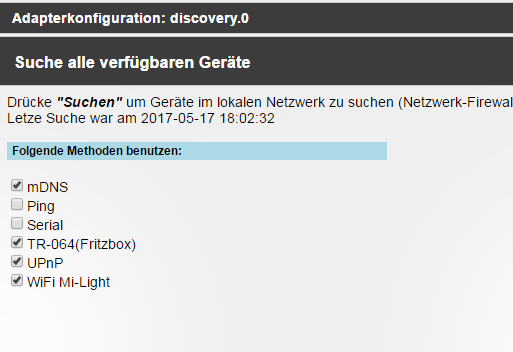
                              48_2017-05-18_09_27_02-iobroker.admin.png

                              Bitte testen (vom git über "octocat").

                              1 Reply Last reply
                              0
                              Reply
                              • Reply as topic
                              Log in to reply
                              • Oldest to Newest
                              • Newest to Oldest
                              • Most Votes


                              Support us

                              ioBroker
                              Community Adapters
                              Donate
                              FAQ Cloud / IOT
                              HowTo: Node.js-Update
                              HowTo: Backup/Restore
                              Downloads
                              BLOG

                              748

                              Online

                              32.6k

                              Users

                              82.1k

                              Topics

                              1.3m

                              Posts
                              Community
                              Impressum | Datenschutz-Bestimmungen | Nutzungsbedingungen | Einwilligungseinstellungen
                              ioBroker Community 2014-2025
                              logo
                              • Login

                              • Don't have an account? Register

                              • Login or register to search.
                              • First post
                                Last post
                              0
                              • Home
                              • Recent
                              • Tags
                              • Unread 0
                              • Categories
                              • Unreplied
                              • Popular
                              • GitHub
                              • Docu
                              • Hilfe