Skip to content
  • Home
  • Aktuell
  • Tags
  • 0 Ungelesen 0
  • Kategorien
  • Unreplied
  • Beliebt
  • GitHub
  • Docu
  • Hilfe
Skins
  • Light
  • Brite
  • Cerulean
  • Cosmo
  • Flatly
  • Journal
  • Litera
  • Lumen
  • Lux
  • Materia
  • Minty
  • Morph
  • Pulse
  • Sandstone
  • Simplex
  • Sketchy
  • Spacelab
  • United
  • Yeti
  • Zephyr
  • Dark
  • Cyborg
  • Darkly
  • Quartz
  • Slate
  • Solar
  • Superhero
  • Vapor

  • Standard: (Kein Skin)
  • Kein Skin
Einklappen
ioBroker Logo

Community Forum

donate donate
  1. ioBroker Community Home
  2. Deutsch
  3. Einsteigerfragen
  4. langsamer IObroker auf Raspberry

NEWS

  • Jahresrückblick 2025 – unser neuer Blogbeitrag ist online! ✨
    BluefoxB
    Bluefox
    17
    1
    4.2k

  • Neuer Blogbeitrag: Monatsrückblick - Dezember 2025 🎄
    BluefoxB
    Bluefox
    13
    1
    1.2k

  • Weihnachtsangebot 2025! 🎄
    BluefoxB
    Bluefox
    25
    1
    2.6k

langsamer IObroker auf Raspberry

Geplant Angeheftet Gesperrt Verschoben Einsteigerfragen
14 Beiträge 6 Kommentatoren 479 Aufrufe 4 Watching
  • Älteste zuerst
  • Neuste zuerst
  • Meiste Stimmen
Antworten
  • In einem neuen Thema antworten
Anmelden zum Antworten
Dieses Thema wurde gelöscht. Nur Nutzer mit entsprechenden Rechten können es sehen.
  • G gluecksmann

    0966a1d9-379e-4097-a155-f0f7934437f5-grafik.png

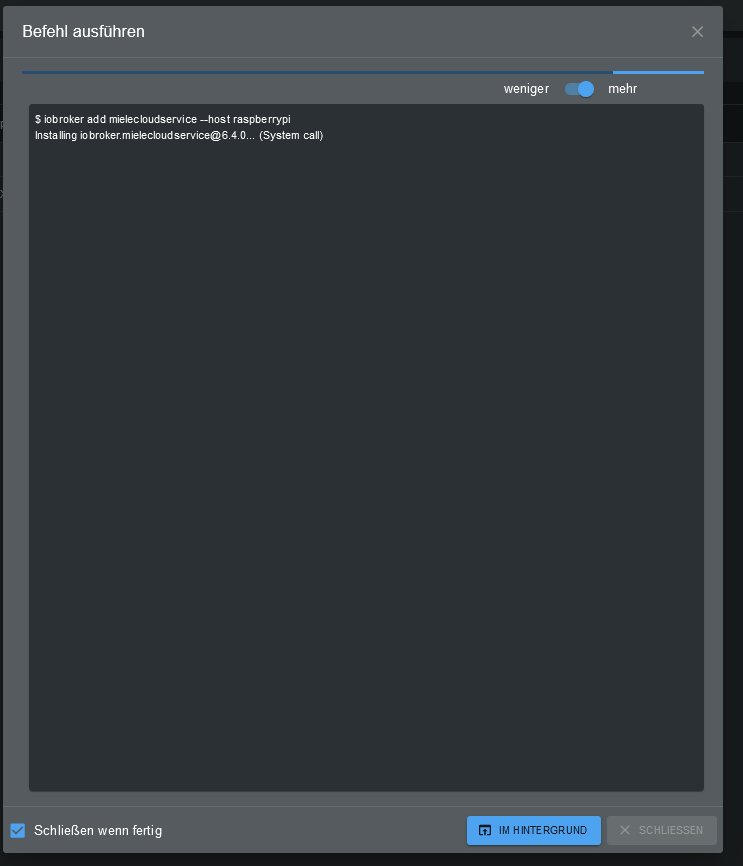
    Hallo ich muss dem Miele Adapter neu installieren... seit über 10 Minunten rödelt er da rum...das geht mir bei allen Sachen so...hat jemand eine Idee was das sein könnte?

    Thomas BraunT Online
    Thomas BraunT Online
    Thomas Braun
    Most Active
    schrieb am zuletzt editiert von
    #4

    @gluecksmann

    Bring dein System halt auf den aktuellen Stand. nodejs@16/npm@8 ist angesagt.

    Linux-Werkzeugkasten:
    https://forum.iobroker.net/topic/42952/der-kleine-iobroker-linux-werkzeugkasten
    NodeJS Fixer Skript:
    https://forum.iobroker.net/topic/68035/iob-node-fix-skript
    iob_diag: curl -sLf -o diag.sh https://iobroker.net/diag.sh && bash diag.sh

    1 Antwort Letzte Antwort
    0
    • G Offline
      G Offline
      gluecksmann
      schrieb am zuletzt editiert von
      #5

      @arteck

      Skript v.0.0.8
      
      *** BASE SYSTEM ***
      Model           : Raspberry Pi 4 Model B Rev 1.4
      Architecture:   armv7l
      Docker:         false
      Virtualization: none
      Distributor ID: Raspbian
      Description:    Raspbian GNU/Linux 10 (buster)
      Release:        10
      Codename:       buster
      
      PRETTY_NAME="Raspbian GNU/Linux 10 (buster)"
      NAME="Raspbian GNU/Linux"
      VERSION_ID="10"
      VERSION="10 (buster)"
      VERSION_CODENAME=buster
      ID=raspbian
      ID_LIKE=debian
      HOME_URL="http://www.raspbian.org/"
      SUPPORT_URL="http://www.raspbian.org/RaspbianForums"
      BUG_REPORT_URL="http://www.raspbian.org/RaspbianBugs"
      
      Systemuptime and Load:
      05:26:33 up 22 days, 19:48,  1 user,  load average: 0.73, 0.50, 0.46
      CPU threads: 4
      
      *** Time and Time Zones ***
      Sun Dec  4 04:26:33 UTC 2022
      Sun Dec  4 05:26:33 CET 2022
      CET +0100
      Europe/Berlin
      
      *** User and Groups ***
      pi
      /home/pi
      pi adm dialout cdrom sudo audio video plugdev games users input netdev lpadmin g                                                                                                                                                             pio i2c spi iobroker
      
      *** X-Server-Setup ***
      X-Server:       false
      Desktop:
      Terminal:       tty
      
      *** MEMORY ***
                   total        used        free      shared  buff/cache   available
      Mem:           7.9G        1.6G        3.9G        435M        2.4G        5.8G
      Swap:           99M         99M        0.0K
      Total:         8.0G        1.7G        3.9G
      
              7898 M total memory
              1597 M used memory
               754 M active memory
              2964 M inactive memory
              3933 M free memory
               196 M buffer memory
              2171 M swap cache
                99 M total swap
                99 M used swap
                 0 M free swap
      
      *** FILESYSTEM ***
      Filesystem     Type      Size  Used Avail Use% Mounted on
      /dev/root      ext4       29G  8.0G   20G  29% /
      devtmpfs       devtmpfs  3.7G     0  3.7G   0% /dev
      tmpfs          tmpfs     3.9G     0  3.9G   0% /dev/shm
      tmpfs          tmpfs     3.9G  436M  3.5G  12% /run
      tmpfs          tmpfs     5.0M  4.0K  5.0M   1% /run/lock
      tmpfs          tmpfs     3.9G     0  3.9G   0% /sys/fs/cgroup
      /dev/mmcblk0p1 vfat      253M   49M  204M  20% /boot
      tmpfs          tmpfs     790M     0  790M   0% /run/user/1000
      
      Show mounted filesystems (real ones only):
      TARGET        SOURCE         FSTYPE OPTIONS
      /             /dev/mmcblk0p2 ext4   rw,noatime
      |-/sys/fs/bpf none           bpf    rw,nosuid,nodev,noexec,relatime,mode=700
      `-/boot       /dev/mmcblk0p1 vfat   rw,relatime,fmask=0022,dmask=0022,codepage=4
      
      Files in neuralgic directories:
      
      /var:
      351M    /var/
      117M    /var/lib
      76M     /var/cache
      69M     /var/lib/apt/lists
      69M     /var/lib/apt
      
      /opt/iobroker/backups:
      94M     /opt/iobroker/backups/
      
      /opt/iobroker/iobroker-data:
      497M    /opt/iobroker/iobroker-data/
      229M    /opt/iobroker/iobroker-data/files
      135M    /opt/iobroker/iobroker-data/backup-objects
      79M     /opt/iobroker/iobroker-data/sonosCache
      48M     /opt/iobroker/iobroker-data/files/javascript.admin
      
      The five largest files in iobroker-data are:
      21M     /opt/iobroker/iobroker-data/files/devices.admin/static/js/2.00a59c14.chu                                                                                                                                                             nk.js.map
      17M     /opt/iobroker/iobroker-data/objects.jsonl
      12M     /opt/iobroker/iobroker-data/objects.json.migrated
      12M     /opt/iobroker/iobroker-data/objects.json.bak.migrated
      12M     /opt/iobroker/iobroker-data/files/javascript.admin/static/js/790.1eb1f33                                                                                                                                                             b.chunk.js.map
      
      *** NodeJS-Installation ***
      
      /usr/bin/nodejs         v16.18.1
      /usr/bin/node           v16.18.1
      /usr/bin/npm            8.19.2
      
      nodejs:
       Installed: 16.18.1-deb-1nodesource1
       Candidate: 16.18.1-deb-1nodesource1
       Version table:
      *** 16.18.1-deb-1nodesource1 500
             500 https://deb.nodesource.com/node_16.x buster/main armhf Packages
             100 /var/lib/dpkg/status
          10.24.0~dfsg-1~deb10u2 500
             500 http://raspbian.raspberrypi.org/raspbian buster/main armhf Packages
      
      Temp directories causing npm8 problem: 0
      
      *** ioBroker-Installation ***
      
      ioBroker Status
      iobroker is running on this host.
      
      
      Objects type: jsonl
      States  type: jsonl
      
      Core adapters versions
      js-controller:  4.0.23
      admin:          6.2.23
      
      npm ERR! code ELSPROBLEMS
      npm ERR! extraneous: @types/caseless@0.12.2 /opt/iobroker/node_modules/@types/ca                                                                                                                                                             seless
      npm ERR! extraneous: @types/request@2.48.8 /opt/iobroker/node_modules/@types/req                                                                                                                                                             uest
      npm ERR! extraneous: @types/tough-cookie@4.0.2 /opt/iobroker/node_modules/@types                                                                                                                                                             /tough-cookie
      npm ERR! extraneous: coffeescript@1.12.7 /opt/iobroker/node_modules/coffeescript
      npm ERR! invalid: iobroker.govee@0.0.5 /opt/iobroker/node_modules/iobroker.govee
      npm ERR! invalid: iobroker.icons-ultimate-png@1.0.1 /opt/iobroker/node_modules/i                                                                                                                                                             obroker.icons-ultimate-png
      npm ERR! extraneous: jsonata@1.8.6 /opt/iobroker/node_modules/jsonata
      npm ERR! extraneous: node-inspect@2.0.0 /opt/iobroker/node_modules/node-inspect
      npm ERR! extraneous: picocolors@1.0.0 /opt/iobroker/node_modules/picocolors
      npm ERR! extraneous: virtual-tsc@0.6.2 /opt/iobroker/node_modules/virtual-tsc
      npm ERR! extraneous: wake_on_lan@1.0.0 /opt/iobroker/node_modules/wake_on_lan
      
      npm ERR! A complete log of this run can be found in:
      npm ERR!     /home/pi/.npm/_logs/2022-12-04T04_26_47_566Z-debug-0.log
      Adapters from github:   2
      
      Enabled adapters with bindings
      + system.adapter.admin.0                  : admin                 : raspberrypi                                                                                                                                                                                           -  enabled, port: 8081, bind: 0.0.0.0, run as: admi                                                                                                                                                             n
      + system.adapter.hue.0                    : hue                   : raspberrypi                                                                                                                                                                                           -  enabled, port: 443
      + system.adapter.shelly.0                 : shelly                : raspberrypi                                                                                                                                                                                           -  enabled, port: 1882, bind: 0.0.0.0
      + system.adapter.sonoff.0                 : sonoff                : raspberrypi                                                                                                                                                                                           -  enabled, port: 1883, bind: 0.0.0.0
      + system.adapter.web.0                    : web                   : raspberrypi                                                                                                                                                                                           -  enabled, port: 8082, bind: 0.0.0.0, run as: admi                                                                                                                                                             n
      + system.adapter.zigbee.0                 : zigbee                : raspberrypi                                                                                                                                                                                           -  enabled, port: /dev/ttyACM0
      
      ioBroker-Repositories
      stable        : http://download.iobroker.net/sources-dist.json
      beta          : http://download.iobroker.net/sources-dist-latest.json
      
      Active repo(s): stable
      
      ioBroker-Instances
      Used repository: stable
      Adapter    "admin"        : 6.2.23   , installed 6.2.23
      Adapter    "alexa2"       : 3.21.0   , installed 3.21.0
      Adapter    "alias-manager": 1.2.4    , installed 1.2.6
      Adapter    "backitup"     : 2.5.4    , installed 2.5.4
      Adapter    "ble"          : 0.13.0   , installed 0.13.0
      Adapter    "chromecast"   : 2.3.1    , installed 2.3.1
      Adapter    "daswetter"    : 3.1.4    , installed 3.1.4
      Adapter    "devices"      : 1.0.12   , installed 1.0.12
      Adapter    "discovery"    : 3.0.5    , installed 3.0.5
      Adapter    "dwd"          : 2.8.3    , installed 2.8.3
      Adapter    "ecovacs-deebot": 1.4.4   , installed 1.4.4
      Adapter    "fullybrowser" : 2.1.2    , installed 2.1.2
      Adapter    "gruenbeck"    : 0.0.42   , installed 0.0.42
      Adapter    "history"      : 2.2.0    , installed 2.2.0
      Adapter    "hue"          : 3.7.1    , installed 3.7.1
      Adapter    "ical"         : 1.13.1   , installed 1.13.1
      Adapter    "icons-mfd-png": 1.1.0    , installed 1.1.0
      Adapter    "icons-mfd-svg": 1.1.0    , installed 1.1.0
      Adapter    "icons-ultimate-png": 1.0.1, installed 1.0.1
      Adapter    "info"         : 1.9.19   , installed 1.9.19
      Adapter    "iot"          : 1.11.9   , installed 1.11.9
      Adapter    "javascript"   : 6.0.3    , installed 6.0.3
      Controller "js-controller": 4.0.23   , installed 4.0.23
      Adapter    "meross"       : 1.14.0   , installed 1.14.0
      Adapter    "mielecloudservice": 6.4.0, installed 6.4.0
      Adapter    "musiccast"    : 0.1.5    , installed 0.2.2
      Adapter    "net-tools"    : 0.2.0    , installed 0.2.0
      Adapter    "netatmo"      : 2.0.5    , installed 1.7.1  [Updatable]
      Adapter    "philips-air"  : 0.1.7    , installed 0.1.7
      Adapter    "ping"         : 1.5.3    , installed 1.5.3
      Adapter    "pollenflug"   : 1.0.6    , installed 1.0.6
      Adapter    "scenes"       : 2.3.9    , installed 2.3.9
      Adapter    "shelly"       : 6.0.0    , installed 6.0.0
      Adapter    "shuttercontrol": 1.4.18  , installed 1.4.18
      Adapter    "simple-api"   : 2.7.0    , installed 2.7.2
      Adapter    "smartcontrol" : 1.2.1    , installed 1.2.1
      Adapter    "socketio"     : 4.2.0    , installed 6.1.7
      Adapter    "sonoff"       : 2.5.1    , installed 2.5.1
      Adapter    "sonos"        : 2.2.3    , installed 2.2.3
      Adapter    "trashschedule": 2.0.3    , installed 2.0.3
      Adapter    "vis"          : 1.4.15   , installed 1.4.15
      Adapter    "vis-colorpicker": 1.2.0  , installed 1.2.0
      Adapter    "vis-hqwidgets": 1.3.0    , installed 1.3.0
      Adapter    "vis-icontwo"  : 0.90.0   , installed 0.90.0
      Adapter    "vis-inventwo" : 3.3.1    , installed 3.3.1
      Adapter    "vis-material-advanced": 1.7.2, installed 1.7.2
      Adapter    "vis-metro"    : 1.2.0    , installed 1.2.0
      Adapter    "vis-players"  : 0.1.6    , installed 0.1.6
      Adapter    "vis-timeandweather": 1.2.2, installed 1.2.2
      Adapter    "weatherunderground": 3.4.2, installed 3.4.2
      Adapter    "web"          : 4.3.0    , installed 5.2.3
      Adapter    "ws"           : 1.3.0    , installed 2.1.2
      Adapter    "zigbee"       : 1.7.6    , installed 1.7.5  [Updatable]
      
      Objects and States
      Please stand by - This may take a while
      Objects:        11128
      States:         8952
      
      *** OS-Repositories and Updates ***
      Hit:1 http://archive.raspberrypi.org/debian buster InRelease
      Hit:2 http://raspbian.raspberrypi.org/raspbian buster InRelease
      Hit:3 https://deb.nodesource.com/node_16.x buster InRelease
      Reading package lists... Done
      Pending Updates: 6
      
      *** Listening Ports ***
      Active Internet connections (only servers)
      Proto Recv-Q Send-Q Local Address           Foreign Address         State       User       Inode      PID/Program name
      tcp        0      0 0.0.0.0:22              0.0.0.0:*               LISTEN      0          18549      652/sshd
      tcp        0      0 127.0.0.1:631           0.0.0.0:*               LISTEN      0          202640585  24427/cupsd
      tcp        0      0 0.0.0.0:1883            0.0.0.0:*               LISTEN      1001       1184291    7301/io.sonoff.0
      tcp        0      0 127.0.0.1:9000          0.0.0.0:*               LISTEN      1001       1183169    7106/iobroker.js-co
      tcp        0      0 127.0.0.1:9001          0.0.0.0:*               LISTEN      1001       1183162    7106/iobroker.js-co
      tcp6       0      0 :::8081                 :::*                    LISTEN      1001       1184917    7136/io.admin.0
      tcp6       0      0 :::8082                 :::*                    LISTEN      1001       11996056   20757/io.web.0
      tcp6       0      0 :::22                   :::*                    LISTEN      0          18551      652/sshd
      tcp6       0      0 ::1:631                 :::*                    LISTEN      0          202640584  24427/cupsd
      tcp6       0      0 :::3500                 :::*                    LISTEN      1001       1184341    7322/io.sonos.0
      udp        0      0 0.0.0.0:5683            0.0.0.0:*                           1001       1185129    7278/io.shelly.0
      udp        0      0 0.0.0.0:40506           0.0.0.0:*                           108        17622      399/avahi-daemon: r
      udp        0      0 0.0.0.0:68              0.0.0.0:*                           0          14851      641/dhcpcd
      udp        0      0 0.0.0.0:631             0.0.0.0:*                           0          202638011  24429/cups-browsed
      udp        0      0 0.0.0.0:41100           0.0.0.0:*                           1001       1187178    7715/io.musiccast.0
      udp        0      0 0.0.0.0:5353            0.0.0.0:*                           1001       1184502    7409/io.chromecast.
      udp        0      0 0.0.0.0:5353            0.0.0.0:*                           108        17620      399/avahi-daemon: r
      udp6       0      0 :::47531                :::*                                108        17623      399/avahi-daemon: r
      udp6       0      0 :::546                  :::*                                0          14862      641/dhcpcd
      udp6       0      0 :::5353                 :::*                                108        17621      399/avahi-daemon: r


      ============ Mark until here for C&P =============

      HomoranH 1 Antwort Letzte Antwort
      0
      • G gluecksmann

        @arteck

        Skript v.0.0.8
        
        *** BASE SYSTEM ***
        Model           : Raspberry Pi 4 Model B Rev 1.4
        Architecture:   armv7l
        Docker:         false
        Virtualization: none
        Distributor ID: Raspbian
        Description:    Raspbian GNU/Linux 10 (buster)
        Release:        10
        Codename:       buster
        
        PRETTY_NAME="Raspbian GNU/Linux 10 (buster)"
        NAME="Raspbian GNU/Linux"
        VERSION_ID="10"
        VERSION="10 (buster)"
        VERSION_CODENAME=buster
        ID=raspbian
        ID_LIKE=debian
        HOME_URL="http://www.raspbian.org/"
        SUPPORT_URL="http://www.raspbian.org/RaspbianForums"
        BUG_REPORT_URL="http://www.raspbian.org/RaspbianBugs"
        
        Systemuptime and Load:
        05:26:33 up 22 days, 19:48,  1 user,  load average: 0.73, 0.50, 0.46
        CPU threads: 4
        
        *** Time and Time Zones ***
        Sun Dec  4 04:26:33 UTC 2022
        Sun Dec  4 05:26:33 CET 2022
        CET +0100
        Europe/Berlin
        
        *** User and Groups ***
        pi
        /home/pi
        pi adm dialout cdrom sudo audio video plugdev games users input netdev lpadmin g                                                                                                                                                             pio i2c spi iobroker
        
        *** X-Server-Setup ***
        X-Server:       false
        Desktop:
        Terminal:       tty
        
        *** MEMORY ***
                     total        used        free      shared  buff/cache   available
        Mem:           7.9G        1.6G        3.9G        435M        2.4G        5.8G
        Swap:           99M         99M        0.0K
        Total:         8.0G        1.7G        3.9G
        
                7898 M total memory
                1597 M used memory
                 754 M active memory
                2964 M inactive memory
                3933 M free memory
                 196 M buffer memory
                2171 M swap cache
                  99 M total swap
                  99 M used swap
                   0 M free swap
        
        *** FILESYSTEM ***
        Filesystem     Type      Size  Used Avail Use% Mounted on
        /dev/root      ext4       29G  8.0G   20G  29% /
        devtmpfs       devtmpfs  3.7G     0  3.7G   0% /dev
        tmpfs          tmpfs     3.9G     0  3.9G   0% /dev/shm
        tmpfs          tmpfs     3.9G  436M  3.5G  12% /run
        tmpfs          tmpfs     5.0M  4.0K  5.0M   1% /run/lock
        tmpfs          tmpfs     3.9G     0  3.9G   0% /sys/fs/cgroup
        /dev/mmcblk0p1 vfat      253M   49M  204M  20% /boot
        tmpfs          tmpfs     790M     0  790M   0% /run/user/1000
        
        Show mounted filesystems (real ones only):
        TARGET        SOURCE         FSTYPE OPTIONS
        /             /dev/mmcblk0p2 ext4   rw,noatime
        |-/sys/fs/bpf none           bpf    rw,nosuid,nodev,noexec,relatime,mode=700
        `-/boot       /dev/mmcblk0p1 vfat   rw,relatime,fmask=0022,dmask=0022,codepage=4
        
        Files in neuralgic directories:
        
        /var:
        351M    /var/
        117M    /var/lib
        76M     /var/cache
        69M     /var/lib/apt/lists
        69M     /var/lib/apt
        
        /opt/iobroker/backups:
        94M     /opt/iobroker/backups/
        
        /opt/iobroker/iobroker-data:
        497M    /opt/iobroker/iobroker-data/
        229M    /opt/iobroker/iobroker-data/files
        135M    /opt/iobroker/iobroker-data/backup-objects
        79M     /opt/iobroker/iobroker-data/sonosCache
        48M     /opt/iobroker/iobroker-data/files/javascript.admin
        
        The five largest files in iobroker-data are:
        21M     /opt/iobroker/iobroker-data/files/devices.admin/static/js/2.00a59c14.chu                                                                                                                                                             nk.js.map
        17M     /opt/iobroker/iobroker-data/objects.jsonl
        12M     /opt/iobroker/iobroker-data/objects.json.migrated
        12M     /opt/iobroker/iobroker-data/objects.json.bak.migrated
        12M     /opt/iobroker/iobroker-data/files/javascript.admin/static/js/790.1eb1f33                                                                                                                                                             b.chunk.js.map
        
        *** NodeJS-Installation ***
        
        /usr/bin/nodejs         v16.18.1
        /usr/bin/node           v16.18.1
        /usr/bin/npm            8.19.2
        
        nodejs:
         Installed: 16.18.1-deb-1nodesource1
         Candidate: 16.18.1-deb-1nodesource1
         Version table:
        *** 16.18.1-deb-1nodesource1 500
               500 https://deb.nodesource.com/node_16.x buster/main armhf Packages
               100 /var/lib/dpkg/status
            10.24.0~dfsg-1~deb10u2 500
               500 http://raspbian.raspberrypi.org/raspbian buster/main armhf Packages
        
        Temp directories causing npm8 problem: 0
        
        *** ioBroker-Installation ***
        
        ioBroker Status
        iobroker is running on this host.
        
        
        Objects type: jsonl
        States  type: jsonl
        
        Core adapters versions
        js-controller:  4.0.23
        admin:          6.2.23
        
        npm ERR! code ELSPROBLEMS
        npm ERR! extraneous: @types/caseless@0.12.2 /opt/iobroker/node_modules/@types/ca                                                                                                                                                             seless
        npm ERR! extraneous: @types/request@2.48.8 /opt/iobroker/node_modules/@types/req                                                                                                                                                             uest
        npm ERR! extraneous: @types/tough-cookie@4.0.2 /opt/iobroker/node_modules/@types                                                                                                                                                             /tough-cookie
        npm ERR! extraneous: coffeescript@1.12.7 /opt/iobroker/node_modules/coffeescript
        npm ERR! invalid: iobroker.govee@0.0.5 /opt/iobroker/node_modules/iobroker.govee
        npm ERR! invalid: iobroker.icons-ultimate-png@1.0.1 /opt/iobroker/node_modules/i                                                                                                                                                             obroker.icons-ultimate-png
        npm ERR! extraneous: jsonata@1.8.6 /opt/iobroker/node_modules/jsonata
        npm ERR! extraneous: node-inspect@2.0.0 /opt/iobroker/node_modules/node-inspect
        npm ERR! extraneous: picocolors@1.0.0 /opt/iobroker/node_modules/picocolors
        npm ERR! extraneous: virtual-tsc@0.6.2 /opt/iobroker/node_modules/virtual-tsc
        npm ERR! extraneous: wake_on_lan@1.0.0 /opt/iobroker/node_modules/wake_on_lan
        
        npm ERR! A complete log of this run can be found in:
        npm ERR!     /home/pi/.npm/_logs/2022-12-04T04_26_47_566Z-debug-0.log
        Adapters from github:   2
        
        Enabled adapters with bindings
        + system.adapter.admin.0                  : admin                 : raspberrypi                                                                                                                                                                                           -  enabled, port: 8081, bind: 0.0.0.0, run as: admi                                                                                                                                                             n
        + system.adapter.hue.0                    : hue                   : raspberrypi                                                                                                                                                                                           -  enabled, port: 443
        + system.adapter.shelly.0                 : shelly                : raspberrypi                                                                                                                                                                                           -  enabled, port: 1882, bind: 0.0.0.0
        + system.adapter.sonoff.0                 : sonoff                : raspberrypi                                                                                                                                                                                           -  enabled, port: 1883, bind: 0.0.0.0
        + system.adapter.web.0                    : web                   : raspberrypi                                                                                                                                                                                           -  enabled, port: 8082, bind: 0.0.0.0, run as: admi                                                                                                                                                             n
        + system.adapter.zigbee.0                 : zigbee                : raspberrypi                                                                                                                                                                                           -  enabled, port: /dev/ttyACM0
        
        ioBroker-Repositories
        stable        : http://download.iobroker.net/sources-dist.json
        beta          : http://download.iobroker.net/sources-dist-latest.json
        
        Active repo(s): stable
        
        ioBroker-Instances
        Used repository: stable
        Adapter    "admin"        : 6.2.23   , installed 6.2.23
        Adapter    "alexa2"       : 3.21.0   , installed 3.21.0
        Adapter    "alias-manager": 1.2.4    , installed 1.2.6
        Adapter    "backitup"     : 2.5.4    , installed 2.5.4
        Adapter    "ble"          : 0.13.0   , installed 0.13.0
        Adapter    "chromecast"   : 2.3.1    , installed 2.3.1
        Adapter    "daswetter"    : 3.1.4    , installed 3.1.4
        Adapter    "devices"      : 1.0.12   , installed 1.0.12
        Adapter    "discovery"    : 3.0.5    , installed 3.0.5
        Adapter    "dwd"          : 2.8.3    , installed 2.8.3
        Adapter    "ecovacs-deebot": 1.4.4   , installed 1.4.4
        Adapter    "fullybrowser" : 2.1.2    , installed 2.1.2
        Adapter    "gruenbeck"    : 0.0.42   , installed 0.0.42
        Adapter    "history"      : 2.2.0    , installed 2.2.0
        Adapter    "hue"          : 3.7.1    , installed 3.7.1
        Adapter    "ical"         : 1.13.1   , installed 1.13.1
        Adapter    "icons-mfd-png": 1.1.0    , installed 1.1.0
        Adapter    "icons-mfd-svg": 1.1.0    , installed 1.1.0
        Adapter    "icons-ultimate-png": 1.0.1, installed 1.0.1
        Adapter    "info"         : 1.9.19   , installed 1.9.19
        Adapter    "iot"          : 1.11.9   , installed 1.11.9
        Adapter    "javascript"   : 6.0.3    , installed 6.0.3
        Controller "js-controller": 4.0.23   , installed 4.0.23
        Adapter    "meross"       : 1.14.0   , installed 1.14.0
        Adapter    "mielecloudservice": 6.4.0, installed 6.4.0
        Adapter    "musiccast"    : 0.1.5    , installed 0.2.2
        Adapter    "net-tools"    : 0.2.0    , installed 0.2.0
        Adapter    "netatmo"      : 2.0.5    , installed 1.7.1  [Updatable]
        Adapter    "philips-air"  : 0.1.7    , installed 0.1.7
        Adapter    "ping"         : 1.5.3    , installed 1.5.3
        Adapter    "pollenflug"   : 1.0.6    , installed 1.0.6
        Adapter    "scenes"       : 2.3.9    , installed 2.3.9
        Adapter    "shelly"       : 6.0.0    , installed 6.0.0
        Adapter    "shuttercontrol": 1.4.18  , installed 1.4.18
        Adapter    "simple-api"   : 2.7.0    , installed 2.7.2
        Adapter    "smartcontrol" : 1.2.1    , installed 1.2.1
        Adapter    "socketio"     : 4.2.0    , installed 6.1.7
        Adapter    "sonoff"       : 2.5.1    , installed 2.5.1
        Adapter    "sonos"        : 2.2.3    , installed 2.2.3
        Adapter    "trashschedule": 2.0.3    , installed 2.0.3
        Adapter    "vis"          : 1.4.15   , installed 1.4.15
        Adapter    "vis-colorpicker": 1.2.0  , installed 1.2.0
        Adapter    "vis-hqwidgets": 1.3.0    , installed 1.3.0
        Adapter    "vis-icontwo"  : 0.90.0   , installed 0.90.0
        Adapter    "vis-inventwo" : 3.3.1    , installed 3.3.1
        Adapter    "vis-material-advanced": 1.7.2, installed 1.7.2
        Adapter    "vis-metro"    : 1.2.0    , installed 1.2.0
        Adapter    "vis-players"  : 0.1.6    , installed 0.1.6
        Adapter    "vis-timeandweather": 1.2.2, installed 1.2.2
        Adapter    "weatherunderground": 3.4.2, installed 3.4.2
        Adapter    "web"          : 4.3.0    , installed 5.2.3
        Adapter    "ws"           : 1.3.0    , installed 2.1.2
        Adapter    "zigbee"       : 1.7.6    , installed 1.7.5  [Updatable]
        
        Objects and States
        Please stand by - This may take a while
        Objects:        11128
        States:         8952
        
        *** OS-Repositories and Updates ***
        Hit:1 http://archive.raspberrypi.org/debian buster InRelease
        Hit:2 http://raspbian.raspberrypi.org/raspbian buster InRelease
        Hit:3 https://deb.nodesource.com/node_16.x buster InRelease
        Reading package lists... Done
        Pending Updates: 6
        
        *** Listening Ports ***
        Active Internet connections (only servers)
        Proto Recv-Q Send-Q Local Address           Foreign Address         State       User       Inode      PID/Program name
        tcp        0      0 0.0.0.0:22              0.0.0.0:*               LISTEN      0          18549      652/sshd
        tcp        0      0 127.0.0.1:631           0.0.0.0:*               LISTEN      0          202640585  24427/cupsd
        tcp        0      0 0.0.0.0:1883            0.0.0.0:*               LISTEN      1001       1184291    7301/io.sonoff.0
        tcp        0      0 127.0.0.1:9000          0.0.0.0:*               LISTEN      1001       1183169    7106/iobroker.js-co
        tcp        0      0 127.0.0.1:9001          0.0.0.0:*               LISTEN      1001       1183162    7106/iobroker.js-co
        tcp6       0      0 :::8081                 :::*                    LISTEN      1001       1184917    7136/io.admin.0
        tcp6       0      0 :::8082                 :::*                    LISTEN      1001       11996056   20757/io.web.0
        tcp6       0      0 :::22                   :::*                    LISTEN      0          18551      652/sshd
        tcp6       0      0 ::1:631                 :::*                    LISTEN      0          202640584  24427/cupsd
        tcp6       0      0 :::3500                 :::*                    LISTEN      1001       1184341    7322/io.sonos.0
        udp        0      0 0.0.0.0:5683            0.0.0.0:*                           1001       1185129    7278/io.shelly.0
        udp        0      0 0.0.0.0:40506           0.0.0.0:*                           108        17622      399/avahi-daemon: r
        udp        0      0 0.0.0.0:68              0.0.0.0:*                           0          14851      641/dhcpcd
        udp        0      0 0.0.0.0:631             0.0.0.0:*                           0          202638011  24429/cups-browsed
        udp        0      0 0.0.0.0:41100           0.0.0.0:*                           1001       1187178    7715/io.musiccast.0
        udp        0      0 0.0.0.0:5353            0.0.0.0:*                           1001       1184502    7409/io.chromecast.
        udp        0      0 0.0.0.0:5353            0.0.0.0:*                           108        17620      399/avahi-daemon: r
        udp6       0      0 :::47531                :::*                                108        17623      399/avahi-daemon: r
        udp6       0      0 :::546                  :::*                                0          14862      641/dhcpcd
        udp6       0      0 :::5353                 :::*                                108        17621      399/avahi-daemon: r


        ============ Mark until here for C&P =============

        HomoranH Nicht stören
        HomoranH Nicht stören
        Homoran
        Global Moderator Administrators
        schrieb am zuletzt editiert von
        #6

        @gluecksmann sagte in langsamer IObroker auf Raspberry:

        Swap: 99M 99M 0.0K

        was läuft da?
        der swap ist komplett verbraucht. Das bremst.

        kein Support per PN! - Fragen im Forum stellen - es gibt fast nichts, was nicht auch für andere interessant ist.

        Benutzt das Voting rechts unten im Beitrag wenn er euch geholfen hat.

        der Installationsfixer: curl -fsL https://iobroker.net/fix.sh | bash -

        G 1 Antwort Letzte Antwort
        0
        • HomoranH Homoran

          @gluecksmann sagte in langsamer IObroker auf Raspberry:

          Swap: 99M 99M 0.0K

          was läuft da?
          der swap ist komplett verbraucht. Das bremst.

          G Offline
          G Offline
          gluecksmann
          schrieb am zuletzt editiert von
          #7

          @homoran

          Nix außer dem IOBroker

          Thomas BraunT 1 Antwort Letzte Antwort
          0
          • G gluecksmann

            @homoran

            Nix außer dem IOBroker

            Thomas BraunT Online
            Thomas BraunT Online
            Thomas Braun
            Most Active
            schrieb am zuletzt editiert von
            #8

            @gluecksmann

            Dann installier da ein 64bit Buster/Debian 11

            Linux-Werkzeugkasten:
            https://forum.iobroker.net/topic/42952/der-kleine-iobroker-linux-werkzeugkasten
            NodeJS Fixer Skript:
            https://forum.iobroker.net/topic/68035/iob-node-fix-skript
            iob_diag: curl -sLf -o diag.sh https://iobroker.net/diag.sh && bash diag.sh

            G 1 Antwort Letzte Antwort
            0
            • Thomas BraunT Thomas Braun

              @gluecksmann

              Dann installier da ein 64bit Buster/Debian 11

              G Offline
              G Offline
              gluecksmann
              schrieb am zuletzt editiert von
              #9

              @thomas-braun

              DAs wird an meinem fehlendem Fachwissen scheitern...

              wendy2702W Thomas BraunT 2 Antworten Letzte Antwort
              0
              • G gluecksmann

                @thomas-braun

                DAs wird an meinem fehlendem Fachwissen scheitern...

                wendy2702W Offline
                wendy2702W Offline
                wendy2702
                schrieb am zuletzt editiert von
                #10

                @gluecksmann läuft nur Iobroker auf dem Pi?

                Bitte keine Fragen per PN, die gehören ins Forum!

                Benutzt das Voting rechts unten im Beitrag wenn er euch geholfen hat.

                G 1 Antwort Letzte Antwort
                0
                • G gluecksmann

                  @thomas-braun

                  DAs wird an meinem fehlendem Fachwissen scheitern...

                  Thomas BraunT Online
                  Thomas BraunT Online
                  Thomas Braun
                  Most Active
                  schrieb am zuletzt editiert von
                  #11

                  @gluecksmann

                  Installieren, iobroker-Backup einspielen, fertig.

                  Irgendwie hast du ja dein 32bit Buster ja auch draufbekommen.

                  Linux-Werkzeugkasten:
                  https://forum.iobroker.net/topic/42952/der-kleine-iobroker-linux-werkzeugkasten
                  NodeJS Fixer Skript:
                  https://forum.iobroker.net/topic/68035/iob-node-fix-skript
                  iob_diag: curl -sLf -o diag.sh https://iobroker.net/diag.sh && bash diag.sh

                  G 1 Antwort Letzte Antwort
                  0
                  • wendy2702W wendy2702

                    @gluecksmann läuft nur Iobroker auf dem Pi?

                    G Offline
                    G Offline
                    gluecksmann
                    schrieb am zuletzt editiert von
                    #12

                    @wendy2702

                    Ja, nix anderes...

                    1 Antwort Letzte Antwort
                    0
                    • Thomas BraunT Thomas Braun

                      @gluecksmann

                      Installieren, iobroker-Backup einspielen, fertig.

                      Irgendwie hast du ja dein 32bit Buster ja auch draufbekommen.

                      G Offline
                      G Offline
                      gluecksmann
                      schrieb am zuletzt editiert von
                      #13

                      @thomas-braun

                      Sorry, habe nur mit Hilfe des Forums 3 Wochen gebraucht um nach einem "Vorfall" das Backup wieder funktionsfähig einzuspielen...


                      Thomas BraunT 1 Antwort Letzte Antwort
                      0
                      • G gluecksmann

                        @thomas-braun

                        Sorry, habe nur mit Hilfe des Forums 3 Wochen gebraucht um nach einem "Vorfall" das Backup wieder funktionsfähig einzuspielen...

                        Thomas BraunT Online
                        Thomas BraunT Online
                        Thomas Braun
                        Most Active
                        schrieb am zuletzt editiert von Thomas Braun
                        #14

                        @gluecksmann

                        Dann hast du ja jetzt Übung.

                        Buster ist jedenfalls seit September offiziell tot.

                        Linux-Werkzeugkasten:
                        https://forum.iobroker.net/topic/42952/der-kleine-iobroker-linux-werkzeugkasten
                        NodeJS Fixer Skript:
                        https://forum.iobroker.net/topic/68035/iob-node-fix-skript
                        iob_diag: curl -sLf -o diag.sh https://iobroker.net/diag.sh && bash diag.sh

                        1 Antwort Letzte Antwort
                        0
                        Antworten
                        • In einem neuen Thema antworten
                        Anmelden zum Antworten
                        • Älteste zuerst
                        • Neuste zuerst
                        • Meiste Stimmen


                        Support us

                        ioBroker
                        Community Adapters
                        Donate

                        559

                        Online

                        32.7k

                        Benutzer

                        82.4k

                        Themen

                        1.3m

                        Beiträge
                        Community
                        Impressum | Datenschutz-Bestimmungen | Nutzungsbedingungen | Einwilligungseinstellungen
                        ioBroker Community 2014-2025
                        logo
                        • Anmelden

                        • Du hast noch kein Konto? Registrieren

                        • Anmelden oder registrieren, um zu suchen
                        • Erster Beitrag
                          Letzter Beitrag
                        0
                        • Home
                        • Aktuell
                        • Tags
                        • Ungelesen 0
                        • Kategorien
                        • Unreplied
                        • Beliebt
                        • GitHub
                        • Docu
                        • Hilfe