




[gelöst] admin version 6.2.17 nach update 5.3.8
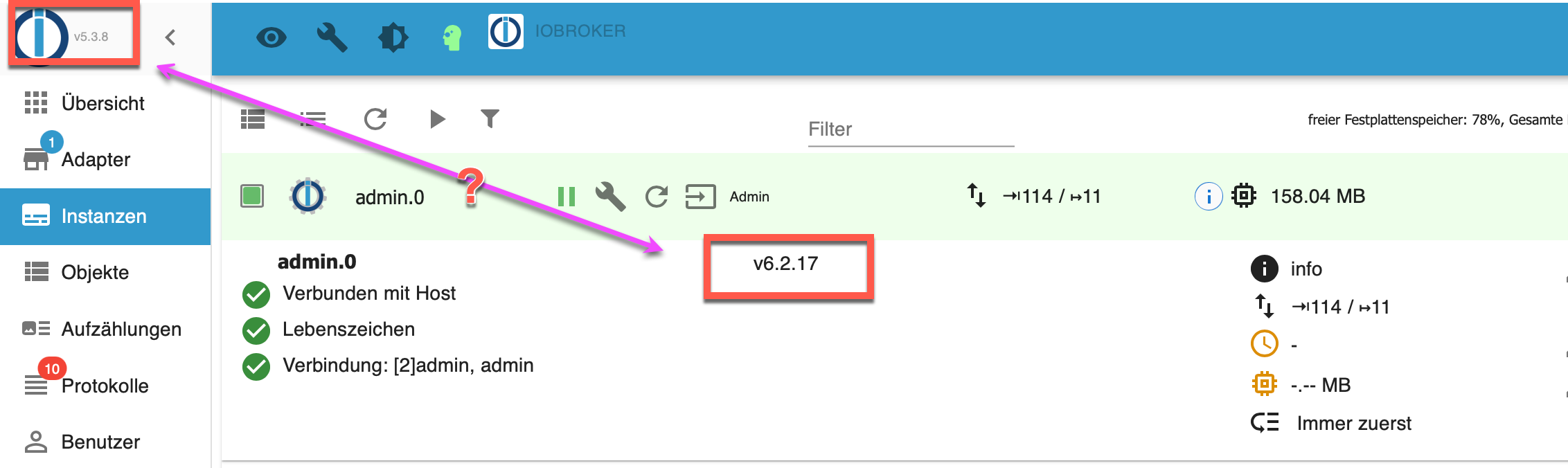
-
iobroker upgrade admin --debugIch schätze mal, jetzt den Löscheinzeiler und dann nochmal probieren?
iobroker@iobroker:~$ iobroker upgrade admin --debug

This upgrade of "admin" will at least introduce the following changes:
==========================================================================
-> 6.2.17:
Corrected GUI bug on intro tab

-> 6.2.16:
Corrected many GUI issues
Added `stable` flag for repositories
Added reset button for repositories
Improved `writeFile` function for socket communication

-> 6.2.14:
Fix for OAuth2 authentication response success page

-> 6.2.13:
Corrected JSON config

-> 6.2.12:
Corrected the Text input field in JSON configuration

-> 6.2.6:
Implemented Oauth2 workflow for adapters
Corrected encrypt/decrypt functions

-> 6.2.4:
Corrected yahka settings
==========================================================================

BE CAREFUL: THIS IS A MAJOR UPGRADE, WHICH WILL MOST LIKELY INTRODUCE BREAKING CHANGES!
Would you like to upgrade admin from @5.3.8 to @6.2.17 now? [(y)es, (n)o]: y
Update admin from @5.3.8 to @6.2.17
host.iobroker Adapter "system.adapter.admin.0" is stopped.
NPM version: 8.15.0
Installing iobroker.admin@6.2.17... (System call)
npm WARN deprecated dgram@1.0.1: npm is holding this package for security reasons. As it's a core Node module, we will not transfer it over to other users. You may safely remove the package from your dependencies.
npm WARN deprecated request-promise-native@1.0.9: request-promise-native has been deprecated because it extends the now deprecated request package, see https://github.com/request/request/issues/3142
npm WARN deprecated har-validator@5.1.5: this library is no longer supported
npm WARN deprecated json3@3.3.2: Please use the native JSON object instead of JSON 3
npm WARN deprecated querystring@0.2.1: The querystring API is considered Legacy. new code should use the URLSearchParams API instead.
npm WARN deprecated node-inspect@2.0.0: This module is part of Node.js core and does not need to be installed separately. It is now unmaintained.
npm WARN deprecated debug@4.1.1: Debug versions >=3.2.0 <3.2.7 || >=4 <4.3.1 have a low-severity ReDos regression when used in a Node.js environment. It is recommended you upgrade to 3.2.7 or 4.3.1. (https://github.com/visionmedia/debug/issues/797)
npm WARN deprecated debug@4.1.1: Debug versions >=3.2.0 <3.2.7 || >=4 <4.3.1 have a low-severity ReDos regression when used in a Node.js environment. It is recommended you upgrade to 3.2.7 or 4.3.1. (https://github.com/visionmedia/debug/issues/797)
npm WARN deprecated debug@4.1.1: Debug versions >=3.2.0 <3.2.7 || >=4 <4.3.1 have a low-severity ReDos regression when used in a Node.js environment. It is recommended you upgrade to 3.2.7 or 4.3.1. (https://github.com/visionmedia/debug/issues/797)
npm WARN deprecated debug@4.1.1: Debug versions >=3.2.0 <3.2.7 || >=4 <4.3.1 have a low-severity ReDos regression when used in a Node.js environment. It is recommended you upgrade to 3.2.7 or 4.3.1. (https://github.com/visionmedia/debug/issues/797)
npm WARN deprecated uuid@3.4.0: Please upgrade  to version 7 or higher.  Older versions may use Math.random() in certain circumstances, which is known to be problematic.  See https://v8.dev/blog/math-random for details.
npm WARN deprecated request@2.88.2: request has been deprecated, see https://github.com/request/request/issues/3142
npm ERR! code ENOTEMPTY
npm ERR! syscall rename
npm ERR! path /opt/iobroker/node_modules/node-red-node-email/node_modules/encoding-japanese/src
npm ERR! dest /opt/iobroker/node_modules/.node-red-node-email-1lk8B7Gi/node_modules/encoding-japanese/src
npm ERR! errno -39
npm ERR! ENOTEMPTY: directory not empty, rename '/opt/iobroker/node_modules/node-red-node-email/node_modules/encoding-japanese/src' -> '/opt/iobroker/node_modules/.node-red-node-email-1lk8B7Gi/node_modules/encoding-japanese/src'

npm ERR! A complete log of this run can be found in:
npm ERR!     /opt/iobroker/.npm/_logs/2022-08-31T18_29_44_299Z-debug-0.log
host.iobroker Cannot install iobroker.admin@6.2.17: 217
Sry keine Ahnung wo hier die Links herkommen;-(
-
Ich schätze mal, jetzt den Löscheinzeiler und dann nochmal probieren?
iobroker@iobroker:~$ iobroker upgrade admin --debug

This upgrade of "admin" will at least introduce the following changes:
==========================================================================
-> 6.2.17:
Corrected GUI bug on intro tab

-> 6.2.16:
Corrected many GUI issues
Added `stable` flag for repositories
Added reset button for repositories
Improved `writeFile` function for socket communication

-> 6.2.14:
Fix for OAuth2 authentication response success page

-> 6.2.13:
Corrected JSON config

-> 6.2.12:
Corrected the Text input field in JSON configuration

-> 6.2.6:
Implemented Oauth2 workflow for adapters
Corrected encrypt/decrypt functions

-> 6.2.4:
Corrected yahka settings
==========================================================================

BE CAREFUL: THIS IS A MAJOR UPGRADE, WHICH WILL MOST LIKELY INTRODUCE BREAKING CHANGES!
Would you like to upgrade admin from @5.3.8 to @6.2.17 now? [(y)es, (n)o]: y
Update admin from @5.3.8 to @6.2.17
host.iobroker Adapter "system.adapter.admin.0" is stopped.
NPM version: 8.15.0
Installing iobroker.admin@6.2.17... (System call)
npm WARN deprecated dgram@1.0.1: npm is holding this package for security reasons. As it's a core Node module, we will not transfer it over to other users. You may safely remove the package from your dependencies.
npm WARN deprecated request-promise-native@1.0.9: request-promise-native has been deprecated because it extends the now deprecated request package, see https://github.com/request/request/issues/3142
npm WARN deprecated har-validator@5.1.5: this library is no longer supported
npm WARN deprecated json3@3.3.2: Please use the native JSON object instead of JSON 3
npm WARN deprecated querystring@0.2.1: The querystring API is considered Legacy. new code should use the URLSearchParams API instead.
npm WARN deprecated node-inspect@2.0.0: This module is part of Node.js core and does not need to be installed separately. It is now unmaintained.
npm WARN deprecated debug@4.1.1: Debug versions >=3.2.0 <3.2.7 || >=4 <4.3.1 have a low-severity ReDos regression when used in a Node.js environment. It is recommended you upgrade to 3.2.7 or 4.3.1. (https://github.com/visionmedia/debug/issues/797)
npm WARN deprecated debug@4.1.1: Debug versions >=3.2.0 <3.2.7 || >=4 <4.3.1 have a low-severity ReDos regression when used in a Node.js environment. It is recommended you upgrade to 3.2.7 or 4.3.1. (https://github.com/visionmedia/debug/issues/797)
npm WARN deprecated debug@4.1.1: Debug versions >=3.2.0 <3.2.7 || >=4 <4.3.1 have a low-severity ReDos regression when used in a Node.js environment. It is recommended you upgrade to 3.2.7 or 4.3.1. (https://github.com/visionmedia/debug/issues/797)
npm WARN deprecated debug@4.1.1: Debug versions >=3.2.0 <3.2.7 || >=4 <4.3.1 have a low-severity ReDos regression when used in a Node.js environment. It is recommended you upgrade to 3.2.7 or 4.3.1. (https://github.com/visionmedia/debug/issues/797)
npm WARN deprecated uuid@3.4.0: Please upgrade  to version 7 or higher.  Older versions may use Math.random() in certain circumstances, which is known to be problematic.  See https://v8.dev/blog/math-random for details.
npm WARN deprecated request@2.88.2: request has been deprecated, see https://github.com/request/request/issues/3142
npm ERR! code ENOTEMPTY
npm ERR! syscall rename
npm ERR! path /opt/iobroker/node_modules/node-red-node-email/node_modules/encoding-japanese/src
npm ERR! dest /opt/iobroker/node_modules/.node-red-node-email-1lk8B7Gi/node_modules/encoding-japanese/src
npm ERR! errno -39
npm ERR! ENOTEMPTY: directory not empty, rename '/opt/iobroker/node_modules/node-red-node-email/node_modules/encoding-japanese/src' -> '/opt/iobroker/node_modules/.node-red-node-email-1lk8B7Gi/node_modules/encoding-japanese/src'

npm ERR! A complete log of this run can be found in:
npm ERR!     /opt/iobroker/.npm/_logs/2022-08-31T18_29_44_299Z-debug-0.log
host.iobroker Cannot install iobroker.admin@6.2.17: 217
Sry keine Ahnung wo hier die Links herkommen;-(
-
@thomas-braun Ok, das war jetzt was Größeres. Bin wie folgt vorgegangen:
iobroker@iobroker:~/node_modules$ for i in $(find /opt/iobroker/node_modules -type d -iname ".*-????????" ! -iname ".local-chromium"); do rm -rf ${i%%/}; doneiobroker@iobroker:~/node_modules$ iobroker upgrade admin --debug Adapter "admin" is up to date.Also hat iob die Version v6.2.17 irgendwo als aktuelle version registriert, obwohl die Installation abbrach. Ich denke, daher der Versionsmissmatch.
Also:iobroker@iobroker:~/node_modules$ iobroker upgrade admin@6.2.17 --debug Would you like to reinstall version 6.2.17 of admin now? [(y)es, (n)o]: y Update admin from @6.2.17 to @6.2.17 NPM version: 8.15.0 Installing iobroker.admin@6.2.17... (System call) npm WARN deprecated dgram@1.0.1: npm is holding this package for security reasons. As it's a core Node module, we will not transfer it over to other users. You may safely remove the package from your dependencies. npm WARN deprecated request-promise-native@1.0.9: request-promise-native has been deprecated because it extends the now deprecated request package, see https://github.com/request/request/issues/3142 npm WARN deprecated har-validator@5.1.5: this library is no longer supported npm WARN deprecated json3@3.3.2: Please use the native JSON object instead of JSON 3 npm WARN deprecated querystring@0.2.1: The querystring API is considered Legacy. new code should use the URLSearchParams API instead. npm WARN deprecated node-inspect@2.0.0: This module is part of Node.js core and does not need to be installed separately. It is now unmaintained. npm WARN deprecated debug@4.1.1: Debug versions >=3.2.0 <3.2.7 || >=4 <4.3.1 have a low-severity ReDos regression when used in a Node.js environment. It is recommended you upgrade to 3.2.7 or 4.3.1. (https://github.com/visionmedia/debug/issues/797) npm WARN deprecated debug@4.1.1: Debug versions >=3.2.0 <3.2.7 || >=4 <4.3.1 have a low-severity ReDos regression when used in a Node.js environment. It is recommended you upgrade to 3.2.7 or 4.3.1. (https://github.com/visionmedia/debug/issues/797) npm WARN deprecated debug@4.1.1: Debug versions >=3.2.0 <3.2.7 || >=4 <4.3.1 have a low-severity ReDos regression when used in a Node.js environment. It is recommended you upgrade to 3.2.7 or 4.3.1. (https://github.com/visionmedia/debug/issues/797) npm WARN deprecated debug@4.1.1: Debug versions >=3.2.0 <3.2.7 || >=4 <4.3.1 have a low-severity ReDos regression when used in a Node.js environment. It is recommended you upgrade to 3.2.7 or 4.3.1. (https://github.com/visionmedia/debug/issues/797) npm WARN deprecated uuid@3.4.0: Please upgrade to version 7 or higher. Older versions may use Math.random() in certain circumstances, which is known to be problematic. See https://v8.dev/blog/math-random for details. npm WARN deprecated request@2.88.2: request has been deprecated, see https://github.com/request/request/issues/3142 changed 1181 packages, and audited 1223 packages in 10m 95 packages are looking for funding run `npm fund` for details 35 vulnerabilities (12 low, 15 moderate, 8 high) To address issues that do not require attention, run: npm audit fix To address all issues possible (including breaking changes), run: npm audit fix --force Some issues need review, and may require choosing a different dependency. Run `npm audit` for details. Update "system.adapter.admin.0" upload [51] admin.admin /opt/iobroker/node_modules/iobroker.admin/admin/admin.png admin.png image/png upload [50] admin.admin /opt/iobroker/node_modules/iobroker.admin/admin/custom/customComponents.js custom/customComponents.jsapplication/javascript upload [40] admin.admin /opt/iobroker/node_modules/iobroker.admin/admin/custom/i18n/ru.json custom/i18n/ru.json application/json upload [30] admin.admin /opt/iobroker/node_modules/iobroker.admin/admin/custom/static/js/node_modules_prop-types_index_js.512eddf9.chunk.js custom/static/js/node_modules_prop-types_index_js.512eddf9.chunk.js application/javascript upload [20] admin.admin /opt/iobroker/node_modules/iobroker.admin/admin/custom/static/js/vendors-node_modules_mui_material_Accordion_index_js-node_modules_mui_material_AccordionDetai-57e02d.0886b730.chunk.js custom/static/js/vendors-node_modules_mui_material_Accordion_index_js-node_modules_mui_material_AccordionDetai-57e02d.0886b730.chunk.js application/javascript upload [19] admin.admin /opt/iobroker/node_modules/iobroker.admin/admin/custom/static/js/vendors-node_modules_mui_material_Accordion_index_js-node_modules_mui_material_AccordionDetai-57e02d.0886b730.chunk.js.map custom/static/js/vendors-node_modules_mui_material_Accordion_index_js-node_modules_mui_material_AccordionDetai-57e02d.0886b730.chunk.js.map application/json upload [18] admin.admin /opt/iobroker/node_modules/iobroker.admin/admin/custom/static/js/vendors-node_modules_mui_material_index_js.40e01f69.chunk.js custom/static/js/vendors-node_modules_mui_material_index_js.40e01f69.chunk.js application/javascript upload [17] admin.admin /opt/iobroker/node_modules/iobroker.admin/admin/custom/static/js/vendors-node_modules_mui_material_index_js.40e01f69.chunk.js.map custom/static/js/vendors-node_modules_mui_material_index_js.40e01f69.chunk.js.map application/json upload [16] admin.admin /opt/iobroker/node_modules/iobroker.admin/admin/custom/static/js/vendors-node_modules_mui_styles_index_js-node_modules_mui_utils_esm_capitalize_js-node_module-19fe07.82575832.chunk.js custom/static/js/vendors-node_modules_mui_styles_index_js-node_modules_mui_utils_esm_capitalize_js-node_module-19fe07.82575832.chunk.js application/javascript upload [15] admin.admin /opt/iobroker/node_modules/iobroker.admin/admin/custom/static/js/vendors-node_modules_mui_styles_index_js-node_modules_mui_utils_esm_capitalize_js-node_module-19fe07.82575832.chunk.js.map custom/static/js/vendors-node_modules_mui_styles_index_js-node_modules_mui_utils_esm_capitalize_js-node_module-19fe07.82575832.chunk.js.map application/json upload [14] admin.admin /opt/iobroker/node_modules/iobroker.admin/admin/custom/static/js/vendors-node_modules_mui_styles_withStyles_withStyles_js.6d998ff2.chunk.js custom/static/js/vendors-node_modules_mui_styles_withStyles_withStyles_js.6d998ff2.chunk.js application/javascript upload [13] admin.admin /opt/iobroker/node_modules/iobroker.admin/admin/custom/static/js/vendors-node_modules_mui_styles_withStyles_withStyles_js.6d998ff2.chunk.js.map custom/static/js/vendors-node_modules_mui_styles_withStyles_withStyles_js.6d998ff2.chunk.js.map application/json upload [12] admin.admin /opt/iobroker/node_modules/iobroker.admin/admin/custom/static/js/vendors-node_modules_react-dom_index_js.51544235.chunk.js custom/static/js/vendors-node_modules_react-dom_index_js.51544235.chunk.js application/javascript upload [11] admin.admin /opt/iobroker/node_modules/iobroker.admin/admin/custom/static/js/vendors-node_modules_react-dom_index_js.51544235.chunk.js.map custom/static/js/vendors-node_modules_react-dom_index_js.51544235.chunk.js.map application/json upload [10] admin.admin /opt/iobroker/node_modules/iobroker.admin/admin/i18n/de/translations.json i18n/de/translations.json application/json upload [9] admin.admin /opt/iobroker/node_modules/iobroker.admin/admin/i18n/en/translations.json i18n/en/translations.json application/json upload [8] admin.admin /opt/iobroker/node_modules/iobroker.admin/admin/i18n/es/translations.json i18n/es/translations.json application/json upload [7] admin.admin /opt/iobroker/node_modules/iobroker.admin/admin/i18n/fr/translations.json i18n/fr/translations.json application/json upload [6] admin.admin /opt/iobroker/node_modules/iobroker.admin/admin/i18n/it/translations.json i18n/it/translations.json application/json upload [5] admin.admin /opt/iobroker/node_modules/iobroker.admin/admin/i18n/nl/translations.json i18n/nl/translations.json application/json upload [4] admin.admin /opt/iobroker/node_modules/iobroker.admin/admin/i18n/pl/translations.json i18n/pl/translations.json application/json upload [3] admin.admin /opt/iobroker/node_modules/iobroker.admin/admin/i18n/pt/translations.json i18n/pt/translations.json application/json upload [2] admin.admin /opt/iobroker/node_modules/iobroker.admin/admin/i18n/ru/translations.json i18n/ru/translations.json application/json upload [1] admin.admin /opt/iobroker/node_modules/iobroker.admin/admin/i18n/zh-cn/translations.json i18n/zh-cn/translations.json application/json upload [0] admin.admin /opt/iobroker/node_modules/iobroker.admin/admin/jsonConfig.json5 jsonConfig.json5 application/json5 iobroker@iobroker:~/node_modules$Sieht mal gut aus, allerdings wird admin nicht gestartet. Ist evtl. durch die vorangegangene abgebrochene Installation noch gestoppt.
iobroker@iobroker:~$ iob list instances
  system.adapter.admin.0                  : admin                 : iobroker                                 - disabled, port: 8081, bind: 0.0.0.0, run as: admin
...
Also von Hand gestartet.
iobroker@iobroker:~$ iob start admin
The adapter "admin.0" was started.

obroker@iobroker:~$ iob list instances
+ system.adapter.admin.0                  : admin                 : iobroker                                 -  enabled, port: 8081, bind: 0.0.0.0, run as: admin
Sieht alles gut aus. Versionen stimmen jetzt.
Danke für die Hilfe.
Reiner
-
@thomas-braun Ok, das war jetzt was Größeres. Bin wie folgt vorgegangen:
iobroker@iobroker:~/node_modules$ for i in $(find /opt/iobroker/node_modules -type d -iname ".*-????????" ! -iname ".local-chromium"); do rm -rf ${i%%/}; doneiobroker@iobroker:~/node_modules$ iobroker upgrade admin --debug Adapter "admin" is up to date.Also hat iob die Version v6.2.17 irgendwo als aktuelle version registriert, obwohl die Installation abbrach. Ich denke, daher der Versionsmissmatch.
Also:iobroker@iobroker:~/node_modules$ iobroker upgrade admin@6.2.17 --debug Would you like to reinstall version 6.2.17 of admin now? [(y)es, (n)o]: y Update admin from @6.2.17 to @6.2.17 NPM version: 8.15.0 Installing iobroker.admin@6.2.17... (System call) npm WARN deprecated dgram@1.0.1: npm is holding this package for security reasons. As it's a core Node module, we will not transfer it over to other users. You may safely remove the package from your dependencies. npm WARN deprecated request-promise-native@1.0.9: request-promise-native has been deprecated because it extends the now deprecated request package, see https://github.com/request/request/issues/3142 npm WARN deprecated har-validator@5.1.5: this library is no longer supported npm WARN deprecated json3@3.3.2: Please use the native JSON object instead of JSON 3 npm WARN deprecated querystring@0.2.1: The querystring API is considered Legacy. new code should use the URLSearchParams API instead. npm WARN deprecated node-inspect@2.0.0: This module is part of Node.js core and does not need to be installed separately. It is now unmaintained. npm WARN deprecated debug@4.1.1: Debug versions >=3.2.0 <3.2.7 || >=4 <4.3.1 have a low-severity ReDos regression when used in a Node.js environment. It is recommended you upgrade to 3.2.7 or 4.3.1. (https://github.com/visionmedia/debug/issues/797) npm WARN deprecated debug@4.1.1: Debug versions >=3.2.0 <3.2.7 || >=4 <4.3.1 have a low-severity ReDos regression when used in a Node.js environment. It is recommended you upgrade to 3.2.7 or 4.3.1. (https://github.com/visionmedia/debug/issues/797) npm WARN deprecated debug@4.1.1: Debug versions >=3.2.0 <3.2.7 || >=4 <4.3.1 have a low-severity ReDos regression when used in a Node.js environment. It is recommended you upgrade to 3.2.7 or 4.3.1. (https://github.com/visionmedia/debug/issues/797) npm WARN deprecated debug@4.1.1: Debug versions >=3.2.0 <3.2.7 || >=4 <4.3.1 have a low-severity ReDos regression when used in a Node.js environment. It is recommended you upgrade to 3.2.7 or 4.3.1. (https://github.com/visionmedia/debug/issues/797) npm WARN deprecated uuid@3.4.0: Please upgrade to version 7 or higher. Older versions may use Math.random() in certain circumstances, which is known to be problematic. See https://v8.dev/blog/math-random for details. npm WARN deprecated request@2.88.2: request has been deprecated, see https://github.com/request/request/issues/3142 changed 1181 packages, and audited 1223 packages in 10m 95 packages are looking for funding run `npm fund` for details 35 vulnerabilities (12 low, 15 moderate, 8 high) To address issues that do not require attention, run: npm audit fix To address all issues possible (including breaking changes), run: npm audit fix --force Some issues need review, and may require choosing a different dependency. Run `npm audit` for details. Update "system.adapter.admin.0" upload [51] admin.admin /opt/iobroker/node_modules/iobroker.admin/admin/admin.png admin.png image/png upload [50] admin.admin /opt/iobroker/node_modules/iobroker.admin/admin/custom/customComponents.js custom/customComponents.jsapplication/javascript upload [40] admin.admin /opt/iobroker/node_modules/iobroker.admin/admin/custom/i18n/ru.json custom/i18n/ru.json application/json upload [30] admin.admin /opt/iobroker/node_modules/iobroker.admin/admin/custom/static/js/node_modules_prop-types_index_js.512eddf9.chunk.js custom/static/js/node_modules_prop-types_index_js.512eddf9.chunk.js application/javascript upload [20] admin.admin /opt/iobroker/node_modules/iobroker.admin/admin/custom/static/js/vendors-node_modules_mui_material_Accordion_index_js-node_modules_mui_material_AccordionDetai-57e02d.0886b730.chunk.js custom/static/js/vendors-node_modules_mui_material_Accordion_index_js-node_modules_mui_material_AccordionDetai-57e02d.0886b730.chunk.js application/javascript upload [19] admin.admin /opt/iobroker/node_modules/iobroker.admin/admin/custom/static/js/vendors-node_modules_mui_material_Accordion_index_js-node_modules_mui_material_AccordionDetai-57e02d.0886b730.chunk.js.map custom/static/js/vendors-node_modules_mui_material_Accordion_index_js-node_modules_mui_material_AccordionDetai-57e02d.0886b730.chunk.js.map application/json upload [18] admin.admin /opt/iobroker/node_modules/iobroker.admin/admin/custom/static/js/vendors-node_modules_mui_material_index_js.40e01f69.chunk.js custom/static/js/vendors-node_modules_mui_material_index_js.40e01f69.chunk.js application/javascript upload [17] admin.admin /opt/iobroker/node_modules/iobroker.admin/admin/custom/static/js/vendors-node_modules_mui_material_index_js.40e01f69.chunk.js.map custom/static/js/vendors-node_modules_mui_material_index_js.40e01f69.chunk.js.map application/json upload [16] admin.admin /opt/iobroker/node_modules/iobroker.admin/admin/custom/static/js/vendors-node_modules_mui_styles_index_js-node_modules_mui_utils_esm_capitalize_js-node_module-19fe07.82575832.chunk.js custom/static/js/vendors-node_modules_mui_styles_index_js-node_modules_mui_utils_esm_capitalize_js-node_module-19fe07.82575832.chunk.js application/javascript upload [15] admin.admin /opt/iobroker/node_modules/iobroker.admin/admin/custom/static/js/vendors-node_modules_mui_styles_index_js-node_modules_mui_utils_esm_capitalize_js-node_module-19fe07.82575832.chunk.js.map custom/static/js/vendors-node_modules_mui_styles_index_js-node_modules_mui_utils_esm_capitalize_js-node_module-19fe07.82575832.chunk.js.map application/json upload [14] admin.admin /opt/iobroker/node_modules/iobroker.admin/admin/custom/static/js/vendors-node_modules_mui_styles_withStyles_withStyles_js.6d998ff2.chunk.js custom/static/js/vendors-node_modules_mui_styles_withStyles_withStyles_js.6d998ff2.chunk.js application/javascript upload [13] admin.admin /opt/iobroker/node_modules/iobroker.admin/admin/custom/static/js/vendors-node_modules_mui_styles_withStyles_withStyles_js.6d998ff2.chunk.js.map custom/static/js/vendors-node_modules_mui_styles_withStyles_withStyles_js.6d998ff2.chunk.js.map application/json upload [12] admin.admin /opt/iobroker/node_modules/iobroker.admin/admin/custom/static/js/vendors-node_modules_react-dom_index_js.51544235.chunk.js custom/static/js/vendors-node_modules_react-dom_index_js.51544235.chunk.js application/javascript upload [11] admin.admin /opt/iobroker/node_modules/iobroker.admin/admin/custom/static/js/vendors-node_modules_react-dom_index_js.51544235.chunk.js.map custom/static/js/vendors-node_modules_react-dom_index_js.51544235.chunk.js.map application/json upload [10] admin.admin /opt/iobroker/node_modules/iobroker.admin/admin/i18n/de/translations.json i18n/de/translations.json application/json upload [9] admin.admin /opt/iobroker/node_modules/iobroker.admin/admin/i18n/en/translations.json i18n/en/translations.json application/json upload [8] admin.admin /opt/iobroker/node_modules/iobroker.admin/admin/i18n/es/translations.json i18n/es/translations.json application/json upload [7] admin.admin /opt/iobroker/node_modules/iobroker.admin/admin/i18n/fr/translations.json i18n/fr/translations.json application/json upload [6] admin.admin /opt/iobroker/node_modules/iobroker.admin/admin/i18n/it/translations.json i18n/it/translations.json application/json upload [5] admin.admin /opt/iobroker/node_modules/iobroker.admin/admin/i18n/nl/translations.json i18n/nl/translations.json application/json upload [4] admin.admin /opt/iobroker/node_modules/iobroker.admin/admin/i18n/pl/translations.json i18n/pl/translations.json application/json upload [3] admin.admin /opt/iobroker/node_modules/iobroker.admin/admin/i18n/pt/translations.json i18n/pt/translations.json application/json upload [2] admin.admin /opt/iobroker/node_modules/iobroker.admin/admin/i18n/ru/translations.json i18n/ru/translations.json application/json upload [1] admin.admin /opt/iobroker/node_modules/iobroker.admin/admin/i18n/zh-cn/translations.json i18n/zh-cn/translations.json application/json upload [0] admin.admin /opt/iobroker/node_modules/iobroker.admin/admin/jsonConfig.json5 jsonConfig.json5 application/json5 iobroker@iobroker:~/node_modules$Sieht mal gut aus, allerdings wird admin nicht gestartet. Ist evtl. durch die vorangegangene abgebrochene Installation noch gestoppt.
iobroker@iobroker:~$ iob list instances
  system.adapter.admin.0                  : admin                 : iobroker                                 - disabled, port: 8081, bind: 0.0.0.0, run as: admin
...
Also von Hand gestartet.
iobroker@iobroker:~$ iob start admin
The adapter "admin.0" was started.

obroker@iobroker:~$ iob list instances
+ system.adapter.admin.0                  : admin                 : iobroker                                 -  enabled, port: 8081, bind: 0.0.0.0, run as: admin
Sieht alles gut aus. Versionen stimmen jetzt.
Danke für die Hilfe.
Reiner
@rewenode sagte in admin version 6.2.17 nach update 5.3.8:
iobroker@iobroker:~/node_modules$
In dem Pfad dürfte es gar kein Verzeichnis node_modules geben. Da haste irgendwann mal irgendwas zerballert.
-
@rewenode sagte in admin version 6.2.17 nach update 5.3.8:
iobroker@iobroker:~/node_modules$
In dem Pfad dürfte es gar kein Verzeichnis node_modules geben. Da haste irgendwann mal irgendwas zerballert.
@thomas-braun Ist nur der Fall, wenn ich als user iobroker in die consolde des Containers gehe.
Standardmäßig ist das /opt/iobrokeriobroker: privileged: true stdin_open: true tty: true depends_on: - influxdb - redis environment: - PACKAGES=nano - IOB_STATESDB_HOST=redis - IOB_STATESDB_PORT=6379 - IOB_STATESDB_TYPE=redis ports: - "1880:1880" #node-red - "2001:2001" #homematic - "8081:8081" #iobroker admin - "8282:8282" #flot - "8087:8087" #simple API - "8088:8088" #terminal - "8084:8084" #socketIO - "6666:6666/udp" #tuya Adapter - "8887:8887/udp" #tuya proxy - "8887:8887/tcp" - "8889:8889/udp" #tuya proxy-web - "8889:8889/tcp" - "9900:9900" #proxy # - "1883:1883" #mqtt volumes: - /dev:/dev - ./iobroker:/opt/iobroker - ./iob_scripte:/scripte ##ggf. host backupordner mounten (sB. ssd) #- ~/myiobbackups:/opt/iobroker/backups hostname: iobroker container_name: iobroker restart: always image: buanet/iobroker:latest-v7Gab bisher diesbezüglich keinerlei Probleme.
Reiner
-
@thomas-braun Ist nur der Fall, wenn ich als user iobroker in die consolde des Containers gehe.
Standardmäßig ist das /opt/iobrokeriobroker: privileged: true stdin_open: true tty: true depends_on: - influxdb - redis environment: - PACKAGES=nano - IOB_STATESDB_HOST=redis - IOB_STATESDB_PORT=6379 - IOB_STATESDB_TYPE=redis ports: - "1880:1880" #node-red - "2001:2001" #homematic - "8081:8081" #iobroker admin - "8282:8282" #flot - "8087:8087" #simple API - "8088:8088" #terminal - "8084:8084" #socketIO - "6666:6666/udp" #tuya Adapter - "8887:8887/udp" #tuya proxy - "8887:8887/tcp" - "8889:8889/udp" #tuya proxy-web - "8889:8889/tcp" - "9900:9900" #proxy # - "1883:1883" #mqtt volumes: - /dev:/dev - ./iobroker:/opt/iobroker - ./iob_scripte:/scripte ##ggf. host backupordner mounten (sB. ssd) #- ~/myiobbackups:/opt/iobroker/backups hostname: iobroker container_name: iobroker restart: always image: buanet/iobroker:latest-v7Gab bisher diesbezüglich keinerlei Probleme.
Reiner
Gibt trotzdem im Normalfall da kein Verzeichnis node_modules:
echad@chet:~ $ ls -l /home/iobroker/ total 20 -rw-r--r-- 1 iobroker iobroker 15691 Jul 29 21:16 abfallkalender.ics drwxr-xr-x 3 iobroker iobroker 4096 Jul 29 21:21 skripte -
@thomas-braun Ist nur der Fall, wenn ich als user iobroker in die consolde des Containers gehe.
Standardmäßig ist das /opt/iobrokeriobroker: privileged: true stdin_open: true tty: true depends_on: - influxdb - redis environment: - PACKAGES=nano - IOB_STATESDB_HOST=redis - IOB_STATESDB_PORT=6379 - IOB_STATESDB_TYPE=redis ports: - "1880:1880" #node-red - "2001:2001" #homematic - "8081:8081" #iobroker admin - "8282:8282" #flot - "8087:8087" #simple API - "8088:8088" #terminal - "8084:8084" #socketIO - "6666:6666/udp" #tuya Adapter - "8887:8887/udp" #tuya proxy - "8887:8887/tcp" - "8889:8889/udp" #tuya proxy-web - "8889:8889/tcp" - "9900:9900" #proxy # - "1883:1883" #mqtt volumes: - /dev:/dev - ./iobroker:/opt/iobroker - ./iob_scripte:/scripte ##ggf. host backupordner mounten (sB. ssd) #- ~/myiobbackups:/opt/iobroker/backups hostname: iobroker container_name: iobroker restart: always image: buanet/iobroker:latest-v7Gab bisher diesbezüglich keinerlei Probleme.
Reiner
@rewenode sagte in admin version 6.2.17 nach update 5.3.8:
wenn ich als user iobroker in
es ist sowieso keine gute idee seinen eigenen User auch iobroker zu nennen, weil so schon der Systemuser heisst.
-
Gibt trotzdem im Normalfall da kein Verzeichnis node_modules:
echad@chet:~ $ ls -l /home/iobroker/ total 20 -rw-r--r-- 1 iobroker iobroker 15691 Jul 29 21:16 abfallkalender.ics drwxr-xr-x 3 iobroker iobroker 4096 Jul 29 21:21 skripte@thomas-braun Auf dem Host nicht, aber im Container
Das Hostlaufwerk ./iobroker wird als /opt/iobroker in den container gemappt. Sie sind damit identisch.Reiner
-
@rewenode sagte in admin version 6.2.17 nach update 5.3.8:
wenn ich als user iobroker in
es ist sowieso keine gute idee seinen eigenen User auch iobroker zu nennen, weil so schon der Systemuser heisst.
@homoran sagte in admin version 6.2.17 nach update 5.3.8:
es ist sowieso keine gute idee seinen eigenen User auch iobroker zu nennen, weil so schon der Systemuser heisst.
Da hast du recht! Aber nach Jahren alles wieder ummodeln, da scheu ich mich vor...
Reiner
-
@thomas-braun Auf dem Host nicht, aber im Container
Das Hostlaufwerk ./iobroker wird als /opt/iobroker in den container gemappt. Sie sind damit identisch.Reiner
Da stehst du doch im Container und in /home/iobroker
iobroker@iobroker:~/node_modules$Und in /home/iobroker gibt es eigentlich kein Verzeichnis node_modules. Wozu auch?
-
@homoran sagte in admin version 6.2.17 nach update 5.3.8:
es ist sowieso keine gute idee seinen eigenen User auch iobroker zu nennen, weil so schon der Systemuser heisst.
Da hast du recht! Aber nach Jahren alles wieder ummodeln, da scheu ich mich vor...
Reiner
@rewenode sagte in admin version 6.2.17 nach update 5.3.8:
Da hast du recht! Aber nach Jahren alles wieder ummodeln, da scheu ich mich vor...
Was denn ummodeln? User anlegen, den künftig benutzen. Und root wie auch iobroker in Ruh lassen.
-
@rewenode sagte in admin version 6.2.17 nach update 5.3.8:
Da hast du recht! Aber nach Jahren alles wieder ummodeln, da scheu ich mich vor...
Was denn ummodeln? User anlegen, den künftig benutzen. Und root wie auch iobroker in Ruh lassen.
@thomas-braun Na ich bin jetzt NICHT der ausgewiesene Docker Experte, aber der container selber sollte als normaler user (Reiner) starten. Der hat die GID/UID 1000 und damit wird der Container defaultmäßig gestartet.
Meine info Kachel zeigt dann auch den richtigen Pfad:PlatformBetriebssystem:linux Architektur:arm64 CPUs:4 Geschwindigkeit:1296 MHz Modell:Cortex-A53 RAM:3.8 GB System-Betriebszeit:62 T. 12:13:26 Node.js:v16.17.0 time:1661974154400 timeOffset:-120 Adapter-Anzahl:431 NPM:v8.15.0 Datenträgergröße:226.9 GB Freier Festplattenspeicher:178.1 GB Betriebszeit:00:03:30 Aktive Instanzen:21 Pfad:/opt/iobroker/ aktiv:trueUnd die Prozesse innerhalb des Containers laufen dann auch unter dem user reiner.
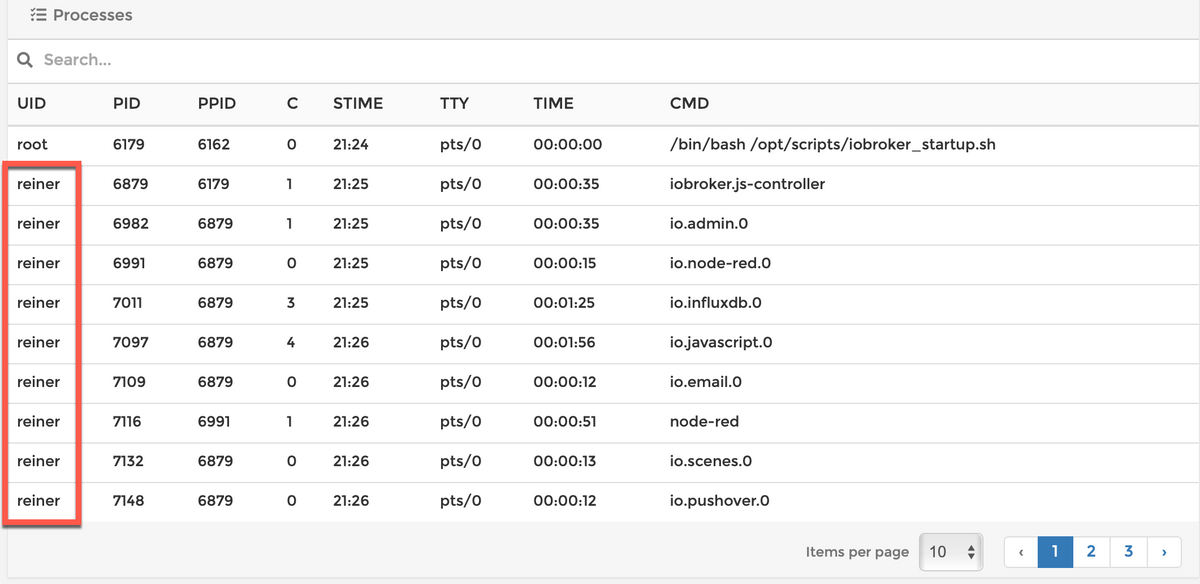
Eine andere Sache ist es, wie ich mich per docker-exec an die Container-Konsole connecte.
Das brauche ich i.d.R. gar nicht, da alle administrativen Sachen ja über den Admin laufen.
Falls ich da doch mal was nachschauen will, mach das über portainer als root.
Warum?
Weil ich mit docker exec defaultmäßig als root connecte. Und ich da als root nichts aktives mache.reiner@rock64:~/docker_iob$ docker exec -ti iobroker bash root@iobroker:/opt/iobroker#Kann mich auch mit
reiner@rock64:~/docker_iob$ docker exec -u 1000 -ti iobroker bash
iobroker@iobroker:~$pwd
/opt/iobroker
connecten. Dann lande ich auch im /opt/iobroker
Und das habe ich hier bei der Updaterei gemacht.Was ich noch nicht rausgefunden habe, warum connected der user reiner innerhalb des containers automatisch als user iobroker?
Reiner

Hey! Du scheinst an dieser Unterhaltung interessiert zu sein, hast aber noch kein Konto.
Hast du es satt, bei jedem Besuch durch die gleichen Beiträge zu scrollen? Wenn du dich für ein Konto anmeldest, kommst du immer genau dorthin zurück, wo du zuvor warst, und kannst dich über neue Antworten benachrichtigen lassen (entweder per E-Mail oder Push-Benachrichtigung). Du kannst auch Lesezeichen speichern und Beiträge positiv bewerten, um anderen Community-Mitgliedern deine Wertschätzung zu zeigen.
Mit deinem Input könnte dieser Beitrag noch besser werden 💗
Registrieren Anmelden445
Online33.0k
Benutzer83.5k
Themen1.3m
Beiträge