



Skip to content
  • Home
  • Aktuell
  • Tags
  • 0 Ungelesen 0
  • Kategorien
  • Unreplied
  • Beliebt
  • GitHub
  • Docu
  • Hilfe
Skins
  • Light
  • Brite
  • Cerulean
  • Cosmo
  • Flatly
  • Journal
  • Litera
  • Lumen
  • Lux
  • Materia
  • Minty
  • Morph
  • Pulse
  • Sandstone
  • Simplex
  • Sketchy
  • Spacelab
  • United
  • Yeti
  • Zephyr
  • Dark
  • Cyborg
  • Darkly
  • Quartz
  • Slate
  • Solar
  • Superhero
  • Vapor

  • Standard: (Kein Skin)
  • Kein Skin
Einklappen
ioBroker Logo

Community Forum

donate donate
  1. ioBroker Community Home
  2. Deutsch
  3. Error/Bug
  4. Update sql 2.1.1 ==> 2.1.3 "File index_m.html not found"

NEWS

  • Monatsrückblick Januar/Februar 2026 ist online!
    BluefoxB
    Bluefox
    16
    1
    363

  • Jahresrückblick 2025 – unser neuer Blogbeitrag ist online! ✨
    BluefoxB
    Bluefox
    17
    1
    4.8k

  • Neuer Blogbeitrag: Monatsrückblick - Dezember 2025 🎄
    BluefoxB
    Bluefox
    13
    1
    1.3k

Update sql 2.1.1 ==> 2.1.3 "File index_m.html not found"

Geplant Angeheftet Gesperrt Verschoben Error/Bug
27 Beiträge 3 Kommentatoren 446 Aufrufe 2 Watching
  • Älteste zuerst
  • Neuste zuerst
  • Meiste Stimmen
Antworten
  • In einem neuen Thema antworten
Anmelden zum Antworten
Dieses Thema wurde gelöscht. Nur Nutzer mit entsprechenden Rechten können es sehen.
  • C condor07

    @thomas-braun
    definiere alte admin-oberfläche?
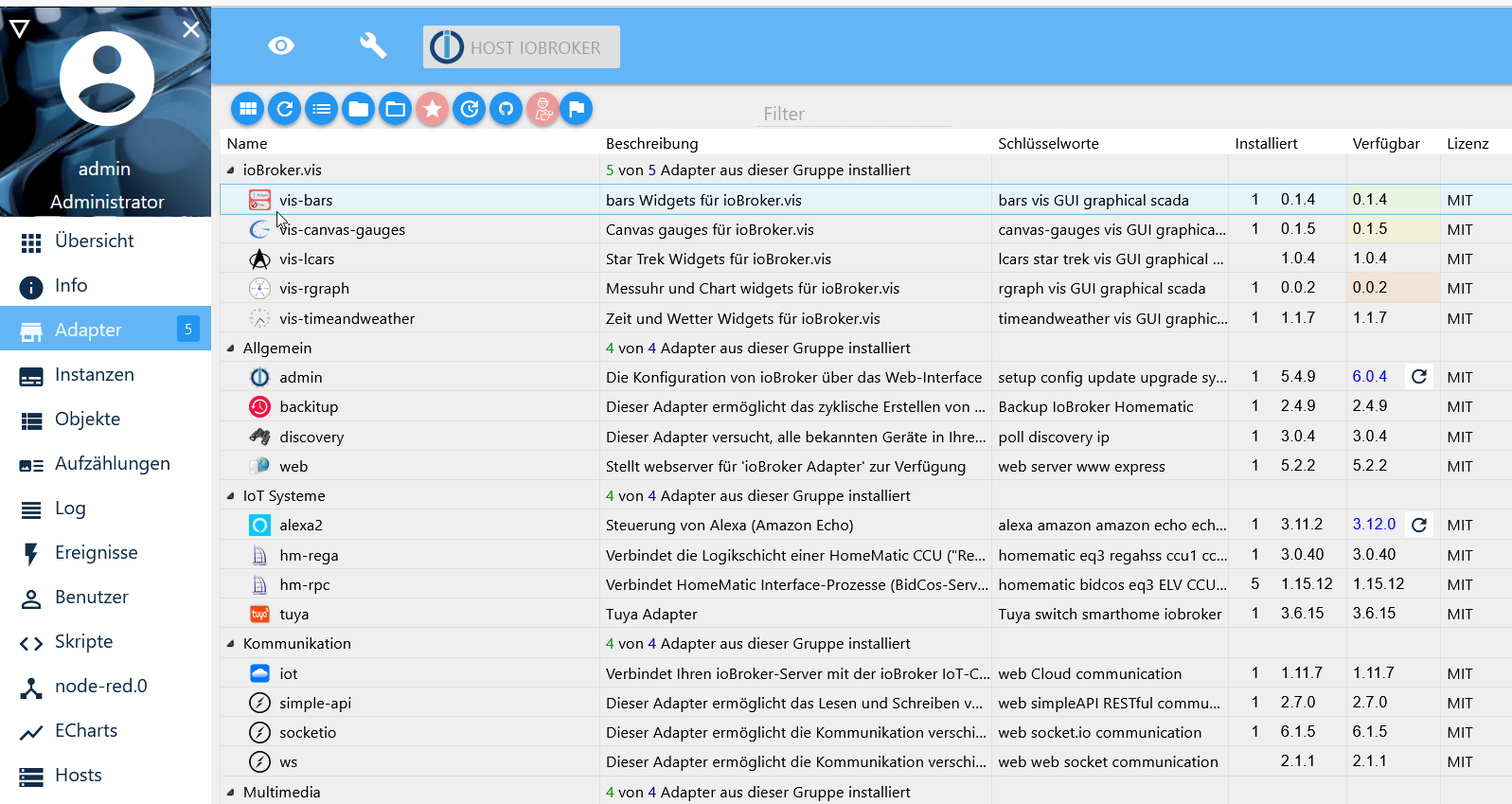
    2022-06-16 13_09_42-adapters - ioBroker.png

    Michael

    Thomas BraunT Online
    Thomas BraunT Online
    Thomas Braun
    Most Active
    schrieb am zuletzt editiert von Thomas Braun
    #4

    @condor07 Bei admin v5 konnte man in dessen Einstellungen die 'alte Oberfläche' aktivieren.

    Linux-Werkzeugkasten:
    https://forum.iobroker.net/topic/42952/der-kleine-iobroker-linux-werkzeugkasten
    NodeJS Fixer Skript:
    https://forum.iobroker.net/topic/68035/iob-node-fix-skript
    iob_diag: curl -sLf -o diag.sh https://iobroker.net/diag.sh && bash diag.sh

    C 1 Antwort Letzte Antwort
    0
    • Thomas BraunT Thomas Braun

      @condor07 Bei admin v5 konnte man in dessen Einstellungen die 'alte Oberfläche' aktivieren.

      C Offline
      C Offline
      condor07
      schrieb am zuletzt editiert von condor07
      #5

      @thomas-braun Ich habe in admin.0 kein button oder haken zur Auswahl oder suche ich an der falschen stelle?
      habe admin v5.4.9 aktiv.
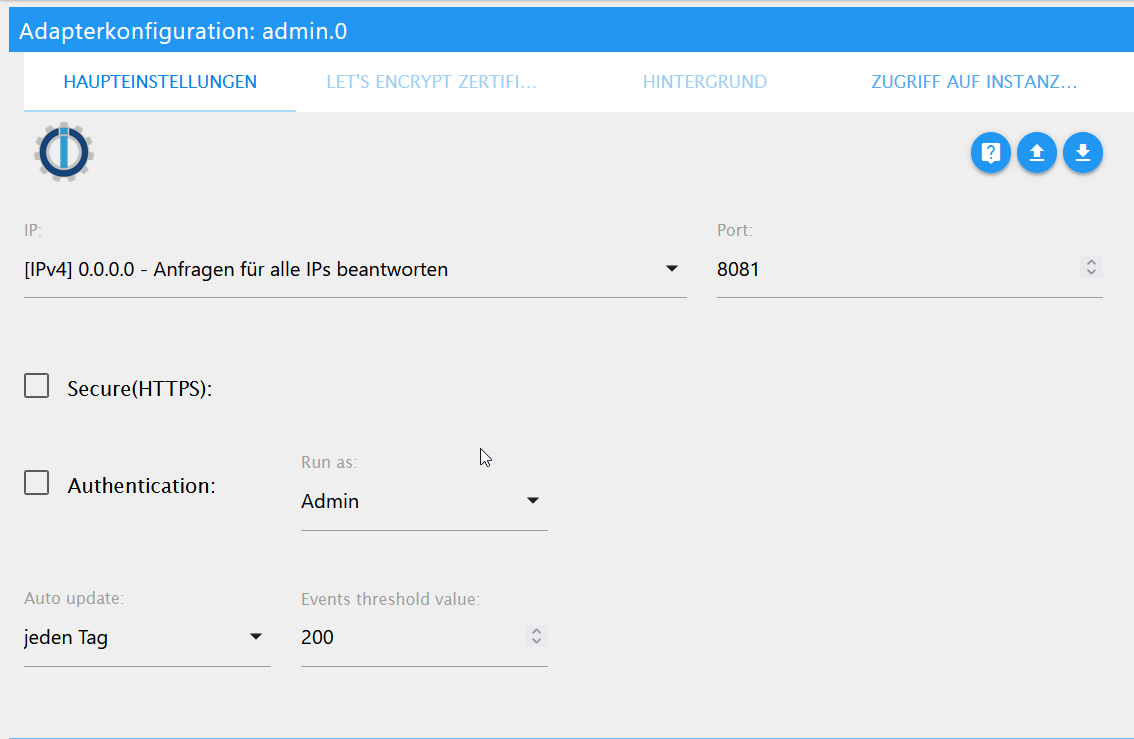
      2022-06-16 13_16_55-instances - ioBroker.png

      Michael

      Thomas BraunT 1 Antwort Letzte Antwort
      0
      • C condor07

        @thomas-braun Ich habe in admin.0 kein button oder haken zur Auswahl oder suche ich an der falschen stelle?
        habe admin v5.4.9 aktiv.
        2022-06-16 13_16_55-instances - ioBroker.png

        Michael

        Thomas BraunT Online
        Thomas BraunT Online
        Thomas Braun
        Most Active
        schrieb am zuletzt editiert von Thomas Braun
        #6

        @condor07 In den Einstellungen der Instanz (Schraubenschlüssel).

        Und halt dein Beta-System auf aktuellem Stand.
        Sowohl was die nodeJS-Version angeht (Da warte ich übrigens noch auf die Ausgabe der Kommandozeile dazu von dir) als auch die Adapter-Versionen.

        Ansonsten fahr ein Stable-System. So macht das jedenfalls keinen Sinn.

        Linux-Werkzeugkasten:
        https://forum.iobroker.net/topic/42952/der-kleine-iobroker-linux-werkzeugkasten
        NodeJS Fixer Skript:
        https://forum.iobroker.net/topic/68035/iob-node-fix-skript
        iob_diag: curl -sLf -o diag.sh https://iobroker.net/diag.sh && bash diag.sh

        C 1 Antwort Letzte Antwort
        0
        • Thomas BraunT Thomas Braun

          @condor07 In den Einstellungen der Instanz (Schraubenschlüssel).

          Und halt dein Beta-System auf aktuellem Stand.
          Sowohl was die nodeJS-Version angeht (Da warte ich übrigens noch auf die Ausgabe der Kommandozeile dazu von dir) als auch die Adapter-Versionen.

          Ansonsten fahr ein Stable-System. So macht das jedenfalls keinen Sinn.

          C Offline
          C Offline
          condor07
          schrieb am zuletzt editiert von
          #7

          @thomas-braun Die Versionen sind doch schon alle in meinem ersten post in den code fenstern

          und mit dem upgrade bin ich nicht ganz so schnell muss mein system erst runterfahren und einen sauberen snapshot anlegen und dansch upgraden gib mir doch mal ein moment.

          Michael

          Thomas BraunT 2 Antworten Letzte Antwort
          0
          • C condor07

            @thomas-braun Die Versionen sind doch schon alle in meinem ersten post in den code fenstern

            und mit dem upgrade bin ich nicht ganz so schnell muss mein system erst runterfahren und einen sauberen snapshot anlegen und dansch upgraden gib mir doch mal ein moment.

            Michael

            Thomas BraunT Online
            Thomas BraunT Online
            Thomas Braun
            Most Active
            schrieb am zuletzt editiert von
            #8

            @condor07 sagte in Update sql 2.1.1 ==> 2.1.3 "File index_m.html not found":

            Die Versionen sind doch schon alle in meinem ersten post in den code fenstern

            Das ist nicht das was interessant ist.

            Linux-Werkzeugkasten:
            https://forum.iobroker.net/topic/42952/der-kleine-iobroker-linux-werkzeugkasten
            NodeJS Fixer Skript:
            https://forum.iobroker.net/topic/68035/iob-node-fix-skript
            iob_diag: curl -sLf -o diag.sh https://iobroker.net/diag.sh && bash diag.sh

            1 Antwort Letzte Antwort
            0
            • C condor07

              @thomas-braun Die Versionen sind doch schon alle in meinem ersten post in den code fenstern

              und mit dem upgrade bin ich nicht ganz so schnell muss mein system erst runterfahren und einen sauberen snapshot anlegen und dansch upgraden gib mir doch mal ein moment.

              Michael

              Thomas BraunT Online
              Thomas BraunT Online
              Thomas Braun
              Most Active
              schrieb am zuletzt editiert von Thomas Braun
              #9

              @condor07

              Davon abgesehen hampelst du da als root rum.
              Das sieht man, auch wenn du das Login versuchst zu verschleiern.
              Log dich verdammt noch eins als user ein.

              Ist wiedermal ein total strubbeliges System.

              iobroker stop
              iobroker fix
              

              Und künftig nicht mehr root rumgurken.

              Linux-Werkzeugkasten:
              https://forum.iobroker.net/topic/42952/der-kleine-iobroker-linux-werkzeugkasten
              NodeJS Fixer Skript:
              https://forum.iobroker.net/topic/68035/iob-node-fix-skript
              iob_diag: curl -sLf -o diag.sh https://iobroker.net/diag.sh && bash diag.sh

              C 1 Antwort Letzte Antwort
              0
              • Thomas BraunT Thomas Braun

                @condor07

                Davon abgesehen hampelst du da als root rum.
                Das sieht man, auch wenn du das Login versuchst zu verschleiern.
                Log dich verdammt noch eins als user ein.

                Ist wiedermal ein total strubbeliges System.

                iobroker stop
                iobroker fix
                

                Und künftig nicht mehr root rumgurken.

                C Offline
                C Offline
                condor07
                schrieb am zuletzt editiert von
                #10

                @thomas-braun
                ich "gurke" nicht als root rum ja ich bin momentan als root aktiv.
                der iobroker wird normalerweise als user verwaltet ich bin momentan in einem aktiven snapshot den ich nach dem rumbasteln und ggf. erkennen des fehlers zurückrolle und sauber behebe.

                und zu deiner ausgabe von oben

                co007@iobroker:~$ sudo ln -s /usr/bin/node /usr/bin/nodejs
                ln: failed to create symbolic link '/usr/bin/nodejs': File exists
                co007@iobroker:~$ uname -m && which nodejs node npm && nodejs -v && node -v && npm -v && whoami && pwd && sudo apt update &> /dev/null && sudo apt update && apt policy nodejs
                x86_64
                /usr/bin/nodejs
                /usr/bin/node
                /usr/bin/npm
                v12.22.12
                v12.22.12
                6.14.16
                co007
                /home/co007
                Hit:1 http://de.archive.ubuntu.com/ubuntu xenial InRelease
                Get:2 http://security.ubuntu.com/ubuntu xenial-security InRelease [99.8 kB]
                Hit:3 https://deb.nodesource.com/node_12.x xenial InRelease
                Get:4 http://de.archive.ubuntu.com/ubuntu xenial-updates InRelease [99.8 kB]
                Get:5 http://de.archive.ubuntu.com/ubuntu xenial-backports InRelease [97.4 kB]
                Fetched 297 kB in 0s (370 kB/s)
                Reading package lists... Done
                Building dependency tree
                Reading state information... Done
                12 packages can be upgraded. Run 'apt list --upgradable' to see them.
                nodejs:
                  Installed: 12.22.12-1nodesource1
                  Candidate: 12.22.12-1nodesource1
                  Version table:
                 *** 12.22.12-1nodesource1 500
                        500 https://deb.nodesource.com/node_12.x xenial/main amd64 Packages
                        100 /var/lib/dpkg/status
                     4.2.6~dfsg-1ubuntu4.2 500
                        500 http://de.archive.ubuntu.com/ubuntu xenial-updates/universe amd64 Packages
                        500 http://security.ubuntu.com/ubuntu xenial-security/universe amd64 Packages
                     4.2.6~dfsg-1ubuntu4 500
                        500 http://de.archive.ubuntu.com/ubuntu xenial/universe amd64 Packages
                co007@iobroker:~$
                
                Thomas BraunT C 2 Antworten Letzte Antwort
                0
                • C condor07

                  @thomas-braun
                  ich "gurke" nicht als root rum ja ich bin momentan als root aktiv.
                  der iobroker wird normalerweise als user verwaltet ich bin momentan in einem aktiven snapshot den ich nach dem rumbasteln und ggf. erkennen des fehlers zurückrolle und sauber behebe.

                  und zu deiner ausgabe von oben

                  co007@iobroker:~$ sudo ln -s /usr/bin/node /usr/bin/nodejs
                  ln: failed to create symbolic link '/usr/bin/nodejs': File exists
                  co007@iobroker:~$ uname -m && which nodejs node npm && nodejs -v && node -v && npm -v && whoami && pwd && sudo apt update &> /dev/null && sudo apt update && apt policy nodejs
                  x86_64
                  /usr/bin/nodejs
                  /usr/bin/node
                  /usr/bin/npm
                  v12.22.12
                  v12.22.12
                  6.14.16
                  co007
                  /home/co007
                  Hit:1 http://de.archive.ubuntu.com/ubuntu xenial InRelease
                  Get:2 http://security.ubuntu.com/ubuntu xenial-security InRelease [99.8 kB]
                  Hit:3 https://deb.nodesource.com/node_12.x xenial InRelease
                  Get:4 http://de.archive.ubuntu.com/ubuntu xenial-updates InRelease [99.8 kB]
                  Get:5 http://de.archive.ubuntu.com/ubuntu xenial-backports InRelease [97.4 kB]
                  Fetched 297 kB in 0s (370 kB/s)
                  Reading package lists... Done
                  Building dependency tree
                  Reading state information... Done
                  12 packages can be upgraded. Run 'apt list --upgradable' to see them.
                  nodejs:
                    Installed: 12.22.12-1nodesource1
                    Candidate: 12.22.12-1nodesource1
                    Version table:
                   *** 12.22.12-1nodesource1 500
                          500 https://deb.nodesource.com/node_12.x xenial/main amd64 Packages
                          100 /var/lib/dpkg/status
                       4.2.6~dfsg-1ubuntu4.2 500
                          500 http://de.archive.ubuntu.com/ubuntu xenial-updates/universe amd64 Packages
                          500 http://security.ubuntu.com/ubuntu xenial-security/universe amd64 Packages
                       4.2.6~dfsg-1ubuntu4 500
                          500 http://de.archive.ubuntu.com/ubuntu xenial/universe amd64 Packages
                  co007@iobroker:~$
                  
                  Thomas BraunT Online
                  Thomas BraunT Online
                  Thomas Braun
                  Most Active
                  schrieb am zuletzt editiert von
                  #11

                  @condor07

                  xenial?
                  Dein Ernst?

                  Linux-Werkzeugkasten:
                  https://forum.iobroker.net/topic/42952/der-kleine-iobroker-linux-werkzeugkasten
                  NodeJS Fixer Skript:
                  https://forum.iobroker.net/topic/68035/iob-node-fix-skript
                  iob_diag: curl -sLf -o diag.sh https://iobroker.net/diag.sh && bash diag.sh

                  1 Antwort Letzte Antwort
                  0
                  • C condor07

                    @thomas-braun
                    ich "gurke" nicht als root rum ja ich bin momentan als root aktiv.
                    der iobroker wird normalerweise als user verwaltet ich bin momentan in einem aktiven snapshot den ich nach dem rumbasteln und ggf. erkennen des fehlers zurückrolle und sauber behebe.

                    und zu deiner ausgabe von oben

                    co007@iobroker:~$ sudo ln -s /usr/bin/node /usr/bin/nodejs
                    ln: failed to create symbolic link '/usr/bin/nodejs': File exists
                    co007@iobroker:~$ uname -m && which nodejs node npm && nodejs -v && node -v && npm -v && whoami && pwd && sudo apt update &> /dev/null && sudo apt update && apt policy nodejs
                    x86_64
                    /usr/bin/nodejs
                    /usr/bin/node
                    /usr/bin/npm
                    v12.22.12
                    v12.22.12
                    6.14.16
                    co007
                    /home/co007
                    Hit:1 http://de.archive.ubuntu.com/ubuntu xenial InRelease
                    Get:2 http://security.ubuntu.com/ubuntu xenial-security InRelease [99.8 kB]
                    Hit:3 https://deb.nodesource.com/node_12.x xenial InRelease
                    Get:4 http://de.archive.ubuntu.com/ubuntu xenial-updates InRelease [99.8 kB]
                    Get:5 http://de.archive.ubuntu.com/ubuntu xenial-backports InRelease [97.4 kB]
                    Fetched 297 kB in 0s (370 kB/s)
                    Reading package lists... Done
                    Building dependency tree
                    Reading state information... Done
                    12 packages can be upgraded. Run 'apt list --upgradable' to see them.
                    nodejs:
                      Installed: 12.22.12-1nodesource1
                      Candidate: 12.22.12-1nodesource1
                      Version table:
                     *** 12.22.12-1nodesource1 500
                            500 https://deb.nodesource.com/node_12.x xenial/main amd64 Packages
                            100 /var/lib/dpkg/status
                         4.2.6~dfsg-1ubuntu4.2 500
                            500 http://de.archive.ubuntu.com/ubuntu xenial-updates/universe amd64 Packages
                            500 http://security.ubuntu.com/ubuntu xenial-security/universe amd64 Packages
                         4.2.6~dfsg-1ubuntu4 500
                            500 http://de.archive.ubuntu.com/ubuntu xenial/universe amd64 Packages
                    co007@iobroker:~$
                    
                    C Offline
                    C Offline
                    condor07
                    schrieb am zuletzt editiert von
                    #12

                    @condor07 bis jetzt ja

                    Thomas BraunT 1 Antwort Letzte Antwort
                    0
                    • C condor07

                      @condor07 bis jetzt ja

                      Thomas BraunT Online
                      Thomas BraunT Online
                      Thomas Braun
                      Most Active
                      schrieb am zuletzt editiert von
                      #13

                      @condor07

                      Dann dringend auf was aktuelles wechseln. xenial hat das EOL 5 Jahren nach seinem Release erreicht.

                      Linux-Werkzeugkasten:
                      https://forum.iobroker.net/topic/42952/der-kleine-iobroker-linux-werkzeugkasten
                      NodeJS Fixer Skript:
                      https://forum.iobroker.net/topic/68035/iob-node-fix-skript
                      iob_diag: curl -sLf -o diag.sh https://iobroker.net/diag.sh && bash diag.sh

                      C 1 Antwort Letzte Antwort
                      0
                      • Thomas BraunT Thomas Braun

                        @condor07

                        Dann dringend auf was aktuelles wechseln. xenial hat das EOL 5 Jahren nach seinem Release erreicht.

                        C Offline
                        C Offline
                        condor07
                        schrieb am zuletzt editiert von
                        #14

                        @thomas-braun
                        so konnte jetzt ein release höher gehen.
                        aber update passiert hier noch nicht. update auf Ubuntu 20... ist noch fehlgeschlagen da ich hier noch etwas an meiner ESX tun muss ab welchem relaease ist nodejs 14.x installierbar?

                        co007@iobroker:/opt/iobroker$ sudo ln -s /usr/bin/node /usr/bin/nodejs
                        ln: failed to create symbolic link '/usr/bin/nodejs': File exists
                        co007@iobroker:/opt/iobroker$ uname -m && which nodejs node npm && nodejs -v && node -v && npm -v && whoami && pwd && sudo apt update &> /dev/null && sudo apt update && apt policy nodejs
                        x86_64
                        /usr/bin/nodejs
                        /usr/bin/node
                        /usr/bin/npm
                        v12.22.12
                        v12.22.12
                        6.14.16
                        co007
                        /opt/iobroker
                        Hit:1 http://de.archive.ubuntu.com/ubuntu bionic InRelease
                        Hit:2 http://de.archive.ubuntu.com/ubuntu bionic-updates InRelease
                        Hit:3 http://de.archive.ubuntu.com/ubuntu bionic-backports InRelease
                        Hit:4 http://security.ubuntu.com/ubuntu bionic-security InRelease
                        Hit:5 https://esm.ubuntu.com/infra/ubuntu bionic-infra-security InRelease
                        Hit:6 https://esm.ubuntu.com/infra/ubuntu bionic-infra-updates InRelease
                        Reading package lists... Done
                        Building dependency tree
                        Reading state information... Done
                        All packages are up to date.
                        nodejs:
                          Installed: 12.22.12-1nodesource1
                          Candidate: 12.22.12-1nodesource1
                          Version table:
                         *** 12.22.12-1nodesource1 100
                                100 /var/lib/dpkg/status
                             8.10.0~dfsg-2ubuntu0.4 500
                                500 http://de.archive.ubuntu.com/ubuntu bionic-updates/universe amd64 Packages
                             8.10.0~dfsg-2ubuntu0.2 500
                                500 http://security.ubuntu.com/ubuntu bionic-security/universe amd64 Packages
                             8.10.0~dfsg-2 500
                                500 http://de.archive.ubuntu.com/ubuntu bionic/universe amd64 Packages
                        co007@iobroker:/opt/iobroker$
                        
                        C 1 Antwort Letzte Antwort
                        0
                        • C condor07

                          @thomas-braun
                          so konnte jetzt ein release höher gehen.
                          aber update passiert hier noch nicht. update auf Ubuntu 20... ist noch fehlgeschlagen da ich hier noch etwas an meiner ESX tun muss ab welchem relaease ist nodejs 14.x installierbar?

                          co007@iobroker:/opt/iobroker$ sudo ln -s /usr/bin/node /usr/bin/nodejs
                          ln: failed to create symbolic link '/usr/bin/nodejs': File exists
                          co007@iobroker:/opt/iobroker$ uname -m && which nodejs node npm && nodejs -v && node -v && npm -v && whoami && pwd && sudo apt update &> /dev/null && sudo apt update && apt policy nodejs
                          x86_64
                          /usr/bin/nodejs
                          /usr/bin/node
                          /usr/bin/npm
                          v12.22.12
                          v12.22.12
                          6.14.16
                          co007
                          /opt/iobroker
                          Hit:1 http://de.archive.ubuntu.com/ubuntu bionic InRelease
                          Hit:2 http://de.archive.ubuntu.com/ubuntu bionic-updates InRelease
                          Hit:3 http://de.archive.ubuntu.com/ubuntu bionic-backports InRelease
                          Hit:4 http://security.ubuntu.com/ubuntu bionic-security InRelease
                          Hit:5 https://esm.ubuntu.com/infra/ubuntu bionic-infra-security InRelease
                          Hit:6 https://esm.ubuntu.com/infra/ubuntu bionic-infra-updates InRelease
                          Reading package lists... Done
                          Building dependency tree
                          Reading state information... Done
                          All packages are up to date.
                          nodejs:
                            Installed: 12.22.12-1nodesource1
                            Candidate: 12.22.12-1nodesource1
                            Version table:
                           *** 12.22.12-1nodesource1 100
                                  100 /var/lib/dpkg/status
                               8.10.0~dfsg-2ubuntu0.4 500
                                  500 http://de.archive.ubuntu.com/ubuntu bionic-updates/universe amd64 Packages
                               8.10.0~dfsg-2ubuntu0.2 500
                                  500 http://security.ubuntu.com/ubuntu bionic-security/universe amd64 Packages
                               8.10.0~dfsg-2 500
                                  500 http://de.archive.ubuntu.com/ubuntu bionic/universe amd64 Packages
                          co007@iobroker:/opt/iobroker$
                          
                          C Offline
                          C Offline
                          condor07
                          schrieb am zuletzt editiert von
                          #15

                          @thomas-braun
                          geht doch repositorie war nach update raus

                          co007@iobroker:/opt/iobroker$ sudo ln -s /usr/bin/node /usr/bin/nodejs
                          ln: failed to create symbolic link '/usr/bin/nodejs': File exists
                          co007@iobroker:/opt/iobroker$ uname -m && which nodejs node npm && nodejs -v && node -v && npm -v && whoami && pwd && sudo apt update &> /dev/null && sudo apt update && apt policy nodejs
                          x86_64
                          /usr/bin/nodejs
                          /usr/bin/node
                          /usr/bin/npm
                          v14.19.3
                          v14.19.3
                          6.14.17
                          co007
                          /opt/iobroker
                          Hit:1 http://de.archive.ubuntu.com/ubuntu bionic InRelease
                          Hit:2 https://deb.nodesource.com/node_14.x bionic InRelease
                          Hit:3 http://de.archive.ubuntu.com/ubuntu bionic-updates InRelease
                          Hit:4 http://security.ubuntu.com/ubuntu bionic-security InRelease
                          Hit:5 http://de.archive.ubuntu.com/ubuntu bionic-backports InRelease
                          Hit:6 https://esm.ubuntu.com/infra/ubuntu bionic-infra-security InRelease
                          Hit:7 https://esm.ubuntu.com/infra/ubuntu bionic-infra-updates InRelease
                          Reading package lists... Done
                          Building dependency tree
                          Reading state information... Done
                          All packages are up to date.
                          nodejs:
                            Installed: 14.19.3-1nodesource1
                            Candidate: 14.19.3-1nodesource1
                            Version table:
                           *** 14.19.3-1nodesource1 500
                                  500 https://deb.nodesource.com/node_14.x bionic/main amd64 Packages
                                  100 /var/lib/dpkg/status
                               8.10.0~dfsg-2ubuntu0.4 500
                                  500 http://de.archive.ubuntu.com/ubuntu bionic-updates/universe amd64 Packages
                               8.10.0~dfsg-2ubuntu0.2 500
                                  500 http://security.ubuntu.com/ubuntu bionic-security/universe amd64 Packages
                               8.10.0~dfsg-2 500
                                  500 http://de.archive.ubuntu.com/ubuntu bionic/universe amd64 Packages
                          co007@iobroker:/opt/iobroker$ iobroker start
                          

                          ursprünglicher fehler bleibt aber bestehen
                          "File index_m.html not found"

                          Thomas BraunT 1 Antwort Letzte Antwort
                          0
                          • C condor07

                            @thomas-braun
                            geht doch repositorie war nach update raus

                            co007@iobroker:/opt/iobroker$ sudo ln -s /usr/bin/node /usr/bin/nodejs
                            ln: failed to create symbolic link '/usr/bin/nodejs': File exists
                            co007@iobroker:/opt/iobroker$ uname -m && which nodejs node npm && nodejs -v && node -v && npm -v && whoami && pwd && sudo apt update &> /dev/null && sudo apt update && apt policy nodejs
                            x86_64
                            /usr/bin/nodejs
                            /usr/bin/node
                            /usr/bin/npm
                            v14.19.3
                            v14.19.3
                            6.14.17
                            co007
                            /opt/iobroker
                            Hit:1 http://de.archive.ubuntu.com/ubuntu bionic InRelease
                            Hit:2 https://deb.nodesource.com/node_14.x bionic InRelease
                            Hit:3 http://de.archive.ubuntu.com/ubuntu bionic-updates InRelease
                            Hit:4 http://security.ubuntu.com/ubuntu bionic-security InRelease
                            Hit:5 http://de.archive.ubuntu.com/ubuntu bionic-backports InRelease
                            Hit:6 https://esm.ubuntu.com/infra/ubuntu bionic-infra-security InRelease
                            Hit:7 https://esm.ubuntu.com/infra/ubuntu bionic-infra-updates InRelease
                            Reading package lists... Done
                            Building dependency tree
                            Reading state information... Done
                            All packages are up to date.
                            nodejs:
                              Installed: 14.19.3-1nodesource1
                              Candidate: 14.19.3-1nodesource1
                              Version table:
                             *** 14.19.3-1nodesource1 500
                                    500 https://deb.nodesource.com/node_14.x bionic/main amd64 Packages
                                    100 /var/lib/dpkg/status
                                 8.10.0~dfsg-2ubuntu0.4 500
                                    500 http://de.archive.ubuntu.com/ubuntu bionic-updates/universe amd64 Packages
                                 8.10.0~dfsg-2ubuntu0.2 500
                                    500 http://security.ubuntu.com/ubuntu bionic-security/universe amd64 Packages
                                 8.10.0~dfsg-2 500
                                    500 http://de.archive.ubuntu.com/ubuntu bionic/universe amd64 Packages
                            co007@iobroker:/opt/iobroker$ iobroker start
                            

                            ursprünglicher fehler bleibt aber bestehen
                            "File index_m.html not found"

                            Thomas BraunT Online
                            Thomas BraunT Online
                            Thomas Braun
                            Most Active
                            schrieb am zuletzt editiert von
                            #16

                            @condor07

                            Und ist jetzt die alte Oberfläche noch aktiv?

                            Linux-Werkzeugkasten:
                            https://forum.iobroker.net/topic/42952/der-kleine-iobroker-linux-werkzeugkasten
                            NodeJS Fixer Skript:
                            https://forum.iobroker.net/topic/68035/iob-node-fix-skript
                            iob_diag: curl -sLf -o diag.sh https://iobroker.net/diag.sh && bash diag.sh

                            C 1 Antwort Letzte Antwort
                            0
                            • Thomas BraunT Thomas Braun

                              @condor07

                              Und ist jetzt die alte Oberfläche noch aktiv?

                              C Offline
                              C Offline
                              condor07
                              schrieb am zuletzt editiert von condor07
                              #17

                              @thomas-braun
                              dazu noch mal die frage wo stelle ich ggf. die adminfläche um?
                              wie schon gepostet unter schraubenschlüssel des admin.0 adapters habe ich kein button oder haken für alte oder neue oberfläche.
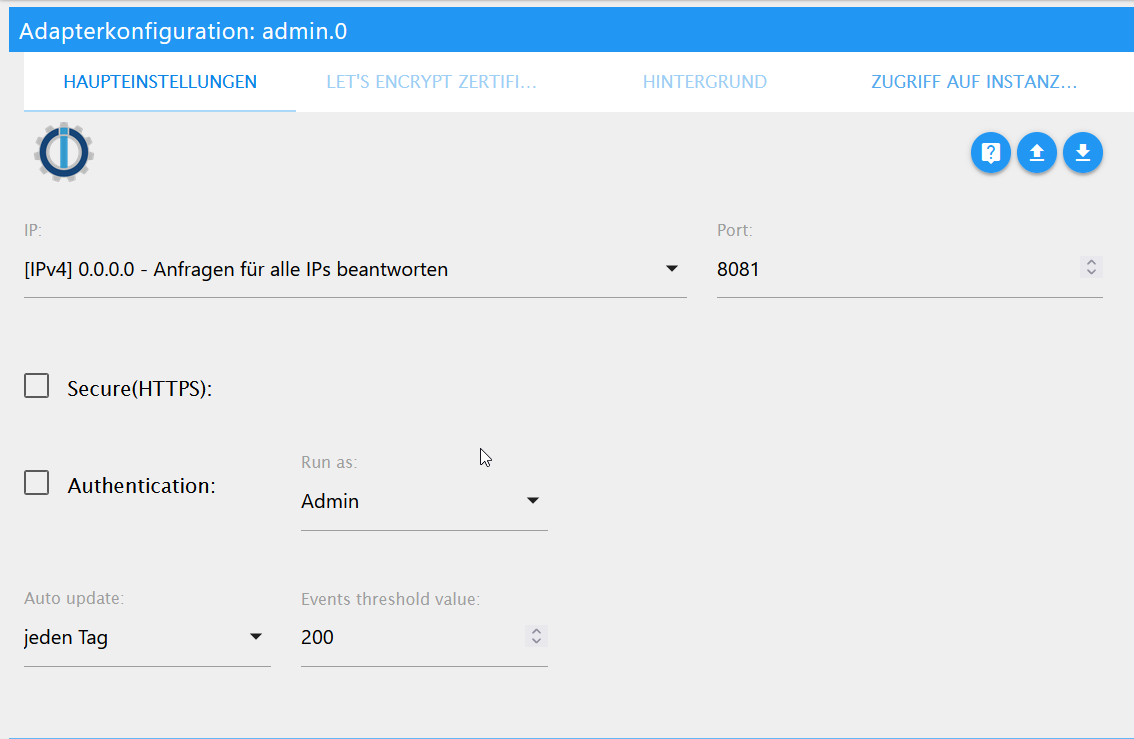
                              2022-06-16 13_16_55-instances - ioBroker.png

                              michael

                              ps: und unter dem globalem schraubenschlüssel -> Haupteinstellungen auch nicht
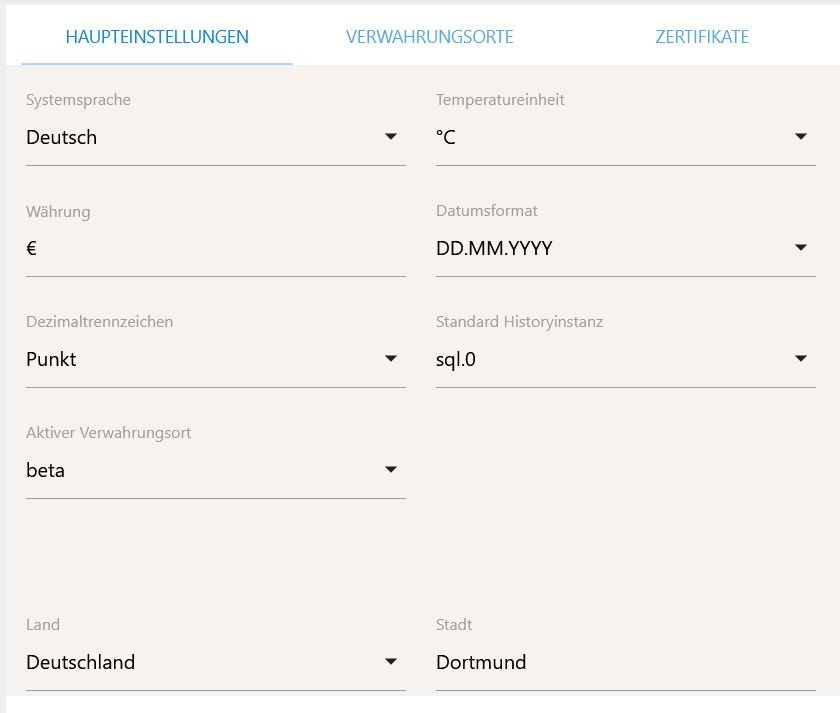
                              2022-06-16 18_02_34-instances - ioBroker.png

                              HomoranH Thomas BraunT 2 Antworten Letzte Antwort
                              0
                              • C condor07

                                @thomas-braun
                                dazu noch mal die frage wo stelle ich ggf. die adminfläche um?
                                wie schon gepostet unter schraubenschlüssel des admin.0 adapters habe ich kein button oder haken für alte oder neue oberfläche.

                                2022-06-16 13_16_55-instances - ioBroker.png

                                michael

                                ps: und unter dem globalem schraubenschlüssel -> Haupteinstellungen auch nicht

                                2022-06-16 18_02_34-instances - ioBroker.png

                                HomoranH Nicht stören
                                HomoranH Nicht stören
                                Homoran
                                Global Moderator Administrators
                                schrieb am zuletzt editiert von Homoran
                                #18

                                @condor07 sagte in Update sql 2.1.1 ==> 2.1.3 "File index_m.html not found":

                                unter schraubenschlüssel des admin.0 adapters habe ich kein button oder haken für alte oder neue oberfläche.

                                hast du noch v5 oder doch schon v6?

                                oder nur nicht weit genug heruntergescrollt?
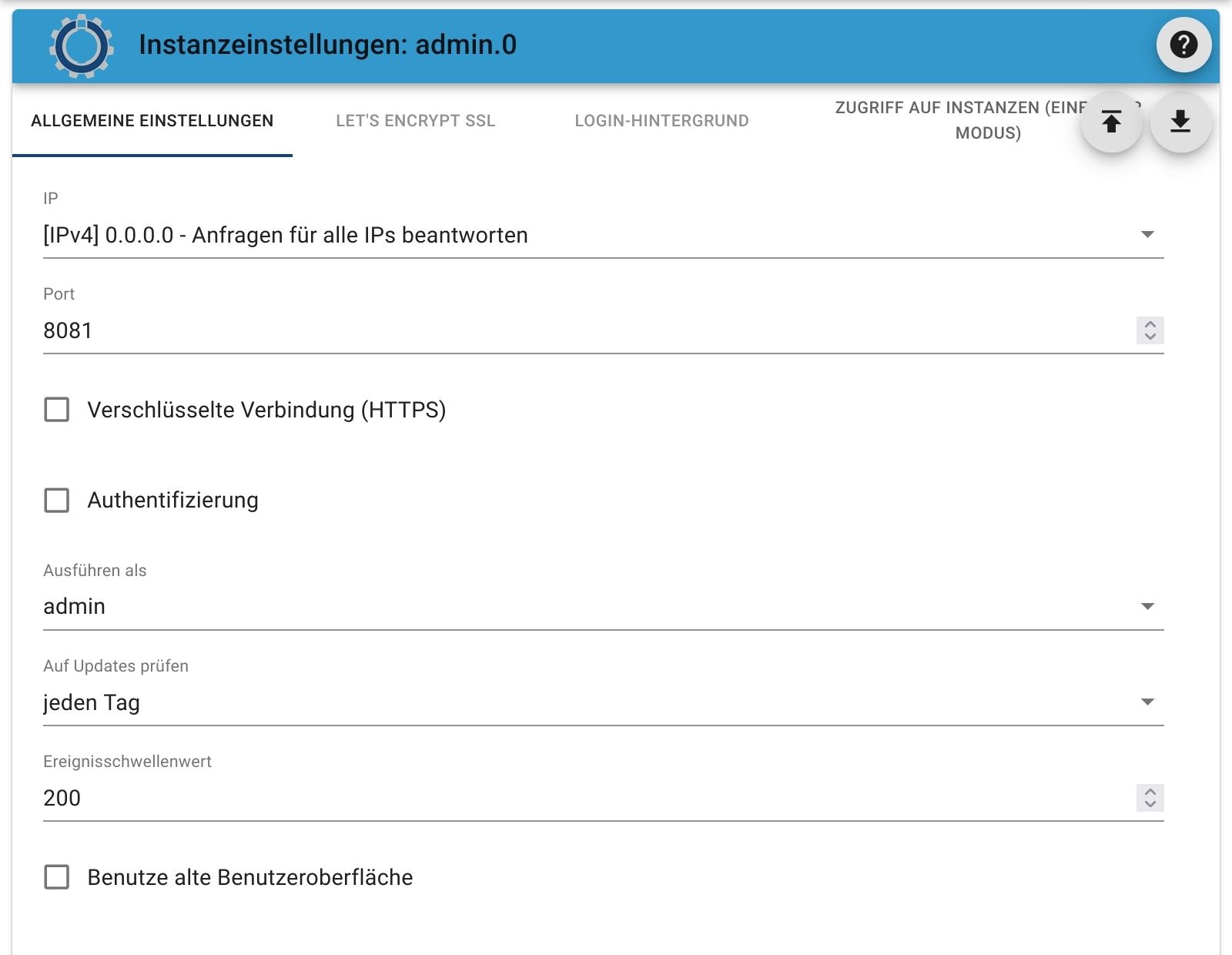
                                Screenshot_20220616-181228_Firefox.jpg

                                kein Support per PN! - Fragen im Forum stellen -
                                Benutzt das Voting rechts unten im Beitrag wenn er euch geholfen hat.
                                Das Forum freut sich über eine Spende. Benutzt dazu den Spendenbutton im Header. Danke!
                                der Installationsfixer: curl -fsL https://iobroker.net/fix.sh | bash -

                                1 Antwort Letzte Antwort
                                0
                                • C condor07

                                  @thomas-braun
                                  dazu noch mal die frage wo stelle ich ggf. die adminfläche um?
                                  wie schon gepostet unter schraubenschlüssel des admin.0 adapters habe ich kein button oder haken für alte oder neue oberfläche.

                                  2022-06-16 13_16_55-instances - ioBroker.png

                                  michael

                                  ps: und unter dem globalem schraubenschlüssel -> Haupteinstellungen auch nicht

                                  2022-06-16 18_02_34-instances - ioBroker.png

                                  Thomas BraunT Online
                                  Thomas BraunT Online
                                  Thomas Braun
                                  Most Active
                                  schrieb am zuletzt editiert von Thomas Braun
                                  #19

                                  @condor07

                                  Ich kann es nicht mehr nachschauen, im admin6 der hier läuft kann man es nicht mehr einstellen.

                                  iobroker update -i
                                  

                                  sagt?

                                  Linux-Werkzeugkasten:
                                  https://forum.iobroker.net/topic/42952/der-kleine-iobroker-linux-werkzeugkasten
                                  NodeJS Fixer Skript:
                                  https://forum.iobroker.net/topic/68035/iob-node-fix-skript
                                  iob_diag: curl -sLf -o diag.sh https://iobroker.net/diag.sh && bash diag.sh

                                  C 1 Antwort Letzte Antwort
                                  0
                                  • Thomas BraunT Thomas Braun

                                    @condor07

                                    Ich kann es nicht mehr nachschauen, im admin6 der hier läuft kann man es nicht mehr einstellen.

                                    iobroker update -i
                                    

                                    sagt?

                                    C Offline
                                    C Offline
                                    condor07
                                    schrieb am zuletzt editiert von
                                    #20

                                    @thomas-braun
                                    system.adapter.admin : admin - v5.4.9

                                    007@iobroker:/opt/iobroker$ iobroker update -i
                                    Used repository: beta
                                    Adapter    "admin"        : 6.0.4    , installed 5.4.9  [Updatable]
                                    Adapter    "alexa2"       : 3.12.0   , installed 3.11.2 [Updatable]
                                    Adapter    "backitup"     : 2.4.9    , installed 2.4.9
                                    Adapter    "cameras"      : 0.1.8    , installed 0.1.8
                                    Adapter    "discovery"    : 3.0.4    , installed 3.0.4
                                    Adapter    "echarts"      : 1.0.8    , installed 1.0.8
                                    Adapter    "email"        : 1.1.3    , installed 1.1.3
                                    Adapter    "feiertage"    : 1.1.0    , installed 1.1.0
                                    Adapter    "flot"         : 1.11.0   , installed 1.11.0
                                    Adapter    "fritzdect"    : 2.2.3    , installed 2.2.3
                                    Adapter    "fronius"      : 1.1.3    , installed 1.1.3
                                    Adapter    "growatt"      : 1.1.15   , installed 1.1.15
                                    Adapter    "harmony"      : 1.2.2    , installed 1.2.2
                                    Adapter    "history"      : 2.1.4    , installed 2.1.4
                                    Adapter    "hm-rega"      : 3.0.40   , installed 3.0.40
                                    Adapter    "hm-rpc"       : 1.15.12  , installed 1.15.12
                                    Adapter    "hs100"        : 2.0.7    , installed 2.0.7
                                    Adapter    "ical"         : 1.12.2   , installed 1.12.2
                                    Adapter    "info"         : 1.9.19   , installed 1.9.19
                                    Adapter    "iot"          : 1.11.7   , installed 1.11.7
                                    Adapter    "javascript"   : 5.7.0    , installed 5.7.0
                                    Controller "js-controller": 4.0.23   , installed 4.0.23
                                    Adapter    "modbus"       : 5.0.4    , installed 5.0.4
                                    Adapter    "node-red"     : 3.3.1    , installed 3.3.1
                                    Adapter    "parser"       : 1.1.6    , installed 1.1.6
                                    Adapter    "ping"         : 1.5.3    , installed 1.5.3
                                    Adapter    "simple-api"   : 2.7.0    , installed 2.7.0
                                    Adapter    "snmp"         : 1.0.0    , installed 1.0.0
                                    Adapter    "socketio"     : 6.1.5    , installed 6.1.5
                                    Adapter    "sonoff"       : 2.5.1    , installed 2.5.1
                                    Adapter    "sql"          : 2.1.3    , installed 2.1.1  [Updatable]
                                    Adapter    "statistics"   : 2.1.1    , installed 1.1.1  [Updatable]
                                    Adapter    "tankerkoenig" : 2.1.1    , installed 2.1.1
                                    Adapter    "tr-064"       : 4.2.16   , installed 4.2.16
                                    Adapter    "tuya"         : 3.6.15   , installed 3.6.15
                                    Adapter    "unifi"        : 0.6.1    , installed 0.5.10 [Updatable]
                                    Adapter    "vis"          : 1.4.15   , installed 1.4.15
                                    Adapter    "vis-bars"     : 0.1.4    , installed 0.1.4
                                    Adapter    "vis-canvas-gauges": 0.1.5, installed 0.1.5
                                    Adapter    "vis-history"  : 1.0.0    , installed 1.0.0
                                    Adapter    "vis-hqwidgets": 1.2.0    , installed 1.2.0
                                    Adapter    "vis-inventwo" : 3.3.3    , installed 3.3.3
                                    Adapter    "vis-lcars"    : 1.0.4    , installed 1.0.4
                                    Adapter    "vis-rgraph"   : 0.0.2    , installed 0.0.2
                                    Adapter    "vis-timeandweather": 1.1.7, installed 1.1.7
                                    Adapter    "web"          : 5.2.2    , installed 5.2.2
                                    Adapter    "ws"           : 2.1.1    , installed 2.1.1
                                    Adapter    "yamaha"       : 0.5.2    , installed 0.5.2
                                    
                                    
                                    Thomas BraunT HomoranH 2 Antworten Letzte Antwort
                                    0
                                    • C condor07

                                      @thomas-braun
                                      system.adapter.admin : admin - v5.4.9

                                      007@iobroker:/opt/iobroker$ iobroker update -i
                                      Used repository: beta
                                      Adapter    "admin"        : 6.0.4    , installed 5.4.9  [Updatable]
                                      Adapter    "alexa2"       : 3.12.0   , installed 3.11.2 [Updatable]
                                      Adapter    "backitup"     : 2.4.9    , installed 2.4.9
                                      Adapter    "cameras"      : 0.1.8    , installed 0.1.8
                                      Adapter    "discovery"    : 3.0.4    , installed 3.0.4
                                      Adapter    "echarts"      : 1.0.8    , installed 1.0.8
                                      Adapter    "email"        : 1.1.3    , installed 1.1.3
                                      Adapter    "feiertage"    : 1.1.0    , installed 1.1.0
                                      Adapter    "flot"         : 1.11.0   , installed 1.11.0
                                      Adapter    "fritzdect"    : 2.2.3    , installed 2.2.3
                                      Adapter    "fronius"      : 1.1.3    , installed 1.1.3
                                      Adapter    "growatt"      : 1.1.15   , installed 1.1.15
                                      Adapter    "harmony"      : 1.2.2    , installed 1.2.2
                                      Adapter    "history"      : 2.1.4    , installed 2.1.4
                                      Adapter    "hm-rega"      : 3.0.40   , installed 3.0.40
                                      Adapter    "hm-rpc"       : 1.15.12  , installed 1.15.12
                                      Adapter    "hs100"        : 2.0.7    , installed 2.0.7
                                      Adapter    "ical"         : 1.12.2   , installed 1.12.2
                                      Adapter    "info"         : 1.9.19   , installed 1.9.19
                                      Adapter    "iot"          : 1.11.7   , installed 1.11.7
                                      Adapter    "javascript"   : 5.7.0    , installed 5.7.0
                                      Controller "js-controller": 4.0.23   , installed 4.0.23
                                      Adapter    "modbus"       : 5.0.4    , installed 5.0.4
                                      Adapter    "node-red"     : 3.3.1    , installed 3.3.1
                                      Adapter    "parser"       : 1.1.6    , installed 1.1.6
                                      Adapter    "ping"         : 1.5.3    , installed 1.5.3
                                      Adapter    "simple-api"   : 2.7.0    , installed 2.7.0
                                      Adapter    "snmp"         : 1.0.0    , installed 1.0.0
                                      Adapter    "socketio"     : 6.1.5    , installed 6.1.5
                                      Adapter    "sonoff"       : 2.5.1    , installed 2.5.1
                                      Adapter    "sql"          : 2.1.3    , installed 2.1.1  [Updatable]
                                      Adapter    "statistics"   : 2.1.1    , installed 1.1.1  [Updatable]
                                      Adapter    "tankerkoenig" : 2.1.1    , installed 2.1.1
                                      Adapter    "tr-064"       : 4.2.16   , installed 4.2.16
                                      Adapter    "tuya"         : 3.6.15   , installed 3.6.15
                                      Adapter    "unifi"        : 0.6.1    , installed 0.5.10 [Updatable]
                                      Adapter    "vis"          : 1.4.15   , installed 1.4.15
                                      Adapter    "vis-bars"     : 0.1.4    , installed 0.1.4
                                      Adapter    "vis-canvas-gauges": 0.1.5, installed 0.1.5
                                      Adapter    "vis-history"  : 1.0.0    , installed 1.0.0
                                      Adapter    "vis-hqwidgets": 1.2.0    , installed 1.2.0
                                      Adapter    "vis-inventwo" : 3.3.3    , installed 3.3.3
                                      Adapter    "vis-lcars"    : 1.0.4    , installed 1.0.4
                                      Adapter    "vis-rgraph"   : 0.0.2    , installed 0.0.2
                                      Adapter    "vis-timeandweather": 1.1.7, installed 1.1.7
                                      Adapter    "web"          : 5.2.2    , installed 5.2.2
                                      Adapter    "ws"           : 2.1.1    , installed 2.1.1
                                      Adapter    "yamaha"       : 0.5.2    , installed 0.5.2
                                      
                                      
                                      Thomas BraunT Online
                                      Thomas BraunT Online
                                      Thomas Braun
                                      Most Active
                                      schrieb am zuletzt editiert von
                                      #21

                                      @condor07

                                      iobroker upload all
                                      iobroker upgrade all
                                      iobroker upload all
                                      iobroker restart
                                      

                                      Linux-Werkzeugkasten:
                                      https://forum.iobroker.net/topic/42952/der-kleine-iobroker-linux-werkzeugkasten
                                      NodeJS Fixer Skript:
                                      https://forum.iobroker.net/topic/68035/iob-node-fix-skript
                                      iob_diag: curl -sLf -o diag.sh https://iobroker.net/diag.sh && bash diag.sh

                                      C 2 Antworten Letzte Antwort
                                      0
                                      • C condor07

                                        @thomas-braun
                                        system.adapter.admin : admin - v5.4.9

                                        007@iobroker:/opt/iobroker$ iobroker update -i
                                        Used repository: beta
                                        Adapter    "admin"        : 6.0.4    , installed 5.4.9  [Updatable]
                                        Adapter    "alexa2"       : 3.12.0   , installed 3.11.2 [Updatable]
                                        Adapter    "backitup"     : 2.4.9    , installed 2.4.9
                                        Adapter    "cameras"      : 0.1.8    , installed 0.1.8
                                        Adapter    "discovery"    : 3.0.4    , installed 3.0.4
                                        Adapter    "echarts"      : 1.0.8    , installed 1.0.8
                                        Adapter    "email"        : 1.1.3    , installed 1.1.3
                                        Adapter    "feiertage"    : 1.1.0    , installed 1.1.0
                                        Adapter    "flot"         : 1.11.0   , installed 1.11.0
                                        Adapter    "fritzdect"    : 2.2.3    , installed 2.2.3
                                        Adapter    "fronius"      : 1.1.3    , installed 1.1.3
                                        Adapter    "growatt"      : 1.1.15   , installed 1.1.15
                                        Adapter    "harmony"      : 1.2.2    , installed 1.2.2
                                        Adapter    "history"      : 2.1.4    , installed 2.1.4
                                        Adapter    "hm-rega"      : 3.0.40   , installed 3.0.40
                                        Adapter    "hm-rpc"       : 1.15.12  , installed 1.15.12
                                        Adapter    "hs100"        : 2.0.7    , installed 2.0.7
                                        Adapter    "ical"         : 1.12.2   , installed 1.12.2
                                        Adapter    "info"         : 1.9.19   , installed 1.9.19
                                        Adapter    "iot"          : 1.11.7   , installed 1.11.7
                                        Adapter    "javascript"   : 5.7.0    , installed 5.7.0
                                        Controller "js-controller": 4.0.23   , installed 4.0.23
                                        Adapter    "modbus"       : 5.0.4    , installed 5.0.4
                                        Adapter    "node-red"     : 3.3.1    , installed 3.3.1
                                        Adapter    "parser"       : 1.1.6    , installed 1.1.6
                                        Adapter    "ping"         : 1.5.3    , installed 1.5.3
                                        Adapter    "simple-api"   : 2.7.0    , installed 2.7.0
                                        Adapter    "snmp"         : 1.0.0    , installed 1.0.0
                                        Adapter    "socketio"     : 6.1.5    , installed 6.1.5
                                        Adapter    "sonoff"       : 2.5.1    , installed 2.5.1
                                        Adapter    "sql"          : 2.1.3    , installed 2.1.1  [Updatable]
                                        Adapter    "statistics"   : 2.1.1    , installed 1.1.1  [Updatable]
                                        Adapter    "tankerkoenig" : 2.1.1    , installed 2.1.1
                                        Adapter    "tr-064"       : 4.2.16   , installed 4.2.16
                                        Adapter    "tuya"         : 3.6.15   , installed 3.6.15
                                        Adapter    "unifi"        : 0.6.1    , installed 0.5.10 [Updatable]
                                        Adapter    "vis"          : 1.4.15   , installed 1.4.15
                                        Adapter    "vis-bars"     : 0.1.4    , installed 0.1.4
                                        Adapter    "vis-canvas-gauges": 0.1.5, installed 0.1.5
                                        Adapter    "vis-history"  : 1.0.0    , installed 1.0.0
                                        Adapter    "vis-hqwidgets": 1.2.0    , installed 1.2.0
                                        Adapter    "vis-inventwo" : 3.3.3    , installed 3.3.3
                                        Adapter    "vis-lcars"    : 1.0.4    , installed 1.0.4
                                        Adapter    "vis-rgraph"   : 0.0.2    , installed 0.0.2
                                        Adapter    "vis-timeandweather": 1.1.7, installed 1.1.7
                                        Adapter    "web"          : 5.2.2    , installed 5.2.2
                                        Adapter    "ws"           : 2.1.1    , installed 2.1.1
                                        Adapter    "yamaha"       : 0.5.2    , installed 0.5.2
                                        
                                        
                                        HomoranH Nicht stören
                                        HomoranH Nicht stören
                                        Homoran
                                        Global Moderator Administrators
                                        schrieb am zuletzt editiert von
                                        #22

                                        @condor07 wieso beta?

                                        kein Support per PN! - Fragen im Forum stellen -
                                        Benutzt das Voting rechts unten im Beitrag wenn er euch geholfen hat.
                                        Das Forum freut sich über eine Spende. Benutzt dazu den Spendenbutton im Header. Danke!
                                        der Installationsfixer: curl -fsL https://iobroker.net/fix.sh | bash -

                                        1 Antwort Letzte Antwort
                                        0
                                        • Thomas BraunT Thomas Braun

                                          @condor07

                                          iobroker upload all
                                          iobroker upgrade all
                                          iobroker upload all
                                          iobroker restart
                                          
                                          C Offline
                                          C Offline
                                          condor07
                                          schrieb am zuletzt editiert von
                                          #23

                                          @thomas-braun
                                          ok mach ich mal muss ich den alexa halt wieder downgraden hat ja immer noch sein sprachausgabe bug in der 3.12er

                                          Thomas BraunT 1 Antwort Letzte Antwort
                                          0
                                          Antworten
                                          • In einem neuen Thema antworten
                                          Anmelden zum Antworten
                                          • Älteste zuerst
                                          • Neuste zuerst
                                          • Meiste Stimmen


                                          Support us

                                          ioBroker
                                          Community Adapters
                                          Donate

                                          587

                                          Online

                                          32.7k

                                          Benutzer

                                          82.5k

                                          Themen

                                          1.3m

                                          Beiträge
                                          Community
                                          Impressum | Datenschutz-Bestimmungen | Nutzungsbedingungen | Einwilligungseinstellungen
                                          ioBroker Community 2014-2025
                                          logo
                                          • Anmelden

                                          • Du hast noch kein Konto? Registrieren

                                          • Anmelden oder registrieren, um zu suchen
                                          • Erster Beitrag
                                            Letzter Beitrag
                                          0
                                          • Home
                                          • Aktuell
                                          • Tags
                                          • Ungelesen 0
                                          • Kategorien
                                          • Unreplied
                                          • Beliebt
                                          • GitHub
                                          • Docu
                                          • Hilfe