




[Gelöst] Admin Kennwort ändern
-
Hallo zusammen,
//edit
Ich habe nun im Froum einen Beitrag gefunden, welcher erklärt wie man das admin Passwort über ssh ändern kann. Der Beitrag hier kann also direkt wieder gelöscht werden. Danke
// –-----------------
ich habe mir eben ioBroker installiert (fertiges rasPi Image). Ich habe dann https und die Authentifizierung aktiviert. Leider habe ich vorher kein Kennwort vergeben bzw. irgendwo geändert. Nun kommt die Login-Maske und ich weiß nicht mit welchen Daten ich mich einloggen muss.
Sorry, ich bin ein absoluter ioBroker-Neuling ;)
Vielen Dank
Jens
-
Password ist "iobroker"
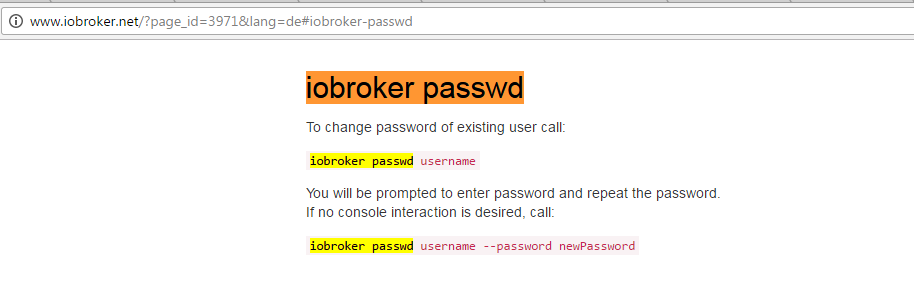
Aber man kann den Password auch über Konsole ändern:
"iobroker passwd admin"
48_2017-04-13_10_58_34-command_line_interface___iobroker.png -
root@FHEM:/opt/iobroker# iobroker passwd `xxx --password xxx
crypto.js:562
    return binding.PBKDF2(password, salt, iterations, keylen, digest, callback);
                   ^

TypeError: Not a buffer
    at TypeError (native)
    at pbkdf2 (crypto.js:562:20)
    at Object.exports.pbkdf2 (crypto.js:548:10)
    at Object.hash (/opt/iobroker/node_modules/iobroker.js-controller/lib/password.js:53:24)
    at Socket. <anonymous>(/opt/iobroker/node_modules/iobroker.js-controller/lib/setup/setupUsers.js:55:26)
    at Socket.onack (/opt/iobroker/node_modules/socket.io-client/lib/socket.js:312:9)
    at Socket.onpacket (/opt/iobroker/node_modules/socket.io-client/lib/socket.js:236:12)
    at Manager. <anonymous>(/opt/iobroker/node_modules/component-bind/index.js:21:15)
    at Manager.Emitter.emit (/opt/iobroker/node_modules/socket.io-client/node_modules/component-emitter/index.js:133:20)
    at Manager.ondecoded (/opt/iobroker/node_modules/socket.io-client/lib/manager.js:332:8)</anonymous></anonymous>
ist das richtig?
-
root@FHEM:/opt/iobroker# iobroker passwd `xxx --password xxx
crypto.js:562
    return binding.PBKDF2(password, salt, iterations, keylen, digest, callback);
                   ^

TypeError: Not a buffer
    at TypeError (native)
    at pbkdf2 (crypto.js:562:20)
    at Object.exports.pbkdf2 (crypto.js:548:10)
    at Object.hash (/opt/iobroker/node_modules/iobroker.js-controller/lib/password.js:53:24)
    at Socket. <anonymous>(/opt/iobroker/node_modules/iobroker.js-controller/lib/setup/setupUsers.js:55:26)
    at Socket.onack (/opt/iobroker/node_modules/socket.io-client/lib/socket.js:312:9)
    at Socket.onpacket (/opt/iobroker/node_modules/socket.io-client/lib/socket.js:236:12)
    at Manager. <anonymous>(/opt/iobroker/node_modules/component-bind/index.js:21:15)
    at Manager.Emitter.emit (/opt/iobroker/node_modules/socket.io-client/node_modules/component-emitter/index.js:133:20)
    at Manager.ondecoded (/opt/iobroker/node_modules/socket.io-client/lib/manager.js:332:8)</anonymous></anonymous>
ist das richtig? `
Es währe super wenn du die Version von js-controller und node.js sagen würdest.Bei mir kommt so was:
iobroker passwd `xxx --password xxx
User "`xxx" does not exist.
Heißt dein User wirklich so? `xxx
-
Ne habe den User weg gemacht beim falschen kommt das bei mir auch. Node 4.8 js Controller 1.03 die aktuelle
Gesendet von meinem SM-G930F mit Tapatalk
-
Password ist "iobroker"
Aber man kann den Password auch über Konsole ändern:
"iobroker passwd admin"
48_2017-04-13_10_58_34-command_line_interface___iobroker.png@Bluefox ich habe ein fertiges Image für einen Tinker, habe ebenfalls kein Passwort zur Hand , iobroker oder admin funktionieren nicht , gibt es eine möglichkeit zum Zurücksetzen oder ähnlichem. Grüße Alex

Hello! It looks like you're interested in this conversation, but you don't have an account yet.
Getting fed up of having to scroll through the same posts each visit? When you register for an account, you'll always come back to exactly where you were before, and choose to be notified of new replies (either via email, or push notification). You'll also be able to save bookmarks and upvote posts to show your appreciation to other community members.
With your input, this post could be even better 💗
Register Login295
Online32.7k
Users82.6k
Topics1.3m
Posts