Skip to content
  • Home
  • Recent
  • Tags
  • 0 Unread 0
  • Categories
  • Unreplied
  • Popular
  • GitHub
  • Docu
  • Hilfe
Skins
  • Light
  • Brite
  • Cerulean
  • Cosmo
  • Flatly
  • Journal
  • Litera
  • Lumen
  • Lux
  • Materia
  • Minty
  • Morph
  • Pulse
  • Sandstone
  • Simplex
  • Sketchy
  • Spacelab
  • United
  • Yeti
  • Zephyr
  • Dark
  • Cyborg
  • Darkly
  • Quartz
  • Slate
  • Solar
  • Superhero
  • Vapor

  • Default (No Skin)
  • No Skin
Collapse
ioBroker Logo

Community Forum

donate donate
  1. ioBroker Community Home
  2. Deutsch
  3. Skripten / Logik
  4. JavaScript
  5. HowTo: Zusatz-Programme fuer jarvis v3

NEWS

  • UPDATE 31.10.: Amazon Alexa - ioBroker Skill läuft aus ?
    apollon77A
    apollon77
    48
    3
    8.9k

  • Monatsrückblick – September 2025
    BluefoxB
    Bluefox
    13
    1
    2.3k

  • Neues Video "KI im Smart Home" - ioBroker plus n8n
    BluefoxB
    Bluefox
    16
    1
    3.4k

HowTo: Zusatz-Programme fuer jarvis v3

Scheduled Pinned Locked Moved JavaScript
javascript
889 Posts 33 Posters 214.8k Views 37 Watching
  • Oldest to Newest
  • Newest to Oldest
  • Most Votes
Reply
  • Reply as topic
Log in to reply
This topic has been deleted. Only users with topic management privileges can see it.
  • M MCU

    @intruder7 Dann bleibt nur noch setValue?

    I Online
    I Online
    intruder7
    wrote on last edited by
    #731

    @mcu genau und die scrollbars

    M 1 Reply Last reply
    0
    • I intruder7

      @mcu genau und die scrollbars

      M Online
      M Online
      MCU
      wrote on last edited by
      #732

      @intruder7 Bezgl der scrollbars, hast du eine Einstellung im CSS?

      NUC i7 64GB mit Proxmox ---- Jarvis Infos Aktualisierungen der Doku auf Instagram verfolgen -> mcuiobroker Instagram
      Wenn Euch mein Vorschlag geholfen hat, bitte rechts "^" klicken.

      I 1 Reply Last reply
      0
      • M MCU

        @intruder7 Dann bleibt nur noch setValue?

        I Online
        I Online
        intruder7
        wrote on last edited by
        #733

        @mcu initial nach nem reload sind sie da. minimiere ich das Fenster und maximiere ich es sind sie weg

        1 Reply Last reply
        0
        • M MCU

          @intruder7 Bezgl der scrollbars, hast du eine Einstellung im CSS?

          I Online
          I Online
          intruder7
          wrote on last edited by
          #734

          @mcu
          dies ist alles was ich unter styles habe

          .MCU_HKT_History_Icon {
          	height: 20px!important;
          	width: 20px!important;
          }
          
          .blink {
          	animation: blinker 2s linear infinite;
          }
          
          @keyframes blinker {
          	50% {
          		opacity: 0;
          	}
          }
          
          .jarvis-StateList.horizontal {
          	display: flex;
          	min-width: fit-content;
          	justify-content: center;
          	padding: 10px;
          }
          
          .stacked .jarvis-StateListItem {
          	width: auto !important;
          }
          
          .jarvis-Calendar-CalendarName {
          	font-size: 15px;
          	margin-top: -6px;
          }
          
          .q-dialog .q-card {
          	max-width: 700px !important;
          	width: 700px !important;
          	color: #EEEEEE;
          	background-color: #000000c9 !important;
          }
          
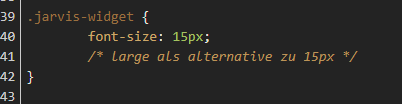
          .jarvis-widget {
          	font-size: 15px;
          	/* large als alternative zu 15px */
          }
          
          .paper {
          	border-radius: 15px;
          }
          
          .jarvis-widget {
          	border-radius: 15px;
          }
          
          .jarvis-widget-container {
          	border-radius: 15px;
          	box-shadow: inset 4px 4px 9px #19212d,
                      inset -4px -4px 9px #253141;
          	color: rgba(255,255,255,.8);
          }
          
          .jarvis-DateTime-Clock-Date {
          	font-size: 30px;
          	/* entsprechende Größe eintragen */
          	color: red;
          	/* falls man die Farbe ändern möchte */
          }
          
          .jarvis-DateTime-Clock-Time {
          	font-size: 20px;
          	/* entsprechende Größe eintragen */
          	color: white;
          	/* falls man die Farbe ändern möchte */
          }
          
          .jarvis-page-container,
          .jarvis-sidebar-container,
          .jarvis-sidebar-container .q-toolbar,
          .jarvis-popup,
          .jarvis-popup .jarvis-StateList {
          	background-image: url("https://images.hdqwalls.com/download/black-gradient-b9-1920x1080.jpg");
          }
          
          .body--dark .jarvis-header {
          	background-color: rgba(0,0,0,0.25) !important;
          }
          
          .body--light .jarvis-header {
          	background-color: rgba(0,0,0,0.25) !important;
          }
          
          .jarvis-tabs-container {
          	background-color: rgba(0,0,0,0.25) !important;
          }
          
          .jarvis-widget-container {
          	background-color: rgba(0,0,0,0.25) !important;
          }
          
          .body--dark .jarvis-widget {
          	background: rgba(0,0,0,0.25);
          }
          
          .body--light .jarvis-widget {
          	background: rgba(0,0,0,0.25);
          }
          
          .body--dark .jarvis-tabs-container {
          	background-color: rgba(0,0,0,0.45) !important;
          }
          
          .body--light .jarvis-tabs-container {
          	background-color: rgba(0,0,0,0.45) !important;
          }
          
          /* für JsonTable ergänzt @mcu */
          
          .q-table__container,
          .q-card__section.q-card__section--vert {
          	background-color: transparent !important;
          }
          
          /*
          .q-card__section {
          	height: 100% !important;
          }
          */
          
          /* für Trennstrich für TABs ergänzt @mcu */
          
          .q-header--bordered {
          	border: 1px solid transparent !important;
          }
          
          /* transparents Icon im Widget-Header @mcu */
          
          .jarvis-widget-icon {
          	background: rgba(0,0,0,0.45);
          }
          
          /* MediaControl in transparentem Design @mcu */
          
          .cover {
          	background-color: transparent !important;
          }
          
          .controls {
          	background-color: transparent !important;
          }
          
          .track-information {
          	background: rgba(25, 118, 210, 0) !important;
          }
          
          .track-duration {
          	background-color: white;
          }
          
          .track-progress {
          	background-color: blue;
          }
          
          .controls .jarvis-icon svg {
          	color: white;
          }
          
          .controls .controlsLeft .q-btn__wrapper {
          	background-color: transparent !important;
          }
          
          .controls .q-btn-group >.q-btn-item {
          	background-color: transparent !important;
          }
          
          M 1 Reply Last reply
          0
          • I intruder7

            @mcu
            dies ist alles was ich unter styles habe

            .MCU_HKT_History_Icon {
            	height: 20px!important;
            	width: 20px!important;
            }
            
            .blink {
            	animation: blinker 2s linear infinite;
            }
            
            @keyframes blinker {
            	50% {
            		opacity: 0;
            	}
            }
            
            .jarvis-StateList.horizontal {
            	display: flex;
            	min-width: fit-content;
            	justify-content: center;
            	padding: 10px;
            }
            
            .stacked .jarvis-StateListItem {
            	width: auto !important;
            }
            
            .jarvis-Calendar-CalendarName {
            	font-size: 15px;
            	margin-top: -6px;
            }
            
            .q-dialog .q-card {
            	max-width: 700px !important;
            	width: 700px !important;
            	color: #EEEEEE;
            	background-color: #000000c9 !important;
            }
            
            .jarvis-widget {
            	font-size: 15px;
            	/* large als alternative zu 15px */
            }
            
            .paper {
            	border-radius: 15px;
            }
            
            .jarvis-widget {
            	border-radius: 15px;
            }
            
            .jarvis-widget-container {
            	border-radius: 15px;
            	box-shadow: inset 4px 4px 9px #19212d,
                        inset -4px -4px 9px #253141;
            	color: rgba(255,255,255,.8);
            }
            
            .jarvis-DateTime-Clock-Date {
            	font-size: 30px;
            	/* entsprechende Größe eintragen */
            	color: red;
            	/* falls man die Farbe ändern möchte */
            }
            
            .jarvis-DateTime-Clock-Time {
            	font-size: 20px;
            	/* entsprechende Größe eintragen */
            	color: white;
            	/* falls man die Farbe ändern möchte */
            }
            
            .jarvis-page-container,
            .jarvis-sidebar-container,
            .jarvis-sidebar-container .q-toolbar,
            .jarvis-popup,
            .jarvis-popup .jarvis-StateList {
            	background-image: url("https://images.hdqwalls.com/download/black-gradient-b9-1920x1080.jpg");
            }
            
            .body--dark .jarvis-header {
            	background-color: rgba(0,0,0,0.25) !important;
            }
            
            .body--light .jarvis-header {
            	background-color: rgba(0,0,0,0.25) !important;
            }
            
            .jarvis-tabs-container {
            	background-color: rgba(0,0,0,0.25) !important;
            }
            
            .jarvis-widget-container {
            	background-color: rgba(0,0,0,0.25) !important;
            }
            
            .body--dark .jarvis-widget {
            	background: rgba(0,0,0,0.25);
            }
            
            .body--light .jarvis-widget {
            	background: rgba(0,0,0,0.25);
            }
            
            .body--dark .jarvis-tabs-container {
            	background-color: rgba(0,0,0,0.45) !important;
            }
            
            .body--light .jarvis-tabs-container {
            	background-color: rgba(0,0,0,0.45) !important;
            }
            
            /* für JsonTable ergänzt @mcu */
            
            .q-table__container,
            .q-card__section.q-card__section--vert {
            	background-color: transparent !important;
            }
            
            /*
            .q-card__section {
            	height: 100% !important;
            }
            */
            
            /* für Trennstrich für TABs ergänzt @mcu */
            
            .q-header--bordered {
            	border: 1px solid transparent !important;
            }
            
            /* transparents Icon im Widget-Header @mcu */
            
            .jarvis-widget-icon {
            	background: rgba(0,0,0,0.45);
            }
            
            /* MediaControl in transparentem Design @mcu */
            
            .cover {
            	background-color: transparent !important;
            }
            
            .controls {
            	background-color: transparent !important;
            }
            
            .track-information {
            	background: rgba(25, 118, 210, 0) !important;
            }
            
            .track-duration {
            	background-color: white;
            }
            
            .track-progress {
            	background-color: blue;
            }
            
            .controls .jarvis-icon svg {
            	color: white;
            }
            
            .controls .controlsLeft .q-btn__wrapper {
            	background-color: transparent !important;
            }
            
            .controls .q-btn-group >.q-btn-item {
            	background-color: transparent !important;
            }
            
            M Online
            M Online
            MCU
            wrote on last edited by MCU
            #735

            @intruder7

            07068830-265b-4b18-add3-80061e090a99-image.png

            Das kann schon Einfluss haben, geht ja auch auf alle Widgets.

            Schalte einmal die Styles ab und schau ob es anders wird.

            Welcher Wert soll gesetzt werden bei setValue?

            Für hm-rpc sind die DPs gesetzt
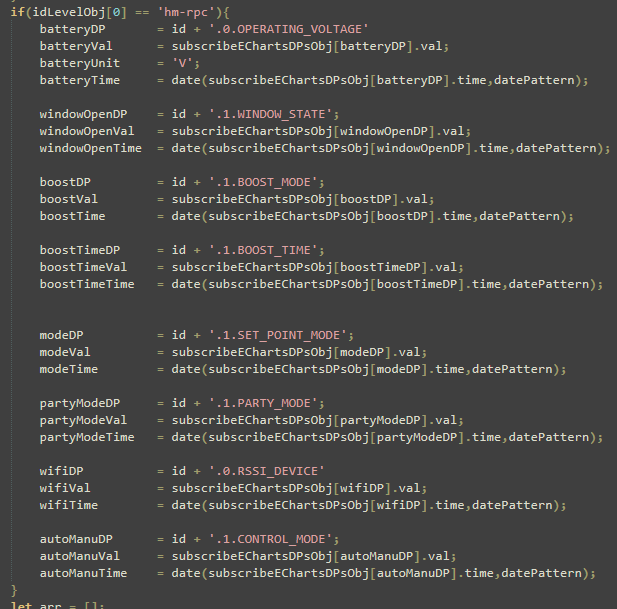
            4ce0e7f9-734d-4df1-86bc-809852a37911-image.png

            So wurde es damals von einem User erklärt.

            NUC i7 64GB mit Proxmox ---- Jarvis Infos Aktualisierungen der Doku auf Instagram verfolgen -> mcuiobroker Instagram
            Wenn Euch mein Vorschlag geholfen hat, bitte rechts "^" klicken.

            I 3 Replies Last reply
            0
            • M MCU

              @intruder7

              07068830-265b-4b18-add3-80061e090a99-image.png

              Das kann schon Einfluss haben, geht ja auch auf alle Widgets.

              Schalte einmal die Styles ab und schau ob es anders wird.

              Welcher Wert soll gesetzt werden bei setValue?

              Für hm-rpc sind die DPs gesetzt

              4ce0e7f9-734d-4df1-86bc-809852a37911-image.png

              So wurde es damals von einem User erklärt.

              I Online
              I Online
              intruder7
              wrote on last edited by
              #736

              @mcu
              leider nicht
              aeac9989-2687-427a-83fa-492ea11ee8fb-image.png

              1 Reply Last reply
              0
              • M MCU

                @intruder7

                07068830-265b-4b18-add3-80061e090a99-image.png

                Das kann schon Einfluss haben, geht ja auch auf alle Widgets.

                Schalte einmal die Styles ab und schau ob es anders wird.

                Welcher Wert soll gesetzt werden bei setValue?

                Für hm-rpc sind die DPs gesetzt

                4ce0e7f9-734d-4df1-86bc-809852a37911-image.png

                So wurde es damals von einem User erklärt.

                I Online
                I Online
                intruder7
                wrote on last edited by
                #737

                @mcu
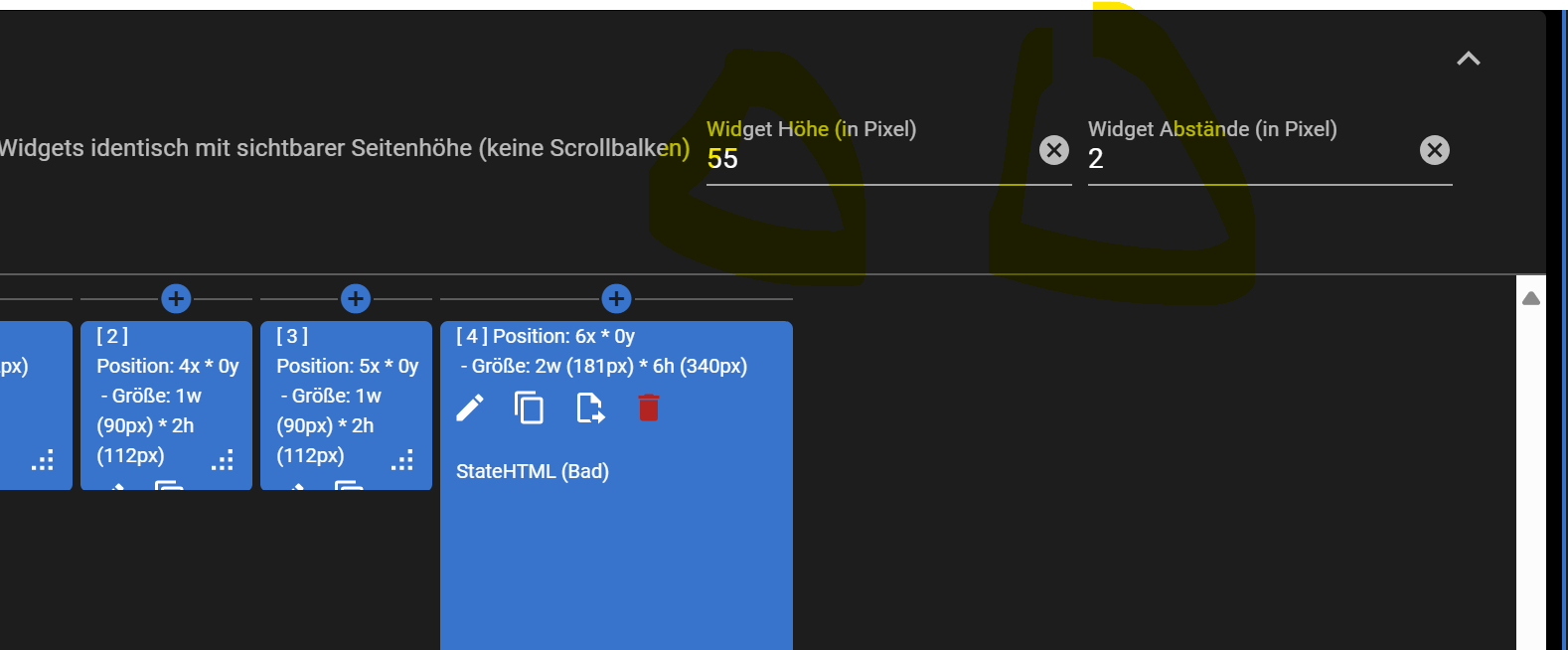
                widget höhe von 50 auf 55 und Abstände von von 5 auf 2 hat geholfen
                15c7a263-8b54-4eab-809d-1a4e622533ae-image.png

                1 Reply Last reply
                0
                • M MCU

                  @intruder7

                  07068830-265b-4b18-add3-80061e090a99-image.png

                  Das kann schon Einfluss haben, geht ja auch auf alle Widgets.

                  Schalte einmal die Styles ab und schau ob es anders wird.

                  Welcher Wert soll gesetzt werden bei setValue?

                  Für hm-rpc sind die DPs gesetzt

                  4ce0e7f9-734d-4df1-86bc-809852a37911-image.png

                  So wurde es damals von einem User erklärt.

                  I Online
                  I Online
                  intruder7
                  wrote on last edited by
                  #738

                  @mcu jetzt nur noch setvalue ;-)

                  M 1 Reply Last reply
                  0
                  • I intruder7

                    @mcu jetzt nur noch setvalue ;-)

                    M Online
                    M Online
                    MCU
                    wrote on last edited by
                    #739

                    @intruder7 Welcher DP muss gesetzt werden?

                    NUC i7 64GB mit Proxmox ---- Jarvis Infos Aktualisierungen der Doku auf Instagram verfolgen -> mcuiobroker Instagram
                    Wenn Euch mein Vorschlag geholfen hat, bitte rechts "^" klicken.

                    I 1 Reply Last reply
                    0
                    • M MCU

                      @intruder7 Welcher DP muss gesetzt werden?

                      I Online
                      I Online
                      intruder7
                      wrote on last edited by
                      #740

                      @mcu hm-rpc.2.000A97XXXXXX23.1.SET_POINT_TEMPERATURE

                      M 1 Reply Last reply
                      0
                      • I intruder7

                        @mcu hm-rpc.2.000A97XXXXXX23.1.SET_POINT_TEMPERATURE

                        M Online
                        M Online
                        MCU
                        wrote on last edited by
                        #741

                        @intruder7 Das ist der der über +/- gesetzt wird?

                        NUC i7 64GB mit Proxmox ---- Jarvis Infos Aktualisierungen der Doku auf Instagram verfolgen -> mcuiobroker Instagram
                        Wenn Euch mein Vorschlag geholfen hat, bitte rechts "^" klicken.

                        I 1 Reply Last reply
                        0
                        • M MCU

                          @intruder7 Das ist der der über +/- gesetzt wird?

                          I Online
                          I Online
                          intruder7
                          wrote on last edited by
                          #742

                          @mcu jap

                          M 1 Reply Last reply
                          0
                          • I intruder7

                            @mcu jap

                            M Online
                            M Online
                            MCU
                            wrote on last edited by MCU
                            #743

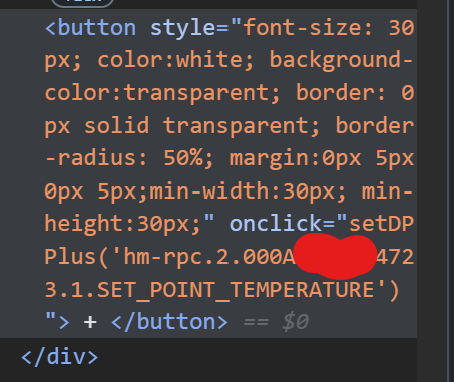
                            @intruder7 Klick mal rechte Maustaste auf - und danach auf + und "untersuchen"
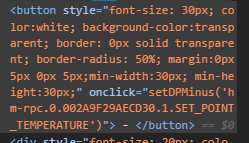
                            154c2c5f-9df3-493d-b8ad-16349604bdd4-image.png

                            NUC i7 64GB mit Proxmox ---- Jarvis Infos Aktualisierungen der Doku auf Instagram verfolgen -> mcuiobroker Instagram
                            Wenn Euch mein Vorschlag geholfen hat, bitte rechts "^" klicken.

                            I 1 Reply Last reply
                            0
                            • M MCU

                              @intruder7 Klick mal rechte Maustaste auf - und danach auf + und "untersuchen"

                              154c2c5f-9df3-493d-b8ad-16349604bdd4-image.png

                              I Online
                              I Online
                              intruder7
                              wrote on last edited by
                              #744

                              @mcu
                              d49a2971-705f-42ad-adc8-4d1d1fbd0fb5-image.png

                              M 1 Reply Last reply
                              0
                              • I intruder7

                                @mcu
                                d49a2971-705f-42ad-adc8-4d1d1fbd0fb5-image.png

                                M Online
                                M Online
                                MCU
                                wrote on last edited by MCU
                                #745

                                @intruder7 Was kommt denn im DP an? Vorher 23 dann 22.5 oder bei Plus 23.5
                                Was würde man manuell in den DP eingeben?

                                NUC i7 64GB mit Proxmox ---- Jarvis Infos Aktualisierungen der Doku auf Instagram verfolgen -> mcuiobroker Instagram
                                Wenn Euch mein Vorschlag geholfen hat, bitte rechts "^" klicken.

                                I 1 Reply Last reply
                                0
                                • M MCU

                                  @intruder7 Was kommt denn im DP an? Vorher 23 dann 22.5 oder bei Plus 23.5
                                  Was würde man manuell in den DP eingeben?

                                  I Online
                                  I Online
                                  intruder7
                                  wrote on last edited by
                                  #746

                                  @mcu Hab jetzt ein bisschen mit + und - probiert. Dies scheint ein sporadisches Problem beim Homematic Adapter zu sein. Die Werte kommen alles an am DP nur manchmal meckert der Adapter

                                  M 1 Reply Last reply
                                  0
                                  • I intruder7

                                    @mcu Hab jetzt ein bisschen mit + und - probiert. Dies scheint ein sporadisches Problem beim Homematic Adapter zu sein. Die Werte kommen alles an am DP nur manchmal meckert der Adapter

                                    M Online
                                    M Online
                                    MCU
                                    wrote on last edited by
                                    #747

                                    @intruder7 ok, dann sind wir erstmal fertig.

                                    NUC i7 64GB mit Proxmox ---- Jarvis Infos Aktualisierungen der Doku auf Instagram verfolgen -> mcuiobroker Instagram
                                    Wenn Euch mein Vorschlag geholfen hat, bitte rechts "^" klicken.

                                    Bernd1967B 1 Reply Last reply
                                    1
                                    • M MCU

                                      @intruder7 ok, dann sind wir erstmal fertig.

                                      Bernd1967B Offline
                                      Bernd1967B Offline
                                      Bernd1967
                                      wrote on last edited by
                                      #748

                                      @mcu
                                      Nur zur Info.
                                      Thema Zusatzprogramm eChartsChange:
                                      Bei der echart Adapter Version >2.0.4 kann es in deinem script zum Fehler in folgender Zeile kommen:

                                      if (eChartobj.native.data.lines[0].xticks == undefined)

                                      Das liegt daran das in den Objektdaten der Preset statt "lines" nur "l" benutzt wurde.
                                      Soll aber wieder korrigiert werden.
                                      Preset Objektdaten Problem #779

                                      1 Reply Last reply
                                      1
                                      • M MCU

                                        @der-eine Steht doch drin?
                                        2594cb8f-a733-4bbf-887b-994fec40de28-image.png

                                        D Offline
                                        D Offline
                                        der-eine
                                        wrote on last edited by
                                        #749

                                        @mcu hab ich wohl übersehen...

                                        Bin jetzt das ganze durchgegangen.

                                        • eChartsHistoryGetData
                                        let logging         = false;
                                        let loggingData     = false;
                                        let dataLimitValue  = 300;  // 300 normal , je höher man diesen Wert einstellt -> Performance und Datenverbrauch für Handy beachten
                                        let standardHistory = 'influxdb.0'; // Hier muss man sein History-Adapter eintragen z.B. sql.0, influxdb.0
                                        let historyGetData  = '0_userdata.0.historyGetData';
                                        let queryDPsDP      = historyGetData + '.queryDPs';
                                        let queryJSONDP     = historyGetData + '.queryJSON'; // dp, type, cnt,start, end, adapt 
                                        let dataResultDP    = historyGetData + '.dataResult';
                                        let dataTypeDP      = historyGetData + '.type'; // queryJSON
                                        let dataCntDP       = historyGetData + '.dataCnt'; // queryJSON
                                        let timeFromDP      = historyGetData + '.timeFrom'; // queryJSON
                                        let timeToDP        = historyGetData + '.timeTo'; // queryJSON
                                        let historyAdaptDP  = historyGetData + '.historyAdapter'; // Auswahl der vorhandenen, queryJSON
                                        let getDataDP       = historyAdaptDP + '.getData';
                                        

                                        historyGetData so richtig?

                                        • stateListItemHistory
                                        let instance 					= '0'; // auslesen aus Adresse erst ab v3.2
                                        let historyStandard             = 'influxdb.0';
                                        let loggingItemHistory          = false;
                                        let changeCntTimeAreaDP         = '0_userdata.0.Variablen.Jarvis.HomekitTile.trvWzBatTimeArea'; // Zeitbereichsänderung in festgelegter Einheit
                                        let absolutePercent 			= false; // false = relative -> 100% dataMin bis dataMax , true: absolute -> 100% = dataMax, 0% = 0
                                        let areaStyleActive				= true; // nur für Kurven mit einer Farbe
                                        let areaStandardColor			= 'grey';
                                        let areaColorGradient			= false;  // false -> areaStandardColor: colorDefaultJSON , true -> Color aus colors 
                                        
                                        let slHistoryWidgets = [
                                        						
                                        						{
                                        							widgetId: 'f4bfb3a6-0783-4252-80e0-fc247f18ed80', 
                                        							item: 0,
                                        							dpForHistory: 'shelly.0.SHTRV-01#60A423D91058#1.bat.value', // auto prüft automatisch ob es zum item aus dem Widget ein HistoryDP gibt und holt sich die Daten
                                        												  // ansonsten muss man den Geräte-DP angeben
                                        							popup: true, 			// true -> Popup wird angezeigt, false -> Umschaltung Anzeige Werte (Standard)
                                        							timeArea : 30, // Anzahl
                                        							timeAreaUnit: 'd', // m min, h hours, d days, 
                                        							colors: colorFuelJSON,
                                        							historyDB: 'influxdb.0'
                                        							
                                        						},
                                        						
                                        						/*
                                        

                                        widgetId eingetragen den Rest der Widgets auskommentiert.

                                        • Datei hochgeladen
                                          Bildschirmfoto 2025-02-03 um 22.36.02.png

                                        • Importvariante
                                          Bildschirmfoto 2025-02-03 um 22.38.04.png
                                          iP Adresse vom iobroker
                                          iob jarvis upload durchgeführt
                                          Muss iobroker auf https umgestellt sein?

                                        Siehst Du hier noch einen Fehler wieso es nicht funktionieren könnte?

                                        M 1 Reply Last reply
                                        0
                                        • D der-eine

                                          @mcu hab ich wohl übersehen...

                                          Bin jetzt das ganze durchgegangen.

                                          • eChartsHistoryGetData
                                          let logging         = false;
                                          let loggingData     = false;
                                          let dataLimitValue  = 300;  // 300 normal , je höher man diesen Wert einstellt -> Performance und Datenverbrauch für Handy beachten
                                          let standardHistory = 'influxdb.0'; // Hier muss man sein History-Adapter eintragen z.B. sql.0, influxdb.0
                                          let historyGetData  = '0_userdata.0.historyGetData';
                                          let queryDPsDP      = historyGetData + '.queryDPs';
                                          let queryJSONDP     = historyGetData + '.queryJSON'; // dp, type, cnt,start, end, adapt 
                                          let dataResultDP    = historyGetData + '.dataResult';
                                          let dataTypeDP      = historyGetData + '.type'; // queryJSON
                                          let dataCntDP       = historyGetData + '.dataCnt'; // queryJSON
                                          let timeFromDP      = historyGetData + '.timeFrom'; // queryJSON
                                          let timeToDP        = historyGetData + '.timeTo'; // queryJSON
                                          let historyAdaptDP  = historyGetData + '.historyAdapter'; // Auswahl der vorhandenen, queryJSON
                                          let getDataDP       = historyAdaptDP + '.getData';
                                          

                                          historyGetData so richtig?

                                          • stateListItemHistory
                                          let instance 					= '0'; // auslesen aus Adresse erst ab v3.2
                                          let historyStandard             = 'influxdb.0';
                                          let loggingItemHistory          = false;
                                          let changeCntTimeAreaDP         = '0_userdata.0.Variablen.Jarvis.HomekitTile.trvWzBatTimeArea'; // Zeitbereichsänderung in festgelegter Einheit
                                          let absolutePercent 			= false; // false = relative -> 100% dataMin bis dataMax , true: absolute -> 100% = dataMax, 0% = 0
                                          let areaStyleActive				= true; // nur für Kurven mit einer Farbe
                                          let areaStandardColor			= 'grey';
                                          let areaColorGradient			= false;  // false -> areaStandardColor: colorDefaultJSON , true -> Color aus colors 
                                          
                                          let slHistoryWidgets = [
                                          						
                                          						{
                                          							widgetId: 'f4bfb3a6-0783-4252-80e0-fc247f18ed80', 
                                          							item: 0,
                                          							dpForHistory: 'shelly.0.SHTRV-01#60A423D91058#1.bat.value', // auto prüft automatisch ob es zum item aus dem Widget ein HistoryDP gibt und holt sich die Daten
                                          												  // ansonsten muss man den Geräte-DP angeben
                                          							popup: true, 			// true -> Popup wird angezeigt, false -> Umschaltung Anzeige Werte (Standard)
                                          							timeArea : 30, // Anzahl
                                          							timeAreaUnit: 'd', // m min, h hours, d days, 
                                          							colors: colorFuelJSON,
                                          							historyDB: 'influxdb.0'
                                          							
                                          						},
                                          						
                                          						/*
                                          

                                          widgetId eingetragen den Rest der Widgets auskommentiert.

                                          • Datei hochgeladen
                                            Bildschirmfoto 2025-02-03 um 22.36.02.png

                                          • Importvariante
                                            Bildschirmfoto 2025-02-03 um 22.38.04.png
                                            iP Adresse vom iobroker
                                            iob jarvis upload durchgeführt
                                            Muss iobroker auf https umgestellt sein?

                                          Siehst Du hier noch einen Fehler wieso es nicht funktionieren könnte?

                                          M Online
                                          M Online
                                          MCU
                                          wrote on last edited by MCU
                                          #750

                                          @der-eine Du hast keinen eigenen Fileserver?

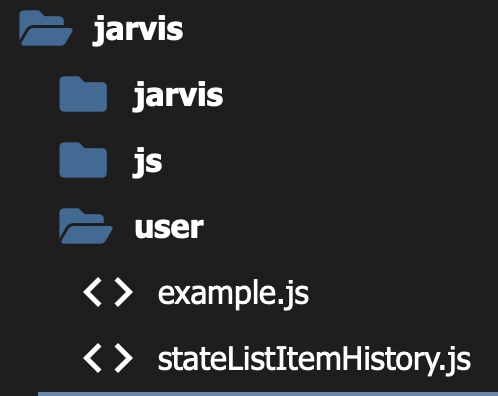
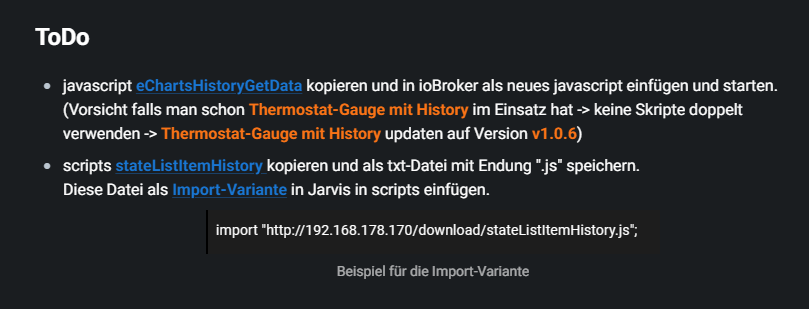
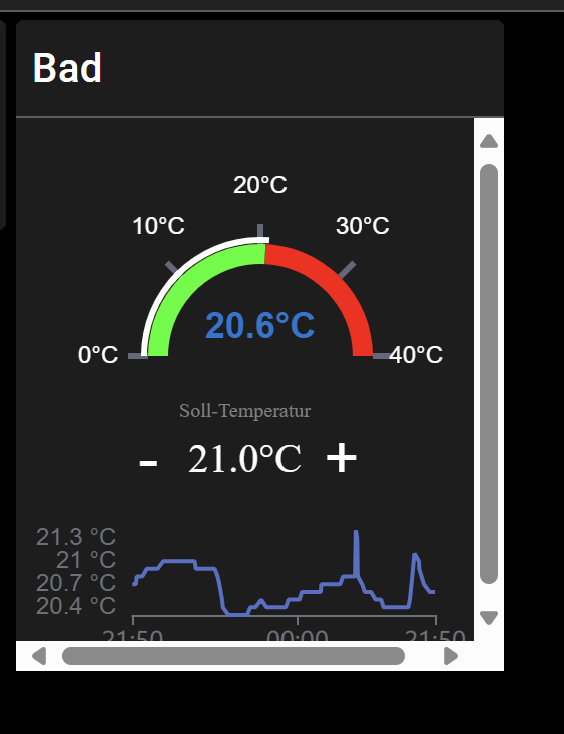
                                          698a1d36-00c3-47c0-bfe6-068883c180f9-image.png
                                          Das ist wenn man einen eigenen Fileserver hat.
                                          Für dich sehr wahrscheinlich so, wenn kein https

                                          @import"http://192.168.20.21:8400/user/stateListItemHistory.js";
                                          

                                          Datei muss aber unter Benuterdaten/jarvis-scripts liegen (wird automatisch von jarvis angelegt)
                                          bzw. 0_userdata.0/jarvis-scripts
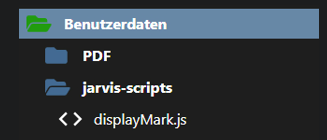
                                          bd1b1fb1-4bce-4c2d-afea-50c88eb8343c-image.png

                                          NUC i7 64GB mit Proxmox ---- Jarvis Infos Aktualisierungen der Doku auf Instagram verfolgen -> mcuiobroker Instagram
                                          Wenn Euch mein Vorschlag geholfen hat, bitte rechts "^" klicken.

                                          D 1 Reply Last reply
                                          0
                                          Reply
                                          • Reply as topic
                                          Log in to reply
                                          • Oldest to Newest
                                          • Newest to Oldest
                                          • Most Votes


                                          Support us

                                          ioBroker
                                          Community Adapters
                                          Donate

                                          851

                                          Online

                                          32.4k

                                          Users

                                          81.6k

                                          Topics

                                          1.3m

                                          Posts
                                          Community
                                          Impressum | Datenschutz-Bestimmungen | Nutzungsbedingungen | Einwilligungseinstellungen
                                          ioBroker Community 2014-2025
                                          logo
                                          • Login

                                          • Don't have an account? Register

                                          • Login or register to search.
                                          • First post
                                            Last post
                                          0
                                          • Home
                                          • Recent
                                          • Tags
                                          • Unread 0
                                          • Categories
                                          • Unreplied
                                          • Popular
                                          • GitHub
                                          • Docu
                                          • Hilfe