



Skip to content
  • Home
  • Recent
  • Tags
  • 0 Unread 0
  • Categories
  • Unreplied
  • Popular
  • GitHub
  • Docu
  • Hilfe
Skins
  • Light
  • Brite
  • Cerulean
  • Cosmo
  • Flatly
  • Journal
  • Litera
  • Lumen
  • Lux
  • Materia
  • Minty
  • Morph
  • Pulse
  • Sandstone
  • Simplex
  • Sketchy
  • Spacelab
  • United
  • Yeti
  • Zephyr
  • Dark
  • Cyborg
  • Darkly
  • Quartz
  • Slate
  • Solar
  • Superhero
  • Vapor

  • Default (No Skin)
  • No Skin
Collapse
ioBroker Logo

Community Forum

donate donate
  1. ioBroker Community Home
  2. English
  3. ioBroker general
  4. Zigbee device availability detection

NEWS

  • Neuer ioBroker-Blog online: Monatsrückblick März/April 2026
    BluefoxB
    Bluefox
    6
    1
    189

  • Verwendung von KI bitte immer deutlich kennzeichnen
    HomoranH
    Homoran
    8
    1
    201

  • Monatsrückblick Januar/Februar 2026 ist online!
    BluefoxB
    Bluefox
    18
    1
    886

Zigbee device availability detection

Scheduled Pinned Locked Moved ioBroker general
zigbee
6 Posts 4 Posters 1.3k Views 4 Watching
  • Oldest to Newest
  • Newest to Oldest
  • Most Votes
Reply
  • Reply as topic
Log in to reply
This topic has been deleted. Only users with topic management privileges can see it.
  • A Offline
    A Offline
    ap2017
    wrote on last edited by
    #1

    I am trying to use Zigbee switch as indicator of available AC power. It seems that object "available" should be the one to use. but It becomes "true" almost immediately after I power the switch, but stays "true" for long time after switch is disconnected from the power. What adapter parameter (if any) controls it?

    Thomas BraunT BananaJoeB 2 Replies Last reply
    0
    • A ap2017

      I am trying to use Zigbee switch as indicator of available AC power. It seems that object "available" should be the one to use. but It becomes "true" almost immediately after I power the switch, but stays "true" for long time after switch is disconnected from the power. What adapter parameter (if any) controls it?

      Thomas BraunT Online
      Thomas BraunT Online
      Thomas Braun
      Most Active
      wrote on last edited by
      #2

      @ap2017

      That is not the right use case for zigbee devices.
      Use a power meter enabled smart plug for checking the power state of a device.

      Linux-Werkzeugkasten:
      https://forum.iobroker.net/topic/42952/der-kleine-iobroker-linux-werkzeugkasten
      NodeJS Fixer Skript:
      https://forum.iobroker.net/topic/68035/iob-node-fix-skript
      iob_diag: curl -sLf -o diag.sh https://iobroker.net/diag.sh && bash diag.sh

      A 2 Replies Last reply
      1
      • A ap2017

        I am trying to use Zigbee switch as indicator of available AC power. It seems that object "available" should be the one to use. but It becomes "true" almost immediately after I power the switch, but stays "true" for long time after switch is disconnected from the power. What adapter parameter (if any) controls it?

        BananaJoeB Online
        BananaJoeB Online
        BananaJoe
        Most Active
        wrote on last edited by
        #3

        @ap2017 The state "available" can not be used for that. As you have noticed, it takes a long time until it jumps back to false.
        You mean 230V sockets? ZigBee is not suitable for this. The data point should quickly jump to true when the power supply is there. I would use a WLAn socket, e.g. with Tasmota. You can actively ping this and thereby determine whether it is in operation or not.

        ioBroker@Ubuntu 24.04 LTS (VMware) für: >260 Geräte, 5 Switche, 7 AP, 10 IP-Cam, 1 NAS 42TB, 1 ESXi 15TB, 4 Proxmox 1TB, 1 Hyper-V 48TB, 14 x Echo, 5x FireTV, 5 x Tablett/Handy VIS || >=160 Tasmota/Shelly || >=95 ZigBee || PV 8.1kW / Akku 14kWh || 2x USV APC 750W kaskadiert || Creality CR-10 SE 3D-Drucker

        1 Reply Last reply
        1
        • Thomas BraunT Thomas Braun

          @ap2017

          That is not the right use case for zigbee devices.
          Use a power meter enabled smart plug for checking the power state of a device.

          A Offline
          A Offline
          ap2017
          wrote on last edited by ap2017
          #4

          @thomas-braun I thought about it first, but switch does not show power when in ON state with no load connected, don't think load needs to be connected for voltage reading. Tried it with load connected, still does not read voltage. Just in case, I filed an issue at Zigbee github regarding not able to read voltage.
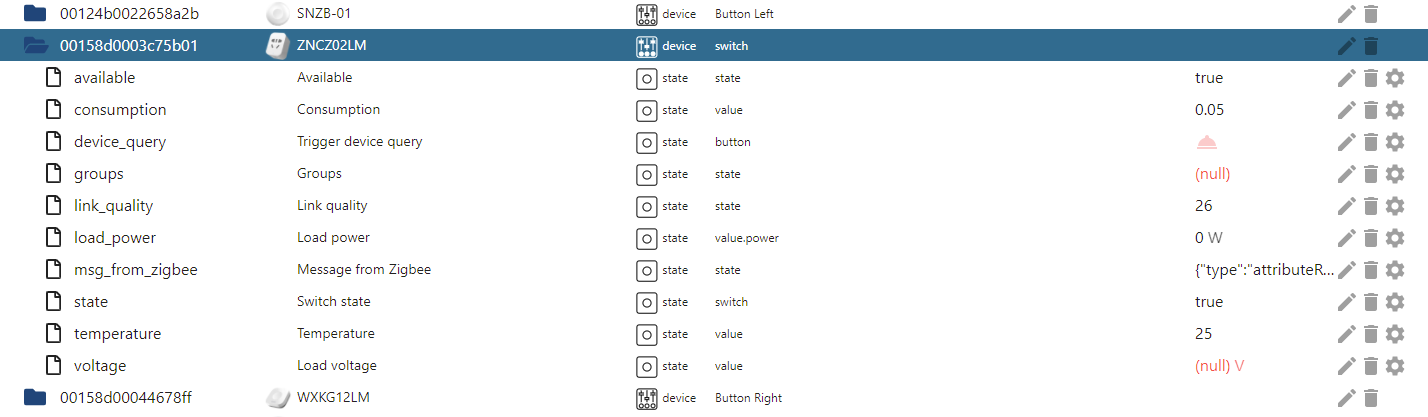
          272591ea-596d-4e45-84ac-2e7081cfdada-image.png

          AsgothianA 1 Reply Last reply
          0
          • Thomas BraunT Thomas Braun

            @ap2017

            That is not the right use case for zigbee devices.
            Use a power meter enabled smart plug for checking the power state of a device.

            A Offline
            A Offline
            ap2017
            wrote on last edited by
            #5

            @thomas-braun I tried Z-Wave smart plug with power monitoring. It measures line voltage, but voltage values stays on when power is disconnected.

            1 Reply Last reply
            0
            • A ap2017

              @thomas-braun I thought about it first, but switch does not show power when in ON state with no load connected, don't think load needs to be connected for voltage reading. Tried it with load connected, still does not read voltage. Just in case, I filed an issue at Zigbee github regarding not able to read voltage.

              272591ea-596d-4e45-84ac-2e7081cfdada-image.png

              AsgothianA Offline
              AsgothianA Offline
              Asgothian
              Developer
              wrote on last edited by
              #6

              @ap2017 sagte in Zigbee device availability detection:

              @thomas-braun I thought about it first, but switch does not show power when in ON state with no load connected, don't think load needs to be connected for voltage reading. Tried it with load connected, still does not read voltage. Just in case, I filed an issue at Zigbee github regarding not able to read voltage.

              272591ea-596d-4e45-84ac-2e7081cfdada-image.png

              The load voltage state will also not be usable for connection detection. The reason is simple:

              A plug which is connected may update this state once every x minutes, with x usually being within the range of 5 to 300. If you power of the plug, it lacks the power to update the value, hence the state will remain at the last state sent by the plug. This is true for any state published by the plug.

              There are very few devices which publish their states in a short interval. Most only post changes to their values, and even then have a minimum time difference between posting different values.

              The available state has the same issue. It is generated by the adapter attempting to obtain a response from the device using a "ping request". In theory, all line powered devices should respond to ping requests. Unfortunately, there are line powered devices which report as "end devices" and as such will not report to ping requests, i.e. their status cannot easily be verified.

              A.

              ioBroker auf RPi4 - Hardware soweit wie möglich via Zigbee.
              "Shit don't work" ist keine Fehlermeldung, sondern ein Fluch.

              1 Reply Last reply
              0

              Hello! It looks like you're interested in this conversation, but you don't have an account yet.

              Getting fed up of having to scroll through the same posts each visit? When you register for an account, you'll always come back to exactly where you were before, and choose to be notified of new replies (either via email, or push notification). You'll also be able to save bookmarks and upvote posts to show your appreciation to other community members.

              With your input, this post could be even better 💗

              Register Login
              Reply
              • Reply as topic
              Log in to reply
              • Oldest to Newest
              • Newest to Oldest
              • Most Votes


              Support us

              ioBroker
              Community Adapters
              Donate

              500

              Online

              32.8k

              Users

              82.7k

              Topics

              1.3m

              Posts
              Community
              Impressum | Datenschutz-Bestimmungen | Nutzungsbedingungen | Einwilligungseinstellungen
              ioBroker Community 2014-2025
              logo
              • Login

              • Don't have an account? Register

              • Login or register to search.
              • First post
                Last post
              0
              • Home
              • Recent
              • Tags
              • Unread 0
              • Categories
              • Unreplied
              • Popular
              • GitHub
              • Docu
              • Hilfe

