Skip to content
  • Home
  • Recent
  • Tags
  • 0 Unread 0
  • Categories
  • Unreplied
  • Popular
  • GitHub
  • Docu
  • Hilfe
Skins
  • Light
  • Brite
  • Cerulean
  • Cosmo
  • Flatly
  • Journal
  • Litera
  • Lumen
  • Lux
  • Materia
  • Minty
  • Morph
  • Pulse
  • Sandstone
  • Simplex
  • Sketchy
  • Spacelab
  • United
  • Yeti
  • Zephyr
  • Dark
  • Cyborg
  • Darkly
  • Quartz
  • Slate
  • Solar
  • Superhero
  • Vapor

  • Default (No Skin)
  • No Skin
Collapse
ioBroker Logo

Community Forum

donate donate
  1. ioBroker Community Home
  2. Deutsch
  3. Error/Bug
  4. iobroker in/out wird nicht angezeigt

NEWS

  • Monatsrückblick Januar/Februar 2026 ist online!
    BluefoxB
    Bluefox
    16
    1
    249

  • Jahresrückblick 2025 – unser neuer Blogbeitrag ist online! ✨
    BluefoxB
    Bluefox
    17
    1
    4.6k

  • Neuer Blogbeitrag: Monatsrückblick - Dezember 2025 🎄
    BluefoxB
    Bluefox
    13
    1
    1.3k

iobroker in/out wird nicht angezeigt

Scheduled Pinned Locked Moved Error/Bug
18 Posts 6 Posters 1.4k Views 5 Watching
  • Oldest to Newest
  • Newest to Oldest
  • Most Votes
Reply
  • Reply as topic
Log in to reply
This topic has been deleted. Only users with topic management privileges can see it.
  • GlasfaserG Glasfaser

    @muro82

    iobroker in/out wird nicht angezeigt

    Hast du vielleicht noch mehr INFO`S ... außer im Thread-Titel !?

    M Offline
    M Offline
    muro82
    wrote on last edited by muro82
    #3

    @glasfaser ^

    So Hardware Pi3
    habe die Software mit Raspberry Pi Manager 1.6.1 installiert

    dann habe ich ibroker über

    1. Erst Node.js installieren (wenn noch nicht vorhanden):
      curl -sLf https://deb.nodesource.com/setup_12.x | sudo -E bash -
      sudo apt-get install -y nodejs
    2. Anschließend ioBroker installieren:
      curl -sLf https://iobroker.net/install.sh | bash -
      instaliert

    Pfade haben gepast nodejs liegt in /usr/bin
    node liegt in /usr/bin
    npm liegt in /usr/bin

    dann habe ich Node-red installiert über
    bash <(curl -sL https://raw.githubusercontent.com/node-red/linux-installers/master/deb/update-nodejs-and-nodered)

    hat auch alles gepast läuft auch über ibroker leider bekome ich die nodes iobroker in/out nicht angezeigt

    GlasfaserG M F 3 Replies Last reply
    0
    • M muro82

      @glasfaser ^

      So Hardware Pi3
      habe die Software mit Raspberry Pi Manager 1.6.1 installiert

      dann habe ich ibroker über

      1. Erst Node.js installieren (wenn noch nicht vorhanden):
        curl -sLf https://deb.nodesource.com/setup_12.x | sudo -E bash -
        sudo apt-get install -y nodejs
      2. Anschließend ioBroker installieren:
        curl -sLf https://iobroker.net/install.sh | bash -
        instaliert

      Pfade haben gepast nodejs liegt in /usr/bin
      node liegt in /usr/bin
      npm liegt in /usr/bin

      dann habe ich Node-red installiert über
      bash <(curl -sL https://raw.githubusercontent.com/node-red/linux-installers/master/deb/update-nodejs-and-nodered)

      hat auch alles gepast läuft auch über ibroker leider bekome ich die nodes iobroker in/out nicht angezeigt

      GlasfaserG Offline
      GlasfaserG Offline
      Glasfaser
      wrote on last edited by Glasfaser
      #4

      @muro82 sagte in iobroker in/out wird nicht angezeigt:

      @glasfaser ^

      ich versuche

      Was meist du damit : iobroker in/out wird nicht angezeigt

      Brauchst du Hilfe , welche Angaben wir benötigen !?

      Synology 918+ 16GB - ioBroker in Docker v9 , VISO auf Trekstor Primebook C13 13,3" , Hikvision Domkameras mit Surveillance Station .. CCU RaspberryMatic in Synology VM .. Zigbee CC2538+CC2592 .. Sonoff .. KNX .. Modbus ..

      M 1 Reply Last reply
      0
      • GlasfaserG Glasfaser

        @muro82 sagte in iobroker in/out wird nicht angezeigt:

        @glasfaser ^

        ich versuche

        Was meist du damit : iobroker in/out wird nicht angezeigt

        Brauchst du Hilfe , welche Angaben wir benötigen !?

        M Offline
        M Offline
        muro82
        wrote on last edited by
        #5

        @glasfaser

        hi bin neu und muste mich erst zurecht finden wie ich eine Nachricht schicke :v:

        M 1 Reply Last reply
        0
        • M muro82

          @glasfaser

          hi bin neu und muste mich erst zurecht finden wie ich eine Nachricht schicke :v:

          M Offline
          M Offline
          muro82
          wrote on last edited by
          #6

          @muro82

          habs schon 5 mal versucht aber bekomme es nicht hin diese Nodes

          GlasfaserG 1 Reply Last reply
          0
          • M muro82

            @muro82

            habs schon 5 mal versucht aber bekomme es nicht hin diese Nodes

            GlasfaserG Offline
            GlasfaserG Offline
            Glasfaser
            wrote on last edited by
            #7

            @muro82 sagte in iobroker in/out wird nicht angezeigt:

            habs schon 5 mal versucht aber bekomme es nicht hin diese Nodes

            Ich habe keine Ahnung was du meinst .

            Synology 918+ 16GB - ioBroker in Docker v9 , VISO auf Trekstor Primebook C13 13,3" , Hikvision Domkameras mit Surveillance Station .. CCU RaspberryMatic in Synology VM .. Zigbee CC2538+CC2592 .. Sonoff .. KNX .. Modbus ..

            M 1 Reply Last reply
            0
            • GlasfaserG Glasfaser

              @muro82 sagte in iobroker in/out wird nicht angezeigt:

              habs schon 5 mal versucht aber bekomme es nicht hin diese Nodes

              Ich habe keine Ahnung was du meinst .

              M Offline
              M Offline
              muro82
              wrote on last edited by
              #8

              @glasfaser

              also hab das schon 5 mal Versucht zu installieren leider bekomme ich die
              Node "ioBroker in/out" im Node Red Adapter nicht angezeigt

              GlasfaserG 1 Reply Last reply
              0
              • M muro82

                @glasfaser ^

                So Hardware Pi3
                habe die Software mit Raspberry Pi Manager 1.6.1 installiert

                dann habe ich ibroker über

                1. Erst Node.js installieren (wenn noch nicht vorhanden):
                  curl -sLf https://deb.nodesource.com/setup_12.x | sudo -E bash -
                  sudo apt-get install -y nodejs
                2. Anschließend ioBroker installieren:
                  curl -sLf https://iobroker.net/install.sh | bash -
                  instaliert

                Pfade haben gepast nodejs liegt in /usr/bin
                node liegt in /usr/bin
                npm liegt in /usr/bin

                dann habe ich Node-red installiert über
                bash <(curl -sL https://raw.githubusercontent.com/node-red/linux-installers/master/deb/update-nodejs-and-nodered)

                hat auch alles gepast läuft auch über ibroker leider bekome ich die nodes iobroker in/out nicht angezeigt

                M Offline
                M Offline
                ma
                wrote on last edited by
                #9

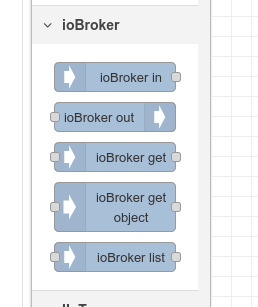
                @muro82

                meinst du diese ?
                screenshot_1.png

                1 Reply Last reply
                1
                • M muro82

                  @glasfaser

                  also hab das schon 5 mal Versucht zu installieren leider bekomme ich die
                  Node "ioBroker in/out" im Node Red Adapter nicht angezeigt

                  GlasfaserG Offline
                  GlasfaserG Offline
                  Glasfaser
                  wrote on last edited by
                  #10

                  @muro82 sagte in iobroker in/out wird nicht angezeigt:

                  Node "ioBroker in/out" im Node Red Adapter nicht angezeigt

                  Ahh , es geht um Node Red ,
                  habe gerade oben gesehn das du deinen Beitrag Editiert hast :(

                  @ma
                  Da kannst du sicherlich weiterhelfen .. ich habe kein Node Red ;)

                  Synology 918+ 16GB - ioBroker in Docker v9 , VISO auf Trekstor Primebook C13 13,3" , Hikvision Domkameras mit Surveillance Station .. CCU RaspberryMatic in Synology VM .. Zigbee CC2538+CC2592 .. Sonoff .. KNX .. Modbus ..

                  M 1 Reply Last reply
                  0
                  • GlasfaserG Glasfaser

                    @muro82 sagte in iobroker in/out wird nicht angezeigt:

                    Node "ioBroker in/out" im Node Red Adapter nicht angezeigt

                    Ahh , es geht um Node Red ,
                    habe gerade oben gesehn das du deinen Beitrag Editiert hast :(

                    @ma
                    Da kannst du sicherlich weiterhelfen .. ich habe kein Node Red ;)

                    M Offline
                    M Offline
                    muro82
                    wrote on last edited by muro82
                    #11

                    @glasfaser

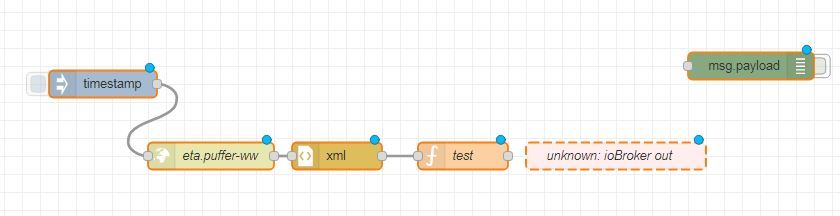
                    genau die meine ich keine iobroker in out

                    Unbenannt111.JPG

                    L 1 Reply Last reply
                    0
                    • M Offline
                      M Offline
                      ma
                      wrote on last edited by
                      #12

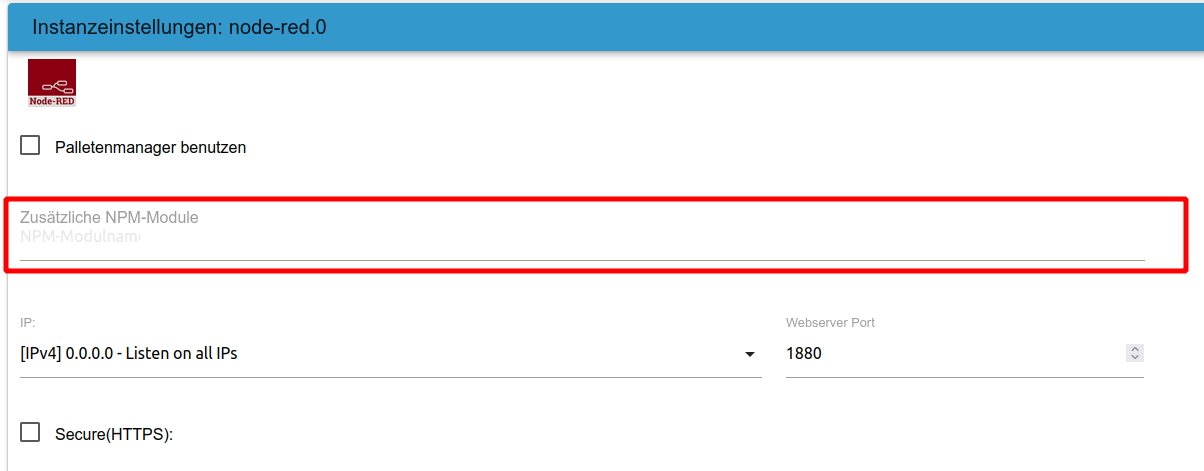
                      ich nutze auch kein node red aber die iobroker in/out waren bei mir direkt mit installiert mit dem Adapter

                      screenshot_2.png

                      evtl. über "Zusätzliche NPM-Module" nachinstallieren ? bin mir da aber auch nicht sicher

                      1 Reply Last reply
                      0
                      • M muro82

                        @glasfaser ^

                        So Hardware Pi3
                        habe die Software mit Raspberry Pi Manager 1.6.1 installiert

                        dann habe ich ibroker über

                        1. Erst Node.js installieren (wenn noch nicht vorhanden):
                          curl -sLf https://deb.nodesource.com/setup_12.x | sudo -E bash -
                          sudo apt-get install -y nodejs
                        2. Anschließend ioBroker installieren:
                          curl -sLf https://iobroker.net/install.sh | bash -
                          instaliert

                        Pfade haben gepast nodejs liegt in /usr/bin
                        node liegt in /usr/bin
                        npm liegt in /usr/bin

                        dann habe ich Node-red installiert über
                        bash <(curl -sL https://raw.githubusercontent.com/node-red/linux-installers/master/deb/update-nodejs-and-nodered)

                        hat auch alles gepast läuft auch über ibroker leider bekome ich die nodes iobroker in/out nicht angezeigt

                        F Offline
                        F Offline
                        fastfoot
                        wrote on last edited by
                        #13

                        @muro82 sagte in iobroker in/out wird nicht angezeigt:

                        dann habe ich Node-red installiert über
                        bash <(curl -sL https://raw.githubusercontent.com/node-red/linux-installers/master/deb/update-nodejs-and-nodered)

                        ich denke das wird für iobroker nicht gebraucht, warum installierst du node red nicht über die iobroker gui?

                        iobroker läuft unter Docker auf QNAP TS-451+
                        SkriptRecovery: https://forum.iobroker.net/post/930558

                        1 Reply Last reply
                        0
                        • M muro82

                          @glasfaser

                          genau die meine ich keine iobroker in out

                          Unbenannt111.JPG

                          L Offline
                          L Offline
                          lessthanmore
                          wrote on last edited by
                          #14

                          @muro82 Die in-und out Nodes sind automatisch vorhanden wenn du node-red als Adapter(!) innerhalb des ioBroker installierst und nicht die standalone Variante von node-red.
                          Ansonsten schau mal bitte in der Palette, ob du da die ioBroker Nodes nachinstallieren kannst.

                          1 Reply Last reply
                          0
                          • M Offline
                            M Offline
                            muro82
                            wrote on last edited by muro82
                            #15

                            @lessthanmore

                            in der Pallete habe ich iobroker eingegeben aber nichts gefunden

                            ich werde Morgen alles nochmals neu installieren und Node red über den Adapter von iobroker
                            obwohl ich das versucht habe aber er konnte die Seite nicht öffnen und hab extra nochmals Node red installieret

                            I

                            L 1 Reply Last reply
                            0
                            • M muro82

                              @lessthanmore

                              in der Pallete habe ich iobroker eingegeben aber nichts gefunden

                              ich werde Morgen alles nochmals neu installieren und Node red über den Adapter von iobroker
                              obwohl ich das versucht habe aber er konnte die Seite nicht öffnen und hab extra nochmals Node red installieret

                              I

                              L Offline
                              L Offline
                              lessthanmore
                              wrote on last edited by
                              #16

                              @muro82 Wie gesagt, node-red sollte in diesem Fall nicht über die Konsole, sondern direkt in ioBroker über "Adapter" installiert werden.

                              Thomas BraunT 1 Reply Last reply
                              0
                              • L lessthanmore

                                @muro82 Wie gesagt, node-red sollte in diesem Fall nicht über die Konsole, sondern direkt in ioBroker über "Adapter" installiert werden.

                                Thomas BraunT Online
                                Thomas BraunT Online
                                Thomas Braun
                                Most Active
                                wrote on last edited by Thomas Braun
                                #17

                                @lessthanmore @muro82

                                Geht doch auch über die Konsole... :-D

                                iobroker add node-red
                                

                                BTW:

                                dann habe ich ibroker über
                                Erst Node.js installieren (wenn noch nicht vorhanden):

                                Ist nicht mehr erforderlich. Das Installer-Skript aus Punkt 2 erledigt das gleich mit.

                                Linux-Werkzeugkasten:
                                https://forum.iobroker.net/topic/42952/der-kleine-iobroker-linux-werkzeugkasten
                                NodeJS Fixer Skript:
                                https://forum.iobroker.net/topic/68035/iob-node-fix-skript
                                iob_diag: curl -sLf -o diag.sh https://iobroker.net/diag.sh && bash diag.sh

                                M 1 Reply Last reply
                                0
                                • Thomas BraunT Thomas Braun

                                  @lessthanmore @muro82

                                  Geht doch auch über die Konsole... :-D

                                  iobroker add node-red
                                  

                                  BTW:

                                  dann habe ich ibroker über
                                  Erst Node.js installieren (wenn noch nicht vorhanden):

                                  Ist nicht mehr erforderlich. Das Installer-Skript aus Punkt 2 erledigt das gleich mit.
                                  M Offline
                                  M Offline
                                  muro82
                                  wrote on last edited by
                                  #18

                                  Hi kurz eine Rückmeldung hat alles funktioniert, node-red nur über Iobroker installiert als Adapter .

                                  Danke nochmals an alle

                                  Gruß

                                  1 Reply Last reply
                                  0
                                  Reply
                                  • Reply as topic
                                  Log in to reply
                                  • Oldest to Newest
                                  • Newest to Oldest
                                  • Most Votes


                                  Support us

                                  ioBroker
                                  Community Adapters
                                  Donate

                                  318

                                  Online

                                  32.7k

                                  Users

                                  82.5k

                                  Topics

                                  1.3m

                                  Posts
                                  Community
                                  Impressum | Datenschutz-Bestimmungen | Nutzungsbedingungen | Einwilligungseinstellungen
                                  ioBroker Community 2014-2025
                                  logo
                                  • Login

                                  • Don't have an account? Register

                                  • Login or register to search.
                                  • First post
                                    Last post
                                  0
                                  • Home
                                  • Recent
                                  • Tags
                                  • Unread 0
                                  • Categories
                                  • Unreplied
                                  • Popular
                                  • GitHub
                                  • Docu
                                  • Hilfe