



Skip to content
  • Home
  • Recent
  • Tags
  • 0 Unread 0
  • Categories
  • Unreplied
  • Popular
  • GitHub
  • Docu
  • Hilfe
Skins
  • Light
  • Brite
  • Cerulean
  • Cosmo
  • Flatly
  • Journal
  • Litera
  • Lumen
  • Lux
  • Materia
  • Minty
  • Morph
  • Pulse
  • Sandstone
  • Simplex
  • Sketchy
  • Spacelab
  • United
  • Yeti
  • Zephyr
  • Dark
  • Cyborg
  • Darkly
  • Quartz
  • Slate
  • Solar
  • Superhero
  • Vapor

  • Default (No Skin)
  • No Skin
Collapse
ioBroker Logo

Community Forum

donate donate
  1. ioBroker Community Home
  2. Deutsch
  3. Skripten / Logik
  4. Blockly
  5. Bei Sonnenuntergang/Aufgang Sensor aktiv/Deaktiv geht nicht
NEWS

  • Monatsrückblick Januar/Februar 2026 ist online!
    BluefoxB
    Bluefox
    18
    1
    823

  • Jahresrückblick 2025 – unser neuer Blogbeitrag ist online! ✨
    BluefoxB
    Bluefox
    18
    1
    6.3k

  • Neuer Blogbeitrag: Monatsrückblick - Dezember 2025 🎄
    BluefoxB
    Bluefox
    13
    1
    1.6k

Bei Sonnenuntergang/Aufgang Sensor aktiv/Deaktiv geht nicht

Scheduled Pinned Locked Moved Blockly
blockly
22 Posts 4 Posters 2.0k Views 1 Watching
  • Oldest to Newest
  • Newest to Oldest
  • Most Votes
Reply
  • Reply as topic
Log in to reply
This topic has been deleted. Only users with topic management privileges can see it.
  • paul53P paul53

    @canim sagte:

    hier mal der Code

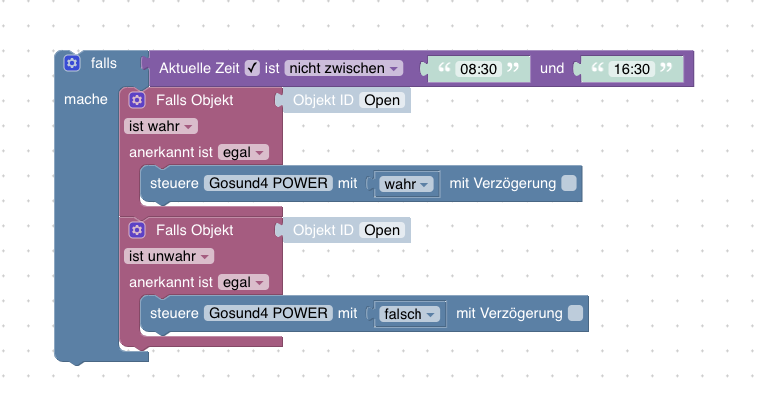
    • "zwischen SU und SA" (Tag übergreifend) funktioniert nicht
    • Wert und falsch ergibt immer false
    C Offline
    C Offline
    canim
    wrote on last edited by
    #12

    @paul53 echt ?, habs nicht ausprobiert, klingt aber vom programmieren her logisch.

    E 1 Reply Last reply
    0
    • C canim

      @paul53 echt ?, habs nicht ausprobiert, klingt aber vom programmieren her logisch.

      E Offline
      E Offline
      EFE
      wrote on last edited by
      #13

      @canim @paul53 blokly funtioniert leider nicht

      paul53P 1 Reply Last reply
      0
      • E EFE

        @canim @paul53 blokly funtioniert leider nicht

        paul53P Offline
        paul53P Offline
        paul53
        wrote on last edited by paul53
        #14

        @EFE sagte:

        blokly funtioniert leider nicht

        Welches ? Nimm das:

        <xml xmlns="https://developers.google.com/blockly/xml">
         <block type="on_ext" id="Vu)tzEuKG]MLG{_5B+M2" x="-388" y="-37">
           <mutation xmlns="http://www.w3.org/1999/xhtml" items="1"></mutation>
           <field name="CONDITION">ne</field>
           <field name="ACK_CONDITION"></field>
           <value name="OID0">
             <shadow type="field_oid" id="TPh(uWT*$mw?t!E^epw?">
               <field name="oid">default</field>
             </shadow>
           </value>
           <statement name="STATEMENT">
             <block type="controls_if" id="Jcw2I-#Hk$vc?1XBuF^@">
               <value name="IF0">
                 <block type="time_compare_ex" id="z6*QvK~IlryMK#1]kh7,">
                   <mutation xmlns="http://www.w3.org/1999/xhtml" end_time="true" actual_time="true"></mutation>
                   <field name="USE_ACTUAL_TIME">TRUE</field>
                   <field name="OPTION">not between</field>
                   <value name="START_TIME">
                     <shadow type="text" id="%X^W]VWZHRed@hfzJ9[J">
                       <field name="TEXT">12:00</field>
                     </shadow>
                     <block type="time_astro" id="Py.8_zjhK%E9(%2H5^[+">
                       <field name="TYPE">sunrise</field>
                       <field name="OFFSET">0</field>
                     </block>
                   </value>
                   <value name="END_TIME">
                     <shadow type="text" id="3F=aL:|I7tqq)R`vXu4*">
                       <field name="TEXT">18:00</field>
                     </shadow>
                     <block type="time_astro" id=";7~BOTG1^zC}{EhYb|]z">
                       <field name="TYPE">sunset</field>
                       <field name="OFFSET">0</field>
                     </block>
                   </value>
                 </block>
               </value>
               <statement name="DO0">
                 <block type="control" id="OT`+7o}LB^0L|3@wzI#9">
                   <mutation xmlns="http://www.w3.org/1999/xhtml" delay_input="false"></mutation>
                   <field name="OID">Object ID</field>
                   <field name="WITH_DELAY">FALSE</field>
                   <value name="VALUE">
                     <block type="on_source" id="kk9L26QocY8`iKbE6dQ9">
                       <field name="ATTR">state.val</field>
                     </block>
                   </value>
                 </block>
               </statement>
             </block>
           </statement>
         </block>
        </xml>
        

        Bitte verzichtet auf Chat-Nachrichten, denn die Handhabung ist grauenhaft !
        Produktiv: RPi 2 mit S.USV, HM-MOD-RPI und SLC-USB-Stick mit root fs

        E 1 Reply Last reply
        0
        • paul53P paul53

          @EFE sagte:

          blokly funtioniert leider nicht

          Welches ? Nimm das:

          <xml xmlns="https://developers.google.com/blockly/xml">
           <block type="on_ext" id="Vu)tzEuKG]MLG{_5B+M2" x="-388" y="-37">
             <mutation xmlns="http://www.w3.org/1999/xhtml" items="1"></mutation>
             <field name="CONDITION">ne</field>
             <field name="ACK_CONDITION"></field>
             <value name="OID0">
               <shadow type="field_oid" id="TPh(uWT*$mw?t!E^epw?">
                 <field name="oid">default</field>
               </shadow>
             </value>
             <statement name="STATEMENT">
               <block type="controls_if" id="Jcw2I-#Hk$vc?1XBuF^@">
                 <value name="IF0">
                   <block type="time_compare_ex" id="z6*QvK~IlryMK#1]kh7,">
                     <mutation xmlns="http://www.w3.org/1999/xhtml" end_time="true" actual_time="true"></mutation>
                     <field name="USE_ACTUAL_TIME">TRUE</field>
                     <field name="OPTION">not between</field>
                     <value name="START_TIME">
                       <shadow type="text" id="%X^W]VWZHRed@hfzJ9[J">
                         <field name="TEXT">12:00</field>
                       </shadow>
                       <block type="time_astro" id="Py.8_zjhK%E9(%2H5^[+">
                         <field name="TYPE">sunrise</field>
                         <field name="OFFSET">0</field>
                       </block>
                     </value>
                     <value name="END_TIME">
                       <shadow type="text" id="3F=aL:|I7tqq)R`vXu4*">
                         <field name="TEXT">18:00</field>
                       </shadow>
                       <block type="time_astro" id=";7~BOTG1^zC}{EhYb|]z">
                         <field name="TYPE">sunset</field>
                         <field name="OFFSET">0</field>
                       </block>
                     </value>
                   </block>
                 </value>
                 <statement name="DO0">
                   <block type="control" id="OT`+7o}LB^0L|3@wzI#9">
                     <mutation xmlns="http://www.w3.org/1999/xhtml" delay_input="false"></mutation>
                     <field name="OID">Object ID</field>
                     <field name="WITH_DELAY">FALSE</field>
                     <value name="VALUE">
                       <block type="on_source" id="kk9L26QocY8`iKbE6dQ9">
                         <field name="ATTR">state.val</field>
                       </block>
                     </value>
                   </block>
                 </statement>
               </block>
             </statement>
           </block>
          </xml>
          

          E Offline
          E Offline
          EFE
          wrote on last edited by
          #15

          @paul53 von @canim ich dachte das die gleich sind , bauemal kurz um auf deins .....melde mich gleich

          paul53P 1 Reply Last reply
          0
          • E EFE

            @paul53 von @canim ich dachte das die gleich sind , bauemal kurz um auf deins .....melde mich gleich

            paul53P Offline
            paul53P Offline
            paul53
            wrote on last edited by
            #16

            @EFE sagte:

            ich dachte das die gleich sind

            Dann hätte ich mir die Bemerkungen dazu sparen können.

            Bitte verzichtet auf Chat-Nachrichten, denn die Handhabung ist grauenhaft !
            Produktiv: RPi 2 mit S.USV, HM-MOD-RPI und SLC-USB-Stick mit root fs

            E 1 Reply Last reply
            0
            • paul53P paul53

              @EFE sagte:

              ich dachte das die gleich sind

              Dann hätte ich mir die Bemerkungen dazu sparen können.

              E Offline
              E Offline
              EFE
              wrote on last edited by
              #17

              @paul53 hab nicht aufgepasst aber funktioniert wunderbar !
              Das heißt zB. SA 8 Uhr und SU 17 Uhr keine Funktion richtig?

              paul53P 1 Reply Last reply
              0
              • E EFE

                @paul53 hab nicht aufgepasst aber funktioniert wunderbar !
                Das heißt zB. SA 8 Uhr und SU 17 Uhr keine Funktion richtig?

                paul53P Offline
                paul53P Offline
                paul53
                wrote on last edited by
                #18

                @EFE sagte:

                SA 8 Uhr und SU 17 Uhr keine Funktion richtig?

                Ja, zwischen SA und SU erfolgt keine Reaktion.

                Bitte verzichtet auf Chat-Nachrichten, denn die Handhabung ist grauenhaft !
                Produktiv: RPi 2 mit S.USV, HM-MOD-RPI und SLC-USB-Stick mit root fs

                E 2 Replies Last reply
                0
                • paul53P paul53

                  @EFE sagte:

                  SA 8 Uhr und SU 17 Uhr keine Funktion richtig?

                  Ja, zwischen SA und SU erfolgt keine Reaktion.

                  E Offline
                  E Offline
                  EFE
                  wrote on last edited by
                  #19

                  @paul53 super genau das wollte ich .
                  Ich danke dir für deine schnelle Unterstützung @canim danke auf für deine Mühe

                  1 Reply Last reply
                  1
                  • paul53P paul53

                    @EFE sagte:

                    SA 8 Uhr und SU 17 Uhr keine Funktion richtig?

                    Ja, zwischen SA und SU erfolgt keine Reaktion.

                    E Offline
                    E Offline
                    EFE
                    wrote on last edited by
                    #20

                    hi @paul53 erst mal frohe Weihnacht , ich hab noch eine frage!

                    Screenshot at Dez. 27 15-35-01.png
                    dieser Blockly arbeitet wunderbar aber eine Kleinigkeit ist da noch.

                    Öffne ich die Türe vor SA geht die Gartenbeleuchtung an die Türe ist sagen wir mal 30min auf inzwischen ist die SA Zeit aktiviert geht die Beleuchtung nicht mehr aus wenn ich die Türe schließe oder öffne. Diese ist dauerhaft an .
                    Reagiert dann erst wieder nach SU auf den Kontakt.

                    Ich würde gerne noch eine Kontrolle einbauen , so das wenn SA erfolgt , Blockly guckt Fals ist AN dann Beleuchtung AUS
                    bei SU ist es egal da muss ich kurz die Türe zu und Aufmachen dann geht die Beleuchtung an.

                    paul53P 1 Reply Last reply
                    0
                    • E EFE

                      hi @paul53 erst mal frohe Weihnacht , ich hab noch eine frage!
                      Screenshot at Dez. 27 15-35-01.png
                      dieser Blockly arbeitet wunderbar aber eine Kleinigkeit ist da noch.

                      Öffne ich die Türe vor SA geht die Gartenbeleuchtung an die Türe ist sagen wir mal 30min auf inzwischen ist die SA Zeit aktiviert geht die Beleuchtung nicht mehr aus wenn ich die Türe schließe oder öffne. Diese ist dauerhaft an .
                      Reagiert dann erst wieder nach SU auf den Kontakt.

                      Ich würde gerne noch eine Kontrolle einbauen , so das wenn SA erfolgt , Blockly guckt Fals ist AN dann Beleuchtung AUS
                      bei SU ist es egal da muss ich kurz die Türe zu und Aufmachen dann geht die Beleuchtung an.

                      paul53P Offline
                      paul53P Offline
                      paul53
                      wrote on last edited by paul53
                      #21

                      @EFE sagte:

                      wenn SA erfolgt , Blockly guckt Fals ist AN dann Beleuchtung AUS

                      Zusätzlichen Astro-Trigger bei SA: Licht aus.
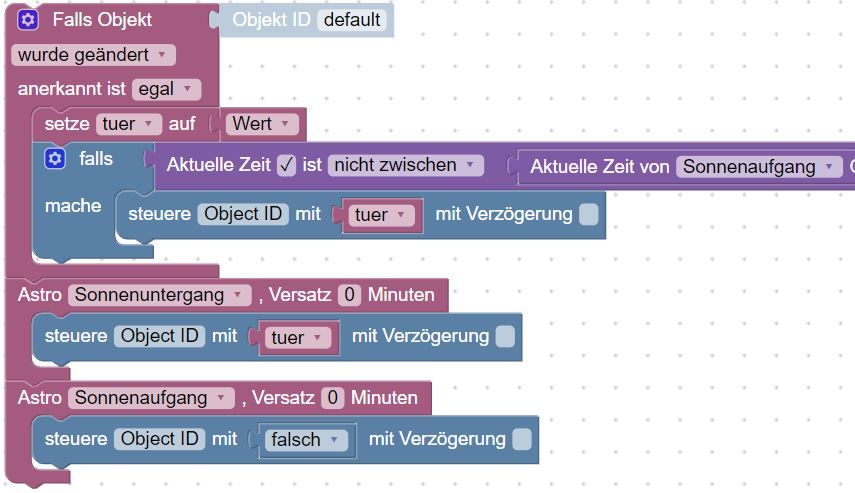
                      Blockly_temp.JPG

                      Bitte verzichtet auf Chat-Nachrichten, denn die Handhabung ist grauenhaft !
                      Produktiv: RPi 2 mit S.USV, HM-MOD-RPI und SLC-USB-Stick mit root fs

                      E 1 Reply Last reply
                      0
                      • paul53P paul53

                        @EFE sagte:

                        wenn SA erfolgt , Blockly guckt Fals ist AN dann Beleuchtung AUS

                        Zusätzlichen Astro-Trigger bei SA: Licht aus.

                        Blockly_temp.JPG

                        E Offline
                        E Offline
                        EFE
                        wrote on last edited by EFE
                        #22

                        @paul53 danke habs mal eingebauten und es klappt wunderbar!
                        Licht geht nur an wenn die Astro SU ist und auch wenn der Kontakt aktiv ist.
                        Vielen Dank

                        1 Reply Last reply
                        0

                        Hello! It looks like you're interested in this conversation, but you don't have an account yet.

                        Getting fed up of having to scroll through the same posts each visit? When you register for an account, you'll always come back to exactly where you were before, and choose to be notified of new replies (either via email, or push notification). You'll also be able to save bookmarks and upvote posts to show your appreciation to other community members.

                        With your input, this post could be even better 💗

                        Register Login
                        Reply
                        • Reply as topic
                        Log in to reply
                        • Oldest to Newest
                        • Newest to Oldest
                        • Most Votes


                        Support us

                        ioBroker
                        Community Adapters
                        Donate

                        563

                        Online

                        32.8k

                        Users

                        82.7k

                        Topics

                        1.3m

                        Posts
                        Community
                        Impressum | Datenschutz-Bestimmungen | Nutzungsbedingungen | Einwilligungseinstellungen
                        ioBroker Community 2014-2025
                        logo
                        • Login

                        • Don't have an account? Register

                        • Login or register to search.
                        • First post
                          Last post
                        0
                        • Home
                        • Recent
                        • Tags
                        • Unread 0
                        • Categories
                        • Unreplied
                        • Popular
                        • GitHub
                        • Docu
                        • Hilfe