



Skip to content
  • Home
  • Recent
  • Tags
  • 0 Unread 0
  • Categories
  • Unreplied
  • Popular
  • GitHub
  • Docu
  • Hilfe
Skins
  • Light
  • Brite
  • Cerulean
  • Cosmo
  • Flatly
  • Journal
  • Litera
  • Lumen
  • Lux
  • Materia
  • Minty
  • Morph
  • Pulse
  • Sandstone
  • Simplex
  • Sketchy
  • Spacelab
  • United
  • Yeti
  • Zephyr
  • Dark
  • Cyborg
  • Darkly
  • Quartz
  • Slate
  • Solar
  • Superhero
  • Vapor

  • Default (No Skin)
  • No Skin
Collapse
ioBroker Logo

Community Forum

donate donate
  1. ioBroker Community Home
  2. Deutsch
  3. Error/Bug
  4. Nach Update Fehler beim Start und Putty II

NEWS

  • Jahresrückblick 2025 – unser neuer Blogbeitrag ist online! ✨
    BluefoxB
    Bluefox
    17
    1
    3.3k

  • Neuer Blogbeitrag: Monatsrückblick - Dezember 2025 🎄
    BluefoxB
    Bluefox
    13
    1
    1.1k

  • Weihnachtsangebot 2025! 🎄
    BluefoxB
    Bluefox
    25
    1
    2.4k

Nach Update Fehler beim Start und Putty II

Scheduled Pinned Locked Moved Error/Bug
update fehler
20 Posts 2 Posters 1.1k Views 2 Watching
  • Oldest to Newest
  • Newest to Oldest
  • Most Votes
Reply
  • Reply as topic
Log in to reply
This topic has been deleted. Only users with topic management privileges can see it.
  • I Offline
    I Offline
    IwaKim
    wrote on last edited by Negalein
    #1

    ludino 16 Oct 2019, 19:37 hatte bereits das gleiche Problem nach einen Update. Seinen Beitrag konnte ich aber nicht kommentieren.
    Bei ihm hat sich das Problem von selber erledigt. Bei mir leider nicht. Was kann ich machen?

    root@iobroker:/opt/iobroker# iobroker start
    module.js:478
        throw err;
        ^
     
    Error: Cannot find module '/opt/iobroker/node_modules/iobroker.js-controller/iobroker.js'
        at Function.Module._resolveFilename (module.js:476:15)
        at Function.Module._load (module.js:424:25)
        at Module.runMain (module.js:611:10)
        at run (bootstrap_node.js:394:7)
        at startup (bootstrap_node.js:160:9)
        at bootstrap_node.js:507:3
    root@iobroker:/opt/iobroker#


    Den Ordner '/opt/iobroker/node_modules/iobroker.js-controller' gibt es bei mir nicht.
    Es war ein Update in der Konsole
    iobroker stop
    iobroker backup
    iobroker stop
    iobroker update
    iobroker upgrade self

    Viele Grüße


    Mod-Edit: Thema von Forum nach Error/Bug verschoben!

    1 Reply Last reply
    0
    • wendy2702W Online
      wendy2702W Online
      wendy2702
      wrote on last edited by
      #2

      Probiere mal:

      
      cd /opt/iobroker
      iobroker stop
      npm install iobroker.js-controller
      iobroker start


      Bitte keine Fragen per PN, die gehören ins Forum!

      Benutzt das Voting rechts unten im Beitrag wenn er euch geholfen hat.

      wendy2702W 1 Reply Last reply
      0
      • I Offline
        I Offline
        IwaKim
        wrote on last edited by wendy2702
        #3

        das schaut so aus:

        npm WARN deprecated request@2.88.2: request has been deprecated, see https://github.com/request/request/issues/3142
        npm WARN lifecycle iobroker.js-controller@2.2.9~preinstall: cannot run in wd %s %s (wd=%s) iobroker.js-controller@2.2.9 node lib/preinstallCheck.js /opt/iobroker/node_modules/.staging/iobroker.js-controller-a76002ca
        
        > unix-dgram@2.0.3 install /opt/iobroker/node_modules/unix-dgram
        > node-gyp rebuild
        
        make: Entering directory '/opt/iobroker/node_modules/unix-dgram/build'
          CXX(target) Release/obj.target/unix_dgram/src/unix_dgram.o
          SOLINK_MODULE(target) Release/obj.target/unix_dgram.node
          COPY Release/unix_dgram.node
        make: Leaving directory '/opt/iobroker/node_modules/unix-dgram/build'
        
        > ursa-optional@0.9.10 install /opt/iobroker/node_modules/ursa-optional
        > node rebuild.js
        
        
        > diskusage@1.1.3 install /opt/iobroker/node_modules/diskusage
        > node-gyp rebuild
        
        make: Entering directory '/opt/iobroker/node_modules/diskusage/build'
          CXX(target) Release/obj.target/diskusage/src/main.o
          CXX(target) Release/obj.target/diskusage/src/diskusage_posix.o
        ../src/diskusage_posix.cpp: In function 'DiskUsage GetDiskUsage(const char*)':
        ../src/diskusage_posix.cpp:10:28: warning: missing initializer for member 'statvfs::f_bsize' [-Wmissing-field-initializers]
             struct statvfs info = {};
                                    ^
        ../src/diskusage_posix.cpp:10:28: warning: missing initializer for member 'statvfs::f_frsize' [-Wmissing-field-initializers]
        ../src/diskusage_posix.cpp:10:28: warning: missing initializer for member 'statvfs::f_blocks' [-Wmissing-field-initializers]
        ../src/diskusage_posix.cpp:10:28: warning: missing initializer for member 'statvfs::f_bfree' [-Wmissing-field-initializers]
        ../src/diskusage_posix.cpp:10:28: warning: missing initializer for member 'statvfs::f_bavail' [-Wmissing-field-initializers]
        ../src/diskusage_posix.cpp:10:28: warning: missing initializer for member 'statvfs::f_files' [-Wmissing-field-initializers]
        ../src/diskusage_posix.cpp:10:28: warning: missing initializer for member 'statvfs::f_ffree' [-Wmissing-field-initializers]
        ../src/diskusage_posix.cpp:10:28: warning: missing initializer for member 'statvfs::f_favail' [-Wmissing-field-initializers]
        ../src/diskusage_posix.cpp:10:28: warning: missing initializer for member 'statvfs::f_fsid' [-Wmissing-field-initializers]
        ../src/diskusage_posix.cpp:10:28: warning: missing initializer for member 'statvfs::f_flag' [-Wmissing-field-initializers]
        ../src/diskusage_posix.cpp:10:28: warning: missing initializer for member 'statvfs::f_namemax' [-Wmissing-field-initializers]
        ../src/diskusage_posix.cpp:10:28: warning: missing initializer for member 'statvfs::__f_spare' [-Wmissing-field-initializers]
          SOLINK_MODULE(target) Release/obj.target/diskusage.node
          COPY Release/diskusage.node
        make: Leaving directory '/opt/iobroker/node_modules/diskusage/build'
        
        > iobroker.js-controller@2.2.9 install /opt/iobroker/node_modules/iobroker.js-controller
        > node iobroker.js setup first
        
        /opt/iobroker/node_modules/iobroker.js-controller/lib/setup.js:242
                                const createInitialInstances = async () => {
                                                                     ^
        
        SyntaxError: Unexpected token (
            at createScript (vm.js:56:10)
            at Object.runInThisContext (vm.js:97:10)
            at Module._compile (module.js:549:28)
            at Object.Module._extensions..js (module.js:586:10)
            at Module.load (module.js:494:32)
            at tryModuleLoad (module.js:453:12)
            at Function.Module._load (module.js:445:3)
            at Module.require (module.js:504:17)
            at require (internal/module.js:20:19)
            at Object.<anonymous> (/opt/iobroker/node_modules/iobroker.js-controller/iobroker.js:1:63)
        iobroker@1.0.0 /opt/iobroker
        `-- (empty)
        
        npm WARN optional SKIPPING OPTIONAL DEPENDENCY: fsevents@~2.1.2 (node_modules/chokidar/node_modules/fsevents):
        npm WARN notsup SKIPPING OPTIONAL DEPENDENCY: Unsupported platform for fsevents@2.1.2: wanted {"os":"darwin","arch":"any"} (current: {"os":"linux","arch":"x64"})
        npm ERR! Linux 3.14-1-amd64
        npm ERR! argv "/usr/bin/node" "/usr/bin/npm" "install" "iobroker.js-controller"
        npm ERR! node v6.17.1
        npm ERR! npm  v3.10.10
        npm ERR! code ELIFECYCLE
        
        npm ERR! iobroker.js-controller@2.2.9 install: `node iobroker.js setup first`
        npm ERR! Exit status 1
        npm ERR!
        npm ERR! Failed at the iobroker.js-controller@2.2.9 install script 'node iobroker.js setup first'.
        npm ERR! Make sure you have the latest version of node.js and npm installed.
        npm ERR! If you do, this is most likely a problem with the iobroker.js-controller package,
        npm ERR! not with npm itself.
        npm ERR! Tell the author that this fails on your system:
        npm ERR!     node iobroker.js setup first
        npm ERR! You can get information on how to open an issue for this project with:
        npm ERR!     npm bugs iobroker.js-controller
        npm ERR! Or if that isn't available, you can get their info via:
        npm ERR!     npm owner ls iobroker.js-controller
        npm ERR! There is likely additional logging output above.
        
        npm ERR! Please include the following file with any support request:
        npm ERR!     /opt/iobroker/npm-debug.log
        npm ERR! code 1
        root@jessie:/opt/iobroker
        

        EDIT:LOG in CODE TAGS

        1 Reply Last reply
        0
        • wendy2702W Online
          wendy2702W Online
          wendy2702
          wrote on last edited by
          #4

          Was kommt bei

          node -v
          npm -v
          

          Bitte keine Fragen per PN, die gehören ins Forum!

          Benutzt das Voting rechts unten im Beitrag wenn er euch geholfen hat.

          1 Reply Last reply
          0
          • I Offline
            I Offline
            IwaKim
            wrote on last edited by
            #5

            @wendy2702 said in Nach Update Fehler beim Start und Putty II:
            root@jessie:/opt/iobroker# node -v

            v6.17.1
            root@jessie:/opt/iobroker# npm -v
            3.10.10
            root@jessie:/opt/iobroker#

            1 Reply Last reply
            0
            • wendy2702W Online
              wendy2702W Online
              wendy2702
              wrote on last edited by
              #6

              Die Versionen sind zu alt.

              Bitte updaten:

              https://www.iobroker.net/#de/documentation/install/linux.md

              Bitte keine Fragen per PN, die gehören ins Forum!

              Benutzt das Voting rechts unten im Beitrag wenn er euch geholfen hat.

              wendy2702W 1 Reply Last reply
              0
              • I Offline
                I Offline
                IwaKim
                wrote on last edited by wendy2702
                #7

                das habe ich bis "Installation ioBroker" gemacht.
                Jetzt schau das so aus

                root@jessie:~# nodejs -v
                v10.20.1
                root@jessie:~# nodejs -v
                v10.20.1
                root@jessie:~# iobroker start
                internal/modules/cjs/loader.js:638
                    throw err;
                    ^
                
                Error: Cannot find module '/opt/iobroker/node_modules/iobroker.js-controller/iobroker.js'
                    at Function.Module._resolveFilename (internal/modules/cjs/loader.js:636:15)
                    at Function.Module._load (internal/modules/cjs/loader.js:562:25)
                    at Function.Module.runMain (internal/modules/cjs/loader.js:831:12)
                    at startup (internal/bootstrap/node.js:283:19)
                    at bootstrapNodeJSCore (internal/bootstrap/node.js:623:3)
                root@jessie:~#


                Soll ich dem Link auch noch weiter folgen (ab Installation ioBroker). Mache ich da nicht meine gesamte Installation kaputt?

                EDIT: LOG in CODE TAGS

                1 Reply Last reply
                0
                • wendy2702W Online
                  wendy2702W Online
                  wendy2702
                  wrote on last edited by
                  #8

                  Nach update von NPM und Node musst du den JS-Controller neu installieren. Also das was du zuvor probiert hast.

                  Welche NPM Version ist jetzt installiert?

                  Bitte keine Fragen per PN, die gehören ins Forum!

                  Benutzt das Voting rechts unten im Beitrag wenn er euch geholfen hat.

                  1 Reply Last reply
                  0
                  • I Offline
                    I Offline
                    IwaKim
                    wrote on last edited by
                    #9

                    @wendy2702 said in Nach Update Fehler beim Start und Putty II:

                    NPM

                    root@jessie:~# npm -v
                    6.14.4
                    root@jessie:~#

                    1 Reply Last reply
                    0
                    • wendy2702W wendy2702

                      Probiere mal:

                      
                      cd /opt/iobroker
                      iobroker stop
                      npm install iobroker.js-controller
                      iobroker start
                      
                      
                      wendy2702W Online
                      wendy2702W Online
                      wendy2702
                      wrote on last edited by
                      #10

                      @wendy2702 sagte in Nach Update Fehler beim Start und Putty II:

                      Probiere mal:

                      
                      cd /opt/iobroker
                      iobroker stop
                      npm install iobroker.js-controller
                      iobroker start


                      Dann das erneut

                      Bitte keine Fragen per PN, die gehören ins Forum!

                      Benutzt das Voting rechts unten im Beitrag wenn er euch geholfen hat.

                      1 Reply Last reply
                      0
                      • I Offline
                        I Offline
                        IwaKim
                        wrote on last edited by wendy2702
                        #11

                        egal was ich hinter iobroker schreibe, ich bekomme immer das:

                        root@jessie:~# iobroker [stop|start|update|...]
                        internal/modules/cjs/loader.js:638
                            throw err;
                            ^
                        
                        Error: Cannot find module '/opt/iobroker/node_modules/iobroker.js-controller/iobroker.js'
                            at Function.Module._resolveFilename (internal/modules/cjs/loader.js:636:15)
                            at Function.Module._load (internal/modules/cjs/loader.js:562:25)
                            at Function.Module.runMain (internal/modules/cjs/loader.js:831:12)
                            at startup (internal/bootstrap/node.js:283:19)
                            at bootstrapNodeJSCore (internal/bootstrap/node.js:623:3)
                        root@jessie:~#
                        
                        wendy2702W 1 Reply Last reply
                        0
                        • I IwaKim

                          egal was ich hinter iobroker schreibe, ich bekomme immer das:

                          root@jessie:~# iobroker [stop|start|update|...]
                          internal/modules/cjs/loader.js:638
                              throw err;
                              ^
                          
                          Error: Cannot find module '/opt/iobroker/node_modules/iobroker.js-controller/iobroker.js'
                              at Function.Module._resolveFilename (internal/modules/cjs/loader.js:636:15)
                              at Function.Module._load (internal/modules/cjs/loader.js:562:25)
                              at Function.Module.runMain (internal/modules/cjs/loader.js:831:12)
                              at startup (internal/bootstrap/node.js:283:19)
                              at bootstrapNodeJSCore (internal/bootstrap/node.js:623:3)
                          root@jessie:~#
                          
                          wendy2702W Online
                          wendy2702W Online
                          wendy2702
                          wrote on last edited by wendy2702
                          #12

                          @IwaKim BITTE BENUTZE CODE TAGS ZUM POSTEN VON LOGS

                          cd /opt/iobroker
                          npm install iobroker.js-controller
                          iobroker start


                          Stop ist überflüssig weil er ja eh nicht läuft. Von update habe ich nichts geschrieben.

                          Bitte keine Fragen per PN, die gehören ins Forum!

                          Benutzt das Voting rechts unten im Beitrag wenn er euch geholfen hat.

                          1 Reply Last reply
                          0
                          • I Offline
                            I Offline
                            IwaKim
                            wrote on last edited by
                            #13

                            Du meinst "npm install iobroker.js-controller"?

                            1 Reply Last reply
                            0
                            • wendy2702W Online
                              wendy2702W Online
                              wendy2702
                              wrote on last edited by
                              #14

                              Ja.

                              Aber bitte im richtigen Ordner!

                              Bitte keine Fragen per PN, die gehören ins Forum!

                              Benutzt das Voting rechts unten im Beitrag wenn er euch geholfen hat.

                              1 Reply Last reply
                              0
                              • I Offline
                                I Offline
                                IwaKim
                                wrote on last edited by
                                #15

                                dieser hier?
                                root@jessie:/opt/iobroker# ls
                                backups install.sh iobroker-data log npm-debug.log package.json
                                etc iobroker killall.sh node_modules package-lock.json reinstall.sh
                                root@jessie:/opt/iobroker#

                                1 Reply Last reply
                                0
                                • wendy2702W Online
                                  wendy2702W Online
                                  wendy2702
                                  wrote on last edited by
                                  #16

                                  Ja.

                                  Wie bereits geschrieben.

                                  Bitte keine Fragen per PN, die gehören ins Forum!

                                  Benutzt das Voting rechts unten im Beitrag wenn er euch geholfen hat.

                                  1 Reply Last reply
                                  0
                                  • I Offline
                                    I Offline
                                    IwaKim
                                    wrote on last edited by
                                    #17

                                    Sorry, das hatte ich oberlesen!

                                    1. es geht Suuuper!
                                      root@jessie:/opt/iobroker# iobroker start
                                      Starting iobroker controller daemon...
                                      iobroker controller daemon started. PID: 4484
                                      root@jessie:/opt/iobroker#

                                    2. bei "npm install iobroker.js-controller" kam u.a. das
                                      | New major version of npm available! 5.3.0 -> 6.4.1 │
                                      │ Changelog: https://github.com/npm/cli/releases/tag/v6.4.1 │
                                      │ Run npm install -g npm to update!
                                      Ist das eine gute Idee?

                                    1 Reply Last reply
                                    0
                                    • wendy2702W wendy2702

                                      Die Versionen sind zu alt.

                                      Bitte updaten:

                                      https://www.iobroker.net/#de/documentation/install/linux.md

                                      wendy2702W Online
                                      wendy2702W Online
                                      wendy2702
                                      wrote on last edited by wendy2702
                                      #18

                                      @wendy2702 sagte in Nach Update Fehler beim Start und Putty II:

                                      Die Versionen sind zu alt.

                                      Bitte updaten:

                                      https://www.iobroker.net/#de/documentation/install/linux.md

                                      Hättest du das hier gelesen :point_up_2:

                                      Wäre dir dieser Teil aufgefallen:

                                      
                                      Als letzte Überprüfung bitte noch die Version von npm mittels npm -v überprüfen.
                                      
                                      Ergibt dies eine Version < 6, bitte noch mit sudo -H npm install -g npm@6 ein npm-Update durchführen


                                      Also lautet die Antwort: JA... machen, es ist eine gute Idee

                                      Bitte keine Fragen per PN, die gehören ins Forum!

                                      Benutzt das Voting rechts unten im Beitrag wenn er euch geholfen hat.

                                      1 Reply Last reply
                                      0
                                      • I Offline
                                        I Offline
                                        IwaKim
                                        wrote on last edited by
                                        #19

                                        alles super1
                                        ein gutes Voting hast Du Dir mehr als verdient. Aber wie geht das?
                                        Recht unter was was wie "got it". Da habe ich drauf geklickt.

                                        wendy2702W 1 Reply Last reply
                                        0
                                        • I IwaKim

                                          alles super1
                                          ein gutes Voting hast Du Dir mehr als verdient. Aber wie geht das?
                                          Recht unter was was wie "got it". Da habe ich drauf geklickt.
                                          wendy2702W Online
                                          wendy2702W Online
                                          wendy2702
                                          wrote on last edited by
                                          #20

                                          @IwaKim

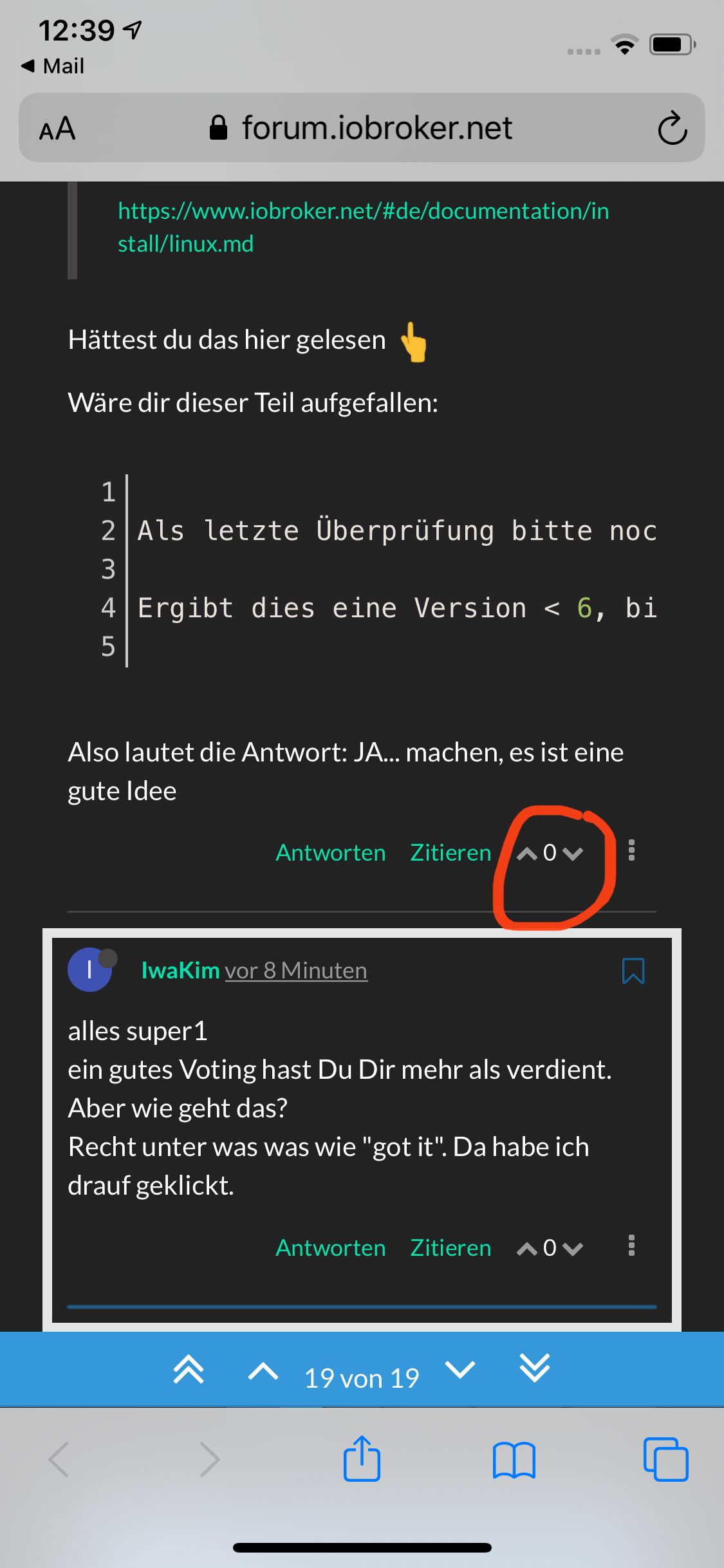
                                          Kannst gerne Hier in den Beiträgen die geholfen haben auf den Pfeil nach oben drücken

                                          A06D2C01-CF6A-4A4A-B711-5B5EF7EC0046.jpeg

                                          Schön das es wieder läuft.

                                          Schönen Sonntag

                                          Bitte keine Fragen per PN, die gehören ins Forum!

                                          Benutzt das Voting rechts unten im Beitrag wenn er euch geholfen hat.

                                          1 Reply Last reply
                                          0
                                          Reply
                                          • Reply as topic
                                          Log in to reply
                                          • Oldest to Newest
                                          • Newest to Oldest
                                          • Most Votes


                                          Support us

                                          ioBroker
                                          Community Adapters
                                          Donate

                                          673

                                          Online

                                          32.7k

                                          Users

                                          82.3k

                                          Topics

                                          1.3m

                                          Posts
                                          Community
                                          Impressum | Datenschutz-Bestimmungen | Nutzungsbedingungen | Einwilligungseinstellungen
                                          ioBroker Community 2014-2025
                                          logo
                                          • Login

                                          • Don't have an account? Register

                                          • Login or register to search.
                                          • First post
                                            Last post
                                          0
                                          • Home
                                          • Recent
                                          • Tags
                                          • Unread 0
                                          • Categories
                                          • Unreplied
                                          • Popular
                                          • GitHub
                                          • Docu
                                          • Hilfe