




Gelöst: IOT Adapter plötzlich nur noch gelb
-
@Glasfaser sagte in Gelöst: IOT Adapter plötzlich nur noch gelb:
Nur als zwischen info , der Log zeigt kein debug !!!
Wo finde ich dann das debug?
Ubuntu auf Intel NUC PC
Node.js v14.18.1
NPM 6.14.15 -
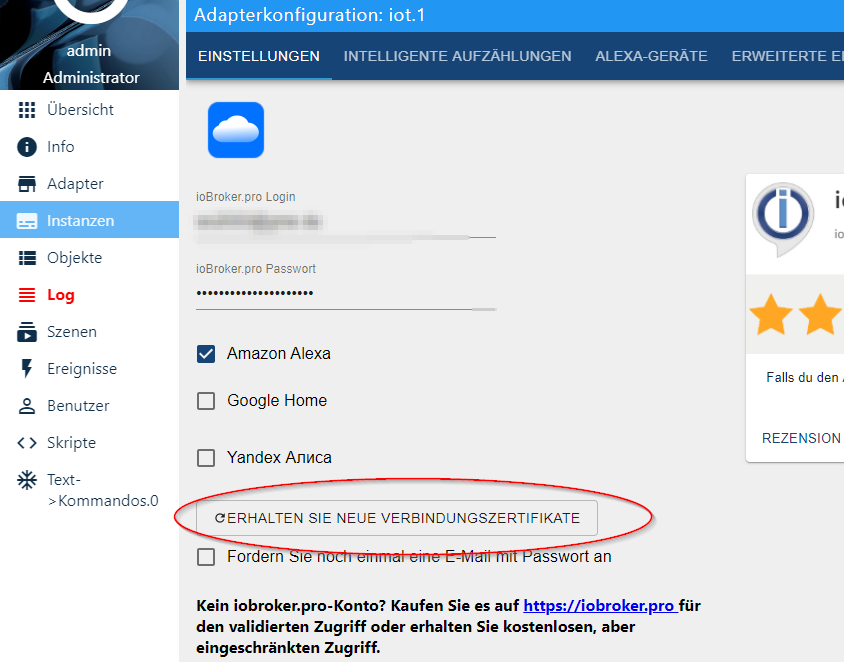
Meine ursprüngliche Instanz ging erst dann wieder auf grün als ich den Button ERHALTEN SIE NEUE VERBINDUNGSZERTIFIKATE anklickte!
Und rein von der Logik her kann ich dir nicht zustimmen.
IOT Insatz 1 geht nich, IOT Instanz geht. Beide nutzen die gleiche Internetverbindung. Warum soll in diesem Fall also eine instabile Internetverbindung schuld sein? Wenn instabile Internetverbindung, dann doch immer und nicht nur bei Instanz 1. Oder was meinst du dazu?
-
@Glasfaser sagte in Gelöst: IOT Adapter plötzlich nur noch gelb:
Nur als zwischen info , der Log zeigt kein debug !!!
Wo finde ich dann das debug?
-
@harrym sagte in Gelöst: IOT Adapter plötzlich nur noch gelb:
@WalterKA mMn .... eine Lizenz .... eine Instanz. oder sehe ich das falsch?
Bin mir nicht sicher. Aber das geht eh in die falsche Richtung denke ich.
Ich aktiviere immer nur eine Instanz des IOT. Beide Instanzen kann ich nicht starten. Instanz 1 war defekt, Instanz 2 funktioniert.
Wir reden ja immer noch davon dass ich einen Pi im Einsatz habe, nicht 2.Ich will auch keine 2 Lizenzen nutzen, habe die zweite Instanz nur erzeugt weil Instanz ein urplötzlich defekt ist, auf beiden micoSD Kaerten!
-
Im Log ...!
muss dann so aussehen
ost.IOBrokerWS 2020-04-10 00:46:36.143 debug stopInstance system.adapter.iot.1@Glasfaser sagte in Gelöst: IOT Adapter plötzlich nur noch gelb:
Im Log ...!
muss dann so aussehen
ost.IOBrokerWS 2020-04-10 00:46:36.143 debug stopInstance system.adapter.iot.1Das geht mir momentan zu tief ins Geschehen. Bin schon lange müde und (noch) kein Linuxmensch. Da muss ich erst mal schauen wie ich über Putty an die Stelle komme wo ich diese Log Informationen einsehen kann.
Dazu bin ich zu müde, zu alt und dann ist auch noch Karfreitag.Ich gehe jetzt zu Bett.
-
unter instanzen den expertenmodus aktivieren ....
 rot bei mir.
dann kannste bei der instanz den log level von info auf debug ändern.

@WalterKA
@harrym sagte in Gelöst: IOT Adapter plötzlich nur noch gelb:unter instanzen den expertenmodus aktivieren ....
rot bei mir.dann kannste bei der instanz den log level von info auf debug ändern.
nein in der Instanz umstellen !!!
Du sieht dort das Info ... das auf debug stellen
-
@WalterKA
@harrym sagte in Gelöst: IOT Adapter plötzlich nur noch gelb:unter instanzen den expertenmodus aktivieren ....
rot bei mir.dann kannste bei der instanz den log level von info auf debug ändern.
nein in der Instanz umstellen !!!
Du sieht dort das Info ... das auf debug stellen
@Glasfaser sagte in Gelöst: IOT Adapter plötzlich nur noch gelb:
@WalterKA
@harrym sagte in Gelöst: IOT Adapter plötzlich nur noch gelb:unter instanzen den expertenmodus aktivieren ....
rot bei mir.dann kannste bei der instanz den log level von info auf debug ändern.
nein in der Instanz umstellen !!!
Du sieht dort das Info ... das auf debug stellen
Da habe ich doch schon in der Instanz umgestellt.
Der Screenshot sollte dir nur zeigen wo cih das Logfile vermutete, denn die Bezeichnung von dem Knopf auf der linken Seite ist Log und daher vermutete ich,d ass ich dort das Logfile finde. Und dort steht auch noch Debug als Spaltenkopf ...Ubuntu auf Intel NUC PC
Node.js v14.18.1
NPM 6.14.15 -
@Glasfaser sagte in Gelöst: IOT Adapter plötzlich nur noch gelb:
@WalterKA
@harrym sagte in Gelöst: IOT Adapter plötzlich nur noch gelb:unter instanzen den expertenmodus aktivieren ....
rot bei mir.dann kannste bei der instanz den log level von info auf debug ändern.
nein in der Instanz umstellen !!!
Du sieht dort das Info ... das auf debug stellen
Da habe ich doch schon in der Instanz umgestellt.
Der Screenshot sollte dir nur zeigen wo cih das Logfile vermutete, denn die Bezeichnung von dem Knopf auf der linken Seite ist Log und daher vermutete ich,d ass ich dort das Logfile finde. Und dort steht auch noch Debug als Spaltenkopf ... -
@harrym sagte in Gelöst: IOT Adapter plötzlich nur noch gelb:
als quelle nimmste iot.0 und des debug lösch
Was, wie..? Das verstehe ich jetzt nicht.
So sieht das bei mir aus:
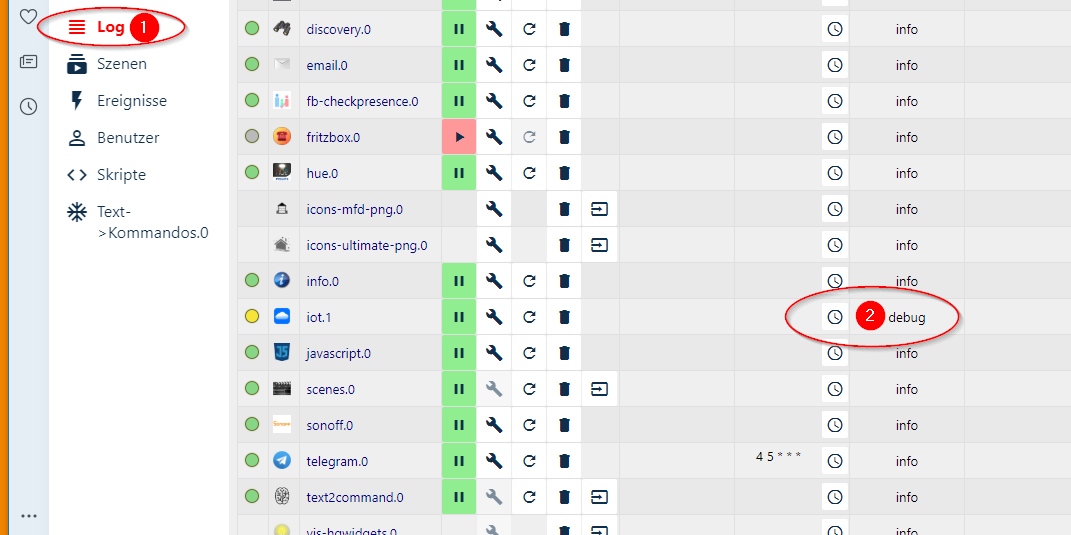
Bei 1 vermutete ich das brauchbare Logfile und bei 2 ist die Einstellung die ich auf denen Tipp hin machte.
-
ja! links der button is es logfile .... rechts passt! start die instanz neu .... und wechsel aufs log
Wow! Da muss man ja höllisch achtgeben dass man nicht aus Versehen vertrauliche Keys übermittel!
Hier das Logfile:
iot.1	2020-04-10 01:09:18.465	info	(17284) Connection changed: disconnect
iot.1	2020-04-10 01:09:18.463	error	(17284) Error by device connection: "premature close"
iot.1	2020-04-10 01:09:18.158	debug	(17284) reconnect
iot.1	2020-04-10 01:08:58.158	info	(17284) Connection changed: disconnect
iot.1	2020-04-10 01:08:58.157	error	(17284) Error by device connection: "premature close"
iot.1	2020-04-10 01:08:57.834	debug	(17284) reconnect
iot.1	2020-04-10 01:08:56.934	debug	(17284) system.adapter.admin.0: logging true
iot.1	2020-04-10 01:08:47.836	info	(17284) Connection changed: disconnect
iot.1	2020-04-10 01:08:47.833	error	(17284) Error by device connection: "premature close"
iot.1	2020-04-10 01:08:47.517	debug	(17284) reconnect
iot.1	2020-04-10 01:08:42.518	info	(17284) Connection changed: disconnect
iot.1	2020-04-10 01:08:42.517	warn	(17284) Looks like your connection certificates are invalid. Please renew them via configuration dialog.
iot.1	2020-04-10 01:08:42.515	error	(17284) Error by device connection: "premature close"
iot.1	2020-04-10 01:08:42.512	debug	(17284) offline
iot.1	2020-04-10 01:08:42.238	debug	(17284) system.adapter.admin.0: logging false
iot.1	2020-04-10 01:08:42.060	debug	(17284) URL key is {"key":XXXXXXXXXXXXXXXXXXXXXXXXXXXXXXXXXXXXXXXXXXXXXXXXXXXXXXXXXXXXXXXXXXXXXXXXXXXXXXXXXXXXe
iot.1	2020-04-10 01:08:42.026	debug	(17284) [ALEX3] Created entertainment ALEXA device: Commands
iot.1	2020-04-10 01:08:42.025	debug	(17284) [ALEX3] Created entertainment ALEXA device: Commands
iot.1	2020-04-10 01:08:42.025	debug	(17284) [ALEX3] Created entertainment ALEXA device: Commands
iot.1	2020-04-10 01:08:42.024	debug	(17284) [ALEX3] Created entertainment ALEXA device: Commands
iot.1	2020-04-10 01:08:42.024	debug	(17284) [ALEX3] Created entertainment ALEXA device: Commands
iot.1	2020-04-10 01:08:42.023	debug	(17284) [ALEX3] Created entertainment ALEXA device: Commands
iot.1	2020-04-10 01:08:42.023	debug	(17284) [ALEX3] Created entertainment ALEXA device: Player
iot.1	2020-04-10 01:08:42.022	debug	(17284) [ALEX3] Created entertainment ALEXA device: Player
iot.1	2020-04-10 01:08:42.021	debug	(17284) [ALEX3] Created entertainment ALEXA device: Player
iot.1	2020-04-10 01:08:42.020	debug	(17284) [ALEX3] Created entertainment ALEXA device: Player
iot.1	2020-04-10 01:08:42.018	debug	(17284) [ALEX3] Created entertainment ALEXA device: Player
iot.1	2020-04-10 01:08:42.017	debug	(17284) [ALEX3] Created entertainment ALEXA device: Player
iot.1	2020-04-10 01:08:42.016	debug	(17284) [ALEX3] Created entertainment ALEXA device: Player
iot.1	2020-04-10 01:08:42.001	debug	(17284) [ALEX3] Invalid state "deconz.2.Lights.2.action". Not exist or no native part.
iot.1	2020-04-10 01:08:41.996	debug	(17284) [ALEX3] Invalid state "deconz.2.Lights.2.dimdown". Not exist or no native part.
iot.1	2020-04-10 01:08:41.995	debug	(17284) [ALEX3] Invalid state "deconz.2.Lights.2.dimup". Not exist or no native part.
iot.1	2020-04-10 01:08:41.993	debug	(17284) [ALEX3] Invalid state "sonoff.0.ShellyKueche.alive". Not exist or no native part.
iot.1	2020-04-10 01:08:41.991	debug	(17284) [ALEX3] Invalid state "sonoff.0.Luminea.alive". Not exist or no native part.
iot.1	2020-04-10 01:08:41.990	debug	(17284) [ALEX3] Invalid state "sonoff.0.Kühlschrank.alive". Not exist or no native part.
iot.1	2020-04-10 01:08:41.990	debug	(17284) [ALEX3] Invalid state "sonoff.0.Herd.alive". Not exist or no native part.
iot.1	2020-04-10 01:08:41.989	debug	(17284) [ALEX3] Invalid state "sonoff.0.Flurlicht-Tasmota.alive". Not exist or no native part.
iot.1	2020-04-10 01:08:41.988	debug	(17284) [ALEX3] Invalid state "sonoff.0.DVES_1943DE.alive". Not exist or no native part.
iot.1	2020-04-10 01:08:41.988	debug	(17284) [ALEX3] Invalid state "sonoff.0.Außensteckdose.alive". Not exist or no native part.
iot.1	2020-04-10 01:08:41.985	debug	(17284) [ALEX3] Invalid state "deconz.1.Lights.2.dimup". Not exist or no native part.
iot.1	2020-04-10 01:08:41.984	debug	(17284) [ALEX3] Invalid state "deconz.1.Lights.2.dimdown". Not exist or no native part.
iot.1	2020-04-10 01:08:41.983	debug	(17284) [ALEX3] Invalid state "deconz.1.Lights.2.action". Not exist or no native part.
iot.1	2020-04-10 01:08:41.975	debug	(17284) [ALEX3] Name "Player" cannot be written and will be ignored
iot.1	2020-04-10 01:08:41.973	debug	(17284) [ALEX3] Name "Player" cannot be written and will be ignored
iot.1	2020-04-10 01:08:41.972	debug	(17284) [ALEX3] Name "Player" cannot be written and will be ignored
iot.1	2020-04-10 01:08:41.970	debug	(17284) [ALEX3] Name "Player" cannot be written and will be ignored
iot.1	2020-04-10 01:08:41.968	debug	(17284) [ALEX3] Name "Player" cannot be written and will be ignored
iot.1	2020-04-10 01:08:41.967	debug	(17284) [ALEX3] Name "Player" cannot be written and will be ignored
iot.1	2020-04-10 01:08:41.964	debug	(17284) [ALEX3] Name "Player" cannot be written and will be ignored
iot.1	2020-04-10 01:08:41.961	debug	(17284) [ALEX3] Invalid state "admin.0.connected". Not exist or no native part.
iot.1	2020-04-10 01:08:41.960	debug	(17284) [ALEX3] Invalid state "0_userdata.0.example_state". Not exist or no native part.
iot.1	2020-04-10 01:08:41.858	debug	(17284) [ALEXA] Created ALEXA device: Außensteckdose ["turnOn","turnOff"]
iot.1	2020-04-10 01:08:41.858	debug	(17284) [ALEXA] Created ALEXA device: Badezimmer ["getTemperatureReading"]
iot.1	2020-04-10 01:08:41.857	debug	(17284) [ALEXA] Created ALEXA device: Balkon ["getTemperatureReading"]
iot.1	2020-04-10 01:08:41.856	debug	(17284) [ALEXA] Created ALEXA device: Esszimmer ["getTemperatureReading"]
iot.1	2020-04-10 01:08:41.856	debug	(17284) [ALEXA] Created ALEXA device: Flur ["getTemperatureReading"]
iot.1	2020-04-10 01:08:41.855	debug	(17284) [ALEXA] Created ALEXA device: Herd ["turnOn","turnOff"]
iot.1	2020-04-10 01:08:41.855	debug	(17284) [ALEXA] Created ALEXA device: Hofseite ["getTemperatureReading"]
iot.1	2020-04-10 01:08:41.854	debug	(17284) [ALEXA] Created ALEXA device: Küche ["getTemperatureReading"]
iot.1	2020-04-10 01:08:41.854	debug	(17284) [ALEXA] Created ALEXA device: Küchenlicht ["turnOn","turnOff"]
iot.1	2020-04-10 01:08:41.853	debug	(17284) [ALEXA] Created ALEXA device: Kühlschrank ["turnOn","turnOff"]
iot.1	2020-04-10 01:08:41.852	debug	(17284) [ALEXA] Created ALEXA device: Schlafzimmer ["getTemperatureReading"]
iot.1	2020-04-10 01:08:41.851	debug	(17284) [ALEXA] Created ALEXA device: Straßenseite ["getTemperatureReading"]
iot.1	2020-04-10 01:08:41.849	debug	(17284) [ALEXA] Name "Multisensor5 humidity" cannot be written and will be ignored
iot.1	2020-04-10 01:08:41.844	debug	(17284) [ALEXA] Name "Multisensor1 humidity" cannot be written and will be ignored
iot.1	2020-04-10 01:08:40.593	info	(17284) Connecting with aXXXXXXXXXXXXXXXXXXXXXXXXXXXXXXXXXXXXXXXXXXXXXXXXXXXXXXXXXXXXXXXXXXXXXXXXXXXXXXXXXXXXe
iot.1	2020-04-10 01:08:40.509	info	(17284) starting. Version 1.1.8 in /opt/iobroker/node_modules/iobroker.iot, node: v10.19.0
iot.1	2020-04-10 01:08:38.279	debug	(17284) statesDB connected
iot.1	2020-04-10 01:08:38.275	debug	(17284) States connected to redis: 127.0.0.1:9000
iot.1	2020-04-10 01:08:38.171	debug	(17284) States create System PubSub Client
iot.1	2020-04-10 01:08:38.165	debug	(17284) States create User PubSub Client
iot.1	2020-04-10 01:08:38.150	debug	(17284) Redis States: Use Redis connection: 127.0.0.1:9000
iot.1	2020-04-10 01:08:38.143	debug	(17284) objectDB connected
iot.1	2020-04-10 01:08:38.129	debug	(17284) Objects connected to redis: 127.0.0.1:9001
iot.1	2020-04-10 01:08:38.099	debug	(17284) Objects client initialize lua scripts
iot.1	2020-04-10 01:08:38.097	debug	(17284) Objects create User PubSub Client
iot.1	2020-04-10 01:08:38.094	debug	(17284) Objects create System PubSub Client
iot.1	2020-04-10 01:08:38.084	debug	(17284) Objects client ready ... initialize now
iot.1	2020-04-10 01:08:38.011	debug	(17284) Redis Objects: Use Redis connection: 127.0.0.1:9001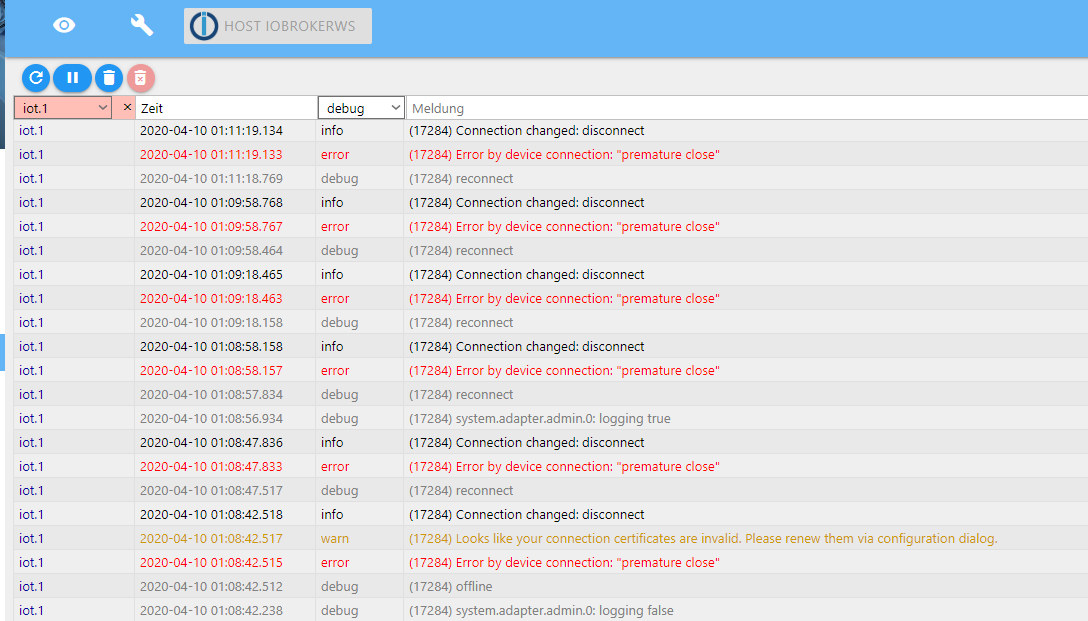
Ubuntu auf Intel NUC PC
Node.js v14.18.1
NPM 6.14.15 -
Wow! Da muss man ja höllisch achtgeben dass man nicht aus Versehen vertrauliche Keys übermittel!
Hier das Logfile:
iot.1 2020-04-10 01:09:18.465 info (17284) Connection changed: disconnect iot.1 2020-04-10 01:09:18.463 error (17284) Error by device connection: "premature close" iot.1 2020-04-10 01:09:18.158 debug (17284) reconnect iot.1 2020-04-10 01:08:58.158 info (17284) Connection changed: disconnect iot.1 2020-04-10 01:08:58.157 error (17284) Error by device connection: "premature close" iot.1 2020-04-10 01:08:57.834 debug (17284) reconnect iot.1 2020-04-10 01:08:56.934 debug (17284) system.adapter.admin.0: logging true iot.1 2020-04-10 01:08:47.836 info (17284) Connection changed: disconnect iot.1 2020-04-10 01:08:47.833 error (17284) Error by device connection: "premature close" iot.1 2020-04-10 01:08:47.517 debug (17284) reconnect iot.1 2020-04-10 01:08:42.518 info (17284) Connection changed: disconnect iot.1 2020-04-10 01:08:42.517 warn (17284) Looks like your connection certificates are invalid. Please renew them via configuration dialog. iot.1 2020-04-10 01:08:42.515 error (17284) Error by device connection: "premature close" iot.1 2020-04-10 01:08:42.512 debug (17284) offline iot.1 2020-04-10 01:08:42.238 debug (17284) system.adapter.admin.0: logging false iot.1 2020-04-10 01:08:42.060 debug (17284) URL key is {"key":XXXXXXXXXXXXXXXXXXXXXXXXXXXXXXXXXXXXXXXXXXXXXXXXXXXXXXXXXXXXXXXXXXXXXXXXXXXXXXXXXXXXe iot.1 2020-04-10 01:08:42.026 debug (17284) [ALEX3] Created entertainment ALEXA device: Commands iot.1 2020-04-10 01:08:42.025 debug (17284) [ALEX3] Created entertainment ALEXA device: Commands iot.1 2020-04-10 01:08:42.025 debug (17284) [ALEX3] Created entertainment ALEXA device: Commands iot.1 2020-04-10 01:08:42.024 debug (17284) [ALEX3] Created entertainment ALEXA device: Commands iot.1 2020-04-10 01:08:42.024 debug (17284) [ALEX3] Created entertainment ALEXA device: Commands iot.1 2020-04-10 01:08:42.023 debug (17284) [ALEX3] Created entertainment ALEXA device: Commands iot.1 2020-04-10 01:08:42.023 debug (17284) [ALEX3] Created entertainment ALEXA device: Player iot.1 2020-04-10 01:08:42.022 debug (17284) [ALEX3] Created entertainment ALEXA device: Player iot.1 2020-04-10 01:08:42.021 debug (17284) [ALEX3] Created entertainment ALEXA device: Player iot.1 2020-04-10 01:08:42.020 debug (17284) [ALEX3] Created entertainment ALEXA device: Player iot.1 2020-04-10 01:08:42.018 debug (17284) [ALEX3] Created entertainment ALEXA device: Player iot.1 2020-04-10 01:08:42.017 debug (17284) [ALEX3] Created entertainment ALEXA device: Player iot.1 2020-04-10 01:08:42.016 debug (17284) [ALEX3] Created entertainment ALEXA device: Player iot.1 2020-04-10 01:08:42.001 debug (17284) [ALEX3] Invalid state "deconz.2.Lights.2.action". Not exist or no native part. iot.1 2020-04-10 01:08:41.996 debug (17284) [ALEX3] Invalid state "deconz.2.Lights.2.dimdown". Not exist or no native part. iot.1 2020-04-10 01:08:41.995 debug (17284) [ALEX3] Invalid state "deconz.2.Lights.2.dimup". Not exist or no native part. iot.1 2020-04-10 01:08:41.993 debug (17284) [ALEX3] Invalid state "sonoff.0.ShellyKueche.alive". Not exist or no native part. iot.1 2020-04-10 01:08:41.991 debug (17284) [ALEX3] Invalid state "sonoff.0.Luminea.alive". Not exist or no native part. iot.1 2020-04-10 01:08:41.990 debug (17284) [ALEX3] Invalid state "sonoff.0.Kühlschrank.alive". Not exist or no native part. iot.1 2020-04-10 01:08:41.990 debug (17284) [ALEX3] Invalid state "sonoff.0.Herd.alive". Not exist or no native part. iot.1 2020-04-10 01:08:41.989 debug (17284) [ALEX3] Invalid state "sonoff.0.Flurlicht-Tasmota.alive". Not exist or no native part. iot.1 2020-04-10 01:08:41.988 debug (17284) [ALEX3] Invalid state "sonoff.0.DVES_1943DE.alive". Not exist or no native part. iot.1 2020-04-10 01:08:41.988 debug (17284) [ALEX3] Invalid state "sonoff.0.Außensteckdose.alive". Not exist or no native part. iot.1 2020-04-10 01:08:41.985 debug (17284) [ALEX3] Invalid state "deconz.1.Lights.2.dimup". Not exist or no native part. iot.1 2020-04-10 01:08:41.984 debug (17284) [ALEX3] Invalid state "deconz.1.Lights.2.dimdown". Not exist or no native part. iot.1 2020-04-10 01:08:41.983 debug (17284) [ALEX3] Invalid state "deconz.1.Lights.2.action". Not exist or no native part. iot.1 2020-04-10 01:08:41.975 debug (17284) [ALEX3] Name "Player" cannot be written and will be ignored iot.1 2020-04-10 01:08:41.973 debug (17284) [ALEX3] Name "Player" cannot be written and will be ignored iot.1 2020-04-10 01:08:41.972 debug (17284) [ALEX3] Name "Player" cannot be written and will be ignored iot.1 2020-04-10 01:08:41.970 debug (17284) [ALEX3] Name "Player" cannot be written and will be ignored iot.1 2020-04-10 01:08:41.968 debug (17284) [ALEX3] Name "Player" cannot be written and will be ignored iot.1 2020-04-10 01:08:41.967 debug (17284) [ALEX3] Name "Player" cannot be written and will be ignored iot.1 2020-04-10 01:08:41.964 debug (17284) [ALEX3] Name "Player" cannot be written and will be ignored iot.1 2020-04-10 01:08:41.961 debug (17284) [ALEX3] Invalid state "admin.0.connected". Not exist or no native part. iot.1 2020-04-10 01:08:41.960 debug (17284) [ALEX3] Invalid state "0_userdata.0.example_state". Not exist or no native part. iot.1 2020-04-10 01:08:41.858 debug (17284) [ALEXA] Created ALEXA device: Außensteckdose ["turnOn","turnOff"] iot.1 2020-04-10 01:08:41.858 debug (17284) [ALEXA] Created ALEXA device: Badezimmer ["getTemperatureReading"] iot.1 2020-04-10 01:08:41.857 debug (17284) [ALEXA] Created ALEXA device: Balkon ["getTemperatureReading"] iot.1 2020-04-10 01:08:41.856 debug (17284) [ALEXA] Created ALEXA device: Esszimmer ["getTemperatureReading"] iot.1 2020-04-10 01:08:41.856 debug (17284) [ALEXA] Created ALEXA device: Flur ["getTemperatureReading"] iot.1 2020-04-10 01:08:41.855 debug (17284) [ALEXA] Created ALEXA device: Herd ["turnOn","turnOff"] iot.1 2020-04-10 01:08:41.855 debug (17284) [ALEXA] Created ALEXA device: Hofseite ["getTemperatureReading"] iot.1 2020-04-10 01:08:41.854 debug (17284) [ALEXA] Created ALEXA device: Küche ["getTemperatureReading"] iot.1 2020-04-10 01:08:41.854 debug (17284) [ALEXA] Created ALEXA device: Küchenlicht ["turnOn","turnOff"] iot.1 2020-04-10 01:08:41.853 debug (17284) [ALEXA] Created ALEXA device: Kühlschrank ["turnOn","turnOff"] iot.1 2020-04-10 01:08:41.852 debug (17284) [ALEXA] Created ALEXA device: Schlafzimmer ["getTemperatureReading"] iot.1 2020-04-10 01:08:41.851 debug (17284) [ALEXA] Created ALEXA device: Straßenseite ["getTemperatureReading"] iot.1 2020-04-10 01:08:41.849 debug (17284) [ALEXA] Name "Multisensor5 humidity" cannot be written and will be ignored iot.1 2020-04-10 01:08:41.844 debug (17284) [ALEXA] Name "Multisensor1 humidity" cannot be written and will be ignored iot.1 2020-04-10 01:08:40.593 info (17284) Connecting with aXXXXXXXXXXXXXXXXXXXXXXXXXXXXXXXXXXXXXXXXXXXXXXXXXXXXXXXXXXXXXXXXXXXXXXXXXXXXXXXXXXXXe iot.1 2020-04-10 01:08:40.509 info (17284) starting. Version 1.1.8 in /opt/iobroker/node_modules/iobroker.iot, node: v10.19.0 iot.1 2020-04-10 01:08:38.279 debug (17284) statesDB connected iot.1 2020-04-10 01:08:38.275 debug (17284) States connected to redis: 127.0.0.1:9000 iot.1 2020-04-10 01:08:38.171 debug (17284) States create System PubSub Client iot.1 2020-04-10 01:08:38.165 debug (17284) States create User PubSub Client iot.1 2020-04-10 01:08:38.150 debug (17284) Redis States: Use Redis connection: 127.0.0.1:9000 iot.1 2020-04-10 01:08:38.143 debug (17284) objectDB connected iot.1 2020-04-10 01:08:38.129 debug (17284) Objects connected to redis: 127.0.0.1:9001 iot.1 2020-04-10 01:08:38.099 debug (17284) Objects client initialize lua scripts iot.1 2020-04-10 01:08:38.097 debug (17284) Objects create User PubSub Client iot.1 2020-04-10 01:08:38.094 debug (17284) Objects create System PubSub Client iot.1 2020-04-10 01:08:38.084 debug (17284) Objects client ready ... initialize now iot.1 2020-04-10 01:08:38.011 debug (17284) Redis Objects: Use Redis connection: 127.0.0.1:9001 -
@WalterKA sagte in Gelöst: IOT Adapter plötzlich nur noch gelb:
iot.1 2020-04-10 01:08:42.517 warn (17284) Looks like your connection certificates are invalid. Please renew them via configuration dialog.
@harrym sagte in Gelöst: IOT Adapter plötzlich nur noch gelb:
@WalterKA sagte in Gelöst: IOT Adapter plötzlich nur noch gelb:
iot.1 2020-04-10 01:08:42.517 warn (17284) Looks like your connection certificates are invalid. Please renew them via configuration dialog.
Aha! Dadurch macht es durchaus Sinn den Button zu drücken. doch was war die Ursache für den Fehler?
-
btw ... tu mal den iot adapter auf die letzte version aktualisieren .... @glasfaser hat das im log gesehen g
-
btw ... tu mal den iot adapter auf die letzte version aktualisieren .... @glasfaser hat das im log gesehen g
@harrym
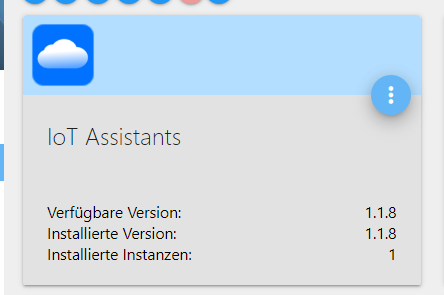
Ich habe die aktuelle Version installiert, siehe Screenshot.Vielen Dank nochmals für Deine Unterstützung, hat mir echt was gebracht! Jetzt weiß ich wo ich die Dokumentation finde (vor lauter Wald die Bäume nicht gesehen) und wie das mit dem Loglevel funktioniert und wie man das Logfile filtern kann.
Jetzt gehe ich schlafen!



Hey! Du scheinst an dieser Unterhaltung interessiert zu sein, hast aber noch kein Konto.
Hast du es satt, bei jedem Besuch durch die gleichen Beiträge zu scrollen? Wenn du dich für ein Konto anmeldest, kommst du immer genau dorthin zurück, wo du zuvor warst, und kannst dich über neue Antworten benachrichtigen lassen (entweder per E-Mail oder Push-Benachrichtigung). Du kannst auch Lesezeichen speichern und Beiträge positiv bewerten, um anderen Community-Mitgliedern deine Wertschätzung zu zeigen.
Mit deinem Input könnte dieser Beitrag noch besser werden 💗
Registrieren Anmelden389
Online33.0k
Benutzer83.4k
Themen1.3m
Beiträge