Skip to content
  • Home
  • Recent
  • Tags
  • 0 Unread 0
  • Categories
  • Unreplied
  • Popular
  • GitHub
  • Docu
  • Hilfe
Skins
  • Light
  • Brite
  • Cerulean
  • Cosmo
  • Flatly
  • Journal
  • Litera
  • Lumen
  • Lux
  • Materia
  • Minty
  • Morph
  • Pulse
  • Sandstone
  • Simplex
  • Sketchy
  • Spacelab
  • United
  • Yeti
  • Zephyr
  • Dark
  • Cyborg
  • Darkly
  • Quartz
  • Slate
  • Solar
  • Superhero
  • Vapor

  • Default (No Skin)
  • No Skin
Collapse
ioBroker Logo

Community Forum

donate donate
  1. ioBroker Community Home
  2. Deutsch
  3. Skripten / Logik
  4. JavaScript
  5. IP Devices im Netzwerk - HTML Tabelle vis, Iqontrol

NEWS

  • Monatsrückblick Januar/Februar 2026 ist online!
    BluefoxB
    Bluefox
    13
    1
    142

  • Jahresrückblick 2025 – unser neuer Blogbeitrag ist online! ✨
    BluefoxB
    Bluefox
    17
    1
    4.3k

  • Neuer Blogbeitrag: Monatsrückblick - Dezember 2025 🎄
    BluefoxB
    Bluefox
    13
    1
    1.3k

IP Devices im Netzwerk - HTML Tabelle vis, Iqontrol
Scheduled Pinned Locked Moved JavaScript
javascripttemplate
493 Posts 26 Posters 107.0k Views 41 Watching
  • Oldest to Newest
  • Newest to Oldest
  • Most Votes
Reply
  • Reply as topic
Log in to reply
This topic has been deleted. Only users with topic management privileges can see it.
  • O Oli

    @liv-in-sky
    danke für das geniale Script, bin gerade erst darauf gestoßen und es funktioniert wie es soll.

    Allerdings habe ich meinen ioBroker über Docker installiert und habe das Problem, dass nicht alle Geräte über das Skript angezeigt werden und die MAC Adressen fehlen.

    @Glasfaser werden bei dir mittlerweile alle Geräte angezeigt und wenn ja, wie hast du das hinbekommen?

    Ausgabe aus dem Skript:

    javascript.0 (235) script.js.common.System.Skript_1: Starting Nmap 7.80 ( https://nmap.org ) at 2023-10-09 13:57 CEST Nmap scan report for speedport.ip (192.168.2.1) Host is up (0.0042s latency). Nmap scan report for 192.168.2.101 Host is up (0.00064s latency). Nmap scan report for 192.168.2.103 Host is up (0.00054s latency). Nmap scan report for 192.168.2.106 Host is up (0.0024s latency). Nmap scan report for 192.168.2.107 Host is up (0.025s latency). Nmap scan report for 192.168.2.108 Host is up (0.0031s latency). Nmap scan report for 192.168.2.112 Host is up (0.0029s latency). Nmap scan report for 192.168.2.115 Host is up (0.0026s latency). Nmap scan report for ioBroker (192.168.2.120) Host is up (0.00019s latency). Nmap scan report for 192.168.2.126 Host is up (0.033s latency). Nmap scan report for 192.168.2.140 Host is up (0.0044s latency). Nmap scan report for 192.168.2.150 Host is up (0.085s latency). Nmap scan report for 192.168.2.155 Host is up (0.0057s latency). Nmap scan report for 192.168.2.176 Host is up (0.070s latency). Nmap done: 256 IP addresses (14 hosts up) scanned in 16.03 seconds
    

    Ausgabe über die Konsole im Docker:

    root@ioBroker:/opt/iobroker# nmap -sPR --dns-servers 192.168.2.1 192.168.2.0/24
    WARNING: -sR is now an alias for -sV and activates version detection as well as RPC scan.
    Starting Nmap 7.80 ( https://nmap.org ) at 2023-10-09 13:25 CEST
    Nmap scan report for speedport.ip (192.168.2.1)
    Host is up (0.0040s latency).
    MAC Address: 64:CC:22:39:A1:98 (Arcadyan)
    Nmap scan report for 192.168.2.101
    Host is up (0.00032s latency).
    MAC Address: 00:08:9B:EA:9B:3A (ICP Electronics)
    Nmap scan report for 192.168.2.103
    Host is up (0.00019s latency).
    MAC Address: F4:06:8D:38:61:92 (devolo AG)
    Nmap scan report for 192.168.2.106
    Host is up (0.0011s latency).
    MAC Address: 60:6D:3C:10:49:B1 (Luxshare Precision Industry Company Limited)
    Nmap scan report for 192.168.2.107
    Host is up (0.015s latency).
    MAC Address: 88:87:17:96:28:12 (Canon)
    Nmap scan report for 192.168.2.110
    Host is up (0.0025s latency).
    MAC Address: 94:C6:91:59:C1:3C (EliteGroup Computer Systems)
    Nmap scan report for 192.168.2.112
    Host is up (0.0023s latency).
    MAC Address: 00:05:CD:94:48:C9 (D&M Holdings)
    Nmap scan report for 192.168.2.115
    Host is up (0.000035s latency).
    MAC Address: 00:08:9B:EA:9B:39 (ICP Electronics)
    Nmap scan report for 192.168.2.126
    Host is up (0.094s latency).
    MAC Address: 00:05:51:10:A3:06 (F & S Elektronik Systeme GmbH)
    Nmap scan report for 192.168.2.139
    Host is up (0.11s latency).
    MAC Address: 70:EE:50:6B:5F:4E (Netatmo)
    Nmap scan report for 192.168.2.140
    Host is up (0.11s latency).
    MAC Address: C8:DB:26:0A:8D:15 (Logitech)
    Nmap scan report for 192.168.2.145
    Host is up (0.023s latency).
    MAC Address: 94:3A:91:81:88:66 (Unknown)
    Nmap scan report for 192.168.2.150
    Host is up (1.4s latency).
    MAC Address: A6:BF:DC:19:1C:41 (Unknown)
    Nmap scan report for 192.168.2.155
    Host is up (0.010s latency).
    MAC Address: 00:0B:3B:9C:96:CD (devolo AG)
    Nmap scan report for 192.168.2.176
    Host is up (0.13s latency).
    MAC Address: EC:2B:EB:23:7E:22 (Unknown)
    Nmap scan report for 192.168.2.186
    Host is up (0.0045s latency).
    MAC Address: 6C:A9:36:FD:1B:7F (DisplayLink (UK))
    Nmap scan report for 192.168.2.211
    Host is up (0.014s latency).
    MAC Address: 50:D4:5C:9B:AA:1E (Unknown)
    Nmap scan report for ioBroker (192.168.2.120)
    Host is up.
    Nmap done: 256 IP addresses (18 hosts up) scanned in 7.34 seconds
    
    liv-in-skyL Offline
    liv-in-skyL Offline
    liv-in-sky
    wrote on last edited by
    #480

    @oli

    probiere mal ein blockly mit exec block - kopiere dort denn befehl und aktiviere das log bzw. den return wert z.b. https://forum.iobroker.net/post/761180 nutzt anderen befehl

    evtl kannst du einen syntax für den befehl finden, indem der befehl mit mac angezeigt wird - habe leider keine docker erfahrung

    nach einem gelösten Thread wäre es sinnvoll dies in der Überschrift des ersten Posts einzutragen [gelöst]-... Bitte benutzt das Voting rechts unten im Beitrag wenn er euch geholfen hat. Forum-Tools: PicPick https://picpick.app/en/download/ und ScreenToGif https://www.screentogif.com/downloads.html

    1 Reply Last reply
    0
    • O Oli

      @liv-in-sky
      danke für das geniale Script, bin gerade erst darauf gestoßen und es funktioniert wie es soll.

      Allerdings habe ich meinen ioBroker über Docker installiert und habe das Problem, dass nicht alle Geräte über das Skript angezeigt werden und die MAC Adressen fehlen.

      @Glasfaser werden bei dir mittlerweile alle Geräte angezeigt und wenn ja, wie hast du das hinbekommen?

      Ausgabe aus dem Skript:

      javascript.0 (235) script.js.common.System.Skript_1: Starting Nmap 7.80 ( https://nmap.org ) at 2023-10-09 13:57 CEST Nmap scan report for speedport.ip (192.168.2.1) Host is up (0.0042s latency). Nmap scan report for 192.168.2.101 Host is up (0.00064s latency). Nmap scan report for 192.168.2.103 Host is up (0.00054s latency). Nmap scan report for 192.168.2.106 Host is up (0.0024s latency). Nmap scan report for 192.168.2.107 Host is up (0.025s latency). Nmap scan report for 192.168.2.108 Host is up (0.0031s latency). Nmap scan report for 192.168.2.112 Host is up (0.0029s latency). Nmap scan report for 192.168.2.115 Host is up (0.0026s latency). Nmap scan report for ioBroker (192.168.2.120) Host is up (0.00019s latency). Nmap scan report for 192.168.2.126 Host is up (0.033s latency). Nmap scan report for 192.168.2.140 Host is up (0.0044s latency). Nmap scan report for 192.168.2.150 Host is up (0.085s latency). Nmap scan report for 192.168.2.155 Host is up (0.0057s latency). Nmap scan report for 192.168.2.176 Host is up (0.070s latency). Nmap done: 256 IP addresses (14 hosts up) scanned in 16.03 seconds
      

      Ausgabe über die Konsole im Docker:

      root@ioBroker:/opt/iobroker# nmap -sPR --dns-servers 192.168.2.1 192.168.2.0/24
      WARNING: -sR is now an alias for -sV and activates version detection as well as RPC scan.
      Starting Nmap 7.80 ( https://nmap.org ) at 2023-10-09 13:25 CEST
      Nmap scan report for speedport.ip (192.168.2.1)
      Host is up (0.0040s latency).
      MAC Address: 64:CC:22:39:A1:98 (Arcadyan)
      Nmap scan report for 192.168.2.101
      Host is up (0.00032s latency).
      MAC Address: 00:08:9B:EA:9B:3A (ICP Electronics)
      Nmap scan report for 192.168.2.103
      Host is up (0.00019s latency).
      MAC Address: F4:06:8D:38:61:92 (devolo AG)
      Nmap scan report for 192.168.2.106
      Host is up (0.0011s latency).
      MAC Address: 60:6D:3C:10:49:B1 (Luxshare Precision Industry Company Limited)
      Nmap scan report for 192.168.2.107
      Host is up (0.015s latency).
      MAC Address: 88:87:17:96:28:12 (Canon)
      Nmap scan report for 192.168.2.110
      Host is up (0.0025s latency).
      MAC Address: 94:C6:91:59:C1:3C (EliteGroup Computer Systems)
      Nmap scan report for 192.168.2.112
      Host is up (0.0023s latency).
      MAC Address: 00:05:CD:94:48:C9 (D&M Holdings)
      Nmap scan report for 192.168.2.115
      Host is up (0.000035s latency).
      MAC Address: 00:08:9B:EA:9B:39 (ICP Electronics)
      Nmap scan report for 192.168.2.126
      Host is up (0.094s latency).
      MAC Address: 00:05:51:10:A3:06 (F & S Elektronik Systeme GmbH)
      Nmap scan report for 192.168.2.139
      Host is up (0.11s latency).
      MAC Address: 70:EE:50:6B:5F:4E (Netatmo)
      Nmap scan report for 192.168.2.140
      Host is up (0.11s latency).
      MAC Address: C8:DB:26:0A:8D:15 (Logitech)
      Nmap scan report for 192.168.2.145
      Host is up (0.023s latency).
      MAC Address: 94:3A:91:81:88:66 (Unknown)
      Nmap scan report for 192.168.2.150
      Host is up (1.4s latency).
      MAC Address: A6:BF:DC:19:1C:41 (Unknown)
      Nmap scan report for 192.168.2.155
      Host is up (0.010s latency).
      MAC Address: 00:0B:3B:9C:96:CD (devolo AG)
      Nmap scan report for 192.168.2.176
      Host is up (0.13s latency).
      MAC Address: EC:2B:EB:23:7E:22 (Unknown)
      Nmap scan report for 192.168.2.186
      Host is up (0.0045s latency).
      MAC Address: 6C:A9:36:FD:1B:7F (DisplayLink (UK))
      Nmap scan report for 192.168.2.211
      Host is up (0.014s latency).
      MAC Address: 50:D4:5C:9B:AA:1E (Unknown)
      Nmap scan report for ioBroker (192.168.2.120)
      Host is up.
      Nmap done: 256 IP addresses (18 hosts up) scanned in 7.34 seconds
      
      liv-in-skyL Offline
      liv-in-skyL Offline
      liv-in-sky
      wrote on last edited by
      #481

      @oli
      nebenbei
      bei mir war es wichtig, dass der root user die abfrage macht - sonst macht das linux netwerk device probleme

      nach einem gelösten Thread wäre es sinnvoll dies in der Überschrift des ersten Posts einzutragen [gelöst]-... Bitte benutzt das Voting rechts unten im Beitrag wenn er euch geholfen hat. Forum-Tools: PicPick https://picpick.app/en/download/ und ScreenToGif https://www.screentogif.com/downloads.html

      O 1 Reply Last reply
      0
      • liv-in-skyL liv-in-sky

        @oli
        nebenbei
        bei mir war es wichtig, dass der root user die abfrage macht - sonst macht das linux netwerk device probleme

        O Offline
        O Offline
        Oli
        wrote on last edited by
        #482

        @liv-in-sky
        Also mit folgendem Befehl bekomme ich die reduzierten Geräte ohne MAC

        nmap -sPR --dns-servers 192.168.2.1 192.168.2.0/24
        

        Bei folgenden Befehl kommt gar nichts zurück

        sudo -u root /usr/bin/nmap -sPR --dns-servers 192.168.2.1 192.168.2.0/24
        

        Ich dachte eigentlich, dass man bei Docker immer mit 'root' unterwegs ist

        Gruß
        Oliver

        liv-in-skyL 3 Replies Last reply
        0
        • O Oli

          @liv-in-sky
          Also mit folgendem Befehl bekomme ich die reduzierten Geräte ohne MAC

          nmap -sPR --dns-servers 192.168.2.1 192.168.2.0/24
          

          Bei folgenden Befehl kommt gar nichts zurück

          sudo -u root /usr/bin/nmap -sPR --dns-servers 192.168.2.1 192.168.2.0/24
          

          Ich dachte eigentlich, dass man bei Docker immer mit 'root' unterwegs ist

          liv-in-skyL Offline
          liv-in-skyL Offline
          liv-in-sky
          wrote on last edited by
          #483

          @oli

          hat docker einen root oder evtl einen admin user ?

          hast du die sueders datei im server angeglichen ?

          beispiel von mir:
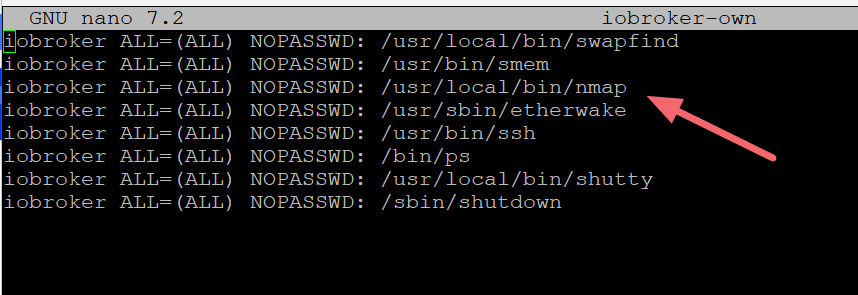
          Image 136.png

          nach einem gelösten Thread wäre es sinnvoll dies in der Überschrift des ersten Posts einzutragen [gelöst]-... Bitte benutzt das Voting rechts unten im Beitrag wenn er euch geholfen hat. Forum-Tools: PicPick https://picpick.app/en/download/ und ScreenToGif https://www.screentogif.com/downloads.html

          1 Reply Last reply
          0
          • O Oli

            @liv-in-sky
            Also mit folgendem Befehl bekomme ich die reduzierten Geräte ohne MAC

            nmap -sPR --dns-servers 192.168.2.1 192.168.2.0/24
            

            Bei folgenden Befehl kommt gar nichts zurück

            sudo -u root /usr/bin/nmap -sPR --dns-servers 192.168.2.1 192.168.2.0/24
            

            Ich dachte eigentlich, dass man bei Docker immer mit 'root' unterwegs ist

            liv-in-skyL Offline
            liv-in-skyL Offline
            liv-in-sky
            wrote on last edited by
            #484

            @oli

            wenn ich das lese, sieht es noicht so toll aus:

            https://stackoverflow.com/questions/71997736/docker-why-sudo-doesnt-work-as-expected

            nach einem gelösten Thread wäre es sinnvoll dies in der Überschrift des ersten Posts einzutragen [gelöst]-... Bitte benutzt das Voting rechts unten im Beitrag wenn er euch geholfen hat. Forum-Tools: PicPick https://picpick.app/en/download/ und ScreenToGif https://www.screentogif.com/downloads.html

            1 Reply Last reply
            0
            • O Oli

              @liv-in-sky
              Also mit folgendem Befehl bekomme ich die reduzierten Geräte ohne MAC

              nmap -sPR --dns-servers 192.168.2.1 192.168.2.0/24
              

              Bei folgenden Befehl kommt gar nichts zurück

              sudo -u root /usr/bin/nmap -sPR --dns-servers 192.168.2.1 192.168.2.0/24
              

              Ich dachte eigentlich, dass man bei Docker immer mit 'root' unterwegs ist

              liv-in-skyL Offline
              liv-in-skyL Offline
              liv-in-sky
              wrote on last edited by
              #485

              @oli

              hier kam mal eine lösung https://forum.iobroker.net/post/600999 - fang ein wenig weiter oben an zu lesen - viel glück

              nach einem gelösten Thread wäre es sinnvoll dies in der Überschrift des ersten Posts einzutragen [gelöst]-... Bitte benutzt das Voting rechts unten im Beitrag wenn er euch geholfen hat. Forum-Tools: PicPick https://picpick.app/en/download/ und ScreenToGif https://www.screentogif.com/downloads.html

              O 1 Reply Last reply
              0
              • liv-in-skyL liv-in-sky

                @oli

                hier kam mal eine lösung https://forum.iobroker.net/post/600999 - fang ein wenig weiter oben an zu lesen - viel glück

                O Offline
                O Offline
                Oli
                wrote on last edited by
                #486

                @liv-in-sky
                Erstmal danke für deine Mühe, werde es mal testen

                Gruß
                Oliver

                liv-in-skyL 1 Reply Last reply
                0
                • O Oli

                  @liv-in-sky
                  Erstmal danke für deine Mühe, werde es mal testen

                  liv-in-skyL Offline
                  liv-in-skyL Offline
                  liv-in-sky
                  wrote on last edited by
                  #487

                  @oli

                  das problem findest du auch des öfteren bei einer google suche - ohne iobroker

                  "nmap root docker" suche

                  nach einem gelösten Thread wäre es sinnvoll dies in der Überschrift des ersten Posts einzutragen [gelöst]-... Bitte benutzt das Voting rechts unten im Beitrag wenn er euch geholfen hat. Forum-Tools: PicPick https://picpick.app/en/download/ und ScreenToGif https://www.screentogif.com/downloads.html

                  O 2 Replies Last reply
                  0
                  • liv-in-skyL liv-in-sky

                    @oli

                    das problem findest du auch des öfteren bei einer google suche - ohne iobroker

                    "nmap root docker" suche

                    O Offline
                    O Offline
                    Oli
                    wrote on last edited by
                    #488

                    @liv-in-sky
                    Ja, aber leider ohne Lösung

                    Gruß
                    Oliver

                    1 Reply Last reply
                    0
                    • liv-in-skyL liv-in-sky

                      @oli

                      das problem findest du auch des öfteren bei einer google suche - ohne iobroker

                      "nmap root docker" suche

                      O Offline
                      O Offline
                      Oli
                      wrote on last edited by
                      #489

                      @liv-in-sky
                      leider finde ich keine Lösung, dass es im Docker richtig läuft und gebe jetzt auf.

                      Kannst du mir sagen, wie ich NMAP wieder deinstallieren kann?

                      Gruß
                      Oliver

                      liv-in-skyL 1 Reply Last reply
                      0
                      • O Oli

                        @liv-in-sky
                        leider finde ich keine Lösung, dass es im Docker richtig läuft und gebe jetzt auf.

                        Kannst du mir sagen, wie ich NMAP wieder deinstallieren kann?

                        liv-in-skyL Offline
                        liv-in-skyL Offline
                        liv-in-sky
                        wrote on last edited by
                        #490

                        @oli leider nein - ich nutze kein docker und habe daher keine ahnung davon :-(

                        nach einem gelösten Thread wäre es sinnvoll dies in der Überschrift des ersten Posts einzutragen [gelöst]-... Bitte benutzt das Voting rechts unten im Beitrag wenn er euch geholfen hat. Forum-Tools: PicPick https://picpick.app/en/download/ und ScreenToGif https://www.screentogif.com/downloads.html

                        O 1 Reply Last reply
                        0
                        • liv-in-skyL liv-in-sky

                          @oli leider nein - ich nutze kein docker und habe daher keine ahnung davon :-(

                          O Offline
                          O Offline
                          Oli
                          wrote on last edited by
                          #491

                          @liv-in-sky
                          Wie ist den der Befehl unter Linux zum deinstallieren?

                          Gruß
                          Oliver

                          liv-in-skyL 1 Reply Last reply
                          0
                          • O Oli

                            @liv-in-sky
                            Wie ist den der Befehl unter Linux zum deinstallieren?

                            liv-in-skyL Offline
                            liv-in-skyL Offline
                            liv-in-sky
                            wrote on last edited by
                            #492

                            @oli

                            sudo apt purge nmap

                            https://www.howtogeek.com/229699/how-to-uninstall-software-using-the-command-line-in-linux/

                            nach einem gelösten Thread wäre es sinnvoll dies in der Überschrift des ersten Posts einzutragen [gelöst]-... Bitte benutzt das Voting rechts unten im Beitrag wenn er euch geholfen hat. Forum-Tools: PicPick https://picpick.app/en/download/ und ScreenToGif https://www.screentogif.com/downloads.html

                            O 1 Reply Last reply
                            0
                            • liv-in-skyL liv-in-sky

                              @oli

                              sudo apt purge nmap

                              https://www.howtogeek.com/229699/how-to-uninstall-software-using-the-command-line-in-linux/

                              O Offline
                              O Offline
                              Oli
                              wrote on last edited by
                              #493

                              @liv-in-sky
                              Super, danke dir

                              Gruß
                              Oliver

                              1 Reply Last reply
                              0
                              Reply
                              • Reply as topic
                              Log in to reply
                              • Oldest to Newest
                              • Newest to Oldest
                              • Most Votes


                              Support us

                              ioBroker
                              Community Adapters
                              Donate

                              570

                              Online

                              32.7k

                              Users

                              82.4k

                              Topics

                              1.3m

                              Posts
                              Community
                              Impressum | Datenschutz-Bestimmungen | Nutzungsbedingungen | Einwilligungseinstellungen
                              ioBroker Community 2014-2025
                              logo
                              • Login

                              • Don't have an account? Register

                              • Login or register to search.
                              • First post
                                Last post
                              0
                              • Home
                              • Recent
                              • Tags
                              • Unread 0
                              • Categories
                              • Unreplied
                              • Popular
                              • GitHub
                              • Docu
                              • Hilfe