
NEWS




Siemens HomeConnect > Homekit (yahka) coupling help FIXED

-
Hi all, thanks for your help so far. I've been getting trough iobroker a bit further. Now I have one of the last challanges that involves the coupling of a specific Adapter to the Homekit Adapter, which I can't get to work.
What I to do is: Simply Turn on/off my oven, with HomeKit. I've manage to pass status details to homekit like temperature of the Oven. But I can't get the on/of switch working. Does anybody know that the values should be in the HomeKit Adapter tot get this "switch" working? It seems not so simple since the oven is responding in iobroker, but not responding to the "switch" in homekit.
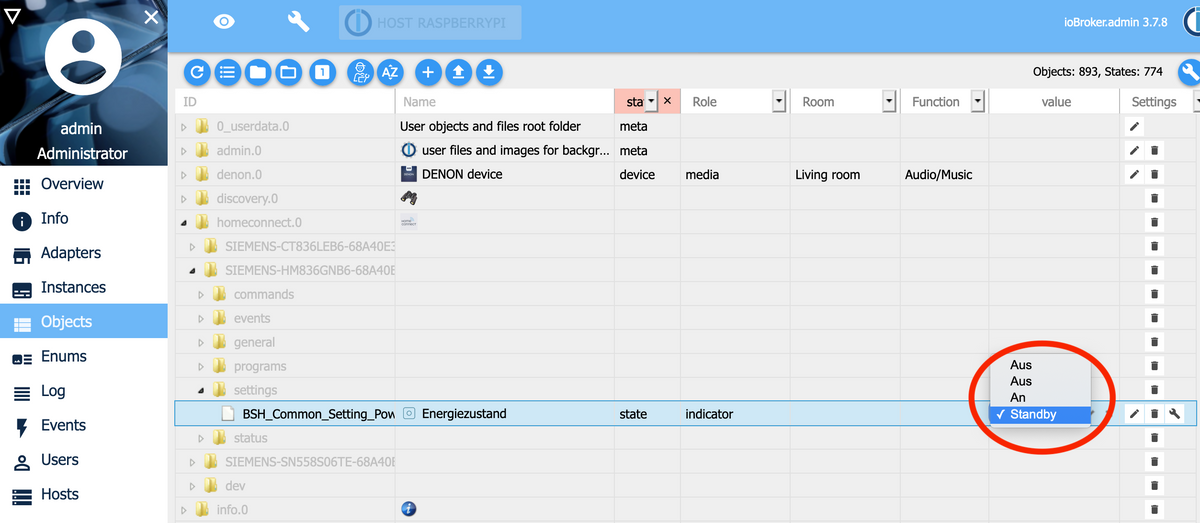
This is how the input data of the HomeConnect Oven data looks. It has got 4 choise of states (maybe the problem that is not 1 and 0?). The laste 2 choices "An" and "Standby" work in iobroker, this is de adapter and value I want to use in homekit:
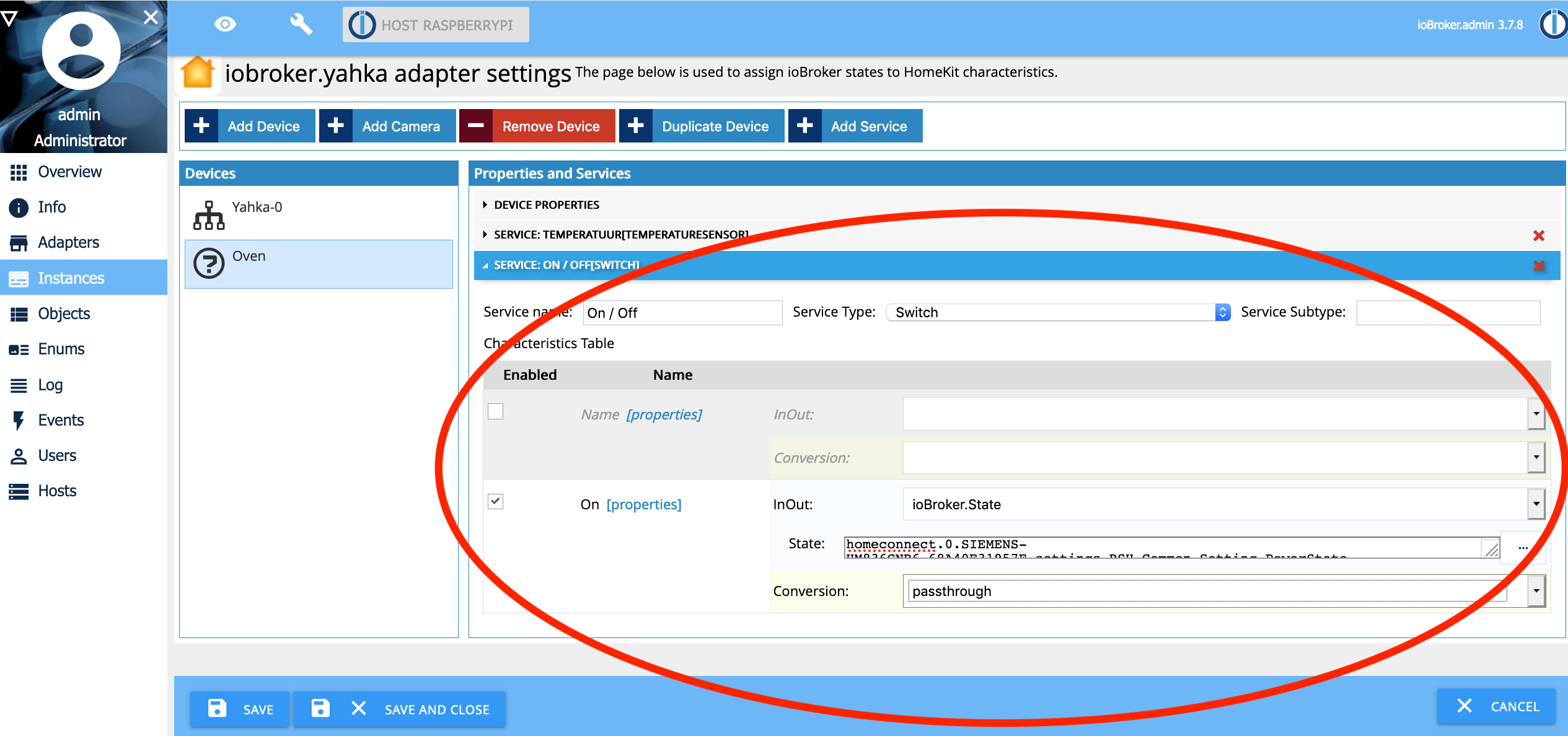
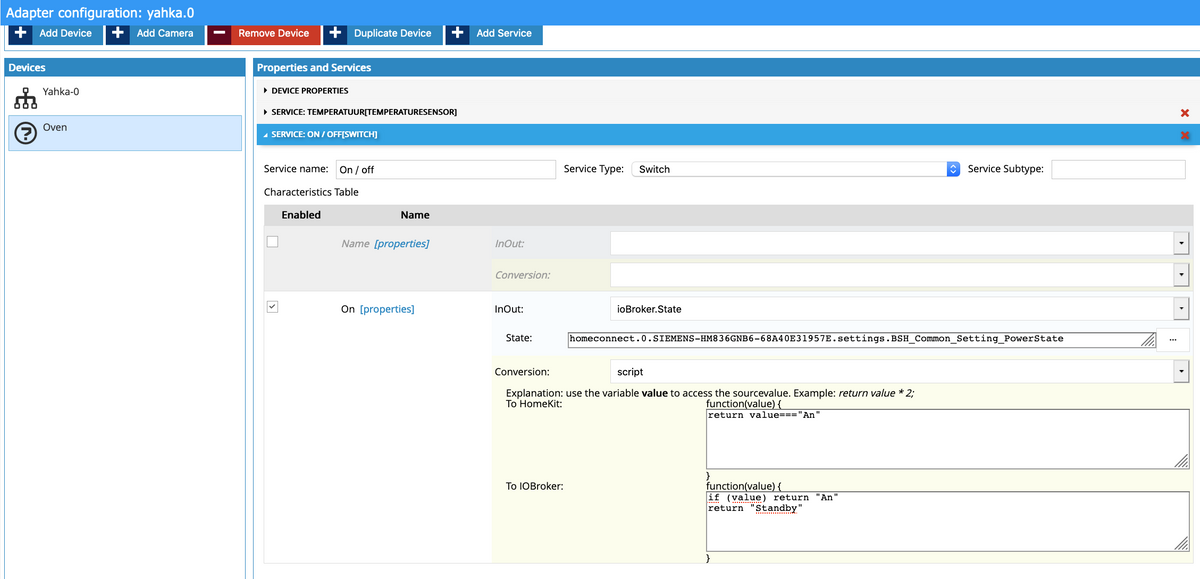
This is How the HomeKit adapter Switch input field looks. I don't know what to fill in to get this actually working. (Not everything I see here is in the github manual and trial and error did not get me there.)
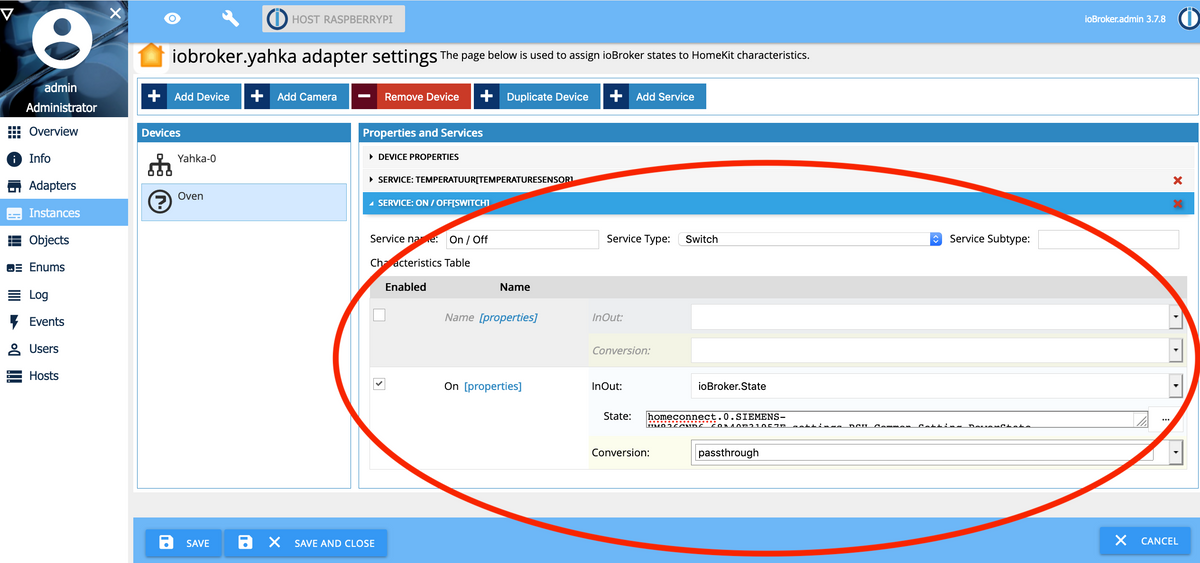
What needs to be in?
-Service subtype?What is meant with: (Do I need both main fields?)
-Name (properties)
-On (properties)What should I put in:
-In/out
-Conversion
-State (I think I need to select here the homeconnect.0.SIEMENS-HM836GNB6-454353nn45.settings.BSH_Common_Setting_PowerState)I hope someone is familiar with connecting both adapters :-)
Thanks for reading! -
Hi all, thanks for your help so far. I've been getting trough iobroker a bit further. Now I have one of the last challanges that involves the coupling of a specific Adapter to the Homekit Adapter, which I can't get to work.
What I to do is: Simply Turn on/off my oven, with HomeKit. I've manage to pass status details to homekit like temperature of the Oven. But I can't get the on/of switch working. Does anybody know that the values should be in the HomeKit Adapter tot get this "switch" working? It seems not so simple since the oven is responding in iobroker, but not responding to the "switch" in homekit.
This is how the input data of the HomeConnect Oven data looks. It has got 4 choise of states (maybe the problem that is not 1 and 0?). The laste 2 choices "An" and "Standby" work in iobroker, this is de adapter and value I want to use in homekit:
This is How the HomeKit adapter Switch input field looks. I don't know what to fill in to get this actually working. (Not everything I see here is in the github manual and trial and error did not get me there.)
What needs to be in?
-Service subtype?What is meant with: (Do I need both main fields?)
-Name (properties)
-On (properties)What should I put in:
-In/out
-Conversion
-State (I think I need to select here the homeconnect.0.SIEMENS-HM836GNB6-454353nn45.settings.BSH_Common_Setting_PowerState)I hope someone is familiar with connecting both adapters :-)
Thanks for reading!a couple of questions:
- which version of the Yahka Adapter do you have installed ?
- Will it be ok to use the "An" (i.e. On) and "Aus" (i.e. Off) states of the Siemens system, or do you need to use the "Standby" state ?
In either case, the solution should be:
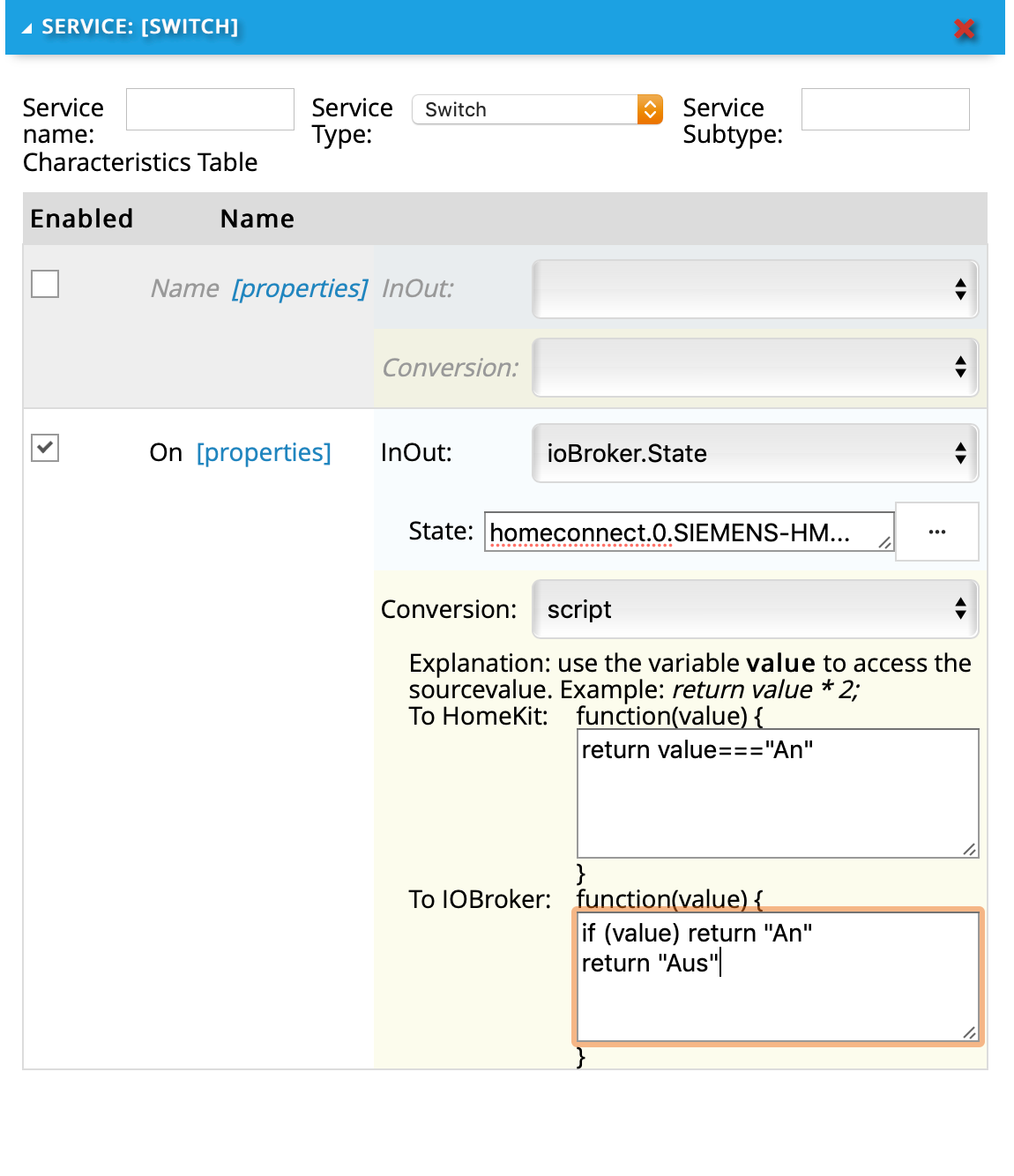
if you want to set it to "standby" rather than "off", you need to change the line
return "Aus"to
return "Standby"Since the home kit Switch can only show 2 states, you will not be able to distinguish between "standby" and "off" in any case.
The service subtype can remain empty (is for me for all cases)
On the name, you can either link it to a state or set a static value. (select conversion "passthrough") If you don't, the switch in HomeKit will have the service name as its initial name, but this can be overridden in the iOS app.
The "on" field is the one which actually reacts to the switch state.I hope this works for you.
A.
-
a couple of questions:
- which version of the Yahka Adapter do you have installed ?
- Will it be ok to use the "An" (i.e. On) and "Aus" (i.e. Off) states of the Siemens system, or do you need to use the "Standby" state ?
In either case, the solution should be:
if you want to set it to "standby" rather than "off", you need to change the line
return "Aus"to
return "Standby"Since the home kit Switch can only show 2 states, you will not be able to distinguish between "standby" and "off" in any case.
The service subtype can remain empty (is for me for all cases)
On the name, you can either link it to a state or set a static value. (select conversion "passthrough") If you don't, the switch in HomeKit will have the service name as its initial name, but this can be overridden in the iOS app.
The "on" field is the one which actually reacts to the switch state.I hope this works for you.
A.
@Asgothian Hi, thanks for your reply!
I have Homekit yahka Available version 0.9.2 Installed version: 0.9.2
I filled in your example advise, but no luck. No reaction from the device. And error in the log:
homeconnect.0 2020-02-05 20:10:23.792 info (4438) 409: Key BSH.Common.Setting.PowerState has unknown enum type or enum member Standby.
homeconnect.0 2020-02-05 20:10:19.526 info (4438) 409: Key BSH.Common.Setting.PowerState has unknown enum type or enum member An.
-
@Asgothian Hi, thanks for your reply!
I have Homekit yahka Available version 0.9.2 Installed version: 0.9.2
I filled in your example advise, but no luck. No reaction from the device. And error in the log:
homeconnect.0 2020-02-05 20:10:23.792 info (4438) 409: Key BSH.Common.Setting.PowerState has unknown enum type or enum member Standby.
homeconnect.0 2020-02-05 20:10:19.526 info (4438) 409: Key BSH.Common.Setting.PowerState has unknown enum type or enum member An.
-
@ydn Can you please paste the Raw Data for the Datapoint in question (as shown in the example screenshot for a different datapoint)
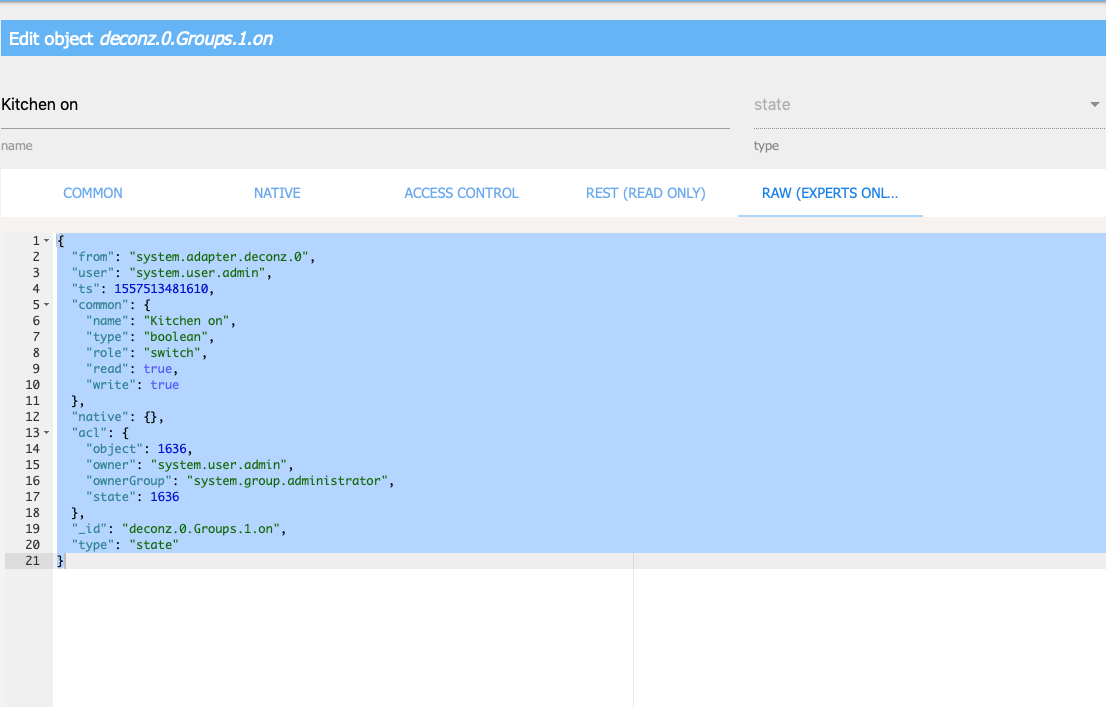
{ "from": "system.adapter.homeconnect.0", "user": "system.user.admin", "ts": 1680671865678, "common": { "name": "Energiezustand", "type": "string", "role": "indicator", "unit": "", "write": true, "read": true, "states": { "BSH.Common.EnumType.PowerState.MainsOff": "Aus", "BSH.Common.EnumType.PowerState.Off": "Aus", "BSH.Common.EnumType.PowerState.On": "An", "BSH.Common.EnumType.PowerState.Standby": "Standby" } }, "native": {}, "acl": { "object": 1636, "owner": "system.user.admin", "ownerGroup": "system.group.administrator", "state": 1636 }, "_id": "homeconnect.0.SIEMENS-HM836GNB6-68A40E31957E.settings.BSH_Common_Setting_PowerState", "type": "state" } -
{ "from": "system.adapter.homeconnect.0", "user": "system.user.admin", "ts": 1680671865678, "common": { "name": "Energiezustand", "type": "string", "role": "indicator", "unit": "", "write": true, "read": true, "states": { "BSH.Common.EnumType.PowerState.MainsOff": "Aus", "BSH.Common.EnumType.PowerState.Off": "Aus", "BSH.Common.EnumType.PowerState.On": "An", "BSH.Common.EnumType.PowerState.Standby": "Standby" } }, "native": {}, "acl": { "object": 1636, "owner": "system.user.admin", "ownerGroup": "system.group.administrator", "state": 1636 }, "_id": "homeconnect.0.SIEMENS-HM836GNB6-68A40E31957E.settings.BSH_Common_Setting_PowerState", "type": "state" } -
@ydn
Please try to replace the "An" with "On", and the "Off" with "Aus" in both script stubsA.
-
@Asgothian sagte in Siemens HomeConnect > Homekit (yahka) coupling help wanted.:
BSH.Common.EnumType.PowerState.On
I think you need a conversation script
return value ? "BSH.Common.EnumType.PowerState.On":"BSH.Common.EnumType.PowerState.Off" -
Yeah got it working! @Asgothian
It needs to be:
return value==="BSH.Common.EnumType.PowerState.On"
and the lower field:
if (value) return "BSH.Common.EnumType.PowerState.On"
return "BSH.Common.EnumType.PowerState.Standby" -
Hi all, thanks for your help so far. I've been getting trough iobroker a bit further. Now I have one of the last challanges that involves the coupling of a specific Adapter to the Homekit Adapter, which I can't get to work.
What I to do is: Simply Turn on/off my oven, with HomeKit. I've manage to pass status details to homekit like temperature of the Oven. But I can't get the on/of switch working. Does anybody know that the values should be in the HomeKit Adapter tot get this "switch" working? It seems not so simple since the oven is responding in iobroker, but not responding to the "switch" in homekit.
This is how the input data of the HomeConnect Oven data looks. It has got 4 choise of states (maybe the problem that is not 1 and 0?). The laste 2 choices "An" and "Standby" work in iobroker, this is de adapter and value I want to use in homekit:
This is How the HomeKit adapter Switch input field looks. I don't know what to fill in to get this actually working. (Not everything I see here is in the github manual and trial and error did not get me there.)
What needs to be in?
-Service subtype?What is meant with: (Do I need both main fields?)
-Name (properties)
-On (properties)What should I put in:
-In/out
-Conversion
-State (I think I need to select here the homeconnect.0.SIEMENS-HM836GNB6-454353nn45.settings.BSH_Common_Setting_PowerState)I hope someone is familiar with connecting both adapters :-)
Thanks for reading!=== PLEASE READ ===
Please describe the changes proposed in the pull request and
reference the issue,
the pull request relates to (if applicable).

Support us
640
Online32.4k
Users81.5k
Topics1.3m
Posts