



Skip to content
  • Home
  • Recent
  • Tags
  • 0 Unread 0
  • Categories
  • Unreplied
  • Popular
  • GitHub
  • Docu
  • Hilfe
Skins
  • Light
  • Brite
  • Cerulean
  • Cosmo
  • Flatly
  • Journal
  • Litera
  • Lumen
  • Lux
  • Materia
  • Minty
  • Morph
  • Pulse
  • Sandstone
  • Simplex
  • Sketchy
  • Spacelab
  • United
  • Yeti
  • Zephyr
  • Dark
  • Cyborg
  • Darkly
  • Quartz
  • Slate
  • Solar
  • Superhero
  • Vapor

  • Default (No Skin)
  • No Skin
Collapse
ioBroker Logo

Community Forum

donate donate
  1. ioBroker Community Home
  2. Deutsch
  3. Error/Bug
  4. BLE adapter startet nicht mehr
NEWS

  • Jahresrückblick 2025 – unser neuer Blogbeitrag ist online! ✨
    BluefoxB
    Bluefox
    17
    1
    2.9k

  • Neuer Blogbeitrag: Monatsrückblick - Dezember 2025 🎄
    BluefoxB
    Bluefox
    13
    1
    1.1k

  • Weihnachtsangebot 2025! 🎄
    BluefoxB
    Bluefox
    25
    1
    2.4k

BLE adapter startet nicht mehr

Scheduled Pinned Locked Moved Solved Error/Bug
ble adapterstartet nicht
69 Posts 11 Posters 7.4k Views 5 Watching
  • Oldest to Newest
  • Newest to Oldest
  • Most Votes
Reply
  • Reply as topic
Log in to reply
This topic has been deleted. Only users with topic management privileges can see it.
  • M M477h145

    @4Josh

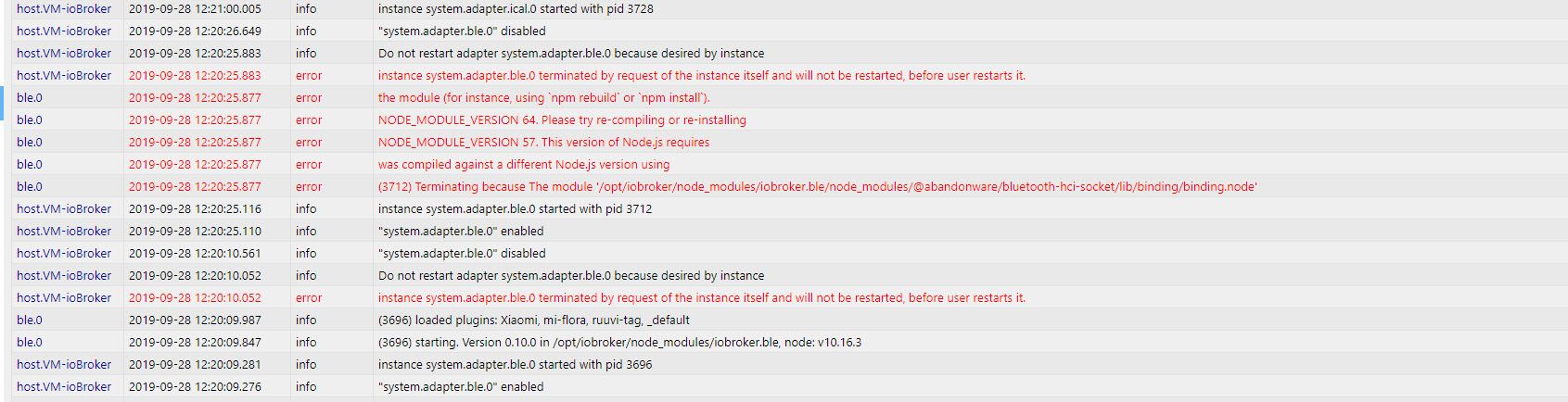
    Vielleicht eine doofe Frage, aber was muss ich bei "which node" eingeben

    Danke :)

    haselchenH Offline
    haselchenH Offline
    haselchen
    Most Active
    wrote on last edited by haselchen
    #8

    @M477h145

    Doofe Antwort : nichts :)
    Den Befehl so lassen

    Synology DS218+ & 2 x Fujitsu Esprimo (VM/Container) + FritzBox7590 + 2 AVM 3000 Repeater & Homematic & HUE & Osram & Xiaomi, NPM 10.9.4, Nodejs 22.21.0 ,JS Controller 7.0.7 ,Admin 7.7.19

    1 Reply Last reply
    0
    • J Offline
      J Offline
      Joker971
      wrote on last edited by
      #9

      Hallo, ich stehe vor exakt dem gleichen Problem aber wenn ich npm install an meinem PI3 (abgesetzter Client) eingebe kommt das hier :

      pi@ioBroker-Pi:~ $ npm install
      npm WARN saveError ENOENT: no such file or directory, open '/home/pi/package.json'
      npm WARN enoent ENOENT: no such file or directory, open '/home/pi/package.json'
      npm WARN pi No description
      npm WARN pi No repository field.
      npm WARN pi No README data
      npm WARN pi No license field.
      
      up to date in 0.856s
      found 0 vulnerabilities
      

      weiß jemand Rat ?

      haselchenH AlCalzoneA 2 Replies Last reply
      0
      • J Joker971

        Hallo, ich stehe vor exakt dem gleichen Problem aber wenn ich npm install an meinem PI3 (abgesetzter Client) eingebe kommt das hier :

        pi@ioBroker-Pi:~ $ npm install
        npm WARN saveError ENOENT: no such file or directory, open '/home/pi/package.json'
        npm WARN enoent ENOENT: no such file or directory, open '/home/pi/package.json'
        npm WARN pi No description
        npm WARN pi No repository field.
        npm WARN pi No README data
        npm WARN pi No license field.
        
        up to date in 0.856s
        found 0 vulnerabilities
        

        weiß jemand Rat ?

        haselchenH Offline
        haselchenH Offline
        haselchen
        Most Active
        wrote on last edited by haselchen
        #10

        @Joker971
        vielleicht sudo davor

        Ich gehe immer nach try&error vor :)
        no risk no fun

        Synology DS218+ & 2 x Fujitsu Esprimo (VM/Container) + FritzBox7590 + 2 AVM 3000 Repeater & Homematic & HUE & Osram & Xiaomi, NPM 10.9.4, Nodejs 22.21.0 ,JS Controller 7.0.7 ,Admin 7.7.19

        J 1 Reply Last reply
        0
        • haselchenH haselchen

          @Joker971
          vielleicht sudo davor

          Ich gehe immer nach try&error vor :)
          no risk no fun

          J Offline
          J Offline
          Jan1
          wrote on last edited by
          #11

          @haselchen
          sudo npm sollte man nicht machen

          haselchenH 1 Reply Last reply
          0
          • J Jan1

            @haselchen
            sudo npm sollte man nicht machen

            haselchenH Offline
            haselchenH Offline
            haselchen
            Most Active
            wrote on last edited by
            #12

            @Jan1

            Wenn das der einzige Befehl ist, der für mich zum Erfolg führt, führe ich ihn aus :grin:
            Da bin ich (unwissend) hartnäckig ;)

            Synology DS218+ & 2 x Fujitsu Esprimo (VM/Container) + FritzBox7590 + 2 AVM 3000 Repeater & Homematic & HUE & Osram & Xiaomi, NPM 10.9.4, Nodejs 22.21.0 ,JS Controller 7.0.7 ,Admin 7.7.19

            J 1 Reply Last reply
            0
            • J Joker971

              Hallo, ich stehe vor exakt dem gleichen Problem aber wenn ich npm install an meinem PI3 (abgesetzter Client) eingebe kommt das hier :

              pi@ioBroker-Pi:~ $ npm install
              npm WARN saveError ENOENT: no such file or directory, open '/home/pi/package.json'
              npm WARN enoent ENOENT: no such file or directory, open '/home/pi/package.json'
              npm WARN pi No description
              npm WARN pi No repository field.
              npm WARN pi No README data
              npm WARN pi No license field.
              
              up to date in 0.856s
              found 0 vulnerabilities
              

              weiß jemand Rat ?

              AlCalzoneA Offline
              AlCalzoneA Offline
              AlCalzone
              Developer
              wrote on last edited by
              #13

              @Joker971 sagte in BLE adapter startet nicht mehr:

              npm install

              Was soll das bringen? Du bist im Home-Verzeichnis deines Users. Probiere es in /opt/iobroker/node_modules/iobroker.ble

              Warum `sudo` böse ist: https://forum.iobroker.net/post/17109

              1 Reply Last reply
              0
              • J Offline
                J Offline
                Joker971
                wrote on last edited by
                #14

                Danke, das war schonmal ein guter Ansatz :-) So läuft NPM Install und Rebuild. Ich probiere mal weiter :-)

                1 Reply Last reply
                0
                • haselchenH haselchen

                  @Jan1

                  Wenn das der einzige Befehl ist, der für mich zum Erfolg führt, führe ich ihn aus :grin:
                  Da bin ich (unwissend) hartnäckig ;)

                  J Offline
                  J Offline
                  Jan1
                  wrote on last edited by
                  #15

                  @haselchen
                  Der wird nicht zum Erfolg führen, eher dazu, dass danach nichts mehr geht, aber aus Fehlern wird man ja klüger:blush:

                  1 Reply Last reply
                  0
                  • J Offline
                    J Offline
                    Joker971
                    wrote on last edited by
                    #16

                    Sodele, mein BLE Adapter steht wieder auf grün :-) AAAAbbbber im Driverstate steht "poweredOff" obwohl Bluetooth auf dem PI läuft, hier von Putty:

                    pi@ioBroker-Pi:~ $ sudo systemctl status bluetooth
                    â bluetooth.service - Bluetooth service
                       Loaded: loaded (/lib/systemd/system/bluetooth.service; enabled; vendor preset
                       Active: active (running) since Mon 2020-01-06 21:06:10 CET; 7min ago
                         Docs: man:bluetoothd(8)
                     Main PID: 2250 (bluetoothd)
                       Status: "Running"
                        Tasks: 1 (limit: 4915)
                       CGroup: /system.slice/bluetooth.service
                               ââ2250 /usr/lib/bluetooth/bluetoothd
                    

                    Restart vom ioBroker auf dem Pi bringt keine Lösung, Reload vom Adapter auch nicht.
                    Was nun ???

                    haselchenH AlCalzoneA 2 Replies Last reply
                    0
                    • J Joker971

                      Sodele, mein BLE Adapter steht wieder auf grün :-) AAAAbbbber im Driverstate steht "poweredOff" obwohl Bluetooth auf dem PI läuft, hier von Putty:

                      pi@ioBroker-Pi:~ $ sudo systemctl status bluetooth
                      â bluetooth.service - Bluetooth service
                         Loaded: loaded (/lib/systemd/system/bluetooth.service; enabled; vendor preset
                         Active: active (running) since Mon 2020-01-06 21:06:10 CET; 7min ago
                           Docs: man:bluetoothd(8)
                       Main PID: 2250 (bluetoothd)
                         Status: "Running"
                          Tasks: 1 (limit: 4915)
                         CGroup: /system.slice/bluetooth.service
                                 ââ2250 /usr/lib/bluetooth/bluetoothd
                      

                      Restart vom ioBroker auf dem Pi bringt keine Lösung, Reload vom Adapter auch nicht.
                      Was nun ???

                      haselchenH Offline
                      haselchenH Offline
                      haselchen
                      Most Active
                      wrote on last edited by
                      #17

                      @Joker971

                      Bin da nicht so der Nerd.
                      Ich hab Bluez installiert. Versuch das mal nach der Anleitung.

                      https://scribles.net/updating-bluez-on-raspberry-pi-from-5-43-to-5-50/

                      Damit läuft mein BLE.

                      Synology DS218+ & 2 x Fujitsu Esprimo (VM/Container) + FritzBox7590 + 2 AVM 3000 Repeater & Homematic & HUE & Osram & Xiaomi, NPM 10.9.4, Nodejs 22.21.0 ,JS Controller 7.0.7 ,Admin 7.7.19

                      J 1 Reply Last reply
                      0
                      • J Joker971

                        Sodele, mein BLE Adapter steht wieder auf grün :-) AAAAbbbber im Driverstate steht "poweredOff" obwohl Bluetooth auf dem PI läuft, hier von Putty:

                        pi@ioBroker-Pi:~ $ sudo systemctl status bluetooth
                        â bluetooth.service - Bluetooth service
                           Loaded: loaded (/lib/systemd/system/bluetooth.service; enabled; vendor preset
                           Active: active (running) since Mon 2020-01-06 21:06:10 CET; 7min ago
                             Docs: man:bluetoothd(8)
                         Main PID: 2250 (bluetoothd)
                           Status: "Running"
                            Tasks: 1 (limit: 4915)
                           CGroup: /system.slice/bluetooth.service
                                   ââ2250 /usr/lib/bluetooth/bluetoothd
                        

                        Restart vom ioBroker auf dem Pi bringt keine Lösung, Reload vom Adapter auch nicht.
                        Was nun ???

                        AlCalzoneA Offline
                        AlCalzoneA Offline
                        AlCalzone
                        Developer
                        wrote on last edited by
                        #18

                        @Joker971 sagte in BLE adapter startet nicht mehr:

                        Driverstate steht "poweredOff"

                        Geht es nach sudo hcitool hci0 up?

                        Warum `sudo` böse ist: https://forum.iobroker.net/post/17109

                        1 Reply Last reply
                        0
                        • haselchenH haselchen

                          @Joker971

                          Bin da nicht so der Nerd.
                          Ich hab Bluez installiert. Versuch das mal nach der Anleitung.

                          https://scribles.net/updating-bluez-on-raspberry-pi-from-5-43-to-5-50/

                          Damit läuft mein BLE.

                          J Offline
                          J Offline
                          Joker971
                          wrote on last edited by
                          #19

                          @haselchen sagte in BLE adapter startet nicht mehr:

                          @Joker971

                          Bin da nicht so der Nerd.
                          Ich hab Bluez installiert. Versuch das mal nach der Anleitung.

                          https://scribles.net/updating-bluez-on-raspberry-pi-from-5-43-to-5-50/

                          Damit läuft mein BLE.

                          Hab ich durchgezogen, hab jetzt auch die neue Version aber Driverstate ist immer noch "poweredOff"

                          @AlCalzone sagte in BLE adapter startet nicht mehr:

                          @Joker971 sagte in BLE adapter startet nicht mehr:

                          Driverstate steht "poweredOff"

                          Geht es nach sudo hcitool hci0 up?

                          da steht dann "unknown command hci0"

                          haselchenH 1 Reply Last reply
                          0
                          • J Joker971

                            @haselchen sagte in BLE adapter startet nicht mehr:

                            @Joker971

                            Bin da nicht so der Nerd.
                            Ich hab Bluez installiert. Versuch das mal nach der Anleitung.

                            https://scribles.net/updating-bluez-on-raspberry-pi-from-5-43-to-5-50/

                            Damit läuft mein BLE.

                            Hab ich durchgezogen, hab jetzt auch die neue Version aber Driverstate ist immer noch "poweredOff"

                            @AlCalzone sagte in BLE adapter startet nicht mehr:

                            @Joker971 sagte in BLE adapter startet nicht mehr:

                            Driverstate steht "poweredOff"

                            Geht es nach sudo hcitool hci0 up?

                            da steht dann "unknown command hci0"

                            haselchenH Offline
                            haselchenH Offline
                            haselchen
                            Most Active
                            wrote on last edited by
                            #20

                            @Joker971

                            sudo rfkill list

                            gib das mal ein und poste das Ergebnis

                            Synology DS218+ & 2 x Fujitsu Esprimo (VM/Container) + FritzBox7590 + 2 AVM 3000 Repeater & Homematic & HUE & Osram & Xiaomi, NPM 10.9.4, Nodejs 22.21.0 ,JS Controller 7.0.7 ,Admin 7.7.19

                            J 1 Reply Last reply
                            0
                            • haselchenH haselchen

                              @Joker971

                              sudo rfkill list

                              gib das mal ein und poste das Ergebnis

                              J Offline
                              J Offline
                              Joker971
                              wrote on last edited by
                              #21

                              @haselchen

                              pi@ioBroker-Pi:/ $ sudo rfkill list
                              0: phy0: Wireless LAN
                                      Soft blocked: no
                                      Hard blocked: no
                              
                              haselchenH 1 Reply Last reply
                              0
                              • J Joker971

                                @haselchen

                                pi@ioBroker-Pi:/ $ sudo rfkill list
                                0: phy0: Wireless LAN
                                        Soft blocked: no
                                        Hard blocked: no
                                
                                haselchenH Offline
                                haselchenH Offline
                                haselchen
                                Most Active
                                wrote on last edited by
                                #22

                                @Joker971

                                sudo hciconfig hci0 up

                                Synology DS218+ & 2 x Fujitsu Esprimo (VM/Container) + FritzBox7590 + 2 AVM 3000 Repeater & Homematic & HUE & Osram & Xiaomi, NPM 10.9.4, Nodejs 22.21.0 ,JS Controller 7.0.7 ,Admin 7.7.19

                                J 1 Reply Last reply
                                0
                                • haselchenH haselchen

                                  @Joker971

                                  sudo hciconfig hci0 up

                                  J Offline
                                  J Offline
                                  Joker971
                                  wrote on last edited by
                                  #23

                                  @haselchen

                                  pi@ioBroker-Pi:/ $ sudo hciconfig hci0 up
                                  Can't get device info: No such device
                                  
                                  haselchenH 1 Reply Last reply
                                  0
                                  • J Joker971

                                    @haselchen

                                    pi@ioBroker-Pi:/ $ sudo hciconfig hci0 up
                                    Can't get device info: No such device
                                    
                                    haselchenH Offline
                                    haselchenH Offline
                                    haselchen
                                    Most Active
                                    wrote on last edited by haselchen
                                    #24

                                    @Joker971
                                    Okay...weiter gehts

                                    sudo bluetoothctl

                                    dann

                                    scan on

                                    Discovery started müsste dann kommen

                                    Synology DS218+ & 2 x Fujitsu Esprimo (VM/Container) + FritzBox7590 + 2 AVM 3000 Repeater & Homematic & HUE & Osram & Xiaomi, NPM 10.9.4, Nodejs 22.21.0 ,JS Controller 7.0.7 ,Admin 7.7.19

                                    J 1 Reply Last reply
                                    0
                                    • haselchenH haselchen

                                      @Joker971
                                      Okay...weiter gehts

                                      sudo bluetoothctl

                                      dann

                                      scan on

                                      Discovery started müsste dann kommen

                                      J Offline
                                      J Offline
                                      Joker971
                                      wrote on last edited by
                                      #25

                                      @haselchen

                                      hat ganz schön gedauert der Befehl...

                                      aber nach reboot und folgenden Befehl leider :

                                      pi@ioBroker-Pi:~ $ sudo systemctl status bluetooth
                                      â bluetooth.service - Bluetooth service
                                         Loaded: loaded (/lib/systemd/system/bluetooth.service; enabled; vendor preset
                                         Active: inactive (dead)
                                           Docs: man:bluetoothd(8)
                                      
                                      haselchenH 1 Reply Last reply
                                      0
                                      • J Joker971

                                        @haselchen

                                        hat ganz schön gedauert der Befehl...

                                        aber nach reboot und folgenden Befehl leider :

                                        pi@ioBroker-Pi:~ $ sudo systemctl status bluetooth
                                        â bluetooth.service - Bluetooth service
                                           Loaded: loaded (/lib/systemd/system/bluetooth.service; enabled; vendor preset
                                           Active: inactive (dead)
                                             Docs: man:bluetoothd(8)
                                        
                                        haselchenH Offline
                                        haselchenH Offline
                                        haselchen
                                        Most Active
                                        wrote on last edited by haselchen
                                        #26

                                        @Joker971

                                        was ergibt denn

                                        sudo bluetoothctl

                                        es müsste [bluetooth] links dann stehen

                                        Synology DS218+ & 2 x Fujitsu Esprimo (VM/Container) + FritzBox7590 + 2 AVM 3000 Repeater & Homematic & HUE & Osram & Xiaomi, NPM 10.9.4, Nodejs 22.21.0 ,JS Controller 7.0.7 ,Admin 7.7.19

                                        J 1 Reply Last reply
                                        0
                                        • haselchenH haselchen

                                          @Joker971

                                          was ergibt denn

                                          sudo bluetoothctl

                                          es müsste [bluetooth] links dann stehen

                                          J Offline
                                          J Offline
                                          Joker971
                                          wrote on last edited by
                                          #27

                                          @haselchen

                                          da kommt einfach garnichts. nach Eingabe von sudo bluetoothctl ist der Cursor weg. Hab den Befehl jetzt nach dem rebboot noch einmal eingegeben weil ich nicht gesehen hatte das ich danach noch "scan on" eingeben sollte.
                                          Ich warte immer noch das der mit dem Befehl sudo bluetoothctl fertig wird....

                                          haselchenH 1 Reply Last reply
                                          0
                                          Reply
                                          • Reply as topic
                                          Log in to reply
                                          • Oldest to Newest
                                          • Newest to Oldest
                                          • Most Votes


                                          Support us

                                          ioBroker
                                          Community Adapters
                                          Donate

                                          338

                                          Online

                                          32.6k

                                          Users

                                          82.3k

                                          Topics

                                          1.3m

                                          Posts
                                          Community
                                          Impressum | Datenschutz-Bestimmungen | Nutzungsbedingungen | Einwilligungseinstellungen
                                          ioBroker Community 2014-2025
                                          logo
                                          • Login

                                          • Don't have an account? Register

                                          • Login or register to search.
                                          • First post
                                            Last post
                                          0
                                          • Home
                                          • Recent
                                          • Tags
                                          • Unread 0
                                          • Categories
                                          • Unreplied
                                          • Popular
                                          • GitHub
                                          • Docu
                                          • Hilfe

