Skip to content
  • Home
  • Recent
  • Tags
  • 0 Unread 0
  • Categories
  • Unreplied
  • Popular
  • GitHub
  • Docu
  • Hilfe
Skins
  • Light
  • Brite
  • Cerulean
  • Cosmo
  • Flatly
  • Journal
  • Litera
  • Lumen
  • Lux
  • Materia
  • Minty
  • Morph
  • Pulse
  • Sandstone
  • Simplex
  • Sketchy
  • Spacelab
  • United
  • Yeti
  • Zephyr
  • Dark
  • Cyborg
  • Darkly
  • Quartz
  • Slate
  • Solar
  • Superhero
  • Vapor

  • Default (No Skin)
  • No Skin
Collapse
ioBroker Logo

Community Forum

donate donate
  1. ioBroker Community Home
  2. Deutsch
  3. ioBroker Allgemein
  4. Alexa schaltet nicht mehr meine Node red flows.
NEWS

  • UPDATE 31.10.: Amazon Alexa - ioBroker Skill läuft aus ?
    apollon77A
    apollon77
    48
    3
    8.9k

  • Monatsrückblick – September 2025
    BluefoxB
    Bluefox
    13
    1
    2.3k

  • Neues Video "KI im Smart Home" - ioBroker plus n8n
    BluefoxB
    Bluefox
    16
    1
    3.4k

Alexa schaltet nicht mehr meine Node red flows.
Scheduled Pinned Locked Moved ioBroker Allgemein
node redalexa
22 Posts 8 Posters 4.7k Views 10 Watching
  • Oldest to Newest
  • Newest to Oldest
  • Most Votes
Reply
  • Reply as topic
Log in to reply
This topic has been deleted. Only users with topic management privileges can see it.
  • M Modjo

    @vepman said in Alexa schaltet nicht mehr meine Node red flows.:

    @Modjo
    Port 80 nutze ich nicht dafür.
    Die Voreinstellung war Port 60000, den habe ich so gelassen.
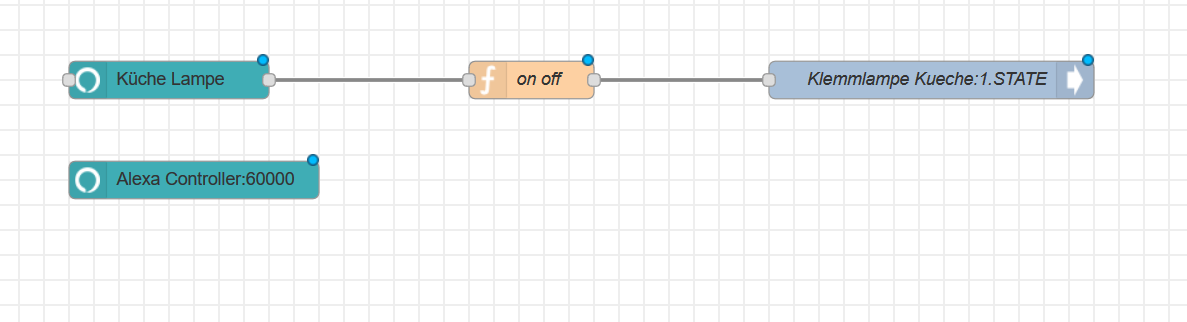
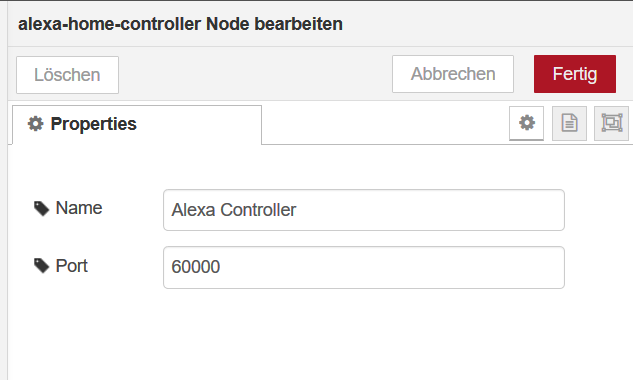
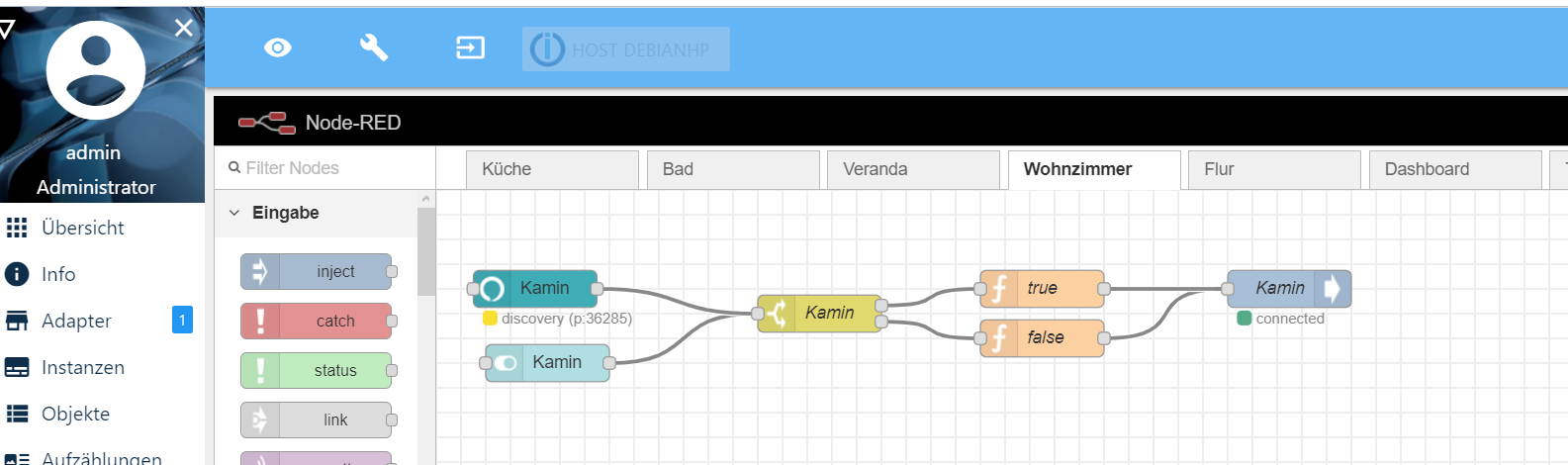
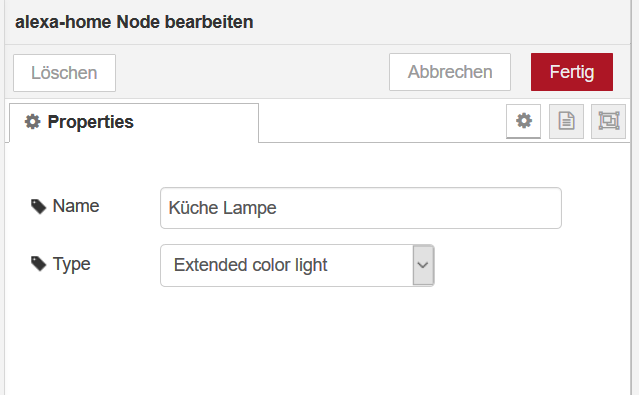
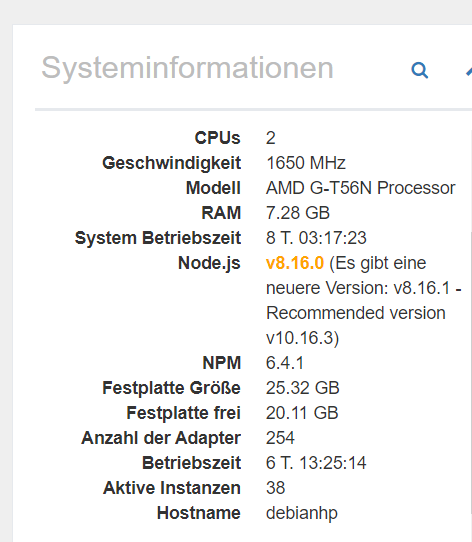
    Bild 001.png
    Bild 002.png
    Bild 3.png

    Vielen Dank für deine Antwort. Und wie hast du den On / Off Switch hinbekommen?

    V Offline
    V Offline
    vepman
    wrote on last edited by vepman
    #11

    @Modjo
    genau wie @Jan1 es schon richtig sagte.
    Geht wahrscheinlich einfacher, aber ich bin node-red-Anfänger:

    let state = msg.payload.on;
    let out = "";
    if(state == false){
    output = "0";
    }else{
    state = true;
    output = "1"
    }
    return { "payload":output };
    
    1 Reply Last reply
    0
    • V vepman

      @TraceFinder
      So läuft es bei mir.
      Als Router habe eine Fritzbox, aber den Port nicht extra freigegeben.
      Sogar beim ersten Durchlauf werden alle Geräte gefunden.
      Das klappte bei alexa-local nie sofort.
      Dir Flows mit alexa-local hatte ich alle deaktiviert, sonst hätte es ein heiloses Chaos gegeben.

      T Offline
      T Offline
      TraceFinder
      wrote on last edited by TraceFinder
      #12

      @vepman Welche Alexa läuft bei dir Revision1 oder 2 oder ...?
      Bei Mir war es ein Echo Dot2, der lief vorher mit dem local package.
      Nochmal die Frage: Das alte node-red-contrib-alexa-local und die Flows hast du gelöscht/deinstalliert?

      V 1 Reply Last reply
      0
      • T TraceFinder

        @vepman Welche Alexa läuft bei dir Revision1 oder 2 oder ...?
        Bei Mir war es ein Echo Dot2, der lief vorher mit dem local package.
        Nochmal die Frage: Das alte node-red-contrib-alexa-local und die Flows hast du gelöscht/deinstalliert?

        V Offline
        V Offline
        vepman
        wrote on last edited by
        #13

        @TraceFinder
        Was meinst du mit alexa Rev 1 oder 2?
        Doppelklick auf den Tab des alten Flows und dann deaktivieren.
        In den alten Flows die kompletten nodes kopieren, in neue Flows einfügen und alexa-local durch alexa-home ersetzen.
        Ich habe nur Echo dots 2. Gen.

        T 1 Reply Last reply
        0
        • V vepman

          @TraceFinder
          Was meinst du mit alexa Rev 1 oder 2?
          Doppelklick auf den Tab des alten Flows und dann deaktivieren.
          In den alten Flows die kompletten nodes kopieren, in neue Flows einfügen und alexa-local durch alexa-home ersetzen.
          Ich habe nur Echo dots 2. Gen.

          T Offline
          T Offline
          TraceFinder
          wrote on last edited by
          #14

          @vepman Was meinst du mit alexa Rev 1 oder 2? Ich habe nur Echo dots 2. Gen
          => Ja genau das hatte ich gemeint. :blush: So einen habe ich auch,

          Die alten Flows habe ich jetzt deaktiviert, den Neuen entsprechend erstellt. => Deploy => Gerätesuche via alexa.amazon.de => Leider wird bei mir nix gefunden ... :cry:

          Ich habe bei mir jetzt noch beide nodes installiert:
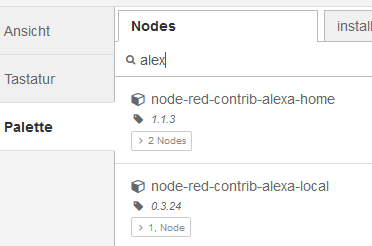
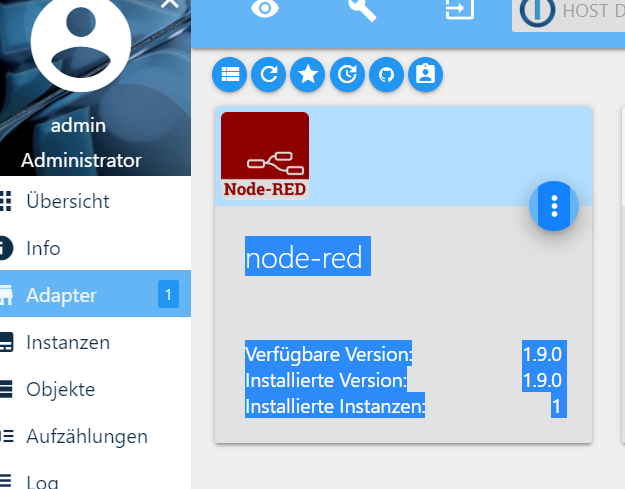
          6f60fdcb-bf28-4b7a-be2f-4c587d82e5e8-grafik.png

          Ist das bei dir auch der Fall?
          Den "neuen" node-red-contrib-alexa-home habe ich, wie von dir beschrieben einfach "nur" installiert und die defaults bestehen lassen. Muss man da sonst noch etwas machen?

          V 1 Reply Last reply
          0
          • T Offline
            T Offline
            TraceFinder
            wrote on last edited by
            #15

            @vepman Kannst du vielleicht auch noch einmal kurz schauen welche Version der Gerätesoftware dein Echo dot Gen2 hat. Meine Firmware Version lautet: "644580520"

            V 1 Reply Last reply
            0
            • T TraceFinder

              @vepman Kannst du vielleicht auch noch einmal kurz schauen welche Version der Gerätesoftware dein Echo dot Gen2 hat. Meine Firmware Version lautet: "644580520"

              V Offline
              V Offline
              vepman
              wrote on last edited by
              #16

              @TraceFinder
              Alle dots haben 641575220

              1 Reply Last reply
              0
              • T TraceFinder

                @vepman Was meinst du mit alexa Rev 1 oder 2? Ich habe nur Echo dots 2. Gen
                => Ja genau das hatte ich gemeint. :blush: So einen habe ich auch,

                Die alten Flows habe ich jetzt deaktiviert, den Neuen entsprechend erstellt. => Deploy => Gerätesuche via alexa.amazon.de => Leider wird bei mir nix gefunden ... :cry:

                Ich habe bei mir jetzt noch beide nodes installiert:
                6f60fdcb-bf28-4b7a-be2f-4c587d82e5e8-grafik.png

                Ist das bei dir auch der Fall?
                Den "neuen" node-red-contrib-alexa-home habe ich, wie von dir beschrieben einfach "nur" installiert und die defaults bestehen lassen. Muss man da sonst noch etwas machen?

                V Offline
                V Offline
                vepman
                wrote on last edited by
                #17

                @TraceFinder

                hier mal ein funktionierender flow, der bei mir garantiert läuft.
                Natürlich muss der iobroker-out node angepasst werden.
                Also:
                Flow erstellen, Import über die Zwischenablage, iobroker-out anpasssen, Name von Küche Lampe ändern, Alexa App oder Dot sagen, dass neue Geräte gesucht werden sollen. Fertig!

                [
                    {
                        "id": "fde342e9.40c8d",
                        "type": "ioBroker out",
                        "z": "c3be1355.09012",
                        "name": "Klemmlampe Kueche:1.STATE",
                        "topic": "hm-rpc.0.KEQ4445555.1.STATE",
                        "ack": "false",
                        "autoCreate": "false",
                        "x": 710,
                        "y": 140,
                        "wires": []
                    },
                    {
                        "id": "a51022fb.348818",
                        "type": "alexa-home",
                        "z": "c3be1355.09012",
                        "devicename": "Küche Lampe",
                        "devicetype": "Extended color light",
                        "x": 100,
                        "y": 140,
                        "wires": [
                            [
                                "2993e794.5cb66"
                            ]
                        ]
                    },
                    {
                        "id": "2993e794.5cb66",
                        "type": "function",
                        "z": "c3be1355.09012",
                        "name": "on off",
                        "func": "let state = msg.payload.on;\nlet out = \"\";\n\nif(state == false){\noutput = \"0\";\n}else{\nstate = true;\noutput = \"1\"\n}\nreturn { \"payload\":output };",
                        "outputs": 1,
                        "noerr": 0,
                        "x": 390,
                        "y": 140,
                        "wires": [
                            [
                                "fde342e9.40c8d"
                            ]
                        ]
                    },
                    {
                        "id": "f549e69e.ccbe28",
                        "type": "alexa-home-controller",
                        "z": "c3be1355.09012",
                        "controllername": "Alexa Controller",
                        "port": 60000,
                        "x": 120,
                        "y": 220,
                        "wires": []
                    }
                ]
                
                ? 1 Reply Last reply
                0
                • J Offline
                  J Offline
                  Jibbo
                  wrote on last edited by Jibbo
                  #18

                  Hey Leute,
                  seit vorgestern funktionierten meine Nodes von "node-red-contrib-alexa-local" und "node-red-contrib-alexa-home" gar nicht mehr.

                  Hier ist meine Lösung dazu:
                  Ich benutze zwei Echo Dot 2nd Gen.(Firmware: 644580520)
                  Ich habe gelesen das Amazon etwas am Discovery verändert hat und das nur noch über Port 80 läuft.
                  Zusätzlich habe ich meine Lösung mit 44 Nodes getestet.

                  Alexa Home

                  Alexa Local

                  Hier ist mein Auszug davon:


                  So Here is my Workaround/ Fix for me

                  My System runs on IoBroker with a Node Red instance.
                  I Use this node Red Module : https://flows.nodered.org/node/node-red-contrib-amazon-echo
                  This Module works local without any Cloud Connection.

                  But i could not assign Port 80 to the "Amazon Echo Hub" from the new Module.
                  So i routed my Port 80 tcp and udp to another Port.(In my Case 1880, but you can choose whatever you want) In fact you should use another Port like 1890 because 1880 is the default Node Red Port.

                  Here´s an Manual for IP Table Routing:
                  https://o7planning.org/de/11363/redirect-port-80-443-auf-ubuntu-server-mit-iptables
                  If you want to save at the end again (Beacuse of TCP and UDP), this is the Command: sudo iptables-save

                  After this I created a "Amazon Echo Hub" ,set the Hub to the Routed Port and replaced my Nodes with the new ones.
                  Connected all Nodes to the Hub and deployed my Flow.

                  That´s it . After that I started the Discover and all Devices were found again.

                  Hope it helps some people.

                  Hoffe es hilft euch

                  T 1 Reply Last reply
                  0
                  • J Jibbo

                    Hey Leute,
                    seit vorgestern funktionierten meine Nodes von "node-red-contrib-alexa-local" und "node-red-contrib-alexa-home" gar nicht mehr.

                    Hier ist meine Lösung dazu:
                    Ich benutze zwei Echo Dot 2nd Gen.(Firmware: 644580520)
                    Ich habe gelesen das Amazon etwas am Discovery verändert hat und das nur noch über Port 80 läuft.
                    Zusätzlich habe ich meine Lösung mit 44 Nodes getestet.

                    Alexa Home

                    Alexa Local

                    Hier ist mein Auszug davon:


                    So Here is my Workaround/ Fix for me

                    My System runs on IoBroker with a Node Red instance.
                    I Use this node Red Module : https://flows.nodered.org/node/node-red-contrib-amazon-echo
                    This Module works local without any Cloud Connection.

                    But i could not assign Port 80 to the "Amazon Echo Hub" from the new Module.
                    So i routed my Port 80 tcp and udp to another Port.(In my Case 1880, but you can choose whatever you want) In fact you should use another Port like 1890 because 1880 is the default Node Red Port.

                    Here´s an Manual for IP Table Routing:
                    https://o7planning.org/de/11363/redirect-port-80-443-auf-ubuntu-server-mit-iptables
                    If you want to save at the end again (Beacuse of TCP and UDP), this is the Command: sudo iptables-save

                    After this I created a "Amazon Echo Hub" ,set the Hub to the Routed Port and replaced my Nodes with the new ones.
                    Connected all Nodes to the Hub and deployed my Flow.

                    That´s it . After that I started the Discover and all Devices were found again.

                    Hope it helps some people.

                    Hoffe es hilft euch

                    T Offline
                    T Offline
                    TraceFinder
                    wrote on last edited by TraceFinder
                    #19

                    @Jibbo said in Alexa schaltet nicht mehr meine Node red flows.:

                    So i routed my Port 80 tcp and udp to another Port.

                    Damit ich das richtig verstehe: Das ReRouting musste in meinem Fall auf dem Raspberry Pi erfolgen, auf dem bei mir der ioBroker und nodeRed läuft?
                    (Also keine Portweiterleitung z.B. auf der Fritzbox, o.ä.)

                    J 1 Reply Last reply
                    0
                    • T TraceFinder

                      @Jibbo said in Alexa schaltet nicht mehr meine Node red flows.:

                      So i routed my Port 80 tcp and udp to another Port.

                      Damit ich das richtig verstehe: Das ReRouting musste in meinem Fall auf dem Raspberry Pi erfolgen, auf dem bei mir der ioBroker und nodeRed läuft?
                      (Also keine Portweiterleitung z.B. auf der Fritzbox, o.ä.)

                      J Offline
                      J Offline
                      Jibbo
                      wrote on last edited by Jibbo
                      #20

                      @TraceFinder
                      Da es viele verschiedene Seiten mit dem gleichen Problem gibt, habe ich ein Discord gemacht um alles zu vereinfachen.

                      Hier wird die Anleitung aktualisiert.

                      https://discord.gg/Turn7Mm

                      aber um deine Frage zu benatworten:
                      Ja das ist eine umleitung auf dem pi.
                      Hat nichts mit Fritzbox oder so zu tun.

                      1 Reply Last reply
                      0
                      • V vepman

                        @TraceFinder

                        hier mal ein funktionierender flow, der bei mir garantiert läuft.
                        Natürlich muss der iobroker-out node angepasst werden.
                        Also:
                        Flow erstellen, Import über die Zwischenablage, iobroker-out anpasssen, Name von Küche Lampe ändern, Alexa App oder Dot sagen, dass neue Geräte gesucht werden sollen. Fertig!

                        [
                            {
                                "id": "fde342e9.40c8d",
                                "type": "ioBroker out",
                                "z": "c3be1355.09012",
                                "name": "Klemmlampe Kueche:1.STATE",
                                "topic": "hm-rpc.0.KEQ4445555.1.STATE",
                                "ack": "false",
                                "autoCreate": "false",
                                "x": 710,
                                "y": 140,
                                "wires": []
                            },
                            {
                                "id": "a51022fb.348818",
                                "type": "alexa-home",
                                "z": "c3be1355.09012",
                                "devicename": "Küche Lampe",
                                "devicetype": "Extended color light",
                                "x": 100,
                                "y": 140,
                                "wires": [
                                    [
                                        "2993e794.5cb66"
                                    ]
                                ]
                            },
                            {
                                "id": "2993e794.5cb66",
                                "type": "function",
                                "z": "c3be1355.09012",
                                "name": "on off",
                                "func": "let state = msg.payload.on;\nlet out = \"\";\n\nif(state == false){\noutput = \"0\";\n}else{\nstate = true;\noutput = \"1\"\n}\nreturn { \"payload\":output };",
                                "outputs": 1,
                                "noerr": 0,
                                "x": 390,
                                "y": 140,
                                "wires": [
                                    [
                                        "fde342e9.40c8d"
                                    ]
                                ]
                            },
                            {
                                "id": "f549e69e.ccbe28",
                                "type": "alexa-home-controller",
                                "z": "c3be1355.09012",
                                "controllername": "Alexa Controller",
                                "port": 60000,
                                "x": 120,
                                "y": 220,
                                "wires": []
                            }
                        ]
                        
                        ? Offline
                        ? Offline
                        A Former User
                        wrote on last edited by
                        #21

                        @vepman sagte in Alexa schaltet nicht mehr meine Node red flows.:

                        @TraceFinder

                        hier mal ein funktionierender flow, der bei mir garantiert läuft.
                        Natürlich muss der iobroker-out node angepasst werden.
                        Also:
                        Flow erstellen, Import über die Zwischenablage, iobroker-out anpasssen, Name von Küche Lampe ändern, Alexa App oder Dot sagen, dass neue Geräte gesucht werden sollen. Fertig!

                        [
                            {
                                "id": "fde342e9.40c8d",
                                "type": "ioBroker out",
                                "z": "c3be1355.09012",
                                "name": "Klemmlampe Kueche:1.STATE",
                                "topic": "hm-rpc.0.KEQ4445555.1.STATE",
                                "ack": "false",
                                "autoCreate": "false",
                                "x": 710,
                                "y": 140,
                                "wires": []
                            },
                            {
                                "id": "a51022fb.348818",
                                "type": "alexa-home",
                                "z": "c3be1355.09012",
                                "devicename": "Küche Lampe",
                                "devicetype": "Extended color light",
                                "x": 100,
                                "y": 140,
                                "wires": [
                                    [
                                        "2993e794.5cb66"
                                    ]
                                ]
                            },
                            {
                                "id": "2993e794.5cb66",
                                "type": "function",
                                "z": "c3be1355.09012",
                                "name": "on off",
                                "func": "let state = msg.payload.on;\nlet out = \"\";\n\nif(state == false){\noutput = \"0\";\n}else{\nstate = true;\noutput = \"1\"\n}\nreturn { \"payload\":output };",
                                "outputs": 1,
                                "noerr": 0,
                                "x": 390,
                                "y": 140,
                                "wires": [
                                    [
                                        "fde342e9.40c8d"
                                    ]
                                ]
                            },
                            {
                                "id": "f549e69e.ccbe28",
                                "type": "alexa-home-controller",
                                "z": "c3be1355.09012",
                                "controllername": "Alexa Controller",
                                "port": 60000,
                                "x": 120,
                                "y": 220,
                                "wires": []
                            }
                        ]
                        

                        Hallo @vepman ,
                        ich habe deinen Flow importiert, aber leider nach wie vor ein Problem.
                        Der Sonoff schaltet ein, aber nicht aus.
                        Was kann ich tun?

                        V 1 Reply Last reply
                        0
                        • ? A Former User

                          @vepman sagte in Alexa schaltet nicht mehr meine Node red flows.:

                          @TraceFinder

                          hier mal ein funktionierender flow, der bei mir garantiert läuft.
                          Natürlich muss der iobroker-out node angepasst werden.
                          Also:
                          Flow erstellen, Import über die Zwischenablage, iobroker-out anpasssen, Name von Küche Lampe ändern, Alexa App oder Dot sagen, dass neue Geräte gesucht werden sollen. Fertig!

                          [
                              {
                                  "id": "fde342e9.40c8d",
                                  "type": "ioBroker out",
                                  "z": "c3be1355.09012",
                                  "name": "Klemmlampe Kueche:1.STATE",
                                  "topic": "hm-rpc.0.KEQ4445555.1.STATE",
                                  "ack": "false",
                                  "autoCreate": "false",
                                  "x": 710,
                                  "y": 140,
                                  "wires": []
                              },
                              {
                                  "id": "a51022fb.348818",
                                  "type": "alexa-home",
                                  "z": "c3be1355.09012",
                                  "devicename": "Küche Lampe",
                                  "devicetype": "Extended color light",
                                  "x": 100,
                                  "y": 140,
                                  "wires": [
                                      [
                                          "2993e794.5cb66"
                                      ]
                                  ]
                              },
                              {
                                  "id": "2993e794.5cb66",
                                  "type": "function",
                                  "z": "c3be1355.09012",
                                  "name": "on off",
                                  "func": "let state = msg.payload.on;\nlet out = \"\";\n\nif(state == false){\noutput = \"0\";\n}else{\nstate = true;\noutput = \"1\"\n}\nreturn { \"payload\":output };",
                                  "outputs": 1,
                                  "noerr": 0,
                                  "x": 390,
                                  "y": 140,
                                  "wires": [
                                      [
                                          "fde342e9.40c8d"
                                      ]
                                  ]
                              },
                              {
                                  "id": "f549e69e.ccbe28",
                                  "type": "alexa-home-controller",
                                  "z": "c3be1355.09012",
                                  "controllername": "Alexa Controller",
                                  "port": 60000,
                                  "x": 120,
                                  "y": 220,
                                  "wires": []
                              }
                          ]
                          

                          Hallo @vepman ,
                          ich habe deinen Flow importiert, aber leider nach wie vor ein Problem.
                          Der Sonoff schaltet ein, aber nicht aus.
                          Was kann ich tun?

                          V Offline
                          V Offline
                          vepman
                          wrote on last edited by
                          #22

                          @Nuggelbeb sagte in Alexa schaltet nicht mehr meine Node red flows.:

                          Was kann ich tun?

                          Versuche mal false und true mit 0 und 1 zu ersetzen.
                          Dann natürlich String oder Number dazu nehmen.

                          1 Reply Last reply
                          0
                          Reply
                          • Reply as topic
                          Log in to reply
                          • Oldest to Newest
                          • Newest to Oldest
                          • Most Votes


                          Support us

                          ioBroker
                          Community Adapters
                          Donate
                          FAQ Cloud / IOT
                          HowTo: Node.js-Update
                          HowTo: Backup/Restore
                          Downloads
                          BLOG

                          694

                          Online

                          32.4k

                          Users

                          81.6k

                          Topics

                          1.3m

                          Posts
                          Community
                          Impressum | Datenschutz-Bestimmungen | Nutzungsbedingungen | Einwilligungseinstellungen
                          ioBroker Community 2014-2025
                          logo
                          • Login

                          • Don't have an account? Register

                          • Login or register to search.
                          • First post
                            Last post
                          0
                          • Home
                          • Recent
                          • Tags
                          • Unread 0
                          • Categories
                          • Unreplied
                          • Popular
                          • GitHub
                          • Docu
                          • Hilfe