



Skip to content
  • Home
  • Recent
  • Tags
  • 0 Unread 0
  • Categories
  • Unreplied
  • Popular
  • GitHub
  • Docu
  • Hilfe
Skins
  • Light
  • Brite
  • Cerulean
  • Cosmo
  • Flatly
  • Journal
  • Litera
  • Lumen
  • Lux
  • Materia
  • Minty
  • Morph
  • Pulse
  • Sandstone
  • Simplex
  • Sketchy
  • Spacelab
  • United
  • Yeti
  • Zephyr
  • Dark
  • Cyborg
  • Darkly
  • Quartz
  • Slate
  • Solar
  • Superhero
  • Vapor

  • Default (No Skin)
  • No Skin
Collapse
ioBroker Logo

Community Forum

donate donate
  1. ioBroker Community Home
  2. Deutsch
  3. ioBroker Allgemein
  4. [How-to] Node.js für ioBroker richtig updaten

NEWS

  • Monatsrückblick Januar/Februar 2026 ist online!
    BluefoxB
    Bluefox
    17
    1
    492

  • Jahresrückblick 2025 – unser neuer Blogbeitrag ist online! ✨
    BluefoxB
    Bluefox
    17
    1
    5.2k

  • Neuer Blogbeitrag: Monatsrückblick - Dezember 2025 🎄
    BluefoxB
    Bluefox
    13
    1
    1.4k

[How-to] Node.js für ioBroker richtig updaten

Scheduled Pinned Locked Moved ioBroker Allgemein
installationlinuxnodenode.jsnodejswindows
1.1k Posts 106 Posters 773.5k Views 112 Watching
  • Oldest to Newest
  • Newest to Oldest
  • Most Votes
Reply
  • Reply as topic
Log in to reply
This topic has been deleted. Only users with topic management privileges can see it.
  • ? Offline
    ? Offline
    A Former User
    wrote on last edited by A Former User
    #418

    Ja hab ich vergessen zu schreiben dass ich das auch gemacht habe im iobroker Verzeichnis.
    Hab ein zweites mal npm rebuild gemacht und jetzt ist es anscheinend weg.

    1 Reply Last reply
    0
    • MathiasJM Offline
      MathiasJM Offline
      MathiasJ
      wrote on last edited by
      #419

      IObroker auf einer frischen SD neu aufgesetzt.
      Ich habe absichtlich neu augfesetzt, damit ich zurück zu Node10.x kann, sollte Radar nicht laufen.
      Aber sogar Radar funktioniert mit Node 12.x.
      jetzt laufen alle Instanzen, die ich installiert habe unter Node 12.x und dem JS-Contoller 3.x

      IObroker auf dem NUC als VM.
      Da ich noch keine Aktoren habe, wird momentan via Radar nur der AB der Fritzbox ein- und ausgeschaltet.
      Welches Smarthome-System es letztendlich wird, weiß ich noch nicht. Vielleicht kommen auch nur Zigbee-Geräte ins Haus.

      1 Reply Last reply
      1
      • N Offline
        N Offline
        Nas007
        wrote on last edited by
        #420

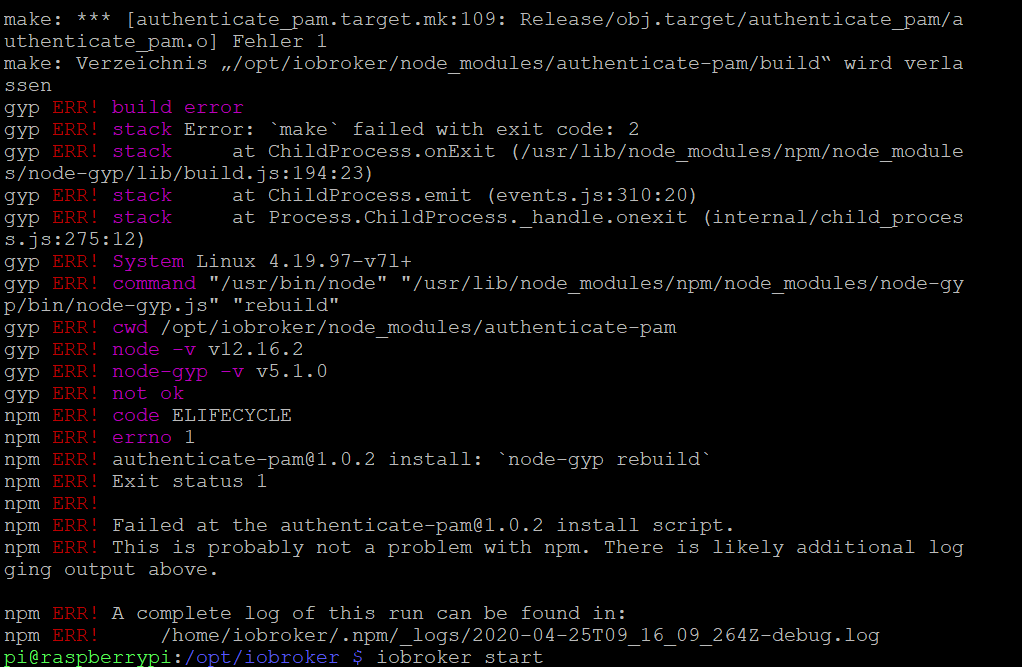
        Hallo ich hab das ganze nach Anleitung von 10.x auf 12.x upgedated. Dabei kamen folgende Fehler:
        0b5d429f-b36e-4d57-84da-d415cb0704bc-grafik.png

        Ich habe deb iobroker trotzdem gestartet und scheinbar funktioniert alles und die Version ist auch up to date.

        Was sagen diese Fehler oben aus?

        apollon77A 1 Reply Last reply
        0
        • G Offline
          G Offline
          G4l4h4d
          wrote on last edited by
          #421

          Bei mir läuft ioBroker auf einem Proxmox mit Ubuntu.
          Beim Update bekomme ich folgende Meldung.

          root@ioBroker:~# curl -sL https://deb.nodesource.com/setup_12.x | sudo -E bash -
          
          ## Installing the NodeSource Node.js 12.x repo...
          
          
          ## Populating apt-get cache...
          
          + apt-get update
          Ign:1 http://archive.ubuntu.com/ubuntu disco InRelease
          Ign:2 http://archive.ubuntu.com/ubuntu disco-updates InRelease                                           
          Hit:3 https://deb.nodesource.com/node_10.x disco InRelease                                               
          Ign:4 http://archive.ubuntu.com/ubuntu disco-security InRelease             
          Hit:5 https://repos.influxdata.com/debian disco InRelease
          Err:6 http://archive.ubuntu.com/ubuntu disco Release
            404  Not Found [IP: 91.189.88.142 80]
          Err:7 http://archive.ubuntu.com/ubuntu disco-updates Release
            404  Not Found [IP: 91.189.88.142 80]
          Err:8 http://archive.ubuntu.com/ubuntu disco-security Release
            404  Not Found [IP: 91.189.88.142 80]
          Reading package lists... Done
          E: The repository 'http://archive.ubuntu.com/ubuntu disco Release' no longer has a Release file.
          N: Updating from such a repository can't be done securely, and is therefore disabled by default.
          N: See apt-secure(8) manpage for repository creation and user configuration details.
          E: The repository 'http://archive.ubuntu.com/ubuntu disco-updates Release' no longer has a Release file.
          N: Updating from such a repository can't be done securely, and is therefore disabled by default.
          N: See apt-secure(8) manpage for repository creation and user configuration details.
          E: The repository 'http://archive.ubuntu.com/ubuntu disco-security Release' no longer has a Release file.
          N: Updating from such a repository can't be done securely, and is therefore disabled by default.
          N: See apt-secure(8) manpage for repository creation and user configuration details.
          Error executing command, exiting
          

          Wenn ich mit Node-v die Version prüfe, steht immer noch die 10.... drin.
          Kann mich jemand unterstützen?
          Danke

          apollon77A Thomas BraunT 2 Replies Last reply
          0
          • N Nas007

            Hallo ich hab das ganze nach Anleitung von 10.x auf 12.x upgedated. Dabei kamen folgende Fehler:
            0b5d429f-b36e-4d57-84da-d415cb0704bc-grafik.png

            Ich habe deb iobroker trotzdem gestartet und scheinbar funktioniert alles und die Version ist auch up to date.

            Was sagen diese Fehler oben aus?

            apollon77A Offline
            apollon77A Offline
            apollon77
            wrote on last edited by
            #422

            @Nas007 auf manchen Systemen meckern optionale Pakete beim bauen. Alles ok.

            Beitrag hat geholfen? Votet rechts unten im Beitrag :-) https://paypal.me/Apollon77 / https://github.com/sponsors/Apollon77

            • Debug-Log für Instanz einschalten? Admin -> Instanzen -> Expertenmodus -> Instanz aufklappen - Loglevel ändern
            • Logfiles auf Platte /opt/iobroker/log/… nutzen, Admin schneidet Zeilen ab
            N 1 Reply Last reply
            0
            • G G4l4h4d

              Bei mir läuft ioBroker auf einem Proxmox mit Ubuntu.
              Beim Update bekomme ich folgende Meldung.

              root@ioBroker:~# curl -sL https://deb.nodesource.com/setup_12.x | sudo -E bash -
              
              ## Installing the NodeSource Node.js 12.x repo...
              
              
              ## Populating apt-get cache...
              
              + apt-get update
              Ign:1 http://archive.ubuntu.com/ubuntu disco InRelease
              Ign:2 http://archive.ubuntu.com/ubuntu disco-updates InRelease                                           
              Hit:3 https://deb.nodesource.com/node_10.x disco InRelease                                               
              Ign:4 http://archive.ubuntu.com/ubuntu disco-security InRelease             
              Hit:5 https://repos.influxdata.com/debian disco InRelease
              Err:6 http://archive.ubuntu.com/ubuntu disco Release
                404  Not Found [IP: 91.189.88.142 80]
              Err:7 http://archive.ubuntu.com/ubuntu disco-updates Release
                404  Not Found [IP: 91.189.88.142 80]
              Err:8 http://archive.ubuntu.com/ubuntu disco-security Release
                404  Not Found [IP: 91.189.88.142 80]
              Reading package lists... Done
              E: The repository 'http://archive.ubuntu.com/ubuntu disco Release' no longer has a Release file.
              N: Updating from such a repository can't be done securely, and is therefore disabled by default.
              N: See apt-secure(8) manpage for repository creation and user configuration details.
              E: The repository 'http://archive.ubuntu.com/ubuntu disco-updates Release' no longer has a Release file.
              N: Updating from such a repository can't be done securely, and is therefore disabled by default.
              N: See apt-secure(8) manpage for repository creation and user configuration details.
              E: The repository 'http://archive.ubuntu.com/ubuntu disco-security Release' no longer has a Release file.
              N: Updating from such a repository can't be done securely, and is therefore disabled by default.
              N: See apt-secure(8) manpage for repository creation and user configuration details.
              Error executing command, exiting
              

              Wenn ich mit Node-v die Version prüfe, steht immer noch die 10.... drin.
              Kann mich jemand unterstützen?
              Danke

              apollon77A Offline
              apollon77A Offline
              apollon77
              wrote on last edited by
              #423

              @G4l4h4d Ubuntu 19.04 ist keine LTS Version und damit ist der Support ausgelaufen Siehe https://wiki.ubuntuusers.de/Disco_Dingo/

              Solltest auf 20.04 gehen.

              Bei Ubuntu immer die LTS Versionen nehmen 18.04, 20.04 uä. Bei den anderen muss man alle halbe Jahr das os updaten.

              Beitrag hat geholfen? Votet rechts unten im Beitrag :-) https://paypal.me/Apollon77 / https://github.com/sponsors/Apollon77

              • Debug-Log für Instanz einschalten? Admin -> Instanzen -> Expertenmodus -> Instanz aufklappen - Loglevel ändern
              • Logfiles auf Platte /opt/iobroker/log/… nutzen, Admin schneidet Zeilen ab
              1 Reply Last reply
              1
              • G G4l4h4d

                Bei mir läuft ioBroker auf einem Proxmox mit Ubuntu.
                Beim Update bekomme ich folgende Meldung.

                root@ioBroker:~# curl -sL https://deb.nodesource.com/setup_12.x | sudo -E bash -
                
                ## Installing the NodeSource Node.js 12.x repo...
                
                
                ## Populating apt-get cache...
                
                + apt-get update
                Ign:1 http://archive.ubuntu.com/ubuntu disco InRelease
                Ign:2 http://archive.ubuntu.com/ubuntu disco-updates InRelease                                           
                Hit:3 https://deb.nodesource.com/node_10.x disco InRelease                                               
                Ign:4 http://archive.ubuntu.com/ubuntu disco-security InRelease             
                Hit:5 https://repos.influxdata.com/debian disco InRelease
                Err:6 http://archive.ubuntu.com/ubuntu disco Release
                  404  Not Found [IP: 91.189.88.142 80]
                Err:7 http://archive.ubuntu.com/ubuntu disco-updates Release
                  404  Not Found [IP: 91.189.88.142 80]
                Err:8 http://archive.ubuntu.com/ubuntu disco-security Release
                  404  Not Found [IP: 91.189.88.142 80]
                Reading package lists... Done
                E: The repository 'http://archive.ubuntu.com/ubuntu disco Release' no longer has a Release file.
                N: Updating from such a repository can't be done securely, and is therefore disabled by default.
                N: See apt-secure(8) manpage for repository creation and user configuration details.
                E: The repository 'http://archive.ubuntu.com/ubuntu disco-updates Release' no longer has a Release file.
                N: Updating from such a repository can't be done securely, and is therefore disabled by default.
                N: See apt-secure(8) manpage for repository creation and user configuration details.
                E: The repository 'http://archive.ubuntu.com/ubuntu disco-security Release' no longer has a Release file.
                N: Updating from such a repository can't be done securely, and is therefore disabled by default.
                N: See apt-secure(8) manpage for repository creation and user configuration details.
                Error executing command, exiting
                

                Wenn ich mit Node-v die Version prüfe, steht immer noch die 10.... drin.
                Kann mich jemand unterstützen?
                Danke

                Thomas BraunT Online
                Thomas BraunT Online
                Thomas Braun
                Most Active
                wrote on last edited by Thomas Braun
                #424

                @G4l4h4d

                1. Du möchtest dich nicht als 'root' anmelden.
                2. Du möchtest eine Distribution benutzen die noch gepflegt wird.

                Linux-Werkzeugkasten:
                https://forum.iobroker.net/topic/42952/der-kleine-iobroker-linux-werkzeugkasten
                NodeJS Fixer Skript:
                https://forum.iobroker.net/topic/68035/iob-node-fix-skript
                iob_diag: curl -sLf -o diag.sh https://iobroker.net/diag.sh && bash diag.sh

                1 Reply Last reply
                0
                • MichiganM Michigan

                  Moin, ich hoffe ich bin hier richtig

                  seit dem ich eben node.js auf 12.x und aktualisiert habe kommt wenn ich ein Adapter aktualisieren möchte diese Meldung.
                  Beispiel am Ping Adapter:

                  $ ./iobroker upgrade history
                  Update history from @1.9.3 to @1.9.4
                  NPM version: 6.14.4
                  npm install iobroker.history@1.9.4 --loglevel error --prefix "/opt/iobroker" (System call)
                  
                  ╭─────────────────────────────────────────────────────────╮│                                                         ││ Manual installation of ioBroker is no longer supported  ││ on Linux, OSX and FreeBSD!                              ││ Please refer to the documentation on how to install it! ││ https://github.com/ioBroker/ioBroker/wiki/Installation  ││                                                         │╰─────────────────────────────────────────────────────────╯
                  npm ERR! code ELIFECYCLEnpm ERR! errno 100npm ERR! iobroker@2.0.3 postinstall: `node lib/install.js`npm ERR! Exit status 100npm ERR! npm ERR! Failed at the iobroker@2.0.3 postinstall script.npm ERR! This is probably not a problem with npm. There is likely additional logging output above.
                  
                  npm ERR! A complete log of this run can be found in:npm ERR!     /home/iobroker/.npm/_logs/2020-04-24T11_19_06_212Z-debug.log
                  ERROR: host.raspberrypi Cannot install iobroker.history@1.9.4: 100
                  ERROR: process exited with code 25
                  

                  Nodes zeigt er mir mit v12.16.2 aktuell an

                  wo hab ich den Fehler gemacht? :face_with_rolling_eyes:

                  es Läuft alles auf ein PI 3
                  mfg
                  Michiagn

                  M Offline
                  M Offline
                  Manolo
                  wrote on last edited by
                  #425

                  @Michigan sagte in [How-to] Node.js für ioBroker richtig updaten:

                  Moin, ich hoffe ich bin hier richtig

                  seit dem ich eben node.js auf 12.x und aktualisiert habe kommt wenn ich ein Adapter aktualisieren möchte diese Meldung.
                  Beispiel am Ping Adapter:

                  $ ./iobroker upgrade history
                  Update history from @1.9.3 to @1.9.4
                  NPM version: 6.14.4
                  npm install iobroker.history@1.9.4 --loglevel error --prefix "/opt/iobroker" (System call)
                  
                  ╭─────────────────────────────────────────────────────────╮│                                                         ││ Manual installation of ioBroker is no longer supported  ││ on Linux, OSX and FreeBSD!                              ││ Please refer to the documentation on how to install it! ││ https://github.com/ioBroker/ioBroker/wiki/Installation  ││                                                         │╰─────────────────────────────────────────────────────────╯
                  npm ERR! code ELIFECYCLEnpm ERR! errno 100npm ERR! iobroker@2.0.3 postinstall: `node lib/install.js`npm ERR! Exit status 100npm ERR! npm ERR! Failed at the iobroker@2.0.3 postinstall script.npm ERR! This is probably not a problem with npm. There is likely additional logging output above.
                  
                  npm ERR! A complete log of this run can be found in:npm ERR!     /home/iobroker/.npm/_logs/2020-04-24T11_19_06_212Z-debug.log
                  ERROR: host.raspberrypi Cannot install iobroker.history@1.9.4: 100
                  ERROR: process exited with code 25
                  

                  Nodes zeigt er mir mit v12.16.2 aktuell an

                  wo hab ich den Fehler gemacht? :face_with_rolling_eyes:

                  es Läuft alles auf ein PI 3
                  mfg
                  Michiagn

                  Hallo,
                  ich habe das gleiche Problem, bzw. den gleichen Fehler beim aktualisieren von Adaptern.
                  System ist ein Beelink J45 auf dem Debian V10.3 läuft.
                  Node V 12.16.2
                  NMP 6.14.4

                  Hat jemand dazu eine Lösung?

                  Gruß Peter

                  ioBroker auf Beelink J45, Slave auf Beelink BT3pro, Unifi Controller auf Raspi Pi 3; 4x VIS Fully Browser auf 10" und 7" Tablet; piVCCU auf 2x Raspi Pi 3 Redundanzsystem, ca. 50 HM-Geräte; Unifi USG, Switch, AP-AC-LR

                  Thomas BraunT apollon77A 2 Replies Last reply
                  0
                  • M Manolo

                    @Michigan sagte in [How-to] Node.js für ioBroker richtig updaten:

                    Moin, ich hoffe ich bin hier richtig

                    seit dem ich eben node.js auf 12.x und aktualisiert habe kommt wenn ich ein Adapter aktualisieren möchte diese Meldung.
                    Beispiel am Ping Adapter:

                    $ ./iobroker upgrade history
                    Update history from @1.9.3 to @1.9.4
                    NPM version: 6.14.4
                    npm install iobroker.history@1.9.4 --loglevel error --prefix "/opt/iobroker" (System call)
                    
                    ╭─────────────────────────────────────────────────────────╮│                                                         ││ Manual installation of ioBroker is no longer supported  ││ on Linux, OSX and FreeBSD!                              ││ Please refer to the documentation on how to install it! ││ https://github.com/ioBroker/ioBroker/wiki/Installation  ││                                                         │╰─────────────────────────────────────────────────────────╯
                    npm ERR! code ELIFECYCLEnpm ERR! errno 100npm ERR! iobroker@2.0.3 postinstall: `node lib/install.js`npm ERR! Exit status 100npm ERR! npm ERR! Failed at the iobroker@2.0.3 postinstall script.npm ERR! This is probably not a problem with npm. There is likely additional logging output above.
                    
                    npm ERR! A complete log of this run can be found in:npm ERR!     /home/iobroker/.npm/_logs/2020-04-24T11_19_06_212Z-debug.log
                    ERROR: host.raspberrypi Cannot install iobroker.history@1.9.4: 100
                    ERROR: process exited with code 25
                    

                    Nodes zeigt er mir mit v12.16.2 aktuell an

                    wo hab ich den Fehler gemacht? :face_with_rolling_eyes:

                    es Läuft alles auf ein PI 3
                    mfg
                    Michiagn

                    Hallo,
                    ich habe das gleiche Problem, bzw. den gleichen Fehler beim aktualisieren von Adaptern.
                    System ist ein Beelink J45 auf dem Debian V10.3 läuft.
                    Node V 12.16.2
                    NMP 6.14.4

                    Hat jemand dazu eine Lösung?

                    Gruß Peter

                    Thomas BraunT Online
                    Thomas BraunT Online
                    Thomas Braun
                    Most Active
                    wrote on last edited by
                    #426

                    @Manolo said in [How-to] Node.js für ioBroker richtig updaten:

                    Manual installation of ioBroker is no longer supported ││ on Linux, OSX and FreeBSD!

                    Die Adapter werden nicht per npm installiert. Nehmt die Admin-Oberfläche dafür her.

                    Linux-Werkzeugkasten:
                    https://forum.iobroker.net/topic/42952/der-kleine-iobroker-linux-werkzeugkasten
                    NodeJS Fixer Skript:
                    https://forum.iobroker.net/topic/68035/iob-node-fix-skript
                    iob_diag: curl -sLf -o diag.sh https://iobroker.net/diag.sh && bash diag.sh

                    M 1 Reply Last reply
                    0
                    • Thomas BraunT Thomas Braun

                      @Manolo said in [How-to] Node.js für ioBroker richtig updaten:

                      Manual installation of ioBroker is no longer supported ││ on Linux, OSX and FreeBSD!

                      Die Adapter werden nicht per npm installiert. Nehmt die Admin-Oberfläche dafür her.

                      M Offline
                      M Offline
                      Manolo
                      wrote on last edited by
                      #427

                      @Thomas-Braun
                      Danke für die Antwort, idR installiere ich die Adapter immer über die Admin-Oberfläche.
                      Es geht aber nicht um die Installation eines Adapters, sondern um die Aktualisierung (update).
                      Das Aktualisieren stoße ich natürlich auch im Admin Adapter an.
                      Im Fenster erscheint dann der o.g. Fehler.

                      Gruß Peter

                      ioBroker auf Beelink J45, Slave auf Beelink BT3pro, Unifi Controller auf Raspi Pi 3; 4x VIS Fully Browser auf 10" und 7" Tablet; piVCCU auf 2x Raspi Pi 3 Redundanzsystem, ca. 50 HM-Geräte; Unifi USG, Switch, AP-AC-LR

                      Thomas BraunT 1 Reply Last reply
                      0
                      • M Manolo

                        @Thomas-Braun
                        Danke für die Antwort, idR installiere ich die Adapter immer über die Admin-Oberfläche.
                        Es geht aber nicht um die Installation eines Adapters, sondern um die Aktualisierung (update).
                        Das Aktualisieren stoße ich natürlich auch im Admin Adapter an.
                        Im Fenster erscheint dann der o.g. Fehler.

                        Gruß Peter

                        Thomas BraunT Online
                        Thomas BraunT Online
                        Thomas Braun
                        Most Active
                        wrote on last edited by Thomas Braun
                        #428

                        @Manolo

                        iobroker version
                        npm -v
                        nodejs -v
                        node -v
                        

                        Linux-Werkzeugkasten:
                        https://forum.iobroker.net/topic/42952/der-kleine-iobroker-linux-werkzeugkasten
                        NodeJS Fixer Skript:
                        https://forum.iobroker.net/topic/68035/iob-node-fix-skript
                        iob_diag: curl -sLf -o diag.sh https://iobroker.net/diag.sh && bash diag.sh

                        M 1 Reply Last reply
                        0
                        • Thomas BraunT Thomas Braun

                          @Manolo

                          iobroker version
                          npm -v
                          nodejs -v
                          node -v
                          
                          M Offline
                          M Offline
                          Manolo
                          wrote on last edited by
                          #429

                          @Thomas-Braun
                          34289c8a-b17f-484a-93a6-05c9f7bc620d-grafik.png

                          ioBroker auf Beelink J45, Slave auf Beelink BT3pro, Unifi Controller auf Raspi Pi 3; 4x VIS Fully Browser auf 10" und 7" Tablet; piVCCU auf 2x Raspi Pi 3 Redundanzsystem, ca. 50 HM-Geräte; Unifi USG, Switch, AP-AC-LR

                          Thomas BraunT 1 Reply Last reply
                          0
                          • M Manolo

                            @Thomas-Braun
                            34289c8a-b17f-484a-93a6-05c9f7bc620d-grafik.png

                            Thomas BraunT Online
                            Thomas BraunT Online
                            Thomas Braun
                            Most Active
                            wrote on last edited by
                            #430

                            @Manolo
                            Ich supporte keine User, die sich als root anmelden.

                            Linux-Werkzeugkasten:
                            https://forum.iobroker.net/topic/42952/der-kleine-iobroker-linux-werkzeugkasten
                            NodeJS Fixer Skript:
                            https://forum.iobroker.net/topic/68035/iob-node-fix-skript
                            iob_diag: curl -sLf -o diag.sh https://iobroker.net/diag.sh && bash diag.sh

                            M 1 Reply Last reply
                            0
                            • Thomas BraunT Thomas Braun

                              @Manolo
                              Ich supporte keine User, die sich als root anmelden.

                              M Offline
                              M Offline
                              Manolo
                              wrote on last edited by
                              #431

                              @Thomas-Braun
                              ich war nur noch als root angemeldet, da der fixer ohne root rechte nicht laufen wollte.
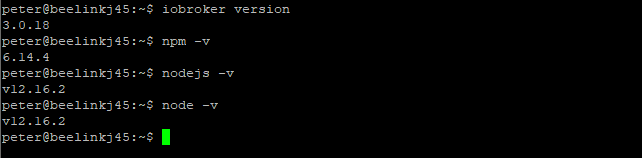
                              Seit ich gestern die js-Controller Version auf 3.x hochgezogen habe. hatte ich Probleme mit mehreren Adaptern im iobroker, vor allem mit BLE und Radar.
                              Hier die Angaben mit normalem User:
                              d199e6e5-1a04-4ad5-8101-dfe0e84d9821-grafik.png

                              ioBroker auf Beelink J45, Slave auf Beelink BT3pro, Unifi Controller auf Raspi Pi 3; 4x VIS Fully Browser auf 10" und 7" Tablet; piVCCU auf 2x Raspi Pi 3 Redundanzsystem, ca. 50 HM-Geräte; Unifi USG, Switch, AP-AC-LR


                              Thomas BraunT 1 Reply Last reply
                              0
                              • M Manolo

                                @Michigan sagte in [How-to] Node.js für ioBroker richtig updaten:

                                Moin, ich hoffe ich bin hier richtig

                                seit dem ich eben node.js auf 12.x und aktualisiert habe kommt wenn ich ein Adapter aktualisieren möchte diese Meldung.
                                Beispiel am Ping Adapter:

                                $ ./iobroker upgrade history
                                Update history from @1.9.3 to @1.9.4
                                NPM version: 6.14.4
                                npm install iobroker.history@1.9.4 --loglevel error --prefix "/opt/iobroker" (System call)
                                
                                ╭─────────────────────────────────────────────────────────╮│                                                         ││ Manual installation of ioBroker is no longer supported  ││ on Linux, OSX and FreeBSD!                              ││ Please refer to the documentation on how to install it! ││ https://github.com/ioBroker/ioBroker/wiki/Installation  ││                                                         │╰─────────────────────────────────────────────────────────╯
                                npm ERR! code ELIFECYCLEnpm ERR! errno 100npm ERR! iobroker@2.0.3 postinstall: `node lib/install.js`npm ERR! Exit status 100npm ERR! npm ERR! Failed at the iobroker@2.0.3 postinstall script.npm ERR! This is probably not a problem with npm. There is likely additional logging output above.
                                
                                npm ERR! A complete log of this run can be found in:npm ERR!     /home/iobroker/.npm/_logs/2020-04-24T11_19_06_212Z-debug.log
                                ERROR: host.raspberrypi Cannot install iobroker.history@1.9.4: 100
                                ERROR: process exited with code 25
                                

                                Nodes zeigt er mir mit v12.16.2 aktuell an

                                wo hab ich den Fehler gemacht? :face_with_rolling_eyes:

                                es Läuft alles auf ein PI 3
                                mfg
                                Michiagn

                                Hallo,
                                ich habe das gleiche Problem, bzw. den gleichen Fehler beim aktualisieren von Adaptern.
                                System ist ein Beelink J45 auf dem Debian V10.3 läuft.
                                Node V 12.16.2
                                NMP 6.14.4

                                Hat jemand dazu eine Lösung?

                                Gruß Peter

                                apollon77A Offline
                                apollon77A Offline
                                apollon77
                                wrote on last edited by
                                #432

                                @Manolo Installation fixer laufen lassen bitte

                                Beitrag hat geholfen? Votet rechts unten im Beitrag :-) https://paypal.me/Apollon77 / https://github.com/sponsors/Apollon77

                                • Debug-Log für Instanz einschalten? Admin -> Instanzen -> Expertenmodus -> Instanz aufklappen - Loglevel ändern
                                • Logfiles auf Platte /opt/iobroker/log/… nutzen, Admin schneidet Zeilen ab
                                M 1 Reply Last reply
                                0
                                • apollon77A apollon77

                                  @Manolo Installation fixer laufen lassen bitte

                                  M Offline
                                  M Offline
                                  Manolo
                                  wrote on last edited by
                                  #433

                                  @apollon77
                                  Reicht das mit dem Befehl: "iobroker fix" ?

                                  ioBroker auf Beelink J45, Slave auf Beelink BT3pro, Unifi Controller auf Raspi Pi 3; 4x VIS Fully Browser auf 10" und 7" Tablet; piVCCU auf 2x Raspi Pi 3 Redundanzsystem, ca. 50 HM-Geräte; Unifi USG, Switch, AP-AC-LR

                                  apollon77A 1 Reply Last reply
                                  0
                                  • M Manolo

                                    @apollon77
                                    Reicht das mit dem Befehl: "iobroker fix" ?

                                    apollon77A Offline
                                    apollon77A Offline
                                    apollon77
                                    wrote on last edited by
                                    #434

                                    @Manolo sollte.

                                    Beitrag hat geholfen? Votet rechts unten im Beitrag :-) https://paypal.me/Apollon77 / https://github.com/sponsors/Apollon77

                                    • Debug-Log für Instanz einschalten? Admin -> Instanzen -> Expertenmodus -> Instanz aufklappen - Loglevel ändern
                                    • Logfiles auf Platte /opt/iobroker/log/… nutzen, Admin schneidet Zeilen ab
                                    1 Reply Last reply
                                    0
                                    • M Offline
                                      M Offline
                                      Manolo
                                      wrote on last edited by
                                      #435

                                      Jetzt weiß ich auch wieder warum ich als "root" eingeloggt war:
                                      "Leider darf der Benutzer peter »/usr/bin/iobroker fix« als root auf beelinkj45 nicht ausführen."

                                      ioBroker auf Beelink J45, Slave auf Beelink BT3pro, Unifi Controller auf Raspi Pi 3; 4x VIS Fully Browser auf 10" und 7" Tablet; piVCCU auf 2x Raspi Pi 3 Redundanzsystem, ca. 50 HM-Geräte; Unifi USG, Switch, AP-AC-LR

                                      1 Reply Last reply
                                      0
                                      • M Manolo

                                        @Thomas-Braun
                                        ich war nur noch als root angemeldet, da der fixer ohne root rechte nicht laufen wollte.
                                        Seit ich gestern die js-Controller Version auf 3.x hochgezogen habe. hatte ich Probleme mit mehreren Adaptern im iobroker, vor allem mit BLE und Radar.
                                        Hier die Angaben mit normalem User:
                                        d199e6e5-1a04-4ad5-8101-dfe0e84d9821-grafik.png

                                        Thomas BraunT Online
                                        Thomas BraunT Online
                                        Thomas Braun
                                        Most Active
                                        wrote on last edited by Thomas Braun
                                        #436

                                        @Manolo said in [How-to] Node.js für ioBroker richtig updaten:

                                        @Thomas-Braun
                                        ich war nur noch als root angemeldet, da der fixer ohne root rechte nicht laufen wollte.

                                        In einer senkrechten und nicht verfummelten Installation funktioniert

                                        iobroker fix
                                        

                                        auch von einem regulären User. Und WENN man erweiterte Rechte benötigt, dann hängt man nur ein

                                        sudo
                                        

                                        vor die Befehle. Jedenfalls auf aktuellen Debian-basierten Distributionen.

                                        Linux-Werkzeugkasten:
                                        https://forum.iobroker.net/topic/42952/der-kleine-iobroker-linux-werkzeugkasten
                                        NodeJS Fixer Skript:
                                        https://forum.iobroker.net/topic/68035/iob-node-fix-skript
                                        iob_diag: curl -sLf -o diag.sh https://iobroker.net/diag.sh && bash diag.sh

                                        M 1 Reply Last reply
                                        0
                                        • Thomas BraunT Thomas Braun

                                          @Manolo said in [How-to] Node.js für ioBroker richtig updaten:

                                          @Thomas-Braun
                                          ich war nur noch als root angemeldet, da der fixer ohne root rechte nicht laufen wollte.

                                          In einer senkrechten und nicht verfummelten Installation funktioniert

                                          iobroker fix
                                          

                                          auch von einem regulären User. Und WENN man erweiterte Rechte benötigt, dann hängt man nur ein

                                          sudo
                                          

                                          vor die Befehle. Jedenfalls auf aktuellen Debian-basierten Distributionen.

                                          M Offline
                                          M Offline
                                          Manolo
                                          wrote on last edited by
                                          #437

                                          @Thomas-Braun
                                          Bei meiner Installation leider nicht.
                                          Auch sudo vor dem Befehl funktioniert da nicht.
                                          Ich habe vor ca. 6 Monaten iobroker komplett neu auf dem Beelink J45 Installiert, alles aus der normalen Userebene (ohen Root-Rechte heraus).
                                          Musste einiges verbiegen auf dem Beelink da ursprünglich ein Win10 drauf war.
                                          Ich hatte auch bis vor Kurzem keine Probleme mit den Rechten, erst seit dem Update auf die admin 4.x Version.
                                          Das seltsame daran ist, dass im Multihost System noch ein Beelink BT3 Pro läuft, und mit dem habe ich absolut keine Probleme mit den Rechten.
                                          Bleibt mir wohl nichts anderes übrig als den ganzen iobroker nochmal komplett neu aufzusetzen.

                                          Das Problem mit der Aktualisierung der Adapter hatte ich vor dem update auf JS-Controller v3.x auch nicht.

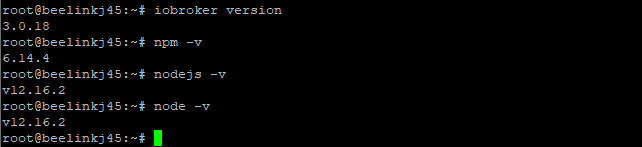
                                          BTW: Der Installation Fixer hat auch keine Verbesserung gebracht

                                          ioBroker auf Beelink J45, Slave auf Beelink BT3pro, Unifi Controller auf Raspi Pi 3; 4x VIS Fully Browser auf 10" und 7" Tablet; piVCCU auf 2x Raspi Pi 3 Redundanzsystem, ca. 50 HM-Geräte; Unifi USG, Switch, AP-AC-LR
                                          Thomas BraunT 1 Reply Last reply
                                          0
                                          Reply
                                          • Reply as topic
                                          Log in to reply
                                          • Oldest to Newest
                                          • Newest to Oldest
                                          • Most Votes


                                          Support us

                                          ioBroker
                                          Community Adapters
                                          Donate
                                          FAQ Cloud / IOT
                                          HowTo: Node.js-Update
                                          HowTo: Backup/Restore
                                          Downloads
                                          BLOG

                                          262

                                          Online

                                          32.7k

                                          Users

                                          82.5k

                                          Topics

                                          1.3m

                                          Posts
                                          Community
                                          Impressum | Datenschutz-Bestimmungen | Nutzungsbedingungen | Einwilligungseinstellungen
                                          ioBroker Community 2014-2025
                                          logo
                                          • Login

                                          • Don't have an account? Register

                                          • Login or register to search.
                                          • First post
                                            Last post
                                          0
                                          • Home
                                          • Recent
                                          • Tags
                                          • Unread 0
                                          • Categories
                                          • Unreplied
                                          • Popular
                                          • GitHub
                                          • Docu
                                          • Hilfe