Skip to content
  • Home
  • Recent
  • Tags
  • 0 Unread 0
  • Categories
  • Unreplied
  • Popular
  • GitHub
  • Docu
  • Hilfe
Skins
  • Light
  • Brite
  • Cerulean
  • Cosmo
  • Flatly
  • Journal
  • Litera
  • Lumen
  • Lux
  • Materia
  • Minty
  • Morph
  • Pulse
  • Sandstone
  • Simplex
  • Sketchy
  • Spacelab
  • United
  • Yeti
  • Zephyr
  • Dark
  • Cyborg
  • Darkly
  • Quartz
  • Slate
  • Solar
  • Superhero
  • Vapor

  • Default (No Skin)
  • No Skin
Collapse
ioBroker Logo

Community Forum

donate donate
  1. ioBroker Community Home
  2. Deutsch
  3. Skripten / Logik
  4. Bild von Kamera per Pushover senden

NEWS

  • Jahresrückblick 2025 – unser neuer Blogbeitrag ist online! ✨
    BluefoxB
    Bluefox
    17
    1
    3.2k

  • Neuer Blogbeitrag: Monatsrückblick - Dezember 2025 🎄
    BluefoxB
    Bluefox
    13
    1
    1.1k

  • Weihnachtsangebot 2025! 🎄
    BluefoxB
    Bluefox
    25
    1
    2.4k

Bild von Kamera per Pushover senden

Scheduled Pinned Locked Moved Skripten / Logik
54 Posts 18 Posters 14.0k Views 12 Watching
  • Oldest to Newest
  • Newest to Oldest
  • Most Votes
Reply
  • Reply as topic
Log in to reply
This topic has been deleted. Only users with topic management privileges can see it.
  • D Offline
    D Offline
    der-eine
    wrote on last edited by
    #19

    Wenn ich das Bild am Speicherort lösche und das Skript neu Anstoße legt er das Bild wieder genau da hin…

    1 Reply Last reply
    0
    • D Offline
      D Offline
      der-eine
      wrote on last edited by
      #20

      @Brainbug:

      Dann liegt es wohl am Multihost, dass das Bild nicht dort gespeichert wird wo es wieder versendet werden soll? `

      Du hast recht, dass Foto war wo anders bzw Telegram war auf dem Slave und ich dachte sie wären beide auf dem Master. Somit sucht er wohl auf dem Slave nach dem Bild das aber auf dem Master liegt. <emoji seq="1f926-1f3fb-2642">🤦🏻‍♂️</emoji>

      Danke Dir!

      1 Reply Last reply
      0
      • D Offline
        D Offline
        dan11hh
        wrote on last edited by
        #21

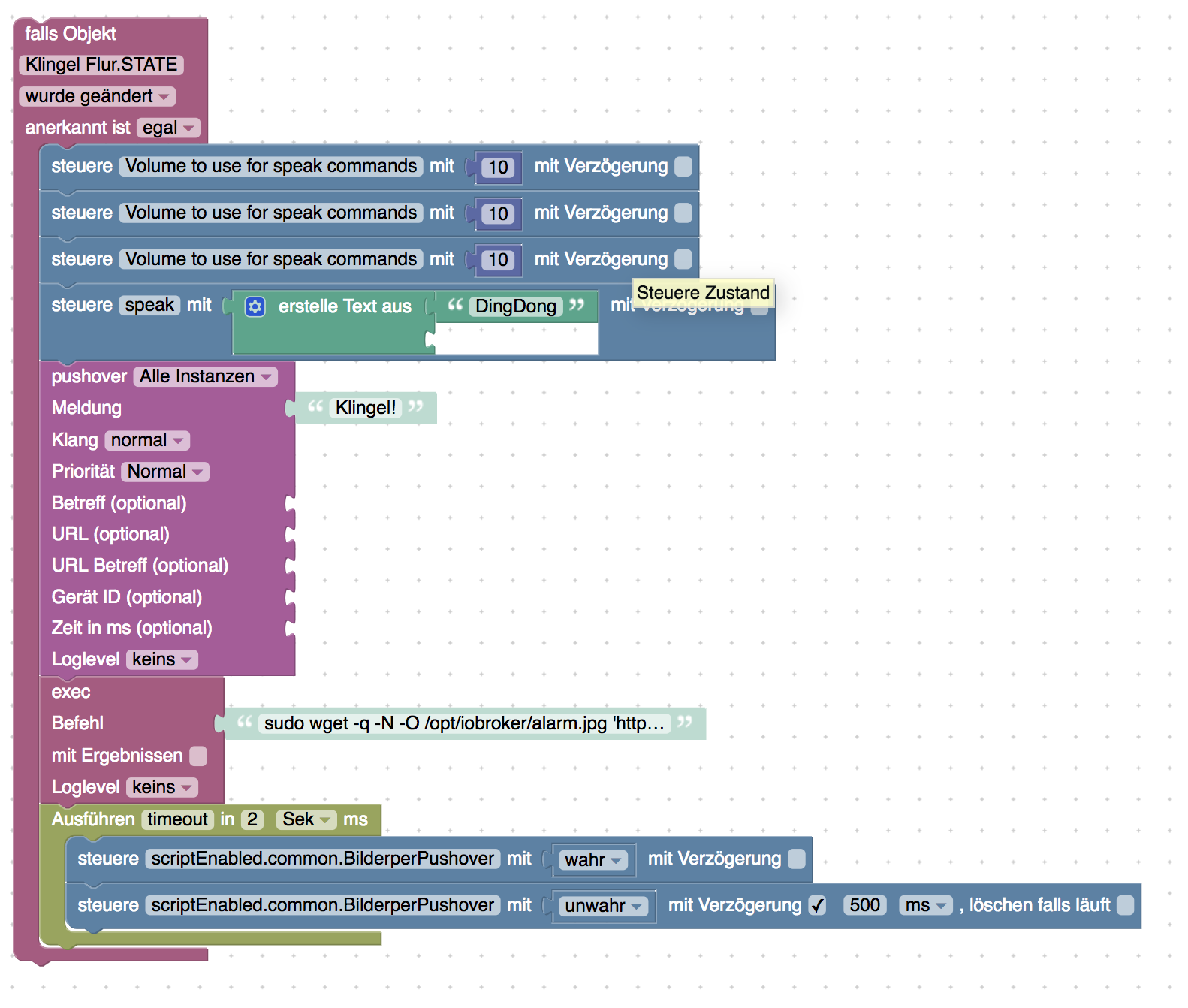
        Das Problem welches in nun noch mit meinem Blockly Skript habe, ist dass nur unregelmäßig ein Bild geschickt wird. Ich vermute, dass liegt daran, dass sobald öfter die Klingel gedrückt wird (man hört sie nicht wirklich), das Skript über den Trigger erneut durchgeführt wird und es dadurch zu Verzögerungen bei der Abspeicherung des BIlds kommt. Wie kann ich den Trigger beenden? Oder kann ich irgendwie eine Variable hochzählen, sodass der Trigger nur einmalig innerhalb einer X Zeit ausgeführt wird. Also bspw. nur alle 10 Sekunden geklingelt werden kann? 17266_bildschirmfoto_2019-01-29_um_22.45.54.png
        1 Reply Last reply
        0
        • H Offline
          H Offline
          homecineplexx
          wrote on last edited by
          #22

          Ich bin im Besitz einer hikam a7 die allerdings keinen snapshot kann.

          Besteht die Möglichkeit mit einem Tool den stream abzugreifen und davon einen Snapshot zu machen um das Bild zu verschicken?

          Jemand eine Idee?

          1 Reply Last reply
          0
          • ? Offline
            ? Offline
            A Former User
            wrote on last edited by
            #23

            @dan11hh

            Deine Lösung nennt sich entprellen: viewtopic.php?p=219749&sid=a8441d41af5f … 6f#p219749

            1 Reply Last reply
            0
            • D Offline
              D Offline
              danw
              wrote on last edited by
              #24

              @homecineplexx:

              Ich bin im Besitz einer hikam a7 die allerdings keinen snapshot kann.

              Besteht die Möglichkeit mit einem Tool den stream abzugreifen und davon einen Snapshot zu machen um das Bild zu verschicken?

              Jemand eine Idee? `

              Auch nicht über ONVIF?

              Ich nutze dafür https://github.com/futomi/node-onvif

              It's not a Bug, it's a Feature

              1 Reply Last reply
              0
              • H Offline
                H Offline
                homecineplexx
                wrote on last edited by
                #25

                @danw:

                @homecineplexx:

                Ich bin im Besitz einer hikam a7 die allerdings keinen snapshot kann.

                Besteht die Möglichkeit mit einem Tool den stream abzugreifen und davon einen Snapshot zu machen um das Bild zu verschicken?

                Jemand eine Idee? `

                Auch nicht über ONVIF?

                Ich nutze dafür https://github.com/futomi/node-onvif `

                das kenn ich nicht, kann man das am rpi installieren?

                1 Reply Last reply
                0
                • D Offline
                  D Offline
                  danw
                  wrote on last edited by
                  #26

                  @homecineplexx:

                  das kenn ich nicht, kann man das am rpi installieren? `

                  Das ist ne javascript library. Natürlich..

                  Und ONVIF ist ein allgemeiner Standard für IP security Geräte.

                  https://en.wikipedia.org/wiki/ONVIF

                  It's not a Bug, it's a Feature

                  1 Reply Last reply
                  0
                  • D Offline
                    D Offline
                    dan11hh
                    wrote on last edited by
                    #27

                    @Brainbug:

                    @dan11hh

                    Deine Lösung nennt sich entprellen: viewtopic.php?p=219749&sid=a8441d41af5f … 6f#p219749 `

                    DANKE! So gefällt mir das besser. Auf die Lösung wäre ich allerdings nie selbst gekommen.

                    1 Reply Last reply
                    0
                    • H Offline
                      H Offline
                      homecineplexx
                      wrote on last edited by
                      #28

                      ich hab eine lösung mit ffmpeg bei mir seit 2 tagen am laufen..funktioniert wirklich gut ohne probleme

                      1 Reply Last reply
                      0
                      • D Offline
                        D Offline
                        dan11hh
                        wrote on last edited by
                        #29

                        @Brainbug

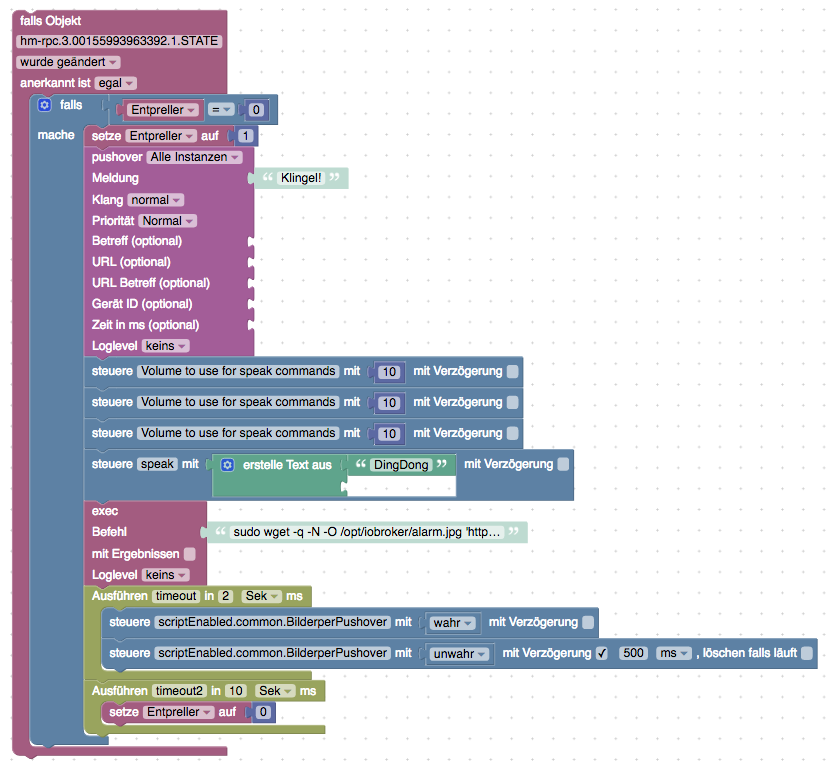
                        Kannst Du mir nochmal helfen? Ich hab das Skript zwar jetzt aufgesetzt. Aber ich vermute irgendwas habe ich vermutlich mit dem Entpreller falsch gemacht. Denn es funktioniert jetzt offenbar gar nicht mehr. Den Fehler seh ich aber leider nicht…

                        17266_bildschirmfoto_2019-02-03_um_13.14.35.png

                        1 Reply Last reply
                        0
                        • ? Offline
                          ? Offline
                          A Former User
                          wrote on last edited by
                          #30

                          Besser ist wenn du anstatt der Variable Entpreller einen eigenen Datenpunkt ( unter Objekte ) anlegst. Dann kannst du diesen mit true und false steuern und er ist immer Verfügbar.

                          ![](</s><URL url=)<link_text text="https://uploads.tapatalk-cdn.com/201902 ... ca4665.jpg">https://uploads.tapatalk-cdn.com/20190203/a91464e42a0f151c2f692e3bf6ca4665.jpg</link_text>" />

                          1 Reply Last reply
                          0
                          • R Offline
                            R Offline
                            Ritter
                            wrote on last edited by
                            #31

                            Hallo,

                            was müsste ich als Befehl eingeben um das Bild von meiner Kamera auf den Windows PC zu zu kopieren z.B. auf c;/, da iobroker unter Windows läuft?

                            1 Reply Last reply
                            0
                            • D Offline
                              D Offline
                              danw
                              wrote on last edited by
                              #32

                              @danw:

                              @homecineplexx:

                              das kenn ich nicht, kann man das am rpi installieren? `

                              Das ist ne javascript library. Natürlich..

                              Und ONVIF ist ein allgemeiner Standard für IP security Geräte.

                              https://en.wikipedia.org/wiki/ONVIF `

                              It's not a Bug, it's a Feature

                              1 Reply Last reply
                              0
                              • E Offline
                                E Offline
                                el_malto
                                wrote on last edited by
                                #33

                                @dan11hh Kannst du nochmal genau beschreiben was du gemacht hast?
                                Bei mir kommt die Message zwar an, aber das Bild wird nicht mit gesendet. Das Bild für korrekt abgelegt und ist vorhanden. Aber es wird nicht mit Pushover mit gesendet.

                                1 Reply Last reply
                                0
                                • M Offline
                                  M Offline
                                  moyo77
                                  wrote on last edited by
                                  #34

                                  Hallo zusammen,
                                  ich habe gerade versucht, ein Bild von Motioneye bei Bewegungserkennung an Telegram zu senden.
                                  Bein Script sieht folgendermaßen aus (so ähnlich wie bei euch):
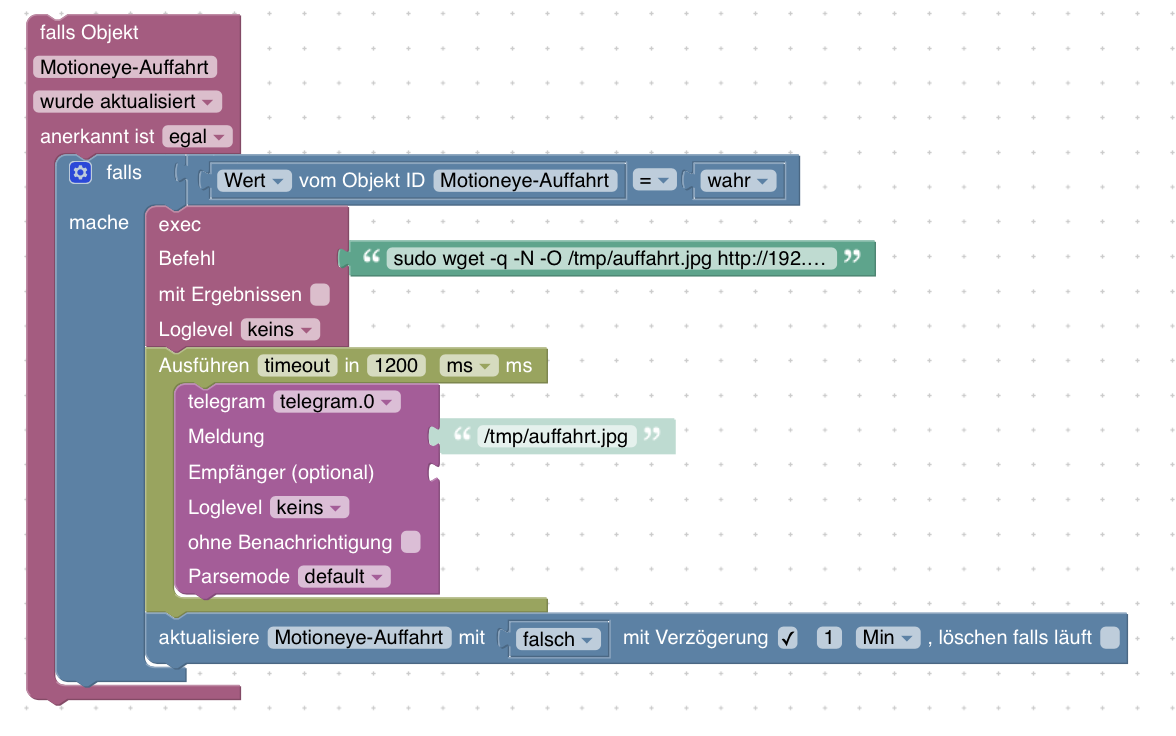
                                  Bildschirmfoto 2019-04-29 um 18.30.39.png

                                  Unter Befehl haben ich folgenden Link von Motioneye eingefügt (so wie man ihn als Snapshot URL vorgegeben bekommt.

                                  sudo wget -q -N -O /tmp/auffahrt.jpg http://[meine-IP]:8765/picture/3/current/?_username=admin&_signature=[meine Signature]

                                  Wenn ich das Script ausführe, kommt folgende Meldung vom Telegram Adapter im Log:

                                  cannot send photo [chatId - [mein Chat ID]]: Error: ETELEGRAM: 400 Bad Request: file must be non-empty

                                  Scheinbar speichert ioBroker eine leere Datei ab. Im Temp Ordner ist die Datei auch unter dem Namen abgespeichert.

                                  Hat jemand eine Idee, wie ich das lösen kann? Ist der Link falsch? Wie sieht der bei euch aus?

                                  Viele Grüße von einem Newbie,
                                  Mario

                                  1 Reply Last reply
                                  0
                                  • bergjetB Offline
                                    bergjetB Offline
                                    bergjet
                                    wrote on last edited by bergjet
                                    #35

                                    Ich habe auch den selben Fehler

                                    telegram.0 2019-05-04 21:46:31.701 error Cannot send photo [chatId - 802104283]: Error: ETELEGRAM: 400 Bad Request: file must be non-empty

                                    Die jpg Datei ist da, aber hat keinen Inhalt.

                                    FEHLER gefunden: Mein Passwort für die Kamera war falsch.

                                    homee, ioBroker, iMac, iPhone, Sonos, Alaxa

                                    1 Reply Last reply
                                    0
                                    • ? Offline
                                      ? Offline
                                      A Former User
                                      wrote on last edited by A Former User
                                      #36

                                      Mein Befehl sieht so aus:

                                      wget --output-document /opt/iobroker/ipcam/alarm.jpg 'http://user:password@192.168.178.178/Streaming/channels/1/picture'
                                      
                                      1 Reply Last reply
                                      0
                                      • ? A Former User

                                        Ich hab das jetzt mal getestet. Mit dem Code aus dem Beitrag habe ich ein JS Script angelegt. file Pfad an deine gespeicherte Datei anpassen!

                                        sendTo("pushover", {
                                          message: 'Dies ist eine Test-Nachricht', // mandatory - your text message
                                          title: 'ioBroker', // optional - your message's title, otherwise your app's name is used
                                          sound: 'magic', // optional - the name of one of the sounds supported by device clients to override the user's default sound choice
                                                          // pushover, bike, bugle, cashregister, classical, cosmic, falling,
                                                          // gamelan, incoming, intermission, magic, mechanical, pianobar, siren,
                                                          // spacealarm, tugboat, alien, climb, persistent, echo, updown, none
                                          priority: 0, // optional (-2, -1, 0, 1, 2)
                                                          // -2 to always send as a quiet notification,
                                                          // 1 to display as high-priority and bypass the user's quiet hours, or
                                                          // 2 to also require confirmation from the user
                                          file: '/opt/iobroker/alarm.jpg', // optional - attachment
                                          //token: 'API/KEY token', // optional - add other than configurated token to the call
                                          //url: , // optional - a supplementary URL to show with your message
                                          //url_title: , // optional - a title for your supplementary URL, otherwise just the URL is shown
                                          //device: , // optional - your user's device name to send the message directly to that device, rather than all of the user's devices
                                          //timestamp // optional - a Unix timestamp of your message's date and time to display to the user, rather than the time your message is received by our API
                                        });
                                        

                                        Anstatt den Block pushover nimmst du dann steuere und wählst dort unter Javascript usw bis zum Objekt des Script und steuerst mit wahr. Ein paar ms später steuerst du es wieder mit false. Und vor dem versenden noch ein Timeout damit das Bild auch komplett gespeichert wird. Speichern und gleich versenden geht nicht. Und ein paar Sekunden später wird das Bild mit pushover gesendet.
                                        6779_pushover.jpg

                                        joggeJ Offline
                                        joggeJ Offline
                                        jogge
                                        wrote on last edited by jogge
                                        #37

                                        @Brainbug said in Bild von Kamera per Pushover senden:

                                        Ich hab das jetzt mal getestet. Mit dem Code aus dem Beitrag habe ich ein JS Script angelegt. file Pfad an deine gespeicherte Datei anpassen!

                                        sendTo("pushover", {
                                          message: 'Dies ist eine Test-Nachricht', // mandatory - your text message
                                          title: 'ioBroker', // optional - your message's title, otherwise your app's name is used
                                          sound: 'magic', // optional - the name of one of the sounds supported by device clients to override the user's default sound choice
                                                          // pushover, bike, bugle, cashregister, classical, cosmic, falling,
                                                          // gamelan, incoming, intermission, magic, mechanical, pianobar, siren,
                                                          // spacealarm, tugboat, alien, climb, persistent, echo, updown, none
                                          priority: 0, // optional (-2, -1, 0, 1, 2)
                                                          // -2 to always send as a quiet notification,
                                                          // 1 to display as high-priority and bypass the user's quiet hours, or
                                                          // 2 to also require confirmation from the user
                                          file: '/opt/iobroker/alarm.jpg', // optional - attachment
                                          //token: 'API/KEY token', // optional - add other than configurated token to the call
                                          //url: , // optional - a supplementary URL to show with your message
                                          //url_title: , // optional - a title for your supplementary URL, otherwise just the URL is shown
                                          //device: , // optional - your user's device name to send the message directly to that device, rather than all of the user's devices
                                          //timestamp // optional - a Unix timestamp of your message's date and time to display to the user, rather than the time your message is received by our API
                                        });
                                        

                                        Anstatt den Block pushover nimmst du dann steuere und wählst dort unter Javascript usw bis zum Objekt des Script und steuerst mit wahr. Ein paar ms später steuerst du es wieder mit false. Und vor dem versenden noch ein Timeout damit das Bild auch komplett gespeichert wird. Speichern und gleich versenden geht nicht. Und ein paar Sekunden später wird das Bild mit pushover gesendet.
                                        6779_pushover.jpg

                                        Hi, ich versuche mich auch gerade am Bilder via pushover versenden.
                                        Das Bild meiner IP Kamera kann ich schon mal mittels:

                                        code_text
                                        ```wget --output-document /opt/iobroker/temp/cam/alarm.jpg 'http://192.XXX.X.XXX/tmpfs/snap.jpg?usr=user&pwd=passwort'``````
                                        code_text
                                        

                                        im richtigen Verzeichnis speichern.
                                        Zum Versenden verwende ich das oben aufgeführte javascript.
                                        Mein iobroker läuft auf einer Synology DS unter Docker. Ich habe mein Verzeichnis zum Bilder speichern und versenden in der Docker Konsole erzeugt mit dem Befehl:

                                        code_text
                                        ```mkdir -p /opt/iobroker/temp/cam/```
                                        code_text
                                        

                                        Daher gehe ich davon aus, dass auch der Pfad korrekt ist:

                                        code_text
                                        ```sendTo("pushover", {
                                          message: 'Dies ist eine Test-Nachricht', // mandatory - your text message
                                           title: 'ioBroker', // optional - your message's title, otherwise your app's name is used
                                           sound: 'magic', // optional - the name of one of the sounds supported by device clients to override the user's default sound choice
                                                           // pushover, bike, bugle, cashregister, classical, cosmic, falling,
                                                           // gamelan, incoming, intermission, magic, mechanical, pianobar, siren,
                                                           // spacealarm, tugboat, alien, climb, persistent, echo, updown, none
                                           priority: 0, // optional (-2, -1, 0, 1, 2)
                                                           // -2 to always send as a quiet notification,
                                                           // 1 to display as high-priority and bypass the user's quiet hours, or
                                                           // 2 to also require confirmation from the user
                                           file: '/opt/iobroker/temp/cam/alarm.jpg', // optional - attachment
                                           //token: 'API/KEY token', // optional - add other than configurated token to the call
                                           //url: , // optional - a supplementary URL to show with your message
                                           //url_title: , // optional - a title for your supplementary URL, otherwise just the URL is shown
                                           //device: , // optional - your user's device name to send the message directly to that device, rather than all of the user's devices
                                           //timestamp // optional - a Unix timestamp of your message's date and time to display to the user, rather than the time your message is received by our API
                                         });```
                                        code_text
                                        

                                        Kann mir jemand sagen was ich falsch mache? Ich hab schon versucht die Rechte der Ordner auf der DS aufzulockern, aber das hat auch nicht geholfen…und das speichern des Bildes in dem Verzeichnis klappt ja auch…und der Text der Nachricht kommt an, nur eben ohne Bild.

                                        Danke schon mal.

                                        ? 1 Reply Last reply
                                        0
                                        • ChaotC Offline
                                          ChaotC Offline
                                          Chaot
                                          wrote on last edited by
                                          #38

                                          Ich habe es wirklich lange mit allen möglichen Varianten per Pushover versucht und letztendlich aufgegeben.
                                          Meine Bilder werden per mail versendet.
                                          Das funktioniert jedenfalls sehr zuverlässig.

                                          sendTo('phantomjs.0', 'send', {
                                              url:                    'http://192.168.xxx.xxx:8765/picture/2/current/?_username=xxxxx&_signature=52634d7b92e34c0b5c865eeb8e3d5935741934ad',
                                              output:                 'picture.png',  // default value
                                              width:                  800,            // default value
                                              height:                 600,            // default value
                                              timeout:                2000,           // default value
                                              zoom:                   1,              // default value
                                          
                                              'clip-top':             0,              // default value
                                              'clip-left':            0,              // default value
                                              'clip-width':           800,            // default value is equal to width
                                              'clip-height':          600,            // default value is equal to height
                                              'scroll-top':           0,              // default value
                                              'scroll-left':          0,              // default value
                                          
                                              online:                 true           // default value
                                          }, function (result) {
                                              if (result.error) {
                                                  console.error(JSON.stringify(result.error));
                                              }
                                              if (result.stderr) {
                                                  console.error(result.stderr);
                                              }
                                              if (result.stdout) {
                                                  console.log(result.stdout);
                                              }
                                              console.log(result.output);
                                             
                                          });
                                          timeout = setTimeout(function () {
                                          sendTo("email", "send", {
                                               text: '',
                                               to: 'xxdddxxx@xxxxmail.com',
                                               subject: 'Klingel',
                                               attachments:[
                                                  {path: '/opt/iobroker/node_modules/iobroker.phantomjs/picture.png', cid: "file1"},
                                                ]
                                                
                                           });
                                           }, 5000);
                                           timeout = setTimeout(function () {
                                          sendTo("email", "send", {
                                               text: '',
                                               to: 'xxdddxxx@xxxxmail.com',
                                               subject: 'Klingel',
                                               attachments:[
                                                  {path: '/opt/iobroker/node_modules/iobroker.phantomjs/picture.png', cid: "file1"},
                                                ]
                                                
                                           });
                                           }, 5000);


                                          Was ich aktuell noch versuche (aber ohne viel Zeit zu investieren) das ein paar Sekunden nach dem Klingeln ein weiteres Bild verschickt wird. Aber da mache ich irgendwas bei der Zeitschleife falsch.

                                          ioBroker auf NUC unter Proxmox; VIS: 12" Touchscreen und 17" Touch; Lichtsteuerung, Thermometer und Sensoren: Tasmota (39); Ambiente Beleuchtung: WLED (9); Heizung: DECT Thermostate (9) an Fritz 6690; EMS-ESP; 1 Echo V2; 3 Echo DOT; 1 Echo Connect; 2 Echo Show 5; Unifi Ap-Ac Lite.

                                          1 Reply Last reply
                                          0
                                          Reply
                                          • Reply as topic
                                          Log in to reply
                                          • Oldest to Newest
                                          • Newest to Oldest
                                          • Most Votes


                                          Support us

                                          ioBroker
                                          Community Adapters
                                          Donate

                                          654

                                          Online

                                          32.7k

                                          Users

                                          82.3k

                                          Topics

                                          1.3m

                                          Posts
                                          Community
                                          Impressum | Datenschutz-Bestimmungen | Nutzungsbedingungen | Einwilligungseinstellungen
                                          ioBroker Community 2014-2025
                                          logo
                                          • Login

                                          • Don't have an account? Register

                                          • Login or register to search.
                                          • First post
                                            Last post
                                          0
                                          • Home
                                          • Recent
                                          • Tags
                                          • Unread 0
                                          • Categories
                                          • Unreplied
                                          • Popular
                                          • GitHub
                                          • Docu
                                          • Hilfe