Skip to content
  • Home
  • Recent
  • Tags
  • 0 Unread 0
  • Categories
  • Unreplied
  • Popular
  • GitHub
  • Docu
  • Hilfe
Skins
  • Light
  • Brite
  • Cerulean
  • Cosmo
  • Flatly
  • Journal
  • Litera
  • Lumen
  • Lux
  • Materia
  • Minty
  • Morph
  • Pulse
  • Sandstone
  • Simplex
  • Sketchy
  • Spacelab
  • United
  • Yeti
  • Zephyr
  • Dark
  • Cyborg
  • Darkly
  • Quartz
  • Slate
  • Solar
  • Superhero
  • Vapor

  • Default (No Skin)
  • No Skin
Collapse
ioBroker Logo

Community Forum

donate donate
  1. ioBroker Community Home
  2. Deutsch
  3. ioBroker Allgemein
  4. [iot-Aktion] iot-Adapter verbindet sich nicht bzw Verbindung ist "gelb"

NEWS

  • Monatsrückblick Januar/Februar 2026 ist online!
    BluefoxB
    Bluefox
    17
    1
    552

  • Jahresrückblick 2025 – unser neuer Blogbeitrag ist online! ✨
    BluefoxB
    Bluefox
    17
    1
    5.4k

  • Neuer Blogbeitrag: Monatsrückblick - Dezember 2025 🎄
    BluefoxB
    Bluefox
    13
    1
    1.4k

[iot-Aktion] iot-Adapter verbindet sich nicht bzw Verbindung ist "gelb"

Scheduled Pinned Locked Moved ioBroker Allgemein
48 Posts 15 Posters 8.8k Views
  • Oldest to Newest
  • Newest to Oldest
  • Most Votes
Reply
  • Reply as topic
Log in to reply
This topic has been deleted. Only users with topic management privileges can see it.
  • M Offline
    M Offline
    MadMax
    wrote on last edited by
    #18

    Irgendwas kann da aber nicht stimmen.

    Habe die letzen Tage nichts geändert und heute auf einmal der IoT Adapter auf gelb.

    Habe den Alexa Skill deaktiviert und wieder aktiviert hat nichts gebracht.

    Auch das neu anfordern des Verbindungszertifikats hat nichts gebracht.

    Jetzt habe ich mein Passwort neu eingegeben und komischerweise klappt es jetzt wieder.

    1 Reply Last reply
    0
    • apollon77A Offline
      apollon77A Offline
      apollon77
      wrote on last edited by
      #19

      Legt bitte mal beim iot adapter ein issue an. Nicht das das Passwort nicht sauber persistiert wird.

      Gesendet vom Handy …

      Beitrag hat geholfen? Votet rechts unten im Beitrag :-) https://paypal.me/Apollon77 / https://github.com/sponsors/Apollon77

      • Debug-Log für Instanz einschalten? Admin -> Instanzen -> Expertenmodus -> Instanz aufklappen - Loglevel ändern
      • Logfiles auf Platte /opt/iobroker/log/… nutzen, Admin schneidet Zeilen ab
      1 Reply Last reply
      0
      • S Offline
        S Offline
        schotte
        wrote on last edited by
        #20

        kann bestätigen, bei mir lief alles bis heute, dann

        Cannot fetch keys: "Internal server error"

        skill neustart brachte nichts, password gelöscht und neu eingegeben und voila - läuft wieder.

        danke für die infos.

        schotte

        1 Reply Last reply
        0
        • D Do not disturb
          D Do not disturb
          dirkhe
          Developer
          wrote on last edited by
          #21

          Hallo,

          Ich habe dassselbe Problem und habe mal debugged: In der main.js, Zeile 647:

                  }).catch(e => {
                      adapter.log.error(JSON.stringify(e));
          
                      if (e === 'timeout' && retry < 10) {
                          setTimeout(() => startDevice(clientId, login, password, retry + 1), 10000);
                      }
                  });
          

          e ist in diesem Fall:

          Error: error:0906D06C:PEM routines:PEM_read_bio:no start line
          message:"error:0906D06C:PEM routines:PEM_read_bio:no start line"
          stack:"Error: error:0906D06C:PEM routines:PEM_read_bio:no start line\n    at Object.createSecureContext (_tls_common.js:124:17)\n    at Object.exports.connect (_tls_wrap.js:1131:48)\n    at Object.buildBuilder [as mqtts] (/opt/iobroker/node_modules/aws-iot-device-sdk/device/lib/tls.js:26:21)\n    at MqttClient._wrapper [as streamBuilder] (/opt/iobroker/node_modules/aws-iot-device-sdk/device/index.js:636:33)\n    at MqttClient._setupStream (/opt/iobroker/node_modules/mqtt/lib/client.js:246:22)\n    at new MqttClient (/opt/iobroker/node_modules/mqtt/lib/client.js:227:8)\n    at new DeviceClient (/opt/iobroker/node_modules/aws-iot-device-sdk/device/index.js:639:17)\n    at readKeys.catch.then.catch.then.key (/opt/iobroker/node_modules/iobroker.iot/main.js:526:22)\n    at process._tickCallback (internal/process/next_tick.js:178:7)"


          Stringify gibt aber nur {} aus

          Vlt. sollte man prüfen auf e.message und dann diese ausgeben, hilf dann zumindest schon mal bei der Fehlersuche.

          Edit:

          In diesem Fall brauchte ich nur das Zertifikat erneuern.

          gruss

          Dirk

          1 Reply Last reply
          0
          • apollon77A Offline
            apollon77A Offline
            apollon77
            wrote on last edited by
            #22

            Super Erkenntnis. Ja logging von error Objekten ist manchmal blöd. Machst du mal ein github issue bzw nen pr draus?

            Gesendet vom Handy …

            Beitrag hat geholfen? Votet rechts unten im Beitrag :-) https://paypal.me/Apollon77 / https://github.com/sponsors/Apollon77

            • Debug-Log für Instanz einschalten? Admin -> Instanzen -> Expertenmodus -> Instanz aufklappen - Loglevel ändern
            • Logfiles auf Platte /opt/iobroker/log/… nutzen, Admin schneidet Zeilen ab
            1 Reply Last reply
            0
            • D Do not disturb
              D Do not disturb
              dirkhe
              Developer
              wrote on last edited by
              #23

              PR ist erstellt

              https://github.com/ioBroker/ioBroker.iot/pull/22

              1 Reply Last reply
              0
              • M Offline
                M Offline
                martinschm
                wrote on last edited by
                #24

                @apollon77:

                Die Warnungen beim install können von install via cloud kommen

                Die zweite Meldung weißt für mich auf ein smart gerät hin was keine vollständige Definition hat. Am besten hier GitHub issue beim Iot Adapter anlegen. Sehe ich aber zum ersten Mal.

                Zu EAI_AGAIN

                EAI_AGAIN is a DNS lookup timed out error, means it is a network connectivity error or proxy related error.

                Hat dein lokales System ein DNS Problem? `

                Hi apollon,

                hab den Adapter nochmal deinstalliert und neuinstalliert. Die erste Meldung tritt nun nicht mehr auf.

                Das EAI Again kommt noch immer. Hab mich mal per SSH auf dem ioBroker eingeloggt und ping google.com funktioniert. Wenn ich ein Ping auf a18wym7vjdl22g.iot.eu-west-1.amazonaws.com:8883 mache, kommt nur eine Fehlermeldung, das der Name oder Dienst nicht bekannt ist.

                iot.0	2018-12-31 18:40:21.009	info	Connection changed: disconnect
                iot.0	2018-12-31 18:40:21.006	error	getaddrinfo EAI_AGAIN a18wym7vjdl22g.iot.eu-west-1.amazonaws.com:8883
                iot.0	2018-12-31 18:40:21.006	error	getaddrinfo EAI_AGAIN a18wym7vjdl22g.iot.eu-west-1.amazonaws.com:8883
                iot.0	2018-12-31 18:40:00.955	info	Connection changed: disconnect
                iot.0	2018-12-31 18:40:00.955	error	getaddrinfo EAI_AGAIN a18wym7vjdl22g.iot.eu-west-1.amazonaws.com:8883
                iot.0	2018-12-31 18:40:00.953	error	getaddrinfo EAI_AGAIN a18wym7vjdl22g.iot.eu-west-1.amazonaws.com:8883
                iot.0	2018-12-31 18:39:50.924	info	Connection changed: disconnect
                iot.0	2018-12-31 18:39:50.924	error	getaddrinfo EAI_AGAIN a18wym7vjdl22g.iot.eu-west-1.amazonaws.com:8883
                iot.0	2018-12-31 18:39:50.923	error	getaddrinfo EAI_AGAIN a18wym7vjdl22g.iot.eu-west-1.amazonaws.com:8883
                iot.0	2018-12-31 18:39:45.890	info	Connection changed: disconnect
                iot.0	2018-12-31 18:39:45.889	error	getaddrinfo EAI_AGAIN a18wym7vjdl22g.iot.eu-west-1.amazonaws.com:8883
                iot.0	2018-12-31 18:39:45.887	error	getaddrinfo EAI_AGAIN a18wym7vjdl22g.iot.eu-west-1.amazonaws.com:8883
                iot.0	2018-12-31 18:39:43.856	info	Connecting with a18wym7vjdl22g.iot.eu-west-1.amazonaws.com
                iot.0	2018-12-31 18:39:43.826	info	starting. Version 0.2.2 in /opt/iobroker/node_modules/iobroker.iot, node: v8.12.0
                iot.0	2018-12-31 18:39:43.629	info	States connected to redis: 127.0.0.1:6379
                host.ioB-RasPi	2018-12-31 18:39:41.584	info	instance system.adapter.iot.0 started with pid 5167
                

                ping auf iot.eu-west-1.amazonaws.com geht auch.

                1 Reply Last reply
                0
                • apollon77A Offline
                  apollon77A Offline
                  apollon77
                  wrote on last edited by
                  #25

                  Dann ist das wohl das Problem. Ich kann a18wym7vjdl22g.iot.eu-west-1.amazonaws.com auflösen!!

                  Was sagt denn dein ioBroker Server wenn du

                  host a18wym7vjdl22g.iot.eu-west-1.amazonaws.com
                  

                  eingibst

                  Beitrag hat geholfen? Votet rechts unten im Beitrag :-) https://paypal.me/Apollon77 / https://github.com/sponsors/Apollon77

                  • Debug-Log für Instanz einschalten? Admin -> Instanzen -> Expertenmodus -> Instanz aufklappen - Loglevel ändern
                  • Logfiles auf Platte /opt/iobroker/log/… nutzen, Admin schneidet Zeilen ab
                  1 Reply Last reply
                  0
                  • M Offline
                    M Offline
                    martinschm
                    wrote on last edited by
                    #26

                    Da kommt jetzt

                    a18wym7vjdl22g.iot.eu-west-1.amazonaws.com is an alias for iotmoonraker.eu-west-                                       1.prod.iot.eu-west-1.amazonaws.com.
                    iotmoonraker.eu-west-1.prod.iot.eu-west-1.amazonaws.com is an alias for dualstac                                       k.iotmoonraker-e-elb-9q2vvmxp3rir-1271985754.eu-west-1.elb.amazonaws.com.
                    dualstack.iotmoonraker-e-elb-9q2vvmxp3rir-1271985754.eu-west-1.elb.amazonaws.com                                        has address 52.209.98.184
                    dualstack.iotmoonraker-e-elb-9q2vvmxp3rir-1271985754.eu-west-1.elb.amazonaws.com                                        has address 52.18.170.86
                    dualstack.iotmoonraker-e-elb-9q2vvmxp3rir-1271985754.eu-west-1.elb.amazonaws.com                                        has address 52.17.87.69
                    dualstack.iotmoonraker-e-elb-9q2vvmxp3rir-1271985754.eu-west-1.elb.amazonaws.com                                        has address 52.49.204.86
                    dualstack.iotmoonraker-e-elb-9q2vvmxp3rir-1271985754.eu-west-1.elb.amazonaws.com                                        has address 52.30.86.222
                    dualstack.iotmoonraker-e-elb-9q2vvmxp3rir-1271985754.eu-west-1.elb.amazonaws.com                                        has address 54.171.231.6
                    dualstack.iotmoonraker-e-elb-9q2vvmxp3rir-1271985754.eu-west-1.elb.amazonaws.com                                        has address 52.50.121.37
                    dualstack.iotmoonraker-e-elb-9q2vvmxp3rir-1271985754.eu-west-1.elb.amazonaws.com                                        has address 54.154.234.121
                    dualstack.iotmoonraker-e-elb-9q2vvmxp3rir-1271985754.eu-west-1.elb.amazonaws.com                                        has IPv6 address 2a01:578:3::3411:5745
                    dualstack.iotmoonraker-e-elb-9q2vvmxp3rir-1271985754.eu-west-1.elb.amazonaws.com                                        has IPv6 address 2a01:578:3::36ab:e706
                    dualstack.iotmoonraker-e-elb-9q2vvmxp3rir-1271985754.eu-west-1.elb.amazonaws.com                                        has IPv6 address 2a01:578:3::3431:cc56
                    dualstack.iotmoonraker-e-elb-9q2vvmxp3rir-1271985754.eu-west-1.elb.amazonaws.com                                        has IPv6 address 2a01:578:3::369a:ea79
                    dualstack.iotmoonraker-e-elb-9q2vvmxp3rir-1271985754.eu-west-1.elb.amazonaws.com                                        has IPv6 address 2a01:578:3::341e:56de
                    dualstack.iotmoonraker-e-elb-9q2vvmxp3rir-1271985754.eu-west-1.elb.amazonaws.com                                        has IPv6 address 2a01:578:3::34d1:62b8
                    dualstack.iotmoonraker-e-elb-9q2vvmxp3rir-1271985754.eu-west-1.elb.amazonaws.com                                        has IPv6 address 2a01:578:3::3432:7925
                    dualstack.iotmoonraker-e-elb-9q2vvmxp3rir-1271985754.eu-west-1.elb.amazonaws.com                                        has IPv6 address 2a01:578:3::3412:aa56


                    Die Ausgabe oben ist nach dem Neustart.

                    Hab den iot Adapter jetzt nochmal aktiviert. Leider kommt die gleiche Meldung im Log und die Exception taucht auch wieder auf.

                    Caught	2019-01-01 23:22:31.934	error	by controller[1]: (node:723) [DEP0018] DeprecationWarning: Unhandled promise rejections are deprecated. In the future, promise rejections that are not handled will terminate the Node.js process with
                    Caught	2019-01-01 23:22:31.934	error	by controller[1]: (node:723) UnhandledPromiseRejectionWarning: Unhandled promise rejection. This error originated either by throwing inside of an async function without a catch block, or by rejecting
                    Caught	2019-01-01 23:22:31.933	error	by controller[0]: at <anonymous>
                    Caught	2019-01-01 23:22:31.933	error	by controller[0]: at _readObjects.then.data (/opt/iobroker/node_modules/iobroker.iot/lib/GoogleHome.js:355:23)
                    Caught	2019-01-01 23:22:31.932	error	by controller[0]: at Array.forEach (<anonymous>)
                    Caught	2019-01-01 23:22:31.932	error	by controller[0]: at funcs.forEach.funcId (/opt/iobroker/node_modules/iobroker.iot/lib/GoogleHome.js:368:41)
                    Caught	2019-01-01 23:22:31.932	error	by controller[0]: at Array.forEach (<anonymous>)
                    Caught	2019-01-01 23:22:31.931	error	by controller[0]: at func.common.members.forEach.id (/opt/iobroker/node_modules/iobroker.iot/lib/GoogleHome.js:369:31)
                    Caught	2019-01-01 23:22:31.931	error	by controller[0]: at Array.forEach (<anonymous>)
                    Caught	2019-01-01 23:22:31.931	error	by controller[0]: at rooms.forEach.roomId (/opt/iobroker/node_modules/iobroker.iot/lib/GoogleHome.js:389:38)
                    Caught	2019-01-01 23:22:31.930	error	by controller[0]: at GoogleHome.processState (/opt/iobroker/node_modules/iobroker.iot/lib/GoogleHome.js:245:33)
                    Caught	2019-01-01 23:22:31.930	error	by controller[0]: at GoogleHome.getSmartName (/opt/iobroker/node_modules/iobroker.iot/lib/GoogleHome.js:230:31)
                    Caught	2019-01-01 23:22:31.929	error	by controller[0]: (node:723) UnhandledPromiseRejectionWarning: TypeError: Cannot read property 'common' of undefined
                    host.ioB-RasPi	2019-01-01 23:22:31.834	info	stopInstance system.adapter.iot.0 killing pid 723
                    host.ioB-RasPi	2019-01-01 23:22:31.833	info	stopInstance system.adapter.iot.0
                    host.ioB-RasPi	2019-01-01 23:22:31.829	info	object change system.adapter.iot.0
                    iot.0	2019-01-01 23:22:22.352	info	Connection changed: disconnect
                    iot.0	2019-01-01 23:22:22.351	error	getaddrinfo EAI_AGAIN a18wym7vjdl22g.iot.eu-west-1.amazonaws.com:8883
                    iot.0	2019-01-01 23:22:22.350	error	getaddrinfo EAI_AGAIN a18wym7vjdl22g.iot.eu-west-1.amazonaws.com:8883
                    iot.0	2019-01-01 23:22:17.315	info	Connection changed: disconnect
                    iot.0	2019-01-01 23:22:17.315	error	getaddrinfo EAI_AGAIN a18wym7vjdl22g.iot.eu-west-1.amazonaws.com:8883
                    iot.0	2019-01-01 23:22:17.313	error	getaddrinfo EAI_AGAIN a18wym7vjdl22g.iot.eu-west-1.amazonaws.com:8883
                    iot.0	2019-01-01 23:22:15.259	info	Connecting with a18wym7vjdl22g.iot.eu-west-1.amazonaws.com</anonymous></anonymous></anonymous></anonymous>
                    
                    1 Reply Last reply
                    0
                    • M Offline
                      M Offline
                      martinschm
                      wrote on last edited by
                      #27

                      Sehe grade, das ich die iot Version 0.2.2 habe und es laut change log die 0.3 gibt. Wird mir aber nicht via admin zum upgrade angeboten

                      1 Reply Last reply
                      0
                      • apollon77A Offline
                        apollon77A Offline
                        apollon77
                        wrote on last edited by
                        #28

                        0.2.2 sollte passen!

                        Warum dein nodejs die Domain nicht auflösen kann weiss ich nicht. Das müsste man rausfinden.

                        Das andere sieht mir nach einem falsch konfigurierten Gerät aus wo komische Daten drin sind. Bitte GitHub issue auf machen das der Fehler abgefangen werden kann

                        Beitrag hat geholfen? Votet rechts unten im Beitrag :-) https://paypal.me/Apollon77 / https://github.com/sponsors/Apollon77

                        • Debug-Log für Instanz einschalten? Admin -> Instanzen -> Expertenmodus -> Instanz aufklappen - Loglevel ändern
                        • Logfiles auf Platte /opt/iobroker/log/… nutzen, Admin schneidet Zeilen ab
                        1 Reply Last reply
                        0
                        • M Offline
                          M Offline
                          martinschm
                          wrote on last edited by
                          #29

                          Hi,

                          hab grade im Router mal die DNS Server meines Providers durch 1.1.1.1 ersetzt und jetzt klappt es plötzlich.

                          ciao

                          Martin

                          1 Reply Last reply
                          0
                          • F Offline
                            F Offline
                            FoxMulder
                            wrote on last edited by
                            #30

                            Hallo @all

                            bei mir ist er zwar grün bekomme aber folgenden fehler :

                            undefined2019-01-03 12:51:39.914 - info: iot.0 Request devices
                            2019-01-03 12:51:56.181 - info: iot.0 Request enums
                            2019-01-03 12:54:28.142 - info: host.ioBroker-Pi object change system.adapter.iot.0
                            2019-01-03 12:54:28.152 - info: host.ioBroker-Pi stopInstance system.adapter.iot.0
                            2019-01-03 12:54:28.153 - info: host.ioBroker-Pi stopInstance system.adapter.iot.0 killing pid 21548
                            2019-01-03 12:54:28.185 - info: iot.0 terminating
                            2019-01-03 12:54:28.275 - info: host.ioBroker-Pi instance system.adapter.iot.0 terminated with code 0 (OK)
                            2019-01-03 12:54:30.753 - info: host.ioBroker-Pi instance system.adapter.iot.0 started with pid 22438
                            2019-01-03 12:54:36.015 - info: iot.0 States connected to redis: 127.0.0.1:6379
                            2019-01-03 12:54:36.291 - info: iot.0 starting. Version 0.3.0 in /opt/iobroker/node_modules/iobroker.iot, node: v6.12.3
                            2019-01-03 12:54:36.346 - info: iot.0 Connecting with a18wym7vjdl22g.iot.eu-west-1.amazonaws.com
                            2019-01-03 12:54:40.366 - info: iot.0 Connection changed: connect
                            2019-01-03 12:54:43.135 - error: iot.0 Cannot report device state: null
                            2019-01-03 12:54:43.138 - warn: iot.0 Invalid URL key. Status update is disabled: {"error":{"error":"No license found or license is no more valid"}}
                            2019-01-03 12:54:45.898 - info: iot.0 Request devices
                            2019-01-03 12:55:53.866 - info: iot.0 Request devices
                            2019-01-03 12:56:20.170 - info: host.ioBroker-Pi object change system.adapter.iot.0
                            2019-01-03 12:56:20.178 - info: host.ioBroker-Pi stopInstance system.adapter.iot.0
                            2019-01-03 12:56:20.180 - info: host.ioBroker-Pi stopInstance system.adapter.iot.0 killing pid 22438
                            2019-01-03 12:56:20.194 - info: iot.0 terminating
                            2019-01-03 12:56:20.260 - info: host.ioBroker-Pi instance system.adapter.iot.0 terminated with code 0 (OK)
                            2019-01-03 12:56:22.763 - info: host.ioBroker-Pi instance system.adapter.iot.0 started with pid 22539
                            2019-01-03 12:56:25.807 - info: iot.0 States connected to redis: 127.0.0.1:6379
                            2019-01-03 12:56:26.068 - info: iot.0 starting. Version 0.3.0 in /opt/iobroker/node_modules/iobroker.iot, node: v6.12.3
                            2019-01-03 12:56:26.121 - info: iot.0 Connecting with a18wym7vjdl22g.iot.eu-west-1.amazonaws.com
                            2019-01-03 12:56:32.535 - info: iot.0 Connection changed: connect
                            2019-01-03 12:56:32.571 - error: iot.0 Cannot report device state: null
                            2019-01-03 12:56:32.573 - warn: iot.0 Invalid URL key. Status update is disabled: {"error":{"error":"No license found or license is no more valid"}}


                            Was ist da falsch ?

                            Danke in voraus

                            1 Reply Last reply
                            0
                            • apollon77A Offline
                              apollon77A Offline
                              apollon77
                              wrote on last edited by
                              #31

                              Schick mir mal deine email vom pro account als PN

                              Beitrag hat geholfen? Votet rechts unten im Beitrag :-) https://paypal.me/Apollon77 / https://github.com/sponsors/Apollon77

                              • Debug-Log für Instanz einschalten? Admin -> Instanzen -> Expertenmodus -> Instanz aufklappen - Loglevel ändern
                              • Logfiles auf Platte /opt/iobroker/log/… nutzen, Admin schneidet Zeilen ab
                              1 Reply Last reply
                              0
                              • F Offline
                                F Offline
                                FoxMulder
                                wrote on last edited by
                                #32

                                OK ! Grade geschickt ! Hoffe das kann sich beheben :) Danke

                                1 Reply Last reply
                                0
                                • M Offline
                                  M Offline
                                  michihorn
                                  wrote on last edited by
                                  #33

                                  Hallo

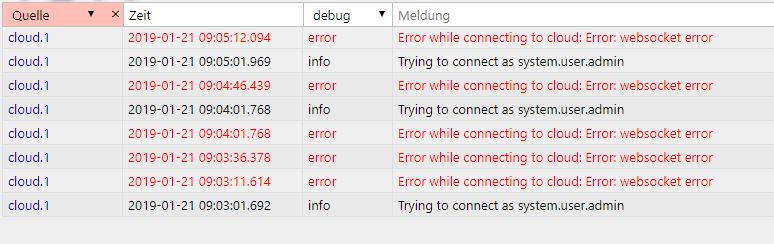
                                  bei mir bleibt der Adapter auch auf Gelb.

                                  Die Fehlermeldung im LOG sieht so aus.
                                  326_unbenannt.jpg
                                  Gruß

                                  Michael

                                  1 Reply Last reply
                                  0
                                  • apollon77A Offline
                                    apollon77A Offline
                                    apollon77
                                    wrote on last edited by
                                    #34

                                    Adapter mal neu gestartet? Pro-Zugangsdaten sind korrekt? Bitte per PN die Email senden

                                    Beitrag hat geholfen? Votet rechts unten im Beitrag :-) https://paypal.me/Apollon77 / https://github.com/sponsors/Apollon77

                                    • Debug-Log für Instanz einschalten? Admin -> Instanzen -> Expertenmodus -> Instanz aufklappen - Loglevel ändern
                                    • Logfiles auf Platte /opt/iobroker/log/… nutzen, Admin schneidet Zeilen ab
                                    1 Reply Last reply
                                    0
                                    • M Offline
                                      M Offline
                                      michihorn
                                      wrote on last edited by
                                      #35

                                      Ups..das hat sich quasi über Nacht von selbst erledigt.

                                      Der Adapter zeigt nun grün

                                      Michael

                                      1 Reply Last reply
                                      0
                                      • S Offline
                                        S Offline
                                        stanby
                                        wrote on last edited by
                                        #36

                                        Hallo ,hatte Gestern noch bei der Weihnachtsaktion zugeschlagen. Paypal bezahlt und auch Rechnung erhalten. Wenn ich nun den generierten Key von Pro eintrage geht der Button kurz auf Gelb und schaltet sofort wieder aus. Im Log zeigt er mir dann die Fehlermeldung cloud.0 2019-01-07 17:55:08.101 error Please buy remote access to use pro. If you did it, please wait 5 minutes.

                                        Wenn ich wieder für die freie Version den Key eingebe funktioniert wieder alles.

                                        Gruß

                                        Wolfgang

                                        1 Reply Last reply
                                        0
                                        • apollon77A Offline
                                          apollon77A Offline
                                          apollon77
                                          wrote on last edited by
                                          #37

                                          Na dann lies mal die FAQ. Such nach deiner Fehlermeldung.

                                          Gesendet vom Handy …

                                          Beitrag hat geholfen? Votet rechts unten im Beitrag :-) https://paypal.me/Apollon77 / https://github.com/sponsors/Apollon77

                                          • Debug-Log für Instanz einschalten? Admin -> Instanzen -> Expertenmodus -> Instanz aufklappen - Loglevel ändern
                                          • Logfiles auf Platte /opt/iobroker/log/… nutzen, Admin schneidet Zeilen ab
                                          1 Reply Last reply
                                          0
                                          Reply
                                          • Reply as topic
                                          Log in to reply
                                          • Oldest to Newest
                                          • Newest to Oldest
                                          • Most Votes


                                          Support us

                                          ioBroker
                                          Community Adapters
                                          Donate
                                          FAQ Cloud / IOT
                                          HowTo: Node.js-Update
                                          HowTo: Backup/Restore
                                          Downloads
                                          BLOG

                                          333

                                          Online

                                          32.7k

                                          Users

                                          82.5k

                                          Topics

                                          1.3m

                                          Posts
                                          Community
                                          Impressum | Datenschutz-Bestimmungen | Nutzungsbedingungen | Einwilligungseinstellungen
                                          ioBroker Community 2014-2025
                                          logo
                                          • Login

                                          • Don't have an account? Register

                                          • Login or register to search.
                                          • First post
                                            Last post
                                          0
                                          • Home
                                          • Recent
                                          • Tags
                                          • Unread 0
                                          • Categories
                                          • Unreplied
                                          • Popular
                                          • GitHub
                                          • Docu
                                          • Hilfe