




Harmony 1.0.0 verliert ständig den HUB
-
Hallo zusammen,
seit meinem Update von 0.9.6 auf 1.0.0 habe ich ständige Verbindungsabbrüche zu meinem HUB, die ich vorher nicht hatte.
Hier ein Auszug aus dem Log:
2018-11-30 08:18:19.308  - debug: harmony.0 [PROCESS] Deleting activities
2018-11-30 08:18:19.308  - debug: harmony.0 [PROCESS] Deleting devices
2018-11-30 08:18:19.309  - info: harmony.0 [PROCESS] Synced hub config for Harmony Hub (192.168.0.202)
2018-11-30 08:18:19.718  - debug: harmony.0 current activity: PowerOff
2018-11-30 08:18:41.107  - debug: harmony.0 [STOP] XMPP offline
2018-11-30 08:18:41.109  - debug: harmony.0 [STOP] XMPP offline
2018-11-30 08:27:40.782  - warn: harmony.0 [DISCONNECT] Lost Harmony Hub (192.168.0.202)
2018-11-30 08:27:40.783  - debug: harmony.0 [STOP] XMPP offline
2018-11-30 08:27:40.783  - info: harmony.0 [STOP] Client ended: Harmony_Hub
2018-11-30 08:28:16.833  - info: harmony.0 [DISCOVER] Discovered Harmony Hub (192.168.0.202) and will try to connect
2018-11-30 08:28:16.852  - debug: harmony.0 hub initialized
2018-11-30 08:28:16.870  - info: harmony.0 [CONNECT] Connecting to Harmony Hub (192.168.0.202)
2018-11-30 08:28:21.095  - info: harmony.0 [CONNECT] Connected to Harmony Hub (192.168.0.202)
2018-11-30 08:28:23.185  - debug: harmony.0 [PROCESS] Creating activities and devices
2018-11-30 08:28:23.185  - debug: harmony.0 [PROCESS] Creating hub device
2018-11-30 08:28:23.188  - debug: harmony.0 creating activities
2018-11-30 08:28:23.189  - debug: harmony.0 [PROCESS] Creating devices
2018-11-30 08:28:23.189  - debug: harmony.0 [PROCESS] Deleting activities
2018-11-30 08:28:23.190  - debug: harmony.0 [PROCESS] Deleting devices
2018-11-30 08:28:23.190  - info: harmony.0 [PROCESS] Synced hub config for Harmony Hub (192.168.0.202)
2018-11-30 08:28:23.401  - debug: harmony.0 current activity: PowerOff
2018-11-30 08:28:34.410  - debug: harmony.0 [STOP] XMPP offline
2018-11-30 08:28:34.410  - debug: harmony.0 [STOP] XMPP offline
2018-11-30 08:42:55.904  - warn: harmony.0 [DISCONNECT] Lost Harmony Hub (192.168.0.202)
2018-11-30 08:42:55.906  - debug: harmony.0 [STOP] XMPP offline
2018-11-30 08:42:55.906  - info: harmony.0 [STOP] Client ended: Harmony_Hub
2018-11-30 08:43:20.071  - info: harmony.0 [DISCOVER] Discovered Harmony Hub (192.168.0.202) and will try to connect
2018-11-30 08:43:20.090  - debug: harmony.0 hub initialized
2018-11-30 08:43:20.109  - info: harmony.0 [CONNECT] Connecting to Harmony Hub (192.168.0.202)
2018-11-30 08:43:24.261  - info: harmony.0 [CONNECT] Connected to Harmony Hub (192.168.0.202)
2018-11-30 08:43:26.495  - debug: harmony.0 [PROCESS] Creating activities and devices
2018-11-30 08:43:26.496  - debug: harmony.0 [PROCESS] Creating hub device
2018-11-30 08:43:26.497  - debug: harmony.0 creating activities
2018-11-30 08:43:26.498  - debug: harmony.0 [PROCESS] Creating devices
2018-11-30 08:43:26.498  - debug: harmony.0 [PROCESS] Deleting activities
2018-11-30 08:43:26.499  - debug: harmony.0 [PROCESS] Deleting devices
2018-11-30 08:43:26.499  - info: harmony.0 [PROCESS] Synced hub config for Harmony Hub (192.168.0.202)
2018-11-30 08:43:26.669  - debug: harmony.0 current activity: PowerOff
2018-11-30 08:43:45.551  - debug: harmony.0 [STOP] XMPP offline
2018-11-30 08:43:45.551  - debug: harmony.0 [STOP] XMPP offline
2018-11-30 08:47:55.942  - warn: harmony.0 [DISCONNECT] Lost Harmony Hub (192.168.0.202)
2018-11-30 08:47:55.943  - debug: harmony.0 [STOP] XMPP offline
2018-11-30 08:47:55.943  - info: harmony.0 [STOP] Client ended: Harmony_Hub
2018-11-30 08:48:19.755  - debug: harmony.0 [STOP] XMPP offline
2018-11-30 08:48:19.755  - debug: harmony.0 [STOP] XMPP offline
2018-11-30 08:48:20.172  - info: harmony.0 [DISCOVER] Discovered Harmony Hub (192.168.0.202) and will try to connect
2018-11-30 08:48:20.191  - debug: harmony.0 hub initialized
2018-11-30 08:48:20.211  - info: harmony.0 [CONNECT] Connecting to Harmony Hub (192.168.0.202)
2018-11-30 08:48:24.437  - info: harmony.0 [CONNECT] Connected to Harmony Hub (192.168.0.202)
2018-11-30 08:48:26.490  - debug: harmony.0 [PROCESS] Creating activities and devices
2018-11-30 08:48:26.491  - debug: harmony.0 [PROCESS] Creating hub device
2018-11-30 08:48:26.492  - debug: harmony.0 creating activities
2018-11-30 08:48:26.493  - debug: harmony.0 [PROCESS] Creating devices
2018-11-30 08:48:26.494  - debug: harmony.0 [PROCESS] Deleting activities
2018-11-30 08:48:26.494  - debug: harmony.0 [PROCESS] Deleting devices
2018-11-30 08:48:26.494  - info: harmony.0 [PROCESS] Synced hub config for Harmony Hub (192.168.0.202)
2018-11-30 08:48:26.689  - debug: harmony.0 current activity: PowerOff
Mein System läuft mit:
node 6.15.0
nodejs 6.15.0
npm 4.6.1
unter Debian 9 auf einem Nuc.
Dazu muss ich noch erwähnen das dieses Verhalten erst nach meinem Umzug von Raspi auf den NUC kommt.
Auf dem Raspi hatte ich 0.9.6 laufen und beim Umzug habe ich gleich das Update auf 1.0.0 gemacht.
Wurde in der neuen Version zum Verbindungsverhalten anpassungen gemacht?
Schlechter WLAN Empfang kann es nicht sein, da der HUB nur 3m Luftlinie vom AP weg ist.
Hat jemand einen Rat hierzu?
-
Hatte mit 1.0 auch ständig Verbindungsabbrüche und bin wieder auf die 0.9.3 zurück. Hier gibt es Verbindungsabbrüche so ein mal alle 1 bis 2 Tage.
Der HUB sucht sich bei mir im WLAN nicht den dichtesten Zugang (Repeater in 2 m Abstand) sondern verbindet sich regelmäßig mit dem AP in 8 m Entfernung, aber auch mal mit den am weitesten entfernten Repeater mit 15 m Abstand und mehren Wänden dazwischen.
Tip wäre auf die alte Version zurückzugehen. Bei Adapter über Expertenmodus wird jedoch nur noch die 0.9.1 angeboten? Hoffe du hast ein Backup.
-
Debug log vom Adapterstart wäre hilfreich.
-
@foxriver76 werde mal am Wochenende das Backupimage mit 1.0.0 wieder aufspielen und dann Debug log hier einstellen.
-
Debug log vom Adapterstart wäre hilfreich. `
anbei:
2018-12-01 10:38:28.843  - info: host.BrokerNUC object change system.adapter.harmony.0
2018-12-01 10:38:28.847  - info: host.BrokerNUC "system.adapter.harmony.0" disabled
2018-12-01 10:38:28.849  - info: host.BrokerNUC stopInstance system.adapter.harmony.0
2018-12-01 10:38:28.849  - info: host.BrokerNUC stopInstance system.adapter.harmony.0 killing pid 5490
2018-12-01 10:38:28.859  - info: harmony.0 [END] Terminating
2018-12-01 10:38:28.904  - info: host.BrokerNUC instance system.adapter.harmony.0 terminated with code 0 (OK)
2018-12-01 10:38:47.197  - info: host.BrokerNUC object change system.adapter.harmony.0
2018-12-01 10:38:47.222  - info: host.BrokerNUC instance system.adapter.harmony.0 started with pid 21352
2018-12-01 10:38:48.453  - debug: harmony.0 objectDB connected
2018-12-01 10:38:48.510  - debug: harmony.0 statesDB connected
2018-12-01 10:38:48.628  - info: harmony.0 starting. Version 1.0.0 in /opt/iobroker/node_modules/iobroker.harmony, node: v6.15.0
2018-12-01 10:38:48.634  - debug: harmony.0 [START] Subnet: 255.255.255.255, Discovery interval: 1000
2018-12-01 10:38:48.651  - info: harmony.0 [DISCOVER] Searching for Harmony Hubs on 255.255.255.255
2018-12-01 10:38:49.886  - info: harmony.0 [DISCOVER] Discovered Harmony Hub (192.168.0.202) and will try to connect
2018-12-01 10:38:49.910  - debug: harmony.0 hub initialized
2018-12-01 10:38:49.922  - info: javascript.0 script.js.common.Counter: Zählerstand HarmonyHub_False = 170
2018-12-01 10:38:49.924  - info: javascript.0 script.js.common.Harmony_HUB: Harmony HUB ist offline
2018-12-01 10:38:49.944  - info: harmony.0 [CONNECT] Connecting to Harmony Hub (192.168.0.202)
2018-12-01 10:38:52.307  - info: harmony.0 [CONNECT] Connected to Harmony Hub (192.168.0.202)
2018-12-01 10:38:52.371  - info: javascript.0 script.js.common.Counter: Zählerstand HarmonyHub_True = 170
2018-12-01 10:38:53.829  - debug: harmony.0 [PROCESS] Creating activities and devices
2018-12-01 10:38:53.830  - debug: harmony.0 [PROCESS] Creating hub device
2018-12-01 10:38:53.834  - debug: harmony.0 creating activities
2018-12-01 10:38:53.836  - debug: harmony.0 [PROCESS] Creating devices
2018-12-01 10:38:53.837  - debug: harmony.0 [PROCESS] Deleting activities
2018-12-01 10:38:53.838  - debug: harmony.0 [PROCESS] Deleting devices
2018-12-01 10:38:53.838  - info: harmony.0 [PROCESS] Synced hub config for Harmony Hub (192.168.0.202)
2018-12-01 10:38:54.062  - debug: harmony.0 current activity: PowerOff
P.S.: das script "Counter: Zählerstand HarmonyHub" läuft bei mir im Hintergrund und zählt die Verbindungsabbrüche. 170 sind allein der letzten 3 Tage.
-
Danke. Sollte mit den Settings eigentlich das gleiche Connection Habdling sein wie mit den vorherigen Versuonen. Zwischen 0.9.3 und den neueren Versionen hat sich allerdings ein bisschen was in der darunterliegenden Lib geändert.
Wenn nur ein Hub da ist könntest du dessen IP mal als Subnetz angeben. Jedoch nimmt die 0.9.3 auch Broadcast.
Edit: du schreibst ja 0.9.6 lief stabil, dann kann es an der drunterliegenden Lib nicht liegen, die war da schon aktualisiert.
-
…Hat jemand einen Rat hierzu? `
Ja, aber vielleicht einen nicht sehr populären:
kauf Dir einen Broadlink, der kostet einen Bruchteil, kann auch RF, hat nicht die Kastrationen durch die Harmony-Software und funktioniert mit dem BL-Adapter absolut stabil. Schmeiß den Harmony in die Bucht.
Wie ich dazu komme?
Meine Beleuchtung läuft ausschließlich über selbstgebaute 16 Kanal LED-Dimmer, die über RC5 gesteuert werden. TV,
Habe vor knapp 2 Jahren den Harmony Hub für damals >100 Euro gekauft, in iobroker eingebunden, probiert und lief.
…Allerdings nur 2 oder 3 'Tage. OK, dachte ich , kann ja mal passieren. Adapter neu gestartet und CRON für täglichen Neustart angelegt. Trotzdem ging nach ein paar Tagen wieder nichts. Der Hub hatte sich im WLAN abgemeldet. Also Spannung weg, Hub umgestellt (vorher ca. 2m vom Router, jetzt 5m). Lief wieder.
...Aber: Richtig, unregelmäßig alle paar Tage kappt er sein WLAN und verbindet sich nur sporadisch wieder. Hab zwischen 1 und 10m Entfernung zum Router probiert, keine Änderung. Das WiFi von dem Ding ist einfach nur unterirdisch.
Da ich keine Lust hatte meinen Keller zu unterkellern, um den WAF dort unterzubringen, hab ich für 35 (?) Euronen einen Broadlink RM Pro geholt, Befehle abgelernt, Scripte angepasst und seit dem läuft das Ding einfach. IR-Reichweite ist gefühlt besser, obwohl hier beim Harmony kein Grund zur Klage bestand.
Hab dann noch eine Deckenhalterung für den BL und einen Dot gedruckt und damit einen eh nicht mehr genutzten Halogen-Spot ersetzt.
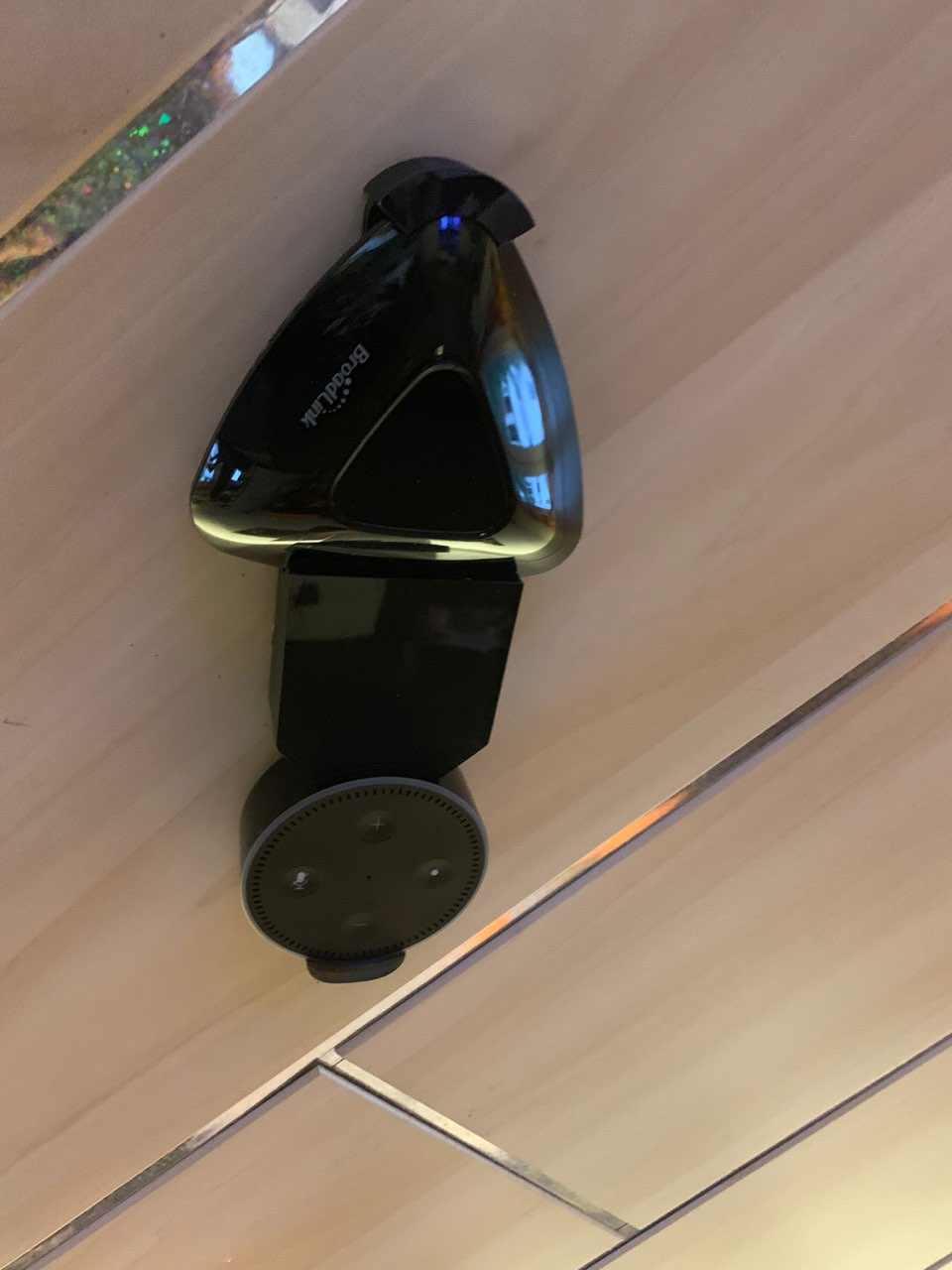
WAF war wieder auf normalen Niveau, vielleicht sogar etwas höher (Nachkommastellen gibt es da ja nicht).Gruß aus der Mitte
Dirk
-
Eigentlich läuft der Harmony seit dem Update auf 1.0.0 bei mir zu 100% stabil, scheint wohl was anderes faul bei Dir zu sein.
Thema Boardlink, den hatte ich und gleich wieder zurück geschickt, weil ich damit nicht wirklich glücklich war, mit dem Harmony und der aktuellen Adapter Version schon ;)
-
Nachdem ich - wie im Beitrag 2 geschrieben - auch Verbindungsprobleme mit der Version 1.0.0 hatte läuft diese nun nach neuer Installation seit einem Tag ohne Verbindungsabbruch und Fehlermeldung. Hoffe das bleibt so.
Was ist anders als bei meiner ersten Installation:
Zigbee Adapter+Instanz ist noch nicht installiert. Keine Ahnung, ob dies in diesem Zusammenhang eine Auswirkung hatte. Hatte ich jedoch vor den Update des harmony Adapters von 0.9.3 auf 1.0.0. aufgespielt.
kein direktes Update; also vorab ausgeführt:
Deinstallation der Instanz harmony
Deinstallation des Adapters harmony (0.9.3.)
danach:
neue Installation Adapter harmony (1.0.0.) + Instanz
im yahka Adapter -> Änderung/Anpassung der Geräte/Service (vorher waren Leerzeichen im String -nun_)
-
Hi Jan,
freut mich, dass es bei Dir jetzt läuft. Ich denke auch nicht, dass die Abbrüche und das Aufhängen des Hub am Adapter lag, gekauft hatte ich im März 2017 - k.A., welche Version damals aktuell war. Aber auch anpingen ging nicht immer und WLAN-Aufbau funktionierte dann nur nach Neustart des Hub.
Ich hatte dann ca. einen Monat lang alles mir Mögliche probiert, incl. einer täglichen (eher nächtlichen) Netztrennung des Harmony und anschließendem (2-5 Minuten) Neustart des Adapters. Frühs lief es dann immer, abends meißt auch noch, aber irgendwann eben nicht mehr…
Ich habe u.a. noch eine Harmony One, mit der man zur Not dann das Licht schalten kann, die Klospülung betätigen kann (die hat seit dem neben einem mechanischen Backup auch einen "Notfalltaster") usw. Das war eigentlich dazu gedacht, die Butze noch bedienen zu können, falls mal DSL oder Routerhardware ausfällt. Wenn das allerdings 2x pro Woche benötigt wird, fängt das Weib verständlicherweise mal an, das Verständnis für die Spinnerei des Göttergatten herunterzuschrauben. Also musste kurzfristig eine Lösung her.
Und die spielt mit dem BL seit >1,5 Jahren...
Seit dem liegt der Hub irgendwo im Schrank. Vielleicht krame ich den irgenwann wieder raus und probiere den nochmal, jedoch gilt bei mir "never ride a dead horse". Ich war ja nicht der Einzige, der mit dem WLAN des Harmony - auch außerhalb dieses Forum - zu kämpfen hatte.
Eine Frage noch: Inwiefern warst Du mit dem Broadlink nicht glücklich? Was funktionierte nicht?
(Ja, sind 2 Fragen ;) )
Gruß aus der Mitte
Dirk
-
Der wurde beworben mit der Unterstützung von Rolling Codes im RF Bereich und das war schlicht weg gelogen. Dann hatte ich noch ein paar Verständnis Probleme. Da ich den aber zu 100% nur wegen den Rolling Codes gekauft hatte, ging er zurück. Für meine Zwecke reicht mit der Harmony Hub, da er mittlerweile wirklich so läuft, wie ich es erwarte. Das bisschen RF Geraffel mach ich bei mir mit der Sonoff RF Bridge, wobei ich so wenig wie möglich auf 433 Technik setzte, weil eben kein Rückkanal und deshalb recht unzuverlässig. Fensterkontakte sind OK, alles andere eben nicht.
Kommt eben auf den Einsatz an, was man bedienen möchte und da ich schon eh und je ne Harmony FB hatte, hab ich eben auch den Hub und IR macht der recht gut. Zumindest machen meine Geräte genau das was ich erwarte.
-
mit dem 1.0.0 habe ich auch permanent Probleme, fast schlimmer als früher, bevor ich auf den foxriver fork gewechselt hatte. Damit lief dann direkt alles super. Mittlweile habe ich wieder große Probleme, komischerweise nur mit einem Hub.
hier mal ein debug log:
! harmony.0 2018-12-10 20:58:44.284 debug current activity: PowerOff
! harmony.0 2018-12-10 20:58:44.260 info [PROCESS] Synced hub config for HarmonyHub SZ (192.168.188.30)
! harmony.0 2018-12-10 20:58:44.259 debug [PROCESS] Deleting devices
! harmony.0 2018-12-10 20:58:44.258 debug [PROCESS] Deleting activities
! harmony.0 2018-12-10 20:58:44.258 debug [PROCESS] Creating devices
! harmony.0 2018-12-10 20:58:44.258 debug creating activities
! harmony.0 2018-12-10 20:58:44.258 debug [PROCESS] Creating hub device
! harmony.0 2018-12-10 20:58:44.258 debug [PROCESS] Creating activities and devices
! harmony.0 2018-12-10 20:58:43.157 info [CONNECT] Connected to HarmonyHub SZ (192.168.188.30)
! harmony.0 2018-12-10 20:58:40.658 info [CONNECT] Connecting to HarmonyHub SZ (192.168.188.30)
! harmony.0 2018-12-10 20:58:40.605 debug hub initialized
! harmony.0 2018-12-10 20:58:40.311 info [DISCOVER] Discovered HarmonyHub SZ (192.168.188.30) and will try to connect
! harmony.0 2018-12-10 20:58:40.209 debug [STOP] XMPP offline
! harmony.0 2018-12-10 20:58:40.208 debug [STOP] XMPP offline
! harmony.0 2018-12-10 20:58:35.416 info [STOP] Client ended: HarmonyHub_SZ
! harmony.0 2018-12-10 20:58:35.415 debug [STOP] XMPP offline
! harmony.0 2018-12-10 20:58:35.414 warn [DISCOVER] Lost HarmonyHub SZ (192.168.188.30)
! harmony.0 2018-12-10 20:55:06.185 debug current activity: Fernsehen
! harmony.0 2018-12-10 20:55:06.176 info [PROCESS] Synced hub config for Harmony Hub WZ (192.168.188.67)
! harmony.0 2018-12-10 20:55:06.176 debug [PROCESS] Deleting devices
! harmony.0 2018-12-10 20:55:06.176 debug [PROCESS] Deleting activities
! harmony.0 2018-12-10 20:55:06.176 debug [PROCESS] Creating devices
! harmony.0 2018-12-10 20:55:06.176 debug creating activities
! harmony.0 2018-12-10 20:55:06.176 debug [PROCESS] Creating hub device
! harmony.0 2018-12-10 20:55:06.175 debug [PROCESS] Creating activities and devices
! harmony.0 2018-12-10 20:55:05.988 debug current activity: PowerOff
! harmony.0 2018-12-10 20:55:05.954 info [PROCESS] Synced hub config for HarmonyHub SZ (192.168.188.30)
! harmony.0 2018-12-10 20:55:05.954 debug [PROCESS] Deleting devices
! harmony.0 2018-12-10 20:55:05.954 debug [PROCESS] Deleting activities
! harmony.0 2018-12-10 20:55:05.954 debug [PROCESS] Creating devices
! harmony.0 2018-12-10 20:55:05.954 debug creating activities
! harmony.0 2018-12-10 20:55:05.954 debug [PROCESS] Creating hub device
! harmony.0 2018-12-10 20:55:05.953 debug [PROCESS] Creating activities and devices
! harmony.0 2018-12-10 20:55:04.791 info [CONNECT] Connected to HarmonyHub SZ (192.168.188.30)
! harmony.0 2018-12-10 20:55:04.784 info [CONNECT] Connected to Harmony Hub WZ (192.168.188.67)
! harmony.0 2018-12-10 20:55:03.787 debug system.adapter.admin.0: logging true
! harmony.0 2018-12-10 20:55:02.193 info [CONNECT] Connecting to Harmony Hub WZ (192.168.188.67)
! harmony.0 2018-12-10 20:55:02.188 info [CONNECT] Connecting to HarmonyHub SZ (192.168.188.30)
! harmony.0 2018-12-10 20:55:02.144 debug hub initialized
! harmony.0 2018-12-10 20:55:02.130 debug hub initialized
! harmony.0 2018-12-10 20:55:01.684 info [DISCOVER] Discovered Harmony Hub WZ (192.168.188.67) and will try to connect
! harmony.0 2018-12-10 20:55:01.675 info [DISCOVER] Discovered HarmonyHub SZ (192.168.188.30) and will try to connect
! harmony.0 2018-12-10 20:55:00.357 info [DISCOVER] Searching for Harmony Hubs on 255.255.255.255
! harmony.0 2018-12-10 20:55:00.341 debug [START] Subnet: 255.255.255.255, Discovery interval: 1000
! harmony.0 2018-12-10 20:55:00.338 info starting. Version 1.0.0 in /opt/iobroker/node_modules/iobroker.harmony, node: v8.14.0
! harmony.0 2018-12-10 20:55:00.228 debug statesDB connected
! harmony.0 2018-12-10 20:55:00.184 debug objectDB connected
! harmony.0 2018-12-10 20:54:56.536 info [END] Terminating
! harmony.0 2018-12-10 20:54:56.519 info [END] Terminating
! harmony.0 2018-12-10 20:48:43.723 info [PROCESS] Synced hub config for HarmonyHub SZ (192.168.188.30)
! harmony.0 2018-12-10 20:48:42.502 info [CONNECT] Connected to HarmonyHub SZ (192.168.188.30)
! harmony.0 2018-12-10 20:48:38.940 info [CONNECT] Connecting to HarmonyHub SZ (192.168.188.30)
! harmony.0 2018-12-10 20:48:38.865 info [DISCOVER] Discovered HarmonyHub SZ (192.168.188.30) and will try to connect
! harmony.0 2018-12-10 20:48:26.680 info [STOP] Client ended: HarmonyHub_SZ
! harmony.0 2018-12-10 20:48:26.678 warn [DISCOVER] Lost HarmonyHub SZ (192.168.188.30)
! harmony.0 2018-12-10 20:43:27.232 info [PROCESS] Synced hub config for HarmonyHub SZ (192.168.188.30)
! harmony.0 2018-12-10 20:43:26.092 info [CONNECT] Connected to HarmonyHub SZ (192.168.188.30)
! harmony.0 2018-12-10 20:43:22.820 info [CONNECT] Connecting to HarmonyHub SZ (192.168.188.30)
! harmony.0 2018-12-10 20:43:22.758 info [DISCOVER] Discovered HarmonyHub SZ (192.168.188.30) and will try to connect
! harmony.0 2018-12-10 20:43:11.580 info [STOP] Client ended: HarmonyHub_SZ
! harmony.0 2018-12-10 20:43:11.579 warn [DISCOVER] Lost HarmonyHub SZ (192.168.188.30)
! harmony.0 2018-12-10 20:30:39.595 info [PROCESS] Synced hub config for HarmonyHub SZ (192.168.188.30)
! harmony.0 2018-12-10 20:30:38.487 info [CONNECT] Connected to HarmonyHub SZ (192.168.188.30)
! harmony.0 2018-12-10 20:30:35.963 info [CONNECT] Connecting to HarmonyHub SZ (192.168.188.30)
! harmony.0 2018-12-10 20:30:35.855 info [DISCOVER] Discovered HarmonyHub SZ (192.168.188.30) and will try to connect
! harmony.0 2018-12-10 20:30:21.400 info [STOP] Client ended: HarmonyHub_SZ
! harmony.0 2018-12-10 20:30:21.398 warn [DISCOVER] Lost HarmonyHub SZ (192.168.188.30) -
komischerweise kann ich nicht mal die 0.9.6 installieren, existiert die Version überhaupt noch ? Die alte 0.9.3 geht auch nicht.
Ich hatte vor der 1.0.0 alles komplett gelöscht, aus der Adapterliste installiert.
! $ ./iobroker upgrade harmony@0.9.6
! Update harmony from @1.0.0 to @0.9.6
! NPM version: 6.4.1
! npm install iobroker.harmony@0.9.6 –production --save --prefix "/opt/iobroker" (System call)
! npm
! ERR! code ETARGETnpm ERR! notarget No matching version found for iobroker.harmony@0.9.6
! npm ERR!
! notarget In most cases you or one of your dependencies are requestingnpm ERR! notarget a package version that doesn't exist.
! npm ERR! A complete log of this run can be found in:
! npm ERR! /root/.npm/_logs/2018-12-10T20_45_10_198Z-debug.log
! got /opt/iobroker/node_modules/iobroker.harmony/admin
! upload [3] harmony.admin /opt/iobroker/node_modules/iobroker.harmony/admin/words.js words.js application/javascript
! upload [2] harmony.admin /opt/iobroker/node_modules/iobroker.harmony/admin/index_m.html index_m.html text/html
! upload [1] harmony.admin /opt/iobroker/node_modules/iobroker.harmony/admin/index.html index.html text/html
! upload [0] harmony.admin /opt/iobroker/node_modules/iobroker.harmony/admin/harmony.png harmony.png image/png
! Adapter "harmony" updated
! process exited with code 0 -
Dadurch dass nur 1.0.0 auf npm veröffentlicht wurde geht nur die und dann erst wieder 0.9.3. die zwischendrin wurden leider nie veröffentlicht und da die news nicht aus io-pack beim veröffentlichen entfernt wurden stehen da noch die zwischenversionen drin.
-
Wenn du denkst, dass es daran liegt, könntest du den Stand eines einzelnen Commit installieren:
npm i https://github.com/Pmant/ioBroker.harmony/tarball/e1cdb60579fd3018ede8c711749062cd696a7751 --prefix /opt/iobroker --production=> Das müsste 0.9.6 sein


Hey! Du scheinst an dieser Unterhaltung interessiert zu sein, hast aber noch kein Konto.
Hast du es satt, bei jedem Besuch durch die gleichen Beiträge zu scrollen? Wenn du dich für ein Konto anmeldest, kommst du immer genau dorthin zurück, wo du zuvor warst, und kannst dich über neue Antworten benachrichtigen lassen (entweder per E-Mail oder Push-Benachrichtigung). Du kannst auch Lesezeichen speichern und Beiträge positiv bewerten, um anderen Community-Mitgliedern deine Wertschätzung zu zeigen.
Mit deinem Input könnte dieser Beitrag noch besser werden 💗
Registrieren Anmelden290
Online33.0k
Benutzer83.6k
Themen1.3m
Beiträge