




Homekit yahka verbindet sich nicht mit dem host
-
Hallo,
der yahka Adapter verbindet sind nicht mit dem Host. Nach der Installation waren alle Eingabefenster in den Einstellungen leer. Folgendes steht im log.
! Zeit
! host.raspberrypi 2018-04-18 20:35:26.245 info Restart adapter system.adapter.yahka.0 because enabled
! host.raspberrypi 2018-04-18 20:35:26.244 error instance system.adapter.yahka.0 terminated with code 1 ()
! host.raspberrypi 2018-04-18 20:35:26.244 error Caught by controller[2]: at Object.Module._extensions..js (module.js:663:10)
! host.raspberrypi 2018-04-18 20:35:26.244 error Caught by controller[2]: at Module._compile (module.js:652:30)
! host.raspberrypi 2018-04-18 20:35:26.244 error Caught by controller[2]: at Object. (/opt/iobroker/node_modules/ed25519/index.js:1:99)
! host.raspberrypi 2018-04-18 20:35:26.244 error Caught by controller[2]: at bindings (/opt/iobroker/node_modules/bindings/bindings.js:76:44)
! host.raspberrypi 2018-04-18 20:35:26.244 error Caught by controller[2]: at require (internal/module.js:11:18)
! host.raspberrypi 2018-04-18 20:35:26.244 error Caught by controller[2]: at Module.require (module.js:596:17)
! host.raspberrypi 2018-04-18 20:35:26.244 error Caught by controller[2]: at Function.Module._load (module.js:497:3)
! host.raspberrypi 2018-04-18 20:35:26.244 error Caught by controller[2]: at tryModuleLoad (module.js:505:12)
! host.raspberrypi 2018-04-18 20:35:26.243 error Caught by controller[2]: at Module.load (module.js:565:32)
! host.raspberrypi 2018-04-18 20:35:26.243 error Caught by controller[2]: at Object.Module._extensions..node (module.js:681:18)
! host.raspberrypi 2018-04-18 20:35:26.243 error Caught by controller[2]: the module (for instance, usingnpm rebuildornpm install).
! host.raspberrypi 2018-04-18 20:35:26.243 error Caught by controller[2]: NODE_MODULE_VERSION 57. Please try re-compiling or re-installing
! host.raspberrypi 2018-04-18 20:35:26.243 error Caught by controller[2]: NODE_MODULE_VERSION 48. This version of Node.js requires
! host.raspberrypi 2018-04-18 20:35:26.243 error Caught by controller[2]: was compiled against a different Node.js version using
! host.raspberrypi 2018-04-18 20:35:26.243 error Caught by controller[2]: Error: The module '/opt/iobroker/node_modules/ed25519/build/Release/ed25519.node'
! host.raspberrypi 2018-04-18 20:35:26.243 error Caught by controller[2]: ^
! host.raspberrypi 2018-04-18 20:35:26.242 error Caught by controller[2]: throw e
! host.raspberrypi 2018-04-18 20:35:26.242 error Caught by controller[2]: /opt/iobroker/node_modules/bindings/bindings.js:83
! host.raspberrypi 2018-04-18 20:35:26.242 error Caught by controller[1]: *** WARNING *** For more information see
! host.raspberrypi 2018-04-18 20:35:26.242 error Caught by controller[1]: *** WARNING *** Please fix your application to use the native API of Avahi!
! host.raspberrypi 2018-04-18 20:35:26.242 error Caught by controller[1]: *** WARNING *** The program 'node' called 'DNSServiceRegister()' which is not supported (or only supported partially) in the Apple Bonjour compatibility layer of Avahi.
! host.raspberrypi 2018-04-18 20:35:26.242 error Caught by controller[1]: *** WARNING *** For more information see
! host.raspberrypi 2018-04-18 20:35:26.242 error Caught by controller[1]: *** WARNING *** Please fix your application to use the native API of Avahi!
! host.raspberrypi 2018-04-18 20:35:26.241 error Caught by controller[0]: *** WARNING *** The program 'node' uses the Apple Bonjour compatibility layer of Avahi.
! host.raspberrypi 2018-04-18 20:35:25.533 info instance system.adapter.yahka.0 started with pid 986
! host.raspberrypi 2018-04-18 20:34:55.506 info Restart adapter system.adapter.yahka.0 because enabled
! host.raspberrypi 2018-04-18 20:34:55.506 error instance system.adapter.yahka.0 terminated with code 1 ()
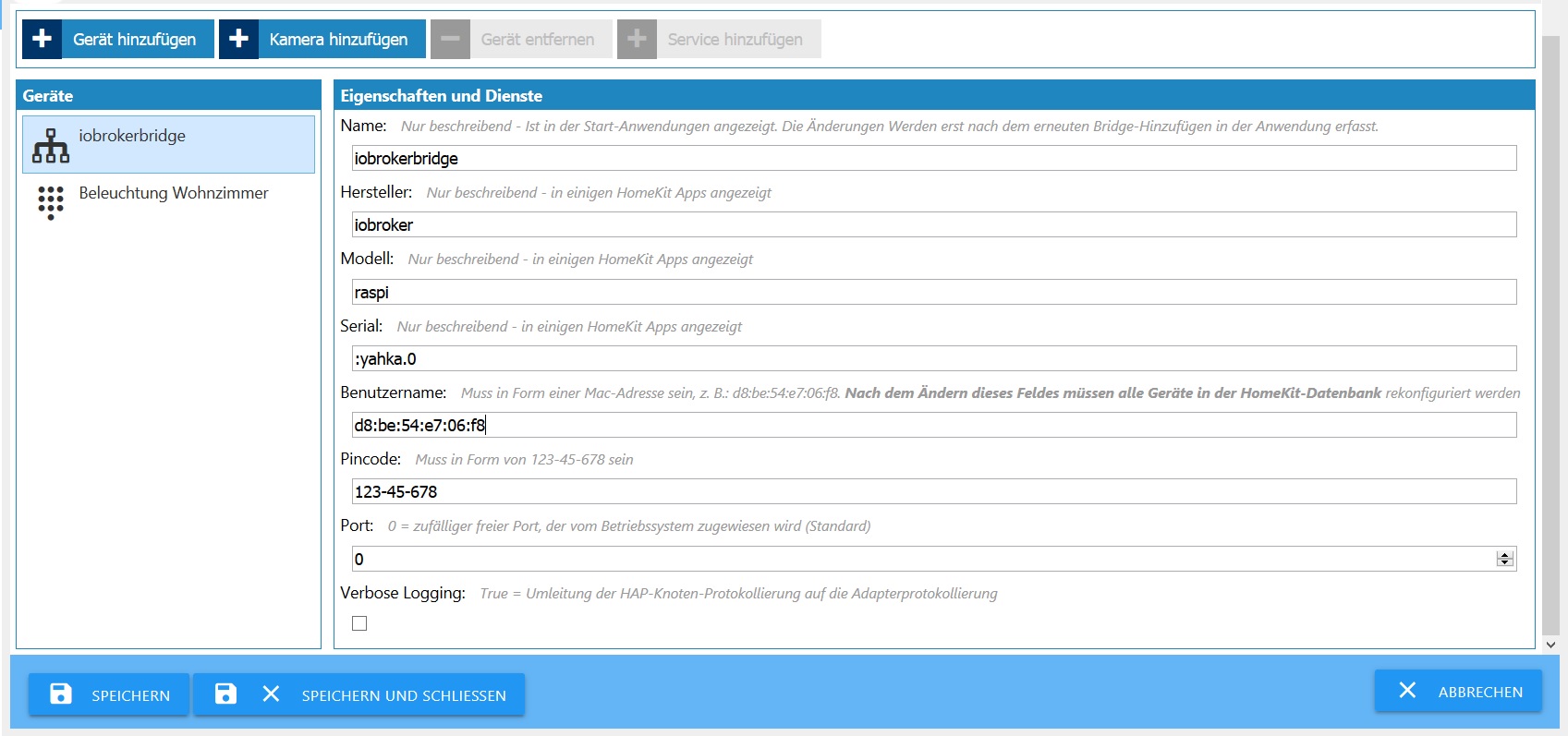
! host.raspberrypi 2018-04-18 20:34:54.654 info instance system.adapter.yahka.0 started with pid 963Sind meine Einstellungen richtig?
6377_yahka.jpg -
Waren bei euch nach der Installation auch alle Felder in den Einstellungen leer, oder waren die schon ausgefüllt?
Hey! Du scheinst an dieser Unterhaltung interessiert zu sein, hast aber noch kein Konto.
Hast du es satt, bei jedem Besuch durch die gleichen Beiträge zu scrollen? Wenn du dich für ein Konto anmeldest, kommst du immer genau dorthin zurück, wo du zuvor warst, und kannst dich über neue Antworten benachrichtigen lassen (entweder per E-Mail oder Push-Benachrichtigung). Du kannst auch Lesezeichen speichern und Beiträge positiv bewerten, um anderen Community-Mitgliedern deine Wertschätzung zu zeigen.
Mit deinem Input könnte dieser Beitrag noch besser werden 💗
Registrieren Anmelden460
Online33.0k
Benutzer83.6k
Themen1.3m
Beiträge