




Kann Jarvis nicht mehr updaten
-
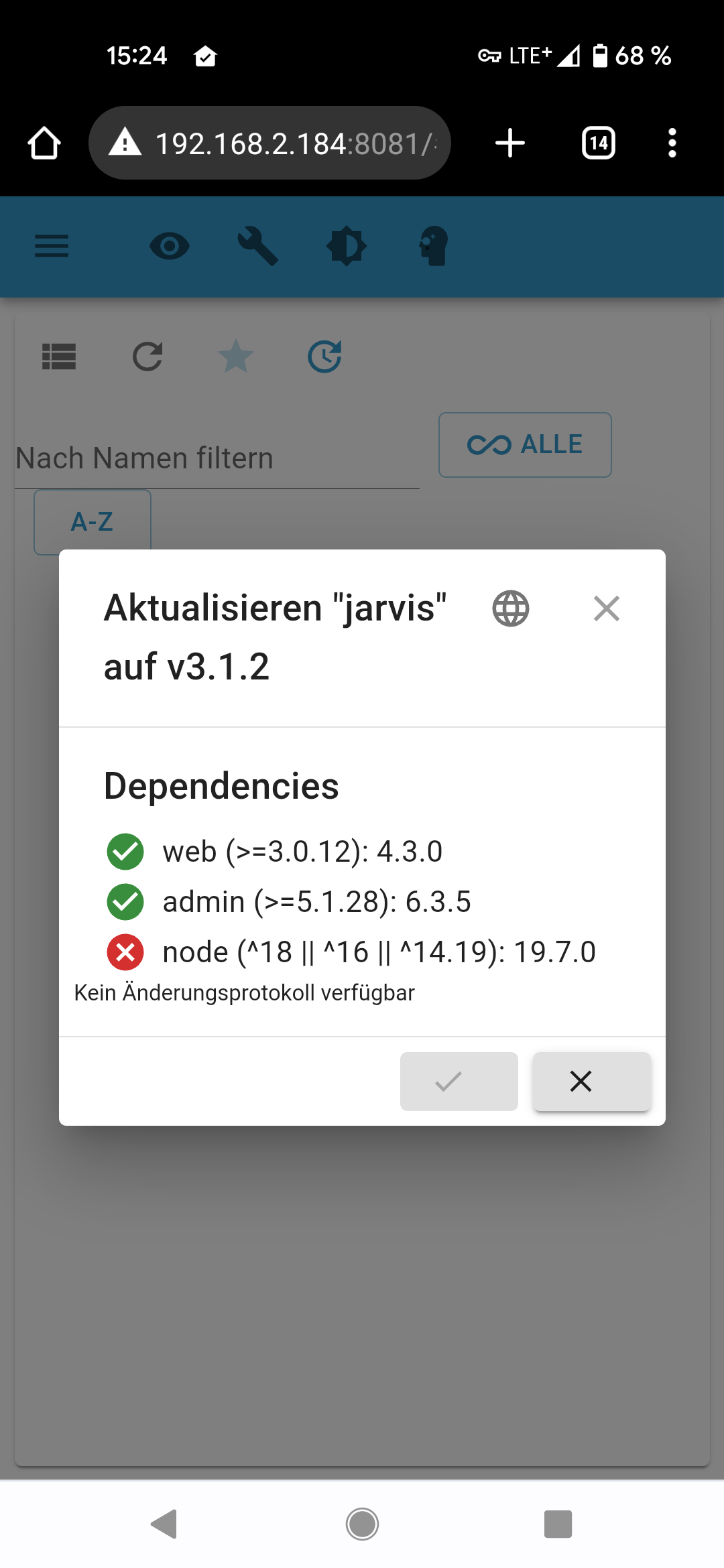
Moin zusammen. Ich habe folgendes, ggf. triviales Problem: kürzlich habe ich meinen IOBroker, insbesondere diverse Adapter, nach längerer Zeit mal wieder aktualisiert und musste in diesem Zusammenhang auch node updaten. Leider habe ich daher auf node 19.7.0 geupdated. Nun sagt mir Jarvis, dass ein Update auf 3.1.2 nicht möglich sei, da ich bspw. node 18 bräuchte und 19.7.0 nicht unterstützt würde. Das macht mich insofern stutzig, als dass ich ja grundsätzlich auf 3.0.11 updaten konnte mit node 19.7.0. Ist das so richtig, oder hängt bei mir woanders etwas? Kann ich einfach auf node 18 downgraden? LG
-
Moin zusammen. Ich habe folgendes, ggf. triviales Problem: kürzlich habe ich meinen IOBroker, insbesondere diverse Adapter, nach längerer Zeit mal wieder aktualisiert und musste in diesem Zusammenhang auch node updaten. Leider habe ich daher auf node 19.7.0 geupdated. Nun sagt mir Jarvis, dass ein Update auf 3.1.2 nicht möglich sei, da ich bspw. node 18 bräuchte und 19.7.0 nicht unterstützt würde. Das macht mich insofern stutzig, als dass ich ja grundsätzlich auf 3.0.11 updaten konnte mit node 19.7.0. Ist das so richtig, oder hängt bei mir woanders etwas? Kann ich einfach auf node 18 downgraden? LG
@priester sagte in Kann Jarvis nicht mehr updaten:
Kann ich einfach auf node 18 downgraden?
Das solltest du tun. Nie ungerade Versionsnummern von nodejs installieren und nicht höher als die aktuelle Empfehlung. Zur Zeit also v18.
Schau in meiner Signatur wie man das richtet.
-
@priester sagte in Kann Jarvis nicht mehr updaten:
Kann ich einfach auf node 18 downgraden?
Das solltest du tun. Nie ungerade Versionsnummern von nodejs installieren und nicht höher als die aktuelle Empfehlung. Zur Zeit also v18.
Schau in meiner Signatur wie man das richtet.
@thomas-braun said in Kann Jarvis nicht mehr updaten:
@priester sagte in Kann Jarvis nicht mehr updaten:
Kann ich einfach auf node 18 downgraden?
Das solltest du tun. Nie ungerade Versionsnummern von nodejs installieren und nicht höher als die aktuelle Empfehlung. Zur Zeit also v18.
Schau in meiner Signatur wie man das richtet.
Danke für die Rückmeldung. Aus deiner Signatur wird mir allerdings nicht ganz klar, wie ich denn nun konkret downgrade? Muss ich die selben Schritte ausführen, wie sie bei dem Link in deiner Sig für eine eine Erstinstallation erläutert sind? D.h. zunächst einmal Alt- und Vorinstallationen löschen, dann Repository anlegen, etc.?
-
@thomas-braun said in Kann Jarvis nicht mehr updaten:
@priester sagte in Kann Jarvis nicht mehr updaten:
Kann ich einfach auf node 18 downgraden?
Das solltest du tun. Nie ungerade Versionsnummern von nodejs installieren und nicht höher als die aktuelle Empfehlung. Zur Zeit also v18.
Schau in meiner Signatur wie man das richtet.
Danke für die Rückmeldung. Aus deiner Signatur wird mir allerdings nicht ganz klar, wie ich denn nun konkret downgrade? Muss ich die selben Schritte ausführen, wie sie bei dem Link in deiner Sig für eine eine Erstinstallation erläutert sind? D.h. zunächst einmal Alt- und Vorinstallationen löschen, dann Repository anlegen, etc.?
Kommt drauf an wie du da jetzt unterwegs bist.
Im Grunde aber nur: 20er-Quelle unscharf setzen und die 18er gezielt installieren.
Steht beides drin.Setzt natürlich sauberen Umgang mit dem Paketmanager voraus. Wie hast du die falschen Versionen denn reingedübelt?
iob diagsagt?
-
Kommt drauf an wie du da jetzt unterwegs bist.
Im Grunde aber nur: 20er-Quelle unscharf setzen und die 18er gezielt installieren.
Steht beides drin.Setzt natürlich sauberen Umgang mit dem Paketmanager voraus. Wie hast du die falschen Versionen denn reingedübelt?
iob diagsagt?
iob diag sagt folgendes:
======== Start marking the full check here =========

Skript v.2023-04-16

*** BASE SYSTEM ***
Architecture    : x86_64
Docker          : false
Virtualization  : lxc
Distributor ID: Ubuntu
Description:    Ubuntu 22.04.2 LTS
Release:        22.04
Codename:       jammy

PRETTY_NAME="Ubuntu 22.04.2 LTS"
NAME="Ubuntu"
VERSION_ID="22.04"
VERSION="22.04.2 LTS (Jammy Jellyfish)"
VERSION_CODENAME=jammy
ID=ubuntu
ID_LIKE=debian
HOME_URL="https://www.ubuntu.com/"
SUPPORT_URL="https://help.ubuntu.com/"
BUG_REPORT_URL="https://bugs.launchpad.net/ubuntu/"
PRIVACY_POLICY_URL="https://www.ubuntu.com/legal/terms-and-policies/privacy-policy"
UBUNTU_CODENAME=jammy

Systemuptime and Load:
 16:44:24 up 44 days, 22:30,  2 users,  load average: 0.21, 0.27, 0.18
CPU threads: 4


*** Time and Time Zones ***
               Local time: Mon 2023-04-24 16:44:24 CEST
           Universal time: Mon 2023-04-24 14:44:24 UTC
                 RTC time: n/a
                Time zone: Europe/Berlin (CEST, +0200)
System clock synchronized: yes
              NTP service: inactive
          RTC in local TZ: no

*** User and Groups ***
root
/root
root

*** X-Server-Setup ***
X-Server:       false
Desktop:
Terminal:
Boot Target:    graphical.target

*** MEMORY ***
               total        used        free      shared  buff/cache   available
Mem:            4.1G        2.1G        1.7G        0.0K        352M        2.0G
Swap:           4.1G         66M        4.0G
Total:          8.2G        2.1G        5.7G

         4096 M total memory
         2071 M used memory
          394 M active memory
         1934 M inactive memory
         1671 M free memory
            0 M buffer memory
          352 M swap cache
         4096 M total swap
           66 M used swap
         4029 M free swap

*** FILESYSTEM ***
Filesystem                       Type   Size  Used Avail Use% Mounted on
/dev/mapper/pve-vm--100--disk--0 ext4    15G  3.6G   11G  26% /
none                             tmpfs  492K  4.0K  488K   1% /dev
tmpfs                            tmpfs  3.7G     0  3.7G   0% /dev/shm
tmpfs                            tmpfs  1.5G  108K  1.5G   1% /run
tmpfs                            tmpfs  5.0M     0  5.0M   0% /run/lock

Messages concerning ext4 filesystem in dmesg:
dmesg: read kernel buffer failed: Operation not permitted

Show mounted filesystems (real ones only):
TARGET SOURCE                           FSTYPE OPTIONS
/      /dev/mapper/pve-vm--100--disk--0 ext4   rw,relatime,stripe=16

Files in neuralgic directories:

/var:
653M    /var/
280M    /var/lib
250M    /var/log
249M    /var/log/journal/e11e8ce1ed9748aeb8b2a11926dc2e77
249M    /var/log/journal

Archived and active journals take up 248.0M in the file system.

/opt/iobroker/backups:
27M     /opt/iobroker/backups/

/opt/iobroker/iobroker-data:
243M    /opt/iobroker/iobroker-data/
135M    /opt/iobroker/iobroker-data/files
80M     /opt/iobroker/iobroker-data/backup-objects
51M     /opt/iobroker/iobroker-data/files/javascript.admin
32M     /opt/iobroker/iobroker-data/files/javascript.admin/static/js

The five largest files in iobroker-data are:
19M     /opt/iobroker/iobroker-data/files/iot.admin/static/js/main.904d455f.js.map
11M     /opt/iobroker/iobroker-data/objects.jsonl
8.1M    /opt/iobroker/iobroker-data/files/iot.admin/static/js/main.904d455f.js
6.9M    /opt/iobroker/iobroker-data/files/javascript.admin/static/js/610.de0231c9.chunk.js.map
6.3M    /opt/iobroker/iobroker-data/files/admin.admin/custom/static/js/vendors-node_modules_iobroker_adapter-react-v5_assets_devices_parseNames_js-node_modules_iobr-99c23e.847b8ad9.chunk.js.map

*** NodeJS-Installation ***

/usr/bin/nodejs         v19.7.0
/usr/bin/node           v19.7.0
/usr/bin/npm            9.5.0
/usr/bin/npx            9.5.0


nodejs:
  Installed: 19.7.0-deb-1nodesource1
  Candidate: 19.7.0-deb-1nodesource1
  Version table:
 *** 19.7.0-deb-1nodesource1 500
        500 https://deb.nodesource.com/node_19.x jammy/main amd64 Packages
        100 /var/lib/dpkg/status
     12.22.9~dfsg-1ubuntu3 500
        500 http://archive.ubuntu.com/ubuntu jammy/universe amd64 Packages

Temp directories causing npm8 problem: 0
No problems detected

*** ioBroker-Installation ***

ioBroker Status
iobroker is running on this host.


Objects type: jsonl
States  type: jsonl

MULTIHOSTSERVICE/enabled: false

Core adapters versions
js-controller:  4.0.24
admin:          6.3.5
javascript:     6.1.4

Adapters from github:   0

Adapter State
+ system.adapter.admin.0                  : admin                 : iobroker                                 -  enabled, port: 8081, bind: 192.168.2.184, run as: admin
+ system.adapter.alexa2.0                 : alexa2                : iobroker                                 -  enabled
+ system.adapter.backitup.0               : backitup              : iobroker                                 -  enabled
+ system.adapter.cloud.0                  : cloud                 : iobroker                                 -  enabled
+ system.adapter.device-reminder.0        : device-reminder       : iobroker                                 -  enabled
+ system.adapter.discovery.0              : discovery             : iobroker                                 -  enabled
+ system.adapter.fakeroku.0               : fakeroku              : iobroker                                 -  enabled
+ system.adapter.harmony.0                : harmony               : iobroker                                 -  enabled
+ system.adapter.hm-rega.0                : hm-rega               : iobroker                                 -  enabled
+ system.adapter.hm-rpc.0                 : hm-rpc                : iobroker                                 -  enabled, port: 0
+ system.adapter.hm-rpc.1                 : hm-rpc                : iobroker                                 -  enabled, port: 12001
  system.adapter.ical.0                   : ical                  : iobroker                                 -  enabled
+ system.adapter.info.0                   : info                  : iobroker                                 -  enabled
+ system.adapter.iot.0                    : iot                   : iobroker                                 -  enabled
+ system.adapter.jarvis.0                 : jarvis                : iobroker                                 -  enabled
+ system.adapter.javascript.0             : javascript            : iobroker                                 -  enabled
+ system.adapter.mihome-vacuum.0          : mihome-vacuum         : iobroker                                 -  enabled, port: 54321
+ system.adapter.simple-api.0             : simple-api            : iobroker                                 -  enabled, port: 8087, bind: 0.0.0.0, run as: admin
+ system.adapter.sonoff.0                 : sonoff                : iobroker                                 -  enabled, port: 1883, bind: 192.168.2.184
+ system.adapter.tr-064.0                 : tr-064                : iobroker                                 -  enabled
+ system.adapter.trashschedule.0          : trashschedule         : iobroker                                 -  enabled
  system.adapter.vis.0                    : vis                   : iobroker                                 -  enabled
+ system.adapter.web.0                    : web                   : iobroker                                 -  enabled, port: 8082, bind: 192.168.2.184, run as: admin
+ system.adapter.whatsapp-cmb.0           : whatsapp-cmb          : iobroker                                 -  enabled
+ system.adapter.whatsapp-cmb.1           : whatsapp-cmb          : iobroker                                 -  enabled
+ system.adapter.whatsapp-cmb.2           : whatsapp-cmb          : iobroker                                 -  enabled

+ instance is alive

Enabled adapters with bindings
+ system.adapter.admin.0                  : admin                 : iobroker                                 -  enabled, port: 8081, bind: 192.168.2.184, run as: admin
+ system.adapter.hm-rpc.0                 : hm-rpc                : iobroker                                 -  enabled, port: 0
+ system.adapter.hm-rpc.1                 : hm-rpc                : iobroker                                 -  enabled, port: 12001
+ system.adapter.mihome-vacuum.0          : mihome-vacuum         : iobroker                                 -  enabled, port: 54321
+ system.adapter.simple-api.0             : simple-api            : iobroker                                 -  enabled, port: 8087, bind: 0.0.0.0, run as: admin
+ system.adapter.sonoff.0                 : sonoff                : iobroker                                 -  enabled, port: 1883, bind: 192.168.2.184
+ system.adapter.web.0                    : web                   : iobroker                                 -  enabled, port: 8082, bind: 192.168.2.184, run as: admin

ioBroker-Repositories
stable        : http://download.iobroker.net/sources-dist.json
beta          : http://download.iobroker.net/sources-dist-latest.json

Active repo(s): stable

Installed ioBroker-Instances
Used repository: stable
Adapter    "admin"        : 6.3.5    , installed 6.3.5
Adapter    "alexa2"       : 3.23.2   , installed 3.23.2
Adapter    "backitup"     : 2.6.16   , installed 2.6.16
Adapter    "cloud"        : 4.3.0    , installed 4.3.0
Adapter    "device-reminder": 1.2.9  , installed 1.2.9
Adapter    "discovery"    : 3.1.0    , installed 3.1.0
Adapter    "fakeroku"     : 0.2.1    , installed 0.2.1
Adapter    "harmony"      : 1.2.2    , installed 1.2.2
Adapter    "hm-rega"      : 3.0.46   , installed 3.0.46
Adapter    "hm-rpc"       : 1.15.16  , installed 1.15.16
Adapter    "ical"         : 1.13.2   , installed 1.13.2
Adapter    "info"         : 1.9.19   , installed 1.9.19
Adapter    "iot"          : 1.14.2   , installed 1.14.2
Adapter    "jarvis"       : 3.1.2    , installed 3.0.11 [Updatable]
Adapter    "javascript"   : 6.1.4    , installed 6.1.4
Controller "js-controller": 4.0.24   , installed 4.0.24
Adapter    "mihome-vacuum": 3.9.5    , installed 3.9.5
Adapter    "simple-api"   : 2.7.2    , installed 2.7.2
Adapter    "socketio"     : 4.2.0    , installed 4.2.0
Adapter    "sonoff"       : 2.5.1    , installed 2.5.1
Adapter    "tr-064"       : 4.2.18   , installed 4.2.18
Adapter    "trashschedule": 2.2.0    , installed 2.2.0
Adapter    "vis"          : 1.4.16   , installed 1.4.16
Adapter    "web"          : 4.3.0    , installed 4.3.0
Adapter    "whatsapp-cmb" : 0.2.3    , installed 0.2.3
Adapter    "ws"           : 1.3.0    , installed 1.3.0

Objects and States
Please stand by - This may take a while
Objects:        5780
States:         4936

*** OS-Repositories and Updates ***
Hit:1 http://archive.ubuntu.com/ubuntu jammy InRelease
Hit:2 http://archive.ubuntu.com/ubuntu jammy-updates InRelease
Hit:3 https://deb.nodesource.com/node_19.x jammy InRelease
Hit:4 http://archive.ubuntu.com/ubuntu jammy-security InRelease
Reading package lists...
Pending Updates: 41

*** Listening Ports ***
Active Internet connections (only servers)
Proto Recv-Q Send-Q Local Address           Foreign Address         State       User       Inode      PID/Program name
tcp        0      0 192.168.2.184:9093      0.0.0.0:*               LISTEN      1000       1753383    522/io.fakeroku.0
tcp        0      0 127.0.0.53:53           0.0.0.0:*               LISTEN      106        1747809    113/systemd-resolve
tcp        0      0 192.168.2.184:1883      0.0.0.0:*               LISTEN      1000       1473819315 86291/io.sonoff.0
tcp        0      0 192.168.2.184:2001      0.0.0.0:*               LISTEN      1000       1491219711 121793/io.hm-rpc.0
tcp        0      0 127.0.0.1:25            0.0.0.0:*               LISTEN      0          1748872    310/master
tcp        0      0 0.0.0.0:111             0.0.0.0:*               LISTEN      0          1749440    1/init
tcp        0      0 0.0.0.0:8400            0.0.0.0:*               LISTEN      1000       1754566    915/io.jarvis.0
tcp        0      0 127.0.0.1:9001          0.0.0.0:*               LISTEN      1000       1748794    121/iobroker.js-con
tcp        0      0 127.0.0.1:9000          0.0.0.0:*               LISTEN      1000       1747857    121/iobroker.js-con
tcp        0      0 192.168.2.184:8081      0.0.0.0:*               LISTEN      1000       1750570    288/io.admin.0
tcp        0      0 192.168.2.184:8082      0.0.0.0:*               LISTEN      1000       1754710    960/io.web.0
tcp        0      0 192.168.2.184:12001     0.0.0.0:*               LISTEN      1000       1491219868 121838/io.hm-rpc.1
tcp6       0      0 ::1:25                  :::*                    LISTEN      0          1748873    310/master
tcp6       0      0 :::8087                 :::*                    LISTEN      1000       1481737584 108780/io.simple-ap
tcp6       0      0 :::22                   :::*                    LISTEN      0          1748701    1/init
tcp6       0      0 :::111                  :::*                    LISTEN      0          1749442    1/init
tcp6       0      0 :::61991                :::*                    LISTEN      1000       1491218937 121819/io.harmony.0
udp        0      0 192.168.2.184:5353      0.0.0.0:*                           1000       1480710927 106811/io.tr-064.0
udp        0      0 0.0.0.0:1900            0.0.0.0:*                           1000       1753384    522/io.fakeroku.0
udp        0      0 127.0.0.53:53           0.0.0.0:*                           106        1747808    113/systemd-resolve
udp        0      0 192.168.2.184:68        0.0.0.0:*                           105        1487321615 96/systemd-networkd
udp        0      0 0.0.0.0:111             0.0.0.0:*                           0          1749441    1/init
udp        0      0 0.0.0.0:53421           0.0.0.0:*                           1000       1857118    1163/io.mihome-vacu
udp        0      0 0.0.0.0:61991           0.0.0.0:*                           1000       1491218938 121819/io.harmony.0
udp6       0      0 :::111                  :::*                                0          1749443    1/init

*** Log File - Last 25 Lines ***

2023-04-24 13:48:54.756  - info: jarvis.0 (915) Client with IP 192.168.2.4 disconnected.
2023-04-24 13:48:56.286  - info: jarvis.0 (915) Client with IP 192.168.2.4 connected.
2023-04-24 13:49:41.691  - info: jarvis.0 (915) Client with IP 192.168.2.4 disconnected.
2023-04-24 14:00:00.036  - info: host.iobroker instance system.adapter.ical.0 started with pid 127999
2023-04-24 14:00:01.097  - info: ical.0 (127999) starting. Version 1.13.2 in /opt/iobroker/node_modules/iobroker.ical, node: v19.7.0, js-controller: 4.0.24
2023-04-24 14:00:01.553  - info: ical.0 (127999) processing URL: Kalender https://calendar.google.com/calendar/ical/markuskozianka%40web.de/private-605700015da470fbea552a076cc8ef13/basic.ics
2023-04-24 14:00:06.640  - info: ical.0 (127999) Terminated (NO_ERROR): Without reason
2023-04-24 14:00:07.165  - info: host.iobroker instance system.adapter.ical.0 terminated with code 0 (NO_ERROR)
2023-04-24 14:00:40.078  - info: hm-rpc.1 (121838) State value to set for "hm-rpc.1.000E1BE9A73E04.1.SECTION" has to be type "number" but received type "string"
2023-04-24 14:14:25.514  - info: hm-rpc.1 (121838) State value to set for "hm-rpc.1.000E1BE9A73E09.1.SECTION" has to be type "number" but received type "string"
2023-04-24 14:19:57.408  - info: hm-rpc.1 (121838) State value to set for "hm-rpc.1.000DDF298FE92D.2.SECTION" has to be type "number" but received type "string"
2023-04-24 14:22:36.016  - info: hm-rpc.1 (121838) State value to set for "hm-rpc.1.000E1BE9A73E09.1.SECTION" has to be type "number" but received type "string"
2023-04-24 14:22:42.395  - info: hm-rpc.1 (121838) State value to set for "hm-rpc.1.000DDF298FE92D.2.SECTION" has to be type "number" but received type "string"
2023-04-24 14:23:20.846  - info: hm-rpc.1 (121838) State value to set for "hm-rpc.1.0008DBE98B9019.3.SECTION" has to be type "number" but received type "string"
2023-04-24 14:28:47.272  - info: hm-rpc.1 (121838) State value to set for "hm-rpc.1.000DDF298FE92D.2.SECTION" has to be type "number" but received type "string"
2023-04-24 14:28:49.080  - info: hm-rpc.1 (121838) State value to set for "hm-rpc.1.0008D78858A998.3.SECTION" has to be type "number" but received type "string"
2023-04-24 14:30:00.039  - info: host.iobroker instance system.adapter.ical.0 started with pid 128027
2023-04-24 14:30:01.091  - info: ical.0 (128027) starting. Version 1.13.2 in /opt/iobroker/node_modules/iobroker.ical, node: v19.7.0, js-controller: 4.0.24
2023-04-24 14:30:01.515  - info: ical.0 (128027) processing URL: Kalender https://calendar.google.com/calendar/ical/markuskozianka%40web.de/private-605700015da470fbea552a076cc8ef13/basic.ics
2023-04-24 14:30:06.606  - info: ical.0 (128027) Terminated (NO_ERROR): Without reason
2023-04-24 14:30:07.129  - info: host.iobroker instance system.adapter.ical.0 terminated with code 0 (NO_ERROR)
2023-04-24 14:30:28.119  - info: hm-rpc.1 (121838) State value to set for "hm-rpc.1.0008DBE98B9019.3.SECTION" has to be type "number" but received type "string"
2023-04-24 14:35:32.787  - info: admin.0 (288) ==> Connected system.user.admin from 192.168.2.211
2023-04-24 14:35:32.797  - info: admin.0 (288) ==> Connected system.user.admin from 192.168.2.211
2023-04-24 14:35:50.049  - info: jarvis.0 (915) Client with IP 192.168.2.211 connected.

============ Mark until here for C&P =============
In der summary dann noch das:
======================= SUMMARY ======================= v.2023-04-16 Operatingsystem: Ubuntu 22.04.2 LTS Kernel: 5.15.85-1-pve Installation: lxc Timezone: Europe/Berlin (CEST, +0200) User-ID: 0 X-Server: false Boot Target: graphical.target Pending OS-Updates: 41 Pending iob updates: 1 Nodejs-Installation: /usr/bin/nodejs v19.7.0 /usr/bin/node v19.7.0 /usr/bin/npm 9.5.0 /usr/bin/npx 9.5.0 Recommended versions are nodejs 18.x.y and npm 9.x.y Your nodejs installation is correct MEMORY: total used free shared buff/cache available Mem: 4.1G 2.1G 1.4G 0.0K 573M 2.0G Swap: 4.1G 66M 4.0G Total: 8.2G 2.2G 5.4G Active iob-Instances: 25 Active repo(s): stable ioBroker Core: js-controller 4.0.24 admin 6.3.5 ioBroker Status: iobroker is running on this host. Objects type: jsonl States type: jsonl Status admin and web instance: + system.adapter.admin.0 : admin : iobroker - enabled, port: 8081, bind: 192.168.2.184, run as: admin + system.adapter.web.0 : web : iobroker - enabled, port: 8082, bind: 192.168.2.184, run as: admin Objects: 5780 States: 4936 Size of iob-Database: 14M /opt/iobroker/iobroker-data/objects.jsonl 5.7M /opt/iobroker/iobroker-data/objects.json.migrated 5.7M /opt/iobroker/iobroker-data/objects.json.bak.migrated 5.6M /opt/iobroker/iobroker-data/states.jsonl 1.1M /opt/iobroker/iobroker-data/states.json.migrated 1.1M /opt/iobroker/iobroker-data/states.json.bak.migrated 0 /opt/iobroker/iobroker-data/states.json.broken =================== END OF SUMMARY ==================== -
iob diag sagt folgendes:
======== Start marking the full check here =========

Skript v.2023-04-16

*** BASE SYSTEM ***
Architecture    : x86_64
Docker          : false
Virtualization  : lxc
Distributor ID: Ubuntu
Description:    Ubuntu 22.04.2 LTS
Release:        22.04
Codename:       jammy

PRETTY_NAME="Ubuntu 22.04.2 LTS"
NAME="Ubuntu"
VERSION_ID="22.04"
VERSION="22.04.2 LTS (Jammy Jellyfish)"
VERSION_CODENAME=jammy
ID=ubuntu
ID_LIKE=debian
HOME_URL="https://www.ubuntu.com/"
SUPPORT_URL="https://help.ubuntu.com/"
BUG_REPORT_URL="https://bugs.launchpad.net/ubuntu/"
PRIVACY_POLICY_URL="https://www.ubuntu.com/legal/terms-and-policies/privacy-policy"
UBUNTU_CODENAME=jammy

Systemuptime and Load:
 16:44:24 up 44 days, 22:30,  2 users,  load average: 0.21, 0.27, 0.18
CPU threads: 4


*** Time and Time Zones ***
               Local time: Mon 2023-04-24 16:44:24 CEST
           Universal time: Mon 2023-04-24 14:44:24 UTC
                 RTC time: n/a
                Time zone: Europe/Berlin (CEST, +0200)
System clock synchronized: yes
              NTP service: inactive
          RTC in local TZ: no

*** User and Groups ***
root
/root
root

*** X-Server-Setup ***
X-Server:       false
Desktop:
Terminal:
Boot Target:    graphical.target

*** MEMORY ***
               total        used        free      shared  buff/cache   available
Mem:            4.1G        2.1G        1.7G        0.0K        352M        2.0G
Swap:           4.1G         66M        4.0G
Total:          8.2G        2.1G        5.7G

         4096 M total memory
         2071 M used memory
          394 M active memory
         1934 M inactive memory
         1671 M free memory
            0 M buffer memory
          352 M swap cache
         4096 M total swap
           66 M used swap
         4029 M free swap

*** FILESYSTEM ***
Filesystem                       Type   Size  Used Avail Use% Mounted on
/dev/mapper/pve-vm--100--disk--0 ext4    15G  3.6G   11G  26% /
none                             tmpfs  492K  4.0K  488K   1% /dev
tmpfs                            tmpfs  3.7G     0  3.7G   0% /dev/shm
tmpfs                            tmpfs  1.5G  108K  1.5G   1% /run
tmpfs                            tmpfs  5.0M     0  5.0M   0% /run/lock

Messages concerning ext4 filesystem in dmesg:
dmesg: read kernel buffer failed: Operation not permitted

Show mounted filesystems (real ones only):
TARGET SOURCE                           FSTYPE OPTIONS
/      /dev/mapper/pve-vm--100--disk--0 ext4   rw,relatime,stripe=16

Files in neuralgic directories:

/var:
653M    /var/
280M    /var/lib
250M    /var/log
249M    /var/log/journal/e11e8ce1ed9748aeb8b2a11926dc2e77
249M    /var/log/journal

Archived and active journals take up 248.0M in the file system.

/opt/iobroker/backups:
27M     /opt/iobroker/backups/

/opt/iobroker/iobroker-data:
243M    /opt/iobroker/iobroker-data/
135M    /opt/iobroker/iobroker-data/files
80M     /opt/iobroker/iobroker-data/backup-objects
51M     /opt/iobroker/iobroker-data/files/javascript.admin
32M     /opt/iobroker/iobroker-data/files/javascript.admin/static/js

The five largest files in iobroker-data are:
19M     /opt/iobroker/iobroker-data/files/iot.admin/static/js/main.904d455f.js.map
11M     /opt/iobroker/iobroker-data/objects.jsonl
8.1M    /opt/iobroker/iobroker-data/files/iot.admin/static/js/main.904d455f.js
6.9M    /opt/iobroker/iobroker-data/files/javascript.admin/static/js/610.de0231c9.chunk.js.map
6.3M    /opt/iobroker/iobroker-data/files/admin.admin/custom/static/js/vendors-node_modules_iobroker_adapter-react-v5_assets_devices_parseNames_js-node_modules_iobr-99c23e.847b8ad9.chunk.js.map

*** NodeJS-Installation ***

/usr/bin/nodejs         v19.7.0
/usr/bin/node           v19.7.0
/usr/bin/npm            9.5.0
/usr/bin/npx            9.5.0


nodejs:
  Installed: 19.7.0-deb-1nodesource1
  Candidate: 19.7.0-deb-1nodesource1
  Version table:
 *** 19.7.0-deb-1nodesource1 500
        500 https://deb.nodesource.com/node_19.x jammy/main amd64 Packages
        100 /var/lib/dpkg/status
     12.22.9~dfsg-1ubuntu3 500
        500 http://archive.ubuntu.com/ubuntu jammy/universe amd64 Packages

Temp directories causing npm8 problem: 0
No problems detected

*** ioBroker-Installation ***

ioBroker Status
iobroker is running on this host.


Objects type: jsonl
States  type: jsonl

MULTIHOSTSERVICE/enabled: false

Core adapters versions
js-controller:  4.0.24
admin:          6.3.5
javascript:     6.1.4

Adapters from github:   0

Adapter State
+ system.adapter.admin.0                  : admin                 : iobroker                                 -  enabled, port: 8081, bind: 192.168.2.184, run as: admin
+ system.adapter.alexa2.0                 : alexa2                : iobroker                                 -  enabled
+ system.adapter.backitup.0               : backitup              : iobroker                                 -  enabled
+ system.adapter.cloud.0                  : cloud                 : iobroker                                 -  enabled
+ system.adapter.device-reminder.0        : device-reminder       : iobroker                                 -  enabled
+ system.adapter.discovery.0              : discovery             : iobroker                                 -  enabled
+ system.adapter.fakeroku.0               : fakeroku              : iobroker                                 -  enabled
+ system.adapter.harmony.0                : harmony               : iobroker                                 -  enabled
+ system.adapter.hm-rega.0                : hm-rega               : iobroker                                 -  enabled
+ system.adapter.hm-rpc.0                 : hm-rpc                : iobroker                                 -  enabled, port: 0
+ system.adapter.hm-rpc.1                 : hm-rpc                : iobroker                                 -  enabled, port: 12001
  system.adapter.ical.0                   : ical                  : iobroker                                 -  enabled
+ system.adapter.info.0                   : info                  : iobroker                                 -  enabled
+ system.adapter.iot.0                    : iot                   : iobroker                                 -  enabled
+ system.adapter.jarvis.0                 : jarvis                : iobroker                                 -  enabled
+ system.adapter.javascript.0             : javascript            : iobroker                                 -  enabled
+ system.adapter.mihome-vacuum.0          : mihome-vacuum         : iobroker                                 -  enabled, port: 54321
+ system.adapter.simple-api.0             : simple-api            : iobroker                                 -  enabled, port: 8087, bind: 0.0.0.0, run as: admin
+ system.adapter.sonoff.0                 : sonoff                : iobroker                                 -  enabled, port: 1883, bind: 192.168.2.184
+ system.adapter.tr-064.0                 : tr-064                : iobroker                                 -  enabled
+ system.adapter.trashschedule.0          : trashschedule         : iobroker                                 -  enabled
  system.adapter.vis.0                    : vis                   : iobroker                                 -  enabled
+ system.adapter.web.0                    : web                   : iobroker                                 -  enabled, port: 8082, bind: 192.168.2.184, run as: admin
+ system.adapter.whatsapp-cmb.0           : whatsapp-cmb          : iobroker                                 -  enabled
+ system.adapter.whatsapp-cmb.1           : whatsapp-cmb          : iobroker                                 -  enabled
+ system.adapter.whatsapp-cmb.2           : whatsapp-cmb          : iobroker                                 -  enabled

+ instance is alive

Enabled adapters with bindings
+ system.adapter.admin.0                  : admin                 : iobroker                                 -  enabled, port: 8081, bind: 192.168.2.184, run as: admin
+ system.adapter.hm-rpc.0                 : hm-rpc                : iobroker                                 -  enabled, port: 0
+ system.adapter.hm-rpc.1                 : hm-rpc                : iobroker                                 -  enabled, port: 12001
+ system.adapter.mihome-vacuum.0          : mihome-vacuum         : iobroker                                 -  enabled, port: 54321
+ system.adapter.simple-api.0             : simple-api            : iobroker                                 -  enabled, port: 8087, bind: 0.0.0.0, run as: admin
+ system.adapter.sonoff.0                 : sonoff                : iobroker                                 -  enabled, port: 1883, bind: 192.168.2.184
+ system.adapter.web.0                    : web                   : iobroker                                 -  enabled, port: 8082, bind: 192.168.2.184, run as: admin

ioBroker-Repositories
stable        : http://download.iobroker.net/sources-dist.json
beta          : http://download.iobroker.net/sources-dist-latest.json

Active repo(s): stable

Installed ioBroker-Instances
Used repository: stable
Adapter    "admin"        : 6.3.5    , installed 6.3.5
Adapter    "alexa2"       : 3.23.2   , installed 3.23.2
Adapter    "backitup"     : 2.6.16   , installed 2.6.16
Adapter    "cloud"        : 4.3.0    , installed 4.3.0
Adapter    "device-reminder": 1.2.9  , installed 1.2.9
Adapter    "discovery"    : 3.1.0    , installed 3.1.0
Adapter    "fakeroku"     : 0.2.1    , installed 0.2.1
Adapter    "harmony"      : 1.2.2    , installed 1.2.2
Adapter    "hm-rega"      : 3.0.46   , installed 3.0.46
Adapter    "hm-rpc"       : 1.15.16  , installed 1.15.16
Adapter    "ical"         : 1.13.2   , installed 1.13.2
Adapter    "info"         : 1.9.19   , installed 1.9.19
Adapter    "iot"          : 1.14.2   , installed 1.14.2
Adapter    "jarvis"       : 3.1.2    , installed 3.0.11 [Updatable]
Adapter    "javascript"   : 6.1.4    , installed 6.1.4
Controller "js-controller": 4.0.24   , installed 4.0.24
Adapter    "mihome-vacuum": 3.9.5    , installed 3.9.5
Adapter    "simple-api"   : 2.7.2    , installed 2.7.2
Adapter    "socketio"     : 4.2.0    , installed 4.2.0
Adapter    "sonoff"       : 2.5.1    , installed 2.5.1
Adapter    "tr-064"       : 4.2.18   , installed 4.2.18
Adapter    "trashschedule": 2.2.0    , installed 2.2.0
Adapter    "vis"          : 1.4.16   , installed 1.4.16
Adapter    "web"          : 4.3.0    , installed 4.3.0
Adapter    "whatsapp-cmb" : 0.2.3    , installed 0.2.3
Adapter    "ws"           : 1.3.0    , installed 1.3.0

Objects and States
Please stand by - This may take a while
Objects:        5780
States:         4936

*** OS-Repositories and Updates ***
Hit:1 http://archive.ubuntu.com/ubuntu jammy InRelease
Hit:2 http://archive.ubuntu.com/ubuntu jammy-updates InRelease
Hit:3 https://deb.nodesource.com/node_19.x jammy InRelease
Hit:4 http://archive.ubuntu.com/ubuntu jammy-security InRelease
Reading package lists...
Pending Updates: 41

*** Listening Ports ***
Active Internet connections (only servers)
Proto Recv-Q Send-Q Local Address           Foreign Address         State       User       Inode      PID/Program name
tcp        0      0 192.168.2.184:9093      0.0.0.0:*               LISTEN      1000       1753383    522/io.fakeroku.0
tcp        0      0 127.0.0.53:53           0.0.0.0:*               LISTEN      106        1747809    113/systemd-resolve
tcp        0      0 192.168.2.184:1883      0.0.0.0:*               LISTEN      1000       1473819315 86291/io.sonoff.0
tcp        0      0 192.168.2.184:2001      0.0.0.0:*               LISTEN      1000       1491219711 121793/io.hm-rpc.0
tcp        0      0 127.0.0.1:25            0.0.0.0:*               LISTEN      0          1748872    310/master
tcp        0      0 0.0.0.0:111             0.0.0.0:*               LISTEN      0          1749440    1/init
tcp        0      0 0.0.0.0:8400            0.0.0.0:*               LISTEN      1000       1754566    915/io.jarvis.0
tcp        0      0 127.0.0.1:9001          0.0.0.0:*               LISTEN      1000       1748794    121/iobroker.js-con
tcp        0      0 127.0.0.1:9000          0.0.0.0:*               LISTEN      1000       1747857    121/iobroker.js-con
tcp        0      0 192.168.2.184:8081      0.0.0.0:*               LISTEN      1000       1750570    288/io.admin.0
tcp        0      0 192.168.2.184:8082      0.0.0.0:*               LISTEN      1000       1754710    960/io.web.0
tcp        0      0 192.168.2.184:12001     0.0.0.0:*               LISTEN      1000       1491219868 121838/io.hm-rpc.1
tcp6       0      0 ::1:25                  :::*                    LISTEN      0          1748873    310/master
tcp6       0      0 :::8087                 :::*                    LISTEN      1000       1481737584 108780/io.simple-ap
tcp6       0      0 :::22                   :::*                    LISTEN      0          1748701    1/init
tcp6       0      0 :::111                  :::*                    LISTEN      0          1749442    1/init
tcp6       0      0 :::61991                :::*                    LISTEN      1000       1491218937 121819/io.harmony.0
udp        0      0 192.168.2.184:5353      0.0.0.0:*                           1000       1480710927 106811/io.tr-064.0
udp        0      0 0.0.0.0:1900            0.0.0.0:*                           1000       1753384    522/io.fakeroku.0
udp        0      0 127.0.0.53:53           0.0.0.0:*                           106        1747808    113/systemd-resolve
udp        0      0 192.168.2.184:68        0.0.0.0:*                           105        1487321615 96/systemd-networkd
udp        0      0 0.0.0.0:111             0.0.0.0:*                           0          1749441    1/init
udp        0      0 0.0.0.0:53421           0.0.0.0:*                           1000       1857118    1163/io.mihome-vacu
udp        0      0 0.0.0.0:61991           0.0.0.0:*                           1000       1491218938 121819/io.harmony.0
udp6       0      0 :::111                  :::*                                0          1749443    1/init

*** Log File - Last 25 Lines ***

2023-04-24 13:48:54.756  - info: jarvis.0 (915) Client with IP 192.168.2.4 disconnected.
2023-04-24 13:48:56.286  - info: jarvis.0 (915) Client with IP 192.168.2.4 connected.
2023-04-24 13:49:41.691  - info: jarvis.0 (915) Client with IP 192.168.2.4 disconnected.
2023-04-24 14:00:00.036  - info: host.iobroker instance system.adapter.ical.0 started with pid 127999
2023-04-24 14:00:01.097  - info: ical.0 (127999) starting. Version 1.13.2 in /opt/iobroker/node_modules/iobroker.ical, node: v19.7.0, js-controller: 4.0.24
2023-04-24 14:00:01.553  - info: ical.0 (127999) processing URL: Kalender https://calendar.google.com/calendar/ical/markuskozianka%40web.de/private-605700015da470fbea552a076cc8ef13/basic.ics
2023-04-24 14:00:06.640  - info: ical.0 (127999) Terminated (NO_ERROR): Without reason
2023-04-24 14:00:07.165  - info: host.iobroker instance system.adapter.ical.0 terminated with code 0 (NO_ERROR)
2023-04-24 14:00:40.078  - info: hm-rpc.1 (121838) State value to set for "hm-rpc.1.000E1BE9A73E04.1.SECTION" has to be type "number" but received type "string"
2023-04-24 14:14:25.514  - info: hm-rpc.1 (121838) State value to set for "hm-rpc.1.000E1BE9A73E09.1.SECTION" has to be type "number" but received type "string"
2023-04-24 14:19:57.408  - info: hm-rpc.1 (121838) State value to set for "hm-rpc.1.000DDF298FE92D.2.SECTION" has to be type "number" but received type "string"
2023-04-24 14:22:36.016  - info: hm-rpc.1 (121838) State value to set for "hm-rpc.1.000E1BE9A73E09.1.SECTION" has to be type "number" but received type "string"
2023-04-24 14:22:42.395  - info: hm-rpc.1 (121838) State value to set for "hm-rpc.1.000DDF298FE92D.2.SECTION" has to be type "number" but received type "string"
2023-04-24 14:23:20.846  - info: hm-rpc.1 (121838) State value to set for "hm-rpc.1.0008DBE98B9019.3.SECTION" has to be type "number" but received type "string"
2023-04-24 14:28:47.272  - info: hm-rpc.1 (121838) State value to set for "hm-rpc.1.000DDF298FE92D.2.SECTION" has to be type "number" but received type "string"
2023-04-24 14:28:49.080  - info: hm-rpc.1 (121838) State value to set for "hm-rpc.1.0008D78858A998.3.SECTION" has to be type "number" but received type "string"
2023-04-24 14:30:00.039  - info: host.iobroker instance system.adapter.ical.0 started with pid 128027
2023-04-24 14:30:01.091  - info: ical.0 (128027) starting. Version 1.13.2 in /opt/iobroker/node_modules/iobroker.ical, node: v19.7.0, js-controller: 4.0.24
2023-04-24 14:30:01.515  - info: ical.0 (128027) processing URL: Kalender https://calendar.google.com/calendar/ical/markuskozianka%40web.de/private-605700015da470fbea552a076cc8ef13/basic.ics
2023-04-24 14:30:06.606  - info: ical.0 (128027) Terminated (NO_ERROR): Without reason
2023-04-24 14:30:07.129  - info: host.iobroker instance system.adapter.ical.0 terminated with code 0 (NO_ERROR)
2023-04-24 14:30:28.119  - info: hm-rpc.1 (121838) State value to set for "hm-rpc.1.0008DBE98B9019.3.SECTION" has to be type "number" but received type "string"
2023-04-24 14:35:32.787  - info: admin.0 (288) ==> Connected system.user.admin from 192.168.2.211
2023-04-24 14:35:32.797  - info: admin.0 (288) ==> Connected system.user.admin from 192.168.2.211
2023-04-24 14:35:50.049  - info: jarvis.0 (915) Client with IP 192.168.2.211 connected.

============ Mark until here for C&P =============
In der summary dann noch das:
======================= SUMMARY ======================= v.2023-04-16 Operatingsystem: Ubuntu 22.04.2 LTS Kernel: 5.15.85-1-pve Installation: lxc Timezone: Europe/Berlin (CEST, +0200) User-ID: 0 X-Server: false Boot Target: graphical.target Pending OS-Updates: 41 Pending iob updates: 1 Nodejs-Installation: /usr/bin/nodejs v19.7.0 /usr/bin/node v19.7.0 /usr/bin/npm 9.5.0 /usr/bin/npx 9.5.0 Recommended versions are nodejs 18.x.y and npm 9.x.y Your nodejs installation is correct MEMORY: total used free shared buff/cache available Mem: 4.1G 2.1G 1.4G 0.0K 573M 2.0G Swap: 4.1G 66M 4.0G Total: 8.2G 2.2G 5.4G Active iob-Instances: 25 Active repo(s): stable ioBroker Core: js-controller 4.0.24 admin 6.3.5 ioBroker Status: iobroker is running on this host. Objects type: jsonl States type: jsonl Status admin and web instance: + system.adapter.admin.0 : admin : iobroker - enabled, port: 8081, bind: 192.168.2.184, run as: admin + system.adapter.web.0 : web : iobroker - enabled, port: 8082, bind: 192.168.2.184, run as: admin Objects: 5780 States: 4936 Size of iob-Database: 14M /opt/iobroker/iobroker-data/objects.jsonl 5.7M /opt/iobroker/iobroker-data/objects.json.migrated 5.7M /opt/iobroker/iobroker-data/objects.json.bak.migrated 5.6M /opt/iobroker/iobroker-data/states.jsonl 1.1M /opt/iobroker/iobroker-data/states.json.migrated 1.1M /opt/iobroker/iobroker-data/states.json.bak.migrated 0 /opt/iobroker/iobroker-data/states.json.broken =================== END OF SUMMARY ==================== -
iob diag sagt folgendes:
======== Start marking the full check here =========

Skript v.2023-04-16

*** BASE SYSTEM ***
Architecture    : x86_64
Docker          : false
Virtualization  : lxc
Distributor ID: Ubuntu
Description:    Ubuntu 22.04.2 LTS
Release:        22.04
Codename:       jammy

PRETTY_NAME="Ubuntu 22.04.2 LTS"
NAME="Ubuntu"
VERSION_ID="22.04"
VERSION="22.04.2 LTS (Jammy Jellyfish)"
VERSION_CODENAME=jammy
ID=ubuntu
ID_LIKE=debian
HOME_URL="https://www.ubuntu.com/"
SUPPORT_URL="https://help.ubuntu.com/"
BUG_REPORT_URL="https://bugs.launchpad.net/ubuntu/"
PRIVACY_POLICY_URL="https://www.ubuntu.com/legal/terms-and-policies/privacy-policy"
UBUNTU_CODENAME=jammy

Systemuptime and Load:
 16:44:24 up 44 days, 22:30,  2 users,  load average: 0.21, 0.27, 0.18
CPU threads: 4


*** Time and Time Zones ***
               Local time: Mon 2023-04-24 16:44:24 CEST
           Universal time: Mon 2023-04-24 14:44:24 UTC
                 RTC time: n/a
                Time zone: Europe/Berlin (CEST, +0200)
System clock synchronized: yes
              NTP service: inactive
          RTC in local TZ: no

*** User and Groups ***
root
/root
root

*** X-Server-Setup ***
X-Server:       false
Desktop:
Terminal:
Boot Target:    graphical.target

*** MEMORY ***
               total        used        free      shared  buff/cache   available
Mem:            4.1G        2.1G        1.7G        0.0K        352M        2.0G
Swap:           4.1G         66M        4.0G
Total:          8.2G        2.1G        5.7G

         4096 M total memory
         2071 M used memory
          394 M active memory
         1934 M inactive memory
         1671 M free memory
            0 M buffer memory
          352 M swap cache
         4096 M total swap
           66 M used swap
         4029 M free swap

*** FILESYSTEM ***
Filesystem                       Type   Size  Used Avail Use% Mounted on
/dev/mapper/pve-vm--100--disk--0 ext4    15G  3.6G   11G  26% /
none                             tmpfs  492K  4.0K  488K   1% /dev
tmpfs                            tmpfs  3.7G     0  3.7G   0% /dev/shm
tmpfs                            tmpfs  1.5G  108K  1.5G   1% /run
tmpfs                            tmpfs  5.0M     0  5.0M   0% /run/lock

Messages concerning ext4 filesystem in dmesg:
dmesg: read kernel buffer failed: Operation not permitted

Show mounted filesystems (real ones only):
TARGET SOURCE                           FSTYPE OPTIONS
/      /dev/mapper/pve-vm--100--disk--0 ext4   rw,relatime,stripe=16

Files in neuralgic directories:

/var:
653M    /var/
280M    /var/lib
250M    /var/log
249M    /var/log/journal/e11e8ce1ed9748aeb8b2a11926dc2e77
249M    /var/log/journal

Archived and active journals take up 248.0M in the file system.

/opt/iobroker/backups:
27M     /opt/iobroker/backups/

/opt/iobroker/iobroker-data:
243M    /opt/iobroker/iobroker-data/
135M    /opt/iobroker/iobroker-data/files
80M     /opt/iobroker/iobroker-data/backup-objects
51M     /opt/iobroker/iobroker-data/files/javascript.admin
32M     /opt/iobroker/iobroker-data/files/javascript.admin/static/js

The five largest files in iobroker-data are:
19M     /opt/iobroker/iobroker-data/files/iot.admin/static/js/main.904d455f.js.map
11M     /opt/iobroker/iobroker-data/objects.jsonl
8.1M    /opt/iobroker/iobroker-data/files/iot.admin/static/js/main.904d455f.js
6.9M    /opt/iobroker/iobroker-data/files/javascript.admin/static/js/610.de0231c9.chunk.js.map
6.3M    /opt/iobroker/iobroker-data/files/admin.admin/custom/static/js/vendors-node_modules_iobroker_adapter-react-v5_assets_devices_parseNames_js-node_modules_iobr-99c23e.847b8ad9.chunk.js.map

*** NodeJS-Installation ***

/usr/bin/nodejs         v19.7.0
/usr/bin/node           v19.7.0
/usr/bin/npm            9.5.0
/usr/bin/npx            9.5.0


nodejs:
  Installed: 19.7.0-deb-1nodesource1
  Candidate: 19.7.0-deb-1nodesource1
  Version table:
 *** 19.7.0-deb-1nodesource1 500
        500 https://deb.nodesource.com/node_19.x jammy/main amd64 Packages
        100 /var/lib/dpkg/status
     12.22.9~dfsg-1ubuntu3 500
        500 http://archive.ubuntu.com/ubuntu jammy/universe amd64 Packages

Temp directories causing npm8 problem: 0
No problems detected

*** ioBroker-Installation ***

ioBroker Status
iobroker is running on this host.


Objects type: jsonl
States  type: jsonl

MULTIHOSTSERVICE/enabled: false

Core adapters versions
js-controller:  4.0.24
admin:          6.3.5
javascript:     6.1.4

Adapters from github:   0

Adapter State
+ system.adapter.admin.0                  : admin                 : iobroker                                 -  enabled, port: 8081, bind: 192.168.2.184, run as: admin
+ system.adapter.alexa2.0                 : alexa2                : iobroker                                 -  enabled
+ system.adapter.backitup.0               : backitup              : iobroker                                 -  enabled
+ system.adapter.cloud.0                  : cloud                 : iobroker                                 -  enabled
+ system.adapter.device-reminder.0        : device-reminder       : iobroker                                 -  enabled
+ system.adapter.discovery.0              : discovery             : iobroker                                 -  enabled
+ system.adapter.fakeroku.0               : fakeroku              : iobroker                                 -  enabled
+ system.adapter.harmony.0                : harmony               : iobroker                                 -  enabled
+ system.adapter.hm-rega.0                : hm-rega               : iobroker                                 -  enabled
+ system.adapter.hm-rpc.0                 : hm-rpc                : iobroker                                 -  enabled, port: 0
+ system.adapter.hm-rpc.1                 : hm-rpc                : iobroker                                 -  enabled, port: 12001
  system.adapter.ical.0                   : ical                  : iobroker                                 -  enabled
+ system.adapter.info.0                   : info                  : iobroker                                 -  enabled
+ system.adapter.iot.0                    : iot                   : iobroker                                 -  enabled
+ system.adapter.jarvis.0                 : jarvis                : iobroker                                 -  enabled
+ system.adapter.javascript.0             : javascript            : iobroker                                 -  enabled
+ system.adapter.mihome-vacuum.0          : mihome-vacuum         : iobroker                                 -  enabled, port: 54321
+ system.adapter.simple-api.0             : simple-api            : iobroker                                 -  enabled, port: 8087, bind: 0.0.0.0, run as: admin
+ system.adapter.sonoff.0                 : sonoff                : iobroker                                 -  enabled, port: 1883, bind: 192.168.2.184
+ system.adapter.tr-064.0                 : tr-064                : iobroker                                 -  enabled
+ system.adapter.trashschedule.0          : trashschedule         : iobroker                                 -  enabled
  system.adapter.vis.0                    : vis                   : iobroker                                 -  enabled
+ system.adapter.web.0                    : web                   : iobroker                                 -  enabled, port: 8082, bind: 192.168.2.184, run as: admin
+ system.adapter.whatsapp-cmb.0           : whatsapp-cmb          : iobroker                                 -  enabled
+ system.adapter.whatsapp-cmb.1           : whatsapp-cmb          : iobroker                                 -  enabled
+ system.adapter.whatsapp-cmb.2           : whatsapp-cmb          : iobroker                                 -  enabled

+ instance is alive

Enabled adapters with bindings
+ system.adapter.admin.0                  : admin                 : iobroker                                 -  enabled, port: 8081, bind: 192.168.2.184, run as: admin
+ system.adapter.hm-rpc.0                 : hm-rpc                : iobroker                                 -  enabled, port: 0
+ system.adapter.hm-rpc.1                 : hm-rpc                : iobroker                                 -  enabled, port: 12001
+ system.adapter.mihome-vacuum.0          : mihome-vacuum         : iobroker                                 -  enabled, port: 54321
+ system.adapter.simple-api.0             : simple-api            : iobroker                                 -  enabled, port: 8087, bind: 0.0.0.0, run as: admin
+ system.adapter.sonoff.0                 : sonoff                : iobroker                                 -  enabled, port: 1883, bind: 192.168.2.184
+ system.adapter.web.0                    : web                   : iobroker                                 -  enabled, port: 8082, bind: 192.168.2.184, run as: admin

ioBroker-Repositories
stable        : http://download.iobroker.net/sources-dist.json
beta          : http://download.iobroker.net/sources-dist-latest.json

Active repo(s): stable

Installed ioBroker-Instances
Used repository: stable
Adapter    "admin"        : 6.3.5    , installed 6.3.5
Adapter    "alexa2"       : 3.23.2   , installed 3.23.2
Adapter    "backitup"     : 2.6.16   , installed 2.6.16
Adapter    "cloud"        : 4.3.0    , installed 4.3.0
Adapter    "device-reminder": 1.2.9  , installed 1.2.9
Adapter    "discovery"    : 3.1.0    , installed 3.1.0
Adapter    "fakeroku"     : 0.2.1    , installed 0.2.1
Adapter    "harmony"      : 1.2.2    , installed 1.2.2
Adapter    "hm-rega"      : 3.0.46   , installed 3.0.46
Adapter    "hm-rpc"       : 1.15.16  , installed 1.15.16
Adapter    "ical"         : 1.13.2   , installed 1.13.2
Adapter    "info"         : 1.9.19   , installed 1.9.19
Adapter    "iot"          : 1.14.2   , installed 1.14.2
Adapter    "jarvis"       : 3.1.2    , installed 3.0.11 [Updatable]
Adapter    "javascript"   : 6.1.4    , installed 6.1.4
Controller "js-controller": 4.0.24   , installed 4.0.24
Adapter    "mihome-vacuum": 3.9.5    , installed 3.9.5
Adapter    "simple-api"   : 2.7.2    , installed 2.7.2
Adapter    "socketio"     : 4.2.0    , installed 4.2.0
Adapter    "sonoff"       : 2.5.1    , installed 2.5.1
Adapter    "tr-064"       : 4.2.18   , installed 4.2.18
Adapter    "trashschedule": 2.2.0    , installed 2.2.0
Adapter    "vis"          : 1.4.16   , installed 1.4.16
Adapter    "web"          : 4.3.0    , installed 4.3.0
Adapter    "whatsapp-cmb" : 0.2.3    , installed 0.2.3
Adapter    "ws"           : 1.3.0    , installed 1.3.0

Objects and States
Please stand by - This may take a while
Objects:        5780
States:         4936

*** OS-Repositories and Updates ***
Hit:1 http://archive.ubuntu.com/ubuntu jammy InRelease
Hit:2 http://archive.ubuntu.com/ubuntu jammy-updates InRelease
Hit:3 https://deb.nodesource.com/node_19.x jammy InRelease
Hit:4 http://archive.ubuntu.com/ubuntu jammy-security InRelease
Reading package lists...
Pending Updates: 41

*** Listening Ports ***
Active Internet connections (only servers)
Proto Recv-Q Send-Q Local Address           Foreign Address         State       User       Inode      PID/Program name
tcp        0      0 192.168.2.184:9093      0.0.0.0:*               LISTEN      1000       1753383    522/io.fakeroku.0
tcp        0      0 127.0.0.53:53           0.0.0.0:*               LISTEN      106        1747809    113/systemd-resolve
tcp        0      0 192.168.2.184:1883      0.0.0.0:*               LISTEN      1000       1473819315 86291/io.sonoff.0
tcp        0      0 192.168.2.184:2001      0.0.0.0:*               LISTEN      1000       1491219711 121793/io.hm-rpc.0
tcp        0      0 127.0.0.1:25            0.0.0.0:*               LISTEN      0          1748872    310/master
tcp        0      0 0.0.0.0:111             0.0.0.0:*               LISTEN      0          1749440    1/init
tcp        0      0 0.0.0.0:8400            0.0.0.0:*               LISTEN      1000       1754566    915/io.jarvis.0
tcp        0      0 127.0.0.1:9001          0.0.0.0:*               LISTEN      1000       1748794    121/iobroker.js-con
tcp        0      0 127.0.0.1:9000          0.0.0.0:*               LISTEN      1000       1747857    121/iobroker.js-con
tcp        0      0 192.168.2.184:8081      0.0.0.0:*               LISTEN      1000       1750570    288/io.admin.0
tcp        0      0 192.168.2.184:8082      0.0.0.0:*               LISTEN      1000       1754710    960/io.web.0
tcp        0      0 192.168.2.184:12001     0.0.0.0:*               LISTEN      1000       1491219868 121838/io.hm-rpc.1
tcp6       0      0 ::1:25                  :::*                    LISTEN      0          1748873    310/master
tcp6       0      0 :::8087                 :::*                    LISTEN      1000       1481737584 108780/io.simple-ap
tcp6       0      0 :::22                   :::*                    LISTEN      0          1748701    1/init
tcp6       0      0 :::111                  :::*                    LISTEN      0          1749442    1/init
tcp6       0      0 :::61991                :::*                    LISTEN      1000       1491218937 121819/io.harmony.0
udp        0      0 192.168.2.184:5353      0.0.0.0:*                           1000       1480710927 106811/io.tr-064.0
udp        0      0 0.0.0.0:1900            0.0.0.0:*                           1000       1753384    522/io.fakeroku.0
udp        0      0 127.0.0.53:53           0.0.0.0:*                           106        1747808    113/systemd-resolve
udp        0      0 192.168.2.184:68        0.0.0.0:*                           105        1487321615 96/systemd-networkd
udp        0      0 0.0.0.0:111             0.0.0.0:*                           0          1749441    1/init
udp        0      0 0.0.0.0:53421           0.0.0.0:*                           1000       1857118    1163/io.mihome-vacu
udp        0      0 0.0.0.0:61991           0.0.0.0:*                           1000       1491218938 121819/io.harmony.0
udp6       0      0 :::111                  :::*                                0          1749443    1/init

*** Log File - Last 25 Lines ***

2023-04-24 13:48:54.756  - info: jarvis.0 (915) Client with IP 192.168.2.4 disconnected.
2023-04-24 13:48:56.286  - info: jarvis.0 (915) Client with IP 192.168.2.4 connected.
2023-04-24 13:49:41.691  - info: jarvis.0 (915) Client with IP 192.168.2.4 disconnected.
2023-04-24 14:00:00.036  - info: host.iobroker instance system.adapter.ical.0 started with pid 127999
2023-04-24 14:00:01.097  - info: ical.0 (127999) starting. Version 1.13.2 in /opt/iobroker/node_modules/iobroker.ical, node: v19.7.0, js-controller: 4.0.24
2023-04-24 14:00:01.553  - info: ical.0 (127999) processing URL: Kalender https://calendar.google.com/calendar/ical/markuskozianka%40web.de/private-605700015da470fbea552a076cc8ef13/basic.ics
2023-04-24 14:00:06.640  - info: ical.0 (127999) Terminated (NO_ERROR): Without reason
2023-04-24 14:00:07.165  - info: host.iobroker instance system.adapter.ical.0 terminated with code 0 (NO_ERROR)
2023-04-24 14:00:40.078  - info: hm-rpc.1 (121838) State value to set for "hm-rpc.1.000E1BE9A73E04.1.SECTION" has to be type "number" but received type "string"
2023-04-24 14:14:25.514  - info: hm-rpc.1 (121838) State value to set for "hm-rpc.1.000E1BE9A73E09.1.SECTION" has to be type "number" but received type "string"
2023-04-24 14:19:57.408  - info: hm-rpc.1 (121838) State value to set for "hm-rpc.1.000DDF298FE92D.2.SECTION" has to be type "number" but received type "string"
2023-04-24 14:22:36.016  - info: hm-rpc.1 (121838) State value to set for "hm-rpc.1.000E1BE9A73E09.1.SECTION" has to be type "number" but received type "string"
2023-04-24 14:22:42.395  - info: hm-rpc.1 (121838) State value to set for "hm-rpc.1.000DDF298FE92D.2.SECTION" has to be type "number" but received type "string"
2023-04-24 14:23:20.846  - info: hm-rpc.1 (121838) State value to set for "hm-rpc.1.0008DBE98B9019.3.SECTION" has to be type "number" but received type "string"
2023-04-24 14:28:47.272  - info: hm-rpc.1 (121838) State value to set for "hm-rpc.1.000DDF298FE92D.2.SECTION" has to be type "number" but received type "string"
2023-04-24 14:28:49.080  - info: hm-rpc.1 (121838) State value to set for "hm-rpc.1.0008D78858A998.3.SECTION" has to be type "number" but received type "string"
2023-04-24 14:30:00.039  - info: host.iobroker instance system.adapter.ical.0 started with pid 128027
2023-04-24 14:30:01.091  - info: ical.0 (128027) starting. Version 1.13.2 in /opt/iobroker/node_modules/iobroker.ical, node: v19.7.0, js-controller: 4.0.24
2023-04-24 14:30:01.515  - info: ical.0 (128027) processing URL: Kalender https://calendar.google.com/calendar/ical/markuskozianka%40web.de/private-605700015da470fbea552a076cc8ef13/basic.ics
2023-04-24 14:30:06.606  - info: ical.0 (128027) Terminated (NO_ERROR): Without reason
2023-04-24 14:30:07.129  - info: host.iobroker instance system.adapter.ical.0 terminated with code 0 (NO_ERROR)
2023-04-24 14:30:28.119  - info: hm-rpc.1 (121838) State value to set for "hm-rpc.1.0008DBE98B9019.3.SECTION" has to be type "number" but received type "string"
2023-04-24 14:35:32.787  - info: admin.0 (288) ==> Connected system.user.admin from 192.168.2.211
2023-04-24 14:35:32.797  - info: admin.0 (288) ==> Connected system.user.admin from 192.168.2.211
2023-04-24 14:35:50.049  - info: jarvis.0 (915) Client with IP 192.168.2.211 connected.

============ Mark until here for C&P =============
In der summary dann noch das:
======================= SUMMARY ======================= v.2023-04-16 Operatingsystem: Ubuntu 22.04.2 LTS Kernel: 5.15.85-1-pve Installation: lxc Timezone: Europe/Berlin (CEST, +0200) User-ID: 0 X-Server: false Boot Target: graphical.target Pending OS-Updates: 41 Pending iob updates: 1 Nodejs-Installation: /usr/bin/nodejs v19.7.0 /usr/bin/node v19.7.0 /usr/bin/npm 9.5.0 /usr/bin/npx 9.5.0 Recommended versions are nodejs 18.x.y and npm 9.x.y Your nodejs installation is correct MEMORY: total used free shared buff/cache available Mem: 4.1G 2.1G 1.4G 0.0K 573M 2.0G Swap: 4.1G 66M 4.0G Total: 8.2G 2.2G 5.4G Active iob-Instances: 25 Active repo(s): stable ioBroker Core: js-controller 4.0.24 admin 6.3.5 ioBroker Status: iobroker is running on this host. Objects type: jsonl States type: jsonl Status admin and web instance: + system.adapter.admin.0 : admin : iobroker - enabled, port: 8081, bind: 192.168.2.184, run as: admin + system.adapter.web.0 : web : iobroker - enabled, port: 8082, bind: 192.168.2.184, run as: admin Objects: 5780 States: 4936 Size of iob-Database: 14M /opt/iobroker/iobroker-data/objects.jsonl 5.7M /opt/iobroker/iobroker-data/objects.json.migrated 5.7M /opt/iobroker/iobroker-data/objects.json.bak.migrated 5.6M /opt/iobroker/iobroker-data/states.jsonl 1.1M /opt/iobroker/iobroker-data/states.json.migrated 1.1M /opt/iobroker/iobroker-data/states.json.bak.migrated 0 /opt/iobroker/iobroker-data/states.json.broken =================== END OF SUMMARY ====================Stell in der /etc/apt/sources.list.d/nodesource.list auf nodejs18 um.
Dann gezielt die richtige Version installieren.
Steht im HowTo drin. -
Stell in der /etc/apt/sources.list.d/nodesource.list auf nodejs18 um.
Dann gezielt die richtige Version installieren.
Steht im HowTo drin.Also erstmal einen neuen User anlegen. Muss ich denn dann auch noch die alte node Version löschen vorher? Oder einfach die 18er drüberbügeln?
-
Also erstmal einen neuen User anlegen. Muss ich denn dann auch noch die alte node Version löschen vorher? Oder einfach die 18er drüberbügeln?
@priester sagte in Kann Jarvis nicht mehr updaten:
Also erstmal einen neuen User anlegen.
Das ist eigentlich eh die erste Aktion in einem neuen Container.
-
Also erstmal einen neuen User anlegen. Muss ich denn dann auch noch die alte node Version löschen vorher? Oder einfach die 18er drüberbügeln?
@priester sagte in Kann Jarvis nicht mehr updaten:
Oder einfach die 18er drüberbügeln?
Einfach drüber bügeln. Der Paketmanager schnallt das.
-
@priester sagte in Kann Jarvis nicht mehr updaten:
Oder einfach die 18er drüberbügeln?
Einfach drüber bügeln. Der Paketmanager schnallt das.
@thomas-braun Besten Dank, hat alles wunderbar geklappt. Nun konnte ich auch auch Jarvis updaten. Vielen Dank für die Hilfe. LG

Hey! Du scheinst an dieser Unterhaltung interessiert zu sein, hast aber noch kein Konto.
Hast du es satt, bei jedem Besuch durch die gleichen Beiträge zu scrollen? Wenn du dich für ein Konto anmeldest, kommst du immer genau dorthin zurück, wo du zuvor warst, und kannst dich über neue Antworten benachrichtigen lassen (entweder per E-Mail oder Push-Benachrichtigung). Du kannst auch Lesezeichen speichern und Beiträge positiv bewerten, um anderen Community-Mitgliedern deine Wertschätzung zu zeigen.
Mit deinem Input könnte dieser Beitrag noch besser werden 💗
Registrieren AnmeldenSupport us
345
Online33.0k
Benutzer83.3k
Themen1.3m
Beiträge