




Synology und IR-Lesekopf für Stromzähler
-
Dann zeige in der Docker-Konsole die Ausgabe , ob er da ist und welche Rechte :
ls -l /dev/ttyACM0meinen hat er auf USB gelegt.
root@buanet-iobroker1:/opt/iobroker# ls -l /dev/ttyACM0
crwxrwxrwx 1 root root 166, 0 Aug 14 14:07 /dev/ttyACM0
Das sieht für mich wie erwartet aus. Einen USB findet sich unter den anderen Devices nicht.
-
Dann zeige in der Docker-Konsole die Ausgabe , ob er da ist und welche Rechte :
ls -l /dev/ttyACM0meinen hat er auf USB gelegt.
Ich habe gerade noch einmal das Log von ioBroker angesehen. Da sehe ich zwei Fehler, habe aber keine Idee was es sein könnte..
2022-08-14 14:09:10.338 - info: host.buanet-iobroker1 iobroker.js-controller version 4.0.23 js-controller starting 2022-08-14 14:09:10.344 - info: host.buanet-iobroker1 Copyright (c) 2014-2022 bluefox, 2014 hobbyquaker 2022-08-14 14:09:10.345 - info: host.buanet-iobroker1 hostname: buanet-iobroker1, node: v16.16.0 2022-08-14 14:09:10.346 - info: host.buanet-iobroker1 ip addresses: 192.168.1.250 2001:16b8:1765:3100:211:32ff:fe8b:988f fe80::211:32ff:fe8b:988f 2022-08-14 14:09:10.724 - info: host.buanet-iobroker1 connected to Objects and States 2022-08-14 14:09:10.748 - info: host.buanet-iobroker1 Node.js version has changed from unknown to 16.16.0 2022-08-14 14:09:10.808 - info: host.buanet-iobroker1 added notifications configuration of host 2022-08-14 14:09:11.051 - info: host.buanet-iobroker1 3 instances found 2022-08-14 14:09:11.060 - info: host.buanet-iobroker1 starting 3 instances 2022-08-14 14:09:11.112 - info: host.buanet-iobroker1 Successfully updated capabilities "cap_net_admin, cap_net_bind_service, cap_net_raw" for /usr/bin/node 2022-08-14 14:09:11.152 - info: host.buanet-iobroker1 instance system.adapter.admin.0 started with pid 1124 2022-08-14 14:09:11.323 - info: host.buanet-iobroker1 Created UUID: 815f69c0-0883-443a-9893-4090acf8daf0 2022-08-14 14:09:12.932 - info: admin.0 (1124) starting. Version 5.3.8 in /opt/iobroker/node_modules/iobroker.admin, node: v16.16.0, js-controller: 4.0.23 2022-08-14 14:09:12.972 - info: admin.0 (1124) requesting all states 2022-08-14 14:09:12.973 - info: admin.0 (1124) requesting all objects 2022-08-14 14:09:13.042 - info: admin.0 (1124) received all objects 2022-08-14 14:09:13.075 - info: admin.0 (1124) Request actual repository... 2022-08-14 14:09:13.086 - info: host.buanet-iobroker1 Updating repository "stable" under "http://download.iobroker.net/sources-dist.json" 2022-08-14 14:09:13.091 - info: admin.0 (1124) http server listening on port 8081 2022-08-14 14:09:13.092 - info: admin.0 (1124) Use link "http://localhost:8081" to configure. 2022-08-14 14:09:13.246 - warn: admin.0 (1124) Repository cannot be read: Active repo - stable 2022-08-14 14:09:13.247 - warn: admin.0 (1124) Active repository "stable cannot be read 2022-08-14 14:09:14.649 - info: admin.0 (1124) Repository received successfully. 2022-08-14 14:09:15.120 - info: host.buanet-iobroker1 instance system.adapter.discovery.0 started with pid 1139 2022-08-14 14:09:16.428 - info: discovery.0 (1139) starting. Version 3.0.3 in /opt/iobroker/node_modules/iobroker.discovery, node: v16.16.0, js-controller: 4.0.23 2022-08-14 14:09:19.125 - info: host.buanet-iobroker1 instance system.adapter.backitup.0 started with pid 1154 2022-08-14 14:09:20.631 - info: backitup.0 (1154) starting. Version 2.4.9 in /opt/iobroker/node_modules/iobroker.backitup, node: v16.16.0, js-controller: 4.0.23 2022-08-14 14:09:20.689 - info: backitup.0 (1154) [iobroker] backup was activated at 02:40 every 1 day(s) 2022-08-14 20:33:59.799 - info: host.buanet-iobroker1 stopInstance system.adapter.admin.0 (force=false, process=true) 2022-08-14 20:33:59.806 - info: admin.0 (1124) Got terminate signal TERMINATE_YOURSELF 2022-08-14 20:33:59.810 - info: admin.0 (1124) terminating http server on port 8081 2022-08-14 20:33:59.811 - info: admin.0 (1124) terminating 2022-08-14 20:33:59.812 - info: admin.0 (1124) Terminated (ADAPTER_REQUESTED_TERMINATION): Without reason 2022-08-14 20:33:59.846 - info: host.buanet-iobroker1 stopInstance system.adapter.admin.0 send kill signal 2022-08-14 20:34:00.358 - info: host.buanet-iobroker1 instance system.adapter.admin.0 terminated with code 11 (ADAPTER_REQUESTED_TERMINATION) 2022-08-14 20:34:02.876 - info: host.buanet-iobroker1 instance system.adapter.admin.0 started with pid 20347 2022-08-14 20:34:04.363 - info: admin.0 (20347) starting. Version 5.3.8 in /opt/iobroker/node_modules/iobroker.admin, node: v16.16.0, js-controller: 4.0.23 2022-08-14 20:34:04.401 - info: admin.0 (20347) requesting all states 2022-08-14 20:34:04.402 - info: admin.0 (20347) requesting all objects 2022-08-14 20:34:04.688 - info: admin.0 (20347) received all objects 2022-08-14 20:34:05.030 - info: admin.0 (20347) Request actual repository... 2022-08-14 20:34:05.040 - info: admin.0 (20347) http server listening on port 8081 2022-08-14 20:34:05.041 - info: admin.0 (20347) Use link "http://localhost:8081" to configure. 2022-08-14 20:34:05.180 - info: host.buanet-iobroker1 Updating repository "stable" under "http://download.iobroker.net/sources-dist.json" 2022-08-14 20:34:05.446 - info: admin.0 (20347) failed connection to socket.io from ::ffff:192.168.1.66: 2022-08-14 20:34:05.450 - error: admin.0 (20347) Error: "error" 2022-08-14 20:34:06.824 - info: admin.0 (20347) Repository received successfully. 2022-08-14 20:34:23.240 - info: discovery.0 (1139) Done discovering serial devices. 5 packages received 2022-08-14 20:34:23.246 - info: discovery.0 (1139) Found 6 addresses 2022-08-14 20:34:24.282 - warn: discovery.0 (1139) write: 10;VERSION; 2022-08-14 20:34:24.284 - warn: discovery.0 (1139) Received: ���� 2022-08-14 20:34:24.343 - info: discovery.0 (1139) Discovery finished. Found new or modified 7 instances 2022-08-14 20:34:24.398 - info: discovery.0 (1139) Discovery finished 2022-08-14 20:35:04.096 - info: host.buanet-iobroker1 iobroker add smartmeter --host buanet-iobroker1 2022-08-14 20:35:06.485 - info: host.buanet-iobroker1 iobroker NPM version: 8.11.0 2022-08-14 20:35:06.486 - info: host.buanet-iobroker1 iobroker Installing iobroker.smartmeter@3.3.4... (System call) 2022-08-14 20:35:12.858 - info: host.buanet-iobroker1 iobroker 2022-08-14 20:35:12.859 - info: host.buanet-iobroker1 iobroker added 4 packages in 6s38 packages are looking for funding run `npm fund` for details 2022-08-14 20:35:12.886 - info: host.buanet-iobroker1 iobroker host.buanet-iobroker1 install adapter smartmeter 2022-08-14 20:35:12.925 - info: host.buanet-iobroker1 iobroker upload [5] smartmeter.admin /opt/iobroker/node_modules/iobroker.smartmeter/admin/index.html index.html text/html 2022-08-14 20:35:12.956 - info: host.buanet-iobroker1 iobroker upload [4] smartmeter.admin /opt/iobroker/node_modules/iobroker.smartmeter/admin/questionmark.png questionmark.png image/png 2022-08-14 20:35:12.965 - info: host.buanet-iobroker1 iobroker upload [3] smartmeter.admin /opt/iobroker/node_modules/iobroker.smartmeter/admin/smartmeter.jpg smartmeter.jpg image/jpeg 2022-08-14 20:35:12.974 - info: host.buanet-iobroker1 iobroker upload [2] smartmeter.admin /opt/iobroker/node_modules/iobroker.smartmeter/admin/smartmeter.png smartmeter.png image/png 2022-08-14 20:35:12.982 - info: host.buanet-iobroker1 iobroker upload [1] smartmeter.admin /opt/iobroker/node_modules/iobroker.smartmeter/admin/tooltip.css tooltip.css text/css 2022-08-14 20:35:12.991 - info: host.buanet-iobroker1 iobroker upload [0] smartmeter.admin /opt/iobroker/node_modules/iobroker.smartmeter/admin/words.js words.js application/javascript 2022-08-14 20:35:13.020 - info: host.buanet-iobroker1 iobroker host.buanet-iobroker1 object system.adapter.smartmeter created/updated 2022-08-14 20:35:13.047 - info: host.buanet-iobroker1 iobroker host.buanet-iobroker1 create instance smartmeter 2022-08-14 20:35:13.055 - info: host.buanet-iobroker1 iobroker host.buanet-iobroker1 object system.adapter.smartmeter.0.alive created 2022-08-14 20:35:13.061 - info: host.buanet-iobroker1 iobroker host.buanet-iobroker1 object system.adapter.smartmeter.0.connected created 2022-08-14 20:35:13.072 - info: host.buanet-iobroker1 iobroker host.buanet-iobroker1 object system.adapter.smartmeter.0.compactMode created 2022-08-14 20:35:13.080 - info: host.buanet-iobroker1 iobroker host.buanet-iobroker1 object system.adapter.smartmeter.0.cpu created 2022-08-14 20:35:13.086 - info: host.buanet-iobroker1 iobroker host.buanet-iobroker1 object system.adapter.smartmeter.0.cputime created 2022-08-14 20:35:13.096 - info: host.buanet-iobroker1 iobroker host.buanet-iobroker1 object system.adapter.smartmeter.0.memHeapUsed created 2022-08-14 20:35:13.106 - info: host.buanet-iobroker1 iobroker host.buanet-iobroker1 object system.adapter.smartmeter.0.memHeapTotal created 2022-08-14 20:35:13.114 - info: host.buanet-iobroker1 iobroker host.buanet-iobroker1 object system.adapter.smartmeter.0.memRss created 2022-08-14 20:35:13.124 - info: host.buanet-iobroker1 iobroker host.buanet-iobroker1 object system.adapter.smartmeter.0.uptime created 2022-08-14 20:35:13.130 - info: host.buanet-iobroker1 iobroker host.buanet-iobroker1 object system.adapter.smartmeter.0.inputCount created 2022-08-14 20:35:13.136 - info: host.buanet-iobroker1 iobroker host.buanet-iobroker1 object system.adapter.smartmeter.0.outputCount created 2022-08-14 20:35:13.142 - info: host.buanet-iobroker1 iobroker host.buanet-iobroker1 object system.adapter.smartmeter.0.eventLoopLag created 2022-08-14 20:35:13.148 - info: host.buanet-iobroker1 iobroker host.buanet-iobroker1 object system.adapter.smartmeter.0.sigKill created 2022-08-14 20:35:13.154 - info: host.buanet-iobroker1 iobroker host.buanet-iobroker1 object system.adapter.smartmeter.0.logLevel created 2022-08-14 20:35:13.159 - info: host.buanet-iobroker1 iobroker host.buanet-iobroker1 object smartmeter.0.info created 2022-08-14 20:35:13.164 - info: host.buanet-iobroker1 iobroker host.buanet-iobroker1 object smartmeter.0.info.connection created 2022-08-14 20:35:13.168 - info: host.buanet-iobroker1 iobroker host.buanet-iobroker1 Set default value of smartmeter.0.info.connection: false 2022-08-14 20:35:13.180 - info: host.buanet-iobroker1 iobroker host.buanet-iobroker1 object system.adapter.smartmeter.0 created 2022-08-14 20:35:14.200 - info: host.buanet-iobroker1 iobroker exit 0 2022-08-14 20:35:16.209 - info: host.buanet-iobroker1 instance system.adapter.smartmeter.0 started with pid 20461 2022-08-14 20:35:18.025 - info: smartmeter.0 (20461) List of port: [] 2022-08-14 20:35:18.113 - info: smartmeter.0 (20461) starting. Version 3.3.4 in /opt/iobroker/node_modules/iobroker.smartmeter, node: v16.16.0, js-controller: 4.0.23 2022-08-14 20:35:18.138 - error: smartmeter.0 (20461) Serial port device is undefined, check your configuration! 2022-08-14 20:35:19.120 - info: smartmeter.0 (20461) List of port: [] 2022-08-14 20:35:20.354 - info: smartmeter.0 (20461) List of port: [] 2022-08-14 20:35:21.408 - info: smartmeter.0 (20461) List of port: [] 2022-08-14 20:35:22.494 - info: smartmeter.0 (20461) List of port: [] 2022-08-14 20:35:23.573 - info: smartmeter.0 (20461) List of port: [] 2022-08-14 20:35:24.701 - info: smartmeter.0 (20461) List of port: [] 2022-08-14 20:35:25.777 - info: smartmeter.0 (20461) List of port: [] 2022-08-14 20:35:26.826 - info: smartmeter.0 (20461) List of port: [] 2022-08-14 20:35:27.919 - info: smartmeter.0 (20461) List of port: [] 2022-08-14 20:35:28.993 - info: smartmeter.0 (20461) List of port: [] 2022-08-14 20:35:30.043 - info: smartmeter.0 (20461) List of port: [] 2022-08-14 20:35:31.098 - info: smartmeter.0 (20461) List of port: [] 2022-08-14 20:35:32.200 - info: smartmeter.0 (20461) List of port: [] 2022-08-14 20:35:33.254 - info: smartmeter.0 (20461) List of port: [] 2022-08-14 20:35:34.305 - info: smartmeter.0 (20461) List of port: [] 2022-08-14 20:35:35.368 - info: smartmeter.0 (20461) List of port: [] 2022-08-14 20:35:36.449 - info: smartmeter.0 (20461) List of port: [] 2022-08-14 20:35:37.575 - info: smartmeter.0 (20461) List of port: [] 2022-08-14 20:36:57.106 - info: host.buanet-iobroker1 stopInstance system.adapter.smartmeter.0 (force=false, process=true) 2022-08-14 20:36:57.111 - info: smartmeter.0 (20461) Got terminate signal TERMINATE_YOURSELF 2022-08-14 20:36:57.113 - info: smartmeter.0 (20461) terminating 2022-08-14 20:36:57.114 - info: smartmeter.0 (20461) Terminated (ADAPTER_REQUESTED_TERMINATION): Without reason 2022-08-14 20:36:57.150 - info: host.buanet-iobroker1 stopInstance system.adapter.smartmeter.0 send kill signal 2022-08-14 20:36:57.647 - info: host.buanet-iobroker1 instance system.adapter.smartmeter.0 terminated with code 11 (ADAPTER_REQUESTED_TERMINATION) 2022-08-14 20:37:00.173 - info: host.buanet-iobroker1 instance system.adapter.smartmeter.0 started with pid 20569 2022-08-14 20:37:01.881 - info: smartmeter.0 (20569) starting. Version 3.3.4 in /opt/iobroker/node_modules/iobroker.smartmeter, node: v16.16.0, js-controller: 4.0.23 2022-08-14 20:37:11.933 - info: smartmeter.0 (20569) Error: No or too long answer from Serial Device after last request. 2022-08-14 20:37:11.934 - warn: smartmeter.0 (20569) No or too long answer from Serial Device after last request. -
root@buanet-iobroker1:/opt/iobroker# ls -l /dev/ttyACM0
crwxrwxrwx 1 root root 166, 0 Aug 14 14:07 /dev/ttyACM0
Das sieht für mich wie erwartet aus. Einen USB findet sich unter den anderen Devices nicht.
Ok . Er wird sauber erkannt / durchgereicht .
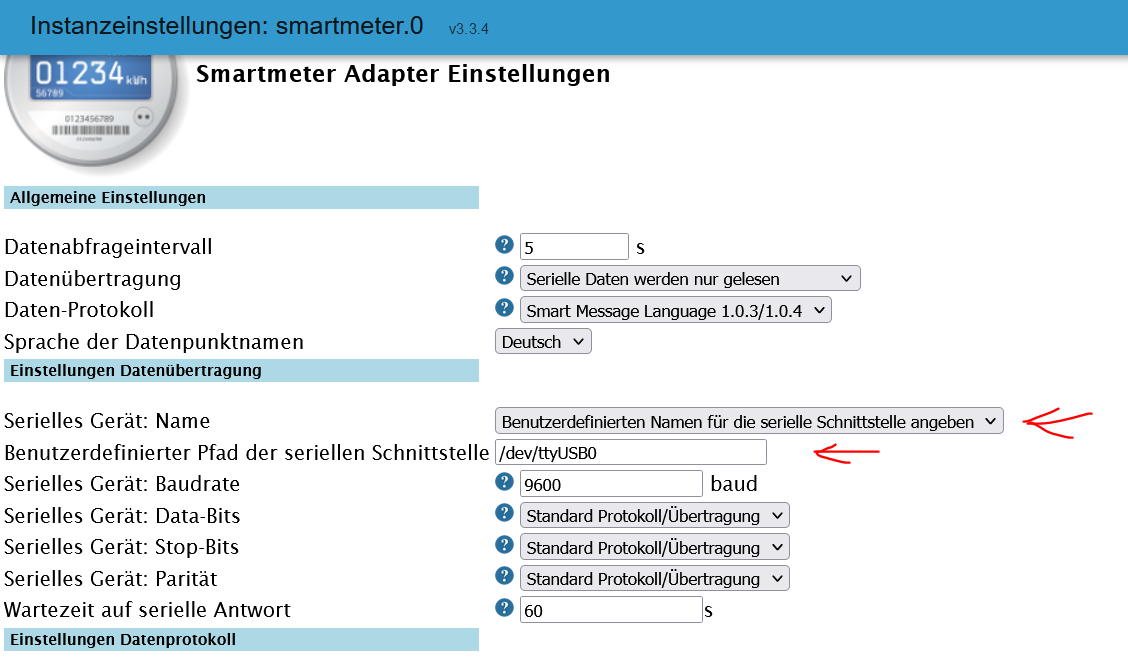
Hast du die Einstellungen so wie ich durchgeführt.
- ... Benutzerdefiniert ..
- /dev/ttyACM0
-
Ich habe gerade noch einmal das Log von ioBroker angesehen. Da sehe ich zwei Fehler, habe aber keine Idee was es sein könnte..
2022-08-14 14:09:10.338 - info: host.buanet-iobroker1 iobroker.js-controller version 4.0.23 js-controller starting 2022-08-14 14:09:10.344 - info: host.buanet-iobroker1 Copyright (c) 2014-2022 bluefox, 2014 hobbyquaker 2022-08-14 14:09:10.345 - info: host.buanet-iobroker1 hostname: buanet-iobroker1, node: v16.16.0 2022-08-14 14:09:10.346 - info: host.buanet-iobroker1 ip addresses: 192.168.1.250 2001:16b8:1765:3100:211:32ff:fe8b:988f fe80::211:32ff:fe8b:988f 2022-08-14 14:09:10.724 - info: host.buanet-iobroker1 connected to Objects and States 2022-08-14 14:09:10.748 - info: host.buanet-iobroker1 Node.js version has changed from unknown to 16.16.0 2022-08-14 14:09:10.808 - info: host.buanet-iobroker1 added notifications configuration of host 2022-08-14 14:09:11.051 - info: host.buanet-iobroker1 3 instances found 2022-08-14 14:09:11.060 - info: host.buanet-iobroker1 starting 3 instances 2022-08-14 14:09:11.112 - info: host.buanet-iobroker1 Successfully updated capabilities "cap_net_admin, cap_net_bind_service, cap_net_raw" for /usr/bin/node 2022-08-14 14:09:11.152 - info: host.buanet-iobroker1 instance system.adapter.admin.0 started with pid 1124 2022-08-14 14:09:11.323 - info: host.buanet-iobroker1 Created UUID: 815f69c0-0883-443a-9893-4090acf8daf0 2022-08-14 14:09:12.932 - info: admin.0 (1124) starting. Version 5.3.8 in /opt/iobroker/node_modules/iobroker.admin, node: v16.16.0, js-controller: 4.0.23 2022-08-14 14:09:12.972 - info: admin.0 (1124) requesting all states 2022-08-14 14:09:12.973 - info: admin.0 (1124) requesting all objects 2022-08-14 14:09:13.042 - info: admin.0 (1124) received all objects 2022-08-14 14:09:13.075 - info: admin.0 (1124) Request actual repository... 2022-08-14 14:09:13.086 - info: host.buanet-iobroker1 Updating repository "stable" under "http://download.iobroker.net/sources-dist.json" 2022-08-14 14:09:13.091 - info: admin.0 (1124) http server listening on port 8081 2022-08-14 14:09:13.092 - info: admin.0 (1124) Use link "http://localhost:8081" to configure. 2022-08-14 14:09:13.246 - warn: admin.0 (1124) Repository cannot be read: Active repo - stable 2022-08-14 14:09:13.247 - warn: admin.0 (1124) Active repository "stable cannot be read 2022-08-14 14:09:14.649 - info: admin.0 (1124) Repository received successfully. 2022-08-14 14:09:15.120 - info: host.buanet-iobroker1 instance system.adapter.discovery.0 started with pid 1139 2022-08-14 14:09:16.428 - info: discovery.0 (1139) starting. Version 3.0.3 in /opt/iobroker/node_modules/iobroker.discovery, node: v16.16.0, js-controller: 4.0.23 2022-08-14 14:09:19.125 - info: host.buanet-iobroker1 instance system.adapter.backitup.0 started with pid 1154 2022-08-14 14:09:20.631 - info: backitup.0 (1154) starting. Version 2.4.9 in /opt/iobroker/node_modules/iobroker.backitup, node: v16.16.0, js-controller: 4.0.23 2022-08-14 14:09:20.689 - info: backitup.0 (1154) [iobroker] backup was activated at 02:40 every 1 day(s) 2022-08-14 20:33:59.799 - info: host.buanet-iobroker1 stopInstance system.adapter.admin.0 (force=false, process=true) 2022-08-14 20:33:59.806 - info: admin.0 (1124) Got terminate signal TERMINATE_YOURSELF 2022-08-14 20:33:59.810 - info: admin.0 (1124) terminating http server on port 8081 2022-08-14 20:33:59.811 - info: admin.0 (1124) terminating 2022-08-14 20:33:59.812 - info: admin.0 (1124) Terminated (ADAPTER_REQUESTED_TERMINATION): Without reason 2022-08-14 20:33:59.846 - info: host.buanet-iobroker1 stopInstance system.adapter.admin.0 send kill signal 2022-08-14 20:34:00.358 - info: host.buanet-iobroker1 instance system.adapter.admin.0 terminated with code 11 (ADAPTER_REQUESTED_TERMINATION) 2022-08-14 20:34:02.876 - info: host.buanet-iobroker1 instance system.adapter.admin.0 started with pid 20347 2022-08-14 20:34:04.363 - info: admin.0 (20347) starting. Version 5.3.8 in /opt/iobroker/node_modules/iobroker.admin, node: v16.16.0, js-controller: 4.0.23 2022-08-14 20:34:04.401 - info: admin.0 (20347) requesting all states 2022-08-14 20:34:04.402 - info: admin.0 (20347) requesting all objects 2022-08-14 20:34:04.688 - info: admin.0 (20347) received all objects 2022-08-14 20:34:05.030 - info: admin.0 (20347) Request actual repository... 2022-08-14 20:34:05.040 - info: admin.0 (20347) http server listening on port 8081 2022-08-14 20:34:05.041 - info: admin.0 (20347) Use link "http://localhost:8081" to configure. 2022-08-14 20:34:05.180 - info: host.buanet-iobroker1 Updating repository "stable" under "http://download.iobroker.net/sources-dist.json" 2022-08-14 20:34:05.446 - info: admin.0 (20347) failed connection to socket.io from ::ffff:192.168.1.66: 2022-08-14 20:34:05.450 - error: admin.0 (20347) Error: "error" 2022-08-14 20:34:06.824 - info: admin.0 (20347) Repository received successfully. 2022-08-14 20:34:23.240 - info: discovery.0 (1139) Done discovering serial devices. 5 packages received 2022-08-14 20:34:23.246 - info: discovery.0 (1139) Found 6 addresses 2022-08-14 20:34:24.282 - warn: discovery.0 (1139) write: 10;VERSION; 2022-08-14 20:34:24.284 - warn: discovery.0 (1139) Received: ���� 2022-08-14 20:34:24.343 - info: discovery.0 (1139) Discovery finished. Found new or modified 7 instances 2022-08-14 20:34:24.398 - info: discovery.0 (1139) Discovery finished 2022-08-14 20:35:04.096 - info: host.buanet-iobroker1 iobroker add smartmeter --host buanet-iobroker1 2022-08-14 20:35:06.485 - info: host.buanet-iobroker1 iobroker NPM version: 8.11.0 2022-08-14 20:35:06.486 - info: host.buanet-iobroker1 iobroker Installing iobroker.smartmeter@3.3.4... (System call) 2022-08-14 20:35:12.858 - info: host.buanet-iobroker1 iobroker 2022-08-14 20:35:12.859 - info: host.buanet-iobroker1 iobroker added 4 packages in 6s38 packages are looking for funding run `npm fund` for details 2022-08-14 20:35:12.886 - info: host.buanet-iobroker1 iobroker host.buanet-iobroker1 install adapter smartmeter 2022-08-14 20:35:12.925 - info: host.buanet-iobroker1 iobroker upload [5] smartmeter.admin /opt/iobroker/node_modules/iobroker.smartmeter/admin/index.html index.html text/html 2022-08-14 20:35:12.956 - info: host.buanet-iobroker1 iobroker upload [4] smartmeter.admin /opt/iobroker/node_modules/iobroker.smartmeter/admin/questionmark.png questionmark.png image/png 2022-08-14 20:35:12.965 - info: host.buanet-iobroker1 iobroker upload [3] smartmeter.admin /opt/iobroker/node_modules/iobroker.smartmeter/admin/smartmeter.jpg smartmeter.jpg image/jpeg 2022-08-14 20:35:12.974 - info: host.buanet-iobroker1 iobroker upload [2] smartmeter.admin /opt/iobroker/node_modules/iobroker.smartmeter/admin/smartmeter.png smartmeter.png image/png 2022-08-14 20:35:12.982 - info: host.buanet-iobroker1 iobroker upload [1] smartmeter.admin /opt/iobroker/node_modules/iobroker.smartmeter/admin/tooltip.css tooltip.css text/css 2022-08-14 20:35:12.991 - info: host.buanet-iobroker1 iobroker upload [0] smartmeter.admin /opt/iobroker/node_modules/iobroker.smartmeter/admin/words.js words.js application/javascript 2022-08-14 20:35:13.020 - info: host.buanet-iobroker1 iobroker host.buanet-iobroker1 object system.adapter.smartmeter created/updated 2022-08-14 20:35:13.047 - info: host.buanet-iobroker1 iobroker host.buanet-iobroker1 create instance smartmeter 2022-08-14 20:35:13.055 - info: host.buanet-iobroker1 iobroker host.buanet-iobroker1 object system.adapter.smartmeter.0.alive created 2022-08-14 20:35:13.061 - info: host.buanet-iobroker1 iobroker host.buanet-iobroker1 object system.adapter.smartmeter.0.connected created 2022-08-14 20:35:13.072 - info: host.buanet-iobroker1 iobroker host.buanet-iobroker1 object system.adapter.smartmeter.0.compactMode created 2022-08-14 20:35:13.080 - info: host.buanet-iobroker1 iobroker host.buanet-iobroker1 object system.adapter.smartmeter.0.cpu created 2022-08-14 20:35:13.086 - info: host.buanet-iobroker1 iobroker host.buanet-iobroker1 object system.adapter.smartmeter.0.cputime created 2022-08-14 20:35:13.096 - info: host.buanet-iobroker1 iobroker host.buanet-iobroker1 object system.adapter.smartmeter.0.memHeapUsed created 2022-08-14 20:35:13.106 - info: host.buanet-iobroker1 iobroker host.buanet-iobroker1 object system.adapter.smartmeter.0.memHeapTotal created 2022-08-14 20:35:13.114 - info: host.buanet-iobroker1 iobroker host.buanet-iobroker1 object system.adapter.smartmeter.0.memRss created 2022-08-14 20:35:13.124 - info: host.buanet-iobroker1 iobroker host.buanet-iobroker1 object system.adapter.smartmeter.0.uptime created 2022-08-14 20:35:13.130 - info: host.buanet-iobroker1 iobroker host.buanet-iobroker1 object system.adapter.smartmeter.0.inputCount created 2022-08-14 20:35:13.136 - info: host.buanet-iobroker1 iobroker host.buanet-iobroker1 object system.adapter.smartmeter.0.outputCount created 2022-08-14 20:35:13.142 - info: host.buanet-iobroker1 iobroker host.buanet-iobroker1 object system.adapter.smartmeter.0.eventLoopLag created 2022-08-14 20:35:13.148 - info: host.buanet-iobroker1 iobroker host.buanet-iobroker1 object system.adapter.smartmeter.0.sigKill created 2022-08-14 20:35:13.154 - info: host.buanet-iobroker1 iobroker host.buanet-iobroker1 object system.adapter.smartmeter.0.logLevel created 2022-08-14 20:35:13.159 - info: host.buanet-iobroker1 iobroker host.buanet-iobroker1 object smartmeter.0.info created 2022-08-14 20:35:13.164 - info: host.buanet-iobroker1 iobroker host.buanet-iobroker1 object smartmeter.0.info.connection created 2022-08-14 20:35:13.168 - info: host.buanet-iobroker1 iobroker host.buanet-iobroker1 Set default value of smartmeter.0.info.connection: false 2022-08-14 20:35:13.180 - info: host.buanet-iobroker1 iobroker host.buanet-iobroker1 object system.adapter.smartmeter.0 created 2022-08-14 20:35:14.200 - info: host.buanet-iobroker1 iobroker exit 0 2022-08-14 20:35:16.209 - info: host.buanet-iobroker1 instance system.adapter.smartmeter.0 started with pid 20461 2022-08-14 20:35:18.025 - info: smartmeter.0 (20461) List of port: [] 2022-08-14 20:35:18.113 - info: smartmeter.0 (20461) starting. Version 3.3.4 in /opt/iobroker/node_modules/iobroker.smartmeter, node: v16.16.0, js-controller: 4.0.23 2022-08-14 20:35:18.138 - error: smartmeter.0 (20461) Serial port device is undefined, check your configuration! 2022-08-14 20:35:19.120 - info: smartmeter.0 (20461) List of port: [] 2022-08-14 20:35:20.354 - info: smartmeter.0 (20461) List of port: [] 2022-08-14 20:35:21.408 - info: smartmeter.0 (20461) List of port: [] 2022-08-14 20:35:22.494 - info: smartmeter.0 (20461) List of port: [] 2022-08-14 20:35:23.573 - info: smartmeter.0 (20461) List of port: [] 2022-08-14 20:35:24.701 - info: smartmeter.0 (20461) List of port: [] 2022-08-14 20:35:25.777 - info: smartmeter.0 (20461) List of port: [] 2022-08-14 20:35:26.826 - info: smartmeter.0 (20461) List of port: [] 2022-08-14 20:35:27.919 - info: smartmeter.0 (20461) List of port: [] 2022-08-14 20:35:28.993 - info: smartmeter.0 (20461) List of port: [] 2022-08-14 20:35:30.043 - info: smartmeter.0 (20461) List of port: [] 2022-08-14 20:35:31.098 - info: smartmeter.0 (20461) List of port: [] 2022-08-14 20:35:32.200 - info: smartmeter.0 (20461) List of port: [] 2022-08-14 20:35:33.254 - info: smartmeter.0 (20461) List of port: [] 2022-08-14 20:35:34.305 - info: smartmeter.0 (20461) List of port: [] 2022-08-14 20:35:35.368 - info: smartmeter.0 (20461) List of port: [] 2022-08-14 20:35:36.449 - info: smartmeter.0 (20461) List of port: [] 2022-08-14 20:35:37.575 - info: smartmeter.0 (20461) List of port: [] 2022-08-14 20:36:57.106 - info: host.buanet-iobroker1 stopInstance system.adapter.smartmeter.0 (force=false, process=true) 2022-08-14 20:36:57.111 - info: smartmeter.0 (20461) Got terminate signal TERMINATE_YOURSELF 2022-08-14 20:36:57.113 - info: smartmeter.0 (20461) terminating 2022-08-14 20:36:57.114 - info: smartmeter.0 (20461) Terminated (ADAPTER_REQUESTED_TERMINATION): Without reason 2022-08-14 20:36:57.150 - info: host.buanet-iobroker1 stopInstance system.adapter.smartmeter.0 send kill signal 2022-08-14 20:36:57.647 - info: host.buanet-iobroker1 instance system.adapter.smartmeter.0 terminated with code 11 (ADAPTER_REQUESTED_TERMINATION) 2022-08-14 20:37:00.173 - info: host.buanet-iobroker1 instance system.adapter.smartmeter.0 started with pid 20569 2022-08-14 20:37:01.881 - info: smartmeter.0 (20569) starting. Version 3.3.4 in /opt/iobroker/node_modules/iobroker.smartmeter, node: v16.16.0, js-controller: 4.0.23 2022-08-14 20:37:11.933 - info: smartmeter.0 (20569) Error: No or too long answer from Serial Device after last request. 2022-08-14 20:37:11.934 - warn: smartmeter.0 (20569) No or too long answer from Serial Device after last request.@carsten6273 sagte in Synology und IR-Lesekopf für Stromzähler:
Serial port device is undefined, check your configuration!
!!!!
Synology 918+ 16GB - ioBroker in Docker v9 , VISO auf Trekstor Primebook C13 13,3" , Hikvision Domkameras mit Surveillance Station .. CCU RaspberryMatic in Synology VM .. Zigbee CC2538+CC2592 .. Sonoff .. KNX .. Modbus ..
-
@carsten6273 sagte in Synology und IR-Lesekopf für Stromzähler:
Serial port device is undefined, check your configuration!
!!!!
deswegen
@Carsten6273 immer zeigen und nicht erzählen -
deswegen
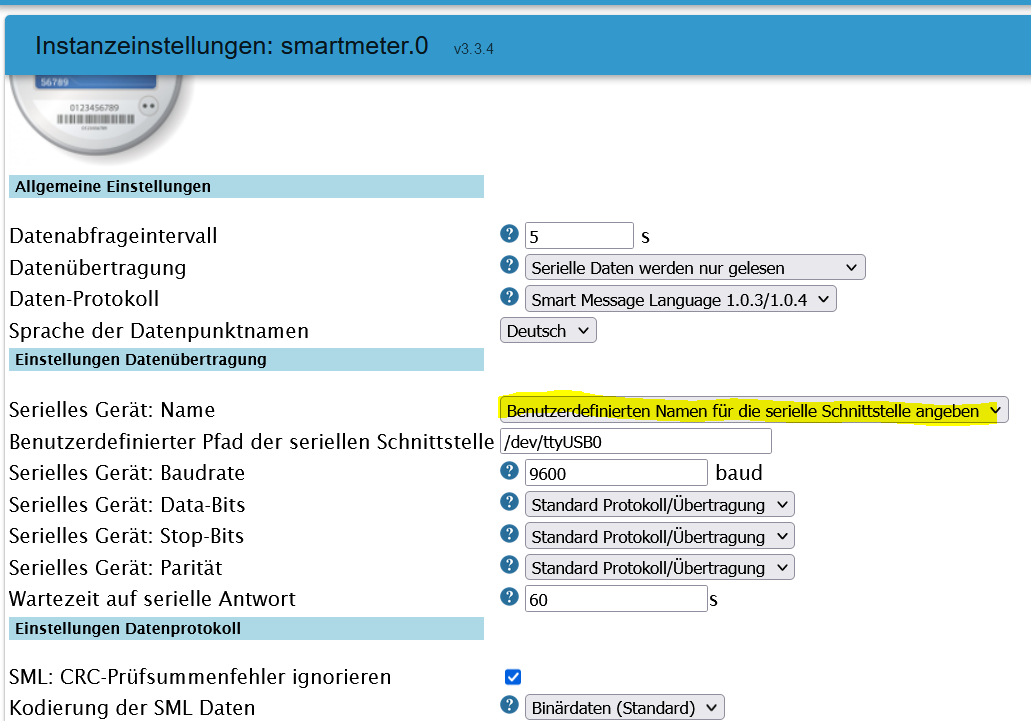
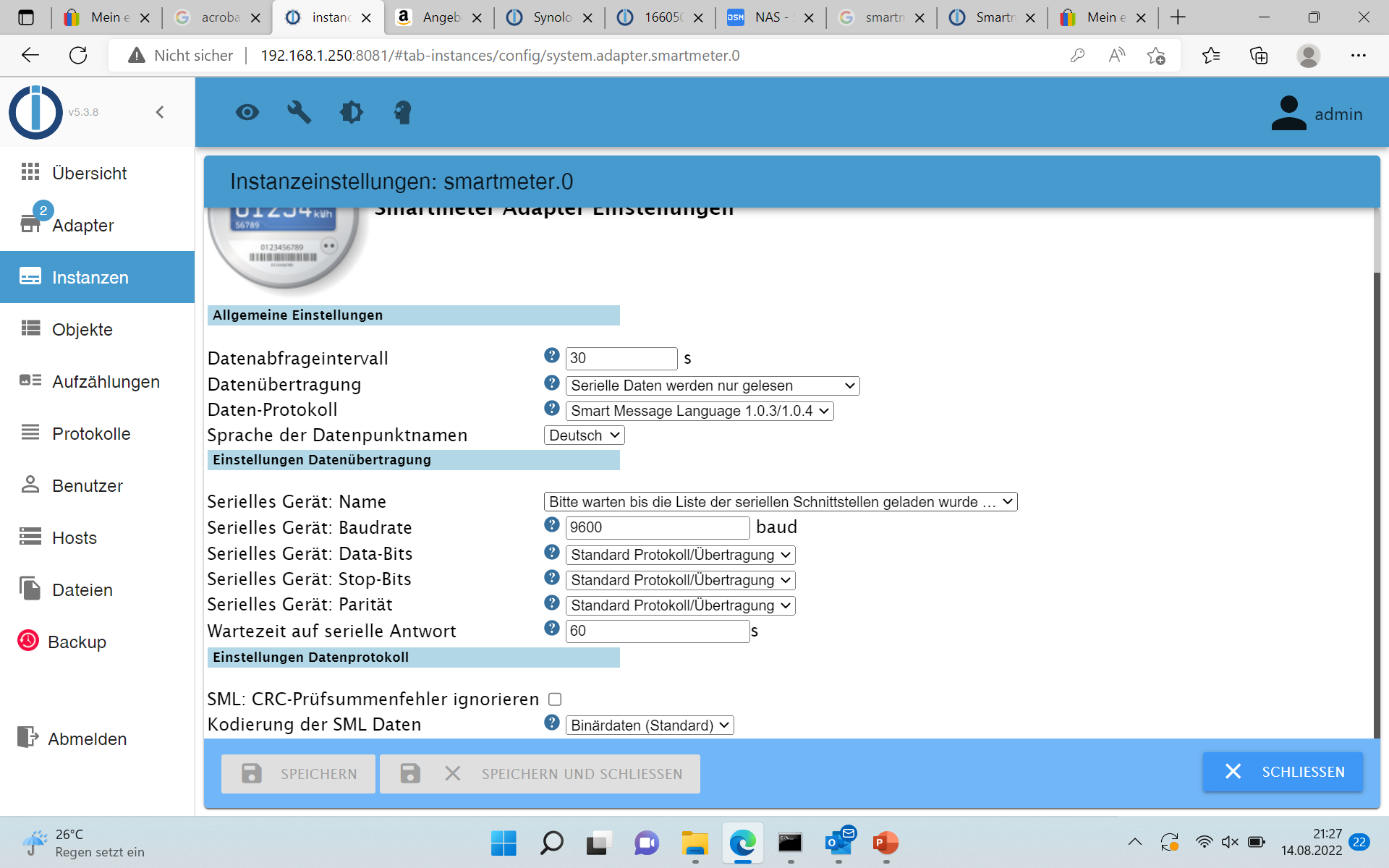
@Carsten6273 immer zeigen und nicht erzählenSo stelle ich es ein:
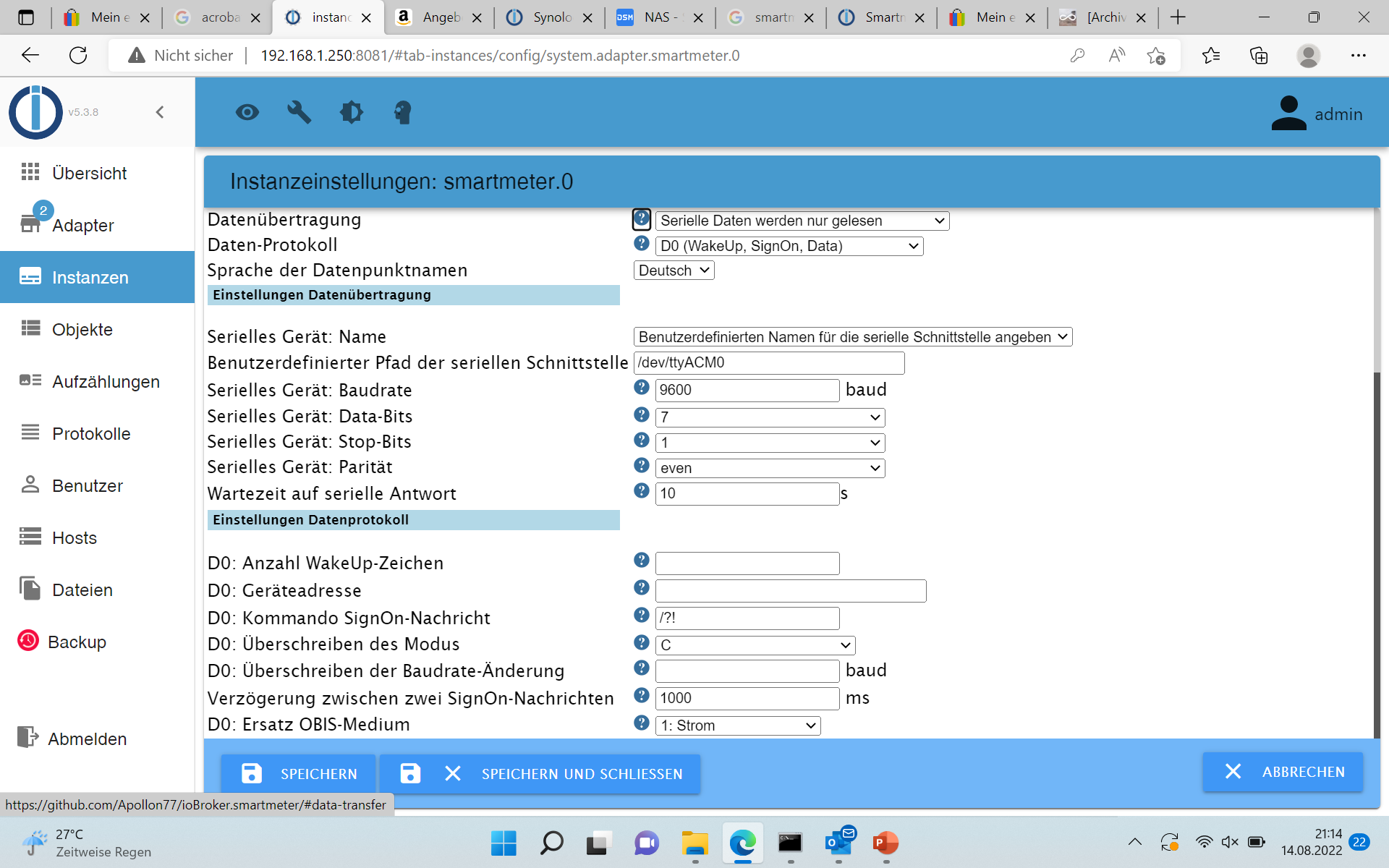
klicke auf Speichern und Schliessen und beim nächsten Öffnen sehe ich wieder das
-
So stelle ich es ein:
klicke auf Speichern und Schliessen und beim nächsten Öffnen sehe ich wieder das
@carsten6273 sagte in Synology und IR-Lesekopf für Stromzähler:
So stelle ich es ein:
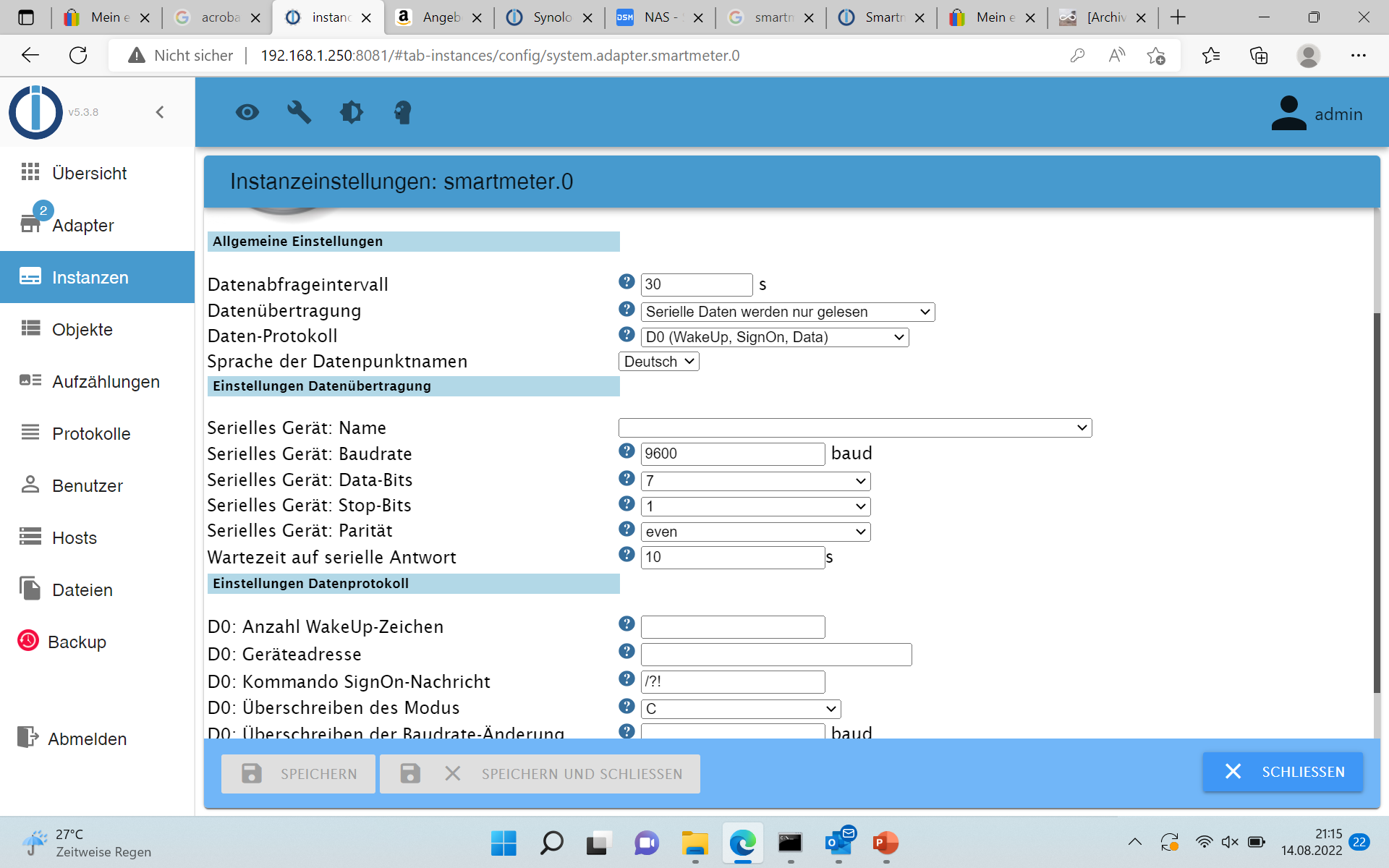
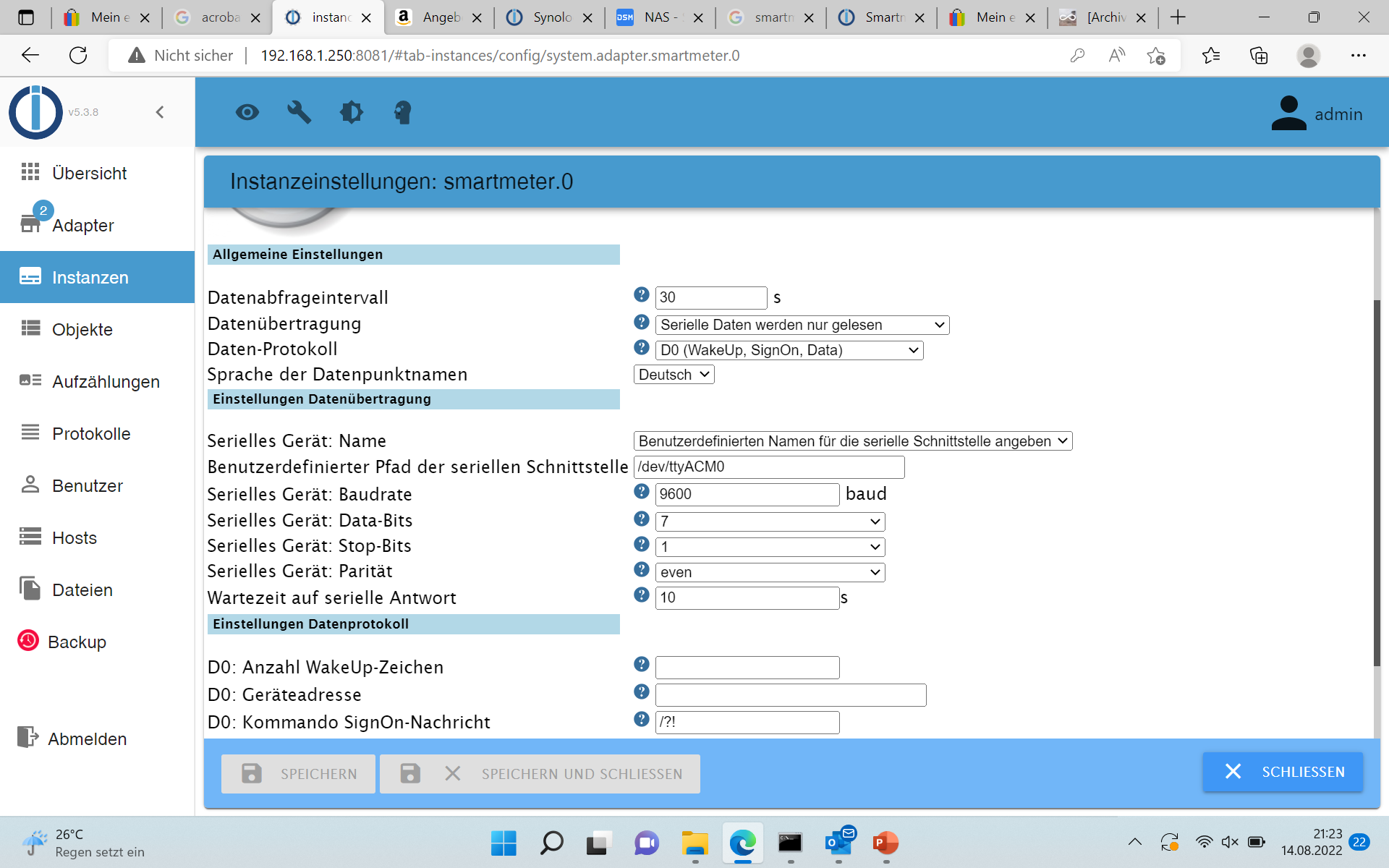
du must etwas warte ( so bei mir ) bis es alles kommt .
dauert ca. 15-30 Sekunden ,erst so ...
... Zeit x .. danach ist es alles ausgefüllt .
nutzt du VPN !?
-
@carsten6273 sagte in Synology und IR-Lesekopf für Stromzähler:
So stelle ich es ein:
du must etwas warte ( so bei mir ) bis es alles kommt .
dauert ca. 15-30 Sekunden ,erst so ...
... Zeit x .. danach ist es alles ausgefüllt .
nutzt du VPN !?
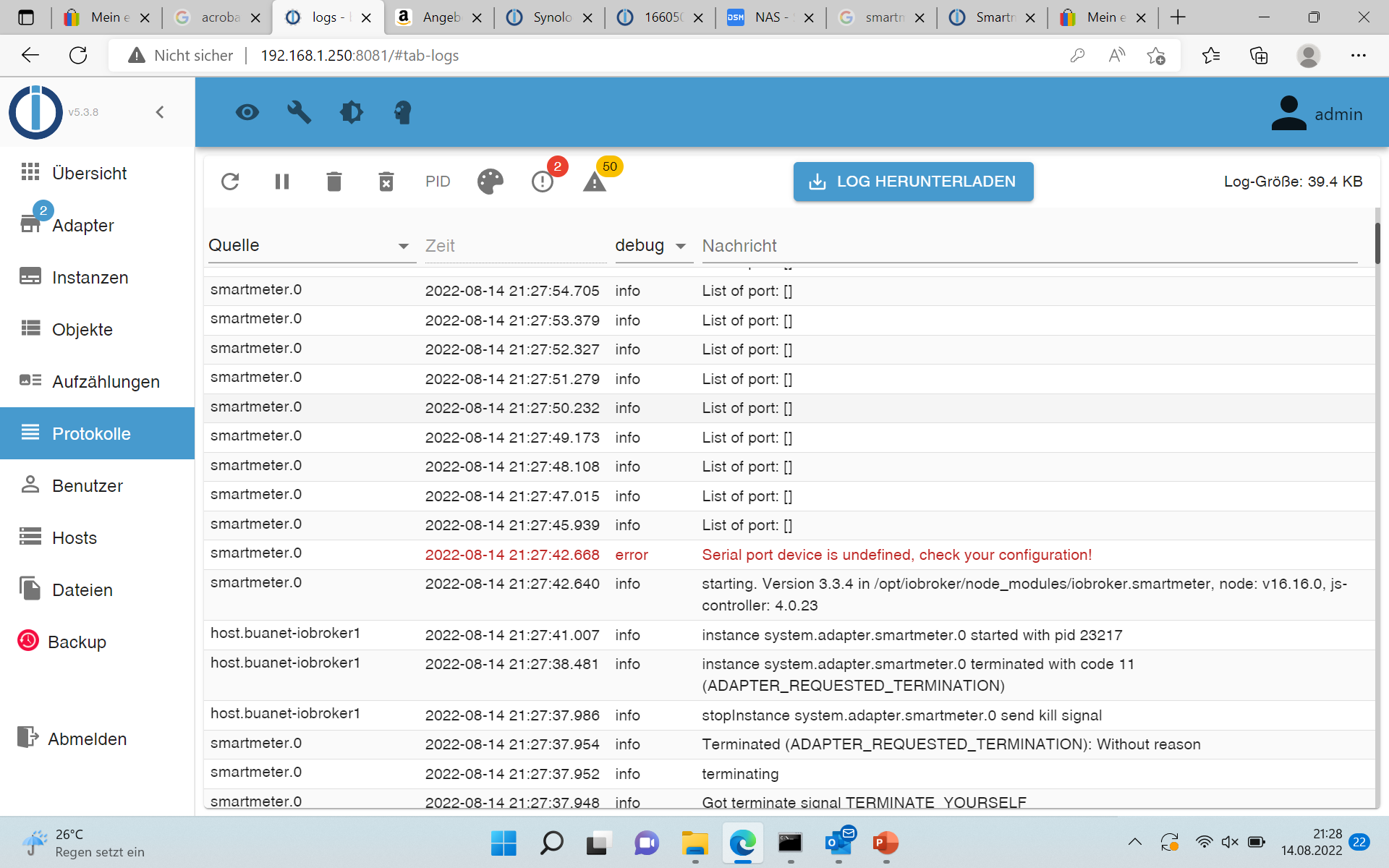
Du hast recht, ich war zu ungeduldig
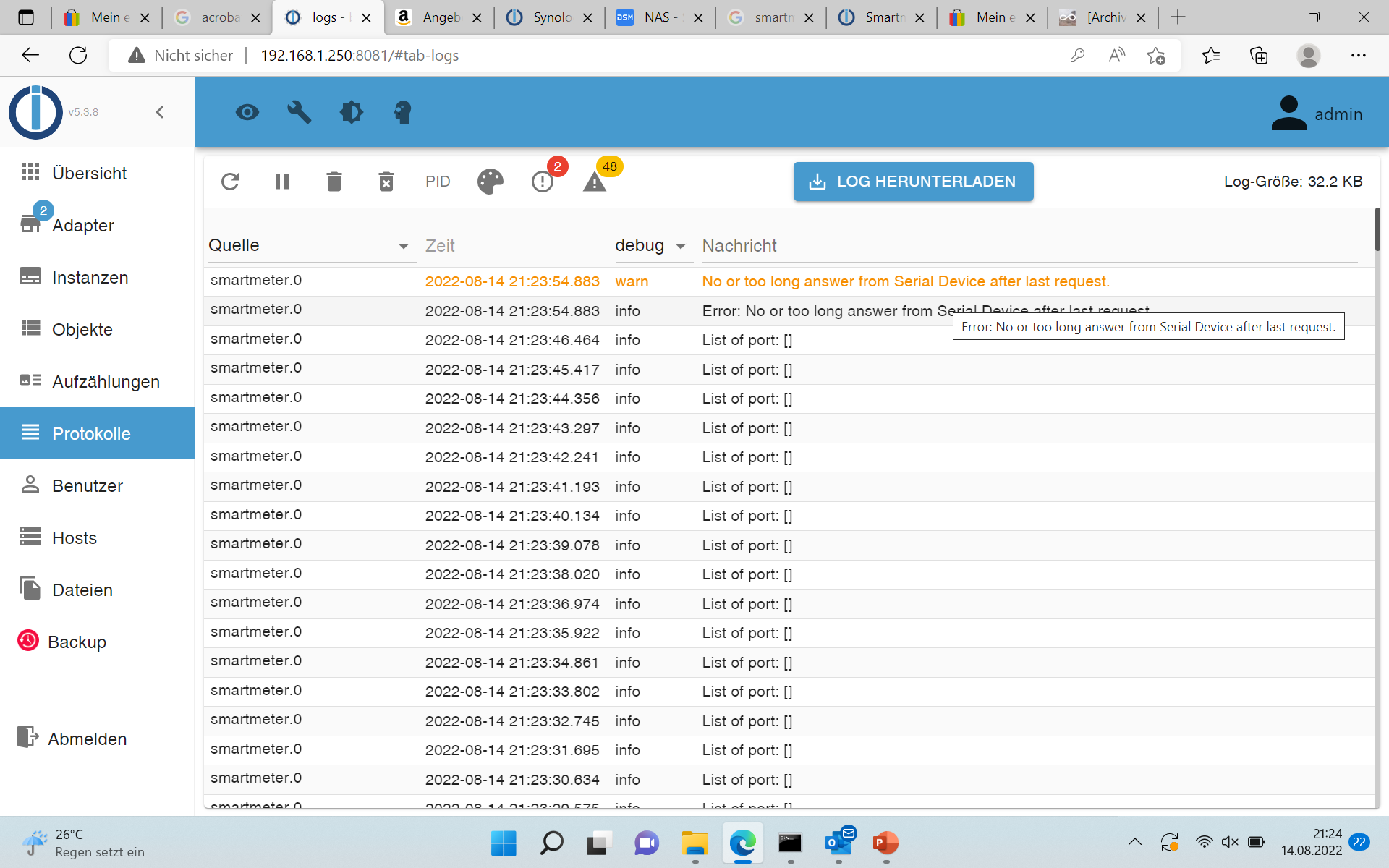
Das Log sieht aber nicht viel besser aus
Und ansonsten kein VPN
-
Du hast recht, ich war zu ungeduldig
Das Log sieht aber nicht viel besser aus
Und ansonsten kein VPN
@carsten6273 sagte in Synology und IR-Lesekopf für Stromzähler:
Das Log sieht aber nicht viel besser au
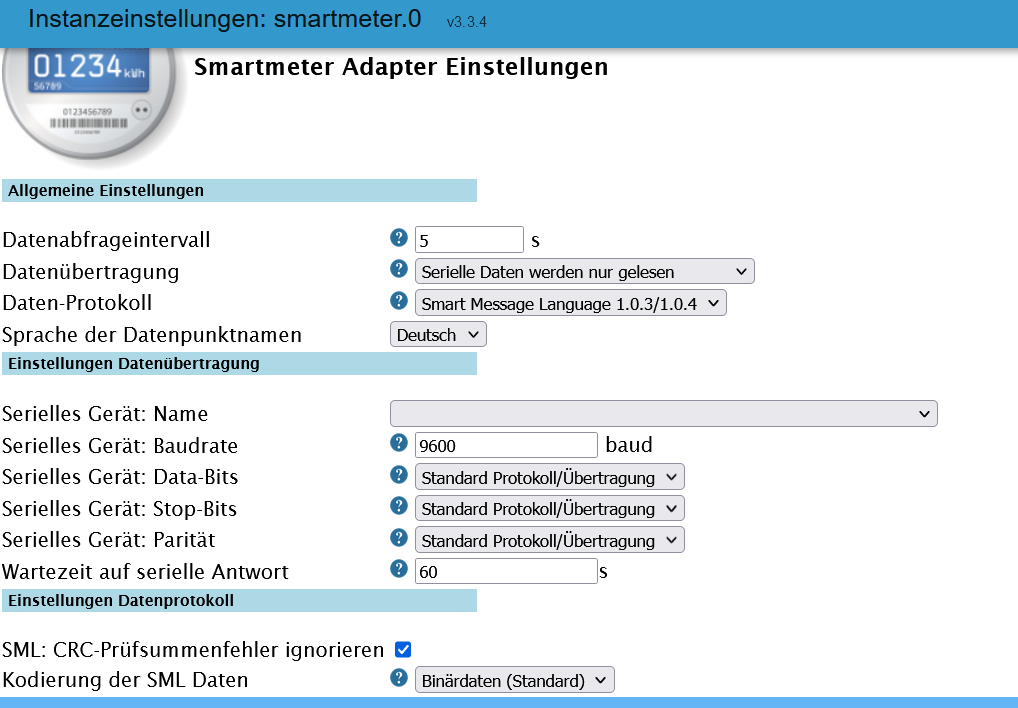
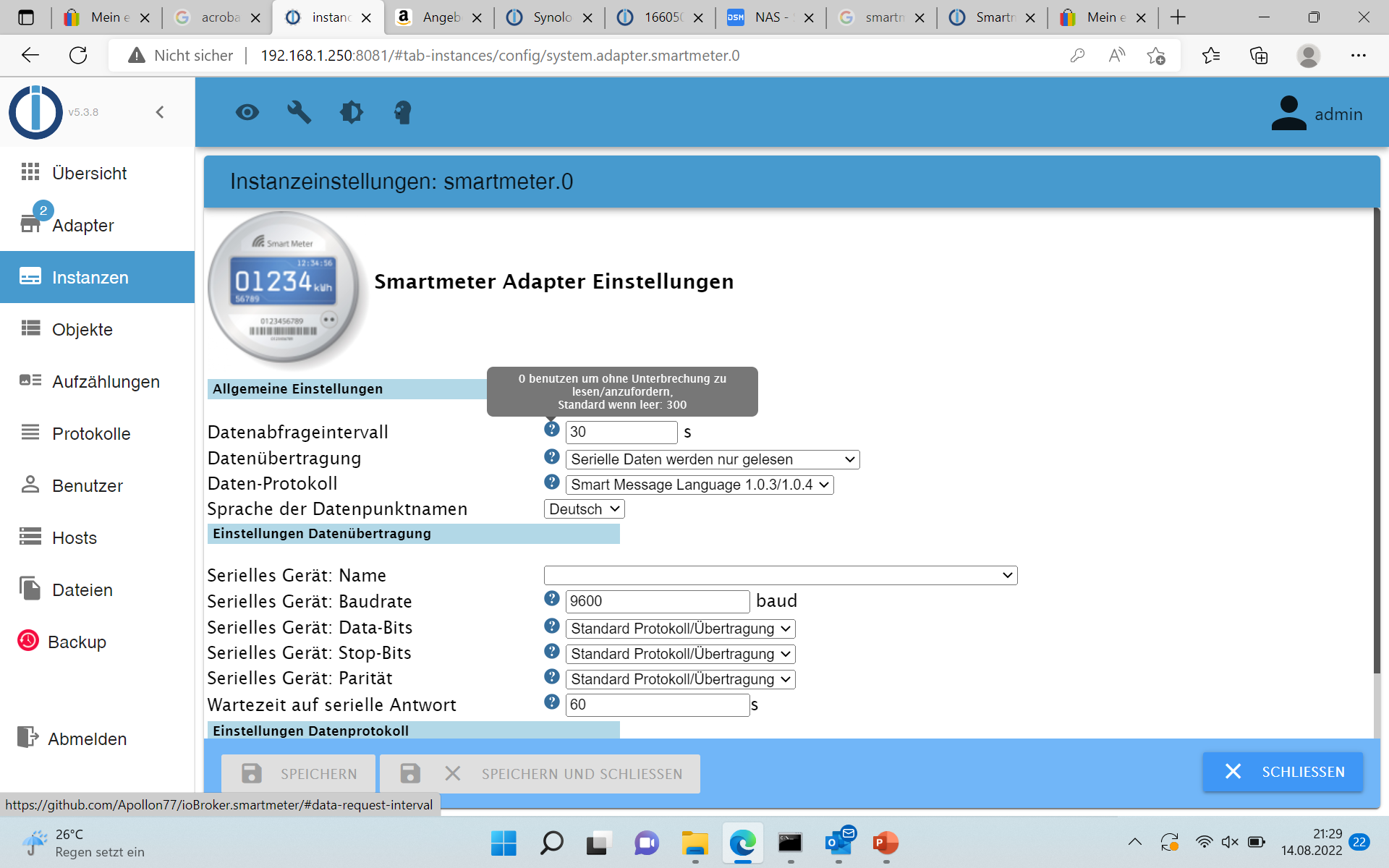
Nimm alle Einstellungen so wie ich ... nur das bei dir /dev/ttyACM0 rein kommt
EDIT :
So wie ganz oben schon gezeigt :
-
@carsten6273 sagte in Synology und IR-Lesekopf für Stromzähler:
Das Log sieht aber nicht viel besser au
Nimm alle Einstellungen so wie ich ... nur das bei dir /dev/ttyACM0 rein kommt
EDIT :
So wie ganz oben schon gezeigt :
-
-
Nicht so hektisch sein ... dann klappt es auch !!!!
-
Ich teste gleich noch einmal weiter, aber in den Instanzen sehe ich den grünen Status.....
Was nutzt du zum Visualisieren der Daten?
-
Ich teste gleich noch einmal weiter, aber in den Instanzen sehe ich den grünen Status.....
Was nutzt du zum Visualisieren der Daten?
@carsten6273 sagte in Synology und IR-Lesekopf für Stromzähler:
Was nutzt du zum Visualisieren der Daten?
sourceanalytix
Angregung ... Beispiel bei History_Wallbox
https://forum.iobroker.net/topic/40926/vorlage-view-visualisierung-emobility-vw-connect-audi
-
@carsten6273 sagte in Synology und IR-Lesekopf für Stromzähler:
Was nutzt du zum Visualisieren der Daten?
sourceanalytix
Angregung ... Beispiel bei History_Wallbox
https://forum.iobroker.net/topic/40926/vorlage-view-visualisierung-emobility-vw-connect-audi
Danke, ich werfe mal Morgen einen Blick drauf. Deine Reaktionsgeschwindigkeit war super. Und die Lösung so einfach. Viele andere Webseiten zeigen aber andere Einstellungen....
-
Danke, ich werfe mal Morgen einen Blick drauf. Deine Reaktionsgeschwindigkeit war super. Und die Lösung so einfach. Viele andere Webseiten zeigen aber andere Einstellungen....
@carsten6273 sagte in Synology und IR-Lesekopf für Stromzähler:
Viele andere Webseiten zeigen aber andere Einstellungen....
Naja ... dazu sage ich mal nicht´s ....
Das ist der Haupt-Thread , wenn du nochmal was brauchen solltest :
-
@carsten6273 sagte in Synology und IR-Lesekopf für Stromzähler:
Viele andere Webseiten zeigen aber andere Einstellungen....
Naja ... dazu sage ich mal nicht´s ....
Das ist der Haupt-Thread , wenn du nochmal was brauchen solltest :
Eine Frage ist bei mir heute noch aufgekommen:
Ich habe den Stromzähler jetzt mit der Pin entsperrt und dieser zeigt dann die weiteren Infos wie Momentverbrauch usw. an. Leider kommen diese Infos jetzt nicht im iobroker an. Ich sehe weiterhin nur die Gesamtzähler. Was muss ich denn jetzt noch verändern?
-
Eine Frage ist bei mir heute noch aufgekommen:
Ich habe den Stromzähler jetzt mit der Pin entsperrt und dieser zeigt dann die weiteren Infos wie Momentverbrauch usw. an. Leider kommen diese Infos jetzt nicht im iobroker an. Ich sehe weiterhin nur die Gesamtzähler. Was muss ich denn jetzt noch verändern?
@carsten6273 sagte in Synology und IR-Lesekopf für Stromzähler:
Was muss ich denn jetzt noch verändern?
Nichts ... die Datenpunkte werden dazu selbstständig erzeugt .
jetzt mit der Pin entsperrt
Auch dauerhaft gespeichert ... codiert !
Synology 918+ 16GB - ioBroker in Docker v9 , VISO auf Trekstor Primebook C13 13,3" , Hikvision Domkameras mit Surveillance Station .. CCU RaspberryMatic in Synology VM .. Zigbee CC2538+CC2592 .. Sonoff .. KNX .. Modbus ..
-
@carsten6273 sagte in Synology und IR-Lesekopf für Stromzähler:
Was muss ich denn jetzt noch verändern?
Nichts ... die Datenpunkte werden dazu selbstständig erzeugt .
jetzt mit der Pin entsperrt
Auch dauerhaft gespeichert ... codiert !
Danke für deine schnellen Antworten. Leider vermisse ich in meinen Daten noch den Momentanverbrauch. Meine Ansicht sieht so aus
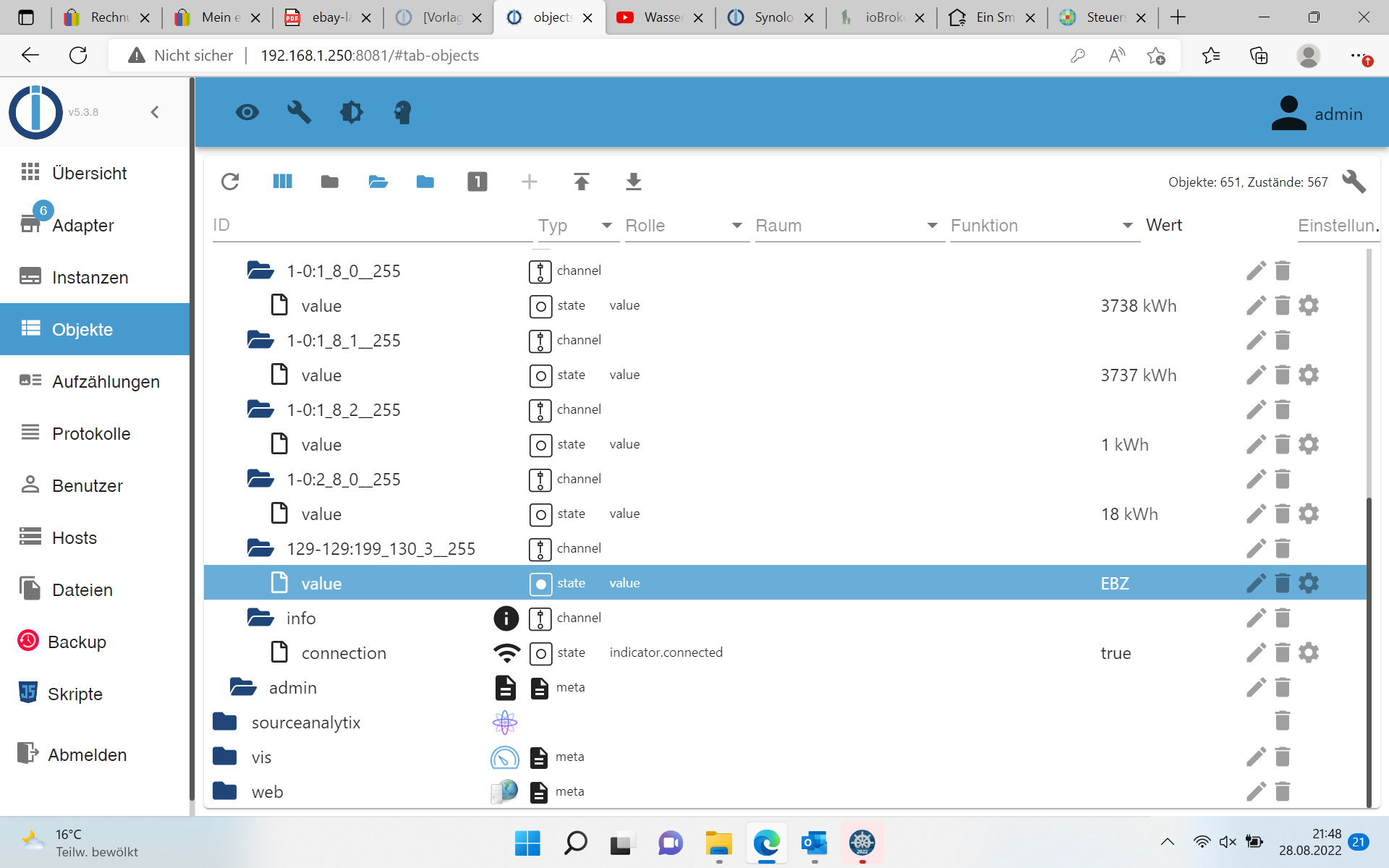
Eigentlich müsste ich doch noch weitere Werte sehen können oder?
-
@carsten6273 sagte in Synology und IR-Lesekopf für Stromzähler:
Was muss ich denn jetzt noch verändern?
Nichts ... die Datenpunkte werden dazu selbstständig erzeugt .
jetzt mit der Pin entsperrt
Auch dauerhaft gespeichert ... codiert !
Jipp da fehlen die freigeschalteten Werte
@glasfaser sagte in Synology und IR-Lesekopf für Stromzähler:
jetzt mit der Pin entsperrtAuch dauerhaft gespeichert ... codiert !
Wenn es freigeschaltet ist , dann wären auch die Datenpunkte z.b. mit Komma Werte

Hey! Du scheinst an dieser Unterhaltung interessiert zu sein, hast aber noch kein Konto.
Hast du es satt, bei jedem Besuch durch die gleichen Beiträge zu scrollen? Wenn du dich für ein Konto anmeldest, kommst du immer genau dorthin zurück, wo du zuvor warst, und kannst dich über neue Antworten benachrichtigen lassen (entweder per E-Mail oder Push-Benachrichtigung). Du kannst auch Lesezeichen speichern und Beiträge positiv bewerten, um anderen Community-Mitgliedern deine Wertschätzung zu zeigen.
Mit deinem Input könnte dieser Beitrag noch besser werden 💗
Registrieren AnmeldenSupport us
473
Online33.0k
Benutzer83.6k
Themen1.3m
Beiträge