




Einige Adapter starten nicht mehr
-
Used repository: Beta (latest) Adapter "admin" : 6.2.4 , installed 6.2.4 Adapter "alexa2" : 3.18.6 , installed 3.18.6 Adapter "backitup" : 2.4.10 , installed 2.4.10 Adapter "daswetter" : 3.1.3 , installed 3.1.3 Adapter "device-reminder": 1.2.9 , installed 1.2.9 Adapter "devices" : 1.0.12 , installed 1.0.12 Adapter "discovery" : 3.0.5 , installed 3.0.5 Adapter "feiertage" : 1.1.0 , installed 1.1.0 Adapter "flot" : 1.11.0 , installed 1.11.0 Adapter "fullybrowser" : 2.1.2 , installed 2.1.2 Adapter "history" : 2.2.0 , installed 2.2.0 Adapter "hm-rega" : 3.0.40 , installed 3.0.40 Adapter "hm-rpc" : 1.15.12 , installed 1.15.12 Adapter "hs100" : 2.0.7 , installed 2.0.7 Adapter "ical" : 1.13.1 , installed 1.13.1 Adapter "icons-icons8" : 0.0.1 , installed 0.0.1 Adapter "icons-material-png": 0.1.0, installed 0.1.0 Adapter "icons-mfd-png": 1.1.0 , installed 1.1.0 Adapter "info" : 1.9.19 , installed 1.9.19 Adapter "iot" : 1.11.9 , installed 1.11.9 Adapter "javascript" : 6.0.0 , installed 6.0.0 Controller "js-controller": 4.0.23 , installed 4.0.23 Adapter "mihome" : 1.4.0 , installed 1.4.0 Adapter "mqtt" : 4.0.7 , installed 4.0.7 Adapter "ping" : 1.5.3 , installed 1.5.3 Adapter "pushover" : 3.0.2 , installed 3.0.2 Adapter "rpi2" : 1.3.2 , installed 1.3.2 Adapter "samsung" : 0.5.11 , installed 0.5.11 Adapter "shelly" : 6.0.0 , installed 6.0.0 Adapter "simple-api" : 2.7.0 , installed 2.7.0 Adapter "socketio" : 6.1.8 , installed 6.1.8 Adapter "sonoff" : 2.5.1 , installed 2.5.1 Adapter "sourceanalytix": 0.4.14 , installed 0.4.14 Adapter "synology" : 2.1.9 , installed 2.1.9 Adapter "tankerkoenig" : 2.1.1 , installed 2.1.1 Adapter "tr-064" : 4.2.16 , installed 4.2.16 Adapter "trashschedule": 2.0.3 , installed 2.0.3 Adapter "tuya" : 3.6.15 , installed 3.6.15 Adapter "vis" : 1.4.15 , installed 1.4.15 Adapter "vis-canvas-gauges": 0.1.5, installed 0.1.5 Adapter "vis-colorpicker": 1.2.0 , installed 1.2.0 Adapter "vis-hqwidgets": 1.2.0 , installed 1.2.0 Adapter "vis-inventwo" : 3.3.3 , installed 3.3.3 Adapter "vis-jqui-mfd" : 1.0.12 , installed 1.0.12 Adapter "vis-material" : 0.1.3 , installed 0.1.3 Adapter "vis-material-webfont": 0.0.3, installed 0.0.3 Adapter "vis-materialdesign": 0.5.9, installed 0.5.9 Adapter "vis-timeandweather": 1.2.2, installed 1.2.2 Adapter "web" : 5.2.4 , installed 5.2.4 Adapter "ws" : 2.1.3 , installed 2.1.3 Adapter "zigbee" : 1.7.6 , installed 1.7.6Wie bist du denn sonst unterwegs?
sudo ln -s /usr/bin/node /usr/bin/nodejs uname -m && type -P nodejs node npm && nodejs -v && node -v && npm -v && whoami && pwd && sudo apt update &> /dev/null && sudo apt update && apt policy nodejs cd /opt/iobroker npm ls | grep -E 'github|ERR' -
Systemdata Bitte Ausfüllen Hardwaresystem: Pi4 Arbeitsspeicher: 4GB Festplattenart: SD-Karte Betriebssystem: Linux Node-Version: 16.16.0 Nodejs-Version: 16.16.0 NPM-Version: 8.15.0 Installationsart: Manuell Ich bin vorgestern aus dem Urlaub heimgekommen und hab gesehen daß einige Adapterupdates
anstanden. Die hab ich durchgeführt. Danach ist dann der Admin Adapter nicht mehr gestartet.
Ich hab den dann neu installiert, dann bin ich wieder in den Admin gekommen. Nun hab ich gemerkt daß nun einige Instanzen nicht mehr starten. Ob das jetzt direkt mit den Updates zusammenhängt oder ob die schon
vorher nicht mehr liefen kann ich gar nicht sagen :-(
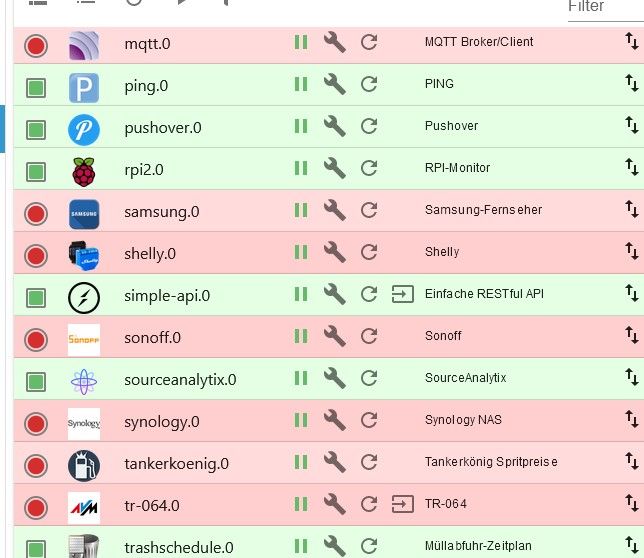
Leider hab ich nur so ein gefährliches Halbwissen. Ich hab inzwischen viel gegoogelt und das System komplett
aktualisiert, die aktuellsten Adapterversionen aus dem Beta Repositorium installiert, alles hat leider nix geholfen.
Auch das Einspielen eines alten Backups von vor dem Urlaub als noch alles lief hat nix geändert. Es sind immer
die gleichen Instanzen die nicht starten.
Log wenn ich z.B den HM-Rega starteZeit Nachricht host.raspi4-iobroker 2022-07-24 17:52:36.610 info Rebuild for adapter system.adapter.hm-rega.0 not successful in 3 tries. Adapter will not be restarted again. Please execute "npm install --production" in adapter directory manually. host.raspi4-iobroker 2022-07-24 17:52:36.610 error instance system.adapter.hm-rega.0 terminated with code 1 (JS_CONTROLLER_STOPPED) host.raspi4-iobroker 2022-07-24 17:52:36.609 error Caught by controller[0]: } host.raspi4-iobroker 2022-07-24 17:52:36.609 error Caught by controller[0]: ] host.raspi4-iobroker 2022-07-24 17:52:36.609 error Caught by controller[0]: '/opt/iobroker/node_modules/iobroker.hm-rega/main.js' host.raspi4-iobroker 2022-07-24 17:52:36.609 error Caught by controller[0]: '/opt/iobroker/node_modules/iobroker.hm-rega/lib/rega.js', host.raspi4-iobroker 2022-07-24 17:52:36.609 error Caught by controller[0]: '/opt/iobroker/node_modules/request/index.js', host.raspi4-iobroker 2022-07-24 17:52:36.609 error Caught by controller[0]: '/opt/iobroker/node_modules/request/request.js', host.raspi4-iobroker 2022-07-24 17:52:36.609 error Caught by controller[0]: '/opt/iobroker/node_modules/request/lib/har.js', host.raspi4-iobroker 2022-07-24 17:52:36.609 error Caught by controller[0]: '/opt/iobroker/node_modules/har-validator/lib/promise.js', host.raspi4-iobroker 2022-07-24 17:52:36.608 error Caught by controller[0]: '/opt/iobroker/node_modules/ajv/lib/ajv.js', host.raspi4-iobroker 2022-07-24 17:52:36.608 error Caught by controller[0]: '/opt/iobroker/node_modules/ajv/lib/keyword.js', host.raspi4-iobroker 2022-07-24 17:52:36.608 error Caught by controller[0]: '/opt/iobroker/node_modules/ajv/lib/definition_schema.js', host.raspi4-iobroker 2022-07-24 17:52:36.608 error Caught by controller[0]: requireStack: [ host.raspi4-iobroker 2022-07-24 17:52:36.608 error Caught by controller[0]: code: 'MODULE_NOT_FOUND', host.raspi4-iobroker 2022-07-24 17:52:36.608 error Caught by controller[0]: at Module.require (node:internal/modules/cjs/loader:1005:19) { host.raspi4-iobroker 2022-07-24 17:52:36.608 error Caught by controller[0]: at Function.Module._load (node:internal/modules/cjs/loader:822:12) host.raspi4-iobroker 2022-07-24 17:52:36.608 error Caught by controller[0]: at Module.load (node:internal/modules/cjs/loader:981:32) host.raspi4-iobroker 2022-07-24 17:52:36.607 error Caught by controller[0]: at Object.Module._extensions..js (node:internal/modules/cjs/loader:1159:10) host.raspi4-iobroker 2022-07-24 17:52:36.607 error Caught by controller[0]: at Module._compile (node:internal/modules/cjs/loader:1105:14) host.raspi4-iobroker 2022-07-24 17:52:36.607 error Caught by controller[0]: at Object.<anonymous> (/opt/iobroker/node_modules/ajv/lib/definition_schema.js:3:18) host.raspi4-iobroker 2022-07-24 17:52:36.607 error Caught by controller[0]: at require (node:internal/modules/cjs/helpers:102:18) host.raspi4-iobroker 2022-07-24 17:52:36.607 error Caught by controller[0]: at Module.require (node:internal/modules/cjs/loader:1005:19) host.raspi4-iobroker 2022-07-24 17:52:36.607 error Caught by controller[0]: at Function.Module._load (node:internal/modules/cjs/loader:778:27) host.raspi4-iobroker 2022-07-24 17:52:36.607 error Caught by controller[0]: at Function.Module._resolveFilename (node:internal/modules/cjs/loader:933:15) host.raspi4-iobroker 2022-07-24 17:52:36.607 error Caught by controller[0]: - /opt/iobroker/node_modules/iobroker.hm-rega/main.js host.raspi4-iobroker 2022-07-24 17:52:36.606 error Caught by controller[0]: - /opt/iobroker/node_modules/iobroker.hm-rega/lib/rega.js host.raspi4-iobroker 2022-07-24 17:52:36.606 error Caught by controller[0]: - /opt/iobroker/node_modules/request/index.js host.raspi4-iobroker 2022-07-24 17:52:36.606 error Caught by controller[0]: - /opt/iobroker/node_modules/request/request.js host.raspi4-iobroker 2022-07-24 17:52:36.606 error Caught by controller[0]: - /opt/iobroker/node_modules/request/lib/har.js host.raspi4-iobroker 2022-07-24 17:52:36.606 error Caught by controller[0]: - /opt/iobroker/node_modules/har-validator/lib/promise.js host.raspi4-iobroker 2022-07-24 17:52:36.606 error Caught by controller[0]: - /opt/iobroker/node_modules/ajv/lib/ajv.js host.raspi4-iobroker 2022-07-24 17:52:36.606 error Caught by controller[0]: - /opt/iobroker/node_modules/ajv/lib/keyword.js host.raspi4-iobroker 2022-07-24 17:52:36.605 error Caught by controller[0]: - /opt/iobroker/node_modules/ajv/lib/definition_schema.js host.raspi4-iobroker 2022-07-24 17:52:36.605 error Caught by controller[0]: Require stack: host.raspi4-iobroker 2022-07-24 17:52:36.605 error Caught by controller[0]: Error: Cannot find module './refs/json-schema-draft-07.json' host.raspi4-iobroker 2022-07-24 17:52:36.605 error Caught by controller[0]: ^ host.raspi4-iobroker 2022-07-24 17:52:36.605 error Caught by controller[0]: throw err; host.raspi4-iobroker 2022-07-24 17:52:36.604 error Caught by controller[0]: node:internal/modules/cjs/loader:936 host.raspi4-iobroker 2022-07-24 17:52:35.010 info instance system.adapter.hm-rega.0 started with pid 10388 host.raspi4-iobroker 2022-07-24 17:52:34.508 info "system.adapter.hm-rega.0" enabledIch bin mit meinem Latein am Ende, vielleicht kann mir ja die Community weiterhelfen?
@kalle-r sagte in Einige Adapter starten nicht mehr:
NPM-Version:
8.15.0Wieder selbst Hand angelegt !?
EDIT :
sieht auch danach aus :
Adapter will not be restarted again. Please execute "npm install --production" in adapter directory manually -
@kalle-r sagte in Einige Adapter starten nicht mehr:
Leider hab ich nur so ein gefährliches Halbwissen.
und trotzdem (oder deshalb?) bist du als Betatester unterwegs?
Da hab ich jetzt nich alle issues und Abhängigkeiten parat. Bin auch nur am Handy.
Sorry@homoran
Nein, normalerweise steht alles auf stable. Nachdem ich die Instanzen aber nicht zum starten gebracht habe
hab ich mal im Beta nachgeschaut ob es evtl. Updates für die Adapter gibt und gehofft daß sich das Startproblem dabei löst. Es gab auch von manchen der betroffenen Adapter Updates, geholfen hat's nur leider nix.sudo ln -s /usr/bin/node /usr/bin/nodejs ln: die symbolische Verknüpfung '/usr/bin/nodejs' konnte nicht angelegt werden: Die Datei existiert bereitspi@raspi4-iobroker:/opt/iobroker $ uname -m && type -P nodejs node npm && nodejs -v && node -v && npm -v && whoami && pwd && sudo apt update &> /dev/null && sudo apt update && apt policy nodejs armv7l /usr/bin/nodejs /usr/bin/node /usr/bin/npm v16.16.0 v16.16.0 8.15.0 pi /opt/iobroker OK:1 http://raspbian.raspberrypi.org/raspbian buster InRelease OK:2 http://archive.raspberrypi.org/debian buster InRelease OK:3 https://deb.nodesource.com/node_16.x buster InRelease Paketlisten werden gelesen... Fertig Abhängigkeitsbaum wird aufgebaut. Statusinformationen werden eingelesen.... Fertig Alle Pakete sind aktuell. nodejs: Installiert: 16.16.0-deb-1nodesource1 Installationskandidat: 16.16.0-deb-1nodesource1 Versionstabelle: *** 16.16.0-deb-1nodesource1 500 500 https://deb.nodesource.com/node_16.x buster/main armhf Packages 100 /var/lib/dpkg/status 10.24.0~dfsg-1~deb10u1 500 500 http://raspbian.raspberrypi.org/raspbian buster/main armhf Packages pi@raspi4-iobroker:/opt/iobroker $pi@raspi4-iobroker:/opt/iobroker $ npm ls | grep -E 'github|ERR' ├── iobroker.sourceanalytix@0.4.14 (git+ssh://git@github.com/iobroker-community-adapters/ioBroker.sourceanalytix.git#42c45d3e9a581869b0ba9cf710dbecb42ca3e574) pi@raspi4-iobroker:/opt/iobroker $@Glasfaser
Wie oben schon geschrieben: Ich hab halt viel gegoogelt und gemacht was ich da so alles an Fehlerbehebungen gefunden hab. Irgendwann kam dann daß es eine neue NPM Version gibt, da hab ich dann halt auch das upgedatet. Aber geändert hat sich dadurch leider nix. Ich hab die Ausgabe so interpretiert daß ich das im Verzeichnis von hm-rega machen soll:pi@raspi4-iobroker:/opt/iobroker/iobroker-data/files/hm-rega $ npm install --production npm WARN config production Use `--omit=dev` instead. > iobroker.inst@2.0.3 install > node lib/checkVersions.js NPM version: 8.15.0 > iobroker.inst@2.0.3 postinstall > node lib/install.js lib/install.js is not being run as part of an installation - skipping... up to date in 10swegen der Meldung hab ich dann auch npm install --omit=dev gemacht, hat aber auch nix geholfen...
-
@homoran
Nein, normalerweise steht alles auf stable. Nachdem ich die Instanzen aber nicht zum starten gebracht habe
hab ich mal im Beta nachgeschaut ob es evtl. Updates für die Adapter gibt und gehofft daß sich das Startproblem dabei löst. Es gab auch von manchen der betroffenen Adapter Updates, geholfen hat's nur leider nix.sudo ln -s /usr/bin/node /usr/bin/nodejs ln: die symbolische Verknüpfung '/usr/bin/nodejs' konnte nicht angelegt werden: Die Datei existiert bereitspi@raspi4-iobroker:/opt/iobroker $ uname -m && type -P nodejs node npm && nodejs -v && node -v && npm -v && whoami && pwd && sudo apt update &> /dev/null && sudo apt update && apt policy nodejs armv7l /usr/bin/nodejs /usr/bin/node /usr/bin/npm v16.16.0 v16.16.0 8.15.0 pi /opt/iobroker OK:1 http://raspbian.raspberrypi.org/raspbian buster InRelease OK:2 http://archive.raspberrypi.org/debian buster InRelease OK:3 https://deb.nodesource.com/node_16.x buster InRelease Paketlisten werden gelesen... Fertig Abhängigkeitsbaum wird aufgebaut. Statusinformationen werden eingelesen.... Fertig Alle Pakete sind aktuell. nodejs: Installiert: 16.16.0-deb-1nodesource1 Installationskandidat: 16.16.0-deb-1nodesource1 Versionstabelle: *** 16.16.0-deb-1nodesource1 500 500 https://deb.nodesource.com/node_16.x buster/main armhf Packages 100 /var/lib/dpkg/status 10.24.0~dfsg-1~deb10u1 500 500 http://raspbian.raspberrypi.org/raspbian buster/main armhf Packages pi@raspi4-iobroker:/opt/iobroker $pi@raspi4-iobroker:/opt/iobroker $ npm ls | grep -E 'github|ERR' ├── iobroker.sourceanalytix@0.4.14 (git+ssh://git@github.com/iobroker-community-adapters/ioBroker.sourceanalytix.git#42c45d3e9a581869b0ba9cf710dbecb42ca3e574) pi@raspi4-iobroker:/opt/iobroker $@Glasfaser
Wie oben schon geschrieben: Ich hab halt viel gegoogelt und gemacht was ich da so alles an Fehlerbehebungen gefunden hab. Irgendwann kam dann daß es eine neue NPM Version gibt, da hab ich dann halt auch das upgedatet. Aber geändert hat sich dadurch leider nix. Ich hab die Ausgabe so interpretiert daß ich das im Verzeichnis von hm-rega machen soll:pi@raspi4-iobroker:/opt/iobroker/iobroker-data/files/hm-rega $ npm install --production npm WARN config production Use `--omit=dev` instead. > iobroker.inst@2.0.3 install > node lib/checkVersions.js NPM version: 8.15.0 > iobroker.inst@2.0.3 postinstall > node lib/install.js lib/install.js is not being run as part of an installation - skipping... up to date in 10swegen der Meldung hab ich dann auch npm install --omit=dev gemacht, hat aber auch nix geholfen...
@kalle-r sagte in Einige Adapter starten nicht mehr:
sourceanalytix
iobroker stop sudo apt install --reinstall nodejs iobroker upgrade sourceanalytix@0.4.14 iobroker start -
@kalle-r sagte in Einige Adapter starten nicht mehr:
sourceanalytix
iobroker stop sudo apt install --reinstall nodejs iobroker upgrade sourceanalytix@0.4.14 iobroker start@thomas-braun sagte in Einige Adapter starten nicht mehr:
iobroker upgrade sourceanalytix@0.4.14
ohne --debug?
kein Support per PN! - Fragen im Forum stellen - Benutzt das Voting rechts unten im Beitrag wenn er euch geholfen hat.
Das Forum freut sich über eine Spende. Benutzt dazu den Spendenbutton oben rechts. Danke!
der Installationsfixer: curl -fsL https://iobroker.net/fix.sh | bash - -
@thomas-braun sagte in Einige Adapter starten nicht mehr:
iobroker upgrade sourceanalytix@0.4.14
ohne --debug?
Ja, das soll nur vom git auf das Repo umgehoben werden.
-
@kalle-r sagte in Einige Adapter starten nicht mehr:
sourceanalytix
iobroker stop sudo apt install --reinstall nodejs iobroker upgrade sourceanalytix@0.4.14 iobroker start@thomas-braun
beim sourceanalytix kam eine Frage ob ich die Version nochmal installieren will. Hab das mit Ja bestätigt.Leider keine Änderung, die betroffenen Instanzen starten nicht
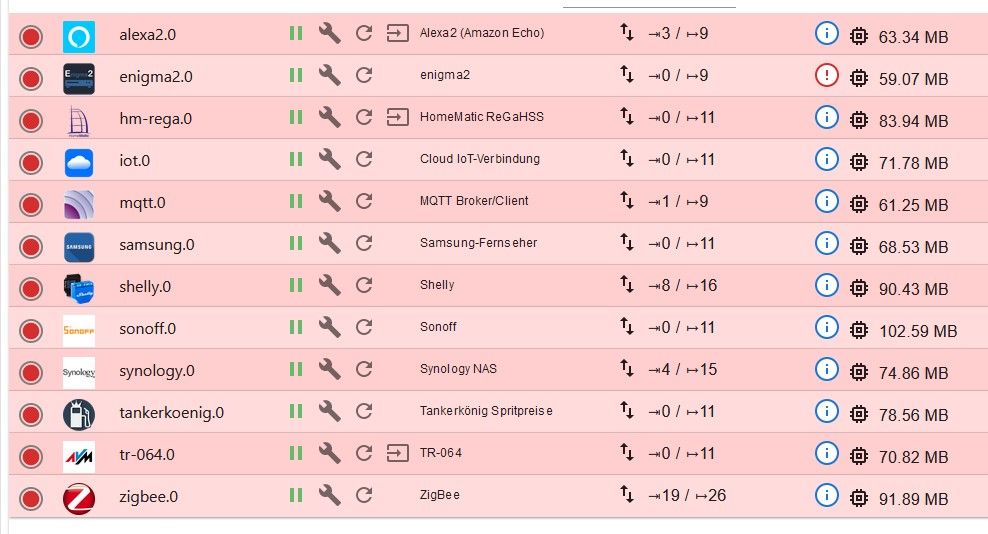
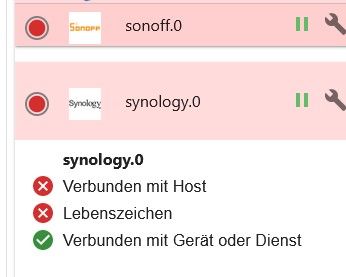
bei allen die nicht starten ist "Verbunden mit Host" und "Lebenszeichen" inaktiv
-
@thomas-braun
beim sourceanalytix kam eine Frage ob ich die Version nochmal installieren will. Hab das mit Ja bestätigt.Leider keine Änderung, die betroffenen Instanzen starten nicht
bei allen die nicht starten ist "Verbunden mit Host" und "Lebenszeichen" inaktiv
@kalle-r
Und was haben die Adapter im Log File für Beschwerden?iobroker logs --watch | uniqund dann mal einen Adapter neustarten.
-
@kalle-r
Und was haben die Adapter im Log File für Beschwerden?iobroker logs --watch | uniqund dann mal einen Adapter neustarten.
@thomas-braun
ich hab mal die betroffenen Adapter alle gestoppt und dann den Zigbee Adapter gestartet, das Loghost.raspi4-iobroker 2022-07-24 20:09:39.568 info Rebuild for adapter system.adapter.zigbee.0 not successful in 3 tries. Adapter will not be restarted again. Please execute "npm install --production" in adapter directory manually. host.raspi4-iobroker 2022-07-24 20:09:39.568 error instance system.adapter.zigbee.0 terminated with code 1 (JS_CONTROLLER_STOPPED) host.raspi4-iobroker 2022-07-24 20:09:39.567 error Caught by controller[0]: } host.raspi4-iobroker 2022-07-24 20:09:39.567 error Caught by controller[0]: ] host.raspi4-iobroker 2022-07-24 20:09:39.567 error Caught by controller[0]: '/opt/iobroker/node_modules/iobroker.zigbee/main.js' host.raspi4-iobroker 2022-07-24 20:09:39.567 error Caught by controller[0]: '/opt/iobroker/node_modules/iobroker.zigbee/lib/statescontroller.js', host.raspi4-iobroker 2022-07-24 20:09:39.567 error Caught by controller[0]: '/opt/iobroker/node_modules/request/index.js', host.raspi4-iobroker 2022-07-24 20:09:39.567 error Caught by controller[0]: '/opt/iobroker/node_modules/request/request.js', host.raspi4-iobroker 2022-07-24 20:09:39.567 error Caught by controller[0]: '/opt/iobroker/node_modules/request/lib/har.js', host.raspi4-iobroker 2022-07-24 20:09:39.566 error Caught by controller[0]: '/opt/iobroker/node_modules/har-validator/lib/promise.js', host.raspi4-iobroker 2022-07-24 20:09:39.566 error Caught by controller[0]: '/opt/iobroker/node_modules/ajv/lib/ajv.js', host.raspi4-iobroker 2022-07-24 20:09:39.566 error Caught by controller[0]: '/opt/iobroker/node_modules/ajv/lib/keyword.js', host.raspi4-iobroker 2022-07-24 20:09:39.566 error Caught by controller[0]: '/opt/iobroker/node_modules/ajv/lib/definition_schema.js', host.raspi4-iobroker 2022-07-24 20:09:39.566 error Caught by controller[0]: requireStack: [ host.raspi4-iobroker 2022-07-24 20:09:39.565 error Caught by controller[0]: code: 'MODULE_NOT_FOUND', host.raspi4-iobroker 2022-07-24 20:09:39.565 error Caught by controller[0]: at Module.require (node:internal/modules/cjs/loader:1005:19) { host.raspi4-iobroker 2022-07-24 20:09:39.565 error Caught by controller[0]: at Function.Module._load (node:internal/modules/cjs/loader:822:12) host.raspi4-iobroker 2022-07-24 20:09:39.565 error Caught by controller[0]: at Module.load (node:internal/modules/cjs/loader:981:32) host.raspi4-iobroker 2022-07-24 20:09:39.565 error Caught by controller[0]: at Object.Module._extensions..js (node:internal/modules/cjs/loader:1159:10) host.raspi4-iobroker 2022-07-24 20:09:39.565 error Caught by controller[0]: at Module._compile (node:internal/modules/cjs/loader:1105:14) host.raspi4-iobroker 2022-07-24 20:09:39.564 error Caught by controller[0]: at Object.<anonymous> (/opt/iobroker/node_modules/ajv/lib/definition_schema.js:3:18) host.raspi4-iobroker 2022-07-24 20:09:39.564 error Caught by controller[0]: at require (node:internal/modules/cjs/helpers:102:18) host.raspi4-iobroker 2022-07-24 20:09:39.564 error Caught by controller[0]: at Module.require (node:internal/modules/cjs/loader:1005:19) host.raspi4-iobroker 2022-07-24 20:09:39.564 error Caught by controller[0]: at Function.Module._load (node:internal/modules/cjs/loader:778:27) host.raspi4-iobroker 2022-07-24 20:09:39.564 error Caught by controller[0]: at Function.Module._resolveFilename (node:internal/modules/cjs/loader:933:15) host.raspi4-iobroker 2022-07-24 20:09:39.564 error Caught by controller[0]: - /opt/iobroker/node_modules/iobroker.zigbee/main.js host.raspi4-iobroker 2022-07-24 20:09:39.563 error Caught by controller[0]: - /opt/iobroker/node_modules/iobroker.zigbee/lib/statescontroller.js host.raspi4-iobroker 2022-07-24 20:09:39.563 error Caught by controller[0]: - /opt/iobroker/node_modules/request/index.js host.raspi4-iobroker 2022-07-24 20:09:39.563 error Caught by controller[0]: - /opt/iobroker/node_modules/request/request.js host.raspi4-iobroker 2022-07-24 20:09:39.563 error Caught by controller[0]: - /opt/iobroker/node_modules/request/lib/har.js host.raspi4-iobroker 2022-07-24 20:09:39.563 error Caught by controller[0]: - /opt/iobroker/node_modules/har-validator/lib/promise.js host.raspi4-iobroker 2022-07-24 20:09:39.562 error Caught by controller[0]: - /opt/iobroker/node_modules/ajv/lib/ajv.js host.raspi4-iobroker 2022-07-24 20:09:39.562 error Caught by controller[0]: - /opt/iobroker/node_modules/ajv/lib/keyword.js host.raspi4-iobroker 2022-07-24 20:09:39.562 error Caught by controller[0]: - /opt/iobroker/node_modules/ajv/lib/definition_schema.js host.raspi4-iobroker 2022-07-24 20:09:39.562 error Caught by controller[0]: Require stack: host.raspi4-iobroker 2022-07-24 20:09:39.562 error Caught by controller[0]: Error: Cannot find module './refs/json-schema-draft-07.json' host.raspi4-iobroker 2022-07-24 20:09:39.561 error Caught by controller[0]: ^ host.raspi4-iobroker 2022-07-24 20:09:39.561 error Caught by controller[0]: throw err; host.raspi4-iobroker 2022-07-24 20:09:39.561 error Caught by controller[0]: node:internal/modules/cjs/loader:936 host.raspi4-iobroker 2022-07-24 20:09:36.406 info instance system.adapter.zigbee.0 started with pid 30827 host.raspi4-iobroker 2022-07-24 20:09:35.845 info "system.adapter.zigbee.0" enableddas log vom Starten des hm-rega Adapters hängt ja ganz oben
-
@thomas-braun
ich hab mal die betroffenen Adapter alle gestoppt und dann den Zigbee Adapter gestartet, das Loghost.raspi4-iobroker 2022-07-24 20:09:39.568 info Rebuild for adapter system.adapter.zigbee.0 not successful in 3 tries. Adapter will not be restarted again. Please execute "npm install --production" in adapter directory manually. host.raspi4-iobroker 2022-07-24 20:09:39.568 error instance system.adapter.zigbee.0 terminated with code 1 (JS_CONTROLLER_STOPPED) host.raspi4-iobroker 2022-07-24 20:09:39.567 error Caught by controller[0]: } host.raspi4-iobroker 2022-07-24 20:09:39.567 error Caught by controller[0]: ] host.raspi4-iobroker 2022-07-24 20:09:39.567 error Caught by controller[0]: '/opt/iobroker/node_modules/iobroker.zigbee/main.js' host.raspi4-iobroker 2022-07-24 20:09:39.567 error Caught by controller[0]: '/opt/iobroker/node_modules/iobroker.zigbee/lib/statescontroller.js', host.raspi4-iobroker 2022-07-24 20:09:39.567 error Caught by controller[0]: '/opt/iobroker/node_modules/request/index.js', host.raspi4-iobroker 2022-07-24 20:09:39.567 error Caught by controller[0]: '/opt/iobroker/node_modules/request/request.js', host.raspi4-iobroker 2022-07-24 20:09:39.567 error Caught by controller[0]: '/opt/iobroker/node_modules/request/lib/har.js', host.raspi4-iobroker 2022-07-24 20:09:39.566 error Caught by controller[0]: '/opt/iobroker/node_modules/har-validator/lib/promise.js', host.raspi4-iobroker 2022-07-24 20:09:39.566 error Caught by controller[0]: '/opt/iobroker/node_modules/ajv/lib/ajv.js', host.raspi4-iobroker 2022-07-24 20:09:39.566 error Caught by controller[0]: '/opt/iobroker/node_modules/ajv/lib/keyword.js', host.raspi4-iobroker 2022-07-24 20:09:39.566 error Caught by controller[0]: '/opt/iobroker/node_modules/ajv/lib/definition_schema.js', host.raspi4-iobroker 2022-07-24 20:09:39.566 error Caught by controller[0]: requireStack: [ host.raspi4-iobroker 2022-07-24 20:09:39.565 error Caught by controller[0]: code: 'MODULE_NOT_FOUND', host.raspi4-iobroker 2022-07-24 20:09:39.565 error Caught by controller[0]: at Module.require (node:internal/modules/cjs/loader:1005:19) { host.raspi4-iobroker 2022-07-24 20:09:39.565 error Caught by controller[0]: at Function.Module._load (node:internal/modules/cjs/loader:822:12) host.raspi4-iobroker 2022-07-24 20:09:39.565 error Caught by controller[0]: at Module.load (node:internal/modules/cjs/loader:981:32) host.raspi4-iobroker 2022-07-24 20:09:39.565 error Caught by controller[0]: at Object.Module._extensions..js (node:internal/modules/cjs/loader:1159:10) host.raspi4-iobroker 2022-07-24 20:09:39.565 error Caught by controller[0]: at Module._compile (node:internal/modules/cjs/loader:1105:14) host.raspi4-iobroker 2022-07-24 20:09:39.564 error Caught by controller[0]: at Object.<anonymous> (/opt/iobroker/node_modules/ajv/lib/definition_schema.js:3:18) host.raspi4-iobroker 2022-07-24 20:09:39.564 error Caught by controller[0]: at require (node:internal/modules/cjs/helpers:102:18) host.raspi4-iobroker 2022-07-24 20:09:39.564 error Caught by controller[0]: at Module.require (node:internal/modules/cjs/loader:1005:19) host.raspi4-iobroker 2022-07-24 20:09:39.564 error Caught by controller[0]: at Function.Module._load (node:internal/modules/cjs/loader:778:27) host.raspi4-iobroker 2022-07-24 20:09:39.564 error Caught by controller[0]: at Function.Module._resolveFilename (node:internal/modules/cjs/loader:933:15) host.raspi4-iobroker 2022-07-24 20:09:39.564 error Caught by controller[0]: - /opt/iobroker/node_modules/iobroker.zigbee/main.js host.raspi4-iobroker 2022-07-24 20:09:39.563 error Caught by controller[0]: - /opt/iobroker/node_modules/iobroker.zigbee/lib/statescontroller.js host.raspi4-iobroker 2022-07-24 20:09:39.563 error Caught by controller[0]: - /opt/iobroker/node_modules/request/index.js host.raspi4-iobroker 2022-07-24 20:09:39.563 error Caught by controller[0]: - /opt/iobroker/node_modules/request/request.js host.raspi4-iobroker 2022-07-24 20:09:39.563 error Caught by controller[0]: - /opt/iobroker/node_modules/request/lib/har.js host.raspi4-iobroker 2022-07-24 20:09:39.563 error Caught by controller[0]: - /opt/iobroker/node_modules/har-validator/lib/promise.js host.raspi4-iobroker 2022-07-24 20:09:39.562 error Caught by controller[0]: - /opt/iobroker/node_modules/ajv/lib/ajv.js host.raspi4-iobroker 2022-07-24 20:09:39.562 error Caught by controller[0]: - /opt/iobroker/node_modules/ajv/lib/keyword.js host.raspi4-iobroker 2022-07-24 20:09:39.562 error Caught by controller[0]: - /opt/iobroker/node_modules/ajv/lib/definition_schema.js host.raspi4-iobroker 2022-07-24 20:09:39.562 error Caught by controller[0]: Require stack: host.raspi4-iobroker 2022-07-24 20:09:39.562 error Caught by controller[0]: Error: Cannot find module './refs/json-schema-draft-07.json' host.raspi4-iobroker 2022-07-24 20:09:39.561 error Caught by controller[0]: ^ host.raspi4-iobroker 2022-07-24 20:09:39.561 error Caught by controller[0]: throw err; host.raspi4-iobroker 2022-07-24 20:09:39.561 error Caught by controller[0]: node:internal/modules/cjs/loader:936 host.raspi4-iobroker 2022-07-24 20:09:36.406 info instance system.adapter.zigbee.0 started with pid 30827 host.raspi4-iobroker 2022-07-24 20:09:35.845 info "system.adapter.zigbee.0" enableddas log vom Starten des hm-rega Adapters hängt ja ganz oben
Da stimmt etwas nicht mit deiner Nodejs
den ( alle ) Adapter sind am mekern .
@Thomas-Braun
Eine Neuinstallation ( Raspberry ) , dann Backup einspielen briegt es besser , denn er hat alles in BETA sich reingeschaufeltSynology 918+ 16GB - ioBroker in Docker v9 , VISO auf Trekstor Primebook C13 13,3" , Hikvision Domkameras mit Surveillance Station .. CCU RaspberryMatic in Synology VM .. Zigbee CC2538+CC2592 .. Sonoff .. KNX .. Modbus ..
-
@kalle-r
Und was haben die Adapter im Log File für Beschwerden?iobroker logs --watch | uniqund dann mal einen Adapter neustarten.
@thomas-braun
hier mal das Log vom Starten des Shelly Adapters2022-07-24 20:13:27.171 - info: host.raspi4-iobroker "system.adapter.shelly.0" enabled 2022-07-24 20:13:27.898 - info: host.raspi4-iobroker instance system.adapter.shelly.0 started with pid 31107 2022-07-24 20:13:29.397 - error: host.raspi4-iobroker Caught by controller[0]: node:internal/modules/cjs/loader:361 2022-07-24 20:13:29.398 - error: host.raspi4-iobroker Caught by controller[0]: throw err; 2022-07-24 20:13:29.398 - error: host.raspi4-iobroker Caught by controller[0]: ^ 2022-07-24 20:13:29.398 - error: host.raspi4-iobroker Caught by controller[0]: Error: Cannot find module '/opt/iobroker/node_modules/process-nextick-args/index.js'. Please verify that the package.json has a valid "main" entry 2022-07-24 20:13:29.398 - error: host.raspi4-iobroker Caught by controller[0]: at tryPackage (node:internal/modules/cjs/loader:353:19) 2022-07-24 20:13:29.399 - error: host.raspi4-iobroker Caught by controller[0]: at Function.Module._findPath (node:internal/modules/cjs/loader:566:18) 2022-07-24 20:13:29.399 - error: host.raspi4-iobroker Caught by controller[0]: at Function.Module._resolveFilename (node:internal/modules/cjs/loader:919:27) 2022-07-24 20:13:29.399 - error: host.raspi4-iobroker Caught by controller[0]: at Function.Module._load (node:internal/modules/cjs/loader:778:27) 2022-07-24 20:13:29.399 - error: host.raspi4-iobroker Caught by controller[0]: at Module.require (node:internal/modules/cjs/loader:1005:19) 2022-07-24 20:13:29.399 - error: host.raspi4-iobroker Caught by controller[0]: at require (node:internal/modules/cjs/helpers:102:18) 2022-07-24 20:13:29.399 - error: host.raspi4-iobroker Caught by controller[0]: at Object.<anonymous> (/opt/iobroker/node_modules/readable-stream/lib/_stream_readable.js:26:11) 2022-07-24 20:13:29.400 - error: host.raspi4-iobroker Caught by controller[0]: at Module._compile (node:internal/modules/cjs/loader:1105:14) 2022-07-24 20:13:29.400 - error: host.raspi4-iobroker Caught by controller[0]: at Object.Module._extensions..js (node:internal/modules/cjs/loader:1159:10) 2022-07-24 20:13:29.400 - error: host.raspi4-iobroker Caught by controller[0]: at Module.load (node:internal/modules/cjs/loader:981:32) { 2022-07-24 20:13:29.400 - error: host.raspi4-iobroker Caught by controller[0]: code: 'MODULE_NOT_FOUND', 2022-07-24 20:13:29.400 - error: host.raspi4-iobroker Caught by controller[0]: path: '/opt/iobroker/node_modules/process-nextick-args/package.json', 2022-07-24 20:13:29.401 - error: host.raspi4-iobroker Caught by controller[0]: requestPath: 'process-nextick-args' 2022-07-24 20:13:29.401 - error: host.raspi4-iobroker Caught by controller[0]: } 2022-07-24 20:13:29.401 - error: host.raspi4-iobroker instance system.adapter.shelly.0 terminated with code 1 (JS_CONTROLLER_STOPPED) 2022-07-24 20:13:29.401 - info: host.raspi4-iobroker Rebuild for adapter system.adapter.shelly.0 not successful in 3 tries. Adapter will not be restarted again. Please execute "npm install --production" in adapter directory manually. 2022-07-24 20:13:29.397 - error: host.raspi4-iobroker Caught by controller[0]: node:internal/modules/cjs/loader:361 2022-07-24 20:13:29.398 - error: host.raspi4-iobroker Caught by controller[0]: throw err; 2022-07-24 20:13:29.398 - error: host.raspi4-iobroker Caught by controller[0]: ^ 2022-07-24 20:13:29.398 - error: host.raspi4-iobroker Caught by controller[0]: Error: Cannot find module '/opt/iobroker/node_modules/process-nextick-args/index.js'. Please verify that the package.json has a valid "main" entry 2022-07-24 20:13:29.398 - error: host.raspi4-iobroker Caught by controller[0]: at tryPackage (node:internal/modules/cjs/loader:353:19) 2022-07-24 20:13:29.399 - error: host.raspi4-iobroker Caught by controller[0]: at Function.Module._findPath (node:internal/modules/cjs/loader:566:18) 2022-07-24 20:13:29.399 - error: host.raspi4-iobroker Caught by controller[0]: at Function.Module._resolveFilename (node:internal/modules/cjs/loader:919:27) 2022-07-24 20:13:29.399 - error: host.raspi4-iobroker Caught by controller[0]: at Function.Module._load (node:internal/modules/cjs/loader:778:27) 2022-07-24 20:13:29.399 - error: host.raspi4-iobroker Caught by controller[0]: at Module.require (node:internal/modules/cjs/loader:1005:19) 2022-07-24 20:13:29.399 - error: host.raspi4-iobroker Caught by controller[0]: at require (node:internal/modules/cjs/helpers:102:18) 2022-07-24 20:13:29.399 - error: host.raspi4-iobroker Caught by controller[0]: at Object.<anonymous> (/opt/iobroker/node_modules/readable-stream/lib/_stream_readable.js:26:11) 2022-07-24 20:13:29.400 - error: host.raspi4-iobroker Caught by controller[0]: at Module._compile (node:internal/modules/cjs/loader:1105:14) 2022-07-24 20:13:29.400 - error: host.raspi4-iobroker Caught by controller[0]: at Object.Module._extensions..js (node:internal/modules/cjs/loader:1159:10) 2022-07-24 20:13:29.400 - error: host.raspi4-iobroker Caught by controller[0]: at Module.load (node:internal/modules/cjs/loader:981:32) { 2022-07-24 20:13:29.400 - error: host.raspi4-iobroker Caught by controller[0]: code: 'MODULE_NOT_FOUND', 2022-07-24 20:13:29.400 - error: host.raspi4-iobroker Caught by controller[0]: path: '/opt/iobroker/node_modules/process-nextick-args/package.json', 2022-07-24 20:13:29.401 - error: host.raspi4-iobroker Caught by controller[0]: requestPath: 'process-nextick-args' 2022-07-24 20:13:29.401 - error: host.raspi4-iobroker Caught by controller[0]: } 2022-07-24 20:13:29.401 - error: host.raspi4-iobroker instance system.adapter.shelly.0 terminated with code 1 (JS_CONTROLLER_STOPPED) 2022-07-24 20:13:29.401 - info: host.raspi4-iobroker Rebuild for adapter system.adapter.shelly.0 not successful in 3 tries. Adapter will not be restarted again. Please execute "npm install --production" in adapter directory manually. -
@thomas-braun
hier mal das Log vom Starten des Shelly Adapters2022-07-24 20:13:27.171 - info: host.raspi4-iobroker "system.adapter.shelly.0" enabled 2022-07-24 20:13:27.898 - info: host.raspi4-iobroker instance system.adapter.shelly.0 started with pid 31107 2022-07-24 20:13:29.397 - error: host.raspi4-iobroker Caught by controller[0]: node:internal/modules/cjs/loader:361 2022-07-24 20:13:29.398 - error: host.raspi4-iobroker Caught by controller[0]: throw err; 2022-07-24 20:13:29.398 - error: host.raspi4-iobroker Caught by controller[0]: ^ 2022-07-24 20:13:29.398 - error: host.raspi4-iobroker Caught by controller[0]: Error: Cannot find module '/opt/iobroker/node_modules/process-nextick-args/index.js'. Please verify that the package.json has a valid "main" entry 2022-07-24 20:13:29.398 - error: host.raspi4-iobroker Caught by controller[0]: at tryPackage (node:internal/modules/cjs/loader:353:19) 2022-07-24 20:13:29.399 - error: host.raspi4-iobroker Caught by controller[0]: at Function.Module._findPath (node:internal/modules/cjs/loader:566:18) 2022-07-24 20:13:29.399 - error: host.raspi4-iobroker Caught by controller[0]: at Function.Module._resolveFilename (node:internal/modules/cjs/loader:919:27) 2022-07-24 20:13:29.399 - error: host.raspi4-iobroker Caught by controller[0]: at Function.Module._load (node:internal/modules/cjs/loader:778:27) 2022-07-24 20:13:29.399 - error: host.raspi4-iobroker Caught by controller[0]: at Module.require (node:internal/modules/cjs/loader:1005:19) 2022-07-24 20:13:29.399 - error: host.raspi4-iobroker Caught by controller[0]: at require (node:internal/modules/cjs/helpers:102:18) 2022-07-24 20:13:29.399 - error: host.raspi4-iobroker Caught by controller[0]: at Object.<anonymous> (/opt/iobroker/node_modules/readable-stream/lib/_stream_readable.js:26:11) 2022-07-24 20:13:29.400 - error: host.raspi4-iobroker Caught by controller[0]: at Module._compile (node:internal/modules/cjs/loader:1105:14) 2022-07-24 20:13:29.400 - error: host.raspi4-iobroker Caught by controller[0]: at Object.Module._extensions..js (node:internal/modules/cjs/loader:1159:10) 2022-07-24 20:13:29.400 - error: host.raspi4-iobroker Caught by controller[0]: at Module.load (node:internal/modules/cjs/loader:981:32) { 2022-07-24 20:13:29.400 - error: host.raspi4-iobroker Caught by controller[0]: code: 'MODULE_NOT_FOUND', 2022-07-24 20:13:29.400 - error: host.raspi4-iobroker Caught by controller[0]: path: '/opt/iobroker/node_modules/process-nextick-args/package.json', 2022-07-24 20:13:29.401 - error: host.raspi4-iobroker Caught by controller[0]: requestPath: 'process-nextick-args' 2022-07-24 20:13:29.401 - error: host.raspi4-iobroker Caught by controller[0]: } 2022-07-24 20:13:29.401 - error: host.raspi4-iobroker instance system.adapter.shelly.0 terminated with code 1 (JS_CONTROLLER_STOPPED) 2022-07-24 20:13:29.401 - info: host.raspi4-iobroker Rebuild for adapter system.adapter.shelly.0 not successful in 3 tries. Adapter will not be restarted again. Please execute "npm install --production" in adapter directory manually. 2022-07-24 20:13:29.397 - error: host.raspi4-iobroker Caught by controller[0]: node:internal/modules/cjs/loader:361 2022-07-24 20:13:29.398 - error: host.raspi4-iobroker Caught by controller[0]: throw err; 2022-07-24 20:13:29.398 - error: host.raspi4-iobroker Caught by controller[0]: ^ 2022-07-24 20:13:29.398 - error: host.raspi4-iobroker Caught by controller[0]: Error: Cannot find module '/opt/iobroker/node_modules/process-nextick-args/index.js'. Please verify that the package.json has a valid "main" entry 2022-07-24 20:13:29.398 - error: host.raspi4-iobroker Caught by controller[0]: at tryPackage (node:internal/modules/cjs/loader:353:19) 2022-07-24 20:13:29.399 - error: host.raspi4-iobroker Caught by controller[0]: at Function.Module._findPath (node:internal/modules/cjs/loader:566:18) 2022-07-24 20:13:29.399 - error: host.raspi4-iobroker Caught by controller[0]: at Function.Module._resolveFilename (node:internal/modules/cjs/loader:919:27) 2022-07-24 20:13:29.399 - error: host.raspi4-iobroker Caught by controller[0]: at Function.Module._load (node:internal/modules/cjs/loader:778:27) 2022-07-24 20:13:29.399 - error: host.raspi4-iobroker Caught by controller[0]: at Module.require (node:internal/modules/cjs/loader:1005:19) 2022-07-24 20:13:29.399 - error: host.raspi4-iobroker Caught by controller[0]: at require (node:internal/modules/cjs/helpers:102:18) 2022-07-24 20:13:29.399 - error: host.raspi4-iobroker Caught by controller[0]: at Object.<anonymous> (/opt/iobroker/node_modules/readable-stream/lib/_stream_readable.js:26:11) 2022-07-24 20:13:29.400 - error: host.raspi4-iobroker Caught by controller[0]: at Module._compile (node:internal/modules/cjs/loader:1105:14) 2022-07-24 20:13:29.400 - error: host.raspi4-iobroker Caught by controller[0]: at Object.Module._extensions..js (node:internal/modules/cjs/loader:1159:10) 2022-07-24 20:13:29.400 - error: host.raspi4-iobroker Caught by controller[0]: at Module.load (node:internal/modules/cjs/loader:981:32) { 2022-07-24 20:13:29.400 - error: host.raspi4-iobroker Caught by controller[0]: code: 'MODULE_NOT_FOUND', 2022-07-24 20:13:29.400 - error: host.raspi4-iobroker Caught by controller[0]: path: '/opt/iobroker/node_modules/process-nextick-args/package.json', 2022-07-24 20:13:29.401 - error: host.raspi4-iobroker Caught by controller[0]: requestPath: 'process-nextick-args' 2022-07-24 20:13:29.401 - error: host.raspi4-iobroker Caught by controller[0]: } 2022-07-24 20:13:29.401 - error: host.raspi4-iobroker instance system.adapter.shelly.0 terminated with code 1 (JS_CONTROLLER_STOPPED) 2022-07-24 20:13:29.401 - info: host.raspi4-iobroker Rebuild for adapter system.adapter.shelly.0 not successful in 3 tries. Adapter will not be restarted again. Please execute "npm install --production" in adapter directory manually.Ja, deine Kompliler wollen nicht mehr. Ich hab aber keinen Dunst warum.
-
@thomas-braun
hier mal das Log vom Starten des Shelly Adapters2022-07-24 20:13:27.171 - info: host.raspi4-iobroker "system.adapter.shelly.0" enabled 2022-07-24 20:13:27.898 - info: host.raspi4-iobroker instance system.adapter.shelly.0 started with pid 31107 2022-07-24 20:13:29.397 - error: host.raspi4-iobroker Caught by controller[0]: node:internal/modules/cjs/loader:361 2022-07-24 20:13:29.398 - error: host.raspi4-iobroker Caught by controller[0]: throw err; 2022-07-24 20:13:29.398 - error: host.raspi4-iobroker Caught by controller[0]: ^ 2022-07-24 20:13:29.398 - error: host.raspi4-iobroker Caught by controller[0]: Error: Cannot find module '/opt/iobroker/node_modules/process-nextick-args/index.js'. Please verify that the package.json has a valid "main" entry 2022-07-24 20:13:29.398 - error: host.raspi4-iobroker Caught by controller[0]: at tryPackage (node:internal/modules/cjs/loader:353:19) 2022-07-24 20:13:29.399 - error: host.raspi4-iobroker Caught by controller[0]: at Function.Module._findPath (node:internal/modules/cjs/loader:566:18) 2022-07-24 20:13:29.399 - error: host.raspi4-iobroker Caught by controller[0]: at Function.Module._resolveFilename (node:internal/modules/cjs/loader:919:27) 2022-07-24 20:13:29.399 - error: host.raspi4-iobroker Caught by controller[0]: at Function.Module._load (node:internal/modules/cjs/loader:778:27) 2022-07-24 20:13:29.399 - error: host.raspi4-iobroker Caught by controller[0]: at Module.require (node:internal/modules/cjs/loader:1005:19) 2022-07-24 20:13:29.399 - error: host.raspi4-iobroker Caught by controller[0]: at require (node:internal/modules/cjs/helpers:102:18) 2022-07-24 20:13:29.399 - error: host.raspi4-iobroker Caught by controller[0]: at Object.<anonymous> (/opt/iobroker/node_modules/readable-stream/lib/_stream_readable.js:26:11) 2022-07-24 20:13:29.400 - error: host.raspi4-iobroker Caught by controller[0]: at Module._compile (node:internal/modules/cjs/loader:1105:14) 2022-07-24 20:13:29.400 - error: host.raspi4-iobroker Caught by controller[0]: at Object.Module._extensions..js (node:internal/modules/cjs/loader:1159:10) 2022-07-24 20:13:29.400 - error: host.raspi4-iobroker Caught by controller[0]: at Module.load (node:internal/modules/cjs/loader:981:32) { 2022-07-24 20:13:29.400 - error: host.raspi4-iobroker Caught by controller[0]: code: 'MODULE_NOT_FOUND', 2022-07-24 20:13:29.400 - error: host.raspi4-iobroker Caught by controller[0]: path: '/opt/iobroker/node_modules/process-nextick-args/package.json', 2022-07-24 20:13:29.401 - error: host.raspi4-iobroker Caught by controller[0]: requestPath: 'process-nextick-args' 2022-07-24 20:13:29.401 - error: host.raspi4-iobroker Caught by controller[0]: } 2022-07-24 20:13:29.401 - error: host.raspi4-iobroker instance system.adapter.shelly.0 terminated with code 1 (JS_CONTROLLER_STOPPED) 2022-07-24 20:13:29.401 - info: host.raspi4-iobroker Rebuild for adapter system.adapter.shelly.0 not successful in 3 tries. Adapter will not be restarted again. Please execute "npm install --production" in adapter directory manually. 2022-07-24 20:13:29.397 - error: host.raspi4-iobroker Caught by controller[0]: node:internal/modules/cjs/loader:361 2022-07-24 20:13:29.398 - error: host.raspi4-iobroker Caught by controller[0]: throw err; 2022-07-24 20:13:29.398 - error: host.raspi4-iobroker Caught by controller[0]: ^ 2022-07-24 20:13:29.398 - error: host.raspi4-iobroker Caught by controller[0]: Error: Cannot find module '/opt/iobroker/node_modules/process-nextick-args/index.js'. Please verify that the package.json has a valid "main" entry 2022-07-24 20:13:29.398 - error: host.raspi4-iobroker Caught by controller[0]: at tryPackage (node:internal/modules/cjs/loader:353:19) 2022-07-24 20:13:29.399 - error: host.raspi4-iobroker Caught by controller[0]: at Function.Module._findPath (node:internal/modules/cjs/loader:566:18) 2022-07-24 20:13:29.399 - error: host.raspi4-iobroker Caught by controller[0]: at Function.Module._resolveFilename (node:internal/modules/cjs/loader:919:27) 2022-07-24 20:13:29.399 - error: host.raspi4-iobroker Caught by controller[0]: at Function.Module._load (node:internal/modules/cjs/loader:778:27) 2022-07-24 20:13:29.399 - error: host.raspi4-iobroker Caught by controller[0]: at Module.require (node:internal/modules/cjs/loader:1005:19) 2022-07-24 20:13:29.399 - error: host.raspi4-iobroker Caught by controller[0]: at require (node:internal/modules/cjs/helpers:102:18) 2022-07-24 20:13:29.399 - error: host.raspi4-iobroker Caught by controller[0]: at Object.<anonymous> (/opt/iobroker/node_modules/readable-stream/lib/_stream_readable.js:26:11) 2022-07-24 20:13:29.400 - error: host.raspi4-iobroker Caught by controller[0]: at Module._compile (node:internal/modules/cjs/loader:1105:14) 2022-07-24 20:13:29.400 - error: host.raspi4-iobroker Caught by controller[0]: at Object.Module._extensions..js (node:internal/modules/cjs/loader:1159:10) 2022-07-24 20:13:29.400 - error: host.raspi4-iobroker Caught by controller[0]: at Module.load (node:internal/modules/cjs/loader:981:32) { 2022-07-24 20:13:29.400 - error: host.raspi4-iobroker Caught by controller[0]: code: 'MODULE_NOT_FOUND', 2022-07-24 20:13:29.400 - error: host.raspi4-iobroker Caught by controller[0]: path: '/opt/iobroker/node_modules/process-nextick-args/package.json', 2022-07-24 20:13:29.401 - error: host.raspi4-iobroker Caught by controller[0]: requestPath: 'process-nextick-args' 2022-07-24 20:13:29.401 - error: host.raspi4-iobroker Caught by controller[0]: } 2022-07-24 20:13:29.401 - error: host.raspi4-iobroker instance system.adapter.shelly.0 terminated with code 1 (JS_CONTROLLER_STOPPED) 2022-07-24 20:13:29.401 - info: host.raspi4-iobroker Rebuild for adapter system.adapter.shelly.0 not successful in 3 tries. Adapter will not be restarted again. Please execute "npm install --production" in adapter directory manually.Wie lange hast du gewartet mit dem Backup einspielen ,,, das sieht noch weiter so aus als hättest du nicht lang genug gewartet ... deshalb fehlt die hälfte
Synology 918+ 16GB - ioBroker in Docker v9 , VISO auf Trekstor Primebook C13 13,3" , Hikvision Domkameras mit Surveillance Station .. CCU RaspberryMatic in Synology VM .. Zigbee CC2538+CC2592 .. Sonoff .. KNX .. Modbus ..
-
Da stimmt etwas nicht mit deiner Nodejs
den ( alle ) Adapter sind am mekern .
@Thomas-Braun
Eine Neuinstallation ( Raspberry ) , dann Backup einspielen briegt es besser , denn er hat alles in BETA sich reingeschaufelt@glasfaser ich fürchte er hat sich mit npm 8.15 alles zerschossen.
ichbweiß gar nicht ob @kalle-r wieder mit node/npm sauber unterwegs ist
mein Holzhammer wäre dann
package-lock.json löschen
npm cache clean --forceupdate und ggf rebuild
kein Support per PN! - Fragen im Forum stellen - Benutzt das Voting rechts unten im Beitrag wenn er euch geholfen hat.
Das Forum freut sich über eine Spende. Benutzt dazu den Spendenbutton oben rechts. Danke!
der Installationsfixer: curl -fsL https://iobroker.net/fix.sh | bash - -
Wie lange hast du gewartet mit dem Backup einspielen ,,, das sieht noch weiter so aus als hättest du nicht lang genug gewartet ... deshalb fehlt die hälfte
@glasfaser sagte in Einige Adapter starten nicht mehr:
nicht lang genug gewartet ..
doch, aber
@kalle-r sagte in Einige Adapter starten nicht mehr:
Rebuild for adapter system.adapter.zigbee.0 not successful in 3 tries.
-
@glasfaser ich fürchte er hat sich mit npm 8.15 alles zerschossen.
ichbweiß gar nicht ob @kalle-r wieder mit node/npm sauber unterwegs ist
mein Holzhammer wäre dann
package-lock.json löschen
npm cache clean --forceupdate und ggf rebuild
-
Wie lange hast du gewartet mit dem Backup einspielen ,,, das sieht noch weiter so aus als hättest du nicht lang genug gewartet ... deshalb fehlt die hälfte
-
@glasfaser
gute Frage.... das hat eine ganze Weile gedauert....
soll ich das einfach nochmal starten?
Ich hab von jedem Tag ein Backup, ich kann z.B. ja auch mal eins von vor dem Urlaub einspielen
als definitiv alles noch lief...@kalle-r sagte in Einige Adapter starten nicht mehr:
soll ich das einfach nochmal starten?
nutzt ichts wenn das Fundament morsch ist
-
@glasfaser ich fürchte er hat sich mit npm 8.15 alles zerschossen.
ichbweiß gar nicht ob @kalle-r wieder mit node/npm sauber unterwegs ist
mein Holzhammer wäre dann
package-lock.json löschen
npm cache clean --forceupdate und ggf rebuild
@homoran said in Einige Adapter starten nicht mehr:
@glasfaser ich fürchte er hat sich mit npm 8.15 alles zerschossen.
ichbweiß gar nicht ob @kalle-r wieder mit node/npm sauber unterwegs ist
mein Holzhammer wäre dann
package-lock.json löschen
npm cache clean --forceupdate und ggf rebuild
ok, dh. ich such die Datei package-lock.json und lösch die?
npm cache clean --force => ist klar
update und ggf rebuild => was genau muss ich da tun? -
@homoran said in Einige Adapter starten nicht mehr:
@glasfaser ich fürchte er hat sich mit npm 8.15 alles zerschossen.
ichbweiß gar nicht ob @kalle-r wieder mit node/npm sauber unterwegs ist
mein Holzhammer wäre dann
package-lock.json löschen
npm cache clean --forceupdate und ggf rebuild
ok, dh. ich such die Datei package-lock.json und lösch die?
npm cache clean --force => ist klar
update und ggf rebuild => was genau muss ich da tun?@kalle-r das ging als Frage an @Glasfaser


Hey! Du scheinst an dieser Unterhaltung interessiert zu sein, hast aber noch kein Konto.
Hast du es satt, bei jedem Besuch durch die gleichen Beiträge zu scrollen? Wenn du dich für ein Konto anmeldest, kommst du immer genau dorthin zurück, wo du zuvor warst, und kannst dich über neue Antworten benachrichtigen lassen (entweder per E-Mail oder Push-Benachrichtigung). Du kannst auch Lesezeichen speichern und Beiträge positiv bewerten, um anderen Community-Mitgliedern deine Wertschätzung zu zeigen.
Mit deinem Input könnte dieser Beitrag noch besser werden 💗
Registrieren AnmeldenSupport us
502
Online33.0k
Benutzer83.6k
Themen1.3m
Beiträge