




Z-Wave Adapter Anfängerfragen
-
Hallo,
muß leider schon wieder nerven. Entweder bin ich zu blöd zum Suchen oder ich stell mich so blöd an, dass keiner solche Fragen überhaupt stellt.
Ich nummeriere sie einfach mal durch:
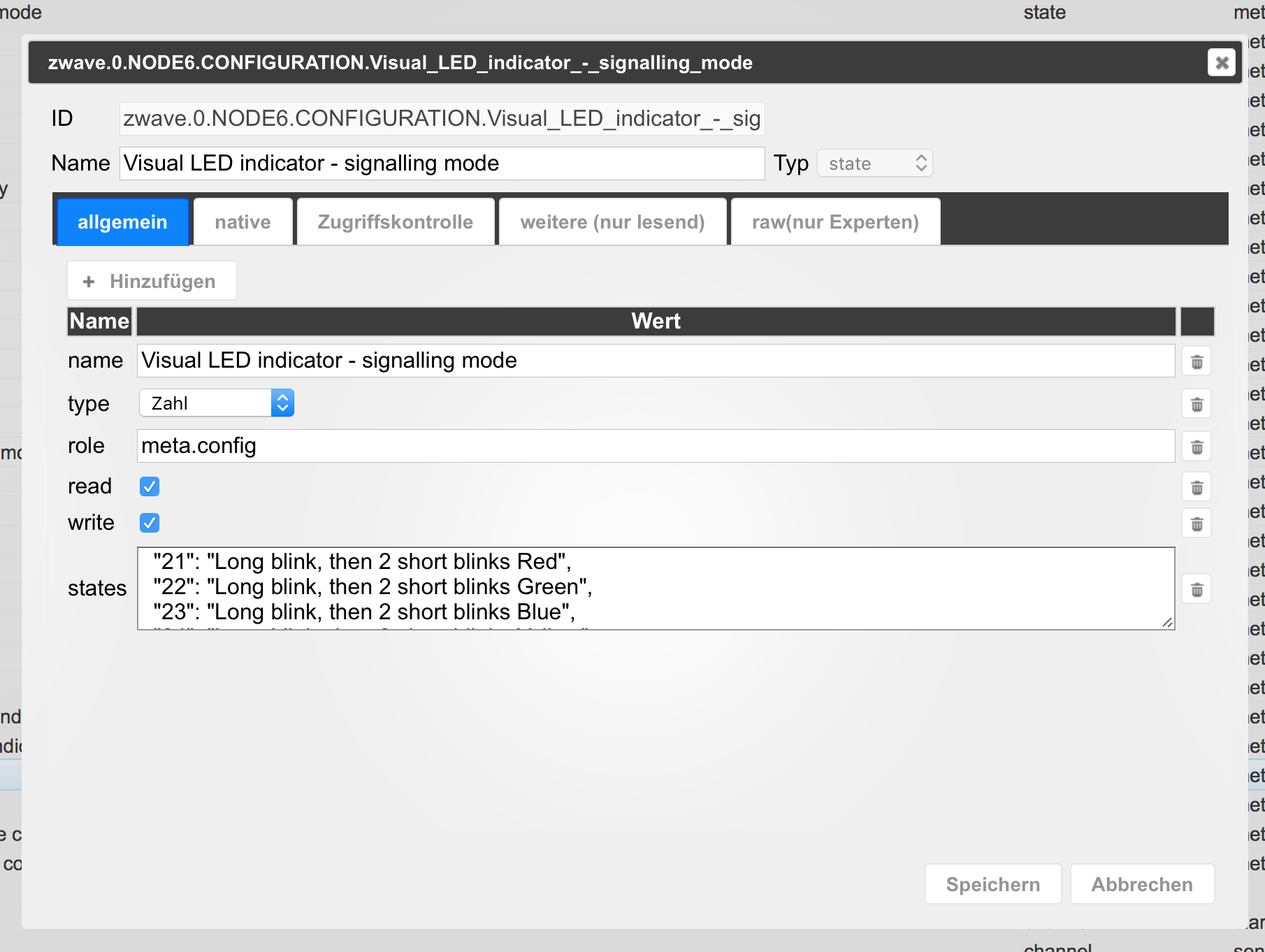
1. Wie ändere ich denn die Z-Wave Parameter von den Geräten? Ich finde in den Objekten zwar die Datenpunkte. Aber beim Bearbeiten dieser sehe ich kein Feld wo der voreingestellte Wert drinnen wäre….
2. Wie kann ich auf "Secure Mode" umstellen damit ich das Danalock verwenden kann?
3. Was bewirken in der Z Wave Adapter Maske die ganzen Einstellmöglichkeiten die oben in der Leiste und rechts neben den Devices im Pulldown Menü?
4. Sehe ich das richtig, dass mir dank ioBroker jetzt die komplette schöne Z Wave Geräte Welt offen steht? Sprich, wenn ein Gerät mal nicht funktionieren sollte ich mir einfach die xml Datei runterlade von
http://products.z-wavealliance.org/regi ... 5/products
und es dann geht?
Arbeiten tue ich mit dem z Wave plus Stick von Aeon.
Vielen Dank im Voraus :D
-
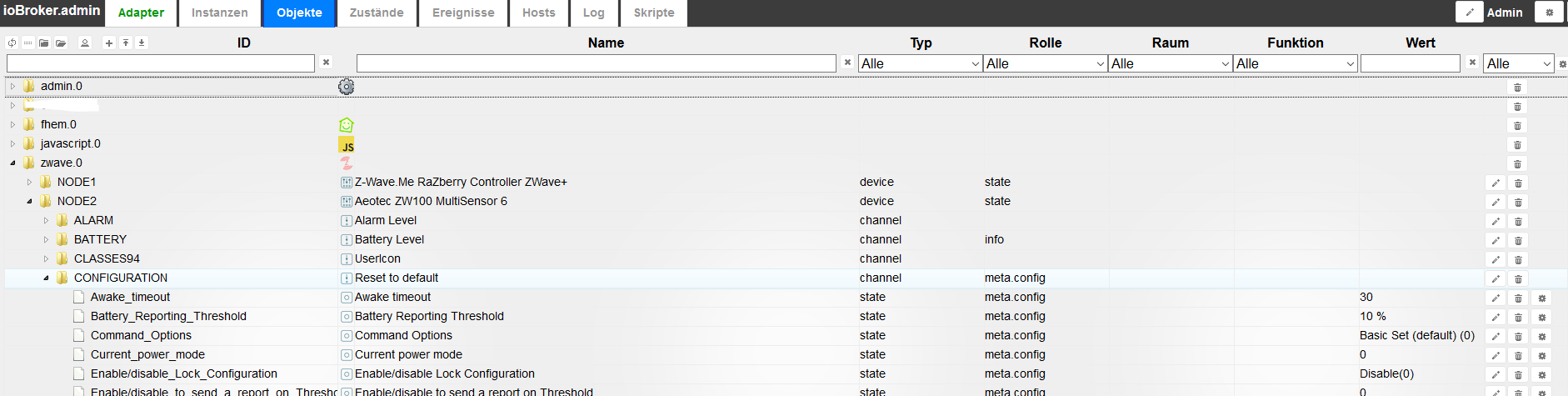
1.: Ich glaube du suchst das hier:
2.: Keine Ahnung
3.:
Netzwerk heilen stellt so wie ich das verstehe die Kommunikation unter verschiedenen zwave-Geräten wieder her (Die Geräte spannen selbstständig ein Netz auf, das den Empfang verbessert).
Finde Nachbarn: ???
Soft Reset: Ich glaube das startet den Treiber neu
Hard Reset: Löscht die Konfiguration des zwave-Chips (die Geräte wissen nichts davon und müssen auch resetted werden zum neuen Koppeln)
Dropdowns sollten mehr oder weniger gut beschreiben sein, ich habe bisher keine der Dropdown-Optionen gebraucht, mit Ausnahme von "Löschen fehlgeschlagen", das "tote" Geräte aus der Liste löscht.
4.: Für die Geräteeinbindung musst du dich an openzwave wenden. Da kommt die verwendete Software her. Einfach ein Issue erstellen unter https://github.com/OpenZWave/open-zwave
-
1.: Ich glaube du suchst das hier: `
richtig, das hätte ich auch soweit gefunden. ich weiß nur nicht wie man die Parameter dann ändert. Ich würde sogar finden welche Parameter Nummer was bewirkt. Aber was muss ich in ioBroker einstellen damit z. B. beim Motionsensor Parameter 23 (blaue LED Signalleuchte) gesetzt wird?
4.: Für die Geräteeinbindung musst du dich an openzwave wenden. Da kommt die verwendete Software her. Einfach ein Issue erstellen unter https://github.com/OpenZWave/open-zwave `
Danke aber sehen was schon geht tut man nicht?
2548_bildschirmfoto_2017-04-18_um_21.41.46.png
2548_bildschirmfoto_2017-04-18_um_21.42.15.png -
richtig, das hätte ich auch soweit gefunden. ich weiß nur nicht wie man die Parameter dann ändert. `
Auf die Werte am Ende der Zeile (siehe dein letzter Screenshot) klicken, dann öffnet sich entweder ein Dropdown oder Textfeld oder Häkchen.Danke aber sehen was schon geht tut man nicht? `
Nicht auf einen Blick, soweit ich weiß. Aber es werden fast alle Geräte unterstützt, und was fehlt kommt schnell nach. -
Auf die Werte am Ende der Zeile (siehe dein letzter Screenshot) klicken, dann öffnet sich entweder ein Dropdown oder Textfeld oder Häkchen. `
Danke AlCalzone, das wars :oops:
-
Hallo
ich habe iobroker auf der Synology 415+ mit docker installiert und schon hue und hanrmony hinzugefügt.
jetzt habe ich mir heute einen Z-Wave USB Stick bestellt. Wollte jetzt den Z-wave Adapter installieren.
Bekomme aber die Fehlermeldung. Könnt ihr mir sagen was da schief gelaufen ist ?
$ ./iobroker add zwave npm install iobroker.zwave --unsafe-perm --production --prefix "/opt/iobroker" (System call) /bin/sh: 1: sudo: not found /opt/iobroker/node_modules/.staging/iobroker.zwave-936e120a/lib/preinstall.js:15 if (!suppressException) throw e; ^ Error: Command failed: sudo apt-get install libudev-dev -y /bin/sh: 1: sudo: not found at checkExecSyncError (child_process.js:481:13) at Object.execSync (child_process.js:521:13) at doScript (/opt/iobroker/node_modules/.staging/iobroker.zwave-936e120a/lib/preinstall.js:12:15) at Object. <anonymous>(/opt/iobroker/node_modules/.staging/iobroker.zwave-936e120a/lib/preinstall.js:25:7) at Module._compile (module.js:570:32) at Object.Module._extensions..js (module.js:579:10) at Module.load (module.js:487:32) at tryModuleLoad (module.js:446:12) at Function.Module._load (module.js:438:3) at Module.runMain (module.js:604:10) npm ERR! Linux 3.10.102 npm ERR! argv "/usr/bin/nodejs" "/usr/bin/npm" "install" "iobroker.zwave" "--unsafe-perm" "--production" "--prefix" "/opt/iobroker"npm ERR! node v6.11.0 npm ERR! npm v3.10.10 npm ERR! code ELIFECYCLE npm ERR! iobroker.zwave@0.6.0 preinstall: `node lib/preinstall.js`npm ERR! Exit status 1 npm ERR! npm ERR! Failed at the iobroker.zwave@0.6.0 preinstall script 'node lib/preinstall.js'. npm ERR! Make sure you have the latest version of node.js and npm installed. npm ERR! If you do, this is most likely a problem with the iobroker.zwave package, npm ERR! not with npm itself.npm ERR! Tell the author that this fails on your system: npm ERR! node lib/preinstall.js npm ERR! You can get information on how to open an issue for this project with: npm ERR! npm bugs iobroker.zwave npm ERR! Or if that isn't available, you can get their info via: npm ERR! npm owner ls iobroker.zwavenpm ERR! There is likely additional logging output above. npm ERR! Please include the following file with any support request:npm ERR! /opt/npm-debug.log host.DS415 install adapter zwave npm install iobroker.zwave --unsafe-perm --production --prefix "/opt/iobroker" (System call) /bin/sh: 1: sudo: not found /opt/iobroker/node_modules/.staging/iobroker.zwave-936e120a/lib/preinstall.js:15 if (!suppressException) throw e; ^ Error: Command failed: sudo apt-get install libudev-dev -y /bin/sh: 1: sudo: not found at checkExecSyncError (child_process.js:481:13) at Object.execSync (child_process.js:521:13) at doScript (/opt/iobroker/node_modules/.staging/iobroker.zwave-936e120a/lib/preinstall.js:12:15) at Object. <anonymous>(/opt/iobroker/node_modules/.staging/iobroker.zwave-936e120a/lib/preinstall.js:25:7) at Module._compile (module.js:570:32) at Object.Module._extensions..js (module.js:579:10) at Module.load (module.js:487:32) at tryModuleLoad (module.js:446:12) at Function.Module._load (module.js:438:3) at Module.runMain (module.js:604:10) npm ERR! Linux 3.10.102npm ERR! argv "/usr/bin/nodejs" "/usr/bin/npm" "install" "iobroker.zwave" "--unsafe-perm" "--production" "--prefix" "/opt/iobroker" npm ERR! node v6.11.0npm ERR! npm v3.10.10 npm ERR! code ELIFECYCLE npm ERR! iobroker.zwave@0.6.0 preinstall: `node lib/preinstall.js`npm ERR! Exit status 1 npm ERR! npm ERR! Failed at the iobroker.zwave@0.6.0 preinstall script 'node lib/preinstall.js'. npm ERR! Make sure you have the latest version of node.js and npm installed. npm ERR! If you do, this is most likely a problem with the iobroker.zwave package, npm ERR! not with npm itself. npm ERR! Tell the author that this fails on your system: npm ERR! node lib/preinstall.js npm ERR! You can get information on how to open an issue for this project with: npm ERR! npm bugs iobroker.zwave npm ERR! Or if that isn't available, you can get their info via: npm ERR! npm owner ls iobroker.zwave npm ERR! There is likely additional logging output above. npm ERR! Please include the following file with any support request:npm ERR! /opt/npm-debug.log host.DS415 install adapter zwave npm install iobroker.zwave --unsafe-perm --production --prefix "/opt/iobroker" (System call) /bin/sh: 1: sudo: not found /opt/iobroker/node_modules/.staging/iobroker.zwave-936e120a/lib/preinstall.js:15 if (!suppressException) throw e; ^ Error: Command failed: sudo apt-get install libudev-dev -y /bin/sh: 1: sudo: not found at checkExecSyncError (child_process.js:481:13) at Object.execSync (child_process.js:521:13) at doScript (/opt/iobroker/node_modules/.staging/iobroker.zwave-936e120a/lib/preinstall.js:12:15) at Object. <anonymous>(/opt/iobroker/node_modules/.staging/iobroker.zwave-936e120a/lib/preinstall.js:25:7) at Module._compile (module.js:570:32) at Object.Module._extensions..js (module.js:579:10) at Module.load (module.js:487:32) at tryModuleLoad (module.js:446:12) at Function.Module._load (module.js:438:3) at Module.runMain (module.js:604:10) npm ERR! Linux 3.10.102 npm ERR! argv "/usr/bin/nodejs" "/usr/bin/npm" "install" "iobroker.zwave" "--unsafe-perm" "--production" "--prefix" "/opt/iobroker"npm ERR! node v6.11.0 npm ERR! npm v3.10.10 npm ERR! code ELIFECYCLE npm ERR! iobroker.zwave@0.6.0 preinstall: `node lib/preinstall.js`npm ERR! Exit status 1 npm ERR! npm ERR! Failed at the iobroker.zwave@0.6.0 preinstall script 'node lib/preinstall.js'. npm ERR! Make sure you have the latest version of node.js and npm installed. npm ERR! If you do, this is most likely a problem with the iobroker.zwave package, npm ERR! not with npm itself. npm ERR! Tell the author that this fails on your system:npm ERR! node lib/preinstall.js npm ERR! You can get information on how to open an issue for this project with: npm ERR! npm bugs iobroker.zwave npm ERR! Or if that isn't available, you can get their info via:npm ERR! npm owner ls iobroker.zwave npm ERR! There is likely additional logging output above. npm ERR! Please include the following file with any support request:npm ERR! /opt/npm-debug.log host.DS415 install adapter zwave ERROR: host.DS415 Cannot install zwave ERROR: process exited with code 13</anonymous></anonymous></anonymous> -
-
Hallo zusammen,
Ich hätte da auch eine Anfängerfrage….Was wird den eigentlich für Zwave Adapter benötigt? ist es ein spezieller USB Stick oder geht z.B. auch "RaZberry2 Z-Wave Plus Modul für den Raspberry Pi EU Version"? Muss es auf dem selber Raspberry PI laufen oder kann ich einen zweiten Nehmen?
-
Hi ich nutze die Zwave-Platine auf einem pi3. Du kannst auch einen 2. Pi für zwave nehmen, musst halt dann im Multi Host Betrieb arbeiten. Geht mit ioBroker auch:
http://www.iobroker.net/docu/?page_id=3068&lang=de
Gesendet von meinem HUAWEI RIO-L01 mit Tapatalk
-
Was wird den eigentlich für Zwave Adapter benötigt? ist es ein spezieller USB Stick oder geht z.B. auch "RaZberry2 Z-Wave Plus Modul für den Raspberry Pi EU Version"? Muss es auf dem selber Raspberry PI laufen oder kann ich einen zweiten Nehmen? `
Zu beiden Fragen: es geht sowohl als auch.


Hey! Du scheinst an dieser Unterhaltung interessiert zu sein, hast aber noch kein Konto.
Hast du es satt, bei jedem Besuch durch die gleichen Beiträge zu scrollen? Wenn du dich für ein Konto anmeldest, kommst du immer genau dorthin zurück, wo du zuvor warst, und kannst dich über neue Antworten benachrichtigen lassen (entweder per E-Mail oder Push-Benachrichtigung). Du kannst auch Lesezeichen speichern und Beiträge positiv bewerten, um anderen Community-Mitgliedern deine Wertschätzung zu zeigen.
Mit deinem Input könnte dieser Beitrag noch besser werden 💗
Registrieren Anmelden263
Online33.0k
Benutzer83.5k
Themen1.3m
Beiträge