



Skip to content
  • Home
  • Aktuell
  • Tags
  • 0 Ungelesen 0
  • Kategorien
  • Unreplied
  • Beliebt
  • GitHub
  • Docu
  • Hilfe
Skins
  • Light
  • Brite
  • Cerulean
  • Cosmo
  • Flatly
  • Journal
  • Litera
  • Lumen
  • Lux
  • Materia
  • Minty
  • Morph
  • Pulse
  • Sandstone
  • Simplex
  • Sketchy
  • Spacelab
  • United
  • Yeti
  • Zephyr
  • Dark
  • Cyborg
  • Darkly
  • Quartz
  • Slate
  • Solar
  • Superhero
  • Vapor

  • Standard: (Kein Skin)
  • Kein Skin
Einklappen
ioBroker Logo

Community Forum

donate donate
  1. ioBroker Community Home
  2. Deutsch
  3. ioBroker Allgemein
  4. Adapter SNMP Drucker, Synology, QNAP etc auslesen

NEWS

  • UPDATE 31.10.: Amazon Alexa - ioBroker Skill läuft aus ?
    apollon77A
    apollon77
    48
    3
    8.7k

  • Monatsrückblick – September 2025
    BluefoxB
    Bluefox
    13
    1
    2.2k

  • Neues Video "KI im Smart Home" - ioBroker plus n8n
    BluefoxB
    Bluefox
    16
    1
    3.2k

Adapter SNMP Drucker, Synology, QNAP etc auslesen
Geplant Angeheftet Gesperrt Verschoben ioBroker Allgemein
snmp
365 Beiträge 85 Kommentatoren 95.0k Aufrufe 41 Watching
  • Älteste zuerst
  • Neuste zuerst
  • Meiste Stimmen
Antworten
  • In einem neuen Thema antworten
Anmelden zum Antworten
Dieses Thema wurde gelöscht. Nur Nutzer mit entsprechenden Rechten können es sehen.
  • K kuerfra

    @rk62 sagte in Adapter SNMP Drucker, Synology, QNAP etc auslesen:

    @kuerfra Was hast Du denn genau vor?

    Die Werte aus SNMP kannst Du ja so verwenden.

    Wenn Du zusätzlich Werte aus der Statusseite auslesen möchtest, must Du die RegEx-Werte auf den HTML-Code Deines Druckers anpassen. Dafür im Browser mit der "rechten Maustaste / Seitenquelltext anzeigen" den Quellcode anzeigen lassen, kopieren und auf https://regex101.com/ unter "Test String" einfügen. Weiter oben kannst Du dann RegEx Begriffe eingeben und sehen ob die richtigen Werte ausgelesen werden.

    @rk62 Danke für die schnelle Antwort.

    Ich wollte die Farb Füllmenge anzeigen lassen.

    Mit Regex hat das soweit geklappt nur was er mir anzeigt in englisch sagt mit leider nichts.

    /
    (C)**</dt><dd>(([0-9.])%)
    /
    gm
    ( matches the character ( with index 4010 (2816 or 508) literally (case sensitive)
    C matches the character C with index 6710 (4316 or 1038) literally (case sensitive)
    ) matches the character ) with index 4110 (2916 or 518) literally (case sensitive)
    * matches the character * with index 4210 (2A16 or 528) literally (case sensitive)
    * matches the character * with index 4210 (2A16 or 528) literally (case sensitive)
    < matches the character < with index 6010 (3C16 or 748) literally (case sensitive)
    / matches the character / with index 4710 (2F16 or 578) literally (case sensitive)
    dt><dd> matches the characters dt><dd> literally (case sensitive)
    ( matches the character ( with index 4010 (2816 or 508) literally (case sensitive)
    1st Capturing Group ([0-9.]
    )
    Match a single character present in the list below [0-9.]

    • matches the previous token between zero and unlimited times, as many times as possible, giving back as needed (greedy)
      0-9 matches a single character in the range between 0 (index 48) and 9 (index 57) (case sensitive)
      . matches the character . with index 4610 (2E16 or 568) literally (case sensitive)
      % matches the character % with index 3710 (2516 or 458) literally (case sensitive)
      ) matches the character ) with index 4110 (2916 or 518) literally (case sensitive)
      Global pattern flags
      g modifier: global. All matches (don't return after first match)
      m modifier: multi line. Causes ^ and $ to match the begin/end of each line (not only begin/end of string)

    Gruß
    Frank

    HomoranH Nicht stören
    HomoranH Nicht stören
    Homoran
    Global Moderator Administrators
    schrieb am zuletzt editiert von
    #229

    @kuerfra sagte in Adapter SNMP Drucker, Synology, QNAP etc auslesen:

    was er mir anzeigt in englisch sagt mit leider nichts.

    Da erklärt dir regex101.com wie er zu dem Ergebnis gekommen ist.
    Also erst die einzelnen Zeichen ( C ) * * dann den Block < / dt><dd> dann nochmal eine Klammer.
    Danach die gesuchte Gruppe indem er diese zerpflückt in Ziffern 0-9 und einem möglichen Punkt und das %-Zeichen

    kein Support per PN! - Fragen im Forum stellen - es gibt fast nichts, was nicht auch für andere interessant ist.

    Benutzt das Voting rechts unten im Beitrag wenn er euch geholfen hat.

    der Installationsfixer: curl -fsL https://iobroker.net/fix.sh | bash -

    1 Antwort Letzte Antwort
    0
    • HomoranH Homoran

      @kuerfra sagte in Adapter SNMP Drucker, Synology, QNAP etc auslesen:

      aber der Parser sagt nur NULL.

      wir hatten schon mal einen Fall, bei dem per Parser eine andere Sprachseite geöffnet wurde als mit dem Browser.
      Dann müsstest du bitte mal den Quelltext aus dem Parser-editorfenster posten

      K Offline
      K Offline
      kuerfra
      schrieb am zuletzt editiert von
      #230

      @homoran sagte in Adapter SNMP Drucker, Synology, QNAP etc auslesen:

      Parser-editorfenster

      Ist es das ?

      {
      "_id": "parser.0.Lexmark_BK",
      "common": {
      "name": "Lexmark_BK",
      "write": false,
      "read": true,
      "unit": "%",
      "type": "number",
      "role": "value"
      },
      "native": {
      "link": "http://192.168.178.60/cgi-bin/dynamic/printer/PrinterStatus.html",
      "regex": "\(BK\)\\<\/dt><dd>\(([0-9.]*)%\)",
      "interval": "",
      "factor": 1,
      "item": 0,
      "offset": 0,
      "substitute": "",
      "substituteOld": false,
      "comma": false
      },
      "type": "state",
      "from": "system.adapter.admin.0",
      "user": "system.user.admin",
      "ts": 1641486274809,
      "acl": {
      "object": 1636,
      "state": 1636,
      "owner": "system.user.admin",
      "ownerGroup": "system.group.administrator"
      }
      }

      1 Antwort Letzte Antwort
      0
      • HomoranH Nicht stören
        HomoranH Nicht stören
        Homoran
        Global Moderator Administrators
        schrieb am zuletzt editiert von Homoran
        #231

        @kuerfra sagte in Adapter SNMP Drucker, Synology, QNAP etc auslesen:

        Ist es das ?

        wenn das im Fenster steht :-)

        aber das ist ein JSON, das geht viel leichter per Blockly

        EDIT:
        nein, dass ist ein Datenpunkt unter Objekten.

        Ich meinte unter Instanzen, Parser-Konfiguration, die Regel und dort rechts auf den Bleistift
        und was dann unten im großen Fenster steht

        kein Support per PN! - Fragen im Forum stellen - es gibt fast nichts, was nicht auch für andere interessant ist.

        Benutzt das Voting rechts unten im Beitrag wenn er euch geholfen hat.

        der Installationsfixer: curl -fsL https://iobroker.net/fix.sh | bash -

        K 1 Antwort Letzte Antwort
        0
        • HomoranH Homoran

          @kuerfra sagte in Adapter SNMP Drucker, Synology, QNAP etc auslesen:

          Ist es das ?

          wenn das im Fenster steht :-)

          aber das ist ein JSON, das geht viel leichter per Blockly

          EDIT:
          nein, dass ist ein Datenpunkt unter Objekten.

          Ich meinte unter Instanzen, Parser-Konfiguration, die Regel und dort rechts auf den Bleistift
          und was dann unten im großen Fenster steht

          K Offline
          K Offline
          kuerfra
          schrieb am zuletzt editiert von Homoran
          #232

          @homoran sagte in Adapter SNMP Drucker, Synology, QNAP etc auslesen:

          @kuerfra sagte in Adapter SNMP Drucker, Synology, QNAP etc auslesen:

          Ist es das ?

          wenn das im Fenster steht :-)

          aber das ist ein JSON, das geht viel leichter per Blockly

          EDIT:
          nein, dass ist ein Datenpunkt unter Objekten.

          Ich meinte unter Instanzen, Parser-Konfiguration, die Regel und dort rechts auf den Bleistift
          und was dann unten im großen Fenster steht

          html>
          <head>
          <meta content="text/html; charset=UTF-8" http-equiv="content-type">
          <meta HTTP-EQUIV="refresh" CONTENT="120; url=/cgi-bin/dynamic/printer/PrinterStatus.html">
          <title>Printer Status</title>
          <base target="_self">
          <LINK REL="stylesheet" HREF="/cgi-bin/dynamic/printer/configStyle.css" TYPE="text/css">
          </head>
          <body>
          <!-- Device Status Title-->
          
          <h3>Gerätestatus - <a href="/" TARGET="_top"><sub><b>Aktualisieren</b></sub></a></h3>


          <!-- More Details Link -->
          <table><tr> 
             <td> <font face="Arial" size="4" color="#0066CC"></font><font face="Arial" size="2">
              <a href="/cgi-bin/dynamic/printer/SuppliesStatus.html"><font color="#0040CC" size="2" face="Arial"><B>Weitere Details</B></font></a><font face="Arial" size="5" color="#FFFFFF">&nbsp;</font></font>
            </td></tr>
          </table>
          
          
          <hr class="status_hr"/>
          
          <!-- Panel and Toner Level -->
          <table class="status_table">
          	<tr>
          		<th colspan="4">&nbsp;</th>
          	</tr>


          	<!-- Toner Level -->
          
          	<tr>
          		<td colspan="4">
          		<B>Kassettenstatus:</B>
          		</td>
          	</tr>
          
          
          	<TABLE width=650 borerColor=#000000 border=0>
          <tr>
          <td><table width="80%" height="25" border=0><tr>
          <TD WIDTH="30%" COLSPAN=2 nowrap><B>Cyan Kassette</B></TD>
          </tr>
          <TR>
          <TD width="25%">
          <TABLE borderColor=#000000 cellSpacing=0 width="160" height="23" border=1>
          <TBODY>
          <TR>
          <TD width="30%" bgColor=#00ffff title=30%>&nbsp;</TD>
          <TD width="70%" bgColor=#ffffff title=30%>&nbsp;</TD>
          </TBODY>
          </TABLE></TD>
          </tr>
          </table></td>
          <td><table width="80%" height="25" border=0><tr>
          <TD WIDTH="30%" COLSPAN=2 nowrap><B>Magenta Kassette</B></TD>
          </tr>
          <TR>
          <TD width="25%">
          <TABLE borderColor=#000000 cellSpacing=0 width="160" height="23" border=1>
          <TBODY>
          <TR>
          <TD width="90%" bgColor=#ff00ff title=90%>&nbsp;</TD>
          <TD width="10%" bgColor=#ffffff title=90%>&nbsp;</TD>
          </TBODY>
          </TABLE></TD>
          </tr>
          </table></td>
          <td><table width="80%" height="25" border=0><tr>
          <TD WIDTH="30%" COLSPAN=2 nowrap><B>Gelbe Kassette</B></TD>
          </tr>
          <TR>
          <TD width="25%">
          <TABLE borderColor=#000000 cellSpacing=0 width="160" height="23" border=1>
          <TBODY>
          <TR>
          <TD width="100%" bgColor=#ffff00 title=100%>&nbsp;</TD>
          </TBODY>
          </TABLE>
          </TD>
          </tr>
          </table></td>
          <td><table width="80%" height="25" border=0><tr>
          <TD WIDTH="30%" COLSPAN=2 nowrap><B>Schwarze Kassette</B></TD>
          </tr>
          <TR>
          <TD width="25%">
          <TABLE borderColor=#000000 cellSpacing=0 width="160" height="23" border=1>
          <TBODY>
          <TR>
          <TD width="90%" bgColor=#000000 title=90%>&nbsp;</TD>
          <TD width="10%" bgColor=#ffffff title=90%>&nbsp;</TD>
          </TBODY>
          </TABLE></TD>
          </tr>
          </table></td>
          </tr>
          </TABLE>
                    
          
          </table>
          
          <hr class="status_hr">
          <table class="status_table">
          	<tr>
          		<th colspan="5">&nbsp;</th>
          	</tr>
          
          	<tr>
          	<td width="23%"><P align="left" style="margin-top: 5; margin-bottom: 5"><B>Papierfach:</B></P> </TD>
          	<td width="20%"><P align="left" style="margin-top: 5; margin-bottom: 5"><B>Status:</B></P> </TD>
          	<td width="15%"><P align="left" style="margin-top: 5; margin-bottom: 5"><B>Kapazität:</B></P></TD>
          	<td width="15%"><P align="left" style="margin-top: 5; margin-bottom: 5"><B>Format:</B></P></TD>
          	<td width="25%"><P align="left" style="margin-top: 5; margin-bottom: 5"><B>Typ:</B></TD>
          	</tr>
          
          	<TR>
            <TD><P style="margin-left:5">Fach 1</P></TD>
           <td width="30%"><P style="margin-left:5"><table width="50%" bgcolor="#009900" style="padding: .75pt" height="1"><tr><td><b>OK</b></TD></TR></TABLE></P></TD>
          <TD><P style="margin-left:5">250</P></TD>
            <TD><P style="margin-left:5">A4</P></TD>
            <TD><P style="margin-left:5">Normalpapier</P></TD>
          </TR>


          </table>
          
          <hr class="status_hr"/>
          
          <table class="status_table">
          
          	<tr>
          		<td width="23%"><P align="left" style="margin-top: 5; margin-bottom: 5"><B>Papierablage:</B></P></TD>
          		<td width="20%"><P align="left" style="margin-top: 5; margin-bottom: 5"><B>Status:</B></P> </TD>
          		<td width="15%"><P align="left" style="margin-top: 5; margin-bottom: 5"><B>Kapazität:</B></P></TD>
          		<td width="15%"><P align="left" style="margin-top: 5; margin-bottom: 5"><B></B></P></TD>
          		<td width="25%"><P align="left" style="margin-top: 5; margin-bottom: 5"><B></B></P></TD>
          	</tr>
          	<TR>
            <TD><P style="margin-left:5">Standardablage</P></TD>
           <td width="30%"><P style="margin-left:5"><table width="50%" bgcolor="#009900" style="padding: .75pt" height="1"><tr><td><b>OK</b></TD></TR></TABLE></P></TD>
          <TD><P style="margin-left:5">125</P></TD>
            <TD><P style="margin-left:5"></P></TD>
            <TD><P style="margin-left:5"></P></TD>
          </TR>
          
          </table>
          
          <hr class="status_hr">
          <table class="status_table">
          	<tr>
          		<th colspan="2">&nbsp;</th>
          	</tr>
          	<TR>
          <TD width="15%"><B>Gerätetyp:</B></TD><TD width="60%">Farblaser</TD>
          </TR><TR>
          <TD><B>Geschwindigkeit:</B></TD><TD>Bis zu 25 Seiten/Minute</TD>
          </TR>
          </table>


          </body>
          </html>
          

          MOD-Edit: Code in code-tags gesetzt!

          HomoranH 1 Antwort Letzte Antwort
          0
          • K kuerfra

            @homoran sagte in Adapter SNMP Drucker, Synology, QNAP etc auslesen:

            @kuerfra sagte in Adapter SNMP Drucker, Synology, QNAP etc auslesen:

            Ist es das ?

            wenn das im Fenster steht :-)

            aber das ist ein JSON, das geht viel leichter per Blockly

            EDIT:
            nein, dass ist ein Datenpunkt unter Objekten.

            Ich meinte unter Instanzen, Parser-Konfiguration, die Regel und dort rechts auf den Bleistift
            und was dann unten im großen Fenster steht

            html>
            <head>
            <meta content="text/html; charset=UTF-8" http-equiv="content-type">
            <meta HTTP-EQUIV="refresh" CONTENT="120; url=/cgi-bin/dynamic/printer/PrinterStatus.html">
            <title>Printer Status</title>
            <base target="_self">
            <LINK REL="stylesheet" HREF="/cgi-bin/dynamic/printer/configStyle.css" TYPE="text/css">
            </head>
            <body>
            <!-- Device Status Title-->
            
            <h3>Gerätestatus - <a href="/" TARGET="_top"><sub><b>Aktualisieren</b></sub></a></h3>


            <!-- More Details Link -->
            <table><tr> 
               <td> <font face="Arial" size="4" color="#0066CC"></font><font face="Arial" size="2">
                <a href="/cgi-bin/dynamic/printer/SuppliesStatus.html"><font color="#0040CC" size="2" face="Arial"><B>Weitere Details</B></font></a><font face="Arial" size="5" color="#FFFFFF">&nbsp;</font></font>
              </td></tr>
            </table>
            
            
            <hr class="status_hr"/>
            
            <!-- Panel and Toner Level -->
            <table class="status_table">
            	<tr>
            		<th colspan="4">&nbsp;</th>
            	</tr>


            	<!-- Toner Level -->
            
            	<tr>
            		<td colspan="4">
            		<B>Kassettenstatus:</B>
            		</td>
            	</tr>
            
            
            	<TABLE width=650 borerColor=#000000 border=0>
            <tr>
            <td><table width="80%" height="25" border=0><tr>
            <TD WIDTH="30%" COLSPAN=2 nowrap><B>Cyan Kassette</B></TD>
            </tr>
            <TR>
            <TD width="25%">
            <TABLE borderColor=#000000 cellSpacing=0 width="160" height="23" border=1>
            <TBODY>
            <TR>
            <TD width="30%" bgColor=#00ffff title=30%>&nbsp;</TD>
            <TD width="70%" bgColor=#ffffff title=30%>&nbsp;</TD>
            </TBODY>
            </TABLE></TD>
            </tr>
            </table></td>
            <td><table width="80%" height="25" border=0><tr>
            <TD WIDTH="30%" COLSPAN=2 nowrap><B>Magenta Kassette</B></TD>
            </tr>
            <TR>
            <TD width="25%">
            <TABLE borderColor=#000000 cellSpacing=0 width="160" height="23" border=1>
            <TBODY>
            <TR>
            <TD width="90%" bgColor=#ff00ff title=90%>&nbsp;</TD>
            <TD width="10%" bgColor=#ffffff title=90%>&nbsp;</TD>
            </TBODY>
            </TABLE></TD>
            </tr>
            </table></td>
            <td><table width="80%" height="25" border=0><tr>
            <TD WIDTH="30%" COLSPAN=2 nowrap><B>Gelbe Kassette</B></TD>
            </tr>
            <TR>
            <TD width="25%">
            <TABLE borderColor=#000000 cellSpacing=0 width="160" height="23" border=1>
            <TBODY>
            <TR>
            <TD width="100%" bgColor=#ffff00 title=100%>&nbsp;</TD>
            </TBODY>
            </TABLE>
            </TD>
            </tr>
            </table></td>
            <td><table width="80%" height="25" border=0><tr>
            <TD WIDTH="30%" COLSPAN=2 nowrap><B>Schwarze Kassette</B></TD>
            </tr>
            <TR>
            <TD width="25%">
            <TABLE borderColor=#000000 cellSpacing=0 width="160" height="23" border=1>
            <TBODY>
            <TR>
            <TD width="90%" bgColor=#000000 title=90%>&nbsp;</TD>
            <TD width="10%" bgColor=#ffffff title=90%>&nbsp;</TD>
            </TBODY>
            </TABLE></TD>
            </tr>
            </table></td>
            </tr>
            </TABLE>
                      
            
            </table>
            
            <hr class="status_hr">
            <table class="status_table">
            	<tr>
            		<th colspan="5">&nbsp;</th>
            	</tr>
            
            	<tr>
            	<td width="23%"><P align="left" style="margin-top: 5; margin-bottom: 5"><B>Papierfach:</B></P> </TD>
            	<td width="20%"><P align="left" style="margin-top: 5; margin-bottom: 5"><B>Status:</B></P> </TD>
            	<td width="15%"><P align="left" style="margin-top: 5; margin-bottom: 5"><B>Kapazität:</B></P></TD>
            	<td width="15%"><P align="left" style="margin-top: 5; margin-bottom: 5"><B>Format:</B></P></TD>
            	<td width="25%"><P align="left" style="margin-top: 5; margin-bottom: 5"><B>Typ:</B></TD>
            	</tr>
            
            	<TR>
              <TD><P style="margin-left:5">Fach 1</P></TD>
             <td width="30%"><P style="margin-left:5"><table width="50%" bgcolor="#009900" style="padding: .75pt" height="1"><tr><td><b>OK</b></TD></TR></TABLE></P></TD>
            <TD><P style="margin-left:5">250</P></TD>
              <TD><P style="margin-left:5">A4</P></TD>
              <TD><P style="margin-left:5">Normalpapier</P></TD>
            </TR>


            </table>
            
            <hr class="status_hr"/>
            
            <table class="status_table">
            
            	<tr>
            		<td width="23%"><P align="left" style="margin-top: 5; margin-bottom: 5"><B>Papierablage:</B></P></TD>
            		<td width="20%"><P align="left" style="margin-top: 5; margin-bottom: 5"><B>Status:</B></P> </TD>
            		<td width="15%"><P align="left" style="margin-top: 5; margin-bottom: 5"><B>Kapazität:</B></P></TD>
            		<td width="15%"><P align="left" style="margin-top: 5; margin-bottom: 5"><B></B></P></TD>
            		<td width="25%"><P align="left" style="margin-top: 5; margin-bottom: 5"><B></B></P></TD>
            	</tr>
            	<TR>
              <TD><P style="margin-left:5">Standardablage</P></TD>
             <td width="30%"><P style="margin-left:5"><table width="50%" bgcolor="#009900" style="padding: .75pt" height="1"><tr><td><b>OK</b></TD></TR></TABLE></P></TD>
            <TD><P style="margin-left:5">125</P></TD>
              <TD><P style="margin-left:5"></P></TD>
              <TD><P style="margin-left:5"></P></TD>
            </TR>
            
            </table>
            
            <hr class="status_hr">
            <table class="status_table">
            	<tr>
            		<th colspan="2">&nbsp;</th>
            	</tr>
            	<TR>
            <TD width="15%"><B>Gerätetyp:</B></TD><TD width="60%">Farblaser</TD>
            </TR><TR>
            <TD><B>Geschwindigkeit:</B></TD><TD>Bis zu 25 Seiten/Minute</TD>
            </TR>
            </table>


            </body>
            </html>
            

            MOD-Edit: Code in code-tags gesetzt!

            HomoranH Nicht stören
            HomoranH Nicht stören
            Homoran
            Global Moderator Administrators
            schrieb am zuletzt editiert von
            #233

            @kuerfra Danke, das sieht besser aus.

            Was genau möchtest du finden?

            kein Support per PN! - Fragen im Forum stellen - es gibt fast nichts, was nicht auch für andere interessant ist.

            Benutzt das Voting rechts unten im Beitrag wenn er euch geholfen hat.

            der Installationsfixer: curl -fsL https://iobroker.net/fix.sh | bash -

            K 1 Antwort Letzte Antwort
            0
            • HomoranH Homoran

              @kuerfra Danke, das sieht besser aus.

              Was genau möchtest du finden?

              K Offline
              K Offline
              kuerfra
              schrieb am zuletzt editiert von
              #234

              @homoran sagte in Adapter SNMP Drucker, Synology, QNAP etc auslesen:

              @kuerfra Danke, das sieht besser aus.

              Was genau möchtest du finden?

              Ich wollte die Farbfüllmenge wissen, das war die Frage.

              HomoranH 2 Antworten Letzte Antwort
              0
              • K kuerfra

                @homoran sagte in Adapter SNMP Drucker, Synology, QNAP etc auslesen:

                @kuerfra Danke, das sieht besser aus.

                Was genau möchtest du finden?

                Ich wollte die Farbfüllmenge wissen, das war die Frage.

                HomoranH Nicht stören
                HomoranH Nicht stören
                Homoran
                Global Moderator Administrators
                schrieb am zuletzt editiert von Homoran
                #235

                @kuerfra sagte in Adapter SNMP Drucker, Synology, QNAP etc auslesen:

                Ich wollte die Farbfüllmenge wissen, das war die Frage.

                die steht da aber nicht drin.
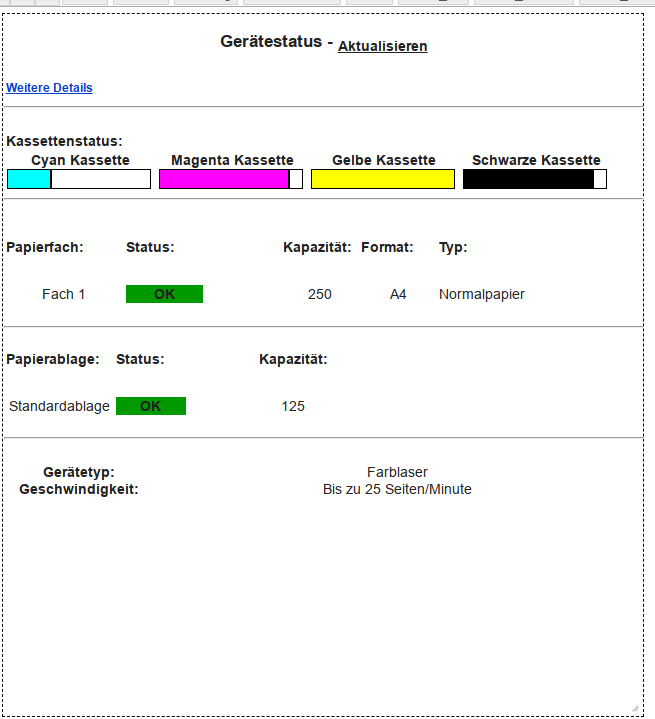
                Tonerstatus.png

                da ist nur ne Grafik

                EDIT: da ist was, ich versuche es

                kein Support per PN! - Fragen im Forum stellen - es gibt fast nichts, was nicht auch für andere interessant ist.

                Benutzt das Voting rechts unten im Beitrag wenn er euch geholfen hat.

                der Installationsfixer: curl -fsL https://iobroker.net/fix.sh | bash -

                1 Antwort Letzte Antwort
                0
                • K kuerfra

                  @homoran sagte in Adapter SNMP Drucker, Synology, QNAP etc auslesen:

                  @kuerfra Danke, das sieht besser aus.

                  Was genau möchtest du finden?

                  Ich wollte die Farbfüllmenge wissen, das war die Frage.

                  HomoranH Nicht stören
                  HomoranH Nicht stören
                  Homoran
                  Global Moderator Administrators
                  schrieb am zuletzt editiert von
                  #236

                  @kuerfra sagte in Adapter SNMP Drucker, Synology, QNAP etc auslesen:

                  @homoran sagte in Adapter SNMP Drucker, Synology, QNAP etc auslesen:

                  @kuerfra Danke, das sieht besser aus.

                  Was genau möchtest du finden?

                  Ich wollte die Farbfüllmenge wissen, das war die Frage.

                  versuch mal das für Cyan:
                  "(\d+)%"\sbgColor=#00f

                  kein Support per PN! - Fragen im Forum stellen - es gibt fast nichts, was nicht auch für andere interessant ist.

                  Benutzt das Voting rechts unten im Beitrag wenn er euch geholfen hat.

                  der Installationsfixer: curl -fsL https://iobroker.net/fix.sh | bash -

                  K 2 Antworten Letzte Antwort
                  0
                  • HomoranH Homoran

                    @kuerfra sagte in Adapter SNMP Drucker, Synology, QNAP etc auslesen:

                    @homoran sagte in Adapter SNMP Drucker, Synology, QNAP etc auslesen:

                    @kuerfra Danke, das sieht besser aus.

                    Was genau möchtest du finden?

                    Ich wollte die Farbfüllmenge wissen, das war die Frage.

                    versuch mal das für Cyan:
                    "(\d+)%"\sbgColor=#00f

                    K Offline
                    K Offline
                    kuerfra
                    schrieb am zuletzt editiert von
                    #237

                    @homoran sagte in Adapter SNMP Drucker, Synology, QNAP etc auslesen:

                    "(\d+)%"\sbgColor=#00f

                    TOP läuft Astrein

                    HomoranH 1 Antwort Letzte Antwort
                    0
                    • K kuerfra

                      @homoran sagte in Adapter SNMP Drucker, Synology, QNAP etc auslesen:

                      "(\d+)%"\sbgColor=#00f

                      TOP läuft Astrein

                      HomoranH Nicht stören
                      HomoranH Nicht stören
                      Homoran
                      Global Moderator Administrators
                      schrieb am zuletzt editiert von
                      #238

                      @kuerfra dann das hier für magenta:
                      "(\d+)%"\sbgColor=#ff0

                      das für gelb:
                      "(\d+)%"\sbgColor=#ffff0

                      bei schwarz
                      "(\d+)%"\sbgColor=#000

                      kein Support per PN! - Fragen im Forum stellen - es gibt fast nichts, was nicht auch für andere interessant ist.

                      Benutzt das Voting rechts unten im Beitrag wenn er euch geholfen hat.

                      der Installationsfixer: curl -fsL https://iobroker.net/fix.sh | bash -

                      1 Antwort Letzte Antwort
                      0
                      • HomoranH Homoran

                        @kuerfra sagte in Adapter SNMP Drucker, Synology, QNAP etc auslesen:

                        @homoran sagte in Adapter SNMP Drucker, Synology, QNAP etc auslesen:

                        @kuerfra Danke, das sieht besser aus.

                        Was genau möchtest du finden?

                        Ich wollte die Farbfüllmenge wissen, das war die Frage.

                        versuch mal das für Cyan:
                        "(\d+)%"\sbgColor=#00f

                        K Offline
                        K Offline
                        kuerfra
                        schrieb am zuletzt editiert von
                        #239

                        @homoran Woran erkenn ich die Farbe für die anderen 3 Töne ?

                        HomoranH 2 Antworten Letzte Antwort
                        0
                        • K kuerfra

                          @homoran Woran erkenn ich die Farbe für die anderen 3 Töne ?

                          HomoranH Nicht stören
                          HomoranH Nicht stören
                          Homoran
                          Global Moderator Administrators
                          schrieb am zuletzt editiert von
                          #240

                          @kuerfra ruhig - ich brauch dafür auch ein paar Sekunden Zeit :-)

                          kein Support per PN! - Fragen im Forum stellen - es gibt fast nichts, was nicht auch für andere interessant ist.

                          Benutzt das Voting rechts unten im Beitrag wenn er euch geholfen hat.

                          der Installationsfixer: curl -fsL https://iobroker.net/fix.sh | bash -

                          1 Antwort Letzte Antwort
                          0
                          • K kuerfra

                            @homoran Woran erkenn ich die Farbe für die anderen 3 Töne ?

                            HomoranH Nicht stören
                            HomoranH Nicht stören
                            Homoran
                            Global Moderator Administrators
                            schrieb am zuletzt editiert von
                            #241

                            @kuerfra und?
                            passt's?

                            kein Support per PN! - Fragen im Forum stellen - es gibt fast nichts, was nicht auch für andere interessant ist.

                            Benutzt das Voting rechts unten im Beitrag wenn er euch geholfen hat.

                            der Installationsfixer: curl -fsL https://iobroker.net/fix.sh | bash -

                            K 1 Antwort Letzte Antwort
                            0
                            • HomoranH Homoran

                              @kuerfra und?
                              passt's?

                              K Offline
                              K Offline
                              kuerfra
                              schrieb am zuletzt editiert von
                              #242

                              @homoran sagte in Adapter SNMP Drucker, Synology, QNAP etc auslesen:

                              @kuerfra und?
                              passt's?

                              Im Moment will er noch nicht speichern und schliessen....

                              HomoranH 1 Antwort Letzte Antwort
                              0
                              • K kuerfra

                                @homoran sagte in Adapter SNMP Drucker, Synology, QNAP etc auslesen:

                                @kuerfra und?
                                passt's?

                                Im Moment will er noch nicht speichern und schliessen....

                                HomoranH Nicht stören
                                HomoranH Nicht stören
                                Homoran
                                Global Moderator Administrators
                                schrieb am zuletzt editiert von
                                #243

                                @kuerfra sagte in Adapter SNMP Drucker, Synology, QNAP etc auslesen:

                                Im Moment will er noch nicht speichern und schliessen....

                                dann ist irgendwo noch eine leere Regel oder sonst ein Fehler

                                kein Support per PN! - Fragen im Forum stellen - es gibt fast nichts, was nicht auch für andere interessant ist.

                                Benutzt das Voting rechts unten im Beitrag wenn er euch geholfen hat.

                                der Installationsfixer: curl -fsL https://iobroker.net/fix.sh | bash -

                                K 1 Antwort Letzte Antwort
                                0
                                • HomoranH Homoran

                                  @kuerfra sagte in Adapter SNMP Drucker, Synology, QNAP etc auslesen:

                                  Im Moment will er noch nicht speichern und schliessen....

                                  dann ist irgendwo noch eine leere Regel oder sonst ein Fehler

                                  K Offline
                                  K Offline
                                  kuerfra
                                  schrieb am zuletzt editiert von
                                  #244

                                  @homoran bei Yellow will er nicht

                                  HomoranH 1 Antwort Letzte Antwort
                                  0
                                  • K kuerfra

                                    @homoran bei Yellow will er nicht

                                    HomoranH Nicht stören
                                    HomoranH Nicht stören
                                    Homoran
                                    Global Moderator Administrators
                                    schrieb am zuletzt editiert von
                                    #245

                                    @kuerfra sagte in Adapter SNMP Drucker, Synology, QNAP etc auslesen:

                                    bei Yellow will er nicht

                                    zeigen!

                                    kein Support per PN! - Fragen im Forum stellen - es gibt fast nichts, was nicht auch für andere interessant ist.

                                    Benutzt das Voting rechts unten im Beitrag wenn er euch geholfen hat.

                                    der Installationsfixer: curl -fsL https://iobroker.net/fix.sh | bash -

                                    K 1 Antwort Letzte Antwort
                                    0
                                    • HomoranH Homoran

                                      @kuerfra sagte in Adapter SNMP Drucker, Synology, QNAP etc auslesen:

                                      bei Yellow will er nicht

                                      zeigen!

                                      K Offline
                                      K Offline
                                      kuerfra
                                      schrieb am zuletzt editiert von Homoran
                                      #246

                                      @homoran sagte in Adapter SNMP Drucker, Synology, QNAP etc auslesen:

                                      @kuerfra sagte in Adapter SNMP Drucker, Synology, QNAP etc auslesen:

                                      bei Yellow will er nicht

                                      zeigen!

                                      <html>
                                      <head>
                                      <meta content="text/html; charset=UTF-8" http-equiv="content-type">
                                      <meta HTTP-EQUIV="refresh" CONTENT="120; url=/cgi-bin/dynamic/printer/PrinterStatus.html">
                                      <title>Printer Status</title>
                                      <base target="_self">
                                      <LINK REL="stylesheet" HREF="/cgi-bin/dynamic/printer/configStyle.css" TYPE="text/css">
                                      </head>
                                      <body>
                                      <!-- Device Status Title-->
                                      
                                      <h3>Gerätestatus - <a href="/" TARGET="_top"><sub><b>Aktualisieren</b></sub></a></h3>


                                      <!-- More Details Link -->
                                      <table><tr> 
                                         <td> <font face="Arial" size="4" color="#0066CC"></font><font face="Arial" size="2">
                                          <a href="/cgi-bin/dynamic/printer/SuppliesStatus.html"><font color="#0040CC" size="2" face="Arial"><B>Weitere Details</B></font></a><font face="Arial" size="5" color="#FFFFFF">&nbsp;</font></font>
                                        </td></tr>
                                      </table>
                                      
                                      
                                      <hr class="status_hr"/>
                                      
                                      <!-- Panel and Toner Level -->
                                      <table class="status_table">
                                      	<tr>
                                      		<th colspan="4">&nbsp;</th>
                                      	</tr>


                                      	<!-- Toner Level -->
                                      
                                      	<tr>
                                      		<td colspan="4">
                                      		<B>Kassettenstatus:</B>
                                      		</td>
                                      	</tr>
                                      
                                      
                                      	<TABLE width=650 borerColor=#000000 border=0>
                                      <tr>
                                      <td><table width="80%" height="25" border=0><tr>
                                      <TD WIDTH="30%" COLSPAN=2 nowrap><B>Cyan Kassette</B></TD>
                                      </tr>
                                      <TR>
                                      <TD width="25%">
                                      <TABLE borderColor=#000000 cellSpacing=0 width="160" height="23" border=1>
                                      <TBODY>
                                      <TR>
                                      <TD width="30%" bgColor=#00ffff title=30%>&nbsp;</TD>
                                      <TD width="70%" bgColor=#ffffff title=30%>&nbsp;</TD>
                                      </TBODY>
                                      </TABLE></TD>
                                      </tr>
                                      </table></td>
                                      <td><table width="80%" height="25" border=0><tr>
                                      <TD WIDTH="30%" COLSPAN=2 nowrap><B>Magenta Kassette</B></TD>
                                      </tr>
                                      <TR>
                                      <TD width="25%">
                                      <TABLE borderColor=#000000 cellSpacing=0 width="160" height="23" border=1>
                                      <TBODY>
                                      <TR>
                                      <TD width="90%" bgColor=#ff00ff title=90%>&nbsp;</TD>
                                      <TD width="10%" bgColor=#ffffff title=90%>&nbsp;</TD>
                                      </TBODY>
                                      </TABLE></TD>
                                      </tr>
                                      </table></td>
                                      <td><table width="80%" height="25" border=0><tr>
                                      <TD WIDTH="30%" COLSPAN=2 nowrap><B>Gelbe Kassette</B></TD>
                                      </tr>
                                      <TR>
                                      <TD width="25%">
                                      <TABLE borderColor=#000000 cellSpacing=0 width="160" height="23" border=1>
                                      <TBODY>
                                      <TR>
                                      <TD width="100%" bgColor=#ffff00 title=100%>&nbsp;</TD>
                                      </TBODY>
                                      </TABLE>
                                      </TD>
                                      </tr>
                                      </table></td>
                                      <td><table width="80%" height="25" border=0><tr>
                                      <TD WIDTH="30%" COLSPAN=2 nowrap><B>Schwarze Kassette</B></TD>
                                      </tr>
                                      <TR>
                                      <TD width="25%">
                                      <TABLE borderColor=#000000 cellSpacing=0 width="160" height="23" border=1>
                                      <TBODY>
                                      <TR>
                                      <TD width="90%" bgColor=#000000 title=90%>&nbsp;</TD>
                                      <TD width="10%" bgColor=#ffffff title=90%>&nbsp;</TD>
                                      </TBODY>
                                      </TABLE></TD>
                                      </tr>
                                      </table></td>
                                      </tr>
                                      </TABLE>
                                                
                                      
                                      </table>
                                      
                                      <hr class="status_hr">
                                      <table class="status_table">
                                      	<tr>
                                      		<th colspan="5">&nbsp;</th>
                                      	</tr>
                                      
                                      	<tr>
                                      	<td width="23%"><P align="left" style="margin-top: 5; margin-bottom: 5"><B>Papierfach:</B></P> </TD>
                                      	<td width="20%"><P align="left" style="margin-top: 5; margin-bottom: 5"><B>Status:</B></P> </TD>
                                      	<td width="15%"><P align="left" style="margin-top: 5; margin-bottom: 5"><B>Kapazität:</B></P></TD>
                                      	<td width="15%"><P align="left" style="margin-top: 5; margin-bottom: 5"><B>Format:</B></P></TD>
                                      	<td width="25%"><P align="left" style="margin-top: 5; margin-bottom: 5"><B>Typ:</B></TD>
                                      	</tr>
                                      
                                      	<TR>
                                        <TD><P style="margin-left:5">Fach 1</P></TD>
                                       <td width="30%"><P style="margin-left:5"><table width="50%" bgcolor="#009900" style="padding: .75pt" height="1"><tr><td><b>OK</b></TD></TR></TABLE></P></TD>
                                      <TD><P style="margin-left:5">250</P></TD>
                                        <TD><P style="margin-left:5">A4</P></TD>
                                        <TD><P style="margin-left:5">Normalpapier</P></TD>
                                      </TR>


                                      </table>
                                      
                                      <hr class="status_hr"/>
                                      
                                      <table class="status_table">
                                      
                                      	<tr>
                                      		<td width="23%"><P align="left" style="margin-top: 5; margin-bottom: 5"><B>Papierablage:</B></P></TD>
                                      		<td width="20%"><P align="left" style="margin-top: 5; margin-bottom: 5"><B>Status:</B></P> </TD>
                                      		<td width="15%"><P align="left" style="margin-top: 5; margin-bottom: 5"><B>Kapazität:</B></P></TD>
                                      		<td width="15%"><P align="left" style="margin-top: 5; margin-bottom: 5"><B></B></P></TD>
                                      		<td width="25%"><P align="left" style="margin-top: 5; margin-bottom: 5"><B></B></P></TD>
                                      	</tr>
                                      	<TR>
                                        <TD><P style="margin-left:5">Standardablage</P></TD>
                                       <td width="30%"><P style="margin-left:5"><table width="50%" bgcolor="#009900" style="padding: .75pt" height="1"><tr><td><b>OK</b></TD></TR></TABLE></P></TD>
                                      <TD><P style="margin-left:5">125</P></TD>
                                        <TD><P style="margin-left:5"></P></TD>
                                        <TD><P style="margin-left:5"></P></TD>
                                      </TR>
                                      
                                      </table>
                                      
                                      <hr class="status_hr">
                                      <table class="status_table">
                                      	<tr>
                                      		<th colspan="2">&nbsp;</th>
                                      	</tr>
                                      	<TR>
                                      <TD width="15%"><B>Gerätetyp:</B></TD><TD width="60%">Farblaser</TD>
                                      </TR><TR>
                                      <TD><B>Geschwindigkeit:</B></TD><TD>Bis zu 25 Seiten/Minute</TD>
                                      </TR>
                                      </table>


                                      </body>
                                      </html>
                                      

                                      HomoranH 1 Antwort Letzte Antwort
                                      0
                                      • K kuerfra

                                        @homoran sagte in Adapter SNMP Drucker, Synology, QNAP etc auslesen:

                                        @kuerfra sagte in Adapter SNMP Drucker, Synology, QNAP etc auslesen:

                                        bei Yellow will er nicht

                                        zeigen!

                                        <html>
                                        <head>
                                        <meta content="text/html; charset=UTF-8" http-equiv="content-type">
                                        <meta HTTP-EQUIV="refresh" CONTENT="120; url=/cgi-bin/dynamic/printer/PrinterStatus.html">
                                        <title>Printer Status</title>
                                        <base target="_self">
                                        <LINK REL="stylesheet" HREF="/cgi-bin/dynamic/printer/configStyle.css" TYPE="text/css">
                                        </head>
                                        <body>
                                        <!-- Device Status Title-->
                                        
                                        <h3>Gerätestatus - <a href="/" TARGET="_top"><sub><b>Aktualisieren</b></sub></a></h3>


                                        <!-- More Details Link -->
                                        <table><tr> 
                                           <td> <font face="Arial" size="4" color="#0066CC"></font><font face="Arial" size="2">
                                            <a href="/cgi-bin/dynamic/printer/SuppliesStatus.html"><font color="#0040CC" size="2" face="Arial"><B>Weitere Details</B></font></a><font face="Arial" size="5" color="#FFFFFF">&nbsp;</font></font>
                                          </td></tr>
                                        </table>
                                        
                                        
                                        <hr class="status_hr"/>
                                        
                                        <!-- Panel and Toner Level -->
                                        <table class="status_table">
                                        	<tr>
                                        		<th colspan="4">&nbsp;</th>
                                        	</tr>


                                        	<!-- Toner Level -->
                                        
                                        	<tr>
                                        		<td colspan="4">
                                        		<B>Kassettenstatus:</B>
                                        		</td>
                                        	</tr>
                                        
                                        
                                        	<TABLE width=650 borerColor=#000000 border=0>
                                        <tr>
                                        <td><table width="80%" height="25" border=0><tr>
                                        <TD WIDTH="30%" COLSPAN=2 nowrap><B>Cyan Kassette</B></TD>
                                        </tr>
                                        <TR>
                                        <TD width="25%">
                                        <TABLE borderColor=#000000 cellSpacing=0 width="160" height="23" border=1>
                                        <TBODY>
                                        <TR>
                                        <TD width="30%" bgColor=#00ffff title=30%>&nbsp;</TD>
                                        <TD width="70%" bgColor=#ffffff title=30%>&nbsp;</TD>
                                        </TBODY>
                                        </TABLE></TD>
                                        </tr>
                                        </table></td>
                                        <td><table width="80%" height="25" border=0><tr>
                                        <TD WIDTH="30%" COLSPAN=2 nowrap><B>Magenta Kassette</B></TD>
                                        </tr>
                                        <TR>
                                        <TD width="25%">
                                        <TABLE borderColor=#000000 cellSpacing=0 width="160" height="23" border=1>
                                        <TBODY>
                                        <TR>
                                        <TD width="90%" bgColor=#ff00ff title=90%>&nbsp;</TD>
                                        <TD width="10%" bgColor=#ffffff title=90%>&nbsp;</TD>
                                        </TBODY>
                                        </TABLE></TD>
                                        </tr>
                                        </table></td>
                                        <td><table width="80%" height="25" border=0><tr>
                                        <TD WIDTH="30%" COLSPAN=2 nowrap><B>Gelbe Kassette</B></TD>
                                        </tr>
                                        <TR>
                                        <TD width="25%">
                                        <TABLE borderColor=#000000 cellSpacing=0 width="160" height="23" border=1>
                                        <TBODY>
                                        <TR>
                                        <TD width="100%" bgColor=#ffff00 title=100%>&nbsp;</TD>
                                        </TBODY>
                                        </TABLE>
                                        </TD>
                                        </tr>
                                        </table></td>
                                        <td><table width="80%" height="25" border=0><tr>
                                        <TD WIDTH="30%" COLSPAN=2 nowrap><B>Schwarze Kassette</B></TD>
                                        </tr>
                                        <TR>
                                        <TD width="25%">
                                        <TABLE borderColor=#000000 cellSpacing=0 width="160" height="23" border=1>
                                        <TBODY>
                                        <TR>
                                        <TD width="90%" bgColor=#000000 title=90%>&nbsp;</TD>
                                        <TD width="10%" bgColor=#ffffff title=90%>&nbsp;</TD>
                                        </TBODY>
                                        </TABLE></TD>
                                        </tr>
                                        </table></td>
                                        </tr>
                                        </TABLE>
                                                  
                                        
                                        </table>
                                        
                                        <hr class="status_hr">
                                        <table class="status_table">
                                        	<tr>
                                        		<th colspan="5">&nbsp;</th>
                                        	</tr>
                                        
                                        	<tr>
                                        	<td width="23%"><P align="left" style="margin-top: 5; margin-bottom: 5"><B>Papierfach:</B></P> </TD>
                                        	<td width="20%"><P align="left" style="margin-top: 5; margin-bottom: 5"><B>Status:</B></P> </TD>
                                        	<td width="15%"><P align="left" style="margin-top: 5; margin-bottom: 5"><B>Kapazität:</B></P></TD>
                                        	<td width="15%"><P align="left" style="margin-top: 5; margin-bottom: 5"><B>Format:</B></P></TD>
                                        	<td width="25%"><P align="left" style="margin-top: 5; margin-bottom: 5"><B>Typ:</B></TD>
                                        	</tr>
                                        
                                        	<TR>
                                          <TD><P style="margin-left:5">Fach 1</P></TD>
                                         <td width="30%"><P style="margin-left:5"><table width="50%" bgcolor="#009900" style="padding: .75pt" height="1"><tr><td><b>OK</b></TD></TR></TABLE></P></TD>
                                        <TD><P style="margin-left:5">250</P></TD>
                                          <TD><P style="margin-left:5">A4</P></TD>
                                          <TD><P style="margin-left:5">Normalpapier</P></TD>
                                        </TR>


                                        </table>
                                        
                                        <hr class="status_hr"/>
                                        
                                        <table class="status_table">
                                        
                                        	<tr>
                                        		<td width="23%"><P align="left" style="margin-top: 5; margin-bottom: 5"><B>Papierablage:</B></P></TD>
                                        		<td width="20%"><P align="left" style="margin-top: 5; margin-bottom: 5"><B>Status:</B></P> </TD>
                                        		<td width="15%"><P align="left" style="margin-top: 5; margin-bottom: 5"><B>Kapazität:</B></P></TD>
                                        		<td width="15%"><P align="left" style="margin-top: 5; margin-bottom: 5"><B></B></P></TD>
                                        		<td width="25%"><P align="left" style="margin-top: 5; margin-bottom: 5"><B></B></P></TD>
                                        	</tr>
                                        	<TR>
                                          <TD><P style="margin-left:5">Standardablage</P></TD>
                                         <td width="30%"><P style="margin-left:5"><table width="50%" bgcolor="#009900" style="padding: .75pt" height="1"><tr><td><b>OK</b></TD></TR></TABLE></P></TD>
                                        <TD><P style="margin-left:5">125</P></TD>
                                          <TD><P style="margin-left:5"></P></TD>
                                          <TD><P style="margin-left:5"></P></TD>
                                        </TR>
                                        
                                        </table>
                                        
                                        <hr class="status_hr">
                                        <table class="status_table">
                                        	<tr>
                                        		<th colspan="2">&nbsp;</th>
                                        	</tr>
                                        	<TR>
                                        <TD width="15%"><B>Gerätetyp:</B></TD><TD width="60%">Farblaser</TD>
                                        </TR><TR>
                                        <TD><B>Geschwindigkeit:</B></TD><TD>Bis zu 25 Seiten/Minute</TD>
                                        </TR>
                                        </table>


                                        </body>
                                        </html>
                                        

                                        HomoranH Nicht stören
                                        HomoranH Nicht stören
                                        Homoran
                                        Global Moderator Administrators
                                        schrieb am zuletzt editiert von
                                        #247

                                        @kuerfra nein!
                                        diesmal Screenshot vom Parser-Editor

                                        kein Support per PN! - Fragen im Forum stellen - es gibt fast nichts, was nicht auch für andere interessant ist.

                                        Benutzt das Voting rechts unten im Beitrag wenn er euch geholfen hat.

                                        der Installationsfixer: curl -fsL https://iobroker.net/fix.sh | bash -

                                        K 1 Antwort Letzte Antwort
                                        0
                                        • HomoranH Homoran

                                          @kuerfra nein!
                                          diesmal Screenshot vom Parser-Editor

                                          K Offline
                                          K Offline
                                          kuerfra
                                          schrieb am zuletzt editiert von Homoran
                                          #248

                                          @homoran sagte in Adapter SNMP Drucker, Synology, QNAP etc auslesen:

                                          @kuerfra nein!
                                          diesmal Screenshot vom Parser-Editor

                                          Dieses: ?

                                          "_id": "parser.0.Lexmark_Y",
                                            "common": {
                                              "name": "Lexmark_Y",
                                              "write": false,
                                              "read": true,
                                              "unit": "%",
                                              "type": "number",
                                              "role": "value"
                                            },
                                            "native": {
                                              "link": "http://192.168.178.60/cgi-bin/dynamic/printer/PrinterStatus.html",
                                              "regex": "\\(Y\\)\\*\\*<\\/dt><dd>\\(([0-9.]*)%\\)",
                                              "interval": "",
                                              "factor": 1,
                                              "item": 0,
                                              "offset": 0,
                                              "substitute": "",
                                              "substituteOld": false,
                                              "comma": false
                                            },
                                            "type": "state",
                                            "from": "system.adapter.admin.0",
                                            "user": "system.user.admin",
                                            "ts": 1641486274837,
                                            "acl": {
                                              "object": 1636,
                                              "state": 1636,
                                              "owner": "system.user.admin",
                                              "ownerGroup": "system.group.administrator"
                                            }
                                          }
                                          

                                          HomoranH 1 Antwort Letzte Antwort
                                          0
                                          Antworten
                                          • In einem neuen Thema antworten
                                          Anmelden zum Antworten
                                          • Älteste zuerst
                                          • Neuste zuerst
                                          • Meiste Stimmen


                                          Support us

                                          ioBroker
                                          Community Adapters
                                          Donate
                                          FAQ Cloud / IOT
                                          HowTo: Node.js-Update
                                          HowTo: Backup/Restore
                                          Downloads
                                          BLOG

                                          656

                                          Online

                                          32.4k

                                          Benutzer

                                          81.5k

                                          Themen

                                          1.3m

                                          Beiträge
                                          Community
                                          Impressum | Datenschutz-Bestimmungen | Nutzungsbedingungen | Einwilligungseinstellungen
                                          ioBroker Community 2014-2025
                                          logo
                                          • Anmelden

                                          • Du hast noch kein Konto? Registrieren

                                          • Anmelden oder registrieren, um zu suchen
                                          • Erster Beitrag
                                            Letzter Beitrag
                                          0
                                          • Home
                                          • Aktuell
                                          • Tags
                                          • Ungelesen 0
                                          • Kategorien
                                          • Unreplied
                                          • Beliebt
                                          • GitHub
                                          • Docu
                                          • Hilfe
