




DoorBird App in Fully Kiosk starten
-
Re: Doorbird in VIS
Ich habe ein Blockly Script, welches beim klingeln die DoorBird App öffnen soll und nach 1 Minute FullyKiosk wieder nach vorne holen soll.
Leider funktioniert es nicht. Es passiert nichts.
Wenn ich im Browser eingebe:
http://192.168.1.122:2323/?cmd=startApplication&package=com.doorbird.doorbird&password=xxxxöffnet sich die DoorBird App.
Wer kann mir bitte helfen?
<xml xmlns="https://developers.google.com/blockly/xml"> <variables> <variable type="timeout" id="timeout">timeout</variable> </variables> <block type="on_ext" id="XAH6G]=wTi?.wfCG~oB8" x="-813" y="-712"> <mutation xmlns="http://www.w3.org/1999/xhtml" items="1"></mutation> <field name="CONDITION">true</field> <field name="ACK_CONDITION"></field> <value name="OID0"> <shadow type="field_oid" id="FmCdUNE#,-Bf2E.gZtE)"> <field name="oid">doorbird.0.Doorbell.1.trigger</field> </shadow> </value> <statement name="STATEMENT"> <block type="request" id="0{8`z~IZg:4Iy7tj44e@"> <mutation xmlns="http://www.w3.org/1999/xhtml" with_statement="false"></mutation> <field name="WITH_STATEMENT">FALSE</field> <field name="LOG"></field> <value name="URL"> <shadow type="text" id=").vWLET7YE`wA9~tJ$(g"> <field name="TEXT">http://192.168.1.122:2323/?cmd=startApplication&package=com.doorbird.doorbird&password=xxx</field> </shadow> </value> <next> <block type="timeouts_settimeout" id="XW_T*A3ITr93(#$OuZsK"> <field name="NAME">timeout</field> <field name="DELAY">1</field> <field name="UNIT">min</field> <statement name="STATEMENT"> <block type="request" id="$ah7Hcr!??y!CnbnyX*d"> <mutation xmlns="http://www.w3.org/1999/xhtml" with_statement="false"></mutation> <field name="WITH_STATEMENT">FALSE</field> <field name="LOG"></field> <value name="URL"> <shadow type="text" id="QPXtwSN`7|(;6Plr4d)n"> <field name="TEXT">http://192.168.1.122:xxxx/?cmd=toForeground&password=2133</field> </shadow> </value> </block> </statement> </block> </next> </block> </statement> </block> </xml> -
Re: Doorbird in VIS
Ich habe ein Blockly Script, welches beim klingeln die DoorBird App öffnen soll und nach 1 Minute FullyKiosk wieder nach vorne holen soll.
Leider funktioniert es nicht. Es passiert nichts.
Wenn ich im Browser eingebe:
http://192.168.1.122:2323/?cmd=startApplication&package=com.doorbird.doorbird&password=xxxxöffnet sich die DoorBird App.
Wer kann mir bitte helfen?
<xml xmlns="https://developers.google.com/blockly/xml"> <variables> <variable type="timeout" id="timeout">timeout</variable> </variables> <block type="on_ext" id="XAH6G]=wTi?.wfCG~oB8" x="-813" y="-712"> <mutation xmlns="http://www.w3.org/1999/xhtml" items="1"></mutation> <field name="CONDITION">true</field> <field name="ACK_CONDITION"></field> <value name="OID0"> <shadow type="field_oid" id="FmCdUNE#,-Bf2E.gZtE)"> <field name="oid">doorbird.0.Doorbell.1.trigger</field> </shadow> </value> <statement name="STATEMENT"> <block type="request" id="0{8`z~IZg:4Iy7tj44e@"> <mutation xmlns="http://www.w3.org/1999/xhtml" with_statement="false"></mutation> <field name="WITH_STATEMENT">FALSE</field> <field name="LOG"></field> <value name="URL"> <shadow type="text" id=").vWLET7YE`wA9~tJ$(g"> <field name="TEXT">http://192.168.1.122:2323/?cmd=startApplication&package=com.doorbird.doorbird&password=xxx</field> </shadow> </value> <next> <block type="timeouts_settimeout" id="XW_T*A3ITr93(#$OuZsK"> <field name="NAME">timeout</field> <field name="DELAY">1</field> <field name="UNIT">min</field> <statement name="STATEMENT"> <block type="request" id="$ah7Hcr!??y!CnbnyX*d"> <mutation xmlns="http://www.w3.org/1999/xhtml" with_statement="false"></mutation> <field name="WITH_STATEMENT">FALSE</field> <field name="LOG"></field> <value name="URL"> <shadow type="text" id="QPXtwSN`7|(;6Plr4d)n"> <field name="TEXT">http://192.168.1.122:xxxx/?cmd=toForeground&password=2133</field> </shadow> </value> </block> </statement> </block> </next> </block> </statement> </block> </xml> -
Re: Doorbird in VIS
Ich habe ein Blockly Script, welches beim klingeln die DoorBird App öffnen soll und nach 1 Minute FullyKiosk wieder nach vorne holen soll.
Leider funktioniert es nicht. Es passiert nichts.
Wenn ich im Browser eingebe:
http://192.168.1.122:2323/?cmd=startApplication&package=com.doorbird.doorbird&password=xxxxöffnet sich die DoorBird App.
Wer kann mir bitte helfen?
<xml xmlns="https://developers.google.com/blockly/xml"> <variables> <variable type="timeout" id="timeout">timeout</variable> </variables> <block type="on_ext" id="XAH6G]=wTi?.wfCG~oB8" x="-813" y="-712"> <mutation xmlns="http://www.w3.org/1999/xhtml" items="1"></mutation> <field name="CONDITION">true</field> <field name="ACK_CONDITION"></field> <value name="OID0"> <shadow type="field_oid" id="FmCdUNE#,-Bf2E.gZtE)"> <field name="oid">doorbird.0.Doorbell.1.trigger</field> </shadow> </value> <statement name="STATEMENT"> <block type="request" id="0{8`z~IZg:4Iy7tj44e@"> <mutation xmlns="http://www.w3.org/1999/xhtml" with_statement="false"></mutation> <field name="WITH_STATEMENT">FALSE</field> <field name="LOG"></field> <value name="URL"> <shadow type="text" id=").vWLET7YE`wA9~tJ$(g"> <field name="TEXT">http://192.168.1.122:2323/?cmd=startApplication&package=com.doorbird.doorbird&password=xxx</field> </shadow> </value> <next> <block type="timeouts_settimeout" id="XW_T*A3ITr93(#$OuZsK"> <field name="NAME">timeout</field> <field name="DELAY">1</field> <field name="UNIT">min</field> <statement name="STATEMENT"> <block type="request" id="$ah7Hcr!??y!CnbnyX*d"> <mutation xmlns="http://www.w3.org/1999/xhtml" with_statement="false"></mutation> <field name="WITH_STATEMENT">FALSE</field> <field name="LOG"></field> <value name="URL"> <shadow type="text" id="QPXtwSN`7|(;6Plr4d)n"> <field name="TEXT">http://192.168.1.122:xxxx/?cmd=toForeground&password=2133</field> </shadow> </value> </block> </statement> </block> </next> </block> </statement> </block> </xml> -
-
@regalo sagte in DoorBird App in Fully Kiosk starten:
Ich als Anfänger hatte die gleiche Frage wie ihr und bin über die Suche auf eurem Thread gekommen. Hier meine Lösung:
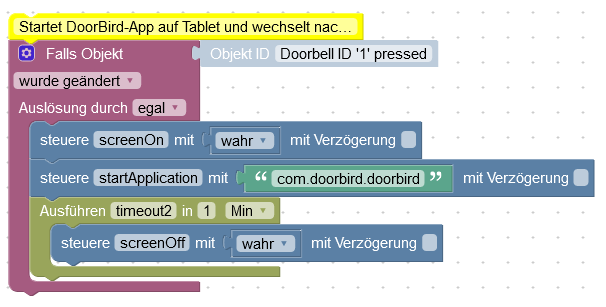
Das ist also ohne http. Stattdessen steuere ich die Objekte im Fully-Adapter an: screenOn, startApplication und screenOff
Ich versuch das auch, bei mir startet die Doorb
Beta-Tester
-
@regalo sagte in DoorBird App in Fully Kiosk starten:
Ich als Anfänger hatte die gleiche Frage wie ihr und bin über die Suche auf eurem Thread gekommen. Hier meine Lösung:
Das ist also ohne http. Stattdessen steuere ich die Objekte im Fully-Adapter an: screenOn, startApplication und screenOff
Ich versuch das auch, bei mir startet die Doorb
@merlin123 wie findet man noch herraus wie die app heißt die man starten will. ich möchte zb eien dart zähler app starten "Pro Darts"
-
@merlin123 wie findet man noch herraus wie die app heißt die man starten will. ich möchte zb eien dart zähler app starten "Pro Darts"
-
@regalo sagte in DoorBird App in Fully Kiosk starten:
Ich als Anfänger hatte die gleiche Frage wie ihr und bin über die Suche auf eurem Thread gekommen. Hier meine Lösung:
Das ist also ohne http. Stattdessen steuere ich die Objekte im Fully-Adapter an: screenOn, startApplication und screenOff
Ich versuch das auch, bei mir startet die Doorb
@merlin123 sagte in DoorBird App in Fully Kiosk starten:
Ich versuch das auch, bei mir startet die Doorb
Hallo
Bin auch gerade dabei das umzusetzen.
Lt. deinem Blockly ist der Bildschirm bei dir aus.
Du schaltest ihn ein, startest Doorbird und nach 1 Minute schaltest du den Bildschirm wieder aus.Bei mir ist der Bildschirm immer an.
Ich möchte nur, dass sich die Doorbird App öffnet und nach 2 Min. wieder in den Hintergrund legt.Wie muss ich das im Blockly angeben?





Hey! Du scheinst an dieser Unterhaltung interessiert zu sein, hast aber noch kein Konto.
Hast du es satt, bei jedem Besuch durch die gleichen Beiträge zu scrollen? Wenn du dich für ein Konto anmeldest, kommst du immer genau dorthin zurück, wo du zuvor warst, und kannst dich über neue Antworten benachrichtigen lassen (entweder per E-Mail oder Push-Benachrichtigung). Du kannst auch Lesezeichen speichern und Beiträge positiv bewerten, um anderen Community-Mitgliedern deine Wertschätzung zu zeigen.
Mit deinem Input könnte dieser Beitrag noch besser werden 💗
Registrieren AnmeldenSupport us
283
Online33.0k
Benutzer83.6k
Themen1.3m
Beiträge