



Skip to content
  • Home
  • Aktuell
  • Tags
  • 0 Ungelesen 0
  • Kategorien
  • Unreplied
  • Beliebt
  • GitHub
  • Docu
  • Hilfe
Skins
  • Light
  • Brite
  • Cerulean
  • Cosmo
  • Flatly
  • Journal
  • Litera
  • Lumen
  • Lux
  • Materia
  • Minty
  • Morph
  • Pulse
  • Sandstone
  • Simplex
  • Sketchy
  • Spacelab
  • United
  • Yeti
  • Zephyr
  • Dark
  • Cyborg
  • Darkly
  • Quartz
  • Slate
  • Solar
  • Superhero
  • Vapor

  • Standard: (Kein Skin)
  • Kein Skin
Einklappen
ioBroker Logo

Community Forum

donate donate
  1. ioBroker Community Home
  2. Deutsch
  3. Error/Bug
  4. ioBroker Startet nicht nach Update Versuch

NEWS

  • Monatsrückblick Januar/Februar 2026 ist online!
    BluefoxB
    Bluefox
    17
    1
    499

  • Jahresrückblick 2025 – unser neuer Blogbeitrag ist online! ✨
    BluefoxB
    Bluefox
    17
    1
    5.2k

  • Neuer Blogbeitrag: Monatsrückblick - Dezember 2025 🎄
    BluefoxB
    Bluefox
    13
    1
    1.4k

ioBroker Startet nicht nach Update Versuch

Geplant Angeheftet Gesperrt Verschoben Error/Bug
errorfehleriobrokerjs-controllerupdateversuch
12 Beiträge 3 Kommentatoren 1.3k Aufrufe 2 Watching
  • Älteste zuerst
  • Neuste zuerst
  • Meiste Stimmen
Antworten
  • In einem neuen Thema antworten
Anmelden zum Antworten
Dieses Thema wurde gelöscht. Nur Nutzer mit entsprechenden Rechten können es sehen.
  • Gurke258G Offline
    Gurke258G Offline
    Gurke258
    schrieb am zuletzt editiert von Gurke258
    #1
    Systemdata Bitte Ausfüllen
    Hardwaresystem: Pi4
    Arbeitsspeicher: 4GB
    Festplattenart: SD-Karte
    Betriebssystem: Rasbian
    Node-Version: 14.x.x
    Nodejs-Version: 14.x.x
    NPM-Version: 6.x.x

    Hallo zusammen,

    leider habe ich gerade meinen ioBroker gekillt :/ Wollte den js-controller auf 3.3.22 updaten und i.was ist schief gelaufen.
    -> Diesen Befehl benutzt:

    pi@HomePi:/opt/iobroker $ curl -sLf https://iobroker.net/install.sh | bash -
    

    Dann Reboot. Ich merkte das der Broker nicht mehr startete und habe mir gedacht, okay spiel ich das Backup ein.
    Leider bekam ich dann folgenden Fehler:

    pi@HomePi:~ $ cd /opt/iobroker
    pi@HomePi:/opt/iobroker $ 
    pi@HomePi:/opt/iobroker $ 
    pi@HomePi:/opt/iobroker $ sudo iobroker stop
    pi@HomePi:/opt/iobroker $ sudo iobroker restore 0
    internal/modules/cjs/loader.js:905
      throw err;
      ^
    
    Error: Cannot find module '/opt/iobroker/node_modules/iobroker.js-controller/iobroker.js'
        at Function.Module._resolveFilename (internal/modules/cjs/loader.js:902:15)
        at Function.Module._load (internal/modules/cjs/loader.js:746:27)
        at Function.executeUserEntryPoint [as runMain] (internal/modules/run_main.js:76:12)
        at internal/main/run_main_module.js:17:47 {
      code: 'MODULE_NOT_FOUND',
      requireStack: []
    }
    pi@HomePi:/opt/iobroker $
    

    Könnt ihr mir weiterhelfen?

    Thomas BraunT 1 Antwort Letzte Antwort
    0
    • Gurke258G Gurke258
      Systemdata Bitte Ausfüllen
      Hardwaresystem: Pi4
      Arbeitsspeicher: 4GB
      Festplattenart: SD-Karte
      Betriebssystem: Rasbian
      Node-Version: 14.x.x
      Nodejs-Version: 14.x.x
      NPM-Version: 6.x.x

      Hallo zusammen,

      leider habe ich gerade meinen ioBroker gekillt :/ Wollte den js-controller auf 3.3.22 updaten und i.was ist schief gelaufen.
      -> Diesen Befehl benutzt:

      pi@HomePi:/opt/iobroker $ curl -sLf https://iobroker.net/install.sh | bash -
      

      Dann Reboot. Ich merkte das der Broker nicht mehr startete und habe mir gedacht, okay spiel ich das Backup ein.
      Leider bekam ich dann folgenden Fehler:

      pi@HomePi:~ $ cd /opt/iobroker
      pi@HomePi:/opt/iobroker $ 
      pi@HomePi:/opt/iobroker $ 
      pi@HomePi:/opt/iobroker $ sudo iobroker stop
      pi@HomePi:/opt/iobroker $ sudo iobroker restore 0
      internal/modules/cjs/loader.js:905
        throw err;
        ^
      
      Error: Cannot find module '/opt/iobroker/node_modules/iobroker.js-controller/iobroker.js'
          at Function.Module._resolveFilename (internal/modules/cjs/loader.js:902:15)
          at Function.Module._load (internal/modules/cjs/loader.js:746:27)
          at Function.executeUserEntryPoint [as runMain] (internal/modules/run_main.js:76:12)
          at internal/main/run_main_module.js:17:47 {
        code: 'MODULE_NOT_FOUND',
        requireStack: []
      }
      pi@HomePi:/opt/iobroker $
      

      Könnt ihr mir weiterhelfen?

      Thomas BraunT Online
      Thomas BraunT Online
      Thomas Braun
      Most Active
      schrieb am zuletzt editiert von Thomas Braun
      #2

      @gurke258 sagte in ioBroker Startet nicht nach Update Versuch:

      leider habe ich gerade meinen ioBroker gekillt. Wollte den js-controller auf 3.3.22 updaten und i.was ist schief gelaufen.

      Ja, wie kommt man auf die krummen Befehle?

      iobroker NIE NIE NIEMALS mit sudo direkt anpacken.
      Und das install.sh heißt deswegen Installationsskript, weil es eben installiert und nicht upgraded.

      cd /opt/iobroker
      sudo -H -u iobroker npm install iobroker.js-controller
      

      Linux-Werkzeugkasten:
      https://forum.iobroker.net/topic/42952/der-kleine-iobroker-linux-werkzeugkasten
      NodeJS Fixer Skript:
      https://forum.iobroker.net/topic/68035/iob-node-fix-skript
      iob_diag: curl -sLf -o diag.sh https://iobroker.net/diag.sh && bash diag.sh

      1 Antwort Letzte Antwort
      0
      • Gurke258G Offline
        Gurke258G Offline
        Gurke258
        schrieb am zuletzt editiert von Gurke258
        #3

        Ich weiß auch nicht... das wird mir wohl eine Lehre sein.

        ich wollte eig nur den js-controller updaten und habe das ausgeführt:

        iobroker stop
        iobroker update
        iobroker upgrade self

        Leider kam dann die Nachricht das man den js-controller seit Version 3 nicht mehr per Hand updaten kann und hat mir einen Error ausgegeben. Deswegen habe ich gedacht es hilft wenn man es neuinstalliert. -> Schande über mein Haupt :/

        Jetzt läuft er wieder! Schon mal vielen Dank :)

        Nur meine ganzen Adapter sind alle noch rot... Neustart hat leider nicht geholfen.

        Edit: Scheint so als wenn ich diese neu installieren muss :/

        Gurke258G 1 Antwort Letzte Antwort
        0
        • Gurke258G Gurke258

          Ich weiß auch nicht... das wird mir wohl eine Lehre sein.

          ich wollte eig nur den js-controller updaten und habe das ausgeführt:

          iobroker stop
          iobroker update
          iobroker upgrade self

          Leider kam dann die Nachricht das man den js-controller seit Version 3 nicht mehr per Hand updaten kann und hat mir einen Error ausgegeben. Deswegen habe ich gedacht es hilft wenn man es neuinstalliert. -> Schande über mein Haupt :/

          Jetzt läuft er wieder! Schon mal vielen Dank :)

          Nur meine ganzen Adapter sind alle noch rot... Neustart hat leider nicht geholfen.

          Edit: Scheint so als wenn ich diese neu installieren muss :/

          Gurke258G Offline
          Gurke258G Offline
          Gurke258
          schrieb am zuletzt editiert von
          #4

          @gurke258

          Kann man die i.wo gesamt neu verbinden?

          Wenn ich die neu installiere, erstellt er direkt ne neue Instanz von dem adapter :/

          Thomas BraunT 1 Antwort Letzte Antwort
          0
          • Gurke258G Gurke258

            @gurke258

            Kann man die i.wo gesamt neu verbinden?

            Wenn ich die neu installiere, erstellt er direkt ne neue Instanz von dem adapter :/

            Thomas BraunT Online
            Thomas BraunT Online
            Thomas Braun
            Most Active
            schrieb am zuletzt editiert von Thomas Braun
            #5

            @gurke258

            Du solltest mal in das LogFile schauen und nicht wild irgendwas neuinstallieren.

            iobroker stop
            iobroker fix
            iobroker start
            

            könnte vielleicht auch helfen.

            Linux-Werkzeugkasten:
            https://forum.iobroker.net/topic/42952/der-kleine-iobroker-linux-werkzeugkasten
            NodeJS Fixer Skript:
            https://forum.iobroker.net/topic/68035/iob-node-fix-skript
            iob_diag: curl -sLf -o diag.sh https://iobroker.net/diag.sh && bash diag.sh

            Gurke258G 1 Antwort Letzte Antwort
            0
            • Thomas BraunT Thomas Braun

              @gurke258

              Du solltest mal in das LogFile schauen und nicht wild irgendwas neuinstallieren.

              iobroker stop
              iobroker fix
              iobroker start
              

              könnte vielleicht auch helfen.

              Gurke258G Offline
              Gurke258G Offline
              Gurke258
              schrieb am zuletzt editiert von
              #6

              @thomas-braun

              Habe ich aber da kommen nur Warnungen

              host.HomePi
              	2021-12-22 14:34:36.595	warn	startInstance cannot find adapter "coronavirus-statistics@0.8.7". Try to install it... 1 attempt
              host.HomePi
              	2021-12-22 14:33:50.146	warn	startInstance cannot find adapter "tuya@3.6.9". Try to install it... 1 attempt
              host.HomePi
              	2021-12-22 14:32:53.419	warn	startInstance cannot find adapter "synology@1.1.3". Try to install it... 1 attempt
              host.HomePi
              	2021-12-22 14:32:49.084	warn	startInstance cannot find adapter "backitup@2.2.2". Try to install it... 1 attempt
              host.HomePi
              	2021-12-22 14:31:46.416	warn	startInstance cannot find adapter "rpi2@1.3.1". Try to install it... 1 attempt
              host.HomePi
              	2021-12-22 14:31:09.101	warn	startInstance cannot find adapter "ping@1.5.0". Try to install it... 1 attempt
              host.HomePi
              	2021-12-22 14:31:04.871	warn	startInstance cannot find adapter "ical@1.11.4". Try to install it... 1 attempt
              host.HomePi
              	2021-12-22 14:30:25.489	warn	startInstance cannot find adapter "ical@1.11.4". Try to install it... 1 attempt
              host.HomePi
              	2021-12-22 14:30:21.463	warn	startInstance cannot find adapter "hm-rpc@1.14.50". Try to install it... 1 attempt
              host.HomePi
              	2021-12-22 14:29:17.421	warn	startInstance cannot find adapter "hm-rpc@1.14.50". Try to install it... 1 attempt
              

              Habe aber auch gesehen das er zumindest zwei adapter gerade wieder installiert hat und die wieder grün sind.

              Ich lasse ihn mal machen.

              Gurke258G 1 Antwort Letzte Antwort
              0
              • Gurke258G Gurke258

                @thomas-braun

                Habe ich aber da kommen nur Warnungen

                host.HomePi
                	2021-12-22 14:34:36.595	warn	startInstance cannot find adapter "coronavirus-statistics@0.8.7". Try to install it... 1 attempt
                host.HomePi
                	2021-12-22 14:33:50.146	warn	startInstance cannot find adapter "tuya@3.6.9". Try to install it... 1 attempt
                host.HomePi
                	2021-12-22 14:32:53.419	warn	startInstance cannot find adapter "synology@1.1.3". Try to install it... 1 attempt
                host.HomePi
                	2021-12-22 14:32:49.084	warn	startInstance cannot find adapter "backitup@2.2.2". Try to install it... 1 attempt
                host.HomePi
                	2021-12-22 14:31:46.416	warn	startInstance cannot find adapter "rpi2@1.3.1". Try to install it... 1 attempt
                host.HomePi
                	2021-12-22 14:31:09.101	warn	startInstance cannot find adapter "ping@1.5.0". Try to install it... 1 attempt
                host.HomePi
                	2021-12-22 14:31:04.871	warn	startInstance cannot find adapter "ical@1.11.4". Try to install it... 1 attempt
                host.HomePi
                	2021-12-22 14:30:25.489	warn	startInstance cannot find adapter "ical@1.11.4". Try to install it... 1 attempt
                host.HomePi
                	2021-12-22 14:30:21.463	warn	startInstance cannot find adapter "hm-rpc@1.14.50". Try to install it... 1 attempt
                host.HomePi
                	2021-12-22 14:29:17.421	warn	startInstance cannot find adapter "hm-rpc@1.14.50". Try to install it... 1 attempt
                

                Habe aber auch gesehen das er zumindest zwei adapter gerade wieder installiert hat und die wieder grün sind.

                Ich lasse ihn mal machen.

                Gurke258G Offline
                Gurke258G Offline
                Gurke258
                schrieb am zuletzt editiert von
                #7

                @gurke258

                Okay die Adapter sind alle wieder da, allerdings sind sie im "Tab" Adapter nicht mehr blau unterlegt, so als wären sie gar nicht installiert :/

                und ich musste 1-2 Adapter komplett neuinstallieren :(

                Kann man jetzt noch nen Backup machen auf meinen Stand heute mitttag und den js-controller nochmal komplett neu updaten?

                Thomas BraunT 1 Antwort Letzte Antwort
                0
                • Gurke258G Gurke258

                  @gurke258

                  Okay die Adapter sind alle wieder da, allerdings sind sie im "Tab" Adapter nicht mehr blau unterlegt, so als wären sie gar nicht installiert :/

                  und ich musste 1-2 Adapter komplett neuinstallieren :(

                  Kann man jetzt noch nen Backup machen auf meinen Stand heute mitttag und den js-controller nochmal komplett neu updaten?

                  Thomas BraunT Online
                  Thomas BraunT Online
                  Thomas Braun
                  Most Active
                  schrieb am zuletzt editiert von
                  #8

                  @gurke258

                  So ganz klar ist mir nicht wo du da jetzt genau hängst.

                  iobroker status
                  iobroker update -i
                  iobroker list adapters
                  iobroker list instances
                  

                  Linux-Werkzeugkasten:
                  https://forum.iobroker.net/topic/42952/der-kleine-iobroker-linux-werkzeugkasten
                  NodeJS Fixer Skript:
                  https://forum.iobroker.net/topic/68035/iob-node-fix-skript
                  iob_diag: curl -sLf -o diag.sh https://iobroker.net/diag.sh && bash diag.sh

                  HomoranH Gurke258G 2 Antworten Letzte Antwort
                  0
                  • Thomas BraunT Thomas Braun

                    @gurke258

                    So ganz klar ist mir nicht wo du da jetzt genau hängst.

                    iobroker status
                    iobroker update -i
                    iobroker list adapters
                    iobroker list instances
                    
                    HomoranH Nicht stören
                    HomoranH Nicht stören
                    Homoran
                    Global Moderator Administrators
                    schrieb am zuletzt editiert von
                    #9

                    @thomas-braun sagte in ioBroker Startet nicht nach Update Versuch:

                    So ganz klar ist mir nicht wo du da jetzt genau hängst.

                    geht mir genauso

                    ich vermute:

                    @gurke258 sagte in ioBroker Startet nicht nach Update Versuch:

                    habe mir gedacht, okay spiel ich das Backup ein.

                    dass das noch rödelt

                    kein Support per PN! - Fragen im Forum stellen -
                    Benutzt das Voting rechts unten im Beitrag wenn er euch geholfen hat.
                    Das Forum freut sich über eine Spende. Benutzt dazu den Spendenbutton im Header. Danke!
                    der Installationsfixer: curl -fsL https://iobroker.net/fix.sh | bash -

                    1 Antwort Letzte Antwort
                    0
                    • Thomas BraunT Thomas Braun

                      @gurke258

                      So ganz klar ist mir nicht wo du da jetzt genau hängst.

                      iobroker status
                      iobroker update -i
                      iobroker list adapters
                      iobroker list instances
                      
                      Gurke258G Offline
                      Gurke258G Offline
                      Gurke258
                      schrieb am zuletzt editiert von Gurke258
                      #10

                      @thomas-braun

                      Habe die Befehle ausgeführt:

                      
                      pi@HomePi:~ $ iobroker status
                      iobroker is running on this host.
                      
                      
                      Objects type: file
                      States  type: file
                      pi@HomePi:~ $ iobroker update -i
                      Used repository: stable
                      hash unchanged, use cached sources
                      update done
                      Adapter    "admin"         : 5.2.2    , installed 5.2.2
                      Adapter    "alexa2"        : 3.11.2   , installed 3.11.2
                      Adapter    "backitup"      : 2.2.2    , installed 2.2.2
                      Adapter    "coronavirus-statistics": 0.8.7   , installed 0.8.7
                      Adapter    "daswetter"     : 3.0.9    , installed 3.0.9
                      Adapter    "devices"       : 1.0.9    , installed 1.0.9
                      Adapter    "discovery"     : 2.7.3    , installed 2.7.3
                      Adapter    "dwd"           : 2.7.7    , installed 2.7.7
                      Adapter    "ham"           : 4.0.2    , installed 4.0.2
                      Adapter    "hm-rega"       : 3.0.33   , installed 3.0.33
                      Adapter    "hm-rpc"        : 1.14.50  , installed 1.14.50
                      Adapter    "ical"          : 1.11.4   , installed 1.11.4
                      Adapter    "icons-mfd-svg" : 1.0.2    , installed 1.0.2
                      Adapter    "influxdb"      : 1.9.5    , installed 1.9.5
                      Adapter    "info"          : 1.9.8    , installed 1.9.8
                      Adapter    "iot"           : 1.8.24   , installed 1.8.24
                      Adapter    "jarvis"        : 2.2.1    , installed 2.2.1
                      Adapter    "javascript"    : 5.2.13   , installed 5.2.13
                      Controller "js-controller" : 3.3.22   , installed 3.3.22
                      Adapter    "nina"          : 0.0.25   , installed 0.0.25
                      Adapter    "node-red"      : 2.4.1    , installed 2.4.1
                      Adapter    "ping"          : 1.5.0    , installed 1.5.0
                      Adapter    "rpi2"          : 1.3.1    , installed 1.3.1
                      Adapter    "simple-api"    : 2.6.1    , installed 2.6.2
                      Adapter    "socketio"      : 3.1.4    , installed 3.1.5
                      Adapter    "spotify-premium": 1.0.0   , installed 1.1.3
                      Adapter    "synology"      : 1.1.3    , installed 1.1.3
                      Adapter    "systeminfo"    : 0.3.1    , installed 0.3.1
                      Adapter    "tankerkoenig"  : 2.1.1    , installed 2.1.1
                      Adapter    "telegram"      : 1.10.0   , installed 1.10.0
                      Adapter    "text2command"  : 2.1.1    , installed 2.1.1
                      Adapter    "trashschedule" : 1.2.0    , installed 1.2.0
                      Adapter    "tuya"          : 3.6.9    , installed 3.6.9
                      Adapter    "virtualpowermeter": 1.4.2   , installed 1.4.2
                      Adapter    "vis"           : 1.4.5    , installed 1.4.5
                      Adapter    "vis-hqwidgets" : 1.1.7    , installed 1.1.7
                      Adapter    "vis-icontwo"   : 0.82.0   , installed 0.82.0
                      Adapter    "vis-inventwo"  : 3.2.0    , installed 3.2.0
                      Adapter    "vis-jqui-mfd"  : 1.0.12   , installed 1.0.12
                      Adapter    "vis-keyboard"  : 0.0.2    , installed 0.0.2
                      Adapter    "vis-material-advanced": 1.7.2   , installed 1.7.2
                      Adapter    "vis-metro"     : 1.1.2    , installed 1.1.2
                      Adapter    "vis-timeandweather": 1.1.7   , installed 1.1.7
                      Adapter    "web"           : 3.4.9    , installed 3.4.9
                      pi@HomePi:~ $ iobroker list adapters
                      system.adapter.admin                   : admin          - v5.2.1
                      system.adapter.alexa2                  : alexa2         - v3.11.2
                      system.adapter.backitup                : backitup       - v2.2.2
                      system.adapter.coronavirus-statistics  : coronavirus-statistics - v0.8.7
                      system.adapter.countdown               : countdown      - v1.2.5
                      system.adapter.daswetter               : daswetter      - v3.0.9
                      system.adapter.deconz                  : deconz         - v1.3.19
                      system.adapter.device-reminder         : device-reminder - v1.2.9
                      system.adapter.devices                 : devices        - v1.0.9
                      system.adapter.discovery               : discovery      - v2.7.3
                      system.adapter.dwd                     : dwd            - v2.7.7
                      system.adapter.fullcalendar            : fullcalendar   - v1.1.0
                      system.adapter.ham                     : ham            - v4.0.2
                      system.adapter.hm-rega                 : hm-rega        - v3.0.33
                      system.adapter.hm-rpc                  : hm-rpc         - v1.14.50
                      system.adapter.ical                    : ical           - v1.11.4
                      system.adapter.icons-material-svg      : icons-material-svg - v0.1.0
                      system.adapter.icons-mfd-svg           : icons-mfd-svg  - v1.0.2
                      system.adapter.icons-ultimate-png      : icons-ultimate-png - v1.0.1
                      system.adapter.influxdb                : influxdb       - v1.9.5
                      system.adapter.info                    : info           - v1.9.8
                      system.adapter.iot                     : iot            - v1.8.24
                      system.adapter.iqontrol                : iqontrol       - v1.8.2
                      system.adapter.jarvis                  : jarvis         - v2.2.1
                      system.adapter.javascript              : javascript     - v5.2.13
                      system.adapter.material                : material       - v1.0.4
                      system.adapter.mqtt                    : mqtt           - v2.4.0
                      system.adapter.nina                    : nina           - v0.0.25
                      system.adapter.node-red                : node-red       - v2.4.1
                      system.adapter.parser                  : parser         - v1.0.7
                      system.adapter.ping                    : ping           - v1.5.0
                      system.adapter.rpi2                    : rpi2           - v1.3.1
                      system.adapter.simple-api              : simple-api     - v2.6.1
                      system.adapter.socketio                : socketio       - v3.1.4
                      system.adapter.spotify-premium         : spotify-premium - v1.1.3
                      system.adapter.synology                : synology       - v1.1.3
                      system.adapter.systeminfo              : systeminfo     - v0.3.1
                      system.adapter.tankerkoenig            : tankerkoenig   - v2.1.1
                      system.adapter.telegram                : telegram       - v1.10.0
                      system.adapter.text2command            : text2command   - v2.1.1
                      system.adapter.tr-064                  : tr-064         - v4.2.14
                      system.adapter.trashschedule           : trashschedule  - v1.2.0
                      system.adapter.tuya                    : tuya           - v3.6.9
                      system.adapter.virtualpowermeter       : virtualpowermeter - v1.4.2
                      system.adapter.vis                     : vis            - v1.4.5
                      system.adapter.vis-hqwidgets           : vis-hqwidgets  - v1.1.7
                      system.adapter.vis-icontwo             : vis-icontwo    - v0.82.0
                      system.adapter.vis-inventwo            : vis-inventwo   - v3.2.0
                      system.adapter.vis-jqui-mfd            : vis-jqui-mfd   - v1.0.12
                      system.adapter.vis-keyboard            : vis-keyboard   - v0.0.2
                      system.adapter.vis-material-advanced   : vis-material-advanced - v1.7.2
                      system.adapter.vis-metro               : vis-metro      - v1.1.2
                      system.adapter.vis-timeandweather      : vis-timeandweather - v1.1.7
                      system.adapter.vis-weather             : vis-weather    - v2.5.5
                      system.adapter.web                     : web            - v3.4.9
                      system.adapter.wifilight               : wifilight      - v1.1.0
                      system.adapter.zigbee                  : zigbee         - v1.6.6
                      pi@HomePi:~ $ iobroker list instances
                      + system.adapter.admin.0                  : admin                 : HomePi                                   -  enabled, port: 8081, bind: 0.0.0.0, run as: admin
                      + system.adapter.alexa2.0                 : alexa2                : HomePi                                   -  enabled
                      + system.adapter.backitup.0               : backitup              : HomePi                                   -  enabled
                        system.adapter.coronavirus-statistics.0 : coronavirus-statistics: HomePi                                   -  enabled
                        system.adapter.daswetter.0              : daswetter             : HomePi                                   -  enabled
                        system.adapter.devices.0                : devices               : HomePi                                   - disabled
                      + system.adapter.discovery.0              : discovery             : HomePi                                   -  enabled
                        system.adapter.dwd.0                    : dwd                   : HomePi                                   -  enabled
                        system.adapter.ham.0                    : ham                   : HomePi                                   - disabled
                      + system.adapter.hm-rega.0                : hm-rega               : HomePi                                   -  enabled
                      + system.adapter.hm-rpc.0                 : hm-rpc                : HomePi                                   -  enabled, port: 18701
                      + system.adapter.hm-rpc.1                 : hm-rpc                : HomePi                                   -  enabled, port: 12001
                        system.adapter.ical.0                   : ical                  : HomePi                                   -  enabled
                        system.adapter.ical.1                   : ical                  : HomePi                                   -  enabled
                        system.adapter.icons-mfd-svg.0          : icons-mfd-svg         : HomePi                                   - disabled
                      + system.adapter.influxdb.0               : influxdb              : HomePi                                   -  enabled, port: 8086
                      + system.adapter.info.0                   : info                  : HomePi                                   -  enabled
                      + system.adapter.iot.0                    : iot                   : HomePi                                   -  enabled
                        system.adapter.jarvis.0                 : jarvis                : HomePi                                   - disabled
                      + system.adapter.javascript.0             : javascript            : HomePi                                   -  enabled
                      + system.adapter.nina.0                   : nina                  : HomePi                                   -  enabled
                        system.adapter.node-red.0               : node-red              : HomePi                                   - disabled, port: 1880, bind: 192.168.178.79
                      + system.adapter.ping.0                   : ping                  : HomePi                                   -  enabled
                      + system.adapter.rpi2.0                   : rpi2                  : HomePi                                   -  enabled
                        system.adapter.spotify-premium.0        : spotify-premium       : HomePi                                   - disabled
                      + system.adapter.synology.0               : synology              : HomePi                                   -  enabled, port: 5001
                      + system.adapter.systeminfo.0             : systeminfo            : HomePi                                   -  enabled
                        system.adapter.tankerkoenig.0           : tankerkoenig          : HomePi                                   - disabled
                      + system.adapter.telegram.0               : telegram              : HomePi                                   -  enabled, port: 8443, bind: 0.0.0.0
                      + system.adapter.text2command.0           : text2command          : HomePi                                   -  enabled
                      + system.adapter.trashschedule.0          : trashschedule         : HomePi                                   -  enabled
                      + system.adapter.tuya.0                   : tuya                  : HomePi                                   -  enabled
                        system.adapter.virtualpowermeter.0      : virtualpowermeter     : HomePi                                   - disabled
                        system.adapter.vis-hqwidgets.0          : vis-hqwidgets         : HomePi                                   - disabled
                        system.adapter.vis-icontwo.0            : vis-icontwo           : HomePi                                   - disabled
                      + system.adapter.vis-inventwo.0           : vis-inventwo          : HomePi                                   -  enabled
                        system.adapter.vis-jqui-mfd.0           : vis-jqui-mfd          : HomePi                                   - disabled
                        system.adapter.vis-keyboard.0           : vis-keyboard          : HomePi                                   - disabled
                        system.adapter.vis-material-advanced.0  : vis-material-advanced : HomePi                                   - disabled
                        system.adapter.vis-metro.0              : vis-metro             : HomePi                                   - disabled
                        system.adapter.vis-timeandweather.0     : vis-timeandweather    : HomePi                                   - disabled
                        system.adapter.vis.0                    : vis                   : HomePi                                   -  enabled
                      + system.adapter.web.0                    : web                   : HomePi                                   -  enabled, port: 8082, bind: 0.0.0.0, run as: admin
                      
                      + instance is alive


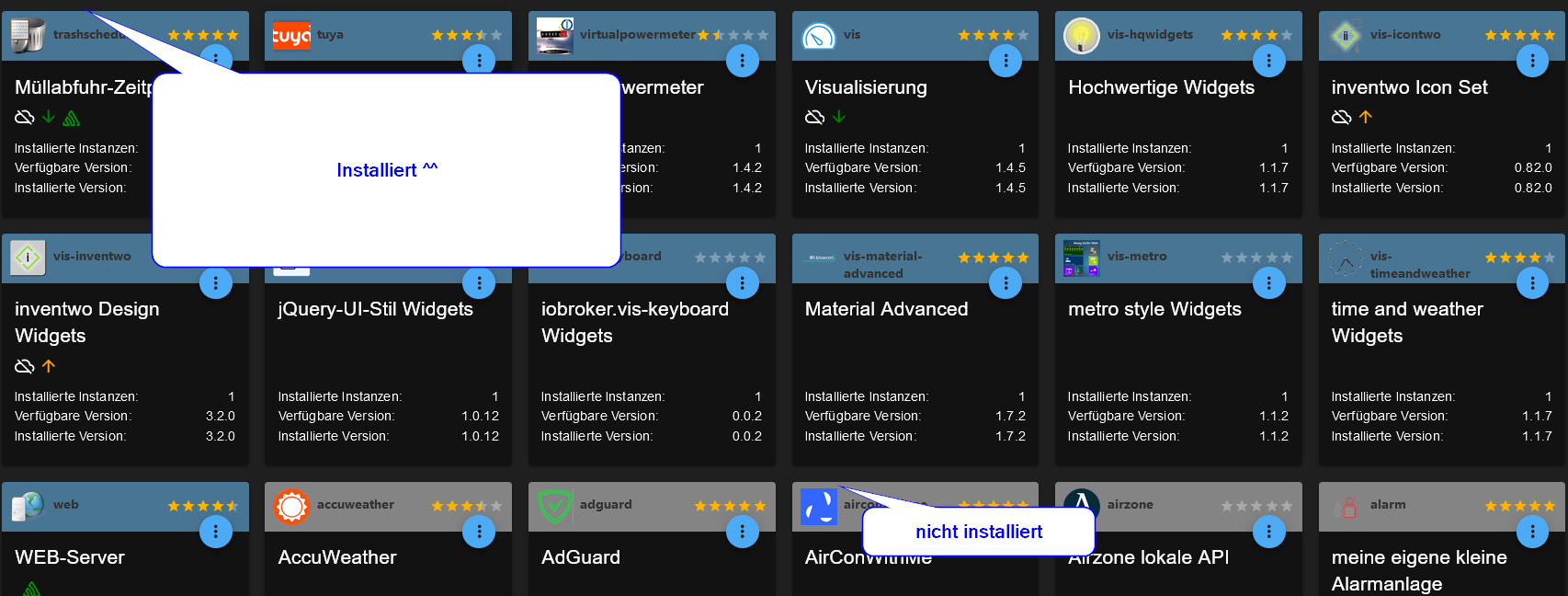
                      Jetzt sind alle wieder Blau hinterlegt:
                      23d17c9d-7722-48ec-8200-a30cf7cb19bb-grafik.png

                      Vorher waren alle grau, obwohl sie bei den Instanzen grün udn aktiv waren

                      Nur noch ein paar Warnungen:

                      web.0
                      	2021-12-22 15:08:45.168	warn	State "web.0.info.connection" has no existing object, this might lead to an error in future versions
                      web.0
                      	2021-12-22 15:02:01.847	warn	State "web.0.info.connection" has no existing object, this might lead to an error in future versions
                      web.0
                      	2021-12-22 15:01:56.985	warn	State "web.0.info.connection" has no existing object, this might lead to an error in future versions
                      web.0
                      	2021-12-22 15:01:30.449	warn	State "web.0.info.connection" has no existing object, this might lead to an error in future versions
                      web.0
                      	2021-12-22 15:01:20.293	warn	State "web.0.info.connection" has no existing object, this might lead to an error in future versions
                      systeminfo.0
                      	2021-12-22 15:01:00.057	warn	State "systeminfo.0.NAS.Space_?" has no existing object, this might lead to an error in future versions
                      web.0
                      	2021-12-22 14:58:47.918	warn	State "web.0.info.connection" has no existing object, this might lead to an error in future versions
                      web.0
                      	2021-12-22 14:58:42.756	warn	State "web.0.info.connection" has no existing object, this might lead to an error in future versions
                      web.0
                      	2021-12-22 14:55:46.124	warn	State "web.0.info.connection" has no existing object, this might lead to an error in future versions
                      systeminfo.0
                      	2021-12-22 14:55:23.289	warn	adapter.objects.getObjectList is deprecated, and will be removed in the future. Please use adapter.getObjectList/Async. Report this to Developer!
                      systeminfo.0
                      	2021-12-22 14:55:23.273	warn	Used invalid characters: systeminfo.0.TVProgramm.? changed to systeminfo.0.TVProgramm._
                      web.0
                      	2021-12-22 14:55:22.746	warn	State "web.0.info.connection" has no existing object, this might lead to an error in future versions
                      
                      Thomas BraunT 1 Antwort Letzte Antwort
                      0
                      • Gurke258G Gurke258

                        @thomas-braun

                        Habe die Befehle ausgeführt:

                        
                        pi@HomePi:~ $ iobroker status
                        iobroker is running on this host.
                        
                        
                        Objects type: file
                        States  type: file
                        pi@HomePi:~ $ iobroker update -i
                        Used repository: stable
                        hash unchanged, use cached sources
                        update done
                        Adapter    "admin"         : 5.2.2    , installed 5.2.2
                        Adapter    "alexa2"        : 3.11.2   , installed 3.11.2
                        Adapter    "backitup"      : 2.2.2    , installed 2.2.2
                        Adapter    "coronavirus-statistics": 0.8.7   , installed 0.8.7
                        Adapter    "daswetter"     : 3.0.9    , installed 3.0.9
                        Adapter    "devices"       : 1.0.9    , installed 1.0.9
                        Adapter    "discovery"     : 2.7.3    , installed 2.7.3
                        Adapter    "dwd"           : 2.7.7    , installed 2.7.7
                        Adapter    "ham"           : 4.0.2    , installed 4.0.2
                        Adapter    "hm-rega"       : 3.0.33   , installed 3.0.33
                        Adapter    "hm-rpc"        : 1.14.50  , installed 1.14.50
                        Adapter    "ical"          : 1.11.4   , installed 1.11.4
                        Adapter    "icons-mfd-svg" : 1.0.2    , installed 1.0.2
                        Adapter    "influxdb"      : 1.9.5    , installed 1.9.5
                        Adapter    "info"          : 1.9.8    , installed 1.9.8
                        Adapter    "iot"           : 1.8.24   , installed 1.8.24
                        Adapter    "jarvis"        : 2.2.1    , installed 2.2.1
                        Adapter    "javascript"    : 5.2.13   , installed 5.2.13
                        Controller "js-controller" : 3.3.22   , installed 3.3.22
                        Adapter    "nina"          : 0.0.25   , installed 0.0.25
                        Adapter    "node-red"      : 2.4.1    , installed 2.4.1
                        Adapter    "ping"          : 1.5.0    , installed 1.5.0
                        Adapter    "rpi2"          : 1.3.1    , installed 1.3.1
                        Adapter    "simple-api"    : 2.6.1    , installed 2.6.2
                        Adapter    "socketio"      : 3.1.4    , installed 3.1.5
                        Adapter    "spotify-premium": 1.0.0   , installed 1.1.3
                        Adapter    "synology"      : 1.1.3    , installed 1.1.3
                        Adapter    "systeminfo"    : 0.3.1    , installed 0.3.1
                        Adapter    "tankerkoenig"  : 2.1.1    , installed 2.1.1
                        Adapter    "telegram"      : 1.10.0   , installed 1.10.0
                        Adapter    "text2command"  : 2.1.1    , installed 2.1.1
                        Adapter    "trashschedule" : 1.2.0    , installed 1.2.0
                        Adapter    "tuya"          : 3.6.9    , installed 3.6.9
                        Adapter    "virtualpowermeter": 1.4.2   , installed 1.4.2
                        Adapter    "vis"           : 1.4.5    , installed 1.4.5
                        Adapter    "vis-hqwidgets" : 1.1.7    , installed 1.1.7
                        Adapter    "vis-icontwo"   : 0.82.0   , installed 0.82.0
                        Adapter    "vis-inventwo"  : 3.2.0    , installed 3.2.0
                        Adapter    "vis-jqui-mfd"  : 1.0.12   , installed 1.0.12
                        Adapter    "vis-keyboard"  : 0.0.2    , installed 0.0.2
                        Adapter    "vis-material-advanced": 1.7.2   , installed 1.7.2
                        Adapter    "vis-metro"     : 1.1.2    , installed 1.1.2
                        Adapter    "vis-timeandweather": 1.1.7   , installed 1.1.7
                        Adapter    "web"           : 3.4.9    , installed 3.4.9
                        pi@HomePi:~ $ iobroker list adapters
                        system.adapter.admin                   : admin          - v5.2.1
                        system.adapter.alexa2                  : alexa2         - v3.11.2
                        system.adapter.backitup                : backitup       - v2.2.2
                        system.adapter.coronavirus-statistics  : coronavirus-statistics - v0.8.7
                        system.adapter.countdown               : countdown      - v1.2.5
                        system.adapter.daswetter               : daswetter      - v3.0.9
                        system.adapter.deconz                  : deconz         - v1.3.19
                        system.adapter.device-reminder         : device-reminder - v1.2.9
                        system.adapter.devices                 : devices        - v1.0.9
                        system.adapter.discovery               : discovery      - v2.7.3
                        system.adapter.dwd                     : dwd            - v2.7.7
                        system.adapter.fullcalendar            : fullcalendar   - v1.1.0
                        system.adapter.ham                     : ham            - v4.0.2
                        system.adapter.hm-rega                 : hm-rega        - v3.0.33
                        system.adapter.hm-rpc                  : hm-rpc         - v1.14.50
                        system.adapter.ical                    : ical           - v1.11.4
                        system.adapter.icons-material-svg      : icons-material-svg - v0.1.0
                        system.adapter.icons-mfd-svg           : icons-mfd-svg  - v1.0.2
                        system.adapter.icons-ultimate-png      : icons-ultimate-png - v1.0.1
                        system.adapter.influxdb                : influxdb       - v1.9.5
                        system.adapter.info                    : info           - v1.9.8
                        system.adapter.iot                     : iot            - v1.8.24
                        system.adapter.iqontrol                : iqontrol       - v1.8.2
                        system.adapter.jarvis                  : jarvis         - v2.2.1
                        system.adapter.javascript              : javascript     - v5.2.13
                        system.adapter.material                : material       - v1.0.4
                        system.adapter.mqtt                    : mqtt           - v2.4.0
                        system.adapter.nina                    : nina           - v0.0.25
                        system.adapter.node-red                : node-red       - v2.4.1
                        system.adapter.parser                  : parser         - v1.0.7
                        system.adapter.ping                    : ping           - v1.5.0
                        system.adapter.rpi2                    : rpi2           - v1.3.1
                        system.adapter.simple-api              : simple-api     - v2.6.1
                        system.adapter.socketio                : socketio       - v3.1.4
                        system.adapter.spotify-premium         : spotify-premium - v1.1.3
                        system.adapter.synology                : synology       - v1.1.3
                        system.adapter.systeminfo              : systeminfo     - v0.3.1
                        system.adapter.tankerkoenig            : tankerkoenig   - v2.1.1
                        system.adapter.telegram                : telegram       - v1.10.0
                        system.adapter.text2command            : text2command   - v2.1.1
                        system.adapter.tr-064                  : tr-064         - v4.2.14
                        system.adapter.trashschedule           : trashschedule  - v1.2.0
                        system.adapter.tuya                    : tuya           - v3.6.9
                        system.adapter.virtualpowermeter       : virtualpowermeter - v1.4.2
                        system.adapter.vis                     : vis            - v1.4.5
                        system.adapter.vis-hqwidgets           : vis-hqwidgets  - v1.1.7
                        system.adapter.vis-icontwo             : vis-icontwo    - v0.82.0
                        system.adapter.vis-inventwo            : vis-inventwo   - v3.2.0
                        system.adapter.vis-jqui-mfd            : vis-jqui-mfd   - v1.0.12
                        system.adapter.vis-keyboard            : vis-keyboard   - v0.0.2
                        system.adapter.vis-material-advanced   : vis-material-advanced - v1.7.2
                        system.adapter.vis-metro               : vis-metro      - v1.1.2
                        system.adapter.vis-timeandweather      : vis-timeandweather - v1.1.7
                        system.adapter.vis-weather             : vis-weather    - v2.5.5
                        system.adapter.web                     : web            - v3.4.9
                        system.adapter.wifilight               : wifilight      - v1.1.0
                        system.adapter.zigbee                  : zigbee         - v1.6.6
                        pi@HomePi:~ $ iobroker list instances
                        + system.adapter.admin.0                  : admin                 : HomePi                                   -  enabled, port: 8081, bind: 0.0.0.0, run as: admin
                        + system.adapter.alexa2.0                 : alexa2                : HomePi                                   -  enabled
                        + system.adapter.backitup.0               : backitup              : HomePi                                   -  enabled
                          system.adapter.coronavirus-statistics.0 : coronavirus-statistics: HomePi                                   -  enabled
                          system.adapter.daswetter.0              : daswetter             : HomePi                                   -  enabled
                          system.adapter.devices.0                : devices               : HomePi                                   - disabled
                        + system.adapter.discovery.0              : discovery             : HomePi                                   -  enabled
                          system.adapter.dwd.0                    : dwd                   : HomePi                                   -  enabled
                          system.adapter.ham.0                    : ham                   : HomePi                                   - disabled
                        + system.adapter.hm-rega.0                : hm-rega               : HomePi                                   -  enabled
                        + system.adapter.hm-rpc.0                 : hm-rpc                : HomePi                                   -  enabled, port: 18701
                        + system.adapter.hm-rpc.1                 : hm-rpc                : HomePi                                   -  enabled, port: 12001
                          system.adapter.ical.0                   : ical                  : HomePi                                   -  enabled
                          system.adapter.ical.1                   : ical                  : HomePi                                   -  enabled
                          system.adapter.icons-mfd-svg.0          : icons-mfd-svg         : HomePi                                   - disabled
                        + system.adapter.influxdb.0               : influxdb              : HomePi                                   -  enabled, port: 8086
                        + system.adapter.info.0                   : info                  : HomePi                                   -  enabled
                        + system.adapter.iot.0                    : iot                   : HomePi                                   -  enabled
                          system.adapter.jarvis.0                 : jarvis                : HomePi                                   - disabled
                        + system.adapter.javascript.0             : javascript            : HomePi                                   -  enabled
                        + system.adapter.nina.0                   : nina                  : HomePi                                   -  enabled
                          system.adapter.node-red.0               : node-red              : HomePi                                   - disabled, port: 1880, bind: 192.168.178.79
                        + system.adapter.ping.0                   : ping                  : HomePi                                   -  enabled
                        + system.adapter.rpi2.0                   : rpi2                  : HomePi                                   -  enabled
                          system.adapter.spotify-premium.0        : spotify-premium       : HomePi                                   - disabled
                        + system.adapter.synology.0               : synology              : HomePi                                   -  enabled, port: 5001
                        + system.adapter.systeminfo.0             : systeminfo            : HomePi                                   -  enabled
                          system.adapter.tankerkoenig.0           : tankerkoenig          : HomePi                                   - disabled
                        + system.adapter.telegram.0               : telegram              : HomePi                                   -  enabled, port: 8443, bind: 0.0.0.0
                        + system.adapter.text2command.0           : text2command          : HomePi                                   -  enabled
                        + system.adapter.trashschedule.0          : trashschedule         : HomePi                                   -  enabled
                        + system.adapter.tuya.0                   : tuya                  : HomePi                                   -  enabled
                          system.adapter.virtualpowermeter.0      : virtualpowermeter     : HomePi                                   - disabled
                          system.adapter.vis-hqwidgets.0          : vis-hqwidgets         : HomePi                                   - disabled
                          system.adapter.vis-icontwo.0            : vis-icontwo           : HomePi                                   - disabled
                        + system.adapter.vis-inventwo.0           : vis-inventwo          : HomePi                                   -  enabled
                          system.adapter.vis-jqui-mfd.0           : vis-jqui-mfd          : HomePi                                   - disabled
                          system.adapter.vis-keyboard.0           : vis-keyboard          : HomePi                                   - disabled
                          system.adapter.vis-material-advanced.0  : vis-material-advanced : HomePi                                   - disabled
                          system.adapter.vis-metro.0              : vis-metro             : HomePi                                   - disabled
                          system.adapter.vis-timeandweather.0     : vis-timeandweather    : HomePi                                   - disabled
                          system.adapter.vis.0                    : vis                   : HomePi                                   -  enabled
                        + system.adapter.web.0                    : web                   : HomePi                                   -  enabled, port: 8082, bind: 0.0.0.0, run as: admin
                        
                        + instance is alive


                        Jetzt sind alle wieder Blau hinterlegt:
                        23d17c9d-7722-48ec-8200-a30cf7cb19bb-grafik.png

                        Vorher waren alle grau, obwohl sie bei den Instanzen grün udn aktiv waren

                        Nur noch ein paar Warnungen:

                        web.0
                        	2021-12-22 15:08:45.168	warn	State "web.0.info.connection" has no existing object, this might lead to an error in future versions
                        web.0
                        	2021-12-22 15:02:01.847	warn	State "web.0.info.connection" has no existing object, this might lead to an error in future versions
                        web.0
                        	2021-12-22 15:01:56.985	warn	State "web.0.info.connection" has no existing object, this might lead to an error in future versions
                        web.0
                        	2021-12-22 15:01:30.449	warn	State "web.0.info.connection" has no existing object, this might lead to an error in future versions
                        web.0
                        	2021-12-22 15:01:20.293	warn	State "web.0.info.connection" has no existing object, this might lead to an error in future versions
                        systeminfo.0
                        	2021-12-22 15:01:00.057	warn	State "systeminfo.0.NAS.Space_?" has no existing object, this might lead to an error in future versions
                        web.0
                        	2021-12-22 14:58:47.918	warn	State "web.0.info.connection" has no existing object, this might lead to an error in future versions
                        web.0
                        	2021-12-22 14:58:42.756	warn	State "web.0.info.connection" has no existing object, this might lead to an error in future versions
                        web.0
                        	2021-12-22 14:55:46.124	warn	State "web.0.info.connection" has no existing object, this might lead to an error in future versions
                        systeminfo.0
                        	2021-12-22 14:55:23.289	warn	adapter.objects.getObjectList is deprecated, and will be removed in the future. Please use adapter.getObjectList/Async. Report this to Developer!
                        systeminfo.0
                        	2021-12-22 14:55:23.273	warn	Used invalid characters: systeminfo.0.TVProgramm.? changed to systeminfo.0.TVProgramm._
                        web.0
                        	2021-12-22 14:55:22.746	warn	State "web.0.info.connection" has no existing object, this might lead to an error in future versions
                        
                        Thomas BraunT Online
                        Thomas BraunT Online
                        Thomas Braun
                        Most Active
                        schrieb am zuletzt editiert von
                        #11

                        @gurke258 sagte in ioBroker Startet nicht nach Update Versuch:

                        systeminfo

                        Der Adapter braucht wohl noch etwas Liebe, vielleicht von @frankjoke ?

                        Linux-Werkzeugkasten:
                        https://forum.iobroker.net/topic/42952/der-kleine-iobroker-linux-werkzeugkasten
                        NodeJS Fixer Skript:
                        https://forum.iobroker.net/topic/68035/iob-node-fix-skript
                        iob_diag: curl -sLf -o diag.sh https://iobroker.net/diag.sh && bash diag.sh

                        HomoranH 1 Antwort Letzte Antwort
                        0
                        • Thomas BraunT Thomas Braun

                          @gurke258 sagte in ioBroker Startet nicht nach Update Versuch:

                          systeminfo

                          Der Adapter braucht wohl noch etwas Liebe, vielleicht von @frankjoke ?

                          HomoranH Nicht stören
                          HomoranH Nicht stören
                          Homoran
                          Global Moderator Administrators
                          schrieb am zuletzt editiert von
                          #12

                          @thomas-braun sagte in ioBroker Startet nicht nach Update Versuch:

                          Der Adapter braucht wohl noch etwas Liebe, vielleicht von @frankjoke ?

                          sehr wahrscheinlich

                          github:	0.3.0
                          latest:	0.3.1 for 25 months
                          stable:	0.3.1 for 25 months
                          

                          kein Support per PN! - Fragen im Forum stellen -
                          Benutzt das Voting rechts unten im Beitrag wenn er euch geholfen hat.
                          Das Forum freut sich über eine Spende. Benutzt dazu den Spendenbutton im Header. Danke!
                          der Installationsfixer: curl -fsL https://iobroker.net/fix.sh | bash -

                          1 Antwort Letzte Antwort
                          0
                          Antworten
                          • In einem neuen Thema antworten
                          Anmelden zum Antworten
                          • Älteste zuerst
                          • Neuste zuerst
                          • Meiste Stimmen


                          Support us

                          ioBroker
                          Community Adapters
                          Donate

                          487

                          Online

                          32.7k

                          Benutzer

                          82.5k

                          Themen

                          1.3m

                          Beiträge
                          Community
                          Impressum | Datenschutz-Bestimmungen | Nutzungsbedingungen | Einwilligungseinstellungen
                          ioBroker Community 2014-2025
                          logo
                          • Anmelden

                          • Du hast noch kein Konto? Registrieren

                          • Anmelden oder registrieren, um zu suchen
                          • Erster Beitrag
                            Letzter Beitrag
                          0
                          • Home
                          • Aktuell
                          • Tags
                          • Ungelesen 0
                          • Kategorien
                          • Unreplied
                          • Beliebt
                          • GitHub
                          • Docu
                          • Hilfe