Skip to content
  • Home
  • Aktuell
  • Tags
  • 0 Ungelesen 0
  • Kategorien
  • Unreplied
  • Beliebt
  • GitHub
  • Docu
  • Hilfe
Skins
  • Light
  • Brite
  • Cerulean
  • Cosmo
  • Flatly
  • Journal
  • Litera
  • Lumen
  • Lux
  • Materia
  • Minty
  • Morph
  • Pulse
  • Sandstone
  • Simplex
  • Sketchy
  • Spacelab
  • United
  • Yeti
  • Zephyr
  • Dark
  • Cyborg
  • Darkly
  • Quartz
  • Slate
  • Solar
  • Superhero
  • Vapor

  • Standard: (Kein Skin)
  • Kein Skin
Einklappen
ioBroker Logo

Community Forum

donate donate
  1. ioBroker Community Home
  2. Deutsch
  3. Error/Bug
  4. Backup funktioniert nicht mehr

NEWS

  • Neuer Blogbeitrag: Monatsrückblick - Dezember 2025 🎄
    BluefoxB
    Bluefox
    11
    1
    473

  • Weihnachtsangebot 2025! 🎄
    BluefoxB
    Bluefox
    24
    1
    1.6k

  • UPDATE 31.10.: Amazon Alexa - ioBroker Skill läuft aus ?
    apollon77A
    apollon77
    48
    3
    9.5k

Backup funktioniert nicht mehr

Geplant Angeheftet Gesperrt Verschoben Error/Bug
108 Beiträge 6 Kommentatoren 8.1k Aufrufe 5 Watching
  • Älteste zuerst
  • Neuste zuerst
  • Meiste Stimmen
Antworten
  • In einem neuen Thema antworten
Anmelden zum Antworten
Dieses Thema wurde gelöscht. Nur Nutzer mit entsprechenden Rechten können es sehen.
  • N norman

    Hallo zusammen,

    ich kann keine Backups mehr erstellen via Backitup-Adapter.
    Adapter neu installiert, ohne Änderung.
    Er sichert zwar die Zibee, History und Redis-Dateien, aber keine IObroker-Dateien.

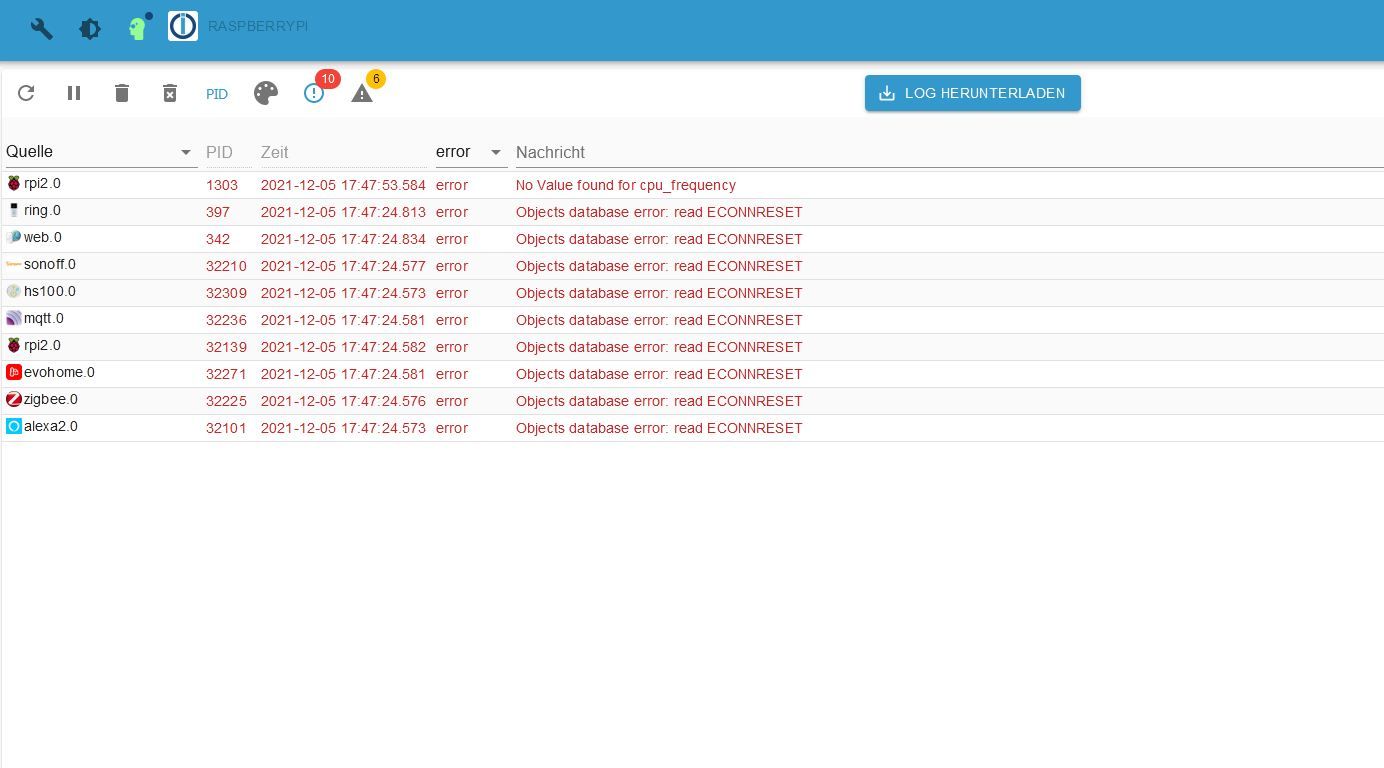
    In der Konsole kommt ständig diese Fehlermeldung:
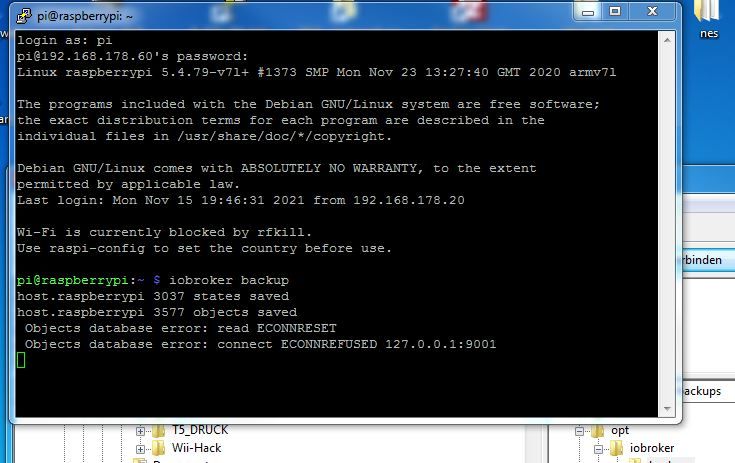
    Log.JPG

    und im Admin steht:
    admin.JPG

    Mir ist nur folgendes aufgefallen:
    beim Starten des Backups ist der RAM bei etwa 800MB in Gebrauch, nach dem Start geht er langsam hoch bis zum maximal verfügbaren 2GB, dann ist der Admin kurz offline, die Konsole hat kurz keine Verbindung mehr und dann geht es wieder bei 240MB belegtem RAM weiter.

    Systemdata Bitte Ausfüllen
    Hardwaresystem: NUC/Pi4/etc.
    Arbeitsspeicher: 2GB
    Festplattenart: SD-Karte/SSD/HDD
    Betriebssystem: Ubuntu
    Node-Version: 12.22.1
    Nodejs-Version: 12.22.1
    NPM-Version: 6.4.12
    Installationsart: Manuell
    Image genutzt: Nein
    Ort/Name der Imagedatei: Link
    Thomas BraunT Online
    Thomas BraunT Online
    Thomas Braun
    Most Active
    schrieb am zuletzt editiert von
    #2

    @norman

    Aha.

    Linux-Werkzeugkasten:
    https://forum.iobroker.net/topic/42952/der-kleine-iobroker-linux-werkzeugkasten
    NodeJS Fixer Skript:
    https://forum.iobroker.net/topic/68035/iob-node-fix-skript
    iob_diag: curl -sLf -o diag.sh https://iobroker.net/diag.sh && bash diag.sh

    GlasfaserG HomoranH 2 Antworten Letzte Antwort
    0
    • Thomas BraunT Thomas Braun

      @norman

      Aha.

      GlasfaserG Online
      GlasfaserG Online
      Glasfaser
      schrieb am zuletzt editiert von
      #3

      @thomas-braun sagte in Backup funktioniert nicht mehr:

      Aha.

      Das ist das 5. Türchen , das mußt du erst aufmachen ;)

      Synology 918+ 16GB - ioBroker in Docker v9 , VISO auf Trekstor Primebook C13 13,3" , Hikvision Domkameras mit Surveillance Station .. CCU RaspberryMatic in Synology VM .. Zigbee CC2538+CC2592 .. Sonoff .. KNX .. Modbus ..

      1 Antwort Letzte Antwort
      0
      • Thomas BraunT Thomas Braun

        @norman

        Aha.

        HomoranH Nicht stören
        HomoranH Nicht stören
        Homoran
        Global Moderator Administrators
        schrieb am zuletzt editiert von
        #4

        @thomas-braun sagte in Backup funktioniert nicht mehr:

        @norman

        Aha.

        so deutlich ist das eher nicht!

        @norman sagte in Backup funktioniert nicht mehr:

        Betriebssystem:
        Ubuntu/Windows/Mac

        da kann das schon sein!

        kein Support per PN! - Fragen im Forum stellen - es gibt fast nichts, was nicht auch für andere interessant ist.

        Benutzt das Voting rechts unten im Beitrag wenn er euch geholfen hat.

        der Installationsfixer: curl -fsL https://iobroker.net/fix.sh | bash -

        N 1 Antwort Letzte Antwort
        0
        • HomoranH Homoran

          @thomas-braun sagte in Backup funktioniert nicht mehr:

          @norman

          Aha.

          so deutlich ist das eher nicht!

          @norman sagte in Backup funktioniert nicht mehr:

          Betriebssystem:
          Ubuntu/Windows/Mac

          da kann das schon sein!

          N Offline
          N Offline
          norman
          schrieb am zuletzt editiert von
          #5

          @homoran
          sorry, Jungs, irgendwie hab ich den Post eröffnet, ohne den Text mit zu posten, mein Fehler :angel: :angel:
          Die Systemdaten hat er automatisch rangehangen, die musste ich erst mal aktualisieren.....

          1 Antwort Letzte Antwort
          0
          • GlasfaserG Online
            GlasfaserG Online
            Glasfaser
            schrieb am zuletzt editiert von Glasfaser
            #6

            @norman

            Zeige mal

            sudo netstat -nap | grep 9001
            sudo netstat -nap | grep 9000
            

            Synology 918+ 16GB - ioBroker in Docker v9 , VISO auf Trekstor Primebook C13 13,3" , Hikvision Domkameras mit Surveillance Station .. CCU RaspberryMatic in Synology VM .. Zigbee CC2538+CC2592 .. Sonoff .. KNX .. Modbus ..

            N 2 Antworten Letzte Antwort
            0
            • GlasfaserG Glasfaser

              @norman

              Zeige mal

              sudo netstat -nap | grep 9001
              sudo netstat -nap | grep 9000
              
              N Offline
              N Offline
              norman
              schrieb am zuletzt editiert von
              #7

              @glasfaser
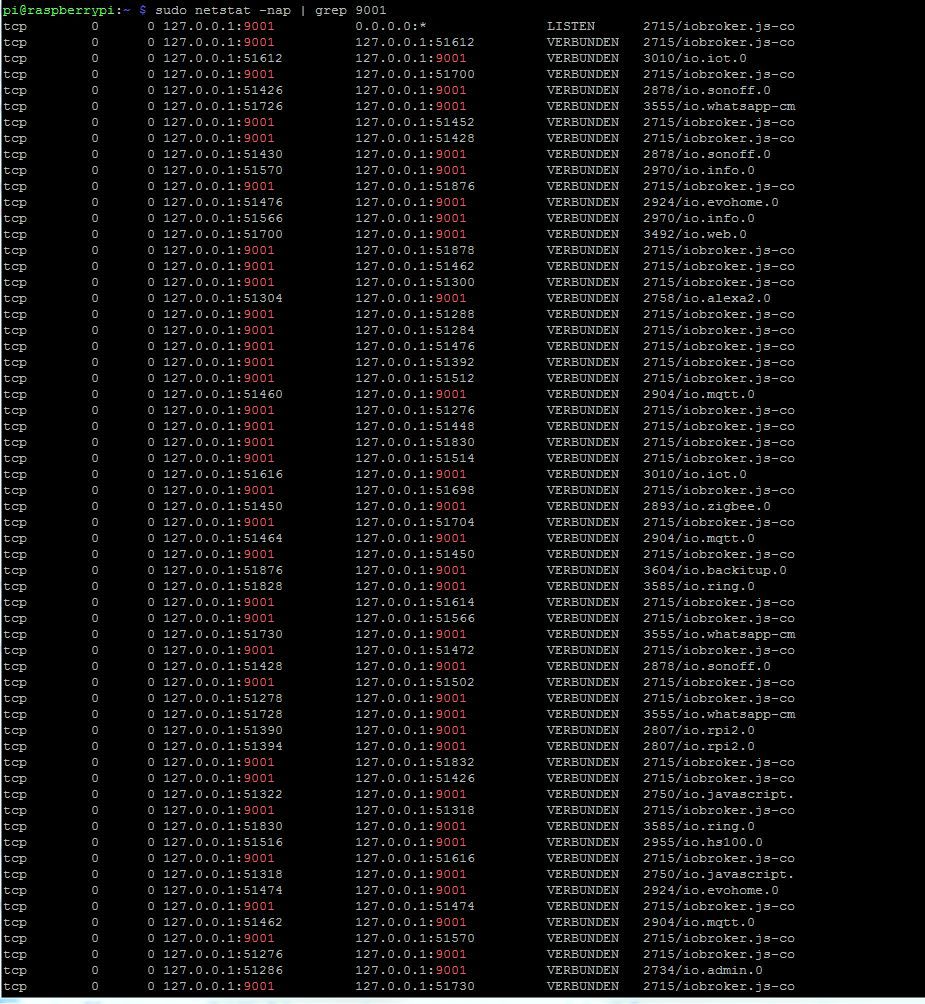
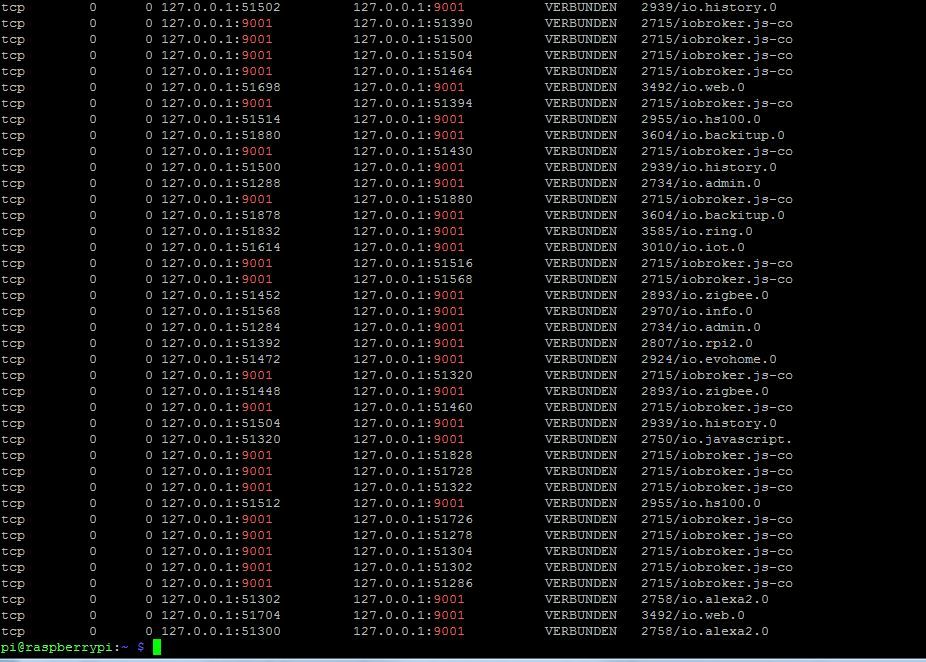
              9001:
              9001-1.JPG
              9001-2.JPG

              GlasfaserG Meister MopperM 2 Antworten Letzte Antwort
              0
              • N norman

                @glasfaser
                9001:
                9001-1.JPG
                9001-2.JPG

                GlasfaserG Online
                GlasfaserG Online
                Glasfaser
                schrieb am zuletzt editiert von
                #8

                @norman

                Kann man nicht lesen , packe die Ausgabe in Code-Tags </> !!!

                Synology 918+ 16GB - ioBroker in Docker v9 , VISO auf Trekstor Primebook C13 13,3" , Hikvision Domkameras mit Surveillance Station .. CCU RaspberryMatic in Synology VM .. Zigbee CC2538+CC2592 .. Sonoff .. KNX .. Modbus ..

                1 Antwort Letzte Antwort
                0
                • GlasfaserG Glasfaser

                  @norman

                  Zeige mal

                  sudo netstat -nap | grep 9001
                  sudo netstat -nap | grep 9000
                  
                  N Offline
                  N Offline
                  norman
                  schrieb am zuletzt editiert von
                  #9

                  @glasfaser
                  bei 9000 kommt nix!
                  9000.JPG

                  1 Antwort Letzte Antwort
                  0
                  • N norman

                    @glasfaser
                    9001:
                    9001-1.JPG
                    9001-2.JPG

                    Meister MopperM Online
                    Meister MopperM Online
                    Meister Mopper
                    schrieb am zuletzt editiert von Meister Mopper
                    #10

                    @norman
                    Jetzt hau endlich die Terminalausgaben in codetags </>, sonst bekommen hier einige Augen-Aids.

                    Proxmox und HA

                    N 1 Antwort Letzte Antwort
                    0
                    • GlasfaserG Online
                      GlasfaserG Online
                      Glasfaser
                      schrieb am zuletzt editiert von
                      #11

                      @norman sagte in Backup funktioniert nicht mehr:

                      bei 9000 kommt nix!

                      Ausgabe :

                      iobroker setup custom
                      

                      Synology 918+ 16GB - ioBroker in Docker v9 , VISO auf Trekstor Primebook C13 13,3" , Hikvision Domkameras mit Surveillance Station .. CCU RaspberryMatic in Synology VM .. Zigbee CC2538+CC2592 .. Sonoff .. KNX .. Modbus ..

                      N 1 Antwort Letzte Antwort
                      0
                      • Meister MopperM Meister Mopper

                        @norman
                        Jetzt hau endlich die Terminalausgaben in codetags </>, sonst bekommen hier einige Augen-Aids.

                        N Offline
                        N Offline
                        norman
                        schrieb am zuletzt editiert von norman
                        #12

                        @meister-mopper

                        pi@raspberrypi:~ $ sudo netstat -nap | grep 9001
                        tcp        0      0 127.0.0.1:9001          0.0.0.0:*               LISTEN      2715/iobroker.js-co
                        tcp        0      0 127.0.0.1:9001          127.0.0.1:51612         VERBUNDEN   2715/iobroker.js-co
                        tcp        0      0 127.0.0.1:51612         127.0.0.1:9001          VERBUNDEN   3010/io.iot.0
                        tcp        0      0 127.0.0.1:9001          127.0.0.1:51700         VERBUNDEN   2715/iobroker.js-co
                        tcp        0      0 127.0.0.1:51426         127.0.0.1:9001          VERBUNDEN   2878/io.sonoff.0
                        tcp        0      0 127.0.0.1:51726         127.0.0.1:9001          VERBUNDEN   3555/io.whatsapp-cm
                        tcp        0      0 127.0.0.1:9001          127.0.0.1:51452         VERBUNDEN   2715/iobroker.js-co
                        tcp        0      0 127.0.0.1:9001          127.0.0.1:51428         VERBUNDEN   2715/iobroker.js-co
                        tcp        0      0 127.0.0.1:51430         127.0.0.1:9001          VERBUNDEN   2878/io.sonoff.0
                        tcp        0      0 127.0.0.1:51570         127.0.0.1:9001          VERBUNDEN   2970/io.info.0
                        tcp        0      0 127.0.0.1:9001          127.0.0.1:51876         VERBUNDEN   2715/iobroker.js-co
                        tcp        0      0 127.0.0.1:51476         127.0.0.1:9001          VERBUNDEN   2924/io.evohome.0
                        tcp        0      0 127.0.0.1:51566         127.0.0.1:9001          VERBUNDEN   2970/io.info.0
                        tcp        0      0 127.0.0.1:51700         127.0.0.1:9001          VERBUNDEN   3492/io.web.0
                        tcp        0      0 127.0.0.1:9001          127.0.0.1:51878         VERBUNDEN   2715/iobroker.js-co
                        tcp        0      0 127.0.0.1:9001          127.0.0.1:51462         VERBUNDEN   2715/iobroker.js-co
                        tcp        0      0 127.0.0.1:9001          127.0.0.1:51300         VERBUNDEN   2715/iobroker.js-co
                        tcp        0      0 127.0.0.1:51304         127.0.0.1:9001          VERBUNDEN   2758/io.alexa2.0
                        tcp        0      0 127.0.0.1:9001          127.0.0.1:51288         VERBUNDEN   2715/iobroker.js-co
                        tcp        0      0 127.0.0.1:9001          127.0.0.1:51284         VERBUNDEN   2715/iobroker.js-co
                        tcp        0      0 127.0.0.1:9001          127.0.0.1:51476         VERBUNDEN   2715/iobroker.js-co
                        tcp        0      0 127.0.0.1:9001          127.0.0.1:51392         VERBUNDEN   2715/iobroker.js-co
                        tcp        0      0 127.0.0.1:9001          127.0.0.1:51512         VERBUNDEN   2715/iobroker.js-co
                        tcp        0      0 127.0.0.1:51460         127.0.0.1:9001          VERBUNDEN   2904/io.mqtt.0
                        tcp        0      0 127.0.0.1:9001          127.0.0.1:51276         VERBUNDEN   2715/iobroker.js-co
                        tcp        0      0 127.0.0.1:9001          127.0.0.1:51448         VERBUNDEN   2715/iobroker.js-co
                        tcp        0      0 127.0.0.1:9001          127.0.0.1:51830         VERBUNDEN   2715/iobroker.js-co
                        tcp        0      0 127.0.0.1:9001          127.0.0.1:51514         VERBUNDEN   2715/iobroker.js-co
                        tcp        0      0 127.0.0.1:51616         127.0.0.1:9001          VERBUNDEN   3010/io.iot.0
                        tcp        0      0 127.0.0.1:9001          127.0.0.1:51698         VERBUNDEN   2715/iobroker.js-co
                        tcp        0      0 127.0.0.1:51450         127.0.0.1:9001          VERBUNDEN   2893/io.zigbee.0
                        tcp        0      0 127.0.0.1:9001          127.0.0.1:51704         VERBUNDEN   2715/iobroker.js-co
                        tcp        0      0 127.0.0.1:51464         127.0.0.1:9001          VERBUNDEN   2904/io.mqtt.0
                        tcp        0      0 127.0.0.1:9001          127.0.0.1:51450         VERBUNDEN   2715/iobroker.js-co
                        tcp        0      0 127.0.0.1:51876         127.0.0.1:9001          VERBUNDEN   3604/io.backitup.0
                        tcp        0      0 127.0.0.1:51828         127.0.0.1:9001          VERBUNDEN   3585/io.ring.0
                        tcp        0      0 127.0.0.1:9001          127.0.0.1:51614         VERBUNDEN   2715/iobroker.js-co
                        tcp        0      0 127.0.0.1:9001          127.0.0.1:51566         VERBUNDEN   2715/iobroker.js-co
                        tcp        0      0 127.0.0.1:51730         127.0.0.1:9001          VERBUNDEN   3555/io.whatsapp-cm
                        tcp        0      0 127.0.0.1:9001          127.0.0.1:51472         VERBUNDEN   2715/iobroker.js-co
                        tcp        0      0 127.0.0.1:51428         127.0.0.1:9001          VERBUNDEN   2878/io.sonoff.0
                        tcp        0      0 127.0.0.1:9001          127.0.0.1:51502         VERBUNDEN   2715/iobroker.js-co
                        tcp        0      0 127.0.0.1:51278         127.0.0.1:9001          VERBUNDEN   2715/iobroker.js-co
                        tcp        0      0 127.0.0.1:51728         127.0.0.1:9001          VERBUNDEN   3555/io.whatsapp-cm
                        tcp        0      0 127.0.0.1:51390         127.0.0.1:9001          VERBUNDEN   2807/io.rpi2.0
                        tcp        0      0 127.0.0.1:51394         127.0.0.1:9001          VERBUNDEN   2807/io.rpi2.0
                        tcp        0      0 127.0.0.1:9001          127.0.0.1:51832         VERBUNDEN   2715/iobroker.js-co
                        tcp        0      0 127.0.0.1:9001          127.0.0.1:51426         VERBUNDEN   2715/iobroker.js-co
                        tcp        0      0 127.0.0.1:51322         127.0.0.1:9001          VERBUNDEN   2750/io.javascript.
                        tcp        0      0 127.0.0.1:9001          127.0.0.1:51318         VERBUNDEN   2715/iobroker.js-co
                        tcp        0      0 127.0.0.1:51830         127.0.0.1:9001          VERBUNDEN   3585/io.ring.0
                        tcp        0      0 127.0.0.1:51516         127.0.0.1:9001          VERBUNDEN   2955/io.hs100.0
                        tcp        0      0 127.0.0.1:9001          127.0.0.1:51616         VERBUNDEN   2715/iobroker.js-co
                        tcp        0      0 127.0.0.1:51318         127.0.0.1:9001          VERBUNDEN   2750/io.javascript.
                        tcp        0      0 127.0.0.1:51474         127.0.0.1:9001          VERBUNDEN   2924/io.evohome.0
                        tcp        0      0 127.0.0.1:9001          127.0.0.1:51474         VERBUNDEN   2715/iobroker.js-co
                        tcp        0      0 127.0.0.1:51462         127.0.0.1:9001          VERBUNDEN   2904/io.mqtt.0
                        tcp        0      0 127.0.0.1:9001          127.0.0.1:51570         VERBUNDEN   2715/iobroker.js-co
                        tcp        0      0 127.0.0.1:51276         127.0.0.1:9001          VERBUNDEN   2715/iobroker.js-co
                        tcp        0      0 127.0.0.1:51286         127.0.0.1:9001          VERBUNDEN   2734/io.admin.0
                        tcp        0      0 127.0.0.1:9001          127.0.0.1:51730         VERBUNDEN   2715/iobroker.js-co
                        tcp        0      0 127.0.0.1:51502         127.0.0.1:9001          VERBUNDEN   2939/io.history.0
                        tcp        0      0 127.0.0.1:9001          127.0.0.1:51390         VERBUNDEN   2715/iobroker.js-co
                        tcp        0      0 127.0.0.1:9001          127.0.0.1:51500         VERBUNDEN   2715/iobroker.js-co
                        tcp        0      0 127.0.0.1:9001          127.0.0.1:51504         VERBUNDEN   2715/iobroker.js-co
                        tcp        0      0 127.0.0.1:9001          127.0.0.1:51464         VERBUNDEN   2715/iobroker.js-co
                        tcp        0      0 127.0.0.1:51698         127.0.0.1:9001          VERBUNDEN   3492/io.web.0
                        tcp        0      0 127.0.0.1:9001          127.0.0.1:51394         VERBUNDEN   2715/iobroker.js-co
                        tcp        0      0 127.0.0.1:51514         127.0.0.1:9001          VERBUNDEN   2955/io.hs100.0
                        tcp        0      0 127.0.0.1:51880         127.0.0.1:9001          VERBUNDEN   3604/io.backitup.0
                        tcp        0      0 127.0.0.1:9001          127.0.0.1:51430         VERBUNDEN   2715/iobroker.js-co
                        tcp        0      0 127.0.0.1:51500         127.0.0.1:9001          VERBUNDEN   2939/io.history.0
                        tcp        0      0 127.0.0.1:51288         127.0.0.1:9001          VERBUNDEN   2734/io.admin.0
                        tcp        0      0 127.0.0.1:9001          127.0.0.1:51880         VERBUNDEN   2715/iobroker.js-co
                        tcp        0      0 127.0.0.1:51878         127.0.0.1:9001          VERBUNDEN   3604/io.backitup.0
                        tcp        0      0 127.0.0.1:51832         127.0.0.1:9001          VERBUNDEN   3585/io.ring.0
                        tcp        0      0 127.0.0.1:51614         127.0.0.1:9001          VERBUNDEN   3010/io.iot.0
                        tcp        0      0 127.0.0.1:9001          127.0.0.1:51516         VERBUNDEN   2715/iobroker.js-co
                        tcp        0      0 127.0.0.1:9001          127.0.0.1:51568         VERBUNDEN   2715/iobroker.js-co
                        tcp        0      0 127.0.0.1:51452         127.0.0.1:9001          VERBUNDEN   2893/io.zigbee.0
                        tcp        0      0 127.0.0.1:51568         127.0.0.1:9001          VERBUNDEN   2970/io.info.0
                        tcp        0      0 127.0.0.1:51284         127.0.0.1:9001          VERBUNDEN   2734/io.admin.0
                        tcp        0      0 127.0.0.1:51392         127.0.0.1:9001          VERBUNDEN   2807/io.rpi2.0
                        tcp        0      0 127.0.0.1:51472         127.0.0.1:9001          VERBUNDEN   2924/io.evohome.0
                        tcp        0      0 127.0.0.1:9001          127.0.0.1:51320         VERBUNDEN   2715/iobroker.js-co
                        tcp        0      0 127.0.0.1:51448         127.0.0.1:9001          VERBUNDEN   2893/io.zigbee.0
                        tcp        0      0 127.0.0.1:9001          127.0.0.1:51460         VERBUNDEN   2715/iobroker.js-co
                        tcp        0      0 127.0.0.1:51504         127.0.0.1:9001          VERBUNDEN   2939/io.history.0
                        tcp        0      0 127.0.0.1:51320         127.0.0.1:9001          VERBUNDEN   2750/io.javascript.
                        tcp        0      0 127.0.0.1:9001          127.0.0.1:51828         VERBUNDEN   2715/iobroker.js-co
                        tcp        0      0 127.0.0.1:9001          127.0.0.1:51728         VERBUNDEN   2715/iobroker.js-co
                        tcp        0      0 127.0.0.1:9001          127.0.0.1:51322         VERBUNDEN   2715/iobroker.js-co
                        tcp        0      0 127.0.0.1:51512         127.0.0.1:9001          VERBUNDEN   2955/io.hs100.0
                        tcp        0      0 127.0.0.1:9001          127.0.0.1:51726         VERBUNDEN   2715/iobroker.js-co
                        tcp        0      0 127.0.0.1:9001          127.0.0.1:51278         VERBUNDEN   2715/iobroker.js-co
                        tcp        0      0 127.0.0.1:9001          127.0.0.1:51304         VERBUNDEN   2715/iobroker.js-co
                        tcp        0      0 127.0.0.1:9001          127.0.0.1:51302         VERBUNDEN   2715/iobroker.js-co
                        tcp        0      0 127.0.0.1:9001          127.0.0.1:51286         VERBUNDEN   2715/iobroker.js-co
                        tcp        0      0 127.0.0.1:51302         127.0.0.1:9001          VERBUNDEN   2758/io.alexa2.0
                        tcp        0      0 127.0.0.1:51704         127.0.0.1:9001          VERBUNDEN   3492/io.web.0
                        tcp        0      0 127.0.0.1:51300         127.0.0.1:9001          VERBUNDEN   2758/io.alexa2.0
                        
                        GlasfaserG Meister MopperM 2 Antworten Letzte Antwort
                        0
                        • GlasfaserG Glasfaser

                          @norman sagte in Backup funktioniert nicht mehr:

                          bei 9000 kommt nix!

                          Ausgabe :

                          iobroker setup custom
                          
                          N Offline
                          N Offline
                          norman
                          schrieb am zuletzt editiert von
                          #13

                          @glasfaser said in Backup funktioniert nicht mehr:

                          iobroker setup custom

                          <pi@raspberrypi:~ $ iobroker setup custom
                          Current configuration:

                          • Objects database:
                            • Type: file
                            • Host/Unix Socket: 127.0.0.1
                            • Port: 9001
                          • States database:
                            • Type: redis
                            • Host/Unix Socket: 127.0.0.1
                            • Port: 6379
                          • Data Directory: ../../iobroker-data/

                          Type of objects DB [(f)ile, (r)edis, ...], default [file]:

                          1 Antwort Letzte Antwort
                          0
                          • N norman

                            @meister-mopper

                            pi@raspberrypi:~ $ sudo netstat -nap | grep 9001
                            tcp        0      0 127.0.0.1:9001          0.0.0.0:*               LISTEN      2715/iobroker.js-co
                            tcp        0      0 127.0.0.1:9001          127.0.0.1:51612         VERBUNDEN   2715/iobroker.js-co
                            tcp        0      0 127.0.0.1:51612         127.0.0.1:9001          VERBUNDEN   3010/io.iot.0
                            tcp        0      0 127.0.0.1:9001          127.0.0.1:51700         VERBUNDEN   2715/iobroker.js-co
                            tcp        0      0 127.0.0.1:51426         127.0.0.1:9001          VERBUNDEN   2878/io.sonoff.0
                            tcp        0      0 127.0.0.1:51726         127.0.0.1:9001          VERBUNDEN   3555/io.whatsapp-cm
                            tcp        0      0 127.0.0.1:9001          127.0.0.1:51452         VERBUNDEN   2715/iobroker.js-co
                            tcp        0      0 127.0.0.1:9001          127.0.0.1:51428         VERBUNDEN   2715/iobroker.js-co
                            tcp        0      0 127.0.0.1:51430         127.0.0.1:9001          VERBUNDEN   2878/io.sonoff.0
                            tcp        0      0 127.0.0.1:51570         127.0.0.1:9001          VERBUNDEN   2970/io.info.0
                            tcp        0      0 127.0.0.1:9001          127.0.0.1:51876         VERBUNDEN   2715/iobroker.js-co
                            tcp        0      0 127.0.0.1:51476         127.0.0.1:9001          VERBUNDEN   2924/io.evohome.0
                            tcp        0      0 127.0.0.1:51566         127.0.0.1:9001          VERBUNDEN   2970/io.info.0
                            tcp        0      0 127.0.0.1:51700         127.0.0.1:9001          VERBUNDEN   3492/io.web.0
                            tcp        0      0 127.0.0.1:9001          127.0.0.1:51878         VERBUNDEN   2715/iobroker.js-co
                            tcp        0      0 127.0.0.1:9001          127.0.0.1:51462         VERBUNDEN   2715/iobroker.js-co
                            tcp        0      0 127.0.0.1:9001          127.0.0.1:51300         VERBUNDEN   2715/iobroker.js-co
                            tcp        0      0 127.0.0.1:51304         127.0.0.1:9001          VERBUNDEN   2758/io.alexa2.0
                            tcp        0      0 127.0.0.1:9001          127.0.0.1:51288         VERBUNDEN   2715/iobroker.js-co
                            tcp        0      0 127.0.0.1:9001          127.0.0.1:51284         VERBUNDEN   2715/iobroker.js-co
                            tcp        0      0 127.0.0.1:9001          127.0.0.1:51476         VERBUNDEN   2715/iobroker.js-co
                            tcp        0      0 127.0.0.1:9001          127.0.0.1:51392         VERBUNDEN   2715/iobroker.js-co
                            tcp        0      0 127.0.0.1:9001          127.0.0.1:51512         VERBUNDEN   2715/iobroker.js-co
                            tcp        0      0 127.0.0.1:51460         127.0.0.1:9001          VERBUNDEN   2904/io.mqtt.0
                            tcp        0      0 127.0.0.1:9001          127.0.0.1:51276         VERBUNDEN   2715/iobroker.js-co
                            tcp        0      0 127.0.0.1:9001          127.0.0.1:51448         VERBUNDEN   2715/iobroker.js-co
                            tcp        0      0 127.0.0.1:9001          127.0.0.1:51830         VERBUNDEN   2715/iobroker.js-co
                            tcp        0      0 127.0.0.1:9001          127.0.0.1:51514         VERBUNDEN   2715/iobroker.js-co
                            tcp        0      0 127.0.0.1:51616         127.0.0.1:9001          VERBUNDEN   3010/io.iot.0
                            tcp        0      0 127.0.0.1:9001          127.0.0.1:51698         VERBUNDEN   2715/iobroker.js-co
                            tcp        0      0 127.0.0.1:51450         127.0.0.1:9001          VERBUNDEN   2893/io.zigbee.0
                            tcp        0      0 127.0.0.1:9001          127.0.0.1:51704         VERBUNDEN   2715/iobroker.js-co
                            tcp        0      0 127.0.0.1:51464         127.0.0.1:9001          VERBUNDEN   2904/io.mqtt.0
                            tcp        0      0 127.0.0.1:9001          127.0.0.1:51450         VERBUNDEN   2715/iobroker.js-co
                            tcp        0      0 127.0.0.1:51876         127.0.0.1:9001          VERBUNDEN   3604/io.backitup.0
                            tcp        0      0 127.0.0.1:51828         127.0.0.1:9001          VERBUNDEN   3585/io.ring.0
                            tcp        0      0 127.0.0.1:9001          127.0.0.1:51614         VERBUNDEN   2715/iobroker.js-co
                            tcp        0      0 127.0.0.1:9001          127.0.0.1:51566         VERBUNDEN   2715/iobroker.js-co
                            tcp        0      0 127.0.0.1:51730         127.0.0.1:9001          VERBUNDEN   3555/io.whatsapp-cm
                            tcp        0      0 127.0.0.1:9001          127.0.0.1:51472         VERBUNDEN   2715/iobroker.js-co
                            tcp        0      0 127.0.0.1:51428         127.0.0.1:9001          VERBUNDEN   2878/io.sonoff.0
                            tcp        0      0 127.0.0.1:9001          127.0.0.1:51502         VERBUNDEN   2715/iobroker.js-co
                            tcp        0      0 127.0.0.1:51278         127.0.0.1:9001          VERBUNDEN   2715/iobroker.js-co
                            tcp        0      0 127.0.0.1:51728         127.0.0.1:9001          VERBUNDEN   3555/io.whatsapp-cm
                            tcp        0      0 127.0.0.1:51390         127.0.0.1:9001          VERBUNDEN   2807/io.rpi2.0
                            tcp        0      0 127.0.0.1:51394         127.0.0.1:9001          VERBUNDEN   2807/io.rpi2.0
                            tcp        0      0 127.0.0.1:9001          127.0.0.1:51832         VERBUNDEN   2715/iobroker.js-co
                            tcp        0      0 127.0.0.1:9001          127.0.0.1:51426         VERBUNDEN   2715/iobroker.js-co
                            tcp        0      0 127.0.0.1:51322         127.0.0.1:9001          VERBUNDEN   2750/io.javascript.
                            tcp        0      0 127.0.0.1:9001          127.0.0.1:51318         VERBUNDEN   2715/iobroker.js-co
                            tcp        0      0 127.0.0.1:51830         127.0.0.1:9001          VERBUNDEN   3585/io.ring.0
                            tcp        0      0 127.0.0.1:51516         127.0.0.1:9001          VERBUNDEN   2955/io.hs100.0
                            tcp        0      0 127.0.0.1:9001          127.0.0.1:51616         VERBUNDEN   2715/iobroker.js-co
                            tcp        0      0 127.0.0.1:51318         127.0.0.1:9001          VERBUNDEN   2750/io.javascript.
                            tcp        0      0 127.0.0.1:51474         127.0.0.1:9001          VERBUNDEN   2924/io.evohome.0
                            tcp        0      0 127.0.0.1:9001          127.0.0.1:51474         VERBUNDEN   2715/iobroker.js-co
                            tcp        0      0 127.0.0.1:51462         127.0.0.1:9001          VERBUNDEN   2904/io.mqtt.0
                            tcp        0      0 127.0.0.1:9001          127.0.0.1:51570         VERBUNDEN   2715/iobroker.js-co
                            tcp        0      0 127.0.0.1:51276         127.0.0.1:9001          VERBUNDEN   2715/iobroker.js-co
                            tcp        0      0 127.0.0.1:51286         127.0.0.1:9001          VERBUNDEN   2734/io.admin.0
                            tcp        0      0 127.0.0.1:9001          127.0.0.1:51730         VERBUNDEN   2715/iobroker.js-co
                            tcp        0      0 127.0.0.1:51502         127.0.0.1:9001          VERBUNDEN   2939/io.history.0
                            tcp        0      0 127.0.0.1:9001          127.0.0.1:51390         VERBUNDEN   2715/iobroker.js-co
                            tcp        0      0 127.0.0.1:9001          127.0.0.1:51500         VERBUNDEN   2715/iobroker.js-co
                            tcp        0      0 127.0.0.1:9001          127.0.0.1:51504         VERBUNDEN   2715/iobroker.js-co
                            tcp        0      0 127.0.0.1:9001          127.0.0.1:51464         VERBUNDEN   2715/iobroker.js-co
                            tcp        0      0 127.0.0.1:51698         127.0.0.1:9001          VERBUNDEN   3492/io.web.0
                            tcp        0      0 127.0.0.1:9001          127.0.0.1:51394         VERBUNDEN   2715/iobroker.js-co
                            tcp        0      0 127.0.0.1:51514         127.0.0.1:9001          VERBUNDEN   2955/io.hs100.0
                            tcp        0      0 127.0.0.1:51880         127.0.0.1:9001          VERBUNDEN   3604/io.backitup.0
                            tcp        0      0 127.0.0.1:9001          127.0.0.1:51430         VERBUNDEN   2715/iobroker.js-co
                            tcp        0      0 127.0.0.1:51500         127.0.0.1:9001          VERBUNDEN   2939/io.history.0
                            tcp        0      0 127.0.0.1:51288         127.0.0.1:9001          VERBUNDEN   2734/io.admin.0
                            tcp        0      0 127.0.0.1:9001          127.0.0.1:51880         VERBUNDEN   2715/iobroker.js-co
                            tcp        0      0 127.0.0.1:51878         127.0.0.1:9001          VERBUNDEN   3604/io.backitup.0
                            tcp        0      0 127.0.0.1:51832         127.0.0.1:9001          VERBUNDEN   3585/io.ring.0
                            tcp        0      0 127.0.0.1:51614         127.0.0.1:9001          VERBUNDEN   3010/io.iot.0
                            tcp        0      0 127.0.0.1:9001          127.0.0.1:51516         VERBUNDEN   2715/iobroker.js-co
                            tcp        0      0 127.0.0.1:9001          127.0.0.1:51568         VERBUNDEN   2715/iobroker.js-co
                            tcp        0      0 127.0.0.1:51452         127.0.0.1:9001          VERBUNDEN   2893/io.zigbee.0
                            tcp        0      0 127.0.0.1:51568         127.0.0.1:9001          VERBUNDEN   2970/io.info.0
                            tcp        0      0 127.0.0.1:51284         127.0.0.1:9001          VERBUNDEN   2734/io.admin.0
                            tcp        0      0 127.0.0.1:51392         127.0.0.1:9001          VERBUNDEN   2807/io.rpi2.0
                            tcp        0      0 127.0.0.1:51472         127.0.0.1:9001          VERBUNDEN   2924/io.evohome.0
                            tcp        0      0 127.0.0.1:9001          127.0.0.1:51320         VERBUNDEN   2715/iobroker.js-co
                            tcp        0      0 127.0.0.1:51448         127.0.0.1:9001          VERBUNDEN   2893/io.zigbee.0
                            tcp        0      0 127.0.0.1:9001          127.0.0.1:51460         VERBUNDEN   2715/iobroker.js-co
                            tcp        0      0 127.0.0.1:51504         127.0.0.1:9001          VERBUNDEN   2939/io.history.0
                            tcp        0      0 127.0.0.1:51320         127.0.0.1:9001          VERBUNDEN   2750/io.javascript.
                            tcp        0      0 127.0.0.1:9001          127.0.0.1:51828         VERBUNDEN   2715/iobroker.js-co
                            tcp        0      0 127.0.0.1:9001          127.0.0.1:51728         VERBUNDEN   2715/iobroker.js-co
                            tcp        0      0 127.0.0.1:9001          127.0.0.1:51322         VERBUNDEN   2715/iobroker.js-co
                            tcp        0      0 127.0.0.1:51512         127.0.0.1:9001          VERBUNDEN   2955/io.hs100.0
                            tcp        0      0 127.0.0.1:9001          127.0.0.1:51726         VERBUNDEN   2715/iobroker.js-co
                            tcp        0      0 127.0.0.1:9001          127.0.0.1:51278         VERBUNDEN   2715/iobroker.js-co
                            tcp        0      0 127.0.0.1:9001          127.0.0.1:51304         VERBUNDEN   2715/iobroker.js-co
                            tcp        0      0 127.0.0.1:9001          127.0.0.1:51302         VERBUNDEN   2715/iobroker.js-co
                            tcp        0      0 127.0.0.1:9001          127.0.0.1:51286         VERBUNDEN   2715/iobroker.js-co
                            tcp        0      0 127.0.0.1:51302         127.0.0.1:9001          VERBUNDEN   2758/io.alexa2.0
                            tcp        0      0 127.0.0.1:51704         127.0.0.1:9001          VERBUNDEN   3492/io.web.0
                            tcp        0      0 127.0.0.1:51300         127.0.0.1:9001          VERBUNDEN   2758/io.alexa2.0
                            
                            GlasfaserG Online
                            GlasfaserG Online
                            Glasfaser
                            schrieb am zuletzt editiert von
                            #14

                            @norman

                            zu CodeTags ...

                            dp2.gif

                            Synology 918+ 16GB - ioBroker in Docker v9 , VISO auf Trekstor Primebook C13 13,3" , Hikvision Domkameras mit Surveillance Station .. CCU RaspberryMatic in Synology VM .. Zigbee CC2538+CC2592 .. Sonoff .. KNX .. Modbus ..

                            N 2 Antworten Letzte Antwort
                            0
                            • N norman

                              @meister-mopper

                              pi@raspberrypi:~ $ sudo netstat -nap | grep 9001
                              tcp        0      0 127.0.0.1:9001          0.0.0.0:*               LISTEN      2715/iobroker.js-co
                              tcp        0      0 127.0.0.1:9001          127.0.0.1:51612         VERBUNDEN   2715/iobroker.js-co
                              tcp        0      0 127.0.0.1:51612         127.0.0.1:9001          VERBUNDEN   3010/io.iot.0
                              tcp        0      0 127.0.0.1:9001          127.0.0.1:51700         VERBUNDEN   2715/iobroker.js-co
                              tcp        0      0 127.0.0.1:51426         127.0.0.1:9001          VERBUNDEN   2878/io.sonoff.0
                              tcp        0      0 127.0.0.1:51726         127.0.0.1:9001          VERBUNDEN   3555/io.whatsapp-cm
                              tcp        0      0 127.0.0.1:9001          127.0.0.1:51452         VERBUNDEN   2715/iobroker.js-co
                              tcp        0      0 127.0.0.1:9001          127.0.0.1:51428         VERBUNDEN   2715/iobroker.js-co
                              tcp        0      0 127.0.0.1:51430         127.0.0.1:9001          VERBUNDEN   2878/io.sonoff.0
                              tcp        0      0 127.0.0.1:51570         127.0.0.1:9001          VERBUNDEN   2970/io.info.0
                              tcp        0      0 127.0.0.1:9001          127.0.0.1:51876         VERBUNDEN   2715/iobroker.js-co
                              tcp        0      0 127.0.0.1:51476         127.0.0.1:9001          VERBUNDEN   2924/io.evohome.0
                              tcp        0      0 127.0.0.1:51566         127.0.0.1:9001          VERBUNDEN   2970/io.info.0
                              tcp        0      0 127.0.0.1:51700         127.0.0.1:9001          VERBUNDEN   3492/io.web.0
                              tcp        0      0 127.0.0.1:9001          127.0.0.1:51878         VERBUNDEN   2715/iobroker.js-co
                              tcp        0      0 127.0.0.1:9001          127.0.0.1:51462         VERBUNDEN   2715/iobroker.js-co
                              tcp        0      0 127.0.0.1:9001          127.0.0.1:51300         VERBUNDEN   2715/iobroker.js-co
                              tcp        0      0 127.0.0.1:51304         127.0.0.1:9001          VERBUNDEN   2758/io.alexa2.0
                              tcp        0      0 127.0.0.1:9001          127.0.0.1:51288         VERBUNDEN   2715/iobroker.js-co
                              tcp        0      0 127.0.0.1:9001          127.0.0.1:51284         VERBUNDEN   2715/iobroker.js-co
                              tcp        0      0 127.0.0.1:9001          127.0.0.1:51476         VERBUNDEN   2715/iobroker.js-co
                              tcp        0      0 127.0.0.1:9001          127.0.0.1:51392         VERBUNDEN   2715/iobroker.js-co
                              tcp        0      0 127.0.0.1:9001          127.0.0.1:51512         VERBUNDEN   2715/iobroker.js-co
                              tcp        0      0 127.0.0.1:51460         127.0.0.1:9001          VERBUNDEN   2904/io.mqtt.0
                              tcp        0      0 127.0.0.1:9001          127.0.0.1:51276         VERBUNDEN   2715/iobroker.js-co
                              tcp        0      0 127.0.0.1:9001          127.0.0.1:51448         VERBUNDEN   2715/iobroker.js-co
                              tcp        0      0 127.0.0.1:9001          127.0.0.1:51830         VERBUNDEN   2715/iobroker.js-co
                              tcp        0      0 127.0.0.1:9001          127.0.0.1:51514         VERBUNDEN   2715/iobroker.js-co
                              tcp        0      0 127.0.0.1:51616         127.0.0.1:9001          VERBUNDEN   3010/io.iot.0
                              tcp        0      0 127.0.0.1:9001          127.0.0.1:51698         VERBUNDEN   2715/iobroker.js-co
                              tcp        0      0 127.0.0.1:51450         127.0.0.1:9001          VERBUNDEN   2893/io.zigbee.0
                              tcp        0      0 127.0.0.1:9001          127.0.0.1:51704         VERBUNDEN   2715/iobroker.js-co
                              tcp        0      0 127.0.0.1:51464         127.0.0.1:9001          VERBUNDEN   2904/io.mqtt.0
                              tcp        0      0 127.0.0.1:9001          127.0.0.1:51450         VERBUNDEN   2715/iobroker.js-co
                              tcp        0      0 127.0.0.1:51876         127.0.0.1:9001          VERBUNDEN   3604/io.backitup.0
                              tcp        0      0 127.0.0.1:51828         127.0.0.1:9001          VERBUNDEN   3585/io.ring.0
                              tcp        0      0 127.0.0.1:9001          127.0.0.1:51614         VERBUNDEN   2715/iobroker.js-co
                              tcp        0      0 127.0.0.1:9001          127.0.0.1:51566         VERBUNDEN   2715/iobroker.js-co
                              tcp        0      0 127.0.0.1:51730         127.0.0.1:9001          VERBUNDEN   3555/io.whatsapp-cm
                              tcp        0      0 127.0.0.1:9001          127.0.0.1:51472         VERBUNDEN   2715/iobroker.js-co
                              tcp        0      0 127.0.0.1:51428         127.0.0.1:9001          VERBUNDEN   2878/io.sonoff.0
                              tcp        0      0 127.0.0.1:9001          127.0.0.1:51502         VERBUNDEN   2715/iobroker.js-co
                              tcp        0      0 127.0.0.1:51278         127.0.0.1:9001          VERBUNDEN   2715/iobroker.js-co
                              tcp        0      0 127.0.0.1:51728         127.0.0.1:9001          VERBUNDEN   3555/io.whatsapp-cm
                              tcp        0      0 127.0.0.1:51390         127.0.0.1:9001          VERBUNDEN   2807/io.rpi2.0
                              tcp        0      0 127.0.0.1:51394         127.0.0.1:9001          VERBUNDEN   2807/io.rpi2.0
                              tcp        0      0 127.0.0.1:9001          127.0.0.1:51832         VERBUNDEN   2715/iobroker.js-co
                              tcp        0      0 127.0.0.1:9001          127.0.0.1:51426         VERBUNDEN   2715/iobroker.js-co
                              tcp        0      0 127.0.0.1:51322         127.0.0.1:9001          VERBUNDEN   2750/io.javascript.
                              tcp        0      0 127.0.0.1:9001          127.0.0.1:51318         VERBUNDEN   2715/iobroker.js-co
                              tcp        0      0 127.0.0.1:51830         127.0.0.1:9001          VERBUNDEN   3585/io.ring.0
                              tcp        0      0 127.0.0.1:51516         127.0.0.1:9001          VERBUNDEN   2955/io.hs100.0
                              tcp        0      0 127.0.0.1:9001          127.0.0.1:51616         VERBUNDEN   2715/iobroker.js-co
                              tcp        0      0 127.0.0.1:51318         127.0.0.1:9001          VERBUNDEN   2750/io.javascript.
                              tcp        0      0 127.0.0.1:51474         127.0.0.1:9001          VERBUNDEN   2924/io.evohome.0
                              tcp        0      0 127.0.0.1:9001          127.0.0.1:51474         VERBUNDEN   2715/iobroker.js-co
                              tcp        0      0 127.0.0.1:51462         127.0.0.1:9001          VERBUNDEN   2904/io.mqtt.0
                              tcp        0      0 127.0.0.1:9001          127.0.0.1:51570         VERBUNDEN   2715/iobroker.js-co
                              tcp        0      0 127.0.0.1:51276         127.0.0.1:9001          VERBUNDEN   2715/iobroker.js-co
                              tcp        0      0 127.0.0.1:51286         127.0.0.1:9001          VERBUNDEN   2734/io.admin.0
                              tcp        0      0 127.0.0.1:9001          127.0.0.1:51730         VERBUNDEN   2715/iobroker.js-co
                              tcp        0      0 127.0.0.1:51502         127.0.0.1:9001          VERBUNDEN   2939/io.history.0
                              tcp        0      0 127.0.0.1:9001          127.0.0.1:51390         VERBUNDEN   2715/iobroker.js-co
                              tcp        0      0 127.0.0.1:9001          127.0.0.1:51500         VERBUNDEN   2715/iobroker.js-co
                              tcp        0      0 127.0.0.1:9001          127.0.0.1:51504         VERBUNDEN   2715/iobroker.js-co
                              tcp        0      0 127.0.0.1:9001          127.0.0.1:51464         VERBUNDEN   2715/iobroker.js-co
                              tcp        0      0 127.0.0.1:51698         127.0.0.1:9001          VERBUNDEN   3492/io.web.0
                              tcp        0      0 127.0.0.1:9001          127.0.0.1:51394         VERBUNDEN   2715/iobroker.js-co
                              tcp        0      0 127.0.0.1:51514         127.0.0.1:9001          VERBUNDEN   2955/io.hs100.0
                              tcp        0      0 127.0.0.1:51880         127.0.0.1:9001          VERBUNDEN   3604/io.backitup.0
                              tcp        0      0 127.0.0.1:9001          127.0.0.1:51430         VERBUNDEN   2715/iobroker.js-co
                              tcp        0      0 127.0.0.1:51500         127.0.0.1:9001          VERBUNDEN   2939/io.history.0
                              tcp        0      0 127.0.0.1:51288         127.0.0.1:9001          VERBUNDEN   2734/io.admin.0
                              tcp        0      0 127.0.0.1:9001          127.0.0.1:51880         VERBUNDEN   2715/iobroker.js-co
                              tcp        0      0 127.0.0.1:51878         127.0.0.1:9001          VERBUNDEN   3604/io.backitup.0
                              tcp        0      0 127.0.0.1:51832         127.0.0.1:9001          VERBUNDEN   3585/io.ring.0
                              tcp        0      0 127.0.0.1:51614         127.0.0.1:9001          VERBUNDEN   3010/io.iot.0
                              tcp        0      0 127.0.0.1:9001          127.0.0.1:51516         VERBUNDEN   2715/iobroker.js-co
                              tcp        0      0 127.0.0.1:9001          127.0.0.1:51568         VERBUNDEN   2715/iobroker.js-co
                              tcp        0      0 127.0.0.1:51452         127.0.0.1:9001          VERBUNDEN   2893/io.zigbee.0
                              tcp        0      0 127.0.0.1:51568         127.0.0.1:9001          VERBUNDEN   2970/io.info.0
                              tcp        0      0 127.0.0.1:51284         127.0.0.1:9001          VERBUNDEN   2734/io.admin.0
                              tcp        0      0 127.0.0.1:51392         127.0.0.1:9001          VERBUNDEN   2807/io.rpi2.0
                              tcp        0      0 127.0.0.1:51472         127.0.0.1:9001          VERBUNDEN   2924/io.evohome.0
                              tcp        0      0 127.0.0.1:9001          127.0.0.1:51320         VERBUNDEN   2715/iobroker.js-co
                              tcp        0      0 127.0.0.1:51448         127.0.0.1:9001          VERBUNDEN   2893/io.zigbee.0
                              tcp        0      0 127.0.0.1:9001          127.0.0.1:51460         VERBUNDEN   2715/iobroker.js-co
                              tcp        0      0 127.0.0.1:51504         127.0.0.1:9001          VERBUNDEN   2939/io.history.0
                              tcp        0      0 127.0.0.1:51320         127.0.0.1:9001          VERBUNDEN   2750/io.javascript.
                              tcp        0      0 127.0.0.1:9001          127.0.0.1:51828         VERBUNDEN   2715/iobroker.js-co
                              tcp        0      0 127.0.0.1:9001          127.0.0.1:51728         VERBUNDEN   2715/iobroker.js-co
                              tcp        0      0 127.0.0.1:9001          127.0.0.1:51322         VERBUNDEN   2715/iobroker.js-co
                              tcp        0      0 127.0.0.1:51512         127.0.0.1:9001          VERBUNDEN   2955/io.hs100.0
                              tcp        0      0 127.0.0.1:9001          127.0.0.1:51726         VERBUNDEN   2715/iobroker.js-co
                              tcp        0      0 127.0.0.1:9001          127.0.0.1:51278         VERBUNDEN   2715/iobroker.js-co
                              tcp        0      0 127.0.0.1:9001          127.0.0.1:51304         VERBUNDEN   2715/iobroker.js-co
                              tcp        0      0 127.0.0.1:9001          127.0.0.1:51302         VERBUNDEN   2715/iobroker.js-co
                              tcp        0      0 127.0.0.1:9001          127.0.0.1:51286         VERBUNDEN   2715/iobroker.js-co
                              tcp        0      0 127.0.0.1:51302         127.0.0.1:9001          VERBUNDEN   2758/io.alexa2.0
                              tcp        0      0 127.0.0.1:51704         127.0.0.1:9001          VERBUNDEN   3492/io.web.0
                              tcp        0      0 127.0.0.1:51300         127.0.0.1:9001          VERBUNDEN   2758/io.alexa2.0
                              
                              Meister MopperM Online
                              Meister MopperM Online
                              Meister Mopper
                              schrieb am zuletzt editiert von
                              #15

                              @norman

                              6cdc0790-19c7-4ab3-8d36-7b549bd744d4-grafik.png

                              Da ist das Zauberzeichen :grinning:

                              Proxmox und HA

                              1 Antwort Letzte Antwort
                              0
                              • GlasfaserG Glasfaser

                                @norman

                                zu CodeTags ...

                                dp2.gif

                                N Offline
                                N Offline
                                norman
                                schrieb am zuletzt editiert von
                                #16

                                @glasfaser
                                Danke, jetzt hab ich es auch verstanden ;-)

                                1 Antwort Letzte Antwort
                                0
                                • GlasfaserG Glasfaser

                                  @norman

                                  zu CodeTags ...

                                  dp2.gif

                                  N Offline
                                  N Offline
                                  norman
                                  schrieb am zuletzt editiert von norman
                                  #17

                                  @glasfaser

                                  pi@raspberrypi:~ $ iobroker setup custom
                                  Current configuration:
                                  - Objects database:
                                    - Type: file
                                    - Host/Unix Socket: 127.0.0.1
                                    - Port: 9001
                                  - States database:
                                    - Type: redis
                                    - Host/Unix Socket: 127.0.0.1
                                    - Port: 6379
                                  - Data Directory: ../../iobroker-data/
                                  
                                  Type of objects DB [(f)ile, (r)edis, ...], default [file]:


                                  Muss ich Database auf 9000 umstellen?

                                  1 Antwort Letzte Antwort
                                  0
                                  • GlasfaserG Online
                                    GlasfaserG Online
                                    Glasfaser
                                    schrieb am zuletzt editiert von
                                    #18

                                    @norman sagte in Backup funktioniert nicht mehr:

                                    Muss ich Database auf 9000 umstellen?

                                    Nein du nutzt doch redis .

                                    Du schreibts ja oben ..

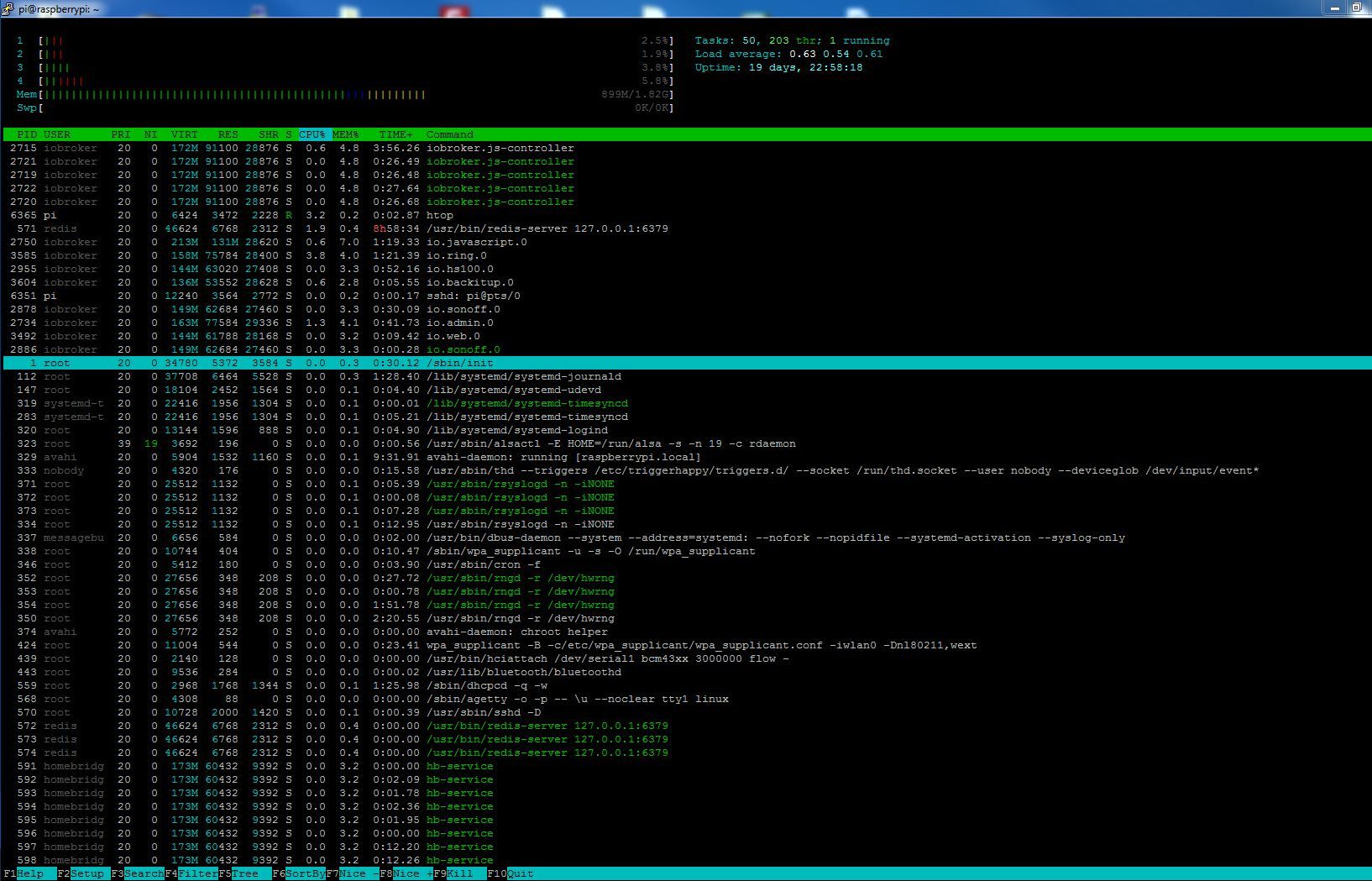
                                    bei etwa 800MB in Gebrauch, nach dem Start geht er langsam hoch bis zum maximal verfügbaren 2GB, dann ist der Admin kurz offline,

                                    Zeige mal

                                    htop
                                    

                                    Synology 918+ 16GB - ioBroker in Docker v9 , VISO auf Trekstor Primebook C13 13,3" , Hikvision Domkameras mit Surveillance Station .. CCU RaspberryMatic in Synology VM .. Zigbee CC2538+CC2592 .. Sonoff .. KNX .. Modbus ..

                                    N 2 Antworten Letzte Antwort
                                    0
                                    • GlasfaserG Glasfaser

                                      @norman sagte in Backup funktioniert nicht mehr:

                                      Muss ich Database auf 9000 umstellen?

                                      Nein du nutzt doch redis .

                                      Du schreibts ja oben ..

                                      bei etwa 800MB in Gebrauch, nach dem Start geht er langsam hoch bis zum maximal verfügbaren 2GB, dann ist der Admin kurz offline,

                                      Zeige mal

                                      htop
                                      
                                      N Offline
                                      N Offline
                                      norman
                                      schrieb am zuletzt editiert von
                                      #19

                                      @glasfaser said in Backup funktioniert nicht mehr:

                                      Nein du nutzt doch redis .

                                      ich weiß nicht, ob ich redis nutze, das lief alles nach der Installation so. Redis hat er bei mir automatisch immer nur mitgesichert

                                      htop kann ich aber nur per Screenshot, da kann ich nix kopieren, ist das richtig?

                                      HomoranH 2 Antworten Letzte Antwort
                                      0
                                      • GlasfaserG Glasfaser

                                        @norman sagte in Backup funktioniert nicht mehr:

                                        Muss ich Database auf 9000 umstellen?

                                        Nein du nutzt doch redis .

                                        Du schreibts ja oben ..

                                        bei etwa 800MB in Gebrauch, nach dem Start geht er langsam hoch bis zum maximal verfügbaren 2GB, dann ist der Admin kurz offline,

                                        Zeige mal

                                        htop
                                        
                                        N Offline
                                        N Offline
                                        norman
                                        schrieb am zuletzt editiert von
                                        #20

                                        @glasfaser

                                        htop.JPG

                                        1 Antwort Letzte Antwort
                                        0
                                        • N norman

                                          @glasfaser said in Backup funktioniert nicht mehr:

                                          Nein du nutzt doch redis .

                                          ich weiß nicht, ob ich redis nutze, das lief alles nach der Installation so. Redis hat er bei mir automatisch immer nur mitgesichert

                                          htop kann ich aber nur per Screenshot, da kann ich nix kopieren, ist das richtig?

                                          HomoranH Nicht stören
                                          HomoranH Nicht stören
                                          Homoran
                                          Global Moderator Administrators
                                          schrieb am zuletzt editiert von
                                          #21

                                          @norman sagte in Backup funktioniert nicht mehr:

                                          ist das richtig?

                                          @norman sagte in Backup funktioniert nicht mehr:

                                          ist das richtig?

                                          alles falsch!

                                          bitte allePosts mit logs editieren und in code-tags setzen.
                                          Dann kann man auch zitieren

                                          kein Support per PN! - Fragen im Forum stellen - es gibt fast nichts, was nicht auch für andere interessant ist.

                                          Benutzt das Voting rechts unten im Beitrag wenn er euch geholfen hat.

                                          der Installationsfixer: curl -fsL https://iobroker.net/fix.sh | bash -

                                          N 1 Antwort Letzte Antwort
                                          0
                                          Antworten
                                          • In einem neuen Thema antworten
                                          Anmelden zum Antworten
                                          • Älteste zuerst
                                          • Neuste zuerst
                                          • Meiste Stimmen


                                          Support us

                                          ioBroker
                                          Community Adapters
                                          Donate

                                          731

                                          Online

                                          32.5k

                                          Benutzer

                                          81.8k

                                          Themen

                                          1.3m

                                          Beiträge
                                          Community
                                          Impressum | Datenschutz-Bestimmungen | Nutzungsbedingungen | Einwilligungseinstellungen
                                          ioBroker Community 2014-2025
                                          logo
                                          • Anmelden

                                          • Du hast noch kein Konto? Registrieren

                                          • Anmelden oder registrieren, um zu suchen
                                          • Erster Beitrag
                                            Letzter Beitrag
                                          0
                                          • Home
                                          • Aktuell
                                          • Tags
                                          • Ungelesen 0
                                          • Kategorien
                                          • Unreplied
                                          • Beliebt
                                          • GitHub
                                          • Docu
                                          • Hilfe