Skip to content
  • Home
  • Aktuell
  • Tags
  • 0 Ungelesen 0
  • Kategorien
  • Unreplied
  • Beliebt
  • GitHub
  • Docu
  • Hilfe
Skins
  • Light
  • Brite
  • Cerulean
  • Cosmo
  • Flatly
  • Journal
  • Litera
  • Lumen
  • Lux
  • Materia
  • Minty
  • Morph
  • Pulse
  • Sandstone
  • Simplex
  • Sketchy
  • Spacelab
  • United
  • Yeti
  • Zephyr
  • Dark
  • Cyborg
  • Darkly
  • Quartz
  • Slate
  • Solar
  • Superhero
  • Vapor

  • Standard: (Kein Skin)
  • Kein Skin
Einklappen
ioBroker Logo

Community Forum

donate donate
  1. ioBroker Community Home
  2. Deutsch
  3. Off Topic
  4. Reolink RLC-520 und motioneye
NEWS

  • UPDATE 31.10.: Amazon Alexa - ioBroker Skill läuft aus ?
    apollon77A
    apollon77
    48
    3
    8.9k

  • Monatsrückblick – September 2025
    BluefoxB
    Bluefox
    13
    1
    2.2k

  • Neues Video "KI im Smart Home" - ioBroker plus n8n
    BluefoxB
    Bluefox
    16
    1
    3.4k

Reolink RLC-520 und motioneye

Geplant Angeheftet Gesperrt Verschoben Off Topic
48 Beiträge 7 Kommentatoren 7.0k Aufrufe 7 Watching
  • Älteste zuerst
  • Neuste zuerst
  • Meiste Stimmen
Antworten
  • In einem neuen Thema antworten
Anmelden zum Antworten
Dieses Thema wurde gelöscht. Nur Nutzer mit entsprechenden Rechten können es sehen.
  • S saeft_2003

    @bananajoe

    Ja habe ich alles probiert.

    da_WoodyD Online
    da_WoodyD Online
    da_Woody
    schrieb am zuletzt editiert von
    #33

    @saeft_2003 ist die cam eigentlich im reolink client ordentlich eingerichtet?
    iwie erinnere ich mich dunkel das ich anfangs auch passwort probleme hatte...

    gruß vom Woody
    HAPPINESS is not a DESTINATION, it's a WAY of LIFE!

    BananaJoeB 1 Antwort Letzte Antwort
    0
    • da_WoodyD da_Woody

      @saeft_2003 ist die cam eigentlich im reolink client ordentlich eingerichtet?
      iwie erinnere ich mich dunkel das ich anfangs auch passwort probleme hatte...

      BananaJoeB Online
      BananaJoeB Online
      BananaJoe
      Most Active
      schrieb am zuletzt editiert von
      #34

      @da_woody ich hab mir die Kameras gekauft weil es ja ohne den Client geht :-) Einfach die IP der Kamera im Webbrowser eingeben.

      ioBroker@Ubuntu 24.04 LTS (VMware) für: >260 Geräte, 5 Switche, 7 AP, 9 IP-Cam, 1 NAS 42TB, 1 ESXi 15TB, 4 Proxmox 1TB, 1 Hyper-V 48TB, 14 x Echo, 5x FireTV, 5 x Tablett/Handy VIS || >=160 Tasmota/Shelly || >=95 ZigBee || PV 8.1kW / Akku 14kWh || 2x USV 750W kaskadiert || Creality CR-10 SE 3D-Drucker

      da_WoodyD 1 Antwort Letzte Antwort
      0
      • BananaJoeB BananaJoe

        @da_woody ich hab mir die Kameras gekauft weil es ja ohne den Client geht :-) Einfach die IP der Kamera im Webbrowser eingeben.

        da_WoodyD Online
        da_WoodyD Online
        da_Woody
        schrieb am zuletzt editiert von da_Woody
        #35

        @bananajoe jup. das problem ist nur, flash player funktioniert nicht mehr...
        Da Flash Player seit dem 31.12.2020 nicht mehr unterstützt wird und Adobe die Ausführung Flash-basierter Inhalte in Flash Player seit dem 12.01.2021 blockiert, empfiehlt Adobe allen Anwendern dringend, Flash Player zum Schutz ihrer Systeme umgehend zu deinstallieren.

        gruß vom Woody
        HAPPINESS is not a DESTINATION, it's a WAY of LIFE!

        BananaJoeB 1 Antwort Letzte Antwort
        0
        • da_WoodyD da_Woody

          @bananajoe jup. das problem ist nur, flash player funktioniert nicht mehr...
          Da Flash Player seit dem 31.12.2020 nicht mehr unterstützt wird und Adobe die Ausführung Flash-basierter Inhalte in Flash Player seit dem 12.01.2021 blockiert, empfiehlt Adobe allen Anwendern dringend, Flash Player zum Schutz ihrer Systeme umgehend zu deinstallieren.

          BananaJoeB Online
          BananaJoeB Online
          BananaJoe
          Most Active
          schrieb am zuletzt editiert von BananaJoe
          #36

          @da_woody Da ist einer auf der alten Firmware. Auch toll fand ich ja bei Reolink das die für alle Ihre Kameras ein Update heraus gebracht haben was diese auf HTML5 umstellt ...

          Also noch mal einen FlashPlayer irgendwie zum laufen bringen und Updaten. Oder geht das über die App?
          Älteres Windows 10 in einer VM installieren (15xx oder 16xx) ohne Updates, da ist der Flashplayer noch an Board)

          ioBroker@Ubuntu 24.04 LTS (VMware) für: >260 Geräte, 5 Switche, 7 AP, 9 IP-Cam, 1 NAS 42TB, 1 ESXi 15TB, 4 Proxmox 1TB, 1 Hyper-V 48TB, 14 x Echo, 5x FireTV, 5 x Tablett/Handy VIS || >=160 Tasmota/Shelly || >=95 ZigBee || PV 8.1kW / Akku 14kWh || 2x USV 750W kaskadiert || Creality CR-10 SE 3D-Drucker

          da_WoodyD 1 Antwort Letzte Antwort
          0
          • BananaJoeB BananaJoe

            @da_woody Da ist einer auf der alten Firmware. Auch toll fand ich ja bei Reolink das die für alle Ihre Kameras ein Update heraus gebracht haben was diese auf HTML5 umstellt ...

            Also noch mal einen FlashPlayer irgendwie zum laufen bringen und Updaten. Oder geht das über die App?
            Älteres Windows 10 in einer VM installieren (15xx oder 16xx) ohne Updates, da ist der Flashplayer noch an Board)

            da_WoodyD Online
            da_WoodyD Online
            da_Woody
            schrieb am zuletzt editiert von da_Woody
            #37

            @bananajoe sagte in Reolink RLC-520 und motioneye:

            Oder geht das über die App?

            sieht so aus...
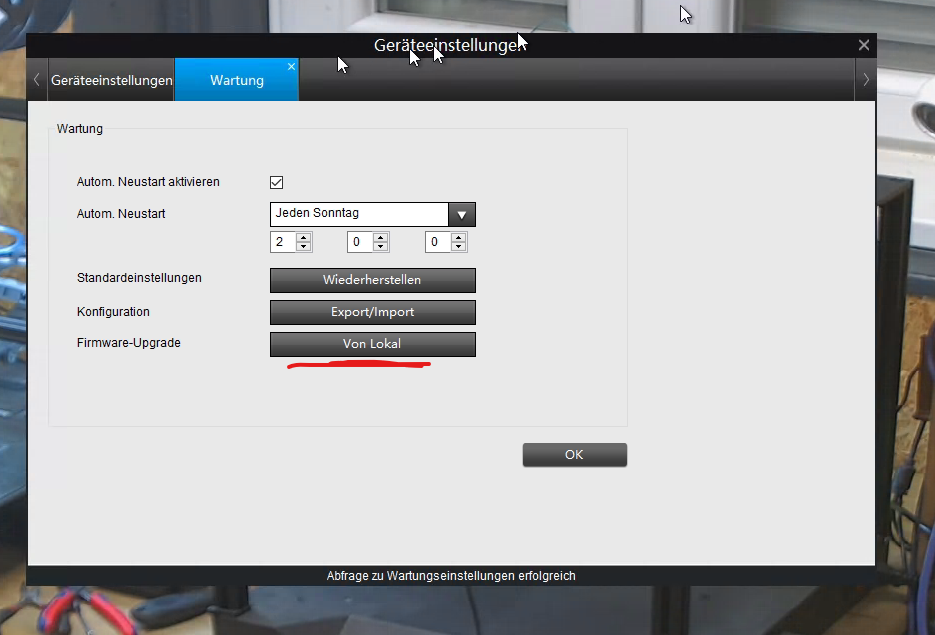
            739b2a90-30a9-4f4d-b670-ec03bddf4bd0-grafik.png
            muss ich mir einen link suchen... :)
            got it. falls noch wer braucht: https://reolink.com/de/firmware/

            gruß vom Woody
            HAPPINESS is not a DESTINATION, it's a WAY of LIFE!

            1 Antwort Letzte Antwort
            0
            • S saeft_2003

              @bananajoe

              Ja habe ich alles probiert.

              Ralla66R Offline
              Ralla66R Offline
              Ralla66
              Most Active
              schrieb am zuletzt editiert von
              #38

              @saeft_2003

              da war was mit dem Port bei mir, im deinem Log steht ja Port 8081 auf Git :
              Defines the TCP port on which the motionEye server will listen. Defaults to 8765

              da_WoodyD S 2 Antworten Letzte Antwort
              0
              • Ralla66R Ralla66

                @saeft_2003

                da war was mit dem Port bei mir, im deinem Log steht ja Port 8081 auf Git :
                Defines the TCP port on which the motionEye server will listen. Defaults to 8765

                da_WoodyD Online
                da_WoodyD Online
                da_Woody
                schrieb am zuletzt editiert von
                #39

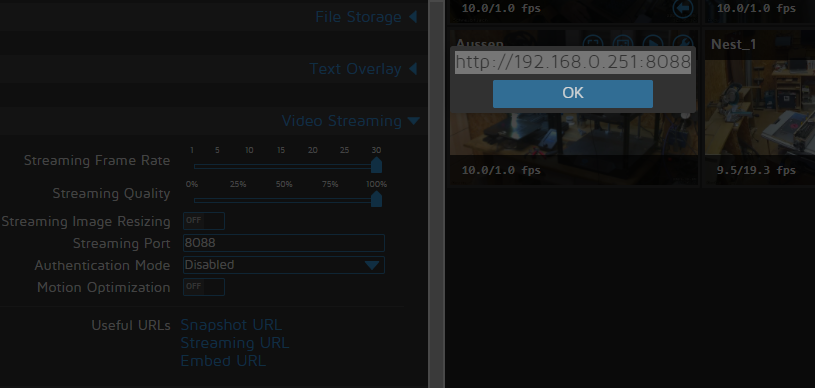
                @ralla66 die streamingports gehn bei mir von 8081-8088 bei meinen 8 cams...
                918d573b-929c-4656-9424-79345b0ec8fd-grafik.png
                sreaming url:
                1430657e-dee3-4dde-beed-6bc573c24262-grafik.png

                gruß vom Woody
                HAPPINESS is not a DESTINATION, it's a WAY of LIFE!

                Ralla66R 1 Antwort Letzte Antwort
                0
                • da_WoodyD da_Woody

                  @ralla66 die streamingports gehn bei mir von 8081-8088 bei meinen 8 cams...
                  918d573b-929c-4656-9424-79345b0ec8fd-grafik.png
                  sreaming url:
                  1430657e-dee3-4dde-beed-6bc573c24262-grafik.png

                  Ralla66R Offline
                  Ralla66R Offline
                  Ralla66
                  Most Active
                  schrieb am zuletzt editiert von
                  #40

                  @da_woody
                  nicht die Streamingports, Motioneye selbst wars es bei mir

                  1 Antwort Letzte Antwort
                  1
                  • Ralla66R Ralla66

                    @saeft_2003

                    da war was mit dem Port bei mir, im deinem Log steht ja Port 8081 auf Git :
                    Defines the TCP port on which the motionEye server will listen. Defaults to 8765

                    S Offline
                    S Offline
                    saeft_2003
                    Most Active
                    schrieb am zuletzt editiert von
                    #41

                    @ralla66 sagte in Reolink RLC-520 und motioneye:

                    @saeft_2003

                    da war was mit dem Port bei mir, im deinem Log steht ja Port 8081 auf Git :
                    Defines the TCP port on which the motionEye server will listen. Defaults to 8765

                    Da komm ich jetzt nicht ganz mit. Der motioneye port ist bei mir 8765 und was soll ich jetzt probieren?

                    Ralla66R 1 Antwort Letzte Antwort
                    0
                    • S saeft_2003

                      @ralla66 sagte in Reolink RLC-520 und motioneye:

                      @saeft_2003

                      da war was mit dem Port bei mir, im deinem Log steht ja Port 8081 auf Git :
                      Defines the TCP port on which the motionEye server will listen. Defaults to 8765

                      Da komm ich jetzt nicht ganz mit. Der motioneye port ist bei mir 8765 und was soll ich jetzt probieren?

                      Ralla66R Offline
                      Ralla66R Offline
                      Ralla66
                      Most Active
                      schrieb am zuletzt editiert von Ralla66
                      #42

                      @saeft_2003

                      keine Ahnung warum, bei dir kommt ja immer im Log
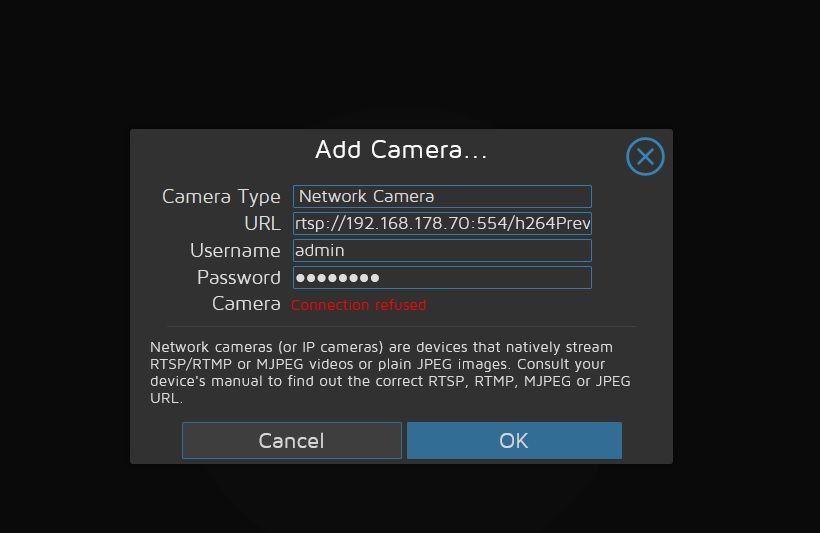
                      ERROR: mjpg client timed out receiving data for camera 1 on port 8081

                      S 1 Antwort Letzte Antwort
                      0
                      • Ralla66R Ralla66

                        @saeft_2003

                        keine Ahnung warum, bei dir kommt ja immer im Log
                        ERROR: mjpg client timed out receiving data for camera 1 on port 8081

                        S Offline
                        S Offline
                        saeft_2003
                        Most Active
                        schrieb am zuletzt editiert von saeft_2003
                        #43

                        @ralla66

                        Ok wüsste aber nicht wo ich da was ändern kann. 8081 ist der iobroker port!

                        Ralla66R 1 Antwort Letzte Antwort
                        0
                        • S saeft_2003

                          @ralla66

                          Ok wüsste aber nicht wo ich da was ändern kann. 8081 ist der iobroker port!

                          Ralla66R Offline
                          Ralla66R Offline
                          Ralla66
                          Most Active
                          schrieb am zuletzt editiert von Ralla66
                          #44

                          @saeft_2003

                          so Fit bin ich in Linux nicht würde aber vermuten in der motioneye.conf
                          Hier den listen genau zuweisen.

                          listen
                          Defines the IP address on which the motionEye server will listen. Use 0.0.0.0 for all interfaces or 127.0.0.1 for localhost. Defaults to all interfaces.

                          Nix genaues weiß ich :-)

                          S 1 Antwort Letzte Antwort
                          0
                          • Ralla66R Ralla66

                            @saeft_2003

                            so Fit bin ich in Linux nicht würde aber vermuten in der motioneye.conf
                            Hier den listen genau zuweisen.

                            listen
                            Defines the IP address on which the motionEye server will listen. Use 0.0.0.0 for all interfaces or 127.0.0.1 for localhost. Defaults to all interfaces.

                            Nix genaues weiß ich :-)

                            S Offline
                            S Offline
                            saeft_2003
                            Most Active
                            schrieb am zuletzt editiert von
                            #45

                            @ralla66

                            Das ist meine motioneye.config

                            
                            # path to the configuration directory (must be writable by motionEye)
                            conf_path /etc/motioneye
                            
                            # path to the directory where pid files go (must be writable by motionEye)
                            run_path /var/run
                            
                            # path to the directory where log files go (must be writable by motionEye)
                            log_path /var/log
                            
                            # default output path for media files (must be writable by motionEye)
                            media_path /var/lib/motioneye
                            
                            # the log level (use quiet, error, warning, info or debug)
                            log_level info
                            
                            # the IP address to listen on
                            # (0.0.0.0 for all interfaces, 127.0.0.1 for localhost)
                            listen 0.0.0.0
                            
                            # the TCP port to listen on
                            port 8765
                            
                            # path to the motion binary to use (automatically detected if commented)
                            #motion_binary /usr/bin/motion
                            
                            # whether motion HTTP control interface listens on
                            # localhost or on all interfaces
                            motion_control_localhost true
                            
                            # the TCP port that motion HTTP control interface listens on
                            motion_control_port 7999
                            
                            # interval in seconds at which motionEye checks if motion is running
                            motion_check_interval 10
                            
                            # whether to restart the motion daemon when an error occurs while communicating with it
                            motion_restart_on_errors false
                            
                            # interval in seconds at which motionEye checks the SMB mounts
                            mount_check_interval 300
                            
                            # interval in seconds at which the janitor is called
                            # to remove old pictures and movies
                            cleanup_interval 43200
                            
                            # timeout in seconds to wait for response from a remote motionEye server
                            remote_request_timeout 10
                            
                            # timeout in seconds to wait for mjpg data from the motion daemon
                            mjpg_client_timeout 10
                            
                            # timeout in seconds after which an idle mjpg client is removed
                            # (set to 0 to disable)
                            mjpg_client_idle_timeout 10
                            
                            # enable SMB shares (requires motionEye to run as root) 
                            smb_shares false
                            
                            # the directory where the SMB mount points will be created
                            smb_mount_root /media
                            
                            # path to the wpa_supplicant.conf file
                            # (enable this to configure wifi settings from the UI)
                            #wpa_supplicant_conf /etc/wpa_supplicant.conf
                            
                            # path to the localtime file
                            # (enable this to configure the system time zone from the UI)
                            #local_time_file /etc/localtime
                            
                            # enables shutdown and rebooting after changing system settings
                            # (such as wifi settings or time zone)
                            enable_reboot false
                            
                            # timeout in seconds to use when talking to the SMTP server
                            smtp_timeout 60
                            
                            # timeout in seconds to wait for media files list
                            list_media_timeout 120
                            
                            # timeout in seconds to wait for media files list, when sending emails
                            list_media_timeout_email 10
                            
                            # timeout in seconds to wait for zip file creation
                            zip_timeout 500
                            
                            # timeout in seconds to wait for timelapse creation
                            timelapse_timeout 500
                            
                            # enable adding and removing cameras from UI
                            add_remove_cameras true
                            
                            # enables HTTP basic authentication scheme (in addition to, not instead of the signature mechanism)
                            http_basic_auth false
                            
                            # overrides the hostname (useful if motionEye runs behind a reverse proxy)
                            # server_name motionEye
                            
                            
                            1 Antwort Letzte Antwort
                            0
                            • S Offline
                              S Offline
                              saeft_2003
                              Most Active
                              schrieb am zuletzt editiert von
                              #46

                              Ich konnte mittlerweile die Lösung finden. Die Reolink mag am Schluss keine zweistellige IP. Auch in den Settings der Kamera kann man wenn man von dhcp auf static umstellt keine zeiwstellige nehmen, ich hatte ihr aber über unifi eine zweistellige zugeteilt.

                              Mit einer dreistelligen IP am Schluss geht alles. Klingt verrückt ist aber so :-)

                              da_WoodyD 1 Antwort Letzte Antwort
                              0
                              • S saeft_2003

                                Ich konnte mittlerweile die Lösung finden. Die Reolink mag am Schluss keine zweistellige IP. Auch in den Settings der Kamera kann man wenn man von dhcp auf static umstellt keine zeiwstellige nehmen, ich hatte ihr aber über unifi eine zweistellige zugeteilt.

                                Mit einer dreistelligen IP am Schluss geht alles. Klingt verrückt ist aber so :-)

                                da_WoodyD Online
                                da_WoodyD Online
                                da_Woody
                                schrieb am zuletzt editiert von
                                #47

                                @saeft_2003 aha, ich hab aber alle am ende 1stellig, tut auch...
                                aber meine cams sind auf DHCP und nur im router an die MAC gebunden.
                                irgendwas hab ich da im hinterkopf, daß wenn im router gebunden, static nicht wirklich funktioniert...

                                gruß vom Woody
                                HAPPINESS is not a DESTINATION, it's a WAY of LIFE!

                                1 Antwort Letzte Antwort
                                0
                                • S saeft_2003

                                  @bananajoe

                                  Ja hatte ich versucht geht nicht. Da kommt nicht das connection refused, aber ich kann nichts auswählen oder auf ok drücken.
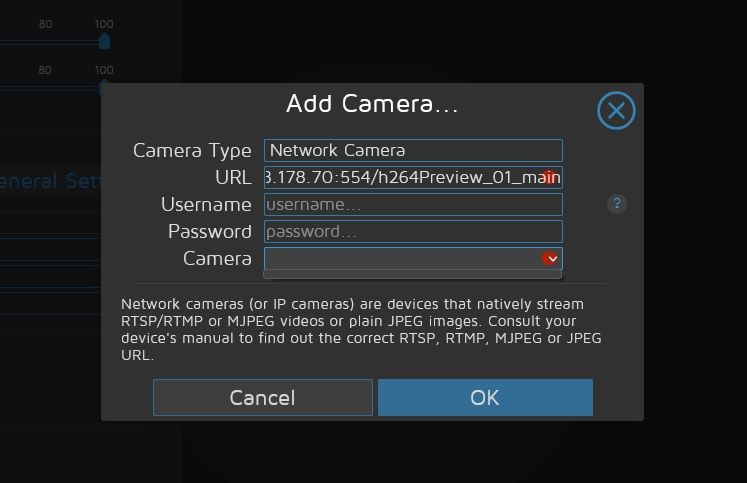
                                  Unbenannt.jpg

                                  M Offline
                                  M Offline
                                  McLane
                                  schrieb am zuletzt editiert von
                                  #48

                                  @saeft_2003
                                  Ja ich weiß, das Thema ist schon eine Weile her. Aber ich bin ja auch wegen des gleichen Problems hier gelandet, und weitere User vielleicht auch irgendwann. Aber ich habe die Lösung nach einiger Suche gefunden.
                                  Reolink Kameras mit neuerer Firmware, oder Kameras deren Firmware ein Upgrade erhalten, haben
                                  standardmäßig den RTSP Port deaktiviert. Ports müssen in den erweiterten Netzwerkeinstellungen unter Port-Settings wieder frei geschaltet werden. Das wars!
                                  Hoffe das hilft irgendwann jemandem.

                                  1 Antwort Letzte Antwort
                                  0
                                  Antworten
                                  • In einem neuen Thema antworten
                                  Anmelden zum Antworten
                                  • Älteste zuerst
                                  • Neuste zuerst
                                  • Meiste Stimmen


                                  Support us

                                  ioBroker
                                  Community Adapters
                                  Donate

                                  753

                                  Online

                                  32.4k

                                  Benutzer

                                  81.5k

                                  Themen

                                  1.3m

                                  Beiträge
                                  Community
                                  Impressum | Datenschutz-Bestimmungen | Nutzungsbedingungen | Einwilligungseinstellungen
                                  ioBroker Community 2014-2025
                                  logo
                                  • Anmelden

                                  • Du hast noch kein Konto? Registrieren

                                  • Anmelden oder registrieren, um zu suchen
                                  • Erster Beitrag
                                    Letzter Beitrag
                                  0
                                  • Home
                                  • Aktuell
                                  • Tags
                                  • Ungelesen 0
                                  • Kategorien
                                  • Unreplied
                                  • Beliebt
                                  • GitHub
                                  • Docu
                                  • Hilfe