Skip to content
  • Home
  • Aktuell
  • Tags
  • 0 Ungelesen 0
  • Kategorien
  • Unreplied
  • Beliebt
  • GitHub
  • Docu
  • Hilfe
Skins
  • Light
  • Brite
  • Cerulean
  • Cosmo
  • Flatly
  • Journal
  • Litera
  • Lumen
  • Lux
  • Materia
  • Minty
  • Morph
  • Pulse
  • Sandstone
  • Simplex
  • Sketchy
  • Spacelab
  • United
  • Yeti
  • Zephyr
  • Dark
  • Cyborg
  • Darkly
  • Quartz
  • Slate
  • Solar
  • Superhero
  • Vapor

  • Standard: (Kein Skin)
  • Kein Skin
Einklappen
ioBroker Logo

Community Forum

donate donate
  1. ioBroker Community Home
  2. Deutsch
  3. ioBroker Allgemein
  4. Forecast.solar mit dem Systeminfo Adapter

NEWS

  • UPDATE 31.10.: Amazon Alexa - ioBroker Skill läuft aus ?
    apollon77A
    apollon77
    48
    3
    8.8k

  • Monatsrückblick – September 2025
    BluefoxB
    Bluefox
    13
    1
    2.2k

  • Neues Video "KI im Smart Home" - ioBroker plus n8n
    BluefoxB
    Bluefox
    16
    1
    3.2k

Forecast.solar mit dem Systeminfo Adapter

Geplant Angeheftet Gesperrt Verschoben ioBroker Allgemein
systeminfosolarjson
188 Beiträge 15 Kommentatoren 26.0k Aufrufe 16 Watching
  • Älteste zuerst
  • Neuste zuerst
  • Meiste Stimmen
Antworten
  • In einem neuen Thema antworten
Anmelden zum Antworten
Dieses Thema wurde gelöscht. Nur Nutzer mit entsprechenden Rechten können es sehen.
  • JB_SullivanJ JB_Sullivan

    @Gargano

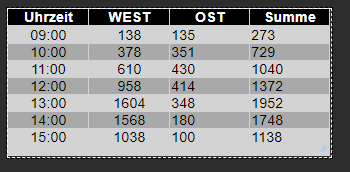
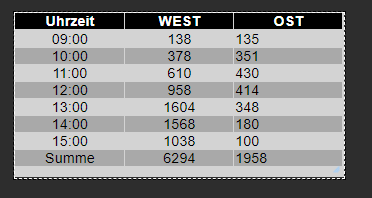
    OK, da habe ich mich wohl falsch ausgedrückt - also Summenbildung von OST + WEST pro Stunde (4. Spalte).

    Du hast jetzt die Summen gebildet aus komplett OST und komplett WEST ;)
    7162af84-89df-4315-ba26-218ba3f1faab-image.png

    Zum entscheiden ob die Waschmaschine laufen soll, wäre es halt wichtig, wieviel Energie mir z.B. um 13:00 in Summe zur Verfügung steht (1952 W)

    GarganoG Offline
    GarganoG Offline
    Gargano
    schrieb am zuletzt editiert von Gargano
    #46

    @JB_Sullivan Dann nimm das von Paul

    function makeTable () {
        log ('MakeTable');
        let watts1 = JSON.parse(getState(SolarJSON1).val);
        let watts2 = JSON.parse(getState(SolarJSON2).val); 
        log ('Items: '+watts1.length);
        let table = [];
       
        for(var n=0;n<watts1.length;n++) {
                let entry = {};
                entry.Uhrzeit = watts1[n].Uhrzeit;
                entry.Leistung1 = watts1[n].Leistung;
                entry.Leistung2 = watts2[n].Leistung;
                entry.Summe = watts1[n].Leistung + watts2[n].Leistung;
                table.push(entry);
        }  
        setState(SolarJSONTable, JSON.stringify(table), true);
    }
    
    
    JB_SullivanJ 1 Antwort Letzte Antwort
    0
    • GarganoG Gargano

      @JB_Sullivan Dann nimm das von Paul

      function makeTable () {
          log ('MakeTable');
          let watts1 = JSON.parse(getState(SolarJSON1).val);
          let watts2 = JSON.parse(getState(SolarJSON2).val); 
          log ('Items: '+watts1.length);
          let table = [];
         
          for(var n=0;n<watts1.length;n++) {
                  let entry = {};
                  entry.Uhrzeit = watts1[n].Uhrzeit;
                  entry.Leistung1 = watts1[n].Leistung;
                  entry.Leistung2 = watts2[n].Leistung;
                  entry.Summe = watts1[n].Leistung + watts2[n].Leistung;
                  table.push(entry);
          }  
          setState(SolarJSONTable, JSON.stringify(table), true);
      }
      
      
      JB_SullivanJ Offline
      JB_SullivanJ Offline
      JB_Sullivan
      schrieb am zuletzt editiert von JB_Sullivan
      #47

      @Gargano

      Perfekt :+1: :+1: :+1: :+1:

      4ccba6b8-f21c-41e4-8a66-ca5e8121f785-image.png

      Ich kenne mich mit javaskript nicht aus, aber wäre das so richtig, wenn man die Vorhersage in Intervallen abholen will?

      schedule({rule: '*/1 * * * * *'}, getSolar );
      getSolar();
      

      Ändert sich da dann überhaupt etwas? Ich weiß ehrlich gesagt gar nicht wie häufig die Vorhersage dort auf der Webseite aktualisiert wird - aber das Wetter ist ja auch nicht statisch und unterliegt ja über den Tag hinweg auch durchaus diversen Veränderungen.

      ioBroker auf Intel Core i3-5005U NUC und Windwos10 Pro

      GarganoG paul53P 3 Antworten Letzte Antwort
      0
      • JB_SullivanJ JB_Sullivan

        @Gargano

        Perfekt :+1: :+1: :+1: :+1:

        4ccba6b8-f21c-41e4-8a66-ca5e8121f785-image.png

        Ich kenne mich mit javaskript nicht aus, aber wäre das so richtig, wenn man die Vorhersage in Intervallen abholen will?

        schedule({rule: '*/1 * * * * *'}, getSolar );
        getSolar();
        

        Ändert sich da dann überhaupt etwas? Ich weiß ehrlich gesagt gar nicht wie häufig die Vorhersage dort auf der Webseite aktualisiert wird - aber das Wetter ist ja auch nicht statisch und unterliegt ja über den Tag hinweg auch durchaus diversen Veränderungen.

        GarganoG Offline
        GarganoG Offline
        Gargano
        schrieb am zuletzt editiert von Gargano
        #48

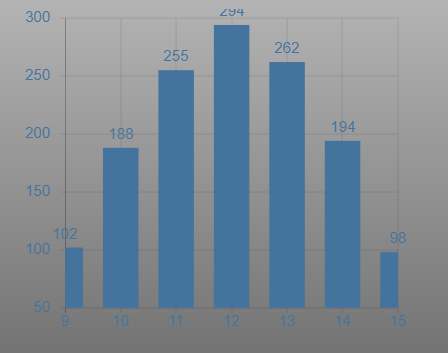
        @JB_Sullivan Wer auch noch Grafik haben will :
        f02ff37a-00cc-4a04-9519-f521cd17bdb7-grafik.png

        Widget ist JSON Chart vom Scrounger.
        Als Datenpunk javascript.0.SolarForecast.JSONGraph auswählen

        Die Änderungen sind :

        const SolarJSON1        = "javascript.0.SolarForecast.JSON1";
        const SolarJSON2        = "javascript.0.SolarForecast.JSON2";
        const SolarJSONTable    = "javascript.0.SolarForecast.JSONTable";
        const SolarJSONGraph    = "javascript.0.SolarForecast.JSONGraph";
        
        const creatStateList = [
            {name :SolarJSON1, type:"string", role : "value"},
            {name :SolarJSON2, type:"string", role : "value"},
            {name :SolarJSONTable, type:"string", role : "value"},
            {name :SolarJSONGraph, type:"string", role : "value"}
        ]
        

        und

        function makeTable () {
            log ('MakeTable');
            let watts1 = JSON.parse(getState(SolarJSON1).val);
            let watts2 = JSON.parse(getState(SolarJSON2).val); 
            log ('Items: '+watts1.length);
            let today = formatDate(new Date(), 'YYYY-MM-DD');
            let table = [];
            let graphTimeData = [];
            
            for(var n=0;n<watts1.length;n++) {
                    let entry = {};
                    let graphEntry ={};
                    let thisTime = today +' '+ watts1[n].Uhrzeit;
                    log (thisTime);
                    entry.Uhrzeit = watts1[n].Uhrzeit;
                    entry.Leistung1 = watts1[n].Leistung;
                    entry.Leistung2 = watts2[n].Leistung;
                    entry.Summe = watts1[n].Leistung + watts2[n].Leistung;
                    table.push(entry);
        
                    graphEntry.t = Date.parse(thisTime);
                    graphEntry.y = watts1[n].Leistung + watts2[n].Leistung;
                    graphTimeData.push(graphEntry);
            } 
        
            var graph = {};
            var graphData ={};
            var graphAllData = [];
            graphData.data = graphTimeData;
            graphAllData.push(graphData);
            graph.graphs=graphAllData;
            setState(SolarJSONTable, JSON.stringify(table), true);
            setState(SolarJSONGraph, JSON.stringify(graph), true);
        
        }


        Hier der ganze Code :

        
        const SolarJSON1        = "javascript.0.SolarForecast.JSON1";
        const SolarJSON2        = "javascript.0.SolarForecast.JSON2";
        const SolarJSONTable    = "javascript.0.SolarForecast.JSONTable";
        const SolarJSONGraph    = "javascript.0.SolarForecast.JSONGraph";
        
        const creatStateList = [
            {name :SolarJSON1, type:"string", role : "value"},
            {name :SolarJSON2, type:"string", role : "value"},
            {name :SolarJSONTable, type:"string", role : "value"},
            {name :SolarJSONGraph, type:"string", role : "value"}
        ]
        
        creatStateList.forEach (function(item) {
            createState(item.name, { 
                type: item.type,
                min: 0,
                def: 0,
                role: item.role
            });
        });
        
        var request = require('request');
        var options1 = {url: 'https://api.forecast.solar/estimate/xxx/yyy/45/45/1', method: 'GET', headers: { 'User-Agent': 'request' }};
        var options2 = {url: 'https://api.forecast.solar/estimate/xxx/yyy/45/-45/1', method: 'GET', headers: { 'User-Agent': 'request' }};
        
        var urls = [
          {myUrl:options1,mySolarJSON:SolarJSON1},
          {myUrl:options2,mySolarJSON:SolarJSON2}
        ]
        
        var promises = urls.map(myAsyncRequest);
        
        schedule({hour: 00, minute: 30}, getSolar );
        getSolar();
        
        function myAsyncRequest(myUrl) {
          log('Request '+myUrl.myUrl.url);
          return new Promise((resolve, reject) => {
             request(myUrl.myUrl.url, function(error, response, body) {
                if (!error && response.statusCode == 200) {
          
                    let today = formatDate(new Date(), 'YYYY-MM-DD');
                    let watts = JSON.parse(body).result.watts;  
                    let table = [];
                    for(let time in watts) {
                        let pos = time.indexOf(':00:00');
                        if(time.includes(today) && pos != -1) {
                            let entry = {};
                            entry.Uhrzeit = time.substr(pos - 2, 5);
                            entry.Leistung = watts[time];
                            table.push(entry);
                        }
                    }  
                    log ('JSON: '+myUrl.mySolarJSON);
                    setState(myUrl.mySolarJSON, JSON.stringify(table), true);
        
                    resolve (body);
                }
            });  
          })
        }
        
        
        function makeTable () {
            log ('MakeTable');
            let watts1 = JSON.parse(getState(SolarJSON1).val);
            let watts2 = JSON.parse(getState(SolarJSON2).val); 
            log ('Items: '+watts1.length);
            let today = formatDate(new Date(), 'YYYY-MM-DD');
            let table = [];
            let graphTimeData = [];
            
            for(var n=0;n<watts1.length;n++) {
                    let entry = {};
                    let graphEntry ={};
                    let thisTime = today +' '+ watts1[n].Uhrzeit;
                    log (thisTime);
                    entry.Uhrzeit = watts1[n].Uhrzeit;
                    entry.Leistung1 = watts1[n].Leistung;
                    entry.Leistung2 = watts2[n].Leistung;
                    entry.Summe = watts1[n].Leistung + watts2[n].Leistung;
                    table.push(entry);
        
                    graphEntry.t = Date.parse(thisTime);
                    graphEntry.y = watts1[n].Leistung + watts2[n].Leistung;
                    graphTimeData.push(graphEntry);
            } 
        
            var graph = {};
            var graphData ={};
            var graphAllData = [];
            graphData.data = graphTimeData;
            graphAllData.push(graphData);
            graph.graphs=graphAllData;
            setState(SolarJSONTable, JSON.stringify(table), true);
            setState(SolarJSONGraph, JSON.stringify(graph), true);
        
        }
        
        
        function getSolar() {
         
          Promise.all(promises)
          .then(function(bodys) {
            console.log("All url loaded");
            makeTable();
          })
        
        }


        1 Antwort Letzte Antwort
        0
        • JB_SullivanJ JB_Sullivan

          @Gargano

          Perfekt :+1: :+1: :+1: :+1:

          4ccba6b8-f21c-41e4-8a66-ca5e8121f785-image.png

          Ich kenne mich mit javaskript nicht aus, aber wäre das so richtig, wenn man die Vorhersage in Intervallen abholen will?

          schedule({rule: '*/1 * * * * *'}, getSolar );
          getSolar();
          

          Ändert sich da dann überhaupt etwas? Ich weiß ehrlich gesagt gar nicht wie häufig die Vorhersage dort auf der Webseite aktualisiert wird - aber das Wetter ist ja auch nicht statisch und unterliegt ja über den Tag hinweg auch durchaus diversen Veränderungen.

          GarganoG Offline
          GarganoG Offline
          Gargano
          schrieb am zuletzt editiert von
          #49

          @JB_Sullivan Jede Minute ist evtl. zu oft:
          Du kannst im JS Editor oben rechts mit der Uhr die Syntax für den schedule einstellen
          78f6a29c-1e24-4868-b0da-05d7baf81aa2-grafik.png

          1 Antwort Letzte Antwort
          0
          • JB_SullivanJ JB_Sullivan

            @Gargano

            Perfekt :+1: :+1: :+1: :+1:

            4ccba6b8-f21c-41e4-8a66-ca5e8121f785-image.png

            Ich kenne mich mit javaskript nicht aus, aber wäre das so richtig, wenn man die Vorhersage in Intervallen abholen will?

            schedule({rule: '*/1 * * * * *'}, getSolar );
            getSolar();
            

            Ändert sich da dann überhaupt etwas? Ich weiß ehrlich gesagt gar nicht wie häufig die Vorhersage dort auf der Webseite aktualisiert wird - aber das Wetter ist ja auch nicht statisch und unterliegt ja über den Tag hinweg auch durchaus diversen Veränderungen.

            paul53P Offline
            paul53P Offline
            paul53
            schrieb am zuletzt editiert von paul53
            #50

            @JB_Sullivan sagte:

            wie häufig die Vorhersage dort auf der Webseite aktualisiert wird

            Sicherlich nicht öfter als jede Stunde.

            schedule('6 6-18 * * *', getSolar); 
            

            Bitte verzichtet auf Chat-Nachrichten, denn die Handhabung ist grauenhaft !
            Produktiv: RPi 2 mit S.USV, HM-MOD-RPI und SLC-USB-Stick mit root fs

            1 Antwort Letzte Antwort
            0
            • JB_SullivanJ Offline
              JB_SullivanJ Offline
              JB_Sullivan
              schrieb am zuletzt editiert von JB_Sullivan
              #51

              Guten Morgen zusammen,
              kann es sein, das dass js-skript nicht ganz "sauber" programmiert ist?

              Wenn das Skript läuft, funktioniert der deconz Adpter extrem langsam und nach kurzer Zeit erscheint dann die Meldung, das die js-skript Instanz gestoppt ist.

              Der "güne Punkt" von js-Instanz ist dann auch wirklich Grau, aber der Play Button ist noch grün.

              Stoppe ich das Forecast Skript, läuft alles normal und auch deconz funktioniert so schnell wie immer.

              const SolarJSON1        = "javascript.0.SolarForecast.JSON1";
              const SolarJSON2        = "javascript.0.SolarForecast.JSON2";
              const SolarJSONTable    = "javascript.0.SolarForecast.JSONTable";
              const SolarJSONGraph    = "javascript.0.SolarForecast.JSONGraph";
               
              const creatStateList = [
                  {name :SolarJSON1, type:"string", role : "value"},
                  {name :SolarJSON2, type:"string", role : "value"},
                  {name :SolarJSONTable, type:"string", role : "value"},
                  {name :SolarJSONGraph, type:"string", role : "value"}
              ]
               
              creatStateList.forEach (function(item) {
                  createState(item.name, { 
                      type: item.type,
                      min: 0,
                      def: 0,
                      role: item.role
                  });
              });
               
              var request = require('request');
              var options1 = {url: 'https://api.forecast.solar/estimate/52.xx/10.xx/40/90/7.26', method: 'GET', headers: { 'User-Agent': 'request' }};
              var options2 = {url: 'https://api.forecast.solar/estimate/52.xx/10.xx/40/-90/2.64', method: 'GET', headers: { 'User-Agent': 'request' }};
               
              var urls = [
                {myUrl:options1,mySolarJSON:SolarJSON1},
                {myUrl:options2,mySolarJSON:SolarJSON2}
              ]
               
              var promises = urls.map(myAsyncRequest);
               
              schedule('6 6-22 * * *', getSolar);
              getSolar();
               
              function myAsyncRequest(myUrl) {
                log('Request '+myUrl.myUrl.url);
                return new Promise((resolve, reject) => {
                   request(myUrl.myUrl.url, function(error, response, body) {
                      if (!error && response.statusCode == 200) {
                
                          let today = formatDate(new Date(), 'YYYY-MM-DD');
                          let watts = JSON.parse(body).result.watts;  
                          let table = [];
                          for(let time in watts) {
                              let pos = time.indexOf(':00:00');
                              if(time.includes(today) && pos != -1) {
                                  let entry = {};
                                  entry.Uhrzeit = time.substr(pos - 2, 5);
                                  entry.Leistung = watts[time];
                                  table.push(entry);
                              }
                          }  
                          log ('JSON: '+myUrl.mySolarJSON);
                          setState(myUrl.mySolarJSON, JSON.stringify(table), true);
               
                          resolve (body);
                      }
                  });  
                })
              }
               
               
              function makeTable () {
                  log ('MakeTable');
                  let watts1 = JSON.parse(getState(SolarJSON1).val);
                  let watts2 = JSON.parse(getState(SolarJSON2).val); 
                  log ('Items: '+watts1.length);
                  let today = formatDate(new Date(), 'YYYY-MM-DD');
                  let table = [];
                  let graphTimeData = [];
                  
                  for(var n=0;n<watts1.length;n++) {
                          let entry = {};
                          let graphEntry ={};
                          let thisTime = today +' '+ watts1[n].Uhrzeit;
                          log (thisTime);
                          entry.Uhrzeit = watts1[n].Uhrzeit;
                          entry.Leistung1 = watts1[n].Leistung;
                          entry.Leistung2 = watts2[n].Leistung;
                          entry.Summe = watts1[n].Leistung + watts2[n].Leistung;
                          table.push(entry);
               
                          graphEntry.t = Date.parse(thisTime);
                          graphEntry.y = watts1[n].Leistung + watts2[n].Leistung;
                          graphTimeData.push(graphEntry);
                  } 
               
                  var graph = {};
                  var graphData ={};
                  var graphAllData = [];
                  graphData.data = graphTimeData;
                  graphAllData.push(graphData);
                  graph.graphs=graphAllData;
                  setState(SolarJSONTable, JSON.stringify(table), true);
                  setState(SolarJSONGraph, JSON.stringify(graph), true);
               
              }
               
               
              function getSolar() {
               
                Promise.all(promises)
                .then(function(bodys) {
                  console.log("All url loaded");
                  makeTable();
                })
              

              ioBroker auf Intel Core i3-5005U NUC und Windwos10 Pro

              GarganoG 1 Antwort Letzte Antwort
              0
              • JB_SullivanJ JB_Sullivan

                Guten Morgen zusammen,
                kann es sein, das dass js-skript nicht ganz "sauber" programmiert ist?

                Wenn das Skript läuft, funktioniert der deconz Adpter extrem langsam und nach kurzer Zeit erscheint dann die Meldung, das die js-skript Instanz gestoppt ist.

                Der "güne Punkt" von js-Instanz ist dann auch wirklich Grau, aber der Play Button ist noch grün.

                Stoppe ich das Forecast Skript, läuft alles normal und auch deconz funktioniert so schnell wie immer.

                const SolarJSON1        = "javascript.0.SolarForecast.JSON1";
                const SolarJSON2        = "javascript.0.SolarForecast.JSON2";
                const SolarJSONTable    = "javascript.0.SolarForecast.JSONTable";
                const SolarJSONGraph    = "javascript.0.SolarForecast.JSONGraph";
                 
                const creatStateList = [
                    {name :SolarJSON1, type:"string", role : "value"},
                    {name :SolarJSON2, type:"string", role : "value"},
                    {name :SolarJSONTable, type:"string", role : "value"},
                    {name :SolarJSONGraph, type:"string", role : "value"}
                ]
                 
                creatStateList.forEach (function(item) {
                    createState(item.name, { 
                        type: item.type,
                        min: 0,
                        def: 0,
                        role: item.role
                    });
                });
                 
                var request = require('request');
                var options1 = {url: 'https://api.forecast.solar/estimate/52.xx/10.xx/40/90/7.26', method: 'GET', headers: { 'User-Agent': 'request' }};
                var options2 = {url: 'https://api.forecast.solar/estimate/52.xx/10.xx/40/-90/2.64', method: 'GET', headers: { 'User-Agent': 'request' }};
                 
                var urls = [
                  {myUrl:options1,mySolarJSON:SolarJSON1},
                  {myUrl:options2,mySolarJSON:SolarJSON2}
                ]
                 
                var promises = urls.map(myAsyncRequest);
                 
                schedule('6 6-22 * * *', getSolar);
                getSolar();
                 
                function myAsyncRequest(myUrl) {
                  log('Request '+myUrl.myUrl.url);
                  return new Promise((resolve, reject) => {
                     request(myUrl.myUrl.url, function(error, response, body) {
                        if (!error && response.statusCode == 200) {
                  
                            let today = formatDate(new Date(), 'YYYY-MM-DD');
                            let watts = JSON.parse(body).result.watts;  
                            let table = [];
                            for(let time in watts) {
                                let pos = time.indexOf(':00:00');
                                if(time.includes(today) && pos != -1) {
                                    let entry = {};
                                    entry.Uhrzeit = time.substr(pos - 2, 5);
                                    entry.Leistung = watts[time];
                                    table.push(entry);
                                }
                            }  
                            log ('JSON: '+myUrl.mySolarJSON);
                            setState(myUrl.mySolarJSON, JSON.stringify(table), true);
                 
                            resolve (body);
                        }
                    });  
                  })
                }
                 
                 
                function makeTable () {
                    log ('MakeTable');
                    let watts1 = JSON.parse(getState(SolarJSON1).val);
                    let watts2 = JSON.parse(getState(SolarJSON2).val); 
                    log ('Items: '+watts1.length);
                    let today = formatDate(new Date(), 'YYYY-MM-DD');
                    let table = [];
                    let graphTimeData = [];
                    
                    for(var n=0;n<watts1.length;n++) {
                            let entry = {};
                            let graphEntry ={};
                            let thisTime = today +' '+ watts1[n].Uhrzeit;
                            log (thisTime);
                            entry.Uhrzeit = watts1[n].Uhrzeit;
                            entry.Leistung1 = watts1[n].Leistung;
                            entry.Leistung2 = watts2[n].Leistung;
                            entry.Summe = watts1[n].Leistung + watts2[n].Leistung;
                            table.push(entry);
                 
                            graphEntry.t = Date.parse(thisTime);
                            graphEntry.y = watts1[n].Leistung + watts2[n].Leistung;
                            graphTimeData.push(graphEntry);
                    } 
                 
                    var graph = {};
                    var graphData ={};
                    var graphAllData = [];
                    graphData.data = graphTimeData;
                    graphAllData.push(graphData);
                    graph.graphs=graphAllData;
                    setState(SolarJSONTable, JSON.stringify(table), true);
                    setState(SolarJSONGraph, JSON.stringify(graph), true);
                 
                }
                 
                 
                function getSolar() {
                 
                  Promise.all(promises)
                  .then(function(bodys) {
                    console.log("All url loaded");
                    makeTable();
                  })
                
                GarganoG Offline
                GarganoG Offline
                Gargano
                schrieb am zuletzt editiert von
                #52

                @JB_Sullivan Welche Version JS Adapter hast Du ? Was sagt denn der Log ?

                JB_SullivanJ 1 Antwort Letzte Antwort
                0
                • GarganoG Gargano

                  @JB_Sullivan Welche Version JS Adapter hast Du ? Was sagt denn der Log ?

                  JB_SullivanJ Offline
                  JB_SullivanJ Offline
                  JB_Sullivan
                  schrieb am zuletzt editiert von
                  #53

                  @Gargano Ich bin dem kompletten ioB System im latest unterwegs - also alles Top Aktuell. Das Log sagt bis auf ein js-skript Instanz "stopped" gar nichts weiter.

                  ioBroker auf Intel Core i3-5005U NUC und Windwos10 Pro

                  GarganoG 1 Antwort Letzte Antwort
                  0
                  • JB_SullivanJ JB_Sullivan

                    @Gargano Ich bin dem kompletten ioB System im latest unterwegs - also alles Top Aktuell. Das Log sagt bis auf ein js-skript Instanz "stopped" gar nichts weiter.

                    GarganoG Offline
                    GarganoG Offline
                    Gargano
                    schrieb am zuletzt editiert von Gargano
                    #54

                    @JB_Sullivan Steht Deine Log-Stufe vom JS auf Debug ?

                    Ich habe noch eine Fehlerbehandlung dazu gebaut, aber ich fürchte daß es das nicht ist :

                    
                    const SolarJSON1        = "javascript.0.SolarForecast.JSON1";
                    const SolarJSON2        = "javascript.0.SolarForecast.JSON2";
                    const SolarJSONTable    = "javascript.0.SolarForecast.JSONTable";
                    const SolarJSONGraph    = "javascript.0.SolarForecast.JSONGraph";
                    
                    const creatStateList = [
                        {name :SolarJSON1, type:"string", role : "value"},
                        {name :SolarJSON2, type:"string", role : "value"},
                        {name :SolarJSONTable, type:"string", role : "value"},
                        {name :SolarJSONGraph, type:"string", role : "value"}
                    ]
                    
                    creatStateList.forEach (function(item) {
                        createState(item.name, { 
                            type: item.type,
                            min: 0,
                            def: 0,
                            role: item.role
                        });
                    });
                    
                    var request = require('request');
                    var options1 = {url: 'https://api.forecast.solar/estimate/xx/yy/45/45/1', method: 'GET', headers: { 'User-Agent': 'request' }};
                    var options2 = {url: 'https://api.forecast.solar/estimate/xx/yy/45/-45/1', method: 'GET', headers: { 'User-Agent': 'request' }};
                    
                    var urls = [
                      {myUrl:options1,mySolarJSON:SolarJSON1},
                      {myUrl:options2,mySolarJSON:SolarJSON2}
                    ]
                    
                    var promises = urls.map(myAsyncRequest);
                    
                    schedule('6 6-18 * * *', getSolar);
                    getSolar();
                    
                    function myAsyncRequest(myUrl) {
                      log('Request '+myUrl.myUrl.url);
                      return new Promise((resolve, reject) => {
                         request(myUrl.myUrl.url, function(error, response, body) {
                            if (!error && response.statusCode == 200) {
                      
                                let today = formatDate(new Date(), 'YYYY-MM-DD');
                                let watts = JSON.parse(body).result.watts;  
                                let table = [];
                                for(let time in watts) {
                                    let pos = time.indexOf(':00:00');
                                    if(time.includes(today) && pos != -1) {
                                        let entry = {};
                                        entry.Uhrzeit = time.substr(pos - 2, 5);
                                        entry.Leistung = watts[time];
                                        table.push(entry);
                                    }
                                }  
                                setState(myUrl.mySolarJSON, JSON.stringify(table), true);
                                resolve (body);
                            } else {
                                reject(new Error("Could not load " + myUrl.myUrl.url))
                            }
                        });  
                      })
                    }
                    
                    
                    function makeTable () {
                        log ('MakeTable');
                        let watts1 = JSON.parse(getState(SolarJSON1).val);
                        let watts2 = JSON.parse(getState(SolarJSON2).val); 
                        log ('Items: '+watts1.length);
                        let today = formatDate(new Date(), 'YYYY-MM-DD');
                        let table = [];
                        let graphTimeData = [];
                        
                        for(var n=0;n<watts1.length;n++) {
                                let entry = {};
                                let graphEntry ={};
                                let thisTime = today +' '+ watts1[n].Uhrzeit;
                                entry.Uhrzeit = watts1[n].Uhrzeit;
                                entry.Leistung1 = watts1[n].Leistung;
                                entry.Leistung2 = watts2[n].Leistung;
                                entry.Summe = watts1[n].Leistung + watts2[n].Leistung;
                                table.push(entry);
                    
                                graphEntry.t = Date.parse(thisTime);
                                graphEntry.y = watts1[n].Leistung + watts2[n].Leistung;
                                graphTimeData.push(graphEntry);
                        } 
                    
                        var graph = {};
                        var graphData ={};
                        var graphAllData = [];
                        graphData.data = graphTimeData;
                        graphAllData.push(graphData);
                        graph.graphs=graphAllData;
                        setState(SolarJSONTable, JSON.stringify(table), true);
                        setState(SolarJSONGraph, JSON.stringify(graph), true);
                    
                    }
                    
                    
                    function getSolar() {
                      Promise.all(promises)
                      .then(function() {
                        console.log("All url loaded");
                        makeTable();
                      })
                      .catch(error => {
                        console.log(error)
                      })  
                    }


                    1 Antwort Letzte Antwort
                    0
                    • JB_SullivanJ Offline
                      JB_SullivanJ Offline
                      JB_Sullivan
                      schrieb am zuletzt editiert von JB_Sullivan
                      #55

                      Ich greife den Thread nochmal wieder auf, da ich mich nun entschieden habe, in die forecast.solar Kauf Version des API Zugriffs zu investieren. Ich denke für 1€ pro Monat kann man das mal machen.

                      Bislang erzeugt das Script, welches ihr mir oben gebastelt habt, ja nur json Tabellen, was ich ja auch so haben wollte. Nun würde ich die 30 minütig erzeugten Vorhersagen auch gerne als einzelne DP`s haben wollen, welche ich dann zum Loggin in InfluxDB aktivieren kann.

                      Kann man das Skript oben um diese Funktionalität erweitern oder müsste man dafür etwas ganz neues kreieren?

                      Genauso liefert die Kauf API nun die Vorhersage von 3 Tagen. Kann man das auch irgendwie mit dem Script abgreifen?


                      2021-03-07 06:44:00 0
                      2021-03-07 07:15:00 45
                      2021-03-07 07:45:00 312
                      2021-03-07 08:00:00 401
                      2021-03-07 08:30:00 615
                      2021-03-07 09:00:00 639
                      2021-03-07 09:30:00 655
                      2021-03-07 10:00:00 876
                      2021-03-07 10:30:00 861
                      2021-03-07 11:00:00 821
                      2021-03-07 11:30:00 774
                      2021-03-07 12:00:00 710
                      2021-03-07 12:30:00 647
                      2021-03-07 13:00:00 681
                      2021-03-07 13:30:00 528
                      2021-03-07 14:00:00 414
                      2021-03-07 14:30:00 327
                      2021-03-07 15:00:00 264
                      2021-03-07 15:30:00 216
                      2021-03-07 16:00:00 166
                      2021-03-07 16:30:00 114
                      2021-03-07 17:23:00 16
                      2021-03-07 18:16:00 0
                      2021-03-08 06:42:00 0
                      2021-03-08 07:14:00 32
                      2021-03-08 07:45:00 224
                      2021-03-08 08:00:00 338
                      2021-03-08 08:30:00 594
                      2021-03-08 09:00:00 876
                      2021-03-08 09:30:00 1143
                      2021-03-08 10:00:00 1346
                      2021-03-08 10:30:00 1394
                      2021-03-08 11:00:00 1386
                      2021-03-08 11:30:00 1317
                      2021-03-08 12:00:00 1204
                      2021-03-08 12:30:00 1048
                      2021-03-08 13:00:00 855
                      2021-03-08 13:30:00 628
                      2021-03-08 14:00:00 459
                      2021-03-08 14:30:00 346
                      2021-03-08 15:00:00 269
                      2021-03-08 15:30:00 219
                      2021-03-08 16:00:00 169
                      2021-03-08 16:30:00 116
                      2021-03-08 17:24:00 16
                      2021-03-08 18:18:00 0
                      2021-03-09 06:40:00 0
                      2021-03-09 07:13:00 16
                      2021-03-09 07:45:00 106
                      2021-03-09 08:00:00 140
                      2021-03-09 08:30:00 214
                      2021-03-09 09:00:00 282
                      2021-03-09 09:30:00 343
                      2021-03-09 10:00:00 393
                      2021-03-09 10:30:00 430
                      2021-03-09 11:00:00 459
                      2021-03-09 11:30:00 473
                      2021-03-09 12:00:00 475
                      2021-03-09 12:30:00 462
                      2021-03-09 13:00:00 436
                      2021-03-09 13:30:00 391
                      2021-03-09 14:00:00 351
                      2021-03-09 14:30:00 309
                      2021-03-09 15:00:00 264
                      2021-03-09 15:30:00 214
                      2021-03-09 16:00:00 166
                      2021-03-09 16:30:00 116
                      2021-03-09 17:25:00 16
                      2021-03-09 18:19:00 0
                      2021-03-10 06:38:00 0
                      2021-03-10 07:12:00 16
                      2021-03-10 07:45:00 111
                      2021-03-10 08:00:00 145
                      2021-03-10 08:30:00 216
                      2021-03-10 09:00:00 288
                      2021-03-10 09:30:00 346
                      2021-03-10 10:00:00 396
                      2021-03-10 10:30:00 430
                      2021-03-10 11:00:00 459
                      2021-03-10 11:30:00 473
                      2021-03-10 12:00:00 473
                      2021-03-10 12:30:00 459
                      2021-03-10 13:00:00 433
                      2021-03-10 13:30:00 391
                      2021-03-10 14:00:00 348
                      2021-03-10 14:30:00 309
                      2021-03-10 15:00:00 264
                      2021-03-10 15:30:00 216
                      2021-03-10 16:00:00 166
                      2021-03-10 16:30:00 116
                      2021-03-10 17:26:00 16
                      2021-03-10 18:21:00 0
                      watt_hours
                      2021-03-07 06:44:00 0
                      2021-03-07 07:15:00 24
                      2021-03-07 07:45:00 180
                      2021-03-07 08:00:00 280
                      2021-03-07 08:30:00 586
                      2021-03-07 09:00:00 906
                      2021-03-07 09:30:00 1233
                      2021-03-07 10:00:00 1671
                      2021-03-07 10:30:00 2101
                      2021-03-07 11:00:00 2513
                      2021-03-07 11:30:00 2899
                      2021-03-07 12:00:00 3255
                      2021-03-07 12:30:00 3577
                      2021-03-07 13:00:00 3918
                      2021-03-07 13:30:00 4182
                      2021-03-07 14:00:00 4390
                      2021-03-07 14:30:00 4554
                      2021-03-07 15:00:00 4686
                      2021-03-07 15:30:00 4794
                      2021-03-07 16:00:00 4876
                      2021-03-07 16:30:00 4934
                      2021-03-07 17:23:00 4947
                      2021-03-07 18:16:00 4947
                      2021-03-08 06:42:00 0
                      2021-03-08 07:14:00 16
                      2021-03-08 07:45:00 132
                      2021-03-08 08:00:00 216
                      2021-03-08 08:30:00 515
                      2021-03-08 09:00:00 953
                      2021-03-08 09:30:00 1523
                      2021-03-08 10:00:00 2196
                      2021-03-08 10:30:00 2893
                      2021-03-08 11:00:00 3588
                      2021-03-08 11:30:00 4245
                      2021-03-08 12:00:00 4847
                      2021-03-08 12:30:00 5372
                      2021-03-08 13:00:00 5800
                      2021-03-08 13:30:00 6114
                      2021-03-08 14:00:00 6344
                      2021-03-08 14:30:00 6516
                      2021-03-08 15:00:00 6650
                      2021-03-08 15:30:00 6761
                      2021-03-08 16:00:00 6846
                      2021-03-08 16:30:00 6904
                      2021-03-08 17:24:00 6917
                      2021-03-08 18:18:00 6917
                      2021-03-09 06:40:00 0
                      2021-03-09 07:13:00 8
                      2021-03-09 07:45:00 66
                      2021-03-09 08:00:00 100
                      2021-03-09 08:30:00 206
                      2021-03-09 09:00:00 348
                      2021-03-09 09:30:00 520
                      2021-03-09 10:00:00 715
                      2021-03-09 10:30:00 932
                      2021-03-09 11:00:00 1162
                      2021-03-09 11:30:00 1397
                      2021-03-09 12:00:00 1634
                      2021-03-09 12:30:00 1866
                      2021-03-09 13:00:00 2083
                      2021-03-09 13:30:00 2278
                      2021-03-09 14:00:00 2455
                      2021-03-09 14:30:00 2608
                      2021-03-09 15:00:00 2740
                      2021-03-09 15:30:00 2849
                      2021-03-09 16:00:00 2930
                      2021-03-09 16:30:00 2988
                      2021-03-09 17:25:00 3004
                      2021-03-09 18:19:00 3004
                      2021-03-10 06:38:00 0
                      2021-03-10 07:12:00 8
                      2021-03-10 07:45:00 71
                      2021-03-10 08:00:00 106
                      2021-03-10 08:30:00 214
                      2021-03-10 09:00:00 359
                      2021-03-10 09:30:00 531
                      2021-03-10 10:00:00 729
                      2021-03-10 10:30:00 945
                      2021-03-10 11:00:00 1175
                      2021-03-10 11:30:00 1410
                      2021-03-10 12:00:00 1647
                      2021-03-10 12:30:00 1877
                      2021-03-10 13:00:00 2094
                      2021-03-10 13:30:00 2289
                      2021-03-10 14:00:00 2463
                      2021-03-10 14:30:00 2616
                      2021-03-10 15:00:00 2748
                      2021-03-10 15:30:00 2856
                      2021-03-10 16:00:00 2941
                      2021-03-10 16:30:00 2999
                      2021-03-10 17:26:00 3012
                      2021-03-10 18:21:00 3012
                      watt_hours_day
                      2021-03-07 4947
                      2021-03-08 6917
                      2021-03-09 3004
                      2021-03-10 3012

                      PS: Das Problem mit der Performance hat sich inzwischen erledigt. War offensichtlich etwas anderes. ioB - Reboot tut gut ;)

                      ioBroker auf Intel Core i3-5005U NUC und Windwos10 Pro

                      GarganoG 1 Antwort Letzte Antwort
                      0
                      • JB_SullivanJ JB_Sullivan

                        Ich greife den Thread nochmal wieder auf, da ich mich nun entschieden habe, in die forecast.solar Kauf Version des API Zugriffs zu investieren. Ich denke für 1€ pro Monat kann man das mal machen.

                        Bislang erzeugt das Script, welches ihr mir oben gebastelt habt, ja nur json Tabellen, was ich ja auch so haben wollte. Nun würde ich die 30 minütig erzeugten Vorhersagen auch gerne als einzelne DP`s haben wollen, welche ich dann zum Loggin in InfluxDB aktivieren kann.

                        Kann man das Skript oben um diese Funktionalität erweitern oder müsste man dafür etwas ganz neues kreieren?

                        Genauso liefert die Kauf API nun die Vorhersage von 3 Tagen. Kann man das auch irgendwie mit dem Script abgreifen?


                        2021-03-07 06:44:00 0
                        2021-03-07 07:15:00 45
                        2021-03-07 07:45:00 312
                        2021-03-07 08:00:00 401
                        2021-03-07 08:30:00 615
                        2021-03-07 09:00:00 639
                        2021-03-07 09:30:00 655
                        2021-03-07 10:00:00 876
                        2021-03-07 10:30:00 861
                        2021-03-07 11:00:00 821
                        2021-03-07 11:30:00 774
                        2021-03-07 12:00:00 710
                        2021-03-07 12:30:00 647
                        2021-03-07 13:00:00 681
                        2021-03-07 13:30:00 528
                        2021-03-07 14:00:00 414
                        2021-03-07 14:30:00 327
                        2021-03-07 15:00:00 264
                        2021-03-07 15:30:00 216
                        2021-03-07 16:00:00 166
                        2021-03-07 16:30:00 114
                        2021-03-07 17:23:00 16
                        2021-03-07 18:16:00 0
                        2021-03-08 06:42:00 0
                        2021-03-08 07:14:00 32
                        2021-03-08 07:45:00 224
                        2021-03-08 08:00:00 338
                        2021-03-08 08:30:00 594
                        2021-03-08 09:00:00 876
                        2021-03-08 09:30:00 1143
                        2021-03-08 10:00:00 1346
                        2021-03-08 10:30:00 1394
                        2021-03-08 11:00:00 1386
                        2021-03-08 11:30:00 1317
                        2021-03-08 12:00:00 1204
                        2021-03-08 12:30:00 1048
                        2021-03-08 13:00:00 855
                        2021-03-08 13:30:00 628
                        2021-03-08 14:00:00 459
                        2021-03-08 14:30:00 346
                        2021-03-08 15:00:00 269
                        2021-03-08 15:30:00 219
                        2021-03-08 16:00:00 169
                        2021-03-08 16:30:00 116
                        2021-03-08 17:24:00 16
                        2021-03-08 18:18:00 0
                        2021-03-09 06:40:00 0
                        2021-03-09 07:13:00 16
                        2021-03-09 07:45:00 106
                        2021-03-09 08:00:00 140
                        2021-03-09 08:30:00 214
                        2021-03-09 09:00:00 282
                        2021-03-09 09:30:00 343
                        2021-03-09 10:00:00 393
                        2021-03-09 10:30:00 430
                        2021-03-09 11:00:00 459
                        2021-03-09 11:30:00 473
                        2021-03-09 12:00:00 475
                        2021-03-09 12:30:00 462
                        2021-03-09 13:00:00 436
                        2021-03-09 13:30:00 391
                        2021-03-09 14:00:00 351
                        2021-03-09 14:30:00 309
                        2021-03-09 15:00:00 264
                        2021-03-09 15:30:00 214
                        2021-03-09 16:00:00 166
                        2021-03-09 16:30:00 116
                        2021-03-09 17:25:00 16
                        2021-03-09 18:19:00 0
                        2021-03-10 06:38:00 0
                        2021-03-10 07:12:00 16
                        2021-03-10 07:45:00 111
                        2021-03-10 08:00:00 145
                        2021-03-10 08:30:00 216
                        2021-03-10 09:00:00 288
                        2021-03-10 09:30:00 346
                        2021-03-10 10:00:00 396
                        2021-03-10 10:30:00 430
                        2021-03-10 11:00:00 459
                        2021-03-10 11:30:00 473
                        2021-03-10 12:00:00 473
                        2021-03-10 12:30:00 459
                        2021-03-10 13:00:00 433
                        2021-03-10 13:30:00 391
                        2021-03-10 14:00:00 348
                        2021-03-10 14:30:00 309
                        2021-03-10 15:00:00 264
                        2021-03-10 15:30:00 216
                        2021-03-10 16:00:00 166
                        2021-03-10 16:30:00 116
                        2021-03-10 17:26:00 16
                        2021-03-10 18:21:00 0
                        watt_hours
                        2021-03-07 06:44:00 0
                        2021-03-07 07:15:00 24
                        2021-03-07 07:45:00 180
                        2021-03-07 08:00:00 280
                        2021-03-07 08:30:00 586
                        2021-03-07 09:00:00 906
                        2021-03-07 09:30:00 1233
                        2021-03-07 10:00:00 1671
                        2021-03-07 10:30:00 2101
                        2021-03-07 11:00:00 2513
                        2021-03-07 11:30:00 2899
                        2021-03-07 12:00:00 3255
                        2021-03-07 12:30:00 3577
                        2021-03-07 13:00:00 3918
                        2021-03-07 13:30:00 4182
                        2021-03-07 14:00:00 4390
                        2021-03-07 14:30:00 4554
                        2021-03-07 15:00:00 4686
                        2021-03-07 15:30:00 4794
                        2021-03-07 16:00:00 4876
                        2021-03-07 16:30:00 4934
                        2021-03-07 17:23:00 4947
                        2021-03-07 18:16:00 4947
                        2021-03-08 06:42:00 0
                        2021-03-08 07:14:00 16
                        2021-03-08 07:45:00 132
                        2021-03-08 08:00:00 216
                        2021-03-08 08:30:00 515
                        2021-03-08 09:00:00 953
                        2021-03-08 09:30:00 1523
                        2021-03-08 10:00:00 2196
                        2021-03-08 10:30:00 2893
                        2021-03-08 11:00:00 3588
                        2021-03-08 11:30:00 4245
                        2021-03-08 12:00:00 4847
                        2021-03-08 12:30:00 5372
                        2021-03-08 13:00:00 5800
                        2021-03-08 13:30:00 6114
                        2021-03-08 14:00:00 6344
                        2021-03-08 14:30:00 6516
                        2021-03-08 15:00:00 6650
                        2021-03-08 15:30:00 6761
                        2021-03-08 16:00:00 6846
                        2021-03-08 16:30:00 6904
                        2021-03-08 17:24:00 6917
                        2021-03-08 18:18:00 6917
                        2021-03-09 06:40:00 0
                        2021-03-09 07:13:00 8
                        2021-03-09 07:45:00 66
                        2021-03-09 08:00:00 100
                        2021-03-09 08:30:00 206
                        2021-03-09 09:00:00 348
                        2021-03-09 09:30:00 520
                        2021-03-09 10:00:00 715
                        2021-03-09 10:30:00 932
                        2021-03-09 11:00:00 1162
                        2021-03-09 11:30:00 1397
                        2021-03-09 12:00:00 1634
                        2021-03-09 12:30:00 1866
                        2021-03-09 13:00:00 2083
                        2021-03-09 13:30:00 2278
                        2021-03-09 14:00:00 2455
                        2021-03-09 14:30:00 2608
                        2021-03-09 15:00:00 2740
                        2021-03-09 15:30:00 2849
                        2021-03-09 16:00:00 2930
                        2021-03-09 16:30:00 2988
                        2021-03-09 17:25:00 3004
                        2021-03-09 18:19:00 3004
                        2021-03-10 06:38:00 0
                        2021-03-10 07:12:00 8
                        2021-03-10 07:45:00 71
                        2021-03-10 08:00:00 106
                        2021-03-10 08:30:00 214
                        2021-03-10 09:00:00 359
                        2021-03-10 09:30:00 531
                        2021-03-10 10:00:00 729
                        2021-03-10 10:30:00 945
                        2021-03-10 11:00:00 1175
                        2021-03-10 11:30:00 1410
                        2021-03-10 12:00:00 1647
                        2021-03-10 12:30:00 1877
                        2021-03-10 13:00:00 2094
                        2021-03-10 13:30:00 2289
                        2021-03-10 14:00:00 2463
                        2021-03-10 14:30:00 2616
                        2021-03-10 15:00:00 2748
                        2021-03-10 15:30:00 2856
                        2021-03-10 16:00:00 2941
                        2021-03-10 16:30:00 2999
                        2021-03-10 17:26:00 3012
                        2021-03-10 18:21:00 3012
                        watt_hours_day
                        2021-03-07 4947
                        2021-03-08 6917
                        2021-03-09 3004
                        2021-03-10 3012

                        PS: Das Problem mit der Performance hat sich inzwischen erledigt. War offensichtlich etwas anderes. ioB - Reboot tut gut ;)

                        GarganoG Offline
                        GarganoG Offline
                        Gargano
                        schrieb am zuletzt editiert von Gargano
                        #56

                        @jb_sullivan Das obige Script extrahiert ja die Daten für jede volle Stunde, das sollte auch über die 3 Tage gehen. die einzelne DP#s hast Du ja in SolarJSON1 und SolarJSON2, allerdings immer nur die vollen Stunden. (Wegen der Berechnung der Gesamtleistung).
                        In javascript.0.SolarForecast.JSONAll1 und javascript.0.SolarForecast.JSONAll2 hast Du dann jetzt die Tabelle aller Werte. Um die einzelnen Wete dann in IfluxDB zu schreiben ,ist es am Besten ein Ereignis zu definieren ( on..) und darin die einzelnen Werte aus der Tabelle (JSONAll1 und JSONAll2) holen und in die DB schreiben . Geht auch in Blockly


                        const SolarJSON1        = "javascript.0.SolarForecast.JSON1";
                        const SolarJSON2        = "javascript.0.SolarForecast.JSON2";
                        const SolarJSONAll1        = "javascript.0.SolarForecast.JSONAll1";
                        const SolarJSONAll2        = "javascript.0.SolarForecast.JSONAll2";
                        const SolarJSONTable    = "javascript.0.SolarForecast.JSONTable";
                        const SolarJSONGraph    = "javascript.0.SolarForecast.JSONGraph";
                        
                        const creatStateList = [
                            {name :SolarJSON1, type:"string", role : "value"},
                            {name :SolarJSON2, type:"string", role : "value"},
                            {name :SolarJSONAll1, type:"string", role : "value"},
                            {name :SolarJSONAll2, type:"string", role : "value"},
                            {name :SolarJSONTable, type:"string", role : "value"},
                            {name :SolarJSONGraph, type:"string", role : "value"}
                        ]
                        
                        
                        creatStateList.forEach (function(item) {
                            createState(item.name, { 
                                type: item.type,
                                min: 0,
                                def: 0,
                                role: item.role
                            });
                        });
                        
                        var request = require('request');
                        var options1 = {url: 'https://api.forecast.solar/estimate/52.xx/10.xx/40/90/7.26', method: 'GET', headers: { 'User-Agent': 'request' }};
                        var options2 = {url: 'https://api.forecast.solar/estimate/52.xx/10.xx/40/-90/2.64', method: 'GET', headers: { 'User-Agent': 'request' }};
                        
                        
                        var urls = [
                          {myUrl:options1,mySolarJSON:SolarJSON1,mySolarJSONAll:SolarJSONAll1},
                          {myUrl:options2,mySolarJSON:SolarJSON2,mySolarJSONAll:SolarJSONAll2}
                        ]
                        
                        var promises = urls.map(myAsyncRequest);
                        schedule('6 6-22 * * *', getSolar);
                        
                        getSolar();
                        
                        
                        function myAsyncRequest(myUrl) {
                          log('Request '+myUrl.myUrl.url);
                          return new Promise((resolve, reject) => {
                             request(myUrl.myUrl.url, function(error, response, body) {
                                if (!error && response.statusCode == 200) {
                                    let today = formatDate(new Date(), 'YYYY-MM-DD');
                                    let watts = JSON.parse(body).result.watts;
                                    setState(myUrl.mySolarJSONAll, JSON.stringify(watts), true);
                                    let table = [];
                                    for(let time in watts) {
                                        let pos = time.indexOf(':00:00');
                                        if(time.includes(today) && pos != -1) {
                                            let entry = {};
                                            entry.Uhrzeit = time.substr(pos - 2, 5);
                                            entry.Leistung = watts[time];
                                            table.push(entry);
                                        }
                                    }  
                                    log ('JSON: '+myUrl.mySolarJSON);
                                    setState(myUrl.mySolarJSON, JSON.stringify(table), true);
                                    resolve (body);
                                }
                            });  
                          })
                        }
                        
                        function makeTable () {
                            log ('MakeTable');
                            let watts1 = JSON.parse(getState(SolarJSON1).val);
                            let watts2 = JSON.parse(getState(SolarJSON2).val); 
                            log ('Items: '+watts1.length);
                            let today = formatDate(new Date(), 'YYYY-MM-DD');
                            let table = [];
                            let graphTimeData = [];
                        
                            for(var n=0;n<watts1.length;n++) {
                                    let entry = {};
                                    let graphEntry ={};
                                    let thisTime = today +' '+ watts1[n].Uhrzeit;
                                    log (thisTime);
                                    entry.Uhrzeit = watts1[n].Uhrzeit;
                                    entry.Leistung1 = watts1[n].Leistung;
                                    entry.Leistung2 = watts2[n].Leistung;
                                    entry.Summe = watts1[n].Leistung + watts2[n].Leistung;
                                    table.push(entry);
                                    graphEntry.t = Date.parse(thisTime);
                                    graphEntry.y = watts1[n].Leistung + watts2[n].Leistung;
                                    graphTimeData.push(graphEntry);
                            } 
                        
                            var graph = {};
                            var graphData ={};
                            var graphAllData = [];
                            graphData.data = graphTimeData;
                            graphAllData.push(graphData);
                            graph.graphs=graphAllData;
                            setState(SolarJSONTable, JSON.stringify(table), true);
                            setState(SolarJSONGraph, JSON.stringify(graph), true);
                        }
                        
                        function getSolar() {
                          Promise.all(promises)
                          .then(function(bodys) {
                            console.log("All url loaded");
                            makeTable();
                          })
                        
                        
                        JB_SullivanJ 1 Antwort Letzte Antwort
                        0
                        • GarganoG Gargano

                          @jb_sullivan Das obige Script extrahiert ja die Daten für jede volle Stunde, das sollte auch über die 3 Tage gehen. die einzelne DP#s hast Du ja in SolarJSON1 und SolarJSON2, allerdings immer nur die vollen Stunden. (Wegen der Berechnung der Gesamtleistung).
                          In javascript.0.SolarForecast.JSONAll1 und javascript.0.SolarForecast.JSONAll2 hast Du dann jetzt die Tabelle aller Werte. Um die einzelnen Wete dann in IfluxDB zu schreiben ,ist es am Besten ein Ereignis zu definieren ( on..) und darin die einzelnen Werte aus der Tabelle (JSONAll1 und JSONAll2) holen und in die DB schreiben . Geht auch in Blockly


                          const SolarJSON1        = "javascript.0.SolarForecast.JSON1";
                          const SolarJSON2        = "javascript.0.SolarForecast.JSON2";
                          const SolarJSONAll1        = "javascript.0.SolarForecast.JSONAll1";
                          const SolarJSONAll2        = "javascript.0.SolarForecast.JSONAll2";
                          const SolarJSONTable    = "javascript.0.SolarForecast.JSONTable";
                          const SolarJSONGraph    = "javascript.0.SolarForecast.JSONGraph";
                          
                          const creatStateList = [
                              {name :SolarJSON1, type:"string", role : "value"},
                              {name :SolarJSON2, type:"string", role : "value"},
                              {name :SolarJSONAll1, type:"string", role : "value"},
                              {name :SolarJSONAll2, type:"string", role : "value"},
                              {name :SolarJSONTable, type:"string", role : "value"},
                              {name :SolarJSONGraph, type:"string", role : "value"}
                          ]
                          
                          
                          creatStateList.forEach (function(item) {
                              createState(item.name, { 
                                  type: item.type,
                                  min: 0,
                                  def: 0,
                                  role: item.role
                              });
                          });
                          
                          var request = require('request');
                          var options1 = {url: 'https://api.forecast.solar/estimate/52.xx/10.xx/40/90/7.26', method: 'GET', headers: { 'User-Agent': 'request' }};
                          var options2 = {url: 'https://api.forecast.solar/estimate/52.xx/10.xx/40/-90/2.64', method: 'GET', headers: { 'User-Agent': 'request' }};
                          
                          
                          var urls = [
                            {myUrl:options1,mySolarJSON:SolarJSON1,mySolarJSONAll:SolarJSONAll1},
                            {myUrl:options2,mySolarJSON:SolarJSON2,mySolarJSONAll:SolarJSONAll2}
                          ]
                          
                          var promises = urls.map(myAsyncRequest);
                          schedule('6 6-22 * * *', getSolar);
                          
                          getSolar();
                          
                          
                          function myAsyncRequest(myUrl) {
                            log('Request '+myUrl.myUrl.url);
                            return new Promise((resolve, reject) => {
                               request(myUrl.myUrl.url, function(error, response, body) {
                                  if (!error && response.statusCode == 200) {
                                      let today = formatDate(new Date(), 'YYYY-MM-DD');
                                      let watts = JSON.parse(body).result.watts;
                                      setState(myUrl.mySolarJSONAll, JSON.stringify(watts), true);
                                      let table = [];
                                      for(let time in watts) {
                                          let pos = time.indexOf(':00:00');
                                          if(time.includes(today) && pos != -1) {
                                              let entry = {};
                                              entry.Uhrzeit = time.substr(pos - 2, 5);
                                              entry.Leistung = watts[time];
                                              table.push(entry);
                                          }
                                      }  
                                      log ('JSON: '+myUrl.mySolarJSON);
                                      setState(myUrl.mySolarJSON, JSON.stringify(table), true);
                                      resolve (body);
                                  }
                              });  
                            })
                          }
                          
                          function makeTable () {
                              log ('MakeTable');
                              let watts1 = JSON.parse(getState(SolarJSON1).val);
                              let watts2 = JSON.parse(getState(SolarJSON2).val); 
                              log ('Items: '+watts1.length);
                              let today = formatDate(new Date(), 'YYYY-MM-DD');
                              let table = [];
                              let graphTimeData = [];
                          
                              for(var n=0;n<watts1.length;n++) {
                                      let entry = {};
                                      let graphEntry ={};
                                      let thisTime = today +' '+ watts1[n].Uhrzeit;
                                      log (thisTime);
                                      entry.Uhrzeit = watts1[n].Uhrzeit;
                                      entry.Leistung1 = watts1[n].Leistung;
                                      entry.Leistung2 = watts2[n].Leistung;
                                      entry.Summe = watts1[n].Leistung + watts2[n].Leistung;
                                      table.push(entry);
                                      graphEntry.t = Date.parse(thisTime);
                                      graphEntry.y = watts1[n].Leistung + watts2[n].Leistung;
                                      graphTimeData.push(graphEntry);
                              } 
                          
                              var graph = {};
                              var graphData ={};
                              var graphAllData = [];
                              graphData.data = graphTimeData;
                              graphAllData.push(graphData);
                              graph.graphs=graphAllData;
                              setState(SolarJSONTable, JSON.stringify(table), true);
                              setState(SolarJSONGraph, JSON.stringify(graph), true);
                          }
                          
                          function getSolar() {
                            Promise.all(promises)
                            .then(function(bodys) {
                              console.log("All url loaded");
                              makeTable();
                            })
                          
                          
                          JB_SullivanJ Offline
                          JB_SullivanJ Offline
                          JB_Sullivan
                          schrieb am zuletzt editiert von JB_Sullivan
                          #57

                          @gargano

                          WOW - das ist ja ein Hammer Service !!! Schon geändert - vielen Dank :+1: :+1: :+1:

                          Die Änderung ist aber auch wieder ein json Tabelle. Ich kenne leider die Anforderungen von InfluxDB nicht genau, aber wird die json Tabelle denn überhaupt in die Datenbank schreibbar sein, das man im Anschluss daraus ein GRAFANA Diagramm bauen kann?

                          Geht das nicht nur mit Einzelwerten?
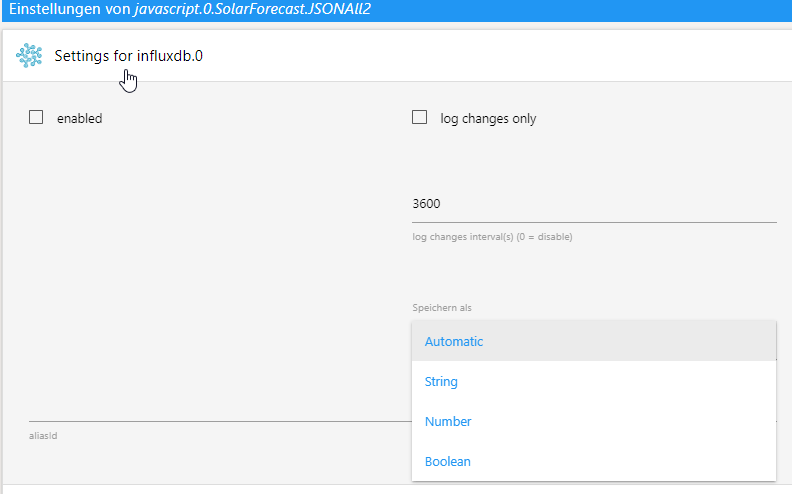
                          f5dc12ae-4188-4e3f-a5b9-9788ccd994fc-image.png

                          EDIT: Hast du deinen Beitrag eben noch editiert? Ich verstehe nicht so genau was du mit dem Ereigniss meinst.

                          Nochmal EDIT:

                          Gerade dein Script ausprobiert - so ganz funktioniert es noch nicht. Die eine Seite liefert nur eine 0

                          08f21fd8-0529-4e7a-a9d3-79a3c842abe9-image.png

                          ioBroker auf Intel Core i3-5005U NUC und Windwos10 Pro

                          GarganoG 2 Antworten Letzte Antwort
                          0
                          • JB_SullivanJ JB_Sullivan

                            @gargano

                            WOW - das ist ja ein Hammer Service !!! Schon geändert - vielen Dank :+1: :+1: :+1:

                            Die Änderung ist aber auch wieder ein json Tabelle. Ich kenne leider die Anforderungen von InfluxDB nicht genau, aber wird die json Tabelle denn überhaupt in die Datenbank schreibbar sein, das man im Anschluss daraus ein GRAFANA Diagramm bauen kann?

                            Geht das nicht nur mit Einzelwerten?

                            f5dc12ae-4188-4e3f-a5b9-9788ccd994fc-image.png

                            EDIT: Hast du deinen Beitrag eben noch editiert? Ich verstehe nicht so genau was du mit dem Ereigniss meinst.

                            Nochmal EDIT:

                            Gerade dein Script ausprobiert - so ganz funktioniert es noch nicht. Die eine Seite liefert nur eine 0

                            08f21fd8-0529-4e7a-a9d3-79a3c842abe9-image.png

                            GarganoG Offline
                            GarganoG Offline
                            Gargano
                            schrieb am zuletzt editiert von
                            #58

                            @jb_sullivan Ein Ereignis oder Trigger ist eine Funktion , die aufgerufen wird, wenn sich ein DP ändert oder upgedatet wird .
                            Z.B.

                            on({id:"javascript.0.SolarForecast.JSONAll1" , change:'ne'}, function (obj) {
                              // fülle Datan in InfluxDB
                            })
                            
                            
                            1 Antwort Letzte Antwort
                            0
                            • JB_SullivanJ JB_Sullivan

                              @gargano

                              WOW - das ist ja ein Hammer Service !!! Schon geändert - vielen Dank :+1: :+1: :+1:

                              Die Änderung ist aber auch wieder ein json Tabelle. Ich kenne leider die Anforderungen von InfluxDB nicht genau, aber wird die json Tabelle denn überhaupt in die Datenbank schreibbar sein, das man im Anschluss daraus ein GRAFANA Diagramm bauen kann?

                              Geht das nicht nur mit Einzelwerten?

                              f5dc12ae-4188-4e3f-a5b9-9788ccd994fc-image.png

                              EDIT: Hast du deinen Beitrag eben noch editiert? Ich verstehe nicht so genau was du mit dem Ereigniss meinst.

                              Nochmal EDIT:

                              Gerade dein Script ausprobiert - so ganz funktioniert es noch nicht. Die eine Seite liefert nur eine 0

                              08f21fd8-0529-4e7a-a9d3-79a3c842abe9-image.png

                              GarganoG Offline
                              GarganoG Offline
                              Gargano
                              schrieb am zuletzt editiert von
                              #59

                              @jb_sullivan Starte nochmal, evtl. war der eine DP noch nicht angelegt.

                              JB_SullivanJ 1 Antwort Letzte Antwort
                              0
                              • GarganoG Gargano

                                @jb_sullivan Starte nochmal, evtl. war der eine DP noch nicht angelegt.

                                JB_SullivanJ Offline
                                JB_SullivanJ Offline
                                JB_Sullivan
                                schrieb am zuletzt editiert von JB_Sullivan
                                #60

                                @gargano

                                Hmmm - neu gestartet und aktualisiert, aber es bleibt dabei. Im LOG steht der folgende Fehler.

                                javascript.0	2021-03-07 14:18:57.807	error	(2136) at process.topLevelDomainCallback (domain.js:126:23)
                                javascript.0	2021-03-07 14:18:57.807	error	(2136) at processImmediate (timers.js:658:5)
                                javascript.0	2021-03-07 14:18:57.807	error	(2136) at tryOnImmediate (timers.js:676:5)
                                javascript.0	2021-03-07 14:18:57.807	error	(2136) at runCallback (timers.js:706:11)
                                javascript.0	2021-03-07 14:18:57.806	error	(2136) at Immediate.adapter.getForeignState [as _onImmediate] (C:\iobroker\GLT\node_modules\iobroker.javascript\main.js:1238:17)
                                javascript.0	2021-03-07 14:18:57.806	error	(2136) at createProblemObject (C:\iobroker\GLT\node_modules\iobroker.javascript\main.js:1722:17)
                                javascript.0	2021-03-07 14:18:57.806	error	(2136) at prepareScript (C:\iobroker\GLT\node_modules\iobroker.javascript\main.js:1621:37)
                                javascript.0	2021-03-07 14:18:57.806	error	(2136) at createVM (C:\iobroker\GLT\node_modules\iobroker.javascript\main.js:1383:28)
                                javascript.0	2021-03-07 14:18:57.806	error	(2136) at Object.createScript (vm.js:277:10)
                                javascript.0	2021-03-07 14:18:57.806	error	(2136) at new Script (vm.js:83:7)
                                javascript.0	2021-03-07 14:18:57.806	error	(2136) SyntaxError: Unexpected token )
                                javascript.0	2021-03-07 14:18:57.805	error	(2136) ^
                                javascript.0	2021-03-07 14:18:57.805	error	(2136) })();
                                javascript.0	2021-03-07 14:18:57.805	error	at script.js.Solar.SolarForcast:110
                                javascript.0	2021-03-07 14:18:57.805	error	(2136) script.js.Solar.SolarForcast compile failed:
                                javascript.0	2021-03-07 14:18:43.412	error	(2136) at process.topLevelDomainCallback (domain.js:126:23)
                                javascript.0	2021-03-07 14:18:43.412	error	(2136) at processImmediate (timers.js:658:5)
                                javascript.0	2021-03-07 14:18:43.412	error	(2136) at tryOnImmediate (timers.js:676:5)
                                javascript.0	2021-03-07 14:18:43.412	error	(2136) at runCallback (timers.js:706:11)
                                javascript.0	2021-03-07 14:18:43.412	error	(2136) at Immediate.adapter.getForeignState [as _onImmediate] (C:\iobroker\GLT\node_modules\iobroker.javascript\main.js:1238:17)
                                javascript.0	2021-03-07 14:18:43.411	error	(2136) at createProblemObject (C:\iobroker\GLT\node_modules\iobroker.javascript\main.js:1722:17)
                                javascript.0	2021-03-07 14:18:43.411	error	(2136) at prepareScript (C:\iobroker\GLT\node_modules\iobroker.javascript\main.js:1621:37)
                                javascript.0	2021-03-07 14:18:43.411	error	(2136) at createVM (C:\iobroker\GLT\node_modules\iobroker.javascript\main.js:1383:28)
                                javascript.0	2021-03-07 14:18:43.411	error	(2136) at Object.createScript (vm.js:277:10)
                                javascript.0	2021-03-07 14:18:43.411	error	(2136) at new Script (vm.js:83:7)
                                javascript.0	2021-03-07 14:18:43.411	error	(2136) SyntaxError: Unexpected token )
                                javascript.0	2021-03-07 14:18:43.410	error	(2136) ^
                                javascript.0	2021-03-07 14:18:43.410	error	(2136) })();
                                javascript.0	2021-03-07 14:18:43.409	error	at script.js.Solar.SolarForcast:110
                                javascript.0	2021-03-07 14:18:43.409	error	(2136) script.js.Solar.SolarForcast compile failed:
                                

                                Nur damit ich es besser verstehe - wenn ich das Loggin von InfluxDB aktiviere wird es keine Probleme geben diesen Datenpunkt so wie er hier geschrieben wird, einzutragen?

                                {"2021-03-07 06:44:00":0,"2021-03-07 07:15:00":45,"2021-03-07 07:45:00":312,"2021-03-07 08:00:00":401,"2021-03-07 08:30:00":615,"2021-03-07 09:00:00":639,"2021-03-07 09:30:00":655,"2021-03-07 10:00:00":876,"2021-03-07 10:30:00":861,"2021-03-07 11:00:00":821,"2021-03-07 11:30:00":774,"2021-03-07 12:00:00":710,"2021-03-07 12:30:00":647,"2021-03-07 13:00:00":681,"2021-03-07 13:30:00":528,"2021-03-07 14:00:00":414,"2021-03-07 14:30:00":327,"2021-03-07 15:00:00":259,"2021-03-07 15:30:00":211,"2021-03-07 16:00:00":164,"2021-03-07 16:30:00":114,"2021-03-07 17:23:00":16,"2021-03-07 18:16:00":0,"2021-03-08 06:42:00":0,"2021-03-08 07:14:00":58,"2021-03-08 07:45:00":401,"2021-03-08 08:00:00":523,"2021-03-08 08:30:00":789,"2021-03-08 09:00:00":1032,"2021-03-08 09:30:00":1214,"2021-03-08 10:00:00":1336,"2021-03-08 10:30:00":1375,"2021-03-08 11:00:00":1365,"2021-03-08 11:30:00":1309,"2021-03-08 12:00:00":1204,"2021-03-08 12:30:00":1045,"2021-03-08 13:00:00":863,"2021-03-08 13:30:00":660,"2021-03-08 14:00:00":483,"2021-03-08 14:30:00":354,"2021-03-08 15:00:00":275,"2021-03-08 15:30:00":227,"2021-03-08 16:00:00":177,"2021-03-08 16:30:00":124,"2021-03-08 17:24:00":18,"2021-03-08 18:18:00":0,"2021-03-09 06:40:00":0,"2021-03-09 07:13:00":16,"2021-03-09 07:45:00":108,"2021-03-09 08:00:00":143,"2021-03-09 08:30:00":214,"2021-03-09 09:00:00":285,"2021-03-09 09:30:00":346,"2021-03-09 10:00:00":399,"2021-03-09 10:30:00":436,"2021-03-09 11:00:00":462,"2021-03-09 11:30:00":478,"2021-03-09 12:00:00":478,"2021-03-09 12:30:00":465,"2021-03-09 13:00:00":438,"2021-03-09 13:30:00":396,"2021-03-09 14:00:00":354,"2021-03-09 14:30:00":312,"2021-03-09 15:00:00":267,"2021-03-09 15:30:00":216,"2021-03-09 16:00:00":166,"2021-03-09 16:30:00":116,"2021-03-09 17:25:00":16,"2021-03-09 18:19:00":0,"2021-03-10 06:38:00":0,"2021-03-10 07:12:00":16,"2021-03-10 07:45:00":116,"2021-03-10 08:00:00":150,"2021-03-10 08:30:00":222,"2021-03-10 09:00:00":288,"2021-03-10 09:30:00":348,"2021-03-10 10:00:00":399,"2021-03-10 10:30:00":433,"2021-03-10 11:00:00":462,"2021-03-10 11:30:00":475,"2021-03-10 12:00:00":475,"2021-03-10 12:30:00":462,"2021-03-10 13:00:00":436,"2021-03-10 13:30:00":391,"2021-03-10 14:00:00":351,"2021-03-10 14:30:00":309,"2021-03-10 15:00:00":264,"2021-03-10 15:30:00":216,"2021-03-10 16:00:00":166,"2021-03-10 16:30:00":116,"2021-03-10 17:26:00":16,"2021-03-10 18:21:00":0}
                                

                                EDIT: Kommando zurück - der Fehler ist von 14:18 Uhr also vom ersten Start der geänderten Script Version. Da waren die beiden DP`s noch nicht angelegt. Jetzt gibt es im LOG keine Fehler mehr - ich habe nicht auf die Uhrzeit geachtet

                                ioBroker auf Intel Core i3-5005U NUC und Windwos10 Pro

                                GarganoG 2 Antworten Letzte Antwort
                                0
                                • JB_SullivanJ JB_Sullivan

                                  @gargano

                                  Hmmm - neu gestartet und aktualisiert, aber es bleibt dabei. Im LOG steht der folgende Fehler.

                                  javascript.0	2021-03-07 14:18:57.807	error	(2136) at process.topLevelDomainCallback (domain.js:126:23)
                                  javascript.0	2021-03-07 14:18:57.807	error	(2136) at processImmediate (timers.js:658:5)
                                  javascript.0	2021-03-07 14:18:57.807	error	(2136) at tryOnImmediate (timers.js:676:5)
                                  javascript.0	2021-03-07 14:18:57.807	error	(2136) at runCallback (timers.js:706:11)
                                  javascript.0	2021-03-07 14:18:57.806	error	(2136) at Immediate.adapter.getForeignState [as _onImmediate] (C:\iobroker\GLT\node_modules\iobroker.javascript\main.js:1238:17)
                                  javascript.0	2021-03-07 14:18:57.806	error	(2136) at createProblemObject (C:\iobroker\GLT\node_modules\iobroker.javascript\main.js:1722:17)
                                  javascript.0	2021-03-07 14:18:57.806	error	(2136) at prepareScript (C:\iobroker\GLT\node_modules\iobroker.javascript\main.js:1621:37)
                                  javascript.0	2021-03-07 14:18:57.806	error	(2136) at createVM (C:\iobroker\GLT\node_modules\iobroker.javascript\main.js:1383:28)
                                  javascript.0	2021-03-07 14:18:57.806	error	(2136) at Object.createScript (vm.js:277:10)
                                  javascript.0	2021-03-07 14:18:57.806	error	(2136) at new Script (vm.js:83:7)
                                  javascript.0	2021-03-07 14:18:57.806	error	(2136) SyntaxError: Unexpected token )
                                  javascript.0	2021-03-07 14:18:57.805	error	(2136) ^
                                  javascript.0	2021-03-07 14:18:57.805	error	(2136) })();
                                  javascript.0	2021-03-07 14:18:57.805	error	at script.js.Solar.SolarForcast:110
                                  javascript.0	2021-03-07 14:18:57.805	error	(2136) script.js.Solar.SolarForcast compile failed:
                                  javascript.0	2021-03-07 14:18:43.412	error	(2136) at process.topLevelDomainCallback (domain.js:126:23)
                                  javascript.0	2021-03-07 14:18:43.412	error	(2136) at processImmediate (timers.js:658:5)
                                  javascript.0	2021-03-07 14:18:43.412	error	(2136) at tryOnImmediate (timers.js:676:5)
                                  javascript.0	2021-03-07 14:18:43.412	error	(2136) at runCallback (timers.js:706:11)
                                  javascript.0	2021-03-07 14:18:43.412	error	(2136) at Immediate.adapter.getForeignState [as _onImmediate] (C:\iobroker\GLT\node_modules\iobroker.javascript\main.js:1238:17)
                                  javascript.0	2021-03-07 14:18:43.411	error	(2136) at createProblemObject (C:\iobroker\GLT\node_modules\iobroker.javascript\main.js:1722:17)
                                  javascript.0	2021-03-07 14:18:43.411	error	(2136) at prepareScript (C:\iobroker\GLT\node_modules\iobroker.javascript\main.js:1621:37)
                                  javascript.0	2021-03-07 14:18:43.411	error	(2136) at createVM (C:\iobroker\GLT\node_modules\iobroker.javascript\main.js:1383:28)
                                  javascript.0	2021-03-07 14:18:43.411	error	(2136) at Object.createScript (vm.js:277:10)
                                  javascript.0	2021-03-07 14:18:43.411	error	(2136) at new Script (vm.js:83:7)
                                  javascript.0	2021-03-07 14:18:43.411	error	(2136) SyntaxError: Unexpected token )
                                  javascript.0	2021-03-07 14:18:43.410	error	(2136) ^
                                  javascript.0	2021-03-07 14:18:43.410	error	(2136) })();
                                  javascript.0	2021-03-07 14:18:43.409	error	at script.js.Solar.SolarForcast:110
                                  javascript.0	2021-03-07 14:18:43.409	error	(2136) script.js.Solar.SolarForcast compile failed:
                                  

                                  Nur damit ich es besser verstehe - wenn ich das Loggin von InfluxDB aktiviere wird es keine Probleme geben diesen Datenpunkt so wie er hier geschrieben wird, einzutragen?

                                  {"2021-03-07 06:44:00":0,"2021-03-07 07:15:00":45,"2021-03-07 07:45:00":312,"2021-03-07 08:00:00":401,"2021-03-07 08:30:00":615,"2021-03-07 09:00:00":639,"2021-03-07 09:30:00":655,"2021-03-07 10:00:00":876,"2021-03-07 10:30:00":861,"2021-03-07 11:00:00":821,"2021-03-07 11:30:00":774,"2021-03-07 12:00:00":710,"2021-03-07 12:30:00":647,"2021-03-07 13:00:00":681,"2021-03-07 13:30:00":528,"2021-03-07 14:00:00":414,"2021-03-07 14:30:00":327,"2021-03-07 15:00:00":259,"2021-03-07 15:30:00":211,"2021-03-07 16:00:00":164,"2021-03-07 16:30:00":114,"2021-03-07 17:23:00":16,"2021-03-07 18:16:00":0,"2021-03-08 06:42:00":0,"2021-03-08 07:14:00":58,"2021-03-08 07:45:00":401,"2021-03-08 08:00:00":523,"2021-03-08 08:30:00":789,"2021-03-08 09:00:00":1032,"2021-03-08 09:30:00":1214,"2021-03-08 10:00:00":1336,"2021-03-08 10:30:00":1375,"2021-03-08 11:00:00":1365,"2021-03-08 11:30:00":1309,"2021-03-08 12:00:00":1204,"2021-03-08 12:30:00":1045,"2021-03-08 13:00:00":863,"2021-03-08 13:30:00":660,"2021-03-08 14:00:00":483,"2021-03-08 14:30:00":354,"2021-03-08 15:00:00":275,"2021-03-08 15:30:00":227,"2021-03-08 16:00:00":177,"2021-03-08 16:30:00":124,"2021-03-08 17:24:00":18,"2021-03-08 18:18:00":0,"2021-03-09 06:40:00":0,"2021-03-09 07:13:00":16,"2021-03-09 07:45:00":108,"2021-03-09 08:00:00":143,"2021-03-09 08:30:00":214,"2021-03-09 09:00:00":285,"2021-03-09 09:30:00":346,"2021-03-09 10:00:00":399,"2021-03-09 10:30:00":436,"2021-03-09 11:00:00":462,"2021-03-09 11:30:00":478,"2021-03-09 12:00:00":478,"2021-03-09 12:30:00":465,"2021-03-09 13:00:00":438,"2021-03-09 13:30:00":396,"2021-03-09 14:00:00":354,"2021-03-09 14:30:00":312,"2021-03-09 15:00:00":267,"2021-03-09 15:30:00":216,"2021-03-09 16:00:00":166,"2021-03-09 16:30:00":116,"2021-03-09 17:25:00":16,"2021-03-09 18:19:00":0,"2021-03-10 06:38:00":0,"2021-03-10 07:12:00":16,"2021-03-10 07:45:00":116,"2021-03-10 08:00:00":150,"2021-03-10 08:30:00":222,"2021-03-10 09:00:00":288,"2021-03-10 09:30:00":348,"2021-03-10 10:00:00":399,"2021-03-10 10:30:00":433,"2021-03-10 11:00:00":462,"2021-03-10 11:30:00":475,"2021-03-10 12:00:00":475,"2021-03-10 12:30:00":462,"2021-03-10 13:00:00":436,"2021-03-10 13:30:00":391,"2021-03-10 14:00:00":351,"2021-03-10 14:30:00":309,"2021-03-10 15:00:00":264,"2021-03-10 15:30:00":216,"2021-03-10 16:00:00":166,"2021-03-10 16:30:00":116,"2021-03-10 17:26:00":16,"2021-03-10 18:21:00":0}
                                  

                                  EDIT: Kommando zurück - der Fehler ist von 14:18 Uhr also vom ersten Start der geänderten Script Version. Da waren die beiden DP`s noch nicht angelegt. Jetzt gibt es im LOG keine Fehler mehr - ich habe nicht auf die Uhrzeit geachtet

                                  GarganoG Offline
                                  GarganoG Offline
                                  Gargano
                                  schrieb am zuletzt editiert von Gargano
                                  #61

                                  @jb_sullivan Da ist ein Problem im Result.
                                  Füge mal nach

                                              let watts = JSON.parse(body).result.watts;
                                  

                                  Dies ein :

                                    console.log ('JSON: '+body);


                                  und poste das Log.

                                  Im MOment weiß ich noch nicht wie man die einzelnen Daten in InfluxDB manuell (also per Progarmm bekommt.

                                  1 Antwort Letzte Antwort
                                  0
                                  • JB_SullivanJ JB_Sullivan

                                    @gargano

                                    Hmmm - neu gestartet und aktualisiert, aber es bleibt dabei. Im LOG steht der folgende Fehler.

                                    javascript.0	2021-03-07 14:18:57.807	error	(2136) at process.topLevelDomainCallback (domain.js:126:23)
                                    javascript.0	2021-03-07 14:18:57.807	error	(2136) at processImmediate (timers.js:658:5)
                                    javascript.0	2021-03-07 14:18:57.807	error	(2136) at tryOnImmediate (timers.js:676:5)
                                    javascript.0	2021-03-07 14:18:57.807	error	(2136) at runCallback (timers.js:706:11)
                                    javascript.0	2021-03-07 14:18:57.806	error	(2136) at Immediate.adapter.getForeignState [as _onImmediate] (C:\iobroker\GLT\node_modules\iobroker.javascript\main.js:1238:17)
                                    javascript.0	2021-03-07 14:18:57.806	error	(2136) at createProblemObject (C:\iobroker\GLT\node_modules\iobroker.javascript\main.js:1722:17)
                                    javascript.0	2021-03-07 14:18:57.806	error	(2136) at prepareScript (C:\iobroker\GLT\node_modules\iobroker.javascript\main.js:1621:37)
                                    javascript.0	2021-03-07 14:18:57.806	error	(2136) at createVM (C:\iobroker\GLT\node_modules\iobroker.javascript\main.js:1383:28)
                                    javascript.0	2021-03-07 14:18:57.806	error	(2136) at Object.createScript (vm.js:277:10)
                                    javascript.0	2021-03-07 14:18:57.806	error	(2136) at new Script (vm.js:83:7)
                                    javascript.0	2021-03-07 14:18:57.806	error	(2136) SyntaxError: Unexpected token )
                                    javascript.0	2021-03-07 14:18:57.805	error	(2136) ^
                                    javascript.0	2021-03-07 14:18:57.805	error	(2136) })();
                                    javascript.0	2021-03-07 14:18:57.805	error	at script.js.Solar.SolarForcast:110
                                    javascript.0	2021-03-07 14:18:57.805	error	(2136) script.js.Solar.SolarForcast compile failed:
                                    javascript.0	2021-03-07 14:18:43.412	error	(2136) at process.topLevelDomainCallback (domain.js:126:23)
                                    javascript.0	2021-03-07 14:18:43.412	error	(2136) at processImmediate (timers.js:658:5)
                                    javascript.0	2021-03-07 14:18:43.412	error	(2136) at tryOnImmediate (timers.js:676:5)
                                    javascript.0	2021-03-07 14:18:43.412	error	(2136) at runCallback (timers.js:706:11)
                                    javascript.0	2021-03-07 14:18:43.412	error	(2136) at Immediate.adapter.getForeignState [as _onImmediate] (C:\iobroker\GLT\node_modules\iobroker.javascript\main.js:1238:17)
                                    javascript.0	2021-03-07 14:18:43.411	error	(2136) at createProblemObject (C:\iobroker\GLT\node_modules\iobroker.javascript\main.js:1722:17)
                                    javascript.0	2021-03-07 14:18:43.411	error	(2136) at prepareScript (C:\iobroker\GLT\node_modules\iobroker.javascript\main.js:1621:37)
                                    javascript.0	2021-03-07 14:18:43.411	error	(2136) at createVM (C:\iobroker\GLT\node_modules\iobroker.javascript\main.js:1383:28)
                                    javascript.0	2021-03-07 14:18:43.411	error	(2136) at Object.createScript (vm.js:277:10)
                                    javascript.0	2021-03-07 14:18:43.411	error	(2136) at new Script (vm.js:83:7)
                                    javascript.0	2021-03-07 14:18:43.411	error	(2136) SyntaxError: Unexpected token )
                                    javascript.0	2021-03-07 14:18:43.410	error	(2136) ^
                                    javascript.0	2021-03-07 14:18:43.410	error	(2136) })();
                                    javascript.0	2021-03-07 14:18:43.409	error	at script.js.Solar.SolarForcast:110
                                    javascript.0	2021-03-07 14:18:43.409	error	(2136) script.js.Solar.SolarForcast compile failed:
                                    

                                    Nur damit ich es besser verstehe - wenn ich das Loggin von InfluxDB aktiviere wird es keine Probleme geben diesen Datenpunkt so wie er hier geschrieben wird, einzutragen?

                                    {"2021-03-07 06:44:00":0,"2021-03-07 07:15:00":45,"2021-03-07 07:45:00":312,"2021-03-07 08:00:00":401,"2021-03-07 08:30:00":615,"2021-03-07 09:00:00":639,"2021-03-07 09:30:00":655,"2021-03-07 10:00:00":876,"2021-03-07 10:30:00":861,"2021-03-07 11:00:00":821,"2021-03-07 11:30:00":774,"2021-03-07 12:00:00":710,"2021-03-07 12:30:00":647,"2021-03-07 13:00:00":681,"2021-03-07 13:30:00":528,"2021-03-07 14:00:00":414,"2021-03-07 14:30:00":327,"2021-03-07 15:00:00":259,"2021-03-07 15:30:00":211,"2021-03-07 16:00:00":164,"2021-03-07 16:30:00":114,"2021-03-07 17:23:00":16,"2021-03-07 18:16:00":0,"2021-03-08 06:42:00":0,"2021-03-08 07:14:00":58,"2021-03-08 07:45:00":401,"2021-03-08 08:00:00":523,"2021-03-08 08:30:00":789,"2021-03-08 09:00:00":1032,"2021-03-08 09:30:00":1214,"2021-03-08 10:00:00":1336,"2021-03-08 10:30:00":1375,"2021-03-08 11:00:00":1365,"2021-03-08 11:30:00":1309,"2021-03-08 12:00:00":1204,"2021-03-08 12:30:00":1045,"2021-03-08 13:00:00":863,"2021-03-08 13:30:00":660,"2021-03-08 14:00:00":483,"2021-03-08 14:30:00":354,"2021-03-08 15:00:00":275,"2021-03-08 15:30:00":227,"2021-03-08 16:00:00":177,"2021-03-08 16:30:00":124,"2021-03-08 17:24:00":18,"2021-03-08 18:18:00":0,"2021-03-09 06:40:00":0,"2021-03-09 07:13:00":16,"2021-03-09 07:45:00":108,"2021-03-09 08:00:00":143,"2021-03-09 08:30:00":214,"2021-03-09 09:00:00":285,"2021-03-09 09:30:00":346,"2021-03-09 10:00:00":399,"2021-03-09 10:30:00":436,"2021-03-09 11:00:00":462,"2021-03-09 11:30:00":478,"2021-03-09 12:00:00":478,"2021-03-09 12:30:00":465,"2021-03-09 13:00:00":438,"2021-03-09 13:30:00":396,"2021-03-09 14:00:00":354,"2021-03-09 14:30:00":312,"2021-03-09 15:00:00":267,"2021-03-09 15:30:00":216,"2021-03-09 16:00:00":166,"2021-03-09 16:30:00":116,"2021-03-09 17:25:00":16,"2021-03-09 18:19:00":0,"2021-03-10 06:38:00":0,"2021-03-10 07:12:00":16,"2021-03-10 07:45:00":116,"2021-03-10 08:00:00":150,"2021-03-10 08:30:00":222,"2021-03-10 09:00:00":288,"2021-03-10 09:30:00":348,"2021-03-10 10:00:00":399,"2021-03-10 10:30:00":433,"2021-03-10 11:00:00":462,"2021-03-10 11:30:00":475,"2021-03-10 12:00:00":475,"2021-03-10 12:30:00":462,"2021-03-10 13:00:00":436,"2021-03-10 13:30:00":391,"2021-03-10 14:00:00":351,"2021-03-10 14:30:00":309,"2021-03-10 15:00:00":264,"2021-03-10 15:30:00":216,"2021-03-10 16:00:00":166,"2021-03-10 16:30:00":116,"2021-03-10 17:26:00":16,"2021-03-10 18:21:00":0}
                                    

                                    EDIT: Kommando zurück - der Fehler ist von 14:18 Uhr also vom ersten Start der geänderten Script Version. Da waren die beiden DP`s noch nicht angelegt. Jetzt gibt es im LOG keine Fehler mehr - ich habe nicht auf die Uhrzeit geachtet

                                    GarganoG Offline
                                    GarganoG Offline
                                    Gargano
                                    schrieb am zuletzt editiert von
                                    #62

                                    @jb_sullivan ok, also geht schon mal bis hierher.

                                    JB_SullivanJ 1 Antwort Letzte Antwort
                                    0
                                    • GarganoG Gargano

                                      @jb_sullivan ok, also geht schon mal bis hierher.

                                      JB_SullivanJ Offline
                                      JB_SullivanJ Offline
                                      JB_Sullivan
                                      schrieb am zuletzt editiert von
                                      #63

                                      @gargano War die Korrektur aufs LOG bezogen oder auf den "0" Wert?

                                      ioBroker auf Intel Core i3-5005U NUC und Windwos10 Pro

                                      GarganoG 1 Antwort Letzte Antwort
                                      0
                                      • JB_SullivanJ JB_Sullivan

                                        @gargano War die Korrektur aufs LOG bezogen oder auf den "0" Wert?

                                        GarganoG Offline
                                        GarganoG Offline
                                        Gargano
                                        schrieb am zuletzt editiert von
                                        #64

                                        @jb_sullivan Beides, aber es geht ja jetzt ?

                                        JB_SullivanJ 1 Antwort Letzte Antwort
                                        0
                                        • GarganoG Gargano

                                          @jb_sullivan Beides, aber es geht ja jetzt ?

                                          JB_SullivanJ Offline
                                          JB_SullivanJ Offline
                                          JB_Sullivan
                                          schrieb am zuletzt editiert von JB_Sullivan
                                          #65

                                          @gargano Nein - bei dem einen DP steht immer noch "0", aber es gibt auch keinen aktuellen Fehler LOG Eintrag - ich schalte mal auf DEBUG um.

                                          FEHLER gefunden !!! Beim 2. Eintrag war in meiner API ein Zeichen zu viel :confounded: Shame on me

                                          ioBroker auf Intel Core i3-5005U NUC und Windwos10 Pro

                                          GarganoG 2 Antworten Letzte Antwort
                                          0
                                          Antworten
                                          • In einem neuen Thema antworten
                                          Anmelden zum Antworten
                                          • Älteste zuerst
                                          • Neuste zuerst
                                          • Meiste Stimmen


                                          Support us

                                          ioBroker
                                          Community Adapters
                                          Donate
                                          FAQ Cloud / IOT
                                          HowTo: Node.js-Update
                                          HowTo: Backup/Restore
                                          Downloads
                                          BLOG

                                          821

                                          Online

                                          32.4k

                                          Benutzer

                                          81.5k

                                          Themen

                                          1.3m

                                          Beiträge
                                          Community
                                          Impressum | Datenschutz-Bestimmungen | Nutzungsbedingungen | Einwilligungseinstellungen
                                          ioBroker Community 2014-2025
                                          logo
                                          • Anmelden

                                          • Du hast noch kein Konto? Registrieren

                                          • Anmelden oder registrieren, um zu suchen
                                          • Erster Beitrag
                                            Letzter Beitrag
                                          0
                                          • Home
                                          • Aktuell
                                          • Tags
                                          • Ungelesen 0
                                          • Kategorien
                                          • Unreplied
                                          • Beliebt
                                          • GitHub
                                          • Docu
                                          • Hilfe