




Fehler bei Shelly Adaper Installation
-
Guten Tag
beim Versuch den Shelly Adapter zu Installieren bekomme ich immer diese Fehlermeldung. Iobroker läuft auf einem Raspberry pi 3b. Kann mir jemand helfen? Wäre sehr dankbar.
Grüsse, Markus
@simar
Bitte Texte auch als Text (in CodeTags) hier rein, keine Screenshots. -
Guten Tag
beim Versuch den Shelly Adapter zu Installieren bekomme ich immer diese Fehlermeldung. Iobroker läuft auf einem Raspberry pi 3b. Kann mir jemand helfen? Wäre sehr dankbar.
Grüsse, Markus@simar $
./iobroker add shelly  --host raspberrypi

NPM version: 6.14.8
npm install iobroker.shelly@4.0.3 --loglevel error --prefix "/opt/iobroker" (System call)
npm

ERR!

code
 EINTEGRITY
npm
 ERR! errno EINTEGRITY
npm
ERR! Invalid response body while trying to fetch https://registry.npmjs.org/typedarray: Integrity verification failed for sha512-MOtT4rW6q0jko4EuJ2l25Veb5coa8CP6h7duOR/DLXXk2ZWjFGokVpWSneavhxToXzY0raT74ioxReuXtmKTag== (/home/iobroker/.npm/_cacache/content-v2/sha512/30/eb/53e2b5baab48e4a3812e276976e5579be5ca1af023fa87b76e391fc32d75e4d995a3146a245695929de6af8714e85f3634ada4fbe22a3145eb97b662936a)

npm
ERR! A complete log of this run can be found in:npm ERR!     /home/iobroker/.npm/_logs/2020-11-20T11_52_33_378Z-debug.log
ERROR: host.raspberrypi Cannot install iobroker.shelly@4.0.3: 1
ERROR: process exited with code 25
MOD-Edit: Code in code-tags gesetzt!
-
@simar $
./iobroker add shelly  --host raspberrypi

NPM version: 6.14.8
npm install iobroker.shelly@4.0.3 --loglevel error --prefix "/opt/iobroker" (System call)
npm

ERR!

code
 EINTEGRITY
npm
 ERR! errno EINTEGRITY
npm
ERR! Invalid response body while trying to fetch https://registry.npmjs.org/typedarray: Integrity verification failed for sha512-MOtT4rW6q0jko4EuJ2l25Veb5coa8CP6h7duOR/DLXXk2ZWjFGokVpWSneavhxToXzY0raT74ioxReuXtmKTag== (/home/iobroker/.npm/_cacache/content-v2/sha512/30/eb/53e2b5baab48e4a3812e276976e5579be5ca1af023fa87b76e391fc32d75e4d995a3146a245695929de6af8714e85f3634ada4fbe22a3145eb97b662936a)

npm
ERR! A complete log of this run can be found in:npm ERR!     /home/iobroker/.npm/_logs/2020-11-20T11_52_33_378Z-debug.log
ERROR: host.raspberrypi Cannot install iobroker.shelly@4.0.3: 1
ERROR: process exited with code 25
MOD-Edit: Code in code-tags gesetzt!
cd /opt/iobroker
npm cache clean --force
alternativ in einer Zeile:
cd /opt/iobroker && npm cache clean --force -
cd /opt/iobroker
npm cache clean --force
alternativ in einer Zeile:
cd /opt/iobroker && npm cache clean --force@Thomas-Braun said in Fehler bei Shelly Adaper Installation:
cd /opt/iobroker && npm cache clean --force
Danke Thomas, hat funktioniert
-
@thomas-braun
Habe nach einer neuinstallation leider wieder das selbe Problem. Kann es nicht mit deinen letzten Befehlen lösen. Kannst du bitte nochmals helfen. (weis nicht wie Code Tags einfügen)
$ ./iobroker url "https://github.com/schmupu/ioBroker.shelly/tarball/master" shelly
install https://github.com/schmupu/ioBroker.shelly/tarball/master
NPM version: 6.14.10
npm install https://github.com/schmupu/ioBroker.shelly/tarball/master --loglevel error --prefix "/opt/iobroker" (System call)
upload [12] shelly.admin /opt/iobroker/node_modules/iobroker.shelly/admin/words.js words.js application/javascript
upload [11] shelly.admin /opt/iobroker/node_modules/iobroker.shelly/admin/shelly.png shelly.png image/png
upload [10] shelly.admin /opt/iobroker/node_modules/iobroker.shelly/admin/index_m.html index_m.html text/html
upload [9] shelly.admin /opt/iobroker/node_modules/iobroker.shelly/admin/i18n/zh-cn/translations.json i18n/zh-cn/translations.json application/json
upload [8] shelly.admin /opt/iobroker/node_modules/iobroker.shelly/admin/i18n/ru/translations.json i18n/ru/translations.json application/json
upload [7] shelly.admin /opt/iobroker/node_modules/iobroker.shelly/admin/i18n/pt/translations.json i18n/pt/translations.json application/json
upload [6] shelly.admin /opt/iobroker/node_modules/iobroker.shelly/admin/i18n/pl/translations.json i18n/pl/translations.json application/json
upload [5] shelly.admin /opt/iobroker/node_modules/iobroker.shelly/admin/i18n/nl/translations.json i18n/nl/translations.json application/json
upload [4] shelly.admin /opt/iobroker/node_modules/iobroker.shelly/admin/i18n/it/translations.json i18n/it/translations.json application/json
upload [3] shelly.admin /opt/iobroker/node_modules/iobroker.shelly/admin/i18n/fr/translations.json i18n/fr/translations.json application/json
upload [2] shelly.admin /opt/iobroker/node_modules/iobroker.shelly/admin/i18n/es/translations.json i18n/es/translations.json application/json
upload [1] shelly.admin /opt/iobroker/node_modules/iobroker.shelly/admin/i18n/en/translations.json i18n/en/translations.json application/json
upload [0] shelly.admin /opt/iobroker/node_modules/iobroker.shelly/admin/i18n/de/translations.json i18n/de/translations.json application/json
process exited with code 0Danke
-
@thomas-braun
Habe nach einer neuinstallation leider wieder das selbe Problem. Kann es nicht mit deinen letzten Befehlen lösen. Kannst du bitte nochmals helfen. (weis nicht wie Code Tags einfügen)
$ ./iobroker url "https://github.com/schmupu/ioBroker.shelly/tarball/master" shelly
install https://github.com/schmupu/ioBroker.shelly/tarball/master
NPM version: 6.14.10
npm install https://github.com/schmupu/ioBroker.shelly/tarball/master --loglevel error --prefix "/opt/iobroker" (System call)
upload [12] shelly.admin /opt/iobroker/node_modules/iobroker.shelly/admin/words.js words.js application/javascript
upload [11] shelly.admin /opt/iobroker/node_modules/iobroker.shelly/admin/shelly.png shelly.png image/png
upload [10] shelly.admin /opt/iobroker/node_modules/iobroker.shelly/admin/index_m.html index_m.html text/html
upload [9] shelly.admin /opt/iobroker/node_modules/iobroker.shelly/admin/i18n/zh-cn/translations.json i18n/zh-cn/translations.json application/json
upload [8] shelly.admin /opt/iobroker/node_modules/iobroker.shelly/admin/i18n/ru/translations.json i18n/ru/translations.json application/json
upload [7] shelly.admin /opt/iobroker/node_modules/iobroker.shelly/admin/i18n/pt/translations.json i18n/pt/translations.json application/json
upload [6] shelly.admin /opt/iobroker/node_modules/iobroker.shelly/admin/i18n/pl/translations.json i18n/pl/translations.json application/json
upload [5] shelly.admin /opt/iobroker/node_modules/iobroker.shelly/admin/i18n/nl/translations.json i18n/nl/translations.json application/json
upload [4] shelly.admin /opt/iobroker/node_modules/iobroker.shelly/admin/i18n/it/translations.json i18n/it/translations.json application/json
upload [3] shelly.admin /opt/iobroker/node_modules/iobroker.shelly/admin/i18n/fr/translations.json i18n/fr/translations.json application/json
upload [2] shelly.admin /opt/iobroker/node_modules/iobroker.shelly/admin/i18n/es/translations.json i18n/es/translations.json application/json
upload [1] shelly.admin /opt/iobroker/node_modules/iobroker.shelly/admin/i18n/en/translations.json i18n/en/translations.json application/json
upload [0] shelly.admin /opt/iobroker/node_modules/iobroker.shelly/admin/i18n/de/translations.json i18n/de/translations.json application/json
process exited with code 0Danke
@simar
Text markieren; Icon anklicken:
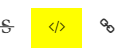
Fertig.
Davon abgesehen: Wo ist dein Problem?
Der Adapter wird doch installiert:process exited with code 0

Hey! Du scheinst an dieser Unterhaltung interessiert zu sein, hast aber noch kein Konto.
Hast du es satt, bei jedem Besuch durch die gleichen Beiträge zu scrollen? Wenn du dich für ein Konto anmeldest, kommst du immer genau dorthin zurück, wo du zuvor warst, und kannst dich über neue Antworten benachrichtigen lassen (entweder per E-Mail oder Push-Benachrichtigung). Du kannst auch Lesezeichen speichern und Beiträge positiv bewerten, um anderen Community-Mitgliedern deine Wertschätzung zu zeigen.
Mit deinem Input könnte dieser Beitrag noch besser werden 💗
Registrieren AnmeldenSupport us
238
Online33.0k
Benutzer83.6k
Themen1.3m
Beiträge