




Update Funktion im Admin geht nicht
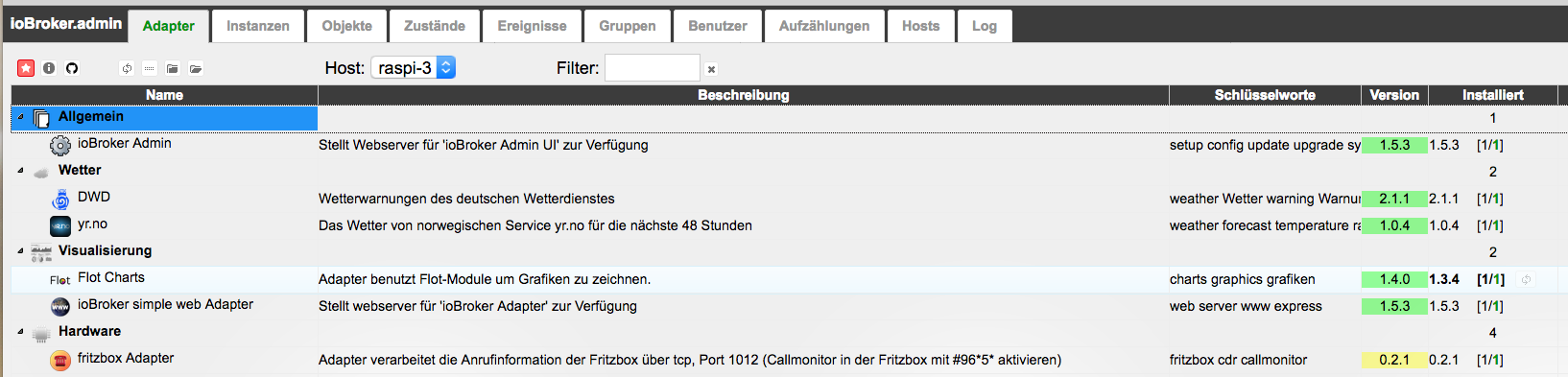
-
Hi Fitti
Update und Upgrade habe ich wohl nicht hintereinder gemacht.
@Fitti:Dafür geht admin nach Update nicht mehr…. :evil: `
Aber ich warte besser noch etwas.
Grüße
-
Hallo
kleiner Hinweis zum js-controller bzw. zum Admin
Auf der Karteikarte Hosts ist das Updatesymbol nicht sichtbar (schon seit einigen Versionen)
Wenn man mit der Maus ein wenig rechts neben der Versionsnummer klickt, wird das Update aber ausgeführt.
-
Simsalabim ich habe den js-controller 0.12.2 drauf :)
Hat sich über Nacht wohl selbst aktualisiert.
Nun kann ich auch die anderen Updates anwählen.
Jetzt erstmal ein Snapshot vom System und dann gehts weiter.
Grüße
-
Hallo zusammen,
habe leichtfertig ein admin update in der GUI angestoßen, ohne zuvor den js-controller (von 12.0 auf 12.2) zu updaten. Nach zwei Stunden und mehreren Backup-Versuchen habe ich immerhin wieder den Stand von gestern Abend.
Ich bekomme es einfach nicht hin, js-controller zu aktualisieren. Auf der Console bekomme ich immer folgende Fehler:
! root@ioBroker:/opt/iobroker# npm cache clean
! root@ioBroker:/opt/iobroker# npm install iobroker.js-controller –production
! npm ERR! Linux 4.4.17-v7+
! npm ERR! argv "/usr/bin/nodejs" "/usr/bin/npm" "install" "iobroker.js-controller" "--production"
! npm ERR! node v4.5.0
! npm ERR! npm v2.15.9
! npm ERR! path /opt/iobroker/node_modules/iobroker.js-controller
! npm ERR! code EISGIT
! npm ERR! git Appears to be a git repo or submodule.
! npm ERR! git /opt/iobroker/node_modules/iobroker.js-controller
! npm ERR! git Refusing to remove it. Update manually,
! npm ERR! git or move it out of the way first.
! npm ERR! Please include the following file with any support request:
! npm ERR! /opt/iobroker/npm-debug.logWürde mich freuen, wenn mir jemand einen Tipp geben kann :D
-
Hallo Griesemer
Bei mir läuft es jetzt.
Meine manuellen Versuche sind vorher auch alle gescheitert.
Das "wundersame" Update meines js-controllers kann ich mir nur so erklären.
Ich hatte im Admin-Adapter "aktiver Verwahrungsort" auf "online" gestellt. (rechts oben das Zahnrädchen)
Grüße
-
Hallo zusammen,
habe leichtfertig ein admin update in der GUI angestoßen, ohne zuvor den js-controller (von 12.0 auf 12.2) zu updaten. Nach zwei Stunden und mehreren Backup-Versuchen habe ich immerhin wieder den Stand von gestern Abend.
Ich bekomme es einfach nicht hin, js-controller zu aktualisieren. Auf der Console bekomme ich immer folgende Fehler:
! root@ioBroker:/opt/iobroker# npm cache clean
! root@ioBroker:/opt/iobroker# npm install iobroker.js-controller –production
! npm ERR! Linux 4.4.17-v7+
! npm ERR! argv "/usr/bin/nodejs" "/usr/bin/npm" "install" "iobroker.js-controller" "--production"
! npm ERR! node v4.5.0
! npm ERR! npm v2.15.9
! npm ERR! path /opt/iobroker/node_modules/iobroker.js-controller
! npm ERR! code EISGIT
! npm ERR! git Appears to be a git repo or submodule.
! npm ERR! git /opt/iobroker/node_modules/iobroker.js-controller
! npm ERR! git Refusing to remove it. Update manually,
! npm ERR! git or move it out of the way first.
! npm ERR! Please include the following file with any support request:
! npm ERR! /opt/iobroker/npm-debug.logWürde mich freuen, wenn mir jemand einen Tipp geben kann :D `
Habe es hinbekommen. Dazu habe ich das Verzeichnis/opt/iobroker/node_modules/iobroker.js-controller
umbenannt und danach mit
npm install iobroker.js-controller –production
das update erfolgreich durchgeführt.
-
Hat jemand noch eine Idee, wie ich den admin zum laufen bekommen kann? Läuft seit vorgestern nicht mehr. Vis läuft aber.
habe mit
iobroker update admin
iobroker upgrade admin
npm install iobroker.admin
versucht. Vorher stop und danach start, reboot - dad dingens will nicht. Sehe ab und wann das Zahnrad. Auch werden 1000ende von Zeilen im Debugger angezeigt.
Irgendwann kommt der Fehler:
TypeError: this.main is undefined adminEnums.js:302 Enums/this.init() adminEnums.js:3 -
Dann kommt das hier:
 /opt/iobroker>npm install iobroker/iobroker.admin --production
npm WARN addRemoteGit Error: not found: git
npm WARN addRemoteGit     at getNotFoundError (/usr/lib/node_modules/npm/node_modules/which/which.js:14:12)
npm WARN addRemoteGit     at F (/usr/lib/node_modules/npm/node_modules/which/which.js:69:19)
npm WARN addRemoteGit     at E (/usr/lib/node_modules/npm/node_modules/which/which.js:81:29)
npm WARN addRemoteGit     at /usr/lib/node_modules/npm/node_modules/which/which.js:90:16
npm WARN addRemoteGit     at /usr/lib/node_modules/npm/node_modules/which/node_modules/isexe/index.js:44:5
npm WARN addRemoteGit     at /usr/lib/node_modules/npm/node_modules/which/node_modules/isexe/access.js:8:5
npm WARN addRemoteGit     at FSReqWrap.oncomplete (fs.js:82:15)
npm WARN addRemoteGit  iobroker/iobroker.admin resetting remote /root/.npm/_git-remotes/git-github-com-iobroker-iobroker-admin-git-6dd618fc because of error: { [Error: not found: git] code: 'ENOGIT' }
npm ERR! git clone --template=/root/.npm/_git-remotes/_templates --mirror git://github.com/iobroker/iobroker.admin.git /root/.npm/_git-remotes/git-github-com-iobroker-iobroker-admin-git-6dd618fc: undefined
npm ERR! git clone --template=/root/.npm/_git-remotes/_templates --mirror git://github.com/iobroker/iobroker.admin.git /root/.npm/_git-remotes/git-github-com-iobroker-iobroker-admin-git-6dd618fc: undefined
npm WARN addRemoteGit Error: not found: git
npm WARN addRemoteGit     at getNotFoundError (/usr/lib/node_modules/npm/node_modules/which/which.js:14:12)
npm WARN addRemoteGit     at F (/usr/lib/node_modules/npm/node_modules/which/which.js:69:19)
npm WARN addRemoteGit     at E (/usr/lib/node_modules/npm/node_modules/which/which.js:81:29)
npm WARN addRemoteGit     at /usr/lib/node_modules/npm/node_modules/which/which.js:90:16
npm WARN addRemoteGit     at /usr/lib/node_modules/npm/node_modules/which/node_modules/isexe/index.js:44:5
npm WARN addRemoteGit     at /usr/lib/node_modules/npm/node_modules/which/node_modules/isexe/access.js:8:5
npm WARN addRemoteGit     at FSReqWrap.oncomplete (fs.js:82:15)
npm WARN addRemoteGit  iobroker/iobroker.admin resetting remote /root/.npm/_git-remotes/https-github-com-iobroker-iobroker-admin-git-acd05b01 because of error: { [Error: not found: git] code: 'ENOGIT' }
npm ERR! git clone --template=/root/.npm/_git-remotes/_templates --mirror https://github.com/iobroker/iobroker.admin.git /root/.npm/_git-remotes/https-github-com-iobroker-iobroker-admin-git-acd05b01: undefined
npm ERR! git clone --template=/root/.npm/_git-remotes/_templates --mirror https://github.com/iobroker/iobroker.admin.git /root/.npm/_git-remotes/https-github-com-iobroker-iobroker-admin-git-acd05b01: undefined
npm WARN addRemoteGit Error: not found: git
npm WARN addRemoteGit     at getNotFoundError (/usr/lib/node_modules/npm/node_modules/which/which.js:14:12)
npm WARN addRemoteGit     at F (/usr/lib/node_modules/npm/node_modules/which/which.js:69:19)
npm WARN addRemoteGit     at E (/usr/lib/node_modules/npm/node_modules/which/which.js:81:29)
npm WARN addRemoteGit     at /usr/lib/node_modules/npm/node_modules/which/which.js:90:16
npm WARN addRemoteGit     at /usr/lib/node_modules/npm/node_modules/which/node_modules/isexe/index.js:44:5
npm WARN addRemoteGit     at /usr/lib/node_modules/npm/node_modules/which/node_modules/isexe/access.js:8:5
npm WARN addRemoteGit     at FSReqWrap.oncomplete (fs.js:82:15)
npm WARN addRemoteGit  iobroker/iobroker.admin resetting remote /root/.npm/_git-remotes/git-github-com-iobroker-iobroker-admin-git-5684d19d because of error: { [Error: not found: git] code: 'ENOGIT' }
npm ERR! git clone --template=/root/.npm/_git-remotes/_templates --mirror git@github.com:iobroker/iobroker.admin.git /root/.npm/_git-remotes/git-github-com-iobroker-iobroker-admin-git-5684d19d: undefined
npm ERR! git clone --template=/root/.npm/_git-remotes/_templates --mirror git@github.com:iobroker/iobroker.admin.git /root/.npm/_git-remotes/git-github-com-iobroker-iobroker-admin-git-5684d19d: undefined
npm ERR! Linux 3.4.39
npm ERR! argv "/usr/bin/nodejs" "/usr/bin/npm" "install" "iobroker/iobroker.admin" "--production"
npm ERR! node v4.4.7
npm ERR! npm  v2.15.8
npm ERR! code ENOGIT

npm ERR! not found: git
npm ERR!
npm ERR! Failed using git.
npm ERR! This is most likely not a problem with npm itself.
npm ERR! Please check if you have git installed and in your PATH.

npm ERR! Please include the following file with any support request:
npm ERR!     /opt/iobroker/npm-debug.log
root@galcubebroker:/opt/iobroker# npm install ioBroker/ioBroker.admin --production
npm ERR! git clone --template=/root/.npm/_git-remotes/_templates --mirror git@github.com:iobroker/ioBroker.admin.git /root/.npm/_git-remotes/git-github-com-iobroker-ioBroker-admin-git-1d2186b9: undefined
npm ERR! git clone --template=/root/.npm/_git-remotes/_templates --mirror git@github.com:iobroker/ioBroker.admin.git /root/.npm/_git-remotes/git-github-com-iobroker-ioBroker-admin-git-1d2186b9: undefined
npm ERR! Linux 3.4.39
npm ERR! argv "/usr/bin/nodejs" "/usr/bin/npm" "install" "ioBroker/ioBroker.admin" "--production"
npm ERR! node v4.4.7
npm ERR! npm  v2.15.8
npm ERR! code ENOGIT

npm ERR! not found: git
npm ERR!
npm ERR! Failed using git.
npm ERR! This is most likely not a problem with npm itself.
npm ERR! Please check if you have git installed and in your PATH.

npm ERR! Please include the following file with any support request:
npm ERR!     /opt/iobroker/npm-debug.log


Hey! Du scheinst an dieser Unterhaltung interessiert zu sein, hast aber noch kein Konto.
Hast du es satt, bei jedem Besuch durch die gleichen Beiträge zu scrollen? Wenn du dich für ein Konto anmeldest, kommst du immer genau dorthin zurück, wo du zuvor warst, und kannst dich über neue Antworten benachrichtigen lassen (entweder per E-Mail oder Push-Benachrichtigung). Du kannst auch Lesezeichen speichern und Beiträge positiv bewerten, um anderen Community-Mitgliedern deine Wertschätzung zu zeigen.
Mit deinem Input könnte dieser Beitrag noch besser werden 💗
Registrieren Anmelden412
Online33.0k
Benutzer83.5k
Themen1.3m
Beiträge