Skip to content
  • Home
  • Aktuell
  • Tags
  • 0 Ungelesen 0
  • Kategorien
  • Unreplied
  • Beliebt
  • GitHub
  • Docu
  • Hilfe
Skins
  • Light
  • Brite
  • Cerulean
  • Cosmo
  • Flatly
  • Journal
  • Litera
  • Lumen
  • Lux
  • Materia
  • Minty
  • Morph
  • Pulse
  • Sandstone
  • Simplex
  • Sketchy
  • Spacelab
  • United
  • Yeti
  • Zephyr
  • Dark
  • Cyborg
  • Darkly
  • Quartz
  • Slate
  • Solar
  • Superhero
  • Vapor

  • Standard: (Kein Skin)
  • Kein Skin
Einklappen
ioBroker Logo

Community Forum

donate donate
  1. ioBroker Community Home
  2. Deutsch
  3. Error/Bug
  4. Hilfe!!! Iobroker Oberfläche nicht erreichbar!
NEWS

  • Jahresrückblick 2025 – unser neuer Blogbeitrag ist online! ✨
    BluefoxB
    Bluefox
    17
    1
    2.5k

  • Neuer Blogbeitrag: Monatsrückblick - Dezember 2025 🎄
    BluefoxB
    Bluefox
    13
    1
    991

  • Weihnachtsangebot 2025! 🎄
    BluefoxB
    Bluefox
    25
    1
    2.3k

Hilfe!!! Iobroker Oberfläche nicht erreichbar!

Geplant Angeheftet Gesperrt Verschoben Ungelöst Error/Bug
iobroker startet nichtoberfläche nicht erreichbar
68 Beiträge 4 Kommentatoren 1.8k Aufrufe 3 Watching
  • Älteste zuerst
  • Neuste zuerst
  • Meiste Stimmen
Antworten
  • In einem neuen Thema antworten
Anmelden zum Antworten
Dieses Thema wurde gelöscht. Nur Nutzer mit entsprechenden Rechten können es sehen.
  • GlasfaserG Glasfaser

    @brokeling

    Zeige mal bitte die Ausgabe von

    cd /opt/iobroker 
    
    ps auxww|grep io
    

    Laut Log laufen viele Adapter doppelt . ( PID .... )

    hast du die Adapter gestoppt

    iobroker stop luftdaten.4
    iobroker stop luftdaten.3
    iobroker stop luftdaten.2
    iobroker stop luftdaten.1
    
    B Offline
    B Offline
    brokeling
    schrieb am zuletzt editiert von
    #30

    @Glasfaser

    pi@raspi:~ $ cd /opt/iobroker
    pi@raspi:/opt/iobroker $ ps auxww|grep ioroot        11  0.0  0.0      0     0 ?        S    23:06   0:00 [migration/0]
    root        14  0.0  0.0      0     0 ?        S    23:06   0:00 [migration/1]
    root        19  0.0  0.0      0     0 ?        S    23:06   0:00 [migration/2]
    root        24  0.0  0.0      0     0 ?        S    23:06   0:00 [migration/3]
    root        53  0.0  0.0      0     0 ?        I<   23:06   0:00 [blkcg_punt_bio]
    root        57  0.0  0.0      0     0 ?        I<   23:06   0:00 [rpciod]
    root        59  0.0  0.0      0     0 ?        I<   23:06   0:00 [xprtiod]
    root        61  0.0  0.0      0     0 ?        I<   23:06   0:00 [nfsiod]
    root        67  0.0  0.0      0     0 ?        I<   23:06   0:00 [DWC Notificatio]message+   386  0.0  0.0   6664  3600 ?        Ss   23:06   0:00 /usr/bin/dbus-daemon --system --address=systemd: --nofork --nopidfile --systemd-activation --syslog-only
    iobroker   703 21.2  3.7 233372 146692 ?       Ssl  23:06  10:51 iobroker.js-controller
    iobroker  1066  3.0  4.0 265180 159788 ?       Sl   23:07   1:34 io.admin.0
    iobroker  1142  0.2  1.5 155580 61992 ?        Sl   23:07   0:07 io.info.0
    iobroker  1319  6.5  3.9 239672 153900 ?       Sl   23:07   3:19 io.web.0
    iobroker  1724  1.7  5.6 325348 220020 ?       Sl   23:07   0:54 io.javascript.0
    iobroker  1769  0.1  1.3 150080 52168 ?        Sl   23:07   0:05 io.pushover.0
    iobroker  1800  0.8  1.6 159764 64748 ?        Sl   23:07   0:24 io.sonoff.0
    iobroker  1915  0.2  2.0 167796 79940 ?        Sl   23:07   0:07 io.backitup.0
    iobroker  1948  0.6  1.9 160532 74828 ?        Sl   23:07   0:18 io.deconz.0
    iobroker  1973  1.8  1.9 165476 77972 ?        Rl   23:07   0:54 io.sql.0
    iobroker  2161  0.2  1.7 159112 67284 ?        Sl   23:07   0:08 io.telegram.0
    iobroker  2227  0.0  0.8  92012 32604 ?        Rl   23:58   0:00 /usr/bin/node /opt/iobroker/node_modules/iobroker.luftdaten/main.js 4 info
    pi        2235  0.0  0.0   7360   524 pts/0    S+   23:58   0:00 grep --color=auto io
    iobroker  2237  0.2  1.6 155220 64420 ?        Sl   23:07   0:06 io.cloud.0
    iobroker  2283  1.5  4.7 296872 187680 ?       Sl   23:08   0:45 io.mqtt.0
    iobroker  2330  0.1  1.2 139592 49212 ?        Sl   23:08   0:04 io.text2command.0iobroker  2466  0.2  1.3 147892 52048 ?        Sl   23:08   0:06 io.statistics.0
    iobroker  2499  0.2  1.3 148608 54776 ?        Sl   23:08   0:07 io.ping.1
    iobroker  2535  0.1  1.4 152140 56376 ?        Sl   23:08   0:05 io.nuki.0
    iobroker  2611  0.1  1.3 149492 54244 ?        Sl   23:08   0:05 io.chromecast.0
    iobroker  2650  0.1  1.3 150496 53720 ?        Sl   23:08   0:05 io.sayit.0
    iobroker  2726  0.1  1.3 149192 53192 ?        Sl   23:08   0:05 io.sayit.1
    pi@raspi:/opt/iobroker $
    
    
    GlasfaserG 1 Antwort Letzte Antwort
    0
    • B brokeling

      @Glasfaser

      pi@raspi:~ $ cd /opt/iobroker
      pi@raspi:/opt/iobroker $ ps auxww|grep ioroot        11  0.0  0.0      0     0 ?        S    23:06   0:00 [migration/0]
      root        14  0.0  0.0      0     0 ?        S    23:06   0:00 [migration/1]
      root        19  0.0  0.0      0     0 ?        S    23:06   0:00 [migration/2]
      root        24  0.0  0.0      0     0 ?        S    23:06   0:00 [migration/3]
      root        53  0.0  0.0      0     0 ?        I<   23:06   0:00 [blkcg_punt_bio]
      root        57  0.0  0.0      0     0 ?        I<   23:06   0:00 [rpciod]
      root        59  0.0  0.0      0     0 ?        I<   23:06   0:00 [xprtiod]
      root        61  0.0  0.0      0     0 ?        I<   23:06   0:00 [nfsiod]
      root        67  0.0  0.0      0     0 ?        I<   23:06   0:00 [DWC Notificatio]message+   386  0.0  0.0   6664  3600 ?        Ss   23:06   0:00 /usr/bin/dbus-daemon --system --address=systemd: --nofork --nopidfile --systemd-activation --syslog-only
      iobroker   703 21.2  3.7 233372 146692 ?       Ssl  23:06  10:51 iobroker.js-controller
      iobroker  1066  3.0  4.0 265180 159788 ?       Sl   23:07   1:34 io.admin.0
      iobroker  1142  0.2  1.5 155580 61992 ?        Sl   23:07   0:07 io.info.0
      iobroker  1319  6.5  3.9 239672 153900 ?       Sl   23:07   3:19 io.web.0
      iobroker  1724  1.7  5.6 325348 220020 ?       Sl   23:07   0:54 io.javascript.0
      iobroker  1769  0.1  1.3 150080 52168 ?        Sl   23:07   0:05 io.pushover.0
      iobroker  1800  0.8  1.6 159764 64748 ?        Sl   23:07   0:24 io.sonoff.0
      iobroker  1915  0.2  2.0 167796 79940 ?        Sl   23:07   0:07 io.backitup.0
      iobroker  1948  0.6  1.9 160532 74828 ?        Sl   23:07   0:18 io.deconz.0
      iobroker  1973  1.8  1.9 165476 77972 ?        Rl   23:07   0:54 io.sql.0
      iobroker  2161  0.2  1.7 159112 67284 ?        Sl   23:07   0:08 io.telegram.0
      iobroker  2227  0.0  0.8  92012 32604 ?        Rl   23:58   0:00 /usr/bin/node /opt/iobroker/node_modules/iobroker.luftdaten/main.js 4 info
      pi        2235  0.0  0.0   7360   524 pts/0    S+   23:58   0:00 grep --color=auto io
      iobroker  2237  0.2  1.6 155220 64420 ?        Sl   23:07   0:06 io.cloud.0
      iobroker  2283  1.5  4.7 296872 187680 ?       Sl   23:08   0:45 io.mqtt.0
      iobroker  2330  0.1  1.2 139592 49212 ?        Sl   23:08   0:04 io.text2command.0iobroker  2466  0.2  1.3 147892 52048 ?        Sl   23:08   0:06 io.statistics.0
      iobroker  2499  0.2  1.3 148608 54776 ?        Sl   23:08   0:07 io.ping.1
      iobroker  2535  0.1  1.4 152140 56376 ?        Sl   23:08   0:05 io.nuki.0
      iobroker  2611  0.1  1.3 149492 54244 ?        Sl   23:08   0:05 io.chromecast.0
      iobroker  2650  0.1  1.3 150496 53720 ?        Sl   23:08   0:05 io.sayit.0
      iobroker  2726  0.1  1.3 149192 53192 ?        Sl   23:08   0:05 io.sayit.1
      pi@raspi:/opt/iobroker $
      
      
      GlasfaserG Offline
      GlasfaserG Offline
      Glasfaser
      schrieb am zuletzt editiert von
      #31

      @brokeling
      Ausgabe von :

      iobroker list adapters
      iobroker version
      

      Synology 918+ 16GB - ioBroker in Docker v9 , VISO auf Trekstor Primebook C13 13,3" , Hikvision Domkameras mit Surveillance Station .. CCU RaspberryMatic in Synology VM .. Zigbee CC2538+CC2592 .. Sonoff .. KNX .. Modbus ..

      B 1 Antwort Letzte Antwort
      0
      • GlasfaserG Glasfaser

        @brokeling
        Ausgabe von :

        iobroker list adapters
        iobroker version
        
        B Offline
        B Offline
        brokeling
        schrieb am zuletzt editiert von
        #32

        @Glasfaser

        pi@raspi:~ $ iobroker list adapters
        system.adapter.admin                   : admin          - v4.0.10
        system.adapter.asterisk                : asterisk       - v1.0.6
        system.adapter.backitup                : backitup       - v1.5.8
        system.adapter.cameras                 : cameras        - v0.1.2
        system.adapter.chromecast              : chromecast     - v2.3.1
        system.adapter.cloud                   : cloud          - v3.0.4
        system.adapter.deconz                  : deconz         - v1.3.10
        system.adapter.devices                 : devices        - v0.3.6
        system.adapter.digitalstrom            : digitalstrom   - v0.5.5
        system.adapter.discovery               : discovery      - v2.3.7
        system.adapter.flot                    : flot           - v1.9.2
        system.adapter.history                 : history        - v1.9.10
        system.adapter.hue                     : hue            - v3.3.5
        system.adapter.hue-extended            : hue-extended   - v1.3.8
        system.adapter.icons-open-icon-library-png: icons-open-icon-library-png - v0.1.2
        system.adapter.info                    : info           - v1.7.2
        system.adapter.javascript              : javascript     - v4.6.17
        system.adapter.luftdaten               : luftdaten      - v0.0.17
        system.adapter.mqtt                    : mqtt           - v2.1.4
        system.adapter.nuki                    : nuki           - v1.3.1
        system.adapter.paw                     : paw            - v0.0.7
        system.adapter.ping                    : ping           - v1.4.8
        system.adapter.pushover                : pushover       - v2.0.2
        system.adapter.samsung                 : samsung        - v0.2.9
        system.adapter.sayit                   : sayit          - v1.9.8
        system.adapter.simple-api              : simple-api     - v2.4.6
        system.adapter.socketio                : socketio       - v3.0.13
        system.adapter.sonoff                  : sonoff         - v2.3.3
        system.adapter.sql                     : sql            - v1.15.2
        system.adapter.statistics              : statistics     - v0.2.2
        system.adapter.telegram                : telegram       - v1.5.9
        system.adapter.text2command            : text2command   - v1.3.0
        system.adapter.tr-064                  : tr-064         - v4.0.9
        system.adapter.vis                     : vis            - v1.2.11
        system.adapter.vis-history             : vis-history    - v1.0.0
        system.adapter.vis-hqwidgets           : vis-hqwidgets  - v1.1.4
        system.adapter.vis-icontwo             : vis-icontwo    - v0.19.0
        system.adapter.vis-justgage            : vis-justgage   - v1.0.2
        system.adapter.vis-metro               : vis-metro      - v1.1.2
        system.adapter.vis-rgraph              : vis-rgraph     - v0.0.2
        system.adapter.vis-timeandweather      : vis-timeandweather - v1.1.7
        system.adapter.web                     : web            - v3.0.12
        pi@raspi:~ $
        
        
        B 1 Antwort Letzte Antwort
        0
        • B brokeling

          @Glasfaser

          pi@raspi:~ $ iobroker list adapters
          system.adapter.admin                   : admin          - v4.0.10
          system.adapter.asterisk                : asterisk       - v1.0.6
          system.adapter.backitup                : backitup       - v1.5.8
          system.adapter.cameras                 : cameras        - v0.1.2
          system.adapter.chromecast              : chromecast     - v2.3.1
          system.adapter.cloud                   : cloud          - v3.0.4
          system.adapter.deconz                  : deconz         - v1.3.10
          system.adapter.devices                 : devices        - v0.3.6
          system.adapter.digitalstrom            : digitalstrom   - v0.5.5
          system.adapter.discovery               : discovery      - v2.3.7
          system.adapter.flot                    : flot           - v1.9.2
          system.adapter.history                 : history        - v1.9.10
          system.adapter.hue                     : hue            - v3.3.5
          system.adapter.hue-extended            : hue-extended   - v1.3.8
          system.adapter.icons-open-icon-library-png: icons-open-icon-library-png - v0.1.2
          system.adapter.info                    : info           - v1.7.2
          system.adapter.javascript              : javascript     - v4.6.17
          system.adapter.luftdaten               : luftdaten      - v0.0.17
          system.adapter.mqtt                    : mqtt           - v2.1.4
          system.adapter.nuki                    : nuki           - v1.3.1
          system.adapter.paw                     : paw            - v0.0.7
          system.adapter.ping                    : ping           - v1.4.8
          system.adapter.pushover                : pushover       - v2.0.2
          system.adapter.samsung                 : samsung        - v0.2.9
          system.adapter.sayit                   : sayit          - v1.9.8
          system.adapter.simple-api              : simple-api     - v2.4.6
          system.adapter.socketio                : socketio       - v3.0.13
          system.adapter.sonoff                  : sonoff         - v2.3.3
          system.adapter.sql                     : sql            - v1.15.2
          system.adapter.statistics              : statistics     - v0.2.2
          system.adapter.telegram                : telegram       - v1.5.9
          system.adapter.text2command            : text2command   - v1.3.0
          system.adapter.tr-064                  : tr-064         - v4.0.9
          system.adapter.vis                     : vis            - v1.2.11
          system.adapter.vis-history             : vis-history    - v1.0.0
          system.adapter.vis-hqwidgets           : vis-hqwidgets  - v1.1.4
          system.adapter.vis-icontwo             : vis-icontwo    - v0.19.0
          system.adapter.vis-justgage            : vis-justgage   - v1.0.2
          system.adapter.vis-metro               : vis-metro      - v1.1.2
          system.adapter.vis-rgraph              : vis-rgraph     - v0.0.2
          system.adapter.vis-timeandweather      : vis-timeandweather - v1.1.7
          system.adapter.web                     : web            - v3.0.12
          pi@raspi:~ $
          
          
          B Offline
          B Offline
          brokeling
          schrieb am zuletzt editiert von brokeling
          #33
          pi@raspi:~ $ iobroker version
          3.1.6
          

          Hey Leute, jetzt erstmal vielen lieben Dank für die Unterstützung, wenn es auch (noch) nicht geklappt hat, jetzt brauche ich erstmal ein paar Stunden Schlaf!
          Vielleicht haben wir ja morgen noch ein paar Ideen, bevor ich ein backup Prozedere machen muss.
          Gute Nacht!

          GlasfaserG 1 Antwort Letzte Antwort
          0
          • B brokeling
            pi@raspi:~ $ iobroker version
            3.1.6
            

            Hey Leute, jetzt erstmal vielen lieben Dank für die Unterstützung, wenn es auch (noch) nicht geklappt hat, jetzt brauche ich erstmal ein paar Stunden Schlaf!
            Vielleicht haben wir ja morgen noch ein paar Ideen, bevor ich ein backup Prozedere machen muss.
            Gute Nacht!

            GlasfaserG Offline
            GlasfaserG Offline
            Glasfaser
            schrieb am zuletzt editiert von Glasfaser
            #34

            @brokeling

            cd /opt/iobroker
            iobroker stop
            
            npm install iobroker.socketio@3.0.13
            npm install iobroker.admin@4.1.10
            npm install iobroker.web@3.0.13
            
            iobroker start
            

            Synology 918+ 16GB - ioBroker in Docker v9 , VISO auf Trekstor Primebook C13 13,3" , Hikvision Domkameras mit Surveillance Station .. CCU RaspberryMatic in Synology VM .. Zigbee CC2538+CC2592 .. Sonoff .. KNX .. Modbus ..

            B 1 Antwort Letzte Antwort
            1
            • GlasfaserG Glasfaser

              @brokeling

              cd /opt/iobroker
              iobroker stop
              
              npm install iobroker.socketio@3.0.13
              npm install iobroker.admin@4.1.10
              npm install iobroker.web@3.0.13
              
              iobroker start
              
              B Offline
              B Offline
              brokeling
              schrieb am zuletzt editiert von
              #35

              @Glasfaser

              pi@raspi:~ $ cd /opt/iobroker
              pi@raspi:/opt/iobroker $ iobroker stop
              pi@raspi:/opt/iobroker $
              pi@raspi:/opt/iobroker $ npm install iobroker.socketio@3.0.13
              npm WARN deprecated request@2.88.2: request has been deprecated, see https://github.com/request/request/issues/3142
              npm WARN optional SKIPPING OPTIONAL DEPENDENCY: fsevents@2.1.3 (node_modules/fsevents):
              npm WARN notsup SKIPPING OPTIONAL DEPENDENCY: Unsupported platform for fsevents@2.1.3: wanted {"os":"darwin","arch":"any"} (current: {"os":"linux","arch":"arm"})
              npm WARN optional SKIPPING OPTIONAL DEPENDENCY: osx-temperature-sensor@1.0.7 (node_modules/osx-temperature-sensor):
              npm WARN notsup SKIPPING OPTIONAL DEPENDENCY: Unsupported platform for osx-temperature-sensor@1.0.7: wanted {"os":"darwin","arch":"any"} (current: {"os":"linux","arch":"arm"})
              
              + iobroker.socketio@3.0.13
              updated 2 packages in 27s
              
              53 packages are looking for funding
                run `npm fund` for details
              
              pi@raspi:/opt/iobroker $ npm install iobroker.admin@4.1.10
              npm WARN deprecated request@2.88.2: request has been deprecated, see https://github.com/request/request/issues/3142
              npm WARN optional SKIPPING OPTIONAL DEPENDENCY: fsevents@2.1.3 (node_modules/fsevents):
              npm WARN notsup SKIPPING OPTIONAL DEPENDENCY: Unsupported platform for fsevents@2.1.3: wanted {"os":"darwin","arch":"any"} (current: {"os":"linux","arch":"arm"})
              npm WARN optional SKIPPING OPTIONAL DEPENDENCY: osx-temperature-sensor@1.0.7 (node_modules/osx-temperature-sensor):
              npm WARN notsup SKIPPING OPTIONAL DEPENDENCY: Unsupported platform for osx-temperature-sensor@1.0.7: wanted {"os":"darwin","arch":"any"} (current: {"os":"linux","arch":"arm"})
              
              + iobroker.admin@4.1.10
              removed 31 packages and updated 4 packages in 26.823s
              
              53 packages are looking for funding
                run `npm fund` for details
              
              pi@raspi:/opt/iobroker $ npm install iobroker.web@3.0.13
              npm WARN deprecated request@2.88.2: request has been deprecated, see https://github.com/request/request/issues/3142
              npm WARN optional SKIPPING OPTIONAL DEPENDENCY: fsevents@2.1.3 (node_modules/fsevents):
              npm WARN notsup SKIPPING OPTIONAL DEPENDENCY: Unsupported platform for fsevents@2.1.3: wanted {"os":"darwin","arch":"any"} (current: {"os":"linux","arch":"arm"})
              npm WARN optional SKIPPING OPTIONAL DEPENDENCY: osx-temperature-sensor@1.0.7 (node_modules/osx-temperature-sensor):
              npm WARN notsup SKIPPING OPTIONAL DEPENDENCY: Unsupported platform for osx-temperature-sensor@1.0.7: wanted {"os":"darwin","arch":"any"} (current: {"os":"linux","arch":"arm"})
              
              + iobroker.web@3.0.13
              removed 1 package and updated 2 packages in 27.83s
              
              53 packages are looking for funding
                run `npm fund` for details
              
              pi@raspi:/opt/iobroker $
              
              B 1 Antwort Letzte Antwort
              0
              • B brokeling

                @Glasfaser

                pi@raspi:~ $ cd /opt/iobroker
                pi@raspi:/opt/iobroker $ iobroker stop
                pi@raspi:/opt/iobroker $
                pi@raspi:/opt/iobroker $ npm install iobroker.socketio@3.0.13
                npm WARN deprecated request@2.88.2: request has been deprecated, see https://github.com/request/request/issues/3142
                npm WARN optional SKIPPING OPTIONAL DEPENDENCY: fsevents@2.1.3 (node_modules/fsevents):
                npm WARN notsup SKIPPING OPTIONAL DEPENDENCY: Unsupported platform for fsevents@2.1.3: wanted {"os":"darwin","arch":"any"} (current: {"os":"linux","arch":"arm"})
                npm WARN optional SKIPPING OPTIONAL DEPENDENCY: osx-temperature-sensor@1.0.7 (node_modules/osx-temperature-sensor):
                npm WARN notsup SKIPPING OPTIONAL DEPENDENCY: Unsupported platform for osx-temperature-sensor@1.0.7: wanted {"os":"darwin","arch":"any"} (current: {"os":"linux","arch":"arm"})
                
                + iobroker.socketio@3.0.13
                updated 2 packages in 27s
                
                53 packages are looking for funding
                  run `npm fund` for details
                
                pi@raspi:/opt/iobroker $ npm install iobroker.admin@4.1.10
                npm WARN deprecated request@2.88.2: request has been deprecated, see https://github.com/request/request/issues/3142
                npm WARN optional SKIPPING OPTIONAL DEPENDENCY: fsevents@2.1.3 (node_modules/fsevents):
                npm WARN notsup SKIPPING OPTIONAL DEPENDENCY: Unsupported platform for fsevents@2.1.3: wanted {"os":"darwin","arch":"any"} (current: {"os":"linux","arch":"arm"})
                npm WARN optional SKIPPING OPTIONAL DEPENDENCY: osx-temperature-sensor@1.0.7 (node_modules/osx-temperature-sensor):
                npm WARN notsup SKIPPING OPTIONAL DEPENDENCY: Unsupported platform for osx-temperature-sensor@1.0.7: wanted {"os":"darwin","arch":"any"} (current: {"os":"linux","arch":"arm"})
                
                + iobroker.admin@4.1.10
                removed 31 packages and updated 4 packages in 26.823s
                
                53 packages are looking for funding
                  run `npm fund` for details
                
                pi@raspi:/opt/iobroker $ npm install iobroker.web@3.0.13
                npm WARN deprecated request@2.88.2: request has been deprecated, see https://github.com/request/request/issues/3142
                npm WARN optional SKIPPING OPTIONAL DEPENDENCY: fsevents@2.1.3 (node_modules/fsevents):
                npm WARN notsup SKIPPING OPTIONAL DEPENDENCY: Unsupported platform for fsevents@2.1.3: wanted {"os":"darwin","arch":"any"} (current: {"os":"linux","arch":"arm"})
                npm WARN optional SKIPPING OPTIONAL DEPENDENCY: osx-temperature-sensor@1.0.7 (node_modules/osx-temperature-sensor):
                npm WARN notsup SKIPPING OPTIONAL DEPENDENCY: Unsupported platform for osx-temperature-sensor@1.0.7: wanted {"os":"darwin","arch":"any"} (current: {"os":"linux","arch":"arm"})
                
                + iobroker.web@3.0.13
                removed 1 package and updated 2 packages in 27.83s
                
                53 packages are looking for funding
                  run `npm fund` for details
                
                pi@raspi:/opt/iobroker $
                
                B Offline
                B Offline
                brokeling
                schrieb am zuletzt editiert von
                #36

                Jetzt komme ich rein :+1: :+1: :+1:
                Was war es dann gewesen?
                Was kann ich vorbeugend machen?
                Was hat es mit dem Runlevel3 auf sich und geht es da wirklich um die
                Boot Options/Desktop/Cli/Console???
                (hab ich jetzt noch nicht gemacht)

                Thomas BraunT GlasfaserG 2 Antworten Letzte Antwort
                0
                • B brokeling

                  Jetzt komme ich rein :+1: :+1: :+1:
                  Was war es dann gewesen?
                  Was kann ich vorbeugend machen?
                  Was hat es mit dem Runlevel3 auf sich und geht es da wirklich um die
                  Boot Options/Desktop/Cli/Console???
                  (hab ich jetzt noch nicht gemacht)

                  Thomas BraunT Online
                  Thomas BraunT Online
                  Thomas Braun
                  Most Active
                  schrieb am zuletzt editiert von
                  #37

                  @brokeling
                  Da waren wohl die Module für die Darstellung von Webseiten verheddert.

                  RunLevel3 ist der Serverbetrieb ohne geladenen Desktop.
                  Der ist unnötig und verschwendet nur Ressourcen und macht das System instabiler. Nicht geladener Code kann auch nicht abstürzen und belegt auch keinen Speicher. Und zu verschenken hast du auf einem Pi nix.

                  Linux-Werkzeugkasten:
                  https://forum.iobroker.net/topic/42952/der-kleine-iobroker-linux-werkzeugkasten
                  NodeJS Fixer Skript:
                  https://forum.iobroker.net/topic/68035/iob-node-fix-skript
                  iob_diag: curl -sLf -o diag.sh https://iobroker.net/diag.sh && bash diag.sh

                  B 1 Antwort Letzte Antwort
                  0
                  • Thomas BraunT Thomas Braun

                    @brokeling
                    Da waren wohl die Module für die Darstellung von Webseiten verheddert.

                    RunLevel3 ist der Serverbetrieb ohne geladenen Desktop.
                    Der ist unnötig und verschwendet nur Ressourcen und macht das System instabiler. Nicht geladener Code kann auch nicht abstürzen und belegt auch keinen Speicher. Und zu verschenken hast du auf einem Pi nix.

                    B Offline
                    B Offline
                    brokeling
                    schrieb am zuletzt editiert von
                    #38

                    @Thomas-Braun
                    Also der Weg stimmt: Boot,... usw?
                    Das mache ich natürlich, wenn er dann stabiler läuft!
                    Wie käme ich wieder in in einen DesktopModus (z. B. Remote Desktop nutze ich öfters...)

                    Thomas BraunT 1 Antwort Letzte Antwort
                    0
                    • B brokeling

                      @Thomas-Braun
                      Also der Weg stimmt: Boot,... usw?
                      Das mache ich natürlich, wenn er dann stabiler läuft!
                      Wie käme ich wieder in in einen DesktopModus (z. B. Remote Desktop nutze ich öfters...)

                      Thomas BraunT Online
                      Thomas BraunT Online
                      Thomas Braun
                      Most Active
                      schrieb am zuletzt editiert von Thomas Braun
                      #39

                      @brokeling
                      Mit 3 - B1 - B3
                      Und Remote Desktop macht man nicht auf Servern. Nie.
                      Alleine weil da nie ein Desktop läuft. Gründe s.o.

                      Linux-Werkzeugkasten:
                      https://forum.iobroker.net/topic/42952/der-kleine-iobroker-linux-werkzeugkasten
                      NodeJS Fixer Skript:
                      https://forum.iobroker.net/topic/68035/iob-node-fix-skript
                      iob_diag: curl -sLf -o diag.sh https://iobroker.net/diag.sh && bash diag.sh

                      B 1 Antwort Letzte Antwort
                      0
                      • Thomas BraunT Thomas Braun

                        @brokeling
                        Mit 3 - B1 - B3
                        Und Remote Desktop macht man nicht auf Servern. Nie.
                        Alleine weil da nie ein Desktop läuft. Gründe s.o.

                        B Offline
                        B Offline
                        brokeling
                        schrieb am zuletzt editiert von brokeling
                        #40

                        @Thomas-Braun
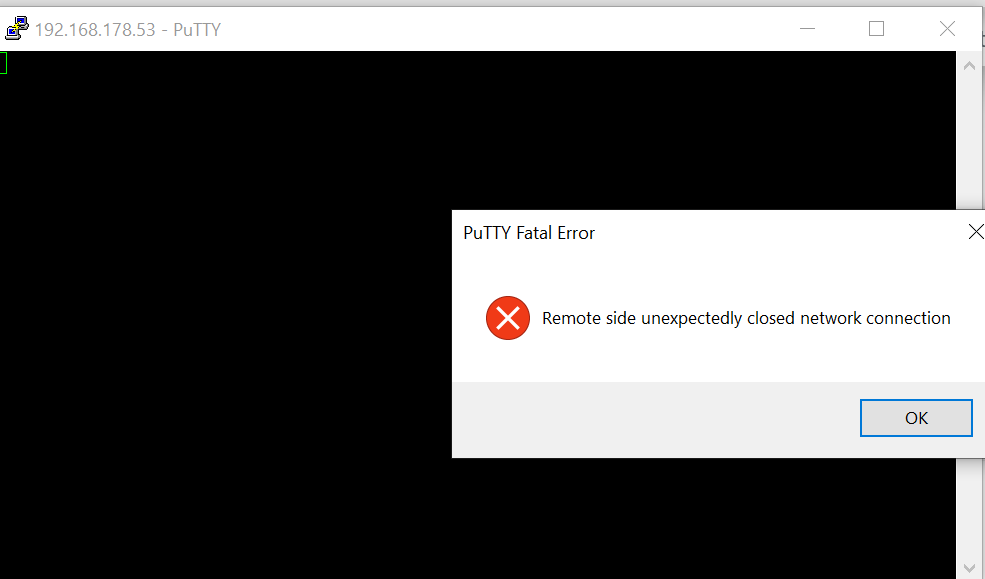
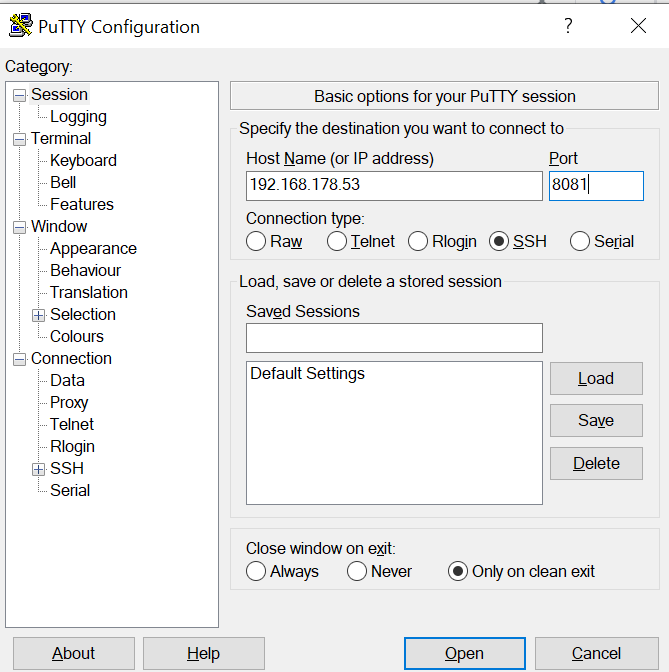
                        jetzt wollte ich noch abklären, warum ich mit putty nicht (mehr) drauf komme, müsste doch gehen, oder?
                        ea86b64b-30d7-49ef-a3d3-e18bb0e7f32c-grafik.png

                        Antwort:
                        688a7ef8-f479-4c18-8a74-948015515bc5-grafik.png

                        B 1 Antwort Letzte Antwort
                        0
                        • B brokeling

                          @Thomas-Braun
                          jetzt wollte ich noch abklären, warum ich mit putty nicht (mehr) drauf komme, müsste doch gehen, oder?
                          ea86b64b-30d7-49ef-a3d3-e18bb0e7f32c-grafik.png

                          Antwort:
                          688a7ef8-f479-4c18-8a74-948015515bc5-grafik.png

                          B Offline
                          B Offline
                          brokeling
                          schrieb am zuletzt editiert von
                          #41

                          @brokeling
                          o.k. - hier stimmte der Port nicht. Muss auf 22 bleiben, dann ist gut :)

                          Thomas BraunT 1 Antwort Letzte Antwort
                          0
                          • B brokeling

                            @brokeling
                            o.k. - hier stimmte der Port nicht. Muss auf 22 bleiben, dann ist gut :)

                            Thomas BraunT Online
                            Thomas BraunT Online
                            Thomas Braun
                            Most Active
                            schrieb am zuletzt editiert von
                            #42

                            @brokeling
                            Natürlich. Der SSH-Server läuft auf 22.
                            Auf 8081 läuft die Webansicht vom ioBroker.

                            Linux-Werkzeugkasten:
                            https://forum.iobroker.net/topic/42952/der-kleine-iobroker-linux-werkzeugkasten
                            NodeJS Fixer Skript:
                            https://forum.iobroker.net/topic/68035/iob-node-fix-skript
                            iob_diag: curl -sLf -o diag.sh https://iobroker.net/diag.sh && bash diag.sh

                            B 1 Antwort Letzte Antwort
                            1
                            • Thomas BraunT Thomas Braun

                              @brokeling
                              Natürlich. Der SSH-Server läuft auf 22.
                              Auf 8081 läuft die Webansicht vom ioBroker.

                              B Offline
                              B Offline
                              brokeling
                              schrieb am zuletzt editiert von
                              #43

                              @Thomas-Braun

                              runlevel:
                              N 3
                              gemacht. Danke nochmal!

                              Thomas BraunT 1 Antwort Letzte Antwort
                              0
                              • B brokeling

                                @Thomas-Braun

                                runlevel:
                                N 3
                                gemacht. Danke nochmal!

                                Thomas BraunT Online
                                Thomas BraunT Online
                                Thomas Braun
                                Most Active
                                schrieb am zuletzt editiert von
                                #44

                                @brokeling
                                Gut.
                                Was liefert jetzt

                                who -r && whoami && which nodejs && nodejs -v && which node && node -v && which npm && npm -v && apt policy nodejs
                                

                                zurück?

                                Linux-Werkzeugkasten:
                                https://forum.iobroker.net/topic/42952/der-kleine-iobroker-linux-werkzeugkasten
                                NodeJS Fixer Skript:
                                https://forum.iobroker.net/topic/68035/iob-node-fix-skript
                                iob_diag: curl -sLf -o diag.sh https://iobroker.net/diag.sh && bash diag.sh

                                B 1 Antwort Letzte Antwort
                                0
                                • Thomas BraunT Thomas Braun

                                  @brokeling
                                  Gut.
                                  Was liefert jetzt

                                  who -r && whoami && which nodejs && nodejs -v && which node && node -v && which npm && npm -v && apt policy nodejs
                                  

                                  zurück?

                                  B Offline
                                  B Offline
                                  brokeling
                                  schrieb am zuletzt editiert von
                                  #45

                                  @Thomas-Braun

                                  pi@raspi:~ $ who -r && whoami && which nodejs && nodejs -v && which node && node -v && which npm && npm -v && apt policy nodejs
                                           Runlevel 3   2020-10-14 09:56
                                  pi
                                  /usr/bin/nodejs
                                  v12.19.0
                                  /usr/bin/node
                                  v12.19.0
                                  /usr/bin/npm
                                  6.14.8
                                  nodejs:
                                    Installiert:           12.19.0-1nodesource1
                                    Installationskandidat: 12.19.0-1nodesource1
                                    Versionstabelle:
                                   *** 12.19.0-1nodesource1 500
                                          500 https://deb.nodesource.com/node_12.x buster/main armhf Packages
                                          100 /var/lib/dpkg/status
                                       10.21.0~dfsg-1~deb10u1+rpi1 500
                                          500 http://raspbian.raspberrypi.org/raspbian buster/main armhf Packages
                                  N: Datei »nodesource.list.save.3« in Verzeichnis »/etc/apt/sources.list.d/« wird ignoriert, da sie eine ungültige Dateinamen-Erweiterung hat.
                                  pi@raspi:~ $
                                  
                                  
                                  Thomas BraunT 1 Antwort Letzte Antwort
                                  0
                                  • B brokeling

                                    @Thomas-Braun

                                    pi@raspi:~ $ who -r && whoami && which nodejs && nodejs -v && which node && node -v && which npm && npm -v && apt policy nodejs
                                             Runlevel 3   2020-10-14 09:56
                                    pi
                                    /usr/bin/nodejs
                                    v12.19.0
                                    /usr/bin/node
                                    v12.19.0
                                    /usr/bin/npm
                                    6.14.8
                                    nodejs:
                                      Installiert:           12.19.0-1nodesource1
                                      Installationskandidat: 12.19.0-1nodesource1
                                      Versionstabelle:
                                     *** 12.19.0-1nodesource1 500
                                            500 https://deb.nodesource.com/node_12.x buster/main armhf Packages
                                            100 /var/lib/dpkg/status
                                         10.21.0~dfsg-1~deb10u1+rpi1 500
                                            500 http://raspbian.raspberrypi.org/raspbian buster/main armhf Packages
                                    N: Datei »nodesource.list.save.3« in Verzeichnis »/etc/apt/sources.list.d/« wird ignoriert, da sie eine ungültige Dateinamen-Erweiterung hat.
                                    pi@raspi:~ $
                                    
                                    
                                    Thomas BraunT Online
                                    Thomas BraunT Online
                                    Thomas Braun
                                    Most Active
                                    schrieb am zuletzt editiert von
                                    #46

                                    @brokeling sagte in Hilfe!!! Iobroker Oberfläche nicht erreichbar!:

                                    N: Datei »nodesource.list.save.3« in Verzeichnis »/etc/apt/sources.list.d/« wird ignoriert, da sie eine ungültige Dateinamen-Erweiterung hat.

                                    Die Meldung würde mich persönlich stören, aber sonst passt das jetzt.

                                    Linux-Werkzeugkasten:
                                    https://forum.iobroker.net/topic/42952/der-kleine-iobroker-linux-werkzeugkasten
                                    NodeJS Fixer Skript:
                                    https://forum.iobroker.net/topic/68035/iob-node-fix-skript
                                    iob_diag: curl -sLf -o diag.sh https://iobroker.net/diag.sh && bash diag.sh

                                    B 1 Antwort Letzte Antwort
                                    0
                                    • Thomas BraunT Thomas Braun

                                      @brokeling sagte in Hilfe!!! Iobroker Oberfläche nicht erreichbar!:

                                      N: Datei »nodesource.list.save.3« in Verzeichnis »/etc/apt/sources.list.d/« wird ignoriert, da sie eine ungültige Dateinamen-Erweiterung hat.

                                      Die Meldung würde mich persönlich stören, aber sonst passt das jetzt.

                                      B Offline
                                      B Offline
                                      brokeling
                                      schrieb am zuletzt editiert von
                                      #47

                                      @Thomas-Braun
                                      kann ich die löschen?
                                      scheint ja eine nicht nutzbare, fehlerhafte Sicherungsdatei zu sein !?!

                                      Thomas BraunT 1 Antwort Letzte Antwort
                                      0
                                      • B brokeling

                                        @Thomas-Braun
                                        kann ich die löschen?
                                        scheint ja eine nicht nutzbare, fehlerhafte Sicherungsdatei zu sein !?!

                                        Thomas BraunT Online
                                        Thomas BraunT Online
                                        Thomas Braun
                                        Most Active
                                        schrieb am zuletzt editiert von
                                        #48

                                        @brokeling
                                        Die kannst du entweder löschen oder in dein backup/home-Verzeichnis schieben.

                                        Linux-Werkzeugkasten:
                                        https://forum.iobroker.net/topic/42952/der-kleine-iobroker-linux-werkzeugkasten
                                        NodeJS Fixer Skript:
                                        https://forum.iobroker.net/topic/68035/iob-node-fix-skript
                                        iob_diag: curl -sLf -o diag.sh https://iobroker.net/diag.sh && bash diag.sh

                                        B 1 Antwort Letzte Antwort
                                        0
                                        • Thomas BraunT Thomas Braun

                                          @brokeling
                                          Die kannst du entweder löschen oder in dein backup/home-Verzeichnis schieben.

                                          B Offline
                                          B Offline
                                          brokeling
                                          schrieb am zuletzt editiert von
                                          #49

                                          @Thomas-Braun
                                          gleich löschen.
                                          per putty, wie geht das?

                                          Thomas BraunT 1 Antwort Letzte Antwort
                                          0
                                          Antworten
                                          • In einem neuen Thema antworten
                                          Anmelden zum Antworten
                                          • Älteste zuerst
                                          • Neuste zuerst
                                          • Meiste Stimmen


                                          Support us

                                          ioBroker
                                          Community Adapters
                                          Donate

                                          519

                                          Online

                                          32.6k

                                          Benutzer

                                          82.3k

                                          Themen

                                          1.3m

                                          Beiträge
                                          Community
                                          Impressum | Datenschutz-Bestimmungen | Nutzungsbedingungen | Einwilligungseinstellungen
                                          ioBroker Community 2014-2025
                                          logo
                                          • Anmelden

                                          • Du hast noch kein Konto? Registrieren

                                          • Anmelden oder registrieren, um zu suchen
                                          • Erster Beitrag
                                            Letzter Beitrag
                                          0
                                          • Home
                                          • Aktuell
                                          • Tags
                                          • Ungelesen 0
                                          • Kategorien
                                          • Unreplied
                                          • Beliebt
                                          • GitHub
                                          • Docu
                                          • Hilfe