



Neue Version von SONOS
-
Hallo,
auf dem git liegt neue Version von SONOS.
Als bonus ihr könnt jetzt http://ipaddr:8083/m/ aufrufen um so was zu sehen.

Bitte testen` > 0.2.0 (2016-07-28)
(soef) fixed restore of radio after sayIt
(bluefox) fix log outputs
(bluefox) update libraries and use fix versions of it `
-
Auf einem i386 Debian läuft die Installation auf Fehler
! ````
$ ./iobroker url "https://github.com/ioBroker/ioBroker.sonos" --debug
install https://github.com/ioBroker/ioBroker.sonos/tarball/master
npm install https://github.com/ioBroker/ioBroker.sonos/tarball/master --production --prefix "/opt/iobroker" (System call)
npmWARN
addRemoteGit
Error: not found: gitnpm WARN addRemoteGit at getNotFoundError (/usr/local/lib/node_modules/npm/node_modules/which/which.js:14:12)
npm WARN addRemoteGit at F (/usr/local/lib/node_modules/npm/node_modules/which/which.js:69:19)
npm
WARN addRemoteGit at E (/usr/local/lib/node_modules/npm/node_modules/which/which.js:81:29)npm WARN addRemoteGit at /usr/local/lib/node_modules/npm/node_modules/which/which.js:90:16
npm WARN addRemoteGit at /usr/local/lib/node_modules/npm/node_modules/which/node_modules/isexe/index.js:44:5
npm WARN addRemoteGit at /usr/local/lib/node_modules/npm/node_modules/which/node_modules/isexe/access.js:8:5
npm WARN addRemoteGit at FSReqWrap.oncomplete (fs.js:82:15)
npm WARN addRemoteGit jishi/node-sonos-web-controller#860a5e1e5c9c4e756566efa96d283724f124e612 resetting remote /root/.npm/_git-remotes/git-github-com-jishi-node-sonos-web-controller-git-860a5e1e5c9c4e756566efa96d283724f124e612-99897ad1 because of error: { [Error: not found: git] code: 'ENOGIT' }! npm
WARN
addRemoteGit Error: not found: gitnpm WARN addRemoteGit at getNotFoundError (/usr/local/lib/node_modules/npm/node_modules/which/which.js:14:12)
npm WARN addRemoteGit at F (/usr/local/lib/node_modules/npm/node_modules/which/which.js:69:19)
npm WARN addRemoteGit at E (/usr/local/lib/node_modules/npm/node_modules/which/which.js:81:29)
npm WARN addRemoteGit at /usr/local/lib/node_modules/npm/node_modules/which/which.js:90:16
npm
WARN addRemoteGit
at /usr/local/lib/node_modules/npm/node_modules/which/node_modules/isexe/index.js:44:5npm WARN addRemoteGit at /usr/local/lib/node_modules/npm/node_modules/which/node_modules/isexe/access.js:8:5
npm WARN addRemoteGit at FSReqWrap.oncomplete (fs.js:82:15)
npm WARN addRemoteGit jishi/node-sonos-discovery#0.15.6 resetting remote /root/.npm/_git-remotes/git-github-com-jishi-node-sonos-discovery-git-0-15-6-b0609fd8 because of error: { [Error: not found: git] code: 'ENOGIT' }
! npmERR!
git clone --template=/root/.npm/_git-remotes/_templates --mirror git://github.com/jishi/node-sonos-web-controller.git /root/.npm/_git-remotes/git-github-com-jishi-node-sonos-web-controller-git-860a5e1e5c9c4e756566efa96d283724f124e612-99897ad1:
undefined
npm
ERR! git clone --template=/root/.npm/_git-remotes/_templates --mirror git://github.com/jishi/node-sonos-web-controller.git /root/.npm/_git-remotes/git-github-com-jishi-node-sonos-web-controller-git-860a5e1e5c9c4e756566efa96d283724f124e612-99897ad1: undefined
npm
ERR! git clone --template=/root/.npm/_git-remotes/_templates --mirror git://github.com/jishi/node-sonos-discovery.git /root/.npm/_git-remotes/git-github-com-jishi-node-sonos-discovery-git-0-15-6-b0609fd8: undefinednpm
ERR! git clone --template=/root/.npm/_git-remotes/_templates --mirror git://github.com/jishi/node-sonos-discovery.git /root/.npm/_git-remotes/git-github-com-jishi-node-sonos-discovery-git-0-15-6-b0609fd8:
undefined
npmWARN
addRemoteGit Error: not found: gitnpm WARN
addRemoteGit at getNotFoundError (/usr/local/lib/node_modules/npm/node_modules/which/which.js:14:12)npm WARN addRemoteGit at F (/usr/local/lib/node_modules/npm/node_modules/which/which.js:69:19)
npm WARN addRemoteGit at E (/usr/local/lib/node_modules/npm/node_modules/which/which.js:81:29)
npm WARN addRemoteGit at /usr/local/lib/node_modules/npm/node_modules/which/which.js:90:16
npm WARN addRemoteGit at /usr/local/lib/node_modules/npm/node_modules/which/node_modules/isexe/index.js:44:5
npm WARN addRemoteGit at /usr/local/lib/node_modules/npm/node_modules/which/node_modules/isexe/access.js:8:5
npm WARN addRemoteGit at FSReqWrap.oncomplete (fs.js:82:15)
npm WARN addRemoteGit jishi/node-sonos-web-controller#860a5e1e5c9c4e756566efa96d283724f124e612 resetting remote /root/.npm/_git-remotes/git-https-github-com-jishi-node-sonos-web-controller-git-860a5e1e5c9c4e756566efa96d283724f124e612-43c65f66 because of error: { [Error: not found: git] code: 'ENOGIT' }! npm
WARN addRemoteGit Error: not found: gitnpm WARN addRemoteGit at getNotFoundError (/usr/local/lib/node_modules/npm/node_modules/which/which.js:14:12)
npm WARN addRemoteGit at F (/usr/local/lib/node_modules/npm/node_modules/which/which.js:69:19)
npm WARN addRemoteGit at E (/usr/local/lib/node_modules/npm/node_modules/which/which.js:81:29)
npm WARN addRemoteGit at /usr/local/lib/node_modules/npm/node_modules/which/which.js:90:16
npm WARN addRemoteGit at /usr/local/lib/node_modules/npm/node_modules/which/node_modules/isexe/index.js:44:5
npm WARN addRemoteGit at /usr/local/lib/node_modules/npm/node_modules/which/node_modules/isexe/access.js:8:5
npm WARN addRemoteGit at FSReqWrap.oncomplete (fs.js:82:15)
npm WARN addRemoteGit jishi/node-sonos-discovery#0.15.6 resetting remote /root/.npm/_git-remotes/git-https-github-com-jishi-node-sonos-discovery-git-0-15-6-94f13ece because of error: { [Error: not found: git] code: 'ENOGIT' }
! npmERR! git clone --template=/root/.npm/_git-remotes/_templates --mirror https://github.com/jishi/node-sonos-web-controller.git /root/.npm/_git-remotes/git-https-github-com-jishi-node-sonos-web-controller-git-860a5e1e5c9c4e756566efa96d283724f124e612-43c65f66: undefinednpm ERR! git clone --template=/root/.npm/_git-remotes/_templates --mirror https://github.com/jishi/node-sonos-web-controller.git /root/.npm/_git-remotes/git-https-github-com-jishi-node-sonos-web-controller-git-860a5e1e5c9c4e756566efa96d283724f124e612-43c65f66: undefined
! npm
ERR! git clone --template=/root/.npm/_git-remotes/_templates --mirror https://github.com/jishi/node-sonos-discovery.git /root/.npm/_git-remotes/git-https-github-com-jishi-node-sonos-discovery-git-0-15-6-94f13ece: undefinednpm ERR! git clone --template=/root/.npm/_git-remotes/_templates --mirror https://github.com/jishi/node-sonos-discovery.git /root/.npm/_git-remotes/git-https-github-com-jishi-node-sonos-discovery-git-0-15-6-94f13ece: undefined
! npm WARN addRemoteGit Error: not found: gitnpm WARN addRemoteGit at getNotFoundError (/usr/local/lib/node_modules/npm/node_modules/which/which.js:14:12)
npm WARN addRemoteGit at F (/usr/local/lib/node_modules/npm/node_modules/which/which.js:69:19)
npm WARN addRemoteGit at E (/usr/local/lib/node_modules/npm/node_modules/which/which.js:81:29)
npm WARN addRemoteGit at /usr/local/lib/node_modules/npm/node_modules/which/which.js:90:16
npm WARN addRemoteGit at /usr/local/lib/node_modules/npm/node_modules/which/node_modules/isexe/index.js:44:5
npm WARN addRemoteGit at /usr/local/lib/node_modules/npm/node_modules/which/node_modules/isexe/access.js:8:5
npm WARN addRemoteGit at FSReqWrap.oncomplete (fs.js:82:15)
npm WARN addRemoteGit jishi/node-sonos-web-controller#860a5e1e5c9c4e756566efa96d283724f124e612 resetting remote /root/.npm/_git-remotes/git-github-com-jishi-node-sonos-web-controller-git-860a5e1e5c9c4e756566efa96d283724f124e612-9635f0bd because of error: { [Error: not found: git] code: 'ENOGIT' }
npm WARN addRemoteGit Error: not found: git
npm WARN addRemoteGit at getNotFoundError (/usr/local/lib/node_modules/npm/node_modules/which/which.js:14:12)
npm WARN addRemoteGit at F (/usr/local/lib/node_modules/npm/node_modules/which/which.js:69:19)
npm WARN addRemoteGit at E (/usr/local/lib/node_modules/npm/node_modules/which/which.js:81:29)
npm WARN addRemoteGit at /usr/local/lib/node_modules/npm/node_modules/which/which.js:90:16
npm WARN
addRemoteGit at /usr/local/lib/node_modules/npm/node_modules/which/node_modules/isexe/index.js:44:5npm WARN addRemoteGit at /usr/local/lib/node_modules/npm/node_modules/which/node_modules/isexe/access.js:8:5
npm WARN addRemoteGit at FSReqWrap.oncomplete (fs.js:82:15)
npm WARN addRemoteGit jishi/node-sonos-discovery#0.15.6 resetting remote /root/.npm/_git-remotes/git-github-com-jishi-node-sonos-discovery-git-0-15-6-4d31d51d because of error: { [Error: not found: git] code: 'ENOGIT' }
! npm ERR! git clone --template=/root/.npm/_git-remotes/_templates --mirror git@github.com:jishi/node-sonos-web-controller.git /root/.npm/_git-remotes/git-github-com-jishi-node-sonos-web-controller-git-860a5e1e5c9c4e756566efa96d283724f124e612-9635f0bd: undefinednpm ERR!
git clone --template=/root/.npm/_git-remotes/_templates --mirror git@github.com:jishi/node-sonos-web-controller.git /root/.npm/_git-remotes/git-github-com-jishi-node-sonos-web-controller-git-860a5e1e5c9c4e756566efa96d283724f124e612-9635f0bd: undefinednpm
ERR! git clone --template=/root/.npm/_git-remotes/_templates --mirror git@github.com:jishi/node-sonos-discovery.git /root/.npm/_git-remotes/git-github-com-jishi-node-sonos-discovery-git-0-15-6-4d31d51d: undefinednpm ERR! git clone --template=/root/.npm/_git-remotes/_templates --mirror git@github.com:jishi/node-sonos-discovery.git /root/.npm/_git-remotes/git-github-com-jishi-node-sonos-discovery-git-0-15-6-4d31d51d: undefined
! npmERR!
Linux 3.16.0-4-686-pae
npm
ERR! argv "/usr/bin/nodejs" "/usr/local/bin/npm" "install" "https://github.com/ioBroker/ioBroker.sonos/tarball/master" "--production" "--prefix" "/opt/iobroker"npm ERR! node v4.4.7
npm ERR! npm v3.10.5
npm
ERR! code ENOGIT! npm
ERR! not found: gitnpm ERR!
npm ERR! Failed using git.
npm
ERR! This is most likely not a problem with npm itself.npm ERR! Please check if you have git installed and in your PATH.
! npmERR! Please include the following file with any support request:npm
ERR! /npm-debug.log
ERROR: host.iobroker-test Cannot install https://github.com/ioBroker/ioBroker.sonos/tarball/master: 1
ERROR: process exited with code 25Ich installiere jetzt einen Raspi neu und zusätzlich noch ein Ubuntu 16.4.1 LTS Mal sehen, ob es damit geht. Gruß, Eric -
Hallo,
wollte es gerade installieren, aber finde den "Kofferanhänger" in Admin nicht mehr :shock: :shock:
Wie installiere ich jetzt von Githiub?
Nebenbei: Das neue Admin 11 sieht super aus (tolles schedule Fenster). Habe mal ein iobroker upgrade gemacht und es läuft gefühlt alles schneller :lol:
Pix
EDIT: Bisschen im Forum gesucht und Octocat gefunden :? Leider in meinem Safari Browser nicht sichtbar. Chrome zeigt sie an.
EDIT2: Läuft super! Danke!
-
-
Moin,
Installation läuft jetzt durch, aber es hängt bei der Ermittlung der Geräte.
Nach dem Klick auf den Scan-Button, findet der Adapter zwar die Geräte, fügt die IP-Adressen aber nicht ein.
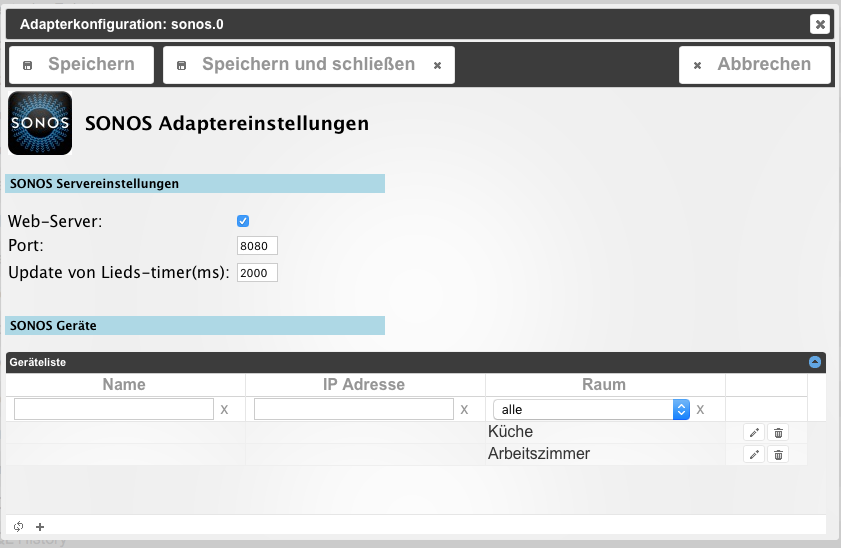
Wenn ich die Werte dann manuell eintrage, kommen folgende Meldungen im Log
!
sonos-0 2016-07-30 08:18:24.035 info try to control id sonos.0.root.192_168_178_53.tts with {'val':'','ack':false,'ts':1469859503958,'q':0,'from':'system.adapter.sonos.0','lc':1469859503958} sonos-0 2016-07-30 08:18:24.035 info try to control id sonos.0.root.192_168_178_53.favorites_set with {'val':'','ack':false,'ts':1469859503958,'q':0,'from':'system.adapter.sonos.0','lc':1469859503958} sonos-0 2016-07-30 08:18:24.035 info try to control id sonos.0.root.192_168_178_53.favorites_list with {'val':'','ack':false,'ts':1469859503957,'q':0,'from':'system.adapter.sonos.0','lc':1469859503957} sonos-0 2016-07-30 08:18:24.035 info try to control id sonos.0.root.192_168_178_53.current_elapsed_s with {'val':0,'ack':false,'ts':1469859503957,'q':0,'from':'system.adapter.sonos.0','lc':1469859503957} sonos-0 2016-07-30 08:18:24.034 info try to control id sonos.0.root.192_168_178_53.current_elapsed with {'val':'00:00','ack':false,'ts':1469859503957,'q':0,'from':'system.adapter.sonos.0','lc':1469859503957} sonos-0 2016-07-30 08:18:24.033 info try to control id sonos.0.root.192_168_178_53.alive with {'val':null,'ack':false,'ts':1469859503957,'q':0,'from':'system.adapter.sonos.0','lc':1469859503957} sonos-0 2016-07-30 08:18:24.033 info try to control id sonos.0.root.192_168_178_53.current_type with {'val':'','ack':false,'ts':1469859503956,'q':0,'from':'system.adapter.sonos.0','lc':1469859503956} sonos-0 2016-07-30 08:18:24.033 info try to control id sonos.0.root.192_168_178_53.current_duration_s with {'val':0,'ack':false,'ts':1469859503956,'q':0,'from':'system.adapter.sonos.0','lc':1469859503956} sonos-0 2016-07-30 08:18:24.033 info try to control id sonos.0.root.192_168_178_53.current_duration with {'val':'00:00','ack':false,'ts':1469859503956,'q':0,'from':'system.adapter.sonos.0','lc':1469859503956} sonos-0 2016-07-30 08:18:24.033 info try to control id sonos.0.root.192_168_178_53.current_cover with {'val':'','ack':false,'ts':1469859503955,'q':0,'from':'system.adapter.sonos.0','lc':1469859503955} sonos-0 2016-07-30 08:18:24.033 info try to control id sonos.0.root.192_168_178_53.current_album with {'val':'','ack':false,'ts':1469859503955,'q':0,'from':'system.adapter.sonos.0','lc':1469859503955} sonos-0 2016-07-30 08:18:24.033 info try to control id sonos.0.root.192_168_178_53.current_artist with {'val':'','ack':false,'ts':1469859503955,'q':0,'from':'system.adapter.sonos.0','lc':1469859503955} sonos-0 2016-07-30 08:18:24.030 info try to control id sonos.0.root.192_168_178_53.current_title with {'val':'','ack':false,'ts':1469859503954,'q':0,'from':'system.adapter.sonos.0','lc':1469859503954} sonos-0 2016-07-30 08:18:24.030 info try to control id sonos.0.root.192_168_178_53.muted with {'val':'false','ack':false,'ts':1469859503954,'q':0,'from':'system.adapter.sonos.0','lc':1469859503954} sonos-0 2016-07-30 08:18:24.030 info try to control id sonos.0.root.192_168_178_53.volume with {'val':'number','ack':false,'ts':1469859503954,'q':0,'from':'system.adapter.sonos.0','lc':1469859503954} sonos-0 2016-07-30 08:18:24.029 info try to control id sonos.0.root.192_168_178_53.state with {'val':'stop','ack':false,'ts':1469859503953,'q':0,'from':'system.adapter.sonos.0','lc':1469859503953} sonos-0 2016-07-30 08:18:24.027 info try to control id sonos.0.root.192_168_178_53.state_simple with {'val':'false','ack':false,'ts':1469859503951,'q':0,'from':'system.adapter.sonos.0','lc':1469859503951} sonos-0 2016-07-30 08:18:23.935 info try to control id sonos.0.root.192_168_178_60.tts with {'val':'','ack':false,'ts':1469859503854,'q':0,'from':'system.adapter.sonos.0','lc':1469859503854} sonos-0 2016-07-30 08:18:23.935 info try to control id sonos.0.root.192_168_178_60.favorites_set with {'val':'','ack':false,'ts':1469859503853,'q':0,'from':'system.adapter.sonos.0','lc':1469859503853} sonos-0 2016-07-30 08:18:23.935 info try to control id sonos.0.root.192_168_178_60.favorites_list with {'val':'','ack':false,'ts':1469859503853,'q':0,'from':'system.adapter.sonos.0','lc':1469859503853} sonos-0 2016-07-30 08:18:23.935 info try to control id sonos.0.root.192_168_178_60.current_elapsed_s with {'val':0,'ack':false,'ts':1469859503853,'q':0,'from':'system.adapter.sonos.0','lc':1469859503853} sonos-0 2016-07-30 08:18:23.935 info try to control id sonos.0.root.192_168_178_60.current_elapsed with {'val':'00:00','ack':false,'ts':1469859503852,'q':0,'from':'system.adapter.sonos.0','lc':1469859503852} sonos-0 2016-07-30 08:18:23.934 info try to control id sonos.0.root.192_168_178_60.alive with {'val':null,'ack':false,'ts':1469859503852,'q':0,'from':'system.adapter.sonos.0','lc':1469859503852} sonos-0 2016-07-30 08:18:23.934 info try to control id sonos.0.root.192_168_178_60.current_type with {'val':'','ack':false,'ts':1469859503852,'q':0,'from':'system.adapter.sonos.0','lc':1469859503852} sonos-0 2016-07-30 08:18:23.934 info try to control id sonos.0.root.192_168_178_60.current_duration_s with {'val':0,'ack':false,'ts':1469859503852,'q':0,'from':'system.adapter.sonos.0','lc':1469859503852} sonos-0 2016-07-30 08:18:23.934 info try to control id sonos.0.root.192_168_178_60.current_duration with {'val':'00:00','ack':false,'ts':1469859503851,'q':0,'from':'system.adapter.sonos.0','lc':1469859503851} sonos-0 2016-07-30 08:18:23.934 info try to control id sonos.0.root.192_168_178_60.current_cover with {'val':'','ack':false,'ts':1469859503851,'q':0,'from':'system.adapter.sonos.0','lc':1469859503851} sonos-0 2016-07-30 08:18:23.934 info try to control id sonos.0.root.192_168_178_60.current_album with {'val':'','ack':false,'ts':1469859503851,'q':0,'from':'system.adapter.sonos.0','lc':1469859503851} sonos-0 2016-07-30 08:18:23.933 info try to control id sonos.0.root.192_168_178_60.current_artist with {'val':'','ack':false,'ts':1469859503850,'q':0,'from':'system.adapter.sonos.0','lc':1469859503850} sonos-0 2016-07-30 08:18:23.927 info try to control id sonos.0.root.192_168_178_60.current_title with {'val':'','ack':false,'ts':1469859503850,'q':0,'from':'system.adapter.sonos.0','lc':1469859503850} sonos-0 2016-07-30 08:18:23.926 info try to control id sonos.0.root.192_168_178_60.muted with {'val':'false','ack':false,'ts':1469859503850,'q':0,'from':'system.adapter.sonos.0','lc':1469859503850} sonos-0 2016-07-30 08:18:23.926 info try to control id sonos.0.root.192_168_178_60.volume with {'val':'number','ack':false,'ts':1469859503849,'q':0,'from':'system.adapter.sonos.0','lc':1469859503849} sonos-0 2016-07-30 08:18:23.900 info try to control id sonos.0.root.192_168_178_60.state with {'val':'stop','ack':false,'ts':1469859503845,'q':0,'from':'system.adapter.sonos.0','lc':1469859503845} sonos-0 2016-07-30 08:18:23.899 info try to control id sonos.0.root.192_168_178_60.state_simple with {'val':'false','ack':false,'ts':1469859503828,'q':0,'from':'system.adapter.sonos.0','lc':1469859503828} sonos-0 2016-07-30 08:18:23.796 info http sonos server listening on port 8080 sonos-0 2016-07-30 08:18:23.751 info starting. Version 0.2.0 in /opt/iobroker/node_modules/iobroker.sonos host-iobroker-test 2016-07-30 08:18:22.649 info instance system.adapter.sonos.0 started with pid 16469 host-iobroker-test 2016-07-30 08:18:20.169 info instance system.adapter.sonos.0 terminated with code 0 (OK) sonos-0 2016-07-30 08:18:20.159 info terminating host-iobroker-test 2016-07-30 08:18:20.141 info stopInstance system.adapter.sonos.0 killing pid 16397 host-iobroker-test 2016-07-30 08:18:20.141 info stopInstance system.adapter.sonos.0 sonos-0 2016-07-30 08:18:20.142 info terminating host-iobroker-test 2016-07-30 08:18:20.140 info object change system.adapter.sonos.0 !Kurz danach (nach Aufruf der Sonos-Webseite über das Icon beim Adapter) kommen dann folgende Meldungen
!
host-iobroker-test 2016-07-30 08:20:21.971 info Restart adapter system.adapter.sonos.0 because enabled host-iobroker-test 2016-07-30 08:20:21.971 error instance system.adapter.sonos.0 terminated with code 0 (OK) sonos-0 2016-07-30 08:20:21.948 info terminating TypeError: 2016-07-30 08:20:21.947 error at process._tickCallback (node.js:349:13) TypeError: 2016-07-30 08:20:21.947 error at nextTickCallbackWith0Args (node.js:420:9) TypeError: 2016-07-30 08:20:21.947 error at /opt/iobroker/node_modules/socket.io/lib/namespace.js:174:14 TypeError: 2016-07-30 08:20:21.947 error at Namespace.emit (/opt/iobroker/node_modules/socket.io/lib/namespace.js:206:10) TypeError: 2016-07-30 08:20:21.947 error at Namespace.emit (events.js:169:7) TypeError: 2016-07-30 08:20:21.947 error at emitOne (events.js:77:13) TypeError: 2016-07-30 08:20:21.947 error at Namespace. (/opt/iobroker/node_modules/iobroker.sonos/sonos.js:1097:37) TypeError: 2016-07-30 08:20:21.947 error player.convertToSimple is not a function uncaught 2016-07-30 08:20:21.946 error exception: player.convertToSimple is not a function !Die Songs-Webseite bleibt quasi leer
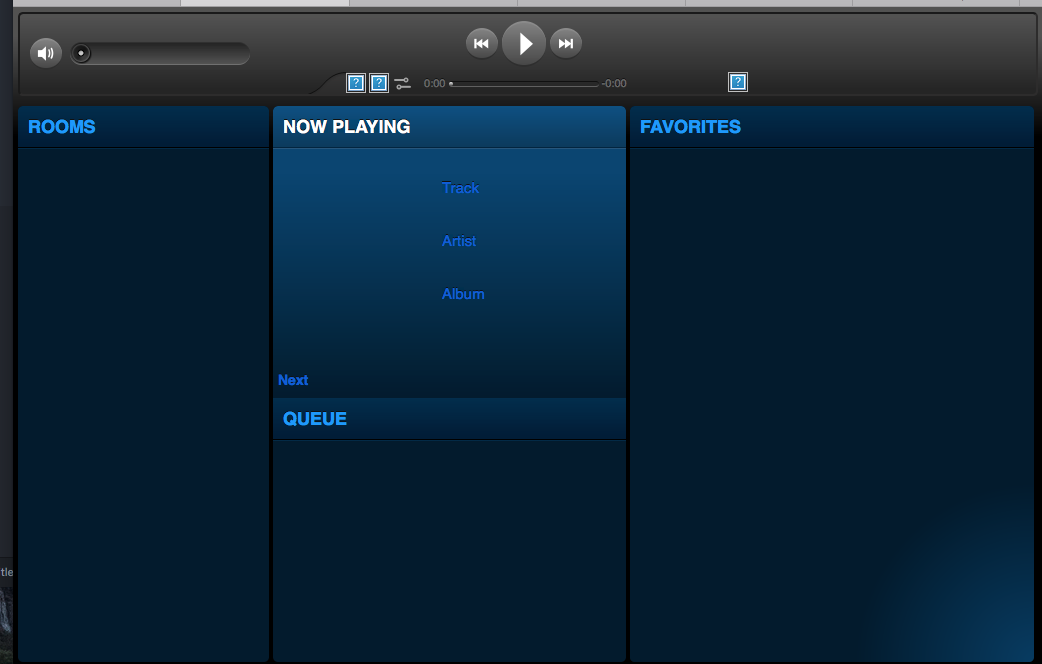
Sobald die Webseite aufgerufen wird, springt der Adapter auf Status rot, fängt sich dann wieder und geht auf Status grün.
Es kommen dann immer die gleichen Fehlermeldungen.
Gruß,
Eric
-
Installation ist wieder problemlos durchgelaufen.
Durch den Admin-Test kann ich den Songs-Adapter aber nicht konfigurieren … er wird mir nicht angezeigt (siehe Posting hier : http://forum.iobroker.net/viewtopic.php … 690#p31690)
Gruß,
Eric
-
 H Homoran verschob dieses Thema von Tester am
-
H Homoran verschob dieses Thema von ...nicht in offiziellem Repo am

Hey! Du scheinst an dieser Unterhaltung interessiert zu sein, hast aber noch kein Konto.
Hast du es satt, bei jedem Besuch durch die gleichen Beiträge zu scrollen? Wenn du dich für ein Konto anmeldest, kommst du immer genau dorthin zurück, wo du zuvor warst, und kannst dich über neue Antworten benachrichtigen lassen (entweder per E-Mail oder Push-Benachrichtigung). Du kannst auch Lesezeichen speichern und Beiträge positiv bewerten, um anderen Community-Mitgliedern deine Wertschätzung zu zeigen.
Mit deinem Input könnte dieser Beitrag noch besser werden 💗
Registrieren AnmeldenSupport us
305
Online33.0k
Benutzer83.7k
Themen1.3m
Beiträge