




[gelöst] SQL # Datenbankname wird nicht genutzt
-
EDIT
Lösung wurde in neuer Version von SQLerstellt
EDIT Off
Laut beschreibung kann man dern Datenbankname ändern
Default Database name is "iobroker", but it can be changed in configuration.
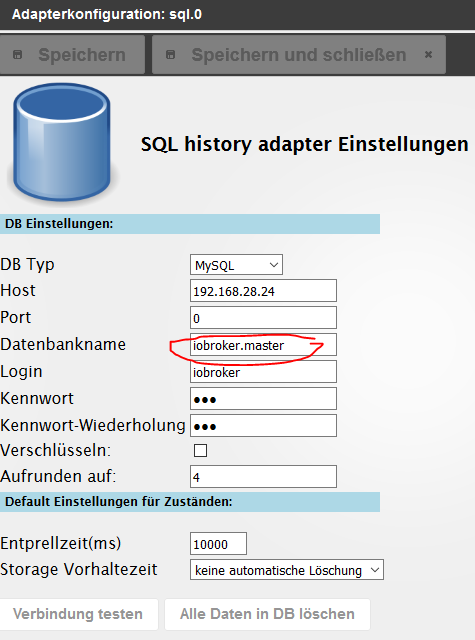
Es wird jedoch die StandartDB genommen
2016-05-30 23:00:15.848  - info: host.DS instance system.adapter.sql.0 started with pid 23862
2016-05-30 23:00:19.141  - debug: sql.0 objectDB connected
2016-05-30 23:00:19.163  - debug: sql.0 statesDB connected
2016-05-30 23:00:19.260  - info: sql.0 starting. Version 1.0.5 in /volume2/ioBroker/Master/node_modules/iobroker.sql
2016-05-30 23:00:19.612  - info: sql.0 enabled logging of yr.0.forecast.day0.wind_speed
2016-05-30 23:00:19.614  - info: sql.0 enabled logging of yr.0.forecast.day0.temperature_actual
2016-05-30 23:00:19.700  - debug: sql.0 CREATE DATABASE iobroker;
2016-05-30 23:00:19.724  - debug: sql.0 Response: {"code":"ER_DB_CREATE_EXISTS","errno":1007,"sqlState":"HY000","index":0}
2016-05-30 23:00:19.750  - debug: sql.0 CREATE TABLE iobroker.sources    (id INTEGER NOT NULL PRIMARY KEY AUTO_INCREMENT, name TEXT);
2016-05-30 23:00:19.760  - debug: sql.0 Response: {"code":"ER_TABLE_EXISTS_ERROR","errno":1050,"sqlState":"42S01","index":0}
2016-05-30 23:00:19.770  - debug: sql.0 CREATE TABLE iobroker.datapoints (id INTEGER NOT NULL PRIMARY KEY AUTO_INCREMENT, name TEXT, type INTEGER);
2016-05-30 23:00:19.774  - debug: sql.0 Response: {"code":"ER_TABLE_EXISTS_ERROR","errno":1050,"sqlState":"42S01","index":0}
2016-05-30 23:00:19.779  - debug: sql.0 CREATE TABLE iobroker.ts_number  (id INTEGER, ts BIGINT, val REAL,    ack BOOLEAN, _from INTEGER, q INTEGER, PRIMARY KEY                                     (id, ts));
2016-05-30 23:00:19.782  - debug: sql.0 Response: {"code":"ER_TABLE_EXISTS_ERROR","errno":1050,"sqlState":"42S01","index":0}
2016-05-30 23:00:19.789  - debug: sql.0 CREATE TABLE iobroker.ts_string  (id INTEGER, ts BIGINT, val TEXT,    ack BOOLEAN, _from INTEGER, q INTEGER, PRIMARY KEY                                     (id, ts));
2016-05-30 23:00:19.794  - debug: sql.0 Response: {"code":"ER_TABLE_EXISTS_ERROR","errno":1050,"sqlState":"42S01","index":0}
2016-05-30 23:00:19.803  - debug: sql.0 CREATE TABLE iobroker.ts_bool    (id INTEGER, ts BIGINT, val BOOLEAN, ack BOOLEAN, _from INTEGER, q INTEGER, PRIMARY KEY                                     (id, ts));
2016-05-30 23:00:19.806  - debug: sql.0 Response: {"code":"ER_TABLE_EXISTS_ERROR","errno":1050,"sqlState":"42S01","index":0}
2016-05-30 23:00:19.807  - info: sql.0 Connected to mysql
Somit keine unterschiedlichen DB möglich
Gruß
Jürgen
-
Kannst du die Version 1.0.5 vom git ausprobieren?
https://github.com/ioBroker/ioBroker.sql
1.0.5 (2016-05-30)
- (bluefox) allow setup DB name for mysql and mssql
-
Kannst du die Version 1.0.5 vom git ausprobieren?
https://github.com/ioBroker/ioBroker.sql
1.0.5 (2016-05-30)
- (bluefox) allow setup DB name for mysql and mssql `
Installation durchgeführt: (Ich hoffe das es so richtig war)
admin@DS:/volume2/ioBroker/Master$ iobroker upgrade sql https://github.com/ioBroker/ioBroker.sql
host.DS Adapter "system.adapter.sql.0" is stopped.
npm install iobroker.sql --production --prefix "/volume2/ioBroker/Master" (System call)
host.DS Adapter "system.adapter.sql.0" is started
npm install --production --prefix "/volume2/ioBroker/Master/node_modules/iobroker.sql" (System call)
got /volume2/ioBroker/Master/node_modules/iobroker.sql/admin
upload [2] sql.admin /volume2/ioBroker/Master/node_modules/iobroker.sql/admin/storage.html storage.html text/html
Update "system.adapter.sql.0"
upload [1] sql.admin /volume2/ioBroker/Master/node_modules/iobroker.sql/admin/sql.png sql.png image/png
upload [0] sql.admin /volume2/ioBroker/Master/node_modules/iobroker.sql/admin/index.html index.html text/html
Adapter "sql" updated
admin@DS:/volume2/ioBroker/Master$
nach dem upgrade den Adapter auf DEBUG gestellt
folgendes ist im LOG:
2016-05-31 20:27:32.298  - info: host.DS object change system.adapter.sql.0
2016-05-31 20:27:32.304  - info: host.DS "system.adapter.sql.0" disabled
2016-05-31 20:27:32.307  - info: host.DS stopInstance system.adapter.sql.0
2016-05-31 20:27:32.308  - info: host.DS stopInstance system.adapter.sql.0 killing pid 27821
2016-05-31 20:27:32.377  - info: host.DS instance system.adapter.sql.0 terminated with code 0 (OK)
2016-05-31 20:28:33.227  - info: host.DS object change system.adapter.sql.0
2016-05-31 20:28:45.903  - info: host.DS object change system.adapter.sql.0
2016-05-31 20:28:45.904  - info: host.DS "system.adapter.sql.0" enabled
2016-05-31 20:28:46.179  - info: host.DS instance system.adapter.sql.0 started with pid 24171
2016-05-31 20:28:50.554  - info: sql.0 starting. Version 1.0.5 in /volume2/ioBroker/Master/node_modules/iobroker.sql
2016-05-31 20:28:51.716  - info: sql.0 Connected to mysql
2016-05-31 20:28:54.086  - info: host.DS object change system.adapter.sql.0
2016-05-31 20:28:54.087  - info: host.DS stopInstance system.adapter.sql.0
2016-05-31 20:28:54.087  - info: host.DS stopInstance system.adapter.sql.0 killing pid 24171
2016-05-31 20:28:54.102  - info: sql.0 terminating
2016-05-31 20:28:54.123  - info: host.DS instance system.adapter.sql.0 terminated with code 0 (OK)
2016-05-31 20:28:56.625  - info: host.DS instance system.adapter.sql.0 started with pid 24204
2016-05-31 20:28:58.959  - info: sql.0 starting. Version 1.0.5 in /volume2/ioBroker/Master/node_modules/iobroker.sql
2016-05-31 20:28:59.377  - info: sql.0 Connected to mysql
2016-05-31 20:29:16.633  - info: host.DS object change system.adapter.sql.0
2016-05-31 20:29:16.633  - info: host.DS stopInstance system.adapter.sql.0
2016-05-31 20:29:16.634  - info: host.DS stopInstance system.adapter.sql.0 killing pid 24204
2016-05-31 20:29:16.682  - info: host.DS instance system.adapter.sql.0 terminated with code 0 (OK)
2016-05-31 20:29:19.171  - info: host.DS instance system.adapter.sql.0 started with pid 24237
2016-05-31 20:29:21.327  - debug: sql.0 objectDB connected
2016-05-31 20:29:21.350  - debug: sql.0 statesDB connected
2016-05-31 20:29:21.477  - info: sql.0 starting. Version 1.0.5 in /volume2/ioBroker/Master/node_modules/iobroker.sql
2016-05-31 20:29:21.739  - info: sql.0 enabled logging of yr.0.forecast.day0.wind_speed
2016-05-31 20:29:21.740  - info: sql.0 enabled logging of yr.0.forecast.day0.temperature_actual
2016-05-31 20:29:21.769  - debug: sql.0 CREATE DATABASE iobroker;
2016-05-31 20:29:21.788  - debug: sql.0 Response: {"code":"ER_DB_CREATE_EXISTS","errno":1007,"sqlState":"HY000","index":0}
2016-05-31 20:29:21.812  - debug: sql.0 CREATE TABLE iobroker.sources    (id INTEGER NOT NULL PRIMARY KEY AUTO_INCREMENT, name TEXT);
2016-05-31 20:29:21.817  - debug: sql.0 Response: {"code":"ER_TABLE_EXISTS_ERROR","errno":1050,"sqlState":"42S01","index":0}
2016-05-31 20:29:21.826  - debug: sql.0 CREATE TABLE iobroker.datapoints (id INTEGER NOT NULL PRIMARY KEY AUTO_INCREMENT, name TEXT, type INTEGER);
2016-05-31 20:29:21.830  - debug: sql.0 Response: {"code":"ER_TABLE_EXISTS_ERROR","errno":1050,"sqlState":"42S01","index":0}
2016-05-31 20:29:21.835  - debug: sql.0 CREATE TABLE iobroker.ts_number  (id INTEGER, ts BIGINT, val REAL,    ack BOOLEAN, _from INTEGER, q INTEGER, PRIMARY KEY(id, ts));
2016-05-31 20:29:21.838  - debug: sql.0 Response: {"code":"ER_TABLE_EXISTS_ERROR","errno":1050,"sqlState":"42S01","index":0}
2016-05-31 20:29:21.843  - debug: sql.0 CREATE TABLE iobroker.ts_string  (id INTEGER, ts BIGINT, val TEXT,    ack BOOLEAN, _from INTEGER, q INTEGER, PRIMARY KEY(id, ts));
2016-05-31 20:29:21.846  - debug: sql.0 Response: {"code":"ER_TABLE_EXISTS_ERROR","errno":1050,"sqlState":"42S01","index":0}
2016-05-31 20:29:21.855  - debug: sql.0 CREATE TABLE iobroker.ts_bool    (id INTEGER, ts BIGINT, val BOOLEAN, ack BOOLEAN, _from INTEGER, q INTEGER, PRIMARY KEY(id, ts));
2016-05-31 20:29:21.858  - debug: sql.0 Response: {"code":"ER_TABLE_EXISTS_ERROR","errno":1050,"sqlState":"42S01","index":0}
2016-05-31 20:29:21.859  - info: sql.0 Connected to mysql
Es wurden keine Tabellen angelegt
Gruß
Jürgen
-
admin@DS:~$ cd /volume2/ioBroker/Master/ admin@DS:/volume2/ioBroker/Master$ admin@DS:/volume2/ioBroker/Master$ admin@DS:/volume2/ioBroker/Master$ admin@DS:/volume2/ioBroker/Master$ iobroker stop sql Adapter "sql.0 stopped. admin@DS:/volume2/ioBroker/Master$ npm install https://github.com/ioBroker/ioBroker.sql npm ERR! git clone --template=/var/services/homes/admin/.npm/_git-remotes/_templates --mirror https://github.com/ioBroker/ioBroker.sql.git /var/services/homes/admin/.npm/_git-remotes/https-github-com-ioBroker-ioBroker-sql-git-ee17b8ff: undefined npm ERR! git clone --template=/var/services/homes/admin/.npm/_git-remotes/_templates --mirror https://github.com/ioBroker/ioBroker.sql.git /var/services/homes/admin/.npm/_git-remotes/https-github-com-ioBroker-ioBroker-sql-git-ee17b8ff: undefined npm ERR! Linux 3.10.77 npm ERR! argv "/volume1/@appstore/Node.js_v4/usr/local/bin/node" "/usr/local/bin/npm" "install" "https://github.com/ioBroker/ioBroker.sql" npm ERR! node v4.2.6 npm ERR! npm v2.14.12 npm ERR! code ENOGIT npm ERR! not found: git npm ERR! npm ERR! Failed using git. npm ERR! This is most likely not a problem with npm itself. npm ERR! Please check if you have git installed and in your PATH. npm ERR! Please include the following file with any support request: npm ERR! /volume2/ioBroker/Master/npm-debug.log admin@DS:/volume2/ioBroker/Master$ -
admin@DS:~$ cd /volume2/ioBroker/Master/
admin@DS:/volume2/ioBroker/Master$ npm install https://github.com/ioBroker/ioBroker.sql/tarball/master
\
> sqlite3@3.1.4 install /volume2/ioBroker/Master/node_modules/iobroker.sql/node_modules/sqlite3
> node-pre-gyp install --fallback-to-build

[sqlite3] Success: "/volume2/ioBroker/Master/node_modules/iobroker.sql/node_modules/sqlite3/lib/binding/node-v46-linux-x64/node_sqlite3.node" is installed via remote
iobroker.sql@1.0.7 node_modules/iobroker.sql
├── mysql@2.10.2 (bignumber.js@2.1.4, readable-stream@1.1.14)
├── pg@4.5.5 (packet-reader@0.2.0, pg-connection-string@0.1.3, generic-pool@2.1.1, buffer-writer@1.0.1, semver@4.3.6, pg-types@1.11.0, pgpass@0.0.3)
├── sql-client@0.7.0 (argf@0.0.1, optimist@0.6.1, inote-util@0.8.1)
├── mssql@3.3.0 (generic-pool@2.4.2, promise@7.1.1, tedious@1.14.0)
└── sqlite3@3.1.4 (nan@2.3.5)
admin@DS:/volume2/ioBroker/Master$
So sieht es besser aus.
2016-06-01 07:06:08.001  - info: host.DS instance system.adapter.yr.0 terminated with code 0 (OK)
2016-06-01 07:36:48.516  - warn: host.DS "system.host.RPi2-1" is offline
2016-06-01 07:36:48.522  - warn: host.DS too delayed answer
2016-06-01 07:36:48.570  - warn: host.DS "system.host.RPi2-1" is offline
2016-06-01 07:36:48.570  - warn: host.DS too delayed answer
2016-06-01 07:37:24.886  - info: host.DS object change system.adapter.sql.0
2016-06-01 07:37:24.888  - info: host.DS stopInstance system.adapter.sql.0
2016-06-01 07:37:24.889  - info: host.DS stopInstance system.adapter.sql.0 killing pid 25724
2016-06-01 07:37:25.060  - info: host.DS instance system.adapter.sql.0 terminated with code 0 (OK)
2016-06-01 07:37:27.417  - info: host.DS instance system.adapter.sql.0 started with pid 23321
2016-06-01 07:37:30.955  - debug: sql.0 objectDB connected
2016-06-01 07:37:30.978  - debug: sql.0 statesDB connected
2016-06-01 07:37:31.083  - info: sql.0 starting. Version 1.0.7 in /volume2/ioBroker/Master/node_modules/iobroker.sql
2016-06-01 07:37:31.438  - info: sql.0 enabled logging of yr.0.forecast.day0.wind_speed
2016-06-01 07:37:31.440  - info: sql.0 enabled logging of yr.0.forecast.day0.temperature_actual
2016-06-01 07:37:31.545  - debug: sql.0 CREATE DATABASE iobroker.master;
2016-06-01 07:37:31.583  - debug: sql.0 Response: {"code":"ER_PARSE_ERROR","errno":1064,"sqlState":"42000","index":0}
2016-06-01 07:37:31.584  - error: sql.0 CREATE DATABASE iobroker.master;
2016-06-01 07:37:31.584  - error: sql.0 Error: ER_PARSE_ERROR: You have an error in your SQL syntax; check the manual that corresponds to your MariaDB server version for the right syntax to use near '.master' at line 1
2016-06-01 07:38:01.600  - debug: sql.0 CREATE DATABASE iobroker.master;
2016-06-01 07:38:01.605  - debug: sql.0 Response: {"code":"ER_PARSE_ERROR","errno":1064,"sqlState":"42000","index":0}
2016-06-01 07:38:01.605  - error: sql.0 CREATE DATABASE iobroker.master;
2016-06-01 07:38:01.605  - error: sql.0 Error: ER_PARSE_ERROR: You have an error in your SQL syntax; check the manual that corresponds to your MariaDB server version for the right syntax to use near '.master' at line 1
2016-06-01 07:38:18.646  - debug: inMem message  *.logging system.adapter.admin.0.logging val=true, ack=true, ts=1464759498638, q=0, from=system.adapter.admin.0, lc=1464759393462
2016-06-01 07:38:31.613  - debug: sql.0 CREATE DATABASE iobroker.master;
2016-06-01 07:38:31.618  - debug: sql.0 Response: {"code":"ER_PARSE_ERROR","errno":1064,"sqlState":"42000","index":0}
2016-06-01 07:38:31.619  - error: sql.0 CREATE DATABASE iobroker.master;
2016-06-01 07:38:31.620  - error: sql.0 Error: ER_PARSE_ERROR: You have an error in your SQL syntax; check the manual that corresponds to your MariaDB server version for the right syntax to use near '.master' at line 1
2016-06-01 07:38:40.963  - info: host.DS object change system.adapter.sql.0
2016-06-01 07:38:40.964  - info: host.DS stopInstance system.adapter.sql.0
2016-06-01 07:38:40.964  - info: host.DS stopInstance system.adapter.sql.0 killing pid 23321
2016-06-01 07:38:40.994  - debug: inMem message  * system.adapter.sql.0 _id=system.adapter.sql.0, type=instance, name=sql, title=SQL History, en=Logging of states into SQL DB, de=Loggt die Historie von einzelnen Zuständen in einer SQL DB, ru=Сохраняет историю событий для отдельных состояний в SQL DB, version=1.0.5, en=try to calculate old timestamps, de=try to calculate old timestamps, ru=try to calculate old timestamps, en=fix error with io-package, de=fix error with io-package, ru=fix error with io-package, en=fix error with SQLite, de=fix error with SQLite, ru=fix error with SQLite, en=change default aggregation name, de=change default aggregation name, ru=change default aggregation name, en=check retention of data if set [never], de=check retention of data if set [never], ru=check retention of data if set [never], en=switch max and min with each other, de=switch max and min with each other, ru=switch max and min with each other, mode=daemon, platform=Javascript/Node.js, loglevel=debug, messagebox=true, subscribe=messagebox, keywords=[charts, sql, logging, graphs, archive], preserveSettings=history, enabled=true, stopBeforeUpdate=true, authors=[bluefox <dogafox@gmail.com>], license=MIT, readme=https://github.com/ioBroker/ioBroker.sql/blob/master/README.md, icon=sql.png, extIcon=https://raw.githubusercontent.com/ioBroker/ioBroker.sql/master/admin/sql.png, type=storage, minWidth=570, width =435, minHeight=200, height=540, installedVersion=1.0.5, host=DS, connLink=, debounce=10000, retention=0, host=192.168.28.24, port=0, user=iobroker, password=jbu, dbtype=mysql, fileName=sqlite.db, encrypt=false, round=4, dbname=iobroker_master
2016-06-01 07:38:41.001  - info: sql.0 terminating
2016-06-01 07:38:41.018  - info: host.DS instance system.adapter.sql.0 terminated with code 0 (OK)</dogafox@gmail.com>
ABER: CREATE DATABASE iobroker.master
Der Datenbankname darf kein "." haben
Ohne "." geht es besser:
CREATE DATABASE iobroker_master
2016-06-01 07:38:43.481  - info: host.DS instance system.adapter.sql.0 started with pid 23390
2016-06-01 07:38:45.641  - debug: sql.0 objectDB connected
2016-06-01 07:38:45.663  - debug: sql.0 statesDB connected
2016-06-01 07:38:45.761  - info: sql.0 starting. Version 1.0.7 in /volume2/ioBroker/Master/node_modules/iobroker.sql
2016-06-01 07:38:46.005  - info: sql.0 enabled logging of yr.0.forecast.day0.wind_speed
2016-06-01 07:38:46.007  - info: sql.0 enabled logging of yr.0.forecast.day0.temperature_actual
2016-06-01 07:38:46.037  - debug: sql.0 CREATE DATABASE iobroker_master;
2016-06-01 07:38:46.132  - debug: sql.0 Response: null
2016-06-01 07:38:46.156  - debug: sql.0 CREATE TABLE iobroker_master.sources    (id INTEGER NOT NULL PRIMARY KEY AUTO_INCREMENT, name TEXT);
2016-06-01 07:38:46.704  - debug: sql.0 Response: null
2016-06-01 07:38:46.713  - debug: sql.0 CREATE TABLE iobroker_master.datapoints (id INTEGER NOT NULL PRIMARY KEY AUTO_INCREMENT, name TEXT, type INTEGER);
2016-06-01 07:38:46.802  - debug: sql.0 Response: null
2016-06-01 07:38:46.808  - debug: sql.0 CREATE TABLE iobroker_master.ts_number  (id INTEGER, ts BIGINT, val REAL,    ack BOOLEAN, _from INTEGER, q INTEGER, PRIMARY KEY(id, ts));
2016-06-01 07:38:46.963  - debug: sql.0 Response: null
2016-06-01 07:38:46.968  - debug: sql.0 CREATE TABLE iobroker_master.ts_string  (id INTEGER, ts BIGINT, val TEXT,    ack BOOLEAN, _from INTEGER, q INTEGER, PRIMARY KEY(id, ts));
2016-06-01 07:38:47.103  - debug: sql.0 Response: null
2016-06-01 07:38:47.108  - debug: sql.0 CREATE TABLE iobroker_master.ts_bool    (id INTEGER, ts BIGINT, val BOOLEAN, ack BOOLEAN, _from INTEGER, q INTEGER, PRIMARY KEY(id, ts));
2016-06-01 07:38:47.218  - debug: sql.0 Response: null
2016-06-01 07:38:47.220  - info: sql.0 Connected to mysql
Die Datenbank wurde angelegt und Daten werden geschrieben.
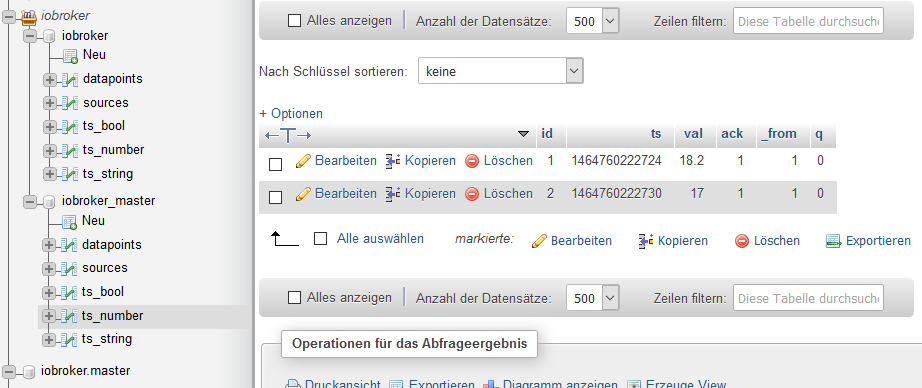
interissant ist, dass nun eine Gruppe angelegt wurdePS: die Datenbank "iobroker.master" hatte ich manuell angelegt. Die werde ich nun wieder löschen
Gruß
Jürgen
-
> interissant ist, dass nun eine Gruppe angelegt wurdeWas meinst du damit? `
bei SQL wurden die beiden Datenbanken (iobroker und iobroker_master) in dem "Ordner" (Gruppe) ioBroker zusammen gefasst. (Siehe Bild)
Ich kann nicht sagen wo das her kommt.
PS:
Nun steht im Admin dass es eine Version 1.0.7 gibt. (Installiert = 1.0.5) Er wird jedoch kein Update-Symbol angezeigt
Gruß
Jürgen

Hey! Du scheinst an dieser Unterhaltung interessiert zu sein, hast aber noch kein Konto.
Hast du es satt, bei jedem Besuch durch die gleichen Beiträge zu scrollen? Wenn du dich für ein Konto anmeldest, kommst du immer genau dorthin zurück, wo du zuvor warst, und kannst dich über neue Antworten benachrichtigen lassen (entweder per E-Mail oder Push-Benachrichtigung). Du kannst auch Lesezeichen speichern und Beiträge positiv bewerten, um anderen Community-Mitgliedern deine Wertschätzung zu zeigen.
Mit deinem Input könnte dieser Beitrag noch besser werden 💗
Registrieren AnmeldenSupport us
442
Online33.0k
Benutzende83.7k
Themen1.3m
Beiträge