




[Adapter] Doorbird - Ideensammlung
-
Guten Morgen zusammen,
hat sich Erld. Man sollte halt die Anleitung bis zu Ende lesen. Hatte die HTTP Requests im Doorbird übersehen. Nun klappt es. Danke Euch
-
Hi,
ich habe auch das Problem.
In der Doorbird_App habe ich http-Aufrufe für die VU eingestellt. Nun hat ioBroker 2 zusätzliche http-Aufrufe hinzugefügt:
Ring & Motion
Ich habe nun also insgesamt 4 Stück. Unter Zeitplan für Türklingel sind 3 davon nun grau und nur 1ner blau (den kann ich also zeitlich einstellen).Wenn ich den Zeitplan setzen will (bei den grauen) steht immer: belegt durch... und dann der entsprechend blau hinterlegte Zeitplan.
Damit muss das irgendwie zu tun haben.
Leider erwähnt @algermi nur irgendwas mit Anleitung zu Ende. In der Doorbird Anleitung finde ich nichts! Oder stehe ich auf dem Schlauch...?
-
Hi,
ich habe auch das Problem.
In der Doorbird_App habe ich http-Aufrufe für die VU eingestellt. Nun hat ioBroker 2 zusätzliche http-Aufrufe hinzugefügt:
Ring & Motion
Ich habe nun also insgesamt 4 Stück. Unter Zeitplan für Türklingel sind 3 davon nun grau und nur 1ner blau (den kann ich also zeitlich einstellen).Wenn ich den Zeitplan setzen will (bei den grauen) steht immer: belegt durch... und dann der entsprechend blau hinterlegte Zeitplan.
Damit muss das irgendwie zu tun haben.
Leider erwähnt @algermi nur irgendwas mit Anleitung zu Ende. In der Doorbird Anleitung finde ich nichts! Oder stehe ich auf dem Schlauch...?
Okay. Irgendwo hierdrin habe ich gefunden was ich bereits vermutet habe.
Alle http-Aufrufe vorher löschen, dann gibt es keine Fehler. -
Hallo David,
bevor das Bild im State hochgeladen wird, wird es unter
/opt/iobroker/iobroker-data/doorbird.0.snap.jpgabgelegt…
Egal ob durch Bewegung oder durch drücken der Klingel,..
Das aktuelle Bild ist immer unter dem oben genannten Pfad zu finden.
Also solltest du mit
sendTo('telegram', '/opt/iobroker/iobroker-data/doorbird.0.snap.jpg');das aktuelle Bild via Telegram versenden können.
Oder habe ich dich jetzt falsch verstanden?
Gruß `
Ja, das hatte ich gesucht. Danke :-)
Habe es zwischenzeitlich aber auch anders gelöst, für mich sogar ein bisschen besser da mit Bewegbild als animiertes GIF :-)
Falls es jemand nachbauen möchte: Ich wandle mit ffmpeg den stream in eine mp4-Datei um und sende diese dann via Telegram. In Telegram wird das Bild dann in Dauerschleife als animiertes GIF angezeigt.
Hier der Code zur Umwandlung, den man auf dem Screenshot nicht ganz erkennen kann:
ffmpeg -y -i rtsp://USERNAME:PASSWORT@DOORBIRD-IP:554/mpeg/media.amp -t 5 -f mp4 -vcodec libx264 -pix_fmt yuv420p -an -vf scale=w=1280:h=738:force_original_aspect_ratio=decrease -r 10 /opt/iobroker/kamerabilder/doorbird-motion.mp4Und hier der Screenshot des Blockly-Skriptes:
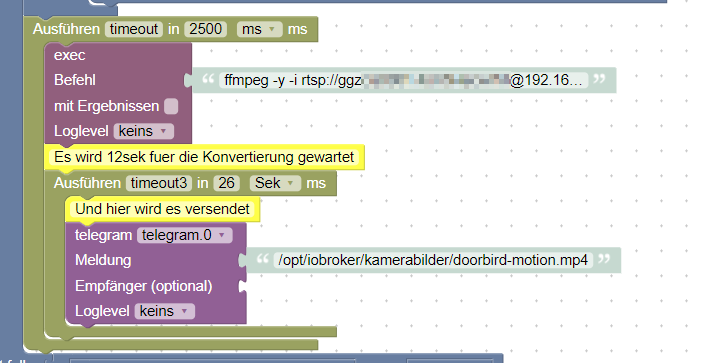
LG
@Kunibert Coole sache! Habe es auch soweit geschafft, allerding wird es bei mir nicht vernüpftig umgewandelt d.h. mir wird eine Datei geschickt aber diese kann nicht abgespielt werden, genauso im VLC nicht.
Habe deinen Code kopiert und durch meine daten ersetzt! Und vorher FFMPEG mit install über die konsole installier!
Muss ich noch etwas an den Einstellungen ändern?
System Raspi 3+ und iphone mit Telegram
lg
-
Okay. Irgendwo hierdrin habe ich gefunden was ich bereits vermutet habe.
Alle http-Aufrufe vorher löschen, dann gibt es keine Fehler. -
Habe ich gemacht. Habe jetzt auch alle Datenpunkte. TOP! Danke schonmal
Aber mein Log dreht völlig am Rad.
Das ist der LOG wenn ich die klingel betätige:
@Nicky_86 Das sieht seltsam aus. Definitiv ist es bei mir "sauber".
Hast Du mal alles geupdated? Also auf OS-Ebene...? -
Hi, erstmal vielen Dank für die Arbeit an dem Adapter !
Ich ziehe gerade von Openhab nach IOBroker und habe noch so meine Startschwierigkeiten deswegen habe ich wohl hier ein Verständnissproblem. Ich habe den Adapter verbunden und bekomme auch die Snapshots. HTTP Einträge in der App sind auch vorhanden. Log schmeißt auch keine Probleme, soweit so gut.
Ich habe den Thread jetzt hier 3 mal nachgelesen und finde auch ein paar Andeutungen aber leider keine Anleitung wie es weiter geht. Ich kann natürlich den Snapshot jetzt mit update Zeit in der VIS verankern, aber hier wird ja oft geschrieben das ihr es so gemacht habt das sich dann auch nach Taste Schellen sich das Fenster in der VIS in den Vordergrund schiebt und dann nach Zeit x wieder zurück. Da ich mich noch nicht so mit iobroker auskenne würde ich mich also freuen wie mir jemand eine kleine Anleitung geben könnte wie ich das jetzt schön in der VIS verankern kann.
Vielen Dank schon einmal.Grüße
-
Nabend. Bekomme den Adapter über den Admin Bereich nicht installiert.
Mir fehlen scheinbar die Schreibrechte auf meinem Pi. Kann mir da jemand auf die Sprünge helfen? Besten Dank im voraus!$ ./iobroker url "https://github.com/BuZZy1337/ioBroker.doorbird.git" install https://github.com/BuZZy1337/ioBroker.doorbird/tarball/master npm install https://github.com/BuZZy1337/ioBroker.doorbird/tarball/master --production --save --prefix "/opt/iobroker" (System call) npm WARN checkPermissions Missing write access to /opt/iobroker/node_modules/iobroker.doorbird npm WARN bl@0.7.0 requires a peer of stream-browserify@* but none is installed. You must install peer dependencies yourself. npm ERR! path /opt/iobroker/node_modules/iobroker.doorbirdnpm ERR! code EACCES npm ERR! errno -13npm ERR! syscall access npm ERR! Error: EACCES: permission denied, access '/opt/iobroker/node_modules/iobroker.doorbird'npm ERR! { [Error: EACCES: permission denied, access '/opt/iobroker/node_modules/iobroker.doorbird'] npm ERR! stack: npm ERR! 'Error: EACCES: permission denied, access \'/opt/iobroker/node_modules/iobroker.doorbird\'', npm ERR! errno: -13,npm ERR! code: 'EACCES', npm ERR! syscall: 'access', npm ERR! path: '/opt/iobroker/node_modules/iobroker.doorbird' } npm ERR! npm ERR! The operation was rejected by your operating system. npm ERR! It is likely you do not have the permissions to access this file as the current user npm ERR! npm ERR! If you believe this might be a permissions issue, please double-check the npm ERR! permissions of the file and its containing directories, or try running npm ERR! the command again as root/Administrator (though this is not recommended). npm ERR! A complete log of this run can be found in:npm ERR! /home/iobroker/.npm/_logs/2019-11-21T19_36_21_545Z-debug.log ERROR: host.raspberrypi Cannot install https://github.com/BuZZy1337/ioBroker.doorbird/tarball/master: 243 ERROR: process exited with code 25Edit: hat sich erledigt!
-
Hi, erstmal vielen Dank für die Arbeit an dem Adapter !
Ich ziehe gerade von Openhab nach IOBroker und habe noch so meine Startschwierigkeiten deswegen habe ich wohl hier ein Verständnissproblem. Ich habe den Adapter verbunden und bekomme auch die Snapshots. HTTP Einträge in der App sind auch vorhanden. Log schmeißt auch keine Probleme, soweit so gut.
Ich habe den Thread jetzt hier 3 mal nachgelesen und finde auch ein paar Andeutungen aber leider keine Anleitung wie es weiter geht. Ich kann natürlich den Snapshot jetzt mit update Zeit in der VIS verankern, aber hier wird ja oft geschrieben das ihr es so gemacht habt das sich dann auch nach Taste Schellen sich das Fenster in der VIS in den Vordergrund schiebt und dann nach Zeit x wieder zurück. Da ich mich noch nicht so mit iobroker auskenne würde ich mich also freuen wie mir jemand eine kleine Anleitung geben könnte wie ich das jetzt schön in der VIS verankern kann.
Vielen Dank schon einmal.Grüße
@sourex
Hallo,
den lifechat bekommst du nicht in Vis direkt eingebunden.
Ich habe den fully Browser installiert.
Ein blockly schaltet mit fully commands die Anzeige nach dem Klingeln von Vis um auf die DoorBird App und wieder zurück.
Findest du alles im Forum.MfG Ulrich
-
@sourex
Hallo,
den lifechat bekommst du nicht in Vis direkt eingebunden.
Ich habe den fully Browser installiert.
Ein blockly schaltet mit fully commands die Anzeige nach dem Klingeln von Vis um auf die DoorBird App und wieder zurück.
Findest du alles im Forum.@zahnheinrich sagte in [Adapter] Doorbird - Ideensammlung:
Ein blockly schaltet mit fully commands die Anzeige nach dem Klingeln von Vis um auf die DoorBird App und wieder zurück.
Findest du alles im Forum.Würdest du das Blockly zur Verfügung stellen?
Ich finde nur eine Lösung mit Tasker. Dazu muss das Tablett aber leider gerootet sein. -
@zahnheinrich sagte in [Adapter] Doorbird - Ideensammlung:
Ein blockly schaltet mit fully commands die Anzeige nach dem Klingeln von Vis um auf die DoorBird App und wieder zurück.
Findest du alles im Forum.Würdest du das Blockly zur Verfügung stellen?
Ich finde nur eine Lösung mit Tasker. Dazu muss das Tablett aber leider gerootet sein.@Negalein
Bitteschön:<xml xmlns="http://www.w3.org/1999/xhtml"> <variables> <variable type="undefined" id="timeout3">timeout3</variable> <variable type="undefined" id="timeout">timeout</variable> </variables> <block type="create" id="}pLCv[ASDixk]bWPW$j)" collapsed="true" disabled="true" x="88" y="-737"> <field name="NAME">javascript.0.Variablen.DoorBird.doorbird</field> <value name="VALUE"> <block type="logic_boolean" id="2OEtlFZMXvkO(%~rGi9N"> <field name="BOOL">FALSE</field> </block> </value> <next> <block type="comment" id="``,yrzV@53[XfjaMXpqE"> <field name="COMMENT">button de auf die doorbird app wechselt</field> <next> <block type="comment" id="G-S$}/CW]ps(^=EX;tM0"> <field name="COMMENT">oder wenn jemand klingelt</field> <next> <block type="on_ext" id="~InNTIlI;tkEFM`2B.B5"> <mutation items="2"></mutation> <field name="CONDITION">ne</field> <field name="ACK_CONDITION"></field> <value name="OID0"> <shadow type="field_oid" id="Px`^x@jK]Hqs2WMO,-a#"> <field name="oid">javascript.0.Variablen.DoorBird.doorbird</field> </shadow> </value> <value name="OID1"> <shadow type="field_oid" id="?@5#x8KkT={%l4tFH/O@"> <field name="oid">doorbird.0.Doorbell.1.trigger</field> </shadow> </value> <statement name="STATEMENT"> <block type="debug" id="[NfvqhwbpQDIZK26Q#zN"> <field name="Severity">log</field> <value name="TEXT"> <shadow type="text" id="YWkLl4i1PB5Xfk8M2zdi"> <field name="TEXT">--- starte DoorBird App</field> </shadow> </value> <next> <block type="procedures_callnoreturn" id="8E|!|GDRe@nu++8Q@N;T"> <mutation name="doorbird"></mutation> </block> </next> </block> </statement> <next> <block type="comment" id="g.E}ZOW:r$NV:E?i+%%j"> <field name="COMMENT">wenn sich was bewegt</field> <next> <block type="on_ext" id="GyUJR:1lFaz0WXO]s|)N"> <mutation items="1"></mutation> <field name="CONDITION">any</field> <field name="ACK_CONDITION"></field> <value name="OID0"> <shadow type="field_oid" id="/zB.k5@)Q^oA2qDlRUgP"> <field name="oid">doorbird.0.Motion.trigger</field> </shadow> </value> <statement name="STATEMENT"> <block type="controls_if" id="~Awn^=wwX9}9BzX[x_Jw"> <value name="IF0"> <block type="logic_compare" id="bw-tsB`7p]mSBv75aB_-"> <field name="OP">EQ</field> <value name="A"> <block type="get_value" id="gJ;}tEG%hNR3_0a!T9Cw"> <field name="ATTR">val</field> <field name="OID">doorbird.0.Motion.trigger</field> </block> </value> <value name="B"> <block type="logic_boolean" id="b_JL6;?fTuB,1hg=*xQU"> <field name="BOOL">TRUE</field> </block> </value> </block> </value> <statement name="DO0"> <block type="procedures_callnoreturn" id="9cQ}sI2ZXib!bC!QV3aP"> <mutation name="doorbird"></mutation> </block> </statement> </block> </statement> <next> <block type="comment" id="GVv5P.W$@Gj+h$j|iYU!"> <field name="COMMENT">bildschirm ein wenn jemand nach hause kommt, bzw aus wenn alle das hausverlassen</field> <next> <block type="on_ext" id="^pRvz(J`83-LLKv;3m|i"> <mutation items="1"></mutation> <field name="CONDITION">ne</field> <field name="ACK_CONDITION"></field> <value name="OID0"> <shadow type="field_oid" id="^@9+`,`E@m(LI86?f!kk"> <field name="oid">hm-rega.0.50493</field> </shadow> </value> <statement name="STATEMENT"> <block type="timeouts_settimeout" id="b57HF3OP7d#MuWSIGpe7"> <field name="NAME">timeout</field> <field name="DELAY">2000</field> <field name="UNIT">ms</field> <statement name="STATEMENT"> <block type="controls_if" id="7_xJm`dMS4GX]mGv^V?|"> <mutation else="1"></mutation> <value name="IF0"> <block type="logic_operation" id="IMTf?8wLlWrVwt5*3apR" inline="false"> <field name="OP">AND</field> <value name="A"> <block type="time_compare" id="kvVCD!+)^|GkG`QvYUFj"> <mutation end_time="true"></mutation> <field name="OPTION">between</field> <field name="START_TIME">05:59</field> <field name="END_TIME">22:21</field> </block> </value> <value name="B"> <block type="on_source" id=".?(+mq?](hxSFC=s:OWk"> <field name="ATTR">state.val</field> </block> </value> </block> </value> <statement name="DO0"> <block type="procedures_callnoreturn" id="isG=_?2Pb51=IZQP2|+M"> <mutation name="display_on"></mutation> </block> </statement> <statement name="ELSE"> <block type="procedures_callnoreturn" id="N.}yeNQN_6O]oL:~bO{p"> <mutation name="display_off"></mutation> </block> </statement> </block> </statement> </block> </statement> </block> </next> </block> </next> </block> </next> </block> </next> </block> </next> </block> </next> </block> </next> </block> <block type="procedures_defnoreturn" id="53TwS?4NX*0d+)HU;m8U" x="987" y="-688"> <field name="NAME">display_off</field> <comment pinned="false" h="80" w="160">Beschreibe diese Funktion …</comment> <statement name="STACK"> <block type="comment" id="j4LA3Dj|;#aHamjBX2YU"> <field name="COMMENT">befehle display aus</field> <next> <block type="control" id="x`Mjs-BBLS-IO8QfVYTN"> <mutation delay_input="false"></mutation> <field name="OID">fullybrowser.0.192_168_3_25.Commands.screenOff</field> <field name="WITH_DELAY">FALSE</field> <value name="VALUE"> <block type="logic_boolean" id="BZ.Q,wNc$WU3pKMN0h8t"> <field name="BOOL">TRUE</field> </block> </value> <next> <block type="control" id="6vDz7T69xfkbNcJ5%BN="> <mutation delay_input="false"></mutation> <field name="OID">fullybrowser.0.192_168_3_26.Commands.screenOff</field> <field name="WITH_DELAY">FALSE</field> <value name="VALUE"> <block type="logic_boolean" id="K3rY3#|Q^%Fl2rUY3LhS"> <field name="BOOL">TRUE</field> </block> </value> </block> </next> </block> </next> </block> </statement> </block> <block type="procedures_defnoreturn" id="ug{F{JHlC$QPsy[4i[(R" x="987" y="-412"> <field name="NAME">display_on</field> <comment pinned="false" h="80" w="160">Beschreibe diese Funktion …</comment> <statement name="STACK"> <block type="comment" id="y:%!nG}zIBk*Q;PfLmWS"> <field name="COMMENT">befehle display an</field> <next> <block type="control" id="w0~cmx8PYYmPD.p9gFzr"> <mutation delay_input="false"></mutation> <field name="OID">fullybrowser.0.192_168_3_25.Commands.screenOn</field> <field name="WITH_DELAY">FALSE</field> <value name="VALUE"> <block type="logic_boolean" id="h:__*3gtl99;{jO4hP]v"> <field name="BOOL">TRUE</field> </block> </value> <next> <block type="control" id="iVK@;mS}M:?gGWJg8j}n"> <mutation delay_input="false"></mutation> <field name="OID">fullybrowser.0.192_168_3_26.Commands.screenOn</field> <field name="WITH_DELAY">FALSE</field> <value name="VALUE"> <block type="logic_boolean" id="+CJ=U#C1Ne#lB-G2hvUF"> <field name="BOOL">TRUE</field> </block> </value> </block> </next> </block> </next> </block> </statement> </block> <block type="procedures_defnoreturn" id="2z6oiB]zf#Cscz}h}6TO" x="988" y="-212"> <field name="NAME">doorbird</field> <comment pinned="false" h="80" w="160">Beschreibe diese Funktion …</comment> <statement name="STACK"> <block type="controls_if" id="V5vFcpL*;2,ek2*h[n/="> <value name="IF0"> <block type="logic_compare" id="z*ZSpV@L-}#m[#.+LNLm"> <field name="OP">EQ</field> <value name="A"> <block type="get_value" id="oe@7]K{cC3#h*XS-#szm"> <field name="ATTR">val</field> <field name="OID">hm-rega.0.20907</field> </block> </value> <value name="B"> <block type="math_number" id="tz?3+.rm5mWnSc+Mdc_A"> <field name="NUM">1</field> </block> </value> </block> </value> <statement name="DO0"> <block type="comment" id="^I?~uXiTJc$HM#8$jbVj"> <field name="COMMENT">befehle bei doorbird</field> <next> <block type="procedures_callnoreturn" id="6ffN~gBjuJBW5{Ij5z)a"> <mutation name="display_on"></mutation> <next> <block type="control" id="th#JRU]VY3BT|NP[:+_z"> <mutation delay_input="false"></mutation> <field name="OID">fullybrowser.0.192_168_3_25.Commands.startApplication</field> <field name="WITH_DELAY">FALSE</field> <value name="VALUE"> <block type="text" id="A*CS6?hf,{f{!moE1!.("> <field name="TEXT">com.doorbird.doorbird</field> </block> </value> <next> <block type="control" id="|y#HD18FmV;,W2da4bXH"> <mutation delay_input="false"></mutation> <field name="OID">fullybrowser.0.192_168_3_26.Commands.startApplication</field> <field name="WITH_DELAY">FALSE</field> <value name="VALUE"> <block type="text" id="F!pz#P}CseVsPo5BRV^["> <field name="TEXT">com.doorbird.doorbird</field> </block> </value> <next> <block type="timeouts_settimeout" id="ONkd*5UreD(R.SB1DW^#"> <field name="NAME">timeout3</field> <field name="DELAY">60</field> <field name="UNIT">sec</field> <statement name="STATEMENT"> <block type="control" id="S#){dd3:lDra9FSEO9Q@"> <mutation delay_input="false"></mutation> <field name="OID">fullybrowser.0.192_168_3_25.Commands.startApplication</field> <field name="WITH_DELAY">FALSE</field> <value name="VALUE"> <block type="text" id="i~nP.#BCP1pTeLY}o[`p"> <field name="TEXT">de.ozerov.fully</field> </block> </value> <next> <block type="control" id="67~2[6+FcbF8yT;.rH|j"> <mutation delay_input="false"></mutation> <field name="OID">fullybrowser.0.192_168_3_26.Commands.startApplication</field> <field name="WITH_DELAY">FALSE</field> <value name="VALUE"> <block type="text" id="3,cI$!{iRye3=.Rzl}-/"> <field name="TEXT">de.ozerov.fully</field> </block> </value> </block> </next> </block> </statement> </block> </next> </block> </next> </block> </next> </block> </next> </block> </statement> </block> </statement> </block> </xml>Nicht wundern, daß die fully commands scheinbar doppelt vorhanden sind. Ich steuere zwei tablets damit (mit entsprechend unterschiedlichen commands).
Und: Das script stammt nicht von mir, sondern ist aus diesem super hervorragenden Forum, nur auf meine Bedürfnisse angepasst.
-
Hello,
I'm from Belgium, my German isn't good (at all) so excuse me for replying in English. I have the same issue as someone above...
Doorbird-instance is created, user settings and the app are correct, everything shows up except for the RING folder
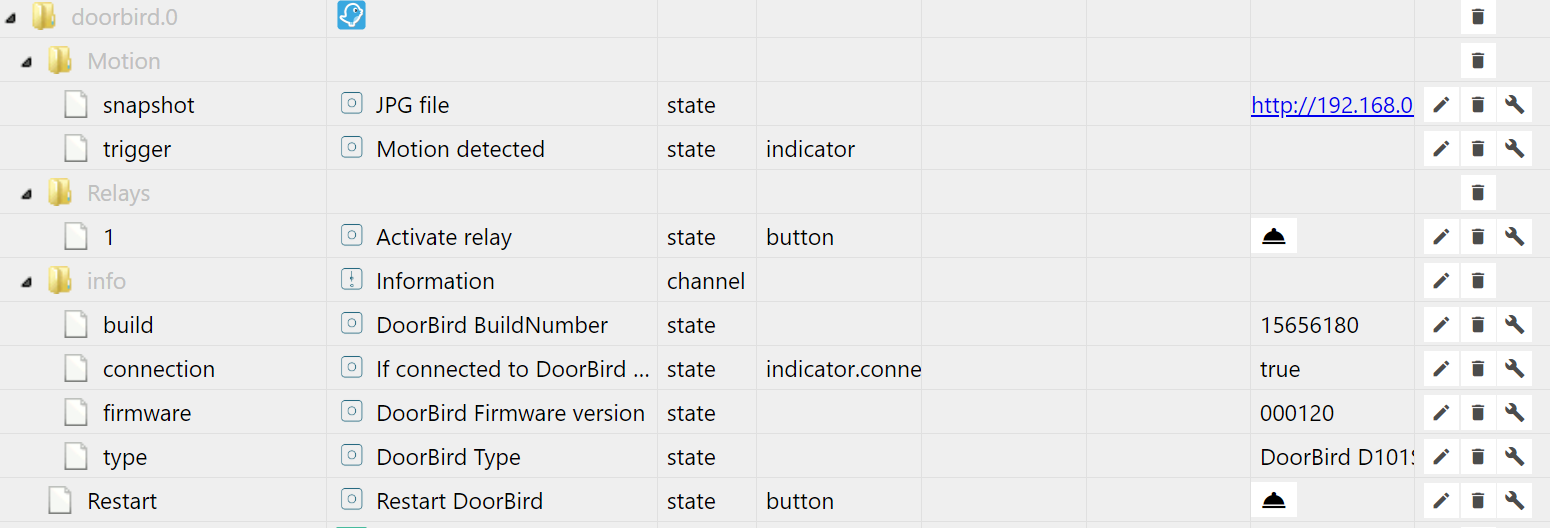
What am I doing wrong? :-)
Thanks in advance!
Kind regards,
Jan
-
Hello,
I'm from Belgium, my German isn't good (at all) so excuse me for replying in English. I have the same issue as someone above...
Doorbird-instance is created, user settings and the app are correct, everything shows up except for the RING folder
What am I doing wrong? :-)
Thanks in advance!
Kind regards,
Jan
@Jan-Geurts
Hi,
I think it's not a problem of iobroker but a problem of a missing http command for ring inside your doorbird settings.MfG Ulrich
-
@Jan-Geurts
Hi,
I think it's not a problem of iobroker but a problem of a missing http command for ring inside your doorbird settings.I've tried lots of things. Reinstalling the Doorbird-adapter, recreating the instance, reloading the instance, restarting ioBroker. Even when the instance is recreated, it creates the doorbird.0 with the same objects as before: Motion, Relays and info.
I've tried - as suggested by someone else in this thread - to delete the HTTP(S) calls in the DoorBird administration section and then re-adding the doorbird, nothing changes. So it keeps showing everything except the ring folder (with trigger and snapshot).
I've tried manually creating a HTTP-call for the ring that points to the object in ioBroker, but that doesn't magically make it show up there...
I'm quite stuck

-
@Jan-Geurts
Hi,
I think it's not a problem of iobroker but a problem of a missing http command for ring inside your doorbird settings.I have tried the same on a Windows-install of ioBroker and now I noticed what happens in the logs when adding a Doorbird-instance:
host.WKS80SERVER(WKS80)	2019-11-26 13:09:16.621	info	iobroker exit 0
host.WKS80SERVER(WKS80)	2019-11-26 13:09:15.617	info	iobroker host.WKS80SERVER(WKS80) object system.adapter.doorbird.0 created
host.WKS80SERVER(WKS80)	2019-11-26 13:09:15.587	info	iobroker host.WKS80SERVER(WKS80) object system.adapter.doorbird.0.alive created
host.WKS80SERVER(WKS80)	2019-11-26 13:09:15.562	info	iobroker host.WKS80SERVER(WKS80) object system.adapter.doorbird.0.connected created
host.WKS80SERVER(WKS80)	2019-11-26 13:09:15.535	info	iobroker host.WKS80SERVER(WKS80) object system.adapter.doorbird.0.compactMode created
host.WKS80SERVER(WKS80)	2019-11-26 13:09:15.508	info	iobroker host.WKS80SERVER(WKS80) object system.adapter.doorbird.0.cpu created
host.WKS80SERVER(WKS80)	2019-11-26 13:09:15.481	info	iobroker host.WKS80SERVER(WKS80) object system.adapter.doorbird.0.cputime created
host.WKS80SERVER(WKS80)	2019-11-26 13:09:15.454	info	iobroker host.WKS80SERVER(WKS80) object system.adapter.doorbird.0.memHeapUsed created
host.WKS80SERVER(WKS80)	2019-11-26 13:09:15.428	info	iobroker host.WKS80SERVER(WKS80) object system.adapter.doorbird.0.memHeapTotal created
host.WKS80SERVER(WKS80)	2019-11-26 13:09:15.401	info	iobroker host.WKS80SERVER(WKS80) object system.adapter.doorbird.0.memRss created
host.WKS80SERVER(WKS80)	2019-11-26 13:09:15.375	info	iobroker host.WKS80SERVER(WKS80) object system.adapter.doorbird.0.uptime created
host.WKS80SERVER(WKS80)	2019-11-26 13:09:15.347	info	iobroker host.WKS80SERVER(WKS80) object system.adapter.doorbird.0.inputCount created
host.WKS80SERVER(WKS80)	2019-11-26 13:09:15.322	info	iobroker host.WKS80SERVER(WKS80) object system.adapter.doorbird.0.outputCount created
host.WKS80SERVER(WKS80)	2019-11-26 13:09:15.295	info	iobroker host.WKS80SERVER(WKS80) object system.adapter.doorbird.0.eventLoopLag created
host.WKS80SERVER(WKS80)	2019-11-26 13:09:15.268	info	iobroker host.WKS80SERVER(WKS80) object system.adapter.doorbird.0.sigKill created
host.WKS80SERVER(WKS80)	2019-11-26 13:09:15.242	info	iobroker host.WKS80SERVER(WKS80) object doorbird.0.Restart created
host.WKS80SERVER(WKS80)	2019-11-26 13:09:15.215	info	iobroker host.WKS80SERVER(WKS80) object doorbird.0.Motion.trigger created
host.WKS80SERVER(WKS80)	2019-11-26 13:09:15.190	info	iobroker host.WKS80SERVER(WKS80) object doorbird.0.Motion.snapshot created
host.WKS80SERVER(WKS80)	2019-11-26 13:09:15.163	info	iobroker host.WKS80SERVER(WKS80) object doorbird.0.info created
host.WKS80SERVER(WKS80)	2019-11-26 13:09:15.135	info	iobroker host.WKS80SERVER(WKS80) object doorbird.0.info.connection created
host.WKS80SERVER(WKS80)	2019-11-26 13:09:15.109	info	iobroker host.WKS80SERVER(WKS80) object doorbird.0.info.firmware created
host.WKS80SERVER(WKS80)	2019-11-26 13:09:15.083	info	iobroker host.WKS80SERVER(WKS80) object doorbird.0.info.build created
host.WKS80SERVER(WKS80)	2019-11-26 13:09:15.055	info	iobroker host.WKS80SERVER(WKS80) object doorbird.0.info.type created
host.WKS80SERVER(WKS80)	2019-11-26 13:09:15.053	info	iobroker host.WKS80SERVER(WKS80) create instance doorbird
host.WKS80SERVER(WKS80)	2019-11-26 13:09:14.059	info	iobroker add doorbird --host WKS80SERVER(WKS80)
There is no ring object created when creating the instance, however, the app has the 'doorbell' function enabled. HTTP(S) calls are empty right now... Can I add the HTTP(S)-calls manually?
Thanks in advance!
Kind regards,
Jan
-
Solved! Manually logging in over http (using the API-commands provided in the Doorbird API manual) created the necessary HTTP(S) calls for the iobroker.doorbird-adapter to pick up. Thanks for pointing me partly in the right direction! ;-)
-
Solved! Manually logging in over http (using the API-commands provided in the Doorbird API manual) created the necessary HTTP(S) calls for the iobroker.doorbird-adapter to pick up. Thanks for pointing me partly in the right direction! ;-)
@Jan-Geurts
You are welcome any time
-
Da der Adapter schon lange im Stable ist schließe ich dieses Thema.
Für Fragen zum Adapter und dessen Benutzung eröffnet bitte ein Thema in der Unterkategorie ioBroker Allgemein. Wenn ihr Fehler im Adapter findet eröffnet bitte in der Unterkategorie Error/Bug ein Thema. -
Also wenn ich von der App das Relais schalte, kann man das visualisieren ? `
Diese Möglichkeit bietet Doorbird momentan leider nicht. Sollte sich das in Zukunft ändern, wird das natürlich im Adapter übernommen.Wenn ich im iobroker-Admin unter Objekte auf den Snapshot-state klicke öffnet sich eine Seite mit lauter Hyroglyphen und ein Bild, hier ein
….. `
Welchen Browser verwendest du?Jetzt kann ich die Tür mit einem RFID-Chip über KeyMatic öffnen. Zu jedem einzelnen RFID-Chip habe ich einen HTTP Aufruf erstellt und zugeordnet,….......
Bist Du mit dem Hersteller weiter gekommen? Kann man sowas direkt in den Adapter einbauen? `
Ich werde bald eine neue Version veröffentlichen wo man die Tag-IDs von den RFID Chips eingeben kann und dementsprechend auch dann darauf reagieren kann..Ich würde nen Adapter benötigen, um die beiden Relais für die Tore über ioBroker zu schalten. Geht das mit dem Adapter? Wenn ja: Wo bekomme ich den denn her? Danke schonmal :) `
Die Doorbird Relais kannst du über den Adapter schalten.Der Adapter ist in der Latest Repo vom ioBroker verfügbar. Du kannst ihn auch manuell via Github installieren.
Weiß jemand ob der Adapter mit dem Doordbird D301A funktioniert?
Ich krieg trotz mehrfacher Versuche leider keine Verbindung zum Doordbird hin im iobroker. `
Ich habe leider kein D301A hier um das zu testen.Kann man denn über die Doorbird App ganz normal auf den D301A zugreifen?
Da ich vorher mit einem Skript schon verbunden war habe ich im Doorbird App die http Einträge gelöscht.
Nach dem Neustart des Adapters werden da aber keine neuen Einträge mehr erstellt…
Und der Adapter bleibt gelb. `
Du kannst auf die Lupe neben dem Feld für die Doorbird IP Adresse klicken.. Danach auf den Klingelknopf drücken, dann sollten sich alle Felder automatisch ausfüllen - bis auf Username und Password.Hast du das mal probiert?
Gruß






Hey! Du scheinst an dieser Unterhaltung interessiert zu sein, hast aber noch kein Konto.
Hast du es satt, bei jedem Besuch durch die gleichen Beiträge zu scrollen? Wenn du dich für ein Konto anmeldest, kommst du immer genau dorthin zurück, wo du zuvor warst, und kannst dich über neue Antworten benachrichtigen lassen (entweder per E-Mail oder Push-Benachrichtigung). Du kannst auch Lesezeichen speichern und Beiträge positiv bewerten, um anderen Community-Mitgliedern deine Wertschätzung zu zeigen.
Mit deinem Input könnte dieser Beitrag noch besser werden 💗
Registrieren AnmeldenSupport us
515
Online33.0k
Benutzer83.6k
Themen1.3m
Beiträge