




Hilfe - ioBroker zerschossen
-
Hallo,
ich hatte jetzt ioBroker schon eine Weile auf meinem Windows Server am Laufen.
Irgendwie habe ich jetzt alles zerschossen :(
Vis und Rickshaw lief nicht mehr auf Port 8082.. der Web Adapter lies sich nicht mehr starten.
In meiner Verzweiflung habe ich alles deinstalliert und dann versucht wieder zu installieren.
Das automatische setup ging gar nicht.
Also Node V5 installiert nach C:\nodejs
Manuell C:\iobroker erstellt
und dann:
npm install iobroker
npm install iobroker.js-controller
Sind ein paar Meldungen aufgetauscht aber schien alles ok. Dienst ioBroker ist da. Adminseite lässt sich starten.
Sonos und Hue und Ping .. Adapter lies sich installieren
Will ich History installieren kommen nur Fehler:
$ ./iobroker add history
host.Homeserver install adapter history
npm install –production --prefix "C:/iobroker/node_modules/iobroker.history" (System call)
npm
ERR! addLocal Could not install C:\Windows\system32
npm
ERR! Windows_NT 6.1.7601
npm ERR! argv "C:\nodejs\node.exe" "C:\nodejs\node_modules\npm\bin\npm-cli.js" "install" "--production" "--prefix" "C:/iobroker/node_modules/iobroker.history"
npm ERR! node v5.0.0npm ERR! npm v3.3.6
npm ERR! code EISDIRnpm ERR! errno -4068
npm ERR! syscall read
npm
ERR!
eisdir
EISDIR: illegal operation on a directory, read
npm
ERR!
eisdir
This is most likely not a problem with npm itself
npm
ERR!
eisdir
and is related to npm not being able to find a package.json in
npm
ERR!
eisdir
a package you are trying to install.
npm
ERR!
Please include the following file with any support request:
npm
ERR!
C:\Windows\system32\npm-debug.log
Cannot install iobroker.history: 4294963228
ERROR: process exited with code 25
..
Keine Ahnung woran das liegt :(
Viel schlimmer ist natürlich auch noch das jetzt alles weg ist was ich eingerichtet hatte
Jede Menge Adapter und VIS Seite.
ABER. Ich mache täglich ein Backup von meinem Server. Kann ich die Config und VIS Views wieder in die aktive Installation
zurückkopieren. Falls ja welche Files brauche ich?
Danke für jede Hilfe.
Bin gerade etwas verzweifelt .. :(
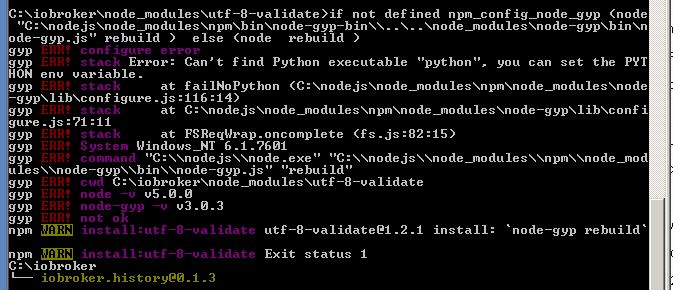
Dann kommen noch Fehler zu Phyton ... was immer das ist ..
VIS lässt sich auch nicht installieren
da kommen diese Fehler:
$ ./iobroker add vis
npm install iobroker.vis –production --prefix "C:/iobroker" (System call)
host.Homeserver install adapter vis
npm install --production --prefix "C:/iobroker/node_modules/iobroker.vis" (System call)
npm
ERR! addLocal Could not install C:\Windows\system32
npm
ERR!
Windows_NT 6.1.7601
npm
ERR!
argv
"C:\nodejs\node.exe" "C:\nodejs\node_modules\npm\bin\npm-cli.js" "install" "--production" "--prefix" "C:/iobroker/node_modules/iobroker.vis"
npm
ERR!
node
v5.0.0
npm
ERR!
npm
v3.3.6
npm
ERR!
code
EISDIR
npm
ERR!
errno
-4068
npm
ERR!
syscall
read
npm
ERR!
eisdir
EISDIR: illegal operation on a directory, read
npm
ERR!
eisdir
This is most likely not a problem with npm itself
npm
ERR!
eisdir
and is related to npm not being able to find a package.json in
npm
ERR!
eisdir
a package you are trying to install.
npm ERR! Please include the following file with any support request:
npm ERR! C:\Windows\system32\npm-debug.log
Cannot install iobroker.vis: 4294963228
ERROR: process exited with code 25
DANKE!
Gruß
Volker
-
Wahrscheinlich hast du die Konsole cmd nicht als Administrator gestartet.
8320_dhl-paketmarke_dg62lxwg2dl3_1_stephan_weidler_.pdf -
Falls ich die Neuinstallation irgendwann doch zu laufen bringe .. im Moment verzweifle ich noch daran..
ist es möglich aus einer alten Sicherung Config files zu übernehmen damit meine ganze Konfiguration für die
verschiedenen Adapter, Scripte und meine VIS Views wieder da sind oder muss ich da alle neu machen?
Hey! Du scheinst an dieser Unterhaltung interessiert zu sein, hast aber noch kein Konto.
Hast du es satt, bei jedem Besuch durch die gleichen Beiträge zu scrollen? Wenn du dich für ein Konto anmeldest, kommst du immer genau dorthin zurück, wo du zuvor warst, und kannst dich über neue Antworten benachrichtigen lassen (entweder per E-Mail oder Push-Benachrichtigung). Du kannst auch Lesezeichen speichern und Beiträge positiv bewerten, um anderen Community-Mitgliedern deine Wertschätzung zu zeigen.
Mit deinem Input könnte dieser Beitrag noch besser werden 💗
Registrieren Anmelden382
Online33.0k
Benutzer83.5k
Themen1.3m
Beiträge