




[gelöst] Farbe abhängig vom Zustand ändern
-
Hallo,
ich nutzte die Fenstersymbole und möchte sie gerne abhängig vom Zustand rot bzw grün färben. Das Schwarz des Bildes kann ich ja wahrscheinlich nicht ändern, daher am besten den Bildhintergrund. Muß ich dazu effektiv zwei Icon erstellen, an der gleichen Stelle positionieren und nur jeweils eins abhängig vom state zeigen? Oder was ist der beste/einfachste Weg dafür?
Gruß, Drao
-
Das ist wahrscheinlich nicht der beste Tipp, da ich mich noch nicht so mit den Möglichkeiten der Widgets beschäftigt habe.
Was aber z.B. geht:
Du kannst Dir über Javascript ein Objekt annehmen, in dem dann die verschiedenen Farben, in Abhängigkeit des Levels der Jalousien drinstehet.
z.B.:
0% rot
0% bis 30%: orange
30% bis 70%: yellow
70%: green
Dann dieses Objekt im Widget unter Background angeben:
{objektname}
[EDIT]: Ups…. Fenster, nicht Jalousien
-
Hallo Drao,
Du kannst ein Basic HTML valuelist 8- Widget nehmen. Unter 0 dann den zu Zustand "designen"
Dann bei 1 das gleich mit rot und Zustand zu Icon eintragen. Oid ist der türfensterkontakt. Bei einem RHS sind es die Zustände 0 1 und 2\. Sorry, etwas holprig mit Tapatalk auf dem iPhone. Gruß Pix Gesendet von meinem iPhone mit Tapatalk -
Bei mir sieht es so aus:
filename="fenster.png" index="0">~~ `
Hi,Hört soch gut an. Aber ich finde besagtes widget nicht. Kann jemand zusätzlich einen screenshot schicken, wo im widget der css Teil hinkommt? Habe leider noch keinen Plan hier …
Danke, drao
-
[{"tpl":"tplValueListHtml8","data":{"oid":"javascript.0.logik.gästebadLicht.bewegungGästebad","visibility-cond":"==","visibility-val":1,"count":"2","value0":"0","value1":"1","style0":"","style1":"background-color:yellow; color:black; padding:1px","test_list":"2","html_prepend":"Anzahl BWM: ","value2":"2","style2":"background-color:orange; color:black; padding:1px"},"style":{"left":477,"top":268,"width":"170px","height":"21px","color":"rgb(34, 34, 34)","text-align":"center","font-size":"13px","line-height":"21px","background":"rgb(211, 211, 211) none repeat scroll 0% 0% / auto padding-box border-box"},"widgetSet":"basic"}]Mal ein Beispielwidget zum Import.
Im Widget kannst Du unter "Testlist" die Werte zwischen 0 bis 5 verändern, um zu sehen, wie sich die Farbe vom Widget ändert.
-
Vielen Dank für das Widget. Ich habe es mir mal gespeichert. Sehr nützlich!
Das konkrete "Problem", d.h. das Fesntericon abhängig vom Zustand mit anderer Hintergrundfarbe zu zeigen, habe ich jetzt implementiert, in dem ich offline die Fesnterbilder (auf Basis der ioBroker Bilder) erstellt habe. Dann die Bilder hochgeladen und mittels tplJquiToogle widget die beiden Bilder abhängig vom Zustand toggle. Passt
-
Herzlichen Dank für diesen Thread. Genau was ich suchte und hat sofort geklappt meinen Tür-Fenster-Kontakt mit rot/gelb/gar nichts anzuzeigen.
Topp!
Schön das das Widget dabei war.
4489_erstes_skript_mit_blockly.pdf -
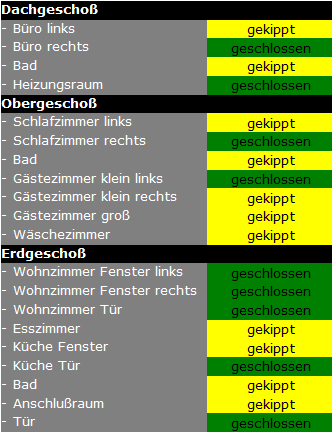
Die "Tabelle" habe ich händisch erstellt.
Hier der Code
[{"tpl":"tplValueListHtml8","data":{"oid":"hm-rpc.0.LEQ1249340.1.STATE","visibility-cond":"==","visibility-val":1,"count":"2","value0":"geschlossen","value1":"gekippt","value2":"offen","style0":"background-color:green; color:black; padding:1px","style1":"background-color:yellow; color:black; padding:1px","style2":"background-color:red; color:black; padding:1px","test_list":null},"style":{"left":"315px","top":"210px","height":"15px","text-align":"center","font-weight":"","font-size":"x-small","font-variant":"","font-style":"","font-family":"Verdana, Geneva, sans-serif"},"widgetSet":"basic"},{"tpl":"tplHtmlNav","data":{"visibility-cond":"==","visibility-val":1,"html":"Dachgeschoß"},"style":{"left":"150px","top":"195px","width":"265px","height":"15px","font-style":"","font-family":"Verdana, Geneva, sans-serif","font-size":"x-small","font-weight":"bolder","background":"black","color":"white"},"widgetSet":"basic"},{"tpl":"tplHtmlNav","data":{"visibility-cond":"==","visibility-val":1,"html":"- Büro links"},"style":{"left":"150px","top":"210px","height":"15px","font-style":"","font-family":"Verdana, Geneva, sans-serif","font-size":"x-small","width":"165px","background":"grey","color":"white"},"widgetSet":"basic"},{"tpl":"tplHtmlNav","data":{"visibility-cond":"==","visibility-val":1,"html":"- Büro rechts"},"style":{"left":"150px","top":"225px","height":"15px","font-style":"","font-family":"Verdana, Geneva, sans-serif","font-size":"x-small","width":"165px","color":"white","background":"grey"},"widgetSet":"basic"},{"tpl":"tplHtmlNav","data":{"visibility-cond":"==","visibility-val":1,"html":"- Bad"},"style":{"left":"150px","top":"240px","height":"15px","font-style":"","font-family":"Verdana, Geneva, sans-serif","font-size":"x-small","width":"165px","color":"white","background":"grey"},"widgetSet":"basic"},{"tpl":"tplHtmlNav","data":{"visibility-cond":"==","visibility-val":1,"html":"- Heizungsraum"},"style":{"left":"150px","top":"255px","height":"15px","font-style":"","font-family":"Verdana, Geneva, sans-serif","font-size":"x-small","width":"165px","color":"white","background":"grey"},"widgetSet":"basic"},{"tpl":"tplHtmlNav","data":{"visibility-cond":"==","visibility-val":1,"html":"- Gästezimmer klein links"},"style":{"left":"150px","top":"330px","height":"15px","font-style":"","font-family":"Verdana, Geneva, sans-serif","font-size":"x-small","width":"165px","color":"white","background":"grey"},"widgetSet":"basic"},{"tpl":"tplHtmlNav","data":{"visibility-cond":"==","visibility-val":1,"html":"Obergeschoß"},"style":{"left":"150px","top":"270px","width":"265px","height":"15px","font-style":"","font-family":"Verdana, Geneva, sans-serif","font-size":"x-small","font-weight":"bolder","background":"black","color":"white"},"widgetSet":"basic"},{"tpl":"tplHtmlNav","data":{"visibility-cond":"==","visibility-val":1,"html":"- Schlafzimmer links"},"style":{"left":"150px","top":"285px","height":"15px","font-style":"","font-family":"Verdana, Geneva, sans-serif","font-size":"x-small","width":"165px","color":"white","background":"grey"},"widgetSet":"basic"},{"tpl":"tplHtmlNav","data":{"visibility-cond":"==","visibility-val":1,"html":"- Schlafzimmer rechts"},"style":{"left":"150px","top":"300px","height":"15px","font-style":"","font-family":"Verdana, Geneva, sans-serif","font-size":"x-small","width":"165px","color":"white","background":"grey"},"widgetSet":"basic"},{"tpl":"tplHtmlNav","data":{"visibility-cond":"==","visibility-val":1,"html":"- Bad"},"style":{"left":"150px","top":"315px","height":"15px","font-style":"","font-family":"Verdana, Geneva, sans-serif","font-size":"x-small","width":"165px","color":"white","background":"grey"},"widgetSet":"basic"},{"tpl":"tplHtmlNav","data":{"visibility-cond":"==","visibility-val":1,"html":"- Wäschezimmer"},"style":{"left":"150px","top":"375px","height":"15px","font-style":"","font-family":"Verdana, Geneva, sans-serif","font-size":"x-small","width":"165px","color":"white","background":"grey"},"widgetSet":"basic"},{"tpl":"tplHtmlNav","data":{"visibility-cond":"==","visibility-val":1,"html":"- Gästezimmer klein rechts"},"style":{"left":"150px","top":"345px","height":"15px","font-style":"","font-family":"Verdana, Geneva, sans-serif","font-size":"x-small","width":"165px","color":"white","background":"grey"},"widgetSet":"basic"},{"tpl":"tplHtmlNav","data":{"visibility-cond":"==","visibility-val":1,"html":"- Gästezimmer groß"},"style":{"left":"150px","top":"360px","height":"15px","font-style":"","font-family":"Verdana, Geneva, sans-serif","font-size":"x-small","width":"165px","color":"white","background":"grey"},"widgetSet":"basic"},{"tpl":"tplHtmlNav","data":{"visibility-cond":"==","visibility-val":1,"html":"Erdgeschoß"},"style":{"left":"150px","top":"390px","height":"15px","font-style":"","font-family":"Verdana, Geneva, sans-serif","font-size":"x-small","width":"265px","font-weight":"bolder","background":"black","color":"white"},"widgetSet":"basic"},{"tpl":"tplHtmlNav","data":{"visibility-cond":"==","visibility-val":1,"html":"- Wohnzimmer Tür"},"style":{"left":"150px","top":"435px","height":"15px","font-style":"","font-family":"Verdana, Geneva, sans-serif","font-size":"x-small","width":"165px","color":"white","background":"grey"},"widgetSet":"basic"},{"tpl":"tplHtmlNav","data":{"visibility-cond":"==","visibility-val":1,"html":"- Wohnzimmer Fenster links"},"style":{"left":"150px","top":"405px","height":"15px","font-style":"","font-family":"Verdana, Geneva, sans-serif","font-size":"x-small","width":"165px","color":"white","background":"grey"},"widgetSet":"basic"},{"tpl":"tplHtmlNav","data":{"visibility-cond":"==","visibility-val":1,"html":"- Esszimmer"},"style":{"left":"150px","top":"450px","height":"15px","font-style":"","font-family":"Verdana, Geneva, sans-serif","font-size":"x-small","width":"165px","color":"white","background":"grey"},"widgetSet":"basic"},{"tpl":"tplHtmlNav","data":{"visibility-cond":"==","visibility-val":1,"html":"- Küche Fenster"},"style":{"left":"150px","top":"465px","height":"15px","font-style":"","font-family":"Verdana, Geneva, sans-serif","font-size":"x-small","width":"165px","color":"white","background":"grey"},"widgetSet":"basic"},{"tpl":"tplHtmlNav","data":{"visibility-cond":"==","visibility-val":1,"html":"- Wohnzimmer Fenster rechts"},"style":{"left":"150px","top":"420px","height":"15px","font-style":"","font-family":"Verdana, Geneva, sans-serif","font-size":"x-small","width":"165px","color":"white","background":"grey"},"widgetSet":"basic"},{"tpl":"tplHtmlNav","data":{"visibility-cond":"==","visibility-val":1,"html":"- Küche Tür"},"style":{"left":"150px","top":"480px","height":"15px","font-style":"","font-family":"Verdana, Geneva, sans-serif","font-size":"x-small","width":"165px","color":"white","background":"grey"},"widgetSet":"basic"},{"tpl":"tplHtmlNav","data":{"visibility-cond":"==","visibility-val":1,"html":"- Bad"},"style":{"left":"150px","top":"495px","height":"15px","font-style":"","font-family":"Verdana, Geneva, sans-serif","font-size":"x-small","width":"165px","color":"white","background":"grey"},"widgetSet":"basic"},{"tpl":"tplHtmlNav","data":{"visibility-cond":"==","visibility-val":1,"html":"- Anschlußraum"},"style":{"left":"150px","top":"510px","height":"15px","font-style":"","font-family":"Verdana, Geneva, sans-serif","font-size":"x-small","width":"165px","color":"white","background":"grey"},"widgetSet":"basic"},{"tpl":"tplHtmlNav","data":{"visibility-cond":"==","visibility-val":1,"html":"- Tür"},"style":{"left":"150px","top":"525px","height":"15px","font-style":"","font-family":"Verdana, Geneva, sans-serif","font-size":"x-small","width":"165px","color":"white","background":"grey"},"widgetSet":"basic"},{"tpl":"tplValueListHtml8","data":{"oid":"hm-rpc.0.LEQ1249341.1.STATE","visibility-cond":"==","visibility-val":1,"count":"2","value0":"geschlossen","value1":"gekippt","value2":"offen","style0":"background-color:green; color:black; padding:1px","style1":"background-color:yellow; color:black; padding:1px","test_list":"","style2":"background-color:red; color:black; padding:1px"},"style":{"left":"315px","top":"225px","height":"15px","text-align":"center","font-weight":"","font-size":"x-small","font-variant":"","font-style":"","font-family":"Verdana, Geneva, sans-serif","width":"100px"},"widgetSet":"basic"},{"tpl":"tplValueListHtml8","data":{"oid":"hm-rpc.0.LEQ0629760.1.STATE","visibility-cond":"==","visibility-val":1,"count":"2","value0":"geschlossen","value1":"gekippt","value2":"offen","style0":"background-color:green; color:black; padding:1px","style1":"background-color:yellow; color:black; padding:1px","test_list":null,"style2":"background-color:red; color:black; padding:1px"},"style":{"left":"315px","top":"240px","height":"15px","text-align":"center","font-weight":"","font-size":"x-small","font-variant":"","font-style":"","font-family":"Verdana, Geneva, sans-serif"},"widgetSet":"basic"},{"tpl":"tplValueListHtml8","data":{"oid":"hm-rpc.0.LEQ1467052.1.STATE","visibility-cond":"==","visibility-val":1,"count":"1","value0":"geschlossen","value1":"offen","value2":"offen","style0":"background-color:green; color:black; padding:1px","style1":"background-color:red; color:black; padding:1px","test_list":null,"style2":"background-color:red; color:black; padding:1px"},"style":{"left":"315px","top":"255px","height":"15px","text-align":"center","font-weight":"","font-size":"x-small","font-variant":"","font-style":"","font-family":"Verdana, Geneva, sans-serif"},"widgetSet":"basic"},{"tpl":"tplValueListHtml8","data":{"oid":"hm-rpc.0.LEQ1249117.1.STATE","visibility-cond":"==","visibility-val":1,"count":"2","value0":"geschlossen","value1":"gekippt","value2":"offen","style0":"background-color:green; color:black; padding:1px","style1":"background-color:yellow; color:black; padding:1px","test_list":null,"style2":"background-color:red; color:black; padding:1px"},"style":{"left":"315px","top":"285px","height":"15px","text-align":"center","font-weight":"","font-size":"x-small","font-variant":"","font-style":"","font-family":"Verdana, Geneva, sans-serif"},"widgetSet":"basic"},{"tpl":"tplValueListHtml8","data":{"oid":"hm-rpc.0.LEQ1249306.1.STATE","visibility-cond":"==","visibility-val":1,"count":"2","value0":"geschlossen","value1":"gekippt","value2":"offen","style0":"background-color:green; color:black; padding:1px","style1":"background-color:yellow; color:black; padding:1px","test_list":null,"style2":"background-color:red; color:black; padding:1px"},"style":{"left":"315px","top":"300px","height":"15px","text-align":"center","font-weight":"","font-size":"x-small","font-variant":"","font-style":"","font-family":"Verdana, Geneva, sans-serif"},"widgetSet":"basic"},{"tpl":"tplValueListHtml8","data":{"oid":"hm-rpc.0.LEQ1249438.1.STATE","visibility-cond":"==","visibility-val":1,"count":"2","value0":"geschlossen","value1":"gekippt","value2":"offen","style0":"background-color:green; color:black; padding:1px","style1":"background-color:yellow; color:black; padding:1px","test_list":null,"style2":"background-color:red; color:black; padding:1px"},"style":{"left":"315px","top":"345px","height":"15px","text-align":"center","font-weight":"","font-size":"x-small","font-variant":"","font-style":"","font-family":"Verdana, Geneva, sans-serif"},"widgetSet":"basic"},{"tpl":"tplValueListHtml8","data":{"oid":"hm-rpc.0.LEQ1248740.1.STATE","visibility-cond":"==","visibility-val":1,"count":"2","value0":"geschlossen","value1":"gekippt","value2":"offen","style0":"background-color:green; color:black; padding:1px","style1":"background-color:yellow; color:black; padding:1px","test_list":null,"style2":"background-color:red; color:black; padding:1px"},"style":{"left":"315px","top":"330px","height":"15px","text-align":"center","font-weight":"","font-size":"x-small","font-variant":"","font-style":"","font-family":"Verdana, Geneva, sans-serif"},"widgetSet":"basic"},{"tpl":"tplValueListHtml8","data":{"oid":"hm-rpc.0.LEQ1249122.1.STATE","visibility-cond":"==","visibility-val":1,"count":"2","value0":"geschlossen","value1":"gekippt","value2":"offen","style0":"background-color:green; color:black; padding:1px","style1":"background-color:yellow; color:black; padding:1px","test_list":null,"style2":"background-color:red; color:black; padding:1px"},"style":{"left":"315px","top":"315px","height":"15px","text-align":"center","font-weight":"","font-size":"x-small","font-variant":"","font-style":"","font-family":"Verdana, Geneva, sans-serif"},"widgetSet":"basic"},{"tpl":"tplValueListHtml8","data":{"oid":"hm-rpc.0.LEQ0630717.1.STATE","visibility-cond":"==","visibility-val":1,"count":"2","value0":"geschlossen","value1":"gekippt","value2":"offen","style0":"background-color:green; color:black; padding:1px","style1":"background-color:yellow; color:black; padding:1px","test_list":null,"style2":"background-color:red; color:black; padding:1px"},"style":{"left":"315px","top":"405px","height":"15px","text-align":"center","font-weight":"","font-size":"x-small","font-variant":"","font-style":"","font-family":"Verdana, Geneva, sans-serif"},"widgetSet":"basic"},{"tpl":"tplValueListHtml8","data":{"oid":"hm-rpc.0.LEQ1249006.1.STATE","visibility-cond":"==","visibility-val":1,"count":"2","value0":"geschlossen","value1":"gekippt","value2":"offen","style0":"background-color:green; color:black; padding:1px","style1":"background-color:yellow; color:black; padding:1px","test_list":null,"style2":"background-color:red; color:black; padding:1px"},"style":{"left":"315px","top":"375px","height":"15px","text-align":"center","font-weight":"","font-size":"x-small","font-variant":"","font-style":"","font-family":"Verdana, Geneva, sans-serif"},"widgetSet":"basic"},{"tpl":"tplValueListHtml8","data":{"oid":"hm-rpc.0.LEQ1248500.1.STATE","visibility-cond":"==","visibility-val":1,"count":"2","value0":"geschlossen","value1":"gekippt","value2":"offen","style0":"background-color:green; color:black; padding:1px","style1":"background-color:yellow; color:black; padding:1px","test_list":null,"style2":"background-color:red; color:black; padding:1px"},"style":{"left":"315px","top":"360px","height":"15px","text-align":"center","font-weight":"","font-size":"x-small","font-variant":"","font-style":"","font-family":"Verdana, Geneva, sans-serif"},"widgetSet":"basic"},{"tpl":"tplValueListHtml8","data":{"oid":"hm-rpc.0.KEQ0848388.1.STATE","visibility-cond":"==","visibility-val":1,"count":"2","value0":"geschlossen","value1":"gekippt","value2":"offen","style0":"background-color:green; color:black; padding:1px","style1":"background-color:yellow; color:black; padding:1px","test_list":null,"style2":"background-color:red; color:black; padding:1px"},"style":{"left":"315px","top":"450px","height":"15px","text-align":"center","font-weight":"","font-size":"x-small","font-variant":"","font-style":"","font-family":"Verdana, Geneva, sans-serif"},"widgetSet":"basic"},{"tpl":"tplValueListHtml8","data":{"oid":"hm-rpc.0.LEQ1249372.1.STATE","visibility-cond":"==","visibility-val":1,"count":"2","value0":"geschlossen","value1":"gekippt","value2":"offen","style0":"background-color:green; color:black; padding:1px","style1":"background-color:yellow; color:black; padding:1px","test_list":null,"style2":"background-color:red; color:black; padding:1px"},"style":{"left":"315px","top":"435px","height":"15px","text-align":"center","font-weight":"","font-size":"x-small","font-variant":"","font-style":"","font-family":"Verdana, Geneva, sans-serif"},"widgetSet":"basic"},{"tpl":"tplValueListHtml8","data":{"oid":"hm-rpc.0.LEQ1249315.1.STATE","visibility-cond":"==","visibility-val":1,"count":"2","value0":"geschlossen","value1":"gekippt","value2":"offen","style0":"background-color:green; color:black; padding:1px","style1":"background-color:yellow; color:black; padding:1px","test_list":null,"style2":"background-color:red; color:black; padding:1px"},"style":{"left":"315px","top":"420px","height":"15px","text-align":"center","font-weight":"","font-size":"x-small","font-variant":"","font-style":"","font-family":"Verdana, Geneva, sans-serif"},"widgetSet":"basic"},{"tpl":"tplValueListHtml8","data":{"oid":"hm-rpc.0.LEQ1249569.1.STATE","visibility-cond":"==","visibility-val":1,"count":"2","value0":"geschlossen","value1":"gekippt","value2":"offen","style0":"background-color:green; color:black; padding:1px","style1":"background-color:yellow; color:black; padding:1px","test_list":null,"style2":"background-color:red; color:black; padding:1px"},"style":{"left":"315px","top":"465px","height":"15px","text-align":"center","font-weight":"","font-size":"x-small","font-variant":"","font-style":"","font-family":"Verdana, Geneva, sans-serif"},"widgetSet":"basic"},{"tpl":"tplValueListHtml8","data":{"oid":"hm-rpc.0.LEQ1254226.1.STATE","visibility-cond":"==","visibility-val":1,"count":"2","value0":"geschlossen","value1":"gekippt","value2":"offen","style0":"background-color:green; color:black; padding:1px","style1":"background-color:yellow; color:black; padding:1px","test_list":null,"style2":"background-color:red; color:black; padding:1px"},"style":{"left":"315px","top":"510px","height":"15px","text-align":"center","font-weight":"","font-size":"x-small","font-variant":"","font-style":"","font-family":"Verdana, Geneva, sans-serif"},"widgetSet":"basic"},{"tpl":"tplValueListHtml8","data":{"oid":"hm-rpc.0.LEQ1253267.1.STATE","visibility-cond":"==","visibility-val":1,"count":"2","value0":"geschlossen","value1":"gekippt","value2":"offen","style0":"background-color:green; color:black; padding:1px","style1":"background-color:yellow; color:black; padding:1px","test_list":null,"style2":"background-color:red; color:black; padding:1px"},"style":{"left":"315px","top":"495px","height":"15px","text-align":"center","font-weight":"","font-size":"x-small","font-variant":"","font-style":"","font-family":"Verdana, Geneva, sans-serif"},"widgetSet":"basic"},{"tpl":"tplValueListHtml8","data":{"oid":"hm-rpc.0.LEQ1250064.1.STATE","visibility-cond":"==","visibility-val":1,"count":"2","value0":"geschlossen","value1":"gekippt","value2":"offen","style0":"background-color:green; color:black; padding:1px","style1":"background-color:yellow; color:black; padding:1px","test_list":null,"style2":"background-color:red; color:black; padding:1px"},"style":{"left":"315px","top":"480px","height":"15px","text-align":"center","font-weight":"","font-size":"x-small","font-variant":"","font-style":"","font-family":"Verdana, Geneva, sans-serif"},"widgetSet":"basic"},{"tpl":"tplValueListHtml8","data":{"oid":"hm-rpc.0.MEQ0175436.1.STATE","visibility-cond":"==","visibility-val":1,"count":"1","value0":"geschlossen","value1":"offen","value2":"offen","style0":"background-color:green; color:black; padding:1px","style1":"background-color:red; color:black; padding:1px","test_list":null,"style2":"background-color:red; color:black; padding:1px"},"style":{"left":"315px","top":"525px","height":"15px","text-align":"center","font-weight":"","font-size":"x-small","font-variant":"","font-style":"","font-family":"Verdana, Geneva, sans-serif"},"widgetSet":"basic"}]Vorsicht: Es gibt in dem Widget neben den vielen Drehgriffsensoren auch zwei "normale" Tür/Fenstersensoren.
-
Vielen dank dafür!!!! Ich dachte das es sich hier bei um eine Tabelle handelt, so wie man sie aus den HTML Zeiten kennt, aber es sind ja auch einzelne Zellen die angeordnet wurden :-)
Gibt es eigentlich einen Editor mit dem man solche Widgets erstellen kann? Wäre manchmal sehr hilfreich :-D
-
Vielen dank dafür!!!! Ich dachte das es sich hier bei um eine Tabelle handelt, so wie man sie aus den HTML Zeiten kennt, aber es sind ja auch einzelne Zellen die angeordnet wurden :-)
Gibt es eigentlich einen Editor mit dem man solche Widgets erstellen kann? Wäre manchmal sehr hilfreich :-D `
Der Editor heisst "simpixo". :mrgreen: Ich habe das abends beim Fernsehen gebaut. Man kann in vis relativ gut mehrere Objekte markieren und dann anordnen.
-
-
Hallo,
super Anleitung, das funktioniert auch sehr gut. Ich hätte da aber noch eine andere Anwendung die ich irgendwie nicht hin bekomme.
Ich möchte gerne ein Feld haben was die Farbe ändert wenn ich bestimmte Werte zwischen 0 und 100 erreiche.
Anwendung soll die Temperaturanzeige des Pufferspeichers sein, hier zeige ich die Werte bereits an möchte aber zusätzlich noch diese Anzeigen mit farblichen Hintergrund hinterlegen. z.B. bis 30 °C blau von 30 bis 40 gelb und von 40 bis 60 °C rot u.s.w.
Wie könnte mal so etwas realisieren?Geht das überhaupt?
Danke und Gruß Jan
-
Ich bin gerade an dem gleichen Thema dran - allerdings möchte ich nicht den Hintergrund farbig haben, sondern NUR die Schrift.
background-color wäre ja der Hintergrund aber font color funktioniert da leider nicht. Hat jemand einen Tip, wie ich die Schriften entsprechend der Zustände mit einem Farbumschlag belegen kann?
-
Ich hätte da mal ne Frage.
Ich habe VW Car Net mithilfe von Javascript und nem Code von einem aus dem Forum in ioBroker angebunden. Ich sehe von meinem Elektro-Golf den LAdezustand Rest-Reichweite usw.
Jetzt wollte ich dass wenn Ladevorgang "Charging" steht dass mein Hintergrund Grün wird und "Ladevorgang" steht. Und wenn der Wert "off" steht "Ladevorgang gestoppt" steht. Aber woher weiss ich welcher wert 0 oder 1 ist? oder geht das ganze nur mit TRUE und FALSE werten?
Sorry bin neu in der ioBroker Welt und kein programmierer^^
VG
Gimix
-
Hallo,
habe diese Farbumschläge nun hinbekommen aber das geht nur wenn die Werte
0 oder 1 sind
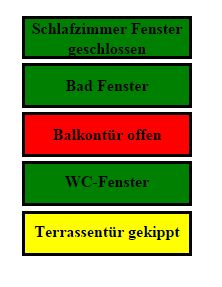
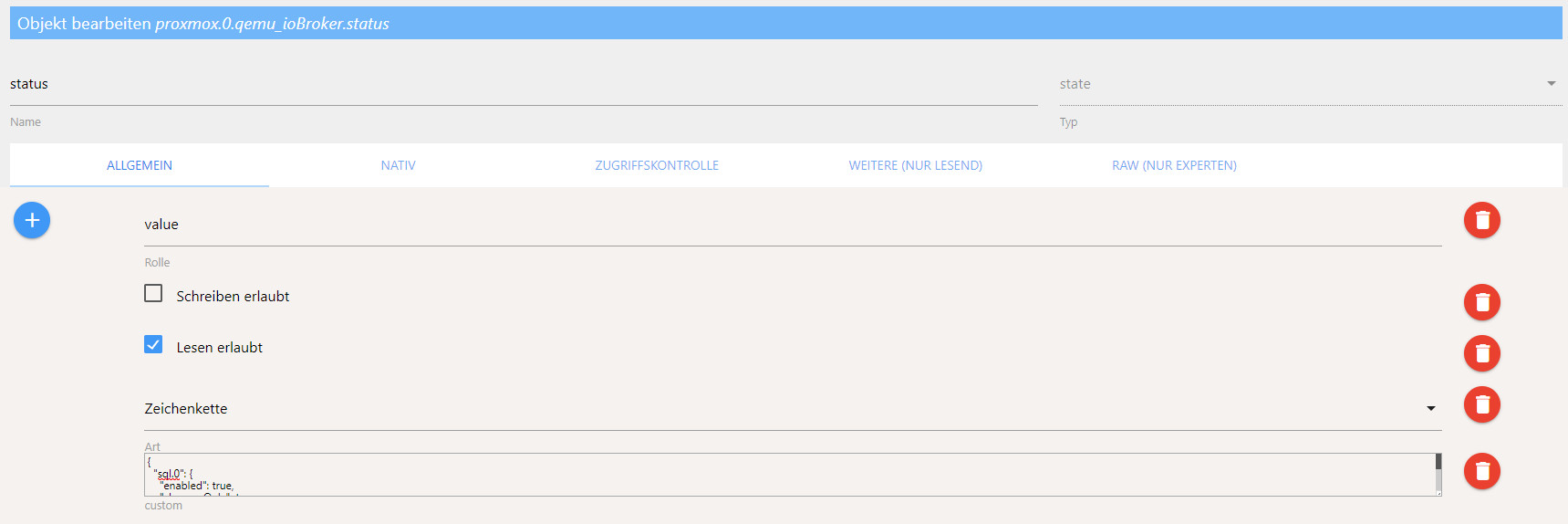
True oder False sindIch habe den proxmox Adapter laufen für meine einzelnen VMs und dort ist der status halt RUNNING oder STOPPED. Ein Farbumschlag bekomme ich leider nicht hin :-(
hier OK:

Proxmox nicht OK
Gruß Dirk
Intel Proxmox Cluster (3x NUC) mit Debian & Proxmox / IoB als VM unter Debian / 60+ Adapter installiert -
Hallo,
habe diese Farbumschläge nun hinbekommen aber das geht nur wenn die Werte
0 oder 1 sind
True oder False sindIch habe den proxmox Adapter laufen für meine einzelnen VMs und dort ist der status halt RUNNING oder STOPPED. Ein Farbumschlag bekomme ich leider nicht hin :-(
hier OK:
Proxmox nicht OK


 ,
,


Hey! Du scheinst an dieser Unterhaltung interessiert zu sein, hast aber noch kein Konto.
Hast du es satt, bei jedem Besuch durch die gleichen Beiträge zu scrollen? Wenn du dich für ein Konto anmeldest, kommst du immer genau dorthin zurück, wo du zuvor warst, und kannst dich über neue Antworten benachrichtigen lassen (entweder per E-Mail oder Push-Benachrichtigung). Du kannst auch Lesezeichen speichern und Beiträge positiv bewerten, um anderen Community-Mitgliedern deine Wertschätzung zu zeigen.
Mit deinem Input könnte dieser Beitrag noch besser werden 💗
Registrieren AnmeldenSupport us
215
Online33.0k
Benutzer83.5k
Themen1.3m
Beiträge