




Adapterfrage
-
Hallo,
Tag für Tag komme ich als Änfänger ein Stück weiter.
Nun habe ich auch die Antwort auf viele meiner Probleme im HQWidget gefunden.
Folglich bin ich in die Adapterübersicht gegangen und habe dieses widget installiert.
Ich bekam dann allerdings die Antwort, dass das Widget von Ubuntu nicht installiert werden kann. Danach mit der Installation des widgets von github gestartet. Damit war ich erfolgreich. Die Ernüchterung kam umgehend Von dem widget ist weit und breit nichts zu sehen. Weder bei den Instanzen, wo ich es erhofft hatte, noch bei VIS wird es aufgeführt.
Das gleiche Spiel bei dem Shellyadapter.
Vermuitlich mache ich was falsch, aber was?Dann noch eine Frage zu den Adaptern. In der Übersicht steht hinter jedem Adapter, dass sie installiert sind. Eigentlich müsste ich dann doch auf alle zugreifen können.
Habe ich da einen Denkfehler? -
Wenn du den Adapter direkt von github installiert hast musst du noch manuell eine Instanz erzeugen.
Das geht in der Adapter Übersicht wenn du auf das + Klickst, gleich wie beim normalen installieren.@luettis sagte in Adapterfrage:
Dann noch eine Frage zu den Adaptern. In der Übersicht steht hinter jedem Adapter, dass sie installiert sind. Eigentlich müsste ich dann doch auf alle zugreifen können.
Habe ich da einen Denkfehler?Wie meinst du Zugreifen? Oder worauf genau willst du zugreifen?
-
Bei vis widgets muss zusätzlich noch vis nach der Installation neu gestartet werden
-
Bei vis widgets muss zusätzlich noch vis nach der Installation neu gestartet werden
Ich werde noch kirre im Kopf.
Die Installation funktioniert nicht.Fehlerhinweis: ERROR: process exited with code 13
Wie komme ich auf die Konsole? Ich finde sie nicht!
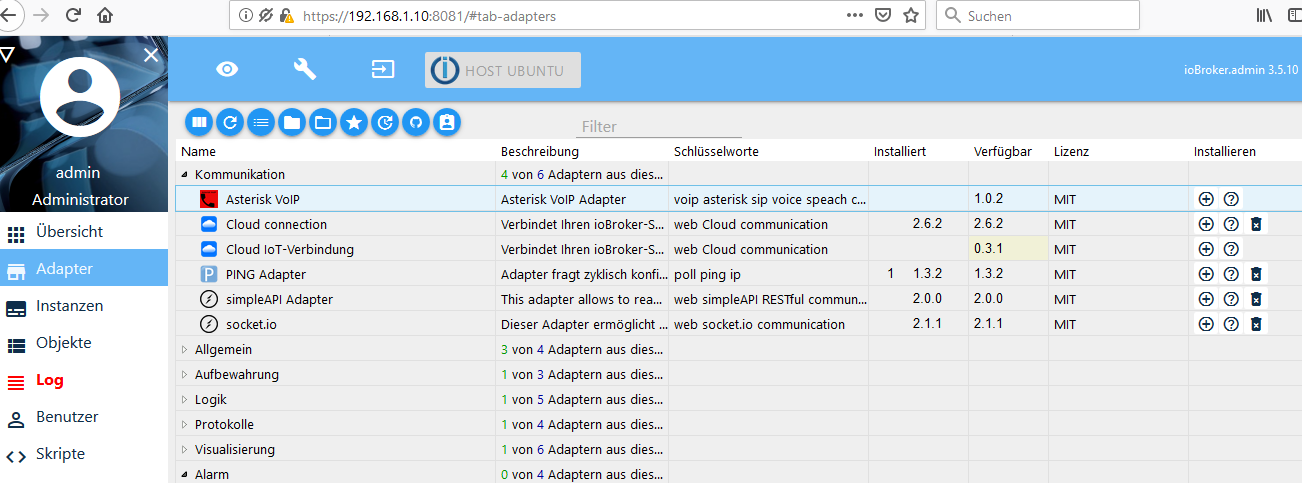
JeyCee: in der Adapeterliste steht rechts in derr Spalte die verfügbare Version, links daneben die installierte Version. Aber wenn ich das richtig gelesen habe, sind die Versionen nur gespeicheret aber noch nicht richtig installiert.
Z. Zt. ist dann nur die Frage nach dem Error Hinweis offen. Woran könnte das liegen?
-
Dann bin ich mal in mich gegangen und zu dem Ergebnis gekommen, dass mit Konsole nur die Ubuntu Konsole gemeint sein kann.
Also habe ich mich mit putty auf den ubuntu server angemeldet und "iobroker install shelly" eingetragen. Nachfolgenden Konsoleneintrag erhielt ich als Antwort. (Jetzt bin ich mit meinem Latein aber am Ende)michael@ubuntu:~$ iobroker install shelly
NPM version: 6.4.1
npm install iobroker.shelly --production --save --prefix "/opt/iobroker" (System call)
npm WARN checkPermissions Missing write access to /opt/iobroker/node_modules
npm ERR! path /opt/iobroker/node_modules
npm ERR! code EACCES
npm ERR! errno -13
npm ERR! syscall access
npm ERR! Error: EACCES: permission denied, access '/opt/iobroker/node_modules'
npm ERR! { Error: EACCES: permission denied, access '/opt/iobroker/node_modules'
npm ERR! stack: 'Error: EACCES: permission denied, access '/opt/iobroker/node_modules'',
npm ERR! errno: -13,
npm ERR! code: 'EACCES',
npm ERR! syscall: 'access',
npm ERR! path: '/opt/iobroker/node_modules' }
npm ERR!
npm ERR! The operation was rejected by your operating system.
npm ERR! It is likely you do not have the permissions to access this file as the current user
npm ERR!
npm ERR! If you believe this might be a permissions issue, please double-check the
npm ERR! permissions of the file and its containing directories, or try running
npm ERR! the command again as root/Administrator (though this is not recommended).npm ERR! A complete log of this run can be found in:
npm ERR! /home/michael/.npm/_logs/2019-02-15T19_43_44_242Z-debug.log
host.ubuntu Cannot install iobroker.shelly: 243
michael@ubuntu:~$
:
Wer kann mir das in verständlicher Sprache übersetzen und sagen was ich mach muß, damit ich endlich die Adapter installieren kann.iobroker add shelly habe ich auch versucht. Ich denke Groß-oder Kleinschreibung spielt dabei keine Rolle. Ich habe Shelly in Kleinschreibung geschrieben.
michael@ubuntu:~$ iobroker add shelly
NPM version: 6.4.1
npm install iobroker.shelly --production --save --prefix "/opt/iobroker" (System call)
npm WARN checkPermissions Missing write access to /opt/iobroker/node_modules
npm ERR! path /opt/iobroker/node_modules
npm ERR! code EACCES
npm ERR! errno -13
npm ERR! syscall access
npm ERR! Error: EACCES: permission denied, access '/opt/iobroker/node_modules'
npm ERR! { Error: EACCES: permission denied, access '/opt/iobroker/node_modules'
npm ERR! stack: 'Error: EACCES: permission denied, access '/opt/iobroker/node_modules'',
npm ERR! errno: -13,
npm ERR! code: 'EACCES',
npm ERR! syscall: 'access',
npm ERR! path: '/opt/iobroker/node_modules' }
npm ERR!
npm ERR! The operation was rejected by your operating system.
npm ERR! It is likely you do not have the permissions to access this file as the current user
npm ERR!
npm ERR! If you believe this might be a permissions issue, please double-check the
npm ERR! permissions of the file and its containing directories, or try running
npm ERR! the command again as root/Administrator (though this is not recommended).npm ERR! A complete log of this run can be found in:
npm ERR! /home/michael/.npm/_logs/2019-02-15T19_52_42_975Z-debug.log
host.ubuntu Cannot install iobroker.shelly: 243
michael@ubuntu:~$Vielen, vielen Dank für eure Hilfe
-
Dann bin ich mal in mich gegangen und zu dem Ergebnis gekommen, dass mit Konsole nur die Ubuntu Konsole gemeint sein kann.
Also habe ich mich mit putty auf den ubuntu server angemeldet und "iobroker install shelly" eingetragen. Nachfolgenden Konsoleneintrag erhielt ich als Antwort. (Jetzt bin ich mit meinem Latein aber am Ende)michael@ubuntu:~$ iobroker install shelly
NPM version: 6.4.1
npm install iobroker.shelly --production --save --prefix "/opt/iobroker" (System call)
npm WARN checkPermissions Missing write access to /opt/iobroker/node_modules
npm ERR! path /opt/iobroker/node_modules
npm ERR! code EACCES
npm ERR! errno -13
npm ERR! syscall access
npm ERR! Error: EACCES: permission denied, access '/opt/iobroker/node_modules'
npm ERR! { Error: EACCES: permission denied, access '/opt/iobroker/node_modules'
npm ERR! stack: 'Error: EACCES: permission denied, access '/opt/iobroker/node_modules'',
npm ERR! errno: -13,
npm ERR! code: 'EACCES',
npm ERR! syscall: 'access',
npm ERR! path: '/opt/iobroker/node_modules' }
npm ERR!
npm ERR! The operation was rejected by your operating system.
npm ERR! It is likely you do not have the permissions to access this file as the current user
npm ERR!
npm ERR! If you believe this might be a permissions issue, please double-check the
npm ERR! permissions of the file and its containing directories, or try running
npm ERR! the command again as root/Administrator (though this is not recommended).npm ERR! A complete log of this run can be found in:
npm ERR! /home/michael/.npm/_logs/2019-02-15T19_43_44_242Z-debug.log
host.ubuntu Cannot install iobroker.shelly: 243
michael@ubuntu:~$
:
Wer kann mir das in verständlicher Sprache übersetzen und sagen was ich mach muß, damit ich endlich die Adapter installieren kann.iobroker add shelly habe ich auch versucht. Ich denke Groß-oder Kleinschreibung spielt dabei keine Rolle. Ich habe Shelly in Kleinschreibung geschrieben.
michael@ubuntu:~$ iobroker add shelly
NPM version: 6.4.1
npm install iobroker.shelly --production --save --prefix "/opt/iobroker" (System call)
npm WARN checkPermissions Missing write access to /opt/iobroker/node_modules
npm ERR! path /opt/iobroker/node_modules
npm ERR! code EACCES
npm ERR! errno -13
npm ERR! syscall access
npm ERR! Error: EACCES: permission denied, access '/opt/iobroker/node_modules'
npm ERR! { Error: EACCES: permission denied, access '/opt/iobroker/node_modules'
npm ERR! stack: 'Error: EACCES: permission denied, access '/opt/iobroker/node_modules'',
npm ERR! errno: -13,
npm ERR! code: 'EACCES',
npm ERR! syscall: 'access',
npm ERR! path: '/opt/iobroker/node_modules' }
npm ERR!
npm ERR! The operation was rejected by your operating system.
npm ERR! It is likely you do not have the permissions to access this file as the current user
npm ERR!
npm ERR! If you believe this might be a permissions issue, please double-check the
npm ERR! permissions of the file and its containing directories, or try running
npm ERR! the command again as root/Administrator (though this is not recommended).npm ERR! A complete log of this run can be found in:
npm ERR! /home/michael/.npm/_logs/2019-02-15T19_52_42_975Z-debug.log
host.ubuntu Cannot install iobroker.shelly: 243
michael@ubuntu:~$Vielen, vielen Dank für eure Hilfe

Hey! Du scheinst an dieser Unterhaltung interessiert zu sein, hast aber noch kein Konto.
Hast du es satt, bei jedem Besuch durch die gleichen Beiträge zu scrollen? Wenn du dich für ein Konto anmeldest, kommst du immer genau dorthin zurück, wo du zuvor warst, und kannst dich über neue Antworten benachrichtigen lassen (entweder per E-Mail oder Push-Benachrichtigung). Du kannst auch Lesezeichen speichern und Beiträge positiv bewerten, um anderen Community-Mitgliedern deine Wertschätzung zu zeigen.
Mit deinem Input könnte dieser Beitrag noch besser werden 💗
Registrieren Anmelden269
Online33.0k
Benutzer83.7k
Themen1.3m
Beiträge